use MERCEDES-BENZ E-Class SEDAN 2010 W212 Comand Manual
[x] Cancel search | Manufacturer: MERCEDES-BENZ, Model Year: 2010, Model line: E-Class SEDAN, Model: MERCEDES-BENZ E-Class SEDAN 2010 W212Pages: 224, PDF Size: 7.4 MB
Page 129 of 224
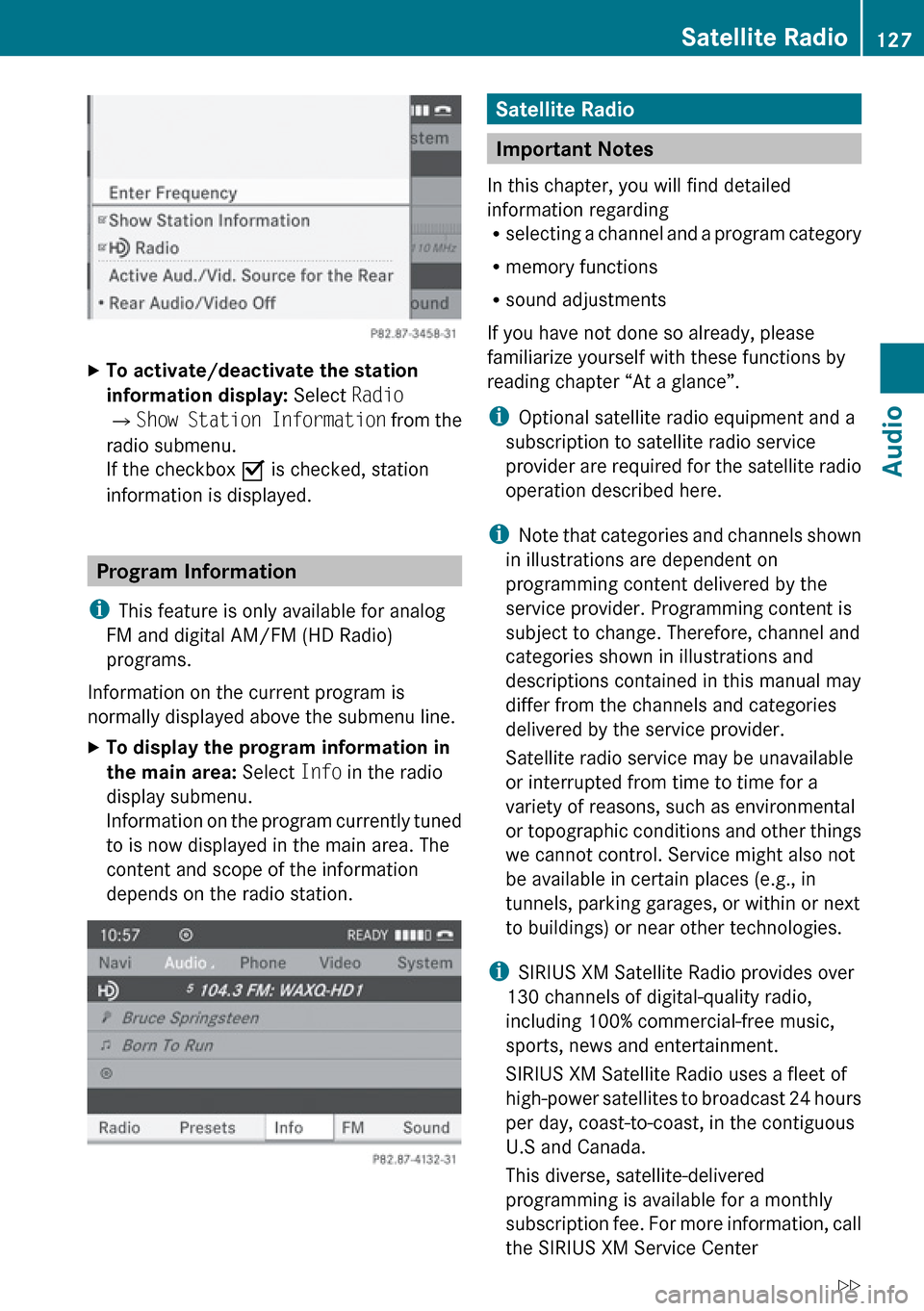
XTo activate/deactivate the station
information display: Select Radio
£ Show Station Information from the
radio submenu.
If the checkbox O is checked, station
information is displayed.
Program Information
i This feature is only available for analog
FM and digital AM/FM (HD Radio)
programs.
Information on the current program is
normally displayed above the submenu line.
XTo display the program information in
the main area: Select Info in the radio
display submenu.
Information on the program currently tuned
to is now displayed in the main area. The
content and scope of the information
depends on the radio station.Satellite Radio
Important Notes
In this chapter, you will find detailed
information regarding
R selecting a channel and a program category
R memory functions
R sound adjustments
If you have not done so already, please
familiarize yourself with these functions by
reading chapter “At a glance”.
i Optional satellite radio equipment and a
subscription to satellite radio service
provider are required for the satellite radio
operation described here.
i Note that categories and channels shown
in illustrations are dependent on
programming content delivered by the
service provider. Programming content is
subject to change. Therefore, channel and
categories shown in illustrations and
descriptions contained in this manual may
differ from the channels and categories
delivered by the service provider.
Satellite radio service may be unavailable
or interrupted from time to time for a
variety of reasons, such as environmental
or topographic conditions and other things
we cannot control. Service might also not
be available in certain places (e.g., in
tunnels, parking garages, or within or next
to buildings) or near other technologies.
i SIRIUS XM Satellite Radio provides over
130 channels of digital-quality radio,
including 100% commercial-free music,
sports, news and entertainment.
SIRIUS XM Satellite Radio uses a fleet of
high-power satellites to broadcast 24 hours
per day, coast-to-coast, in the contiguous
U.S and Canada.
This diverse, satellite-delivered
programming is available for a monthly
subscription fee. For more information, call
the SIRIUS XM Service Center
Satellite Radio127AudioZ
Page 130 of 224
(Y page 131) or contact www.sirius.com
(USA) or www.siriuscanada.com (Canada).
Subscribing
Subscribing to Satellite Radio
To switch to satellite radio operation:
XFrom another main function: Select
Audio £Audio £SatRadio .
i
If radio mode was active last, you only
need to select Audio.
XWithin the audio function: Select Audio
£ SatRadio .
If the satellite radio service is not activated,
the Satellite radio main menu appears and
displays the Weather channel. You cannot
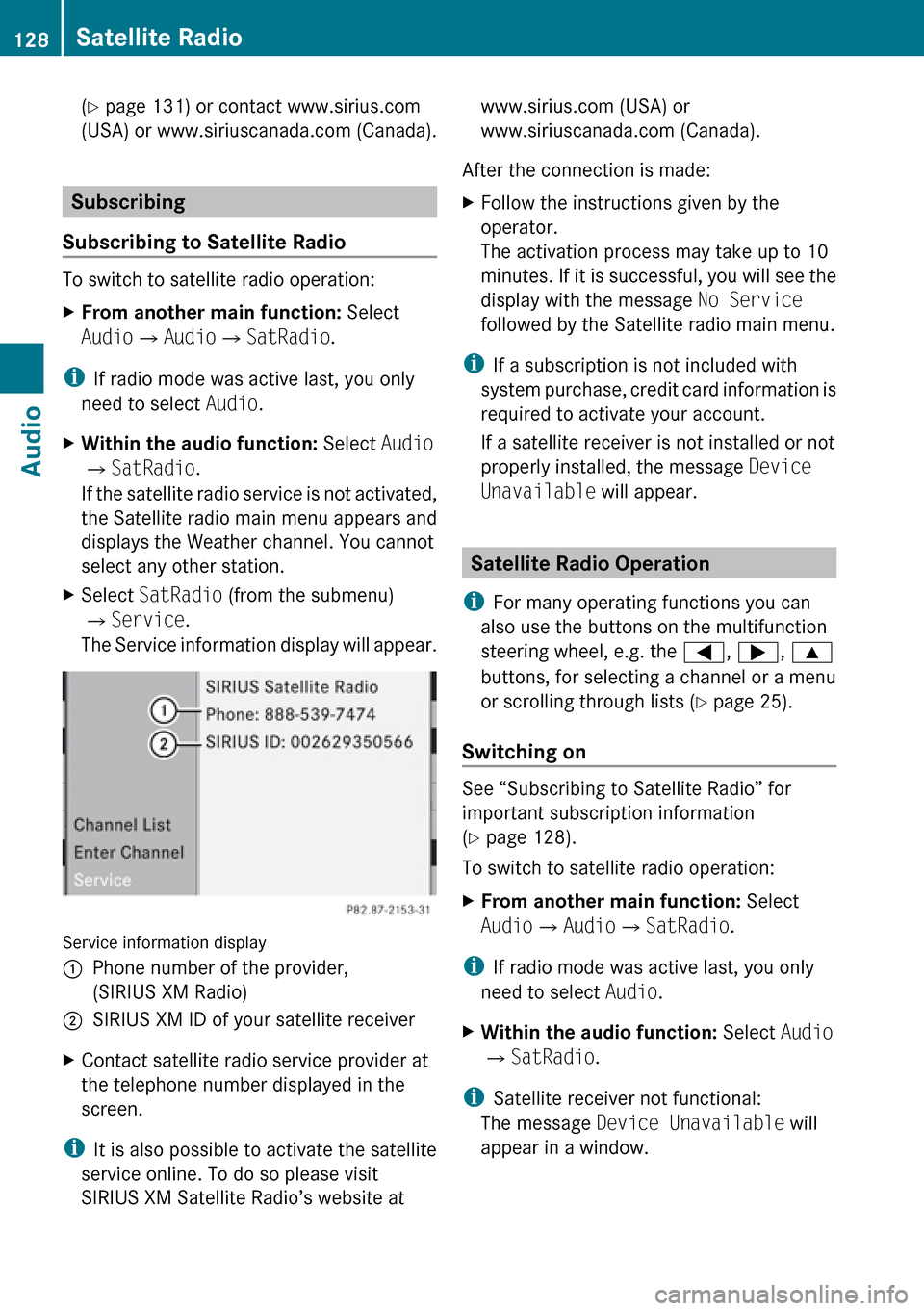
select any other station.XSelect SatRadio (from the submenu)
£ Service .
The Service information display will appear.
Service information display
1Phone number of the provider,
(SIRIUS XM Radio)2SIRIUS XM ID of your satellite receiverXContact satellite radio service provider at
the telephone number displayed in the
screen.
i It is also possible to activate the satellite
service online. To do so please visit
SIRIUS XM Satellite Radio’s website at
www.sirius.com (USA) or
www.siriuscanada.com (Canada).
After the connection is made:XFollow the instructions given by the
operator.
The activation process may take up to 10
minutes. If it is successful, you will see the
display with the message No Service
followed by the Satellite radio main menu.
i If a subscription is not included with
system purchase, credit card information is
required to activate your account.
If a satellite receiver is not installed or not
properly installed, the message Device
Unavailable will appear.
Satellite Radio Operation
i For many operating functions you can
also use the buttons on the multifunction
steering wheel, e.g. the =, ; , 9
buttons, for selecting a channel or a menu
or scrolling through lists ( Y page 25).
Switching on
See “Subscribing to Satellite Radio” for
important subscription information
( Y page 128).
To switch to satellite radio operation:
XFrom another main function: Select
Audio £Audio £SatRadio .
i
If radio mode was active last, you only
need to select Audio.
XWithin the audio function: Select Audio
£ SatRadio .
i
Satellite receiver not functional:
The message Device Unavailable will
appear in a window.
128Satellite RadioAudio
Page 131 of 224
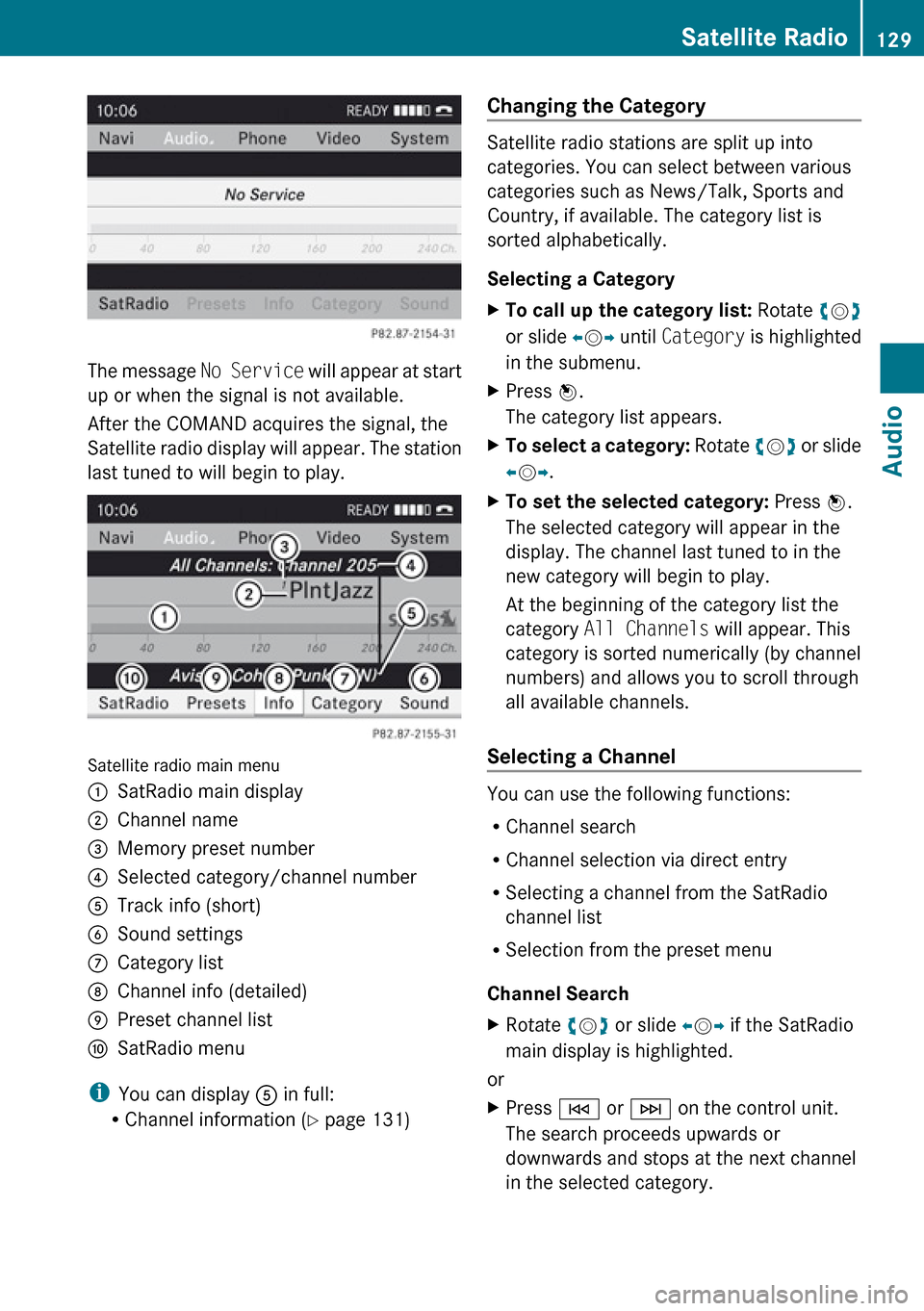
The message No Service will appear at start
up or when the signal is not available.
After the COMAND acquires the signal, the
Satellite radio display will appear. The station
last tuned to will begin to play.
Satellite radio main menu
1SatRadio main display2Channel name3Memory preset number4Selected category/channel number5Track info (short)6Sound settings7Category list8Channel info (detailed)9Preset channel listaSatRadio menu
i You can display 5 in full:
R Channel information ( Y page 131)
Changing the Category
Satellite radio stations are split up into
categories. You can select between various
categories such as News/Talk, Sports and
Country, if available. The category list is
sorted alphabetically.
Selecting a Category
XTo call up the category list: Rotate ym z
or slide om p until Category is highlighted
in the submenu.XPress n.
The category list appears.XTo select a category: Rotate ym z or slide
o m p.XTo set the selected category: Press n.
The selected category will appear in the
display. The channel last tuned to in the
new category will begin to play.
At the beginning of the category list the
category All Channels will appear. This
category is sorted numerically (by channel
numbers) and allows you to scroll through
all available channels.
Selecting a Channel
You can use the following functions:
R Channel search
R Channel selection via direct entry
R Selecting a channel from the SatRadio
channel list
R Selection from the preset menu
Channel Search
XRotate ym z or slide om p if the SatRadio
main display is highlighted.
or
XPress E or F on the control unit.
The search proceeds upwards or
downwards and stops at the next channel
in the selected category.Satellite Radio129AudioZ
Page 132 of 224
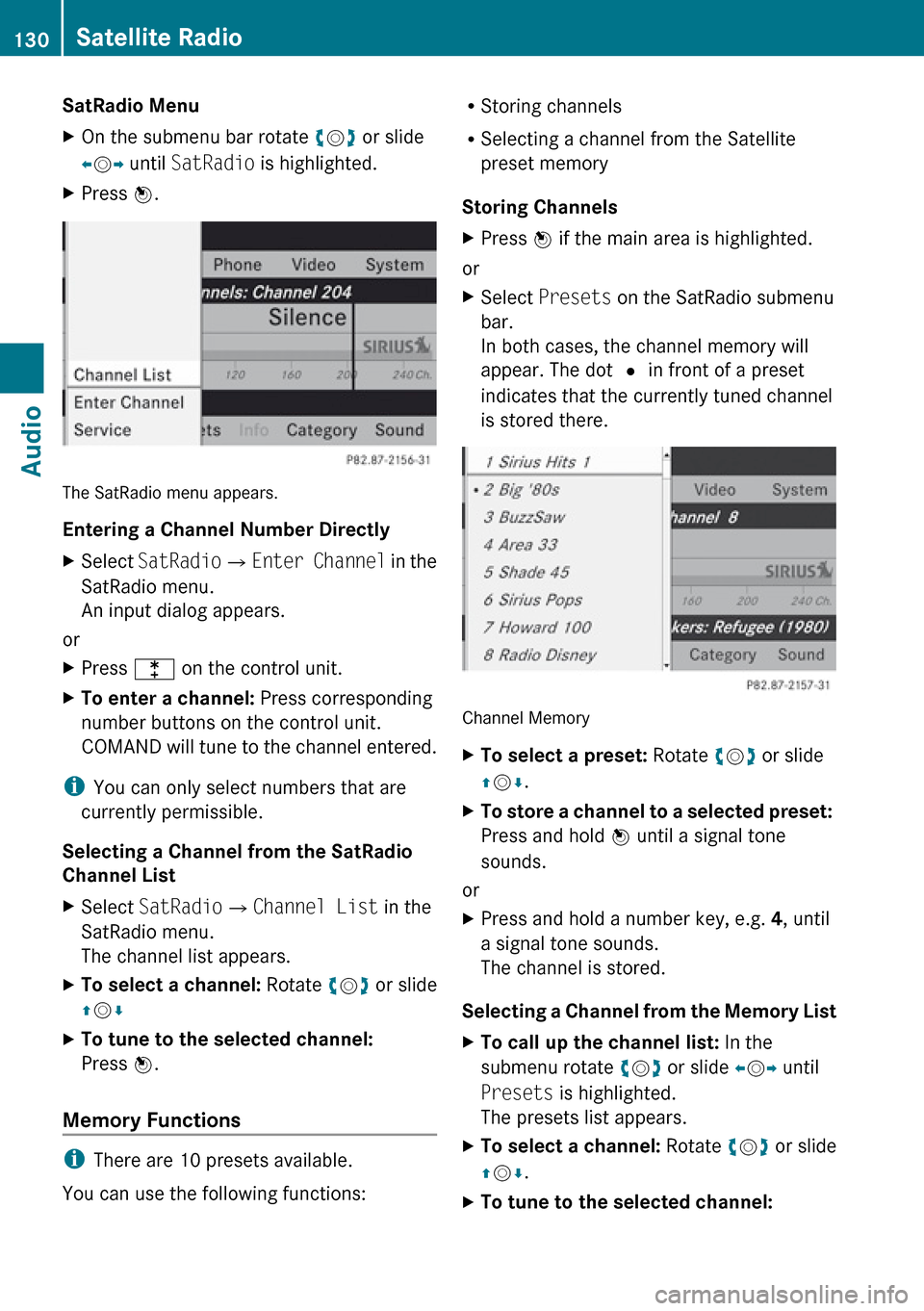
SatRadio MenuXOn the submenu bar rotate ym z or slide
o m p until SatRadio is highlighted.XPress n.
The SatRadio menu appears.
Entering a Channel Number Directly
XSelect SatRadio £Enter Channel in the
SatRadio menu.
An input dialog appears.
or
XPress l on the control unit.XTo enter a channel: Press corresponding
number buttons on the control unit.
COMAND will tune to the channel entered.
i You can only select numbers that are
currently permissible.
Selecting a Channel from the SatRadio
Channel List
XSelect SatRadio £Channel List in the
SatRadio menu.
The channel list appears.XTo select a channel: Rotate ym z or slide
q m rXTo tune to the selected channel:
Press n.
Memory Functions
i
There are 10 presets available.
You can use the following functions:
R Storing channels
R Selecting a channel from the Satellite
preset memory
Storing ChannelsXPress n if the main area is highlighted.
or
XSelect Presets on the SatRadio submenu
bar.
In both cases, the channel memory will
appear. The dot R in front of a preset
indicates that the currently tuned channel
is stored there.
Channel Memory
XTo select a preset: Rotate ym z or slide
q m r.XTo store a channel to a selected preset:
Press and hold n until a signal tone
sounds.
or
XPress and hold a number key, e.g. 4, until
a signal tone sounds.
The channel is stored.
Selecting a Channel from the Memory List
XTo call up the channel list: In the
submenu rotate ym z or slide om p until
Presets is highlighted.
The presets list appears.XTo select a channel: Rotate ym z or slide
q m r.XTo tune to the selected channel: 130Satellite RadioAudio
Page 134 of 224
is a risk of exposure to invisible laser radiation
if you open the casing, or if the casing is faulty
or damaged.
COMAND does not contain any parts that you
are able to maintain yourself. For safety
reasons, all maintenance work must be
exclusively carried out by qualified
technicians.GWarning
Only carry out the following when the vehicle
is stationary:
R Inserting a disc
R Ejecting a disc
There is a risk of accident by being distracted
from road and traffic conditions if you load a
CD/DVD while the vehicle is in motion.
Notes on MP3 Mode
Permissible Storage Media
R CD-R and CD-RW
R DVD+R and DVD+RW
R DVD-R and DVD-RW
R PCMCIA memory card
Permissible File Systems
R ISO9660/Joliet for CD storage media
R UDF for DVDs
R FAT16 or FAT32 for PCMCIA memory card
with storage medium
Multisession CDs
On multisession CDs, the content of the first
session determines how COMAND handles
the CD.
If the first session, for example, contains data
in CD Audio format and the second session
contains MP3 tracks, COMAND handles the
CD as a conventional Audio CD. This means
that the MP3 tracks cannot be accessed.
Similarly, if the first session contains MP3
tracks and the second session contains data
in CD Audio format, COMAND handles the CD
as an MP3 CD. Only the MP3 tracks can be
accessed.
File Structure of Storage Medium
When creating an MP3 storage medium, you
can organize MP3 tracks into folders. A folder
can also contain additional folders. A storage
medium may have a maximum of 255 folders
in total. A maximum of 255 tracks and 255
folders are permissible per folder. A
maximum of 4000 tracks in total are
permissible per storage medium.
Track Names and Folder Names
When creating an MP3 storage medium, you
can assign names to the MP3 tracks and to
the folders.
COMAND uses these names in MP3 mode for
the corresponding display. Empty folders or
folders containing data other than MP3 tracks
will not be displayed by COMAND.
If MP3 files are stored in the root directory
itself, the root directory also counts as a
folder. COMAND will then display the root
directory name as a folder name.
Please note the following when assigning
track names:
R Track names must contain at least one
character.
R Track names must have the extension
“mp3”.
R A period must appear between the track
name and the extension.
i COMAND does not support ID3 tags.
Permissible Formats
COMAND supports the following formats:
R MPEG1 audio layer 3 format
132CD Audio/DVD Audio/MP3Audio
Page 135 of 224
iIn everyday speech, this format
designation has been replaced by the
designation “MP3”.
R Microsoft Windows ®
Media Audio V2, V7,
V8 und V9 (WMA).
Notes on Copyright
The music tracks that you can create for
playback in MP3 mode are generally
copyright-protected under applicable
international and national laws.
In many countries, the reproduction of
copyrighted material is not permitted even if
only for personal use without the express
prior consent of the copyright holder.
Please check the current copyright laws for
your country and comply with them.
These restrictions do not apply, for example,
to your own compositions and recordings or
for recordings for which authorization has
been obtained from the copyright holder.
Notes about DVD Audio Discs
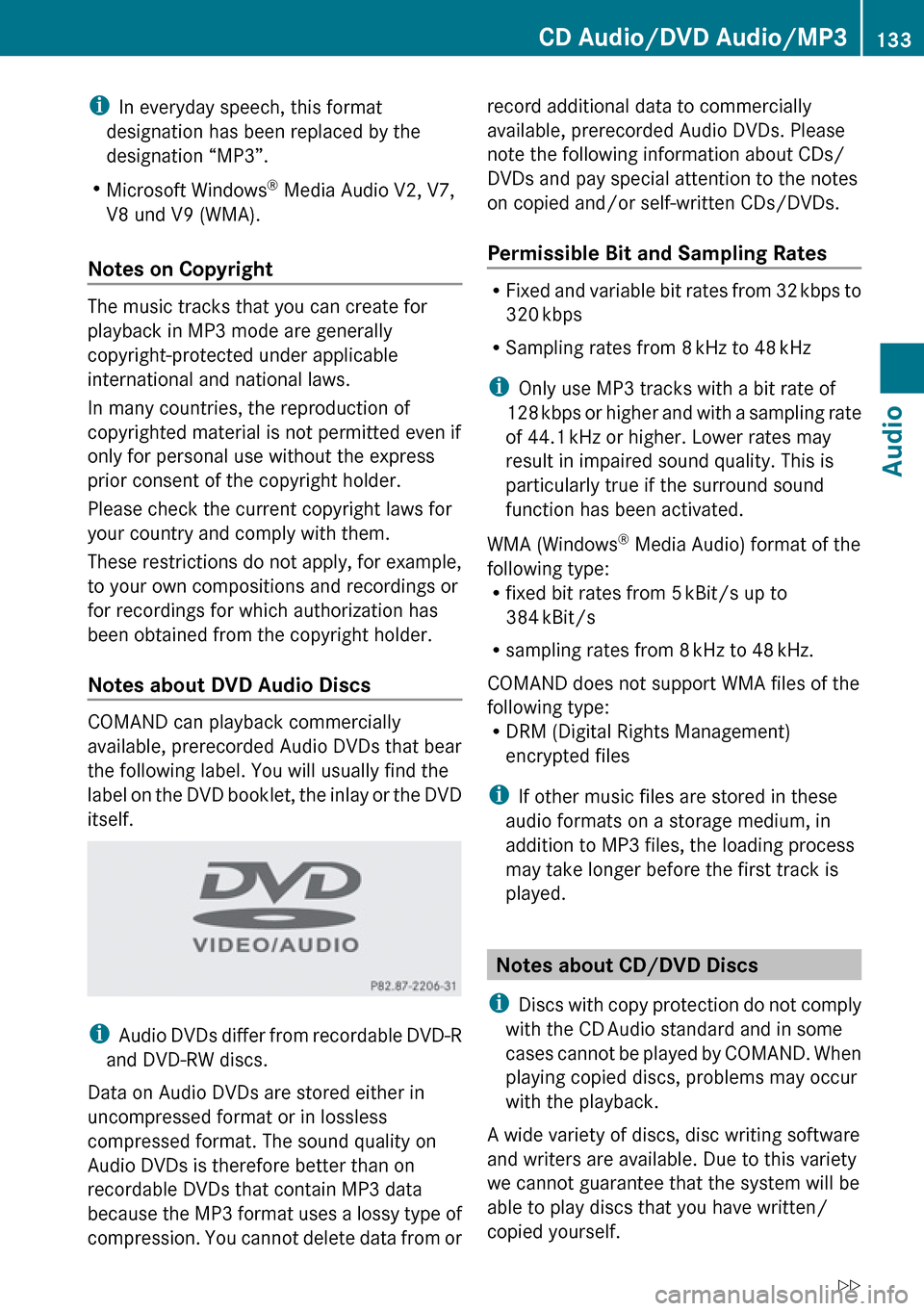
COMAND can playback commercially
available, prerecorded Audio DVDs that bear
the following label. You will usually find the
label on the DVD booklet, the inlay or the DVD
itself.
i Audio DVDs differ from recordable DVD-R
and DVD-RW discs.
Data on Audio DVDs are stored either in
uncompressed format or in lossless
compressed format. The sound quality on
Audio DVDs is therefore better than on
recordable DVDs that contain MP3 data
because the MP3 format uses a lossy type of
compression. You cannot delete data from or
record additional data to commercially
available, prerecorded Audio DVDs. Please
note the following information about CDs/
DVDs and pay special attention to the notes
on copied and/or self-written CDs/DVDs.
Permissible Bit and Sampling Rates
R Fixed and variable bit rates from 32 kbps to
320 kbps
R Sampling rates from 8 kHz to 48 kHz
i Only use MP3 tracks with a bit rate of
128 kbps or higher and with a sampling rate
of 44.1 kHz or higher. Lower rates may
result in impaired sound quality. This is
particularly true if the surround sound
function has been activated.
WMA (Windows ®
Media Audio) format of the
following type:
R fixed bit rates from 5 kBit/s up to
384 kBit/s
R sampling rates from 8 kHz to 48 kHz.
COMAND does not support WMA files of the
following type:
R DRM (Digital Rights Management)
encrypted files
i If other music files are stored in these
audio formats on a storage medium, in
addition to MP3 files, the loading process
may take longer before the first track is
played.
Notes about CD/DVD Discs
i Discs with copy protection do not comply
with the CD Audio standard and in some
cases cannot be played by COMAND. When
playing copied discs, problems may occur
with the playback.
A wide variety of discs, disc writing software
and writers are available. Due to this variety
we cannot guarantee that the system will be
able to play discs that you have written/
copied yourself.
CD Audio/DVD Audio/MP3133AudioZ
Page 136 of 224
There may be playback problems with
userburned CDs with a storage capacity of
more than 700 MB. These CDs do not meet
current valid standards.
i When playing a DVD Audio, it may be the
case with numerous albums that the last
track does not contain any music and
COMAND switches to the next track. This
is due to the production method and does
not imply a fault with the unit.
! Do not attach stickers or labels of any
kind to discs. They may come loose and
damage COMAND.
COMAND has been designed for discs
meeting the requirements of standard
EN 60908. Therefore, only discs with a
maximum thickness of 1.3 mm can be
used.
If a thicker disc is inserted, e.g. one which
stores data on both sides, (DVD on one
side, audio data on the other side), this
cannot be ejected and COMAND will be
damaged.
Do not use 8 cm diameter discs, not even
with an adapter. Only use round discs with
a diameter of 12 cm.
i COMAND can play CD Audio with the high
resolution surround format.
Notes on the Care of CD/DVD Discs
R Only touch the discs at the edges.
R Handle discs with care in order to prevent
malfunctions during playback.
R Avoid scratching, leaving fingerprints and
dust on the discs.
R Clean the discs occasionally with a
commercially available cleaning cloth.
Always wipe in a straight line from the
inside outwards, never in a circular motion.
R The discs must only be labelled using pens
specially designed for this purpose.
R After use, put the discs back into the box.
R Protect the discs from heat and direct
sunlight.
Loading CDs and DVDs
GWarning
Only load a CD or DVD when the vehicle is
stationary. There is a risk of accident by being
distracted from road and traffic conditions if
you load a CD/DVD while the vehicle is in
motion.
Bear in mind that at a speed of just 30 mph
(appr. 50 km/h), your vehicle is covering a
distance of 44 feet (appr. 14 m) every second.
i If the CD/DVD is printed on one side, this
side must face upwards when loaded. If
neither side is printed, the side to be played
must face downwards.
The system may not be able to play copy-
protected CDs/DVDs.
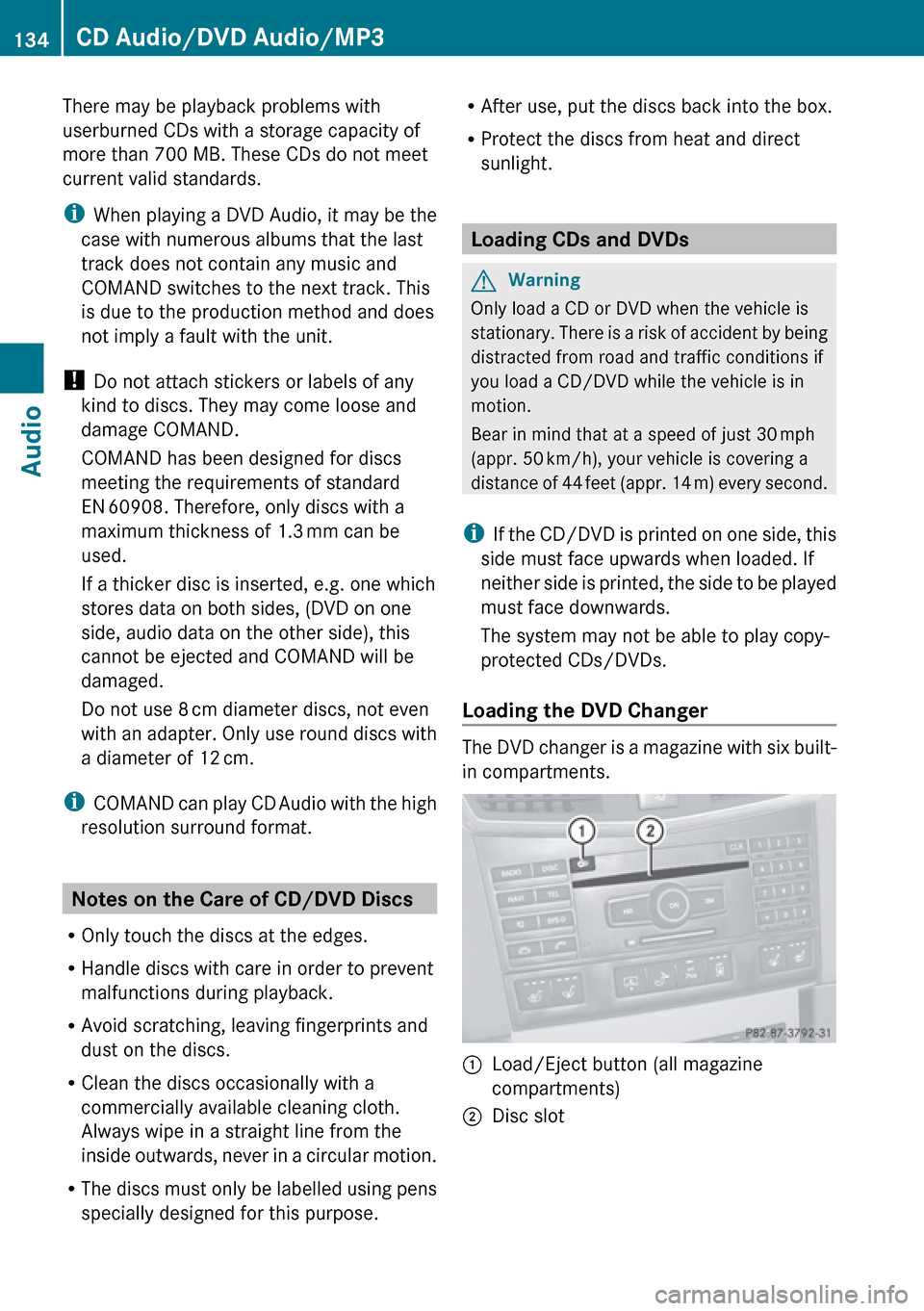
Loading the DVD Changer
The DVD changer is a magazine with six built-
in compartments.
1Load/Eject button (all magazine
compartments)2Disc slot134CD Audio/DVD Audio/MP3Audio
Page 138 of 224
number or, if the magazine is empty,
compartment 1 is marked.XSelect Fill Empty Slots .
The message Please insert disc
will be displayed.
i Only insert a CD after COMAND has
prompted you to do so with this message.
Only insert one CD per magazine
compartment.
XInsert a disc into the slot with the printed
side facing upwards.
You see the Please wait... message.
Once the disc is loaded, the DVD changer
switches to the next empty compartment.
You see these messages: Please wait
and then Please insert disc
loaded.
The DVD changer plays the last disc you
loaded if it has been inserted correctly and
if it is a permissible type.
If loading is not completed, COMAND plays
the first disc inserted.XTo end loading procedure: Press the Load
V button again.
or
XSelect Back.
or
XPress the k button next to the
COMAND controller.
Loading PCMCIA Memory Card
GWarning
Only load a memory card when the vehicle is
stationary. There is a risk of accident by being
distracted from road and traffic conditions if
you load a memory card while the vehicle is
in motion.
Bear in mind that at a speed of just 30 mph
(appr. 50 km/h), your vehicle is covering a
distance of 44 feet (appr. 14 m) every second.
COMAND supports 16-bit full-size type I and II
PCMCIA memory cards.
i COMAND supports commercially
available PCMCIA cards or PCMCIA card
adapters with storage media that may not
be designed for the temperatures which
occur in the vehicle. You should therefore
remove the PCMCIA card from the vehicle
when not in use since extreme
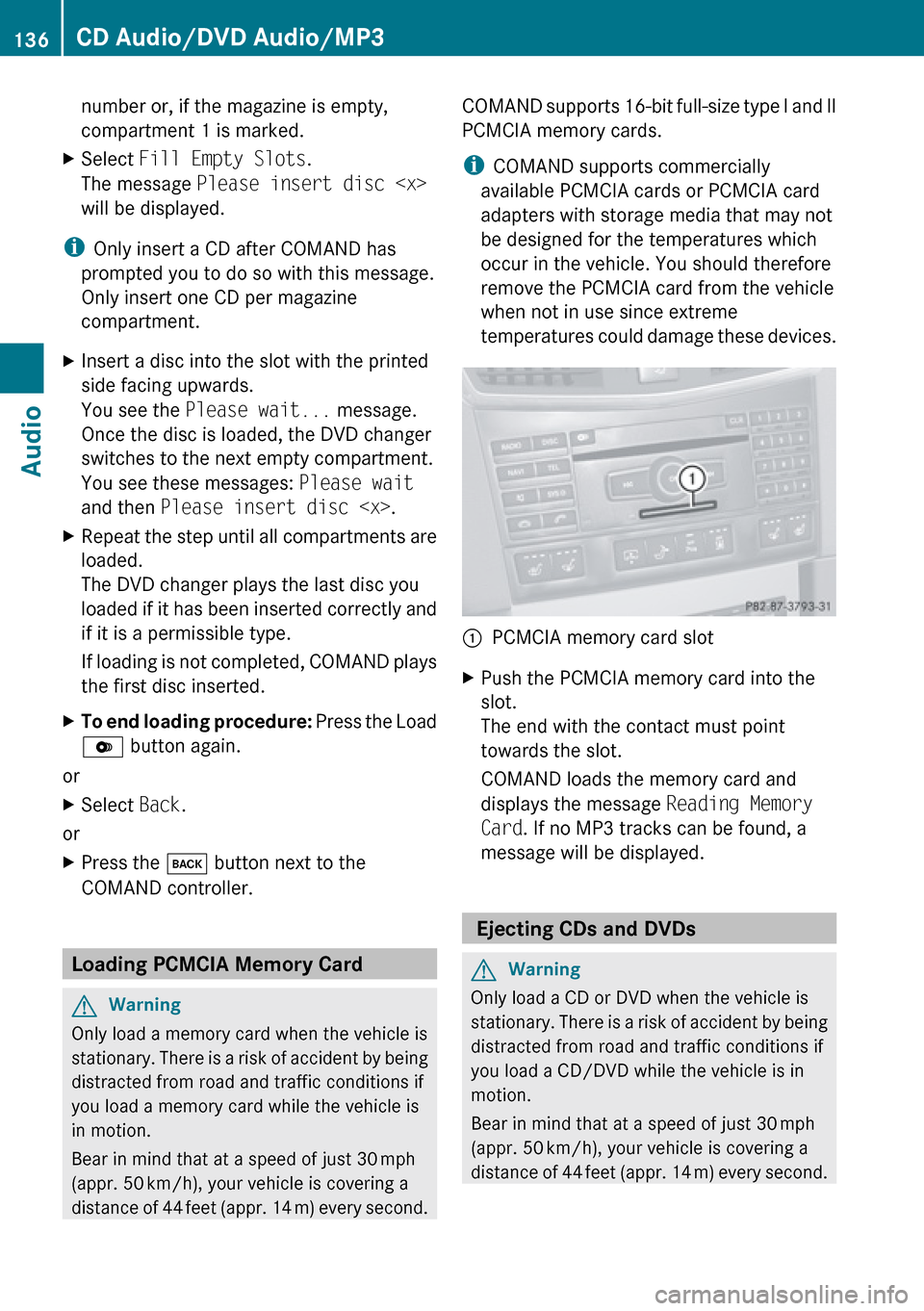
temperatures could damage these devices.1PCMCIA memory card slotXPush the PCMCIA memory card into the
slot.
The end with the contact must point
towards the slot.
COMAND loads the memory card and
displays the message Reading Memory
Card . If no MP3 tracks can be found, a
message will be displayed.
Ejecting CDs and DVDs
GWarning
Only load a CD or DVD when the vehicle is
stationary. There is a risk of accident by being
distracted from road and traffic conditions if
you load a CD/DVD while the vehicle is in
motion.
Bear in mind that at a speed of just 30 mph
(appr. 50 km/h), your vehicle is covering a
distance of 44 feet (appr. 14 m) every second.
136CD Audio/DVD Audio/MP3Audio
Page 140 of 224
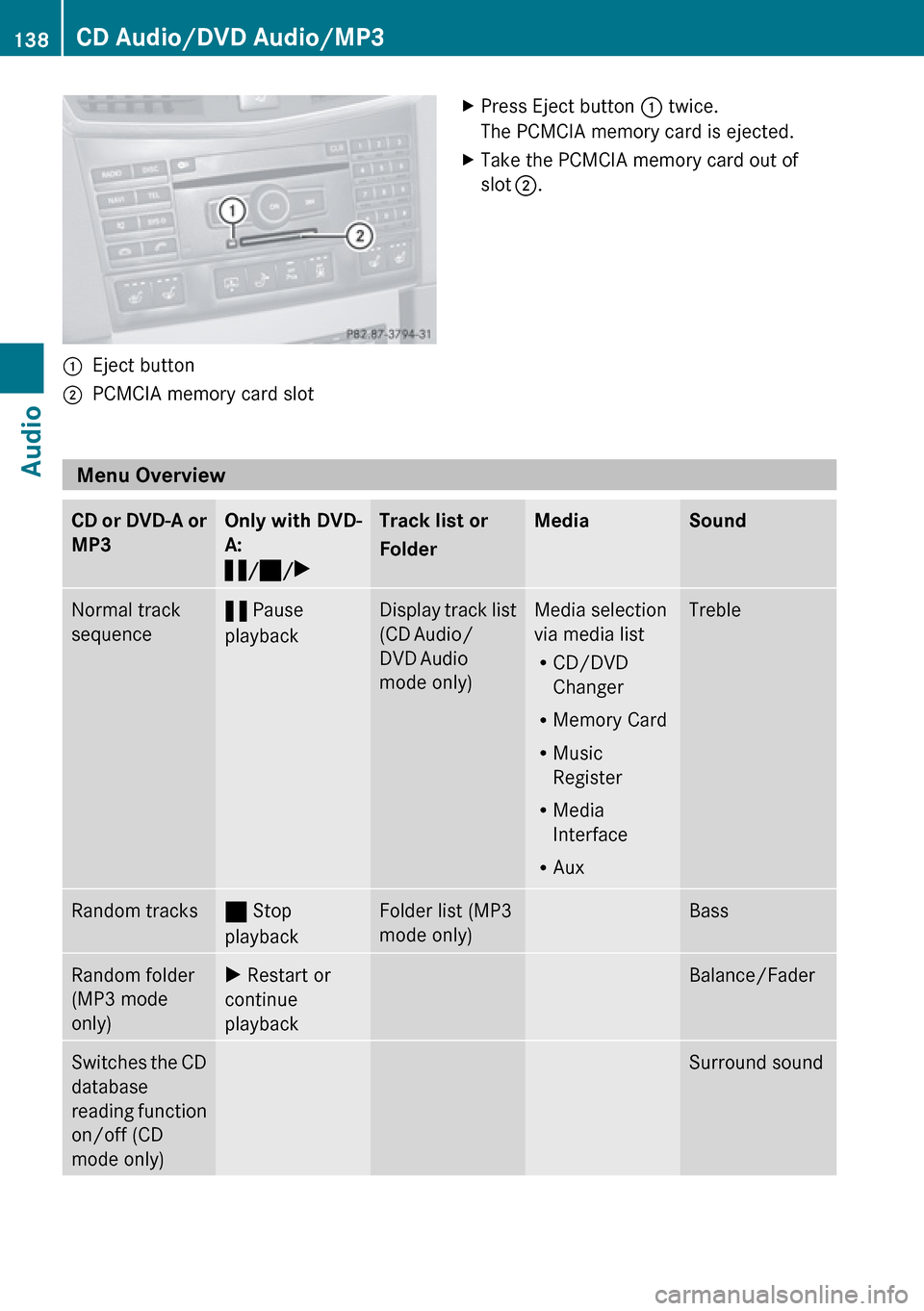
1Eject button2PCMCIA memory card slotXPress Eject button 1 twice.
The PCMCIA memory card is ejected.XTake the PCMCIA memory card out of
slot 2 .
Menu Overview
CD or DVD-A or
MP3Only with DVD-
A:
« /± /XTrack list or
FolderMediaSoundNormal track
sequence« Pause
playbackDisplay track list
(CD Audio/
DVD Audio
mode only)Media selection
via media list
R CD/DVD
Changer
R Memory Card
R Music
Register
R Media
Interface
R AuxTrebleRandom tracks± Stop
playbackFolder list (MP3
mode only)BassRandom folder
(MP3 mode
only)X Restart or
continue
playbackBalance/FaderSwitches the CD
database
reading function
on/off (CD
mode only)Surround sound138CD Audio/DVD Audio/MP3Audio
Page 142 of 224
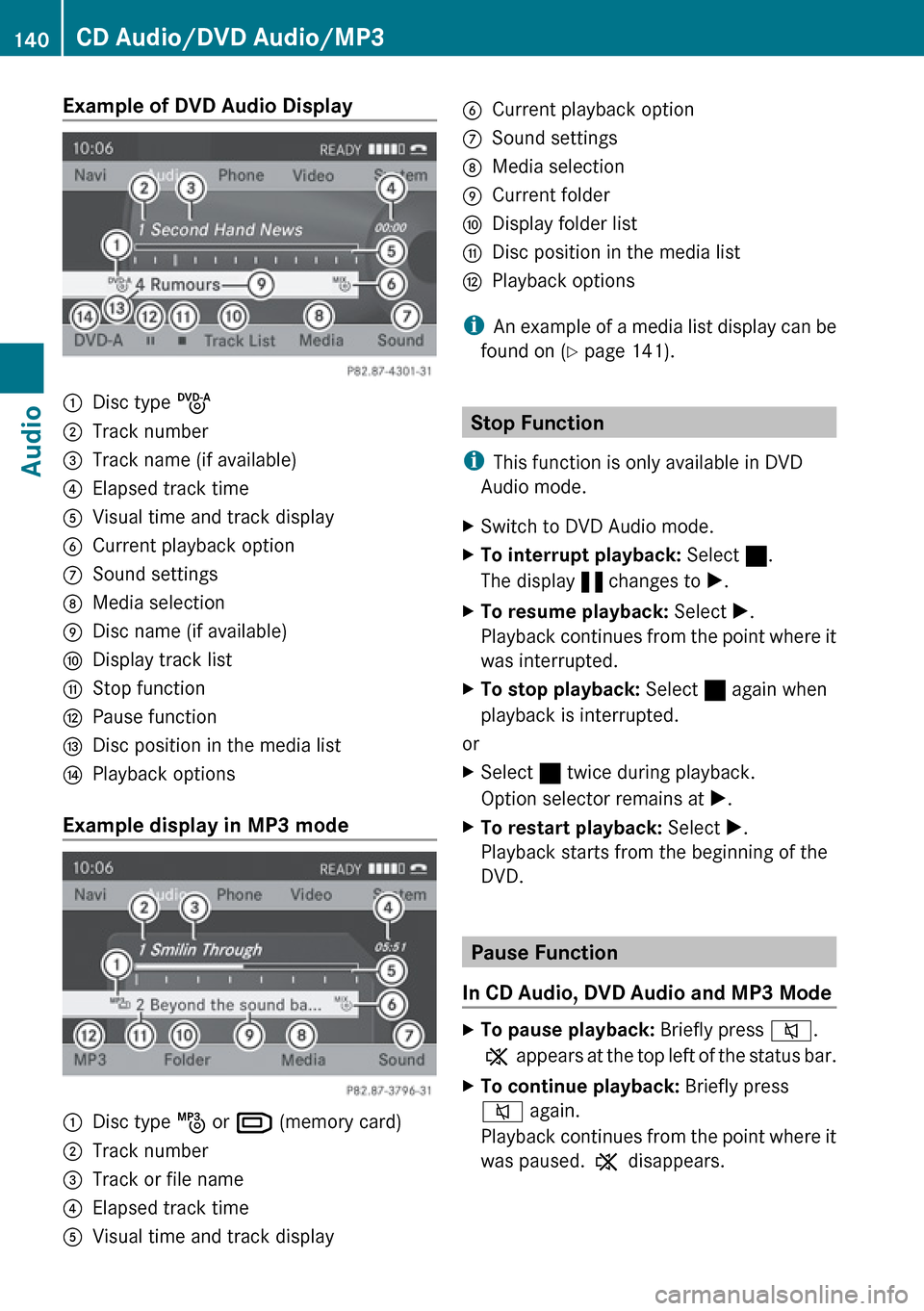
Example of DVD Audio Display1Disc type ü2Track number3Track name (if available)4Elapsed track time5Visual time and track display6Current playback option7Sound settings8Media selection9Disc name (if available)aDisplay track listbStop functioncPause functiondDisc position in the media listePlayback options
Example display in MP3 mode
1Disc type þ or º (memory card)2Track number3Track or file name4Elapsed track time5Visual time and track display6Current playback option7Sound settings8Media selection9Current folderaDisplay folder listbDisc position in the media listcPlayback options
i
An example of a media list display can be
found on ( Y page 141).
Stop Function
i This function is only available in DVD
Audio mode.
XSwitch to DVD Audio mode.XTo interrupt playback: Select ±.
The display « changes to X.XTo resume playback: Select X.
Playback continues from the point where it
was interrupted.XTo stop playback: Select ± again when
playback is interrupted.
or
XSelect ± twice during playback.
Option selector remains at X.XTo restart playback: Select X.
Playback starts from the beginning of the
DVD.
Pause Function
In CD Audio, DVD Audio and MP3 Mode
XTo pause playback: Briefly press 8.
X appears at the top left of the status bar.XTo continue playback: Briefly press
8 again.
Playback continues from the point where it
was paused. X disappears.140CD Audio/DVD Audio/MP3Audio