navigation MERCEDES-BENZ E-Class WAGON 2011 S212 Comand Manual
[x] Cancel search | Manufacturer: MERCEDES-BENZ, Model Year: 2011, Model line: E-Class WAGON, Model: MERCEDES-BENZ E-Class WAGON 2011 S212Pages: 234, PDF Size: 8.64 MB
Page 53 of 234

fact
that certain menuitemsaregray edout
and cannot besele cted.
The followi ngentries arenot possi ble,for
examp le:
R entering thedesti nation cityand street
R entering adesti nation viathe map
R entering points ofinterest inthe vicini tyof
ac ity orvia aname search
R edi ting entries
R usi ng the numbe rkeyp adfor dire ctentry
Other entries arepossi ble,such asentering
poi nts ofinterest inthe vicini tyof the
desti nation orcurrent position.
Address escan beentered viathe Voice
Control System (seethesepa rateOpera ting
Instructions) whilethe vehi cleisin motion. Swi
tchin gton avig ation mode
Option 1
X Press theØ function button.
The map isdisp layed with themenu either
show norhidden .
Opt ion 2
X Selec tNavi in
the main function barby
slidin gZV andturnin gcVd theCOMA ND
con troller andpress Wtocon firm .
The map isdisplayed withthemen ushown . Map
showin gthe men u;rout eguidan ceinac tive
: Status bar
; Main function bar =
Curre ntveh icle posit ion
? Navi gation men ubar Map
withoutthem enu;rout eguidan ceinac tive
: Curre ntveh icle posit ion
; Map orientatio nselected
= Map scale select ed
"Route guidance active"meansthatyouhave
ent ered adestin ation andthat COMAND has
calculated theroute. Thedisplay showsthe
route, changes ofdirect ionand lane
recom mendat ions.Navigation
announ cementsguide youtoyour
destin ation.
"Route guidance inactive"means thatno
destin ationhasbeen entered andthat no
route hasbeen calculated. Showing/hiding
themenu
X To hide themenu: slideZVtheCOMAND
con troller and,when theFull Screen menu
itemisshown, pressWtocon firm.
or
X Press the% backbutton .
The map canbeseen inthe full-scr een
display.
X To show themenu: pressWthe COMAND
con troller whenthemap isshown infull-
screen display. Introd
uction
51Navigation Z
Page 54 of 234

Basi
csettin gs Route
settin gs
Se ttin groute typeandroute options Yo
uc an select the followi ng rou tetyp es:
R Fas tRoute :C
OMAND calculatesaroute
with theshortest (minimized) journeytime.
R Dynamic TrafficRoute :s
ame route
type asFast Route .I
na ddition ,COMAND
tak esany trafficreport sreceiv edwith
regard tothe route intoa ccoun tduring
route guidance. Thenavigat ionsystem can
help youavoid atraf fic jam, forexample, by
recalc ulating theroute.
R Dynami cTRF. Route AfterRequest :
same routetypeasDynami cTraffi c Route .A
fter recalc ulating theroute,
COMAND asksyouwhether youwish to
adopt thenew route orwhether youwould
prefer tocon tinue along theoriginal route.
R Eco Route :t
he Eco Route (econ
omic
route) isav ariant ofthe Fast Route route
type. COMAND willattempt tominimiz ethe
journ eydistan ceatthe expen seofas lightly
incr eased journeytime.
R Short Route :C
OMAND calculatesaroute
with theshortest possible(minimized)
route distance.
i Onvery long routes, the"Eco Route" more
or less corresponds tothe "Fast Route"
route type.
X To call upthe route settings menu:press
the Ø function button.
X Select Navi in
the main function barby
slidi ngZV andturning cVdtheCOMAND
cont roller andpress Wtoconfirm.
X Select Route Settings and
press Wto
confirm. Route
settings menu(startofmenu)
: Toselect theroute type
; Toset the number ofpersons inthe
vehicle forthe use ofcarpool lanes
= Toset route options
X Select aroute typeandpress Wtoconfirm.
Af illed circle indic ates thecurr entsetting.
X Selec tthe route option(s) andpress Wto
confirm .
The route options areswitched onO oroff
ª,d epending onthe previous status.
i Ifyou change theroute typeand/or the
route options whileroute guidanceisactive
(the route hasbeen calculated), COMAND
will calculate anew route.
If you change theroute typeand/or the
route options whileroute guidanceis
inactive (nodestination hasbeen entered
yet), COMAND usesthenew settin gfor the
next route guidance.
i The route calculated may,forexample,
include ferryconnections, evenifthe
Avoid Ferries route
option isswitched
on.
In some cases, e.g.when calculating
particularly longroutes, COMAND maynot
be able totake allthe selected route
options intoaccount.
X To exit themenu: slideXVY theCOMAND
cont roller. 52
Basic
settingsNavigation
Page 55 of 234

Setting
thenumber ofpersons inthe
vehicle forthe use ofcarpool lanes For
route calculation, youcan take HOV or
carpool lanesintoaccount.
If you useHOV orcarpool lanes,please
observe theappli cable lawsaswell asthe
local andtime limitation conditions.
Carpool lanesmayonlybeused under certain
condition s.Normally youcan usethese lanes
when twopeople aretraveling inthe vehicle.
However, therearelanes thatcanonly be
used when threeorfour people (e.g.inNew
York) travel inthe vehicle. InCali fornia, lone
drivers canuseacarpool laneiftheir vehicle's
emission level/fuel consumptionisbelow a
fixed threshold.
Carpool lanesmaybereserved forspecific
times (e.g.during thepeak period).
Carpool lanesareidentified byHOV symbols
on special roadsigns andbymarkings onthe
road. Onthe road signs, youmay alsoseethe
word CARPOOL .T
he lanes arearranged asa
separate lanenext tothe others orare built
as ap hysicall yseparate lane.
Depending upontheNumber of Occupants
in
Vehicle settin
g,COMAND usesHOVor
carpool laneswhen calculating aroute.
COMAND thenguides youwith visual and
acoustic drivinginstruct ionsonto oraway
from HOVorcarpool lanes.
X In the Route Settings menu, selectNumber of
Occupants inVehicle by
turning
cVd theCOMAND controller. X
Press Wthe COMAND controller. X
Select 1 ,
2 or
More than2 by
turning
cVd andconfirm bypressing W.
The #dot indicates thecurrent setting. Destination
entry Introduction
todestination entry G
WARNING
For safety reasons, onlyenter anew
destination whenthevehicle isstationary.
You could otherwise bedistracted fromthe
traffic conditions, causeanaccident and
injure yourself andothers.
The following destination entryoptions are
availa ble:
R enterin gadestination byaddress
R enterin gadestination fromthedestination
memory
R enterin gadestination fromthelistoflast
destinations
R enterin gadestination usingthemap
R enterin gadestination usinggeo-
coordinates
R enterin ganintermediate stop
R enterin gwaypoints
R enterin gapointofinterest
R enterin gapersonal pointofinterest
R enterin gadestination using"Search &
Send" Des
tinatio nentry
53Navigation Z
Page 56 of 234

Ent
erin gad estination byaddress
Intr odu ction When
enterin gana ddres sasthe dest ination,
you have thef ollo wing options:
R ent erin gthe state/ province,cit y/ZI Pcode
and street
R ent erin gthe state/ province,cit ya nd
cen ter
R ent erin gthe state/ province,cit y/z ipcod e,
st reet andhouse number
R ent erin gthe state/ province,cit y/z ipcod e,
st reet andinters ect ion
R ent erin gthe state/ province,street ,city
and house number
R ent erin gthe state/ province,street and
house number
R ent erin gthe state/ province,street and
int ers ect ion
i You canonlyent erthose cities, street s,
zip cod esetc. that are stored inthed igital
map. Thismean sthatfor som ecoun tries,
you cannote nter zipcod es,forexa mpl e.
Ex ample :enteri ng anaddres s The
followi ng isas tep -by-step exampl eof
how toente rana ddress. Thedestin ation
address isas follows:
New York (state)
New York (city)
40 Broadway
Of course, youcan freely enterinfor mation
like state/prov ince,city,str eet and house
number, forexample toent eryour home
address.
Calling upthe address entrymenu X
To switch onnavigat ionmode: pressthe
Ø function button.
X To show themenu: pressWthe COMAND
con troller. X
Select Dest. by
turn ingcVd theCOMAND
con troller and pressin gW tocon firm.
X Select Addres sEntry and
press Wto
con firm.
The address entrymenu appears. Ifyou
have previously entered adestin ation, this
will beshown inthe display. Addres
sentry menu
Depen dingonthe sequenc einw hich you
ent erthe address andonthe data statusof
the digital map,some menu itemsmaynotbe
available atall ormay notyetbeavailable.
Ex ample: afterentering state/prov ince,the
menu itemsMap ,
No. ,
Center ,
Inters ection ,
Save and
Start are
not
available; orthe menu itemZIP is
not
available ifthe digital mapdoes nothave any
zip codes.
Selecting astate/ province X
Sel ect State/Prov in
the addre ssentry
menu byturning cVd theCOMAND
contro ller and pressW toconfi rm.
Am enu with theavailable listsappears: 54
Destination
entryNavigation
Page 57 of 234

R
Last States/Provinces R
States (U.S.A.) R
Provinces (Canada) X
To sele ctalist :turn cVd theCOMAN D
con troller andpress Wtocon firm .
The listofselect edstat es/pr ovinces
appears.
X To select astate/ province :tur ncVd the
CO MAND controller and pressW to
confi rm.
The addre ssentry menu appe arsa gain.T he
sta te/p rovince selecte dhasnow been
ente red.
En teri ngthe city X
Sel ect City in
the addre ssentry menu by
tur ning cVd theCOMAND controller and
pre ssW toconfi rm.
Yo uw ills ee the city list either with the
cha racter bar(option 1)or as as election
list (option 2).
Option 1:city listwith thechara cterbar
X En ter NEW YORK .I
nst ruction sfor enter ing
charact erscan befound inthe "Ent ering
charact ersinnavigation mode(enterin ga
city)" section (Ypage 28). Option
2:city listasselection list City
list
X Select anentr ybyturnin gcVd the
COMAND controller.
X Irrespect iveofthe option, pressWto
conf irmyour selection.
The address entrymenu appears again.The
city hasnow been entered.
Entering astreet name X
Select Street in
the address entrymenu
by turnin gcVd andsliding ZVÆthe
COMAND controller andpress Wto
conf irm.
You willsee thestreet listeither withthe
charact erbar (option 1)or as as election
list (option 2).
Option 1:street listwith chara cterbar
X En ter BROADWAY .I
nst ruction sfor enter ing
charact ersusing cityinput asan example
can befound inthe "Ent ering charact ersin
navigation mode(enterin gacity)"section
(Y page 28). Opt
ion 2:str eet listasselection list Destina
tionentry
55Navigat ion Z
Page 58 of 234

Street
list
X Sel ect astree tbyturni ngcVd the
CO MAND controllera nd pre ssW to
confi rm.
If an entry features the Gicon,itcanno t
be uniquelya ssigne da nd aselecti onlist
wi llop en, allo wi ng yout os elect the desired
entry . X
Sel ect anentry byturning cVd the
CO MAND controller.
X Irre spe ctive ofthe optio n,pre ssW to
confi rmyour sel ecti on.
The addre ssentry menu appe arsa gain.T he
stre ethasn ow been ente red.
En teri ngthe housenumb er It
is not possi blet oe nte rah ouse number until
as treet hasbeen entered.
X Select No. in
the address entrymenu by
turning cVdandsliding ZVÆthe COMAND
controller andpress Wto
confirm .
You willsee thehouse number listeither
with thecharacter bar(option 1)or as a
selection list(option 2).
Option 1:house number listwith
character bar
X Ent er4 and
0 .I
nst ructions forenterin g
characters usingcityinput asan example
can befound inthe "Ent ering characters in
navigation mode(entering acity)" section
(Y page 28). Opt
ion 2:house numberlistasselection
list House
numberlist
X Selec tane ntry by turnin gcVd the
COMA NDcontroller.
X Irr espec tiveo fthe opt ion, press Wto
con firm your selec tion.
The address entrymen uappears again.The
house numberhas now been entered. 56
Destina
tionentryNavigat
ion
Page 59 of 234

Star
ting route calculation You
cannow have COMAND calculatethe
route tothe address enteredorsave the
address first,e.g.asyour home address (My
address) (Ypage 57). Address
entrymenu withdestination address
: Destin ationaddress
; Tostart route calculation
X In the address entrymenu, confirmStart by
pressing W.
If no other routehasbeen calculated, route
calculation startsimmediately (Option1).If
another routehasalready beencalculated
(route guidanceisactive), aprompt
appears (option2).
i Continue is
display edinstead ofStart when
Calculate Alternative Routes is
activated inthe navigation menu
(Y page 82),option 2.
Option 1—norouteguid ance active: route
calc ulatio nstarts. Wh iler oute cal culatio nis
in progr ess,anarrow willindic atethe
direc tiontoyour destination. Below this,you
will see amessage, e.g.Calc ulating Fast
Rout
e Onc
ethe rout ehasbeen calculated, route
guidanc ebegin s.Ifthe vehic leistravelin gon
an on-digit izedroad, thesyst emdisplays the
linear distancetot he dest ination, the
direc tionofthe dest inationand theOff Mapp
edRoad mess
age.Theentries forthe
est imat edtim eofarriv aland thedistanceto
the dest inationare, inthis case, displayed in
gray. Opt
ion 2–r oute guid ance isalr ead y
act ive: ifrout eguidanc eisa lready active, a
prom ptwill appear askingwhether you wish
to ter min ate the curr entlyact ive rout e
guidanc e.
X Selec tYes or
No and
press Wtocon firm .
If you selec tYes ,C
OMA NDwill stop rout e
guidanc eand start rout ecalc ulation forthe
new destination.
If you selec tNo ,C
OMA NDwill continue
with theactive rout eguidanc e.
i Route calculation takesac ertain amoun t
of tim e.The timedepen dson the distance
fro mt hedestination, forexample.
COMAND calculates theroute using the
digital mapdata.
The calculated routecandiffer fromthe
ideal route, forexample becauseof
incomplete mapdata. Please alsorefer to
the notes about thedigital map
(Y page 109).
Entering andsaving yourhome address You
caneither enteryourhome address for
the first time (option 1)or edit apreviously
stored homeaddress (option2).
X Option 1:enter theaddress, e.g.acity,
street andhouse number (Ypage 55).
X Once youhave entered theaddress, select
Save in
the address entrymenu byturning
cVd andsliding ZVÆtheCOMAND
cont roller andpress Wtoconfirm .
X Select Saveas"My Address" and
press
W toconfirm .
COMAND storesyourhome address asMy Address in
the destination memory.
X Option 2:proceed asdescribed under
"Option 1".
Ap rompt appears asking whethe rthe
current homeaddress shouldbe
overwritten . Des
tination entry
57Navigation Z
Page 63 of 234
X
To start route calculati on:sel ect Start and
pressW toconfi rm. En
teri ngadesti nation from thel ist of
last dest inations
X To switch onnav igat ionmod e:pres sthe
Ø function butt on.
X To show them enu:pres sW theC OMA ND
con troller .
X Sele ctDes tin ation in
then avigat ion
syst emmen ubarby turnin gcVd the
COMA NDcontroller andpres singW to
con firm.
X Sele ctFro mL astD estin ations and
pres sW tocon firm. X
Sele ctthed esir eddest inationbyturnin g
cVd theC OMA NDcontroller andpres sing
W tocon firm.
The addres sentry men uappears again.The
destination addressselected hasbeen
entered.
X To star troute calculation: selectStart and
press Wtoconfirm .
Once theroute hasbeen calculated, route
guida ncebegins (Ypage 77).
i Further information onthe "Last
destinations" memorycanbefound on
(Y page 97). Entering
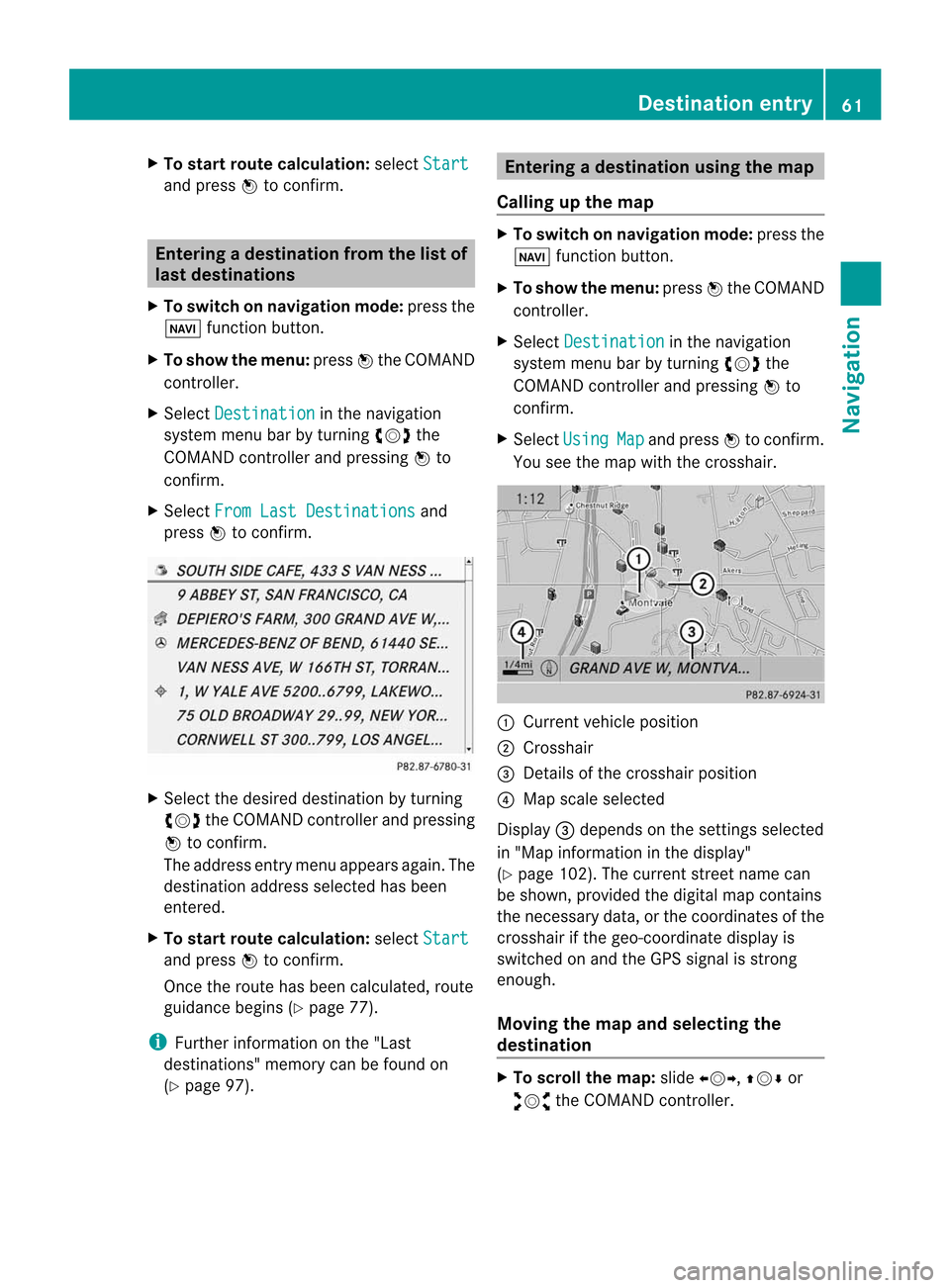
adesti nation usin gthe map
Call ingupthe map X
To swi tch onnavig ation mode: pressthe
Ø function button.
X To show themenu: pressWthe COMAND
controlle r.
X Select Destin ation in
the navig ation
sys tem menu barbyturning cVdthe
COMAND controllerand pre ssing W to
confi rm.
X Sel ect Usi ng Map and
pressW toconfi rm.
Yo us ee the mapw itht he cros shair. :
Curre ntveh iclep ositio n
; Cross hair
= Deta ilso fthe cros shairpo sitio n
? Mapscale sel ecte d
Dis play = depends onthe setti ngsselecte d
in "M ap info rma tionint he displa y"
(Y page 102). Thecurrent streetnamecan
be shown, provided thedigital mapcontains
the necessary data,orthe coordinates ofthe
crosshair ifthe geo-coordinate displayis
switched onand theGPS signal isstron g
enough.
Moving themap andselec tingthe
destination X
To scroll themap :slide XVY, ZVÆor
aVb theCOMAND controller. Des
tination entry
61Navigation Z
Page 64 of 234

X
To setthe map scale:as soon asyou turn
cVd theCOMAND controller,the scal ebar
app ears .
X Turn cVd untilthedesi redscal eiss et.
Turni ngclockwi sezooms outfrom themap;
turning counter-clockwi sezooms in.
X To selectad estination: pressW the
COMA NDcontroller onceorseve raltim es.
You willsee either thea ddres sentry men u
with thed est inat ionaddres sor,ifCOMA ND
is unable toassign aunique addres s,a
selec tionlist. X
Selec tadestination byturn ingcVd the
COMAND controller and press Wto
con firm.
If the destin ationiswithin thelimits ofthe
digital map,COMAND attempts toassign
the destin ationtothe map.
If the destin ationcanbeassigned, youwill
see theaddress entrymenu withthe
address ofthe destin ation. Ifnot ,you will
see theentryDestin ationFromMap .
X To start routecalculat ion:select Start and
press Wtocon firm. Entering
adesti nation usin ggeo-
coord inates
X To switch onnav igat ionmod e:pres sthe
Ø function butt on.
X To show them enu:pres sW theC OMA ND
con troller . X
Sele ctDes tination in
then avigat ion
syst emmen ubarby turnin gcVd the
COMA NDcontroller andpres singW to
con firm.
X Sele ctUsi ngGeo-Coordinates and
pres sW tocon firm.
An entrymen uappears . You
cannowe nter thel atit ude andlongitude
coo rdin ates .
X To cha nge avalu e:tur ncVd the
COMA NDcontroller .
X To mov ethe ma rkwith inthel ine: slide
XVY theC OMA NDcontroller .
X To mov ethe ma rkbetween thel ines:
slide ZVÆ theC OMA NDcontroller .
X To confir mthevalu e:pres sW the
COMA NDcontroller .
i Ifth es elec tedp osit ion isout side the
digit almap, COMA NDuses then earest
digitized roadforroute calculation. Youwill
see theThe position isoff the map message.
Ifthe selected positionislocated
over abody ofwater, youwillsee the
message: Thedestination isina body
ofwater. Please select another
destination. Entering
aninterm ediate stop
Introdu ction You
canusethis funct iontoenter an
interm ediate stopwhile thevehicle isin
motion .COMAND provides aselection of 62
Destination
entryNavigation
Page 66 of 234

Delet
inganinterme diat es top If
an inte rm ediat estoph asalre ady been
en tered ,you can dele teit.
X To swit chon navig ation mode: pressthe
Ø function button.
X To show them enu:pre ssW theC OM AND
co ntro ller .
X Se lec tDes tinati on in
then avigat ion
syst emmen ubarby turn ing cVd the
COM ANDc ontroller andpressing Wto
conf irm.
X Select Stopover and
press Wtoconf irm.
X Select Delete Stopover and
press Wto
conf irm.
COMAND deletestheinter mediate stop
and recalculates theroute tothe main
destinat ion. Entering
waypoints
Introdu ction You
canmap theroute yourself byenter ing
up totwo wayp oints. Thesequence ofthe
wayp oints canbechanged atany time.
i Aninter mediate stopisalwa ysbetween
the current position ofthe vehicle andthe
first wayp oint.
Creating waypoints X
To switch onnavigation mode:pressthe
Ø functionbutton .
X To show themenu: pressWthe COMAND
cont roller.
X Select Dest. in
the navigation system
menu barbyturnin gcVd theCOMAND
cont roller andpressing Wtoconf irm.
X Select Intermediate Destinations and
press Wtoconf irm.
The destinat ionisenter edinthe menu. Waypoint
menuwithout waypoints
X Confirm thesymbol forwayp oint1by
pressin gW the COMAND controller. X
Confirm Set by
pressin gW the COMAND
con troller.
X En ter the waypoint viaone ofthe following
option s. Selection Step
Addres
sEntry X
En ter a
destin ationby
address
(Y page 54). From
Memory X
Select a
destin ationfrom
the destin ation
memor y
(Y page 60). From
Last Destin
ations X
Select a
destin ationfrom
the listoflast
destin ations
(Y page 61). 64
Destinat
ionentr yNavigat
ion