navigation system MERCEDES-BENZ G-Class 2017 W463 User Guide
[x] Cancel search | Manufacturer: MERCEDES-BENZ, Model Year: 2017, Model line: G-Class, Model: MERCEDES-BENZ G-Class 2017 W463Pages: 286, PDF Size: 4.91 MB
Page 219 of 286
multifunction display.The audio outpu tis
muted.
If ac onnection can be made ,the Call
Connec‐tedmessage appears in the multifunction dis-
play.
If am obilep hone network and GPS reception
are available, the system transfers data to the
Mercedes-Benz Customer Assistance Center,
for example:
Rcurrent location of the vehicle
Rvehiclei dentification number
The multimedia system display indicates that a
call is active. During the call ,you can change to
the navigation menu by pressing the NAVI but-
ton on the multimedia system, for example.
Voice outpu tisnot available in this case.
Av oice connection is established betweent he
Mercedes-Benz Customer Assistance Center
and the vehicleo ccupants.
From the remote malfunction diagnosis, the
Mercedes-Benz Customer Assistance Center
can ascertai nthe nature of the problem
(
Ypage 220).
The Mercedes-Benz Customer Assistance Cen-
ter either sends aqualified Mercedes-Benz tech-
nician or makes arrangements for you rvehicle
to be transported to the nearest Mercedes-Benz Service Center.
You may be charged for services such as repair
work and/or towing.
You can find more informatio ninthe separate
mbrace manual.
The system has not been abletoi nitiateaRoad-
side Assistance call ,if:
Rthe F indicator lamp for the Roadside
Assistance call button is flashing continu-
ously.
Rno voice connection to the Mercedes-Benz
Customer Assistance Center was estab-
lished.
This can occur if the relevant mobilep hone net-
work is not available, for example.
The Call Failed
message appears in the mul-
tifunction display.
XTo end acall: press the ~button on the
multifunction steering wheel.
or
XPress the corresponding multimedia system
button for ending aphone call.
Info call button
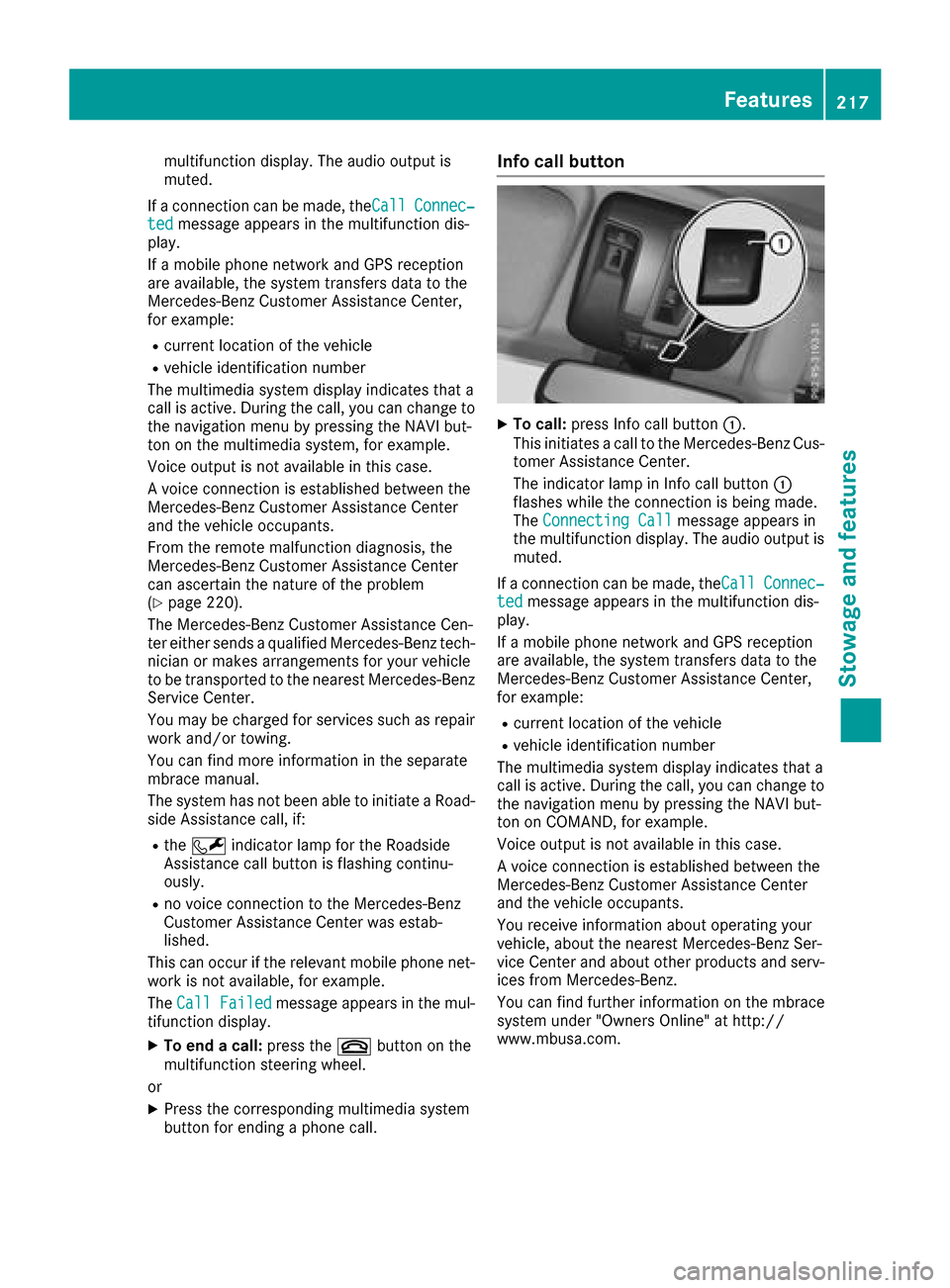
XTo call: press Info call button :.
This initiates acall to the Mercedes-Benz Cus-
tomer Assistance Center.
The indicator lamp in Info call button :
flashes whilet he connection is being made.
The ConnectingC all
message appears in
the multifunction display .The audio outpu tis
muted.
If ac onnection can be made ,the Call
Connec‐tedmessage appears in the multifunction dis-
play.
If am obilep hone network and GPS reception
are available, the system transfers data to the
Mercedes-Benz Customer Assistance Center,
for example:
Rcurrent location of the vehicle
Rvehiclei dentification number
The multimedia system display indicates that a
call is active. During the call ,you can change to
the navigation menu by pressing the NAVI but-
ton on COMAND, for example.
Voice outpu tisnot available in this case.
Av oice connection is established betweent he
Mercedes-Benz Customer Assistance Center
and the vehicleo ccupants.
You receive informatio nabou toperating your
vehicle, aboutt he nearest Mercedes-Benz Ser-
vice Center and abouto ther products and serv-
ices from Mercedes-Benz.
You can find further informatio nonthe mbrace
system under "Owners Online" at http://
www.mbusa.com.
Features217
Stowage and features
Z
Page 220 of 286
The system has not been able to initiate an MB
Info call, if:
Rthe indicator lamp in theïInfo call button
is flashing continuously.
Rno voice connection to the Mercedes-Benz
Customer Assistance Center was estab-
lished.
This can occur if the relevant mobile phone net-
work is not available, for example.
The Call Failed
message appears in the mul-
tifunction display.
XTo end acall: press the ~button on the
multifunction steerin gwheel.
or
XPress the corresponding multimedia system
button for ending aphone call.
Call priority
When service calls are active, e.g. Roadside
Assistance or Info calls, an emergencyc all can
still be initiated. In this case, an emergencyc all
will take priority and override all other active
calls.
The indicator lamp of the respective button
flashes until the call is ended.
An emergencyc all can only be terminated by the
Mercedes-Benz Customer Assistance Center.
All other calls can be ended by pressing:
Rthe ~ button on the multifunction steering
wheel
Rthe corresponding button in the multimedia
system to end the voice call
When acall is initiated, the audio system is
muted.
The mobile phone is no longer connected to the multimedia system.
However, if you want to use your mobile phone,
do so only when the vehicle is stationary and in
as afe location.
Downloading destinations
Downloading destinations
Downloading destinations gives you access to a
database with over 15 million points of interest
(POIs). These can be downloaded on the navi-
gation system in your vehicle. If you know the
destination, the address can be downloaded.
Alternatively, you can obtain the location of Points of Interest (POIs)/important destinations
in the vicinity.
Furthermore, you can download routes with up
to four way points.
You are prompted to confirm route guidance to
the address entered.
XSelect Yesby turning 3or sliding 1
the controller and confirm with 7.
The system calculates the route and subse-
quently start sthe route guidance with the
address entered.
If you select No
the address can be stored in
the address book.
The destination download function is available
if:
Rthe vehicle is equipped with anavigation sys-
tem.
Rthe relevant mobile phone network is availa-
ble and data transfer is possible.
Route Assistance
This service is part of the mbrace PLUS Package
and cannot be purchased separately.
You can use the Route Assistance function even
if the vehicle is not equipped with anavigation
system.
Within the framework of this service, you receive
ap rofessional and reliable form of navigation
support without having to leave your vehicle.
The customer service representative finds a
suitable route depending on your vehicle's cur-
rent position and the desired destination. You
will then be guided live through the current route
section.
Search &Send
General notes
To use "Search &Send", your vehicle must be
equipped with mbrace and anavigation system.
Additionally, an mbrace service subscription
must be completed.
"Search &Send" is adestination entr yservice. A
destination address which is found on Google
Maps
®can be transferred via mbrace directly to
your vehicle's navigation system.
218Features
Stowage and features
Page 221 of 286
Specifying and sending the destination
address
XGo to the website http://maps.google.com
and enteradestination address into the entry
field.
XTo send the destination address to the e-
mail address of your mbrace account:
click on the correspondingb utton on the web-
site.
Example:
If you select 'Send to vehicle' and then
'Mercedes-Benz', the destination address will
be sent to your vehicle.
XWhen the "Send" dialog window appears:
Enter the e-mail address you specified when
settingupy our mbrace account into the cor-
responding field.
XClick "Send".
Information on specific commands such as
"Address entry" or "Send" can be found on the
website.
Calling up atransmitted destination
address
XTurn the SmartKey to position 2in the ignition
lock (Ypage 104).
The transmitted destination address is loaded
into the vehicle's navigation system.
Ad isplay message appears, asking whether
navigation should be started.
XSelectYesby turning 3or sliding 1
the controller and confirm with 7.
The system calculates the route and subse-
quently starts the route guidance with the
address entered.
If you select No
the address can be stored in
the address book.
If you have sent more than one destination
address, each individual destination must be
confirmed separately.
Destination addresses are loaded in the same
order as the order in which they were sent.
If you own multiple Mercedes-Benzv ehicles with
mbrace and activated mbrace accounts:
If multiple vehicles are registered under the
same e-mail address, the destination will be
sent to all the vehicles.
Vehicle remote opening
You can use the vehicle remote opening if you
have unintentionally locked your vehicle and a
replacement SmartKey is not available.
The vehicle can be opened by the Mercedes-
Benz Customer AssistanceC enter.
The vehicle can be immediately opened
remotely within four days of the ignition being
turned off. After this time, the remote unlocking
may be delayed by 15 to 60 minutes. After
30 days, the vehicle can no longer be opened
remotely.
The vehicle remote unlocking feature is availa-
ble if the relevant mobile phone network is avail-
able and adata connection is possible.
XContact the following service hotlines:
Mercedes-BenzC ustomer AssistanceC enter
at 1-800-FOR-MERCedes (1-800-367-6372)
or 1-866-990-9007
You will be asked for your password.
XReturn to your vehicle at the time agreed upon
with the Mercedes-BenzC ustomer Assis-
tance Center.
Alternatively, the vehicle can be opened via:
Rthe Internet, under the "Owners Online" sec-
tion
Rtelephone applications (e.g. for iPhone®,
Android™)
To do this, you will need your identification num-
ber and password.
Vehicle remote closing
The vehicle remote-closing feature can be used
when you have forgotten to lock the vehicle and
you are no longer nearby.
The vehicle can then be locked by the Mercedes-
Benz Customer AssistanceC enter.
The vehicle can be immediately remotely locked
within four days of the ignition being turned off.
After this time, remote closing may be delayed
by 15 to 60 minutes. After 30 days the vehicle
can no longer be valet locked remotely.
The vehicle remote closing feature is available if
the relevant mobile phone network is available
and adata connection is possible.
XContact the following service hotlines:
Features219
Stowage and features
Z
Page 223 of 286
Information on Roadside Assistance
(Ypage 25).
Downloading routes
Downloading routes allows you to transfer and
save predefined routes in the navigation sys-
tem.
Aroute can be prepared and sent by either a
customer service representative or under "Own-
ers Online" at http://www.mbusa.com.
Each route can include up to four way points.
Once aroute has been received by the naviga-
tion system, you wills ee theDo
youwanttostart route guidance? DestinationReceived destination has been savedin "Previous destinations".message on
the multimedia system display.
The route is saved.
XTo start route guidance: selectYes.
An overview of the route is shown in the dis-
play.
If you select No
,the saved route can be called
up later in the navigation menu.
XSelect Start.
Route guidance starts.
Downloaded and saved routes can be calledu p
again.
Speed alert
You can define the uppers peed limit, which
must not be exceeded by the vehicle.
If this selected speed is exceeded by the vehicle,
am essagew illbesent to the Customer Assis-
tance Center. The Customer Assistance Center
then forward sthis information to you.
You can select the way in which you receive this
information beforehand. Possible options
include text message,e -mail or an automated
call.
The data you receive contains the following
information:
Rthe location where the speed limitw as excee-
ded
Rthe time at which the speed limitw as excee-
ded
Rthe selected speed limitw hich was exceeded
Geo fencing
Geo fencing allows you to select areasw hich the
vehicle shoul dnot enter or leave. You willb e
informed if the vehicle crosses the boundaries
of the selected areas. You can select the way in
which you receive this information beforehand.
Possible options include text message, e-mail or an automated call.
The area can be determined as either acircle or
ap olygon with amaximum of ten corners. You
can specify up to ten areass imultaneously. Dif-
ferent settings are possible for each area.
These settings can be calledupu nder "Owners
Online" at http://www.mbusa.com.
Alternatively,y ou can trigger an Info call and
notify the customer service representative that
you wish to activate geo-fencing.
Currently inactive areasc an be activated by text
message.
Triggering the vehicle alarm
With this function, you can trigger the vehicle's
panic alarm via text message. An alarm sounds
and the exterior lighting flashes. Depending on
the setting, the panic alarm lasts five or ten sec- onds. Afterwards, the alarm switches off.
Brush guard (USA only)
If the brush guard has to be removed, contact a
qualifieds pecialist workshop.
Garage door opener
General notes
You can use the HomeLink®garage door opener
integrated into the rear-view mirror to operate
up to three different gate/garage door opener
systems.
Certai ngarage door drives are incompatible
with the integrated garage door opener. If you
have difficulty programing the integrated garage
door opener, contact aMercedes-Benz Service
Center.
Features221
Stowagea nd features
Z