Level MERCEDES-BENZ G-Class 2017 W463 Owner's Guide
[x] Cancel search | Manufacturer: MERCEDES-BENZ, Model Year: 2017, Model line: G-Class, Model: MERCEDES-BENZ G-Class 2017 W463Pages: 286, PDF Size: 4.91 MB
Page 130 of 286
Familiarize yourself with the characteristics of
your vehicle and the gearshift operation before
driving through difficult terrain.
The following driving systems are specially
adapted to off-roadd riving:
R4ETS (Ypage 59)
ROff-roadABS (Ypage 58)
RTransfer case (Ypage 145)
RDifferentia llocks (Ypage 120)
Observe the following notes:
RStop the vehicle before yo udrive off-roada nd,
if necessary ,shift the transfe rcase to the off-
roadd riving position LOW RANGE
(
Ypage 146).
REngag ethe differential locks if necessary
(Ypage 148).
iABS, 4ETS, ESP®and BAS are deactivated
while the differential locks are engaged.T his
allow sthe front wheels to lock briefly, so that
these can dig into aloose surface .However,
please note that locke dwheels skid and can
no longer steer.
RCheck that items of luggage and loads are
stowed safely and are well secured
(
Ypage 209).
RTo avoid damaging the vehicle, make sure
there is always sufficient ground clearance.
RAlway skeep the engine running and in gear
whe ndriving on adownhil lgradient.
RAlway skeep the engine running and in gear
whe ndriving downani ncline.
RDrive slowlyand evenly, if necessary at a
walking pace.
REnsure that the wheels are in contact with the
ground at al ltimes.
RDrive with extreme care on unfamilia roff-road
routes where visibility is poor. For safety rea-
sons, get ou
tofthe vehicle firs tand survey
the off-roadr oute.
RCheck the depth of water before fording rivers
and streams.
RWatch outfor obstacles.
RAlwayskeep the doors, reard oor, sidewin-
dowsa nd the sliding sunroof closed while the
vehicle is in motion.
RSwitch off cruise control.
RDo not deviate from marke droutes.
RAdap tyou rspeed to the terrain. The rougher,
steeper or more ruts on the terrain, the slower
your speed should be.
RDo not jump with the vehicle. as this will inter-
rup tthe vehicle' spropulsion.
RAvoid hig hengine speeds .Drive at appropri-
ate engine speeds (maximu m3,000 rpm).
RDo not shift the automatic transmission to
position N.
RAlwayscheck the vehicle for damag eafteroff-
roadd riving.
Do not use the HOLD function whe ndriving off-
road, on steep uphil lordownhil lgradients or on
slippery or loose surfaces. The HOLD function
cannot holdt he vehicle on such surfaces.
You can obtain further information aboutr etro-
fitting specia lall-terrain tires from aquali fied
specialist workshop.
Checklist before driving off-road
!If the engine oil warning lamp lights up while
the vehicle is in motion, stop the vehicle in a
saf ep lace as soona spossible. Check the
engine oil level. The engine oil warning lamp
warning mus tnot be ignored.C ontinuing the
journey while the symbol is displaye dcould
lea dtoe ngine damage.
XEngin eoillevel: check the engine oil level
and ad doil if necessary.
Whend riving on steep gradients, the engine
oil level mus tbes ufficiently hig htoensure a
correct oil supply in the vehicle.
XTire-changing too lkit: check that the jack is
working and make sur eyou hav ethe lug
wrench, arobust tow cable and afolding
spade in the vehicle.
XWheels and tires: check the tire treadd epth
and tire pressure.
XCheck for damag eand remove any foreign
objects, e.g. small stones,f rom the wheels/
tires.
XReplace any missing valve caps.
XReplace dente dordamaged wheels .Also
check the spare wheel.
XRims: dentedorbent rims can result in aloss
of tire pressure and damag ethe tire bead.
Befored riving off-road, check the wheels and
replace them if necessary.
128Drivin gtips
Drivin gand parking
Page 146 of 286
!Objects that are not at ground level appear
further awayt han they actually are, e.g.:
Rthe bumper of aparked vehicle
Rthe drawbarofat railer
Rthe rear end ofatruck
Rap ost sticking up at an angle
Use the guide lines for orientation only. Do
not cross the lower guide line when approach-
ing objects.
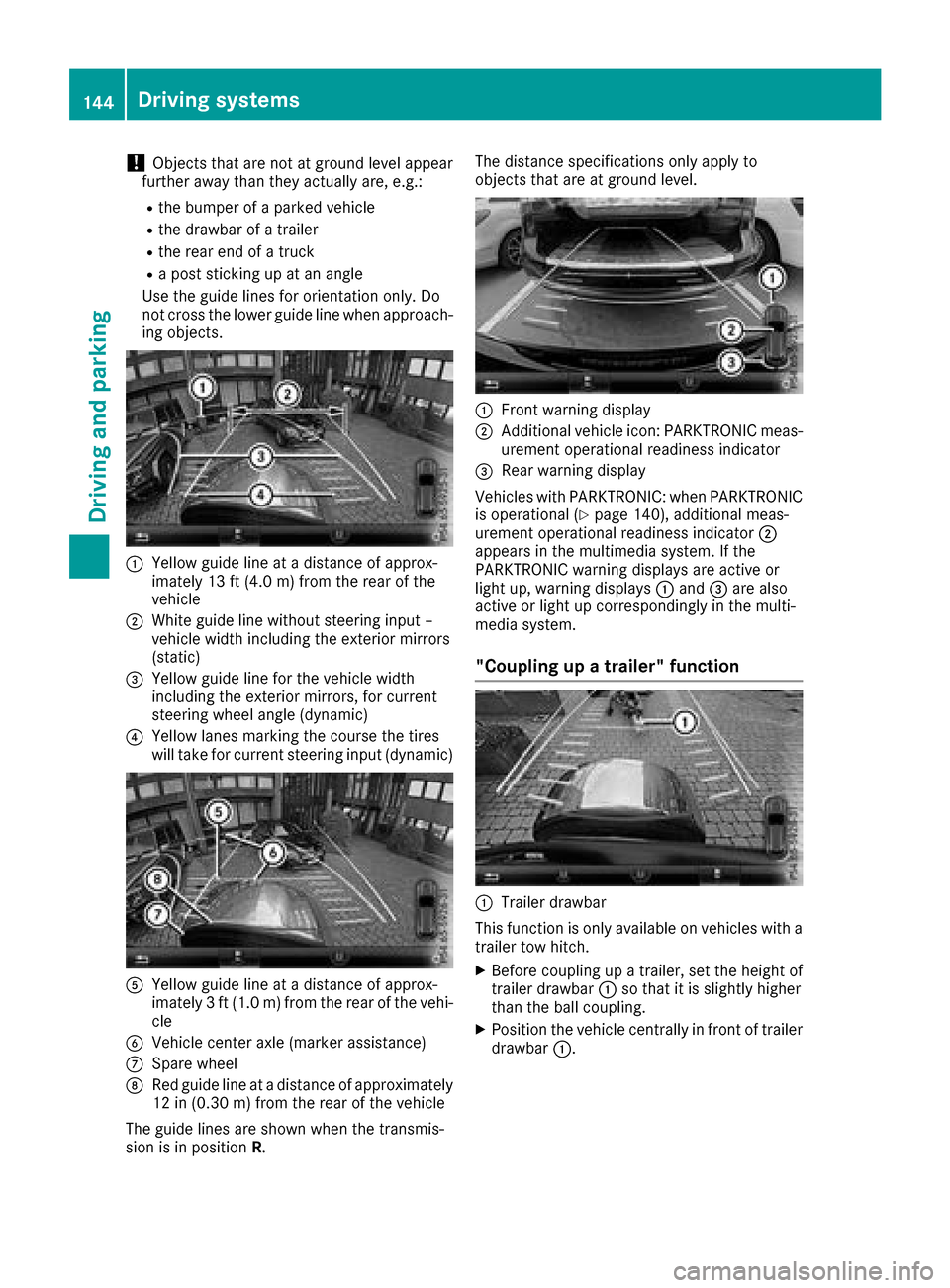
:Yellowg uide line at adistance of approx-
imately 13 ft (4.0 m) from the rear of the
vehicle
;White guide line without steering input –
vehicle width including the exterior mirrors
(static)
=Yellowg uide line for the vehicle width
including the exterior mirrors, for current
steering wheel angle (dynamic)
?Yellowl anes marking the course the tires
will take for current steering input (dynamic)
AYellowg uide line at adistance of approx-
imately 3ft(1.0 m) from the rear of the vehi-
cle
BVehicle center axle (marker assistance)
CSpare wheel
DRed guide line at adistance of approximately
12 in (0.30 m)from the rear of the vehicle
The guide lines are shownw hen the transmis-
sion is in position R. The distance specifications only apply to
objects that are at ground level.
:Front warning display
;Additional vehiclei
con: PARKTRONIC meas-
urement operational readiness indicator
=Rea rwarning display
Vehicles with PARKTRONIC: when PARKTRONIC
is operational (
Ypag e140), additiona lmeas-
urement operational readiness indicator ;
appears in the multimedias ystem. If the
PARKTRONIC warning display sare active or
light up, warning displays :and =are also
active or light up correspondinglyint he multi-
medias ystem.
"Coupling up atrailer" function
:Trailer drawbar
This function is only available on vehicles with a
trailer tow hitch.
XBefore coupling up atrailer, set the height of
trailer drawbar :so that it is slightly higher
than the bal lcoupling.
XPosition the vehiclec entrallyinfront of trailer
drawbar :.
144Driving systems
Driving and parking
Page 147 of 286
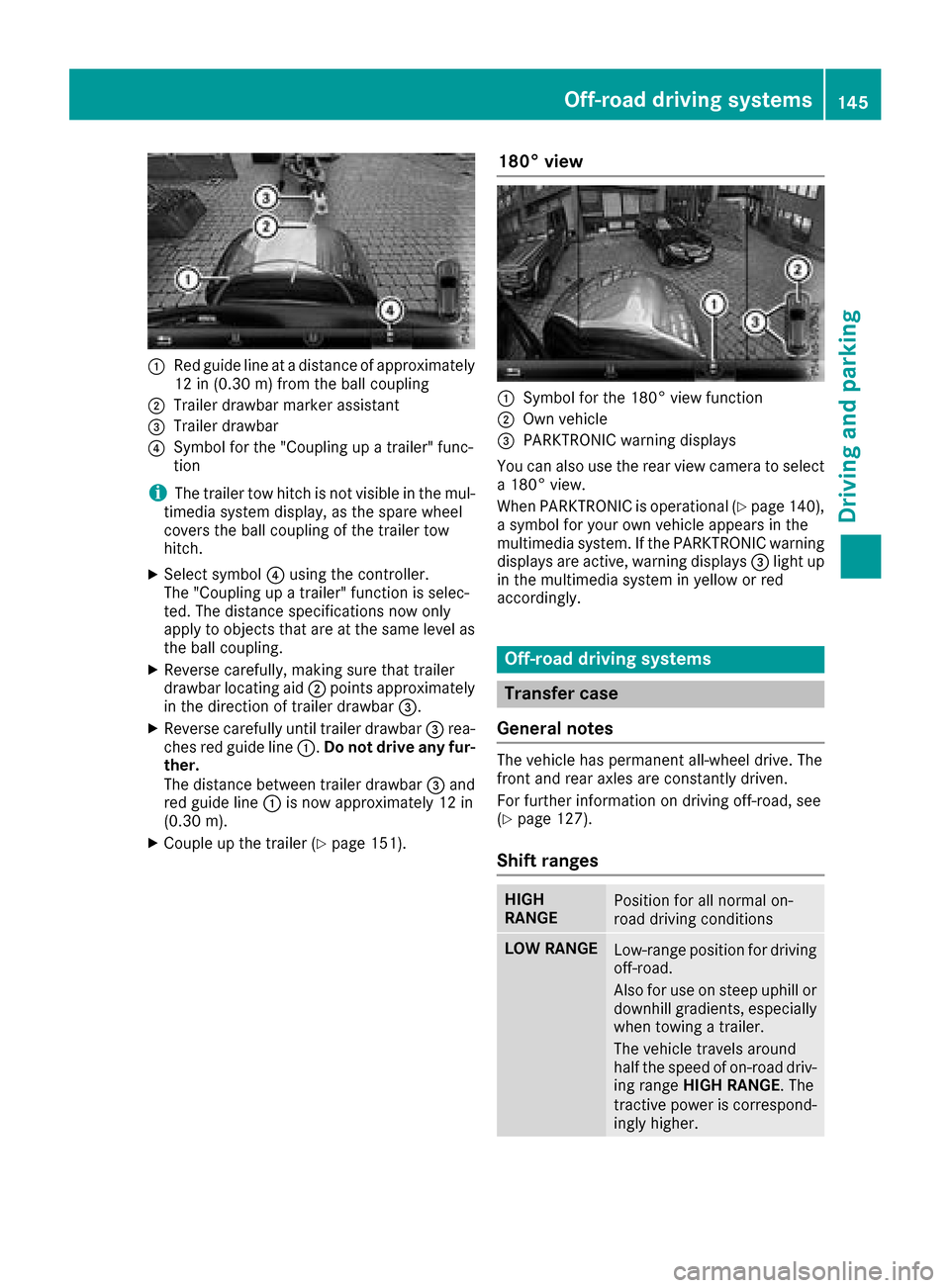
:Red guide lineatadistanceofapproximately
12 in (0.30m)f romt he ball coupling
;Trailer drawbar marker assistant
=Trailer drawbar
?Symbo lfor the "Coupling up atrailer" func-
tion
iThe trailer tow hitch is not visible in the mul-
timedia systemd isplay,asthe spar ewheel
covers the ball coupling of the trailer tow
hitch.
XSelect symbol ?using the controller.
The "Coupling up atrailer" functio niss elec-
ted .The distance specifications now only
appl ytoo bjects thata reat the same level as
the ball coupling.
XReverse carefully, making sure thatt railer
drawbar locating aid ;points approximately
in the direction of trailer drawbar =.
XReverse carefullyuntiltrailer drawbar =rea-
che sred guid eline:. Do no tdriv ea ny fur-
ther.
The distance between trailer drawbar =and
red guid eline : is now approximately 12 in
(0.3 0m).
XCoupl eupthe trailer (Ypage 151).
180° view
:Symbo lfor the 180° vie wfunction
;Ownv ehicle
=PARKTRONICw arning displays
Yo uc an also us ethe rea rviewc amera to select
a1 80° view.
When PARKTRONICi soperational (
Ypage 140),
as ym bolfor your ow nvehicl eappears in the
multimedia system. If the PARKTRONICw arning
displays ar eactive, warning displays =light up
in the multimedia systeminy elloworr ed
accordingly.
Off-roa ddrivin gsystems
Transferc ase
General notes
The vehicl ehaspermanent all-wheel drive. The
front and rea raxles ar econstantl ydriven.
For furtheri nformation on drivin goff-road, see
(
Ypage 127).
Shift ranges
HIGH
RANGEPositio nfor al lnormal on-
roa ddrivin gconditions
LOWR ANGELow-range positio nfor driving
off-road.
Als ofor us eons teep uphill or
downhil lgradients ,especially
when towing atrailer.
The vehicl etravel saround
half the spee dofon-road driv-
ing range HIGH RANGE .The
tractiv epower is correspond-
ingly higher.
Off-roa ddrivin gsystems145
Driving an dparking
Z
Page 154 of 286
Drivingtips
RMaintain agreater distanc efromt hevehicle
in fron ttha nw hen drivin gwithout atrailer .
RAvoid braking abruptly. If possible, brake gen -
tl yatf irst to allow th etrailer to run on .Then,
increase th ebraking forc erapidly.
RThe values given fo rgradient-climbin gcapa-
bilities from astandstill refer to sea level.
Whe ndrivin ginm ountainous areas, note that
th ep owe routput of th eenginea nd,conse -
quently, th evehicle' sgradient-climbin gcapa-
bility, decreases wit hincrea sing altitude.
If th etrailer swings from sid etoside:
XDo no taccelerate.
XDo no tcounter-steer .
XBrakeifn ecessary.
Assemblin gthe ball coupling
GWARNING
The ball couplin gcan be damaged if th enut on
th eb all couplin gistightened usin gthe incor-
rec ttorque. As aresult ,the trailer may
detach .There is ariskofana ccident.
Immediately after installing, hav ethe tighten -
in gt orqu ec hecked ataq ualified specialis t
workshop .
!Mercedes-Ben zrecommends that you only
use ball couplings tested and approved fo r
use on Mercedes-Ben zvehicles .Thish elps to
avoid damage to th evehicle.
Observ ethe manufacturer's installation
instruction sifyou use aball couplin gother
than th eonesupplied .
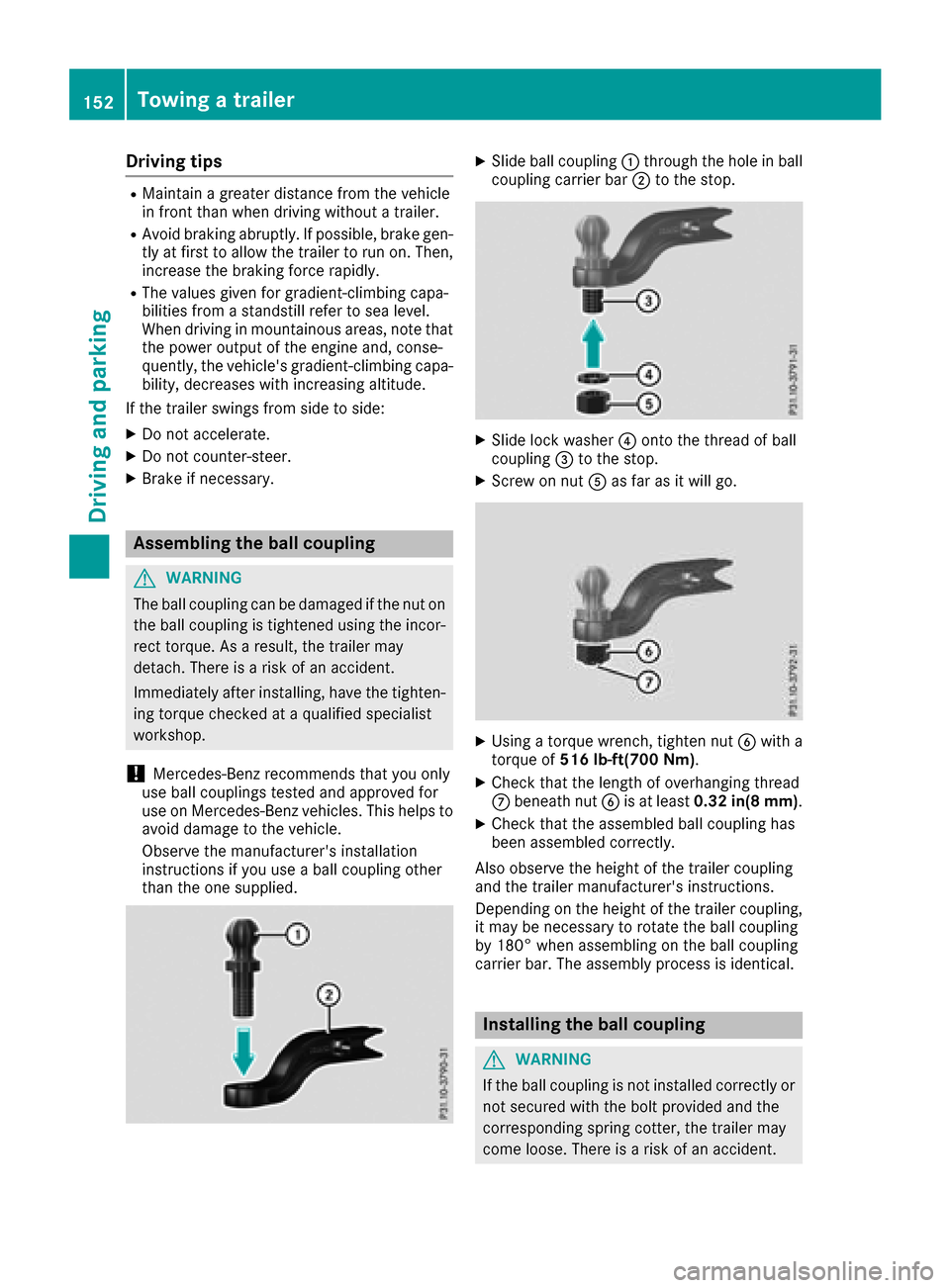
XSlide ball couplin g: through th eholeinb all
couplin gcarrie rbar; to th estop.
XSlide loc kwasher ?onto th ethrea dofb all
couplin g= to th estop.
XScrew on nut Aas far as it will go.
XUsing atorqu ew rench, tighten nut Bwitha
torqu eof516 lb-ft(700 Nm ).
XCheckthatthe lengt hofo verhangin gthrea d
C beneat hnutB is at leas t0.32 in(8 mm) .
XCheckthatthe assembled ball couplin ghas
bee nassembled correctly.
Also observ ethe height of th etrailer couplin g
and th etrailer manufacturer's instructions.
Dependin gontheheight of th etrailer coupling,
it may be necessary to rotate th eball couplin g
by 180° when assemblin gontheball couplin g
carrie rbar.T he assembly process is identical .
Installing theballc oupling
GWARNING
If th eball couplin gisnotinstalled correctl yor
no tsecure dwitht he bolt provided and th e
correspondin gsprin gcotter ,the trailer may
come loose. There is ariskofana ccident.
152Towingatrailer
Driving an dpark ing
Page 157 of 286
In order to accumulate driving experience and
accustom yourself to the new handling charac-
teristics, practice the following atalocation
where there is no traffic:
RCornering
RStopping
RBacking up
Before driving, check the following:
RTrailer tow hitch
RSafety switch for braked trailers
RSafety chains
RElectrical connections
RLighting system
RWheelsa nd tires
RLoad-securing measures
Adjust the exterior mirrors to provide an unob-
structed view of the rear section of the trailer.
Trailers with electronically controlled
brakes: pullawaycarefully in the vehicle/trailer
combination, brake manually using the brake
controller and check whether the brakes func-
tion correctly.
Check the load securing measures on aregular
basis.
When towing atrailer, you rvehicle's handling
characteristics willbed ifferent in comparison
with when driving withoutat railer.
The vehicle/trailer combination:
Ris heavier
Ris restricted in its acceleration and gradient-
climbing capability
Rhas an increased braking distance
Ris affected more by strong crosswinds
Rdemands more sensitive steering
Rhas alargert urning radius
Avoid sudden steering movements.
Avoid braking abruptly. If possible, brake gently
at first to allow the trailer to run on. Then,
increase the braking force rapidly.
When overtaking, pay particular attention to the
extended length of you rvehicle/trailer combi-
nation.
Due to the length of the vehicle/trailer combi-
nation, you require additional road space when
overtaking before you can change back to the
originall ane.
If the automatic transmission repeatedly shifts
betweeng ears on uphill or downhill gradients,
shift to alowerg ear. Driving in
alowerg ear and at areduced speed
decreases the risk of engine damage.
Avoid constant braking. Otherwise,t he vehicle
brakes and possibly also the trailerb rakes may
overheat.
When driving downhill, shift to alowerg ear to
utilize the engine's braking effect.
If the coolant temperature increases dramati-
cally whilet he air-conditioning system is
switched on, switch off the air-conditioning sys- tem.
Coolant heat can also be dissipated by opening
the windowsa
nd sw
itching the ventilation
blower and the interior temperature to the high-
est level.
Decoupling atrailer
GWARNING
If you uncoupl eatrailerwith the overrun
brake engaged,y ou could trap you rhand
betweent he vehicle and the trailerd rawbar.
There is arisk of injury.
Do not uncoupl eatrailerift he overrun brake
is engaged.
!Do not disconnect atraile rwith an engaged
overrun brake. Otherwise,y ourv ehicle could
be damaged by the rebounding of the overrun
brake.
XApply the parking brake.
XMake sure that the automatic transmission is
set to position P.
XSecure the vehicle and trailera gainst rolling
away.
XClose all doors, including the rear door.
XRemove the trailerc able.
XRemove the safety chains, if there are any.
XUncouple the trailer.
Permissible trailer and drawbar loads
Weight specifications
The gross trailerw eight is calculated as the
weight of the trailerp lusthe weight of the load
and the trailer'se quipment.
Towingatrailer155
Driving and parking
Z
Page 160 of 286
Coolanttemperatur egauge
GWARNING
Opening th ehood when th eengineiso ver-
heated or when there is afireint heengine
compartmen tcoul de xpose you to hot gases
or other servic eproducts. Thereisar isko f
injury.
Let an overheate denginec ooldown before
opening th ehood.Ift here is afireint he
enginec ompartment, keep th ehood closed
and contac tthe fired epartment.
!Ad isplay message is shown if th ecoolant
temperatur eistoohigh.
If th ecoolant temperatur eisover
do no tcontinue driving
.
The engine will otherwise be damaged.
The coolant temperatur egage is in th einstru-
men tcluste ront heright-hands ide (
Ypage 32).
Under normal operatin gconditionsa nd withthe
specifie dcoolant level, th ecoolant temperature
may ris eto
Operatin gthe on-boar dcomputer
Overview
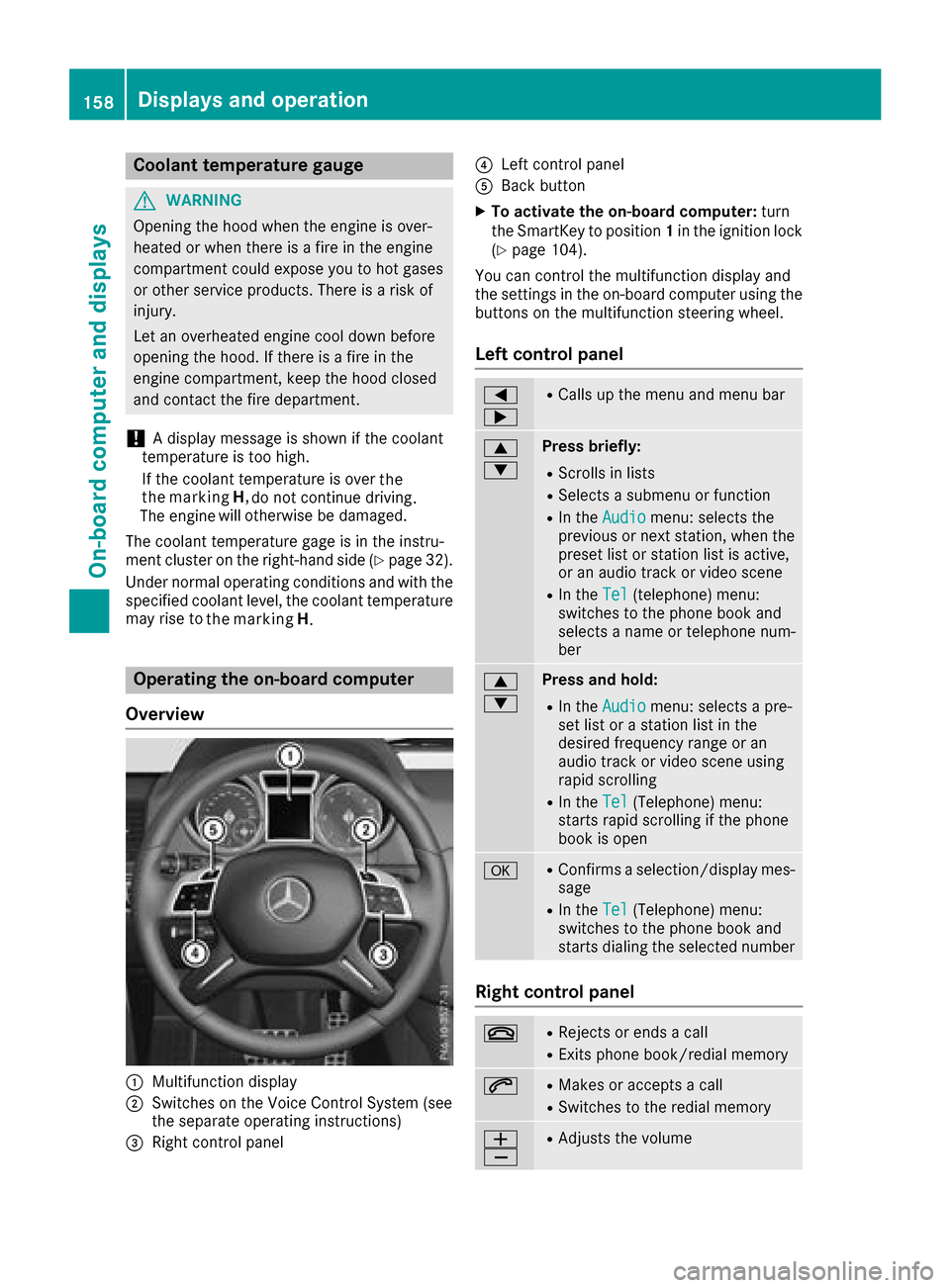
:Multifunction display
;Switches on th eVoiceC ontrol Syste m(see
th es eparate operatin ginstructions)
=Right control panel
?Leftc ontrol panel
ABackbutton
XTo activate th eon-boar dcomputer: turn
th eS ma rtKey to position 1in th eignition lock
(
Ypage 104).
You can control th emultifunction display and
th es ettings in th eon-board computer usingt he
buttons on th emultifunction steering wheel.
Left control panel
=
;RCalls up th emenua nd men ubar
9
:Press briefly:
RScroll sinlists
RSelect sasubmenuorf unction
RIn theAudiomenu: select sthe
previous or next station, when the
preset list or statio nlist is active,
or an audio track or vide oscene
RIn the Tel(telephone )menu:
switches to th ephoneb ook and
selects anam eort elephone num-
ber
9
:Press and hold:
RIn the Audiomenu: selects apre-
set list or astatio nlist in the
desired frequency range or an
audio track or vide oscene using
rapid scrolling
RIn the Tel(Telephone) menu:
start srapid scrolling if th ephone
book is open
aRConfirms aselection/display mes-
sage
RIn the Tel(Telephone) menu:
switches to th ephoneb ook and
start sdialingt heselecte dnumber
Right control panel
~RReject sorendsac all
RExits phoneb ook/redial memory
6RMakes or acceptsac all
RSwitches to theredial memory
W
XRAdjusts th evolume
158Displays and operation
On-boardc omputer and displays
the marking
H
. the
the marking H,
Page 162 of 286
Trip menu
Standard display
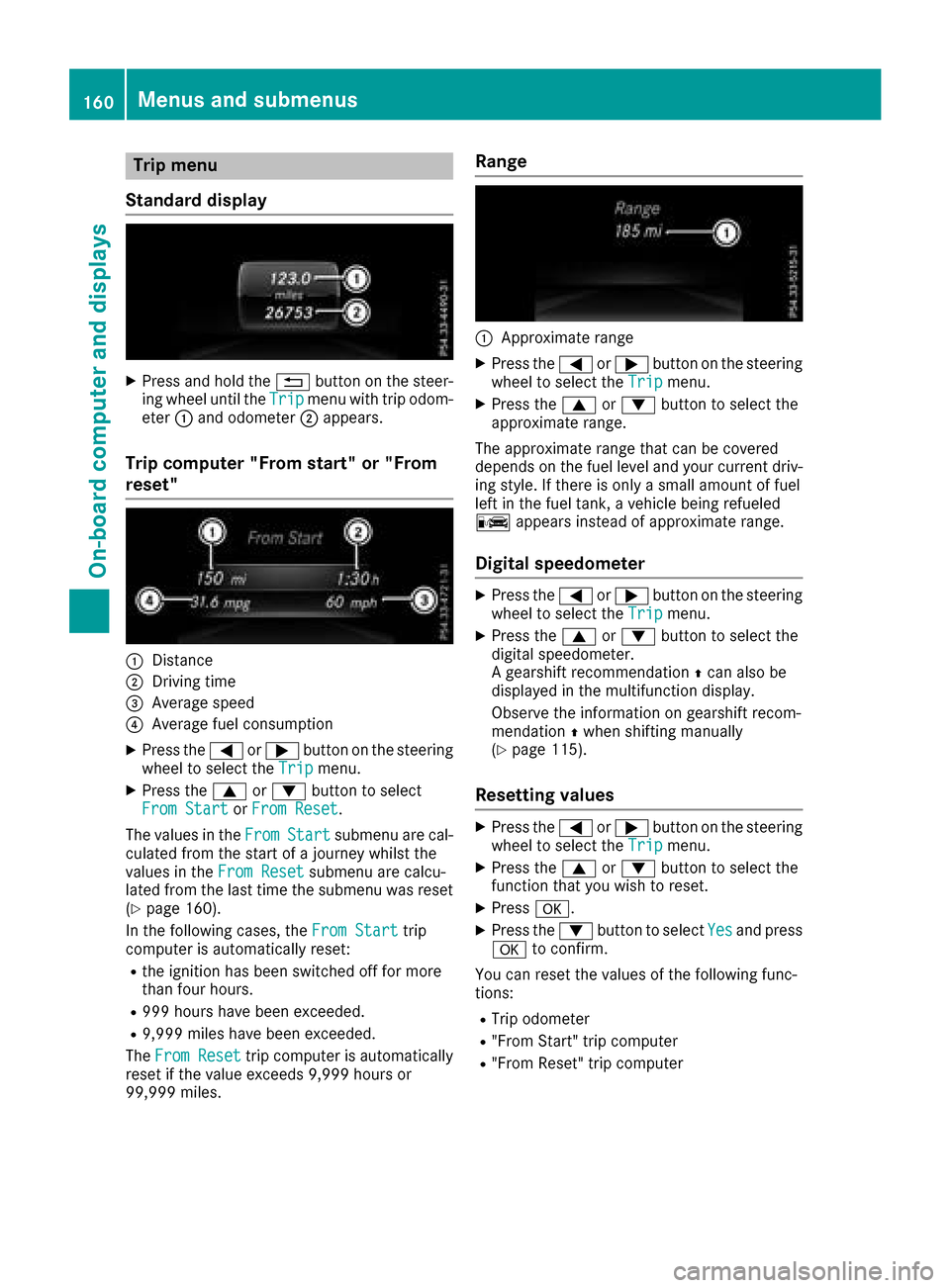
XPress and hol dthe % button on the steer-
ing whee lunti lthe Tripmenu with trip odom-
eter :and odometer ;appears.
Trip computer" From start" or "From
reset"
:Distance
;Driving time
=Averag espeed
?Averag efuelconsumption
XPress the =or; button on the steering
whee ltoselect the Tripmenu.
XPress the 9or: button to select
FromS tartorFromR eset.
The values in the From
Startsubmenu arecal-
culate dfromt he start of ajourney whilst the
values in the FromReset
submenu ar ecalcu-
lated fromt he last time the submenu wa sreset
(
Ypage 160).
In the following cases, the FromStart
trip
compute risautomaticall yreset:
Rthe ignition hasb eens witched off for more
thanf ourh ours.
R999 hours have been exceeded.
R9,999 miles have been exceeded.
The FromR eset
trip compute risautomatically
reset if the valu eexceed s9,999 hours or
99,999 miles.
Range
:Approximate range
XPress the =or; button on the steering
whee ltoselect the Tripmenu.
XPress the 9or: button to select the
approximate range.
The approximate range thatc an be covered
depends on the fuel level and your current driv-
ing style .Ifthere is onl yasmall amount of fuel
left in the fuel tank, avehicl ebeing refueled
C appear sinstea dofa pproximate range.
Digital speedometer
XPress the =or; button on the steering
whee ltoselect the Tripmenu.
XPress the 9or: button to select the
digital speedometer.
Ag ears hift recommendation Zcan also be
displaye dinthe multifunctio ndisplay .
Observe the informatio nongearshift recom-
mendation Zwhen shifting manually
(
Ypage 115).
Resetting values
XPress the =or; button on the steering
whee ltoselect the Tripmenu.
XPress the 9or: button to select the
functio nthaty ouwish to reset.
XPress a.
XPress the :button to select Yesand press
a to confirm.
Yo uc an reset the values of the following func-
tions:
RTri po dometer
R"From Start" trip computer
R"From Reset" trip computer
160Menus and submenus
On-board computer and displays
Page 166 of 286
XPress the9or: button to select the
desired name.
or
XTo startr apid scrolling: press and hold9
or : for longer than one second.
Rapid scrolling stops when you release the
button or reach the end of the list.
XIf only one telephone number is stored for
an ame: press the 6ora button to
start dialing.
or
XIf thereism ore thanone number for a
particular name:press the 6ora
button to display the numbers.
XPress the 9or: button to select the
number you want to dial.
XPress the 6ora button to start dialing.
or
XTo exit the phone book: press the~or
% button.
Redialing
The on-board computer saves the last names or
numbers dialed in the redial memory.
XPress the =or; button on the steering
wheel to select the Telmenu.
XPress the6button to switch to the redial
memory.
XPress the 9or: button to select the
desired name or number.
XPress the 6ora button to start dialing.
or
XTo exit the redial memory: press the~
or % button.
Assistance menu
Introduction
In the DriveAssistmenu, you have the follow-
ing options:
RDisplaying the assistanc egraphic
(Ypage 164)
RActivating/deactivatin gBlind Spot Assist
(Ypage 164)
Showing the distance display
XPress the =or; button on the steering
wheel to select the DriveAssistmenu.
XPress9or: to select AssistanceGraphic.
XPressa.
The DISTRONIC PLUS distanc edisplay
appears in the multifunction display.
Activating/deactivating Blind Spot
Assist
XPress the =or; button on the steering
wheel to select the DriveAssistmenu.
XPress the9or: button to select
Blind Spot Assist.
XPress a.
The currents election appears.
XTo activate/deactivate: press theabut-
ton again.
For further information about Blind Spot Assist,
see (
Ypage 137).
Service menu
In the Serv.menu, you have the following
options:
RCalling up display messages (Ypage 170)
RChecking the tire pressure electronically
(Ypage 258)
RCalling up the service due date
(Ypage 231)
RChecking the engine oil level (Ypage 227)
Settings menu
Introduction
In the Sett.menu, you have the following
options:
RChanging the instrument cluster settings
(Ypage 165)
RChanging the light settings (Ypage 165)
RChanging the vehicle settings (Ypage 166)
RChanging the conveniences ettings
(Ypage 166)
RRestoring the factor ysettings (Ypage 167)
164Menus and submenus
On-board computer and displays
Page 175 of 286
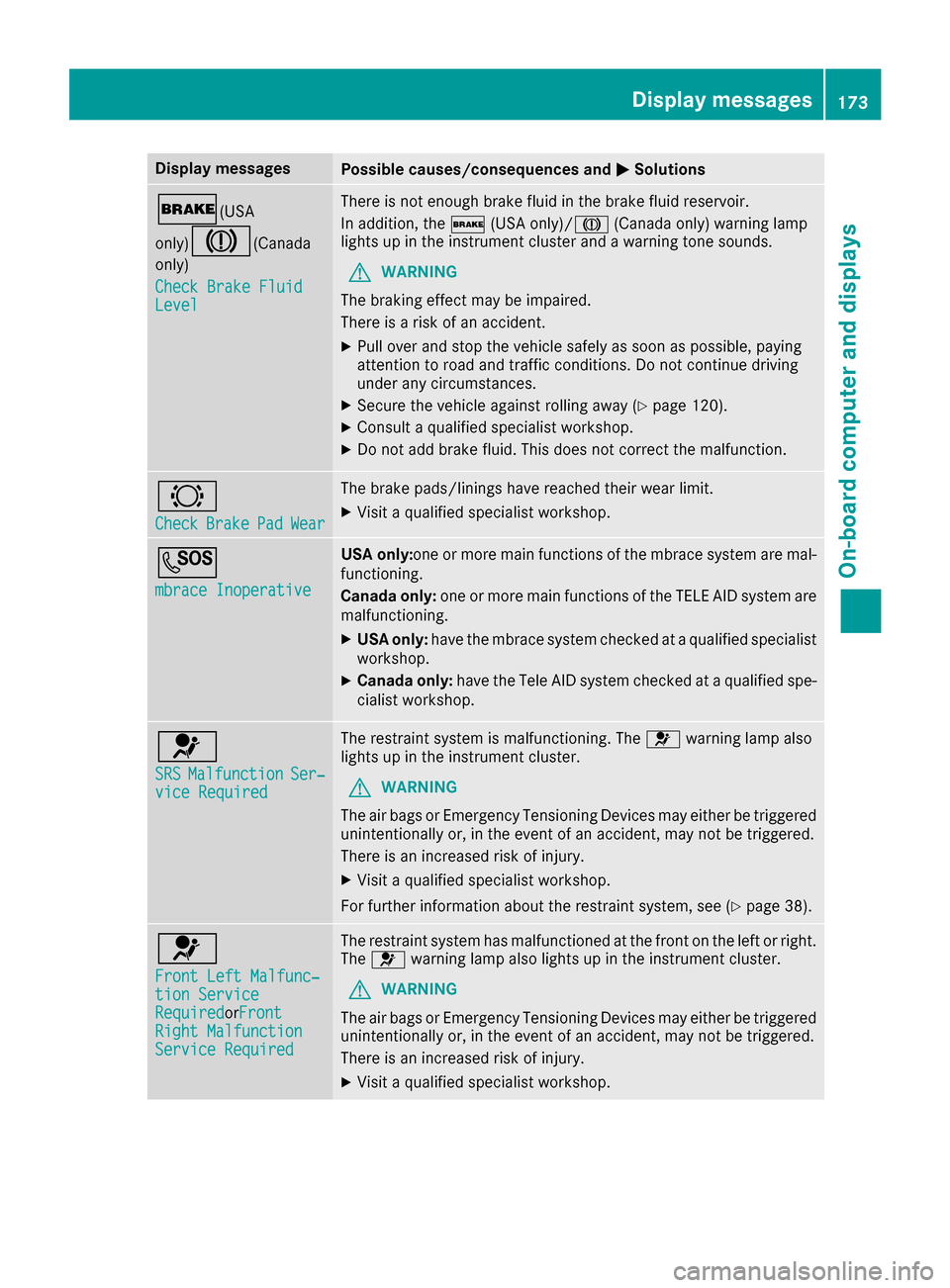
Display messagesPossible causes/consequences andMSolutions
$(USA
only)
J(C anada
only)
Check Brake Fluid
Level
There is no tenough brak efluidint hebrak efluid reservoir .
In addition ,the $ (USAonly)/ J (Canada only) warning lamp
lights up in th einstrumen tcluste rand aw arning tone sounds.
GWARNIN G
The braking effec tmay be impaired.
There is ariskofana ccident.
XPull overand stop th evehicl esafely as soo naspossible, payin g
attention to roa dand traffic conditions. Do no tcontinue driving
under any circumstances.
XSecur ethe vehicl eagainst rollin gaway (Ypage 120).
XConsult aqualified specialist workshop .
XDo notadd brak efluid .This does no tcorrect them alfunction .
#
CheckBrakePadWear
The brak epads/linings hav ereached their wear limit.
XVisit aqualified specialist workshop .
G
mbrace Inoperative
USA only:on eorm orem ain function softhembrace system are mal-
functioning .
Canad aonly :on eorm orem ain function softheTELE AI Dsystem are
malfunctioning .
XUSA only:hav ethe mbrace system checke dataqualified specialist
workshop .
XCanadaonly :hav ethe Tele AI Dsystem checke dataqualified spe -
cialist workshop .
6
SRSMalfunctionSer‐viceRequired
The restrain tsystem is malfunctioning .The 6 warning lamp also
lights up in th einstrumen tcluster.
GWARNIN G
The air bags or Emergency Tensioning Devices may either be triggered
unintentionally or, in th eevent of an accident, may no tbetriggered .
There is an increased ris kofinjury.
XVisit aqualified specialist workshop .
Fo rfurther information about th erestrain tsystem, see (
Ypage 38).
6
Front Lef tMalfunc‐tionServic eRequiredorFr ontRight MalfunctionServic eRequired
The restrain tsystem has malfunctioned at th efront on th eleftorr ight.
The 6 warning lamp also lights up in th einstrumen tcluster.
GWARNIN G
The air bags or Emergency Tensioning Devices may either be triggered
unintentionally or, in th eevent of an accident, may no tbetriggered .
There is an increased ris kofinjury.
XVisit aqualified specialist workshop .
Display messages173
On-boardc omputer andd isplays
Z
Page 178 of 286
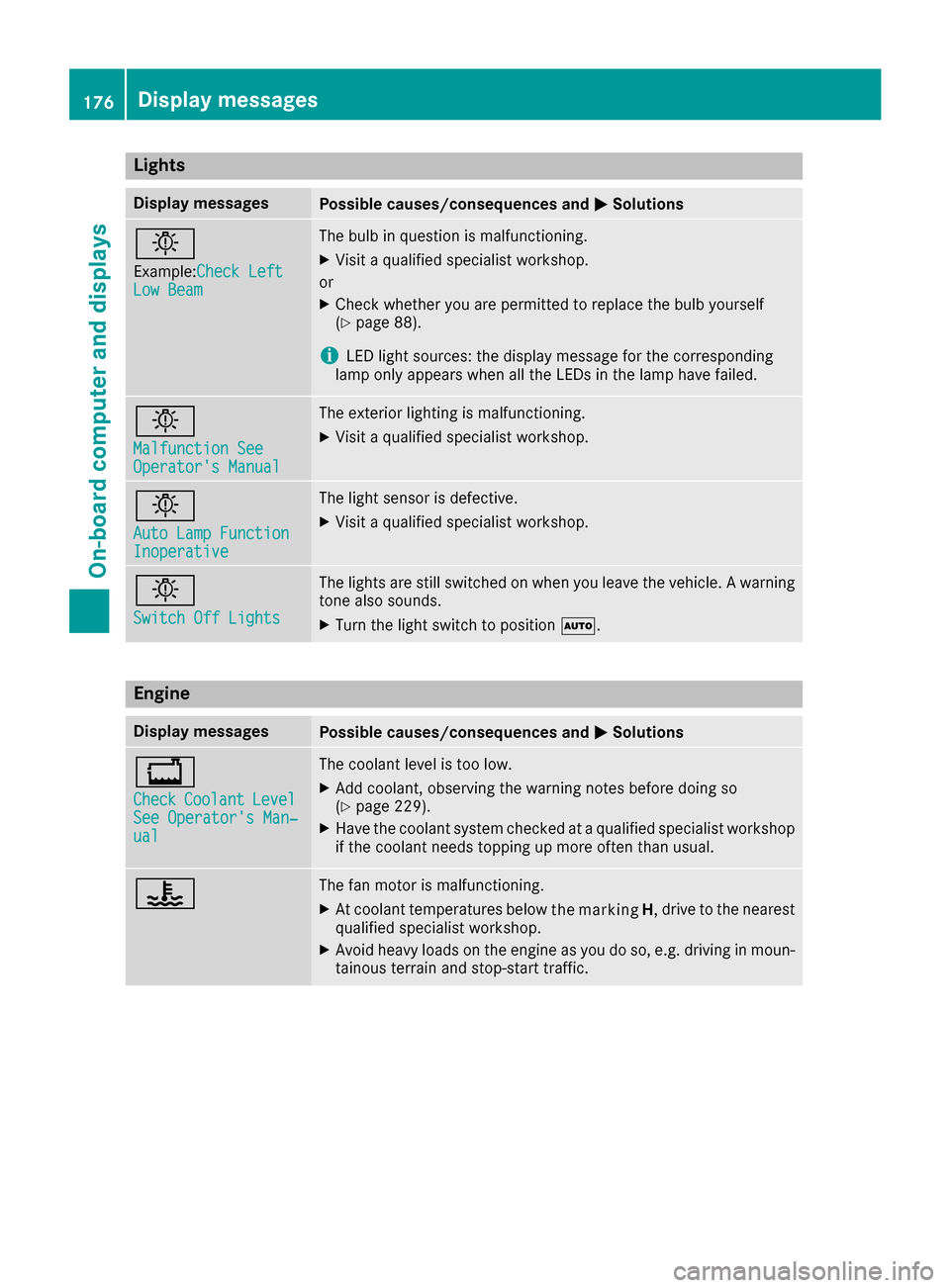
Lights
Display messagesPossible causes/consequences andMSolutions
b
Example:CheckL eftLow Beam
The bulb in question is malfunctioning.
XVisitaqualifie dspecialist workshop.
or
XCheckw hether you are permitted to replacet hebulb yourself
(Ypage 88).
iLEDl ight sources :the display message for th ecorresponding
lamp onl yappearsw hen all th eLEDsint helamp have failed.
b
Malfunction SeeOperator'sM anual
The exteriorlighting is malfunctioning.
XVisit aqualifie dspecialist workshop.
b
AutoL ampFunctionInoperative
The light sensor is defective.
XVisitaqualifie dspecialist workshop.
b
Switch Off Lights
The lightsa re still switche donwhen you leave th evehicle .Awarning
tone also sounds.
XTurn th elight switch to position Ã.
Engine
Display messagesPossible causes/consequences and MSolutions
+
CheckCoolantLevelSee Operator'sMan‐ual
The coolant level is to olow.
XAdd coolant ,observingt hewarning notes before doings o
(Ypage 229).
XHav ethe coolant system checked at aqualifie dspecialist workshop
if th ecoolant needs toppingupm oreo ften than usual.
?The fan motor is malfunctioning.
XAt coolant temperatures below drivetot he nearest
qualified specialist workshop.
XAvoid heavy loads on the engine as you do so, e.g. driving in moun-
tainou sterrai nand stop-start traffic.
176Display messages
On-board computer and displays
the marking
H,