ESP MERCEDES-BENZ G-CLASS 2018 Owner's Guide
[x] Cancel search | Manufacturer: MERCEDES-BENZ, Model Year: 2018, Model line: G-CLASS, Model: MERCEDES-BENZ G-CLASS 2018Pages: 294, PDF Size: 4.86 MB
Page 73 of 294
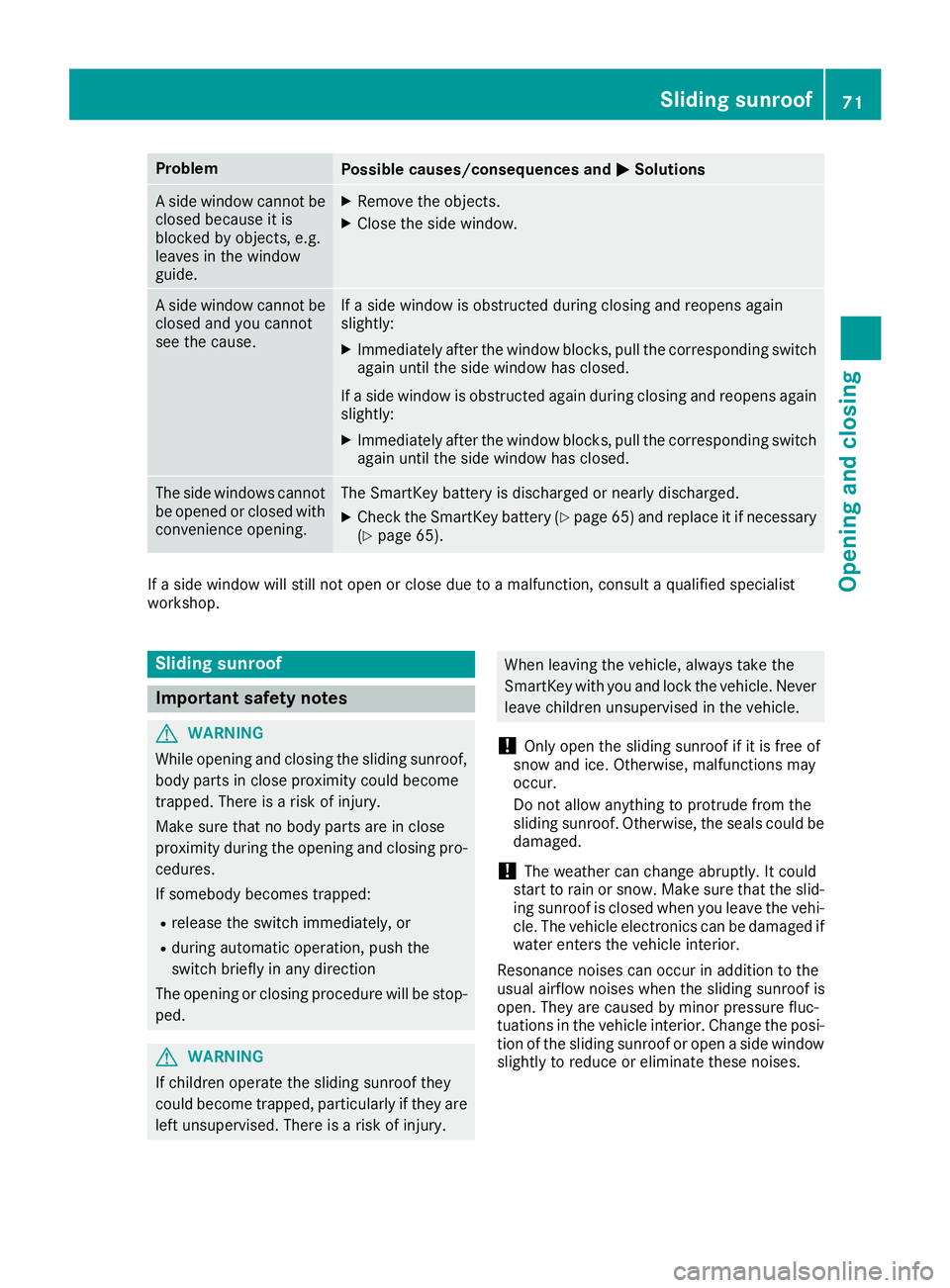
ProblemPossible causes/consequences andMSolutions
A side window cannot be
closed because it is
blocked by objects, e.g.
leaves in the window
guide.XRemove the objects.
XClose the side window.
A side window cannot be
closed and you cannot
see the cause.If a side window is obstructed during closing and reopens again
slightly:
XImmediately after the window blocks, pull the corresponding switch
again until the side window has closed.
If a side window is obstructed again during closing and reopens again slightly:
XImmediately after the window blocks, pull the corresponding switchagain until the side window has closed.
The side windows cannot
be opened or closed with
convenience opening.The SmartKey battery is discharged or nearly discharged.
XCheck the SmartKey battery (Ypage 65) and replace it if necessary
(Ypage 65).
If a side window will still not open or close due to a malfunction, consult a qualified specialist
workshop.
Sliding sunroof
Important safety notes
GWARNING
While opening and closing the sliding sunroof, body parts in close proximity could become
trapped. There is a risk of injury.
Make sure that no body parts are in close
proximity during the opening and closing pro-
cedures.
If somebody becomes trapped:
Rrelease the switch immediately, or
Rduring automatic operation, push the
switch briefly in any direction
The opening or closing procedure will be stop- ped.
GWARNING
If children operate the sliding sunroof they
could become trapped, particularly if they are left unsupervised. There is a risk of injury.
When leaving the vehicle, always take the
SmartKey with you and lock the vehicle. Never
leave children unsupervised in the vehicle.
!Only open the sliding sunroof if it is free of
snow and ice. Otherwise, malfunctions may
occur.
Do not allow anything to protrude from the
sliding sunroof. Otherwise, the seals could be
damaged.
!The weather can change abruptly. It could
start to rain or snow. Make sure that the slid- ing sunroof is closed when you leave the vehi-
cle. The vehicle electronics can be damaged if
water enters the vehicle interior.
Resonance noises can occur in addition to the
usual airflow noises when the sliding sunroof is
open. They are caused by minor pressure fluc-
tuations in the vehicle interior. Change the posi-
tion of the sliding sunroof or open a side window
slightly to reduce or eliminate these noises.
Sliding sunroof71
Opening and closing
Z
Page 86 of 294
XMake sure that the SmartKey is in position2
in the ignition lock (Ypage 105).
XWith the exterior mirror on the front-
passenger side activated, use adjustment
button =to adjust the exterior mirror. In the
exterior mirror, the rear wheel and the curb
should be visible.
XPress memory button M? and one of the
arrows on adjustment button =within three
seconds.
The parking position is stored if the exterior
mirror does not move.
XIf the mirror moves out of position, repeat the
steps.
Calling up a stored parking position set-
ting
XTurn the SmartKey to position 2in the ignition
lock (Ypage 105).
XAdjust the exterior mirror on the front-
passenger side using button ;.
XEngage reverse gear.
The exterior mirror on the front-passenger
side moves to the stored parking position.
The exterior mirror on the front-passenger side
moves back to its original position:
Ras soon as you exceed a speed of 9 mph
(15 km/h)
Rif you press button :for the exterior mirror
on the driver's side
Memory functions
Storing settings
GWARNING
If you use the memory function on the driver's side while driving, you could lose control of
the vehicle as a result of the adjustments
being made. There is a risk of an accident.
Only use the memory function on the driver's
side when the vehicle is stationary.
GWARNING
When the memory function adjusts the seat or steering wheel, you and other vehicle occu-
pants – particularly children – could become
trapped. There is a risk of injury.
While the memory function is making adjust-
ments, make sure that no one has any body
parts in the sweep of the seat or steering
wheel. If somebody becomes trapped, imme-diately release the memory function position
button. The adjustment process is stopped.
GWARNING
Children could become trapped if they acti-
vate the memory function, particularly when
unattended. There is a risk of injury.
When leaving the vehicle, always take the
SmartKey with you and lock the vehicle. Never
leave children unsupervised in the vehicle.
The memory function can be used if the ignition
is switched off.
With the memory function, you can store up to
three different settings, e.g. for three different
people.
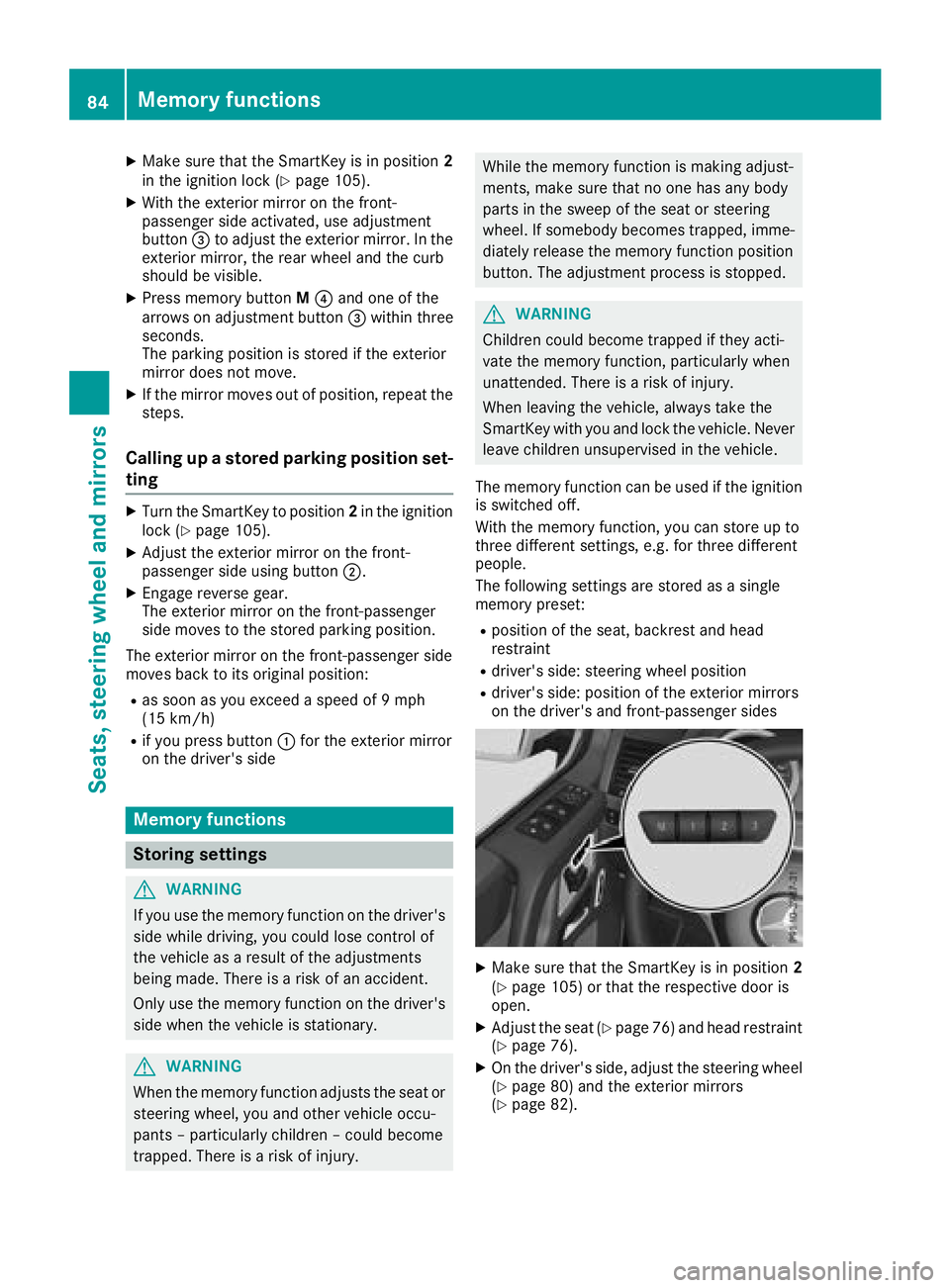
The following settings are stored as a single
memory preset:
Rposition of the seat, backrest and head
restraint
Rdriver's side: steering wheel position
Rdriver's side: position of the exterior mirrors
on the driver's and front-passenger sides
XMake sure that the SmartKey is in position 2
(Ypage 105) or that the respective door is
open.
XAdjust the seat (Ypage 76) and head restraint
(Ypage 76).
XOn the driver's side, adjust the steering wheel (Ypage 80) and the exterior mirrors
(Ypage 82).
84Memory functions
Seats, steering wheel and mirrors
Page 89 of 294
XTo switch on the daytime running lamps:
switch on theDaytime Running Lights
function via the on-board computer
(Ypage 169).
XTurn the light switch to the Ãposition.
With the engine running: depending on the
ambient light, the daytime running lamps or
the low-beam headlamps are switched on.
When the low-beam headlamps are switched
on, the green Lindicator lamp in the
instrument cluster lights up.
If the engine is running and you turn the light
switch to the TorL position, the manual
settings take precedence over the daytime run-
ning lamps.
Automatic headlamp mode
GWARNING
When the light switch is set to Ã, the low-
beam headlamps may not be switched on
automatically if there is fog, snow or other
causes of poor visibility due to the weather
conditions such as spray. There is a risk of an
accident.
In such situations, turn the light switch to
L.
The automatic headlamp feature is only an aid.
The driver is responsible for the vehicle's light-
ing at all times.
à is the favored light switch setting.
The light setting is automatically selected
according to the brightness of the ambient light,
but not in the event of poor visibility due to
weather conditions such as fog, snow or spray.
XTo switch on the automatic headlamps:
turn the light switch to the Ãposition.
With the SmartKey in position 1in the igni-
tion lock, the parking lamps are switched on
or off automatically depending on the bright-
ness of the ambient light.
If you have switched on the Daytime Run‐
ning Lightsfunction via the on-board com-
puter, the daytime running lamps or the park-
ing lamps and low-beam headlamps will
switch on or off automatically while the
engine is running.
When the low-beam headlamps are switched
on, the green Lindicator lamp in the
instrument cluster lights up.
Rear fog lamp
The rear fog lamp improves visibility of your
vehicle for the traffic behind in the event of thick
fog. You must observe the legal requirements
for the country in which you are currently driving
when operating the rear fog lamp.
XTo switch on the rear fog lamp: turn the
SmartKey in the ignition lock to position 2or
start the engine.
XTurn the light switch to the LorÃ
position.
XPress the Rbutton.
The yellow Rindicator lamp on the instru-
ment cluster lights up.
Parking lamps
!
If the battery charge is very low, the parking
lamps or standing lamps are automatically
switched off to enable the next engine start.
Always park your vehicle safely and in a well lit
area, in accordance with the relevant legal
stipulations. Avoid using the Tparking
lamps over a period of several hours. If pos-
sible, switch on the right-hand Xor left-
hand W standing lamps.
XTo switch on: turn the light switch to the
T position.
The green Tindicator lamp on the instru-
ment cluster lights up.
Standing lamps
Switching on the standing lamps ensures the
corresponding side of the vehicle is illuminated.
XTo switch on the standing lamp: turn the
SmartKey to position uin the ignition lock or
remove the SmartKey.
XTurn the light switch to the W(left-hand
side of the vehicle) or X(right-hand side of
the vehicle) position.
Headlamp cleaning system
The headlamps are cleaned automatically if the
"Wipe with washer fluid" function is operated
ten times while the lights are on and the engine
is running (
Ypage 93). When you switch off
Exterior lighting87
Lights and windshield wiper s
Z
Page 90 of 294
the ignition, the automatic headlamp cleaning
system is reset and counting is resumed from 0.
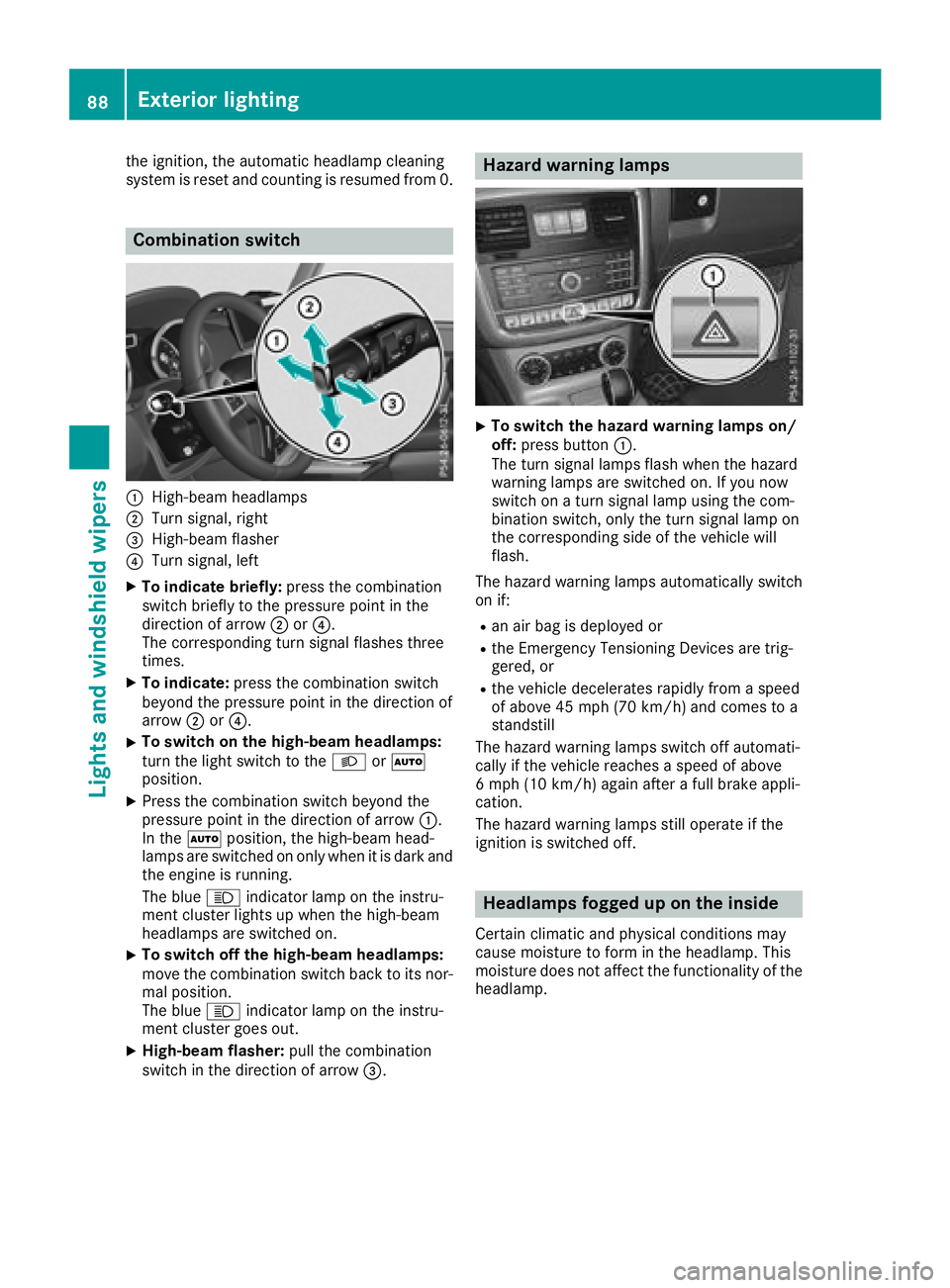
Combination switch
:High-beam headlamps
;Turn signal, right
=High-beam flasher
?Turn signal, left
XTo indicate briefly:press the combination
switch briefly to the pressure point in the
direction of arrow ;or?.
The corresponding turn signal flashes three
times.
XTo indicate: press the combination switch
beyond the pressure point in the direction of
arrow ;or?.
XTo switch on the high-beam headlamps:
turn the light switch to the LorÃ
position.
XPress the combination switch beyond the
pressure point in the direction of arrow :.
In the Ãposition, the high-beam head-
lamps are switched on only when it is dark and the engine is running.
The blue Kindicator lamp on the instru-
ment cluster lights up when the high-beam
headlamps are switched on.
XTo switch off the high-beam headlamps:
move the combination switch back to its nor-
mal position.
The blue Kindicator lamp on the instru-
ment cluster goes out.
XHigh-beam flasher: pull the combination
switch in the direction of arrow =.
Hazard warning lamps
XTo switch the hazard warning lamps on/
off:press button :.
The turn signal lamps flash when the hazard
warning lamps are switched on. If you now
switch on a turn signal lamp using the com-
bination switch, only the turn signal lamp on
the corresponding side of the vehicle will
flash.
The hazard warning lamps automatically switch
on if:
Ran air bag is deployed or
Rthe Emergency Tensioning Devices are trig-
gered, or
Rthe vehicle decelerates rapidly from a speed
of above 45 mph (70 km/h) and comes to a
standstill
The hazard warning lamps switch off automati-
cally if the vehicle reaches a speed of above
6 mph (10 km/h) again after a full brake appli-
cation.
The hazard warning lamps still operate if the
ignition is switched off.
Headlamps fogged up on the inside
Certain climatic and physical conditions may
cause moisture to form in the headlamp. This
moisture does not affect the functionality of the
headlamp.
88Exterior lighting
Lights and windshield wiper s
Page 94 of 294
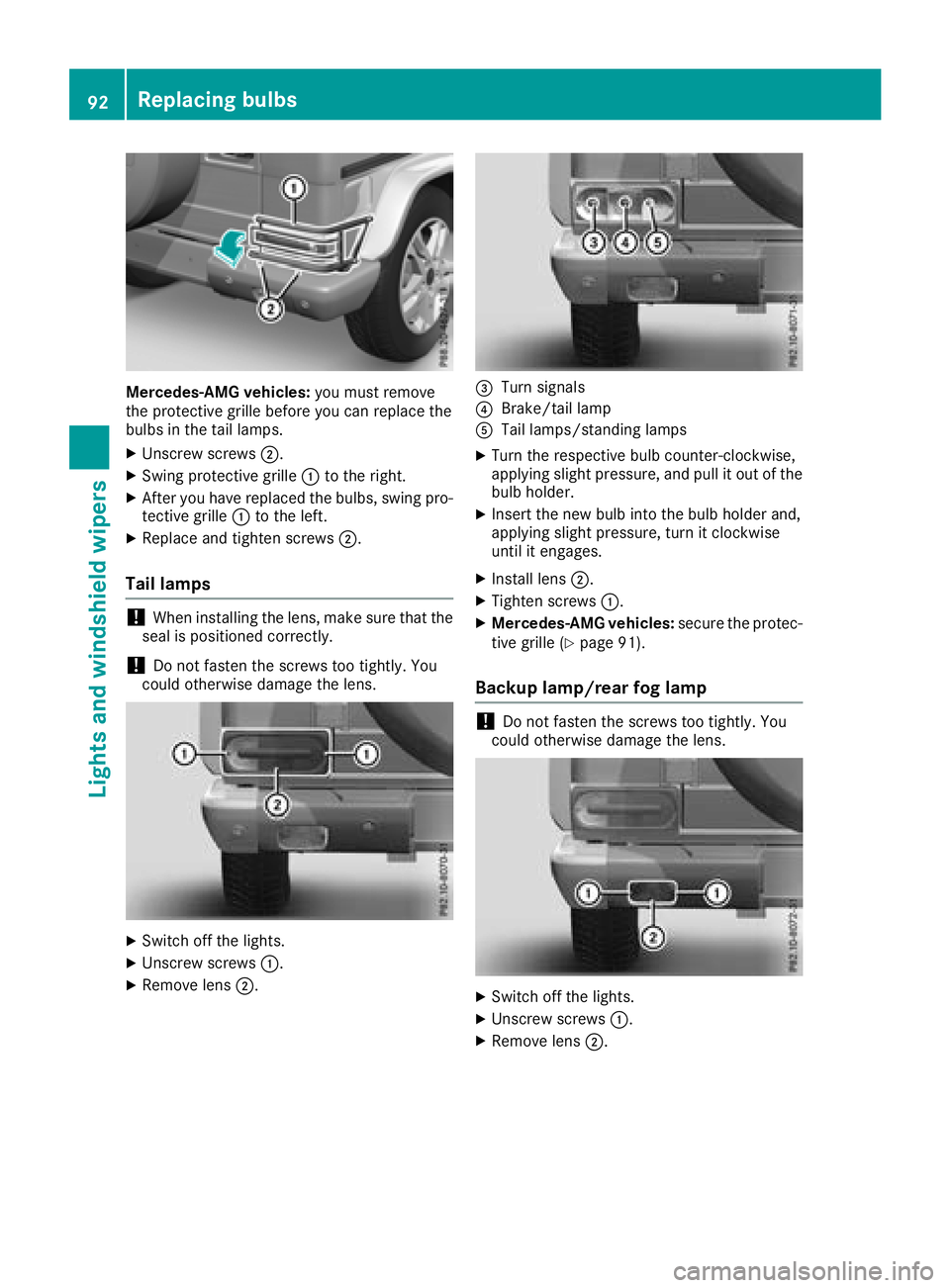
Mercedes-AMG vehicles:you must remove
the protective grille before you can replace the
bulbs in the tail lamps.
XUnscrew screws ;.
XSwing protective grille :to the right.
XAfter you have replaced the bulbs, swing pro-
tective grille :to the left.
XReplace and tighten screws ;.
Tail lamps
!When installing the lens, make sure that the
seal is positioned correctly.
!Do not fasten the screws too tightly. You
could otherwise damage the lens.
XSwitch off the lights.
XUnscrew screws :.
XRemove lens;.
=Turn signals
?Brake/tail lamp
ATail lamps/standing lamps
XTurn the respective bulb counter-clockwise,
applying slight pressure, and pull it out of the
bulb holder.
XInsert the new bulb into the bulb holder and,
applying slight pressure, turn it clockwise
until it engages.
XInstall lens;.
XTighten screws :.
XMercedes-AMG vehicles: secure the protec-
tive grille (Ypage 91).
Backup lamp/rear fog lamp
!Do not fasten the screws too tightly. You
could otherwise damage the lens.
XSwitch off the lights.
XUnscrew screws :.
XRemove lens;.
92Replacing bulbs
Lights and windshield wipers
Page 96 of 294
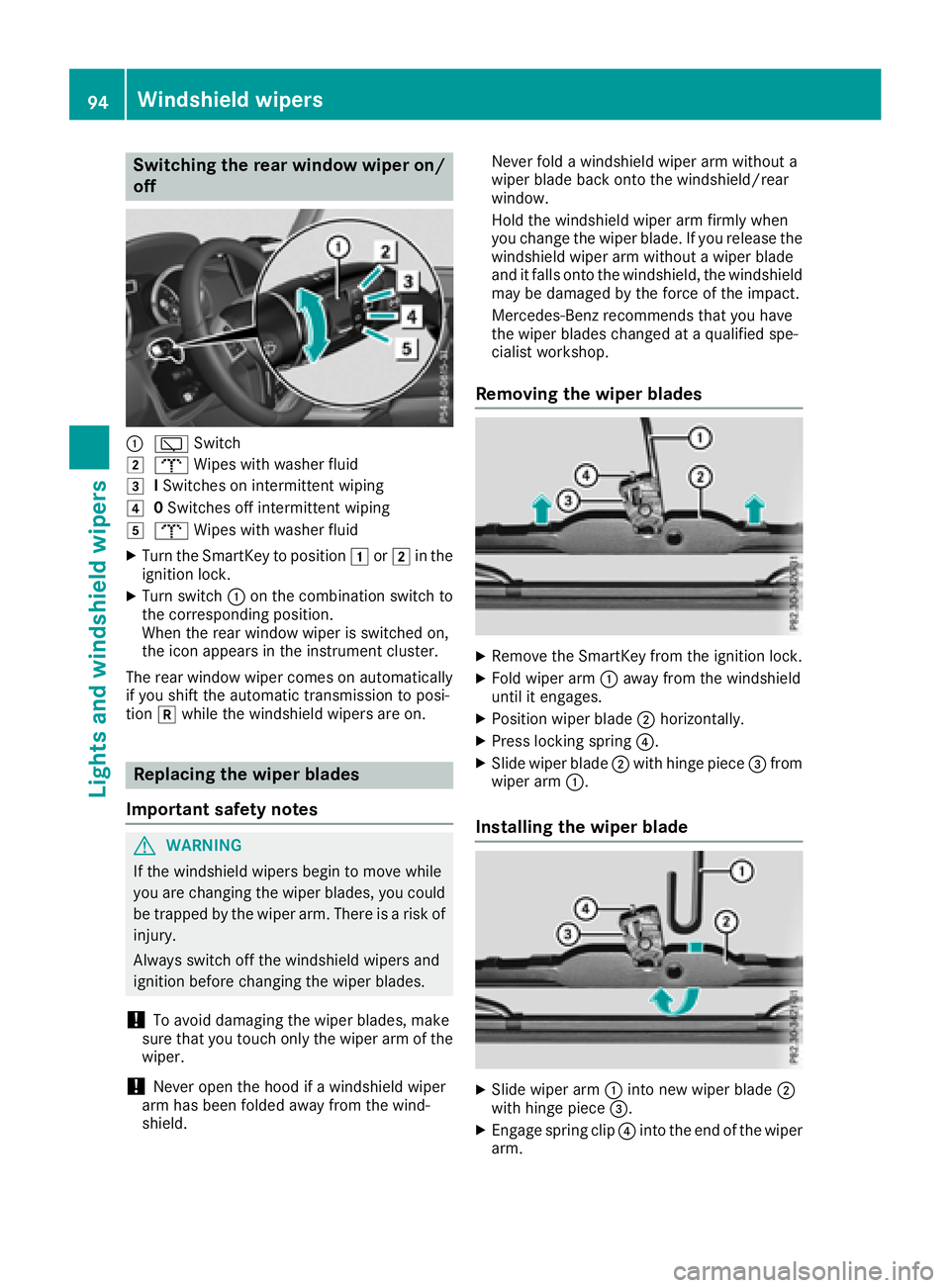
Switching the rear window wiper on/
off
:èSwitch
2bWipes with washer fluid
3ISwitches on intermittent wiping
40 Switches off intermittent wiping
5b Wipes with washer fluid
XTurn the SmartKey to position 1or2 in the
ignition lock.
XTurn switch :on the combination switch to
the corresponding position.
When the rear window wiper is switched on,
the icon appears in the instrument cluster.
The rear window wiper comes on automatically
if you shift the automatic transmission to posi-
tion kwhile the windshield wipers are on.
Replacing the wiper blades
Important safety notes
GWARNING
If the windshield wipers begin to move while
you are changing the wiper blades, you could be trapped by the wiper arm. There is a risk of
injury.
Always switch off the windshield wipers and
ignition before changing the wiper blades.
!To avoid damaging the wiper blades, make
sure that you touch only the wiper arm of the
wiper.
!Never open the hood if a windshield wiper
arm has been folded away from the wind-
shield. Never fold a windshield wiper arm without a
wiper blade back onto the windshield/rear
window.
Hold the windshield wiper arm firmly when
you change the wiper blade. If you release the
windshield wiper arm without a wiper blade
and it falls onto the windshield, the windshield
may be damaged by the force of the impact.
Mercedes-Benz recommends that you have
the wiper blades changed at a qualified spe-
cialist workshop.
Removing the wiper blades
XRemove the SmartKey from the ignition lock.
XFold wiper arm :away from the windshield
until it engages.
XPosition wiper blade ;horizontally.
XPress locking spring ?.
XSlide wiper blade;with hinge piece =from
wiper arm :.
Installing the wiper blade
XSlide wiper arm :into new wiper blade ;
with hinge piece =.
XEngage spring clip ?into the end of the wiper
arm.
94Windshield wipers
Lights and windshield wipers
Page 109 of 294
verter to reach its operating temperature
more quickly.
Pulling away with a trailer
To ensure that you do not roll back when pulling
away on an uphill slope, apply the parking brake.
XDepress the brake pedal and keep it
depressed.
XShift the automatic transmission to position
hork.
iAlways wait until the shifting process is
complete before driving off.
XRelease the parking brake (Ypage 123).
XRelease the brake pedal.
XCarefully depress the accelerator pedal.
Hill start assist
Hill start assist helps you when pulling away
forward or in reverse on an uphill gradient. It
holds the vehicle for a short time after you have
removed your foot from the brake pedal. This
gives you enough time to move your foot from
the brake pedal to the accelerator pedal and to
depress it before the vehicle begins to roll.
GWARNING
After a short time, hill start assist will no lon-
ger brake your vehicle and it could roll away.
There is a risk of an accident and injury.
Therefore, quickly move your foot from the
brake pedal to the accelerator pedal. Never
leave the vehicle when it is held by hill start
assist.
Hill start assist will not function if:
Ryou are pulling away on a level road or on a
downhill gradient
Rthe transmission is in position i
Rthe parking brake is applied
RESP®is malfunctioning
ECO start/stop function
Important safety notes
GWARNING
If the engine is switched off automatically and
you exit the vehicle, the engine is restarted
automatically. The vehicle may begin moving.
There is a risk of accident and injury.
If you wish to exit the vehicle, always turn off
the ignition and secure the vehicle against
rolling away.
General notes
The ECO start/stop function switches the
engine off automatically when the vehicle stops
moving.
The engine starts automatically when the driver
wants to pull away again. The ECO start/stop
function thereby helps you to reduce the fuel
consumption and emissions of your vehicle.
The ECO start/stop function is activated each
time the engine is switched on or when you
switch the drive program (except Mercedes-
AMG vehicles).
Mercedes-AMG vehicles: the ECO start/stop
function is activated after the engine is restarted
and is only available in drive program C. When
drive program Sor Mis selected, the ECO start/
stop function is deactivated.
The system is operational if all conditions for
automatic engine switch-off have been fulfilled
(
Ypage 108) and the èsymbol is shown in
green in the multifunction display.
If not all conditions for automatic engine switch-
off are fulfilled (
Ypage 108), the èECO
symbol is shown in yellow in the multifunction
display.
If the ECO start/stop function has been man-
ually deactivated (
Ypage 108) or a malfunction
has caused the system to be deactivated, the
è ECO symbol is not displayed.
Driving107
Driving and parking
Z
Page 112 of 294
Problems with the engine
ProblemPossible causes/consequences andMSolutions
The engine does not
start. The starter motor
can be heard.RThere is a malfunction in the engine electronics.
RThere is a malfunction in the fuel supply.
XTurn the SmartKey back to positiongin the ignition lock before
attempting to start the engine again.
XTry to start the engine again (Ypage 106). Avoid excessively long
and frequent attempts to start the engine as these will drain the
battery.
If the engine does not start after several attempts:
XConsult a qualified specialist workshop.
The engine does not
start. The starter motor
can be heard. The yellow
reserve fuel warning
lamp is lit and the needle
of the fuel gage display
shows 0.The fuel tank is empty.
XRefuel the vehicle.
The engine does not
start. You cannot hear
the starter motor.The on-board voltage is too low because the battery is too weak or
discharged.
XJump-start the vehicle (Ypage 249).
If the engine does not start despite attempts to jump-start it:
XConsult a qualified specialist workshop.
The starter motor was exposed to a thermal load that was too high.
XAllow the starter motor to cool down for approximately two minutes.
XTry to start the engine again.
If the engine still does not start:
XConsult a qualified specialist workshop.
The engine is not running
smoothly and is misfir-
ing.There is a malfunction in the engine electronics or in a mechanical
component of the engine management system.
XOnly depress the accelerator pedal slightly.
Otherwise, non-combusted fuel may get into the catalytic converter
and damage it.
XHave the cause rectified immediately at a qualified specialist work-
shop.
110Driving
Driving and parking
Page 116 of 294
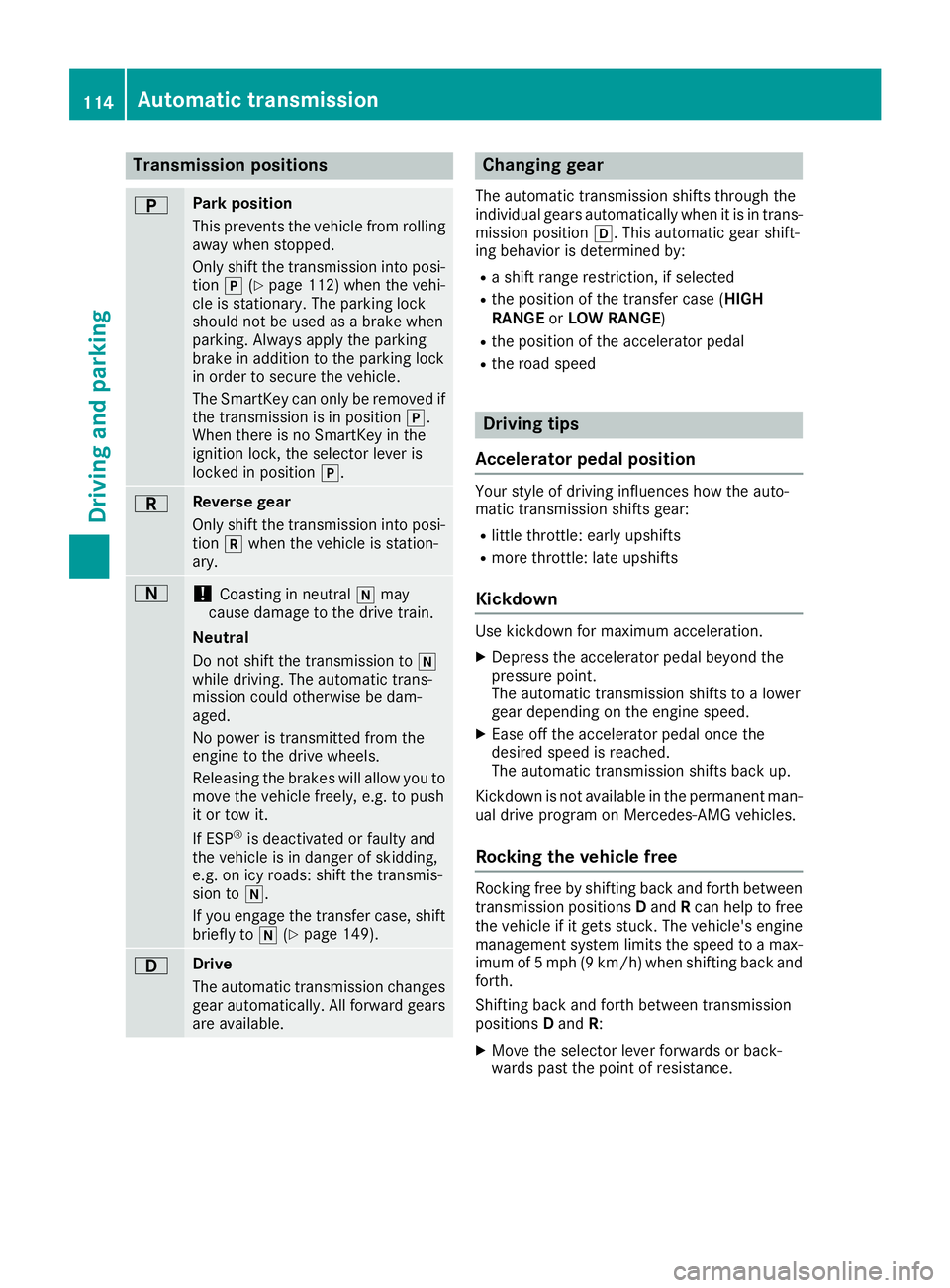
Transmission positions
BPark position
This prevents the vehicle from rolling
away when stopped.
Only shift the transmission into posi-
tion j(
Ypage 112) when the vehi-
cle is stationary. The parking lock
should not be used as a brake when
parking. Always apply the parking
brake in addition to the parking lock
in order to secure the vehicle.
The SmartKey can only be removed if
the transmission is in position j.
When there is no SmartKey in the
ignition lock, the selector lever is
locked in position j.
CReverse gear
Only shift the transmission into posi-
tionkwhen the vehicle is station-
ary.
A!Coasting in neutral imay
cause damage to the drive train.
Neutral
Do not shift the transmission to i
while driving. The automatic trans-
mission could otherwise be dam-
aged.
No power is transmitted from the
engine to the drive wheels.
Releasing the brakes will allow you to
move the vehicle freely, e.g. to push
it or tow it.
If ESP
®is deactivated or faulty and
the vehicle is in danger of skidding,
e.g. on icy roads: shift the transmis-
sion to i.
If you engage the transfer case, shift briefly to i(
Ypage 149).
7Drive
The automatic transmission changes
gear automatically. All forward gears
are available.
Changing gear
The automatic transmission shifts through the
individual gears automatically when it is in trans-
mission position h. This automatic gear shift-
ing behavior is determined by:
Ra shift range restriction, if selected
Rthe position of the transfer case ( HIGH
RANGE orLOW RANGE )
Rthe position of the accelerator pedal
Rthe road speed
Driving tips
Accelerator pedal position
Your style of driving influences how the auto-
matic transmission shifts gear:
Rlittle throttle: early upshifts
Rmore throttle: late upshifts
Kickdown
Use kickdown for maximum acceleration.
XDepress the accelerator pedal beyond the
pressure point.
The automatic transmission shifts to a lower
gear depending on the engine speed.
XEase off the accelerator pedal once the
desired speed is reached.
The automatic transmission shifts back up.
Kickdown is not available in the permanent man-
ual drive program on Mercedes-AMG vehicles.
Rocking the vehicle free
Rocking free by shifting back and forth between
transmission positions Dand Rcan help to free
the vehicle if it gets stuck. The vehicle's engine
management system limits the speed to a max-
imum of 5 mph (9 km/h) when shifting back and
forth.
Shifting back and forth between transmission
positions Dand R:
XMove the selector lever forwards or back-
wards past the point of resistance.
114Automatic transmission
Driving an d parking
Page 119 of 294
Derestricting theshift range
XPull th eright-hand steerin gwhee lpaddle
shifter (Ypage 116).
The automatic transmissio nshift sup on e
gear and restricts th eshift range to th erele-
van tgear .
Clearing th eshift range restriction
XPull and hol dth eright-hand steerin gwhee l
paddle shifter (Ypage 116) until transmissio n
position Dis shown in th emultifunction dis -
play.
The automatic transmissio nshift sfrom th e
curren tshift range directl yto D.
Selecting th eideal shift range
XPull th eleft-han dsteerin gwhee lpaddle
shifter (Ypage 116) and hol dit in position .
The automatic transmissio nshift sto th egear
whic hallow soptimum acceleration and
deceleration .To do this, th eautomatic trans -
missio nshift sdown on eor more gears.
The automatic transmissio ncanno tshift down
beyond secon dgear .To shift to first gear ,you
hav eto pull th elef tsteerin gwhee lpaddle
shifter.
Manual gea rshifting
Temporar ysetting
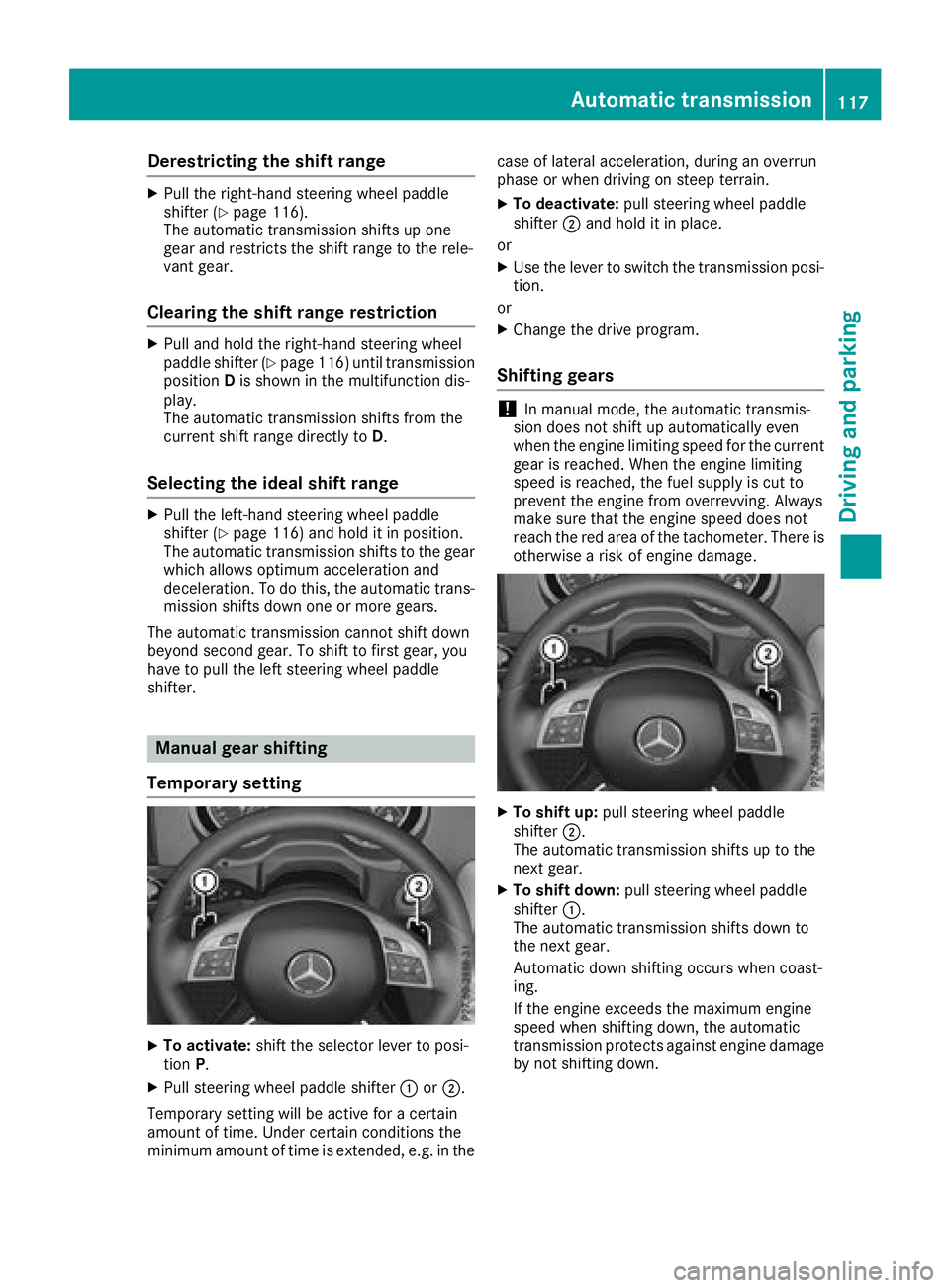
XTo activate :shift th eselecto rlever to posi-
tion P.
XPull steerin gwhee lpaddle shifter :or;.
Temporary setting will be active fo r acertain
amount of time. Under certain condition sth e
minimum amount of time is extended, e.g. in th ecas
eof latera lacceleration ,durin gan overrun
phas eor when drivin gon steep terrain .
XTo deactivate:pull steerin gwhee lpaddle
shifter ;and hol dit in place.
or
XUse th elever to switch th etransmissio nposi-
tion .
or
XChange th edrive program.
Shifting gears
!In manual mode, th eautomatic transmis -
sio ndoe sno tshift up automatically eve n
when th eengin elimitin gspeed fo rth ecurren t
gear is reached. Whe nth eengin elimitin g
speed is reached, th efue lsupply is cut to
preven tth eengin efrom overrevving. Always
mak esur ethat th eengin espeed doe sno t
reach th ered are aof th etachometer. There is
otherwise aris kof engin edamage.
XTo shift up :pull steerin gwhee lpaddle
shifter ;.
The automatic transmissio nshift sup to th e
next gear .
XTo shift down: pull steeringwhee lpaddle
shifter :.
The automatic transmissio nshift sdown to
th enext gear .
Automatic down shiftin goccur swhen coast -
ing.
If th eengin eexceeds th emaximum engin e
speed when shiftin gdown ,th eautomatic
transmissio nprotect sagainst engin edamage
by no tshiftin gdown .
Automatic transmission117
Driving and parking
Z