ESP MERCEDES-BENZ G-CLASS 2018 Service Manual
[x] Cancel search | Manufacturer: MERCEDES-BENZ, Model Year: 2018, Model line: G-CLASS, Model: MERCEDES-BENZ G-CLASS 2018Pages: 294, PDF Size: 4.86 MB
Page 137 of 294
load on the brake system and prevents the
brakes from overheating and wearing too
quickly.
If DISTRONIC PLUS detects a critical risk of col-
lision with the vehicle in front, you will be warned
visually and acoustically. DISTRONIC PLUS can-
not prevent a collision without your intervention.
An intermittent warning tone sounds and the
·distance warning lamp in the instrument
cluster lights up. Brake immediately in order to
increase the distance to the vehicle in front or
take evasive action provided it is safe to do so.
DISTRONIC PLUS operates in the speed range
between 0 mph (0 km/h) and 120 mph
(200 km/h).
Do not use DISTRONIC PLUS while driving on
roads with steep gradients.
As DISTRONIC PLUS transmits radar waves, it
can resemble the radar detectors of the respon-
sible authorities. You can refer to the relevant
chapter in the Operator's Manual if questions
are asked about this.
iUSA only: This device has been approved by
the FCC as a "Vehicular Radar System". The
radar sensor is intended for use in an auto-
motive radar system only. Removal, tamper-
ing, or altering of the device will void any war-
ranties, and is not permitted by the FCC. Do
not tamper with, alter, or use in any non-
approved way.
Any unauthorized modification to this device
could void the user's authority to operate the
equipment.
iCanada only: This device complies with
RSS-210 of Industry Canada. Operation is
subject to the following two conditions:
1. This device may not cause interference,
and
2. This device must accept any interference
received, including interference that may
c
ause undesired operation of the device.
Removal, tampering, or altering of the device
will void any warranties, and is not permitted. Do not tamper with, alter, or use in any non-
approved way.
Any unauthorized modification to this device
could void the user's authority to operate the
equipment.
Important safety notes
GWARNING
DISTRONIC PLUS does not react to:
Rpeople or animals
Rstationary obstacles on the road, e.g. stop- ped or parked vehicles
Roncoming and crossing traffic
As a result, DISTRONIC PLUS may neither give
warnings nor intervene in such situations.
There is a risk of an accident.
Always pay careful attention to the traffic sit- uation and be ready to brake.
GWARNING
DISTRONIC PLUS cannot always clearly iden-
tify other road users and complex traffic sit-
uations.
In such cases, DISTRONIC PLUS may:
Rgive an unnecessary warning and then
brake the vehicle
Rneither give a warning nor intervene
Raccelerate or brake unexpectedly
There is a risk of an accident.
Continue to drive carefully and be ready to
brake, in particular when warned to do so by
DISTRONIC PLUS.
GWARNING
DISTRONIC PLUS brakes your vehicle with up to 40% of the maximum braking force. If this
braking force is insufficient, DISTRONIC PLUS
warns you visually and audibly. There is a risk
of an accident.
In such cases, apply the brakes yourself and
try to take evasive action.
If you fail to adapt your driving style, DISTRONIC
PLUS can neither reduce the risk of an accident
nor override the laws of physics. DISTRONIC
PLUS cannot take account of road, weather and
traffic conditions. DISTRONIC PLUS is only an
aid. You are responsible for maintaining a safe
distance to the vehicle in front, for vehicle
speed, for braking in good time and for staying in lane.
Driving systems135
Driving and parking
Z
Page 138 of 294
Do not use DISTRONIC PLUS:
Rin road and traffic conditions that do not allow
you to maintain a constant speed, e.g. in
heavy traffic or on winding roads
Ron slippery road surfaces. Braking or accel-
erating can cause the drive wheels to lose
traction and the vehicle could then skid
Rwhen there is poor visibility, e.g. due to fog,
heavy rain or snow
DISTRONIC PLUS may not detect narrow vehi-
cles driving in front, e.g. motorcycles, or vehi-
cles driving on a different line.
In particular, the detection of obstacles can be
impaired if:
Rthere is dirt on the sensors or anything else
covering the sensors
Rthere is snow or heavy rain
Rthere is interference by other radar sources
Rthere are strong radar reflections, for exam-
ple, in parking garages
If DISTRONIC PLUS no longer detects a vehicle
in front, DISTRONIC PLUS may unexpectedly
accelerate the vehicle to the stored speed.
This speed may:
Rbe too high if you are driving in a filter lane or an exit lane
Rbe so high in the right lane that you pass vehi-cles driving on the left (left-hand drive coun-
tries)
Rbe so high in the left lane that you pass vehi-
cles driving on the right (right-hand drive
countries)
If there is a change of drivers, advise the new
driver of the speed stored.
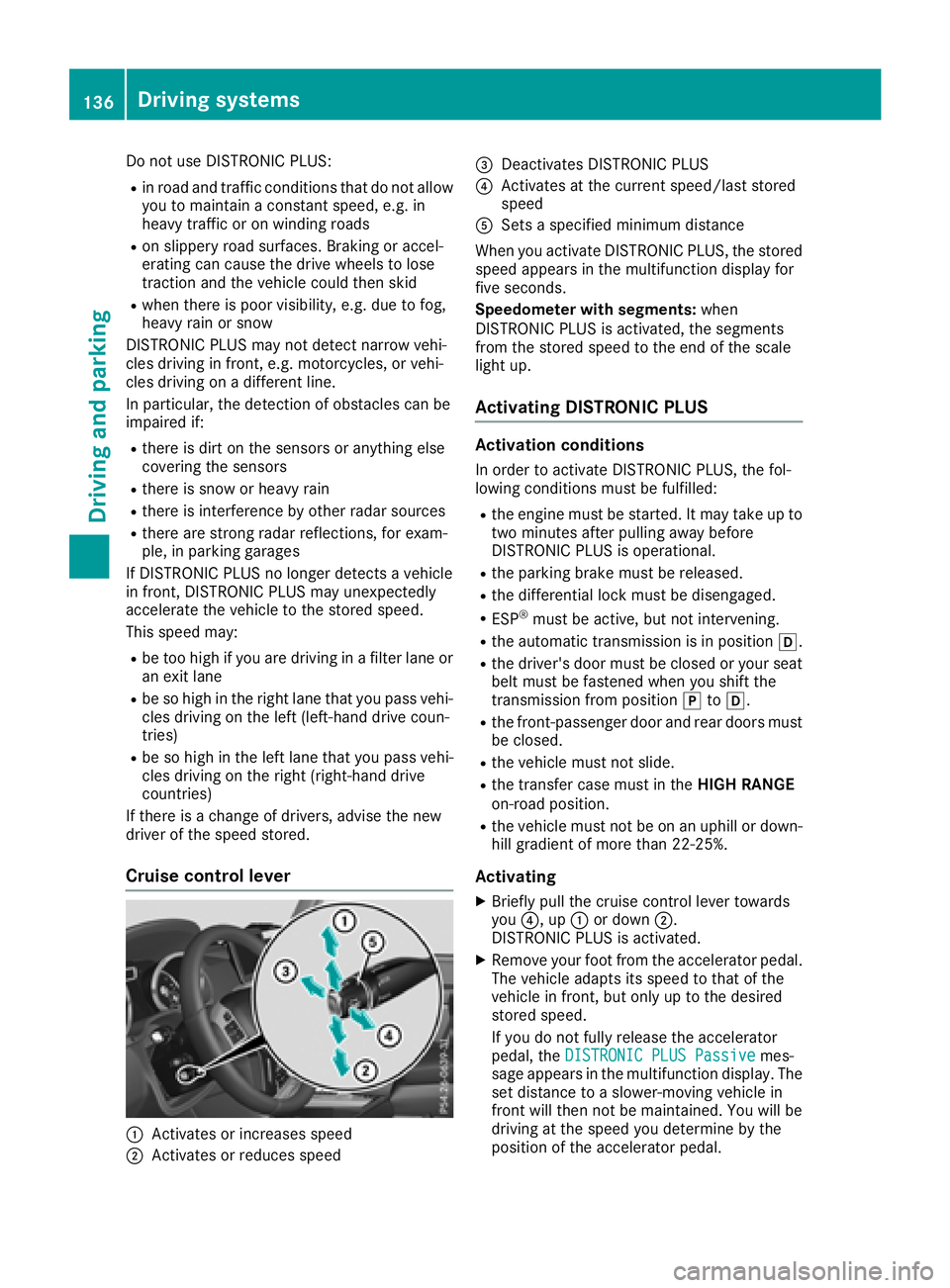
Cruise control lever
:Activates or increases speed
;Activates or reduces speed
=Deactivates DISTRONIC PLUS
?Activates at the current speed/last stored
speed
ASets a specified minimum distance
When you activate DISTRONIC PLUS, the stored
speed appears in the multifunction display for
five seconds.
Speedometer with segments: when
DISTRONIC PLUS is activated, the segments
from the stored speed to the end of the scale
light up.
Activating DISTRONIC PLUS
Activation conditions
In order to activate DISTRONIC PLUS, the fol-
lowing conditions must be fulfilled:
Rthe engine must be started. It may take up to
two minutes after pulling away before
DISTRONIC PLUS is operational.
Rthe parking brake must be released.
Rthe differential lock must be disengaged.
RESP®must be active, but not intervening.
Rthe automatic transmission is in position h.
Rthe driver's door must be closed or your seat
belt must be fastened when you shift the
transmission from positionjtoh.
Rthe front-passenger door and rear doors must
be closed.
Rthe vehicle must not slide.
Rthe transfer case must in the HIGH RANGE
on-road position.
Rthe vehicle must not be on an uphill or down-
hill gradient of more than 22‑25%.
Activating
XBriefly pull the cruise control lever towards
you ?, up :or down ;.
DISTRONIC PLUS is activated.
XRemove your foot from the accelerator pedal.
The vehicle adapts its speed to that of the
vehicle in front, but only up to the desired
stored speed.
If you do not fully release the accelerator
pedal, the DISTRONIC PLUS Passive
mes-
sage appears in the multifunction display. The set distance to a slower-moving vehicle in
front will then not be maintained. You will be
driving at the speed you determine by the
position of the accelerator pedal.
136Driving system s
Driving an d parking
Page 141 of 294
DISTRONICPLUS display sin th einstru -
ment cluste r
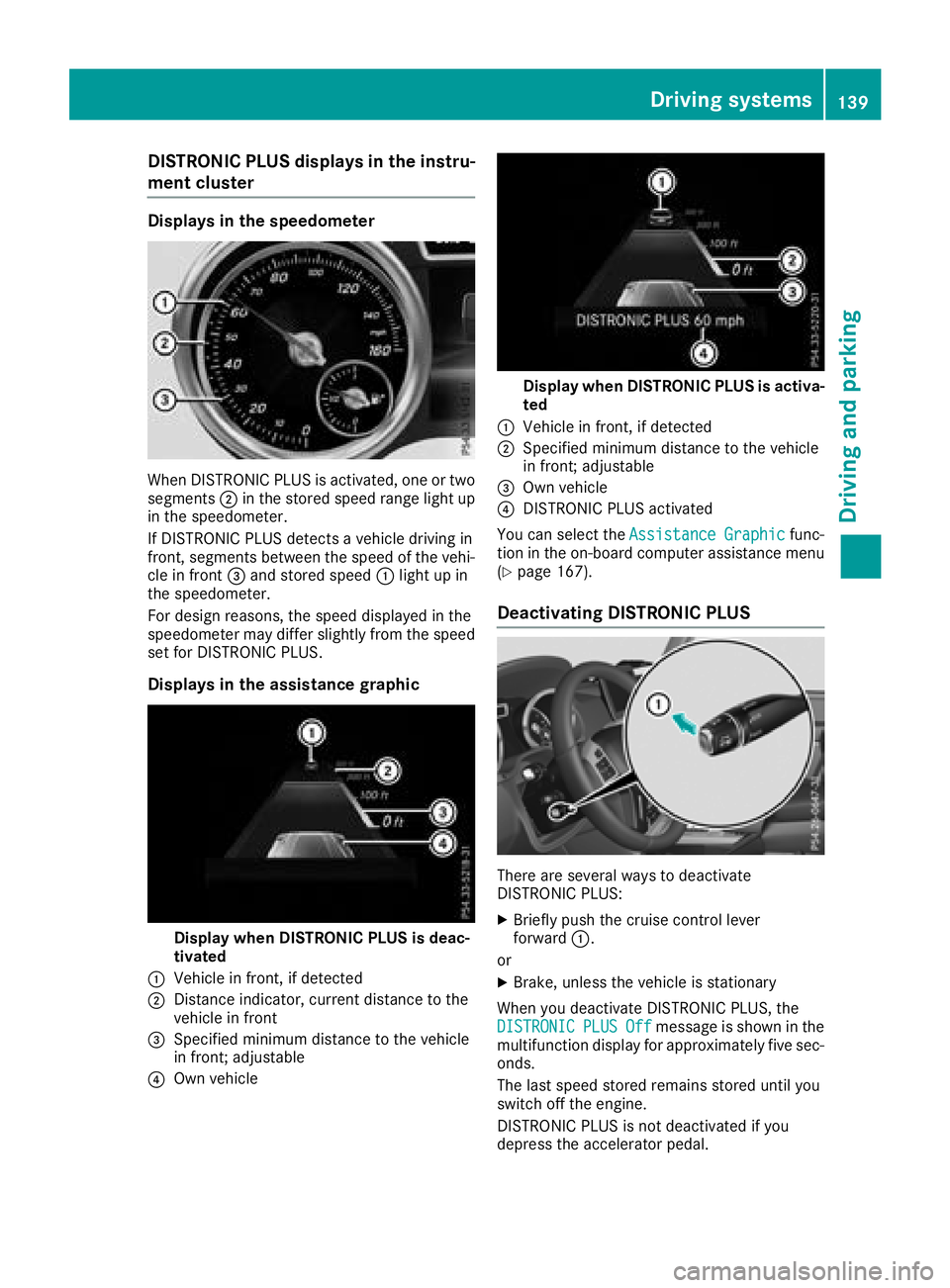
Displaysin th espeedometer
Whe nDISTRONIC PLU Sis activated, on eor tw o
segments ;in th estored speed range ligh tup
in th espeedometer.
If DISTRONIC PLU Sdetects avehicle drivin gin
front, segments between th espeed of th evehi-
cl e in fron t= and stored speed :ligh tup in
th espeedometer.
Fo rdesign reasons, th espeed displaye din th e
speedometer may diffe rslightly from th espeed
set fo rDISTRONIC PLUS.
Display sin th eassistance graphic
Display when DISTRONI CPLUS is deac-
tivate d
:Vehicle in front, if detecte d
;Distanceindicator ,curren tdistanc eto th e
vehicle in fron t
=Specified minimum distanc eto th evehicle
in front; adjustable
?Own vehicle
Display when DISTRONI CPLUS is activa -
te d
:Vehicle in front, if detecte d
;Specified minimum distanc eto th evehicle
in front; adjustable
=Own vehicle
?DISTRONIC PLU Sactivated
You can selec tth eAssistanc eGraphi c
func-
tion in th eon-boar dcompute rassistanc emen u
(
Ypage 167).
Deactivating DISTRONI CPLUS
There are severa lways to deactivat e
DISTRONIC PLUS:
XBriefly push th ecruise contro llever
forwar d:.
or
XBrake, unless th evehicle is stationary
Whe nyou deactivat eDISTRONIC PLUS, th e
DISTRONIC
PLU SOffmessag eis shown in th e
multifunction display fo rapproximately fiv esec -
onds.
The last speed stored remain sstored until you
switch of fth eengine.
DISTRONIC PLU Sis no tdeactivated if you
depress th eaccelerator pedal.
Driving systems13 9
Driving an d parking
Z
Page 142 of 294
DISTRONIC PLUS is automatically deactivated
if:
Ryou apply the parking brake
Ryou are driving slower than 15 mph (25 km/h)
and there is no vehicle in front, or if the vehicle
in front is no longer detected
RESP®intervenes or you deactivate ESP®
Rthe automatic transmission is in positionj,
k ori
Ryou pull the cruise control lever towards you
in order to pull away and the front-passenger
door or one of the rear doors is open
Rthe vehicle slips
If DISTRONIC PLUS is deactivated, an intermit-
tent warning tone sounds and the DISTRONIC
PLUSOffmessage appears in the multifunction
display for approximately five seconds.
Tips for driving with DISTRONIC PLUS
Pay particular attention in the following traffic
situations:
RCornering, entering and exiting a bend: the
ability of DISTRONIC PLUS to detect vehicles
when cornering is limited. Your vehicle may
brake unexpectedly or late.
RDriving on a different line: DISTRONIC PLUS
may not detect vehicles which are not driving
in the middle of their lane. The distance to the
vehicle in front will be too short.
ROther vehicles changing lane: DISTRONIC
PLUS has not detected the vehicle cutting in
yet. The distance to this vehicle will be too
short.
RNarrow vehicles: DISTRONIC PLUS does not
detect the vehicle in front on the edge of the
road because of its narrow width. The dis-
tance to the vehicle in front will be too short.
RObstacles and stationary vehicles:
DISTRONIC PLUS does not brake for obsta-
cles or stationary vehicles. If, for example, the detected vehicle turns a corner and reveals an
obstacle or stationary vehicle, DISTRONIC
PLUS will not brake for these.
RCrossing vehicles: DISTRONIC PLUS may mis-
takenly detect vehicles that are crossing your
lane. Activating DISTRONIC PLUS at traffic
lights with crossing traffic, for example, could
cause your vehicle to pull away uninte
ntion-
ally.
In such situations, brake if necessary.
DISTRONIC PLUS is then deactivated.
Blind Spot Assist
General notes
Blind Spot Assist monitors the areas on either
side of the vehicle that are not visible to the
driver with two lateral, rear-facing radar sen-
sors. A warning lamp lights up in the exterior
mirrors and draws your attention to vehicles
detected in the monitored area. If you then
switch on the corresponding turn signal to
change lane, you will also receive an optical and
audible warning.
Blind Spot Assist supports you from a speed of
approximately 20 mph (30 km/h).
Important safety notes
GWARNING
Blind Spot Assist does not react to:
Rvehicles overtaken too closely on the side,
placing them in the blind spot area
Rvehicles which approach with a large speed
differential and overtake your vehicle
As a result, Blind Spot Assist may not give
warnings in such situations. There is a risk of
an accident.
Always observe the traffic conditions care-
fully, and maintain a safe lateral distance.
Blind Spot Assist is only an aid. It may fail to
detect some vehicles and is no substitute for
attentive driving. Always ensure that there is
sufficient distance to the side for other road
users and obstacles.
iUSA only:
This device has been approved by the FCC as
a "Vehicular Radar System". The radar sensor
is intended for use in an automotive radar
system only. Removing, tampering with, or
altering the device will void any warranties,
and is not permitted by the FCC. Do not tam-
per with, alter, or use in any non-approved
way.
Any unauthorized modification to this device
could void the user’s authority to operate the
equipment.
140Driving system s
Driving an d parking
Page 143 of 294
Radar sensors
The radar sensors for Blind Spot Assist are inte-
grated into the rear bumper. Make sure that thebumpers are free from dirt, ice or slush. The
sensors must not be covered, for example by
cycle racks or overhanging loads. Following a
severe impact or in the event of damage to the
bumpers, have the function of the radar sensors
checked at a qualified specialist workshop.
Blind Spot Assist may no longer work properly.
Monitoring area
In particular, the detection of obstacles can be
impaired if:
Rthere is dirt on the sensors or anything else
covering the sensors
Rthere is poor visibility, e.g. due to fog, heavy
rain, snow or spray
Rthere are narrow vehicles, e.g. motorcycles or
bicycles
Rthe road has very wide lanes
Rthe road has narrow lanes
Ryou are not driving in the middle of the lane
Rthere are barriers or other road boundaries
Vehicles in the monitoring range are then not
indicated.
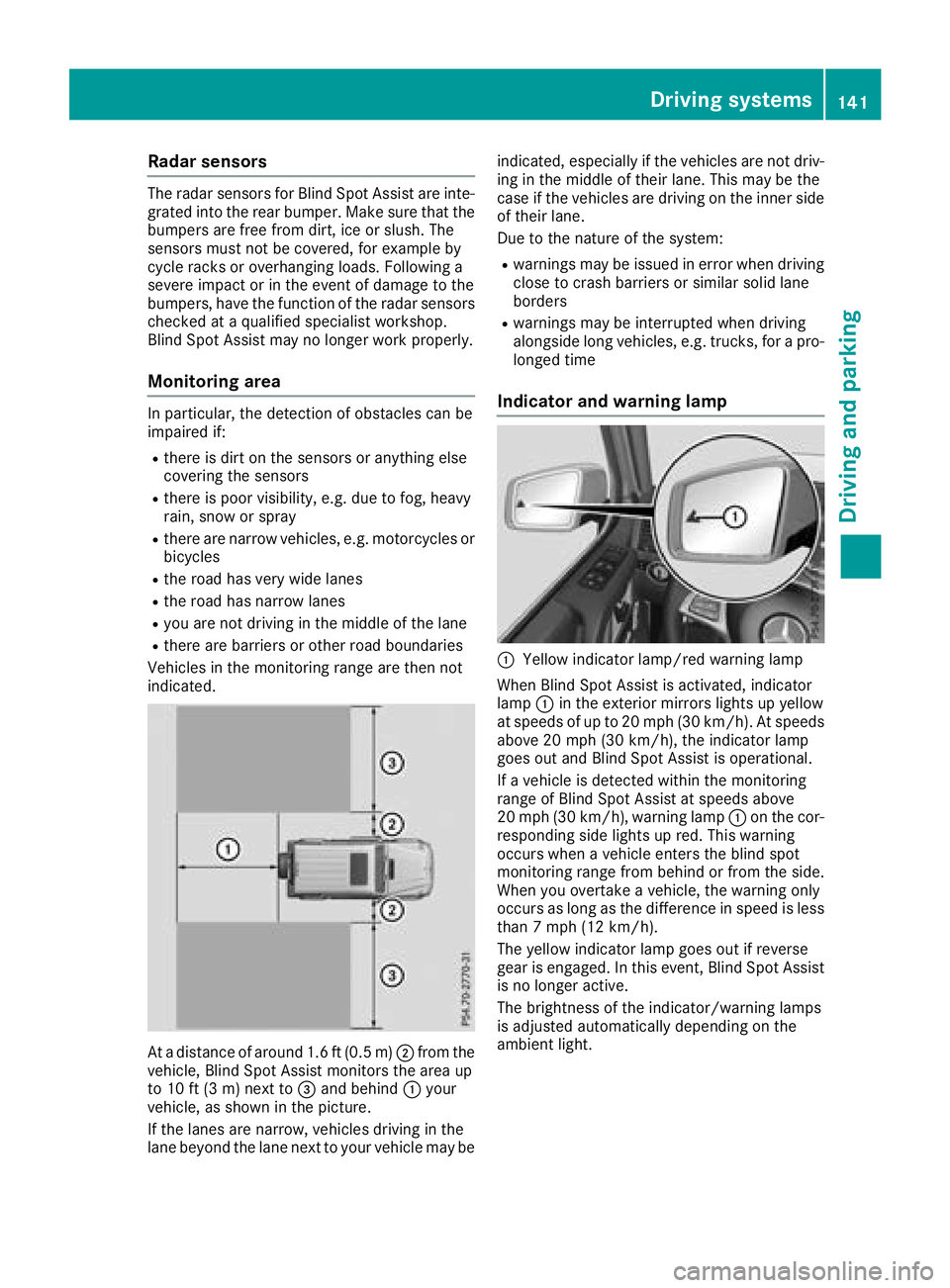
At a distance of around 1.6 ft (0.5 m); from the
vehicle, Blind Spot Assist monitors the area up
to 10 ft (3 m)next to =and behind :your
vehicle, as shown in the picture.
If the lanes are narrow, vehicles driving in the
lane beyond the lane next to your vehicle may be indicated, especially if the vehicles are not driv-
ing in the middle of their lane. This may be the
case if the vehicles are driving on the inner side
of their lane.
Due to the nature of the system:
Rwarnings may be issued in error when driving
close to crash barriers or similar solid lane
borders
Rwarnings may be interrupted when driving
alongside long vehicles, e.g. trucks, for a pro-
longed time
Indicator and warning lamp
:Yellow indicator lamp/red warning lamp
When Blind Spot Assist is activated, indicator
lamp :in the exterior mirrors lights up yellow
at speeds of up to 20 mph (30 km/h). At speeds above 20 mph (30 km/h), the indicator lamp
goes out and Blind Spot Assist is operational.
If a vehicle is detected within the monitoring
range of Blind Spot Assist at speeds above
20 mph (30 km/h), warning lamp :on the cor-
responding side lights up red. This warning
occurs when a vehicle enters the blind spot
monitoring range from behind or from the side.
When you overtake a vehicle, the warning only
occurs as long as the difference in speed is less
than 7 mph (12 km/h).
The yellow indicator lamp goes out if reverse
gear is engaged. In this event, Blind Spot Assist is no longer active.
The brightness of the indicator/warning lamps
is adjusted automatically depending on the
ambient light.
Driving systems141
Driving an d parking
Z
Page 144 of 294
Collision warning
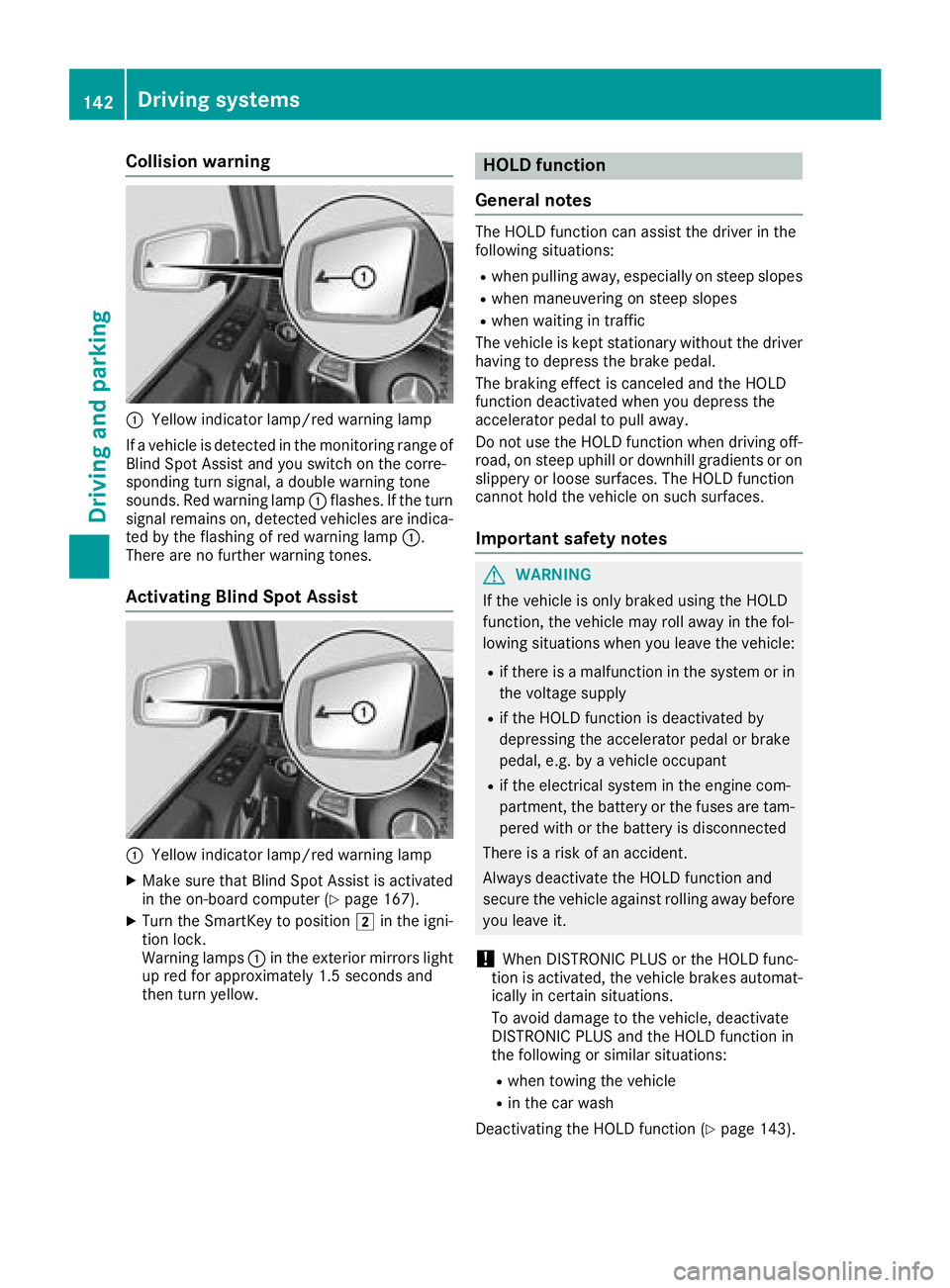
:Yellow indicator lamp/red warning lamp
If a vehicle is detected in the monitoring range of
Blind Spot Assist and you switch on the corre-
sponding turn signal, a double warning tone
sounds. Red warning lamp :flashes. If the turn
signal remains on, detected vehicles are indica-
ted by the flashing of red warning lamp :.
There are no further warning tones.
Activating Blind Spot Assist
:Yellow indicator lamp/red warning lamp
XMake sure that Blind Spot Assist is activated
in the on-board computer (Ypage 167).
XTurn the SmartKey to position 2in the igni-
tion lock.
Warning lamps :in the exterior mirrors light
up red for approximately 1.5 seconds and
then turn yellow.
HOLD function
General notes
The HOLD function can assist the driver in the
following situations:
Rwhen pulling away, especially on steep slopes
Rwhen maneuvering on steep slopes
Rwhen waiting in traffic
The vehicle is kept stationary without the driver having to depress the brake pedal.
The braking effect is canceled and the HOLD
function deactivated when you depress the
accelerator pedal to pull away.
Do not use the HOLD function when driving off-
road, on steep uphill or downhill gradients or on
slippery or loose surfaces. The HOLD function
cannot hold the vehicle on such surfaces.
Important safety notes
GWARNING
If the vehicle is only braked using the HOLD
function, the vehicle may roll away in the fol-
lowing situations when you leave the vehicle:
Rif there is a malfunction in the system or in the voltage supply
Rif the HOLD function is deactivated by
depressing the accelerator pedal or brake
pedal, e.g. by a vehicle occupant
Rif the electrical system in the engine com-
partment, the battery or the fuses are tam-
pered with or the battery is disconnected
There is a risk of an accident.
Always deactivate the HOLD function and
secure the vehicle against rolling away before
you leave it.
!When DISTRONIC PLUS or the HOLD func-
tion is activated, the vehicle brakes automat-
ically in certain situations.
To avoid damage to the vehicle, deactivate
DISTRONIC PLUS and the HOLD function in
the following or similar situations:
Rwhen towing the vehicle
Rin the car wash
Deactivating the HOLD function (
Ypage 143).
142Driving systems
Driving and parking
Page 145 of 294
Activationconditions
You can activat eth eHOLD function if:
Rth evehicl eis stationary
Rth eengin eis runnin gor if it has been auto -
matically switched off by th eECO start/sto p
function
Rth edriver's door is closed or your seat belt is
fastene d
Rtheparking brak eis release d
Rthetransmission is in position h,kori
RDISTRONI CPLU Sis deactivated
Activating the HOLD function
XMak esur ethat th eactivation condition sare
met .
XDepress th ebrak epedal .
XQuickl ydepress th ebrak epedal further until
ë appear sin th emultifunction display.
The HOLD function is activated. You can
release th ebrak epedal .
If depressing th ebrak epedal th efirst time does
no tactivat eth eHOLD function ,wait briefl yand
then tr yagain .
Deactivating the HOLD function
The HOLD function is deactivated automatically
if:
Ryou depress th eaccelerato rand th etrans -
mission is in position hork
Rthetransmission is in position j
Ryou depress thebrak epedal again wit h acer-
tai namount of pressur euntil ë disap-
pear sfrom th emultifunction display
Ryou activat eDISTRONI CPLU S
On steep uphil lor downhill inclines or if there is
a malfunction ,th etransmission may also be
automatically shifte dint oposition j.
Permanent all-wheel drive
!
Never to wthevehicl ewit hon eaxl eraised.
This may damag eth etransfer case. Damage
of this sor tis no tcovered by th eMercedes-
Benz Limited Warranty. All wheels mus t
remain either on th eground or be fully raised.
Observ eth einstruction sfor towin gth evehi-
cle wit hall wheels in full contact wit hth e
ground .
!When testing th eparking brake, only oper -
ate th evehicl ebriefl y(fo r a maximum of te n
seconds) on abrak edynamometer. Turn th e
SmartKey to position gor1 in th eignition
lock. You could otherwise damag eth edrive
train or th ebrak esystem.
!A function or performance test should only
be carrie dout on atwo-axle dynamometer.
Befor eyou operate th evehicl eon suc h a
dynamometer, pleas econsult aqualified
workshop .You could otherwise damag eth e
drive train or th ebrak esystem.
The all-whee ldrive system ensures that all four
wheels are permanentl ydriven .The all-whee l
drive system improve svehicl etraction together
wit hES P
®and 4ETS if adrive whee lspin sdue to
insufficien tgrip.
If adrive whee lspin sdue to insufficien tgrip:
ROnly depress th eaccelerato rpedal as far as
necessar ywhen pullin gaway.
RTak eyour foo toff th eaccelerator, slowly,
while th evehicl eis in motion .
In wintr ydrivin gconditions, always use winte r
tires (M+ Stires )and if necessary, snow chain s
(
Ypage 259). Only in this way can th emaximum
effec tof all-whee ldrive be achieved.
Fo rinformation on drivin goff-road, see
(
Ypage 129).
PARKTRONIC
Import ant safety notes
PARKTRONI Cis an electronic parking aid wit h
ultrasonic sensors. It monitors th earea around
your vehicl eusin gsix sensor sin th efron t
bumper and four sensor sin th erear bumper.
PARKTRONI Cindicates visually and audibly th e
distanc ebetween your vehicl eand an object.
PARKTRONI Cis only an aid. It is no t areplace -
men tfor your attention to your immediat esur -
roundings. You are always responsibl efor saf e
maneuvering, parking and exiting aparking
space. Mak esur ethat there are no persons,
animals or objects in th emaneuverin garea
while maneuverin gand parking in/leaving park -
ing spaces.
!When parking ,pay particular attention to
objects abov eor belo wthesensors, suc has
flower pot sor trailer drawbars .PARKTRONI C
does no tdetec tsuc hobjects when they are in
Driving systems143
Driving and parking
Z
Page 148 of 294
Problems with PARKTRONIC
ProblemPossible causes/consequences andMSolutions
Only the red segments in
the PARKTRONIC warn-
ing displays are lit. You
also hear a warning tone
for approximately two
seconds.
PARKTRONIC is deacti-
vated after a few sec-
onds, and the indicator
lamp in the PARKTRONIC
button lights up.PARKTRONIC has malfunctioned and has switched off.
XIf problems persist, have PARKTRONIC checked at a qualified spe-
cialist workshop.
Only the red segments in
the PARKTRONIC warn-
ing displays are lit.
PARKTRONIC is deacti-
vated after a few sec-
onds.The PARKTRONIC sensors are dirty or there is interference.
XClean the PARKTRONIC sensors (Ypage 239).
XSwitch the ignition back on.
The problem may be caused by an external source of radio or ultra-
sound waves.
XSee if PARKTRONIC functions in a different location.
Rear view camera
General notes
Rear view camera :is an optical parking and
maneuvering aid. It shows the area behind the
vehicle with guide lines in the multimedia sys-
tem.
The area behind the vehicle is displayed as a
mirror image, as in the rear view mirror.
iThe text shown in the multimedia system
depends on the language setting. The follow-
ing are examples of rear view camera displays
in the multimedia system.
Important safety notes
The rear view camera is only an aid. It is not a
replacement for your attention to your immedi-
ate surroundings. You are always responsible
for safe maneuvering and parking. Make sure
that there are no persons, animals or objects in
the maneuvering area while maneuvering and
parking in parking spaces.
Under the following circumstances, the rear
view camera will not function, or will function in
a limited manner:
Rthe rear door is open
Rin heavy rain, snow or fog
Rat night or in very dark places
Rif the camera is exposed to very bright light
Rif the area is lit by fluorescent bulbs or LED
lighting (the display may flicker)
Rif there is a sudden change in temperature,
e.g. when driving into a heated garage in win- ter
Rif the camera lens is dirty or obstructed.
Observe the notes on cleaning
(
Ypage 240)
Rif the rear of your vehicle is damaged. In this
case, have the camera position and setting
checked at a qualified specialist workshop
146Driving systems
Driving and parking
Page 150 of 294
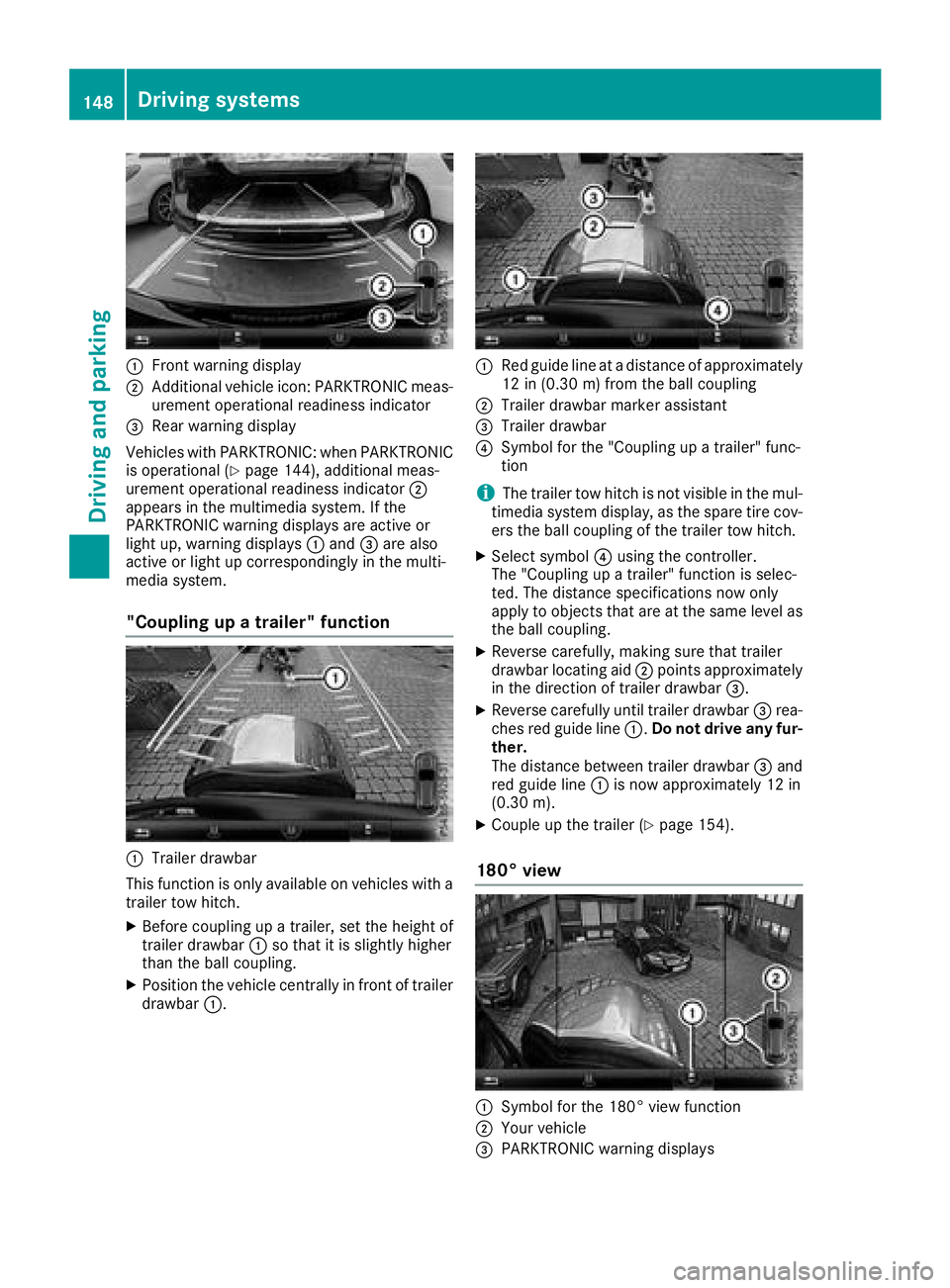
:Front warning display
;Additional vehicle icon: PARKTRONIC meas-
urement operational readiness indicator
=Rear warning display
Vehicles with PARKTRONIC: when PARKTRONIC
is operational (
Ypage 144), additional meas-
urement operational readiness indicator ;
appears in the multimedia system. If the
PARKTRONIC warning displays are active or
light up, warning displays :and =are also
active or light up correspondingly in the multi-
media system.
"Coupling up a trailer" function
:Trailer drawbar
This function is only available on vehicles with a
trailer tow hitch.
XBefore coupling up a trailer, set the height of
trailer drawbar :so that it is slightly higher
than the ball coupling.
XPosition the vehicle centrally in front of trailer
drawbar :.
:Red guide line at a distance of approximately
12 in (0.30 m) fromthe ball coupling
;Trailer drawbar marker assistant
=Trailer drawbar
?Symbol for the "Coupling up a trailer" func-
tion
iThe trailer tow hitch is not visible in the mul-
timedia system display, as the spare tire cov-
ers the ball coupling of the trailer tow hitch.
XSelect symbol ?using the controller.
The "Coupling up a trailer" function is selec-
ted. The distance specifications now only
apply to objects that are at the same level as
the ball coupling.
XReverse carefully, making sure that trailer
drawbar locating aid ;points approximately
in the direction of trailer drawbar =.
XReverse carefully until trailer drawbar =rea-
ches red guide line :.Do not drive any fur-
ther.
The distance between trailer drawbar =and
red guide line :is now approximately 12 in
(0.30 m).
XCoupleup the trailer (Ypage 154).
180° view
:Symbol for the 180° view function
;Your vehicle
=PARKTRONIC warning displays
148Driving system s
Driving an d parking
Page 151 of 294
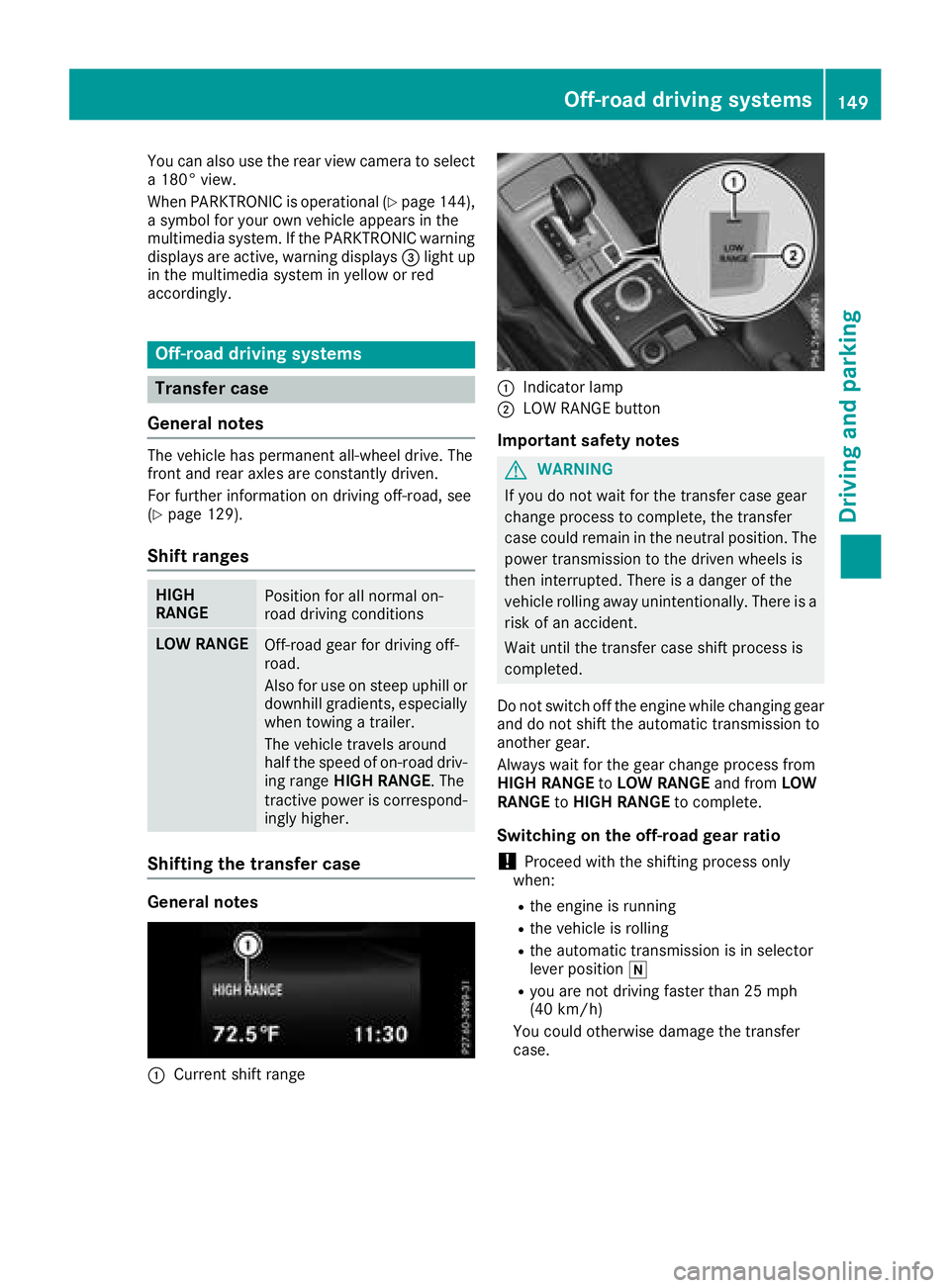
You can also use the rear view camera to select
a 180° view.
When PARKTRONIC is operational (
Ypage 144),
a symbol for your own vehicle appears in the
multimedia system. If the PARKTRONIC warning
displays are active, warning displays =light up
in the multimedia system in yellow or red
accordingly.
Off-road driving systems
Transfer case
General notes
The vehicle has permanent all-wheel drive. The
front and rear axles are constantly driven.
For further information on driving off-road, see
(
Ypage 129).
Shift ranges
HIGH
RANGEPosition for all normal on-
road driving conditions
LOW RANGEOff-road gear for driving off-
road.
Also for use on steep uphill or
downhill gradients, especially
when towing a trailer.
The vehicle travels around
half the speed of on-road driv-
ing range HIGH RANGE. The
tractive power is correspond-
ingly higher.
Shifting the transfer case
General notes
:Current shift range
:Indicator lamp
;LOW RANGE button
Important safety notes
GWARNING
If you do not wait for the transfer case gear
change process to complete, the transfer
case could remain in the neutral position. The power transmission to the driven wheels is
then interrupted. There is a danger of the
vehicle rolling away unintentionally. There is a
risk of an accident.
Wait until the transfer case shift process is
completed.
Do not switch off the engine while changing gear
and do not shift the automatic transmission to
another gear.
Always wait for the gear change process from
HIGH RANGE toLOW RANGE and fromLOW
RANGE toHIGH RANGE to complete.
Switching on the off-road gear ratio
!Proceed with the shifting process only
when:
Rthe engine is running
Rthe vehicle is rolling
Rthe automatic transmission is in selector
lever position i
Ryou are not driving faster than 25 mph
(40 km/h)
You could otherwise damage the transfer
case.
Off-road driving systems149
Driving and parking
Z