ESP MERCEDES-BENZ G-CLASS SUV 2008 User Guide
[x] Cancel search | Manufacturer: MERCEDES-BENZ, Model Year: 2008, Model line: G-CLASS SUV, Model: MERCEDES-BENZ G-CLASS SUV 2008Pages: 293, PDF Size: 4.49 MB
Page 51 of 293
Driving safety sys
tems48 conditions. Maintain sufficient distance
from other road users and objects on the
road. ABS (Anti-lock Braking System)
ABS regulates brake pressure in such a way
that the wheels do not lock when you brake.
This allows you to continue steering the vehi-
cle when braking.
ABS works from a speed of about 8 km/h
upwards, regardless of road surface condi-
tions. ABS works on slippery surfaces, even
when you only brake gently. G
Risk of accident
Do not depress the brake pedal several
times in quick succession (pumping).
Depress the brake firmly and evenly. Pump-
ing the brake pedal reduces the braking
effect.
Braking If ABS intervenes when braking, you will feel
a pulsing in the brake pedal.
X If ABS intervenes: continue to depress the
brake pedal with force until the braking sit-
uation is over. X
To make a full brake application:
depress the brake pedal with full force. G
Risk of accident
If ABS is faulty, the wheels could lock when
braking. This limits the steerability of the
vehicle when braking and the braking dis-
tance may increase.
If ABS is deactivated due to a malfunction,
then BAS, ESP ®
and 4ETS are also deacti-
vated. There is an increased risk of your
vehicle skidding in certain situations.
You should always adapt your driving style
to suit prevailing road and weather condi-
tions. BAS (Brake Assist)
BAS operates in emergency braking situa-
tions. If you depress the brake pedal quickly,
BAS automatically boosts the braking force,
thus shortening the stopping distance.
X Keep the brake pedal firmly depressed until
the emergency braking situation is over.
ABS prevents the wheels from locking.
The brakes will function as usual once you
release the brake pedal. BAS is deactivated. G
Risk of accident
If BAS has malfunctioned, the braking sys-
tem remains available with full brake boost-
ing effect. However, braking force is not
automatically increased in emergency
braking situations and the stopping dis-
tance may increase. ESP
®
(Electronic Stability Program)
ESP ®
monitors driving stability and traction,
i.e. power transmission between tyres and
the road surface.
If ESP ®
detects that the vehicle is deviating
from the direction desired by the driver, one
or more wheels are braked to stabilise the
vehicle. The engine output is also modified, if
necessary, to keep the vehicle on the desired
course within physical limits. ESP ®
assists
the driver when pulling away on wet or slip-
pery roads. ESP ®
can also stabilise the vehi-
cle during braking.
When ESP ®
intervenes, the vwarning
lamp flashes in the speedometer. G
Risk of accident
If the v warning lamp in the speedom-
eter flashes, proceed as follows: Safety
463_AKB; 1; 8, en-GB
wobuchh
,V ersion: 2.10.6
2008-07-17T15:19:41+02:00 - Seite 48 Dateiname: 6515_4091_02_buchblock.pdf; preflight
Page 52 of 293
Driving safety sys
tems 49R
do not deactivate ESP ®
under any cir-
cumstances.
R only depress the accelerator pedal as far
as necessary when pulling away.
R adapt your driving style to suit the pre-
vailing road and weather conditions.
The vehicle could otherwise go into a skid.
ESP ®
cannot reduce the risk of an accident
if you drive too fast. ESP ®
cannot override
the laws of physics.
! If:
R the vehicle is being towed with the front
or rear axle raised,
R the parking brake is being tested using a
dynamometer,
the ignition must be switched off (key in
position 0or 1in the ignition lock). Other-
wise, application of the brakes by ESP ®
could destroy the brake system on the front
or rear axle.
! A function or performance test should
only be carried out on a twin-axle dyna-
mometer. If you wish to operate the vehicle
on such a dynamometer, please consult a
Mercedes-Benz Service Centre in advance. You could otherwise damage the drive train
or the brake system.
i If differential locks are switched on, ABS,
BAS and ESP ®
switch themselves off auto-
matically.
i Only use wheels with the recommended
tyre sizes. Only then will ESP ®
function
properly.
Activating/deactivating ESP ® ESP
®
is activated automatically when the
engine is running.
It may be best to deactivate ESP ®
in the fol-
lowing situations:
R when using snow chains
R in deep snow
R on sand or gravel G
Risk of accident
Activate ESP ®
as soon as the situations
described above no longer apply. ESP ®
will
otherwise not be able to stabilise the vehi-
cle if the vehicle starts to skid or a wheel
starts to spin. If you deactivate ESP
®
:
R ESP ®
no longer improves driving stability.
R the engine's torque is no longer limited and
the drive wheels can spin. Spinning of the
wheels results in a cutting action, which
provides better grip.
R traction control is still activated.
R ESP ®
still provides support when you
brake.
R and are driving at above 60 km/h, ESP ®
still intervenes when one wheel reaches its
grip limit even though it is switched off.
i If ESP ®
is deactivated and one or more
wheels start to spin, the vwarning lamp
in the instrument cluster flashes. In such
situations ESP ®
will not stabilise the vehi-
cle. Safety
463_AKB; 1; 8, en-GB
wobuchh
,V ersion: 2.10.6
2008-07-17T15:19:41+02:00 - Seite 49 ZDateiname: 6515_4091_02_buchblock.pdf; preflight
Page 53 of 293
Driving safety sys
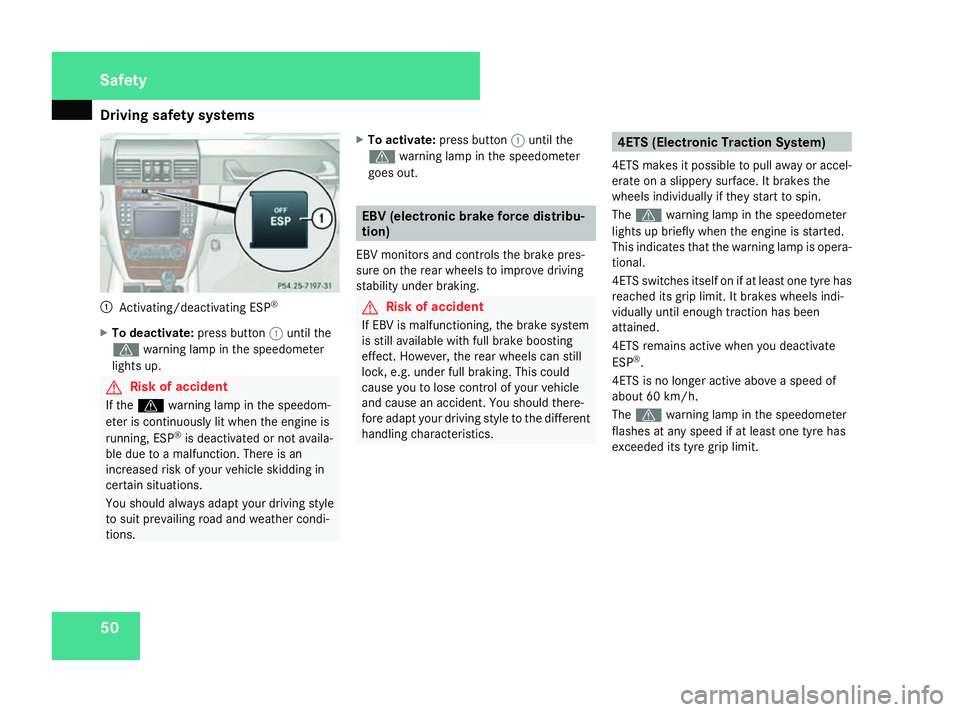
tems501
Activating/deactivating ESP ®
X To deactivate: press button1until the
v warning lamp in the speedometer
lights up. G
Risk of accident
If the v warning lamp in the speedom-
eter is continuously lit when the engine is
running, ESP ®
is deactivated or not availa-
ble due to a malfunction. There is an
increased risk of your vehicle skidding in
certain situations.
You should always adapt your driving style
to suit prevailing road and weather condi-
tions. X
To activate: press button 1until the
v warning lamp in the speedometer
goes out. EBV (electronic brake force distribu-
tion)
EBV monitors and controls the brake pres-
sure on the rear wheels to improve driving
stability under braking. G
Risk of accident
If EBV is malfunctioning, the brake system
is still available with full brake boosting
effect. However, the rear wheels can still
lock, e.g. under full braking. This could
cause you to lose control of your vehicle
and cause an accident. You should there-
fore adapt your driving style to the different
handling characteristics. 4ETS (Electronic Traction System)
4ETS makes it possible to pull away or accel-
erate on a slippery surface. It brakes the
wheels individually if they start to spin.
The v warning lamp in the speedometer
lights up briefly when the engine is started.
This indicates that the warning lamp is opera-
tional.
4ETS switches itself on if at least one tyre has
reached its grip limit. It brakes wheels indi-
vidually until enough traction has been
attained.
4ETS remains active when you deactivate
ESP ®
.
4ETS is no longer active above a speed of
about 60 km/h.
The v warning lamp in the speedometer
flashes at any speed if at least one tyre has
exceeded its tyre grip limit. Safety
463_AKB; 1; 8, en-GB
wobuchh
,V ersion: 2.10.6
2008-07-17T15:19:41+02:00 - Seite 50 Dateiname: 6515_4091_02_buchblock.pdf; preflight
Page 73 of 293

Memory functions
70 Memory functions
Storing settings
Using the memory button on the driver's side
you can store up to three different settings
per key. You can store one setting per mem-
ory button on the front-passenger side.
On the driver's side the following settings can
be stored on each memory position:
R seat and head restraint position of the driv-
er's seat
R steering wheel position
R exterior mirror position on the driver’s and
front-passenger side
R parking position for the exterior mirror on
the front-passenger side
On the front-passenger side, the following
settings can be stored on each memory posi-
tion:
R seat and head restraint position of the
front-passenger seat G
Risk of accident
Only use the memory function on the driv-
er's side when the vehicle is stationary.
Otherwise, you could be distracted from
the traffic conditions by the steering wheel and seat moving of their own accord, as a
result cause an accident.
The buttons are located on the door control
panel. 1
Memory button
2 Storage position switches
X Make sure that the key is in position 2or
that the respective door is open.
X Adjust the seat and head restraint
(Y page 60).
X On the driver's side, also adjust the steer-
ing wheel (Y page 66) and the mirrors
(Y page 68). X
Press memory button 1.
X Press storage position switch 2within
three seconds.
The settings are stored in the selected stor-
age position. Calling up a stored setting
G
Risk of accident
Only use the memory function on the driv-
er's side when the vehicle is stationary.
Otherwise, you could be distracted from
the traffic conditions by the steering wheel
and seat moving of their own accord, as a
result cause an accident.
X Press the required storage position button
2 until the seat, head restraints, steering
wheel and mirrors are in the stored posi-
tion.
i The setting procedure is interrupted as
soon as you release the storage position
switch.
! If you want to move the seat from the fully
reclined position to a stored seat position,
first raise the backrest using the seat Controls
463_AKB; 1; 8, en-GB
wobuchh
, Version: 2.10.6 2008-07-17T15:19:41+02:00 - Seite 70Dateiname: 6515_4091_02_buchblock.pdf; preflight
Page 75 of 293

Seat belts
72 hip joints – not across your abdomen. If
necessary, push down the belt strap
slightly and then retighten it in the roll-up
direction.
R Do not route the belt strap across sharp
or fragile objects, especially if these are
located on or in your clothing, e.g. spec-
tacles, pencils, keys, etc. The seat belt
strap could be damaged and tear in an
accident and you or other vehicle occu-
pants could be injured.
R Only one person should use each seat
belt at any one time. Children must never
travel sitting on the lap of other occu-
pants. It would not be possible to restrain
the child in the event of a sudden change
in direction, braking or an accident. This
could result in severe or even fatal inju-
ries to the child and other occupants.
R Persons less than 1.50 m tall cannot
wear the seat belts correctly. For this
reason, secure persons less than 1.50 m
tall in specially designed, suitable
restraint systems.
R Children less than 1.50 m tall or under
12 years of age cannot wear the seat
belts properly. Therefore, always secure
these children in suitable child restraint systems on suitable vehicle seats. You
can find more information under "Chil-
dren in the vehicle" in the "Safety" sec-
tion of the Owner's Manual. Follow the
manufacturer's installation instructions
when fitting the child restraint system.
R Do not secure any objects with a seat belt
if the seat belt is also being used by one
of the vehicle's occupants. G
Risk of injury
The seat belt does not offer the intended
level of protection unless the backrest is
almost vertical. Under certain circumstan-
ces this could cause severe or even fatal
injuries.
Before starting a journey, make sure that
the seat is properly adjusted and that the
backrest is almost vertical. G
Risk of injury
A dirty or damaged seat belt or a seat belt
that has been subjected to a load in an
accident or modified no longer offers the
intended level of protection. Under certain
circumstances this could cause severe or
even fatal injuries. For this reason, check regularly that the
seat belts are not damaged or dirty.
Always have damaged seat belts or seat
belts that have been subjected to a load in
an accident replaced at a qualified special-
ist workshop. Choose a qualified specialist
workshop which has the necessary special-
ist knowledge and tools for the work
required. Mercedes-Benz recommends
that you use a Mercedes-Benz Service
Centre for this purpose.
For safety reasons, Mercedes-Benz recom-
mends that you only use seat belts which
have been approved by Mercedes-Benz for
your vehicle.Controls
463_AKB; 1; 8, en-GB
wobuchh,
Version: 2.10.6 2008-07-17T15:19:41+02:00 - Seite 72Dateiname: 6515_4091_02_buchblock.pdf; preflight
Page 79 of 293
Lights
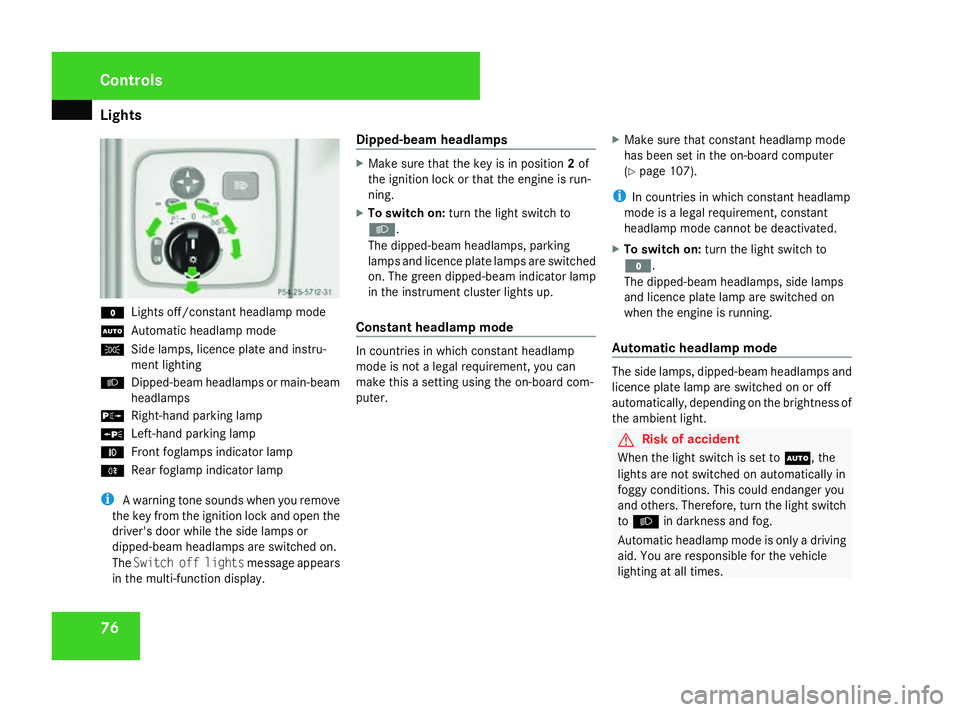
76M
Lights off/constant headlamp mode
U Automatic headlamp mode
C Side lamps, licence plate and instru-
ment lighting
B Dipped-beam headlamps or main-beam
headlamps
g Right-hand parking lamp
a Left-hand parking lamp
¥ Front foglamps indicator lamp
† Rear foglamp indicator lamp
i A warning tone sounds when you remove
the key from the ignition lock and open the
driver's door while the side lamps or
dipped-beam headlamps are switched on.
The Switch off lights message appears
in the multi-function display. Dipped-beam headlamps X
Make sure that the key is in position 2of
the ignition lock or that the engine is run-
ning.
X To switch on: turn the light switch to
B.
The dipped-beam headlamps, parking
lamps and licence plate lamps are switched
on. The green dipped-beam indicator lamp
in the instrument cluster lights up.
Constant headlamp mode In countries in which constant headlamp
mode is not a legal requirement, you can
make this a setting using the on-board com-
puter.
X
Make sure that constant headlamp mode
has been set in the on-board computer
(Y page 107).
i In countries in which constant headlamp
mode is a legal requirement, constant
headlamp mode cannot be deactivated.
X To switch on: turn the light switch to
M.
The dipped-beam headlamps, side lamps
and licence plate lamp are switched on
when the engine is running.
Automatic headlamp mode The side lamps, dipped-beam headlamps and
licence plate lamp are switched on or off
automatically, depending on the brightness of
the ambient light.
G
Risk of accident
When the light switch is set to U, the
lights are not switched on automatically in
foggy conditions. This could endanger you
and others. Therefore, turn the light switch
to B in darkness and fog.
Automatic headlamp mode is only a driving
aid. You are responsible for the vehicle
lighting at all times. Controls
463_AKB; 1; 8, en-GB
wobuchh,
Version: 2.10.6 2008-07-17T15:19:41+02:00 - Seite 76Dateiname: 6515_4091_02_buchblock.pdf; preflight
Page 80 of 293
Lights
77G
Risk of accident
When it is dark or foggy, turn the light
switch from UtoB in good time.
Otherwise, the headlamps could switch off
temporarily and you could cause an acci-
dent.
X To switch on: turn the light switch to
U.
The side lamps are switched on and off
automatically when the key is in position
1 in the ignition lock.
The dipped-beam headlamps, side lamps
and licence plate lamp are switched on
automatically when the engine is running.
When the dipped-beam headlamps are
switched on, the green dipped-beam indi-
cator lamp in the instrument cluster lights
up.
Front foglamps/rear foglamp G
Risk of accident
If you suspect that driving conditions will be
foggy, turn the light switch to Bbefore
you start your journey. Otherwise, your
vehicle may not be visible and you could
endanger yourself and others. G
Risk of accident
When it is dark or foggy, turn the light
switch from UtoB in good time.
Otherwise, the headlamps could switch off
temporarily and you could cause an acci-
dent.
When the light switch is set to Uyou can-
not switch on the front or rear foglamps.
X Make sure that the key is in position 2in
the ignition lock.
X To switch on the front foglamps: turn the
light switch to the Bposition.
X Pull the light switch out to the first stop.
The ¥ green indicator lamp next to the
light switch lights up.
X To switch on the rear foglamp: turn the
light switch to the Bposition.
X Pull the light switch out to the second
detent.
The † yellow indicator lamp next to the
light switch lights up.
X To switch off the front foglamps/rear
foglamp: push in the light switch to the
stop.
The corresponding indicator lamp goes out. Combination switch (turn signals,
main-beam headlamps and headlamp
flasher)
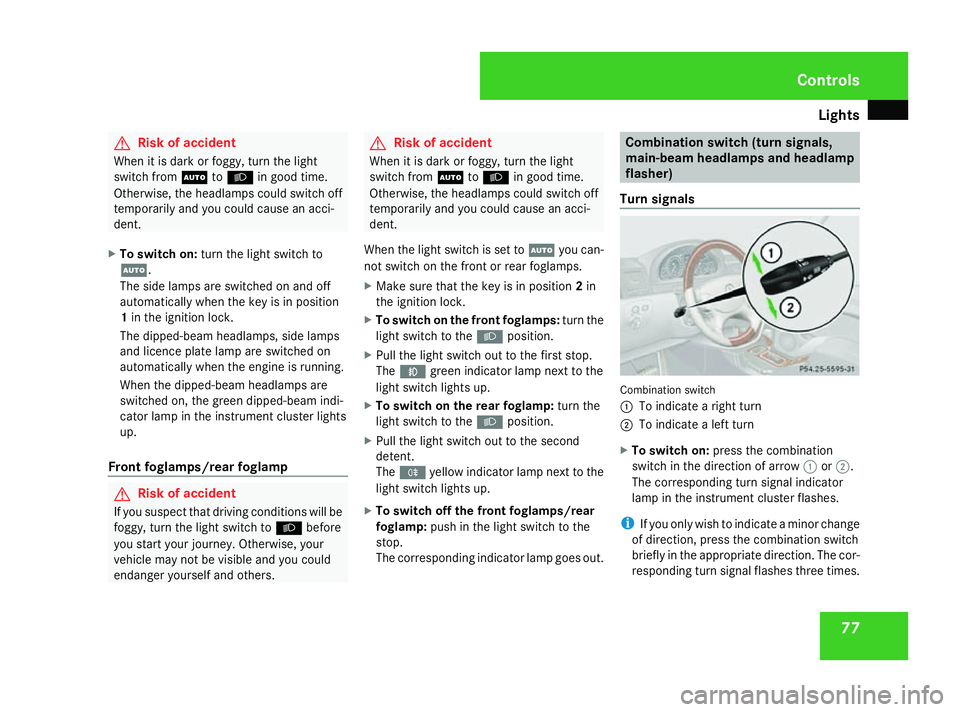
Turn signals Combination switch
1
To indicate a right turn
2 To indicate a left turn
X To switch on: press the combination
switch in the direction of arrow 1or2.
The corresponding turn signal indicator
lamp in the instrument cluster flashes.
i If you only wish to indicate a minor change
of direction, press the combination switch
briefly in the appropriate direction. The cor-
responding turn signal flashes three times. Controls
463_AKB; 1; 8, en-GB
wobuchh,
Version: 2.10.6 2008-07-17T15:19:41+02:00 - Seite 77 ZDateiname: 6515_4091_02_buchblock.pdf; preflight
Page 81 of 293
Lights
78
Main-beam headlamps/headlamp flas-
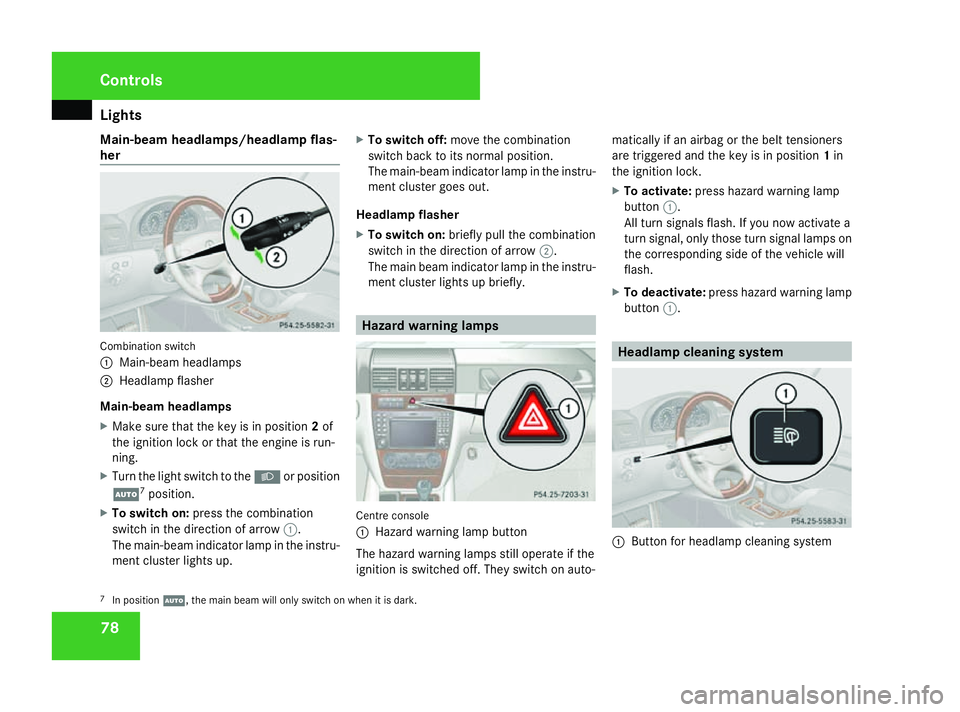
her Combination switch
1
Main-beam headlamps
2 Headlamp flasher
Main-beam headlamps
X Make sure that the key is in position 2of
the ignition lock or that the engine is run-
ning.
X Turn the light switch to the Bor position
U 7
position.
X To switch on: press the combination
switch in the direction of arrow 1.
The main-beam indicator lamp in the instru-
ment cluster lights up. X
To switch off: move the combination
switch back to its normal position.
The main-beam indicator lamp in the instru-
ment cluster goes out.
Headlamp flasher
X To switch on: briefly pull the combination
switch in the direction of arrow 2.
The main beam indicator lamp in the instru-
ment cluster lights up briefly. Hazard warning lamps
Centre console
1
Hazard warning lamp button
The hazard warning lamps still operate if the
ignition is switched off. They switch on auto- matically if an airbag or the belt tensioners
are triggered and the key is in position
1in
the ignition lock.
X To activate: press hazard warning lamp
button 1.
All turn signals flash. If you now activate a
turn signal, only those turn signal lamps on
the corresponding side of the vehicle will
flash.
X To deactivate: press hazard warning lamp
button 1. Headlamp cleaning system
1
Button for headlamp cleaning system
7 In position U, the main beam will only switch on when it is dark. Controls
463_AKB; 1; 8, en-GB
wobuchh,
Version: 2.10.6 2008-07-17T15:19:41+02:00 - Seite 78Dateiname: 6515_4091_02_buchblock.pdf; preflight
Page 85 of 293
Windscreen wipers
82 Courtesy lighting in the front doors
To help you see better when it is dark, the
courtesy light is switched on when the
respective door is opened if you have activa-
ted the automatic control for the interior light.
The courtesy light is switched off when the
door is closed. Windscreen wipers
Switching the windscreen wipers on/
off
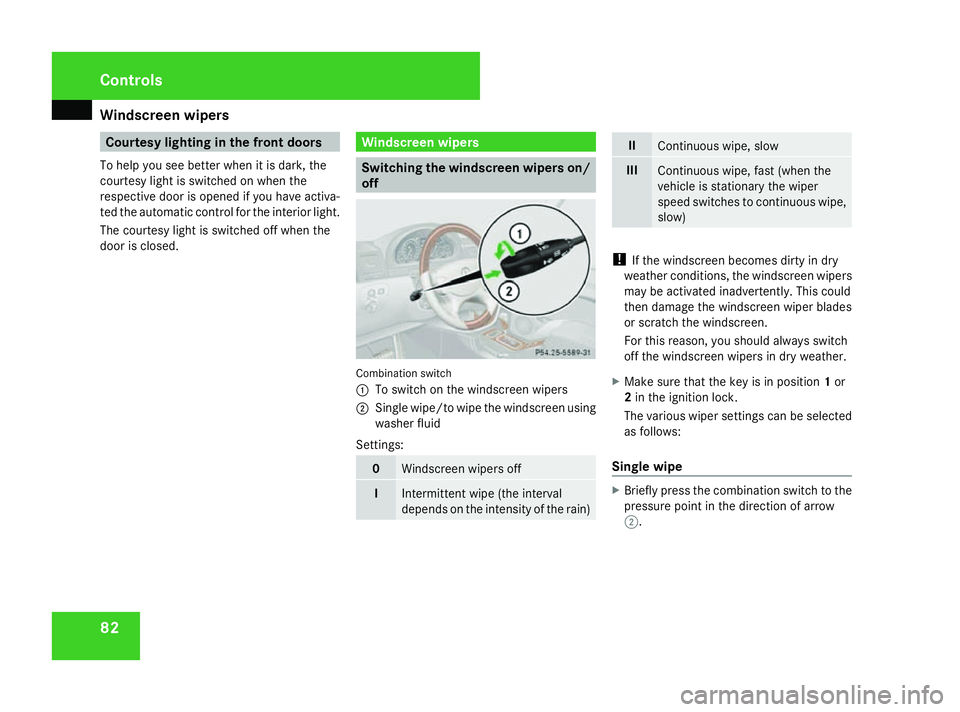
Combination switch
1
To switch on the windscreen wipers
2 Single wipe/to wipe the windscreen using
washer fluid
Settings: 0
Windscreen wipers off
I
Intermittent wipe (the interval
depends on the intensity of the rain) II
Continuous wipe, slow
III
Continuous wipe, fast (when the
vehicle is stationary the wiper
speed switches to continuous wipe,
slow)
!
If the windscreen becomes dirty in dry
weather conditions, the windscreen wipers
may be activated inadvertently. This could
then damage the windscreen wiper blades
or scratch the windscreen.
For this reason, you should always switch
off the windscreen wipers in dry weather.
X Make sure that the key is in position 1or
2 in the ignition lock.
The various wiper settings can be selected
as follows:
Single wipe X
Briefly press the combination switch to the
pressure point in the direction of arrow
2. Controls
463_AKB; 1; 8, en-GB
wobuchh
,V ersion: 2.10.6
2008-07-17T15:19:41+02:00 - Seite 82 Dateiname: 6515_4091_02_buchblock.pdf; preflight
Page 87 of 293
Side windows
84 Side windows
Opening/closing the side windows
G
Risk of injury
Make sure that nobody can become trap-
ped between the side window and the door
frame as a side window is opened. Do not
touch or lean against the side window dur-
ing the opening procedure. You could
become trapped between the side window
and the door frame as the window moves
down. If danger threatens, release the
switch or pull the switch upwards to close
the side window again. G
Risk of injury
Make sure that nobody can become trap-
ped as you close a side window. If danger
threatens, release the switch or press the
switch a second time to open the side win-
dow again. G
Risk of injury
Do not leave children unsupervised in the
vehicle, even if they are secured in a child
restraint system. The children could: R
be seriously or even fatally injured on
parts of the vehicle
R be seriously or even fatally injured by
prolonged exposure to extremely high or
extremely low temperatures
R press the central unlocking switch and
thereby override the child-proof locks
and open the door
If children open a door, they could:
R seriously or even fatally injure other peo-
ple
R get out of the vehicle, thereby injuring
themselves or be seriously or even fatally
injured by a passing vehicle
Activate the child-proof locks if children are
travelling in the vehicle. They could other-
wise open doors or windows while the vehi-
cle is in motion and thereby injure them-
selves or others.
i It is also possible to open and close the
side windows from the outside using the
"Summer opening" (Y page 85) and "Con-
venience closing" (Y page 85) features
respectively. You can disable the controls for the rear
side windows from the driver's seat
(Y
page 46).
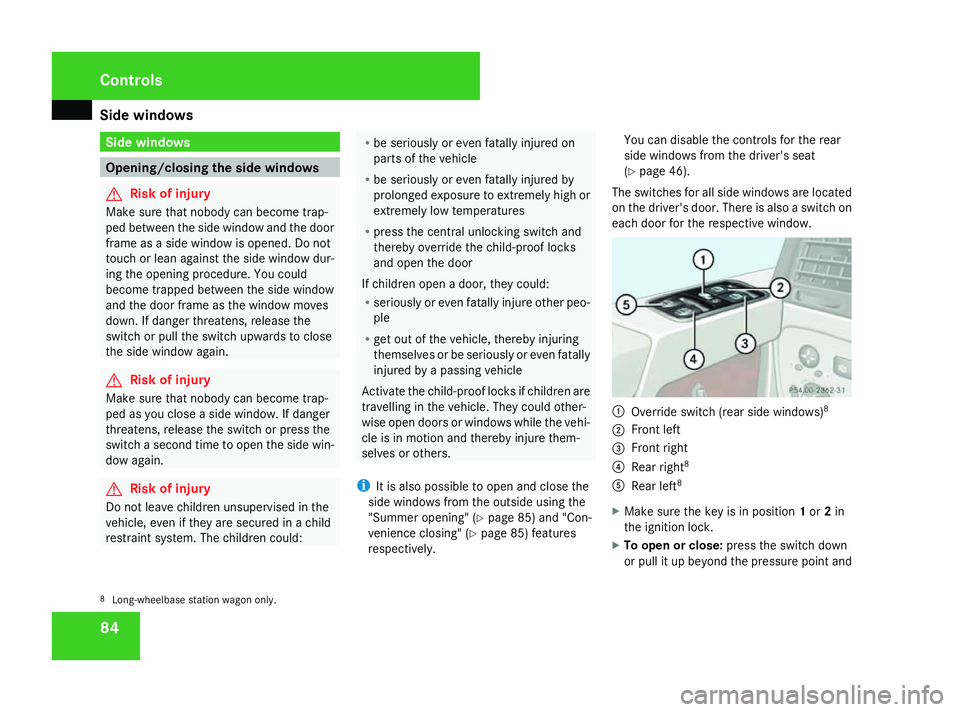
The switches for all side windows are located
on the driver's door. There is also a switch on
each door for the respective window. 1
Override switch (rear side windows) 8
2 Front left
3 Front right
4 Rear right 8
5 Rear left 8
X Make sure the key is in position 1or 2in
the ignition lock.
X To open or close: press the switch down
or pull it up beyond the pressure point and
8 Long-wheelbase station wagon only. Controls
463_AKB; 1; 8, en-GB
wobuchh,
Version: 2.10.6
2008-07-17T15:19:41+02:00 - Seite 84 Dateiname: 6515_4091_02_buchblock.pdf; preflight