heating MERCEDES-BENZ G-CLASS SUV 2008 User Guide
[x] Cancel search | Manufacturer: MERCEDES-BENZ, Model Year: 2008, Model line: G-CLASS SUV, Model: MERCEDES-BENZ G-CLASS SUV 2008Pages: 293, PDF Size: 4.49 MB
Page 67 of 293
Seats
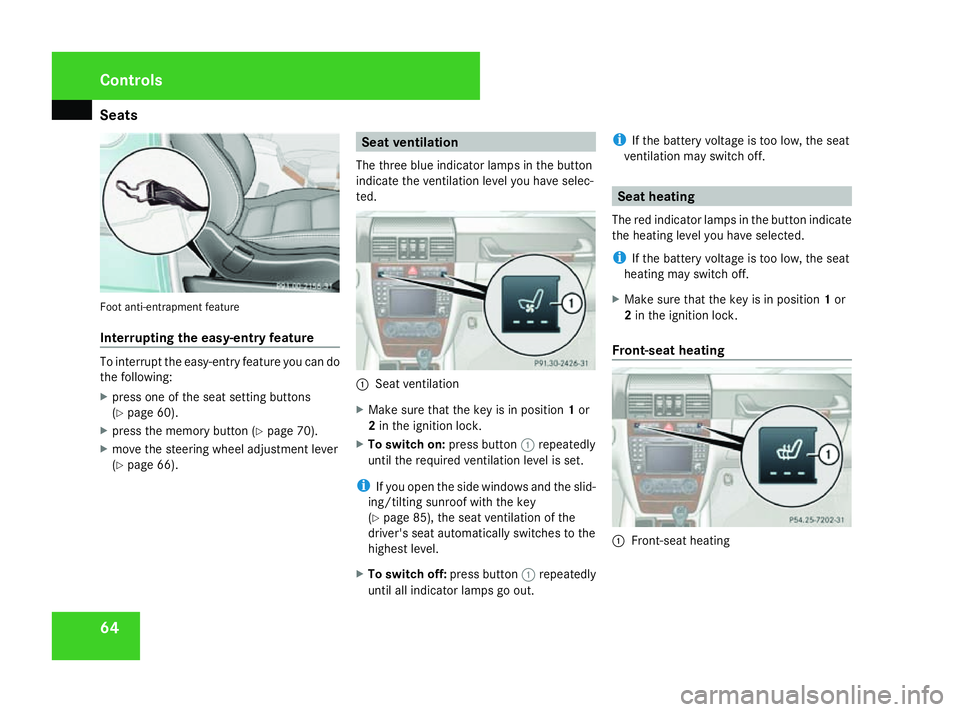
64Foot anti-entrapment feature
Interrupting the easy-entry feature
To interrupt the easy-entry feature you can do
the following:
X press one of the seat setting buttons
(Y page 60).
X press the memory button (Y page 70).
X move the steering wheel adjustment lever
(Y page 66). Seat ventilation
The three blue indicator lamps in the button
indicate the ventilation level you have selec-
ted. 1
Seat ventilation
X Make sure that the key is in position 1or
2 in the ignition lock.
X To switch on: press button1repeatedly
until the required ventilation level is set.
i If you open the side windows and the slid-
ing/tilting sunroof with the key
(Y page 85), the seat ventilation of the
driver's seat automatically switches to the
highest level.
X To switch off: press button1repeatedly
until all indicator lamps go out. i
If the battery voltage is too low, the seat
ventilation may switch off. Seat heating
The red indicator lamps in the button indicate
the heating level you have selected.
i If the battery voltage is too low, the seat
heating may switch off.
X Make sure that the key is in position 1or
2 in the ignition lock.
Front-seat heating 1
Front-seat heating Controls
463_AKB; 1; 8, en-GB
wobuchh,
Version: 2.10.6 2008-07-17T15:19:41+02:00 - Seite 64Dateiname: 6515_4091_02_buchblock.pdf; preflight
Page 68 of 293

Seats
65
i
The system automatically switches down
from level 3to level 2after approximately
five minutes.
The system automatically switches down
from level 2to level 1after approximately
ten minutes.
The system automatically switches off
approximately 20 minutes after it is set to
level 1.
X To switch on: press button1repeatedly
until the desired heating level is set.
X To switch off: press button1repeatedly
until all indicator lamps go out.
Rear-seat heating* Example: long-wheelbase station wagon
1
Rear-seat heating i
The system automatically switches down
from level 2to level 1after approximately
five minutes.
The system automatically switches off
approximately 30 minutes after it is set to
level 1.
X To select level 1: press the upper section
of button 1.
X To select level 2: press the lower section
of button 1.
X To switch off: press button1repeatedly
until all indicator lamps go out. Side-facing bench seat* in the lug-
gage compartment
G
Risk of injury
Make sure that nobody can become trap-
ped when folding down the side-facing
bench seat.
Side-facing bench seats may only be occu-
pied when the rear bench seat is upright
and the seat catch is engaged.
The rear bench seat head restraints must
be fitted. 1
Support
2 Side-facing bench seat
3 Recess
X To fold down: fold out support 1.
X Fold down side-facing bench seat 2. 4
Wheel arch Controls
* optional
463_AKB; 1; 8, en-GB
wobuchh,
Version: 2.10.6 2008-07-17T15:19:41+02:00 - Seite 65 ZDateiname: 6515_4091_02_buchblock.pdf; preflight
Page 70 of 293

Steering wheel
67Steering wheel heating*
The steering-wheel heating heats the leather
areas of the steering wheel. 1
To switch on the steering-wheel heating
2 Indicator lamp
3 To switch off the steering-wheel heating
X To switch on/off: make sure that the key
is in position 1or 2in the ignition lock.
X Turn the lever in direction of arrow 1or
3.
Indicator lamp 2lights up or goes out.
i The steering-wheel heating does not
switch off automatically. Easy-entry/exit feature
The easy-entry/exit feature makes getting in
and out of your vehicle easier.
The steering wheel moves upwards and
towards the dashboard if:
R an easy-entry/exit steering wheel position
has been stored on the key and
R you remove the key from the ignition lock
or
R you open the driver's door with the key in
position 0or 1in the ignition lock.
The steering wheel is moved automatically to
the position previously set when the key is
inserted into the ignition lock with the driver's
door closed.
i The steering wheel only moves upwards
and towards the dashboard if it has not
already reached the upper end stop. G
Risk of injury
Make sure that nobody can become trap-
ped when you activate the easy-entry/exit
feature.
If there is a risk of becoming trapped, stop
the adjustment procedure. To halt the pro-
cedure: R
press the steering-column adjustment
switch
R press one of the memory function posi-
tion buttons
The steering column stops moving immedi-
ately.
Never leave children unsupervised in the
vehicle. They could open the driver's door
and thereby unintentionally activate the
easy-entry feature and become trapped.
You can activate and deactivate the easy-
entry/exit feature via the on-board computer
(Y page 109). Controls
* optional
463_AKB; 1; 8, en-GB
wobuchh,
Version: 2.10.6 2008-07-17T15:19:41+02:00 - Seite 67 ZDateiname: 6515_4091_02_buchblock.pdf; preflight
Page 108 of 293
On-board computer
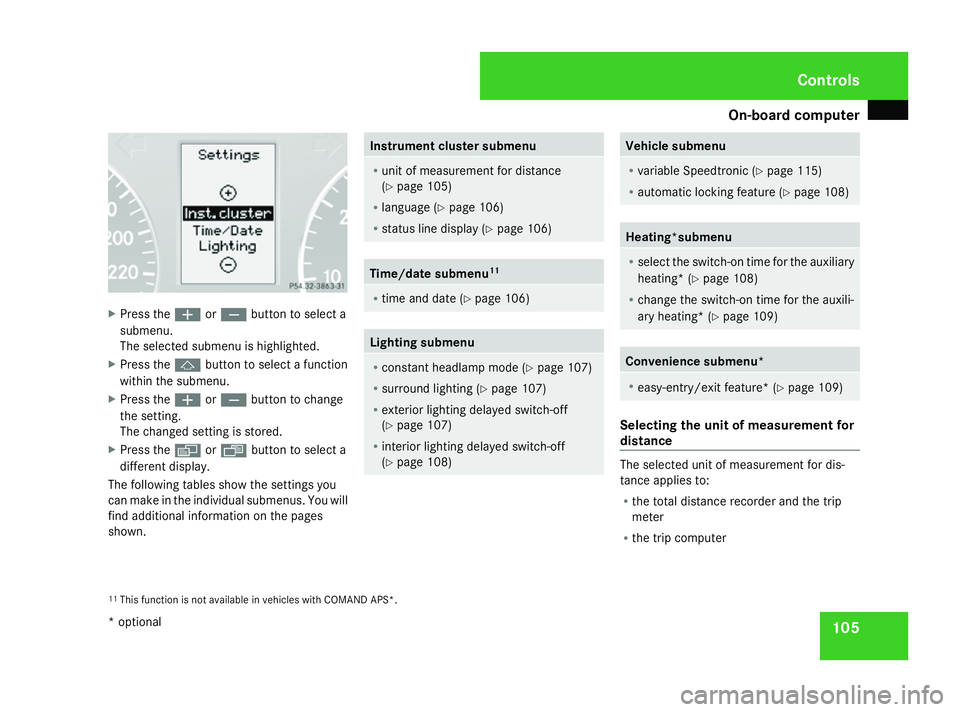
105X
Press the æorç button to select a
submenu.
The selected submenu is highlighted.
X Press the jbutton to select a function
within the submenu.
X Press the æorç button to change
the setting.
The changed setting is stored.
X Press the èorÿ button to select a
different display.
The following tables show the settings you
can make in the individual submenus. You will
find additional information on the pages
shown. Instrument cluster submenu
R
unit of measurement for distance
(Y page 105)
R language (Y page 106)
R status line display (Y page 106) Time/date submenu
11 R
time and date (Y page 106) Lighting submenu
R
constant headlamp mode (Y page 107)
R surround lighting (Y page 107)
R exterior lighting delayed switch-off
(Y page 107)
R interior lighting delayed switch-off
(Y page 108) Vehicle submenu
R
variable Speedtronic (Y page 115)
R automatic locking feature (Y page 108) Heating*submenu
R
select the switch-on time for the auxiliary
heating* (Y page 108)
R change the switch-on time for the auxili-
ary heating* (Y page 109) Convenience submenu*
R
easy-entry/exit feature* (Y page 109) Selecting the unit of measurement for
distance
The selected unit of measurement for dis-
tance applies to:
R
the total distance recorder and the trip
meter
R the trip computer
11 This function is not available in vehicles with COMAND APS*. Controls
* optional
463_AKB; 1; 8, en-GB
wobuchh, Version: 2.10.6
2008-07-17T15:19:41+02:00 - Seite 105 ZDateiname: 6515_4091_02_buchblock.pdf; preflight
Page 111 of 293
On-board computer
108
You can reactivate this function by opening a
door within 10 minutes.
X Press the èor· button to select the
Settings menu.
X Press the jbutton to select submenus.
X Press the æorç button to select the
Lighting submenu.
X Press the jbutton to select Headl.
delayed switch-off .
X Press the æorç button to activate
or deactivate the Headl. delayed
switch-off function.
X Press the j,èorÿ button to
select a different display.
To temporarily deactivate the delayed switch-
off:
X Before leaving the vehicle, turn the key to
position 0in the ignition lock.
X Turn the key to position 2in the ignition
lock and back to position 0.
Delayed switch-off is deactivated.
Delayed switch-off is reactivated as soon as
you restart the engine. Activating/deactivating the interior
lighting delayed switch-off Using the
Inter. lighting
delay.sw.off function, you can set whether
the interior lighting should remain on for 10
seconds after the key is removed from the
ignition lock when it is dark.
X Press the èor· button to select the
Settings menu.
X Press the jbutton to select submenus.
X Press the æorç button to select the
Lighting submenu.
X Press the jbutton to select Inter.
lighting delay.sw.off.
X Press the æorç button to activate
or deactivate Inter. lighting
delay.sw.off.
X Press the j,èorÿ button to
select a different display.
Activating/deactivating the automatic
door locking feature The
Automatic door lock function allows
you to set whether your vehicle will lock cen-
trally from a speed of about 15 km/h
upwards. i
For more information on the automatic
locking feature, see (Y page 55).
X Press the èor· button to select the
Settings menu.
X Press the jbutton to select submenus.
X Press the æorç button to select the
Vehicle submenu.
X Press the jbutton to select Automatic
door lock.
X Press the æorç button to switch
the Automatic door lock feature on or
off.
X Press the j,èorÿ button to
select a different display.
Selecting the switch-on time for the
auxiliary heating* This function is only available if the vehicle
has an auxiliary heating system.
The
Auxiliary heat. function allows you to
select three switch-on times. You can set the
exact switch-on time using the other func-
tions in the Heatersubmenu.
You can switch off the auxiliary heating by
using the remote control or the auxiliary heat-
ing button on the centre console. Controls
* optional
463_AKB; 1; 8, en-GB
wobuchh
,V ersion: 2.10.6
2008-07-17T15:19:41+02:00 - Seite 108 Dateiname: 6515_4091_02_buchblock.pdf; preflight
Page 112 of 293
On-board computer
109
The auxiliary heating is switched off automat-
ically after 50 minutes. This time can be
changed. To do this, visit a qualified specialist
workshop, e.g. a Mercedes-Benz Service
Centre.
G
Risk of fire and poisoning
The operation of the auxiliary heating pro-
duces hot, toxic exhaust fumes. The fuel
vapours produced during refuelling could
ignite on the hot exhaust system.
Do not switch on the auxiliary heating at
filling stations or in enclosed spaces, for
instance, a garage, if there is no air extrac-
tion system.
You could otherwise endanger yourself and
others.
The Auxiliary heat. function can be called
up directly.
X Turn the key to position 1or 2in the ignition
lock.
X Press the button for the auxiliary heating on
the centre console (Y page 130).
or
X Press the èor· button to select the
Settings menu.
X Press the jbutton to select submenus. X
Press the æorç button to select the
Heater submenu.
X Press the jbutton to select Auxiliary
heat. .
X Press the æorç button to select
one of the three switch-on times or Timer
off (auxiliary heating switched off).
When a switch-on time is selected, the yel-
low indicator lamp lights up in the auxiliary
heating button.
X Press the j,èorÿ button to
select a different display.
Changing the switch-on time for the
auxiliary heating* This function is only displayed if you have
selected a switch-on time. Here you can enter
the time at which the auxiliary heating is to
be switched on.
X
Press the èor· button to select the
Settings menu.
X Press the jbutton to select submenus.
X Press the æorç button to select the
Heater submenu.
X Press the jbutton to select Sw.-on
time hour. X
Press the æorç button to set the
hour.
X Press the jbutton to select Sw.-on
time minute(s).
X Press the æorç button to set the
minutes.
After changing from one menu to another,
the new time setting is stored. The yellow
indicator lamp lights up on the button for
the auxiliary heating on the centre console.
X Press the j,èorÿ button to
select a different display.
Activating/deactivating the easy-
entry/exit feature i
For more information on the easy-entry/
exit feature, see (Y page 67). G
Risk of injury
The steering wheel moves when the easy-
entry/exit feature is active. There is a risk
of occupants becoming trapped. Before
activating the easy-entry/exit feature,
make sure that nobody can become trap-
ped.
Do not leave children unsupervised in the
vehicle, even if they are secured in a child
restraint system. The children could open Controls
* optional
463_AKB; 1; 8, en-GB
wobuchh
,V ersion: 2.10.6
2008-07-17T15:19:41+02:00 - Seite 109 ZDateiname: 6515_4091_02_buchblock.pdf; preflight
Page 116 of 293
Driving sys
tems 113
If the call is connected, the call duration
appears in the multi-function display. If it is
stored in the phone book, the name is also
displayed. Otherwise, the number dialled is
displayed.
or
X If you do not wish to make a call, press the
ì button.
Redialling The on-board computer stores the last phone
numbers which were dialled.
X
Press the èor· button to select the
Telephone menu.
X Press the íbutton to call up the most
recently dialled number in the redial mem-
ory.
X Press the jork button to select the
desired name or number.
X Press the íbutton to start dialling. Driving systems
Overview of driving systems
The vehicle's driving systems are described
on the following pages:
R Cruise control and variable Speedtronic
which you can use to control the speed of
the vehicle
R Ultrasonic reversing aid*, which helps you
park and manoeuvre
R Reversing camera *,which helps you when
parking and manoeuvring
You will find further information about driving
off-road in the "Operation" section
(Y page 172). Cruise control
Cruise control maintains a constant road
speed for you. On long and steep downhill
gradients, especially if the vehicle is laden or
towing a trailer, you must select shift range
1, 2or 3in good time. By doing so you will
make use of the braking effect of the engine,
which relieves the load on the brake system
and prevents the brakes from overheating
and wearing too quickly. G
Risk of accident
Do not change down for additional engine
braking on a slippery road surface. This
could cause the drive wheels to lose their
grip and the vehicle could skid.
Use cruise control only if road and traffic con-
ditions make it appropriate to maintain a
steady speed for a prolonged period. You can
store any road speed above 30 km/h. G
Risk of accident
Cruise control cannot take account of road
and traffic conditions.
Always pay attention to traffic conditions
even when cruise control is activated.
Cruise control is only an aid designed to
assist driving. You are responsible for the Cont
rols
* option al
463_AKB; 1; 8, en-GB
wobuchh,
Version: 2.10.6 2008-07-17T15:19:41+02:00 - Seite 113 ZDateiname: 6515_4091_02_buchblock.pdf; preflight
Page 118 of 293
Driving sys
tems 115
Calling up the last speed stored G
Risk of accident
Only select a stored speed if you know what
that speed is and whether it is suitable for
the current situation. Otherwise, sudden
acceleration or braking could endanger you
or others.
X Briefly pull the cruise control lever towards
you 3.
X Remove your foot from the accelerator
pedal.
Cruise control adjusts the vehicle’s speed
to the last speed stored.
i G 320 CDI: if no speed is stored, cruise
control stores the current speed and main-
tains it.
Setting a speed X
Press the cruise control lever up 1for a
higher speed or down 4for a lower speed.
X Keep the cruise control lever pressed until
the desired speed is reached.
X Release the cruise control lever.
The new speed is stored.
i Cruise control is not deactivated if you
depress the accelerator pedal. For exam- ple, if you accelerate briefly to overtake,
cruise control adjusts the vehicle's speed
to the last speed stored after you have fin-
ished overtaking.
Making adjustments in 1 km/hincre-
ments X
Briefly press the cruise control lever up
1 for a higher speed or down 4for a
lower speed.
The last speed stored is increased or
reduced.
Deactivating cruise control There are several ways to deactivate cruise
control:
X Briefly press the cruise control lever for-
wards 6.
or
X Brake.
or
X Briefly press the cruise control lever in the
direction of arrow 5.
Variable Speedtronic is selected. LIM indi-
cator lamp 2in the cruise control lever
lights up. Cruise control is automatically deactivated if,
for example:
R
you are driving at less than 30 km/h
R ESP ®
is intervening
R you move the selector lever to Nwhile driv-
ing
R G 320 CDI: you engage a differential lock
i The last speed stored is cleared when you
switch off the engine. Speedtronic
Variable Speedtronic helps you to avoid
exceeding a specified speed, e. g. when driv-
ing through varying speed limits in built-up
areas. On long and steep downhill gradients,
especially if the vehicle is laden or towing a
trailer, you must select shift range 1,2or 3
in good time. By doing so, you will make use
of the braking effect of the engine, which
relieves the load on the brake system and
prevents the brakes from overheating and
wearing too quickly. G
Risk of accident
Never depress the brake pedal continu-
ously while the vehicle is in motion, e.g. Controls
463_AKB; 1; 8, en-GB
wobuchh
,V ersion: 2.10.6
2008-07-17T15:19:41+02:00 - Seite 115 ZDateiname: 6515_4091_02_buchblock.pdf; preflight
Page 124 of 293
Air conditioning
121
i
The reversing camera also functions
when towing a trailer.
Switching off the reversing camera X
Shift the automatic transmission to P,Nor
D.
or
X In COMAND APS, activate another func-
tion. (See the separate COMAND APS oper-
ating instructions.) Air conditioning
General notes
The vehicle is equipped with the Thermatic
air-conditioning system. Thermatic combines
an automatic heating and ventilation system
with a cooling system.
Thermatic controls the temperature and the
humidity of the vehicle interior and filters out
undesirable substances from the air.
Thermatic is only operational when the
engine is running. Optimum operation is ach-
ieved only when you drive with the side win-
dows and sliding/tilting sunroof* closed.
i Ventilate the vehicle for a brief period
during warm weather, e.g. using the sum-
mer opening feature (Y page 85). This will
speed up the cooling process and the desired interior temperature will be
reached more quickly.
i The integrated filter filters out most par-
ticles of dust and completely filters out pol-
len. A clogged filter reduces the amount of
air supplied to the vehicle interior. For this
reason, you should always observe the
interval for replacing the filter, which is
specified in the Service Booklet. As it
depends on environmental conditions, e.g.
heavy air pollution, the interval may be
shorter than stated in the Service Booklet. G
Risk of accident
Observe the settings recommended on the
following pages. The windows could other-
wise mist up. This may obstruct your view
of the traffic situation, thereby causing an
accident. Cont
rols
* option al
463_AKB; 1; 8, en-GB
wobuchh,
Version: 2.10.6 2008-07-17T15:19:41+02:00 - Seite 121 ZDateiname: 6515_4091_02_buchblock.pdf; preflight
Page 126 of 293
Air conditioning
123Function Recommendation/Notes
5
F
Switches the rear window heating on/off i
At very low temperatures, the rear window heating is
only switched on once the vehicle interior has warmed
up. (Y
page 128) 6
9
Activates/deactivates cooling with air dehumidifi-
cation i
Switch on the cooling with air dehumidification func-
tion. The indicator lamp in the 9button lights up. (Y
page 124) 9
Activates/deactivates the auxiliary heating/venti-
lation i
You can use the residual heat to heat or ventilate the
vehicle interior after you have switched off the ignition. (Y
page 129) 7
U
Controls the air conditioning automatically i
Activate automatic air conditioning. The indicator
lamp in the Ubutton comes on. (Y
page 124) 8
,
Activates/deactivates air-recirculation mode i
Only use this operating mode for a short time, e.g. in
a tunnel. Otherwise, the windows could mist up due to
a lack of fresh air. (Y
page 129) 9
P
Activates/deactivates the demisting function for
the windscreen i
Only use the "demisting" function until the wind-
screen is clear again. (Y
page 127) Cont
rols
463_AKB; 1; 8, en-GB
wobuchh,
Version: 2.10.6 2008-07-17T15:19:41+02:00 - Seite 123 ZDateiname: 6515_4091_02_buchblock.pdf; preflight