lights MERCEDES-BENZ G-CLASS SUV 2008 User Guide
[x] Cancel search | Manufacturer: MERCEDES-BENZ, Model Year: 2008, Model line: G-CLASS SUV, Model: MERCEDES-BENZ G-CLASS SUV 2008Pages: 293, PDF Size: 4.49 MB
Page 55 of 293
Anti-theft syste
ms52
Switching off the alarm X
Insert the key into the ignition lock.
The alarm is switched off.
or
X Press the Œor‹ button on the key.
The alarm is switched off. Tow-away protection*
An audible and visual alarm is triggered if the
vehicle's angle of inclination is altered while
tow-away protection is primed. This occurs if
the vehicle is jacked up on one side, for exam-
ple.
Priming tow-away protection X
Switch off the ignition.
X Lock the vehicle using the key.
Tow-away protection is primed after
approximately 30 seconds. Deactivating tow-away protection Deactivate tow-away protection manually to
prevent a false alarm if your vehicle:
R
it is being transported
R is being loaded, e.g. onto a ferry or car
transporter
R is parked on a movable surface, e.g. split-
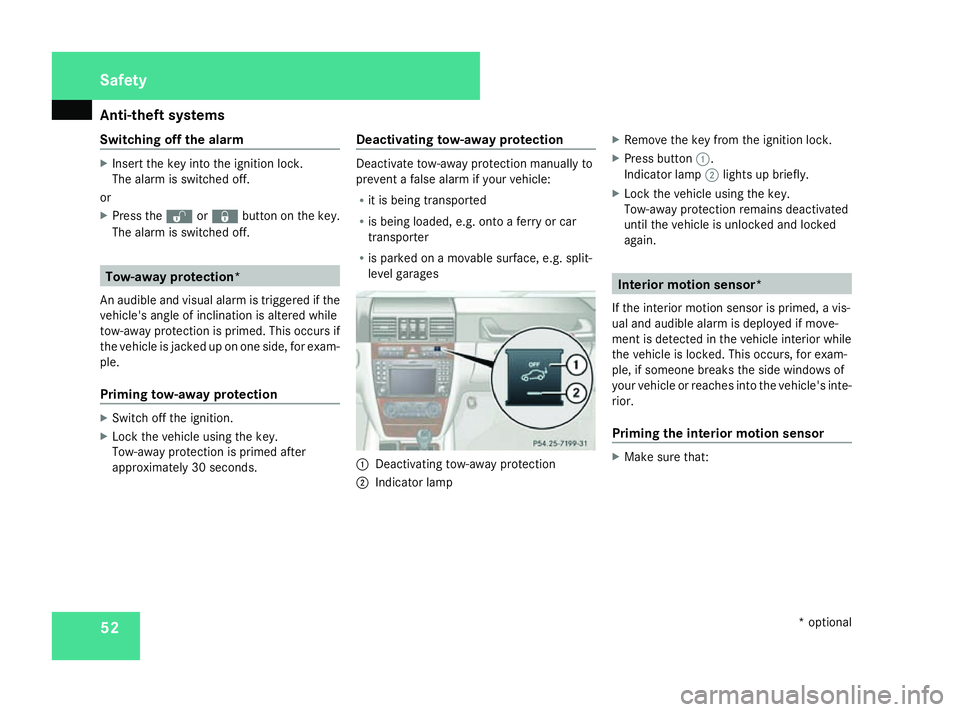
level garages 1
Deactivating tow-away protection
2 Indicator lamp X
Remove the key from the ignition lock.
X Press button 1.
Indicator lamp 2lights up briefly.
X Lock the vehicle using the key.
Tow-away protection remains deactivated
until the vehicle is unlocked and locked
again. Interior motion sensor*
If the interior motion sensor is primed, a vis-
ual and audible alarm is deployed if move-
ment is detected in the vehicle interior while
the vehicle is locked. This occurs, for exam-
ple, if someone breaks the side windows of
your vehicle or reaches into the vehicle's inte-
rior.
Priming the interior motion sensor X
Make sure that: Safety
* optional
463_AKB; 1; 8, en-GB
wobuchh
,V ersion: 2.10.6
2008-07-17T15:19:41+02:00 - Seite 52 Dateiname: 6515_4091_02_buchblock.pdf; preflight
Page 56 of 293
Anti-theft syste
ms 53
R
the side windows are closed.
R the sliding/tilting sunroof* is closed.
R there are no objects, e.g. mascots, hang-
ing on the rear-view mirror or on the
grasp handles on the roof trim.
This will prevent false alarms.
X Lock the vehicle using the key.
The interior motion sensor is primed after
approximately 30 seconds.
Deactivating the interior motion sensor To prevent a false alarm, deactivate the inte-
rior motion sensor if you lock your vehicle and
R
people or animals remain in the vehicle
R the windows remain open
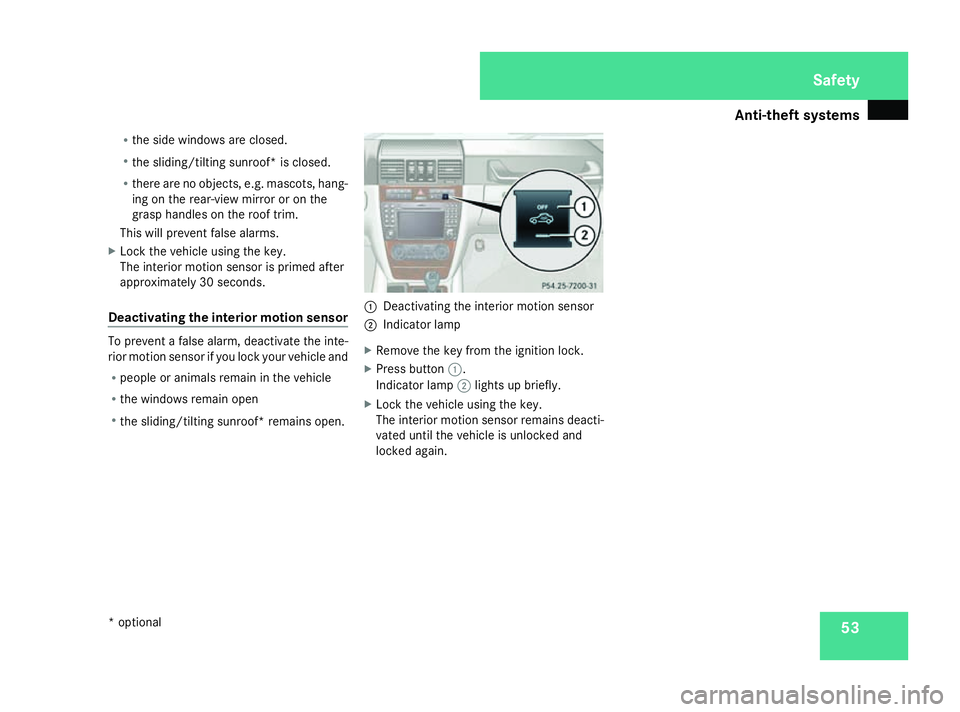
R the sliding/tilting sunroof* remains open. 1
Deactivating the interior motion sensor
2 Indicator lamp
X Remove the key from the ignition lock.
X Press button 1.
Indicator lamp 2lights up briefly.
X Lock the vehicle using the key.
The interior motion sensor remains deacti-
vated until the vehicle is unlocked and
locked again. Safety
* optional
463_AKB; 1; 8, en-GB
wobuchh
,V ersion: 2.10.6
2008-07-17T15:19:41+02:00 - Seite 53 ZDateiname: 6515_4091_02_buchblock.pdf; preflight
Page 70 of 293

Steering wheel
67Steering wheel heating*
The steering-wheel heating heats the leather
areas of the steering wheel. 1
To switch on the steering-wheel heating
2 Indicator lamp
3 To switch off the steering-wheel heating
X To switch on/off: make sure that the key
is in position 1or 2in the ignition lock.
X Turn the lever in direction of arrow 1or
3.
Indicator lamp 2lights up or goes out.
i The steering-wheel heating does not
switch off automatically. Easy-entry/exit feature
The easy-entry/exit feature makes getting in
and out of your vehicle easier.
The steering wheel moves upwards and
towards the dashboard if:
R an easy-entry/exit steering wheel position
has been stored on the key and
R you remove the key from the ignition lock
or
R you open the driver's door with the key in
position 0or 1in the ignition lock.
The steering wheel is moved automatically to
the position previously set when the key is
inserted into the ignition lock with the driver's
door closed.
i The steering wheel only moves upwards
and towards the dashboard if it has not
already reached the upper end stop. G
Risk of injury
Make sure that nobody can become trap-
ped when you activate the easy-entry/exit
feature.
If there is a risk of becoming trapped, stop
the adjustment procedure. To halt the pro-
cedure: R
press the steering-column adjustment
switch
R press one of the memory function posi-
tion buttons
The steering column stops moving immedi-
ately.
Never leave children unsupervised in the
vehicle. They could open the driver's door
and thereby unintentionally activate the
easy-entry feature and become trapped.
You can activate and deactivate the easy-
entry/exit feature via the on-board computer
(Y page 109). Controls
* optional
463_AKB; 1; 8, en-GB
wobuchh,
Version: 2.10.6 2008-07-17T15:19:41+02:00 - Seite 67 ZDateiname: 6515_4091_02_buchblock.pdf; preflight
Page 78 of 293
Lights
75Correct driver's seat position
G
Risk of accident
Only adjust the driver's seat when the vehi-
cle is stationary. You will otherwise be dis-
tracted from the road and traffic conditions
and you could lose control of the vehicle as
a result of the seat moving. This could
cause an accident. G
Risk of accident
Only adjust the steering wheel when the
vehicle is stationary. Drive only when the
steering wheel is fixed.
X Check whether seat and the head restraint
are adjusted properly (Y page 60).
Make sure that:
R you are as far away from the driver's front
airbag as possible.
R you are sitting in a normal upright posi-
tion.
R you can fasten the seat belt properly.
R you have moved the backrest to an
almost vertical position.
R you have set the seat angle so that your
thighs are gently supported. R
you can depress the pedals properly.
R you have adjusted the head restraint so
that the back of your head is supported
at eye level by the central area of the
head restraint.
X Check whether steering wheel is adjusted
properly (Y page 66).
Make sure that:
R you can hold the steering wheel with your
arms slightly bent.
R you can move your legs freely.
R you can see all the displays in the instru-
ment cluster clearly.
X Check whether you have fastened seat belt
properly (Y page 71).
It should:
R fit snugly across your body
R be routed across the middle of your
shoulder
R routed in your pelvic area across the hip
joints Lights
Light switch
For safety reasons, Mercedes-Benz recom-
mends that you drive with the lights switched
on even during the daytime. In some coun-
tries, daytime operation of headlamps varies
due to legal and voluntary requirements. In
these countries, the dipped-beam headlamps
are automatically switched on when the
engine is started.
i If you drive in countries in which traffic
drives on the opposite side of the road to
the country where the vehicle is registered,
oncoming traffic may be dazzled by the
asymmetrical dipped-beam headlamps.
Have the headlamps changed to symmet-
rical dipped beam when driving in these
countries. You can obtain information
about this from any Mercedes-Benz Service
Centre.
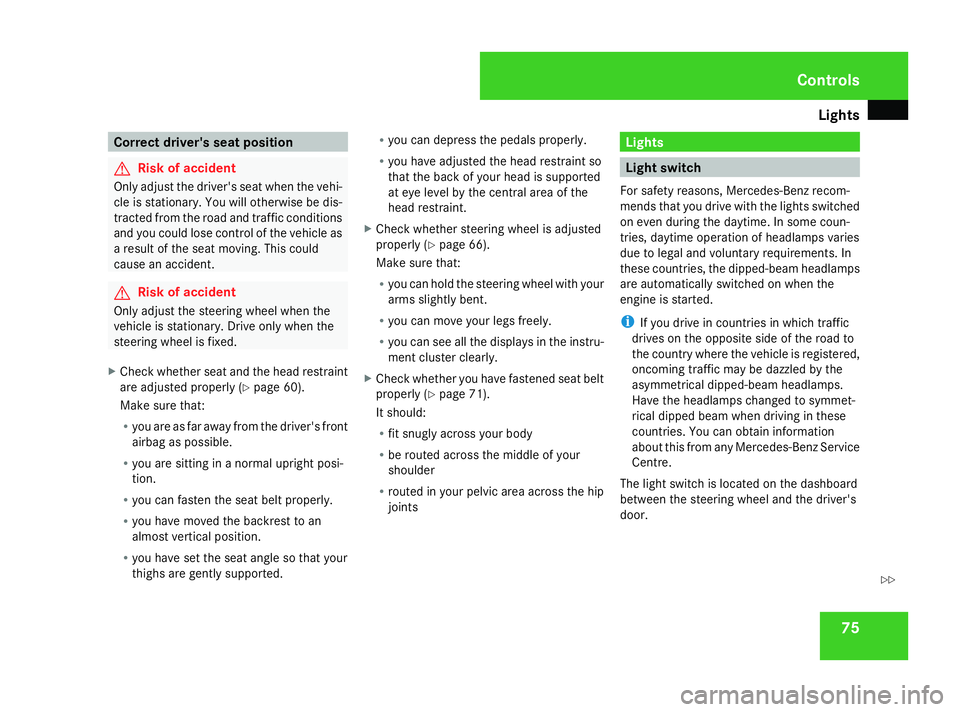
The light switch is located on the dashboard
between the steering wheel and the driver's
door. Controls
463_AKB; 1; 8, en-GB
wobuchh,
Version: 2.10.6 2008-07-17T15:19:41+02:00 - Seite 75 ZDateiname: 6515_4091_02_buchblock.pdf; preflight
Page 79 of 293
Lights
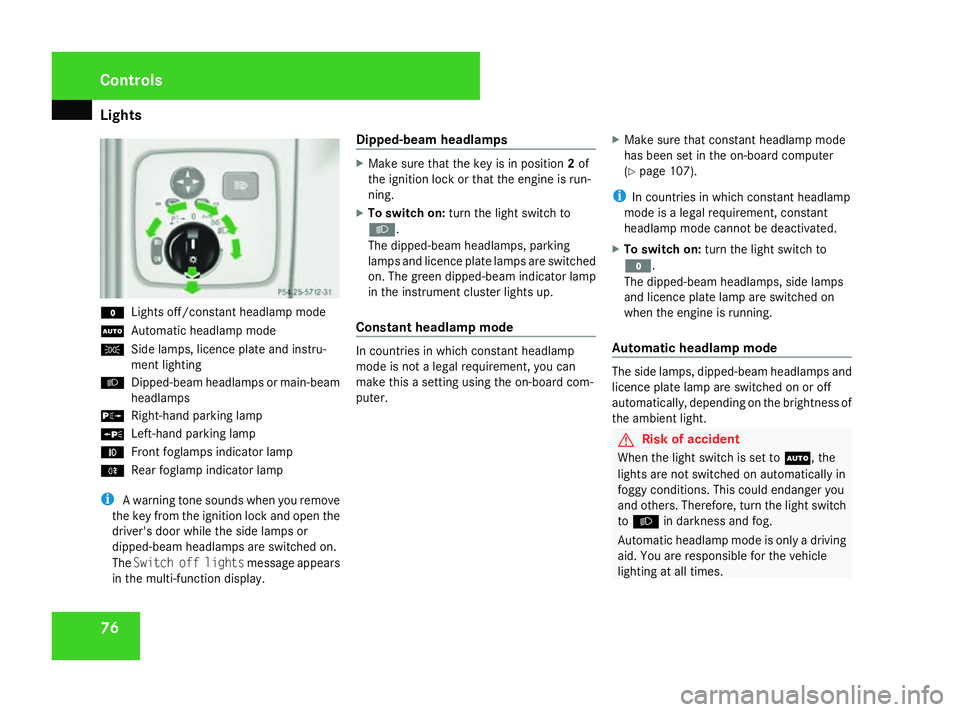
76M
Lights off/constant headlamp mode
U Automatic headlamp mode
C Side lamps, licence plate and instru-
ment lighting
B Dipped-beam headlamps or main-beam
headlamps
g Right-hand parking lamp
a Left-hand parking lamp
¥ Front foglamps indicator lamp
† Rear foglamp indicator lamp
i A warning tone sounds when you remove
the key from the ignition lock and open the
driver's door while the side lamps or
dipped-beam headlamps are switched on.
The Switch off lights message appears
in the multi-function display. Dipped-beam headlamps X
Make sure that the key is in position 2of
the ignition lock or that the engine is run-
ning.
X To switch on: turn the light switch to
B.
The dipped-beam headlamps, parking
lamps and licence plate lamps are switched
on. The green dipped-beam indicator lamp
in the instrument cluster lights up.
Constant headlamp mode In countries in which constant headlamp
mode is not a legal requirement, you can
make this a setting using the on-board com-
puter.
X
Make sure that constant headlamp mode
has been set in the on-board computer
(Y page 107).
i In countries in which constant headlamp
mode is a legal requirement, constant
headlamp mode cannot be deactivated.
X To switch on: turn the light switch to
M.
The dipped-beam headlamps, side lamps
and licence plate lamp are switched on
when the engine is running.
Automatic headlamp mode The side lamps, dipped-beam headlamps and
licence plate lamp are switched on or off
automatically, depending on the brightness of
the ambient light.
G
Risk of accident
When the light switch is set to U, the
lights are not switched on automatically in
foggy conditions. This could endanger you
and others. Therefore, turn the light switch
to B in darkness and fog.
Automatic headlamp mode is only a driving
aid. You are responsible for the vehicle
lighting at all times. Controls
463_AKB; 1; 8, en-GB
wobuchh,
Version: 2.10.6 2008-07-17T15:19:41+02:00 - Seite 76Dateiname: 6515_4091_02_buchblock.pdf; preflight
Page 80 of 293
Lights
77G
Risk of accident
When it is dark or foggy, turn the light
switch from UtoB in good time.
Otherwise, the headlamps could switch off
temporarily and you could cause an acci-
dent.
X To switch on: turn the light switch to
U.
The side lamps are switched on and off
automatically when the key is in position
1 in the ignition lock.
The dipped-beam headlamps, side lamps
and licence plate lamp are switched on
automatically when the engine is running.
When the dipped-beam headlamps are
switched on, the green dipped-beam indi-
cator lamp in the instrument cluster lights
up.
Front foglamps/rear foglamp G
Risk of accident
If you suspect that driving conditions will be
foggy, turn the light switch to Bbefore
you start your journey. Otherwise, your
vehicle may not be visible and you could
endanger yourself and others. G
Risk of accident
When it is dark or foggy, turn the light
switch from UtoB in good time.
Otherwise, the headlamps could switch off
temporarily and you could cause an acci-
dent.
When the light switch is set to Uyou can-
not switch on the front or rear foglamps.
X Make sure that the key is in position 2in
the ignition lock.
X To switch on the front foglamps: turn the
light switch to the Bposition.
X Pull the light switch out to the first stop.
The ¥ green indicator lamp next to the
light switch lights up.
X To switch on the rear foglamp: turn the
light switch to the Bposition.
X Pull the light switch out to the second
detent.
The † yellow indicator lamp next to the
light switch lights up.
X To switch off the front foglamps/rear
foglamp: push in the light switch to the
stop.
The corresponding indicator lamp goes out. Combination switch (turn signals,
main-beam headlamps and headlamp
flasher)
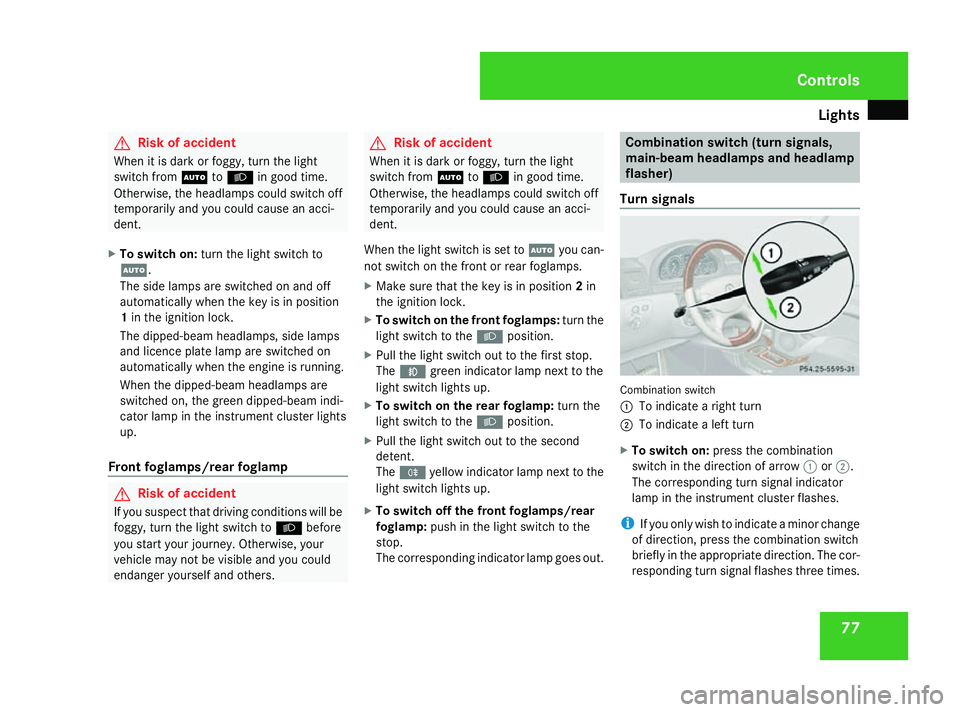
Turn signals Combination switch
1
To indicate a right turn
2 To indicate a left turn
X To switch on: press the combination
switch in the direction of arrow 1or2.
The corresponding turn signal indicator
lamp in the instrument cluster flashes.
i If you only wish to indicate a minor change
of direction, press the combination switch
briefly in the appropriate direction. The cor-
responding turn signal flashes three times. Controls
463_AKB; 1; 8, en-GB
wobuchh,
Version: 2.10.6 2008-07-17T15:19:41+02:00 - Seite 77 ZDateiname: 6515_4091_02_buchblock.pdf; preflight
Page 81 of 293
Lights
78
Main-beam headlamps/headlamp flas-
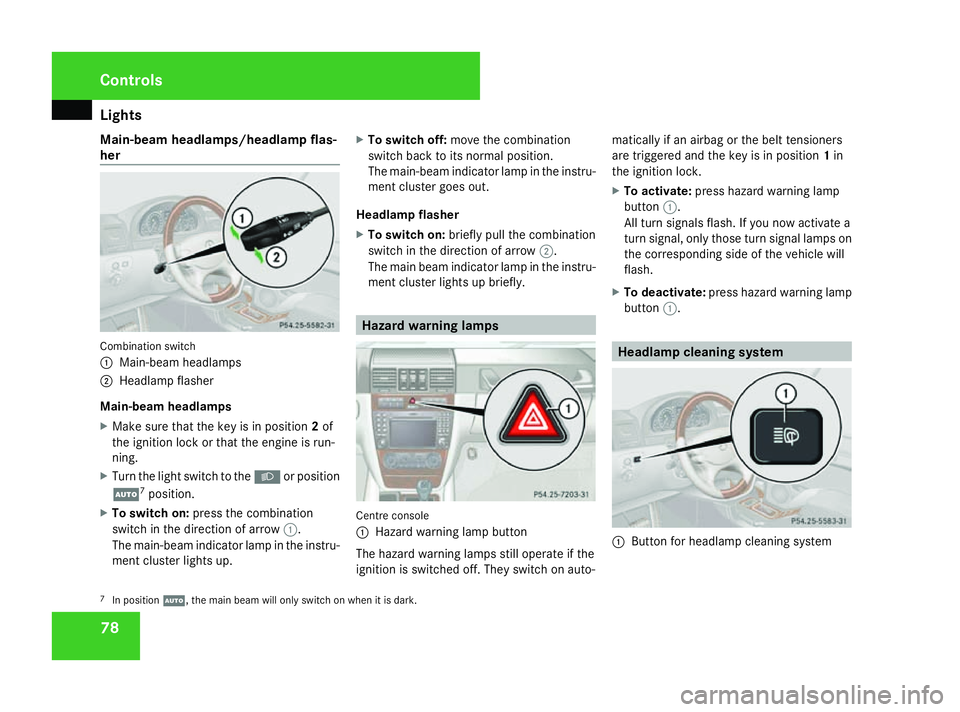
her Combination switch
1
Main-beam headlamps
2 Headlamp flasher
Main-beam headlamps
X Make sure that the key is in position 2of
the ignition lock or that the engine is run-
ning.
X Turn the light switch to the Bor position
U 7
position.
X To switch on: press the combination
switch in the direction of arrow 1.
The main-beam indicator lamp in the instru-
ment cluster lights up. X
To switch off: move the combination
switch back to its normal position.
The main-beam indicator lamp in the instru-
ment cluster goes out.
Headlamp flasher
X To switch on: briefly pull the combination
switch in the direction of arrow 2.
The main beam indicator lamp in the instru-
ment cluster lights up briefly. Hazard warning lamps
Centre console
1
Hazard warning lamp button
The hazard warning lamps still operate if the
ignition is switched off. They switch on auto- matically if an airbag or the belt tensioners
are triggered and the key is in position
1in
the ignition lock.
X To activate: press hazard warning lamp
button 1.
All turn signals flash. If you now activate a
turn signal, only those turn signal lamps on
the corresponding side of the vehicle will
flash.
X To deactivate: press hazard warning lamp
button 1. Headlamp cleaning system
1
Button for headlamp cleaning system
7 In position U, the main beam will only switch on when it is dark. Controls
463_AKB; 1; 8, en-GB
wobuchh,
Version: 2.10.6 2008-07-17T15:19:41+02:00 - Seite 78Dateiname: 6515_4091_02_buchblock.pdf; preflight
Page 82 of 293
Lights
79
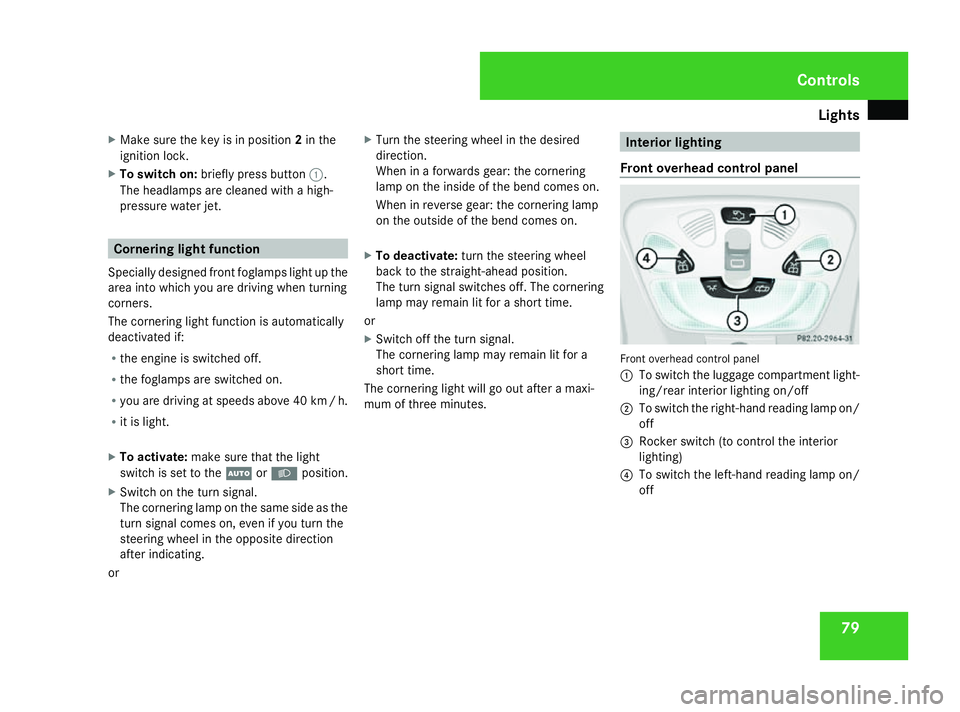
X
Make sure the key is in position 2in the
ignition lock.
X To switch on: briefly press button 1.
The headlamps are cleaned with a high-
pressure water jet. Cornering light function
Specially designed front foglamps light up the
area into which you are driving when turning
corners.
The cornering light function is automatically
deactivated if:
R the engine is switched off.
R the foglamps are switched on.
R you are driving at speeds above 40 km /h.
R it is light.
X To activate: make sure that the light
switch is set to the UorB position.
X Switch on the turn signal.
The cornering lamp on the same side as the
turn signal comes on, even if you turn the
steering wheel in the opposite direction
after indicating.
or X
Turn the steering wheel in the desired
direction.
When in a forwards gear: the cornering
lamp on the inside of the bend comes on.
When in reverse gear: the cornering lamp
on the outside of the bend comes on.
X To deactivate: turn the steering wheel
back to the straight-ahead position.
The turn signal switches off. The cornering
lamp may remain lit for a short time.
or
X Switch off the turn signal.
The cornering lamp may remain lit for a
short time.
The cornering light will go out after a maxi-
mum of three minutes. Interior lighting
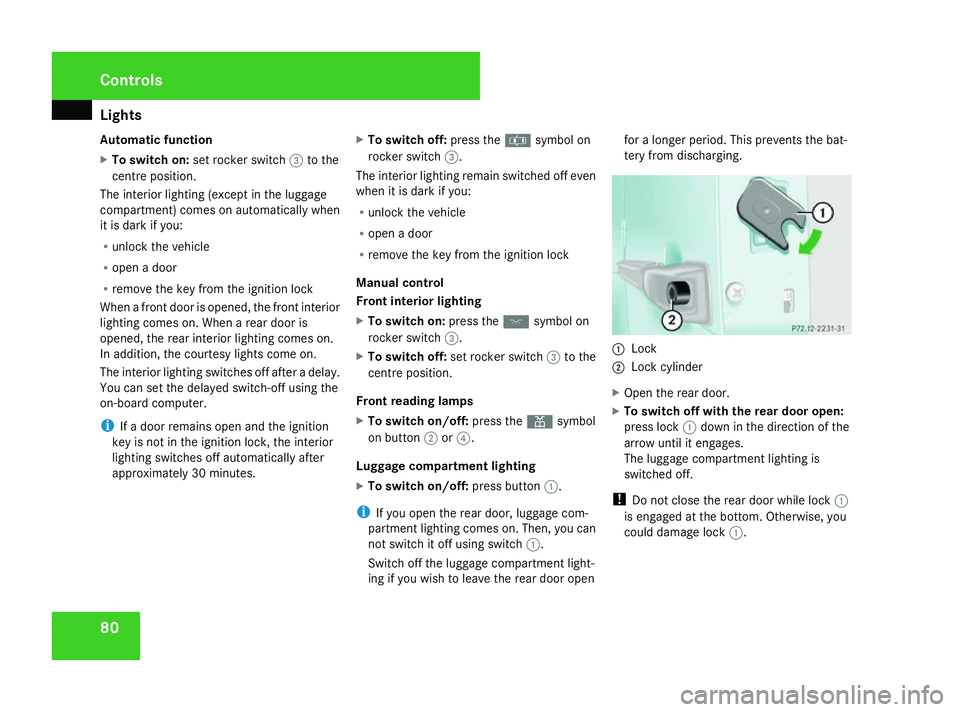
Front overhead control panel Front overhead control panel
1
To switch the luggage compartment light-
ing/rear interior lighting on/off
2 To switch the right-hand reading lamp on/
off
3 Rocker switch (to control the interior
lighting)
4 To switch the left-hand reading lamp on/
off Controls
463_AKB; 1; 8, en-GB
wobuchh,
Version: 2.10.6 2008-07-17T15:19:41+02:00 - Seite 79 ZDateiname: 6515_4091_02_buchblock.pdf; preflight
Page 83 of 293
Lights
80
Automatic function
X
To switch on: set rocker switch 3to the
centre position.
The interior lighting (except in the luggage
compartment) comes on automatically when
it is dark if you:
R unlock the vehicle
R open a door
R remove the key from the ignition lock
When a front door is opened, the front interior
lighting comes on. When a rear door is
opened, the rear interior lighting comes on.
In addition, the courtesy lights come on.
The interior lighting switches off after a delay.
You can set the delayed switch-off using the
on-board computer.
i If a door remains open and the ignition
key is not in the ignition lock, the interior
lighting switches off automatically after
approximately 30 minutes. X
To switch off: press the¤symbol on
rocker switch 3.
The interior lighting remain switched off even
when it is dark if you:
R unlock the vehicle
R open a door
R remove the key from the ignition lock
Manual control
Front interior lighting
X To switch on: press theðsymbol on
rocker switch 3.
X To switch off: set rocker switch 3to the
centre position.
Front reading lamps
X To switch on/off: press theXsymbol
on button 2or4.
Luggage compartment lighting
X To switch on/off: press button1.
i If you open the rear door, luggage com-
partment lighting comes on. Then, you can
not switch it off using switch 1.
Switch off the luggage compartment light-
ing if you wish to leave the rear door open for a longer period. This prevents the bat-
tery from discharging.
1
Lock
2 Lock cylinder
X Open the rear door.
X To switch off with the rear door open:
press lock 1down in the direction of the
arrow until it engages.
The luggage compartment lighting is
switched off.
! Do not close the rear door while lock 1
is engaged at the bottom. Otherwise, you
could damage lock 1.Controls
463_AKB; 1; 8, en-GB
wobuchh,
Version: 2.10.6 2008-07-17T15:19:41+02:00 - Seite 80Dateiname: 6515_4091_02_buchblock.pdf; preflight
Page 84 of 293
Lights
81
X
To switch on with the rear door open:
press lock cylinder 2.
The luggage compartment lighting resumes
its normal function.
Rear interior lighting
X To switch on/off: press button1on the
front overhead control panel (Y page 79).
i If you open the rear door, the rear interior
lighting comes on. You can then not switch
it off using button 1on the front overhead
control panel.
Switch off the rear interior lighting if you
wish to leave the rear door open for a longer
period. This prevents the battery from dis-
charging.
To switch off the rear interior lighting with the
rear door open, see Switching off with rear
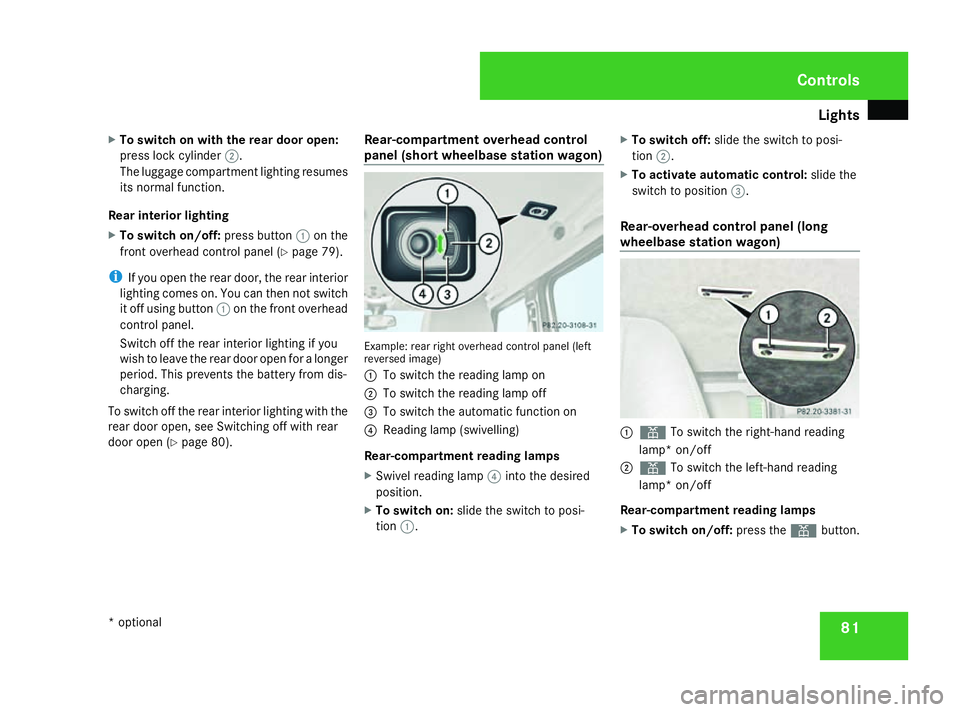
door open (Y page 80). Rear-compartment overhead control
panel (short wheelbase station wagon) Example: rear right overhead control panel (left
reversed image)
1
To switch the reading lamp on
2 To switch the reading lamp off
3 To switch the automatic function on
4 Reading lamp (swivelling)
Rear-compartment reading lamps
X Swivel reading lamp 4into the desired
position.
X To switch on: slide the switch to posi-
tion 1. X
To switch off: slide the switch to posi-
tion 2.
X To activate automatic control: slide the
switch to position 3.
Rear-overhead control panel (long
wheelbase station wagon) 1
X To switch the right-hand reading
lamp* on/off
2 X To switch the left-hand reading
lamp* on/off
Rear-compartment reading lamps
X To switch on/off: press theXbutton. Controls
* optional
463_AKB; 1; 8, en-GB
wobuchh,
Version: 2.10.6
2008-07-17T15:19:41+02:00 - Seite 81 ZDateiname: 6515_4091_02_buchblock.pdf; preflight