lights MERCEDES-BENZ G-CLASS SUV 2008 Owner's Manual
[x] Cancel search | Manufacturer: MERCEDES-BENZ, Model Year: 2008, Model line: G-CLASS SUV, Model: MERCEDES-BENZ G-CLASS SUV 2008Pages: 293, PDF Size: 4.49 MB
Page 86 of 293
Windscreen wipers
83
Wiping with washer fluid X
Press the combination switch beyond the
pressure point in the direction of arrow
2.
i Wipe the windscreen using washer fluid
even if it is raining. By doing so, you will
avoid smearing the windscreen.
Intermittent wipe/rain sensor X
Turn the combination switch in the direc-
tion of arrow 1to position I.
The rain sensor is activated. The appropri-
ate wiping frequency is set automatically
according to the intensity of the rain.
i If you have selected the intermittent wipe
setting, wiping is interrupted when the
vehicle is stationary and you open the driv-
er's or the front-passenger door. This pro-
tects people getting into and out of the
vehicle from being sprayed with water.
Intermittent wipe continues when:
R you close the doors again
R you turn the combination switch to posi-
tion IIor III
R you shift the selector lever to Dor R Continuous wipe X
Depending on the intensity of the rain, turn
the combination switch in the direction of
arrow 1to position IIor III.
i When the windscreen wiper is switched
on and you stop the vehicle, the windscreen
wiper wipes more slowly.
Switching off the windscreen wipers X
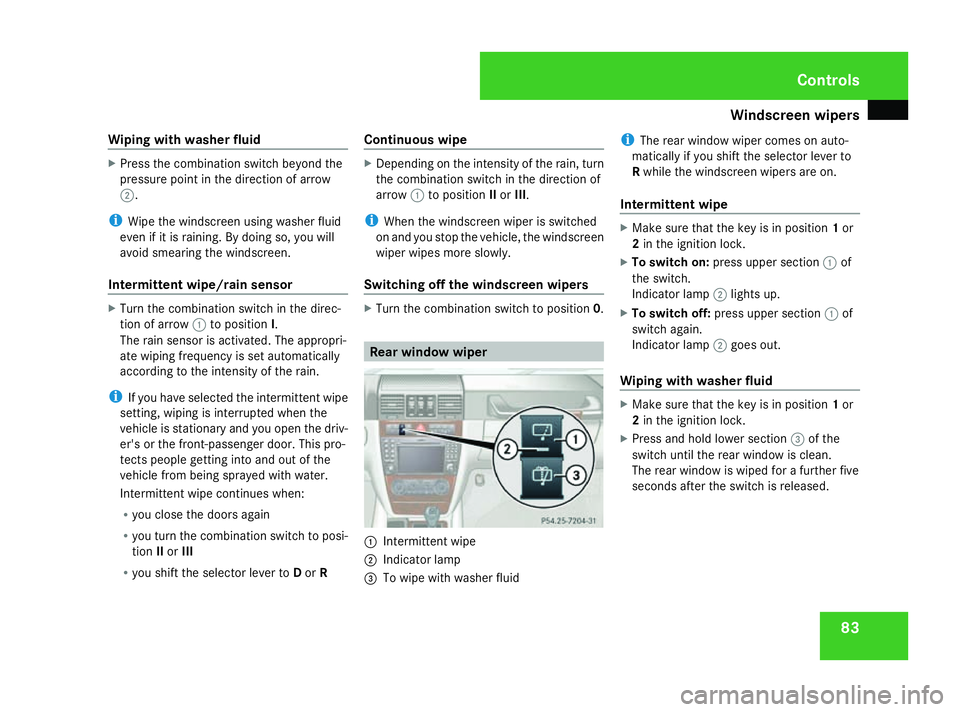
Turn the combination switch to position 0. Rear window wiper
1
Intermittent wipe
2 Indicator lamp
3 To wipe with washer fluid i
The rear window wiper comes on auto-
matically if you shift the selector lever to
R while the windscreen wipers are on.
Intermittent wipe X
Make sure that the key is in position 1or
2 in the ignition lock.
X To switch on: press upper section 1of
the switch.
Indicator lamp 2lights up.
X To switch off: press upper section 1of
switch again.
Indicator lamp 2goes out.
Wiping with washer fluid X
Make sure that the key is in position 1or
2 in the ignition lock.
X Press and hold lower section 3of the
switch until the rear window is clean.
The rear window is wiped for a further five
seconds after the switch is released. Controls
463_AKB; 1; 8, en-GB
wobuchh
,V ersion: 2.10.6
2008-07-17T15:19:41+02:00 - Seite 83 ZDateiname: 6515_4091_02_buchblock.pdf; preflight
Page 90 of 293
Driving and pa
rking 87
Further information about the automatic
transmission (Y
page 89).
Starting the engine X
Apply the parking brake.
X To start a petrol engine: turn the key to
position 3in the ignition lock (Y page 59)
and release it as soon as the engine is run-
ning.
X To start a diesel engine: turn the key to
position 2in the ignition lock .
The q preglow indicator lamp in the
instrument cluster lights up.
X When the qpreglow indicator lamp
goes out, turn the key to position 3and
release it as soon as the engine is running.
i You can start the engine without preglow
if the engine is warm. Pulling away
! Warm up the engine quickly. Do not use
the engine's full performance until it has
reached operating temperature.
Only shift into reverse gear when the vehi-
cle is stationary.
Where possible, avoid spinning the drive
wheels when pulling away on slippery
roads. You could otherwise damage the
drive train.
i It is only possible to move the selector
lever to the desired position if you depress
the brake pedal. Only then is the selector
lever lock released.
X Depress the brake pedal and hold it down.
X Release the parking brake.
X Move the selector lever to position Dor R.
i Wait until the shift process is completed
before pulling away.
X Release the brake pedal.
X Carefully depress the accelerator pedal.
i Upshifts take place at higher engine
speeds after a cold start. This helps the catalytic converter to reach its operating
temperature more quickly.
AAS (Start-off Assist) AAS helps you when pulling away on uphill
gradients. It holds the vehicle for a short time
after you have removed your foot from the
brake pedal. This gives you enough time to
move your foot from the brake pedal to the
accelerator pedal and depress it before the
vehicle begins to roll back. G
Risk of accident
Never leave the vehicle when it is held by
start-off assist. After approximately one
second, AAS stops holding your vehicle and
it could roll away.
X Depress the brake pedal.
X Pull away.
i Once you have taken your foot off the
brake pedal, the vehicle is held for around
one second.
AAS does not function if:
R you are pulling away on a level road or a
downhill gradient
R the selector lever is in the Nposition Controls
463_AKB; 1; 8, en-GB
wobuchh
,V ersion: 2.10.6
2008-07-17T15:19:41+02:00 - Seite 87 ZDateiname: 6515_4091_02_buchblock.pdf; preflight
Page 97 of 293
Transmission
94
!
In order to avoid damage to the transfer
case, you may only operate the vehicle on
a roller dynamometer (single-axle roller
dynamometer), if:
R the undriven axle is raised
or
R the relevant propeller shaft is disconnec-
ted
and
R the differential lock of the transfer case
is engaged
Engaging the differential locks G
Risk of accident
When driving on a firm road surface, never
drive with the differential locks engaged.
Never drive through tight corners with the
differential lock on the front axle engaged.
When differential locks are engaged, the
vehicle's steerability is greatly impaired
and the risk of accident thereby increases.
Do not engage or disengage the differential
locks while cornering. The vehicle motion
could otherwise be jerky. You could lose
control of the vehicle as a result and cause
an accident. If you select a differential lock, ABS, 4ETS,
ESP
®
and BAS are deactivated.
Engage the differential locks:
R when driving off-road
R to deactivate ABS, 4ETS and ESP ®
when
off-road
R when fording
R on snowy, icy or rough road surfaces
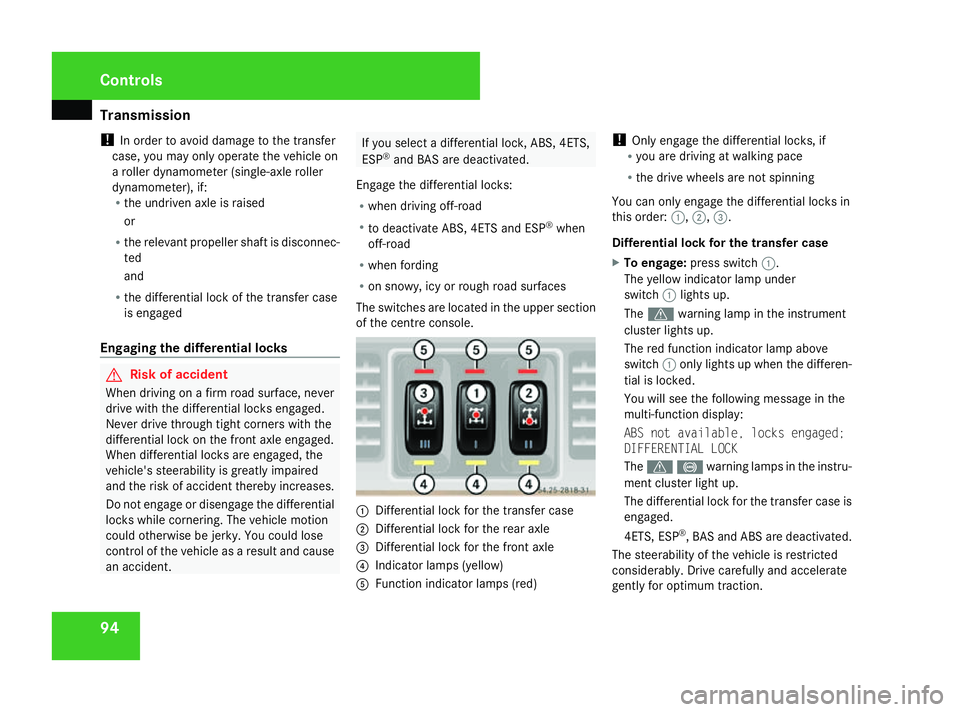
The switches are located in the upper section
of the centre console. 1
Differential lock for the transfer case
2 Differential lock for the rear axle
3 Differential lock for the front axle
4 Indicator lamps (yellow)
5 Function indicator lamps (red) !
Only engage the differential locks, if
R you are driving at walking pace
R the drive wheels are not spinning
You can only engage the differential locks in
this order: 1,2,3.
Differential lock for the transfer case
X To engage: press switch 1.
The yellow indicator lamp under
switch 1lights up.
The v warning lamp in the instrument
cluster lights up.
The red function indicator lamp above
switch 1only lights up when the differen-
tial is locked.
You will see the following message in the
multi-function display:
ABS not available, locks engaged;
DIFFERENTIAL LOCK
The v-warning lamps in the instru-
ment cluster light up.
The differential lock for the transfer case is
engaged.
4ETS, ESP ®
, BAS and ABS are deactivated.
The steerability of the vehicle is restricted
considerably. Drive carefully and accelerate
gently for optimum traction. Cont
rols
463_AKB; 1; 8, en-GB
wobuchh,
Version: 2.10.6 2008-07-17T15:19:41+02:00 - Seite 94Dateiname: 6515_4091_02_buchblock.pdf; preflight
Page 98 of 293
Instrument cluster
95
i
If necessary, you can now engage the dif-
ferential lock for the rear 2and front axle
3.
Differential lock for the rear axle
X To engage: press switch 2.
The yellow indicator lamp lights up first and
then the red function indicator lamp lights
up.
The differential lock of the rear axle is
engaged.
Differential lock for the front axle
X To engage: press switch 3.
The yellow indicator lamp lights up first and
then the red function indicator lamp lights
up.
The differential lock of the front axle is
engaged.
Disengaging differential locks You can disengage the differential locks in the
reverse order (3
,2, 1).
X To disengage all differential locks
simultaneously: press switch1.
Yellow indicator lamps 4go out. Red func-
tion indicator lamps 5go out when the
differentials are no longer locked. After three seconds of normal driving,
4ETS, ESP
®
, BAS and ABS are activated.
The message ABS not available;
locks engaged; DIFFERENTIAL LOCK in
the multi-function display and the v
- warning lamps in the instrument clus-
ter go out.
If red function indicator lamps 5do not go
out when the differential locks are disen-
gaged:
X Pay attention to traffic conditions.
X Only perform slow steering movements
when driving the vehicle.
The red function indicator lamp will then go
out. Instrument cluster
Points to remember
You will find an illustration of the instrument
cluster in the "At a glance" section . G
Risk of accident
No further messages can be displayed if the
instrument cluster and/or the multi-func-
tion display fails.
This means that you will not see information
about the driving situation, such as the
speed, outside temperature, warning/indi-
cator lamps, display messages or system
failures. The vehicle's handling character-
istics may be affected. Adjust your driving
style and speed accordingly.
Immediately consult a qualified specialist
workshop which has the necessary special-
ist knowledge and tools to carry out the
work required. Mercedes-Benz recom-
mends that you use a Mercedes-Benz
Service Centre for this purpose. In particu-
lar, work relevant to safety or on safety-
related systems must be carried out at a
qualified specialist workshop. Cont
rols
463_AKB; 1; 8, en-GB
wobuchh,
Version: 2.10.6 2008-07-17T15:19:41+02:00 - Seite 95 ZDateiname: 6515_4091_02_buchblock.pdf; preflight
Page 99 of 293
Instrument cluster
96 Activating the multi-function display
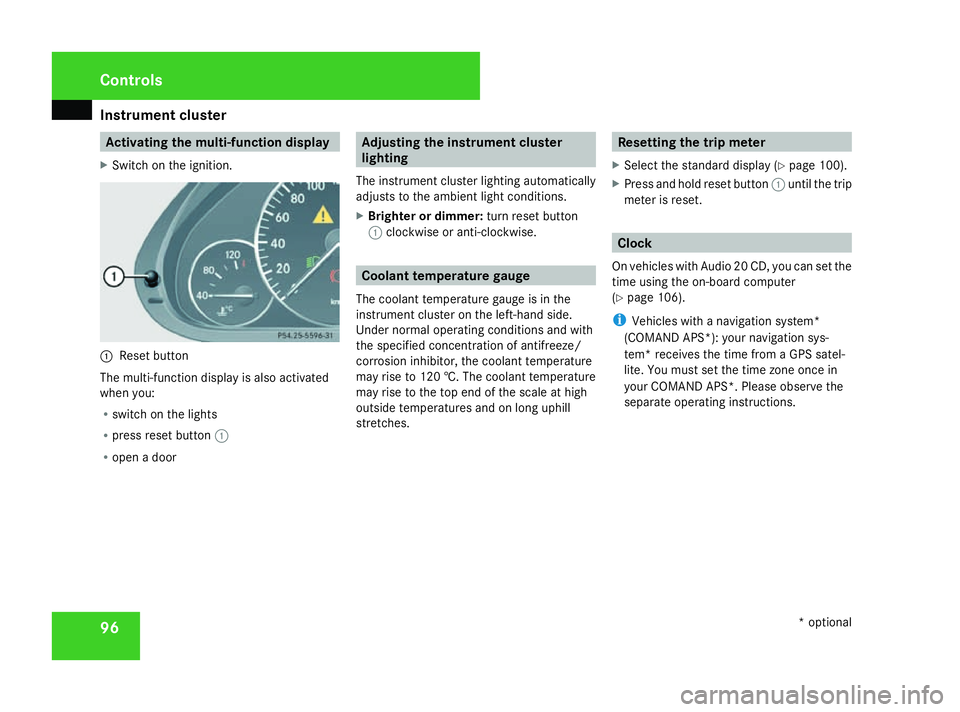
X Switch on the ignition. 1
Reset button
The multi-function display is also activated
when you:
R switch on the lights
R press reset button 1
R open a door Adjusting the instrument cluster
lighting
The instrument cluster lighting automatically
adjusts to the ambient light conditions.
X Brighter or dimmer: turn reset button
1 clockwise or anti-clockwise. Coolant temperature gauge
The coolant temperature gauge is in the
instrument cluster on the left-hand side.
Under normal operating conditions and with
the specified concentration of antifreeze/
corrosion inhibitor, the coolant temperature
may rise to 120 †. The coolant temperature
may rise to the top end of the scale at high
outside temperatures and on long uphill
stretches. Resetting the trip meter
X Select the standard display (Y page 100).
X Press and hold reset button 1until the trip
meter is reset. Clock
On vehicles with Audio 20 CD, you can set the
time using the on-board computer
(Y page 106).
i Vehicles with a navigation system*
(COMAND APS*): your navigation sys-
tem* receives the time from a GPS satel-
lite. You must set the time zone once in
your COMAND APS*. Please observe the
separate operating instructions. Cont
rols
* optional
463_AKB; 1; 8, en-GB
wobuchh,
Version: 2.10.6 2008-07-17T15:19:41+02:00 - Seite 96Dateiname: 6515_4091_02_buchblock.pdf; preflight
Page 110 of 293
On-board computer
107
Setting the date
X
Press the jbutton to select Date Set
day (orDate Set month orDate Set
year).
X Press the æorç button to set the
date.
X Press the j,èorÿ button to
select a different display.
Setting constant headlamp mode If you have set constant headlamp mode and
the light switch is in position
MorU,
the side lamps, dipped-beam headlamps and
licence plate lighting are switched on auto-
matically when the engine is running. Turning
the light switch to a different position
switches on the corresponding lights. Make
sure the light switch is set to BorU if
you switch off the constant headlamp mode
while driving at night.
In countries in which constant headlamp
mode is a legal requirement, Constantis the
factory setting.
X Press the èor· button to select the
Settings menu.
X Press the jbutton to select submenus. X
Press the æorç button to select the
Lighting submenu.
X Press the jbutton to select Headlamp
mode.
X Press the æorç button to set the
switch-on mode for the headlamps to Man-
ual orConstant (constant headlamp
mode).
X Press the j,èorÿ button to
select a different display.
Switching the surround lighting on or
off If the surround lighting is switched on, the
following lights will be switched on automat-
ically in the dark after you have unlocked the
vehicle using the key:
R
the side lamps
R the tail lamps
R the licence plate lighting
R the front foglamps
The surround lighting switches off automati-
cally if you open the driver's door or after 40
seconds. X
Press the èor· button to select the
Settings menu.
X Press the jbutton to select submenus.
X Press the æorç button to select the
Lighting submenu.
X Press the jbutton to select Surround
lighting.
X Press the æorç button to switch
the Surround lighting on or off.
X Press the j,èorÿ button to
select a different display.
Activating/deactivating the exterior
lighting delayed switch-off Using the
Headl. delayed switch-off
function, you can set whether the exterior
lighting should remain on for 15 seconds after
the doors are closed when it is dark.
When you have set a delayed switch-off time
and then switch off the engine, the following
remain lit:
R the side lamps
R the tail lamps
R the licence plate lighting
R the front foglamps Controls
463_AKB; 1; 8, en-GB
wobuchh
,V ersion: 2.10.6
2008-07-17T15:19:41+02:00 - Seite 107 ZDateiname: 6515_4091_02_buchblock.pdf; preflight
Page 112 of 293
On-board computer
109
The auxiliary heating is switched off automat-
ically after 50 minutes. This time can be
changed. To do this, visit a qualified specialist
workshop, e.g. a Mercedes-Benz Service
Centre.
G
Risk of fire and poisoning
The operation of the auxiliary heating pro-
duces hot, toxic exhaust fumes. The fuel
vapours produced during refuelling could
ignite on the hot exhaust system.
Do not switch on the auxiliary heating at
filling stations or in enclosed spaces, for
instance, a garage, if there is no air extrac-
tion system.
You could otherwise endanger yourself and
others.
The Auxiliary heat. function can be called
up directly.
X Turn the key to position 1or 2in the ignition
lock.
X Press the button for the auxiliary heating on
the centre console (Y page 130).
or
X Press the èor· button to select the
Settings menu.
X Press the jbutton to select submenus. X
Press the æorç button to select the
Heater submenu.
X Press the jbutton to select Auxiliary
heat. .
X Press the æorç button to select
one of the three switch-on times or Timer
off (auxiliary heating switched off).
When a switch-on time is selected, the yel-
low indicator lamp lights up in the auxiliary
heating button.
X Press the j,èorÿ button to
select a different display.
Changing the switch-on time for the
auxiliary heating* This function is only displayed if you have
selected a switch-on time. Here you can enter
the time at which the auxiliary heating is to
be switched on.
X
Press the èor· button to select the
Settings menu.
X Press the jbutton to select submenus.
X Press the æorç button to select the
Heater submenu.
X Press the jbutton to select Sw.-on
time hour. X
Press the æorç button to set the
hour.
X Press the jbutton to select Sw.-on
time minute(s).
X Press the æorç button to set the
minutes.
After changing from one menu to another,
the new time setting is stored. The yellow
indicator lamp lights up on the button for
the auxiliary heating on the centre console.
X Press the j,èorÿ button to
select a different display.
Activating/deactivating the easy-
entry/exit feature i
For more information on the easy-entry/
exit feature, see (Y page 67). G
Risk of injury
The steering wheel moves when the easy-
entry/exit feature is active. There is a risk
of occupants becoming trapped. Before
activating the easy-entry/exit feature,
make sure that nobody can become trap-
ped.
Do not leave children unsupervised in the
vehicle, even if they are secured in a child
restraint system. The children could open Controls
* optional
463_AKB; 1; 8, en-GB
wobuchh
,V ersion: 2.10.6
2008-07-17T15:19:41+02:00 - Seite 109 ZDateiname: 6515_4091_02_buchblock.pdf; preflight
Page 118 of 293
Driving sys
tems 115
Calling up the last speed stored G
Risk of accident
Only select a stored speed if you know what
that speed is and whether it is suitable for
the current situation. Otherwise, sudden
acceleration or braking could endanger you
or others.
X Briefly pull the cruise control lever towards
you 3.
X Remove your foot from the accelerator
pedal.
Cruise control adjusts the vehicle’s speed
to the last speed stored.
i G 320 CDI: if no speed is stored, cruise
control stores the current speed and main-
tains it.
Setting a speed X
Press the cruise control lever up 1for a
higher speed or down 4for a lower speed.
X Keep the cruise control lever pressed until
the desired speed is reached.
X Release the cruise control lever.
The new speed is stored.
i Cruise control is not deactivated if you
depress the accelerator pedal. For exam- ple, if you accelerate briefly to overtake,
cruise control adjusts the vehicle's speed
to the last speed stored after you have fin-
ished overtaking.
Making adjustments in 1 km/hincre-
ments X
Briefly press the cruise control lever up
1 for a higher speed or down 4for a
lower speed.
The last speed stored is increased or
reduced.
Deactivating cruise control There are several ways to deactivate cruise
control:
X Briefly press the cruise control lever for-
wards 6.
or
X Brake.
or
X Briefly press the cruise control lever in the
direction of arrow 5.
Variable Speedtronic is selected. LIM indi-
cator lamp 2in the cruise control lever
lights up. Cruise control is automatically deactivated if,
for example:
R
you are driving at less than 30 km/h
R ESP ®
is intervening
R you move the selector lever to Nwhile driv-
ing
R G 320 CDI: you engage a differential lock
i The last speed stored is cleared when you
switch off the engine. Speedtronic
Variable Speedtronic helps you to avoid
exceeding a specified speed, e. g. when driv-
ing through varying speed limits in built-up
areas. On long and steep downhill gradients,
especially if the vehicle is laden or towing a
trailer, you must select shift range 1,2or 3
in good time. By doing so, you will make use
of the braking effect of the engine, which
relieves the load on the brake system and
prevents the brakes from overheating and
wearing too quickly. G
Risk of accident
Never depress the brake pedal continu-
ously while the vehicle is in motion, e.g. Controls
463_AKB; 1; 8, en-GB
wobuchh
,V ersion: 2.10.6
2008-07-17T15:19:41+02:00 - Seite 115 ZDateiname: 6515_4091_02_buchblock.pdf; preflight
Page 119 of 293
Driving sys
tems 116 never cause the brakes to rub by applying
constant slight pedal pressure. This causes
the brake system to overheat, increases
the braking distance and can lead to the
brakes failing completely. G
Risk of accident
Do not change down for additional engine
braking on a slippery road surface. This
could cause the drive wheels to lose their
grip and the vehicle could skid. G
Risk of accident
Variable Speedtronic is only an aid
designed to assist driving. You are respon-
sible for the vehicle's speed and for braking
in good time.
i The speed indicated in the speedometer
may differ slightly from the limit speed
stored.
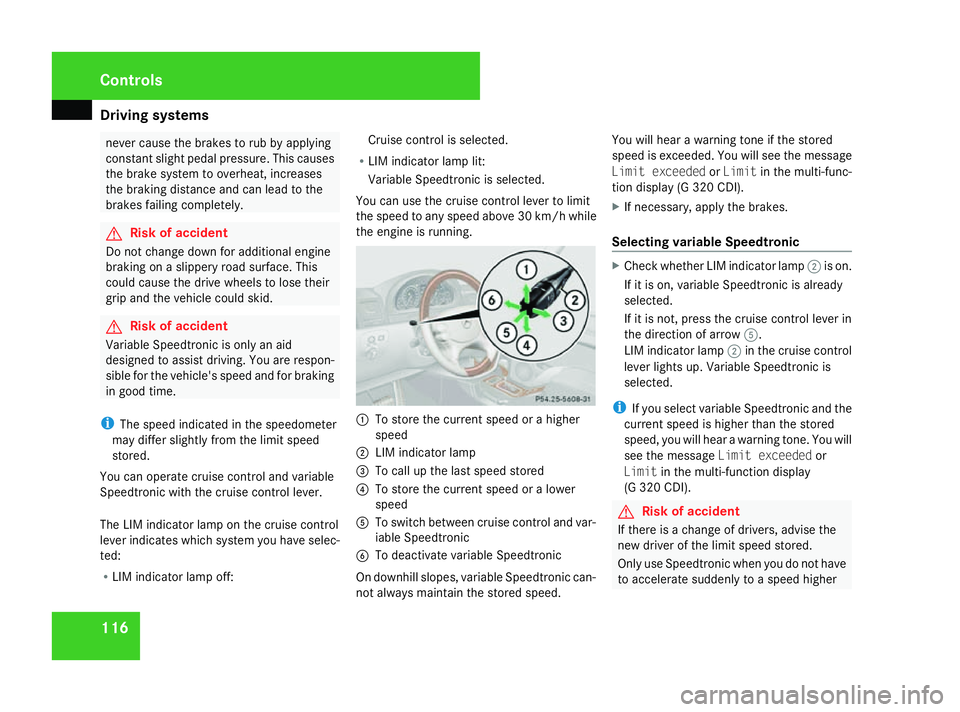
You can operate cruise control and variable
Speedtronic with the cruise control lever.
The LIM indicator lamp on the cruise control
lever indicates which system you have selec-
ted:
R LIM indicator lamp off: Cruise control is selected.
R LIM indicator lamp lit:
Variable Speedtronic is selected.
You can use the cruise control lever to limit
the speed to any speed above 30 km/h while
the engine is running. 1
To store the current speed or a higher
speed
2 LIM indicator lamp
3 To call up the last speed stored
4 To store the current speed or a lower
speed
5 To switch between cruise control and var-
iable Speedtronic
6 To deactivate variable Speedtronic
On downhill slopes, variable Speedtronic can-
not always maintain the stored speed. You will hear a warning tone if the stored
speed is exceeded. You will see the message
Limit exceeded orLimit in the multi-func-
tion display (G 320 CDI).
X If necessary, apply the brakes.
Selecting variable Speedtronic X
Check whether LIM indicator lamp 2is on.
If it is on, variable Speedtronic is already
selected.
If it is not, press the cruise control lever in
the direction of arrow 5.
LIM indicator lamp 2in the cruise control
lever lights up. Variable Speedtronic is
selected.
i If you select variable Speedtronic and the
current speed is higher than the stored
speed, you will hear a warning tone. You will
see the message Limit exceeded or
Limit in the multi-function display
(G 320 CDI). G
Risk of accident
If there is a change of drivers, advise the
new driver of the limit speed stored.
Only use Speedtronic when you do not have
to accelerate suddenly to a speed higher Controls
463_AKB; 1; 8, en-GB
wobuchh
,V ersion: 2.10.6
2008-07-17T15:19:41+02:00 - Seite 116 Dateiname: 6515_4091_02_buchblock.pdf; preflight
Page 126 of 293
Air conditioning
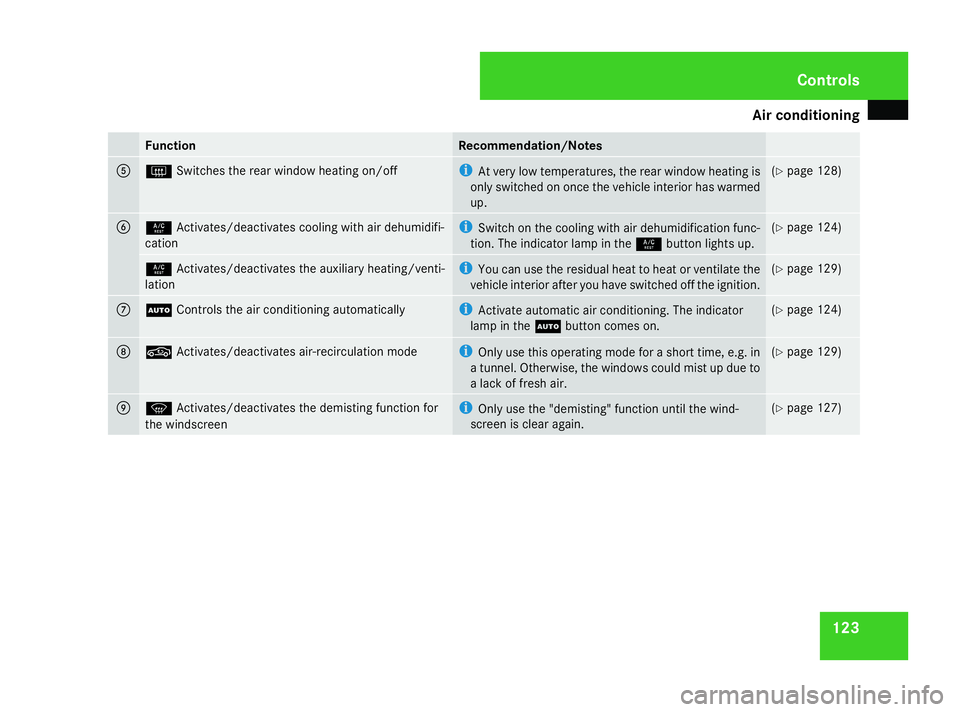
123Function Recommendation/Notes
5
F
Switches the rear window heating on/off i
At very low temperatures, the rear window heating is
only switched on once the vehicle interior has warmed
up. (Y
page 128) 6
9
Activates/deactivates cooling with air dehumidifi-
cation i
Switch on the cooling with air dehumidification func-
tion. The indicator lamp in the 9button lights up. (Y
page 124) 9
Activates/deactivates the auxiliary heating/venti-
lation i
You can use the residual heat to heat or ventilate the
vehicle interior after you have switched off the ignition. (Y
page 129) 7
U
Controls the air conditioning automatically i
Activate automatic air conditioning. The indicator
lamp in the Ubutton comes on. (Y
page 124) 8
,
Activates/deactivates air-recirculation mode i
Only use this operating mode for a short time, e.g. in
a tunnel. Otherwise, the windows could mist up due to
a lack of fresh air. (Y
page 129) 9
P
Activates/deactivates the demisting function for
the windscreen i
Only use the "demisting" function until the wind-
screen is clear again. (Y
page 127) Cont
rols
463_AKB; 1; 8, en-GB
wobuchh,
Version: 2.10.6 2008-07-17T15:19:41+02:00 - Seite 123 ZDateiname: 6515_4091_02_buchblock.pdf; preflight