belt MERCEDES-BENZ G-CLASS SUV 2012 Owner's Manual
[x] Cancel search | Manufacturer: MERCEDES-BENZ, Model Year: 2012, Model line: G-CLASS SUV, Model: MERCEDES-BENZ G-CLASS SUV 2012Pages: 357, PDF Size: 8.86 MB
Page 94 of 357
Seats
Important safety notes
G
WARNING
The seats can still be adjusted when there is
no key in the ignition lock. For this reason,
children should never be left unsupervised in
the vehicle. They could adjust the seats and
become trapped. G
WARNING
Only adjust the driver's seat when the vehicle
is stationary. You will otherwise be distracted
from the road and traffic conditions and you
could lose control of the vehicle as a result of
the seat moving. This could cause an acci-
dent. G
WARNING
If you adjust the seat height carelessly, you or
others could be trapped and thereby injured.
Children in particular could unintentionally
press the buttons to electrically adjust the
seats and become trapped.
Take care that:
R while moving the seats, your hands do not
get under the lever assembly of the seat
adjustment system.
R children in the vehicle do not slide their
hands under the levers. G
WARNING
Make sure that nobody can become trapped
when adjusting the seats.
Observe the notes on airbags.
Secure children as recommended; see the
"Children in the vehicle" section. G
WARNING
Make sure that the back of your head is sup-
ported at eye level by the central area of the
head restraint .Ifyour head is not supported
correctly by the head restraint, you could suf-
fer a severe neck injury in the event of an accident
.Never drive if the head restraints are
not engaged and set correctly. G
WARNING
Occupants should only travel sitting on seats
which have the head restraints fitted. On a
seat which is occupied, move the head
restraint into the upright position .This
reduces the risk of injury to the passenger in
the event of an accident. G
WARNING
As eat belt can only offer its intended degree
of protection when the backrest is almost ver-
tical and the occupant is sitting upright. Avoid
seat positions that do not allow the seat belt
to be routed correctly. Adjust the backrest so
that it is as upright as possible. Never travel
with the backrest reclined too far backwards.
You could otherwise be seriously or even
fatally injured in the event of an accident or
sudden braking.
! To avoid damage to the seats and the seat
heating, observe the following information:
R do not spill any liquids on the seats. If
liquid is spilled on the seats, dry them as
soon as possible.
R if the seat covers are damp or wet, do not
switch on the seat heating. The seat
heating should also not be used to dry
the seats.
R clean the seat covers as recommended;
see the "Interior care" section.
R do not transport heavy loads on the
seats. Do not place sharp objects on the
seat cushions, e.g. knives, nails or tools.
The seats should only be occupied by
passengers, if possible.
R when the seat heating is in operation, do
not cover the seats with insulating mate-
rials, e.g. blankets, coats, bags, seat cov-
ers, child seats or booster seats.
! Make sure that there are no objects in the
footwell or behind the seats when moving Seats
91Seats, steering wheel and mirrors Z
Page 113 of 357
The hazard warning lamps automatically
switch on if:
R
an airbag is deployed
R the seat belt tensioners are triggered, or
R the vehicle decelerates rapidly from a
speed of more than 70 km/ha nd comes to
a standstill.
The hazard warning lamp switches on auto-
matically if an airbag or the belt tensioners
are triggered and the key is in position 1in
the ignition lock.
The hazard warning lamps switch off auto-
matically if the vehicle reaches a speed of
over 10 km/h again after a full brake appli-
cation.
i The hazard warning lamps still operate if
the ignition is switched off. Cornering light function
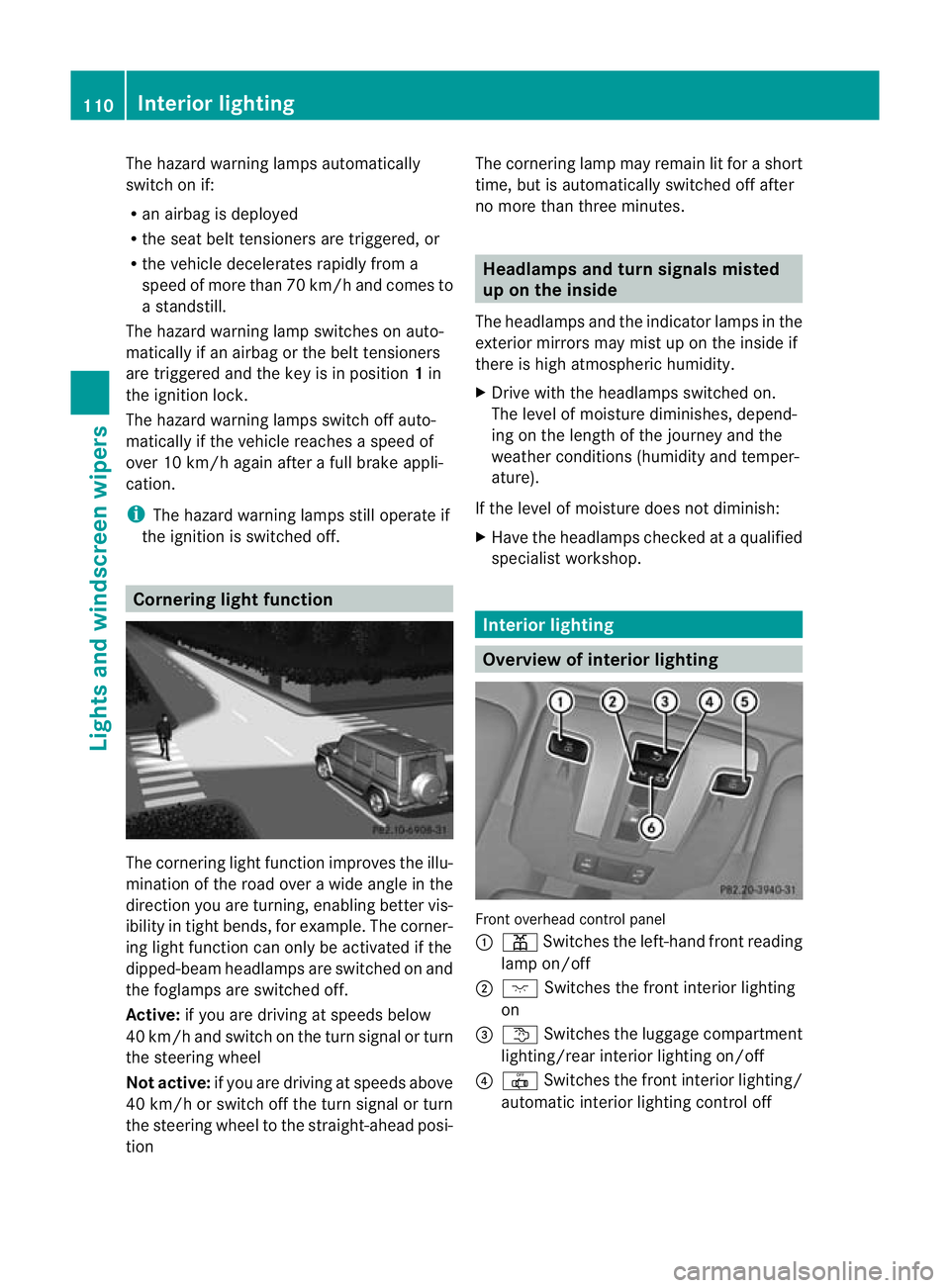
The cornering light functio
nimproves the illu-
mination of the road over a wide angle in the
directio nyou are turning, enabling better vis-
ibility in tight bends, for example. The corner-
ing light function can only be activated if the
dipped-beam headlamps are switched on and
the foglamps are switched off.
Active: if you are driving at speeds below
40 km/ha nd switch on the tur nsignal or turn
the steering wheel
Not active: if you are driving at speeds above
40 km/h or switch off the turn signal or turn
the steering wheel to the straight-ahead posi-
tion The cornering lamp may remain lit for a short
time, but is automatically switched off after
no more than three minutes. Headlamps and turn signals misted
up on the inside
The headlamps and the indicator lamps in the
exterior mirrors may mist up on the inside if
there is high atmospheric humidity.
X Drive with the headlamps switched on.
The level of moisture diminishes, depend-
ing on the length of the journey and the
weathe rconditions (humidity and temper-
ature).
If the level of moisture does not diminish:
X Have the headlamps checked at a qualified
specialist workshop. Interior lighting
Overview of interior lighting
Front overhead control panel
:
p Switches the left-hand front reading
lamp on/off
; c Switches the front interior lighting
on
= t Switches the luggage compartment
lighting/rear interior lighting on/off
? | Switches the front interior lighting/
automatic interior lighting control off 110
Interior lightingLights and windscreen wipers
Page 149 of 357
If the ECO start/stop function has been man-
ually deactivated (Y
page 146) or if a mal-
function has caused the system to be deac-
tivated, the ¤symbol is not displayed.
The Stop/Start active or
Stop/Start inactive message in the AMG menu in the
multifunction display goes out.
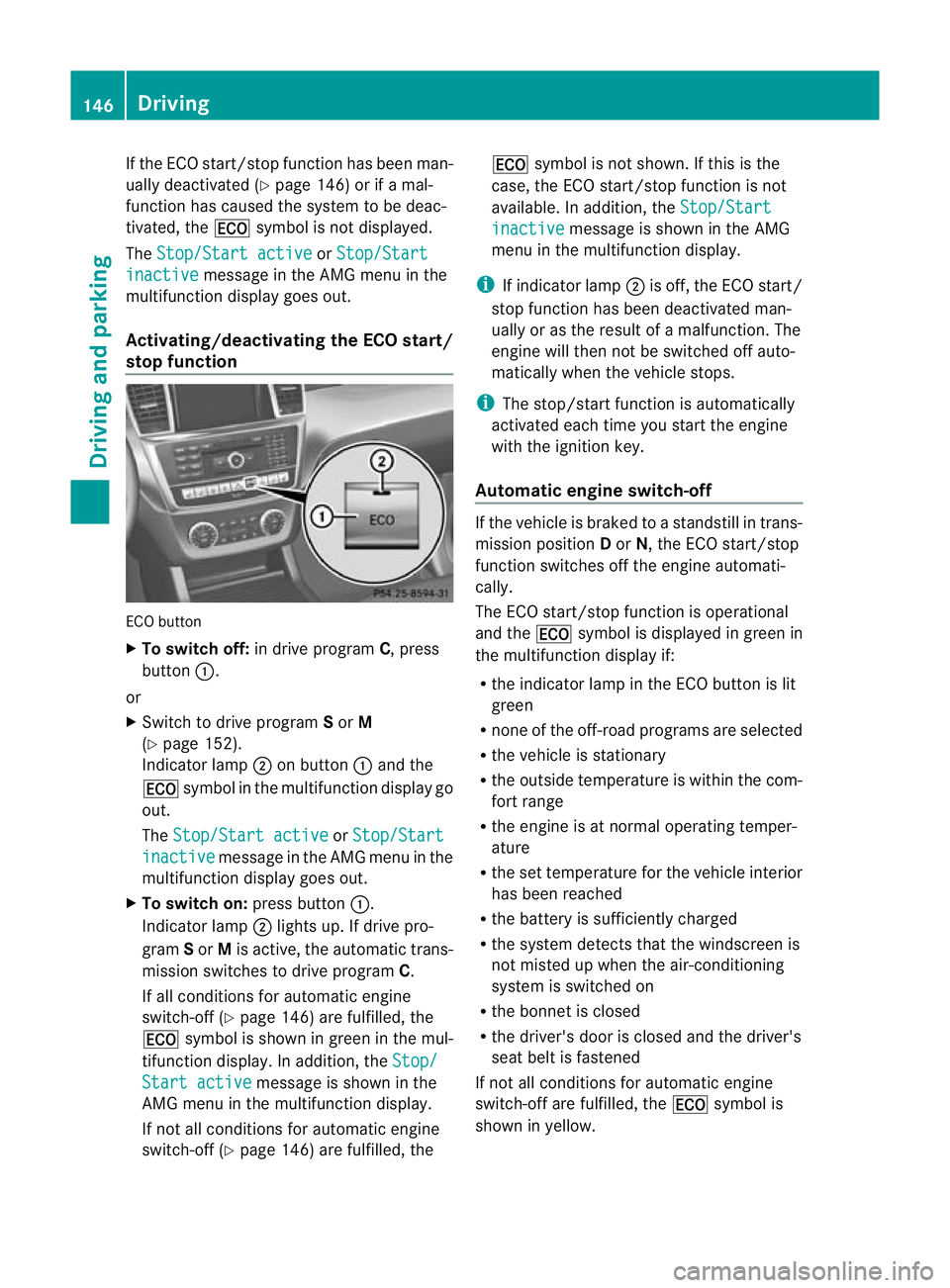
Activating/deactivating the ECO start/
stop function ECO button
X
To switch off: in drive program C, press
button :.
or
X Switch to drive program Sor M
(Y page 152).
Indicator lamp ;on button :and the
¤ symbol in the multifunction display go
out.
The Stop/Start active or
Stop/Start inactive message in the AMG menu in the
multifunction display goes out.
X To switch on: press button:.
Indicator lamp ;lights up. If drive pro-
gram Sor Mis active, the automatic trans-
missio nswitches to drive program C.
If all conditions for automatic engine
switch-off (Y page 146) are fulfilled, the
¤ symbol is shown in gree ninthe mul-
tifunction display. In addition, the Stop/Start active message is shown in the
AMG menu in the multifunction display.
If not all conditions for automatic engine
switch-off (Y page 146) are fulfilled, the ¤
symbol is not shown. If this is the
case, the ECO start/stop function is not
available. In addition, the Stop/Start inactive message is shown in the AMG
menu in the multifunction display.
i If indicator lamp ;is off, the ECO start/
stop function has been deactivated man-
ually or as the result of a malfunction. The
engine will then not be switched off auto-
matically when the vehicle stops.
i The stop/start function is automatically
activated each time you start the engine
with the ignition key.
Automatic engine switch-off If the vehicle is braked to a standstill in trans-
mission position
Dor N, the ECO start/stop
function switches off the engine automati-
cally.
The ECO start/stop function is operational
and the ¤symbol is displayed in green in
the multifunction display if:
R the indicator lamp in the ECO button is lit
green
R none of the off-road programs are selected
R the vehicle is stationary
R the outside temperature is within the com-
fort range
R the engine is at normal operating temper-
ature
R the set temperature for the vehicle interior
has been reached
R the battery is sufficiently charged
R the system detects that the windscreen is
not misted up when the air-conditioning
system is switched on
R the bonnet is closed
R the driver's door is closed and the driver's
seat belt is fastened
If not all conditions for automatic engine
switch-off are fulfilled, the ¤symbol is
shown in yellow. 146
DrivingDriving and parking
Page 150 of 357
In addition, the
Stop/Start inactive mes-
sage is shown in the AMG menu in the multi-
function display.
i If you shift the transmission from Rto D,
the ECO start/stop function is available
again once the ¤symbol reappears in
green in the multifunction display.
i The engine can be automatically switched
off an unlimited number of times.
i You can also activate the HOLD function
when the vehicle is stationary if the engine
has been switched off automatically. It is
then not necessary to continue applying
the brakes during the automatic stop
phase.W hen you depress the accelerator
pedal, the engine starts automatically and
the braking effect of the HOLD function is
deactivated. Depress the accelerator pedal
gently, as the engine must be started first.
i During automatic engine switch-off, the
climate control system only operates at a
reduced capacity. If you require full climate
control capacity, the ECO start/stop func-
tion can be deactivated by pressing the
ECO button (Y page 146). Automatic engine start The engine is started automatically if:
R
In general:
-you switch off the ECO start/stop func-
tion by pressing the ECO button.
- you release the brakes when in transmis-
sion position Dor N, when the HOLD
function is inactive.
R By the driver:
-you release the brakes when in transmis-
sion position Dor N.
- you depress the accelerator pedal.
- you engage reverse gear R.
- you move the transmission out of posi-
tion P.
- you switch to drive program Sor M.
- you unfasten your seat belt or open the
driver's door.
R By the system:
-the vehicle starts to roll.
- the brake system requires this.
- the temperature in the vehicle interior
deviates from the set range.
- the system detects moisture on the
windscreen when the air-conditioning
system is switched on.
- the battery's charge status is too low.
i Shifting the transmission to position P
does not start the engine. Driving
147Driving and parking Z
Page 153 of 357
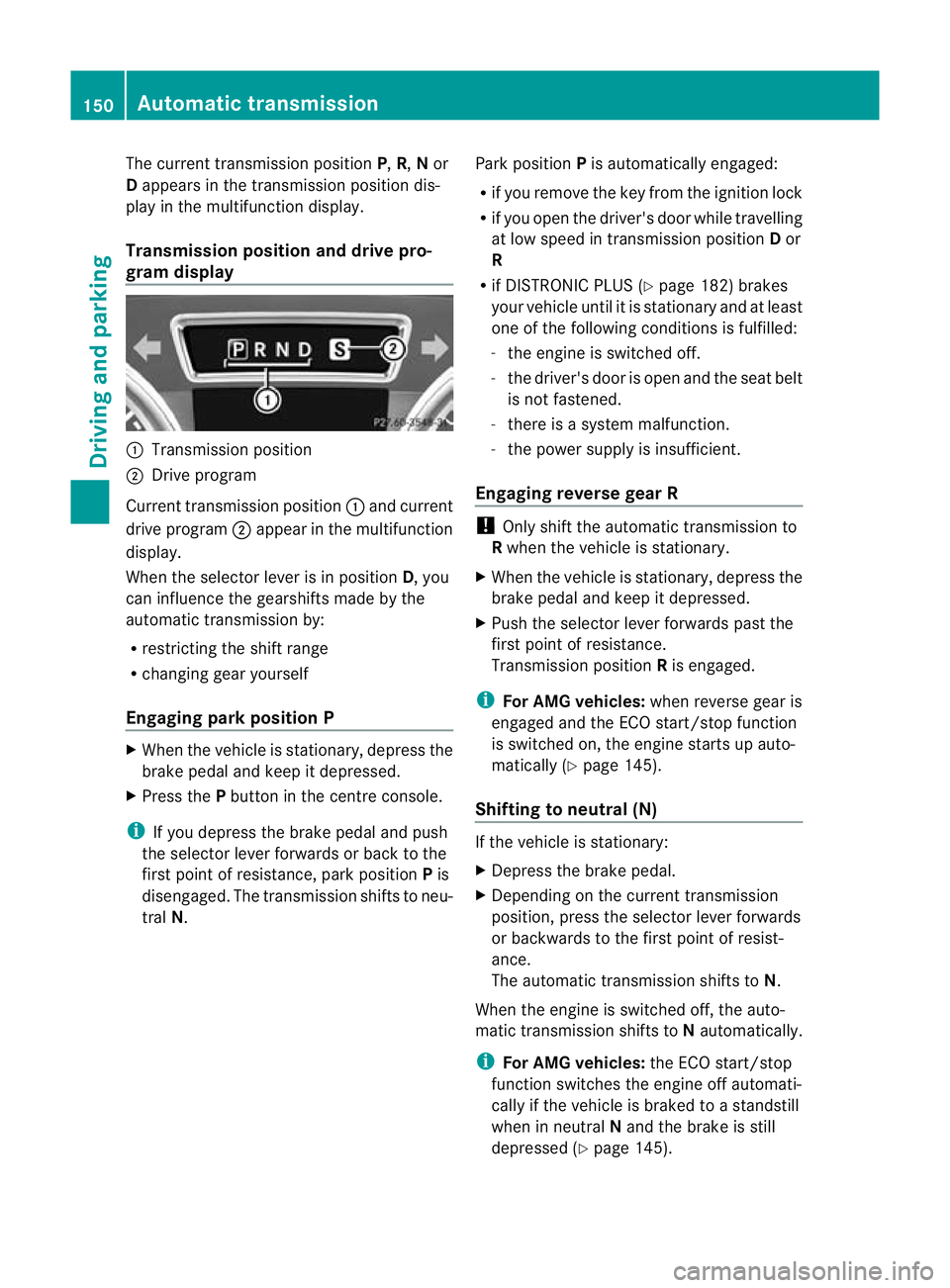
The curren
ttransmission position P,R, Nor
D appears in the transmission position dis-
play in the multifunction display.
Transmission position and drive pro-
gram display :
Transmission position
; Drive program
Current transmission position :and current
drive program ;appear in the multifunction
display.
When the selector leve ris in position D, you
can influence the gearshifts made by the
automatic transmission by:
R restricting the shift range
R changing gear yourself
Engaging parkp osition PX
When the vehicle is stationary, depress the
brake pedal and keep it depressed.
X Press the Pbutton in the centre console.
i If you depress the brake pedal and push
the selector lever forwards or back to the
first poin tofresistance, park position Pis
disengaged. The transmission shifts to neu-
tral N. Park position
Pis automatically engaged:
R if you remove the key from the ignition lock
R if you open the driver's door while travelling
at low speed in transmission position Dor
R
R if DISTRONIC PLUS (Y page 182) brakes
your vehicle until it is stationary and at least
one of the following conditions is fulfilled:
- the engine is switched off.
- the driver's door is open and the seat belt
is not fastened.
- there is a system malfunction.
- the power supply is insufficient.
Engaging reverse gear R !
Only shift the automatic transmission to
R when the vehicle is stationary.
X When the vehicle is stationary, depress the
brake pedal and keep it depressed.
X Push the selector lever forwards past the
first point of resistance.
Transmission position Ris engaged.
i For AMG vehicles: when reverse gear is
engaged and the ECO start/stop function
is switched on, the engine starts up auto-
matically (Y page 145).
Shifting to neutral (N) If the vehicle is stationary:
X
Depress the brake pedal.
X Depending on the curren ttransmission
position, press the selector leve rforwards
or backwards to the first point of resist-
ance.
The automatic transmission shifts to N.
When the engine is switched off, the auto-
matic transmission shifts to Nautomatically.
i For AMG vehicles: the ECO start/stop
function switches the engine off automati-
cally if the vehicle is braked to a standstill
when in neutral Nand the brake is still
depressed (Y page 145).150
Automatic transmissionDriving and parking
Page 187 of 357
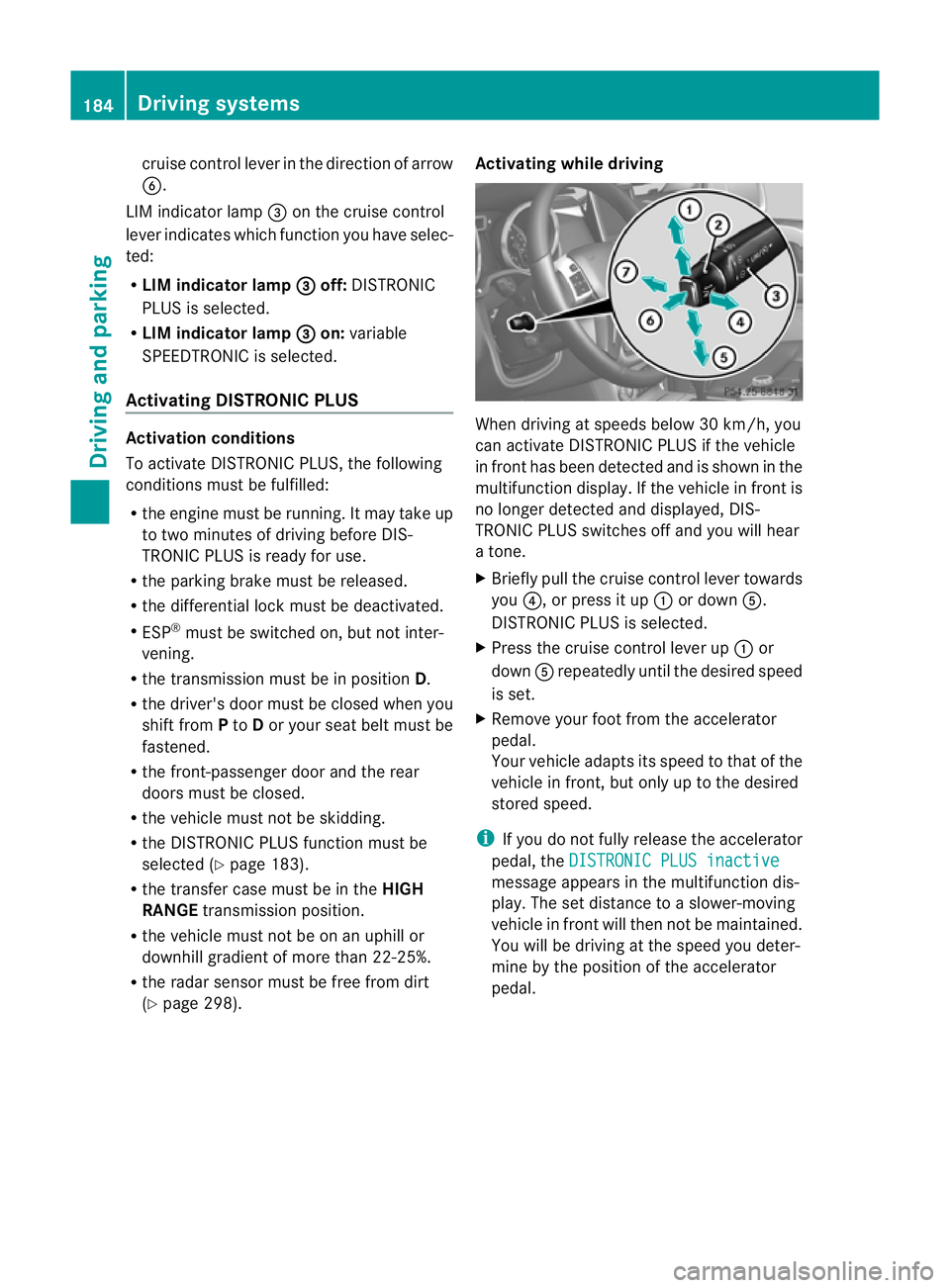
cruise control lever in the direction of arrow
B.
LIM indicator lamp =on the cruise control
lever indicates which function you have selec-
ted:
R LIM indicator lamp = off:
DISTRONIC
PLUS is selected.
R LIM indicator lamp = on:
variable
SPEEDTRONIC is selected.
Activating DISTRONIC PLUS Activation conditions
To activate DISTRONIC PLUS, the following
conditions mus
tbe fulfilled:
R the engine must be running. It may take up
to two minutes of driving before DIS-
TRONIC PLUS is ready for use.
R the parking brake must be released.
R the differential lock must be deactivated.
R ESP ®
must be switched on, but not inter-
vening.
R the transmission must be in position D.
R the driver's door must be closed when you
shift from Pto Dor your seat belt must be
fastened.
R the front-passenger door and the rear
doors must be closed.
R the vehicle must not be skidding.
R the DISTRONIC PLUS function must be
selected (Y page 183).
R the transfer case must be in the HIGH
RANGE transmission position.
R the vehicle must not be on an uphill or
downhill gradient of more than 22-25%.
R the radar sensor must be free from dirt
(Y page 298). Activating while driving When driving at speeds below 30 km/h, you
can activate DISTRONIC PLUS if the vehicle
in fron
thas been detected and is shown in the
multifunction display. If the vehicle in fron tis
no longe rdetected and displayed, DIS-
TRONIC PLUS switches off and you will hear
a tone.
X Briefly pull the cruise control lever towards
you ?, or press it up :or down A.
DISTRONIC PLUS is selected.
X Press the cruise control lever up :or
down Arepeatedly until the desired speed
is set.
X Remove your foot from the accelerator
pedal.
Your vehicle adapts its speed to that of the
vehicle in front, but only up to the desired
stored speed.
i If you do not fully release the accelerator
pedal, the DISTRONIC PLUS inactive message appears in the multifunction dis-
play. The set distance to a slower-moving
vehicle in fron
twill the nnot be maintained.
You will be driving at the speed you deter-
mine by the position of the accelerator
pedal. 184
Driving systemsDriving and parking
Page 199 of 357
X
Make sure that active Blind Spot Assist
(Y page 220) is activated in the on-board
computer.
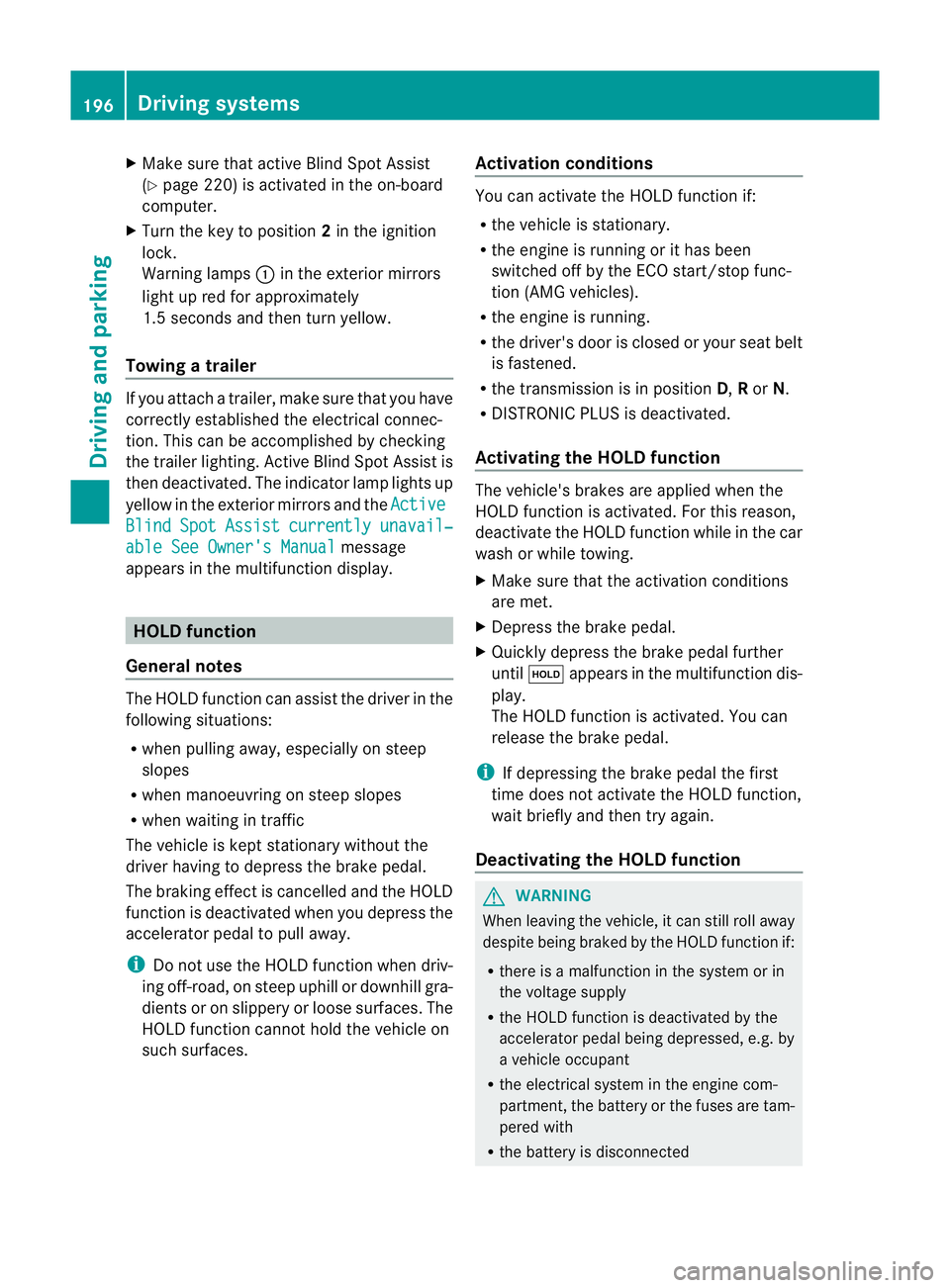
X Turn the key to position 2in the ignition
lock.
Warning lamps :in the exterior mirrors
light up red for approximately
1.5 seconds and then turn yellow.
Towing atrailer If you attach a trailer, make sure tha
tyou have
correctly established the electrical connec-
tion. This can be accomplished by checking
the trailer lighting. Active Blind Spot Assist is
then deactivated. The indicator lamp lights up
yellow in the exterior mirrors and the ActiveBlind Spot Assist currently unavail‐
able See Owner's Manual message
appears in the multifunction display. HOLD function
General notes The HOLD function can assist the driver in the
following situations:
R
when pulling away, especially on steep
slopes
R when manoeuvring on steep slopes
R when waiting in traffic
The vehicle is kept stationary without the
driver having to depress the brake pedal.
The braking effect is cancelled and the HOLD
function is deactivated when you depress the
accelerator pedal to pull away.
i Do not use the HOLD function when driv-
ing off-road, on steep uphill or downhill gra-
dients or on slippery or loose surfaces. The
HOLD function cannot hold the vehicle on
such surfaces. Activation conditions You can activate the HOLD function if:
R
the vehicle is stationary.
R the engine is running or it has been
switched off by the ECO start/stop func-
tion (AMG vehicles).
R the engine is running.
R the driver's door is closed or your seat belt
is fastened.
R the transmission is in position D,Ror N.
R DISTRONIC PLUS is deactivated.
Activating the HOLD function The vehicle's brakes are applied when the
HOLD function is activated. For this reason,
deactivate the HOLD function while in the car
wash or while towing.
X
Make sure that the activation conditions
are met.
X Depress the brake pedal.
X Quickly depress the brake pedal further
until ë appears in the multifunction dis-
play.
The HOLD function is activated. You can
release the brake pedal.
i If depressing the brake pedal the first
time does not activate the HOLD function,
wait briefly and then try again.
Deactivating the HOLD function G
WARNING
When leaving the vehicle, it can still roll away
despite being braked by the HOLD function if:
R there is a malfunction in the system or in
the voltage supply
R the HOLD function is deactivated by the
accelerator pedal being depressed, e.g. by
a vehicle occupant
R the electrical system in the engine com-
partment, the battery or the fuses are tam-
pered with
R the battery is disconnected 196
Driving systemsDriving and parking
Page 235 of 357
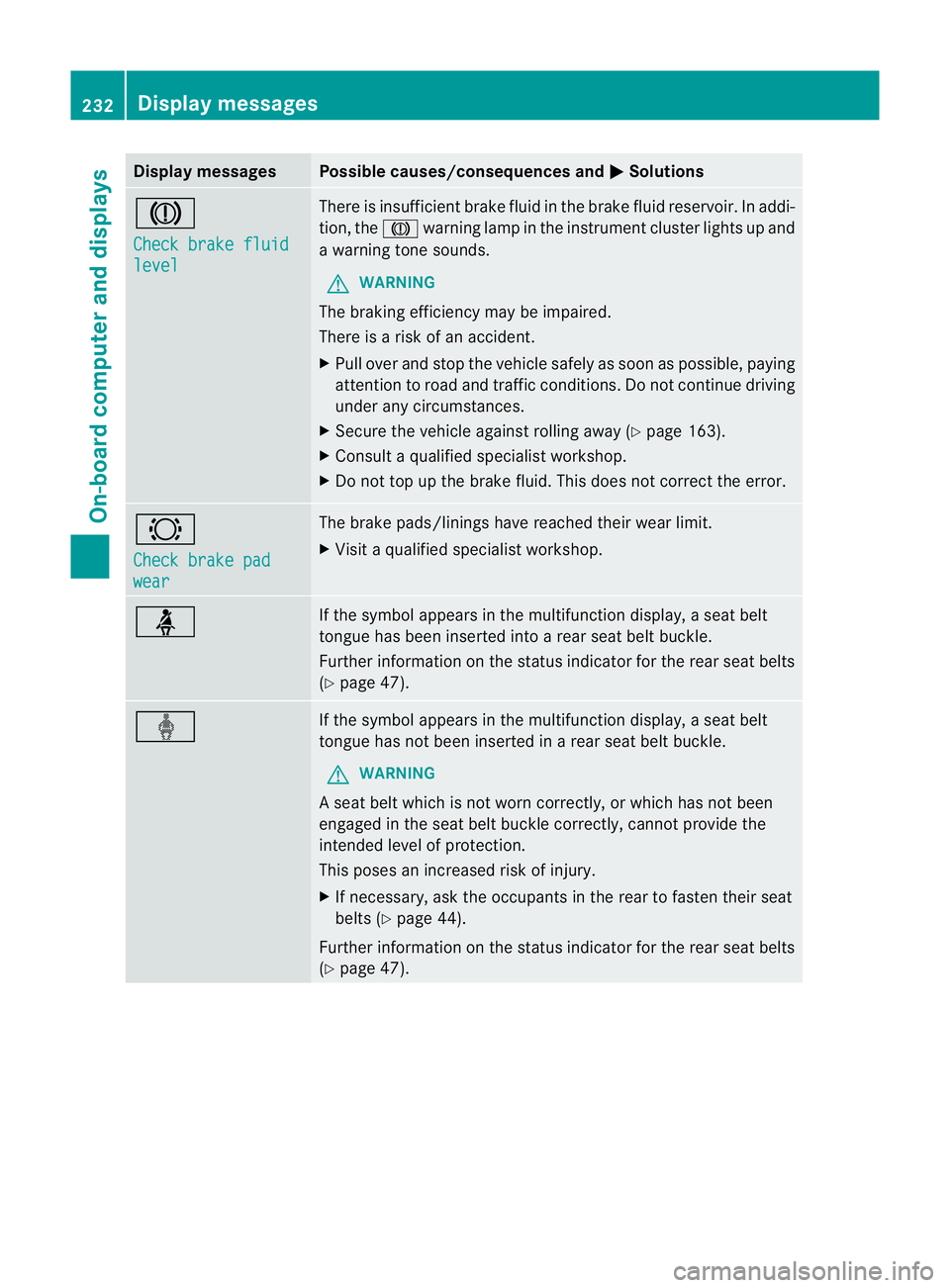
Display messages Possible causes/consequences and
M Solutions
J
Check brake fluid
level There is insufficien
tbrake fluid in the brake fluid reservoir. In addi-
tion, the Jwarning lamp in the instrument cluster lights up and
a warning tone sounds.
G WARNING
The braking efficiency may be impaired.
There is a risk of an accident.
X Pull over and stop the vehicle safely as soon as possible, paying
attention to road and traffic conditions. Do not continue driving
under any circumstances.
X Secure the vehicle against rolling away (Y page 163).
X Consult a qualified specialist workshop.
X Do not top up the brake fluid. This does not correct the error. #
Check brake pad
wear The brake pads/linings have reached their wearl
imit.
X Visit a qualified specialist workshop. ü If the symbol appears in the multifunction display,
aseat belt
tongue has been inserted into a rear seat belt buckle.
Further information on the status indicator for the rear seat belts
(Y page 47). ý If the symbol appears in the multifunction display,
aseat belt
tongue has not been inserted in a rear seat belt buckle.
G WARNING
As eat belt which is not worn correctly, or which has not been
engaged in the seat belt buckle correctly, cannot provide the
intended level of protection.
This poses an increased risk of injury.
X If necessary, ask the occupants in the rear to fasten their seat
belts (Y page 44).
Further information on the status indicator for the rear seat belts
(Y page 47). 232
Display messagesOn-board computer and displays
Page 236 of 357
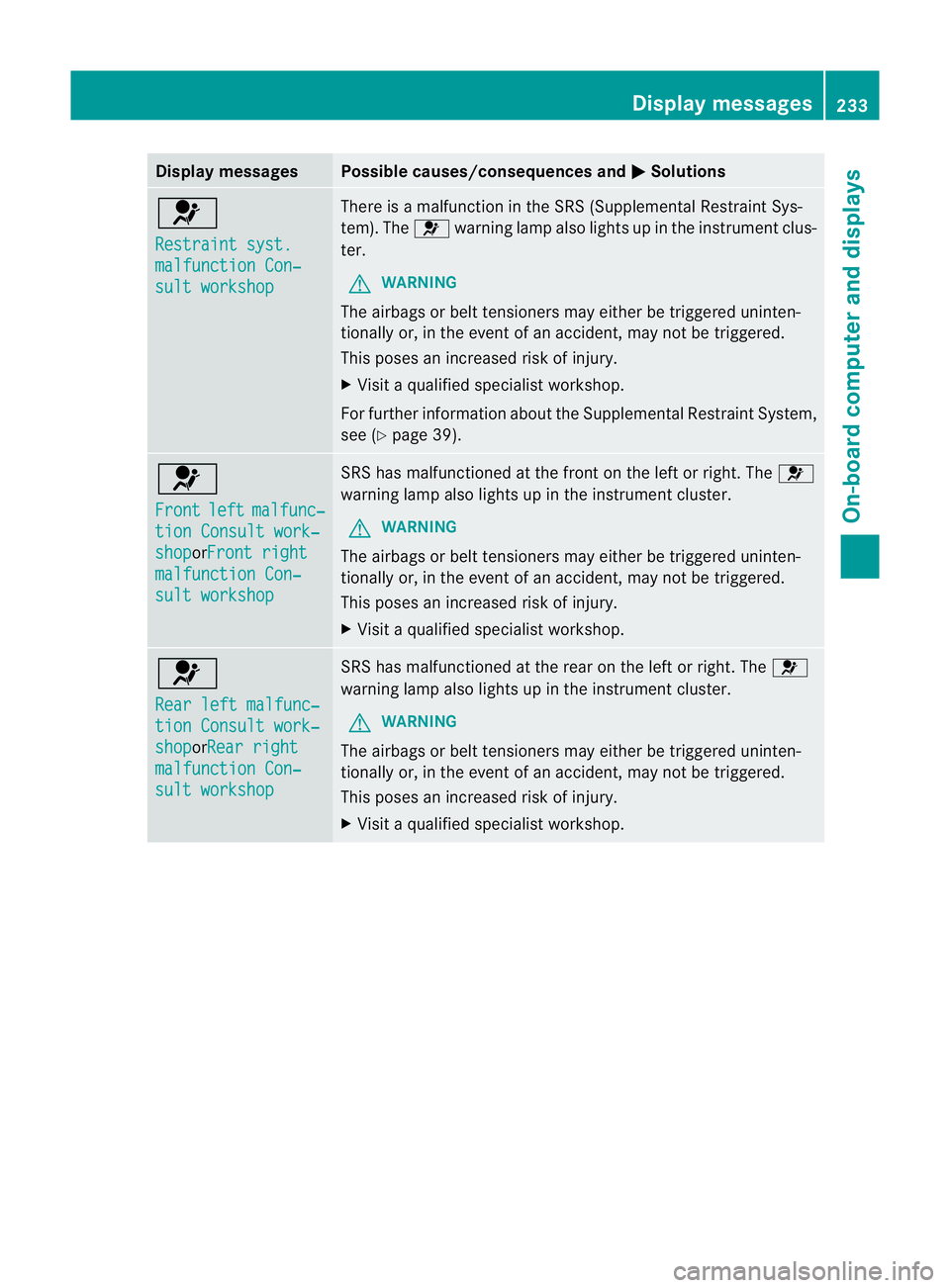
Display messages Possible causes/consequences and
M Solutions
6
Restraint syst.
malfunction Con‐
sult workshop There is a malfunction in the SRS (Supplemental Restrain
tSys-
tem). The 6warning lamp also lights up in the instrumen tclus-
ter.
G WARNING
The airbags or belt tensioners may either be triggered uninten-
tionally or, in the even tofanaccident, may not be triggered.
This poses an increased ris kofinjury.
X Visi taqualified specialist workshop.
For further information about the Supplemental Restrain tSystem,
see (Y page 39). 6
Front
left malfunc‐
tion Consult work‐
shop orFront right
malfunction Con‐
sult workshop SRS has malfunctioned at the front on the left or right. The
6
warning lamp also lights up in the instrumen tcluster.
G WARNING
The airbags or belt tensioners may either be triggered uninten-
tionally or, in the even tofanaccident, may not be triggered.
This poses an increased ris kofinjury.
X Visi taqualified specialist workshop. 6
Rear left malfunc‐
tion Consult work‐
shop orRear right
malfunction Con‐
sult workshop SRS has malfunctioned at the rear on the left or right. The
6
warning lamp also lights up in the instrument cluster.
G WARNING
The airbags or belt tensioner smay either be triggered uninten-
tionally or, in the event of an accident, may no tbe triggered.
This poses an increased risk of injury.
X Visit a qualified specialist workshop. Display messages
233On-board computer and displays Z
Page 237 of 357
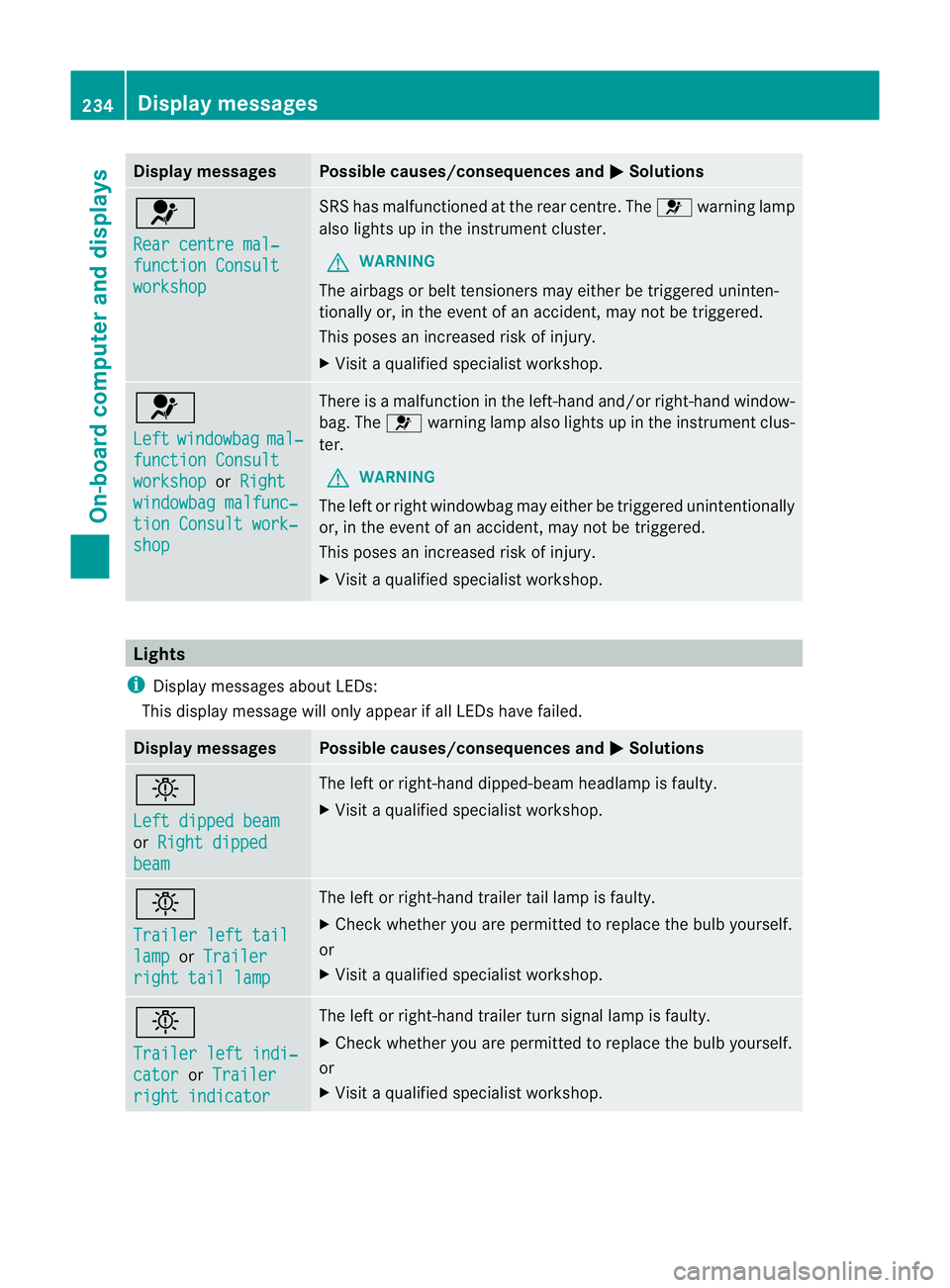
Display messages Possible causes/consequences and
M Solutions
6
Rear centre mal‐
function Consult
workshop SRS has malfunctioned at the rear centre. The
6warning lamp
also lights up in the instrumen tcluster.
G WARNING
The airbags or belt tensioners may either be triggered uninten-
tionally or, in the even tofanaccident, may not be triggered.
This poses an increased ris kofinjury.
X Visi taqualified specialist workshop. 6
Left
windowbag mal‐
function Consult
workshop or
Right windowbag malfunc‐
tion Consult work‐
shop There is a malfunction in the left-hand and/or right-hand window-
bag. The
6warning lamp also lights up in the instrument clus-
ter.
G WARNING
The left or right windowbag may either be triggered unintentionally
or, in the event of an accident, may not be triggered.
This poses an increased risk of injury.
X Visit a qualified specialist workshop. Lights
i Display messages about LEDs:
This display message will only appear if all LEDs have failed. Display messages Possible causes/consequences and
M Solutions
b
Left dipped beam
or
Right dipped beam The left or right-hand dipped-beam headlamp is faulty.
X
Visit a qualified specialist workshop. b
Trailer left tail
lamp or
Trailer right tail lamp The left or right-hand trailer tail lamp is faulty.
X
Check whether you are permitted to replace the bulb yourself.
or
X Visit a qualified specialist workshop. b
Trailer left indi‐
cator or
Trailer right indicator The left or right-hand trailer turn signal lamp is faulty.
X
Check whether you are permitted to replace the bulb yourself.
or
X Visit a qualified specialist workshop. 234
Display messagesOn-board computer and displays