lock MERCEDES-BENZ G-CLASS SUV 2013 Owners Manual
[x] Cancel search | Manufacturer: MERCEDES-BENZ, Model Year: 2013, Model line: G-CLASS SUV, Model: MERCEDES-BENZ G-CLASS SUV 2013Pages: 364, PDF Size: 9.62 MB
Page 211 of 364
Displays and operation
Instrument cluster
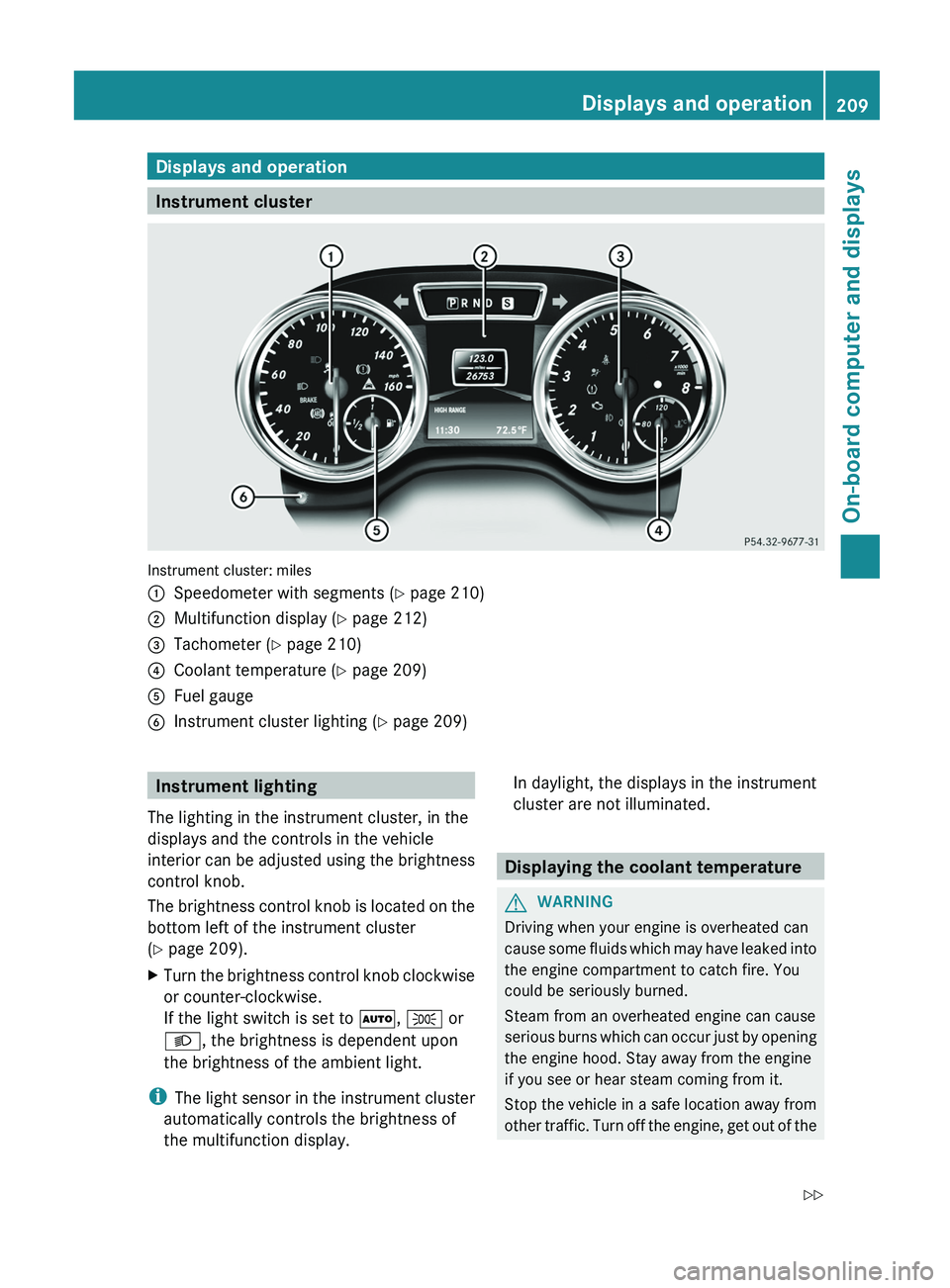
Instrument cluster: miles
0043
Speedometer with segments (Y page 210)
0044 Multifunction display ( Y page 212)
0087 Tachometer (Y page 210)
0085 Coolant temperature ( Y page 209)
0083 Fuel gauge
0084 Instrument cluster lighting (Y page 209) Instrument lighting
The lighting in the instrument cluster, in the
displays and the controls in the vehicle
interior can be adjusted
using the brightness
control knob.
The brightness control knob is located on the
bottom left of the instrument cluster
(Y page 209).
X Turn the brightness control knob clockwise
or counter-clockwise.
If the light switch is set to 0058, 0060 or
0058, the brightness is dependent upon
the brightness of the ambient light.
i The light sensor
in
the instrument cluster
automatically controls the brightness of
the multifunction display. In daylight, the displays in the instrument
cluster are not illuminated.
Displaying the coolant temperature
G
WARNING
Driving when your engine is overheated can
cause some fluids which
may have leaked into
the engine compartment to catch fire. You
could be seriously burned.
Steam from an overheated engine can cause
serious burns which can occur just by opening
the engine hood. Stay away from the engine
if you see or hear steam coming from it.
Stop the vehicle in a safe location away from
other traffic. Turn off the engine, get out of the Displays and operation
209
On-board computer and displays
Z
Page 213 of 364
X
To activate the on-board computer: turn
the SmartKey to position 1(Y
page 139) in
the ignition lock.
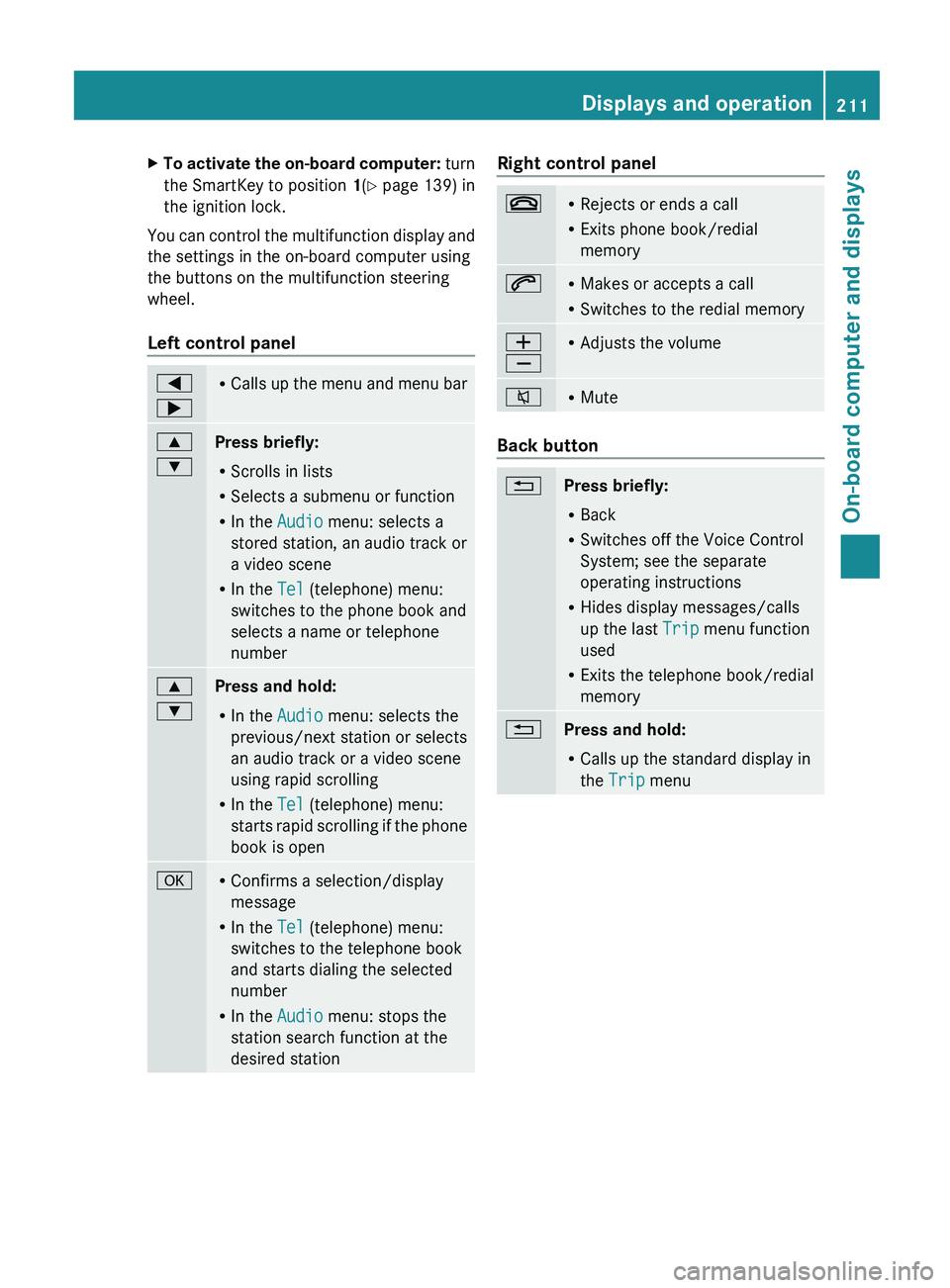
You can control the multifunction display and
the settings in the on-board computer using
the buttons on the multifunction steering
wheel.
Left control panel 0059
0065 R
Calls up the menu
and menu bar0063
0064
Press briefly:
R
Scrolls in lists
R Selects a submenu or function
R In the Audio menu: selects a
stored station, an audio track or
a video scene
R In the Tel (telephone) menu:
switches to the phone book and
selects a name or telephone
number 0063
0064
Press and hold:
R
In the Audio menu: selects the
previous/next station or selects
an audio track or a video scene
using rapid scrolling
R In the Tel (telephone) menu:
starts rapid scrolling
if
the phone
book is open 0076 R
Confirms a selection/display
message
R In the Tel (telephone) menu:
switches to the telephone book
and starts dialing the selected
number
R In the Audio menu: stops the
station search function at the
desired station Right control panel
007F R
Rejects or ends a call
R Exits phone book/redial
memory 006A R
Makes or accepts a call
R Switches to the redial memory 0081
0082 R
Adjusts the volume 006C R
Mute Back button
0041
Press briefly:
R
Back
R Switches off the Voice Control
System; see the separate
operating instructions
R Hides display messages/calls
up the last Trip menu function
used
R Exits the telephone book/redial
memory 0041
Press and hold:
R
Calls up the standard display in
the Trip menu Displays and operation
211
On-board computer and displays Z
Page 222 of 364
X
Press 0064 or 0063 to select the
Surround Lighting function.
When the Surround Lighting function is
activated, the cone of light in the
multifunction display is shown in red.
X Press the 0076 button to save the setting.
Deactivating delayed switch-off of the
exterior lighting temporarily:
X Before leaving the vehicle, turn the
SmartKey to position 0(Y page 139) in the
ignition lock.
X Turn the SmartKey to position 2 in the
ignition lock ( Y
page 139).
The exterior lighting delayed switch-off is
deactivated.
Delayed switch-off of the exterior lighting is
reactivated the next time you start the
engine.
If you have activated the Surround
Lighting function and
the
light switch is set
to 0058, the following functions are activated
when it is dark:
R Surround lighting: the exterior lighting
remains lit for 40 seconds after unlocking
with the SmartKey. If you start the engine,
the surround lighting is switched off and
automatic headlamp mode is activated
(Y page 100).
R Exterior lighting delayed switch-off: the
exterior lighting remains lit for
60 seconds after the engine is switched off.
If you close all the doors and the trunk lid,
the exterior lighting goes off after
15 seconds.
i Depending on your vehicle's equipment,
when the surround lighting and delayed
switch-off exterior lighting are on, the
following light up:
R Parking lamps
R Front fog lamps
R Low-beam headlamps
R Daytime running lamps
R Side marker lamps
R Surround lighting in the exterior mirrors Activating/deactivating the interior
lighting delayed switch-off
If you activate the Interior Lighting
Delay function, the interior lighting remains
on for 20 seconds
after you remove the
SmartKey from the ignition lock.
X Press the 0059 or
0065 button on the
steering wheel to select the Sett. menu.
X Press the 0064
or 0063
button
to select the
Lights submenu.
X Press 0076 to confirm.
X Press 0064 or 0063 to select the
Interior Lighting Delay function.
When the Interior Lighting Delay
function is activated,
the
vehicle interior is
displayed in red in the multifunction
display.
X Press the 0076 button to save the setting.
Vehicle Activating/deactivating the automatic
door locking mechanism
If you activate the Automatic Door Lock
function, the vehicle
is
centrally locked above
a speed of around 9 mph (15 km/h).
X Press the 0059 or 0065 button on the
steering wheel to select the Sett. menu.
X Press the 0064 or 0063 button
to select the
Vehicle submenu.
X Press 0076 to confirm.
X Press 0064 or 0063 to select the
Automatic Door Lock function.
When the Automatic Door
Lock function
is
activated, the vehicle doors are displayed
in red in the multifunction display.
X Press the 0076 button to save the setting.
For further information on the automatic
locking feature, see ( Y page 75).220
Menus and submenus
On-board computer and displays
Page 223 of 364
Activating/deactivating the acoustic
locking verification signal
If you switch
on
the Acoustic Lock function,
an acoustic signal sounds when you lock the
vehicle.
X Press the 0059 or 0065 button on the
steering wheel to select the Sett. menu.
X Press 0064 or 0063 to select the Vehicle
submenu.
X Press 0076 to confirm.
X Press the 0064 or 0063 button
to select the
Acoustic Lock function.
If the Acoustic Lock function is activated,
the 0037 symbol in the multifunction
display lights up red.
X Press the 0076 button to save the setting.
Convenience Activating/deactivating the EASY-
ENTRY/EXIT feature
G
WARNING
You must make sure no one can become
trapped or injured by the moving steering
wheel when the easy-entry/exit feature is
activated.
To stop steering wheel movement, move
steering wheel adjustment lever
or press one
of the memory position buttons.
Do not leave children unattended in the
vehicle, or with access to an unlocked vehicle.
Children could open the driver's door and
unintentionally activate the easy-entry/exit
feature, which could result in an accident
and/or serious personal injury.
X Press the 0059 or 0065 button on the
steering wheel to select the Sett. menu.
X Press the 0064
or 0063
button
to select the
Convenience submenu.
X Press 0076 to confirm. X
Press 0064 or 0063 to select the Easy
Entry/Exit: function.
If the Easy Entry/Exit function is
activated, the vehicle steering wheel is
displayed in red in the multifunction
display.
X Press the 0076 button to save the setting.
Further information on the EASY-ENTRY/EXIT
feature ( Y page 92).
Switching the fold-in mirrors when
locking feature on/off
When you activate the Auto. Mirror
Folding function, the exterior mirrors are
folded in when the vehicle is locked. If you
unlock the vehicle and then open a door, the
exterior mirrors fold out again.
X Press the 0059 or 0065 button on the
steering wheel to select the Sett. menu.
X Press the 0064 or
0063 button
to select the
Convenience submenu.
X Press 0076 to confirm.
X Press 0064 or 0063 to select the Auto.
Mirror Folding function.
If the Auto. Mirror Folding function is
activated, the vehicle's exterior mirror is
displayed in red in the multifunction
display.
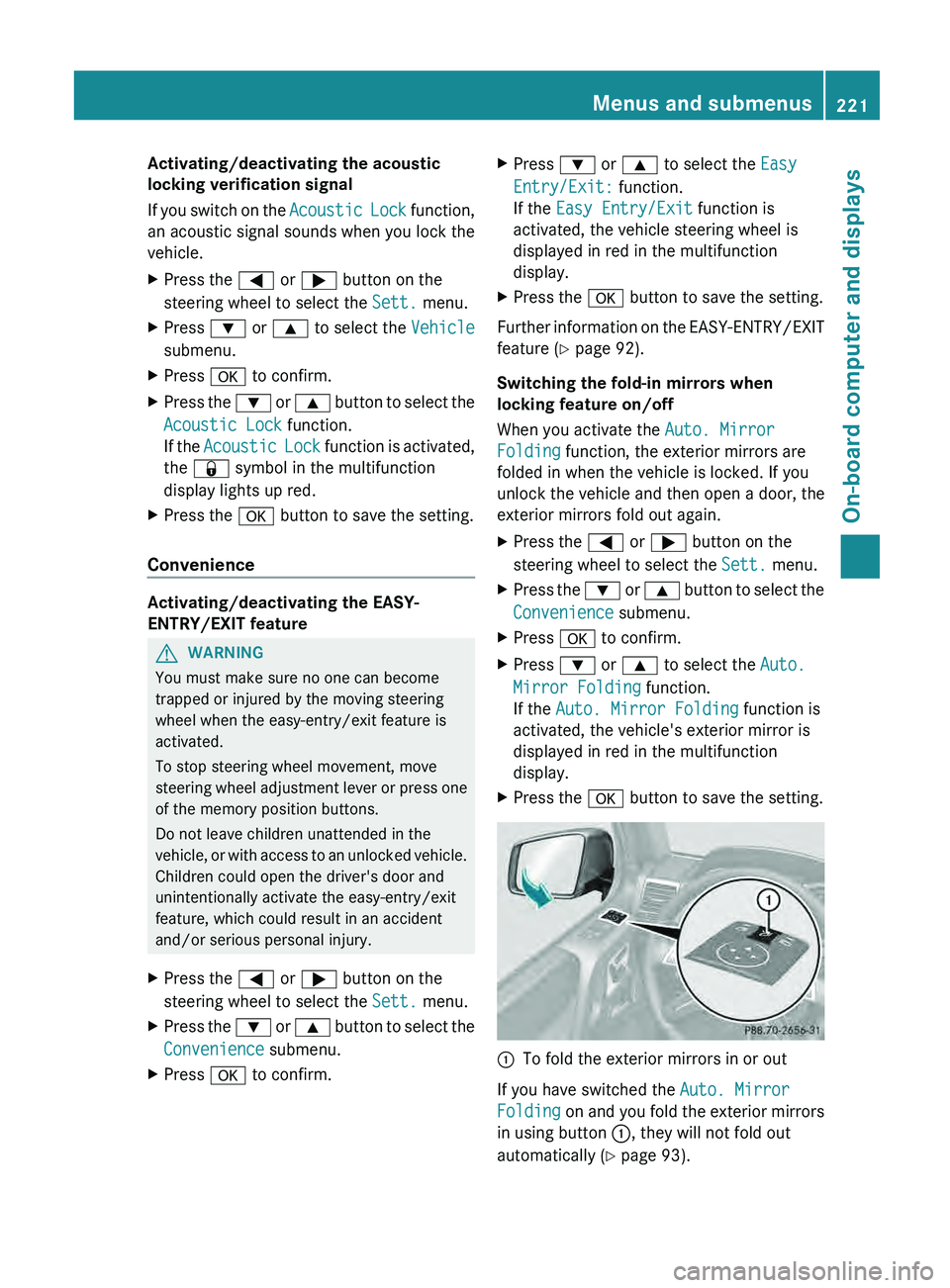
X Press the 0076 button to save the setting. 0043
To fold the exterior mirrors in or out
If you have switched the Auto. Mirror
Folding on and you
fold the exterior mirrors
in using button 0043, they will not fold out
automatically ( Y page 93). Menus and submenus
221
On-board computer and displays Z
Page 225 of 364
0043
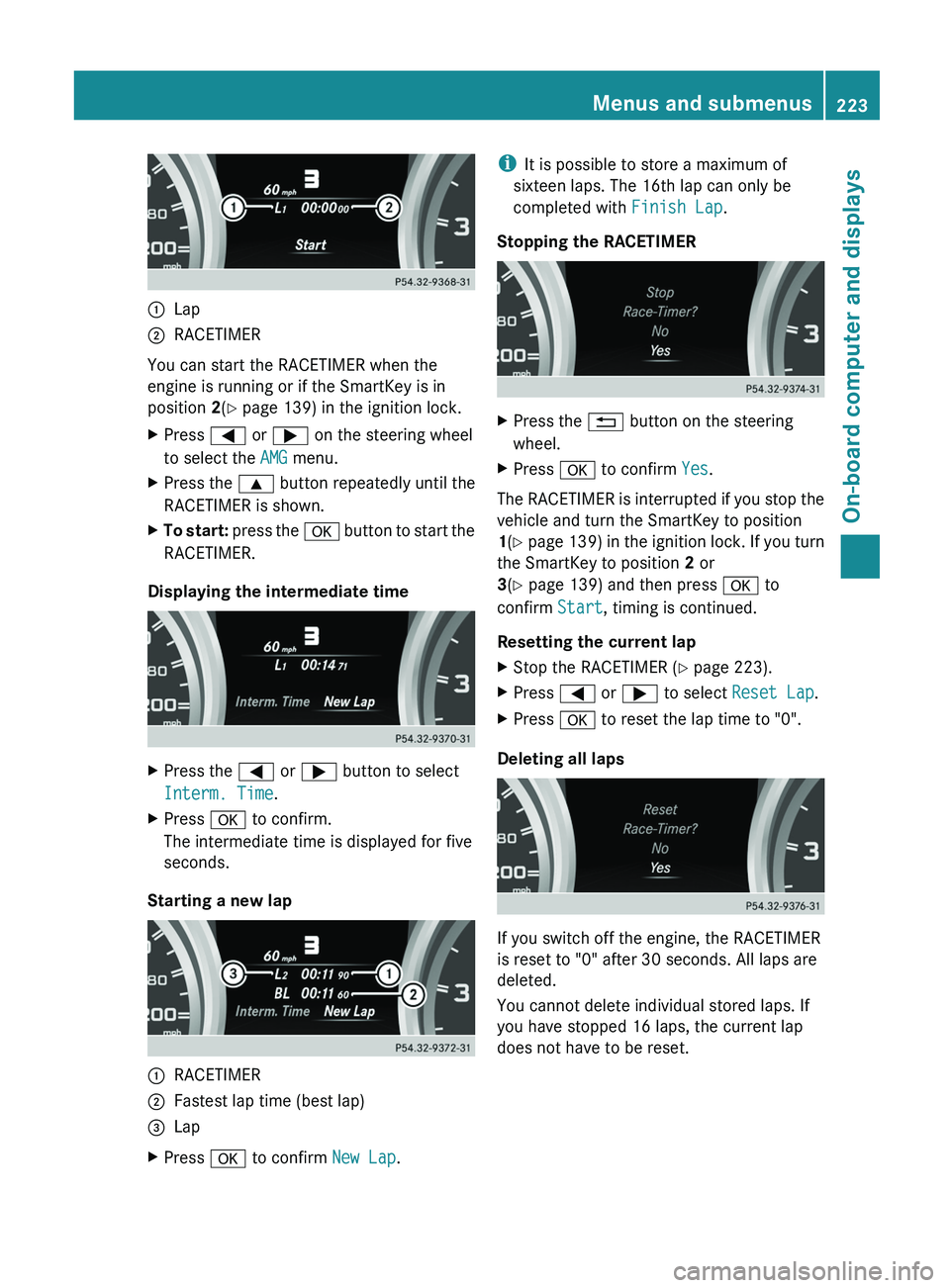
Lap
0044 RACETIMER
You can start the RACETIMER when the
engine is running or if the SmartKey is in
position 2(Y page 139) in the ignition lock.
X Press 0059 or 0065 on the steering wheel
to select the AMG menu.
X Press the 0063 button repeatedly until the
RACETIMER is shown.
X To start: press the 0076 button to start the
RACETIMER.
Displaying the intermediate time X
Press the 0059 or 0065 button to select
Interm. Time.
X Press 0076 to confirm.
The intermediate time is displayed for five
seconds.
Starting a new lap 0043
RACETIMER
0044 Fastest lap time (best lap)
0087 Lap
X Press 0076 to confirm New Lap.i
It is possible to store a maximum of
sixteen laps. The 16th lap can only be
completed with Finish Lap.
Stopping the RACETIMER X
Press the 0041 button on the steering
wheel.
X Press 0076 to confirm Yes.
The RACETIMER is interrupted if you stop the
vehicle and turn the SmartKey to position
1(Y page 139) in
the ignition lock. If you turn
the SmartKey to position 2 or
3(Y page 139) and then press 0076 to
confirm Start, timing is continued.
Resetting the current lap
X Stop the RACETIMER ( Y page 223).
X Press 0059 or 0065 to select Reset Lap.
X Press 0076 to reset the lap time to "0".
Deleting all laps If you switch off the engine, the RACETIMER
is reset to "0" after 30 seconds. All laps are
deleted.
You cannot delete individual stored laps. If
you have stopped 16 laps, the current lap
does not have to be reset. Menus and submenus
223On-board computer and displays Z
Page 228 of 364
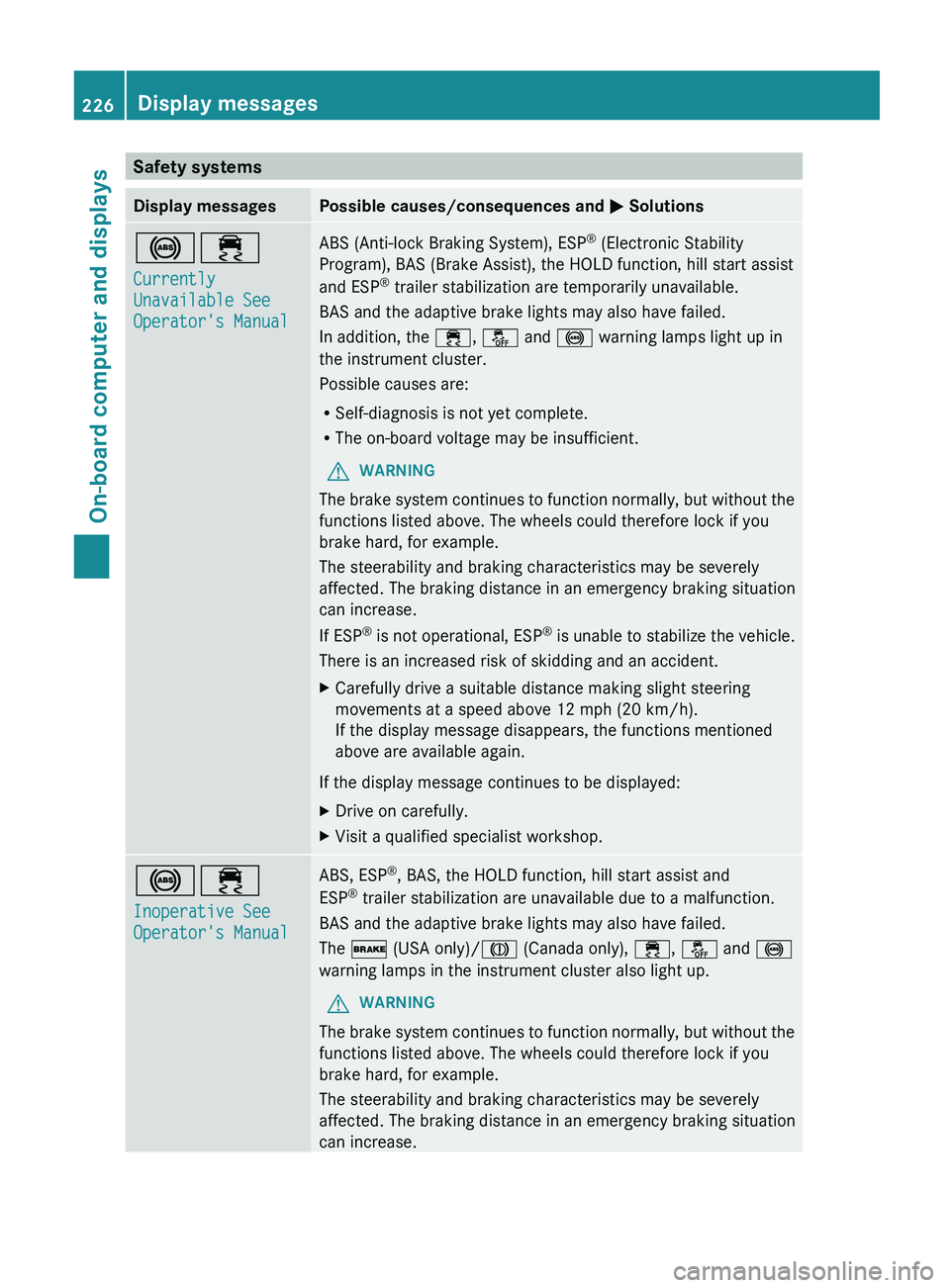
Safety systems
Display messages Possible causes/consequences and
0050 Solutions002500E5
Currently
Unavailable See
Operator's Manual ABS (Anti-lock Braking System), ESP
®
(Electronic Stability
Program), BAS (Brake Assist), the HOLD function, hill start assist
and ESP ®
trailer stabilization are temporarily unavailable.
BAS and the adaptive brake lights may also have failed.
In addition, the 00E5, 00BB and 0025 warning lamps light up in
the instrument cluster.
Possible causes are:
R Self-diagnosis is not yet complete.
R The on-board voltage may be insufficient.
G WARNING
The brake system continues to function normally, but without the
functions listed above. The wheels could therefore lock if you
brake hard, for example.
The steerability and braking characteristics may be severely
affected. The braking distance in an emergency braking situation
can increase.
If ESP ®
is not operational,
ESP®
is unable to stabilize the vehicle.
There is an increased risk of skidding and an accident.
X Carefully drive a suitable distance making slight steering
movements at a speed above 12 mph (20 km/h).
If the display message disappears, the functions mentioned
above are available again.
If the display message continues to be displayed:
X Drive on carefully.
X Visit a qualified specialist workshop. 002500E5
Inoperative See
Operator's Manual ABS, ESP
®
, BAS, the HOLD function, hill start assist and
ESP ®
trailer stabilization are unavailable due to a malfunction.
BAS and the adaptive brake lights may also have failed.
The 0027 (USA only)/004D (Canada only), 00E5, 00BB and 0025
warning lamps in the instrument cluster also light up.
G WARNING
The brake system continues to function normally, but without the
functions listed above. The wheels could therefore lock if you
brake hard, for example.
The steerability and braking characteristics may be severely
affected. The braking distance in an emergency braking situation
can increase. 226
Display messagesOn-board computer and displays
Page 230 of 364
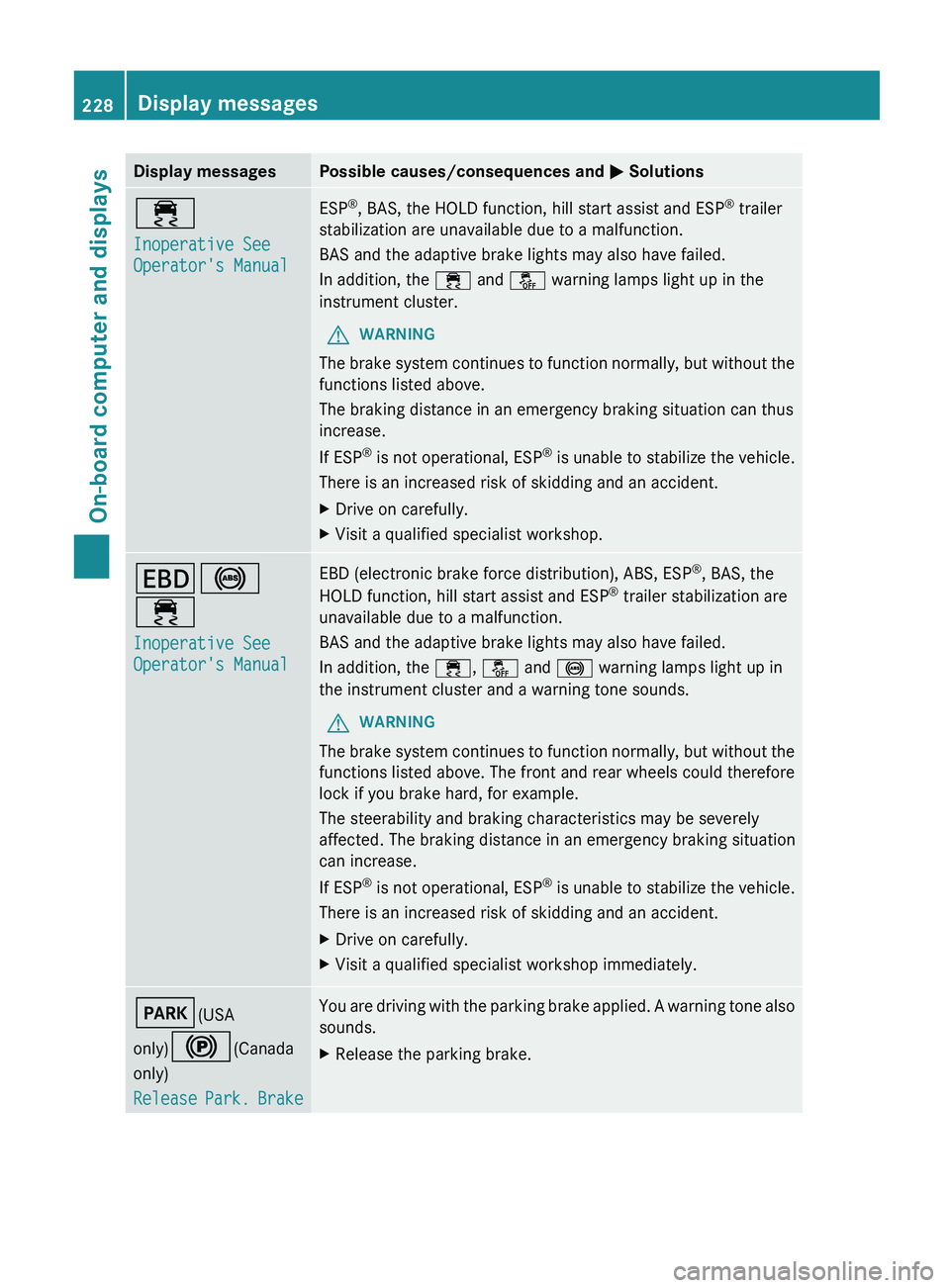
Display messages Possible causes/consequences and
0050 Solutions00E5
Inoperative See
Operator's Manual ESP
®
, BAS, the HOLD function, hill start assist and ESP ®
trailer
stabilization are unavailable due to a malfunction.
BAS and the adaptive brake lights may also have failed.
In addition, the 00E5 and 00BB warning lamps light up in the
instrument cluster.
G WARNING
The brake system continues to function normally, but without the
functions listed above.
The braking distance in an emergency braking situation can thus
increase.
If ESP ®
is not operational,
ESP®
is unable to stabilize the vehicle.
There is an increased risk of skidding and an accident.
X Drive on carefully.
X Visit a qualified specialist workshop. 007A0025
00E5
Inoperative See
Operator's Manual EBD (electronic brake force distribution), ABS, ESP
®
, BAS, the
HOLD function, hill start assist and ESP ®
trailer stabilization are
unavailable due to a malfunction.
BAS and the adaptive brake lights may also have failed.
In addition, the 00E5, 00BB and 0025 warning lamps light up in
the instrument cluster and a warning tone sounds.
G WARNING
The brake system continues to function normally, but without the
functions listed above. The front and rear wheels could therefore
lock if you brake hard, for example.
The steerability and braking characteristics may be severely
affected. The braking distance in an emergency braking situation
can increase.
If ESP ®
is not operational,
ESP®
is unable to stabilize the vehicle.
There is an increased risk of skidding and an accident.
X Drive on carefully.
X Visit a qualified specialist workshop immediately. 0049(USA
only)0024(Canada
only)
Release Park. Brake You are driving with the parking brake applied. A warning tone also
sounds.
X
Release the parking brake.228
Display messages
On-board computer and displays
Page 237 of 364
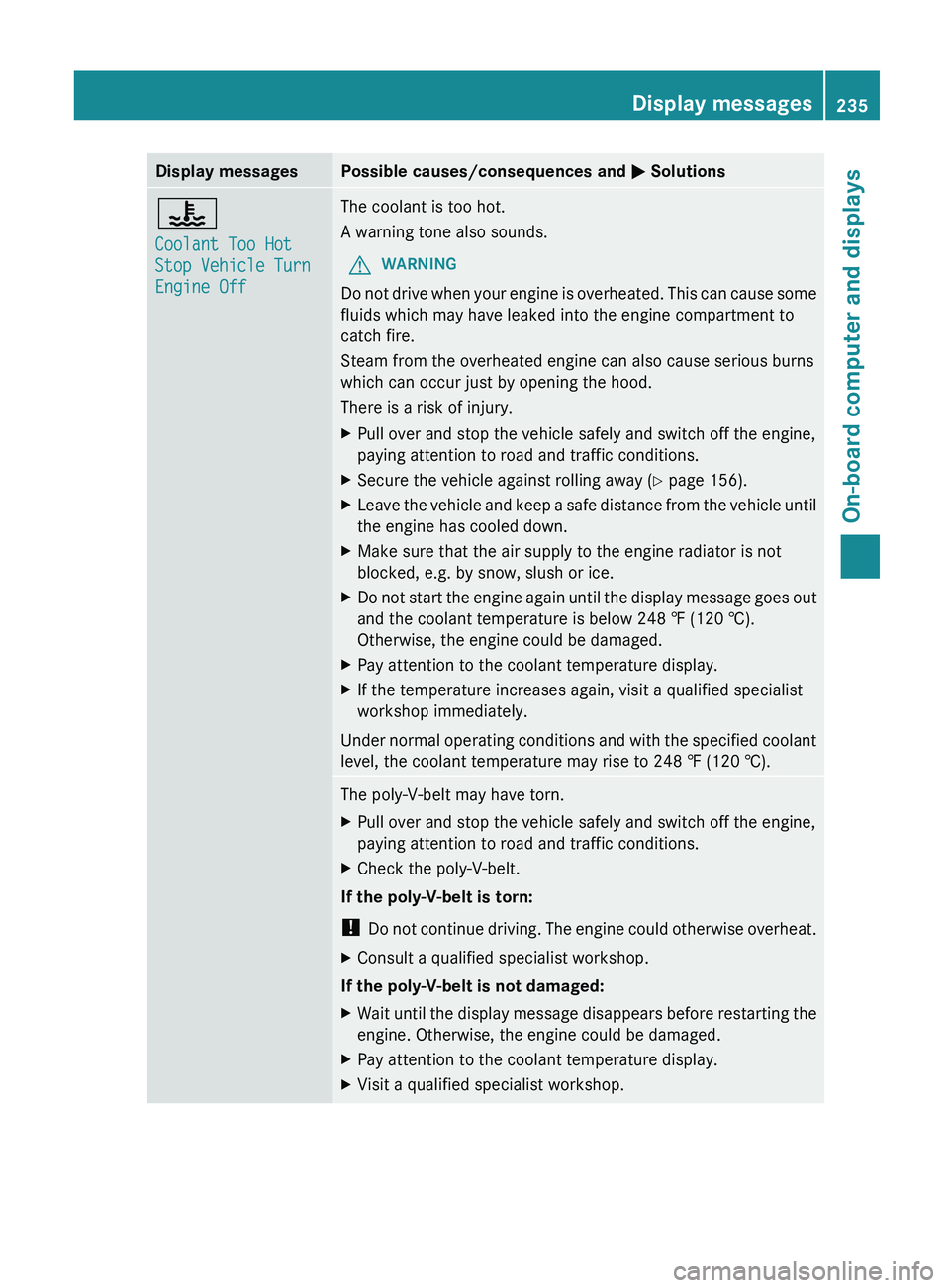
Display messages Possible causes/consequences and
0050 Solutions00AC
Coolant Too Hot
Stop Vehicle Turn
Engine Off The coolant is too hot.
A warning tone also sounds.
G WARNING
Do not drive when your engine is overheated. This can cause some
fluids which may have leaked into the engine compartment to
catch fire.
Steam from the overheated engine can also cause serious burns
which can occur just by opening the hood.
There is a risk of injury.
X Pull over and stop the vehicle safely and switch off the engine,
paying attention to road and traffic conditions.
X Secure the vehicle against rolling away ( Y page 156).
X Leave the vehicle and keep a safe distance from the vehicle until
the engine has cooled down.
X Make sure that the air supply to the engine radiator is not
blocked, e.g. by snow, slush or ice.
X Do not start the engine again until the display message goes out
and the coolant temperature is below 248 ‡ (120 †).
Otherwise, the engine could be damaged.
X Pay attention to the coolant temperature display.
X If the temperature increases again, visit a qualified specialist
workshop immediately.
Under normal
operating conditions and with the specified coolant
level, the coolant temperature may rise to 248 ‡ (120 †). The poly-V-belt may have torn.
X
Pull over and stop the vehicle safely and switch off the engine,
paying attention to road and traffic conditions.
X Check the poly-V-belt.
If the poly-V-belt is torn:
! Do not continue driving.
The engine could otherwise overheat.
X Consult a qualified specialist workshop.
If the poly-V-belt is not damaged:
X Wait until the display message disappears before restarting the
engine. Otherwise, the engine could be damaged.
X Pay attention to the coolant temperature display.
X Visit a qualified specialist workshop. Display messages
235
On-board computer and displays Z
Page 241 of 364
Display messages Possible causes/consequences and
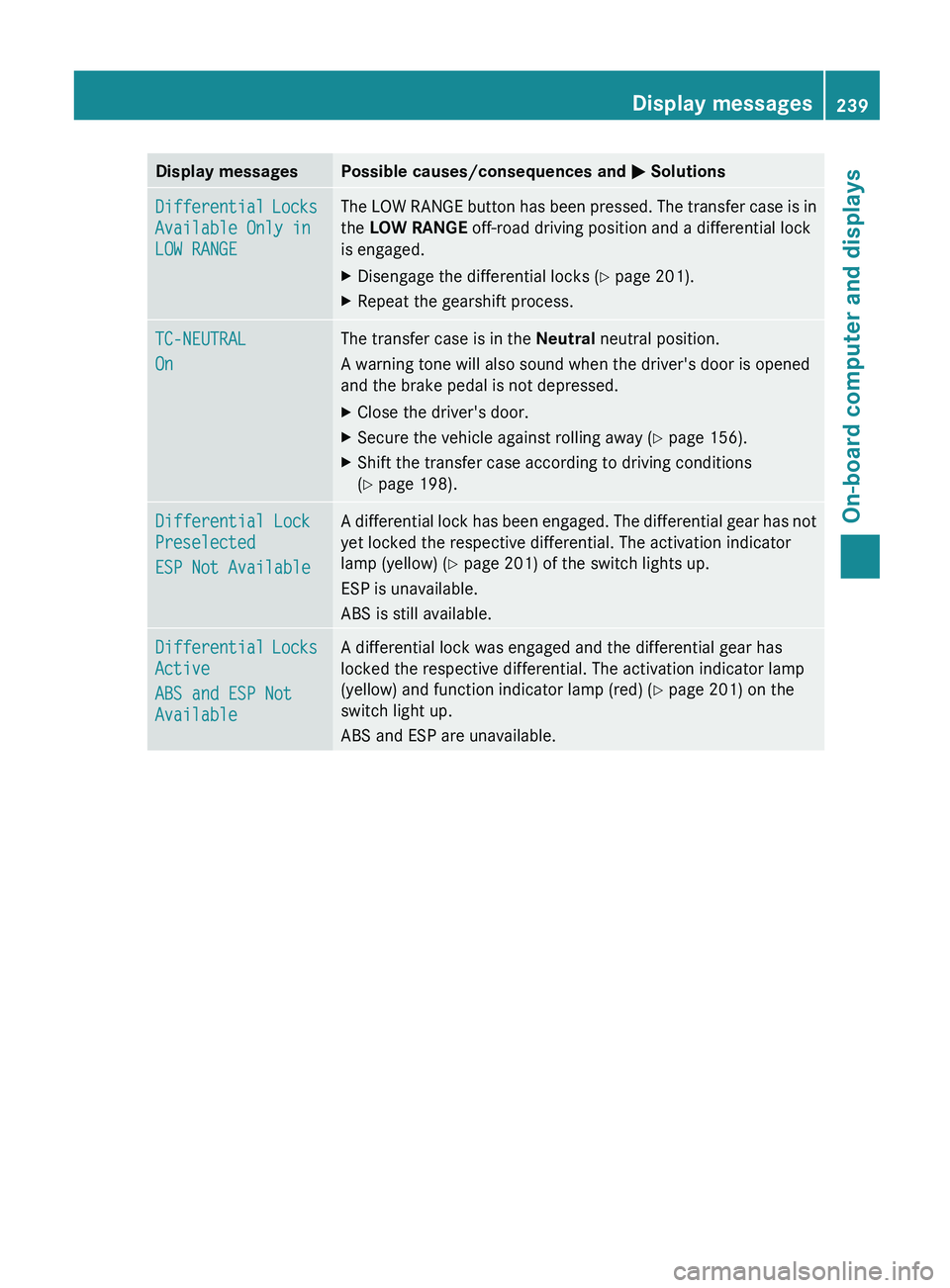
0050 SolutionsDifferential Locks
Available Only in
LOW RANGE The LOW RANGE button has been pressed. The transfer case is in
the LOW RANGE off-road driving position and a differential lock
is engaged.
X
Disengage the differential locks (Y page 201).
X Repeat the gearshift process. TC-NEUTRAL
On The transfer case is in the Neutral
neutral position.
A warning tone will also sound when the driver's door is opened
and the brake pedal is not depressed.
X Close the driver's door.
X Secure the vehicle against rolling away ( Y page 156).
X Shift the transfer case according to driving conditions
(Y page 198). Differential Lock
Preselected
ESP Not Available A differential lock has been engaged. The differential gear has not
yet locked the respective differential. The activation indicator
lamp (yellow) (
Y page 201) of the switch lights up.
ESP is unavailable.
ABS is still available. Differential Locks
Active
ABS and ESP Not
Available A differential lock was engaged and the differential gear has
locked the respective differential. The activation indicator lamp
(yellow) and function indicator lamp (red) (
Y page 201) on the
switch light up.
ABS and ESP are unavailable. Display messages
239On-board computer and displays Z
Page 248 of 364
Display messages Possible causes/consequences and
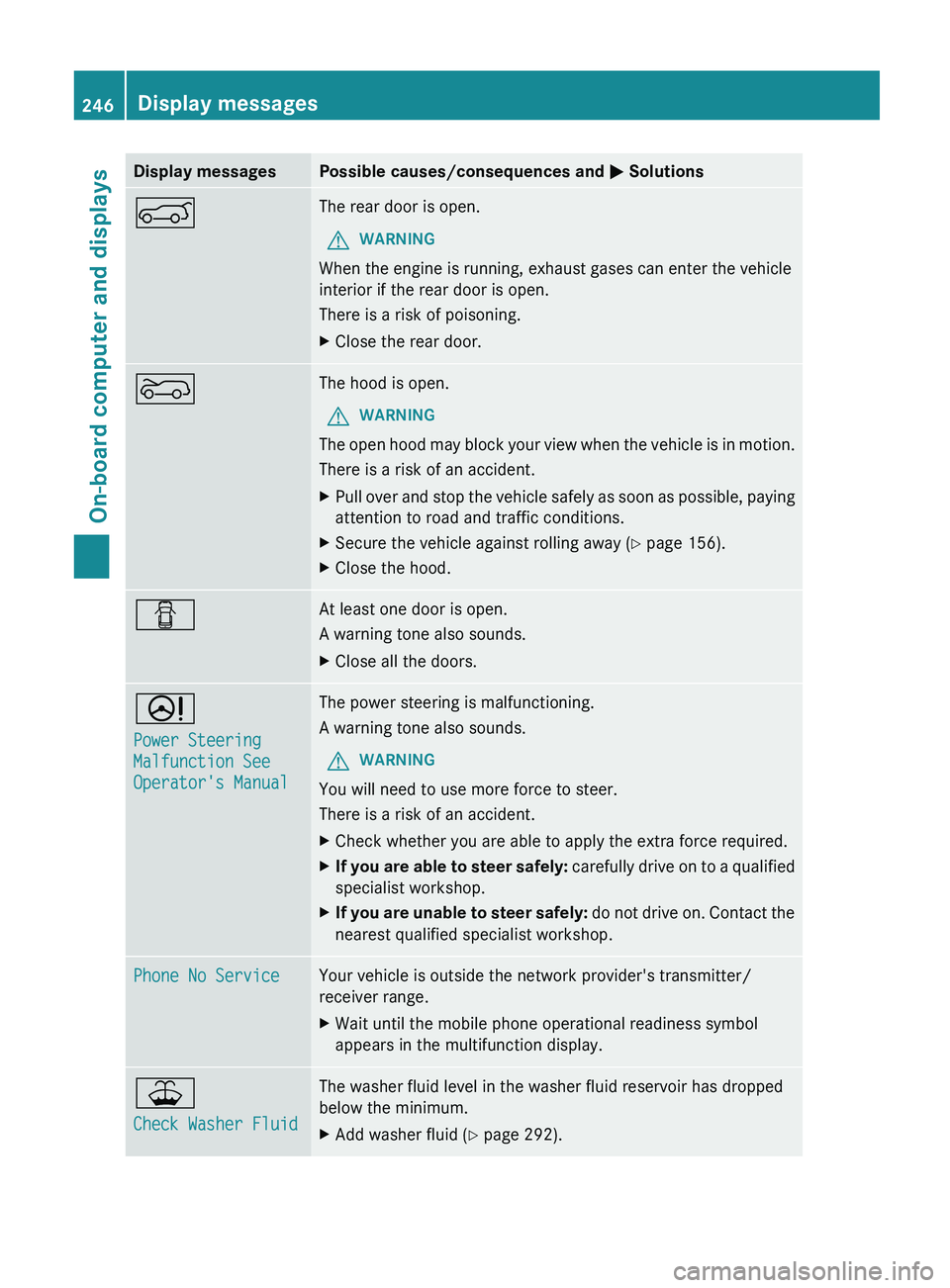
0050 Solutions0065 The rear door is open.
G WARNING
When the engine is running, exhaust gases can enter the vehicle
interior if the rear door is open.
There is a risk of poisoning.
X Close the rear door. 0066 The hood is open.
G WARNING
The open hood may block your view when the vehicle is in motion.
There is a risk of an accident.
X Pull over and stop the vehicle safely as soon as possible, paying
attention to road and traffic conditions.
X Secure the vehicle against rolling away ( Y page 156).
X Close the hood. 0051 At least one door is open.
A warning tone also sounds.
X
Close all the doors. 0052
Power Steering
Malfunction See
Operator's Manual The power steering is malfunctioning.
A warning tone also sounds.
G WARNING
You will need to use more force to steer.
There is a risk of an accident.
X Check whether you are able to apply the extra force required.
X If you are able to steer safely:
carefully drive
on to a qualified
specialist workshop.
X If you are unable to steer safely: do not drive
on. Contact the
nearest qualified specialist workshop. Phone No Service Your vehicle is outside the network provider's transmitter/
receiver range.
X
Wait until the mobile phone operational readiness symbol
appears in the multifunction display. 00B2
Check Washer Fluid The washer fluid level in the washer fluid reservoir has dropped
below the minimum.
X
Add washer fluid ( Y page 292).246
Display messages
On-board computer and displays