lock MERCEDES-BENZ G-CLASS SUV 2013 Owners Manual
[x] Cancel search | Manufacturer: MERCEDES-BENZ, Model Year: 2013, Model line: G-CLASS SUV, Model: MERCEDES-BENZ G-CLASS SUV 2013Pages: 364, PDF Size: 9.62 MB
Page 181 of 364
Any unauthorized modification to this
device could void the user’s authority to
operate the equipment.
i Canada only: This device complies with
RSS-210 of Industry Canada. Operation is
subject to the following two conditions:
1. This device may not cause interference,
and
2. this device must
accept any interference
received, including interference that may
cause undesired operation of the device.
Removal, tampering, or altering of the
device will void any warranties, and is not
permitted. Do not tamper with, alter, or use
the device in any non-approved way.
Any unauthorized modification to this
device could void the user's authority to
operate the equipment.
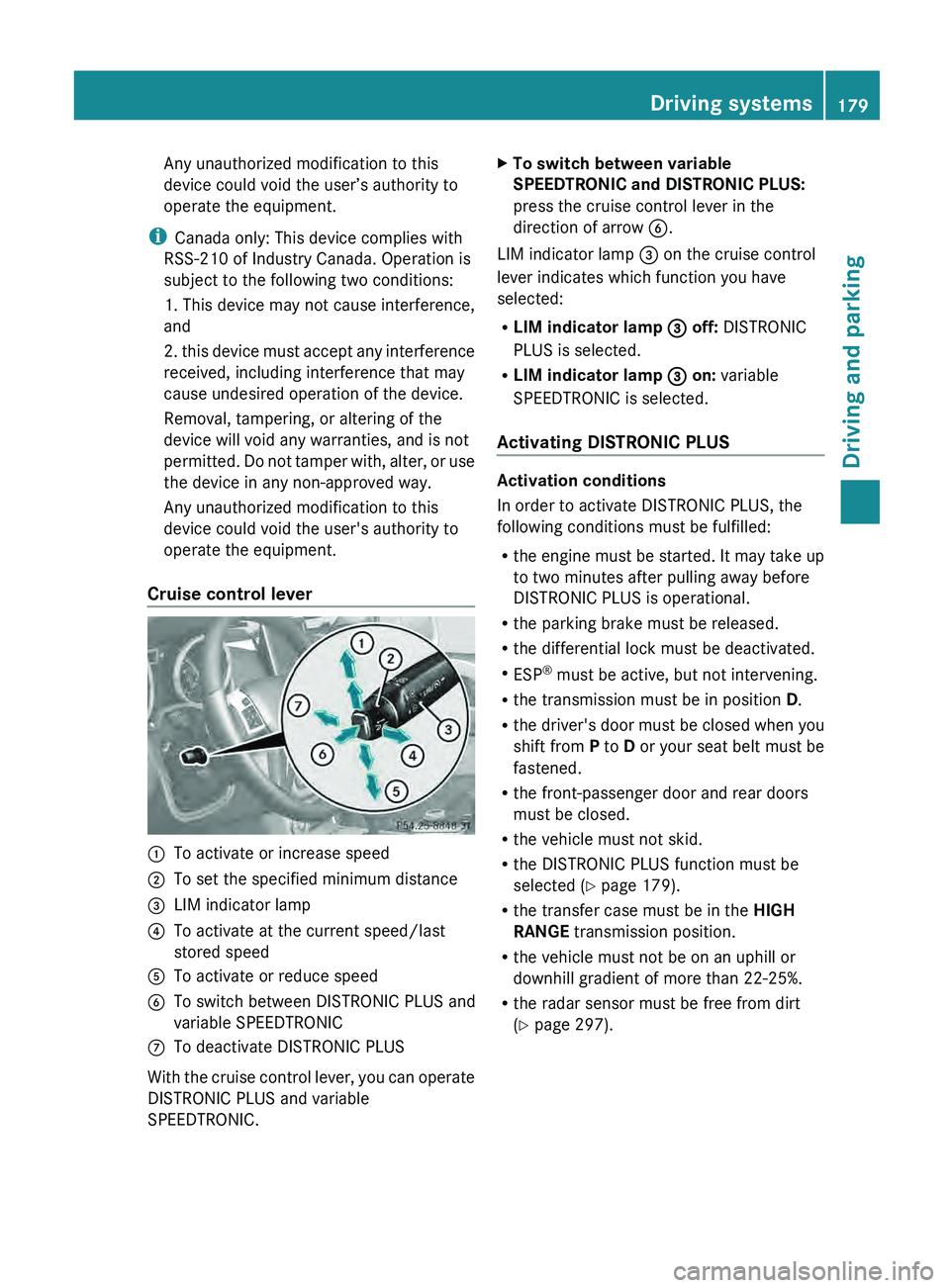
Cruise control lever 0043
To activate or increase speed
0044 To set the specified minimum distance
0087 LIM indicator lamp
0085 To activate at the current speed/last
stored speed
0083 To activate or reduce speed
0084 To switch between DISTRONIC PLUS and
variable SPEEDTRONIC
006B To deactivate DISTRONIC PLUS
With the cruise control lever, you can operate
DISTRONIC PLUS and variable
SPEEDTRONIC. X
To switch between variable
SPEEDTRONIC and DISTRONIC PLUS:
press the cruise control lever in the
direction of arrow 0084.
LIM indicator lamp 0087 on the cruise control
lever indicates which function you have
selected:
R LIM indicator lamp 0087 off: DISTRONIC
PLUS is selected.
R LIM indicator lamp 0087 on: variable
SPEEDTRONIC is selected.
Activating DISTRONIC PLUS Activation conditions
In order to activate DISTRONIC PLUS, the
following conditions must be fulfilled:
R
the engine must be
started. It may take up
to two minutes after pulling away before
DISTRONIC PLUS is operational.
R the parking brake must be released.
R the differential lock must be deactivated.
R ESP ®
must be active, but not intervening.
R the transmission must be in position D.
R the driver's door must be closed when you
shift from P to D or your seat belt must be
fastened.
R the front-passenger door and rear doors
must be closed.
R the vehicle must not skid.
R the DISTRONIC PLUS function must be
selected ( Y page 179).
R the transfer case must be in the HIGH
RANGE transmission position.
R the vehicle must not be on an uphill or
downhill gradient of more than 22-25%.
R the radar sensor must be free from dirt
(Y page 297). Driving systems
179Driving and parking Z
Page 190 of 364
The brightness of the indicator/warning
lamps is adjusted
automatically
according to
the ambient light.
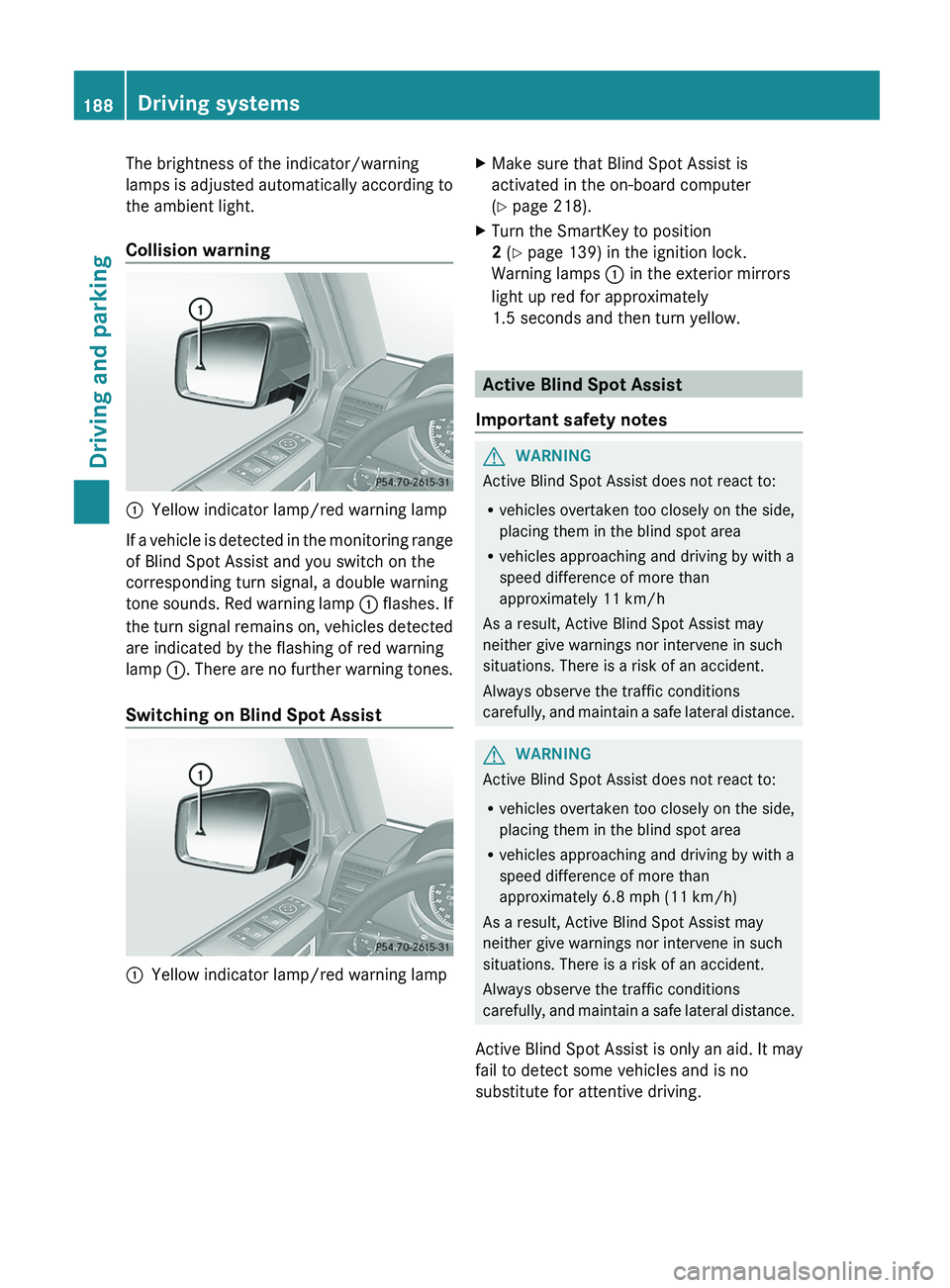
Collision warning 0043
Yellow indicator lamp/red warning lamp
If a vehicle is detected in the monitoring range
of Blind Spot Assist and you switch on the
corresponding turn signal, a double warning
tone sounds.
Red warning
lamp 0043 flashes. If
the turn signal remains on, vehicles detected
are indicated by the flashing of red warning
lamp 0043. There are no further warning tones.
Switching on Blind Spot Assist 0043
Yellow indicator lamp/red warning lamp X
Make sure that Blind Spot Assist is
activated in the on-board computer
(Y page 218).
X Turn the SmartKey to position
2 (Y page 139) in the ignition lock.
Warning lamps 0043 in the exterior mirrors
light up red for approximately
1.5 seconds and then turn yellow. Active Blind Spot Assist
Important safety notes G
WARNING
Active Blind Spot Assist does not react to:
R vehicles overtaken too closely on the side,
placing them in the blind spot area
R vehicles approaching and driving by with a
speed difference of more than
approximately 11 km/h
As a result, Active Blind Spot Assist may
neither give warnings nor intervene in such
situations. There is a risk of an accident.
Always observe the traffic conditions
carefully, and maintain
a safe lateral distance. G
WARNING
Active Blind Spot Assist does not react to:
R vehicles overtaken too closely on the side,
placing them in the blind spot area
R vehicles approaching and driving by with a
speed difference of more than
approximately 6.8 mph (11 km/h)
As a result, Active Blind Spot Assist may
neither give warnings nor intervene in such
situations. There is a risk of an accident.
Always observe the traffic conditions
carefully, and
maintain a safe lateral distance.
Active Blind Spot Assist is only an aid. It may
fail to detect some vehicles and is no
substitute for attentive driving. 188
Driving systems
Driving and parking
Page 194 of 364
There will be either no or only a weak course-
correcting brake application if:
R
there are vehicles or obstacles, e.g. crash
barriers, located on both sides of your
vehicle.
R a vehicle approaches you
too closely at the
side.
R you have adopted a sporty driving style with
high cornering speeds.
R you clearly brake or accelerate.
R a driving safety system intervenes, e.g.
ESP ®
.
R ESP ®
is switched off.
R the LOW RANGE off-road gear is activated.
R a loss of tire pressure has been detected.
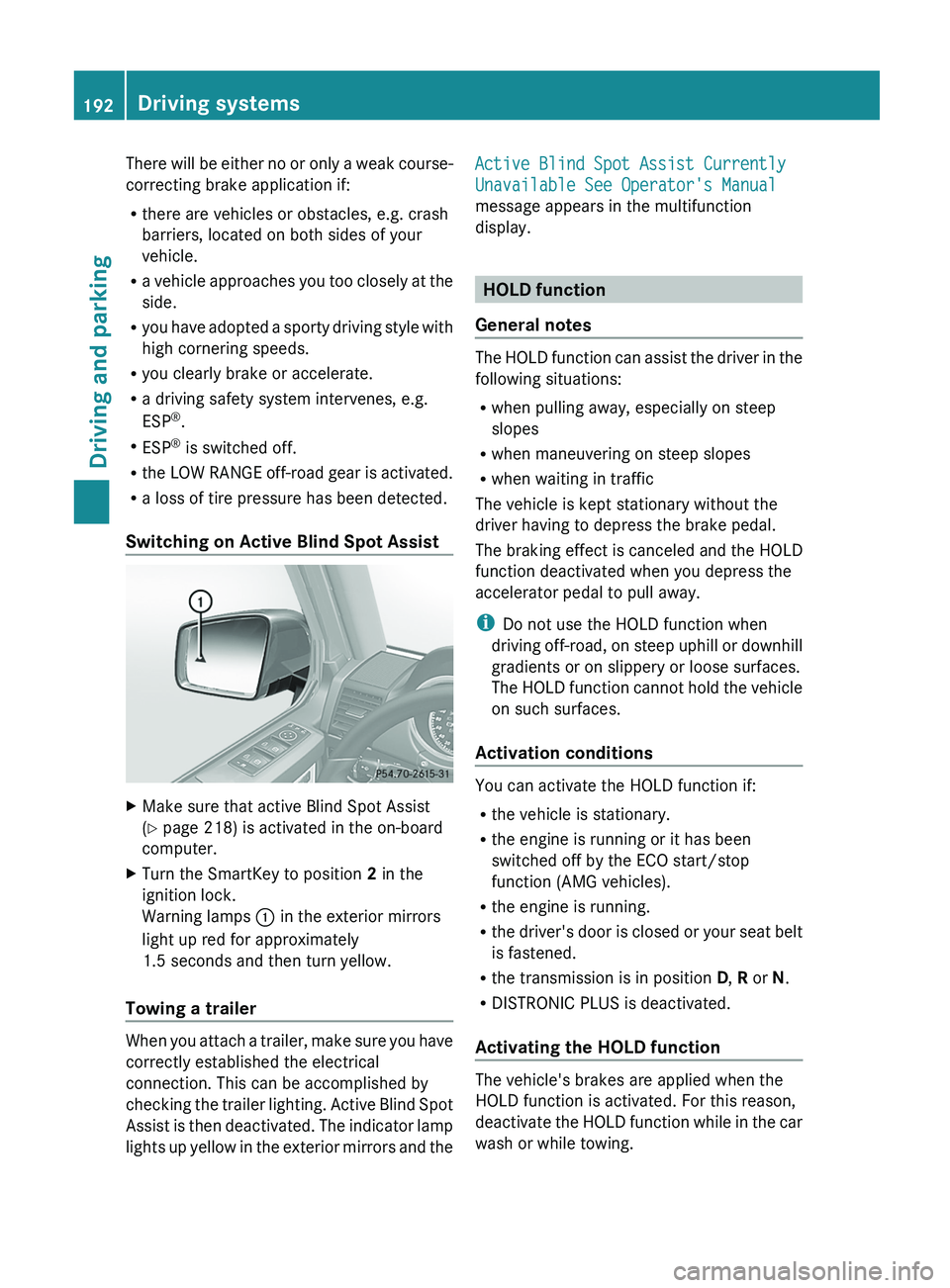
Switching on Active Blind Spot Assist X
Make sure that active Blind Spot Assist
(Y page 218) is activated in the on-board
computer.
X Turn the SmartKey to position 2 in the
ignition lock.
Warning lamps 0043 in the exterior mirrors
light up red for approximately
1.5 seconds and then turn yellow.
Towing a trailer When you attach a trailer, make sure you have
correctly established the electrical
connection. This can be accomplished by
checking the trailer lighting.
Active Blind Spot
Assist is then deactivated. The indicator lamp
lights up yellow in the exterior mirrors and the Active Blind Spot Assist Currently
Unavailable See Operator's Manual
message appears in the multifunction
display.
HOLD function
General notes The HOLD function can assist the driver in the
following situations:
R
when pulling away, especially on steep
slopes
R when maneuvering on steep slopes
R when waiting in traffic
The vehicle is kept stationary without the
driver having to depress the brake pedal.
The braking effect is
canceled and the HOLD
function deactivated when you depress the
accelerator pedal to pull away.
i Do not use the HOLD function when
driving off-road, on steep uphill or downhill
gradients or on slippery or loose surfaces.
The HOLD function cannot hold the vehicle
on such surfaces.
Activation conditions You can activate the HOLD function if:
R
the vehicle is stationary.
R the engine is running or it has been
switched off by the ECO start/stop
function (AMG vehicles).
R the engine is running.
R the driver's
door is
closed or your seat belt
is fastened.
R the transmission is in position D, R or N.
R DISTRONIC PLUS is deactivated.
Activating the HOLD function The vehicle's brakes are applied when the
HOLD function is activated. For this reason,
deactivate the HOLD
function
while in the car
wash or while towing. 192
Driving systems
Driving and parking
Page 198 of 364
One or more segments light up as the vehicle
approaches an obstacle, depending on the
vehicle's distance from the obstacle.
From the:
R
sixth segment onwards, you will hear an
intermittent warning tone for
approximately two seconds.
R seventh segment onwards, you will hear a
warning tone for approximately two
seconds. This indicates that you have now
reached the minimum distance.
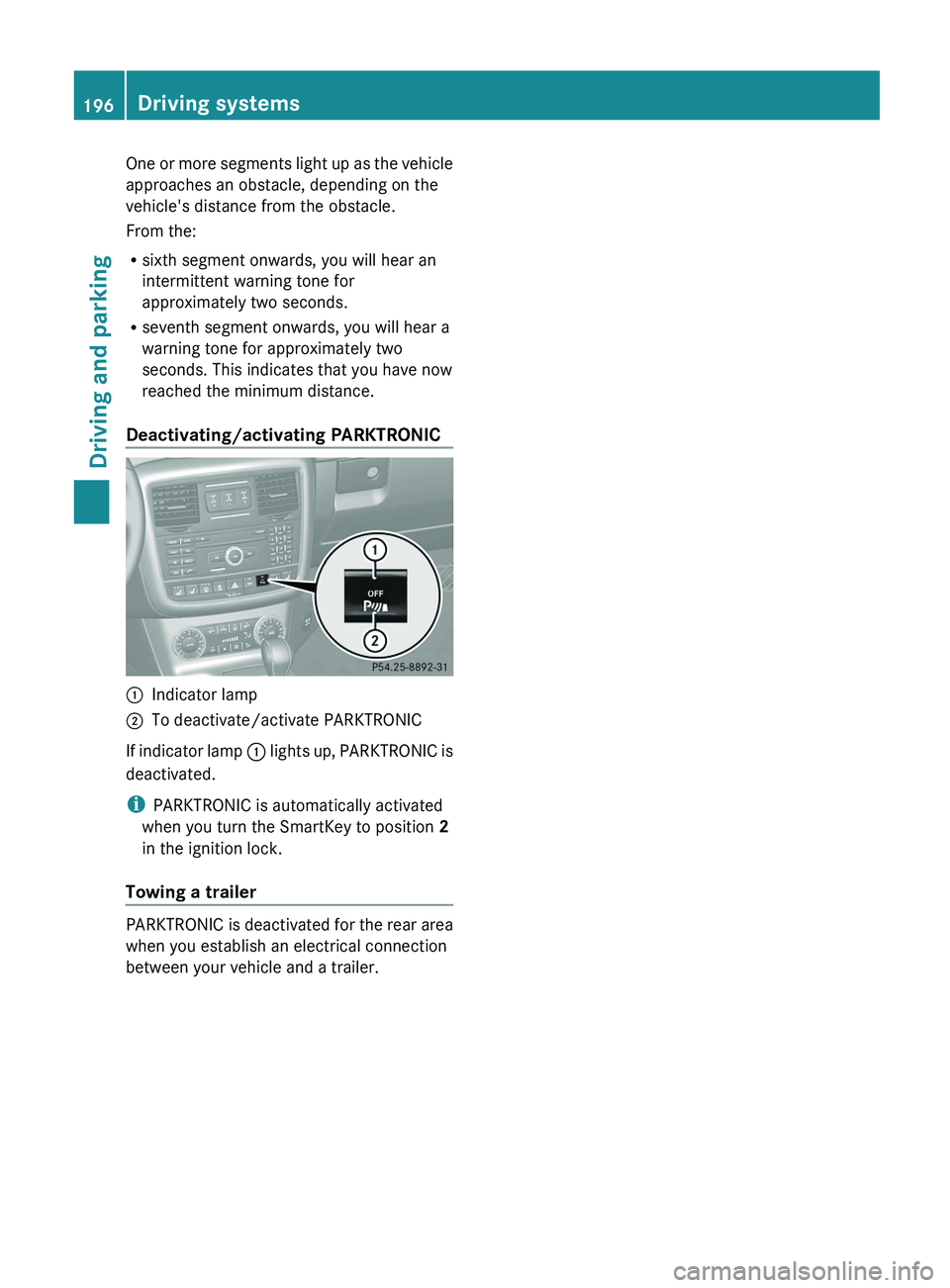
Deactivating/activating PARKTRONIC 0043
Indicator lamp
0044 To deactivate/activate PARKTRONIC
If indicator lamp 0043 lights up,
PARKTRONIC is
deactivated.
i PARKTRONIC is automatically activated
when you turn the SmartKey to position 2
in the ignition lock.
Towing a trailer PARKTRONIC is deactivated for the rear area
when you establish an electrical connection
between your vehicle and a trailer.196
Driving systems
Driving and parking
Page 200 of 364
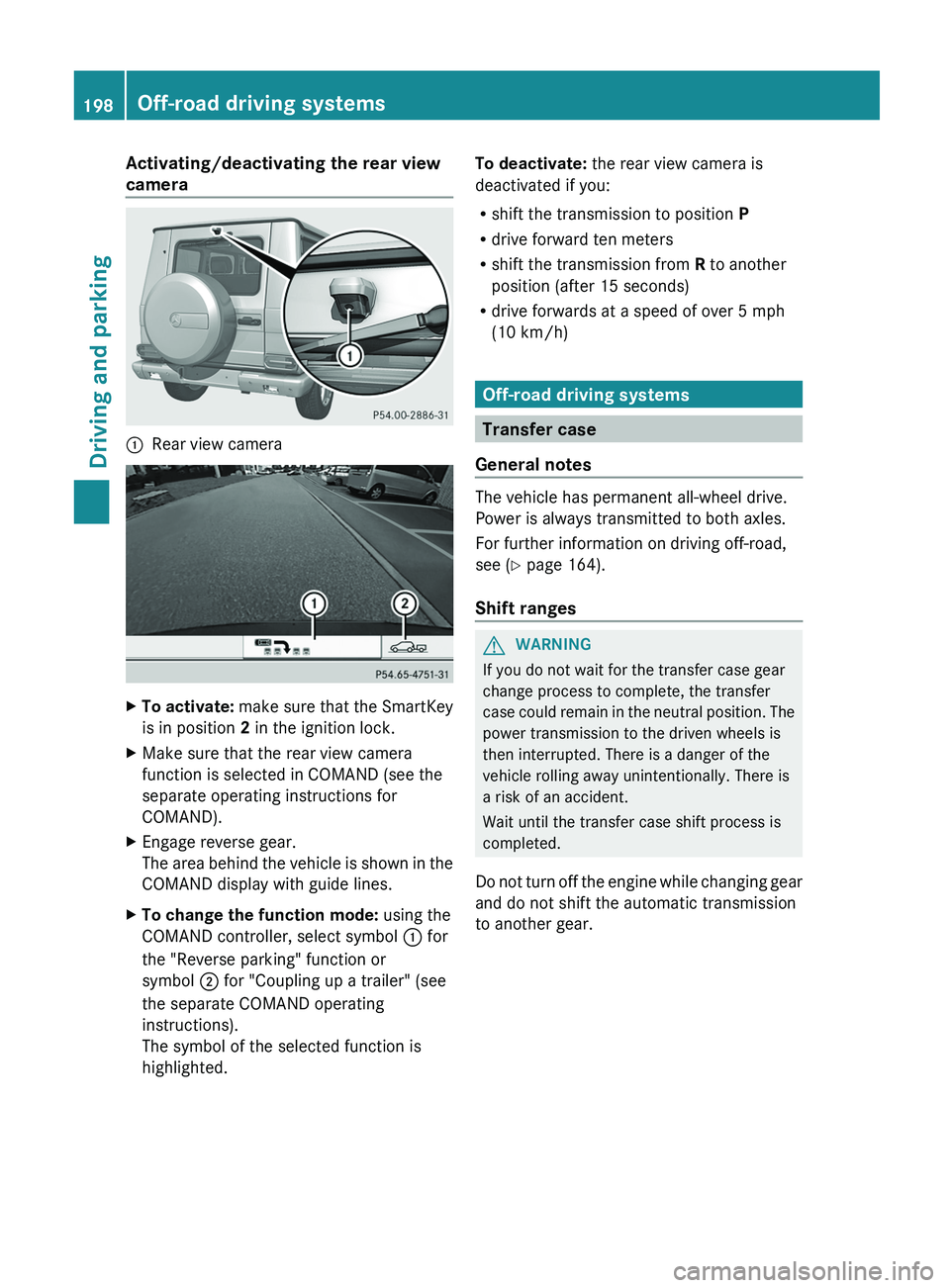
Activating/deactivating the rear view
camera
0043
Rear view camera X
To activate: make sure that the SmartKey
is in position 2 in the ignition lock.
X Make sure that the rear view camera
function is selected in COMAND (see the
separate operating instructions for
COMAND).
X Engage reverse gear.
The area behind the
vehicle is shown in the
COMAND display with guide lines.
X To change the function mode: using the
COMAND controller, select symbol 0043 for
the "Reverse parking" function or
symbol 0044 for "Coupling up a trailer" (see
the separate COMAND operating
instructions).
The symbol of the selected function is
highlighted. To deactivate:
the rear view camera is
deactivated if you:
R shift the transmission to position P
R drive forward ten meters
R shift the transmission from R to another
position (after 15 seconds)
R drive forwards at a speed of over 5 mph
(10 km/h) Off-road driving systems
Transfer case
General notes The vehicle has permanent all-wheel drive.
Power is always transmitted to both axles.
For further information on driving off-road,
see (
Y page 164).
Shift ranges G
WARNING
If you do not wait for the transfer case gear
change process to complete, the transfer
case could remain
in
the neutral position. The
power transmission to the driven wheels is
then interrupted. There is a danger of the
vehicle rolling away unintentionally. There is
a risk of an accident.
Wait until the transfer case shift process is
completed.
Do not turn off the engine while changing gear
and do not shift the automatic transmission
to another gear. 198
Off-road driving systems
Driving and parking
Page 202 of 364
i
AMG vehicles: to shift the transfer case
to LOW RANGE, deactivate the
ECO start/
stop function (Y page 142).
X Press LOW RANGE button 0044.
When the shift procedure is complete, the
LOW RANGE transfer case position appears
in the multifunction display.
Indicator lamp 0043 lights up.
X Shift the transmission to position D.
Switching off the off-road gear ratio G
WARNING
When the transfer case is in the neutral
position, power transmission to the driven
wheels is interrupted. As
a result, the vehicle
could roll away. There is a risk of an accident.
Secure the vehicle with the parking brake, and
on uphill or downhill gradients, also secure it
with a device such as a wheel chock.
! Only carry out the gear selection if:
R the engine is running.
R the vehicle is rolling.
R the automatic transmission is in selector
lever position N.
R you are driving no faster than 43 mph
(70 km/h).
You could otherwise damage the transfer
case.
X Press button 0044.
When the shift procedure is complete, the
HIGH RANGE
transfer
case position appears
in the multifunction display.
Indicator lamp 0043 goes out.
If the gear change is not completed, the
following messages could appear in the
display:
R TC Shift Conditions Not Fulfilled
You have not met one or more shift
conditions.
R TC NEUTRAL On
The transfer case has canceled the gear
change process and is in N. The N transfer case position appears in the multifunction
display.
R TC Shift Canceled
The transfer case has not performed the
gear change process.
X Carry out the gear change process again.
Make sure to meet all conditions for
changing gears.
R TC Malfunction Visit Workshop
There is
a malfunction
in the transfer case.
X Do not shift the transfer case.
X Have the vehicle checked as soon as
possible at a qualified
specialist workshop.
Shifting to neutral G
WARNING
When the transfer case is in the neutral
position, power transmission to the driven
wheels is interrupted. As
a result, the vehicle
could roll away. There is a risk of an accident.
Secure the vehicle with the parking brake, and
on uphill or downhill gradients, also secure it
with a device such as a wheel chock.
X Turn the SmartKey to position
2 (Y page 139) in the ignition lock.
X Apply the parking brake.
X Depress the brake pedal.
X Move the selector lever to position
N(Y page 145).
X Press and hold LOW RANGE button 0044 for
approximately 10 seconds.
Once the gear change procedure is
complete, TC Neutral On message
appears in the multifunction display for
approximately
5 seconds.
If the gear change is not completed, the
following messages could appear in the
display (
Y page 238).
i If the transfer case is in Neutral, the
SmartKey is in the ignition lock and you
open the driver's door, the TC Neutral
On
message appears in the multifunction200
Off-road driving systems
Driving and parking
Page 203 of 364
display. If you then release the parking
brake, a warning tone will sound.
Differential locks
General notes G
WARNING
When differential locks are engaged on a firm,
high-grip surface, the vehicle's steerability is
greatly impaired. In particular, engaging the
differential locks when cornering could lead
to you losing control
of the vehicle. There is a
risk of an accident.
Disengage the differential locks immediately
on firm, high-grip surfaces. G
WARNING
ABS, 4ETS, ESP ®
and BAS are deactivated
while the differential locks are engaged. As a
result, the wheels could lock when braking
and the braking distance is increased. There
is a risk of an accident.
Disengage the differential locks immediately
on firm, high-grip surfaces.
! In order to avoid damage to the transfer
case, you must operate the vehicle on a
dynamometer (1-axle dynamometer) only
if:
R the axle not driven on is jacked up
or
R the corresponding propeller shaft is
disconnected and the transfer case
differential lock is activated.
Otherwise, the transfer case can be
damaged.
Differential locks improve the traction of the
vehicle. Your vehicle is equipped with a differential
lock for:
R
the transfer case: this
controls the balance
between the front and rear axles.
R the rear axle: this controls the balance
between the wheels on the rear axle.
R the front axle: this controls the balance
between the wheels on the front axle.
Information on differential and
differential locks When the vehicle drives around a curve, the
wheels on the
outside
of the curve must cover
a greater distance. Therefore, the wheels turn
more rapidly than on the inside. The
differential, a transmission in the drive train,
compensates for these different rotational
speeds, making cornering possible.
The disadvantage of a differential is that more
power is transferred to the wheels that have
the least grip. An example: a wheel of a driven
axle is on a snow-covered surface and
therefore does not have any traction. The
differential causes this wheel to be subjected
to the strongest driving force, as the flow of
force takes the path of least resistance. The
opposite wheel on this axle, however, which
stands on firm ground and could therefore
allow propulsion, receives no driving power.
4ETS compensates for this disadvantage.
4ETS provides good steerability by
automatically braking the spinning wheel.
4ETS provides the wheel on the firm surface
with more drive force, which in turn provides
propulsion.
ESP® and 4ETS are traction systems that are
ideal for road driving and suitable for light off-
road driving. The LOW RANGE off-road gear
also improves off-road capability.
Moreover, the more difficult conditions in off-
road driving require further measures such as
locking one or several differentials. Your
vehicle is equipped with three differential
locks: Off-road driving systems
201
Driving and parking Z
Page 204 of 364
R
a central differential lock for the transfer
case,
R a differential lock for the front axle and
R a differential lock for the rear axle.
Each differential lock can
be engaged with the
respective switch on the center console. If
the transfer case differential is disabled, the
front and rear wheels turn at the same speed.
If the differential for the rear axle is locked,
both rear wheels turn at the same speed,
regardless of their individual torques. Please
note that activating the differential locks
severely restricts the vehicle's steerability.
Please note that the functions of the
differential are absolutely necessary for
driving on paved roads. The differential locks
must never be engaged when driving on
paved roads. Otherwise, the vehicle may not
be steerable and you could lose control of the
vehicle. The differential locks must therefore
only be engaged when driving off-road. You
may only engage the differential locks if the
functions of the 4ETS and ESP ®
driving
systems and the LOW RANGE off-road gear
are insufficient.
i The differential locks are only available in
the LOW RANGE off-road gear.
Activating the differential lock Important safety notes
G
WARNING
When differential locks are engaged on a firm,
high-grip surface, the vehicle's steerability is
greatly impaired. In particular, engaging the
differential locks when cornering could lead
to you losing control
of the vehicle. There is a
risk of an accident.
Disengage the differential locks immediately
on firm, high-grip surfaces. G
WARNING
ABS, 4ETS, ESP ®
and BAS are deactivated
while the differential locks are engaged. As a
result, the wheels could lock when braking and the braking distance is increased. There
is a risk of an accident.
Disengage the differential locks immediately
on firm, high-grip surfaces.
! Only activate the differential locks when:
R you are driving at walking pace.
R the driven wheels are not spinning.
R you are not driving
on a firm road surface.
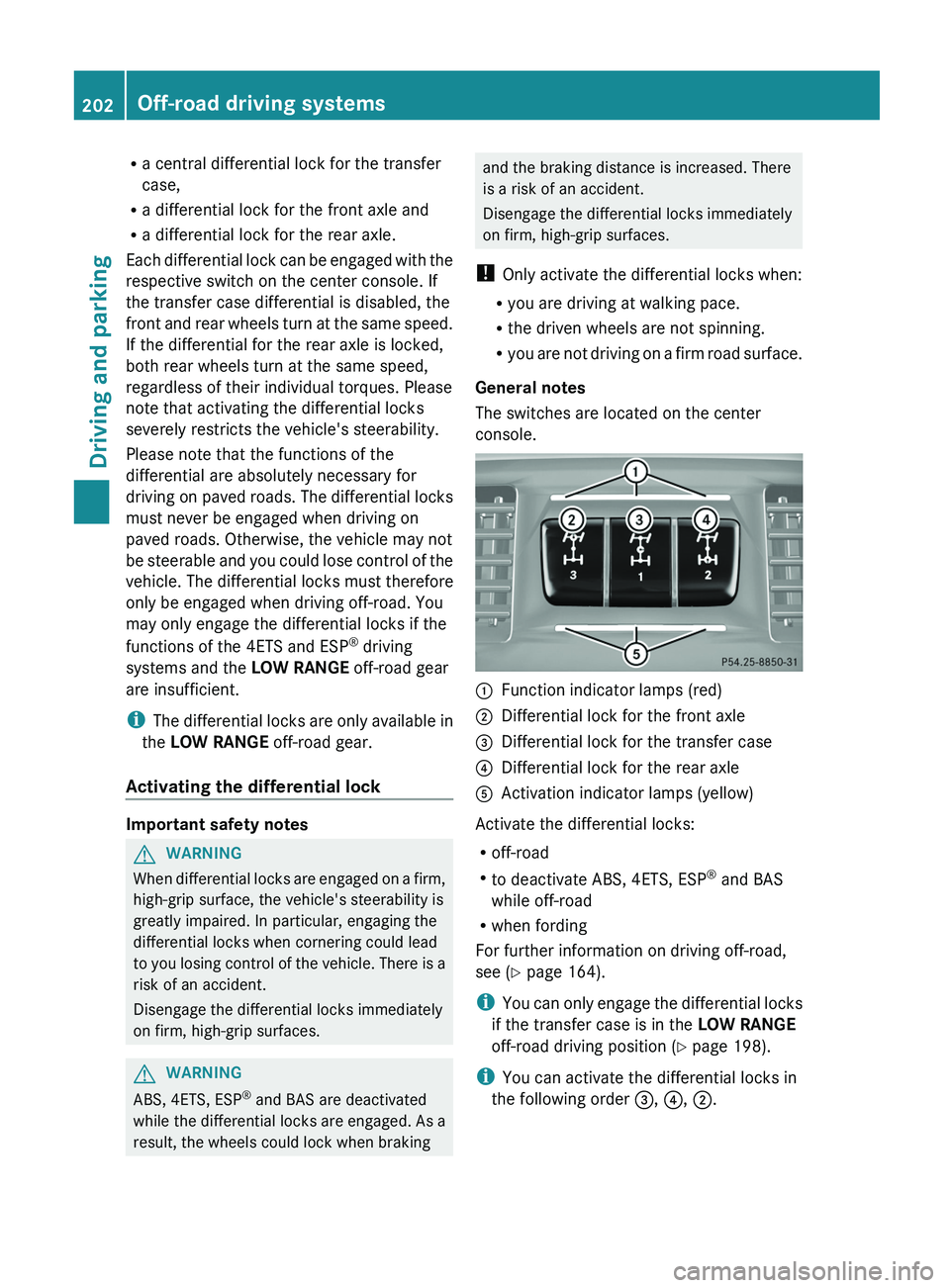
General notes
The switches are located on the center
console. 0043
Function indicator lamps (red)
0044 Differential lock for the front axle
0087 Differential lock for the transfer case
0085 Differential lock for the rear axle
0083 Activation indicator lamps (yellow)
Activate the differential locks:
R off-road
R to deactivate ABS, 4ETS, ESP ®
and BAS
while off-road
R when fording
For further information on driving off-road,
see ( Y page 164).
i You can only engage
the differential locks
if the transfer case is in the LOW RANGE
off-road driving position (Y page 198).
i You can activate the differential locks in
the following order 0087, 0085, 0044.202
Off-road driving systems
Driving and parking
Page 205 of 364
Differential lock for the transfer case
X
To engage: switch the transfer case to the
LOW RANGE off-road driving position ( Y
page 199).
X Press switch 0087.
When the transfer case is in the LOW
RANGE off-road driving position,
the yellow
activation indicator lamp below switch 0087
lights up.
The 00BB warning lamp in the instrument
panel lights up.
When the differential is locked, the red
function indicator lamp above switch 0087
lights up.
In the multifunction display you see the:
ABS not available Differential
Locked
The 00BB002500E5 warning lamps in the
instrument cluster light up.
The differential lock for the transfer case is
engaged.
4ETS, ESP ®
, BAS and ABS are deactivated.
The vehicle's ability to steer is severely
restricted. Drive carefully and accelerate
gently for optimum traction.
i You can now engage the differential lock
for rear axle 0085
and the differential lock for
front axle 0044 as required.
Differential lock for the rear axle X
To engage: press switch 0085.
Yellow activation indicator lamp 0083 lights
up first, followed by red function indicator
lamp 0043 of switch 0085.
The differential lock for the rear axle is
engaged.
Differential lock for the front axle X
To engage: press switch 0044.
First, the yellow activation indicator lamp
lights up, followed by the red function
indicator lamp. The differential lock for the front axle is
engaged.
Deactivating the differential lock You can deactivate the differential locks in
this order: 0044, 0085, 0087.
X
To simultaneously deactivate all
differential locks: press switch 0087.
Yellow activation indicator lamps 0083 and
red function indicator lamps 0043 go out.
After approximately three seconds of
normal driving, ABS, 4ETS, ESP ®
and BAS
are activated.
The ABS not available
Differential
Locked
message disappears from the
multifunction display and the 00BB, 0025
and 00E5 warning lamps in the instrument
cluster go out.
X Shift the transfer case to the HIGH
RANGE on-road position (Y page 199).
i If red function indicator lamps 0043 do not
go out after disengaging the differential
locks, bring the vehicle to a standstill in
accordance with the traffic conditions.
Then continue driving, as the load change
can release the differential locks. Towing a trailer
Notes on towing a trailer
Important safety notes G
WARNING
If you rest your foot on the brake pedal while
driving, the braking system
can overheat. This
increases the stopping distance and can even
cause the braking system to fail. There is a
risk of an accident.
Never use the brake pedal as a footrest. Never
depress the brake pedal and the accelerator
pedal at the same time. Towing a trailer
203
Driving and parking Z
Page 208 of 364
This will use the braking effect of the engine,
so that less braking will be required to
maintain the speed. which relieves the load
on the brake
system
and prevents the brakes
from overheating and wearing too quickly. If
you need additional braking, depress the
brake pedal repeatedly rather than
continuously.
Driving tips If the trailer swings from side to side:
X
Do not accelerate.
X Do not counter-steer.
X Brake if necessary.
R Maintain a greater distance from the
vehicle in front than
when driving without a
trailer.
R Avoid braking abruptly. If possible, brake
gently at first to allow the trailer to run on.
Then, increase the braking force rapidly.
R The values given for gradient-climbing
capabilities from a standstill refer to sea
level. When driving in mountainous areas,
note that the power output of the engine,
and consequently the vehicle's gradient-
climbing capability, decrease with
increasing altitude. Trailer power supply
! You can connect accessories with a
maximum power consumption
of
180 W to
the permanent power supply.
You must not charge a trailer battery using
the power supply.
The trailer socket of your vehicle is equipped
at the factory with a permanent power supply.
The permanent power supply is supplied via
trailer socket pin 9.
A qualified specialist workshop can provide
more information about installing the trailer
electrics. Trailer with 7-pin connector
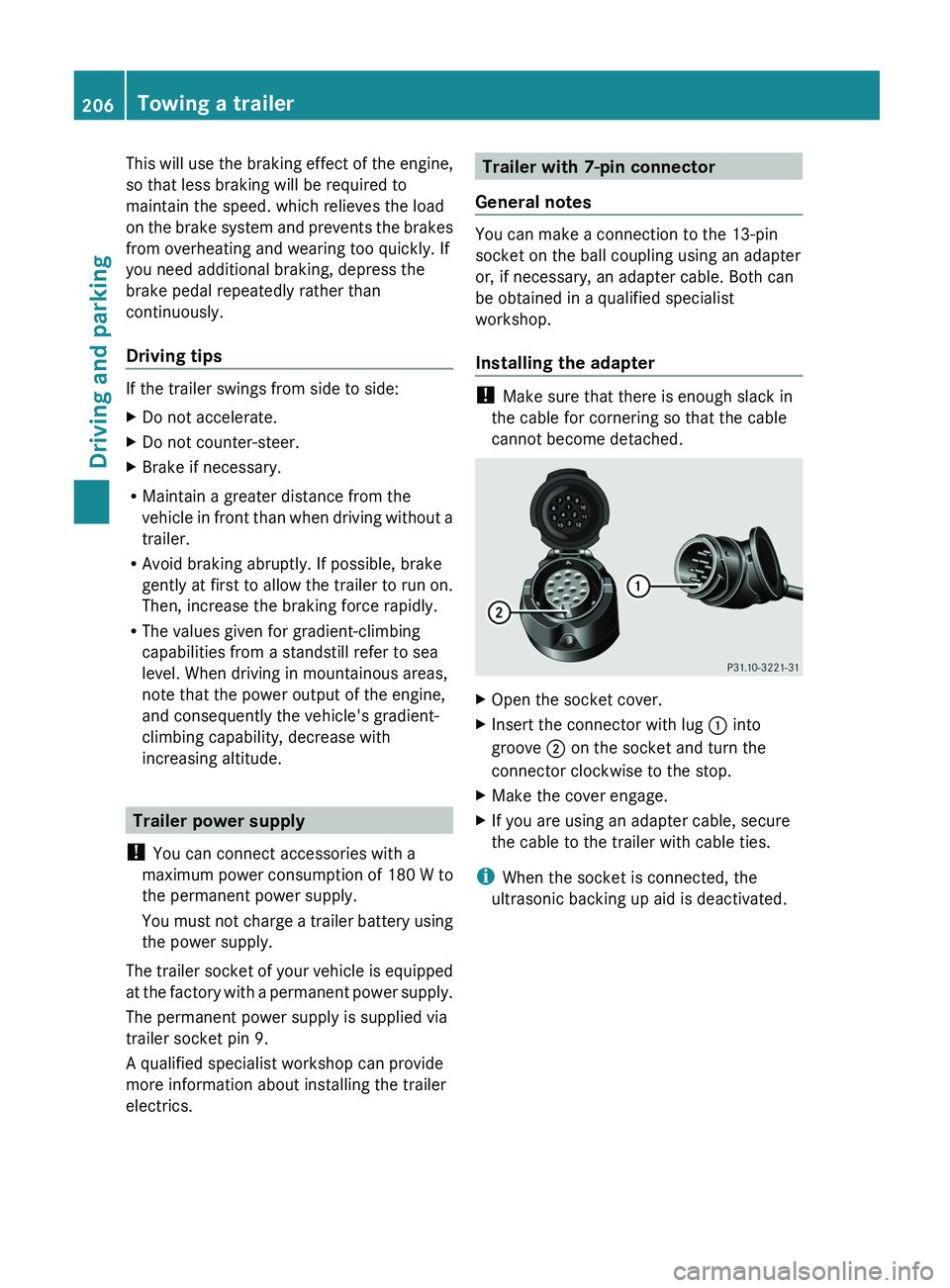
General notes You can make a connection to the 13-pin
socket on the ball coupling using an adapter
or, if necessary, an adapter cable. Both can
be obtained in a qualified specialist
workshop.
Installing the adapter
!
Make sure that there is enough slack in
the cable for cornering so that the cable
cannot become detached. X
Open the socket cover.
X Insert the connector with lug 0043 into
groove 0044 on the socket and turn the
connector clockwise to the stop.
X Make the cover engage.
X If you are using an adapter cable, secure
the cable to the trailer with cable ties.
i When the socket is connected, the
ultrasonic backing up aid is deactivated. 206
Towing a trailer
Driving and parking