lock MERCEDES-BENZ G-CLASS SUV 2014 Manual PDF
[x] Cancel search | Manufacturer: MERCEDES-BENZ, Model Year: 2014, Model line: G-CLASS SUV, Model: MERCEDES-BENZ G-CLASS SUV 2014Pages: 272, PDF Size: 39.13 MB
Page 166 of 272
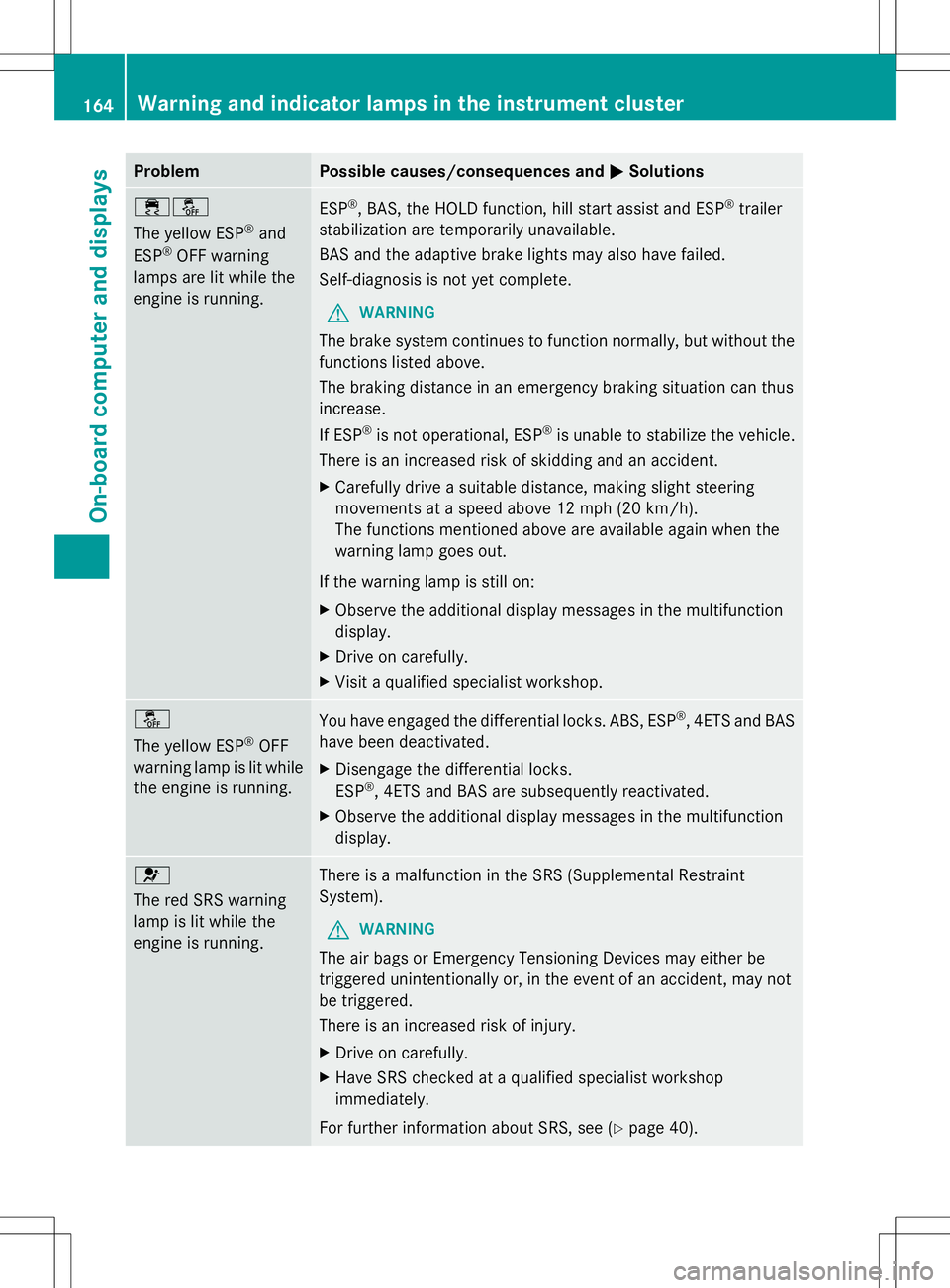
Problem Possible causes/consequences and
M
MSolutions ֌
The yellow ESP
®
and
ESP ®
OFF warning
lamps are lit while the
engine is running. ESP
®
, BAS, the HOLD function, hill start assist and ESP ®
trailer
stabilization are temporarily unavailable.
BAS and the adaptive brake lights may also have failed.
Self-diagnosis is not yet complete.
G WARNING
The brake system continues to function normally, but without the
functions listed above.
The braking distance in an emergency braking situation can thus
increase.
If ESP ®
is not operational, ESP ®
is unable to stabilize the vehicle.
There is an increased risk of skidding and an accident.
X Carefully drive a suitable distance, making slight steering
movements at a speed above 12 mph (20 km/h).
The functions mentioned above are available again when the
warning lamp goes out.
If the warning lamp is still on:
X Observe the additional display messages in the multifunction
display.
X Drive on carefully.
X Visit a qualified specialist workshop. å
The yellow ESP
®
OFF
warning lamp is lit while
the engine is running. You have engaged the differential locks. ABS, ESP
®
, 4ETS and BAS
have been deactivated.
X Disengage the differential locks.
ESP ®
, 4ETS and BAS are subsequently reactivated.
X Observe the additional display messages in the multifunction
display. 6
The red SRS warning
lamp is lit while the
engine is running.
There is a malfunction in the SRS (Supplemental Restraint
System).
G WARNING
The air bags or Emergency Tensioning Devices may either be
triggered unintentionally or, in the event of an accident, may not
be triggered.
There is an increased risk of injury.
X Drive on carefully.
X Have SRS checked at a qualified specialist workshop
immediately.
For further information about SRS, see (Y page 40).164
Warning and indicator lamps in the instrument clusterOn-board computer and displays
Page 167 of 272
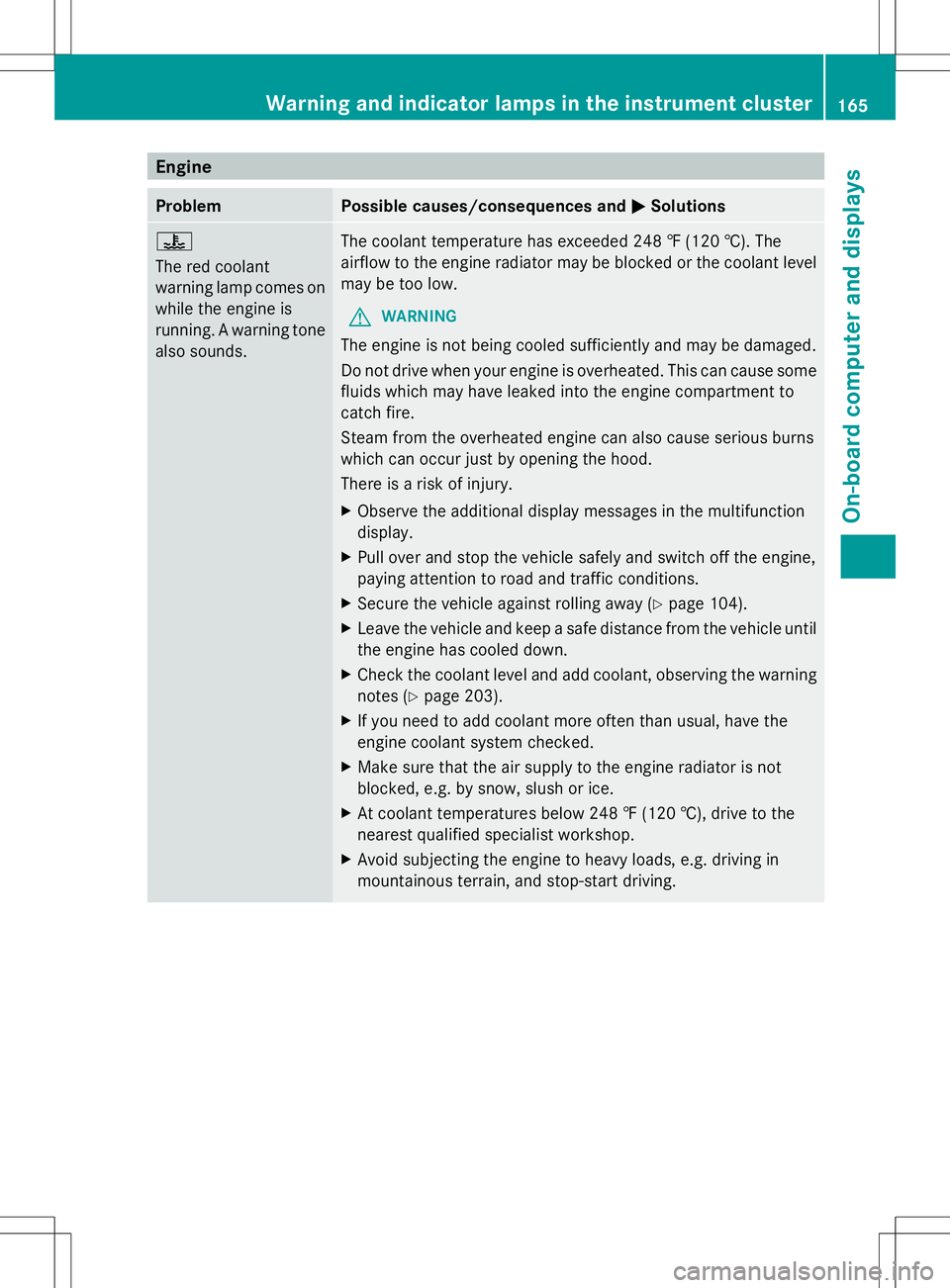
Engine
Problem Possible causes/consequences and
M
MSolutions ?
The red coolant
warning lamp comes on
while the engine is
running. A warning tone
also sounds.
The coolant temperature has exceeded 248 ‡ (120 †). The
airflow to the engine radiator may be blocked or the coolant level
may be too low.
G WARNING
The engine is not being cooled sufficiently and may be damaged.
Do not drive when your engine is overheated. This can cause some
fluids which may have leaked into the engine compartment to
catch fire.
Steam from the overheated engine can also cause serious burns
which can occur just by opening the hood.
There is a risk of injury.
X Observe the additional display messages in the multifunction
display.
X Pull over and stop the vehicle safely and switch off the engine,
paying attention to road and traffic conditions.
X Secure the vehicle against rolling away (Y page 104).
X Leave the vehicle and keep a safe distance from the vehicle until
the engine has cooled down.
X Check the coolant level and add coolant, observing the warning
notes (Y page 203).
X If you need to add coolant more often than usual, have the
engine coolant system checked.
X Make sure that the air supply to the engine radiator is not
blocked, e.g. by snow, slush or ice.
X At coolant temperatures below 248 ‡ (120 †), drive to the
nearest qualified specialist workshop.
X Avoid subjecting the engine to heavy loads, e.g. driving in
mountainous terrain, and stop-start driving. Warning and indicator lamps in the instrument cluster
165On-board computer and displays Z
Page 180 of 272
The COMAND controller can be:
R
pressed briefly or pressed and held W
R turned clockwise or counter-clockwise
cVd
R slid left or right XVY
R slid forwards or backwards ZVÆ
R slid diagonally aVb
Example of operation In the instructions, operating sequences are
described as follows:
X Press the $button.
Radio mode is activated.
X Select Radio
Radio by sliding VÆand turning
cVd the COMAND controller and press
W to confirm.
X Confirm Station List Station List by pressingW.
The station list appears. Buttons on the COMAND controller
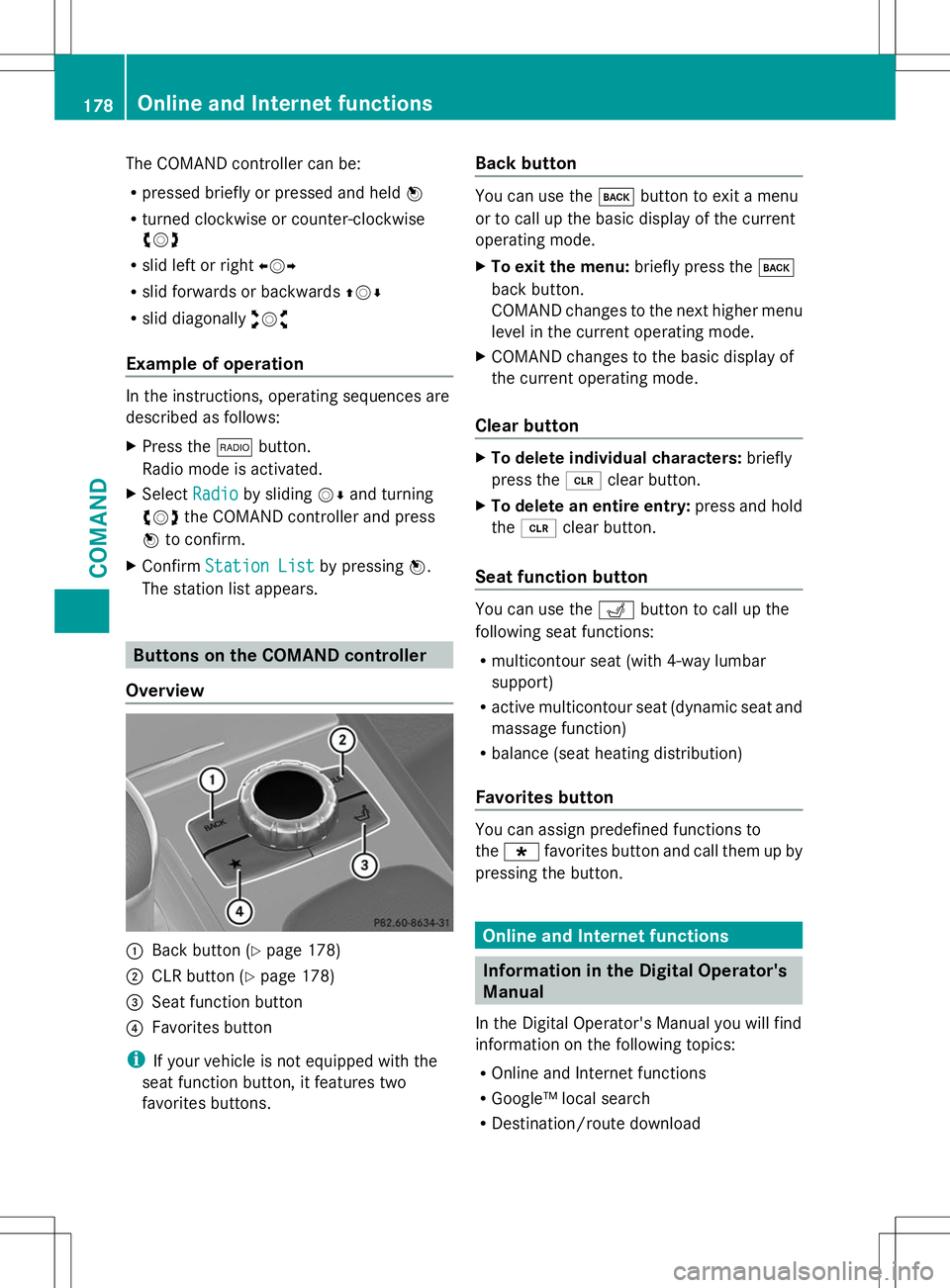
Overview :
Back button (Y page 178)
; CLR button (Y page 178)
= Seat function button
? Favorites button
i If your vehicle is not equipped with the
seat function button, it features two
favorites buttons. Back button You can use the
kbutton to exit a menu
or to call up the basic display of the current
operating mode.
X To exit the menu: briefly press thek
back button.
COMAND changes to the next higher menu
level in the current operating mode.
X COMAND changes to the basic display of
the current operating mode.
Clear button X
To delete individual characters: briefly
press the 2clear button.
X To delete an entire entry: press and hold
the 2 clear button.
Seat function button You can use the
Tbutton to call up the
following seat functions:
R multicontour seat (with 4-way lumbar
support)
R active multicontour seat (dynamic seat and
massage function)
R balance (seat heating distribution)
Favorites button You can assign predefined functions to
the
; favorites button and call them up by
pressing the button. Online and Internet functions
Information in the Digital Operator's
Manual
In the Digital Operator's Manual you will find
information on the following topics:
R Online and Internet functions
R Google™ local search
R Destination/route download 178
Online and Internet functionsCOMAND
Page 187 of 272
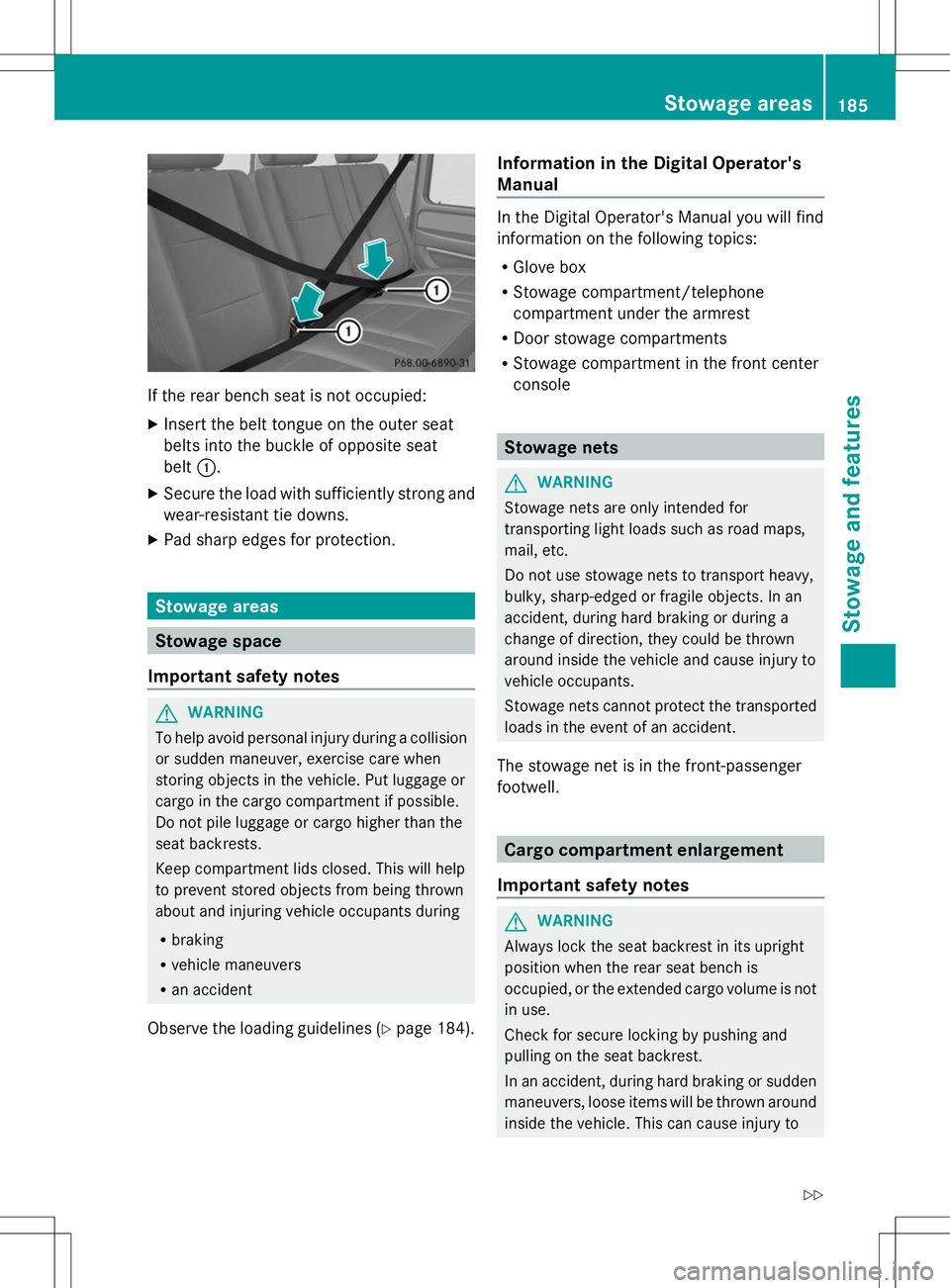
If the rear bench seat is not occupied:
X Insert the belt tongue on the outer seat
belts into the buckle of opposite seat
belt :.
X Secure the load with sufficiently strong and
wear-resistant tie downs.
X Pad sharp edges for protection. Stowage areas
Stowage space
Important safety notes G
WARNING
To help avoid personal injury during a collision
or sudden maneuver, exercise care when
storing objects in the vehicle. Put luggage or
cargo in the cargo compartment if possible.
Do not pile luggage or cargo higher than the
seat backrests.
Keep compartment lids closed. This will help
to prevent stored objects from being thrown
about and injuring vehicle occupants during
R braking
R vehicle maneuvers
R an accident
Observe the loading guidelines (Y page 184).Information in the Digital Operator's
Manual In the Digital Operator's Manual you will find
information on the following topics:
R
Glove box
R Stowage compartment/telephone
compartment under the armrest
R Door stowage compartments
R Stowage compartment in the front center
console Stowage nets
G
WARNING
Stowage nets are only intended for
transporting light loads such as road maps,
mail, etc.
Do not use stowage nets to transport heavy,
bulky, sharp-edged or fragile objects. In an
accident, during hard braking or during a
change of direction, they could be thrown
around inside the vehicle and cause injury to
vehicle occupants.
Stowage nets cannot protect the transported
loads in the event of an accident.
The stowage net is in the front-passenger
footwell. Cargo compartment enlargement
Important safety notes G
WARNING
Always lock the seat backrest in its upright
position when the rear seat bench is
occupied, or the extended cargo volume is not
in use.
Check for secure locking by pushing and
pulling on the seat backrest.
In an accident, during hard braking or sudden
maneuvers, loose items will be thrown around
inside the vehicle. This can cause injury to Stowage areas
185Stowage and features
Z
Page 188 of 272
vehicle occupants unless the items are
securely fastened in the vehicle.
To help avoid personal injury during a collision
or sudden maneuver, exercise care when
transporting cargo. G
WARNING
Failure to assure that the seat bench and seat
backrests are locked into place could result
in an increased chance of injury in an
accident.
Never place hands under seat or near any
moving parts while a seat is being adjusted.
For safety reasons, the rear seat bench must
only be adjusted when the vehicle is
stationary.
Never drive a vehicle with the tailgate open.
Deadly carbon monoxide (CO) gases may
enter vehicle interior resulting in
unconsciousness and death.
! Ensure that you remove all containers
from the cup holder in the rear before
folding the seat backrest and the seat
cushion of the rear bench seat forwards.
Observe the loading guidelines (Y page 184).
The rear bench seat is split symmetrically.
The left-hand and right-hand rear seats can
be folded down to increase the cargo
compartment capacity. The following
changes are possible:
R fold the seat backrests forward
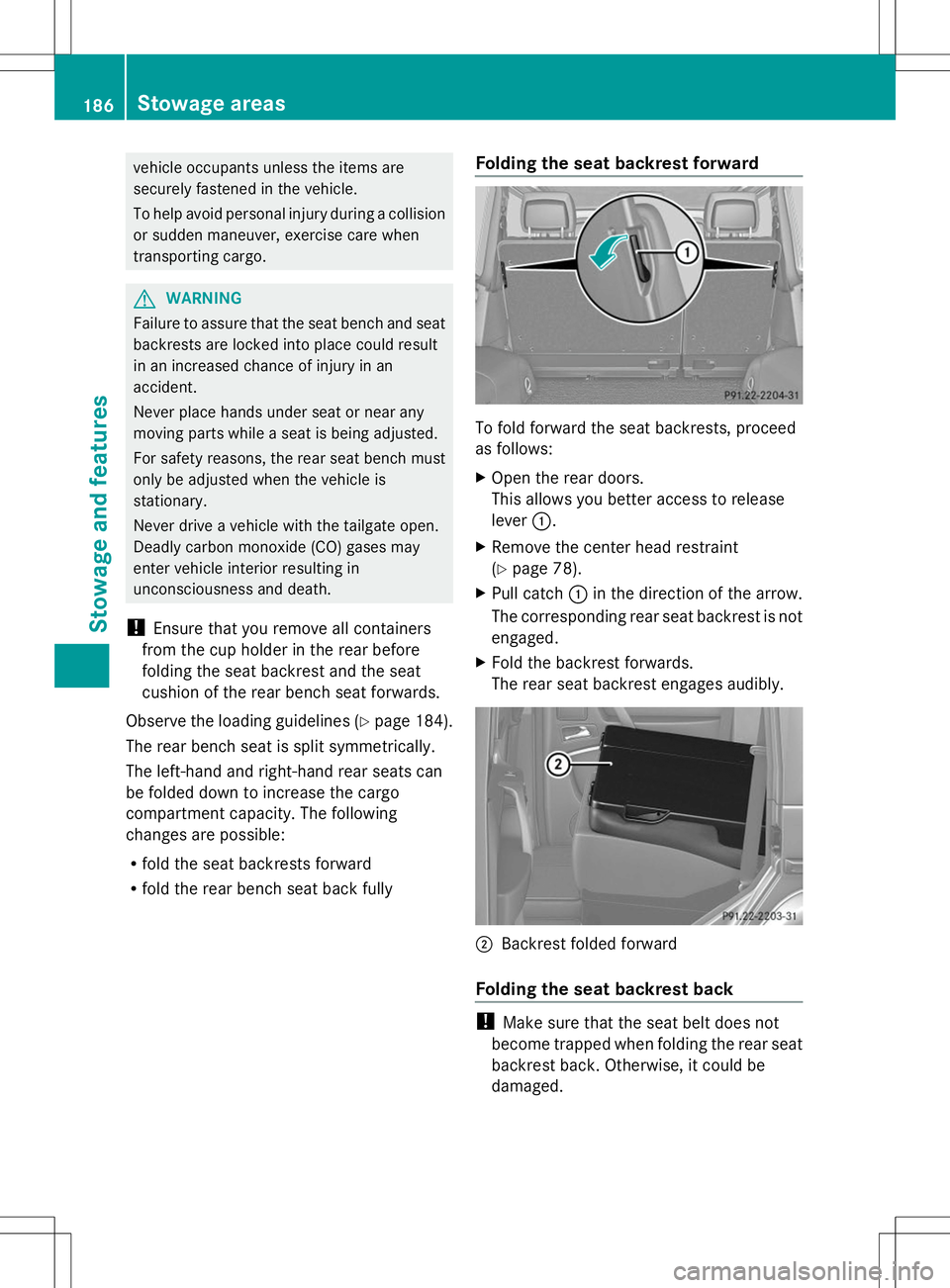
R fold the rear bench seat back fully Folding the seat backrest forward To fold forward the seat backrests, proceed
as follows:
X
Open the rear doors.
This allows you better access to release
lever :.
X Remove the center head restraint
(Y page 78).
X Pull catch :in the direction of the arrow.
The corresponding rear seat backrest is not
engaged.
X Fold the backrest forwards.
The rear seat backrest engages audibly. ;
Backrest folded forward
Folding the seat backrest back !
Make sure that the seat belt does not
become trapped when folding the rear seat
backrest back. Otherwise, it could be
damaged. 186
Stowage areasStowage and features
Page 190 of 272
Do not tamper with or repair cargo tie-down
point, cargo tie down rings or tie downs. Have
maintenance work as well as modifications,
installations and conversions carried out at a
qualified specialist workshop (Y page 27).
Observe the following notes on securing
loads:
R Secure the load using the cargo tie-down
rings.
R Do not use elastic straps or nets to secure
a load, as these are only intended as an
anti-slip protection for light loads.
R Do not route tie-downs across sharp edges
or corners.
R Pad sharp edges for protection.
R Only use tie downs that have been checked
in accordance with applicable standards,
e.g. lashing nets or lashing straps.
R Fill the spaces between the load and the
cargo compartment walls and the wheel
mountings in a form-locking way. Only use
dimensionally stable transportation aids
for this, such as chocks, wooden fixings or
padding.
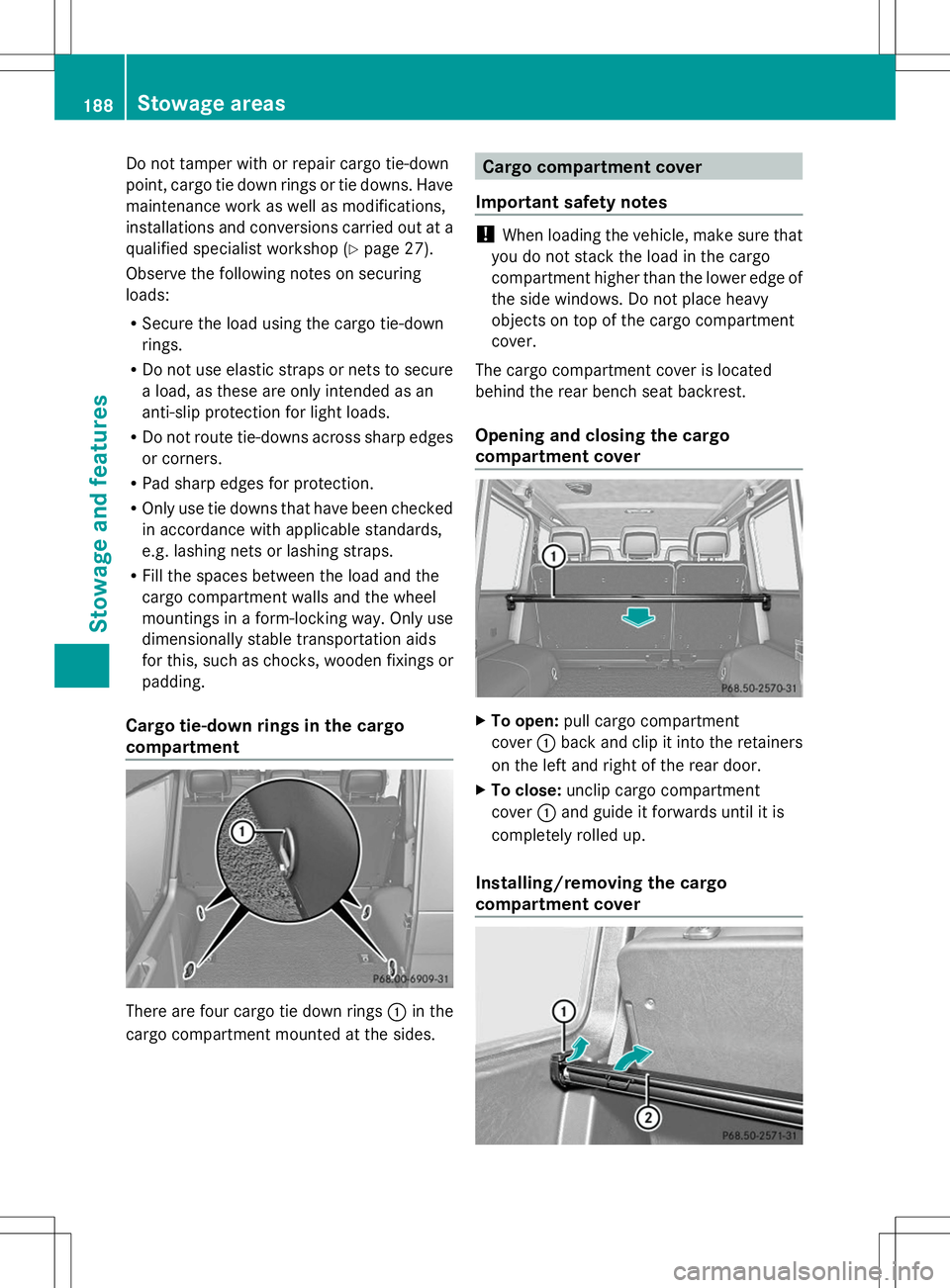
Cargo tie-down rings in the cargo
compartment There are four cargo tie down rings
:in the
cargo compartment mounted at the sides. Cargo compartment cover
Important safety notes !
When loading the vehicle, make sure that
you do not stack the load in the cargo
compartment higher than the lower edge of
the side windows. Do not place heavy
objects on top of the cargo compartment
cover.
The cargo compartment cover is located
behind the rear bench seat backrest.
Opening and closing the cargo
compartment cover X
To open: pull cargo compartment
cover :back and clip it into the retainers
on the left and right of the rear door.
X To close: unclip cargo compartment
cover :and guide it forwards until it is
completely rolled up.
Installing/removing the cargo
compartment cover 188
Sto
wage areasStowage an d features
Page 197 of 272
i
To achieve the best result, insert new
batteries in garage door remote control
A of your garage door drive before
programming.
X Delete the memory of the integrated
remote control (Y page 189) before
programming it for the first time.
X Turn the SmartKey to position
2(Y page 97) in the ignition lock.
X Press and hold transmitter button ;,=
or ?.
After a short time, indicator lamp :will
start flashing. It flashes approximately
once per second.
i Indicator lamp :flashes immediately
the first time that the transmitter button is
programmed. If this transmitter button has
already been programmed, indicator
lamp :will only start flashing at a rate of
once a second after 20 seconds have
elapsed.
X Continue to hold the transmitter button.
X Point transmitter button Aof garage door
remote control Btowards the transmitter
buttons on the rear-view mirror at a
distance of 2 to 12 inches (5 to 30 cm).
i The distance between garage door
remote control Aand the integrated
garage door opener depends on the system
of the garage door drive. Several attempts
might be necessary. You should test every
position for at least 20 seconds before
trying another position.
X Keep transmitter button Bon garage door
remote control Apressed until indicator
lamp :starts to flash rapidly.
The programming has been successful if
indicator lamp :flashes rapidly.
X Release transmitter buttons ;,=or?
on the integrated remote control and
transmitter button Bon the garage door
remote control. If indicator lamp
:goes out after
approximately 20 seconds and has not
flashed rapidly:
X Release transmitter buttons ;,=or?
on the integrated remote control and
transmitter button Bon the garage door
remote control.
X Repeat the procedure for the other
transmitter buttons. When doing so, vary
the distance between the garage door's
remote control and the transmitter buttons
in the rear-view mirror.
i If the garage door system works with a
rolling code, you must synchronize the
remote control integrated in the rear-view
mirror with the garage door system
receiver after programming.
You will find further information in the
garage door opening system's operating
instructions, e.g. the sections on
"Synchronizing the transmitter" or
"Registering a new transmitter". You can
also call the hotline mentioned above.
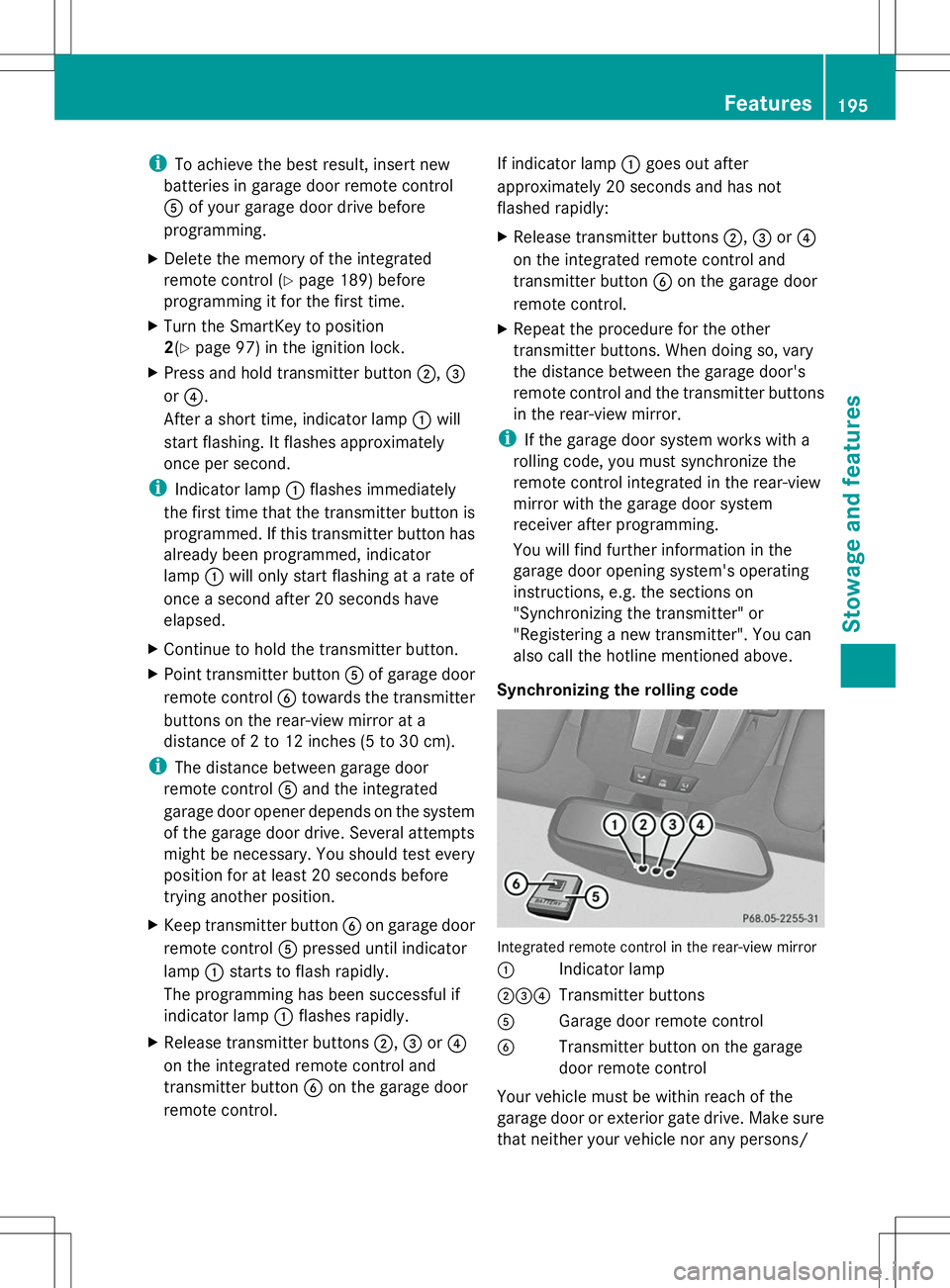
Synchronizing the rolling code Integrated remote control in the rear-view mirror
:
Indicator lamp
;=? Transmitter buttons
A Garage door remote control
B Transmitter button on the garage
door remote control
Your vehicle must be within reach of the
garage door or exterior gate drive. Make sure
that neither your vehicle nor any persons/ Features
195Stowage and features Z
Page 198 of 272
objects are present within the sweep of the
door or gate.
Observe the safety notes when performing
the rolling code synchronization
(Y page 193).
X Turn the SmartKey to position
2(Y page 97) in the ignition lock.
X Press the programming button of the door
or gate drive (see the door or gate drive
operating instructions, e.g. under
"Programming of additional remote
controls").
i Usually, you now have 30 seconds to
initiate the next step.
X Press previously programmed button ;,
= or? of the integrated garage door
opener until the door closes.
The rolling code synchronization is then
complete.
Notes on programming the remote
control
Canadian radio frequency laws require a
"break" (or interruption) of the transmission
signals after broadcasting for a few seconds.
Therefore, these signals may not last long
enough for the integrated remote control to
recognize the signal during programming.
Comparable with Canadian law, American
garage door openers also have a built-in
"interruption".
If you live in Canada or have difficulties
programming the garage door opener
(regardless of where you live) when using the
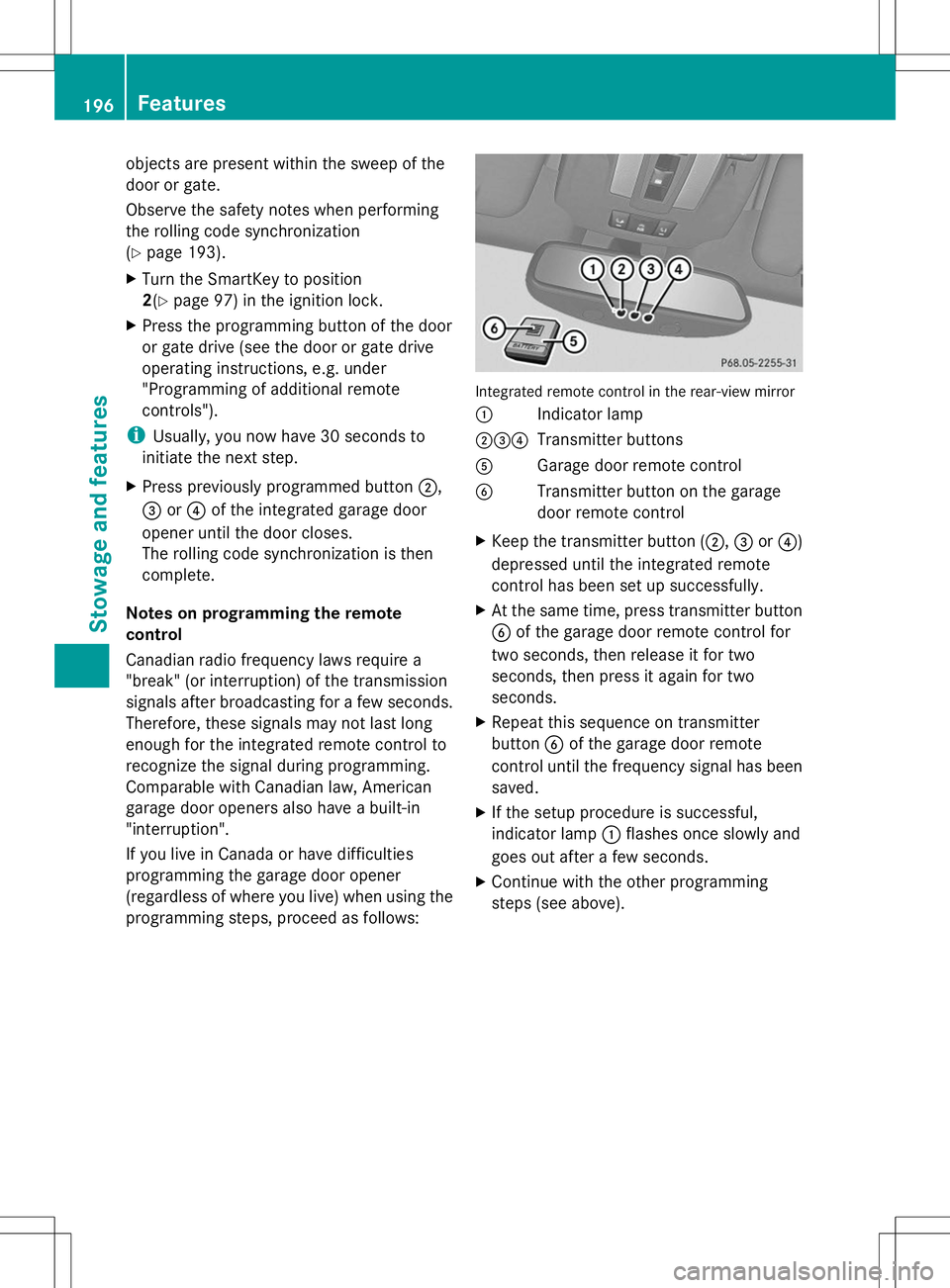
programming steps, proceed as follows: Integrated remote control in the rear-view mirror
:
Indicator lamp
;=? Transmitter buttons
A Garage door remote control
B Transmitter button on the garage
door remote control
X Keep the transmitter button (;, =or?)
depressed until the integrated remote
control has been set up successfully.
X At the same time, press transmitter button
B of the garage door remote control for
two seconds, then release it for two
seconds, then press it again for two
seconds.
X Repeat this sequence on transmitter
button Bof the garage door remote
control until the frequency signal has been
saved.
X If the setup procedure is successful,
indicator lamp :flashes once slowly and
goes out after a few seconds.
X Continue with the other programming
steps (see above). 196
FeaturesStowage and features
Page 199 of 272
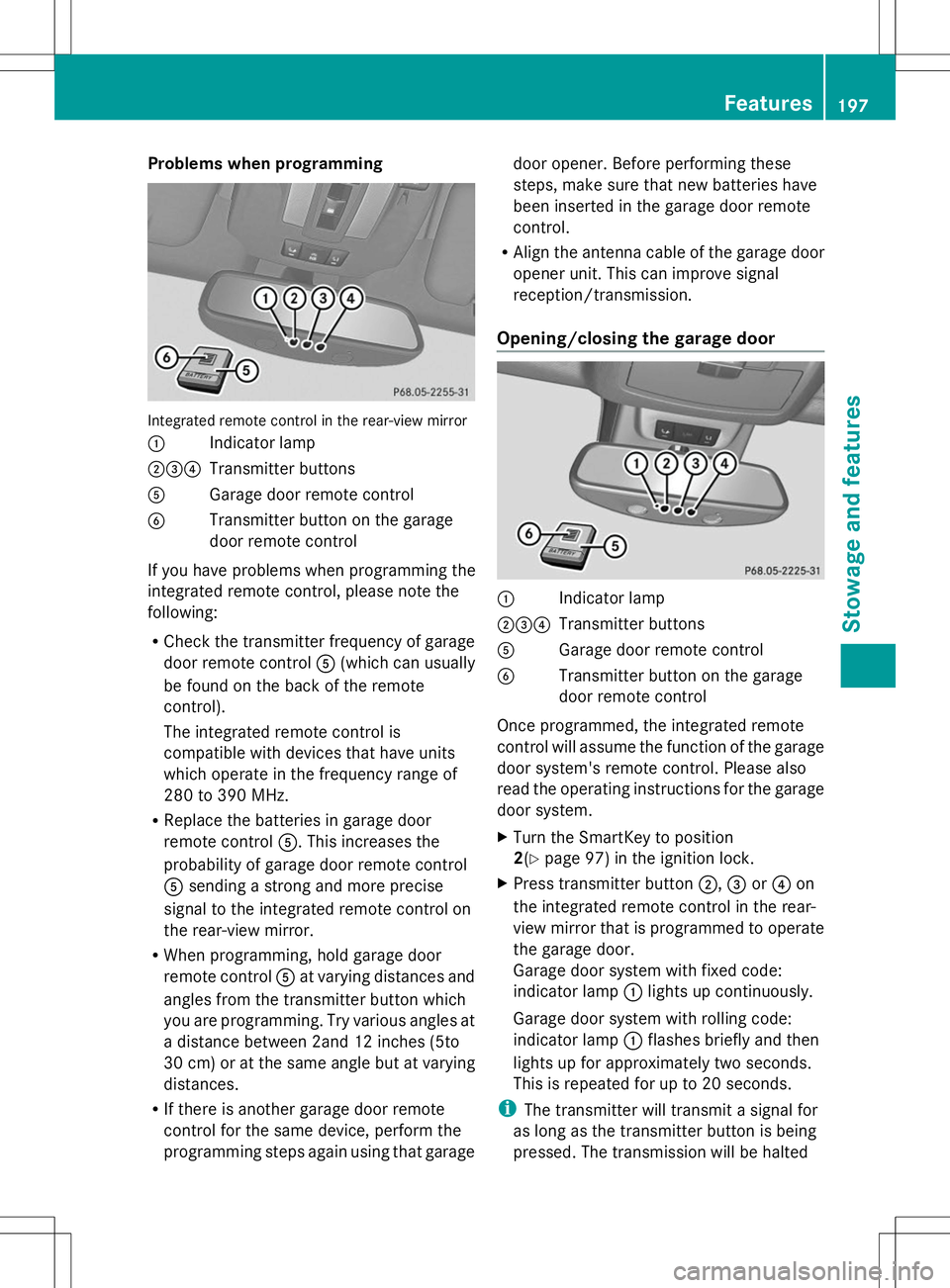
Problems when programming
Integrated remote control in the rear-view mirror
: Indicator lamp
;=? Transmitter buttons
A Garage door remote control
B Transmitter button on the garage
door remote control
If you have problems when programming the
integrated remote control, please note the
following:
R Check the transmitter frequency of garage
door remote control A(which can usually
be found on the back of the remote
control).
The integrated remote control is
compatible with devices that have units
which operate in the frequency range of
280 to 390 MHz.
R Replace the batteries in garage door
remote control A. This increases the
probability of garage door remote control
A sending a strong and more precise
signal to the integrated remote control on
the rear-view mirror.
R When programming, hold garage door
remote control Aat varying distances and
angles from the transmitter button which
you are programming. Try various angles at
a distance between 2and 12 inches (5to
30 cm) or at the same angle but at varying
distances.
R If there is another garage door remote
control for the same device, perform the
programming steps again using that garage door opener. Before performing these
steps, make sure that new batteries have
been inserted in the garage door remote
control.
R Align the antenna cable of the garage door
opener unit. This can improve signal
reception/transmission.
Opening/closing the garage door :
Indicator lamp
;=? Transmitter buttons
A Garage door remote control
B Transmitter button on the garage
door remote control
Once programmed, the integrated remote
control will assume the function of the garage
door system's remote control. Please also
read the operating instructions for the garage
door system.
X Turn the SmartKey to position
2(Y page 97) in the ignition lock.
X Press transmitter button ;,=or? on
the integrated remote control in the rear-
view mirror that is programmed to operate
the garage door.
Garage door system with fixed code:
indicator lamp :lights up continuously.
Garage door system with rolling code:
indicator lamp :flashes briefly and then
lights up for approximately two seconds.
This is repeated for up to 20 seconds.
i The transmitter will transmit a signal for
as long as the transmitter button is being
pressed. The transmission will be halted Features
197Stowage and features Z
Page 200 of 272
after a maximum of 20 seconds and
indicator lamp
:will flash. Press the
transmitter button again, if necessary.
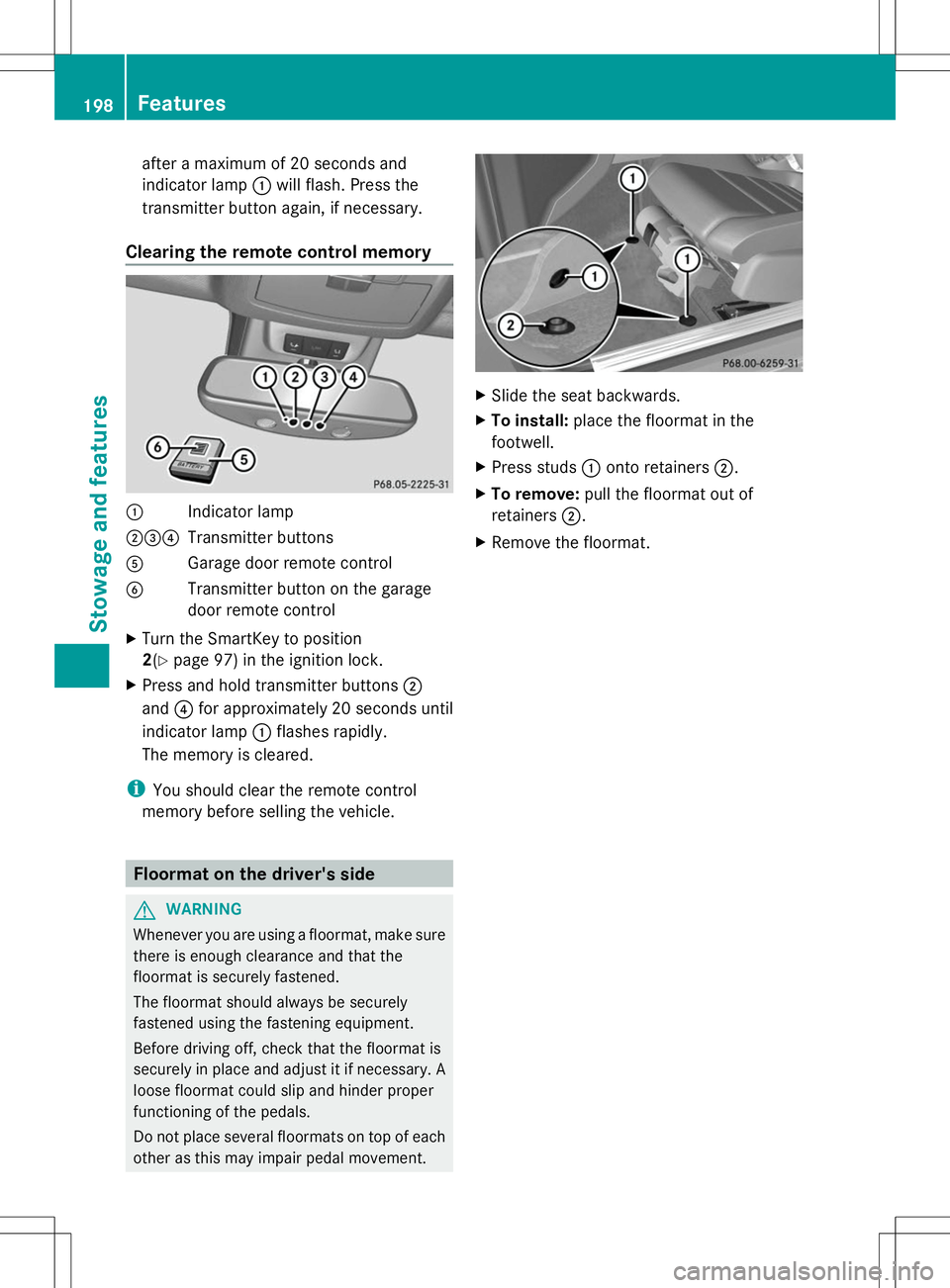
Clearing the remote control memory :
Indicator lamp
;=? Transmitter buttons
A Garage door remote control
B Transmitter button on the garage
door remote control
X Turn the SmartKey to position
2(Y page 97) in the ignition lock.
X Press and hold transmitter buttons ;
and ?for approximately 20 seconds until
indicator lamp :flashes rapidly.
The memory is cleared.
i You should clear the remote control
memory before selling the vehicle. Floormat on the driver's side
G
WARNING
Whenever you are using a floormat, make sure
there is enough clearance and that the
floormat is securely fastened.
The floormat should always be securely
fastened using the fastening equipment.
Before driving off, check that the floormat is
securely in place and adjust it if necessary. A
loose floormat could slip and hinder proper
functioning of the pedals.
Do not place several floormats on top of each
other as this may impair pedal movement. X
Slide the seat backwards.
X To install: place the floormat in the
footwell.
X Press studs :onto retainers ;.
X To remove: pull the floormat out of
retainers ;.
X Remove the floormat. 198
FeaturesStowage and features