engine MERCEDES-BENZ GL-Class 2016 X166 Owners Manual
[x] Cancel search | Manufacturer: MERCEDES-BENZ, Model Year: 2016, Model line: GL-Class, Model: MERCEDES-BENZ GL-Class 2016 X166Pages: 462, PDF Size: 10.44 MB
Page 217 of 462
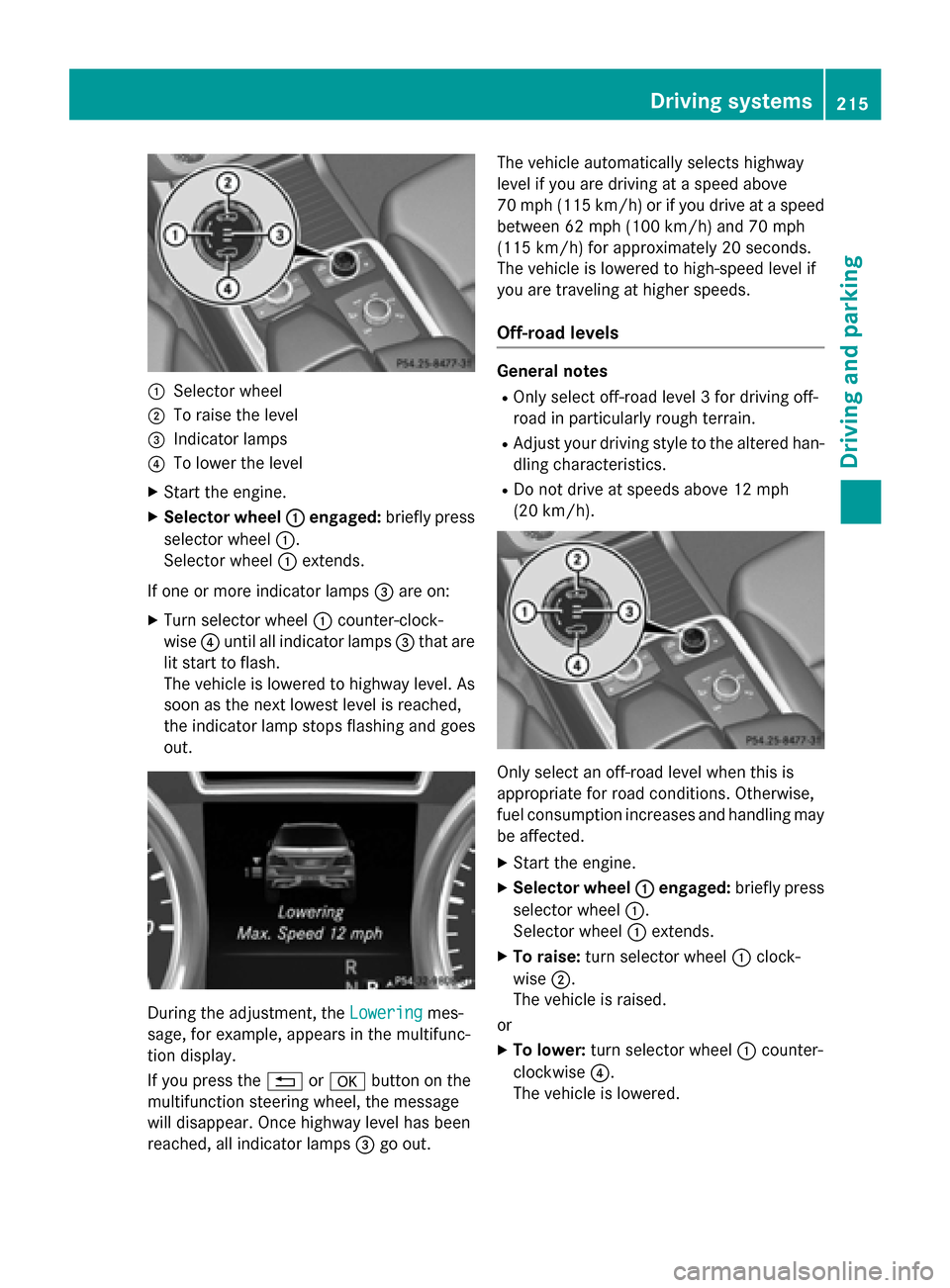
:Selector wheel
;To raise the level
=Indicator lamps
?To lower the level
XStart the engine.
XSelector wheel:engaged:briefly press
selector wheel :.
Selector wheel :extends.
If one or more indicator lamps =are on:
XTurn selector wheel :counter-clock-
wise ?until all indicator lamps =that are
lit start to flash.
The vehicle is lowered to highway level. As
soon as the next lowest level is reached,
the indicator lamp stops flashing and goes
out.
During the adjustment, the Loweringmes-
sage, for example, appears in the multifunc-
tion display.
If you press the %ora button on the
multifunction steering wheel, the message
will disappear. Once highway level has been
reached, all indicator lamps =go out. The vehicle automatically selects highway
level if you are driving at a speed above
70 mph (115 km/h) or if you drive at a speed
between 62 mph (100 km/h) and 70 mph
(115 km/h) for approximately 20 seconds.
The vehicle is lowered to high-speed level if
you are traveling at higher speeds.
Off-road levels
General notes
ROnly select off-road level 3 for driving off-
road in particularly rough terrain.
RAdjust your driving style to the altered han-
dling characteristics.
RDo not drive at speeds above 12 mph
(20 km/h).
Only select an off-road level when this is
appropriate for road conditions. Otherwise,
fuel consumption increases and handling may
be affected.
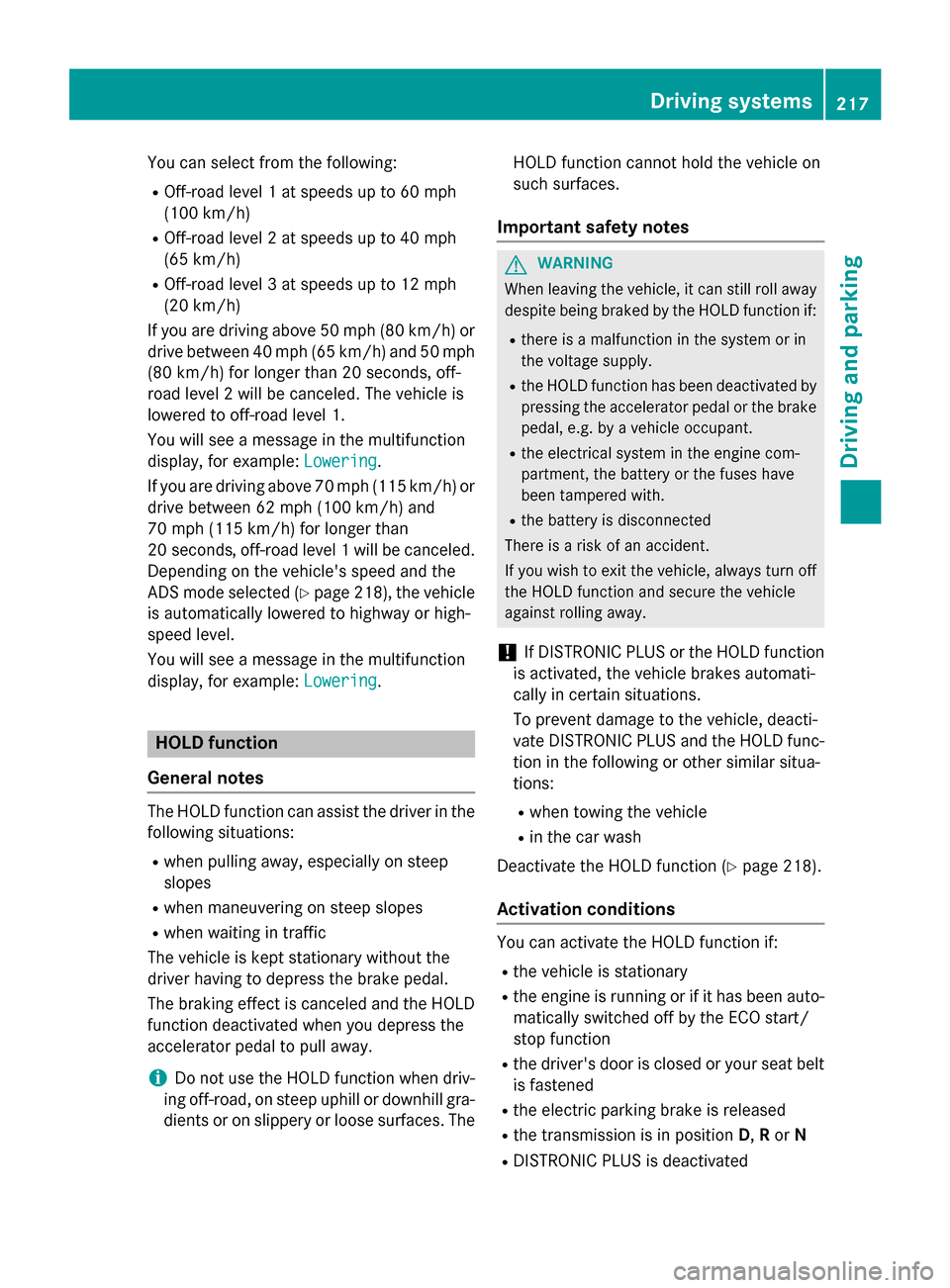
XStart the engine.
XSelector wheel
:engaged:briefly press
selector wheel :.
Selector wheel :extends.
XTo raise: turn selector wheel :clock-
wise ;.
The vehicle is raised.
or
XTo lower: turn selector wheel :counter-
clockwise ?.
The vehicle is lowered.
Driving systems215
Driving and parking
Z
Page 219 of 462
You can select from the following:
ROff-road level 1 at speeds up to 60 mph
(100 km/h)
ROff-road level 2 at speeds up to 40 mph
(65 km/h)
ROff-road level 3 at speeds up to 12 mph
(20 km/h)
If you are driving above 50 mph (80 km/h) or
drive between 40 mph (65 km/h) and 50 mph (80 km/h) for longer than 20 seconds, off-
road level 2 will be canceled. The vehicle is
lowered to off-road level 1.
You will see a message in the multifunction
display, for example: Lowering
.
If you are driving above 70 mph (115 km/h) or
drive between 62 mph (100 km/h) and
70 mph (115 km/h) for longer than
20 seconds, off-road level 1 will be canceled.
Depending on the vehicle's speed and the
ADS mode selected (
Ypage 218), the vehicle
is automatically lowered to highway or high-
speed level.
You will see a message in the multifunction
display, for example: Lowering
.
HOLD function
General notes
The HOLD function can assist the driver in the
following situations:
Rwhen pulling away, especially on steep
slopes
Rwhen maneuvering on steep slopes
Rwhen waiting in traffic
The vehicle is kept stationary without the
driver having to depress the brake pedal.
The braking effect is canceled and the HOLD
function deactivated when you depress the
accelerator pedal to pull away.
iDo not use the HOLD function when driv-
ing off-road, on steep uphill or downhill gra-
dients or on slippery or loose surfaces. The HOLD function cannot hold the vehicle on
such surfaces.
Important safety notes
GWARNING
When leaving the vehicle, it can still roll away despite being braked by the HOLD function if:
Rthere is a malfunction in the system or in
the voltage supply.
Rthe HOLD function has been deactivated by
pressing the accelerator pedal or the brake
pedal, e.g. by a vehicle occupant.
Rthe electrical system in the engine com-
partment, the battery or the fuses have
been tampered with.
Rthe battery is disconnected
There is a risk of an accident.
If you wish to exit the vehicle, always turn off the HOLD function and secure the vehicle
against rolling away.
!If DISTRONIC PLUS or the HOLD function
is activated, the vehicle brakes automati-
cally in certain situations.
To prevent damage to the vehicle, deacti-
vate DISTRONIC PLUS and the HOLD func-
tion in the following or other similar situa-
tions:
Rwhen towing the vehicle
Rin the car wash
Deactivate the HOLD function (
Ypage 218).
Activation conditions
You can activate the HOLD function if:
Rthe vehicle is stationary
Rthe engine is running or if it has been auto- matically switched off by the ECO start/
stop function
Rthe driver's door is closed or your seat belt
is fastened
Rthe electric parking brake is released
Rthe transmission is in position D,Ror N
RDISTRONIC PLUS is deactivated
Driving systems217
Driving and parking
Z
Page 221 of 462
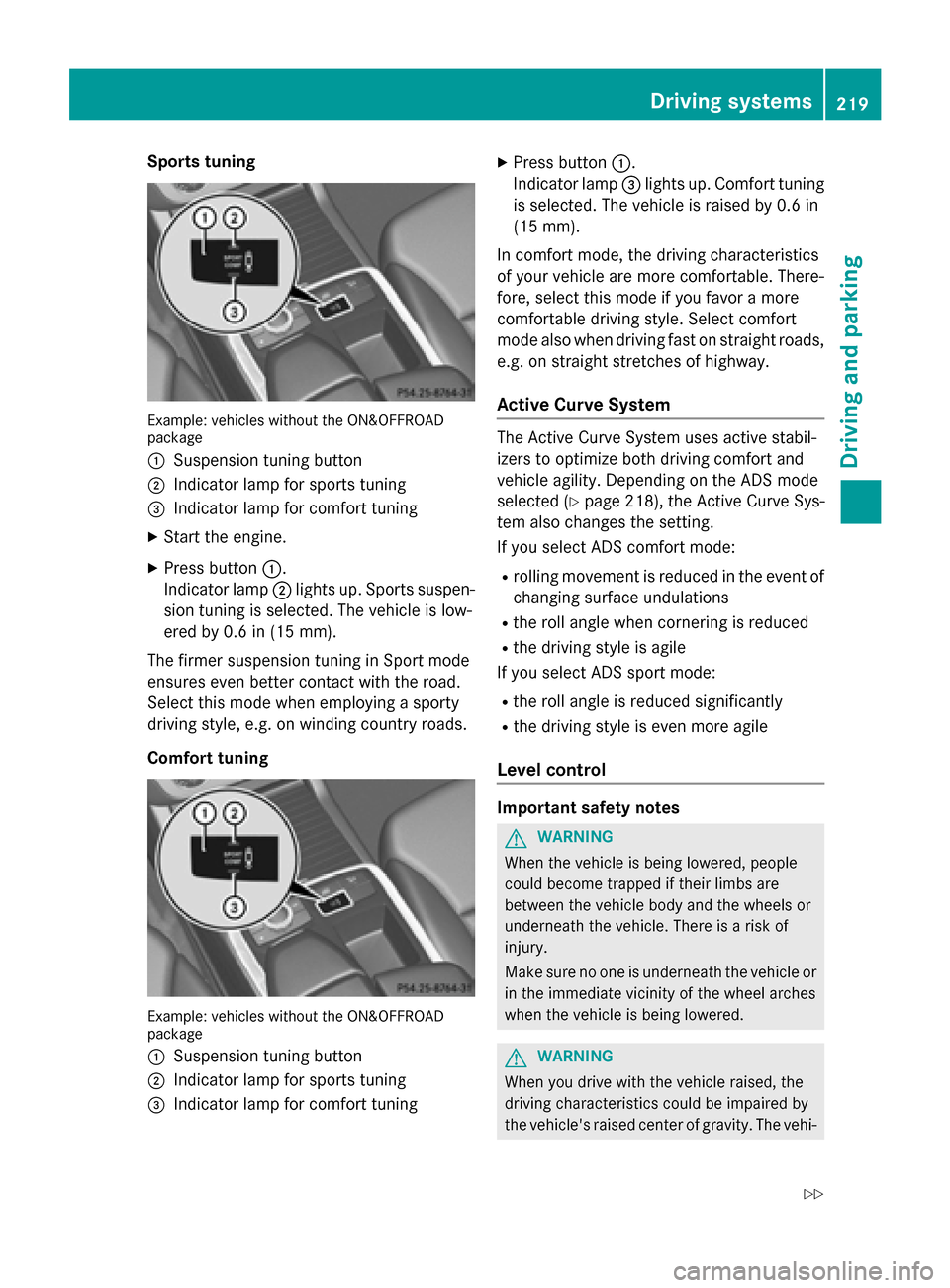
Sports tuning
Example: vehicles without the ON&OFFROAD
package
:
Suspension tuning button
;Indicator lamp for sports tuning
=Indicator lamp for comfort tuning
XStart the engine.
XPress button:.
Indicator lamp ;lights up. Sports suspen-
sion tuning is selected. The vehicle is low-
ered by 0.6 in (15 mm).
The firmer suspension tuning in Sport mode
ensures even better contact with the road.
Select this mode when employing a sporty
driving style, e.g. on winding country roads.
Comfort tuning
Example: vehicles without the ON&OFFROAD
package
:
Suspension tuning button
;Indicator lamp for sports tuning
=Indicator lamp for comfort tuning
XPress button :.
Indicator lamp =lights up. Comfort tuning
is selected. The vehicle is raised by 0.6 in
(15 mm).
In comfort mode, the driving characteristics
of your vehicle are more comfortable. There-
fore, select this mode if you favor a more
comfortable driving style. Select comfort
mode also when driving fast on straight roads,
e.g. on straight stretches of highway.
Active Curve System
The Active Curve System uses active stabil-
izers to optimize both driving comfort and
vehicle agility. Depending on the ADS mode
selected (
Ypage 218), the Active Curve Sys-
tem also changes the setting.
If you select ADS comfort mode:
Rrolling movement is reduced in the event of
changing surface undulations
Rthe roll angle when cornering is reduced
Rthe driving style is agile
If you select ADS sport mode:
Rthe roll angle is reduced significantly
Rthe driving style is even more agile
Level control
Important safety notes
GWARNING
When the vehicle is being lowered, people
could become trapped if their limbs are
between the vehicle body and the wheels or
underneath the vehicle. There is a risk of
injury.
Make sure no one is underneath the vehicle or
in the immediate vicinity of the wheel arches
when the vehicle is being lowered.
GWARNING
When you drive with the vehicle raised, the
driving characteristics could be impaired by
the vehicle's raised center of gravity. The vehi-
Driving systems219
Driving and parking
Z
Page 222 of 462
cle could rollover more easily, for example on
a bend. There is a risk of an accident.
Always select as low a vehicle level as possi-
ble and adjust your driving style.
GWARNING
When you drive with the chassis lowered or
raised, the vehicle's braking and driving char-
acteristics can be significantly impaired. You
could also exceed the permissible vehicle
height if the chassis is raised. There is a risk of an accident.
Adjust the vehicle level before pulling away.
GWARNING
Due to the high center of gravity, the vehicle
may start to skid and roll over in the event of
an abrupt steering maneuver and/or when
the vehicle's speed is not adapted to the road
conditions. There is a risk of an accident.
Always adapt your speed and driving style to
the vehicle's driving characteristics and to the
prevailing road and weather conditions.
!When driving on extremely rough terrain,
select a high vehicle level in good time.
Make sure there is always sufficient ground
clearance. You will otherwise damage the
vehicle.
!When you raise the vehicle in such a way
that not all wheels have contact with the
ground, remove the SmartKey from the
ignition lock.
RUtility vehicles have a significantly higher
rollover rate than other types of vehicles.
Failure to operate this vehicle safely may
result in an accident, rollover of the vehicle, and severe or fatal injury.
RIn a rollover crash, an unbelted person is
significantly more likely to die than a per-
son wearing a seat belt.
You and all vehicle occupants should
always wear your seat belts. General notes
Further information about "Driving off-road"
(
Ypage 198).
Level control adapts the vehicle level auto-
matically to the current operating and driving
situation. This results in reduced fuel con-
sumption and improved ha
ndling.
If you select ADS comfort mode (
Ypage 218),
the vehicle is lowered to high-speed level as
the speed increases. As the vehicle speed
decreases, the vehicle is raised back up to
highway level.
If you select ADS sport mode (
Ypage 218),
the vehicle skips highway level and lowers
directly to high-speed level depending on the
basic setting (
Ypage 220).
Make changes to the vehicle level while the
vehicle is in motion. This enables the vehicle
to adjust to the new level as quickly as pos-
sible.
The vehicle level may change visibly if you
park the vehicle and the outside temperature
changes. If the temperature drops, the vehi-
cle level is lower; with an increase in temper- ature, the vehicle level rises.
If you unlock the vehicle or open a door, the
vehicle begins to compensate for load dis-
crepancies while still parked. However, for
significant level changes, such as after the
vehicle has been stationary for a long period,
the engine must be on. For safety reasons,
the vehicle is only lowered when the doors areclosed. Lowering is interrupted if a door is
opened, and it continues once the door has
been closed.
Basic settings (excluding Mercedes-AMG
vehicles)
The extent to which the vehicle is raised or
lowered depends on the basic setting selec-
ted. Sele ct ra
ised level for off-road driving or
highway/high-speed level for normal roads.
220Driving systems
Driving and parking
Page 223 of 462
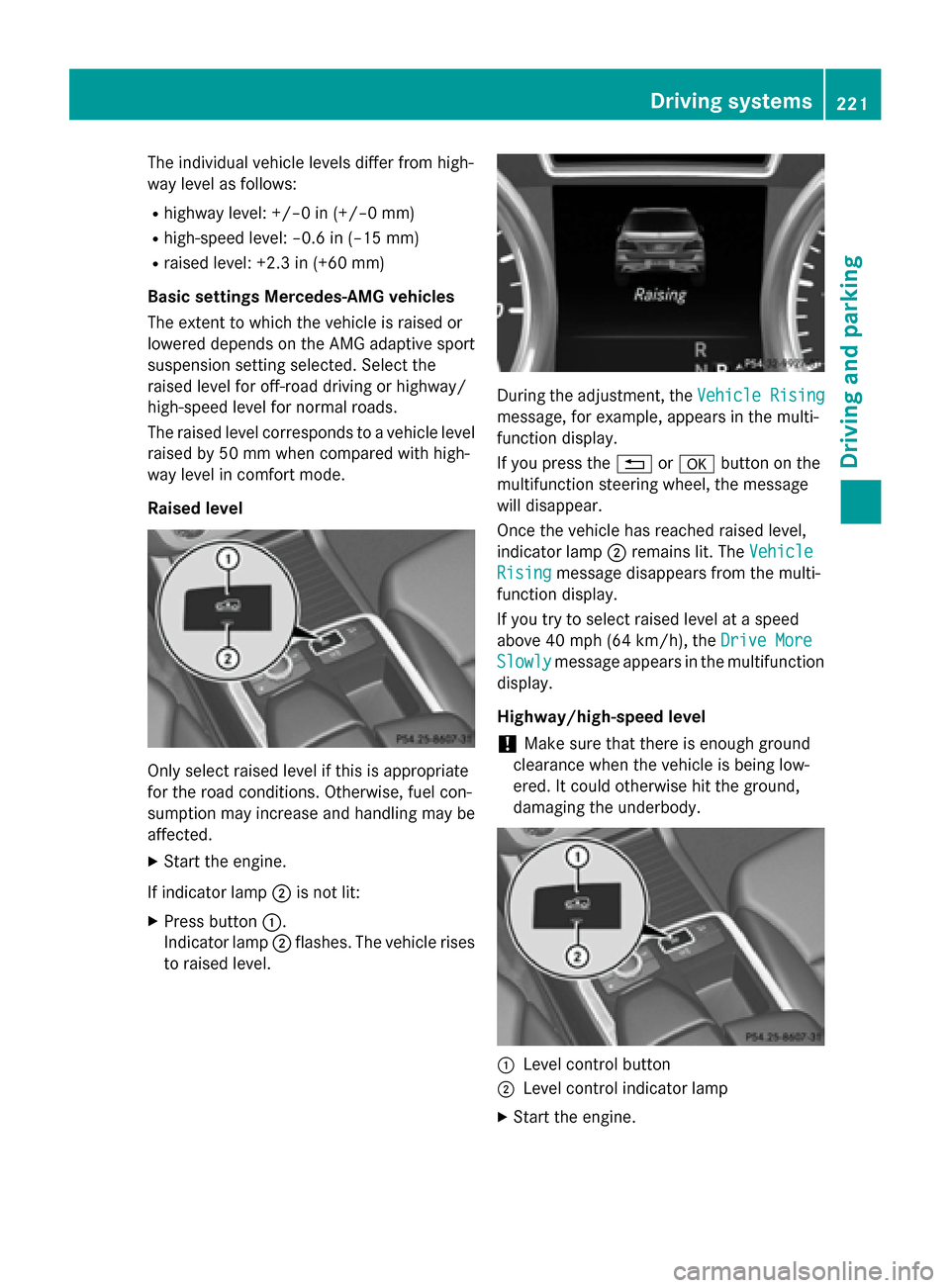
The individual vehicle levels differ from high-
way level as follows:
Rhighway level: +/–0 in (+/–0 mm)
Rhigh-speed level: –0.6 in (–15 mm)
Rraised level: +2.3 in (+60 mm)
Basic settings Mercedes-AMG vehicles
The extent to which the vehicle is raised or
lowered depends on the AMG adaptive sport
suspension setting selected. Select the
raised level for off-road driving or highway/
high-speed level for normal roads.
The raised level corresponds to a vehicle level
raised by 50 mm when compared with high-
way level in comfort mode.
Raised level
Only select raised level if this is appropriate
for the road conditions. Otherwise, fuel con-
sumption may increase and handling may be
affected.
XStart the engine.
If indicator lamp ;is not lit:
XPress button :.
Indicator lamp ;flashes. The vehicle rises
to raised level.
During the adjustment, the Vehicle Rising
message, for example, appears in the multi-
function display.
If you press the%ora button on the
multifunction steering wheel, the message
will disappear.
Once the vehicle has reached raised level,
indicator lamp ;remains lit. The Vehicle
Risingmessage disappears from the multi-
function display.
If you try to select raised level at a speed
above 40 mph (64 km/h) , theDrive More
Slowlymessage appears in the multifunction
display.
Highway/high-speed level
!Make sure that there is enough ground
clearance when the vehicle is being low-
ered. It could otherwise hit the ground,
damaging the underbody.
:Level control button
;Level control indicator lamp
XStart the engine.
Driving systems221
Driving and parking
Z
Page 224 of 462
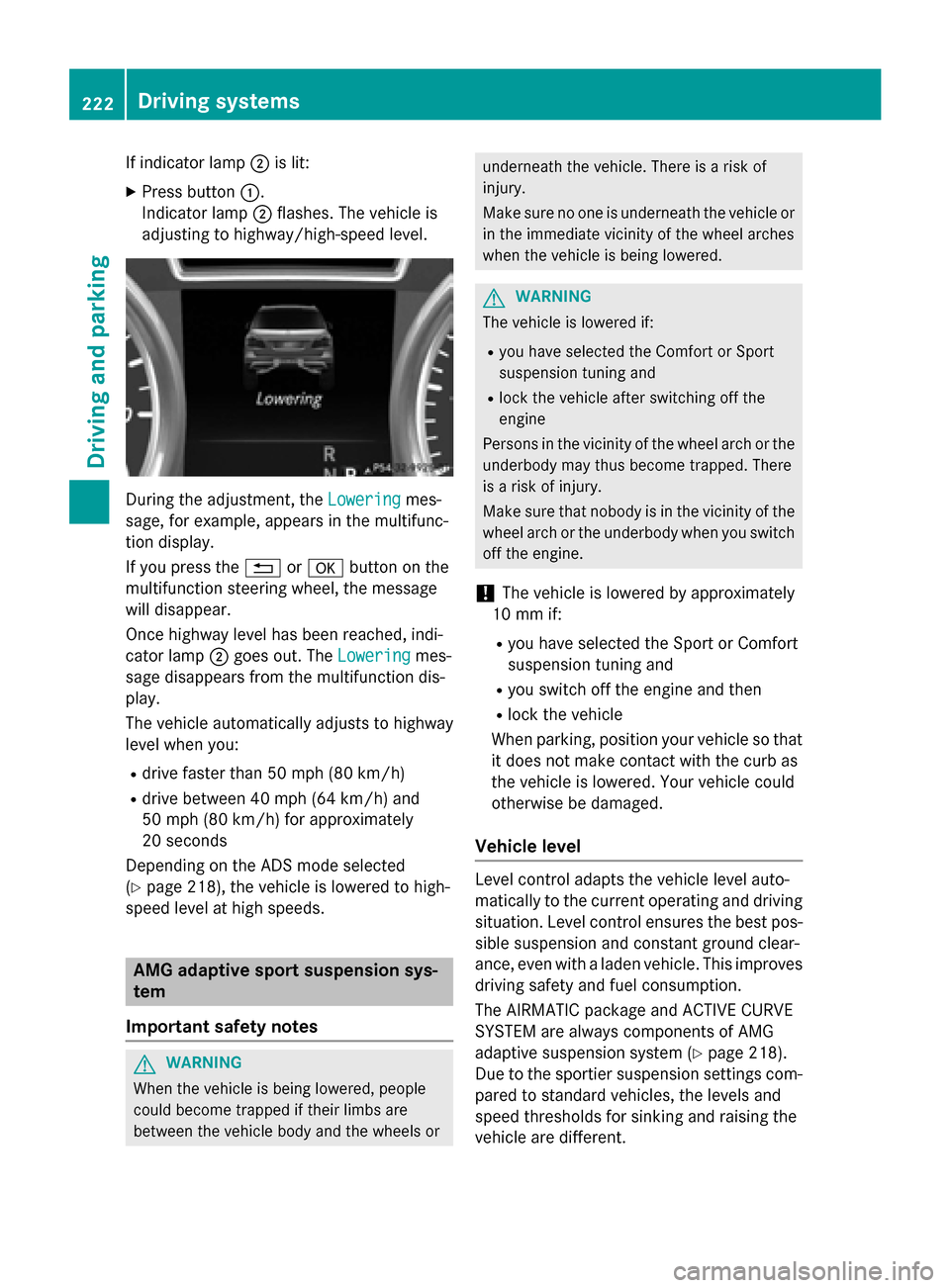
If indicator lamp;is lit:
XPress button :.
Indicator lamp ;flashes. The vehicle is
adjusting to highway/high-speed level.
During the adjustment, the Loweringmes-
sage, for example, appears in the multifunc-
tion display.
If you press the %ora button on the
multifunction steering wheel, the message
will disappear.
Once highway level has been reached, indi-
cator lamp ;goes out. The Lowering
mes-
sage disappears from the multifunction dis-
play.
The vehicle automatically adjusts to highway
level when you:
Rdrive faster than 50 mph (80 km/h)
Rdrive between 40 mph (64 km/h) and
50 mph (80 km/h) for approximately
20 seconds
Depending on the ADS mode selected
(
Ypage 218), the vehicle is lowered to high-
speed level at high speeds.
AMG adaptive sport suspension sys-
tem
Important safety notes
GWARNING
When the vehicle is being lowered, people
could become trapped if their limbs are
between the vehicle body and the wheels or
underneath the vehicle. There is a risk of
injury.
Make sure no one is underneath the vehicle or
in the immediate vicinity of the wheel arches
when the vehicle is being lowered.
GWARNING
The vehicle is lowered if:
Ryou have selected the Comfort or Sport
suspension tuning and
Rlock the vehicle after switching off the
engine
Persons in the vicinity of the wheel arch or the
underbody may thus become trapped. There
is a risk of injury.
Make sure that nobody is in the vicinity of the
wheel arch or the underbody when you switch
off the engine.
!The vehicle is lowered by approximately
10 mm if:
Ryou have selected the Sport or Comfort
suspension tuning and
Ryou switch off the engine and then
Rlock the vehicle
When parking, position your vehicle so that
it does not make contact with the curb as
the vehicle is lowered. Your vehicle could
otherwise be damaged.
Vehicle level
Level control adapts the vehicle level auto-
matically to the current operating and driving
situation. Level control ensures the best pos-
sible suspension and constant ground clear-
ance, even with a laden vehicle. This improves
driving safety and fuel consumption.
The AIRMATIC package and ACTIVE CURVE
SYSTEM are always components of AMG
adaptive suspension system (
Ypage 218).
Due to the sportier suspension settings com-
pared to standard vehicles, the levels and
speed thresholds for sinking and raising the
vehicle are different.
222Driving systems
Driving and parking
Page 225 of 462
In Comfort and Sport driving modes, after
locking the vehicle it lowers to the Sport+
level. When locking the vehicle at the raised
level, the vehicle does not lower.
The settings will remain stored after you
switch off the engine. When starting the
engine, the selected setting, e.g. AMG adap-
tive suspension system Comfort, is restored.
iThe vehicle level may change visibly if you
park the vehicle and the outside tempera-
ture changes. If the temperature drops, the
vehicle level lowers; with an increase in
temperature, the vehicle level rises.
Suspension tuning
General notes
The electronically controlled damping system
works continuously. This improves driving
safety and ride comfort.
The damping is tuned individually to each
wheel and depends on:
Ryour driving style
Rthe road surface conditions
Ryour individual selection of Sport, Sport +
or Comfort
Your selection remains stored even if you
remove the SmartKey from the ignition lock.
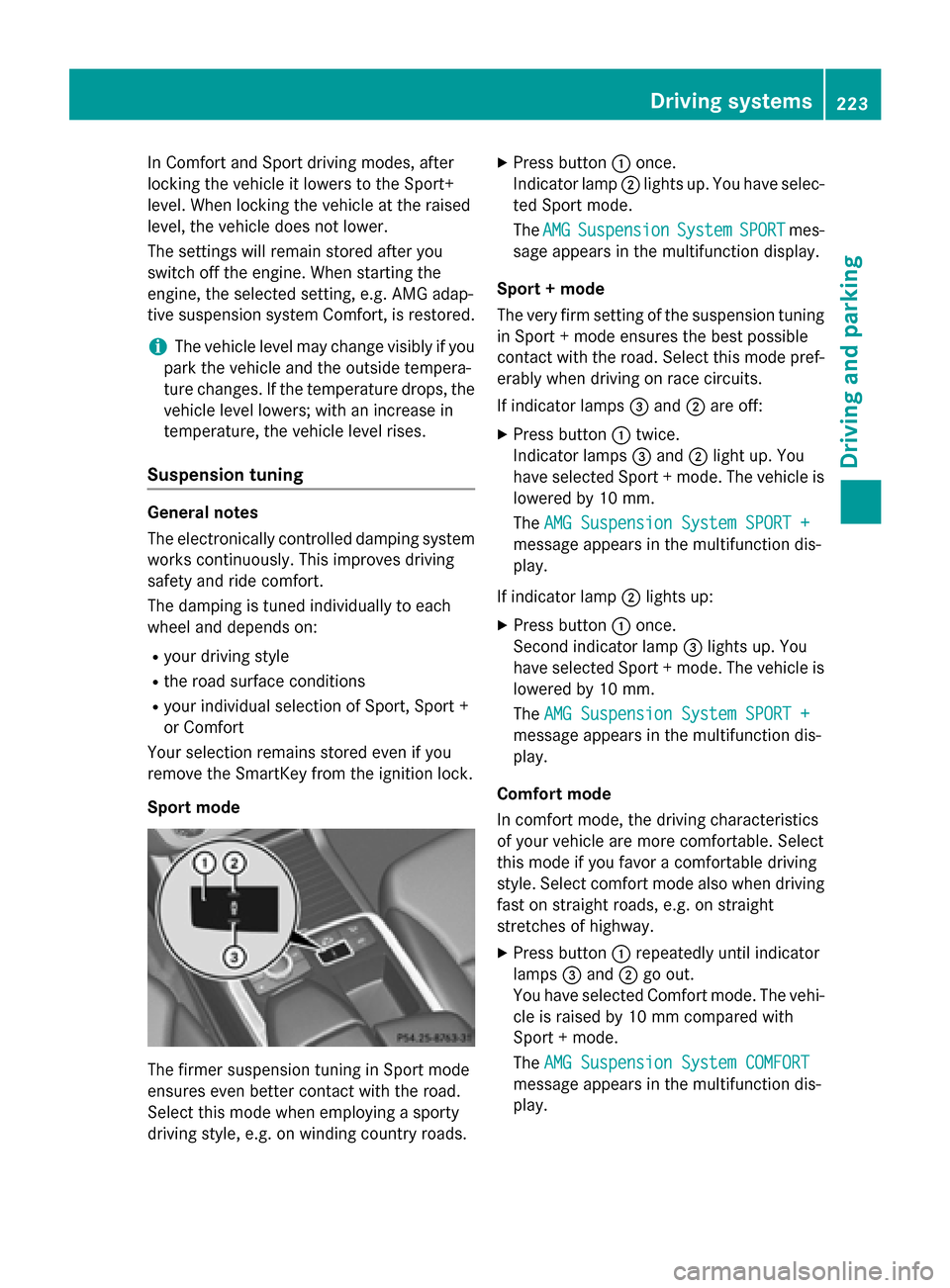
Sport mode
The firmer suspension tuning in Sport mode
ensures even better contact with the road.
Select this mode when employing a sporty
driving style, e.g. on winding country roads.
XPress button :once.
Indicator lamp ;lights up. You have selec-
ted Sport mode.
The AMG
SuspensionSystemSPORTmes-
sage appears in the multifunction display.
Sport + mode
The very firm setting of the suspension tuning
in Sport + mode ensures the best possible
contact with the road. Select this mode pref-
erably when driving on race circuits.
If indicator lamps =and ;are off:
XPress button :twice.
Indicator lamps =and ;light up. You
have selected Sport + mode. The vehicle is
lowered by 10 mm.
The AMG Suspension System SPORT +
message appears in the multifunction dis-
play.
If indicator lamp ;lights up:
XPress button :once.
Second indicator lamp =lights up. You
have selected Sport + mode. The vehicle is
lowered by 10 mm.
The AMG Suspension System SPORT +
message appears in the multifunction dis-
play.
Comfort mode
In comfort mode, the driving characteristics
of your vehicle are more comfortable. Select
this mode if you favor a comfortable driving
style. Select comfort mode also when driving
fast on straight roads, e.g. on straight
stretches of highway.
XPress button :repeatedly until indicator
lamps =and ;go out.
You have selected Comfort mode. The vehi-
cle is raised by 10 mm compared with
Sport + mode.
The AMG Suspension System COMFORT
message appears in the multifunction dis-
play.
Driving systems223
Driving and parking
Z
Page 227 of 462
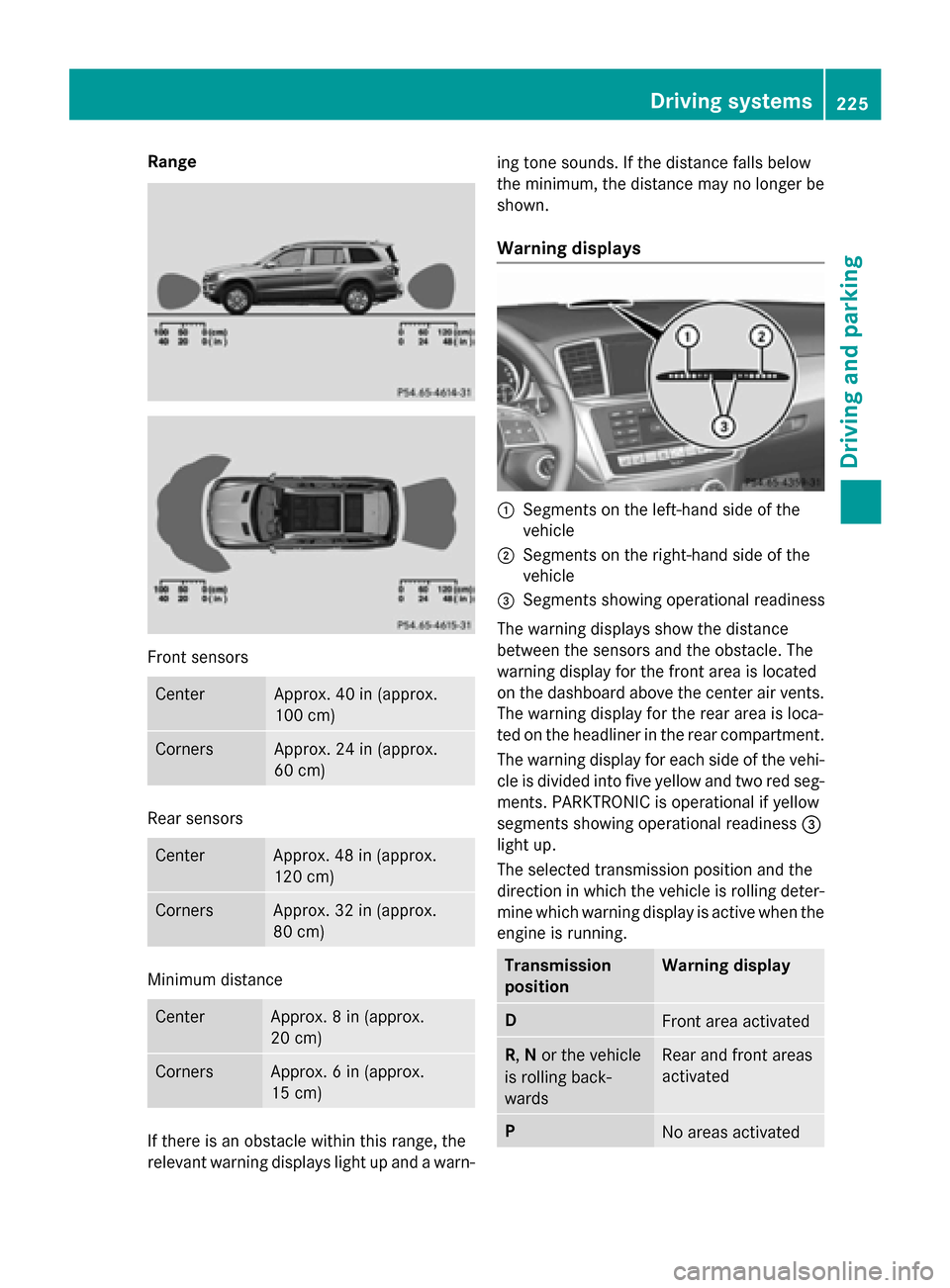
Range
Front sensors
CenterApprox. 40 in (approx.
100 cm)
CornersApprox. 24 in (approx.
60 cm)
Rear sensors
CenterApprox. 48 in (approx.
120 cm)
CornersApprox. 32 in (approx.
80 cm)
Minimum distance
CenterApprox. 8 in (approx.
20 cm)
CornersApprox. 6 in (approx.
15 cm)
If there is an obstacle within this range, the
relevant warning displays light up and a warn-ing tone sounds. If the distance falls below
the minimum, the distance may no longer be
shown.
Warning displays
:Segments on the left-hand side of the
vehicle
;Segments on the right-hand side of the
vehicle
=Segments showing operational readiness
The warning displays show the distance
between the sensors and the obstacle. The
warning display for the front area is located
on the dashboard above the center air vents.
The warning display for the rear area is loca-
ted on the headliner in the rear compartment. The warning display for each side of the vehi-
cle is divided into five yellow and two red seg-
ments. PARKTRONIC is operational if yellow
segments showing operational readiness =
light up.
The selected transmission position and the
direction in which the vehicle is rolling deter-
mine which warning display is active when the
engine is running.
Transmission
positionWarning display
DFront area activated
R, Nor the vehicle
is rolling back-
wardsRear and front areas
activated
PNo areas activated
Driving systems225
Driving and parking
Z
Page 232 of 462
some cases, it may also lead you across or
onto the curb. If necessary, you should can-
cel the parking procedure with Active Park-
ing Assist.
RYou can also select preselect transmission
positionD. The vehicle redirects and does
not drive as far into the parking space.
Should the gear change occur too soon to
achieve a sensible parking position, the
parking procedure will be aborted.
Exiting a parking space
In order that Active Parking Assist can sup-
port you when you exit the parking space:
Ryou need to have parked using Active Park-
ing Assist.
Rthe border of the parking space must be
high enough at the front and the rear. A
curb stone is too small, for example.
Rthe border of the parking space must not be
too wide, as the position of the vehicle must
not exceed an angle of 45° to the starting
position as it is maneuvered into the park-
ing space.
Ra maneuvering distance of at least 3.3 ft
(1.0 m) must be available.
XStart the engine.
XRelease the electric parking brake.
XSwitch on the turn signal in the direction
you are pulling away.
XShift the transmission to position Dor R.
The Start Park Assist? Yes: OK No:
% message appears in the multifunction
display.
XTo cancel the procedure: press the%
button on the multifunction steering wheel
or pull away.
or
XTo exit a parking space using Active
Parking Assist: press theabutton on
the multifunction steering wheel.
The Park Assist Active Accelerate
andBrakeObserveSurroundingsmes-
sage appears in the multifunction display.
XLet go of the multifunction steering wheel.
XReverse the vehicle or drive forwards, being
ready to brake at all times. Do not exceed a
maximum speed of approximately 6 mph
(10 km/h) when exiting a parking space.
Otherwise Active Parking Assist will be can-
celed.
XStop as soon as PARKTRONIC sounds the
continuous warning tone, if not before.
XShift the transmission to position Dor Ras
required while the vehicle is stationary.
Active Parking Assist immediately steers in
the other direction.
iYou will achieve the best results by wait-
ing for the steering procedure to complete
before pulling away.
If you back up after activation, the steering
wheel is moved to the straight-ahead posi-
tion.
XDrive forwards or back up the vehicle, being
ready to brake at all times.
XStop as soon as PARKTRONIC sounds the
continuous warning tone, if not before.
XDrive forwards and back up as prompted by
the PARKTRONIC warning displays, several
times if necessary.
Once you have exited the parking space com-
pletely, the steering wheel is moved to the
straight-ahead position. You hear a tone and
the Park Assist Finished
message
appears in the multifunction display. You will
then have to steer and merge into traffic on
your own. PARKTRONIC is still available. You
can take over the steering, before the vehicle
has exited the parking space completely. This
is useful, for example when you recognize
that it is already possible to pull out of the
parking space.
230Driving systems
Driving and parking
Page 242 of 462
Wide-angle function
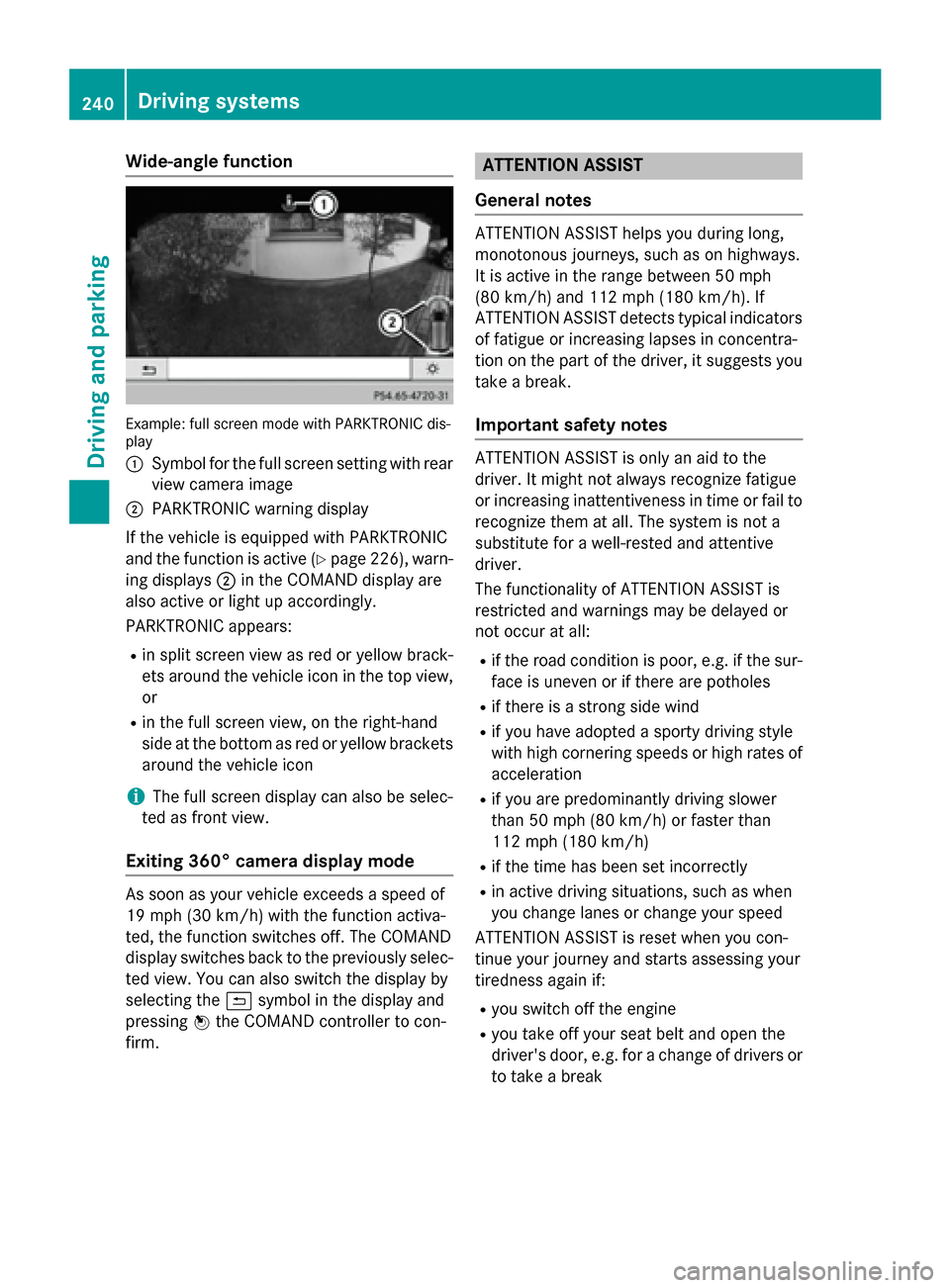
Example: full screen mode with PARKTRONIC dis-
play
:
Symbol for the full screen setting with rear
view camera image
;PARKTRONIC warning display
If the vehicle is equipped with PARKTRONIC
and the function is active (
Ypage 226), warn-
ing displays ;in the COMAND display are
also active or light up accordingly.
PARKTRONIC appears:
Rin split screen view as red or yellow brack-
ets around the vehicle icon in the top view,
or
Rin the full screen view, on the right-hand
side at the bottom as red or yellow brackets
around the vehicle icon
iThe full screen display can also be selec-
ted as front view.
Exiting 360° camera display mode
As soon as your vehicle exceeds a speed of
19 mph (30 km/h) with the function activa-
ted, the function switches off. The COMAND
display switches back to the previously selec-
ted view. You can also switch the display by
selecting the &symbol in the display and
pressing Wthe COMAND controller to con-
firm.
ATTENTION ASSIST
General notes
ATTENTION ASSIST helps you during long,
monotonous journeys, such as on highways.
It is active in the range between 50 mph
(80 km/h) and 112 mph (180 km/h). If
ATTENTION ASSIST detects typical indicators
of fatigue or increasing lapses in concentra-
tion on the part of the driver, it suggests you
take a break.
Important safety notes
ATTENTION ASSIST is only an aid to the
driver. It might not always recognize fatigue
or increasing inattentiveness in time or fail to
recognize them at all. The system is not a
substitute for a well-rested and attentive
driver.
The functionality of ATTENTION ASSIST is
restricted and warnings may be delayed or
not occur at all:
Rif the road condition is poor, e.g. if the sur- face is uneven or if there are potholes
Rif there is a strong side wind
Rif you have adopted a sporty driving style
with high cornering speeds or high rates of
acceleration
Rif you are predominantly driving slower
than 50 mph (80 km/h) or faster than
112 mph (180 km/h)
Rif the time has been set incorrectly
Rin active driving situations, such as when
you change lanes or change your speed
ATTENTION ASSIST is reset when you con-
tinue your journey and starts assessing your
tiredness again if:
Ryou switch off the engine
Ryou take off your seat belt and open the
driver's door, e.g. for a change of drivers or
to take a break
240Driving systems
Driving and parking