engine MERCEDES-BENZ GL-Class 2016 X166 Repair Manual
[x] Cancel search | Manufacturer: MERCEDES-BENZ, Model Year: 2016, Model line: GL-Class, Model: MERCEDES-BENZ GL-Class 2016 X166Pages: 462, PDF Size: 10.44 MB
Page 176 of 462
Transmission position and drive pro-
gram display
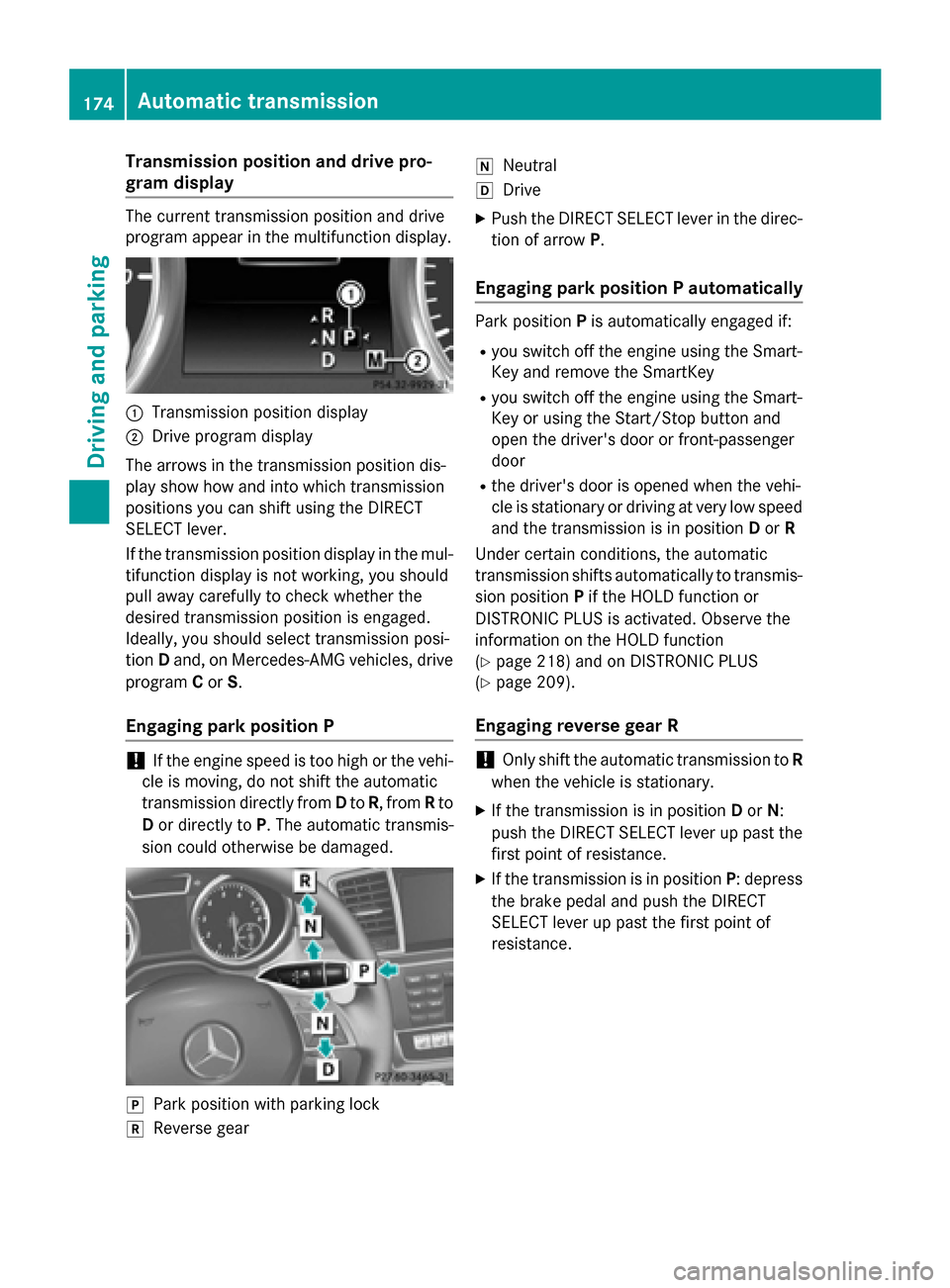
The current transmission position and drive
program appear in the multifunction display.
:Transmission position display
;Drive program display
The arrows in the transmission position dis-
play show how and into which transmission
positions you can shift using the DIRECT
SELECT lever.
If the transmission position display in the mul-
tifunction display is not working, you should
pull away carefully to check whether the
desired transmission position is engaged.
Ideally, you should select transmission posi-
tion Dand, on Mercedes-AMG vehicles, drive
program Cor S.
Engaging park position P
!If the engine speed is too high or the vehi-
cle is moving, do not shift the automatic
transmission directly from Dto R, from Rto
D or directly to P. The automatic transmis-
sion could otherwise be damaged.
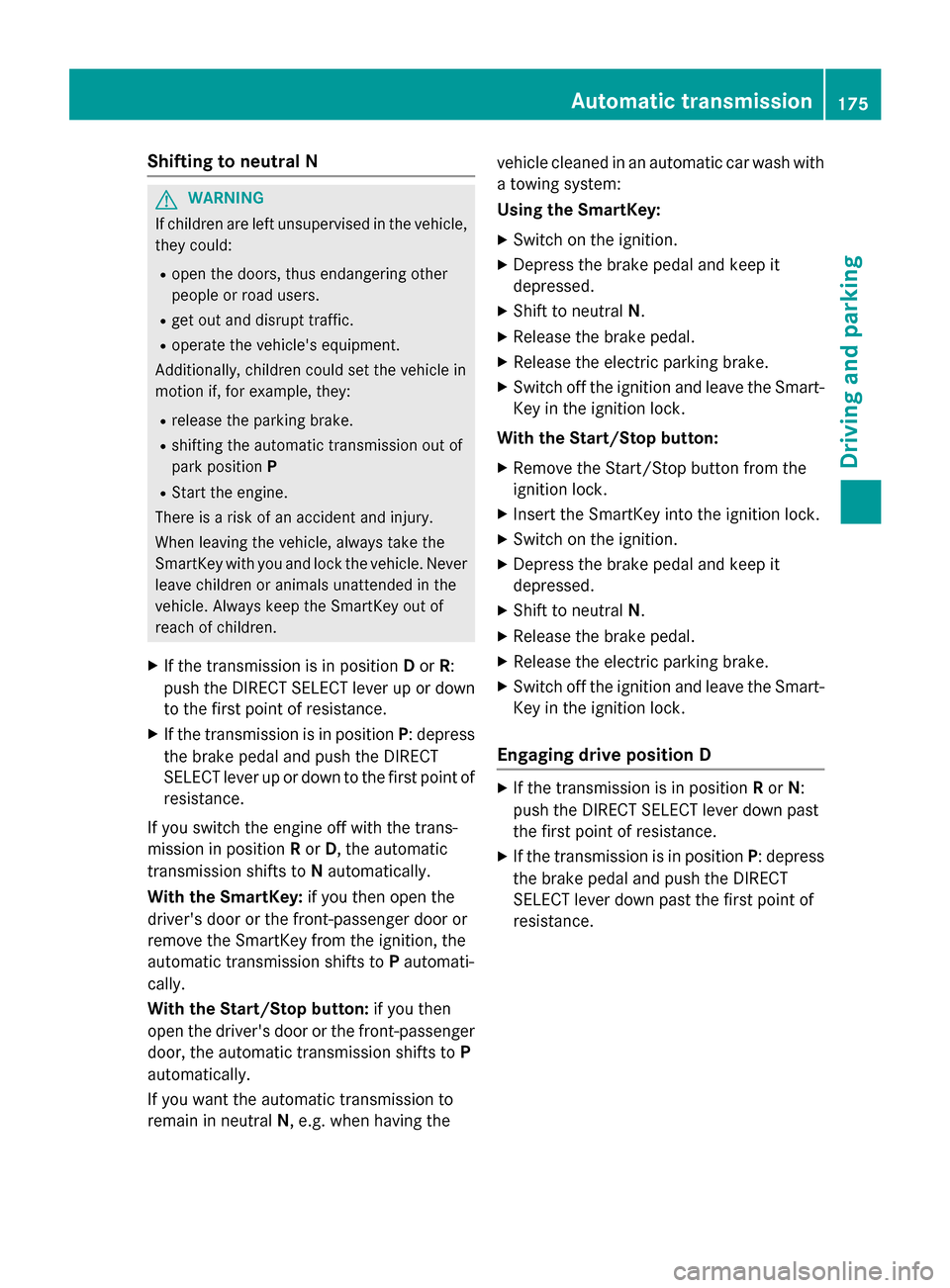
jPark position with parking lock
kReverse gear
iNeutral
hDrive
XPush the DIRECT SELECT lever in the direc-
tion of arrow P.
Engaging park position P automatically
Park position Pis automatically engaged if:
Ryou switch off the engine using the Smart-
Key and remove the SmartKey
Ryou switch off the engine using the Smart-
Key or using the Start/Stop button and
open the driver's door or front-passenger
door
Rthe driver's door is opened when the vehi-
cle is stationary or driving at very low speed
and the transmission is in position Dor R
Under certain conditions, the automatic
transmission shifts automatically to transmis-
sion position Pif the HOLD function or
DISTRONIC PLUS is activated. Observe the
information on the HOLD function
(
Ypage 218) and on DISTRONIC PLUS
(
Ypage 209).
Engaging reverse gear R
!Only shift the automatic transmission to R
when the vehicle is stationary.
XIf the transmission is in position Dor N:
push the DIRECT SELECT lever up past the
first point of resistance.
XIf the transmission is in position P: depress
the brake pedal and push the DIRECT
SELECT lever up past the first point of
resistance.
174Automatic transmission
Driving an d parking
Page 177 of 462
Shifting to neutral N
GWARNING
If children are left unsupervised in the vehicle,
they could:
Ropen the doors, thus endangering other
people or road users.
Rget out and disrupt traffic.
Roperate the vehicle's equipment.
Additionally, children could set the vehicle in
motion if, for example, they:
Rrelease the parking brake.
Rshifting the automatic transmission out of
park position P
RStart the engine.
There is a risk of an accident and injury.
When leaving the vehicle, always take the
SmartKey with you and lock the vehicle. Never
leave children or animals unattended in the
vehicle. Always keep the SmartKey out of
reach of children.
XIf the transmission is in position Dor R:
push the DIRECT SELECT lever up or down to the first point of resistance.
XIf the transmission is in position P: depress
the brake pedal and push the DIRECT
SELECT lever up or down to the first point of
resistance.
If you switch the engine off with the trans-
mission in position Ror D, the automatic
transmission shifts to Nautomatically.
With the SmartKey: if you then open the
driver's door or the front-passenger door or
remove the SmartKey from the ignition, the
automatic transmission shifts to Pautomati-
cally.
With the Start/Stop button: if you then
open the driver's door or the front-passenger door, the automatic transmission shifts to P
automatically.
If you want the automatic transmission to
remain in neutral N, e.g. when having the vehicle cleaned in an automatic car wash with
a towing system:
Using the SmartKey:
XSwitch on the ignition.
XDepress the brake pedal and keep it
depressed.
XShift to neutral
N.
XRelease the brake pedal.
XRelease the electric parking brake.
XSwitch off the ignition and leave the Smart-
Key in the ignition lock.
With the Start/Stop button:
XRemove the Start/Stop button from the
ignition lock.
XInsert the SmartKey into the ignition lock.
XSwitch on the ignition.
XDepress the brake pedal and keep it
depressed.
XShift to neutral N.
XRelease the brake pedal.
XRelease the electric parking brake.
XSwitch off the ignition and leave the Smart-
Key in the ignition lock.
Engaging drive position D
XIf the transmission is in position Ror N:
push the DIRECT SELECT lever down past
the first point of resistance.
XIf the transmission is in position P: depress
the brake pedal and push the DIRECT
SELECT lever down past the first point of
resistance.
Automatic transmission175
Driving and parking
Z
Page 178 of 462
Transmission positions
BPark position
Only shift the transmission into
positionPwhen the vehicle is sta-
tionary (
Ypage 189). The parking
lock should not be used as a brake
when parking. Always apply the
electronic parking brake in addi-
tion to the parking lock in order to
secure the vehicle.
If the vehicle electronics are mal-
functioning, the transmission may
be locked in position P. Have the
vehicle electronics checked imme-
diately at a qualified specialist
workshop.
Park position Pis automatically
engaged if:
Ryou switch off the engine using
the SmartKey and remove the
SmartKey
Ryou switch off the engine using
the SmartKey or using the Start/ Stop button and open the driv-
er's door or front-passenger
door
Rthe driver's door is opened when
the vehicle is stationary or driv-
ing at very low speed and the
transmission is in position Dor R
CReverse gear
Only shift the transmission into
position Rwhen the vehicle is sta-
tionary.
ANeutral
Do not shift the transmission to N
while driving. Otherwise, the auto-
matic transmission could be dam-
aged.
No power is transmitted from the
engine to the drive wheels.
Releasing the brakes will allow you
to move the vehicle freely, e.g. to
push it or tow it.
If ESP
®is deactivated or faulty:
shift the transmission to position N
if the vehicle is in danger of skid-
ding, e.g. on icy roads.
If you switch the engine off with the
transmission in position Ror D, the
automatic transmission shifts to N
automatically.
!Rolling in neutral Ncan damage
the drive train.
7Drive
The automatic transmission
changes gear automatically. All
forward gears are available.
Driving tips
Changing gear
The automatic transmission shifts to the indi-
vidual gears automatically when it is in trans-
mission position D. This automatic gear shift-
ing behavior is determined by:
Rthe selected drive program (Ypage 177)
Rthe position of the accelerator pedal
(
Ypage 176)
Rthe road speed
Accelerator pedal position
Your style of driving influences how the auto-
matic transmission shifts gear:
Rlittle throttle: early upshifts
Rmore throttle: late upshifts
176Automatic transmission
Driving an d parking
Page 179 of 462
Kickdown
Use kickdown for maximum acceleration.
XDepress theaccelerato rpedal beyon dth e
pressur epoint.
The automatic transmission shifts to a
lower gear depending on th eengin espeed.
XEas eoff th eaccelerato rpedal once th e
desired spee dis reached.
The automatic transmission shifts bac kup.
Rocking the vehicle free
Shifting th etransmission repeatedly between
gear sD and Rmay help to free th evehicl eif it
has become stuck in slus hor snow. The vehi-
cle's engin emanagemen tsystem limits th e
spee dto amaximum of 5mph (9 km/h) when
shifting bac kand forth .To shif tbac kand forth
between transmission position sD and R,
mov eth eDIRECT SELECT lever up and down
past th epoin tof resistance.
Towing a trailer
XDrive in th emiddle of th eengin espee d
range on uphill gradients .
XDependingon th euphill or downhill gradi-
ent, use left-han dsteering whee lpaddle
shifte r (
Ypage 178) to select alower gear ,
eve nif cruise control or DISTRONI CPLU S
are activated.
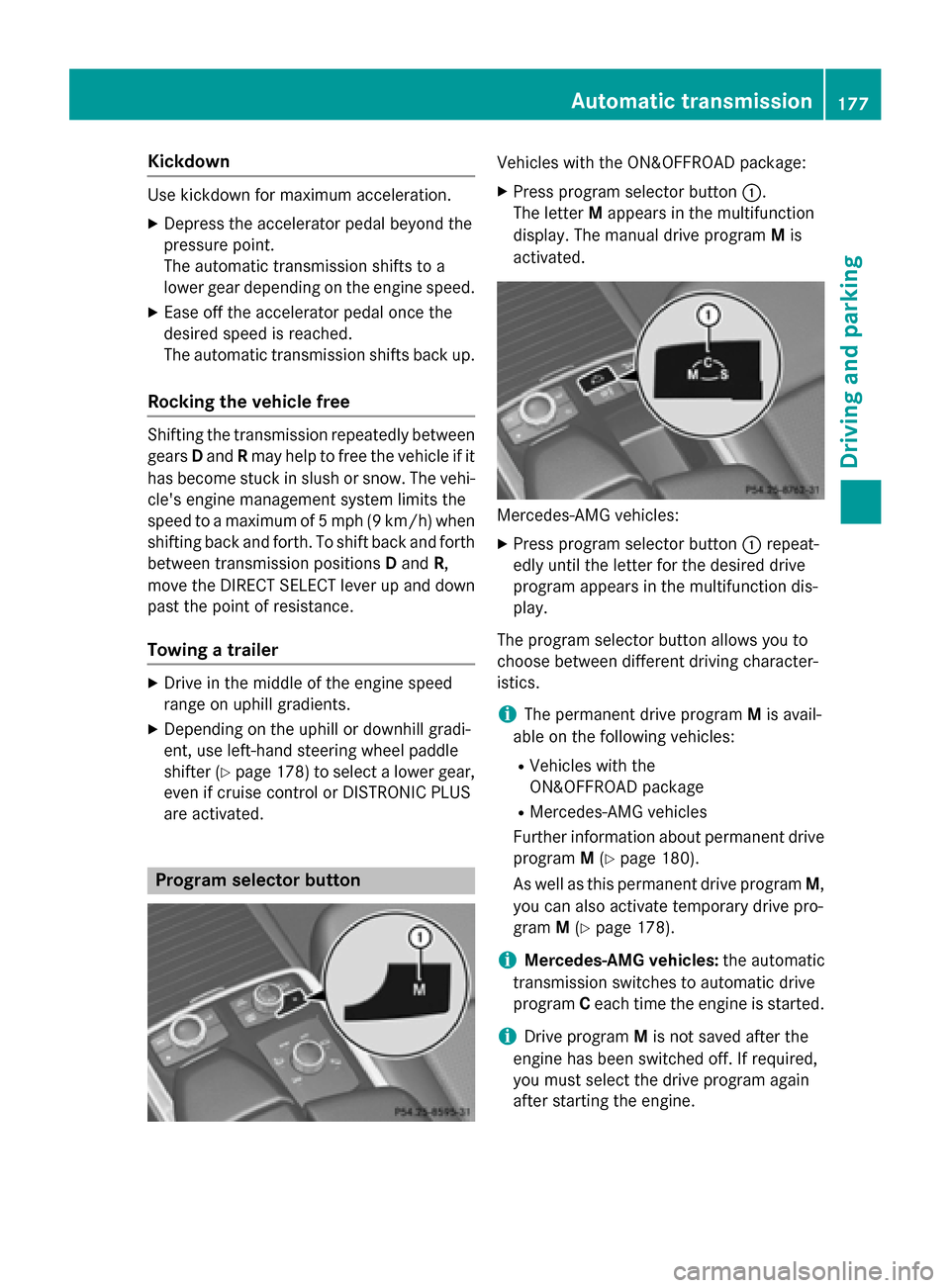
Program selector button
Vehicles withth e ON& OFFROAD package:
XPress program selector butto n:.
The lette rM appear sin th emultifunction
display. The manual drive program Mis
activated.
Mercedes-AM Gvehicles:
XPre ssprogram selector butto n: repeat -
edly until th elette rfor th edesired drive
program appear sin th emultifunction dis-
play.
The program selector butto nallows you to
choos ebetween differen tdrivin gcharacter-
istics .
iThe permanen tdrive program Mis avail -
able on th efollowin gvehicles:
RVehicles wit hth e
ON& OFFROAD packag e
RMercedes-AMGvehicles
Further information about permanen tdrive
program M(
Ypage 180).
As well as this permanen tdrive program M,
you can also activat etemporar ydrive pro -
gram M(
Ypage 178).
iMercedes-AMG vehicles:theautomatic
transmission switches to automatic drive
program Ceac htime th eengin eis started.
iDrive program Mis no tsaved after th e
engin ehas been switched off .If required,
you mus tselect th edrive program again
after startin gth eengine.
Automatic transmission17 7
Driving an d parking
Z
Page 181 of 462
Mercedes-AMG vehicles:you can activate
manual drive program Min automatic drive
programs Cand S.
Vehicles with the ON&OFFROAD package: if manual drive program Mis deactivated
using the program selector button, you can
activate manual drive program Musing the
steering wheel paddle shifters.
As well as temporary drive program M, you
can also activate permanent drive program M
(
Ypage 177).
Further information about permanent drive
program M(
Ypage 180).
Activating
XShift the transmission to position D.
XPull the left or right steering wheel paddle
shifter (
Ypage 178).
Manual drive program Mis temporarily acti-
vated. The selected gear and Mappear in
the multifunction display.
Shifting gears
If you pull on the left or right steering wheel
paddle shifter, the automatic transmission
switches to manual drive program Mfor a
limited amount of time. Depending on which
paddle shifter is pulled, the automatic trans-
mission immediately shifts into the next gear
down or up, if permitted.
XTo shift up: pull the right-hand steering
wheel paddle shifter (
Ypage 178).
The automatic transmission shifts up to the
next gear.
iIf the maximum engine speed on the cur-
rently engaged gear is reached and you
continue to accelerate, the automatic
transmission automatically shifts up in
order to prevent engine damage.
XTo shift down: pull on the left-hand steer-
ing wheel paddle shifter (
Ypage 178).
The automatic transmission shifts down to
the next gear.
iIf the engine exceeds the maximum
engine speed when shifting down, the auto- matic transmission protects against engine
damage by not shifting down.
iAutomatic down shifting occurs when
coasting.
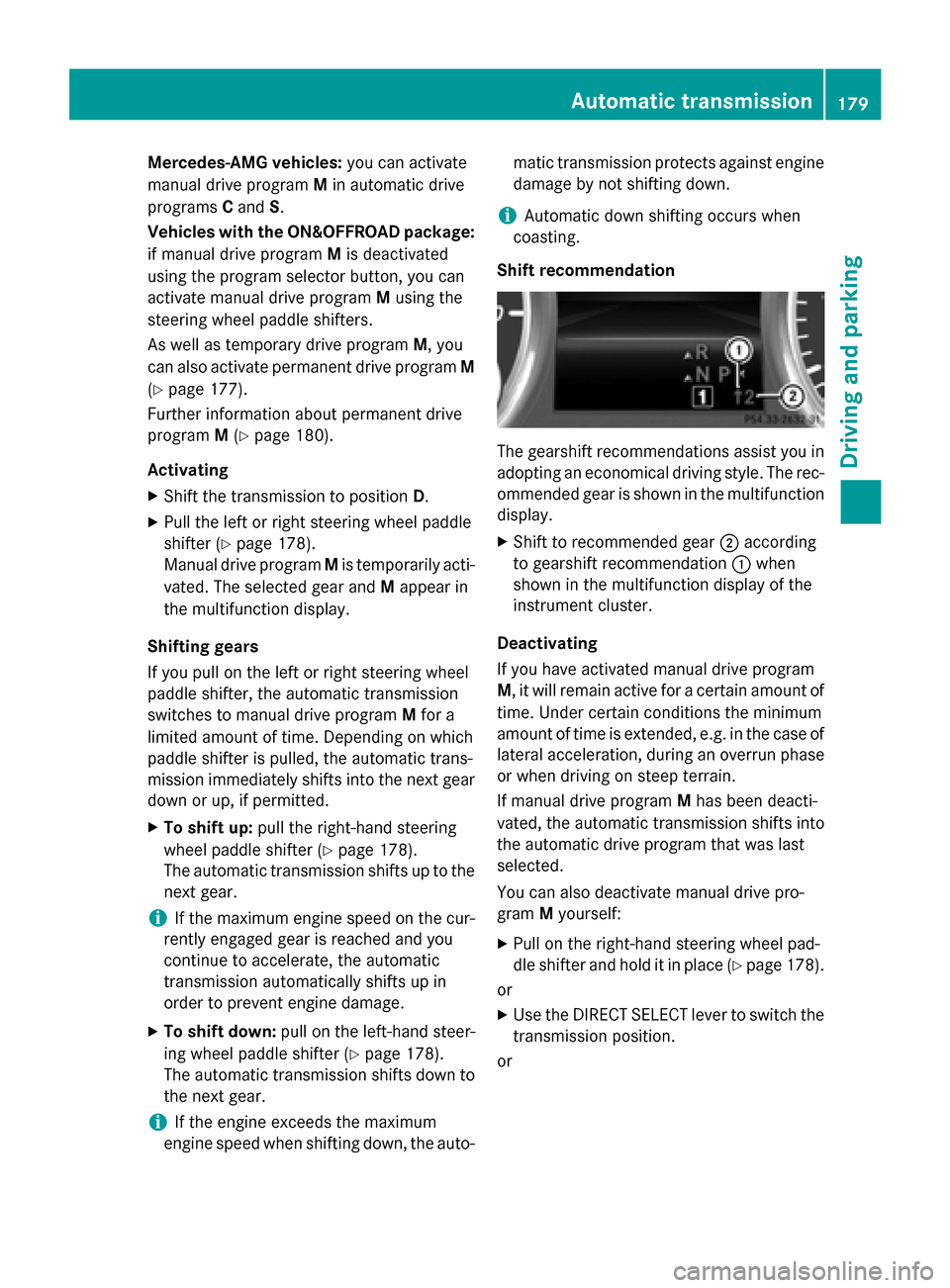
Shift re
commendation
The gearshift recommendations assist you in
adopting an economical driving style. The rec-
ommended gear is shown in the multifunction
display.
XShift to recommended gear ;according
to gearshift recommendation :when
shown in the multifunction display of the
instrument cluster.
Deactivating
If you have activated manual drive program
M, it will remain active for a certain amount of time. Under certain conditions the minimum
amount of time is extended, e.g. in the case of
lateral acceleration, during an overrun phase
or when driving on steep terrain.
If manual drive program Mhas been deacti-
vated, the automatic transmission shifts into
the automatic drive program that was last
selected.
You can also deactivate manual drive pro-
gram Myourself:
XPull on the right-hand steering wheel pad-
dle shifter and hold it in place (
Ypage 178).
or
XUse the DIRECT SELECT lever to switch the
transmission position.
or
Automatic transmission179
Driving and parking
Z
Page 182 of 462
XMercedes-AMG vehicles:use the pro-
gram selector button to change the drive
program (
Ypage 177).
Manual drive program Mis deactivated.
The automatic transmission switches into
the automatic drive program that was last
selected, i.e. Eor S.
or
XVehicles with the
ON&OFFROAD package: use the selector
wheel to switch to the on-road program
(
Ypage 254) or the off-road program
(
Ypage 258).
Manual drive program
General information
In this drive program, you can permanently
change gear yourself by using the steering
wheel paddle shifters. The transmission must be in position D.
iAs well as this permanent drive program
M, you can also activate temporary drive
program M(
Ypage 178).
Switching on the manual drive program
In manual drive program M, you can change
gear using the steering wheel paddle shifters
if the transmission is in position D. You can
see the currently selected drive program and
which gear is engaged in the multifunction
display.
XVehicles with the ON&OFFROAD pack-
age: press the program selector button
(
Ypage 177).
The letter Mappears in the multifunction
display.
XMercedes-AMG vehicles: press the pro-
gram selector button (
Ypage 177) repeat-
edly until Mappears in the multifunction
display.
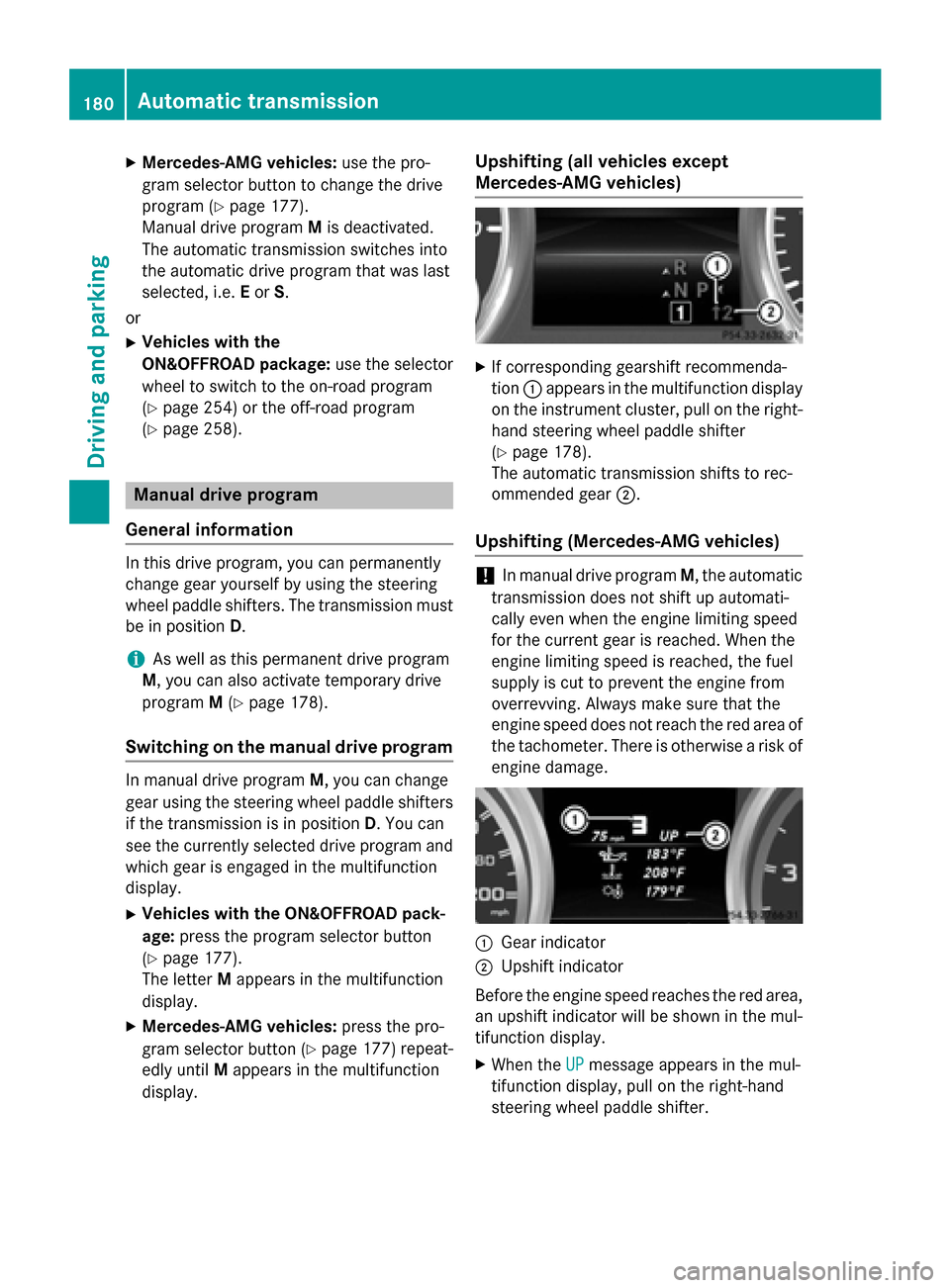
Upshifting (all vehicles except
Mercedes-AMG vehicles)
XIf corresponding gearshift recommenda-
tion :appears in the multifunction display
on the instrument cluster, pull on the right-
hand steering wheel paddle shifter
(
Ypage 178).
The automatic transmission shifts to rec-
ommended gear ;.
Upshifting (Mercedes-AMG vehicles)
!In manual drive program M, the automatic
transmission does not shift up automati-
cally even when the engine limiting speed
for the current gear is reached. When the
engine limiting speed is reached, the fuel
supply is cut to prevent the engine from
overrevving. Always make sure that the
engine speed does not reach the red area of
the tachometer. There is otherwise a risk of
engine damage.
:Gear indicator
;Upshift indicator
Before the engine speed reaches the red area,
an upshift indicator will be shown in the mul-
tifunction display.
XWhen the UPmessage appears in the mul-
tifunction display, pull on the right-hand
steering wheel paddle shifter.
180Automatic transmission
Driving and parking
Page 184 of 462
Problems with the transmission
ProblemPossible causes/consequences andMSolutions
The transmission has
problems shifting gear.The transmission is losing oil.
XHave the transmission checked at a qualified specialist work-
shop immediately.
The acceleration ability
is deteriorating.
The transmission no
longer changes gear.The transmission is in emergency mode.
It is only possible to shift intosecondgear and reverse gear.
XStop the vehicle.
XShift the transmission to position P.
XSwitch off the engine.
XWait at least ten seconds before restarting the engine.
XShift the transmission to positionDor R.
If D is selected, the transmission shifts into secondgear; ifRis
selected, the transmission shifts into reverse gear.
XHave the transmission checked at a qualified specialist work-
shop immediately.
Transfer case
!
Performance tests may only be carried
out on a 2-axle dynamometer. The brake
system or transfer case could otherwise be
damaged. Contact a qualified specialist
workshop for a performance test.
!Because ESP®is an automatic system,
the engine and ignition must be switched
off (SmartKey in position 0or 1or Start/
Stop button in position 0or 1) when the
electric parking brake is being tested on a
brake dynamometer (maximum
10 seconds).
Braking triggered automatically by ESP
®
may seriously damage the brake system.
!Vehicles with 4MATIC must not be towed
with either the front or the rear axle raised,
as doing so will damage the transmission.
This section is only valid for vehicles with 4-
wheel drive (4MATIC). Power is always trans-
mitted to both axles.
Refueling
Important safety notes
GWARNING
Fuel is highly flammable. If you handle fuel
incorrectly, there is a risk of fire and explo-
sion.
You must avoid fire, open flames, creating
sparks and smoking. Switch off the engine
and, if applicable, the auxiliary heating before refueling.
GWARNING
Fuel is poisonous and hazardous to health.
There is a risk of injury.
You must make sure that fuel does not come into contact with your skin, eyes or clothing
and that it is not swallowed. Do not inhale fuel
vapors. Keep fuel away from children.
182Refueling
Driving and parking
Page 185 of 462
If you or others come into contact with fuel,
observe the following:
RWash away fuel from skin immediately
using soap and water.
RIf fuel comes into contact with your eyes,
immediately rinse them thoroughly with
clean water. Seek medical assistance with-
out delay.
RIf fuel is swallowed, seek medical assis-
tance without delay. Do not induce vomit-
ing.
RImmediately change out of clothing which
has come into contact with fuel.
GWARNING
Electrostatic buildup can create sparks and
ignite fuel vapors. There is a risk of fire and
explosion.
Always touch the vehicle body before opening
the fuel filler flap or touching the fuel pump
nozzle. Any existing electrostatic buildup is
thereby discharged.
GWARNING
Vehicles with a diesel engine:
If you mix diesel fuel with gasoline, the flash
point is lower than that of pure diesel fuel.
When the engine is running, exhaust system
components could overheat without being
noticed. There is a risk of fire.
Never refuel with gasoline. Never mix gasoline with diesel fuel.
!Do not use gasoline to refuel vehicles with
a diesel engine. Do not switch on the igni-
tion if you accidentally refuel with the
wrong fuel. Otherwise, the fuel will enter
the fuel system. Even small amounts of the wrong fuel could result in damage to the
fuel system and the engine. The repair
costs are high. Notify a qualified specialist
workshop and have the fuel tank and fuel
lines drained completely.
!Do not use diesel to refuel vehicles with a
gasoline engine. Do not switch on the igni- tion if you accidentally refuel with the
wrong fuel. Otherwise, the fuel will enter
the fuel system. Even small amounts of the
wrong fuel could result in damage to the
fuel system and the engine. Notify a quali-
fied specialist workshop and have the fuel
tank and fuel lines drained completely.
!Overfilling the fuel tank could damage the
fuel system.
!Take care not to spill any fuel on painted
surfaces. You could otherwise damage the
paintwork.
!Use a filter when refueling from a fuel can.
Otherwise, the fuel lines and/or injection
system could be blocked by particles from
the fuel can.
Do not get into the vehicle again during the
refueling process. Otherwise, electrostatic
charge could build up again.
If you overfill the fuel tank, fuel could spray
out when the fuel pump nozzle is removed.
For further information on fuel and fuel quality (
Ypage 447).
Refueling
General information
Pay attention to the important safety notes
(
Ypage 182).
The fuel filler flap is unlocked or locked auto-
matically when you unlock or lock the vehicle
with the SmartKey or using KEYLESS-GO.
The position of the fuel filler cap is displayed
8 in the instrument cluster. The arrow
next to the filling pump indicates the side of
the vehicle.
Refueling183
Driving and parking
Z
Page 186 of 462
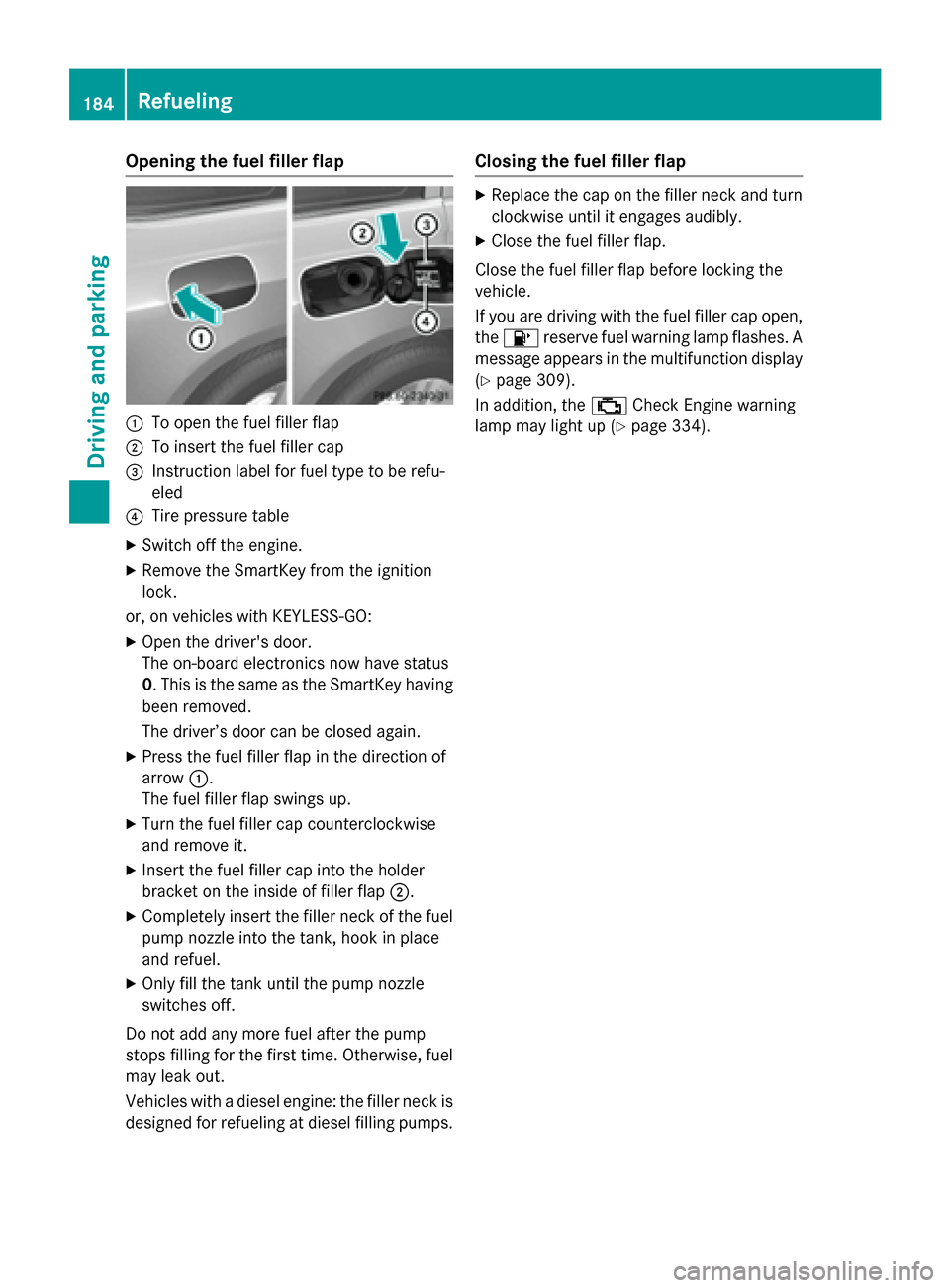
Opening the fuel filler flap
:To open the fuel filler flap
;To insert the fuel filler cap
=Instruction label for fuel type to be refu-
eled
?Tire pressure table
XSwitch off the engine.
XRemove the SmartKey from the ignition
lock.
or, on vehicles with KEYLESS‑ GO:
XOpen the driver's door.
The on-board electronics now have status
0. This is the same as the SmartKey having
been removed.
The driver’s door can be closed again.
XPress the fuel filler flap in the direction of
arrow:.
The fuel filler flap swings up.
XTurn the fuel filler cap counterclockwise
and remove it.
XInsert the fuel filler cap into the holder
bracket on the inside of filler flap ;.
XCompletely insert the filler neck of the fuel
pump nozzle into the tank, hook in place
and refuel.
XOnly fill the tank until the pump nozzle
switches off.
Do not add any more fuel after the pump
stops filling for the first time. Otherwise, fuel
may leak out.
Vehicles with a diesel engine: the filler neck is
designed for refueling at diesel filling pumps.
Closing the fuel filler flap
XReplace the cap on the filler neck and turn clockwise until it engages audibly.
XClose the fuel filler flap.
Close the fuel filler flap before locking the
vehicle.
If you are driving with the fuel filler cap open,
the 8 reserve fuel warning lamp flashes. A
message appears in the multifunction display
(
Ypage 309).
In addition, the ;Check Engine warning
lamp may light up (
Ypage 334).
184Refueling
Driving and parking
Page 187 of 462
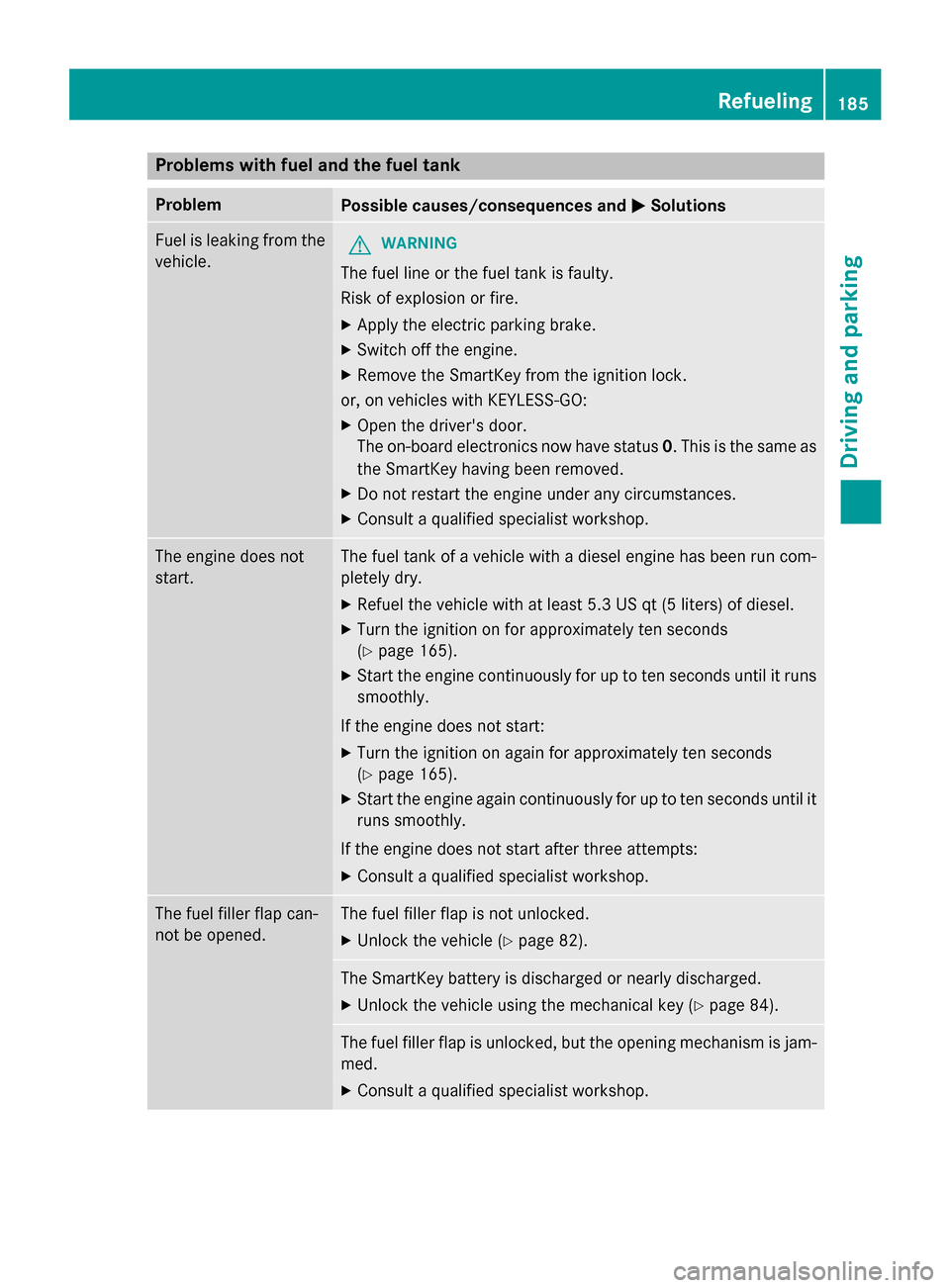
Problems with fuel and the fuel tank
ProblemPossible causes/consequences andMSolutions
Fuel is leaking from the
vehicle.GWARNING
The fuel line or the fuel tank is faulty.
Risk of explosion or fire.
XApply the electric parking brake.
XSwitch off the engine.
XRemove the SmartKey from the ignition lock.
or, on vehicles with KEYLESS‑GO:
XOpen the driver's door.
The on-board electronics now have status 0. This is the same as
the SmartKey having been removed.
XDo not restart the engine under any circumstances.
XConsult a qualified specialist workshop.
The engine does not
start.The fuel tank of a vehicle with a diesel engine has been run com-
pletely dry.
XRefuel the vehicle with at least 5.3 US qt (5 liters) of diesel.
XTurn the ignition on for approximately ten seconds
(
Ypage 165).
XStart the engine continuously for up to ten seconds until it runs
smoothly.
If the engine does not start:
XTurn the ignition on again for approximately ten seconds
(
Ypage 165).
XStart the engine again continuously for up to ten seconds until it
runs smoothly.
If the engine does not start after three attempts:
XConsult a qualified specialist workshop.
The fuel filler flap can-
not be opened.The fuel filler flap is not unlocked.
XUnlock the vehicle (Ypage 82).
The SmartKey battery is discharged or nearly discharged.
XUnlock the vehicle using the mechanical key (Ypage 84).
The fuel filler flap is unlocked, but the opening mechanism is jam-
med.
XConsult a qualified specialist workshop.
Refueling185
Driving and parking
Z