engine MERCEDES-BENZ GL-Class 2016 X166 Owner's Manual
[x] Cancel search | Manufacturer: MERCEDES-BENZ, Model Year: 2016, Model line: GL-Class, Model: MERCEDES-BENZ GL-Class 2016 X166Pages: 462, PDF Size: 10.44 MB
Page 248 of 462

:Yellow indicator lamp/red warning lamp
When Blind Spot Assist is activated, indicator
lamp :in the exterior mirrors lights up yel-
low at speeds of up to 20 mph (30 km/h). At
speeds above 20 mph (30 km/h), the indica-
tor lamp goes out and Blind Spot Assist is
operational.
If a vehicle is detected within the blind spot
monitoring range at speeds above 20 mph
(30 km/h), warning lamp :on the corre-
sponding side lights up red. This warning is
always emitted when a vehicle enters the
blind spot monitoring range from behind or
from the side. When you overtake a vehicle,
the warning only occurs if the difference in
speed is less than 7 mph (12 km/h).
The yellow indicator lamp goes out if reverse
gear is engaged. In this event, Blind Spot
Assist is no longer active.
The brightness of the indicator/warning
lamps is adjusted automatically according to
the ambient light.
Collision warning
If a vehicle is detected in the monitoring range
of Blind Spot Assist and you switch on the
corresponding turn signal, a double warning
tone sounds. Red warning lamp :flashes. If
the turn signal remains on, detected vehicles
are indicated by the flashing of red warning
lamp :. There are no further warning tones.
Switching on Blind Spot Assist
XMake sure that Blind Spot Assist is activa-
ted in the on-board computer
(
Ypage 282).
XTurn the SmartKey to position 2in the igni-
tion lock.
Warning lamps :in the exterior mirrors
light up red for approximately 1.5 seconds
and then turn yellow.
Towing a trailer
When you attach a trailer, make sure you have
cor rect
ly established the electrical connec-
tion. This can be accomplished by checking
the trailer lighting. In this event, Blind Spot
Assist is deactivated. The indicator lamp in
the exterior mirrors lights up yellow, and the
Blind
SpotAssistCurrentlyUnavail‐
able See Operator's Manualmessage
appears in the multifunction display.
iYou can deactivate the indicator lamps in
the exterior mirrors.
To do so, switch off Blind Spot Assist when:
Rthe SmartKey is in position 2in the igni-
tion lock
Rthe engine is not running
Lane Keeping Assist
General notes
:Lane Keeping Assist camera
Lane Keeping Assist monitors the area in
front of your vehicle with camera :, which is
mounted at the top of the windshield. Active
Lane Keeping Assist detects lane markings on
246Driving systems
Driving and parking
Page 260 of 462
ÃDSR symbol appears in the multifunc-
tion display with the Off
message. The status
indicator in the multifunction display goes
out. You also hear a warning. On vehicles with
the ON&OFFROAD package, if you select a
different on-road/off-road program, DSR is
also deactivated.
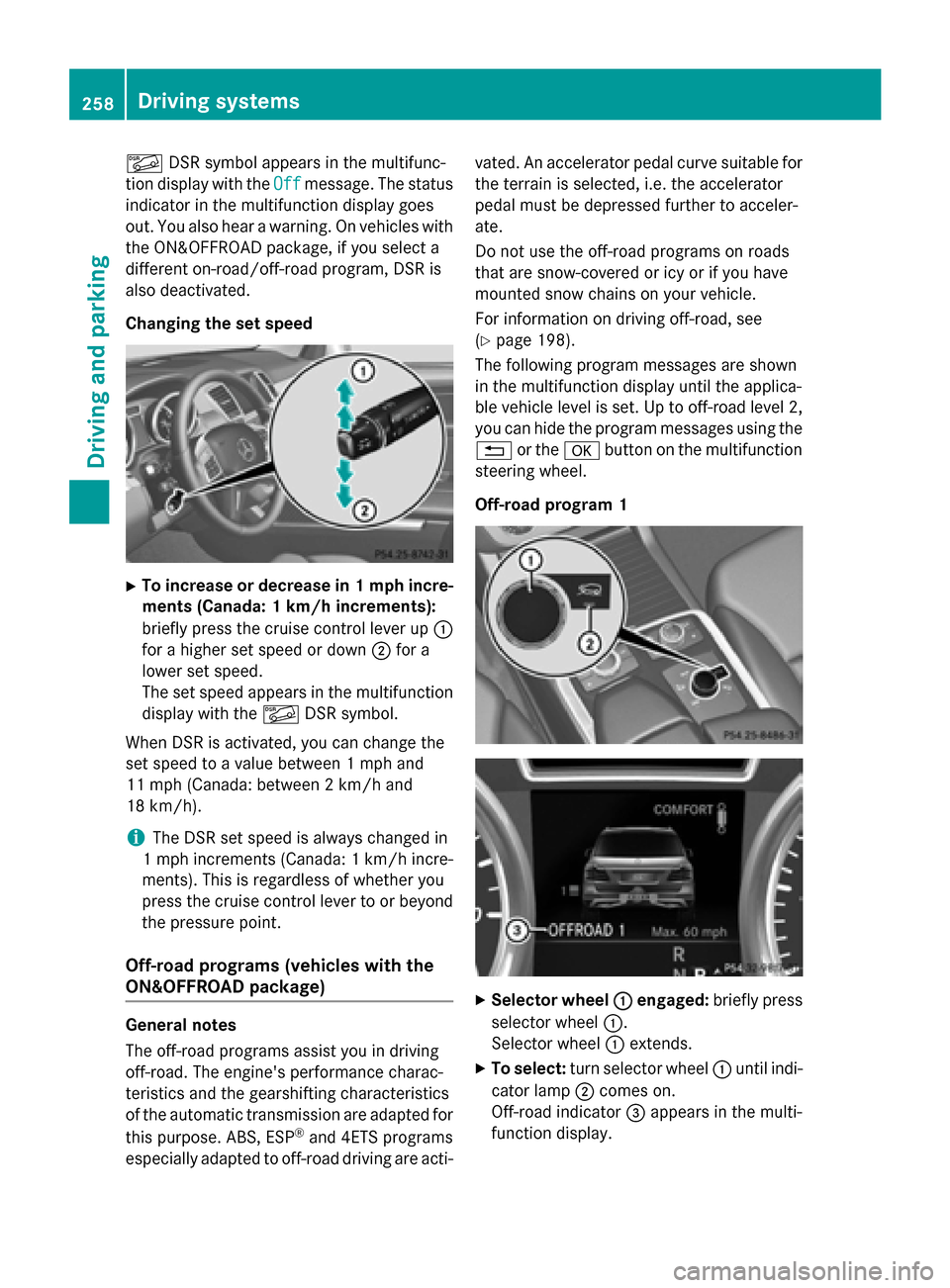
Changing the set speed
XTo increase or decrease in 1 mph incre- ments (Canada: 1 km/h increments):
briefly press the cruise control lever up :
for a higher set speed or down ;for a
lower set speed.
The set speed appears in the multifunction
display with the ÃDSR symbol.
When DSR is activated, you can change the
set speed to a value between 1 mph and
11 mph (Canada: between 2 km/h and
18 km/h).
iThe DSR set speed is always changed in
1 mph increments (Canada: 1 km/h incre-
ments). This is regardless of whether you
press the cruise control lever to or beyond
the pressure point.
Off-road programs (vehicles with the
ON&OFFROAD package)
General notes
The off-road programs assist you in driving
off-road. The engine's performance charac-
teristics and the gearshifting characteristics
of the automatic transmission are adapted for
this purpose. ABS, ESP
®and 4ETS programs
especially adapted to off-road driving are acti- vated. An accelerator pedal curve suitable for
the terrain is selected, i.e. the accelerator
pedal must be depressed further to acceler-
ate.
Do not use the off-road programs on roads
that are snow-covered or icy or if you have
mounted snow chains on your vehicle.
For information on driving off-road, see
(
Ypage 198).
The following program messages are shown
in the multifunction display until the applica-
ble vehicle level is set. Up to off-road level 2,
you can hide the program messages using the
% or the abutton on the multifunction
steering wheel.
Off-road program 1
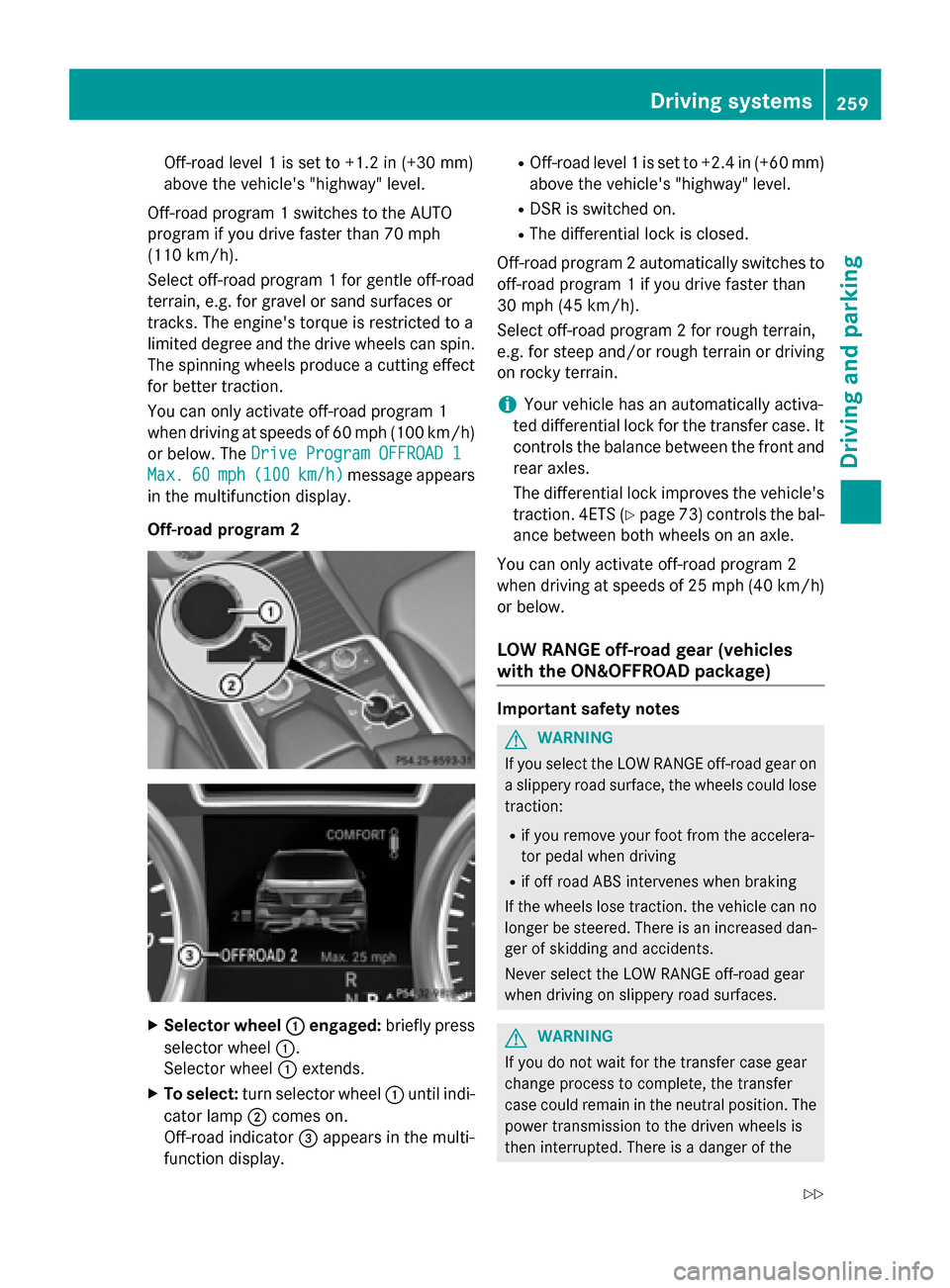
XSelector wheel :engaged:briefly press
selector wheel :.
Selector wheel :extends.
XTo select: turn selector wheel :until indi-
cator lamp ;comes on.
Off-road indicator =appears in the multi-
function display.
258Driving system s
Driving an d parking
Page 261 of 462
Off-road level 1 is set to +1.2 in (+30 mm)
above the vehicle's "highway" level.
Off-road program 1 switches to the AUTO
program if you drive faster than 70 mph
(110 km/h).
Select off-road program 1 for gentle off-road
terrain, e.g. for gravel or sand surfaces or
tracks. The engine's torque is restricted to a
limited degree and the drive wheels can spin.
The spinning wheels produce a cutting effect
for better traction.
You can only activate off-road program 1
when driving at speeds of 60 mph (100 km/h)
or below. The Drive Program OFFROAD 1
Max.60mph (100km/h)message appears
in the multifunction display.
Off-road program 2
XSelector wheel :engaged:briefly press
selector wheel :.
Selector wheel :extends.
XTo select: turn selector wheel :until indi-
cator lamp ;comes on.
Off-road indicator =appears in the multi-
function display.
ROff-road level 1 is set to +2.4 in (+60 mm)
above the vehicle's "highway" level.
RDSR is switched on.
RThe differential lock is closed.
Off-road program 2 automatically switches to
off-road program 1 if you drive faster than
30 mph (45 km/h).
Select off-road program 2 for rough terrain,
e.g. for steep and/or rough terrain or driving
on rocky terrain.
iYour vehicle has an automatically activa-
ted differential lock for the transfer case. It controls the balance between the front and
rear axles.
The differential lock improves the vehicle's
traction. 4ETS (
Ypage 73) controls the bal-
ance between both wheels on an axle.
You can only activate off-road program 2
when driving at speeds of 25 mph (40 km/h)
or below.
LOW RANGE off-road gear (vehicles
with the ON&OFFROAD package)
Important safety notes
GWARNING
If you select the LOW RANGE off-road gear on
a slippery road surface, the wheels could lose traction:
Rif you remove your foot from the accelera-
tor pedal when driving
Rif off road ABS intervenes when braking
If the wheels lose traction. the vehicle can no
longer be steered. There is an increased dan-
ger of skidding and accidents.
Never select the LOW RANGE off-road gear
when driving on slippery road surfaces.
GWARNING
If you do not wait for the transfer case gear
change process to complete, the transfer
case could remain in the neutral position. The power transmission to the driven wheels is
then interrupted. There is a danger of the
Driving systems259
Driving and parking
Z
Page 262 of 462
vehicle rolling away unintentionally. There is a
risk of an accident.
Wait until the transfer case shift process is
completed.
Do not turn off the engine while changing gear
and do not shift the automatic transmission
to another position.
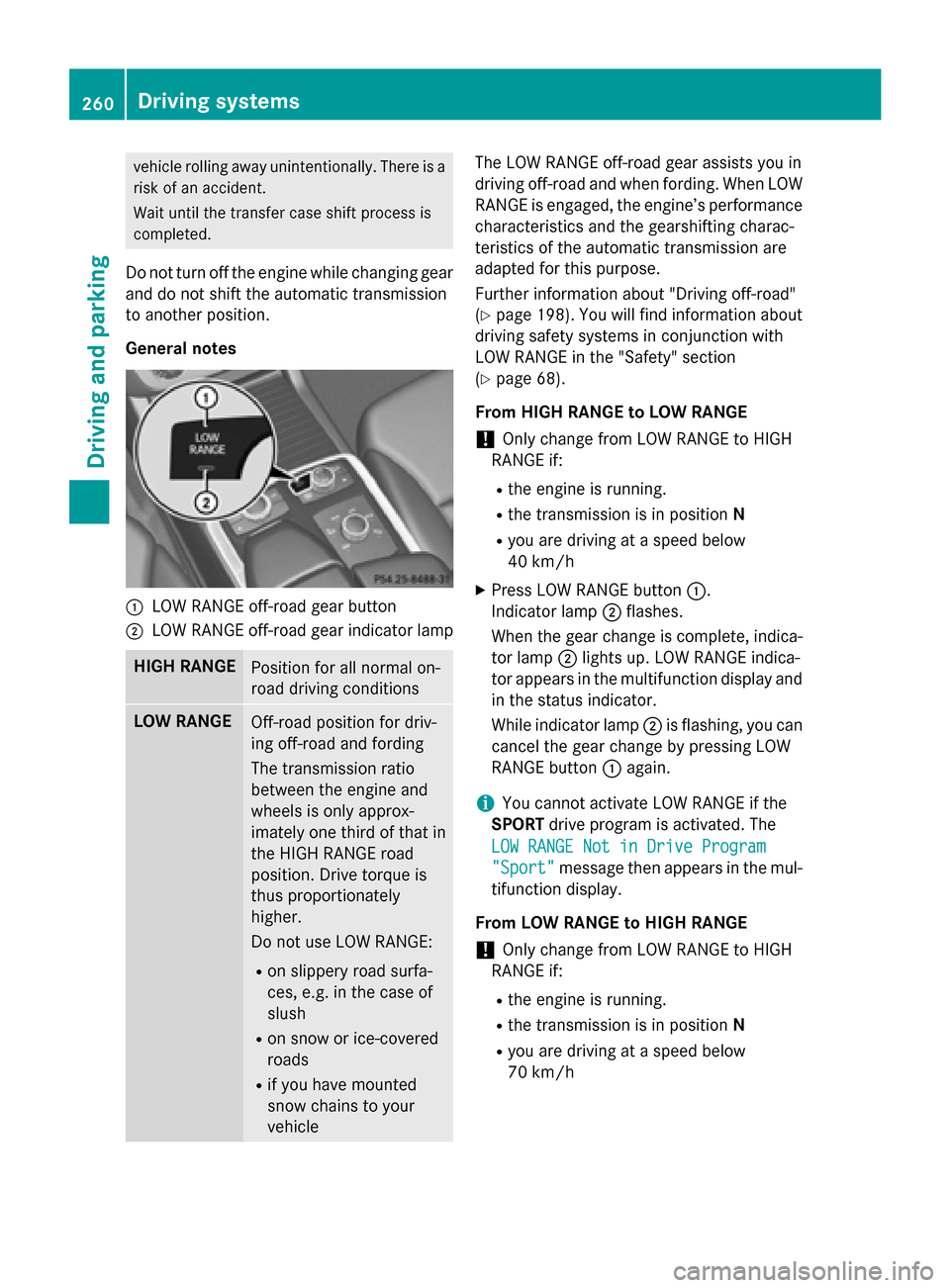
General notes
:LOW RANGE off-road gear button
;LOW RANGE off-road gear indicator lamp
HIGH RANGEPosition for all normal on-
road driving conditions
LOW RANGEOff-road position for driv-
ing off-road and fording
The transmission ratio
between the engine and
wheels is only approx-
imately one third of that in
the HIGH RANGE road
position. Drive torque is
thus proportionately
higher.
Do not use LOW RANGE:
Ron slippery road surfa-
ces, e.g. in the case of
slush
Ron snow or ice-covered
roads
Rif you have mounted
snow chains to your
vehicle
The LOW RANGE off-road gear assists you in
driving off-road and when fording. When LOW
RANGE is engaged, the engine’s performance
characteristics and the gearshifting charac-
teristics of the automatic transmission are
adapted for this purpose.
Further information about "Driving off-road"
(
Ypage 198). You will find information about
driving safety systems in conjunction with
LOW RANGE in the "Safety" section
(
Ypage 68).
From HIGH RANGE to LOW RANGE
!Only change from LOW RANGE to HIGH
RANGE if:
Rthe engine is running.
Rthe transmission is in position N
Ryou are driving at a speed below
40 km/h
XPress LOW RANGE button:.
Indicator lamp ;flashes.
When the gear change is complete, indica- tor lamp ;lights up. LOW RANGE indica-
tor appears in the multifunction display and
in the status indicator.
While indicator lamp ;is flashing, you can
cancel the gear change by pressing LOW
RANGE button :again.
iYou cannot activate LOW RANGE if the
SPORT drive program is activated. The
LOW RANGE Not in Drive Program
"Sport"message then appears in the mul-
tifunction display.
From LOW RANGE to HIGH RANGE
!Only change from LOW RANGE to HIGH
RANGE if:
Rthe engine is running.
Rthe transmission is in position N
Ryou are driving at a speed below
70 km/h
260Driving systems
Driving and parking
Page 264 of 462
Messages in the multifunction display
If a gear change process has not been successful, the following messages may be displayed in
the multifunction display:
Display messagesPossible causes/consequences andMSolutions
LOW RANGE Max.
Speed 40 km/h
You have been driving faster than 40 km/h. Additionally, the indi-
cator lamp on the button in the center console blinks.
XDrive more slowly to carry out the gear change process.
LOWRANGEShiftto
Position N Briefly
The transmission is in positionDand you are driving at below
40 km/h.
XShift the transmission to Nto complete the gear change proc-
ess.
LOWRANGEShifting
Canceled Please
Reactivate
The gear change process was not carried out.
XEnsure that all gear change conditions are fulfilled and carry out the gear change process again.
LOW RANGE Stop
ApplyParkingBrake
A warning tone also sounds. The gear change process has not been
completed. LOW RANGE is in the neutral position. There is no
connection between the engine and the drive wheels.
!Do not drive any further. You could otherwise damage the
vehicle's drive train.
XStop the vehicle. Take into account the road and traffic condi-
tions when doing this.
XDepress the electric parking brake (Ypage 190).
XCarry out the gear change process again.
If the gear change process has been carried out, the LOW
RANGE
Stop Apply Parking Brakemessage disappears.
ON&OFFROAD menu in the COMAND
display (vehicles with the ON&OFF-
ROAD package)You can display some driving systems, driving
programs and additional information in the
COMAND display.
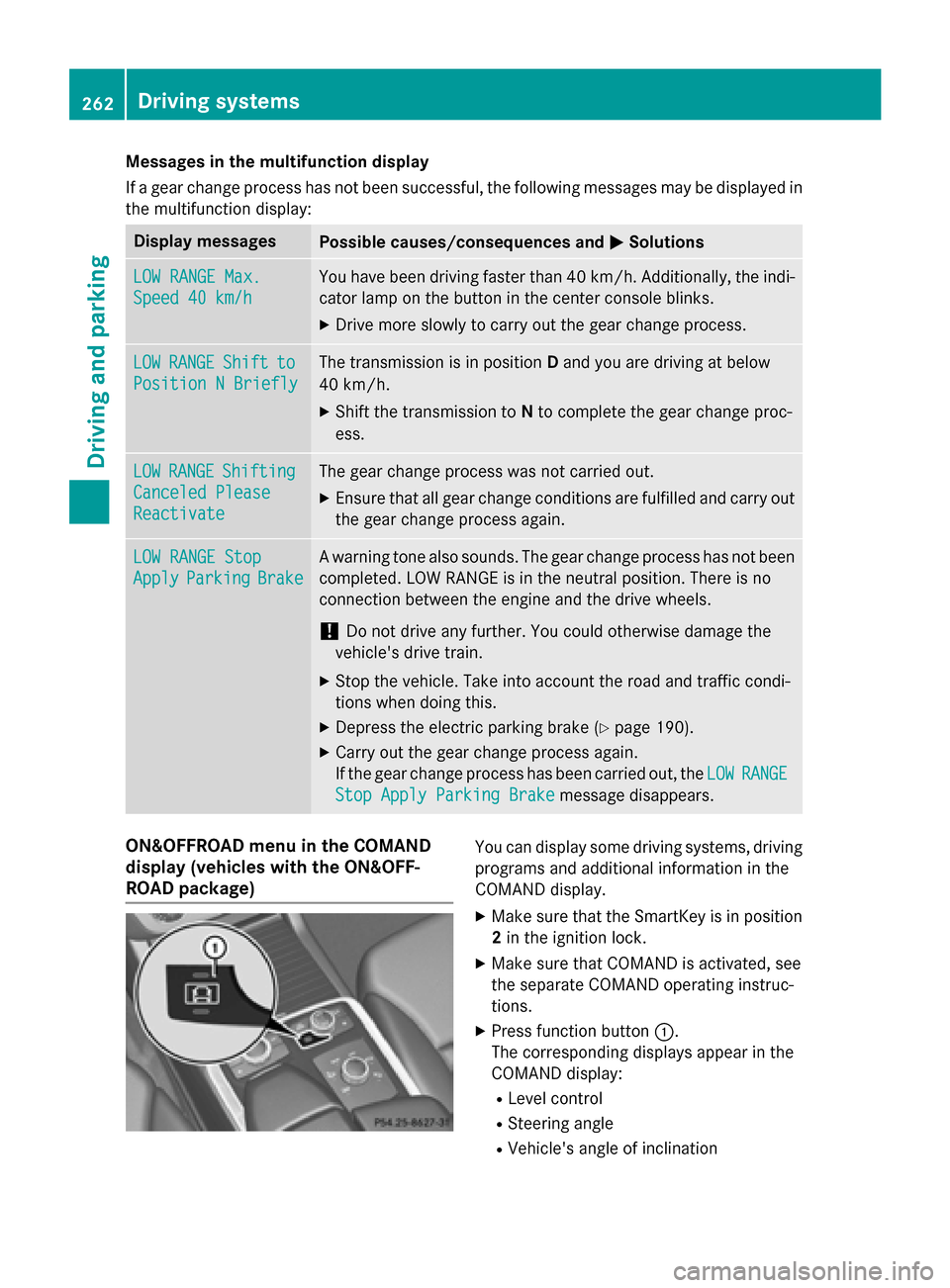
XMake sure that the SmartKey is in position
2in the ignition lock.
XMake sure that COMAND is activated, see
the separate COMAND operating instruc-
tions.
XPress function button :.
The corresponding displays appear in the
COMAND display:
RLevel control
RSteering angle
RVehicle's angle of inclination
262Driving systems
Driving and parking
Page 266 of 462
This could impair the handling characteris-
tics.
When towing a trailer, always adjust your
speed to the current road and weather con-
ditions. Do not exceed the maximum permis-
sible speed for your vehicle/trailer combina-
tion.
Notes on towing a trailer
General notes
The following models cannot be used to tow a
trailer:
RGLE 550 e 4MATIC Sport Utility Vehicle
RDo not exceed the legally prescribed max-
imum speed for vehicle/trailer combina-
tions in the relevant country.
This lowers the risk of an accident.
ROnly install an approved trailer coupling on
your vehicle.
Further information on availability and on
installation is available from any authorized Mercedes-Benz Center.
RThe bumpers of your vehicle are not suita-
ble for installing detachable trailer cou-
plings.
RDo not install hired trailer couplings or
other detachable trailer couplings on the
bumpers of your vehicle.
RIf you no longer need the ball coupling,
remove it from the ball coupling recess.
This will reduce the risk of damage to the
ball coupling.
When towing a trailer, set the tire pressure on the rear axle of the towing vehicle for the
maximum load. You will find the values in the
tire pressure table in the fuel filler flap of the vehicle (
Ypage 425).
Please note that when towing a trailer, the
following driving systems have limited avail-
ability or are not available at all:
RPARKTRONIC (Ypage 224)
RBlind Spot Assist (Ypage 244)
RActive Lane Keeping Assist (Ypage 251) You will find installing dimensions and loads
under "Technical data" (
Ypage 457).
Driving tips
Observe the information on ESP®trailer sta-
bilization (
Ypage 75) and on pulling away with
a trailer (
Ypage 168).
The maximum permissible speed for vehicle/
trailer combinations depends on the type of
trailer. Before beginning the journey, check
the trailer's documents to see what the max-
imum permissible speed is. Observe the
legally prescribed maximum speed in the rel-
evant country.
For certain Mercedes-Benz vehicles, the max-
imum permissible rear axle load is increased
when towing a trailer. See "Technical data" to
find out whether this applies to your vehicle
(
Ypage 458). If you utilize any of the added
maximum rear axle load when towing a trailer,
the vehicle/trailer combination may not
exceed a maximum speed of 60 mph
(100 km/h) for reasons concerning the oper-
ating permit. This also applies in countries in
which the permissible maximum speed for
vehicle/trailer combinations is above 60 mph
(100 km/h) .
When towing a trailer, your vehicle's handling characteristics will be different in comparison
with when driving without a trailer.
Use the left-hand steering wheel paddle
shifter to shift into a lower gear in good time
on long and steep downhill gradients.
This also applies if you have activated cruise
control or DISTRONIC PLUS.
This will use the braking effect of the engine,
so that less braking will be required to main-
tain the speed. This relieves the load on the
brake system and prevents the brakes from
overheating and wearing too quickly. If you
need additional braking, depress the brake
pedal repeatedly rather than continuously.
264Towing a trailer
Driving and parking
Page 269 of 462
so will result in a loss of function of the
brake systems of both the vehicle and the
trailer.
XShift the transmission to positionP.
XApply the vehicle's electric parking brake.
XStart the engine.
XVehicles with the AIRMATIC package:
select highway level.
XVehicles with ADS:set ADS toAUTOor
COMF .
XSwitch off the engine.
XClose the doors and tailgate.
XCouple up the trailer.
XEstablish the electrical connection
between the vehicle and the trailer.
XCheck that the trailer lighting system is
working.
iVehicles with the AIRMATIC package:
with a trailer attached, the vehicle will
always remain at highway level. When cou-
pling up a trailer, please observe the fol-
lowing:
RUnless highway level has been set man-
ually, the vehicle is automatically low-
ered to highway level. This is the case if a
speed of 5 mph (8 km/h) is reached.
RHigh-speed level is not available.
These restrictions apply to all accessories
powered through a connection to the trailer
power socket of your vehicle, e.g. a bicycle
carrier.
Observe the maximum permissible trailer
dimensions (width and length).
Most U.S. states and all Canadian provinces
require by law:
RSafety chains between the towing vehicle
and the trailer. The chains should be cross-
wound under the trailer drawbar. They must
be fastened to the vehicle's trailer cou-
pling, not to the bumper or the axle. Leave enough play in the chains to make
tight cornering possible.
RA separate brake system for certain types
of trailer.
RSafety switch for braked trailers. Check the
specific legal requirements applicable to
your state.
If the trailer becomes detached from the
towing vehicle, the safety switch applies
the trailer brakes.
Towing a trailer
There are numerous legal requirements con-
cerning the towing of a trailer, e.g. speed
restrictions. Make sure that your car/trailer
combination complies with the local regula-
tions:
Rin your place of residence
Rin the location to which you are driving
The police and local authorities can provide
reliable information.
Observe the following when towing a trailer:
RTo gain driving experience and to become
accustomed to the new handling charac-
teristics, you should practice the following
in a traffic-free location:
-cornering
-stopping
-backing up
RBefore driving, check:
-trailer tow hitch
-safety switch for braked trailers
-safety chains
-electrical connections
-lights
-wheels
RAdjust the exterior mirrors to provide an
unobstructed view of the rear section of the
trailer.
RIf the trailer has electronically controlled
brakes, pull away carefully. Brake manually
Towing a trailer267
Driving and parking
Z
Page 270 of 462
using the brake controller and check
whether the brakes function correctly.
RSecure any objects on the trailer to prevent
the cargo from slipping when the vehicle is
in motion.
RWhen you couple up a trailer, check at reg-
ular intervals that the load isfirmly secured.
If the trailer isequipped with trailer lights
and brakes, check the trailer to ensure that
these are working.
RBear inmind that the handlin g will be less
stable when towing a trailer than when driv-
ing without one. Avoid sudden steering
movements.
RThe vehicle/trailer combination isheavier,
accelerates more slowly, has a decreased
gradient cli mbing capability and a longer
braking distance.
It is more susceptible to side winds and
requires more careful steering.
RIf possible, do not brake suddenly, but
instead depress the brake pedal moder-
ate lyat first so that the trailer can activate
it s brakes. Then increase the pressure on
the brake pedal.
RIf the automat ictransmission repeatedly
shifts between gears on uphill or downhill
gradients, shift to a lower gear using the
left-hand steering wheel paddleshifter.
A lower gear and lower speed reduce the
risk of engine failure.
RWhen drivingdown hill, shift to a lower gear
to uti lize the engine's braking effect.
Avoid co ntin
uous brake application as this
may overheat the vehicle brakes and, if
instal led,the trailer brakes.
RIfthe coolant temperature increases dra-
matical ly while the air-cond itioning system
is swit ched on, switch off the air-condition-
ing system.
Coolant heat can also bedissipated by
opening the windows and switching the ventilation
blower and the interior temper-
ature to the highest leve l.
RWhen overtaking, pay particular attention
to the extended length of your vehicle/
trailer combination.
Due to the length of the vehicle/trailer
combination, you require additional road
spaceinrelation to the vehicle you are
overtaking before you can change back to
the original lane.
Decoupling a trailer
GWARNIN G
If you uncouple atrailer wit hth eoverrun
brak eengaged ,you could trap your han d
between th evehicl eand th etrailer drawbar.
Ther eis aris kof injury.
Do no tuncouple atrailer if th eoverrun brak e
is engaged .
GWARNING
Vehicles wit hleve lcontrol :
The vehicl eis lowered as soo nas you discon -
nect th etrailer cable. This could result in your
limb sor those of other people that are
between th evehicl ebody and tires or under-
neath th evehicl ebein gtrapped .Ther eis a
ris kof injury.
Mak esure that nobody is in th eimmediat e
vicinity of th ewhee lhousing sor under th e
vehicl ewhen you disconnect th etrailer cable.
!Do not disconnect a trailer with an
engaged overrun brake. Otherwise, your
vehicle could bedamaged bythe rebound-
ing of the overrun brake.
XSh ift the transmission to position P.
XApply the vehicle's electr icparking brake.
XStart the engine.
XClose the doors and tailgate.
XApply the trailer's parking brake.
268Towing a trailer
Driving and parking
Page 271 of 462
XDetach the trailer cable and decouple the
trailer.
XSwitch off the engine.
Permissible trailer loads and drawbar
loads
Weight specifications
Maximum permissible gross vehicle
weight rating
The gross trailer weight is calculated by add-
ing the weight of the trailer to the weight of
the load and equipment on the trailer.
You will find installing dimensions and loads
under "Technical data" (
Ypage 457).
Permissible noseweight
You will find installing dimensions and loads
under "Technical data" (
Ypage 457).
Loading a trailer
RWhen loading the trailer, make sure that
neither the permissible gross weight of the trailer nor the gross vehicle weight is
exceeded. The permissible gross vehicle
weight is indicated on the identification
plate on the B-pillar on the driver's side of
the vehicle.
You can find the maximum permissible val-
ues on the type plates of your vehicle and
the trailer. When calculating how much
weight the vehicle and trailer may carry,
pay attention to the respective lowest val-
ues.
RThe trailer drawbar load on the ball coupling
must be added to the rear axle load to avoidexceeding the permissible gross axle
weight. The permissible gross vehicle
weight is indicated on the identification
plate on the B-pillar on the driver's side of
the vehicle.
iMercedes-Benz recommends a trailer
load where the trailer drawbar noseweight accounts for 8% to 15% of the trailer's per-
missible gross weight.
iThe weight of additional accessories, pas-
sengers, and cargo reduces the permissi-
ble trailer load and drawbar load for your
vehicle.
Checking the vehicle and trailer weight
RTo check that the weights of the towing
vehicle and the trailer comply with the max-
imum permissible values, have the vehicle/
trailer combination (including the driver,
passengers, and cargo with a fully laden
trailer) weighed on a calibrated weigh-
bridge.
RCheck the gross axle weight rating of the
front and rear axles, the gross weight of the trailer and trailer drawbar load.
Removing the ball coupling
XRemove the spring cotter.
XRemove the bolt from the ball coupling
recess.
XRemove the ball coupling from the ball cou-
pling recess.
XClean the ball coupling if it is dirty.
XStow the ball coupling so that it cannot be
thrown around.
Observe the loading guidelines (
Ypage 340)
and the safety notes regarding stowage
spaces (
Ypage 341).
Information on cleaning and care of the trailer
tow hitch (
Ypage 381).
Trailer power supply
!
You can connect accessories with a max-
imum power consumption of 240 W to the
permanent power supply.
You must not charge a trailer battery using
the power supply.
The trailer socket of your vehicle is equipped
at the factory with a permanent power supply.
Towing a trailer269
Driving an d parking
Z
Page 275 of 462
Tachometer
!
Do not drive in the overrevving range, as
this could damage the engine.
The red band in the tachometer indicates the
engine's overrevving range.
The fuel supply is interrupted to protect the
engine when the red band is reached.
Outside temperature display
You should pay special attention to road con-
ditions when temperatures are around freez-
ing point.
Bear in mind that the outside temperature
display indicates the temperature measured
and does not record the road temperature.
The outside temperature display is in the mul-
tifunction display (
Ypage 275).
Changes in the outside temperature are dis-
played after a short delay.
Coolant temperature display
GWARNING
Opening the hood when the engine is over-
heated or when there is a fire in the engine
compartment could expose you to hot gases
or other service products. There is a risk of
injury.
Let an overheated engine cool down before
opening the hood. If there is a fire in the
engine compartment, keep the hood closed
and contact the fire department.
!A display message is shown if the coolant
temperature is too high.
If the coolant temperature is over 248 ‡
(120 †), do not continue driving. The
engine will otherwise be damaged.
The coolant temperature gauge is in the
instrument cluster on the right-hand side
(
Ypage 35). Under normal operating conditions and with
the specified coolant level, the coolant tem-
perature may rise to 248 ‡ (120 †).
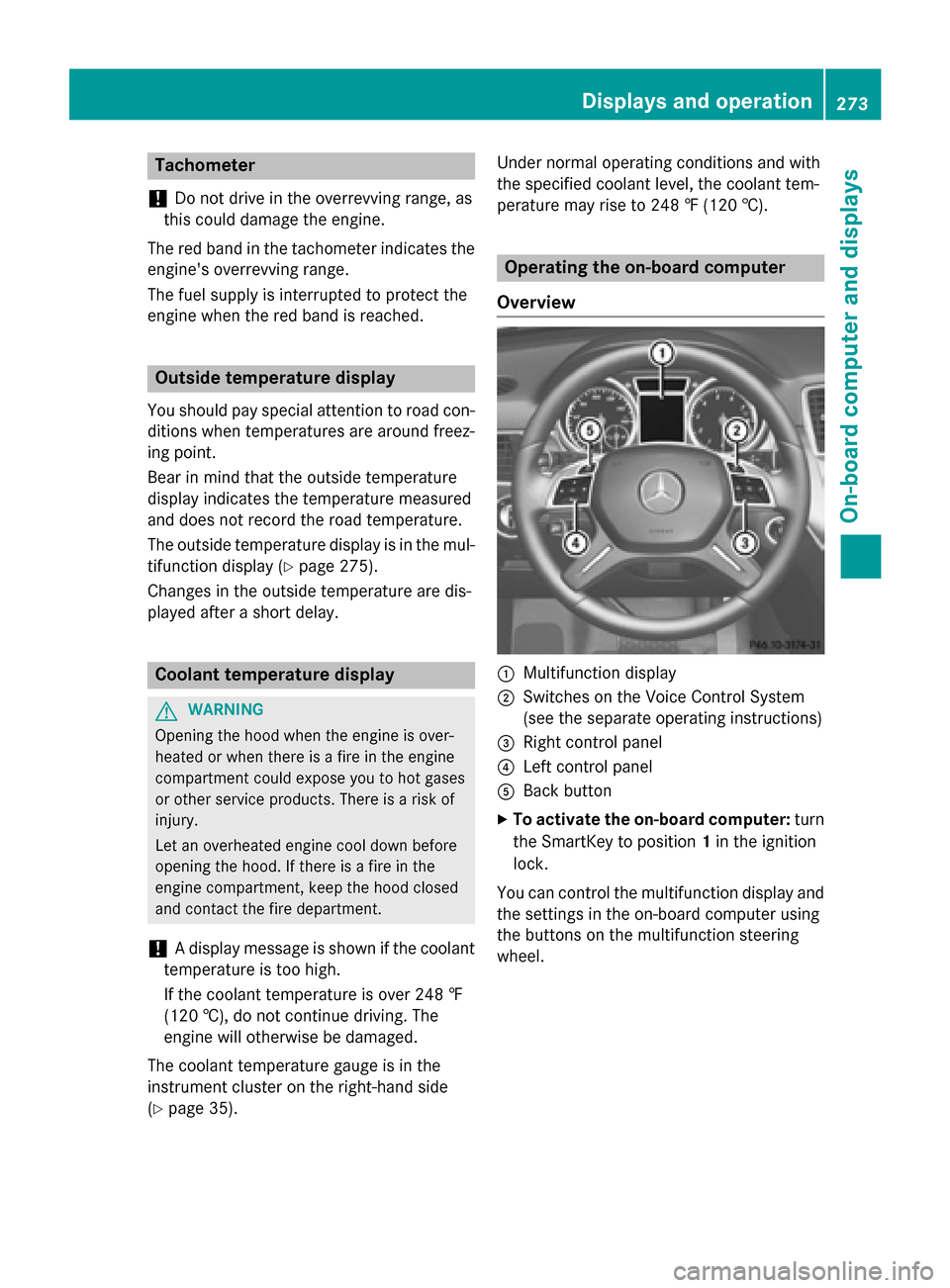
Operating the on-board computer
Overview
:Multifunction display
;Switches on the Voice Control System
(see the separate operating instructions)
=Right control panel
?Left control panel
ABack button
XTo activate the on-board computer: turn
the SmartKey to position 1in the ignition
lock.
You can control the multifunction display and
the settings in the on-board computer using
the buttons on the multifunction steering
wheel.
Displays an doperation273
On-boa rd computer and displays
Z