engine MERCEDES-BENZ GL-Class 2016 X166 Owner's Manual
[x] Cancel search | Manufacturer: MERCEDES-BENZ, Model Year: 2016, Model line: GL-Class, Model: MERCEDES-BENZ GL-Class 2016 X166Pages: 462, PDF Size: 10.44 MB
Page 337 of 462
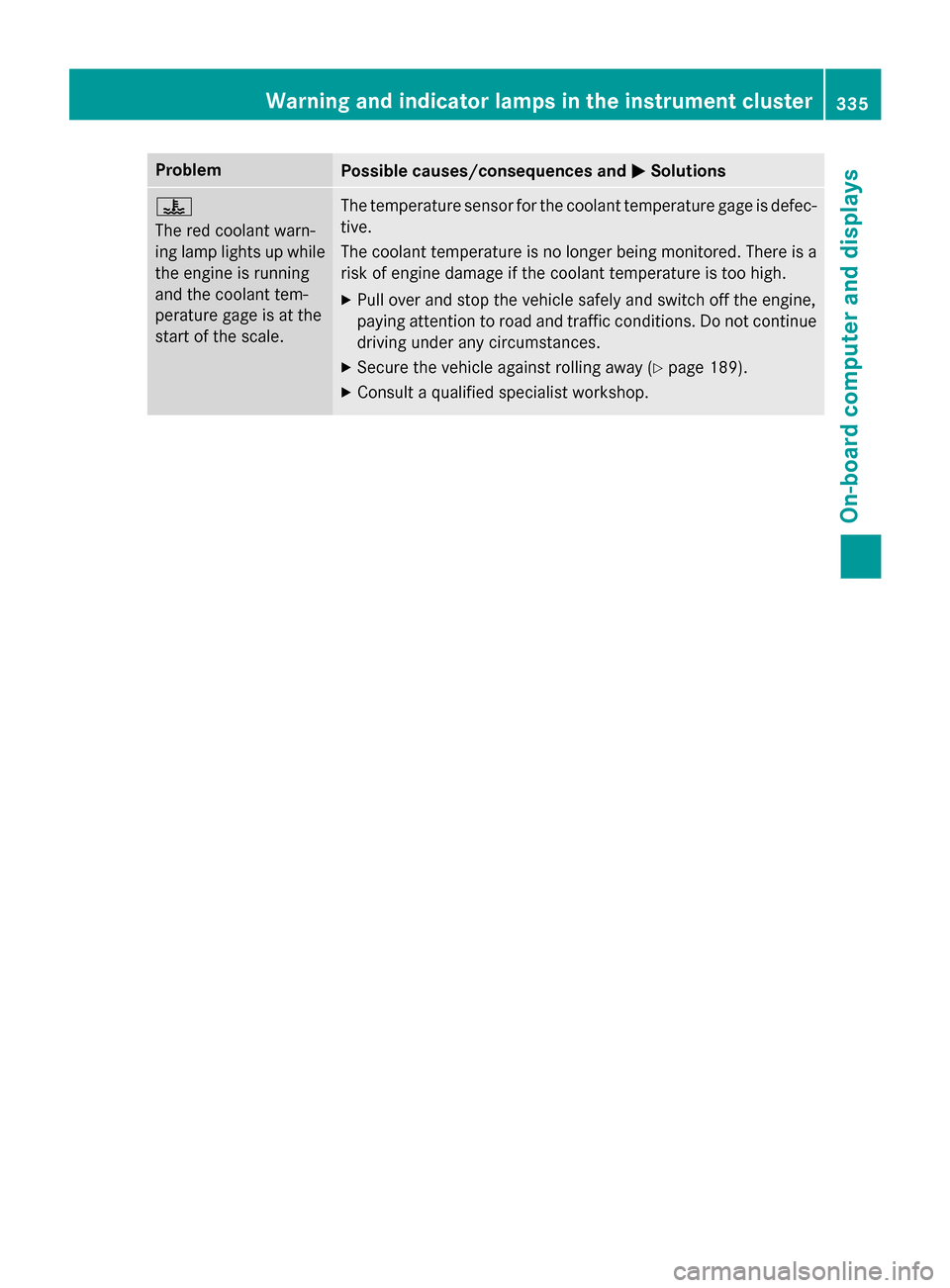
ProblemPossible causes/consequences andMSolutions
?
The red coolant warn-
ing lamp lights up while
the engine is running
and the coolant tem-
perature gage is at the
start of the scale.The temperature sensor for the coolant temperature gage is defec-
tive.
The coolant temperature is no longer being monitored. There is a
risk of engine damage if the coolant temperature is too high.
XPull over and stop the vehicle safely and switch off the engine,
paying attention to road and traffic conditions. Do not continue
driving under any circumstances.
XSecure the vehicle against rolling away (Ypage 189).
XConsult a qualified specialist workshop.
Warning and indicator lamps in the instrument cluster335
On-board computer and displays
Z
Page 338 of 462
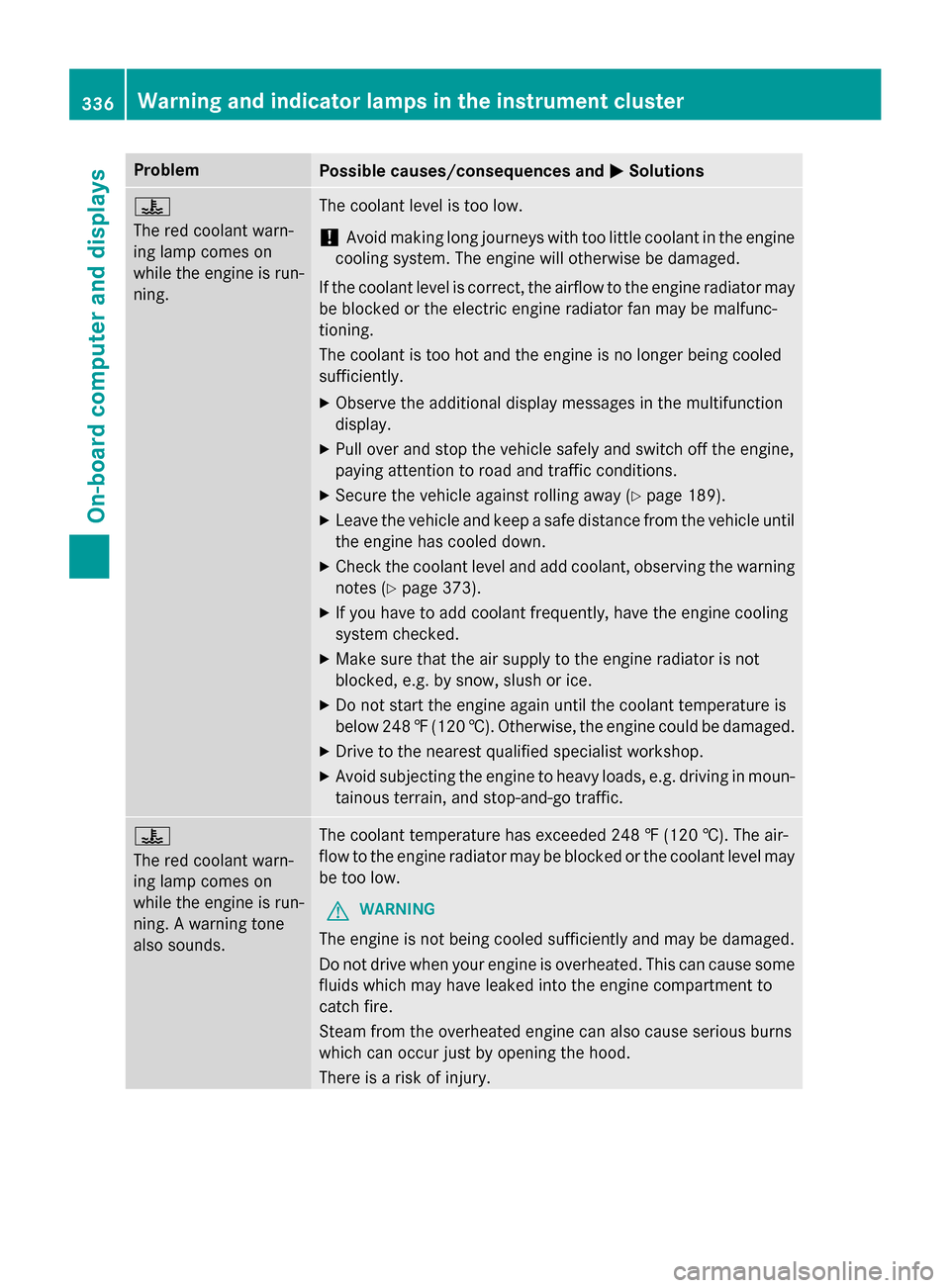
ProblemPossible causes/consequences andMSolutions
?
The red coolant warn-
ing lamp comes on
while the engine is run-
ning.The coolant level is too low.
!Avoid making long journeys with too little coolant in the engine
cooling system. The engine will otherwise be damaged.
If the coolant level is correct, the airflow to the engine radiator may
be blocked or the electric engine radiator fan may be malfunc-
tioning.
The coolant is too hot and the engine is no longer being cooled
sufficiently.
XObserve the additional display messages in the multifunction
display.
XPull over and stop the vehicle safely and switch off the engine,
paying attention to road and traffic conditions.
XSecure the vehicle against rolling away (Ypage 189).
XLeave the vehicle and keep a safe distance from the vehicle until
the engine has cooled down.
XCheck the coolant level and add coolant, observing the warning
notes (
Ypage 373).
XIf you have to add coolant frequently, have the engine cooling
system checked.
XMake sure that the air supply to the engine radiator is not
blocked, e.g. by snow, slush or ice.
XDo not start the engine again until the coolant temperature is
below 248 ‡(120 †). Otherwise, the engine could be damaged.
XDrive to the nearest qualified specialist workshop.
XAvoid subjecting the engine to heavy loads, e.g. driving in moun-
tainous terrain, and stop-and-go traffic.
?
The red coolant warn-
ing lamp comes on
while the engine is run-
ning. A warning tone
also sounds.The coolant temperature has exceeded 248 ‡ (120 †). The air-
flow to the engine radiator may be blocked or the coolant level may
be too low.
GWARNING
The engine is not being cooled sufficiently and may be damaged.
Do not drive when your engine is overheated. This can cause some
fluids which may have leaked into the engine compartment to
catch fire.
Steam from the overheated engine can also cause serious burns
which can occur just by opening the hood.
There is a risk of injury.
336Warning and indicator lamps in the instrument cluster
On-board computer and displays
Page 339 of 462
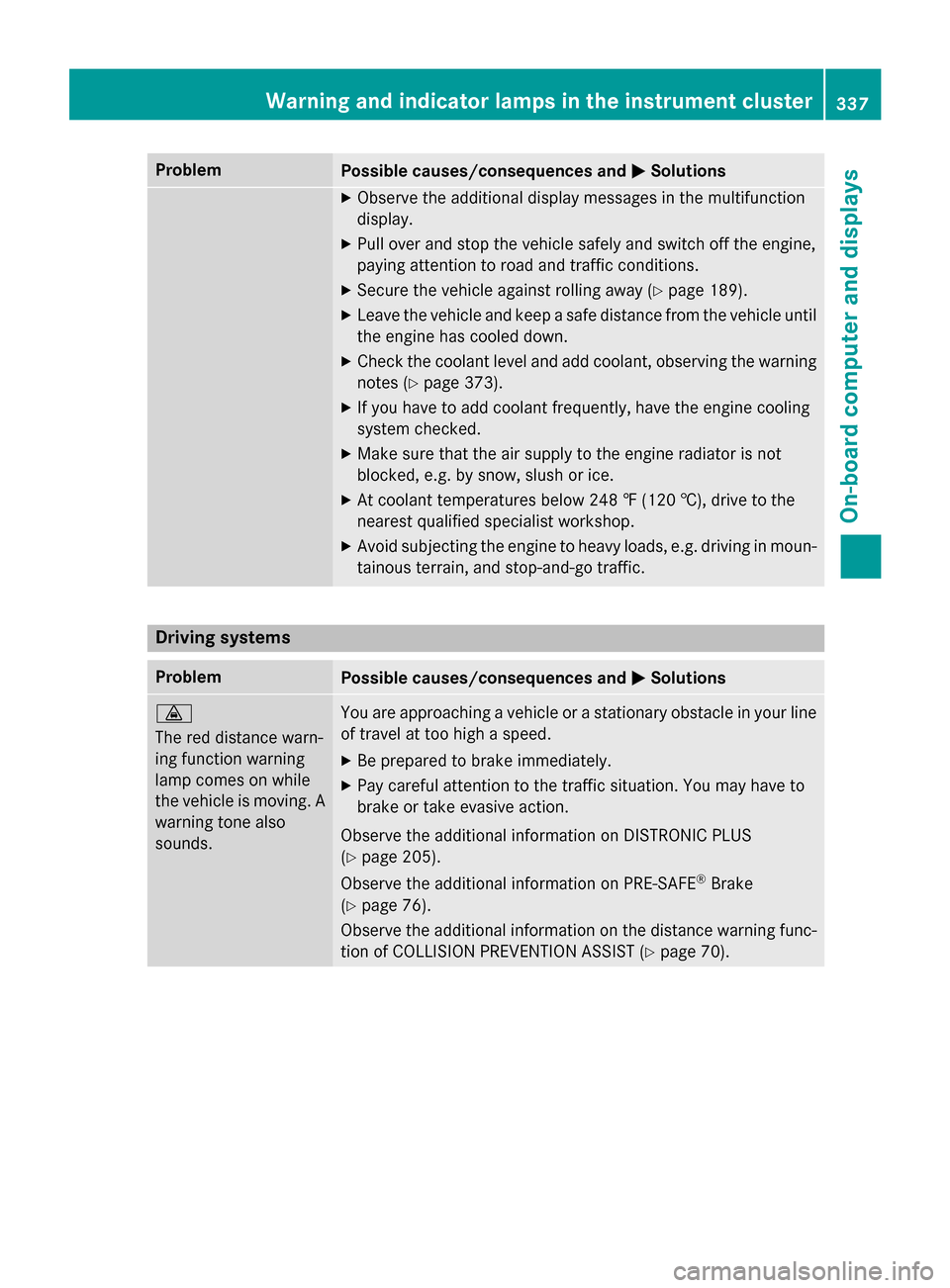
ProblemPossible causes/consequences andMSolutions
XObserve the additional display messages in the multifunction
display.
XPull over and stop the vehicle safely and switch off the engine,
paying attention to road and traffic conditions.
XSecure the vehicle against rolling away (Ypage 189).
XLeave the vehicle and keep a safe distance from the vehicle until
the engine has cooled down.
XCheck the coolant level and add coolant, observing the warning
notes (
Ypage 373).
XIf you have to add coolant frequently, have the engine cooling
system checked.
XMake sure that the air supply to the engine radiator is not
blocked, e.g. by snow, slush or ice.
XAt coolant temperatures below 248 ‡ (120 †), drive to the
nearest qualified specialist workshop.
XAvoid subjecting the engine to heavy loads, e.g. driving in moun-
tainous terrain, and stop-and-go traffic.
Driving systems
ProblemPossible causes/consequences and MSolutions
·
The red distance warn-
ing function warning
lamp comes on while
the vehicle is moving. A
warning tone also
sounds.You are approaching a vehicle or a stationary obstacle in your line
of travel at too high a speed.
XBe prepared to brake immediately.
XPay careful attention to the traffic situation. You may have to
brake or take evasive action.
Observe the additional information on DISTRONIC PLUS
(
Ypage 205).
Observe the additional information on PRE‑SAFE
®Brake
(
Ypage 76).
Observe the additional information on the distance warning func-
tion of COLLISION PREVENTION ASSIST (
Ypage 70).
Warning and indicator lamps in the instrument cluster337
On-board computer and displays
Z
Page 342 of 462
Useful information
i
This Operator's Manual describes all
models and all standard and optional equip-
ment of your vehicle available at the time of
publication of the Operator's Manual.
Country-specific differences are possible.
Please note that your vehicle may not be
equipped with all features described. This
also applies to safety-related systems and
functions.
iRead the information on qualified special-
ist workshops (
Ypage 29).
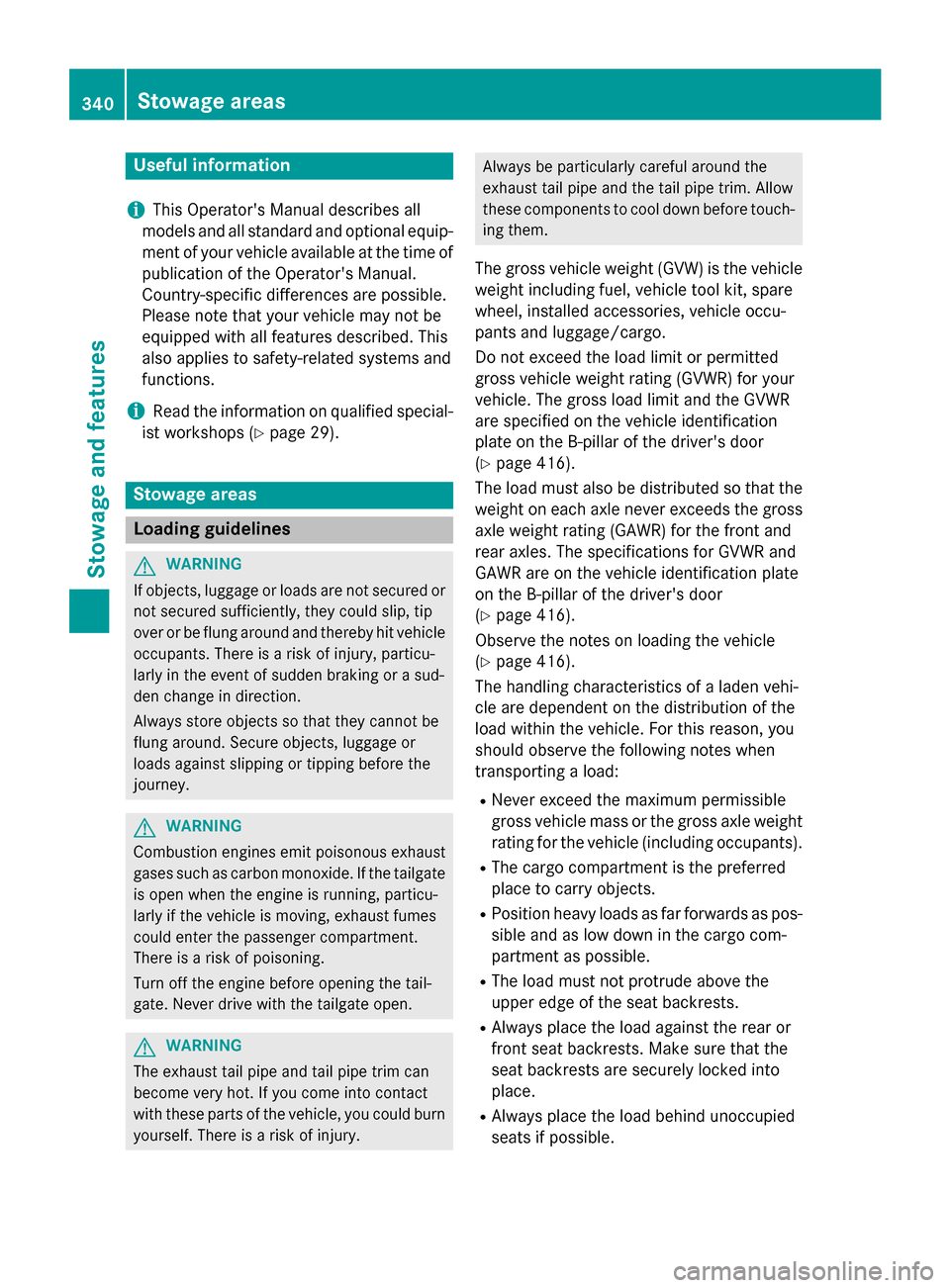
Stowage areas
Loading guidelines
GWARNING
If objects, luggage or loads are not secured or
not secured sufficiently, they could slip, tip
over or be flung around and thereby hit vehicle
occupants. There is a risk of injury, particu-
larly in the event of sudden braking or a sud-
den change in direction.
Always store objects so that they cannot be
flung around. Secure objects, luggage or
loads against slipping or tipping before the
journey.
GWARNING
Combustion engines emit poisonous exhaust
gases such as carbon monoxide. If the tailgate
is open when the engine is running, particu-
larly if the vehicle is moving, exhaust fumes
could enter the passenger compartment.
There is a risk of poisoning.
Turn off the engine before opening the tail-
gate. Never drive with the tailgate open.
GWARNING
The exhaust tail pipe and tail pipe trim can
become very hot. If you come into contact
with these parts of the vehicle, you could burn
yourself. There is a risk of injury.
Always be particularly careful around the
exhaust tail pipe and the tail pipe trim. Allow
these components to cool down before touch-
ing them.
The gross vehicle weight (GVW) is the vehicle
weight including fuel, vehicle tool kit, spare
wheel, installed accessories, vehicle occu-
pants and luggage/cargo.
Do not exceed the load limit or permitted
gross vehicle weight rating (GVWR) for your
vehicle. The gross load limit and the GVWR
are specified on the vehicle identification
plate on the B-pillar of the driver's door
(
Ypage 416).
The load must also be distributed so that the
weight on each axle never exceeds the gross
axle weight rating (GAWR) for the front and
rear axles. The specifications for GVWR and
GAWR are on the vehicle identification plate
on the B-pillar of the driver's door
(
Ypage 416).
Observe the notes on loading the vehicle
(
Ypage 416).
The handling characteristics of a laden vehi-
cle are dependent on the distribution of the
load within the vehicle. For this reason, you
should observe the following notes when
transporting a load:
RNever exceed the maximum permissible
gross vehicle mass or the gross axle weight
rating for the vehicle (including occupants).
RThe cargo compartment is the preferred
place to carry objects.
RPosition heavy loads as far forwards as pos-
sible and as low down in the cargo com-
partment as possible.
RThe load must not protrude above the
upper edge of the seat backrests.
RAlways place the load against the rear or
front seat backrests. Make sure that the
seat backrests are securely locked into
place.
RAlways place the load behind unoccupied
seats if possible.
340Stowage areas
Stowage and features
Page 355 of 462
XTurn the SmartKey to position2in the igni-
tion lock (
Ypage 165).
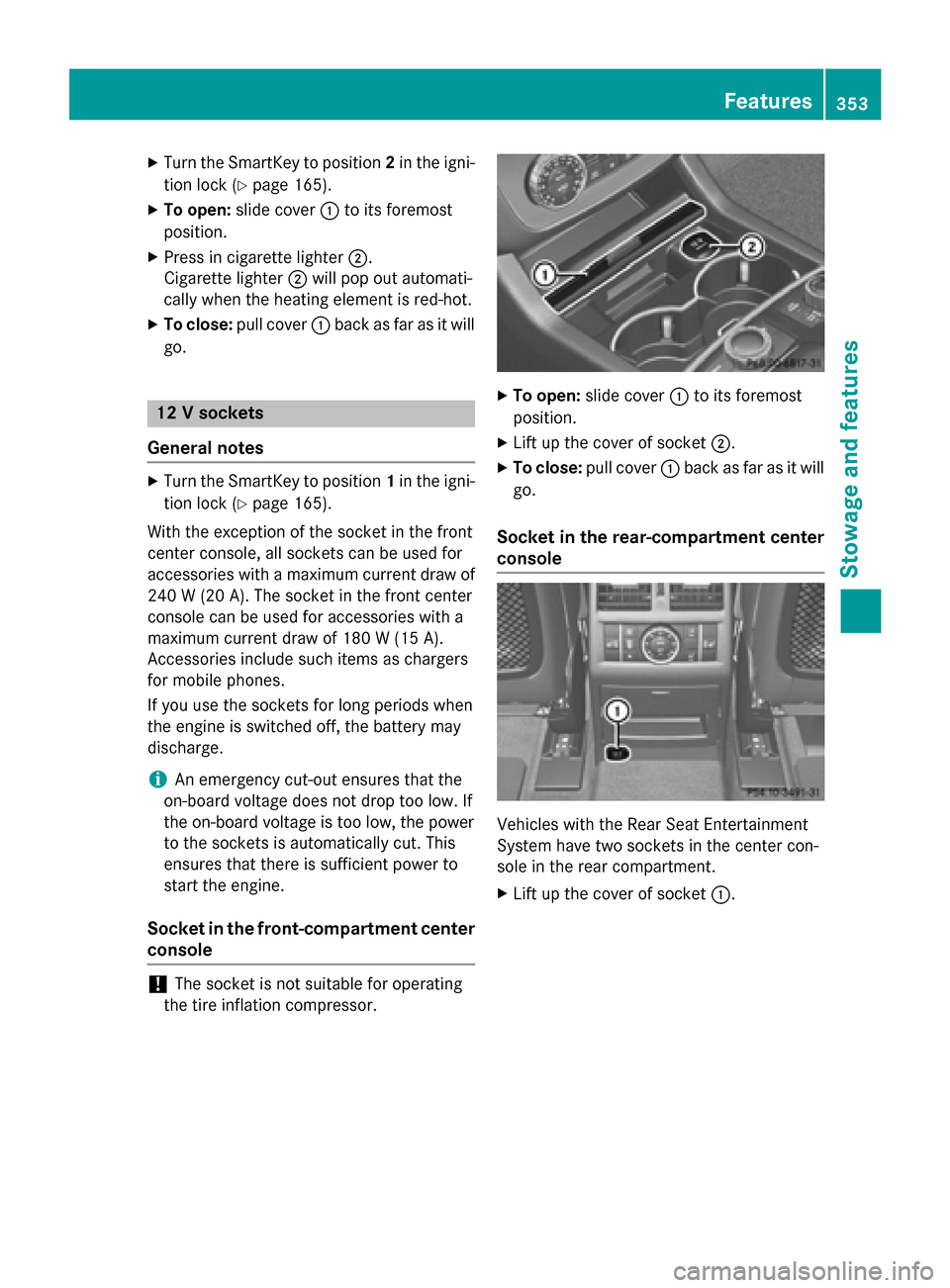
XTo open: slide cover :to its foremost
position.
XPress in cigarette lighter ;.
Cigarette lighter ;will pop out automati-
cally when the heating element is red-hot.
XTo close: pull cover :back as far as it will
go.
12 V sockets
General notes
XTurn the SmartKey to position 1in the igni-
tion lock (
Ypage 165).
With the exception of the socket in the front
center console, all sockets can be used for
accessories with a maximum current draw of
240 W (20 A). The socket in the front center
console can be used for accessories with a
maximum current draw of 180 W (15 A).
Accessories include such items as chargers
for mobile phones.
If you use the sockets for long periods when
the engine is switched off, the battery may
discharge.
iAn emergency cut-out ensures that the
on-board voltage does not drop too low. If
the on-board voltage is too low, the power
to the sockets is automatically cut. This
ensures that there is sufficient power to
start the engine.
Socket in the front-compartment center
console
!The socket is not suitable for operating
the tire inflation compressor.
XTo open: slide cover :to its foremost
position.
XLift up the cover of socket ;.
XTo close:pull cover :back as far as it will
go.
Socket in the rear-compartment center
console
Vehicles with the Rear Seat Entertainment
System have two sockets in the center con-
sole in the rear compartment.
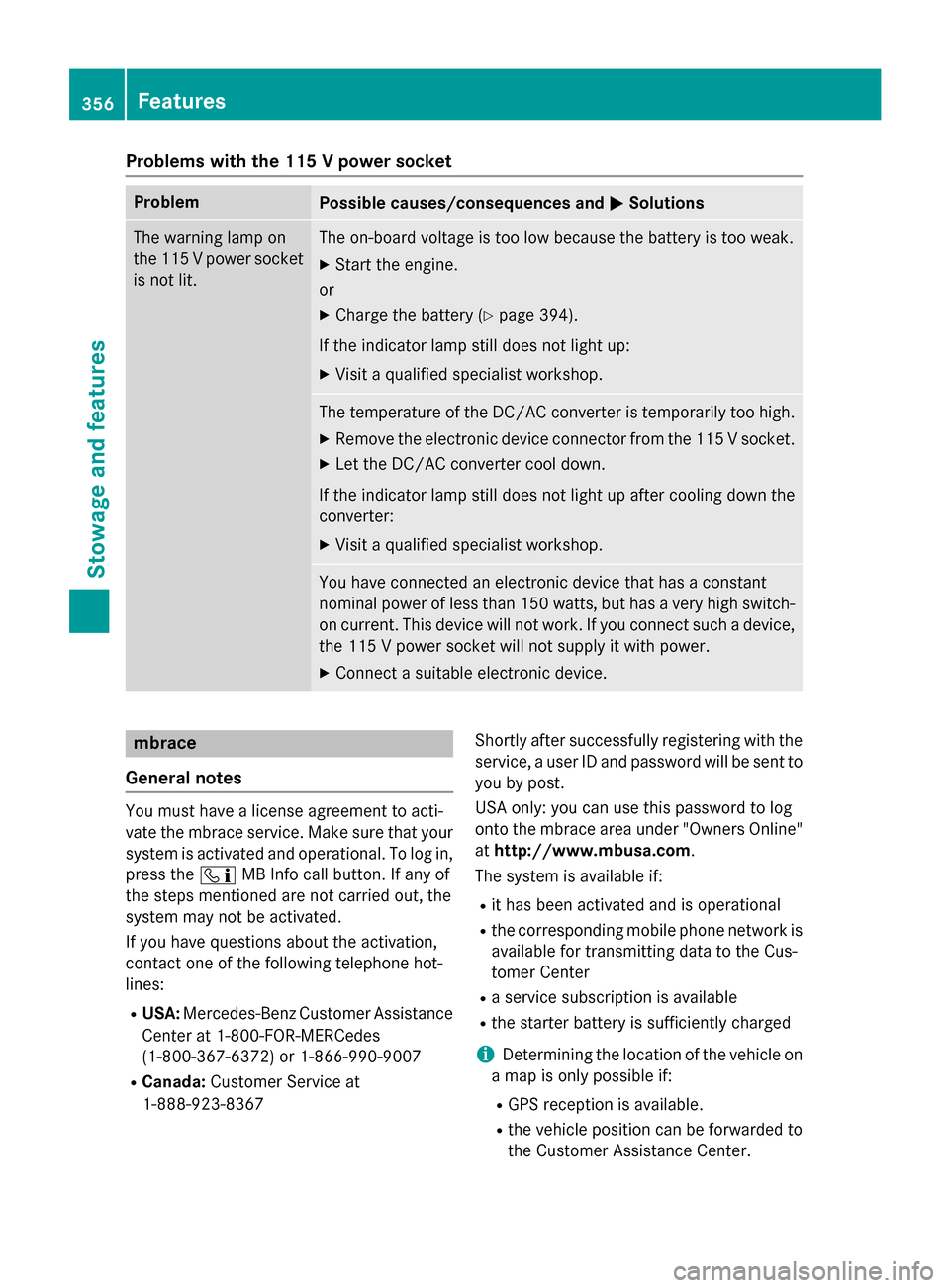
XLift up the cover of socket :.
Features353
Stowage and features
Z
Page 358 of 462
Problems with the 115 V power socket
ProblemPossible causes/consequences andMSolutions
The warning lamp on
the 115Vpower socket
is not lit.The on-board voltage is too low because the battery is too weak.
XStart the engine.
or
XCharge the battery (Ypage 394).
If the indicator lamp still does not light up:
XVisit a qualified specialist workshop.
The temperature of the DC/AC converter is temporarily too high.
XRemove the electronic device connector from the 115 V socket.
XLet the DC/AC converter cool down.
If the indicator lamp still does not light up after cooling down the
converter:
XVisit a qualified specialist workshop.
You have connected an electronic device that has a constant
nominal power of less than 150 watts, but has a very high switch-
on current. This device will not work. If you connect such a device, the 115 V power socket will not supply it with power.
XConnect a suitable electronic device.
mbrace
General notes
You must have a license agreement to acti-
vate the mbrace service. Make sure that your system is activated and operational. To log in,
press the ïMB Info call button. If any of
the steps mentioned are not carried out, the
system may not be activated.
If you have questions about the activation,
contact one of the following telephone hot-
lines:
RUSA: Mercedes-Benz Customer Assistance
Center at 1-800-FOR-MERCedes
(1-800-367-6372) or 1-866-990-9007
RCanada: Customer Service at
1-888-923-8367 Shortly after successfully registering with the
service, a user ID and password will be sent to
you by post.
USA only: you can use this password to log
onto the mbrace area under "Owners Online"
at
http://www.mbusa.com.
The system is available if:
Rit has been activated and is operational
Rthe corresponding mobile phone network is available for transmitting data to the Cus-
tomer Center
Ra service subscription is available
Rthe starter battery is sufficiently charged
iDetermining the location of the vehicle on
a map is only possible if:
RGPS reception is available.
Rthe vehicle position can be forwarded to
the Customer Assistance Center.
356Features
Stowage and features
Page 366 of 462
message in the COMAND display. The route is
saved to the SD memory card.
XTo start route guidance:selectYes.
An overview of the route is shown in the
display.
iIf you select No, the saved route can be
called up later via the navigation menu.
XSelect Start.
Route guidance is started.
iDownloaded and saved data can be called
up again in COMAND.
You can find further information in the sep-
arate COMAND Operating Instructions.
Speed alert
You can define the upper speed limit, which
must not be exceeded by the vehicle.
If this selected speed is exceeded by the vehi-
cle, a message will be sent to the Customer
Assistance Center. The Customer Assistance Center then forwards this information to you.
You can select the way in which you receive
this information beforehand. Possible options
include text message, e-mail or an automated call.
The data you receive contains the following
information:
Rthe location where the speed limit was
exceeded
Rthe time at which the speed limit was
exceeded
Rthe selected speed limit which was excee-
ded
Geo fencing
Geo fencing allows you to select areas which
the vehicle should not enter or leave. You will
be informed if the vehicle crosses the boun-
daries of the selected areas. You can select
the way in which you receive this information beforehand. Possible options include text
message, e-mail or an automated call. The area can be determined as either a circle
or a polygon with a maximum of ten corners.
You can specify up to ten areas simultane-
ously. Different settings are possible for each area.
USA only: these settings can be called up
under "Owners Online" at http://
www.mbusa.com.
Alternatively, you can trigger an MB Info call
and inform the customer service representa-
tive that you wish to activate geo fencing.
Currently inactive areas can be activated by
text message.
Triggering the vehicle alarm
With this function, you can trigger the vehi-
cle's panic alarm via text message. An alarm
sounds and the exterior lighting flashes.
Depending on the setting, the panic alarm
lasts five or ten seconds. Afterwards, the
alarm switches off.
Garage door opener
General notes
The HomeLink®garage door opener integra-
ted in the rear-view mirror allows you to oper-
ate up to three different door and gate sys-
tems.
Use the integrated garage door opener only
on garage doors that:
Rhave safety stop and reverse features and
Rmeet current U.S. federal safety standards
Once programed, the integrated garage door
opener in the rear-view mirror will assume the
function of the garage door system's remote
control. Please also read the operating
instructions for the garage door system.
When programming a garage door opener,
park the vehicle outside the garage. Do not
run the engine while programming.
Certain garage door drives are incompatible
with the integrated garage door opener. If you
have difficulty programing the integrated
364Features
Stowage and features
Page 367 of 462
garage door opener, contact an authorized
Mercedes-Benz Center.
Alternatively, you can call the following tele-
phone assistance services:
RUSA:Mercedes-Benz Customer Assistance
Center at 1-800-FOR-MERCedes
RCanada: Customer Service at
1-800-387-0100
RHomeLink®hotline 1-800-355-3515 (free
of charge)
More information on HomeLink
®and/or
compatible products is also available online
at http://www.homelink.com.
Notes on the declaration of conformity
(
Ypage 28).
USA: FCC ID: CB2HMIHL4
Canada: IC: 279B-HMIHL4
Important safety notes
GWARNING
When you operate or program the garage door
with the integrated garage door opener, per-
sons in the range of movement of the garage
door can become trapped or struck by the
garage door. There is a risk of injury.
When using the integrated garage door
opener, always make sure that nobody is
within the range of movement of the garage
door.
GWARNING
Combustion engines emit poisonous exhaust
gases such as carbon monoxide. Inhaling
these exhaust gases leads to poisoning. There
is a risk of fatal injury. Therefore never leave
the engine running in enclosed spaces with-
out sufficient ventilation.
Programing
Programming buttons
Pay attention to the "Important safety notes"
(
Ypage 365).
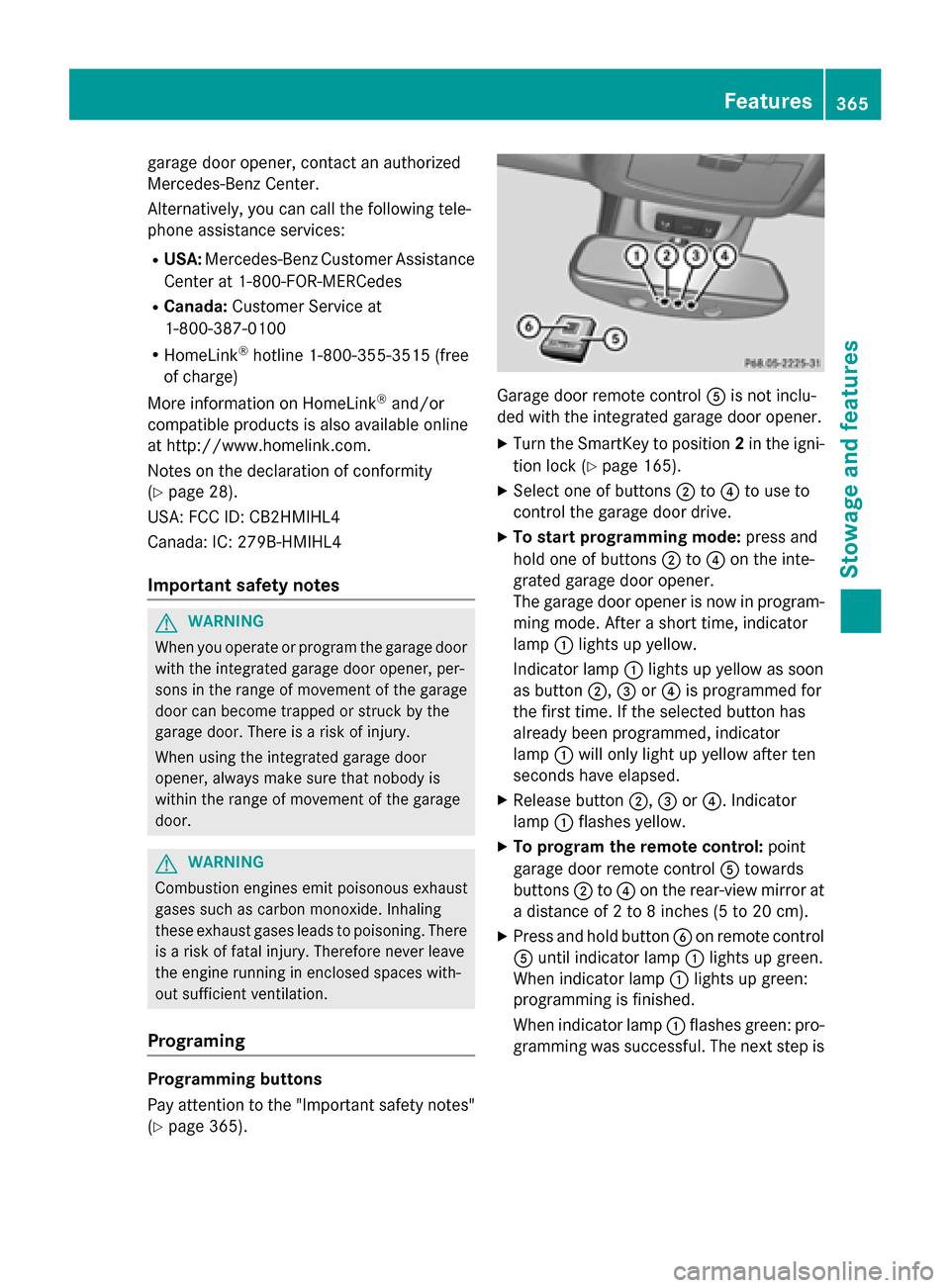
Garage door remote control Ais not inclu-
ded with the integrated garage door opener.
XTurn the SmartKey to position 2in the igni-
tion lock (
Ypage 165).
XSelect one of buttons ;to? to use to
control the garage door drive.
XTo start programming mode: press and
hold one of buttons ;to? on the inte-
grated garage door opener.
The garage door opener is now in program-
ming mode. After a short time, indicator
lamp :lights up yellow.
Indicator lamp :lights up yellow as soon
as button ;,=or? is programmed for
the first time. If the selected button has
already been programmed, indicator
lamp :will only light up yellow after ten
seconds have elapsed.
XRelease button ;,=or?. Indicator
lamp :flashes yellow.
XTo program the remote control: point
garage door remote control Atowards
buttons ;to? on the rear-view mirror at
a distance of 2 to 8 inches (5 to 20 cm).
XPress and hold button Bon remote control
A until indicator lamp :lights up green.
When indicator lamp :lights up green:
programming is finished.
When indicator lamp :flashes green: pro-
gramming was successful. The next step is
Features365
Stowage and features
Z
Page 371 of 462
Useful information............................370
Engine compartment ........................370
ASSYST PLUS .................................... 374
Care .................................................... 375
369
Maintenance and care
Page 372 of 462
Useful information
i
This Operator's Manual describes all
models and all standard and optional equip-
ment of your vehicle available at the time of
publication of the Operator's Manual.
Country-specific differences are possible.
Please note that your vehicle may not be
equipped with all features described. This
also applies to safety-related systems and
functions.
iRead the information on qualified special-
ist workshops (
Ypage 29).
Engine compartment
Hood
Important safety notes
GWARNING
If the hood is unlatched, it may open up when the vehicle is in motion and block your view.
There is a risk of an accident.
Never unlatch the hood while driving. Before
every trip, ensure that the hood is locked.
GWARNING
When opening and closing the hood, it may
suddenly fall into the closed position. There is a risk of injury to persons within range of
movement of the hood.
Open and close the hood only when no one is
within its range of movement.
GWARNING
Opening the hood when the engine is over-
heated or when there is a fire in the engine
compartment could expose you to hot gases
or other service products. There is a risk of
injury.
Let an overheated engine cool down before
opening the hood. If there is a fire in the
engine compartment, keep the hood closed
and contact the fire department.
GWARNING
The engine compartment contains moving
components. Certain components, such as
the radiator fan, may continue to run or start
again suddenly when the ignition is off. There is a risk of injury.
If you need to do any work inside the engine
compartment:
Rswitch off the ignition
Rnever reach into the area where there is a
risk of danger from moving components,
such as the fan rotation area
Rremove jewelry and watches
Rkeep items of clothing and hair, for exam-
ple, away from moving parts
GWARNING
The ignition system and the fuel injection sys-
tem work under high voltage. If you touch
components which are under voltage, you
could get an electric shock. There is a risk of
injury.
Never touch components of the ignition sys-
tem or fuel injection system when the ignition
is switched on.
Opening the hood
GWARNING
Certain components in the engine compart-
ment, such as the engine, radiator and parts
of the exhaust system, can become very hot.
Working in the engine compartment poses a
risk of injury.
Where possible, let the engine cool down and touch only the components described in the
following.
GWARNING
When the hood is open and the windshield
wipers are set in motion, you can be injured by
the wiper linkage. There is a risk of injury.
Always switch off the windshield wipers and
the ignition before opening the hood.
370Engine compartment
Maintenance and care