display MERCEDES-BENZ GL SUV 2012 Owners Manual
[x] Cancel search | Manufacturer: MERCEDES-BENZ, Model Year: 2012, Model line: GL SUV, Model: MERCEDES-BENZ GL SUV 2012Pages: 441, PDF Size: 10.66 MB
Page 259 of 441
Mes
sages in the multifunction display
If ag ear change process has not been successful, the following messages may be displayed
in the multifunction display: Display messages Possibl
ecauses/ consequence sand M Solutions
LO
WR ANGE max. speed 40 km/h Yo
uh ave been driving faster than 40 km/h .Additionally, the indi-
cato rlamp on the button in the centre console blinks.
X Driv emore slowly to carry out the gear chan ge process. LOW RANGE Shift to
position
Nbriefly Th
et ransmission is in position Dand yo uare driving at below
40 km/h.
X Shift th etransmission to Nto comple tethe gear change proc-
ess. LOW RANGE Shifting
cancelled Please
reactivate The gear change process was not carried out.
X
Maintain all gear change conditions and carry out the gear
change process again. LOW RANGE Stop
Apply parking brake Aw
arning ton ealso sounds. The gear chang eprocess has not been
comple ted. LOW RANGE is in the neutral position .There is no
con nectio nbetween the engine and the driv ewheels.
! Do not drive any further. You could otherwise damage the
vehicle’ sdrive train.
X Sto pthe vehicle. Take int oaccount the road and traffic condi-
tions whe ndoing so.
X Apply the electric parkin gbrake (Y page 182).
X Repe atthe gear change process.
If th egear change process has been carried out, the LOW RANGE
Stop Appl
yparking brake message disapp
ears. ONOFFROAD men
uint he COMAND dis-
play (vehicles wit hthe ON&OFFROAD
package) Yo
uc an displ ay some driving systems ,driving
programs and additional information in the
COMAND display.
X Make sure that th ekey is in position 2in
the ignition lock.
X Make sure that COMAN DOnline is activa-
ted, see the separate COMAND operating
instructions.
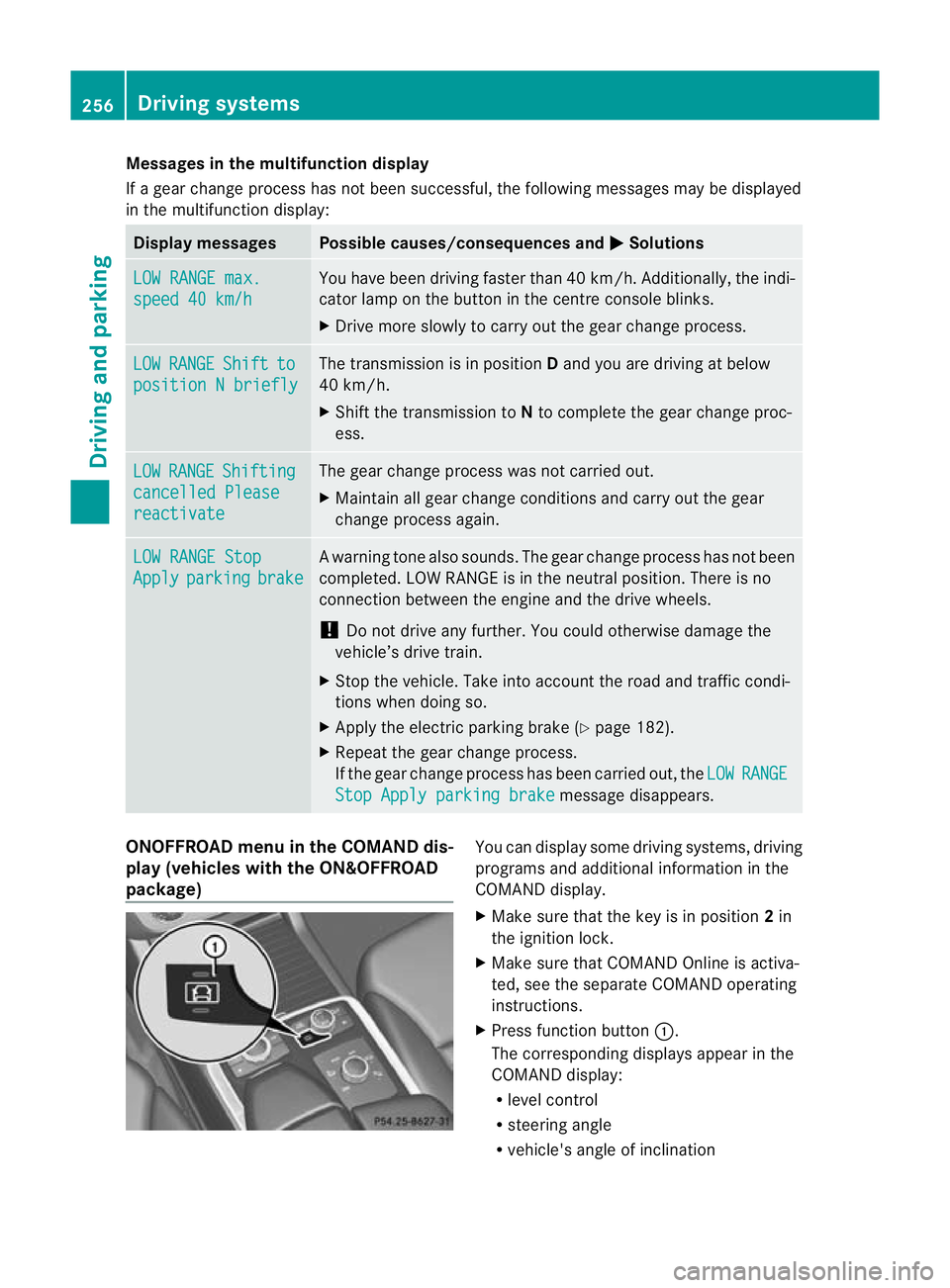
X Pres sfunction button :.
The corresponding displays appea rinthe
COMAN Ddisplay:
R level control
R steering angle
R vehicle' sangle of inclination 256
Drivin
gsystemsDrivin gand pa rking
Page 263 of 441
X
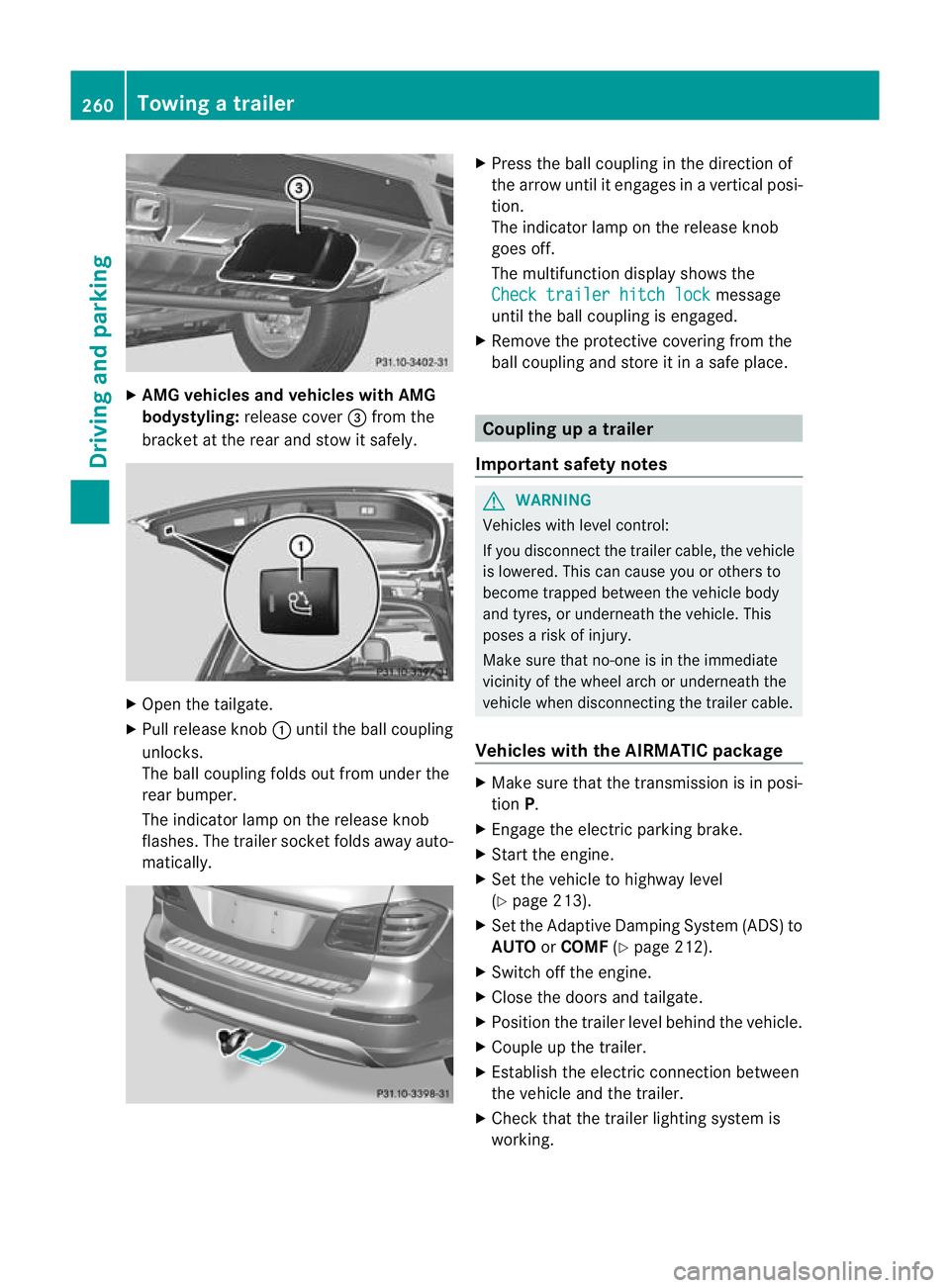
AMG vehicles and vehicles with AMG
bodystyling: release cover =from the
bracket at the rea rand sto witsafely. X
Open the tailgate.
X Pull release knob :until the ball coupling
unlocks.
The ball coupling folds out from under the
rear bumper.
The indicator lamp on the release knob
flashes .The trailer socket folds away auto-
matically. X
Press the ball couplin ginthe direction of
the arrow until it engages in avertical posi-
tion.
The indicator lam ponthe release knob
goes off.
The multifunction display shows the
Chec ktrailer hitch lock message
until th eball coupling is engaged.
X Remove the protective covering from the
ball coupling and store it in asafe place. Coupling up
atrailer
Important safety notes G
WARNING
Vehicles with level control:
If you disconnec tthe trailer cable, the vehicle
is lowered. This can cause you or other sto
become trapped between the vehicl ebody
and tyres, or underneat hthe vehicle. This
poses arisk of injury.
Make sure that no-on eisinthe immediate
vicinit yofthe wheel arch or underneath the
vehicle when disconnectin gthe trailer cable.
Vehicles with th eAIRMATIC package X
Make sure that the transmission is in posi-
tion P.
X Engage the electric parking brake.
X Start the engine.
X Set the vehicle to highway level
(Y page 213).
X Set the Adaptive Damping System (ADS )to
AUTO orCOMF (Ypage 212).
X Switch off the engine.
X Close the doors and tailgate.
X Position the trailer level behind the vehicle.
X Coupl eupthe trailer.
X Establish the electric con nectio nbetween
the vehicle and the trailer.
X Check that the trailer lighting system is
working. 260
Towing
atrailerDriving an dparking
Page 266 of 441
to position
2or 0respective ly
( Y page 159). Bulb fa
ilure indicato rfor LEDl amps
i If LED lamps ar efitted in the trai ler, an
error message ma yappea rinthe multi-
function display eve nifthere is no fault .The
reason for the err or message could be that
the curren thas fallen below the minimum
of 50 mA.
To ensur ereliable operation of the bulb failure
indicator, each LE Dchain in the trailer lighting
must be guaranteed aminimum curren tof
50 mA. Trailer wit
h7-pin connector
General notes Trailers with 7-pi
nconnector: you can
make aconnection to the 13 -pin connector
on the ball coupling using an adapter plug or,
if necessary, an adapter cable. Bot hcan be
obtained in aqualified specialist workshop.
Fitting the adapter !
Make sure that there is sufficien tcable
play so that the cable cannot become
detached when cor nering.
! Remove th einstalled adapter cable
before folding in the ball coupling. Other-
wise, damage may occur to the rear
bumpe rand the adapter cable. X
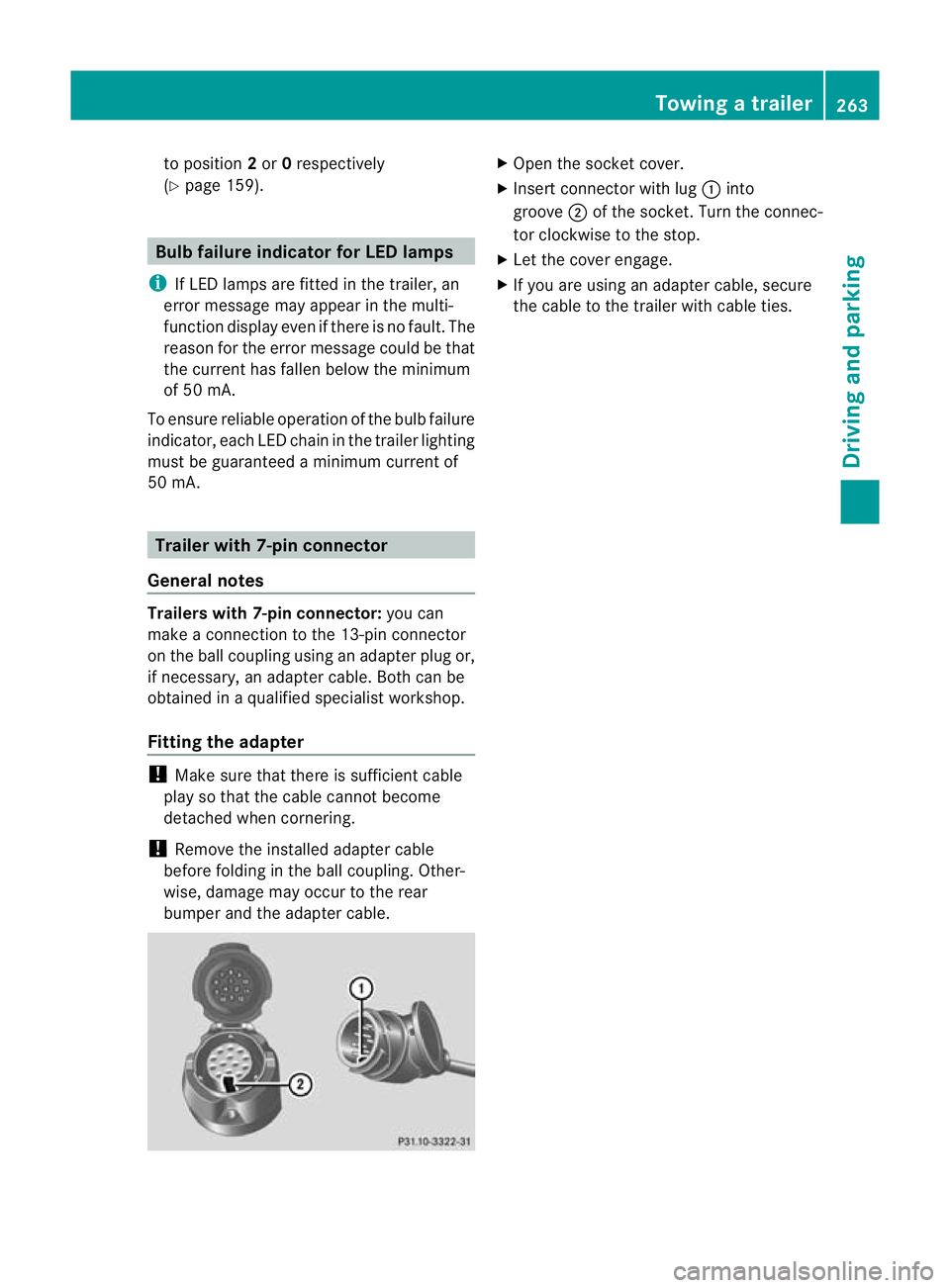
Ope nthe socket cover.
X Inser tconnector with lug :into
groove ;of the socket. Tur nthe connec-
tor cloc kwise to the stop.
X Let the cover engage.
X If you are using an adapter cable, secure
the cable to the trailer with cable ties. Towing
atrailer
263Driving an dparking Z
Page 268 of 441
Usefu
linfor mation ............................ 266
Important safet ynotes .................... 266
Displays and oper ation .................... 267
Menu sand submenus ...................... 271
Displa ymessages ............................. 290
Wa rning and indicator lamp sinthe
instrumen tcluster ............................ 324 265On-boar
dcomputer and displays
Page 269 of 441
Usefu
linfor mati on
i This Owner's Manual describes all mod-
els, series and optional equipment for your
vehicle that were available at the time of
going to press. National variation sare pos-
sible. Note that your vehicl emay not be
equippe dwith all of the function sdescri-
bed. This is also the case for system sand
functions relevant to safety.
i Read the information on qualified special-
ist workshops: (Y page25). Impo
rtantsafety notes G
WARNING
Onl yuse the on-boar dcompu terw hen road
and traffic condition spermit .You would oth-
erwise be distracted and unable to concen-
trate properly on driving, and coul dcause an
accident. G
WARNING
No message swill be displayed if either the
instrument cluster or the multifunction dis-
play is inoperative.
As aresult, you will not be able to see infor-
mation about your driving conditions, such as
speed, outside temperature, warning and indi-
cator lamps, display messages or system fail-
ures. Drivin gcharacteristic smay be impaired.
Adjust your driving style and vehicle speed
accordingly.
Contact aqualified specialist workshop
immediately. G
WARNING
The on-board computer only records and dis-
plays malfunctions and warnings from certain
systems. For this reason, you should always
make sure that your vehicle is safe to use. You
could otherwis ecause an accident by driving
an unsafe vehicle. G
WARNING
The operating safety of your vehicle could be
impaired if maintenance work is carried out
incorrectly. This could cause you to lose con-
trol of your vehicle and cause an accident.
Moreover, the safety systems may no longer
be able to protect you or others as they are
designed to do.
Always have service work carried out at a
qualified specialis tworkshop.
For an illustration of the instrumen tcluster,
see (Y page 30). 266
Important safety notesOn-board computer and displays
Page 270 of 441
Display
sand operation In
strument clu ster Instrument clu
ster: kilometres
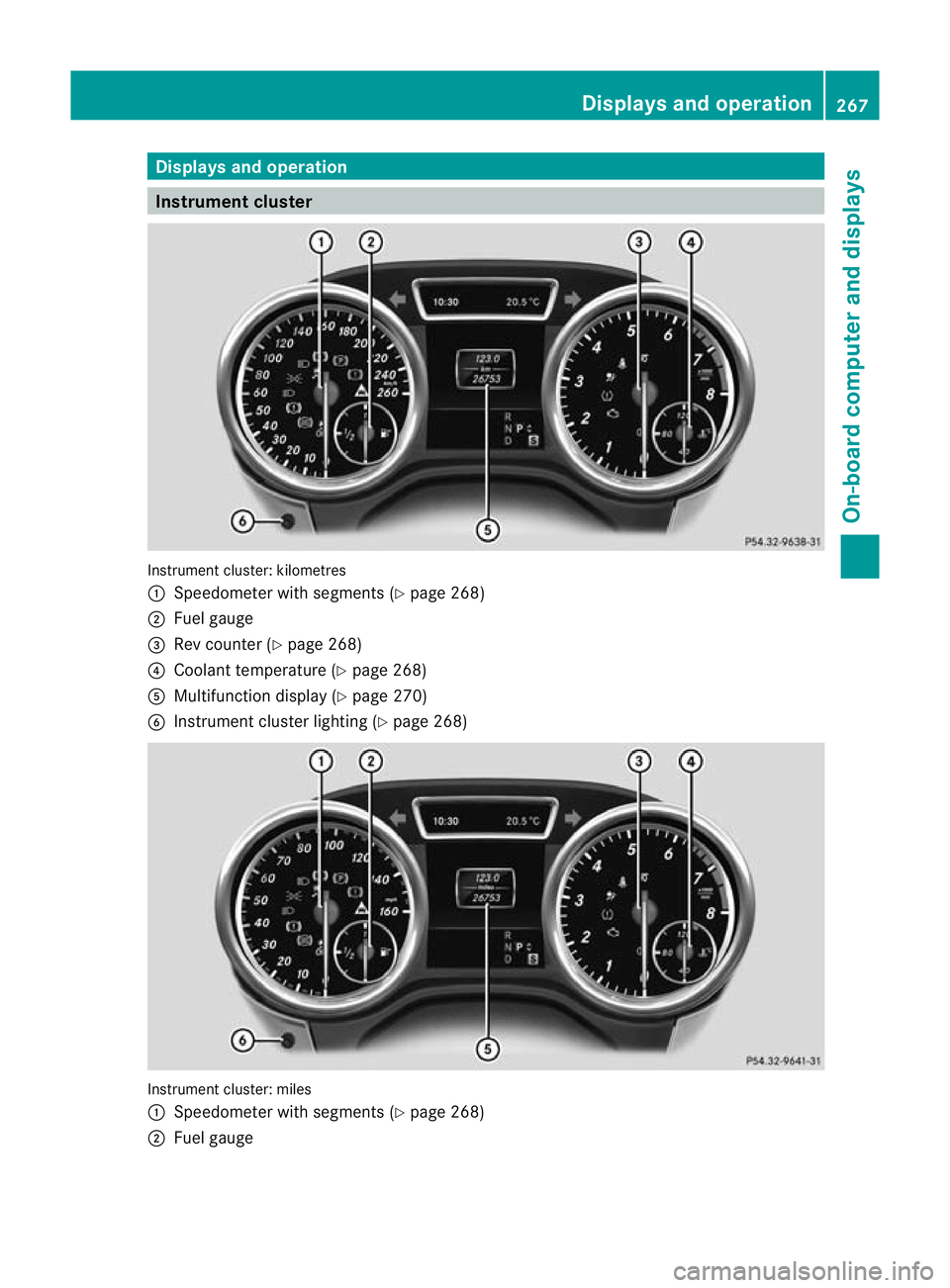
: Speedometer wit hsegments (Y page 268)
; Fue lgauge
= Rev counter (Y page 268)
? Coolant temperature (Y page 268)
A Multifunction display (Y page 270)
B Instrumen tcluster lightin g(Ypage 26 8) Instrument cluster: miles
:
Speedometer with segments (Y page 268)
; Fue lgauge Display
sand ope ration
267On-board computer and displays Z
Page 271 of 441
=
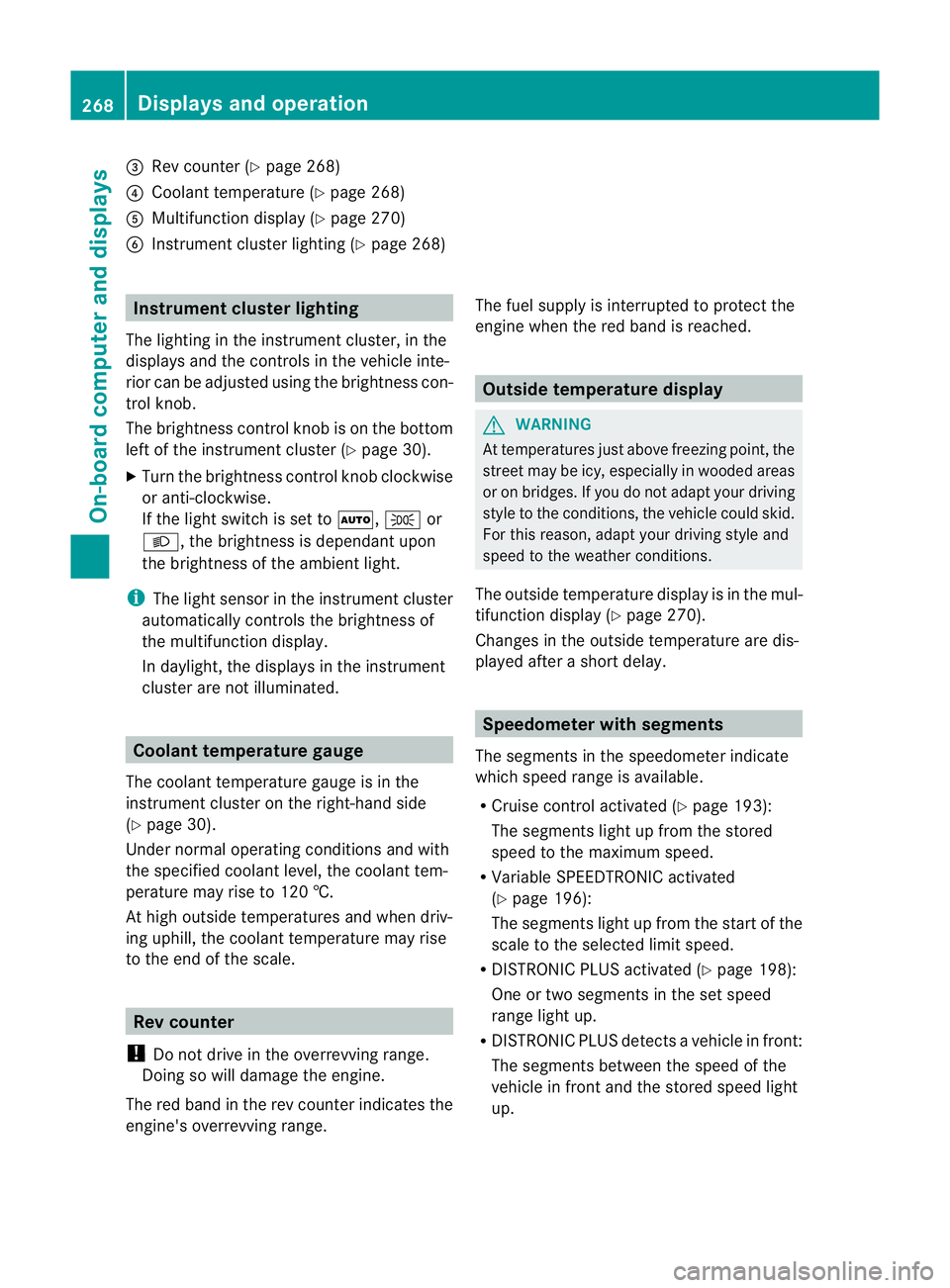
Rev coun ter( Ypage 268)
? Coolan ttemperatur e(Ypage 26 8)
A Multifunction displa y(Ypage 27 0)
B Instrumen tcluster lighting (Y page 268) Instrument cluster lighting
The lighting in the instrument cluster ,inthe
displays and the controls in the vehicle inte-
rior can be adjusted usin gthe brightness con-
trol knob.
The brightness control knob is on the bottom
lef toft he instrumen tcluster (Y page 30).
X Turn the brightness control knob clockwise
or anti-clockwise.
If the light switch is set to Ã,Tor
L,t he brightness is dependant upon
the brightness of the ambient light.
i The light sensor in the instrumen tcluster
automatically controls the brightness of
the multifunction display.
In daylight, the displays in the instrument
cluster are not illuminated. Coolant temperature gauge
The coolant temperature gauge is in the
instrument cluster on the right-hand side
(Y page 30).
Under normal operatin gcondition sand with
the specified coolant level ,the coolant tem-
perature ma yrise to 120 †.
At high outside temperatures and when driv-
ing uphill, the coolant temperature may rise
to the end of the scale. Rev counter
! Do not drive in the overrevving range.
Doin gsow ill damage the engine.
The red band in the rev counter indicates the
engine's overrevving range. The fuel supply is interrupted to protec
tthe
engin ewhen the red band is reached. Outside tem
perature display G
WARNING
At temperatures just above freezing point, the
street may be icy, especially in wooded areas
or on bridges. If you do not adapt your driving
style to the conditio ns,the vehicle coul dskid.
For this reason, adapt your driving style and
speed to the weather conditions.
The outside temperature displa yisinthe mul-
tifunc tion display (Y page 270).
Changes in the outside temperatur eare dis-
played afte rashort delay. Speedomete
rwith segments
The segments in the speedometer indicate
which speed range is avai lable.
R Cruise control activated (Y page 193):
The segment slight up from the stored
speed to the maximum speed.
R Variabl eSPEEDTRONIC activated
(Y page 196):
The segments light up from the star tofthe
scal etot he selected limit speed.
R DISTRONI CPLUS activate d(Ypage 198):
One or two segment sinthe set speed
range light up.
R DISTRONI CPLUS detects avehicle in front:
The segments between the speed of the
vehicle in fron tand the store dspeed light
up. 268
Display
sand operationOn-board computer and displays
Page 272 of 441
Oper
ating the on-board compu ter
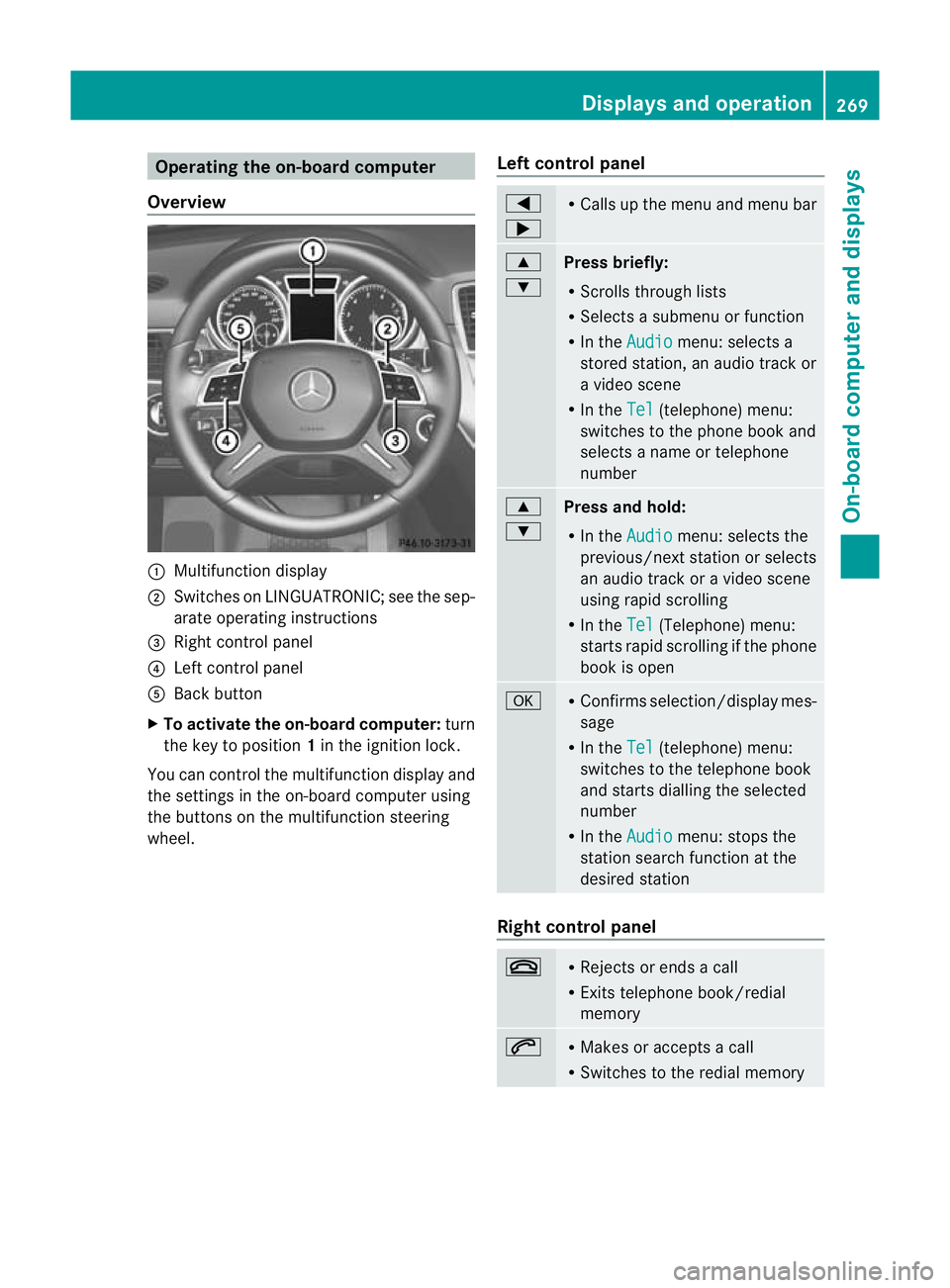
Overview :
Multifunction display
; Swit ches on LINGU ATRONIC; see the sep-
arate operating instructions
= Right control panel
? Left control panel
A Back button
X To activate the on-board computer: turn
the key to position 1in the ignitio nlock.
You can control the multifunction display and
the settings in the on-boar dcompu teru sing
the button sonthe multifunction steering
wheel. Lef
tcontrol panel =
; R
Calls up the menu and menu bar 9
:
Press briefly:
R
Scrolls through lists
R Select sasubmenu or function
R In the Audio menu: select
sa
stored station, an audi otrack or
av ideo scene
R In the Tel (telephone) menu:
switches to th ephon ebook and
selects anam eo rtele phone
number 9
:
Press and hold:
R In the Audio menu: sele
ctst he
previous/next statio norselects
an audio trac koravideoscene
using rapi dscrolling
R In the Tel (Te
lephone) menu:
starts rapid scrolling if the phone
book is open a R
Confirm sselection/display mes-
sage
R In the Tel (telephone) menu:
switches to the telephone book
and starts dialling the selected
number
R In the Audio menu: stops the
station searc hfunction at the
desired station Right control panel
~ R
Rejects or ends acall
R Exits telephone book/redial
memory 6 R
Makes or accepts acall
R Switches to the redial memory Displays and operation
269On-board computer and displays Z
Page 273 of 441
W
X R
Adjusts the volume 8 R
Mute Bac
kbutton %
Press briefly:
R
Back
R Switch esoff LINGUATRONIC;
see the separate operating
instructi ons
R Hides displa ymessages/calls
up the last Trip men
ufunction
used
R Exits the telephone book/redial
memory %
Press and hold:
R
Call supt he standard display in
the Trip menu
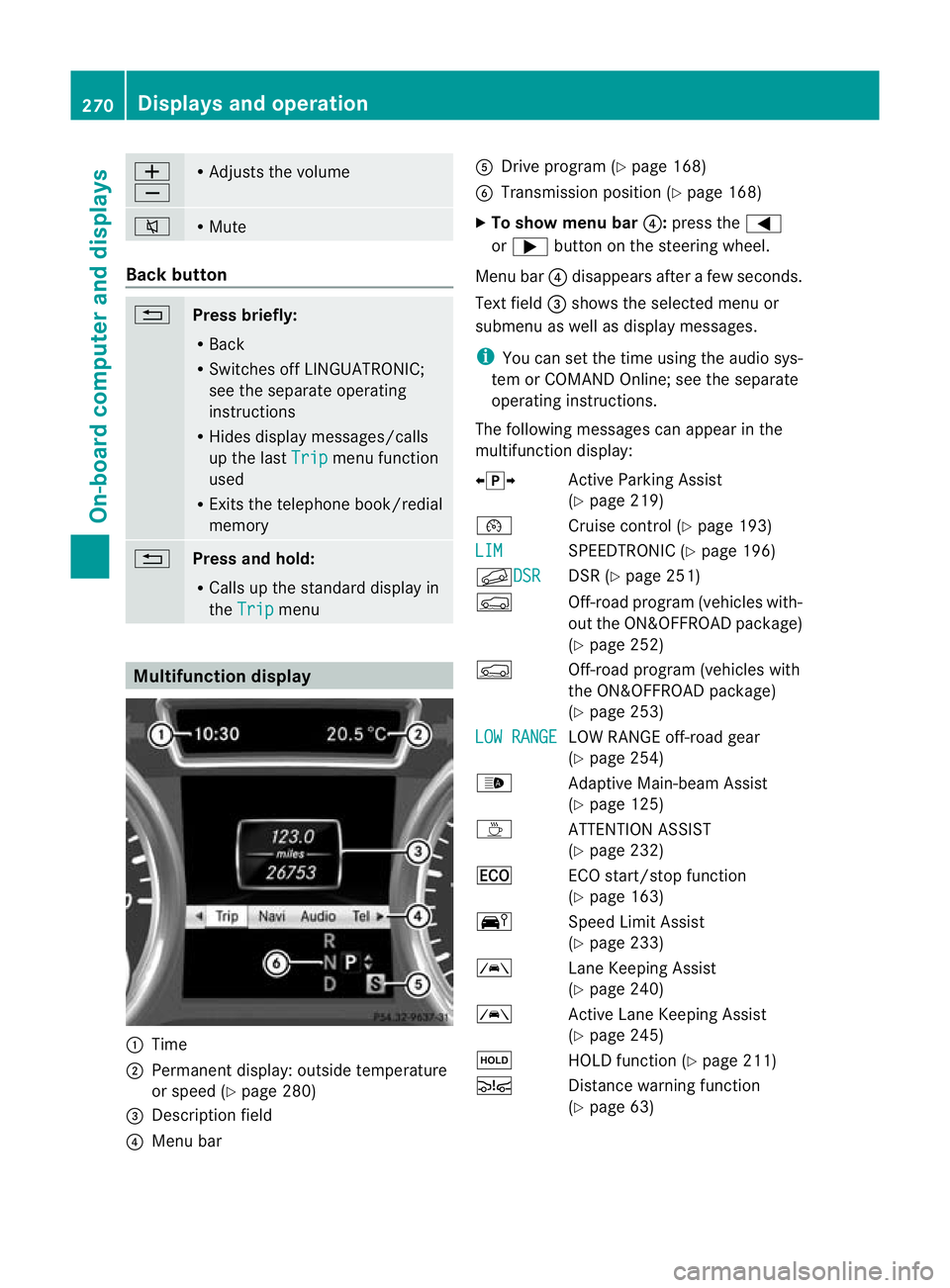
Multifunction display
:
Time
; Permanent display: outside tem perature
or spee d(Ypage 280)
= Description field
? Menu bar A
Drive program (Y page 168)
B Transmission position (Y page 168)
X To sho wmenu bar ?:press the =
or ; button on the steerin gwheel.
Men ubar? disappears after afew seconds.
Text field =shows the selected men uor
submen uaswell as display messages.
i You can set the tim eusing the audi osys-
tem or COMAND Online; see the separate
operating instructions.
The followi ngmessage scan appear in the
multifunction display:
Xj Y ActiveParking Assist
(Y page 219)
¯ Cruise control (Y page 193)
LIM SPEEDTRONI
C(Ypage 19 6)
f DSR DSR (Y
page 251)
Ç Off-ro ad program (vehicles with-
out the ON&OFFROAD package)
(Y page 252)
Ç Off-road program (vehicles with
the ON&OFFROAD package)
(Y page 253)
LO WR ANGE LO
WR ANGE off-road gear
(Y page 254)
_ Adaptive Main-beam Assist
(Ypage 125)
À ATTENTION ASSIST
(Ypage 232)
¤ ECO start/stop function
(Ypage 163)
Ä SpeedLimit Assist
(Y page 233)
à Lane KeepingAssist
(Y page 24 0)
à ActiveLane Keepin gAssist
(Y page 24 5)
ë HOLD functio n(Ypage 21 1)
Ä Distancewarnin gfunction
(Y page 63) 270
Display
sand ope rationOn-board computer and displays
Page 274 of 441
Ä
PRE-SAFE®
Brake (Y page68)
120 km/h! Maximum permissibl
espeed
exceeded (only for cer tain coun-
tries) Menus and submenus
Menu overview
Press the =or; button on the steer-
ing wheel to call up the menu bar and select
am enu.
Operating the on-board computer
(Y page 269).
Dependin gonthe equipment fit tedint he
vehicle, you can cal lupthe followin gmenus:
R Trip men
u(Ypage 271)
R Navi menu (navigation details)
(Y page 272)
R Audio menu (Y
page 274)
R Tel menu (telephone) (Y
page 275)
R Assist. menu (assistance) (Y
page 277)
R Serv. menu (Y
page 279)
R Sett. menu (Y
page 279)
R ON&OFFRO AD menu (Y
page 286)
R AMG menu in AM
Gvehicles (Y page 286)
The Audio ,
Navi and
Tel menus differ slightly
in vehicles with an audio system and in vehi-
cles with COMAN DOnline. The examples
given in this Owner's Manual appl ytov ehicles
equipped with COMAN DOnline. Trip menu
Standard display X
Pres sand hol dthe % button on the
steerin gwheel until the Trip men
uwith
trip meter :and total distance
recorder ;is shown.
Trip compu ter" From start" or "From
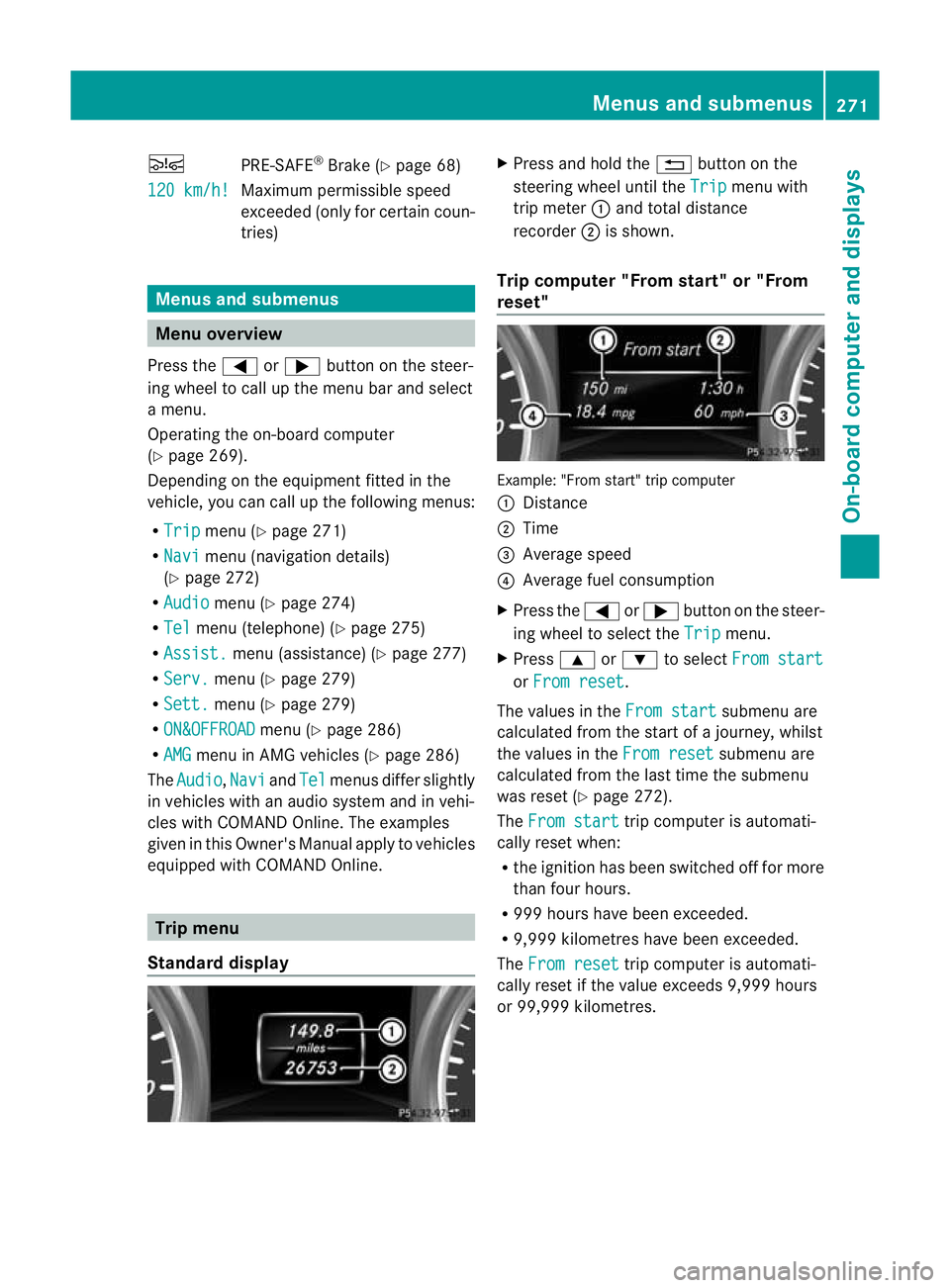
reset" Example: "From start
"trip computer
: Distance
; Time
= Averag espeed
? Average fuel consumption
X Press the =or; button on the steer-
ing wheel to select the Trip menu.
X Press 9or: to select From start or
From reset .
The values in the From start submen
uare
calculate dfrom th estart of ajour ney, whilst
the values in the Fromreset submenu are
calculated fro mthe last tim ethe submenu
was reset (Y page 272).
The From start trip compute
risa utomati-
cally reset when:
R the ignition has been switched off for more
than four hours.
R 999 hours have been exceeded.
R 9,999 kilometres have been exceeded.
The From reset trip computer is automati-
cally reset if the value exceeds 9,999 hours
or 99,99 9kilometres. Menus and submenus
271On-board computer and displays Z