heating MERCEDES-BENZ GL SUV 2012 Owner's Manual
[x] Cancel search | Manufacturer: MERCEDES-BENZ, Model Year: 2012, Model line: GL SUV, Model: MERCEDES-BENZ GL SUV 2012Pages: 441, PDF Size: 10.66 MB
Page 153 of 441
?
u To switc honthe auxiliary heating/
ven tilation
A , To check the status/set the depar-
ture time
X To switch on: press theubutton.
ON is shown in the remote control display.
X To deactivate: press the^button.
OFF is shown in the remot
econtrol display.
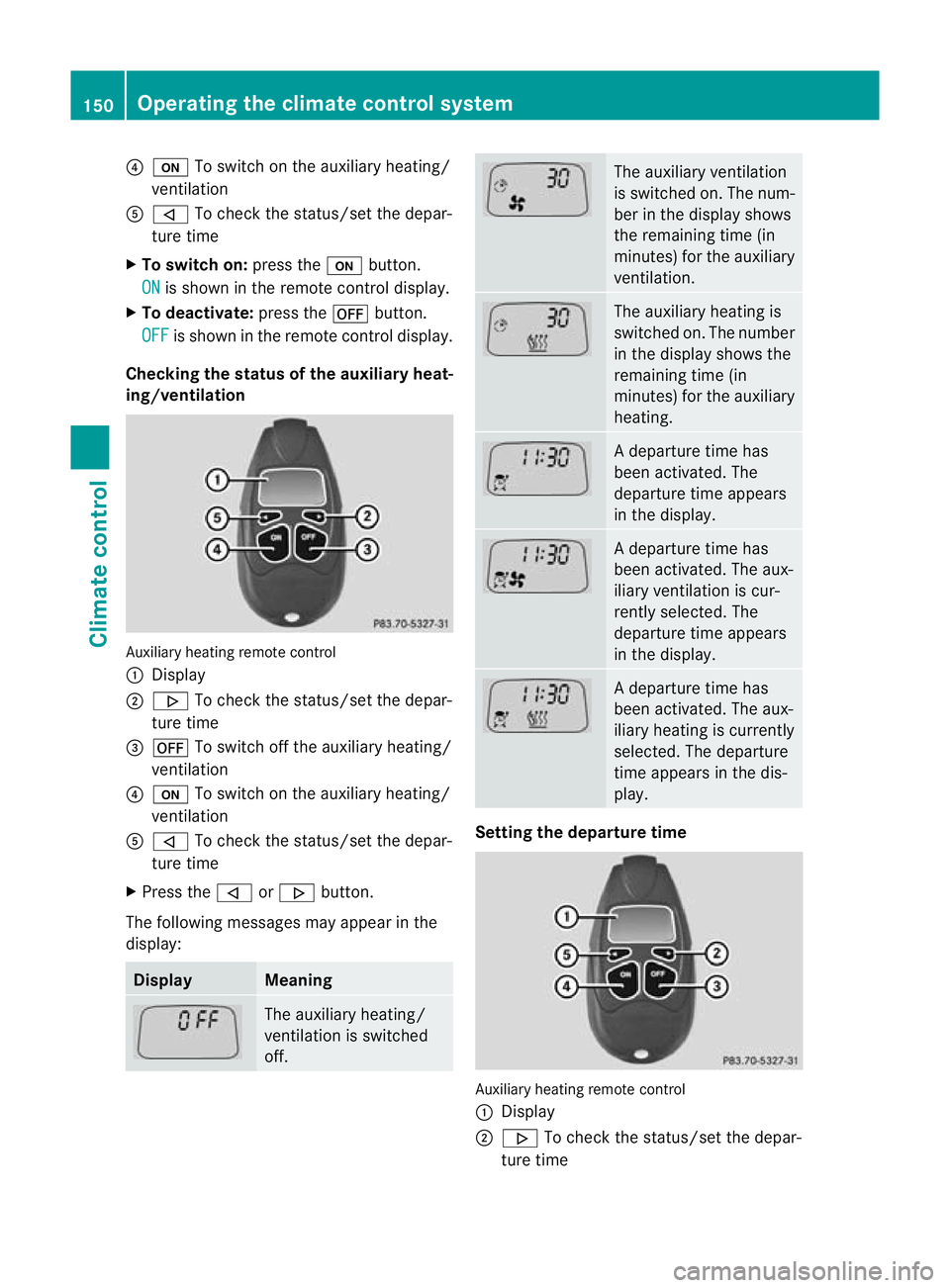
Checking th estatus of the auxiliary heat-
ing/ventilation Auxiliary heating remote control
:
Display
; . To check the status /set the depar-
tur etime
= ^ To switch off the auxiliar yheating/
ven tilation
? u To switch on the auxiliar yheating/
ven tilation
A , To check the status/set the depar-
ture time
X Press the ,or. button.
The following messages may appear in the
display: Display Meaning
The auxiliar
yheating/
ven tilation is switched
off. The auxiliar
yventilation
is switched on. The num-
ber in the display shows
the remainin gtime (in
minutes) for the auxiliary
ventilation. The auxiliar
yheatin gis
switched on. The number
in the displa yshows the
remaining tim e(in
minutes) for the auxiliary
heating. Ad
eparture tim ehas
been activated. The
departure time appears
in the display. Ad
eparture tim ehas
been activated. The aux-
iliary ventilation is cur-
rently selected. The
departure time appears
in the display. Ad
eparture tim ehas
been activated. The aux-
iliary heating is currently
selected. The departure
time appears in the dis-
play. Setting the departure time
Auxiliary heating remot
econtrol
: Display
; . To chec kthe status/se tthe depar-
tur etime 150
Operating the climate control systemClimat
econtrol
Page 154 of 441
=
^ To switc hoff th eauxiliary heating/
ventilation
? u To switch on the auxiliary heating/
ventilation
A , To check the status/set the depar-
ture time
X Press the ,or. button repeatedly
until the time to be changed appears in the
display.
X Press the uand^ buttons simulta-
neously.
The Îsymbol in the remote control dis-
play flashes.
X Press the ,or. button to set the
desired departure time.
i The longer you press the ,or.
button, the faster the time changes.
X Press the uand^ buttons simulta-
neously.
The new departure time is stored.
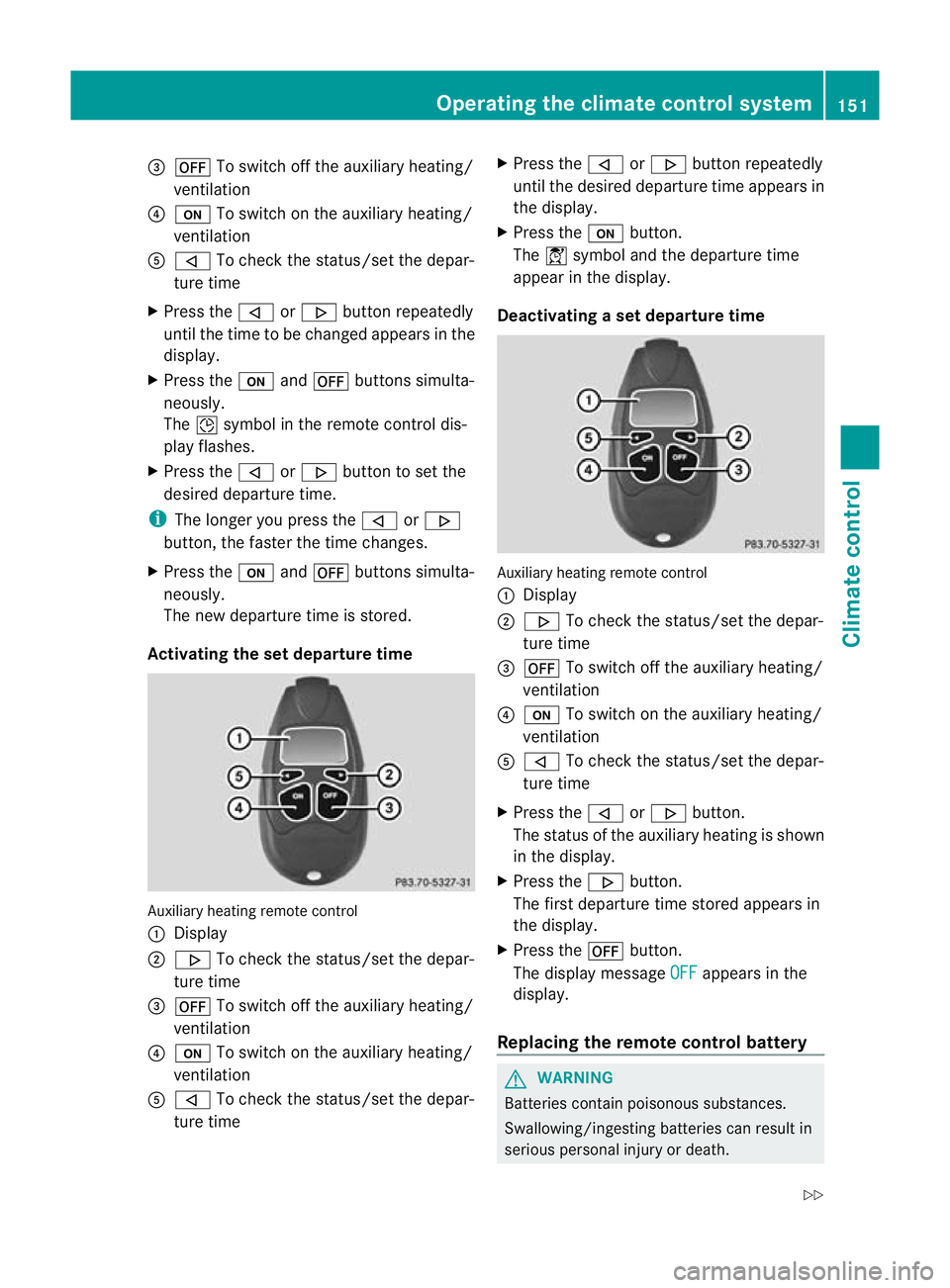
Activating the set departur etime Auxiliary heating remote control
:
Display
; . To check the status/set the depar-
ture time
= ^ To switch off the auxiliar yheating/
ven tilation
? u To switch on the auxiliar yheating/
ven tilation
A , To check the status/set the depar-
ture time X
Press the ,or. button repeatedly
until the desired departur etime appears in
the display.
X Press the ubutton.
The Ísymbol and the departur etime
appear in the display.
Deactivating aset depa rtur et ime Auxiliary heating remote control
:
Display
; . To check the status/set the depar-
ture time
= ^ To switch off the auxiliar yheating/
ven tilation
? u To switch on the auxiliar yheating/
ven tilation
A , To check the status/set the depar-
ture time
X Press the ,or. button.
The status of the auxiliar yheatin gisshown
in the display.
X Press the .button.
The first departur etime stored appears in
the display.
X Press the ^button.
The display message OFF appears in the
display.
Replacing the remot econtrol battery G
WARNING
Batteries contain poisonous substances.
Swallowing/ingestin gbatteries can result in
serious personal injury or death. Operating the climate contro
lsystem
151Climate co ntrol
Z
Page 155 of 441
Alway
skeepb atteries away from children. If
ab attery is swallowed, see kimmediate med-
ica lattention. H
Environmental note Batteries contain pollutants.
It is illegal to dispose of them
with the househo
ldrubbish.
They mus tbecollected sep-
arately and disposed of in an
environmentally responsible
recycl ings ystem. Dispose of batterie
sinan
environmental lyresponsible
manner. Take disch arged
batteries to aqualified spe-
cialist workshop or to acol-
lection point for used batter-
ies. One
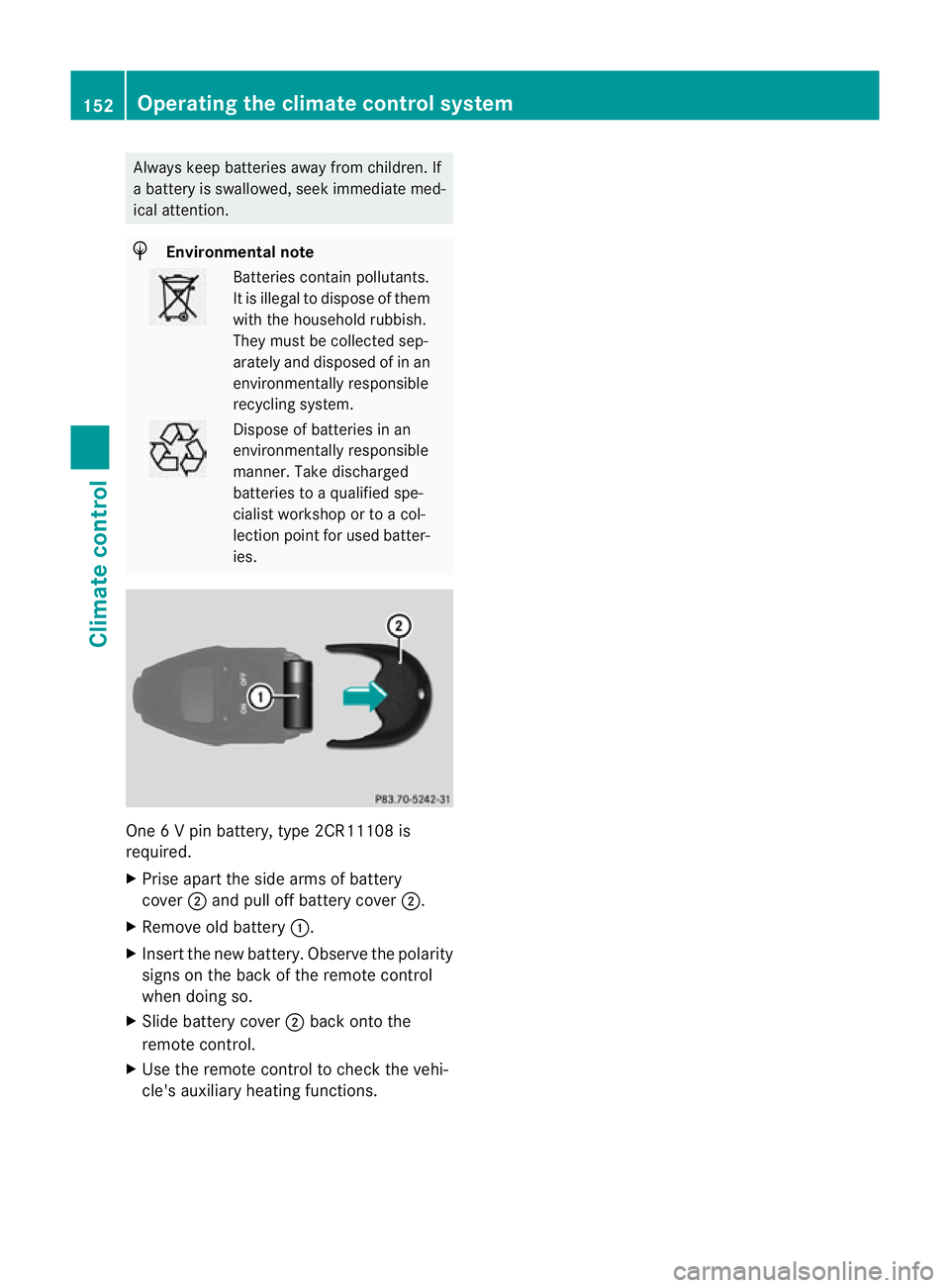
6Vp in battery, type 2CR11108 is
required.
X Prise apart the side arm sofbattery
cover ;and pul loff battery cover ;.
X Remove ol dbattery :.
X Insert the new battery. Observe the polarity
signs on the back of the remote control
when doing so.
X Slid ebattery cover ;back ont othe
remot econtr ol.
X Us ethe remot econtr ol to chec kthe vehi-
cle' sauxiliary heating functions. 152
Operating the climate contro
lsystemClimate co ntrol
Page 156 of 441
Problems wit
hthe auxiliary heating/ventilation Display messages Possible causes/consequences and
M Solutions
$
FAIL Th
es ignal transmission between the transmitter and the vehicle
is faulty.
X Change your position in relation to the vehicle, movin gcloser if
necessary.
X Make another attempt to switch the auxiliary heating on or off
using the remote control. ©
FAIL there is not enough fuel in the fuel tank
,orthe auxiliary heating is
faulty.
X Refuel at the nearest filling station.
X Make another attemp ttos witch on the auxiliary heating using
the remote control.
X Have the auxiliary heating checked at aqualified specialist
workshop. FAIL This display messag
emay appear if you attempt to activate the
auxiliary heating or during astatus query.
If the auxiliary heating doe snot switc honorh as switched off while
running, this has occurred due to one of the following reasons:
R the auxiliary heating was started more than twice when the
engine was switched off.
R the starter battery is not sufficiently charged.
R There is too little fuel in the fuel tank.
R the auxiliary heating is faulty.
If the auxiliary heating was switched on more than twice:
X Switch on the engine and let it run for more than 10 seconds.
X Make another attempt to switch on the auxiliary heating using
the remote control.
If the starter battery is not sufficiently charged:
X Charge the starter battery.
X Make another attempt to switch on the auxiliary heating using
the remote control.
If there is not enough fuel:
X Refuel at the nearest filling station.
X Make another attempt to switch on the auxiliary heating using
the remote control. Operating the climate control system
153Climate control Z
Page 157 of 441
Displa
ymessages Possible causes/consequences and
M Solutions
If th
eauxiliar yheating is faulty:
X Hav ethe auxil iaryh eatin gchecked at aqualified specialist
workshop. Adjusting th
eair vents Important safet
ynotes G
WARNING
Ver yhot or ver ycold ai rcan flo wfromt he air
vents. This coul dcause burns or frostbite to
bare skin in the immediate vicinity of the
vents. Keep bare skin away from these air
outlets. If necessary, direct the airflow away
to ad ifferent area of the vehicle interior.
In order to ensure the direct flow of fresh air
through the air vent sinto the vehicl einterior,
please observe the following notes:
R keep the air inlet grill eonthe bonnet and
in the engin ecompartmen tonthe front-
passenger side free of blockages, such as
ice, snow or leaves.
R never cover the ven tsor ven tilation grilles
in the vehicle interior.
i For virtually draught-free ventilation,
adjust the sliders of the air vent stothe
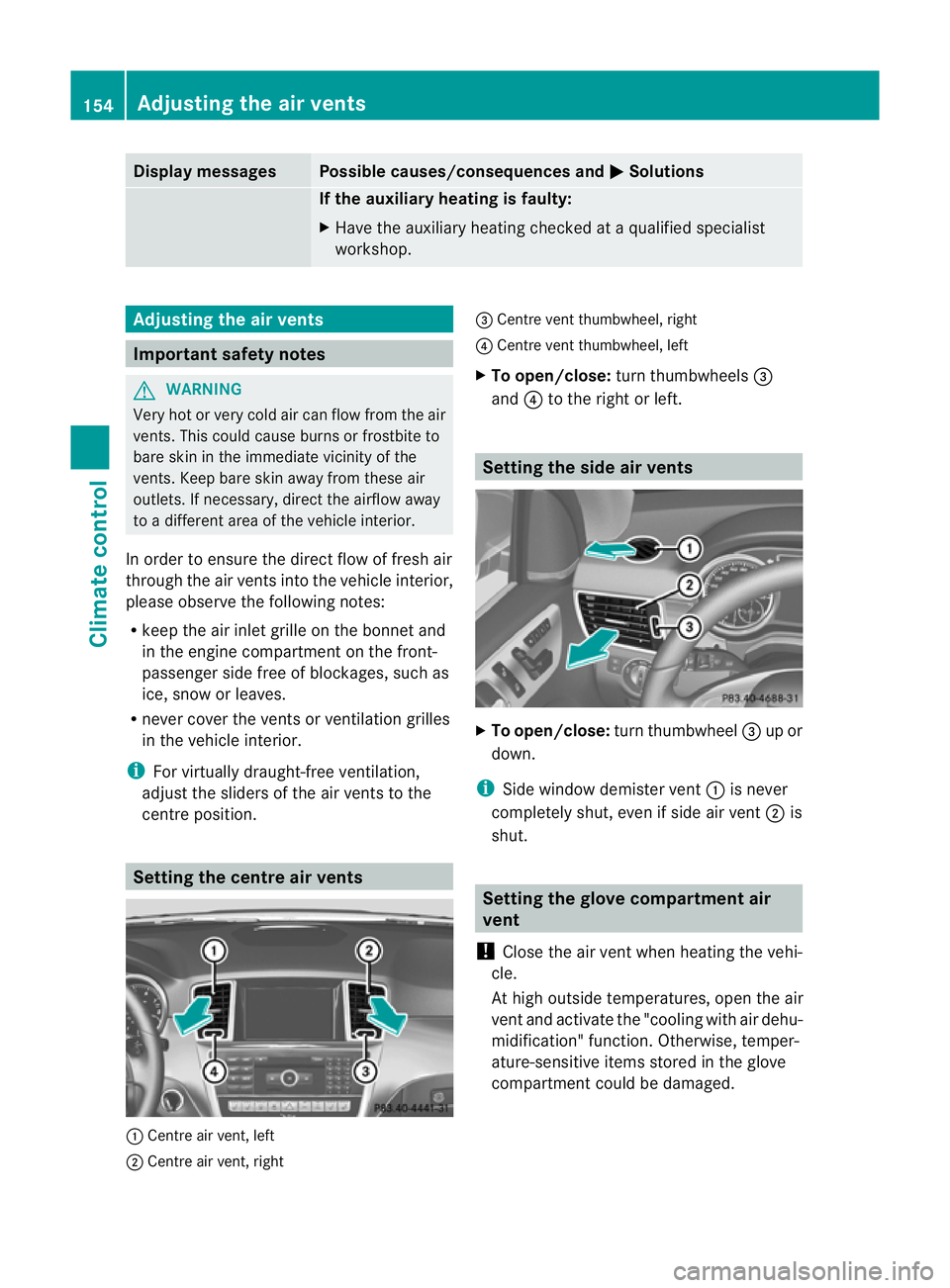
cen treposition. Setting the centre air vents
:
Centre air vent, left
; Centre air vent, right =
Centre ven tthumbwheel, right
? Centre ven tthumbwheel, left
X To open/close: turnthumbwheels =
and ?to the right or left. Setting th
eside air vents X
To open/close: turnthumbwheel =up or
down.
i Side window demister vent :is never
completely shut, even if side air vent ;is
shut. Setting th
eglove compartment air
vent
! Close the air vent when heating the vehi-
cle.
At high outside temperatures, open the air
vent and activate the "cooling with air dehu-
midification" function. Otherwise, temper-
ature-sensitiv eitems stored in the glove
compartmen tcould be damaged. 154
Adjusting th
eair ventsClimat econtrol
Page 177 of 441
Problems wit
hthe transmission Problem Possible causes/consequences and
M Solutions
Th
et rans mission has
problem sshifting gear. The transmission is losing oil.
X
Hav ethe transmission chec kedataq ualified specialist work-
sho pimmediately. Th
ea cceleratio nability
is deteriorating.
The transmission no
longer changes gear. The transmission is in emergency mode.
It is only possible to shift into
secondgear and reverse gear.
X Stop.
X Shift the transmission to position P.
X Switch off the engine.
X Wait at least ten seconds befor erestar tingthe engine.
X Shift the transmission to position Dor R.
If D is selected, the transmission shifts into secondgear; ifRis
selected, the transmission shifts into reverse gear.
X Have the transmission checked at aqualified specialist work-
sho pimmediately. Refuelling
Important safety notes
G
WARNING
Fue lish ighly flammable. If you handle fuel
incorrectly, there is arisk of fire and explo-
sion.
You must avoid fire, naked flames, creating
sparks and smoking. Switch off the engine
and, if applicable, the auxiliary heating before
refuelling. G
WARNING
Fuels are poisonous and hazardous to health.
There is adanger of injury.
Do not swallow fuel or let it come into contact
with skin, eyes or clothing. Do not inhale fuel
vapours. Keep fuels out of the reach of chil-
dren. If you or others come into contact with fuel,
observe the following:
R Wash the fuel off any affected areas of skin
with water and soap immediately.
R If you get fuel in your eyes, rinse them thor-
oughly with clean water immediately. Seek
immediate medical attention.
R If fuel is swallowed, seek immediate medi-
cal attention. Do not induce vomiting.
R Change any clothing that has come into
contact with fuel immediately. G
WARNING
Vehicles with adiesel engine:
If you mix diesel fuel with petrol, the flash
point of this fuel mixture is lower than that of
pure diesel fuel. When the engine is running,
components in the exhaust system may over-
heat unnoticed. There is arisk of fire.
Never refuel with petrol. Never add petrol to
diesel fuel. 174
RefuellingDriving and parking
Page 188 of 441
effect, the driv
ewheels coul dlose their grip.
This inc reases the risk of skidding and having
an accident.
Do not shift down for additional engine brak-
ing on aslippery road surface.
Downhill gradients Do not depress the brake pedal continuously
while the vehicle is in motion ,e.g. causing the
brakes to rub by constantly applying light
pressure to the pedal. This results in exces-
sive and premature wear to the brake pads.
On long and steep downhil lgradients, you
mus tselect shift range 1,2or 3in good time.
Take particular not eofthis when drivin ga
laden vehicle.
i This also applies if you have activated
cruise control, SPEEDTRONIC or DIS-
TRONIC PLUS.
This will use the brakin geffect of the engine,
so les sbraking wil lberequired to prevent the
vehicle from gainin gspeed. This relieves the
load on the brak esystem and prevents the
brakes from overheating and wearing too
quickly.
Heavy and light loads G
WARNING
The braking syste mcan overheat if you leave
your foot on the brake pedal while driving.
This increases the braking distance and could
even cause the braking system to fail. There
is ar isk of an accident.
Never use the brake pedal as afootrest .Do
not simultaneousl ydepress both th ebrake
peda land the accelerato rpedal while driving.
! Depressing the brak epedal constantly
result sinexcessive and premature wear to
the brake pads.
If the brakes have bee nsubjected to aheavy
load, do not stop the vehicle immediately.
Driv eonfor as hort while. This allow sthe air-
flo wtoc ool the brakes mor equickly. If the brakes have been used only moderately,
you should occasionally test their effective-
ness. To do this, brake more firmly from a
higher speed. This improves the grip of the
brakes.
Wet road surfaces
If you have driven for
along tim einheavy rain
without braking ,there ma ybeadelayed reac-
tion from the brakes when braking for the first
time. This may also occu rafter acar wash or
after driving through deep water.
You then have to depress the brake pedal
more firmly. Maintain agreater distance from
th ev ehicle in front.
Af terd riving on awet road or havin gthe vehi-
cle washed, brake firml ywhile paying atten-
tion to the traf ficc onditions. This will warm
up the brake discs, thereby dryin gthem more
quickly and protecting them against corro-
sion.
Limited braking performanc eonsalt-
treated roads If you drive on salte
droads, alaye rofs alt
residue may form on the brake discs and
brake pads. This can result in asignificantly
longer brakin gdistance.
R Brake occasionally to remov eany possible
salt residue. Make sure that you do not
endanger other road users whe ndoing so.
R Carefully depress the brake pedal and the
beginning and end of ajourney.
R Maintain agreater distance to th evehicle
ahead.
New brak epads/linings New and replace
dbrake pads and discs only
reach thei roptimum braking effect after sev-
eral hundred kilometres of driving. Compen-
sate for this by applying greater force to the
brak epedal.
For safet yreasons, Mercedes-Ben zrecom-
mends that you only have brak epads/linings
fitted to your vehicle which have been Driving tips
185Driving and parking Z
Page 190 of 441
vehicle's el
ectronics and interior equip-
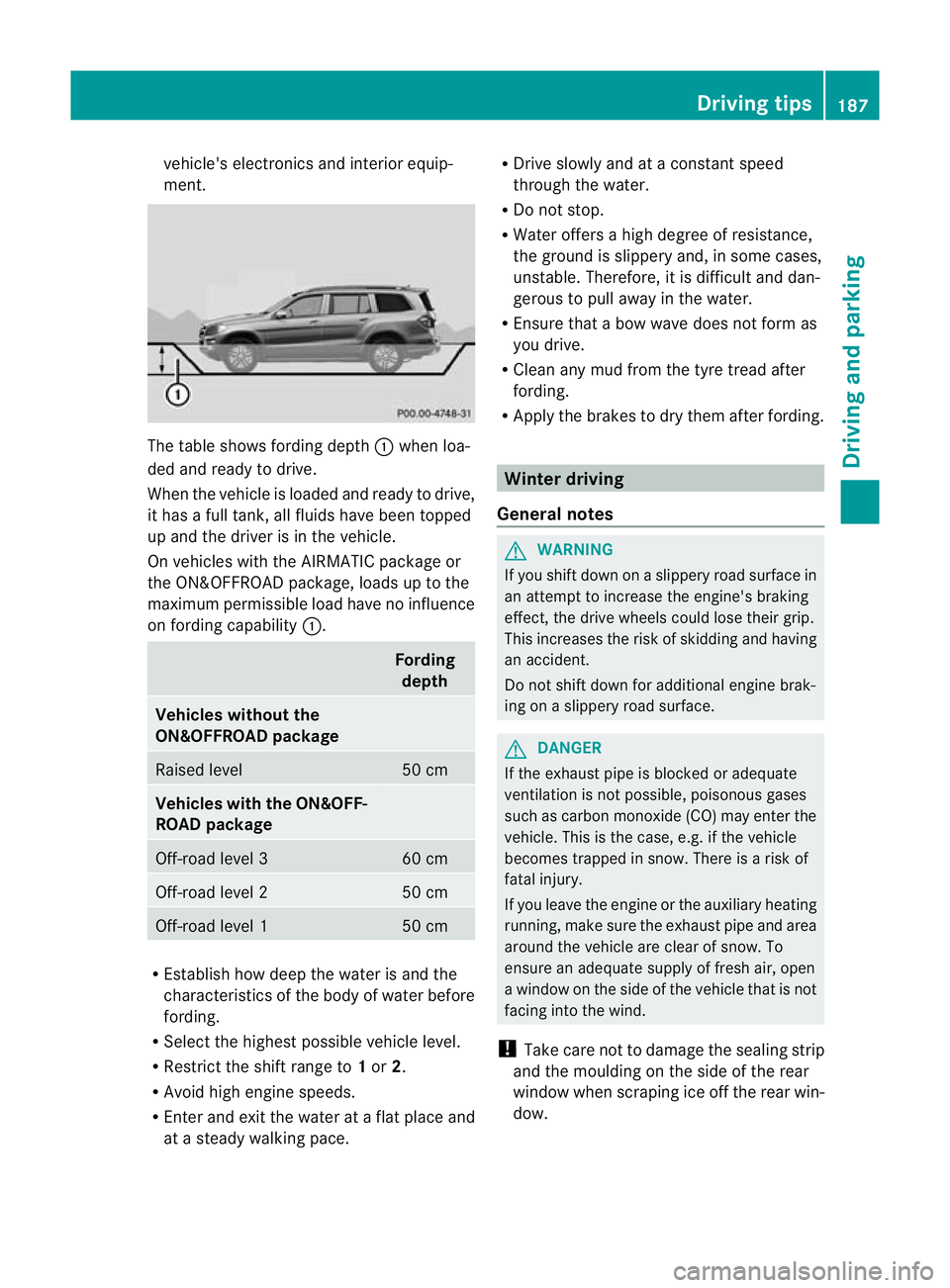
ment. The table sho
wsfording depth :when lo a-
de da nd read ytodrive.
When th evehicle is loaded and ready to driv e,
it has afull tank, all fluids have been topped
up and the driver is in the vehicle.
On vehicles with the AIRMATIC packag eor
the ON&OFFROAD package ,loads up to the
maximum permissible load have no influence
on fording capability :. Fording
depth Vehicles without the
ON&OFFROAD package
Raised level 50 cm
Vehicles with th
eON&OFF-
ROAD package Off-road level 3 60 cm
Off-road level 2 50 cm
Off-road level 1 50 cm
R
Establish how dee pthe water is and the
characteristic softhe body of water before
fording.
R Select the highest possible vehicle level.
R Restrict the shift range to 1or 2.
R Avoid high engin espeeds.
R Enter and exit the water at aflat place and
at as teady walking pace. R
Drive slowly and at aconstant speed
through the water.
R Do not stop.
R Water offers ahigh degree of resistance,
the ground is slippery and, in some cases,
unstable. Therefore, it is difficult and dan-
gerous to pull away in the water.
R Ensure that abow wav edoes not for mas
you drive.
R Clea nany mud from the tyre tread after
fording.
R Appl ythe brakes to dry them after fording. Winter driving
Genera lnotes G
WARNING
If you shift down on aslippery road surfac ein
an attempt to increase the engine's braking
effect, the drive wheels could lose their grip.
This increases the risk of skidding and having
an accident.
Do not shift down for additional engine brak-
ing on aslippery road surface. G
DANGER
If the exhaust pipe is blocked or adequate
ventilation is not possible ,poisonous gases
such as carbon monoxide (CO) may enter the
vehicle. This is the case, e.g. if the vehicle
becomes trapped in snow. There is arisk of
fatal injury.
If you leave the engine or the auxiliary heating
running, make sure the exhaust pipe and area
around the vehicle are clear of snow. To
ensure an adequate supply of fresh air, open
aw indow on the side of the vehicle that is not
facin ginto the wind.
! Take care not to damage the sealing strip
and the mould ingont he side of the rear
window when scrapin gice off the rear win-
dow. Driving tips
187Driving and parking Z
Page 196 of 441
in effect achieved in the process reduces
the stoppin gdistanc ewhen drivin goff-
road. Th esteerabilit yofthe vehi cleisc on-
siderably redu cedift he wheels lock. Driving systems
Cruise cont
rol
Important safety notes G
WARNING
Do not change down for additional engine
braking on aslipper yroad surface. This could
cause the driv ewheels to lose their grip and
the vehi clec ould skid. G
WAR
NING
Cruise control cannot tak eaccount of road
and traffic conditions.
Alway spay attention to traffic conditions
even when cruis econtrol is activa ted.
Cruise control is only an aid designed to assist
driving. You are responsible for the vehicle's
speed and for braking in good time. G
WAR
NING
Do not use cruise control
R in traffic conditions that do not allow you to
drive at aconstan tspeed (e.g. heavy tra ffic
or winding roads). You may otherwise
cause an accident.
R on slippery roads. The drive wheels may
lose their grip when brakin goraccelerating
and the vehicle may skid.
R whe nther eisl ow visibility ,e.g. due to fog,
heavy rain or snow.
General notes Cruis
econtr ol maintains aconstan troad
speed for you. It brakes automatically in order
to avoid exceeding the set speed. On long and
steep downhil lgradients, especiall yifthe
vehicle is laden or towing atrailer, yo umust
select shift range 1,2or 3in good time. By doing so, you will make use of the braking
effec
tofthe engine. This relieves the load on
the brake system and prevents the brakes
from overheating and wearing too quickly.
Use cruise con trolonly if road and traffic con-
ditions make it appropriate to maintain a
steady speed for aprolonged period. Yo ucan
store any road spee dabove 30 km/h.
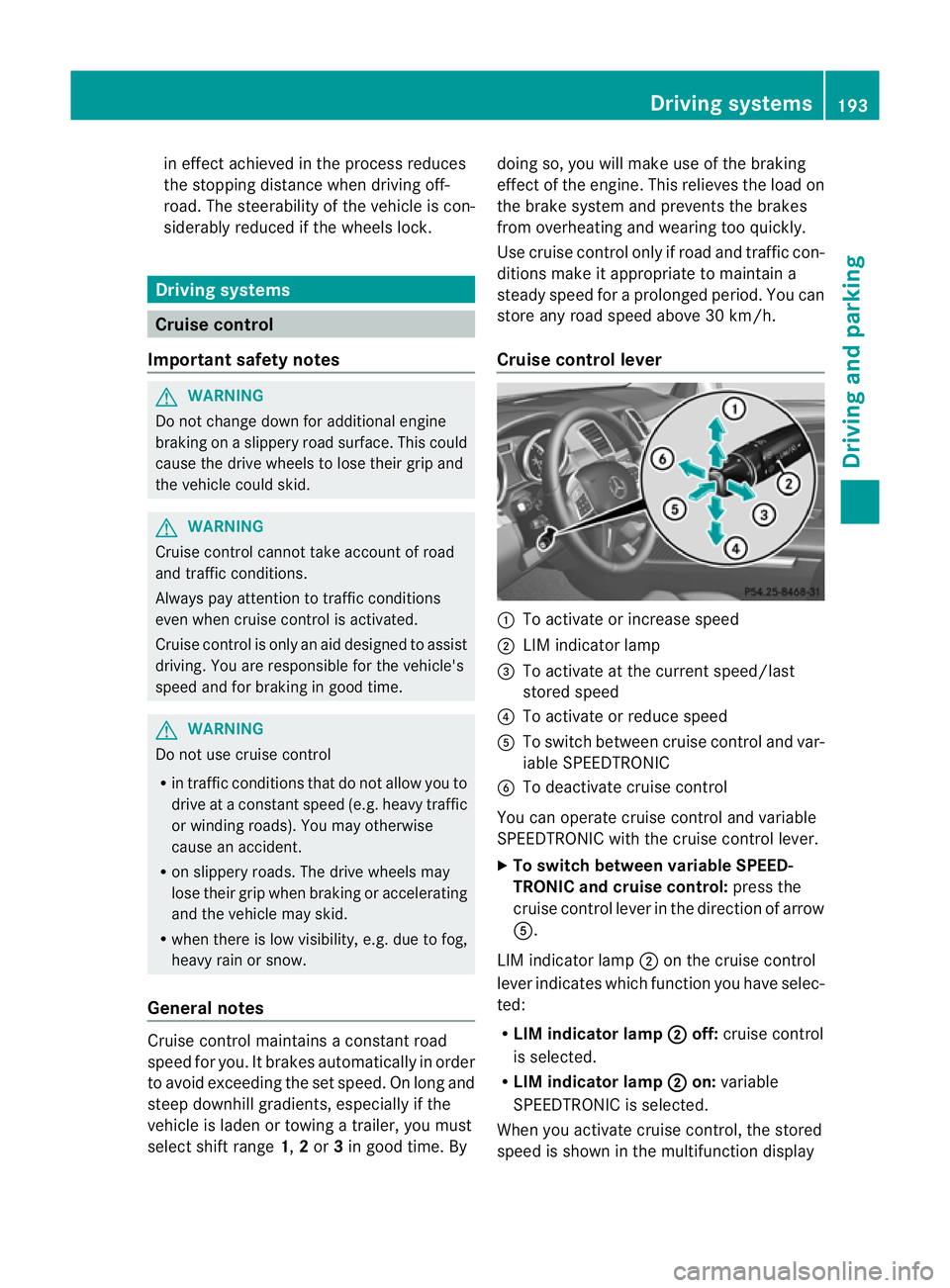
Cruise contro llever :
To activate or increase speed
; LIMi ndicato rlamp
= To activate at the current speed/last
stored speed
? To activate or reduce speed
A To switch between cruise control and var-
iable SPEEDTRONIC
B To deactivate cruise control
You can operate cruise control and variable
SPEEDTRONIC with the cruise control lever.
X To switch between variable SPEED-
TRONIC and cruise control: press the
cruise control lever in the direction of arrow
A.
LIM indicator lamp ;on the cruise control
lever indicates which function you have selec-
ted:
R LIM indicator lamp ; off:
cruise control
is selected.
R LIM indicator lamp ; on:
variable
SPEEDTRONIC is selected.
When you activate cruise control, the stored
spee diss hown in the multifunction display Driving systems
193Driving and parking Z
Page 199 of 441
SPEEDTRONIC
Important safety notes G
WARNING
Never depress the brake peda lcontinuously
while the vehicle is in motion, e.g. never cause
the brakes to rub by applying constant slight
pedal pressure. This causes the brake system
to overheat, increases the brakin gdistance
and can lead to the brakes failing completely. G
WARNING
Do not change down for additional engine
braking on aslippery road surface. This could
cause the drive wheels to lose their grip and
the vehicle could skid. G
WARNING
SPEEDTRONI Cisonly an aid designe dto
assis tdriving. Yo uare responsibl efor the
vehicle' sspeed and for braking in good time. G
WARNING
If there is achange of drivers, advise the new
driver of the limit speed stored.
Only use variable SPE EDTRONI Cifyou will not
have to accelerate suddenl ytoaspeed above
that stored as the limit speed. You could oth-
erwise cause an accident.
You can only exceed the limit speed stored if
you deactivate variable SPE EDTRONIC:
R using the cruise control lever
R by depressin gthe accelerator pedal
beyon dthe pressure point (kickdown)
It is not possible to deactivate variable
SPE EDTRONI Cbybraking.
General notes SPE
EDTRONIC brakes automatically so that
you do not exceed the set speed. On long and
steep downhil lgradients ,especially if the
vehicle is laden or towing atrailer, yo umust
select shift range 1,2or 3in good time. By
doing so, you will make use of the braking
effect of the engine. This relieves the load on the brake system and prevent
sthe brakes
from overheating and wearing too quickly .If
you need additional braking, depres sthe
brake pedal repeatedly rather than con tinu-
ously.
You can set avariable or permanent limit
speed:
R variable for speedlimits, e.g. in built-up
areas
R permanent for long-term speed restric-
tions, e.g. when drivin gwith winter tyres
fitted (Y page 198)
i The speed indicated in the speedometer
may differ slightly from the limit speed
stored.
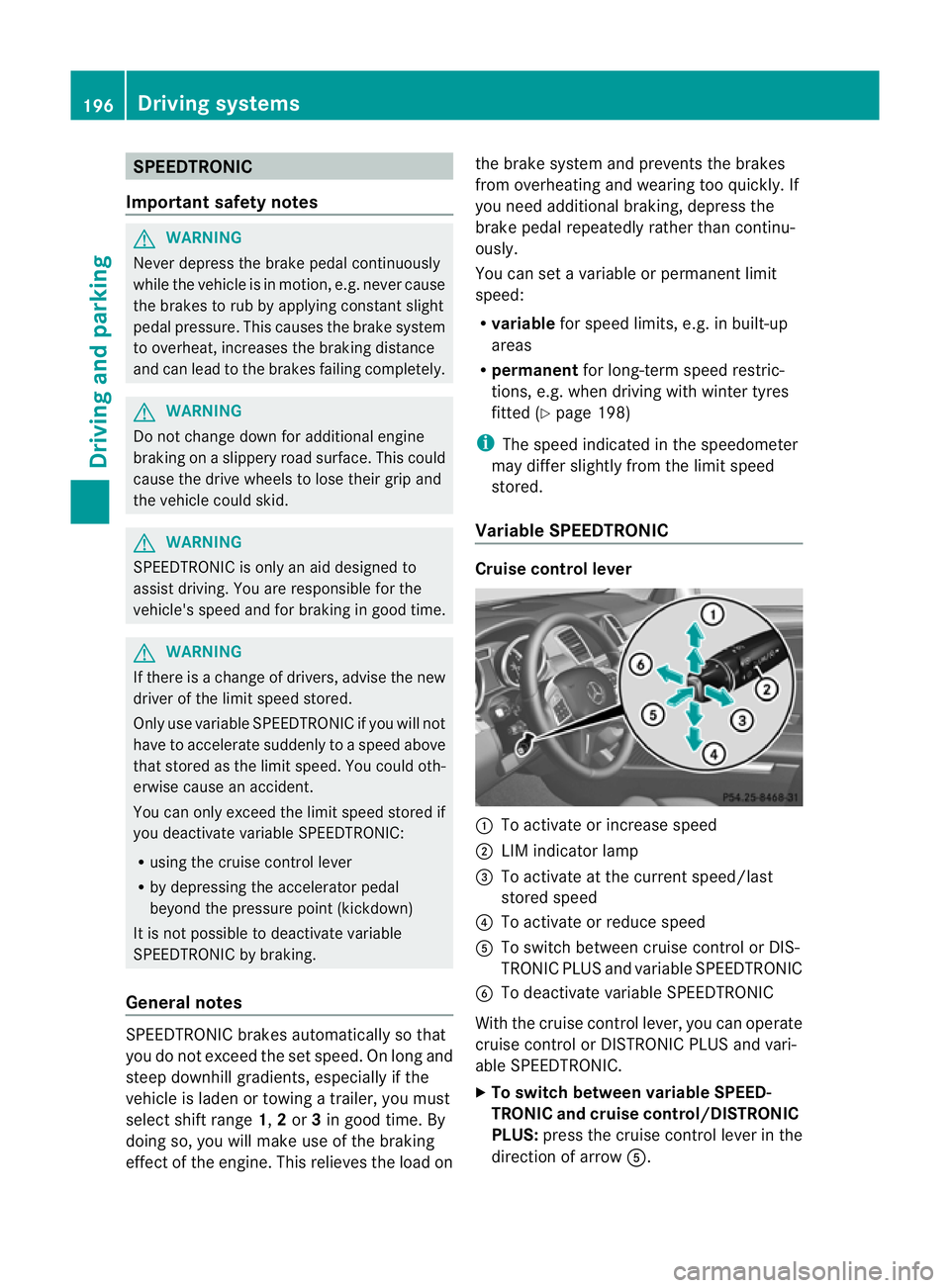
Variable SPEEDTRONIC Cruise control lever
:
To activate or increase speed
; LIMi ndicato rlamp
= To activate at the current speed/last
stored speed
? To activate or reduce speed
A To switch between cruise control or DIS-
TRONIC PLUS and variable SPEEDTRONIC
B To deactivate variable SPEEDTRONIC
With the cruise control lever, you can operate
cruise control or DISTRONIC PLUS and vari-
able SPEEDTRONIC.
X To switch between variable SPEED-
TRONIC and cruise control/DISTRONIC
PLUS: press the cruise control lever in the
direction of arrow A.196
Driving systemsDriving and parking