tow MERCEDES-BENZ GL SUV 2012 Owner's Guide
[x] Cancel search | Manufacturer: MERCEDES-BENZ, Model Year: 2012, Model line: GL SUV, Model: MERCEDES-BENZ GL SUV 2012Pages: 441, PDF Size: 10.66 MB
Page 202 of 441
G
WARNING
DISTRONIC PLUS canno ttake account of road
and traffic conditions. If DISTRONI Cdoes not
recognise or no longer recognises the vehicle
in front, do not activate DISTRONIC or, if it is
alr eady active, deactivate it. This is especially
the case:
R befor ecorners
R on filter lanes
R when changing to alane with faster moving
traffic
R in comple xdriving situations or where lanes
are diverte d,e.g. at roadworks on amotor-
way
DISTRONIC PLU Sotherwise maintains the
current spe ed setbyyou or accelerates up to
the set speed.
DISTRONIC PLU Scannot take account of
weather conditions. Deactivate, or do not
activate, DISTRONI CPLUS:
R if th eroads are slippery, snow-covered or
icy .The wheels coul dlose their grip when
brakin goraccelerating .The vehicle could
star ttos kid.
R if the sensors are dirty or there is poo rvis-
ibility, e.g. due to snow, rain or fog. Dis-
tance control may be impaired.
Always pay attention to traffic conditions
even when DISTRONIC PLU Sisactivate d.
Otherwise, you ma yfail to recognise dangers
in time, caus eanaccident and injure yourself
and others. G
WARNING
DISTRONIC PLUS brake syourvehicle up to a
maximu mof4m /s2
depending on its speed.
This corresponds to approximately 40% of
your vehicle's maximum braking power. You
must als oapply the brakes yourself if this
braking power is not sufficient.
If DISTRONI CPLUS detect sarisk of collision
with avehicle in front, an intermit tent warning
tone sounds. In addition, the ·distance
warning lamp in the instrument cluste rlights
up. Brak etoavoidac ollision. G
WAR
NING
The vehicle can be braked when DISTRONIC
PLUS is activated. For this reason, deactivate
DISTRONIC PLUS if the vehicle is to be set in
motion by othe rmeans (e.g. in acar wash or
by towing).
The radar senso rsystem is switched off auto-
matically in the vicinity of radio teles cope
facilities (Y page 433).
If you want DISTRONIC PLUS to assist you,
the radar sensor syste mmust be activated
(Y page 283 )and operational.
General notes DISTRONIC PLUS regulates the speed and
automati
cally helps you maintain the dis-
tanc etot he vehicle detected in front. DI S-
TRONIC PLU Sbrake sautomatically so that
the set spee disnot exceeded.
On long and steep downhil lgradients, espe-
ciall yifthe vehicle is laden or towing atrailer,
yo um ust select shift range 1,2or 3in good
time. By doing so, you will make use of the
braking effec tofthe engine. This relieves the
load on the brake system and prevents the
brakes from overheating and wearing too
quickly.
If DI STRONIC PLUS detects aslower-moving
vehicle in front ,your vehicle is braked in order
to maintain the preset distance to the vehicle
in front.
If ther eisnov ehicle in front ,DISTRONIC
PLUS operate sinthe sam eway as cruise
control in the spee drange between
30 km/h and 200 km/h. If avehicle is driving
in fron tofyou, DI STRONIC operates in the
speed range betwee n0km/h and
200 km/h.
Do not us eDISTRONIC PLUS on roa dswith
steep gradients. Driving systems
199Drivinga nd parking Z
Page 204 of 441
X
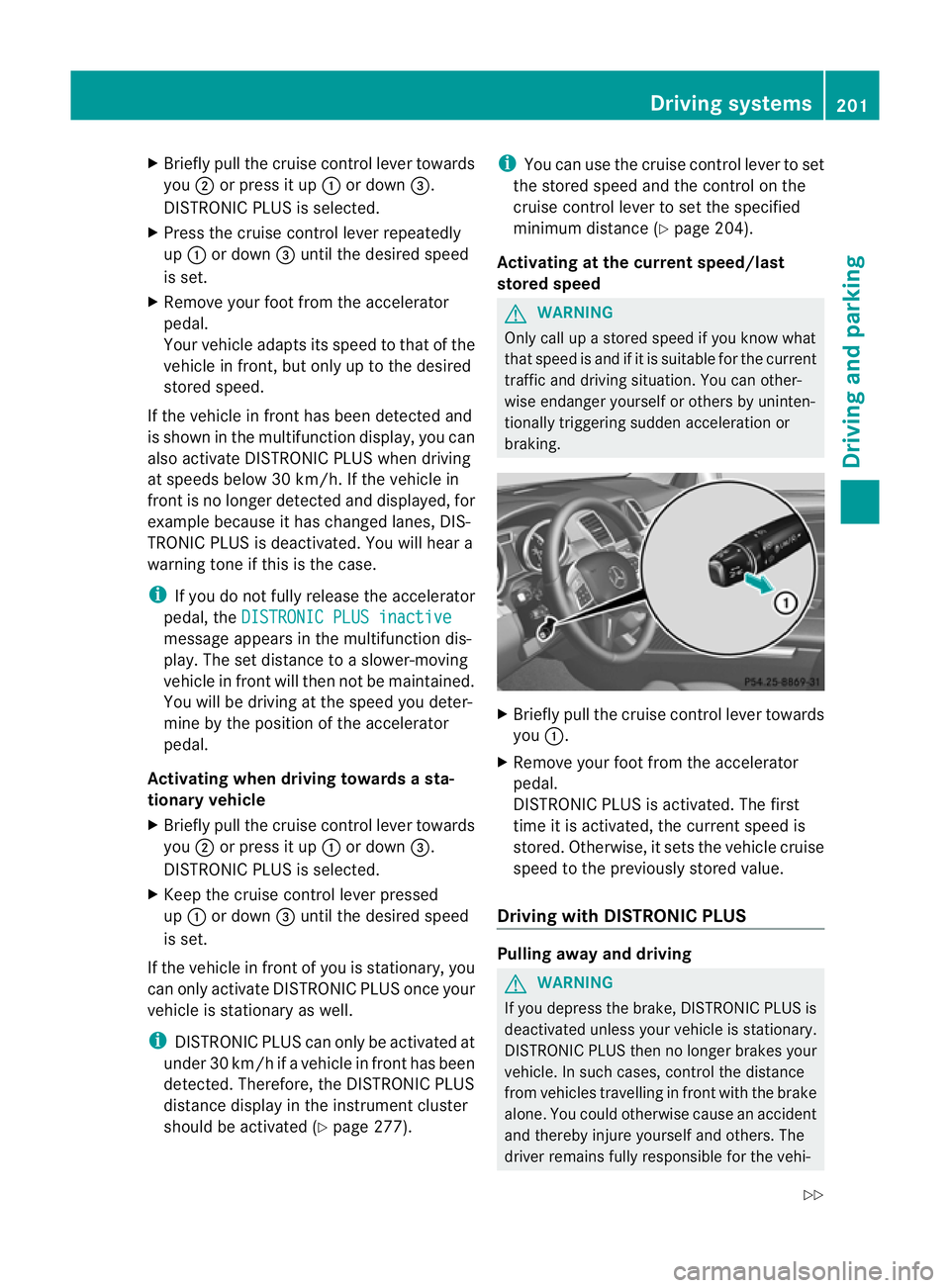
Briefly pull the cruise contro llev er towards
you ;or press it up :or down =.
DISTRONIC PLU Sisselected.
X Press the cruise control lever repeatedly
up : or down =until the desired speed
is set.
X Remove your foot from the acc elerator
pedal.
You rvehicle adapts its speed to that of the
vehicle in front, but only up to the desired
stored speed.
If the vehicle in fron thas been detected and
is shown in the multifunction display, you can
also activat eDISTRONIC PLUS when driving
at speeds belo w30km/h. If th evehicle in
fron tisnol onger detected and displayed, for
example because it has changed lanes, DIS-
TRONIC PLU Sisd eactivated. You will hear a
warning tone if this is the case.
i If you do not fully release the accelerator
pedal, the DISTRONICPLUS inactive message appe
arsint he multifunction dis-
play. The set distance to aslower-moving
vehicle in front will then not be maintained.
You will be drivin gatthe speed you deter-
mine by the position of the accelerator
pedal.
Activating when driving towards asta-
tionary vehicle
X Briefl ypullt he cruis econtr ollever towards
you ;or press it up :or down =.
DISTRONIC PLUS is selected.
X Keep the cruis econtrol leve rpressed
up : or down =unti lthe desired speed
is set.
If the vehicle in front of you is stationary ,you
can only activate DISTRONIC PLU Sonce your
vehicl eisstationary as well.
i DISTRONIC PLUS can only be activated at
under 30 km/h if avehicle in front has been
detected. Therefore, the DISTRONIC PLUS
distance display in the instrumen tcluster
should be activated (Y page 277).i
You can use the cruise control lever to set
the stored speed and the control on the
cruise control lever to set the specified
minimum distance (Y page 204).
Activating at the current speed/last
stored speed G
WARNING
Only call up astored speed if you know what
that speed is and if it is suitable for the current
traffic and driving situation. You can other-
wise endanger yoursel forothers by uninten-
tionally triggering sudden acce leratio nor
braking. X
Briefly pull the cruise contro llever towards
you :.
X Remov eyour foot from the accelerator
pedal.
DI ST RONIC PLUS is activated. The first
time it is activated, the curren tspeed is
stored. Otherwise, it sets the vehicle cruise
speed to the previously stored value.
Driving with DISTRONIC PLUS Pulling awa
yand driving G
WAR
NING
If you depress the brake, DISTRONIC PLUS is
deactivated unles syour vehicle is stationary.
DI ST RONIC PLUS then no longe rbrake syour
vehicle. In such cases, contr ol thedistance
from vehicles travelling in fron twith the brake
alone. You could otherwise cause an accident
and thereby injure yourself and others. The
drive rremain sfully responsible for the vehi- Driving systems
201Drivingand pa rking
Z
Page 205 of 441
cle's distance from oth
ervehicle s, the speed
bein gdrive nand for braking in goo dtime. X
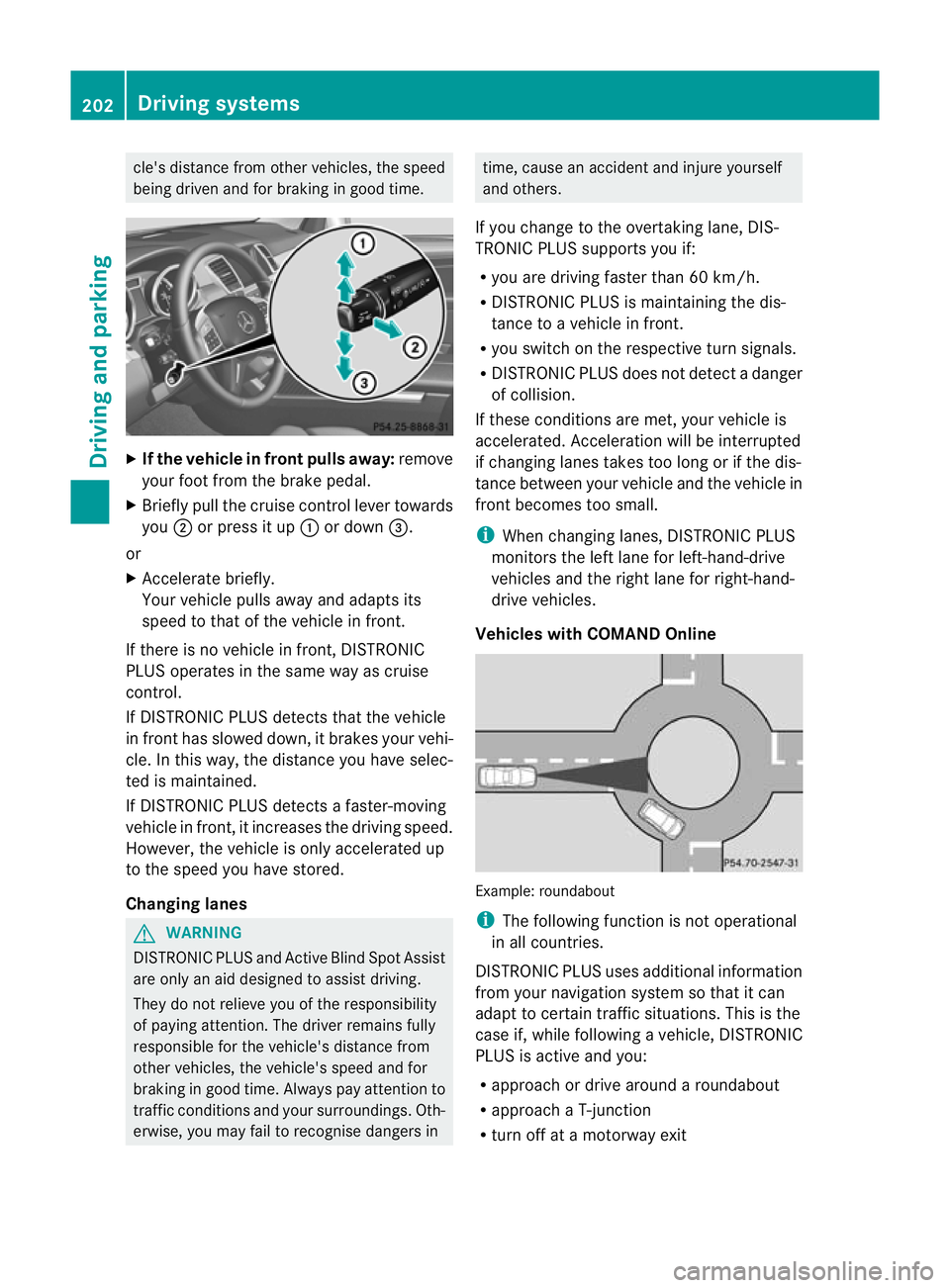
If the vehicle in front pulls away: remove
your foot from the brake pedal.
X Briefly pull the cruise control lever towards
you ;or press it up :or down =.
or
X Accelerate briefly.
Your vehicle pulls away and adapts its
speed to that of the vehicle in front.
If there is no vehicle in front, DISTRONIC
PLUS operates in the same way as cruise
control.
If DISTRONIC PLUS detects that the vehicle
in fron thas slowed down, it brakes your vehi-
cle. In this way, the distanc eyou have selec-
ted is maintained.
If DI STRONIC PLUS detects afaster-moving
vehicle in front, it increases the driving speed.
However, the vehicle is only accelerated up
to the spee dyou have stored.
Changing lanes G
WARNING
DI ST RONIC PLUS and Active Blind Spot Assist
are only an aid designed to assist driving.
The ydon ot relieve you of the responsibility
of payin gattention. The driver remains fully
responsible for the vehicle's distance from
other vehicles, the vehicle's speed and for
braking in good time. Always pay attention to
traffic conditions and your surroundings. Oth-
erwise, you may fail to recognise dangers in time, cause an accident and injure yourself
and others.
If you change to the overtakin glane, DIS-
TRONIC PLUS supports you if:
R you are driving faster than 60 km/h.
R DISTRONIC PLUS is maintaining the dis-
tance to avehicle in front.
R you switc honthe respective tur nsignals.
R DISTRONIC PLU Sdoes not detec tadanger
of collision.
If these condition sare met, your vehicl eis
accelerated. Acceleration will be interrupted
if changing lanes takes too long or if the dis-
tance between your vehicle and the vehicle in
front becomes too small.
i When changing lanes, DISTRONIC PLUS
monitors the left lane for left-hand-drive
vehicles and the right lane for right-hand-
drive vehicles.
Vehicles with COMAND Online Example: roundabout
i
The following function is not operational
in all countries.
DISTRONIC PLUS uses additional information
from your navigation system so that it can
adapt to certain traffic situations. This is the
case if, while following avehicle, DI STRONIC
PLUS is active and you:
R approach or drive around aroundabout
R approach aT-junction
R turn off at amotorway exit 202
Driving systemsDriving and pa
rking
Page 208 of 441
i
The last speed store dremains stored until
you switc hoff th eengine.
i DISTRONIC PLUS is not deactivated if you
depress the accelerator pedal. If you accel-
erate to overtake, DISTRONIC PLUS
adjusts the vehicle's speed to the last
speed stored after you have finished over-
taking.
DISTRONIC PLUS is automatically deactiva-
ted if:
R you engage the electric parking brake or if
the vehicl eisautomatically secured with
the electric parking brake.
R you are driving slowe rthan 25 km /hand
there is no vehicle in front, or if the vehicle
in fron tisnol onger detec ted.
R ESP ®
intervenes or you deactivat eESP®
.
R the transmission is in the P,Ror Nposition.
R the vehicle is near aradio telescop efacility
(Y page 433).
R you switch off the radar senso rsystem
(Y page 283).
R you pull the cruise control lever towards
you in order to pull away ,and the front-
passenger doo rorone of the rear doors is
open.
R you activate DSR.
R you activate off-road program 2onvehicles
with the ON&OFFROA Dpackage.
R the vehicle has skidded.
If DISTRONIC PLUS is deactivated, you will
hear awarning tone. You will see the DIS‐TRONIC PLUS off message in the multifunc-
tion display for approximately five seconds. Displays in the instrument cluster Displays in the speedometer
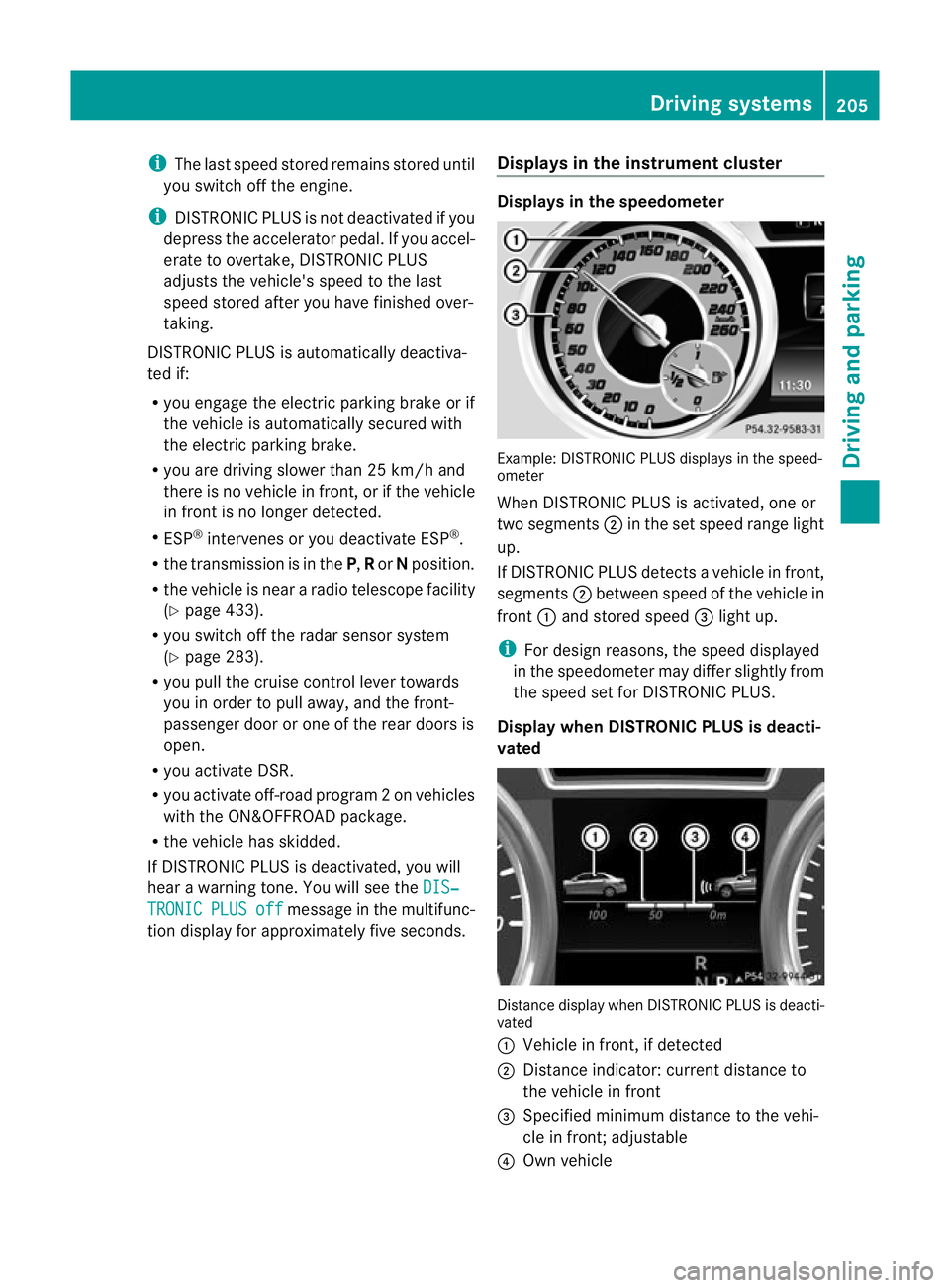
Example: DISTRONIC PLUS displays in the speed-
ometer
When DISTRONIC PLUS is activated, one or
two segments
;in the set spee drange light
up.
If DISTRONIC PLUS detects avehicle in front,
segments ;between speed of the vehicle in
front :and stored speed =light up.
i For design reasons, the speed displayed
in the speedometer may differ slightly from
the speed set for DI STRONIC PLUS.
Display when DISTRONIC PLUS is deacti-
vated Distance display when DISTRONIC PLUS is deacti-
vated
:
Vehicle in front, if detected
; Distance indicator: curren tdistanc eto
the vehicle in front
= Specified minimum distanc etothe vehi-
cle in front; adjustable
? Own vehicle Driving systems
205Driving and parking Z
Page 211 of 441
clearance. You will oth
erwise damag ethe
vehicle.
Lev elcontro ladapt sthe vehicle level auto-
matically to the current operating and driving
situation. Thi sresults in reduced fuel con-
sumption and improved handling.
Make changes to the vehicle level whil ethe
vehicle is in motion. Thi senable sthe vehicle
to adjus ttothe new level as quickly as pos-
sible.
The vehicle level ma ychange visibly if you
par kthe vehicle and the outside temperature
changes. If the temperatur edrops, th evehi-
cle level lowers; with an increase in temper-
ature, the vehicle level rises.
If you unloc kthe vehicle or open adoor, the
vehicle begins to compensate for load dis-
crepancies while still parked. However, for
significant leve lchanges, e.g. after the vehi-
cle has been stationar yfor along period, the
engin emust be running. For safety reasons,
the vehicle is only lowered when the doors are
closed .Lowering is interrupted if adoor is
opened; it con tinues once the doo rhas been
closed.
For information about driving off-road, see
(Y page 188).
Basic settings The exten
ttowhich the vehicle is raised or
lowered depend sonthe basic setting selec-
ted.
Select:
R Highway/high-spee dlevel for driving on
normal roads
R Off -road level 1for drivin goneasily nego-
tiable off-road terrain
R Off-road level 2for drivin gonnormal off-
roa dterrain
R Off -road level 3for freeing the vehicle from
especially difficult off -road terrain at low
speeds The individual vehicle levels differ from high-
way level as follows:
R
highway level: +/– 0mm
R high-spee dlevel: –1 5mm
R off-road leve l1:30mma bove highway level
R off-road level 2: 60 mm above highway level
R off-road level 3: 90 mm above highway level
Highway/high-speed level !
Make sure there is enough groun dclear-
ance when the vehicle is being lowered. It
could otherwise hit the ground, damaging
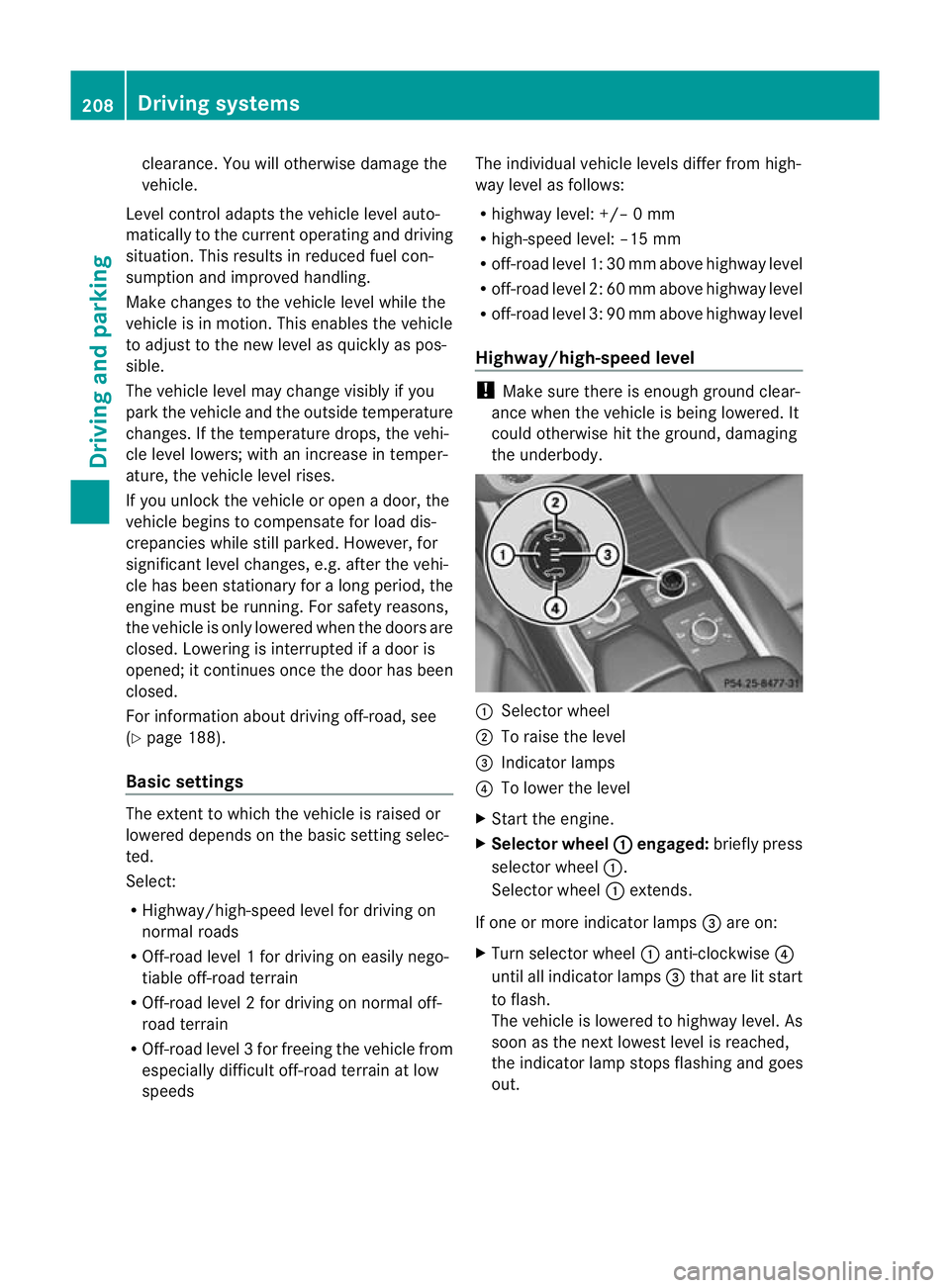
the underbody. :
Selector wheel
; To raise the level
= Indicator lamps
? To lower the level
X Star tthe engine.
X Selector wheel : engaged:
brieflypress
selecto rwheel :.
Selector wheel :extends.
If one or mor eindicato rlamps =are on:
X Turn selector wheel :anti-clockwise ?
until all indicator lamps =that are lit start
to flash.
The vehicle is lowered to highway level. As
soon as the next lowes tlevel is reached,
the indicator lam pstops flashing and goes
out. 208
Drivin
gsystemsDrivin gand pa rking
Page 214 of 441
HOL
Dfunction
Gen eral notes Th
eH OLD function ca nassist the driver in the
foll owing situations:
R when pulling away, especially on steep
slopes
R when manoeuvrin gonsteep slopes
R when waiting in traffic
The vehicle is kept stationary without the
driver having to depress the brake pedal.
The braking effect is cancelled and the HOLD
function is deactivated when you depress the
accelerator peda ltop ull away.
i Do not use the HOLD function when driv-
ing off-road, on steep downhill or uphill
inclines or on aslippery or loose surface.
Under such circumstances, the HOLD func-
tion may not be able to keep the vehicle
stationary.
Activation conditions You can activate the HOLD func
tion if:
R the vehicle is stationary.
R the engin eisrunning or if it has been auto-
matically switched off by the ECO start/
stop function.
R the driver' sdoor is closed or if your seat
belt is fastened.
R the electric parkin gbrake is released.
R thet ransmission is in position D,Ror N.
R DISTRONIC PLUS is deactivated.
Activatin gthe HOL Dfunction G
WARNING
Th ev ehicle' sbrake sare applied when the
HOLD functio nisactivated. For thi sreason,
deactivat ethe HOL Dfunction if the vehicle is
to be set in motion by other means (e.g. in a
car wash or by towing). X
Make sure that the activation conditions
are met.
X Depress the brake pedal.
X Quickly depres sthe brake pedal further
until ë appears in the multifunction dis-
play.
The HOL Dfunction is activated. You can
release the brake pedal.
i If depressing the brake pedal the first
time does not activate the HOLD function,
wait briefly and then try again.
Deactivating the HOLD function G
WARNING
Never get out of the vehicle when the HOLD
function is activated.
The HOLD function must never be operated
or deactivated by apassenger or from outside
the vehicle.
The HOLD function does not replace the elec-
tric parking brake and must not be used for
parking.
The braking effect of the HOLD function is
cancelled and the vehicle could roll away if:
R the HOLD function is deactivated by
depressing the accelerator pedal or the
brake pedal.
R there is amalfunction in the system or an
interruption in the power supply ,e.g. bat-
tery failure.
R the electrical system in the engine com-
partment, the battery or the fuses are tam-
pere dwith.
R the battery is disconnected.
If you leave the vehicle or park it, deactivate
the HOLD func tion and secur ethe vehicle
against rolling away.
The HOL Dfunction is deactivated automati-
cally if:
R you accelerate and the transmission is in
position Dor R.
R you shift the transmission to position P. Driving systems
211Drivingand pa rking Z
Page 221 of 441
One or mor
esegments light up as the vehicle
approaches an obstacle, dependin gonthe
vehicle' sdistance from the obstacle.
From the:
R sixth segment onwards, you will hear an
intermittent warnin gtone for approx-
imately two seconds.
R seventh segmen tonwards ,you will hear a
warnin gtone for approximately two sec-
onds. This indicates that you have now
reached the minimu mdistance.
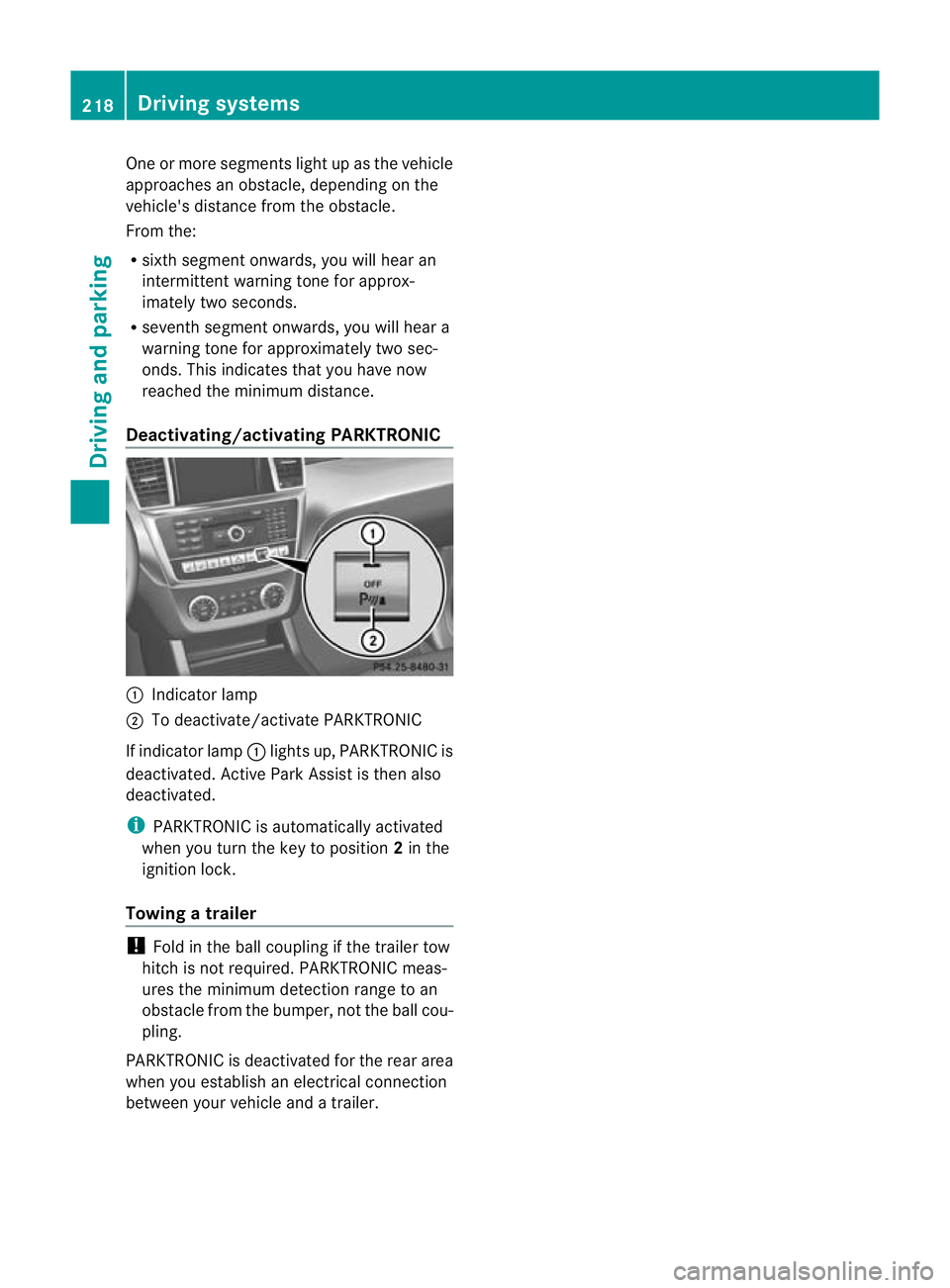
Deactivating/activating PARKTRONIC :
Indicator lamp
; To deactivate/activate PARKTRONIC
If indicator lamp :lights up, PARKTRONIC is
deactivated. Active Park Assist is then also
deactivated.
i PARKTRONIC is automatically activated
when you turn the key to position 2in the
ignition lock.
Towing atrailer !
Foldint he ball coupling if the trailer tow
hitc hisn ot required. PARKTRONIC meas-
ures the min imumdetect ionr ange to an
obstacle from the bumper, no tthe ball cou-
pling.
PARKTRONIC is deactivated for the rea rarea
when yo uestablish an electrica lconnection
between your vehicle and atrailer. 218
Dri
ving systemsDriving and pa rking
Page 224 of 441
Active Parking Ass
isti ss witched on automat-
icall ywhend riving forwards .The system is
operational at speeds of up to approximately
35 km/h. While in operation, the system inde-
pendently locates and measures parking
spaces on both sides of the vehicle. When
drivin gatspeeds below 30 km/ h,you will see
the parking symbol as astatus indicato rinthe
instrumen tcluster .Active Parking Ass ist only
display sparking spaces on the front-
pass enger sid easstandard .Parking spaces
on the driver' sside are displayed as soon as
th et urns ignal on the driver' sside is activa-
ted. To park on the driver' sside, you must
leave the driver' sside tur nsignal switched
on. This must remain switched on until you
acknowledge the use of Activ eParking Assist
by pressing the abutton on the multi-
function steerin gwheel.
When aparking space has been detected, an
arrow towards the right or the left also
appears.
Activ eParking Assist will only detect parking
spaces:
R that are parallel to the direction of travel
R that are at least 1. 5mwide
R that are at least 1. 3mlonger than your
vehicle
Ap arking space is displayed while you are
driving past it, and until you are approx-
imately 15 maway from it.
Parking G
WARNING
PARKTRONI Cand Activ eParking Assist are
merely parking aids and may not detec tall
obstacles. They do not reliev eyou of the
responsibili tyof payin gattention.
You are always responsible for safety and
must continue to pay attention to your imme-
diate surroundings when parking and
manoeuvring. You could, otherwise, endanger
yoursel fand others. G
WARNING
Whe nparking, you need to make sure that no
obstacles are located in the vicinity of the
vehicle durin gthe entire opera tion. Active
Parking Assist does not reliev eyou of the
responsibili tyof payin gattention. It merely
aids you by intervenin gactively in the steer-
ing.
To stop the vehi cleo ravoi dana ccident you
need to apply the brakes yourself.
X Stop the vehi clew hen the par king space
symbo lshows the desired par king space in
the instrumen tcluster.
X Shif tthe transmission to position R.
The Star tPark Assist? Yes: OK No: %
message appe arsint he multifunction
display.
X To cancel th eprocedure: press the
% button on the multifunction steering
whee lorp ull away.
or
X To par kusing Active Parking Assist:
press the abutton on the multifunction
steeri ngwheel.
The Park Assist active Accelerate and brake Observe surroundings mes-
sage appears in the multifunction display.
X Release the multifunction steerin gwheel.
X Reverse the vehicle, being ready to brake
at all times. When reversi ng,d rive at a
spee dbelow 10 km /h.O therwise, Active
Parking Assist will be cancelled.
i In tigh tparking spaces, you will achieve
the best parking results by backin gupas
far as possible .When doing so, also
observe the PARKTRONIC messages.
X Stop as soon as PARKTRONIC sound sthe
continuous warnin gtone, if not before.
Manoeuvrin gmay be required in tight park-
ing spaces.
The Park Assist active Select D Observe surroundings message appears in
the multifunction display. Driving systems
221Driving and parking Z
Page 226 of 441
10 km/h wh
enexiting aparking space.
Otherwise ,Active Parking Assist will be
cancel led.
X Stop as soon as PARK TRONIC sounds the
continuous warning tone, if not before.
X Shif tthe transmission to position Dor Ras
req uired wh ilet he vehicle is stationary.
Activ eParking Assis timmediatel ysteers in
the othe rdirection.
i You will achieve the best results by wait-
ing for the steering procedure to complete
before pulling away.
If you rever seafter activation, the steering
wheel is moved to the straight-ahead posi-
tion.
X Drive forwards or reverse the vehicle, being
read ytob rake at al ltimes.
X Stop as soon as PARKTRONIC sounds the
continuou swarning tone, if not before.
X Drive forwards and revers easinstructed by
the PARKTRONI Cwarning displays.
Once you have exite dthe parkin gspace com-
pletely, the steering wheel is moved to the
straight-ahead position. You hea ratonea nd
the message Park Assist switched off appear
sinthe multifuncti on display. You will
then have to steer and merg eintot raffic on
you rown. PARKTRONI Cisstill available.
Cancelling Active Parking Assist X
Stop the movemen tofthe multifunction
steeri ngwheel or steer yourself.
Activ eParking Assist will be cancelled at
once. The Park Assist cancelled mes-
sage appears in the multifunction display.
or
X Press the PARKTRONI Cbutton on the
centr econsole (Y page 218).
PARKTRONI Cisswitched off and Active
Parking Assist is immediately cancelled.
The Park Assist cancelled message
appears in the multifunction display. Activ
eParking Assist is cancelled automati-
cally if:
R parking using Activ eParking Assist is no
longer possible.
R you are drivin gfaster than 10 km/h.
R aw heel spin sand ESP ®
intervenes or fails.
The ÷ warnin glamp lights up in the
instrumen tcluster.
Aw arning ton esounds. The par king symbol
disappears and the multifunction display
shows the ParkA ssist cancelled mes-
sage.
When Activ eParking Assist is cancelled, you
must steer again yourself.
Towing atrailer For vehicles with
atrailer to whitch, the min-
imum length for parking spaces is slightly
increased.
If yo uhavea ttache datrailer to your vehicle,
yo us houl dnot us eActiv eParking Assist.
Once the electrica lconnection is established
between your vehicl eand the trailer, Active
Parking Assist is no longer available .PARK-
TRONIC is deactivated for the rear area. Reversin
gcamera
Important safety notes G
WARNING
Mak esure that no persons or animals are in
the manoeuvring range. Otherwise, they
could be injured. G
WARNING
The reversing camera is only an aid and may
sho wad istorted view of obstacles, show
them incorrectly or not at all. The reversing
camer aisnotas ubstitute for paying atten-
tion. The camera cannot sho wobject sinthe
following areas: Driving systems
223Driving and parking
Z
Page 227 of 441
R
very close to th erear bumper
R under the rear bumper
R in close range above the handle on the boot
lid
You are alway sresponsible for safety, and
must alway spay attention to you rsurround-
ings when parking and manoeuvring. This
applies to the areas behind, in front of and
beside th evehicle. Yo ucould otherwise
endanger yoursel fand others. G
WARNING
Unde rthe followin gcircumstances, the
reversing camer awill not func tion, or will
function in alimited manner:
R if the boot lid is open
R in heavy rain, snow or fog
R at night or in very dark places
R if the camer aisexposed to very brigh tlight
R if the area is lit by fluorescen tlight or LED
lighting (the display may flicker)
R if there is asudden change in temperature,
e.g. when driving into aheated garage in
winter
R if the camera lens is dirt yorobstructed
R if the rear of your vehicl eisdamaged. In this
event, have the camera positio nand setting
checked at aqualified specialist workshop.
Do not use the reversing camera in these
types of situation. You could otherwis einjure
others or damage object sand your vehicle
whil eyou are parking.
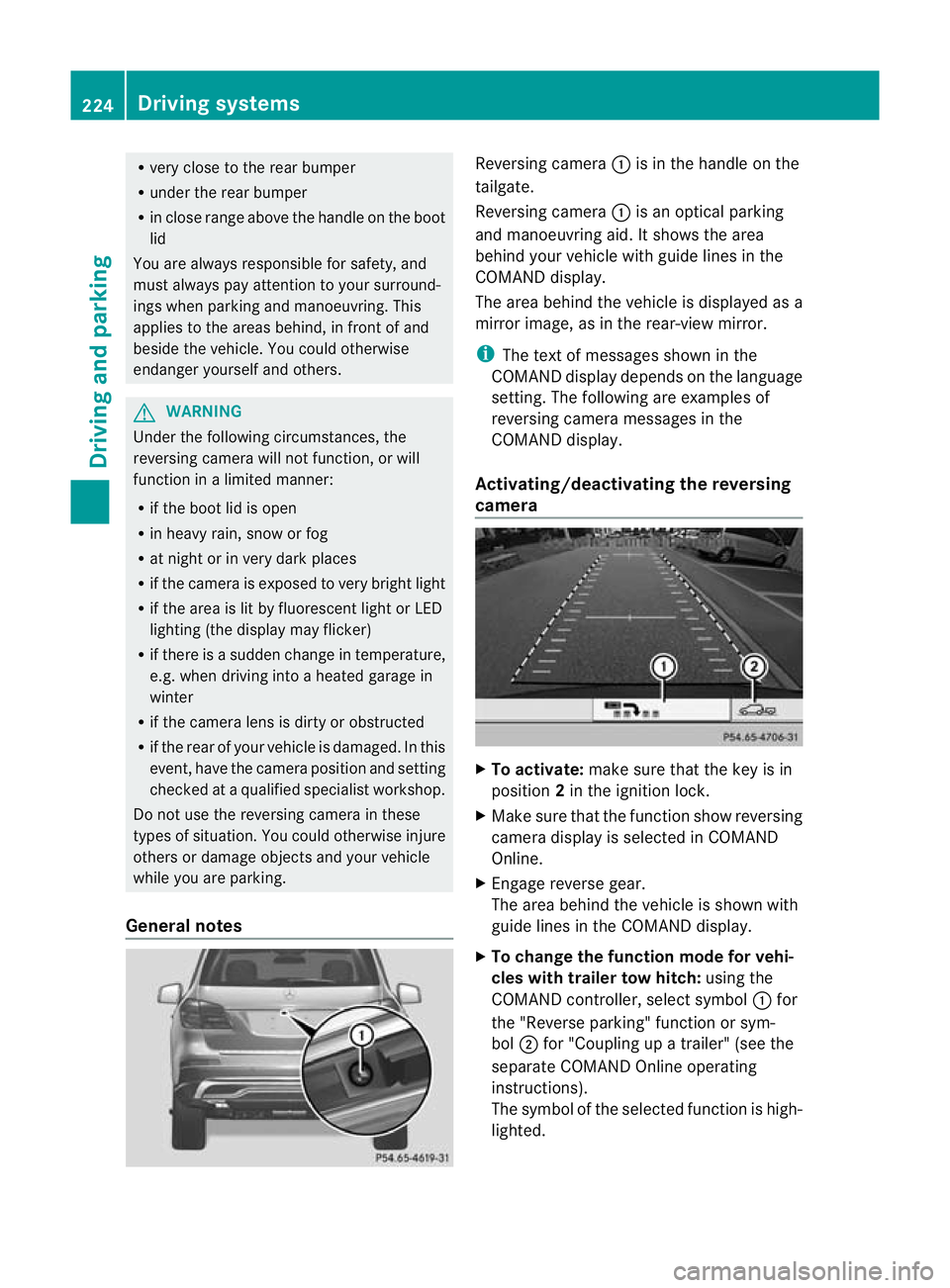
General notes Reversin
gcamera :is in the handle on the
tailgate.
Reversing camera :is an optical parking
and manoeuvring aid. It shows the area
behind your vehicle with guide lines in the
COMAND displ ay.
Th ea rea behind th evehicle is displayed as a
mirror image, as in the rear-view mirror.
i The text of messages shown in the
COMAN Ddispla ydepends on the language
setting. The following are examples of
reversin gcamera message sint he
COMAN Ddisplay.
Activating/deactivating the reversing
camera X
To activate: make sure that the key is in
position 2in the ignition lock.
X Make sure that the func tion show reversing
camera display is selected in COMAND
Online.
X Engage reverse gear.
The area behind the vehicle is shown with
guide lines in the COMAN Ddisplay.
X To change the function mode for vehi-
cles with trailer tow hitch: using the
COMAND controller, select symbol :for
the "Reverse parking" func tion or sym-
bol ;for "Coupling up atrailer" (see the
separate COMAND Online operating
instructions).
Th es ymbol of the selected function is high-
lighted. 224
Driving systemsDrivin
gand pa rking