tow MERCEDES-BENZ GL SUV 2012 Service Manual
[x] Cancel search | Manufacturer: MERCEDES-BENZ, Model Year: 2012, Model line: GL SUV, Model: MERCEDES-BENZ GL SUV 2012Pages: 441, PDF Size: 10.66 MB
Page 228 of 441
To deactivate:
the reversing camera is deac-
tivated if you:
R sh iftt he transmission to position P
R drive for wards 10 m
R shift th etransmission from Rto another
positio n(after 15 seconds)
R driv eforwards at aspee dofover
10 km/h
Display sintheCOMAN Ddisplay G
WARNING
Usin gthe reversing camera ca nbedangerous
if you are colour-blind or if your abilit ytodis-
tinguish colours is impaired.
Only use th ereversing camera if you can see
and distinguish between all th ecoloured
guide lines that are displayed by the reversing
camera in the COMAN Ddisplay. G
WARNING
Please note that object snot at groun dlevel
may appear to be further away than they
actually are. These include:
R the bumper of avehicle that is parked
behind your vehicle
R at railer drawbar
R theb all coupling of atrailer tow hitch
R thet ail-end of alorry
R slanted posts
The lines are only guides, not accurate meas-
urements of the distance to an obstacle.
Therefore, you should never pass the red line
when approachin ganobstacle. You could oth-
erwise cause an accident and injur eyourself
and others. :
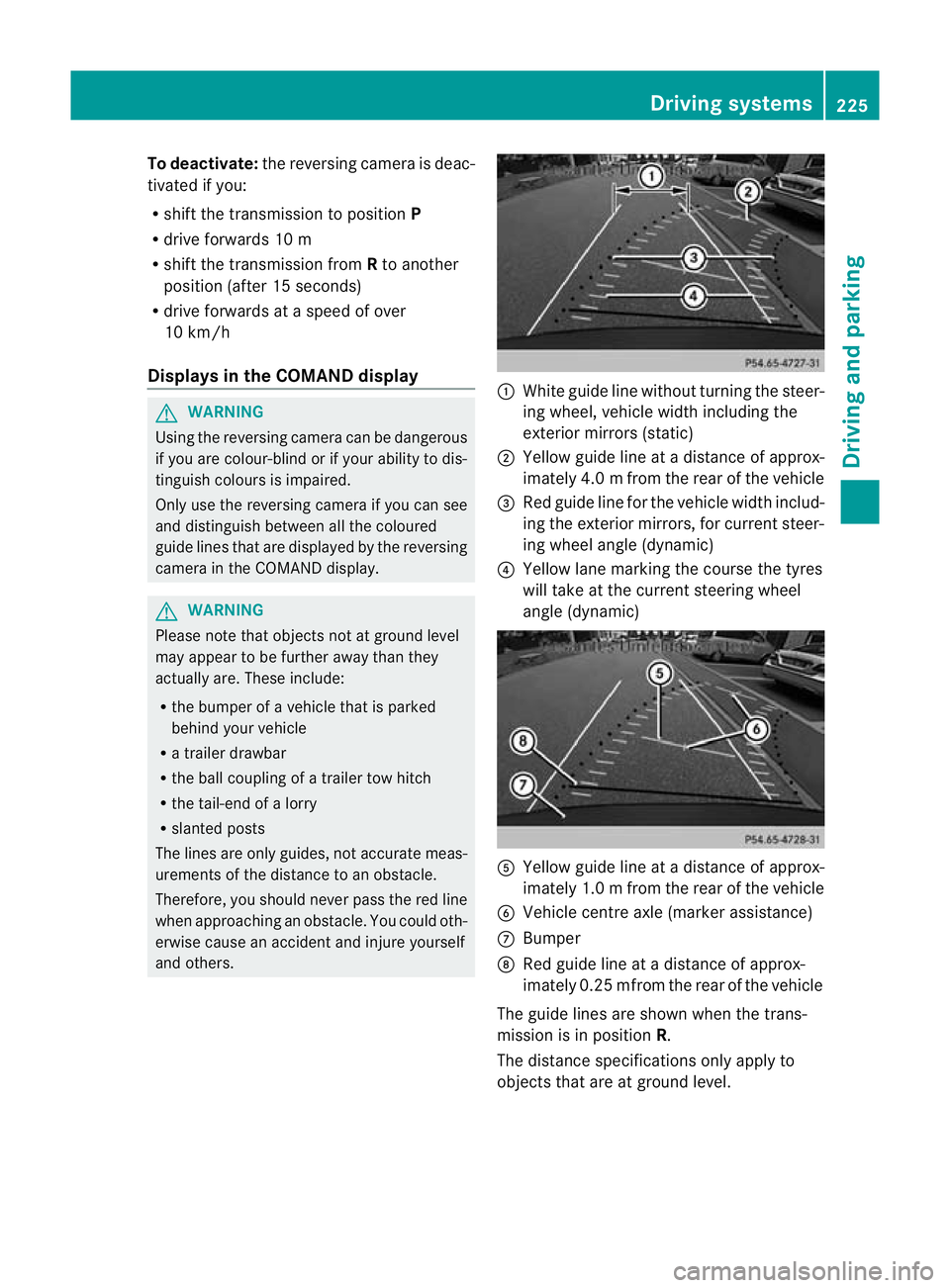
White guide line without turnin gthe steer-
ing wheel, vehicle widt hincluding the
exterior mirrors (static)
; Yellow guid eline at adistance of approx-
imately 4.0 mfrom th erear of the vehic le
= Red guide line for the vehicl ewidth includ-
ing the exterior mirrors, for current steer-
ing whee langle (dynamic)
? Yellow lane marking the course the tyres
willtake at the current steering wheel
angle (dynamic) A
Yellow guide line at adistance of approx-
imately 1.0 mfrom th erear of the vehic le
B Veh icle centr eaxle (marker ass istance)
C Bumper
D Red guide line at adistance of approx-
imately 0.2 5mfrom th erear of the vehic le
Th eg uide lines are sho wn whenthe trans-
mission is in position R.
The distance specifications only apply to
object sthat ar eatground level. Dri
ving systems
225Driving and pa rking Z
Page 232 of 441
The system evaluates images from the fol-
lowin gcameras:
R reversin gcamera
R fron tcamera
R two cameras in the exterior rear view mir-
rors
The cameras capture the immediate sur-
roundings of the vehicle. The system sup-
ports you, e.g. when parking or if vision is
restricted at an exit.
The 360 °camera images can be shown in full
screen mode or in seven different split-screen
views on the COMAND display. Asplit-screen
view also includes atop view of the vehicle.
This view is calculated from the data supplied
by the installed camera s(virtual camera).
Th e7s plit-screen views are:
R top view and picture from the reversing
camera (13 0°viewing angle)
R top view and picture from the fron tcamera
(without displaying the maximum steering
wheel angle)
R top view and enlarged rear view
R top view and enlarged front view
R top view and trailer view (vehicles with
trailer tow hitch)
R top view and pictures from the rearward
facin gmirror cameras (rear wheel view)
R top view and pictures from the forward
facin gmirror cameras (fron twheel view)
i The top vie wand trailer view are available
for vehicles equipped with atrailer tow
hitch.
When th efunction is active and you shift the
transmission from position Dor Rto N,y ou
see the previous view in the COMAN Ddis-
play. The dynamic guidelines are hidden.
When you change between transmission
positions Dand R,you see the previously
selected front or rea rview. Activation conditions The 360
°camera image can be displ ayed if:
R your vehicle is equip pedw ith the 360°
camera.
R COMAND Online is switched on, see the
separate COMAND Online operating
instruc tions.
R the 360° camera func
tion is activated
Activating th e360° camera using the
SYS but ton X
Press and hold the Wbutton for longer
than 2seconds, see the separate COMAND
Online operatin ginstructions.
Depe nding on whether position Dor Ris
engaged, the following is shown:
R full screen display with the image from
the fron tcamera
R full screen display with the image from
the rear camera.
Activating the 360° camer awith
COMAN DOnline X
Press the Wbutton, see the separate
COMAN DOnline operating instructi ons.
X Select System by turning
cVdthe
COMAND contr ollerand press Wto con-
firm.
X Select 360°camera and press
Wto con-
firm.
Depending on whethe rposition Dor Ris
engaged, the following is shown:
R as plit screen with top view and the
image from the front camera or
R as plit screen with top view and the
image from the reversing camera.
For further information about the COMAND
Controller, see the separat eCOMAN DOnline
operating instructions. Drivin
gsystems
229Drivingand pa rking Z
Page 237 of 441
Speed Limi
tAssist detect sthe traffi csigns
with cam era:attached at the top of the
windscreen.
i Speed Limit Assist is not operationa linall
countries.
Speed Limit Ass ists hows you detected speed
limits in the mu ltifunction display .Data from
the navigation system is also used for this
purpose. The display appears if Speed Limit
Assist detect satraffic sign indica ting aspeed
limit or th eend ofas peed limit .IfSpeed Limit
Assist does not detec tany traffic signs ,the
speed limit from the digital road map is tak en
and shown in the display.
Informatio ninthe mult ifunction display Briefly showing detecte
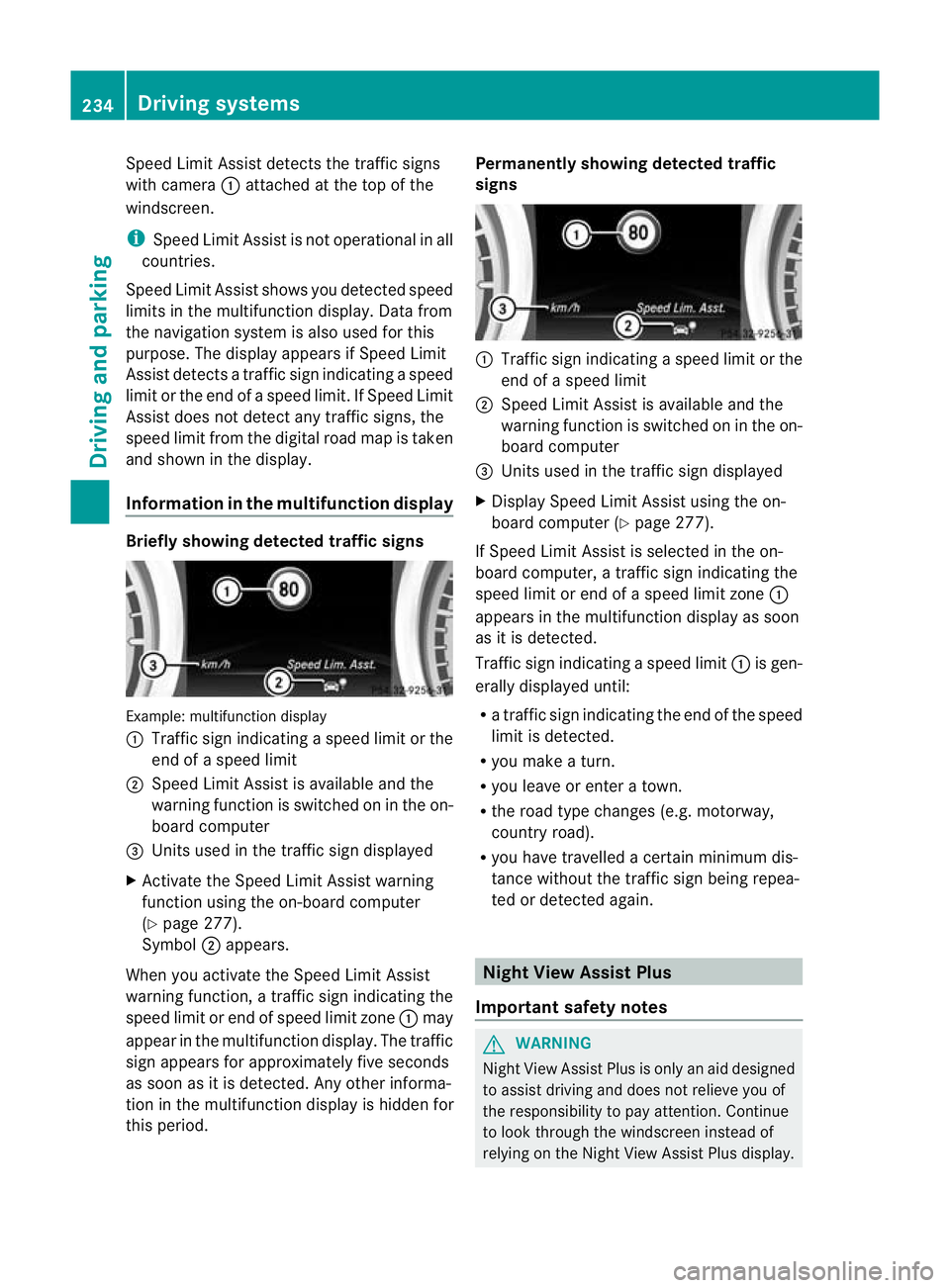
dtraffic signs Examp
le:m ultifunctio ndisplay
: Traffic sign indicatin gaspeed limit or the
end of aspeed limit
; Speed Limit Assist is available and the
warning fun ction is switched on in the on-
board computer
= Unit sused in the traffi csign displayed
X Activat ethe Speed Limi tAssist warning
function usin gthe on-boar dcompu ter
( Y page 27 7).
Symbol ;appears.
When you activate the Spee dLimit Assist
warnin gfunction, atraffic sign indicating the
spee dlimit or end of speed limit zone :may
appear in the multifunction display. The traffic
sign appears for approximately fiv eseconds
as soon as it is detected. An yother informa-
tion in the multifunction display is hidden for
this period. Permanently showing detected traffic
signs
:
Traffic sig nindicating aspeed limit or the
end of aspeed limit
; Speed Limit Assist is available and the
warning fun ction is switched on in the on-
board computer
= Unit sused in the traffi csign displayed
X Display Speed Limit Assist using the on-
board computer (Y page 277).
If Speed Limit Assist is selected in the on-
board computer, atraffic sign indicating the
spee dlimit or end of aspeed limit zone :
appear sinthe multifunction displa yassoon
as it is detected.
Traffic sign indicating aspeed limit :is gen-
erall ydisplayed until:
R at raffic sign indicating th eend of the speed
limit is dete cted.
R you mak eaturn.
R you leave or enter atown.
R the roa dtype changes (e.g. motorway,
country road).
R you have travelle dacertain minimu mdis-
tanc ewithout the traffic sign being repea-
ted or detected again. Night View Assist Plus
Importan tsafety notes G
WARNING
Nigh tView Assist Plus is only an aid designed
to assist drivin gand doe snot relieve you of
the responsibilit ytopay attention. Continue
to look through the windscreen instead of
relying on the Night View Assis tPlus display. 234
Drivin
gsystemsDrivin gand parking
Page 243 of 441
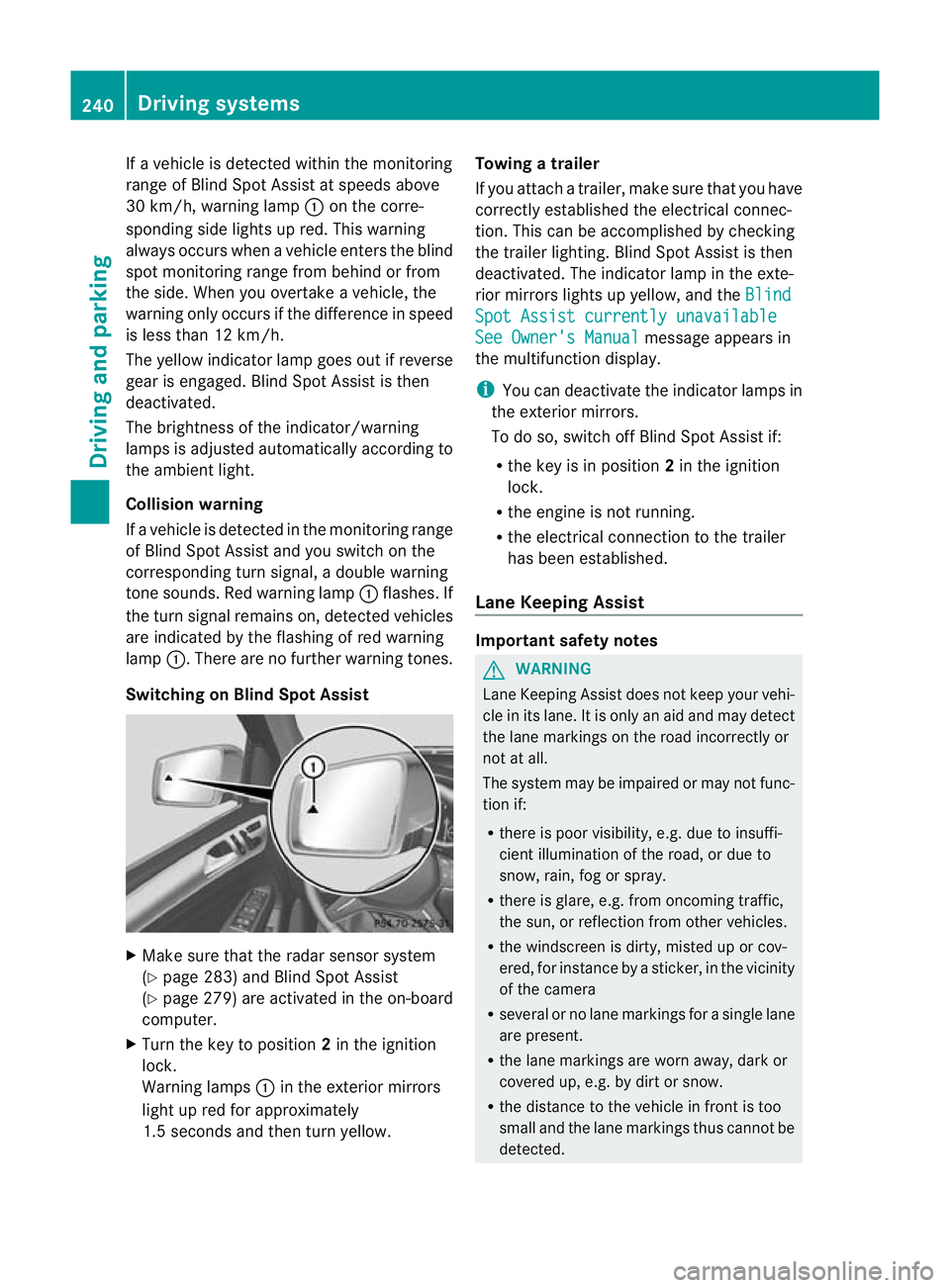
If
av ehicle is detected within the monitoring
range of Blin dSpot Assist at speed sabove
30 km/h, warning lamp :on the corre-
sponding side lights up red. This warning
alway soccurs whe navehicle enter sthe blind
spot monitoring range from behind or from
the side. When you overtak eavehicle, the
warning only occurs if the difference in speed
is less than 12 km/h.
The yellow indicator lam pgoes out if reverse
gear is engaged. Blin dSpot Assist is then
deactivated.
The brightness of the indicator/warning
lamps is adjusted autom atically according to
the ambient light.
Collision warning
If av ehicle is detected in the monitoring range
of Blin dSpot Assist and you switch on the
correspondin gturn signal ,adouble warning
tone sounds. Red warnin glamp :flashes. If
the turn signal remains on, detected vehicles
are indicated by the flashing of red warning
lamp :.There ar enofurther warning tones.
Switching on Blind Spot Assist X
Make sure that the radar senso rsystem
(Y page 283) and Blind Spot Assist
(Y page 279) are activated in the on-board
computer.
X Turn the key to position 2in the ignition
lock.
Warning lamps :in the exterior mirrors
ligh tupr ed for approximately
1. 5s econds and then tur nyellow. Towing
atrailer
If yo uattach atrailer, make sure th at you have
corre ctly established the electrical connec-
tion. This can be accomplished by checking
the trailer lighting. Blind Spot Assist is then
deactivated. The indicator lamp in the exte-
rior mirrors lights up yellow ,and the Blind Spo
tAssist currently unavailable See Owner's Manual message appears in
th em ultifunction display.
i You can deactivate the indicator lamps in
the exterior mirrors.
To do so, switch off Blind Spot Assis tif:
R thek ey is in position 2in the ignition
lock.
R the engine is not running.
R the electrical connection to the trailer
has been established.
Lane Keeping Assist Important safety notes
G
WARNING
Lan eKeeping Assist does not keep your vehi-
cle in its lane. It is only an aid and may detect
the lane markings on the road incor rectly or
not at all.
Th es ystem may be impaired or may not func-
tion if:
R there is poo rvisibility, e.g. due to insuffi-
cient illumination of the road, or due to
snow, rain, fog or spray.
R there is glare, e.g. from oncoming traffic,
the sun, or reflec tion from other vehicles.
R the windscreen is dirty, misted up or cov-
ered, for insta ncebyasticker, in the vicinity
of the camera
R several or no lane markings for asingle lane
are present.
R the lane markings are worn away, dark or
covered up, e.g. by dirt or snow.
R the distance to the vehicle in fron tist oo
smal land the lane markings thus cannot be
detected. 240
Drivin
gsystemsDrivin gand pa rking
Page 248 of 441
No course-correctin
gbrake applicatio nor
brak eapplication adapted to the driving con-
ditions occurs if:
R there are vehicles or obstacles, e.g. crash
barriers, on both sides of your vehicle.
R av ehicle approaches too closely on the
side.
R you have adopted asport ydriving style with
high cornerin gspeeds.
R you brak eoraccelerat edecisively.
R ad riving safety system intervenes, such as
ESP ®
or PRE-SAFE ®
Brake.
R ESP ®
is deactivated.
R theO ff-roa dprogram is activated (vehicles
without th eON&O FFROAD package).
R Off-road program 1or2isactivated (vehi-
cles with the ON&OFFROAD package).
R the LOW RANGE off-road gear is activated
(vehicle swith the ON&OFFROAD package).
R al oss of tyr epressure or adefec tive tyre is
detected.
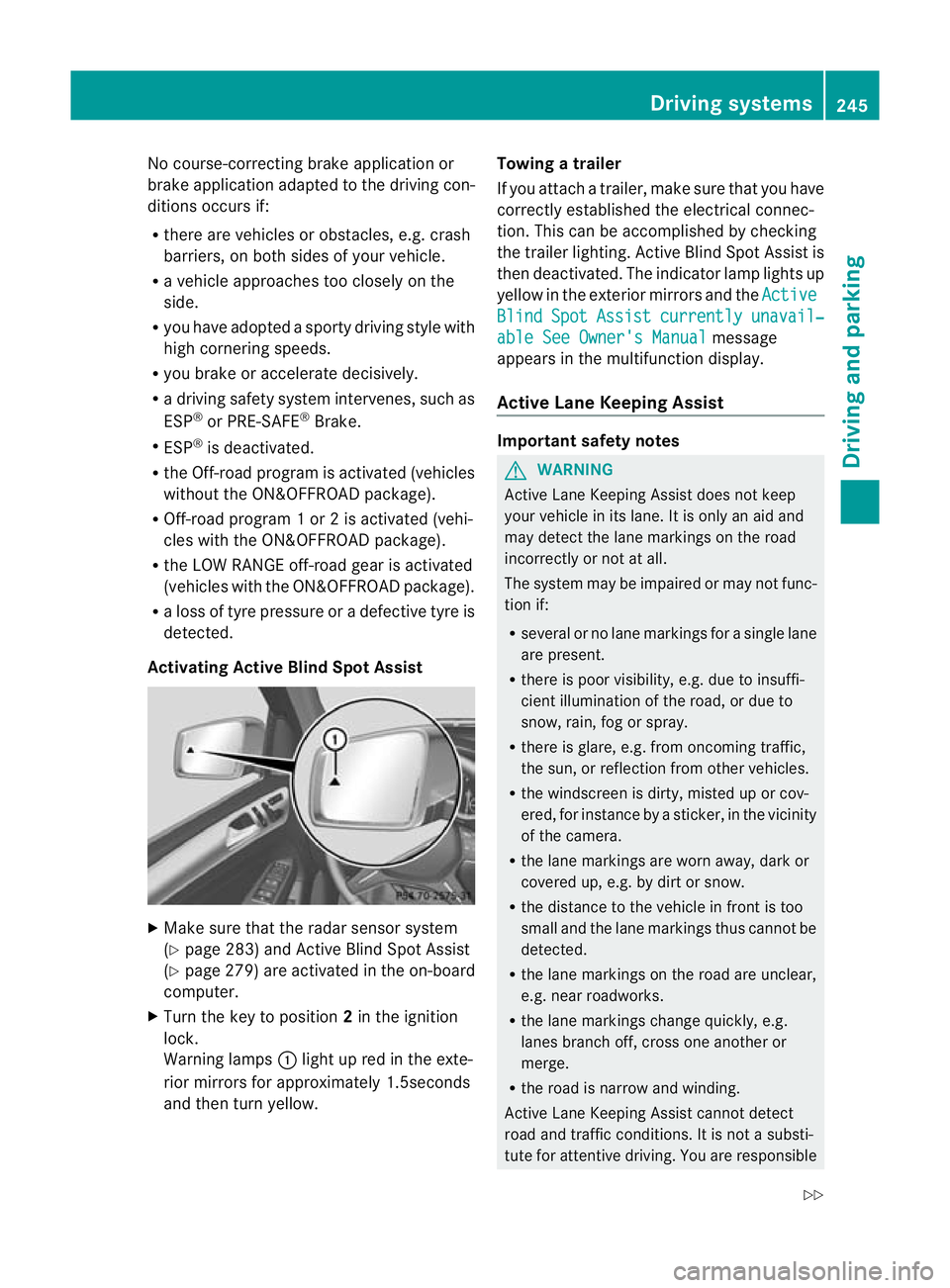
Activatin gActive Blind Spot Assist X
Make sure that the radar senso rsystem
(Y page 283 )and Active Blind Spot Assist
(Y pag e279)are activate dint he on-board
computer.
X Tur nthe key to position 2in the ignition
lock.
Warnin glamps :light up red in the exte-
rior mirrors for approximately 1.5seconds
and then tur nyellow. Towin
gatrailer
If yo uattach atrailer, make sure th at you have
corre ctly established the electrical connec-
tion. This can be accomplished by checking
the trailer lighting. Active Blind Spot Assist is
then deactivated. The indicator lamp lights up
yellow in the exterior mirrors and the Active Blind Spot Assist currently unavail‐
able Se
eOwner's Manual message
appears in th emultifunction display.
Active Lane Keeping Assist Important safety notes
G
WARNING
Active Lane Keeping Assis tdoes not keep
your vehicle in its lane. It is only an aid and
may detec tthe lan emarkings on the road
incorrectly or not at all.
The system may be impaired or may not func-
tion if:
R several or no lane markings for asingle lane
are present.
R there is poor visibility, e.g. due to insuffi-
cient illumination of the road, or due to
snow, rain, fog or spray.
R there is glare, e.g. from oncoming traffic,
the sun, or reflec tion from other vehicles.
R the windscreen is dirty, misted up or cov-
ered, for insta ncebyasticker, in the vicinity
of the camera.
R the lane markings are worn away ,dark or
covered up, e.g. by dirt or snow.
R the distance to the vehicle in front is too
small and the lane markings thus cannot be
detected.
R the lane markings on the road are unclear,
e.g. near roadworks.
R the lane markings change quickly, e.g.
lanes branch off, cross one another or
merge.
R the road is narrow and winding.
Active Lane Keeping Assis tcannot detect
road and traffic conditions. It is not asubsti-
tute for attentive driving. You are responsible Driving systems
245Drivingand pa rking
Z
Page 250 of 441
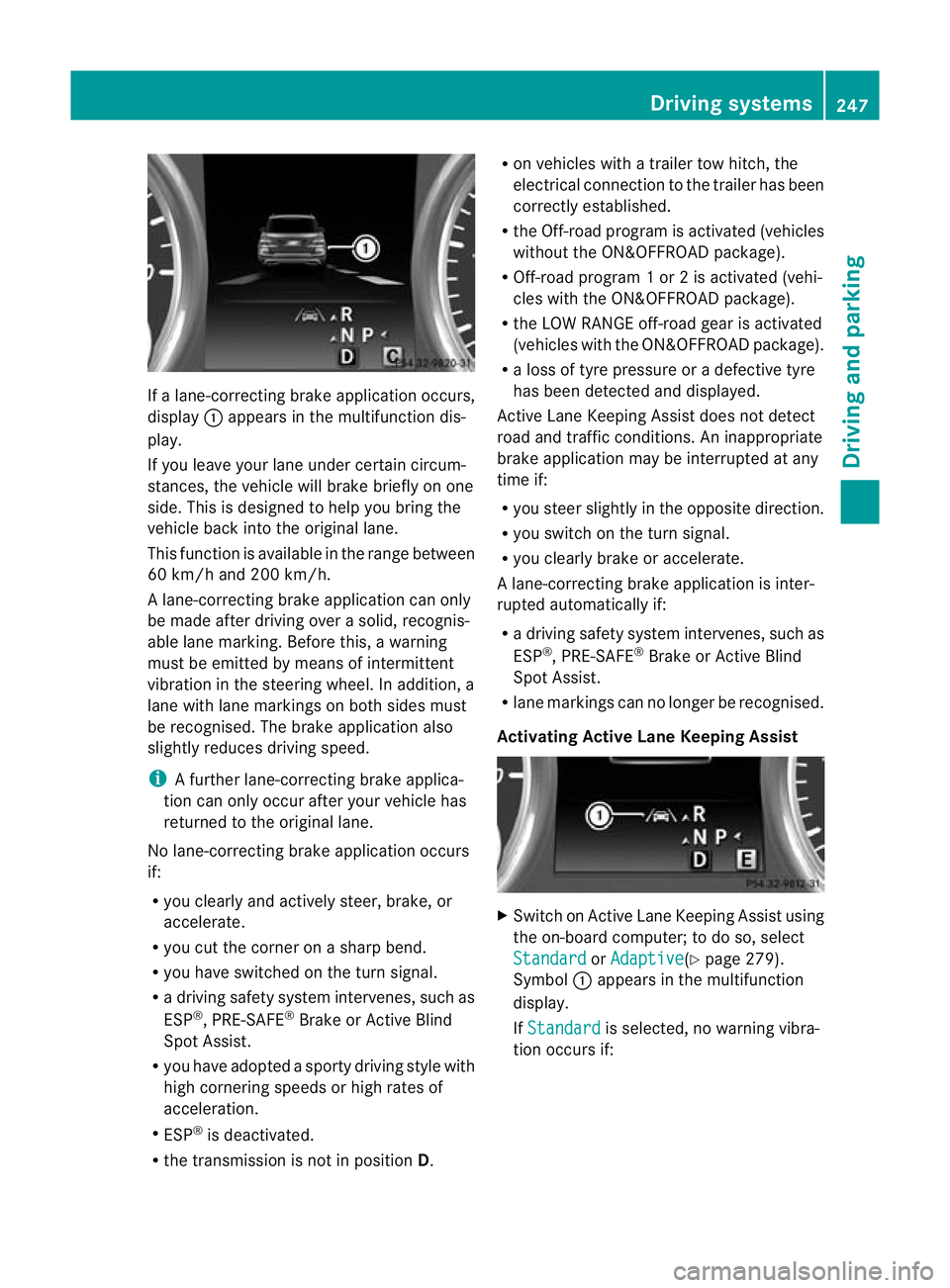
If
al ane-correctin gbrake ap plication occurs,
display :appears in the multif unctio ndis-
play.
If you leave you rlane under certain circum-
stances, the vehicle wil lbrake briefl yonone
side. Thi sisdesigned to help you brin gthe
vehicle bac kinto the original lane.
Thi sfunction is available in the range between
60 km/h and 200 km/h.
Al ane-correctin gbrake ap plication can only
be made after drivin gover asolid, recognis-
able lane marking. Before this, awarning
must be emitted by means of intermittent
vibration in the steering wheel. In addition, a
lane with lane markings on both sides must
be recognised. The brake applicatio nalso
slightly reduces drivin gspeed.
i Afurther lane-correcting brake applica-
tion can only occur after you rvehicle has
returned to the original lane.
No lane-correcting brak eapplication occurs
if:
R you clear lyand actively steer, brake, or
accelerate.
R you cut the corner on ashar pbend.
R you have switched on the tur nsignal.
R ad riving safety system intervenes ,such as
ESP ®
,P RE-SAFE ®
Brake or Active Blind
Spot Assist.
R you have adopted asporty driving style with
high cornering speed sorhigh rates of
acceler ation.
R ESP ®
is deactivated.
R the transmission is not in position D.R
on vehicles with atrail ertow hitch ,the
electrical con nectio ntot he trailer has been
correctly established.
R the Off -road program is activated (vehicles
without the ON&OFFROAD package).
R Off-road program 1or2isactivate d(vehi-
cle sw ith the ON&OFFROAD package).
R the LOW RANGE off-road gear is activated
(vehicles with the ON&OFFROAD package).
R al oss of tyr epressure or adefectiv etyre
has been detected and displayed.
Active Lane Keeping Assist doe snot detect
roa dand traffic condi tions. An inappropriate
brake application ma ybeinterrupted at any
time if:
R you stee rslightly in the opposite direction.
R you switch on the turn signal.
R you clearly brake or accelerate.
Al ane- correcting bra keapplication is inter-
rupted automatically if:
R ad riving safet ysystem intervenes, such as
ESP ®
,P RE-SAFE ®
Brake or Active Blind
Spot Assist.
R lane markings can no longe rberecognised.
Activating Active Lane Keeping Assist X
Switch on Active Lan eKeeping Assist using
the on-boar dcomputer ;todoso, select
Standard or
Adaptive (Y
page 279).
Symbol :appears in the multifunction
display.
If Standard is selected, no warnin
gvibra-
tion occur sif: Dri
ving systems
247Driving and pa rking Z
Page 251 of 441
R
you have switched on the tur nsignals. In
this event ,the warnings are suppressed
for acertai nperio doft ime.
R ad riving safety syst em intervenes, such
as ABS, BAS or ESP ®
.
If Adaptive is selected, no warning vibra-
tio no ccurs if:
R yo uh aves witched on the turn si gnals.In
thi se vent, th ewarnings ar esuppr essed
for acertai nperio doft ime.
R ad riving safety syst em intervenes, such
as ABS, BAS or ESP ®
.
R yo ua ccelerate hard, e.g .kickdown.
R you brak ehard.
R you steer actively, e.g. swerv etoavoid
an obstacle or cha ngelane quickly.
R you cut the corner on ashar pbend.
Towing atrailer
If yo uattach atrailer, make sure th at you have
corre ctly established the electrical connec-
tion. This can be accomplished by checking
the trailer lighting. On-road programs (vehicles with the
ON&OFFROAD package)
Genera lnotes The on-road program
ssupport you when driv-
ing on roads and the off-road programs sup-
port you when driving off-road (Y page 253).
The following program messages remain in
the multifunction display until the corre-
sponding vehicle level has been set. Up to off-
road level 2, you can hide the program mes-
sage susing the %ora button on the
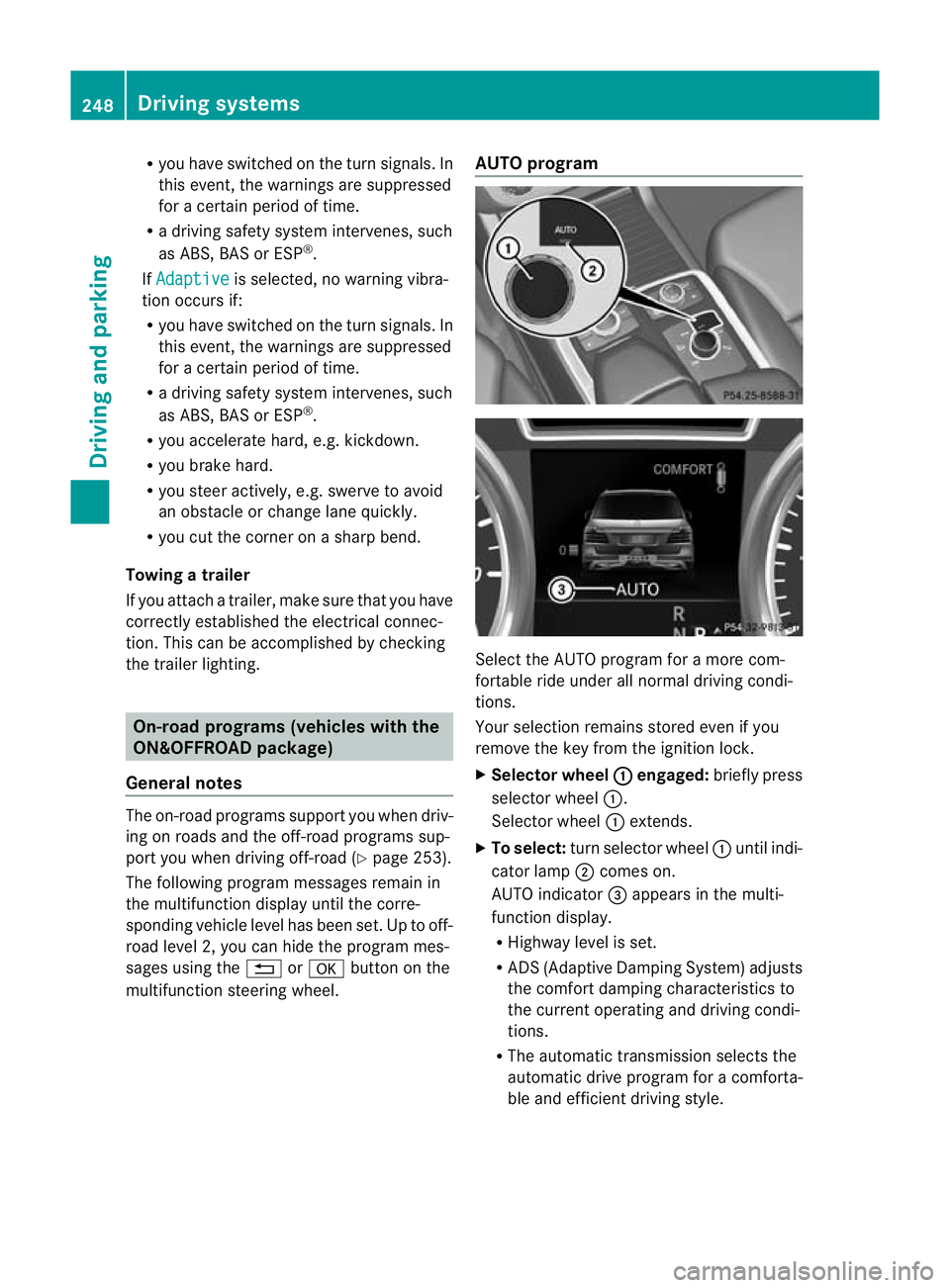
multifunc tion steerin gwheel. AUTO program
Select the AUTO program for
amore com-
for table ride under all normal driving condi-
tions.
Your selection remains stored even if you
remove the key from the ignition lock.
X Selecto rwheel : engaged:
brieflypress
selecto rwheel :.
Selector wheel :extends.
X To select: turnselector wheel :until indi-
cator lamp ;comes on.
AUTO indicator =appear sint he multi-
func tion display.
R Highwa ylevel is set.
R AD S(Adaptive Damp ingS ystem) adjusts
the comfort damping characteristics to
the current operating and driving condi-
tions.
R The automatic transmission selects the
automatic drive progra mforac omforta-
ble and efficien tdriving style. 248
Dri
ving systemsDriving and pa rking
Page 253 of 441
R
Hig hway level is set.
R ADS (Adaptive Damping System) adjusts
the comfort damping characteristics to
the current operating and driving condi-
tions.
R 4ETS and the differential lock are adap-
ted for driving on snow-cover edroads.
R Th ea utomatic transmi ssion selects the
automatic drive program for acomforta-
ble and efficien tdriving style.
R Th es mooth accelerato rpedal curve is
selected. This mean sthat the accelera-
tor pedal needs to be depressed much
further when accelerating.
R The optimal gear for pulling away is
engaged.
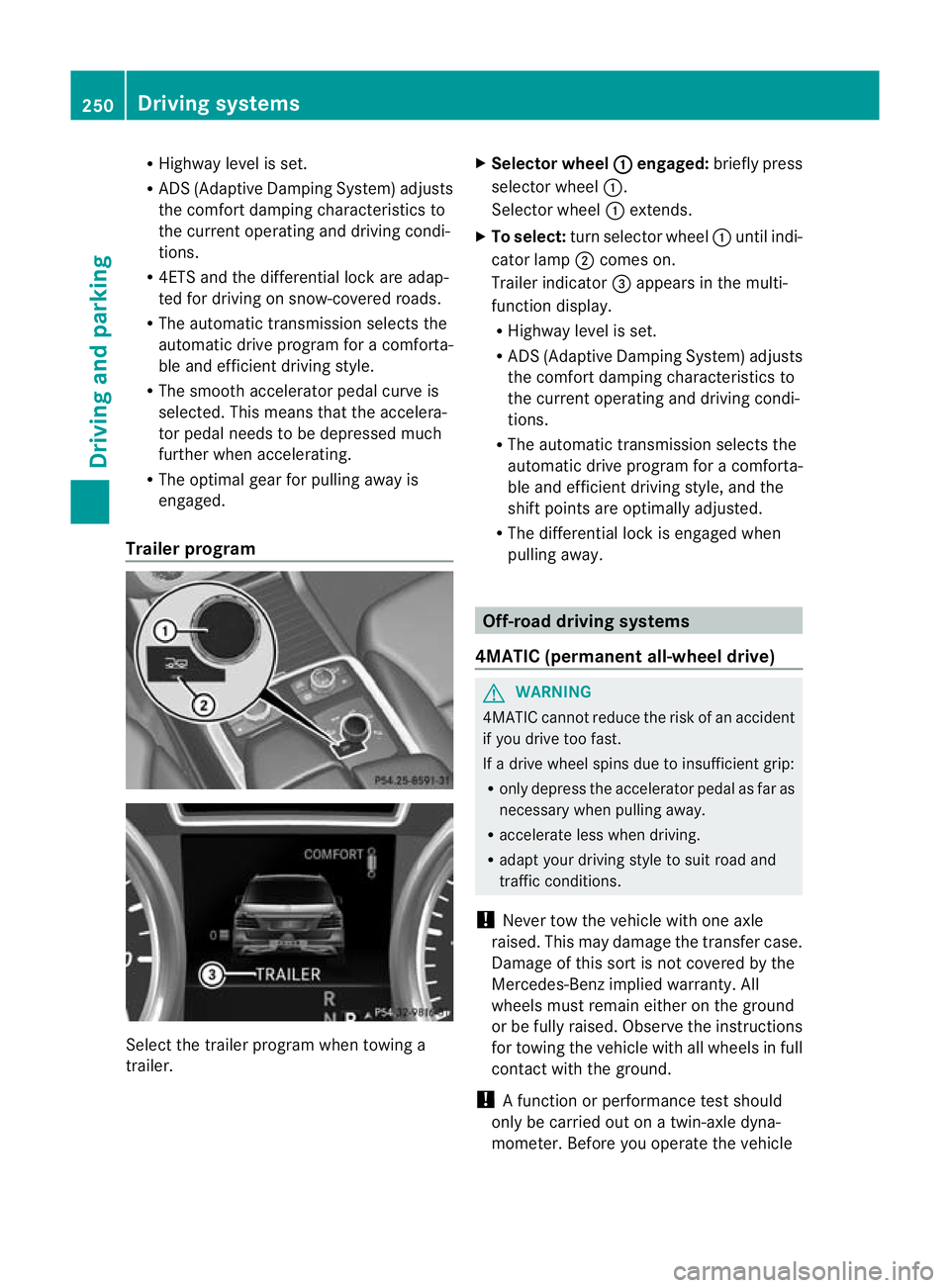
Trailer program Select the trailer program when towing a
trailer. X
Selector wheel : engaged:
brieflypress
selecto rwheel :.
Selector wheel :extends.
X To select: turnselector wheel :until indi-
cator lamp ;comes on.
Trailer indicator =appear sint he multi-
func tion display.
R Highwa ylevel is set.
R AD S(Adaptive Damp ingS ystem) adjusts
the comfort damping characteristics to
the current operating and driving condi-
tions.
R The automatic transmission selects the
automatic drive progra mforac omforta-
ble and efficien tdriving style ,and the
shift points are optimally adjusted.
R The differential lock is engaged when
pulling away. Off-road driving systems
4MATIC (permanent all-wheel drive) G
WARNING
4MATIC cannot reduce the risk of an accident
if you drive too fast.
If ad rive whee lspins due to insufficien tgrip:
R onl ydepress the accelerator peda lasfar as
necessary when pulling away.
R accelerate less when driving.
R adapt you rdriving style to su itroa dand
traffic conditions.
! Never tow the vehicle with one axle
raised. Thi smay damage the transfer case.
Damage of this sort is not covered by the
Mercedes-Benz implied warranty. All
wheels must remain either on the ground
or be fully raised. Observe the instructions
for towing the vehicle with all wheels in full
contact with the ground.
! Afunction or performanc etest should
only be carried out on atwin-axle dyna-
mometer .Before you operate th evehicle 250
Driving systemsDriving and parking
Page 260 of 441
R
uphill or downhill gradien tinpercentage
R on-road/off-road program selected
R condition of the differential lock for the
transfer case
R the LOW RANGE off -road gear is selected
R condition of the LOW RANGE off -road
gear
R the on-roa dtrailer progra misselected Towing
atrailer Note
sont owingatrailer
Important safety notes G
WARNING
Veh icle sw ithl evel control:
Th ev ehicle level can be change dinadver-
tently, e.g. whe nchanged by anot her person.
If yo uare coupling up or uncoupling atrailer
when this happens ,you coul dbecom etrap-
ped. Bod yparts can also become trapped
between the vehicle body and tyres, or under-
neath the vehicle. This pose sarisk of injury.
When coupling up or uncoupling, make sure
that no-one:
R opens or closes the doors or tailgate
R initiates the level control or presses the
AD Ss witch
R locks or unlock sthe vehicle. G
WARNING
The brakin gsystem can overheat if you leave
your foot on the brake pedal while driving.
This increase sthe brakin gdistanc eand could
even cause the braking system to fail. There
is ar isk of an accident.
Never use the brake pedal as afootrest. Do
not simultaneously depress both the brake
pedal and the accelera torp edal while driving. G
WAR
NING
You could los econtrol of the vehicle/trailer
combination if it begins to swerve. The vehi- cle/
trailer combination could even overturn.
There is arisk of an accident.
On no account should you attempt to
straighten out the vehicle/trailer combina-
tion by increasing speed. Decrease your
speed and do not countersteer .Brake if nec-
essary. G
WARNING
If you excee dthe permissible noseweight
while carrying aload, the carrier system could
detac hfrom th evehicle and fall on the road.
There is arisk of an acciden tand injury.
Always maintain the permissible noseweight
whe ncarrying loads. G
WARNING
If the ball coupling is not correctly engaged ,it
coul ddetac hwhile drivin gand fall on the road.
There is arisk of an acciden tand injury.
Engag ethe ball coupling as described. G
WARNING
If the ball coupling is not cor rectly engaged,
the traile rcan detach. There is arisk of an
accident.
Always engage the ball coupling as described.
! Depressing the brake pedal constantly
results in excessive and premature wear to
the brake pads.
You can use carrier systems, e.g. bicycle
rack sorload-bearing implements, on the ball
coupling. The maximum noseweight of
75 kg applies when using carrier system son
the ball coupling.
Whe nreversin gthe vehicle towards the
trailer ,make sure there is nobody between
the trailer and the vehicle.
Couple and uncouple the trailer carefully. If
you do not couple the trailer to the towing
vehicle correctly, the trailer could become
detached. Towin
gatrailer
257Driving an dparking Z
Page 261 of 441
Make sur
ethat the followin gvalues are not
exceeded:
R the permissible trailer drawba rnoseweight
R the permissible trailer load
R the permissible rea raxle load of the towing
vehicle
R the maximum permissible gros svehicle
weight of both the towing vehicle and the
trailer
The applicable permissible values, which
must not be exceeded, can be found:
R in the vehicle documents
R on the identification plates of the trailer tow
hitch, the trailer and the vehicle
If the values differ, the lowest value applies.
You will fin dthe values approved by the man-
ufacturer on the vehicle identification plates
and those for the towing vehicle under "Tech-
nical data "(Ypage 433).
When towing atrailer, your vehicle's handling
characteristics wil lbedifferent in comparison
to when drivin gwithout atrailer.
Th ev ehicle/ trailer combination:
R is heavier
R is restricted in its acceleration and gradi-
ent-climbin gcapability
R has an increased braking distance
R is affected more by stron gcrosswinds
R demand smore sensitive steering
R has alarger turnin gcircle
This could impair the handling charac teris-
tics. Adapt your styl eofdriving accordingly.
Maintain asafe distance. Drive carefully.
When towing atrailer, alw aysa djust your
speed to the current road and weather con-
ditions. Do not exceed the maximum permis-
sible speed for your vehicle/trailer combina-
tion.
General notes !
Use adrawbar noseweigh tasc lose as
possible to the maximum permissible nose-
weight. Do not use anoseweight of less than 50kg, otherwise the trailer ma
ycome
loose.
Not ethat the payload and the rea raxle load
are reduce dbythe actual payload.
i Chec kthe tyr epressures when towin ga
trailer. You will find the values in the tyre
pressure table in the fuel filler flap of the
vehicle (Y page 399).
You will find installation dimensions and loads
in the "Technical data" section
(Y page 432).
The maximum permissible trailer drawbar
noseweight on the ball coupling is 140 kg.
However, the actual noseweight must not
exceed the value given on the trailer tow hitch
or trailer identification plates .The lowest
weight applies.
Please not ethat when towing atrailer, PARK-
TRONIC (Y page 216) and Blind Spo tAssist
(Y page 238) ar eonly available with limita-
tions ,orn ot at all.
Driving tips i
Observ ethe information on ESP ®
trailer
stabilisation (Y page 67)and on pulling
away with atrailer. (Y page 162).
Vehicle swith the ON&OFFROAD pack-
age: select the trailer program (Y page 250)
with the off- road program selector wheel in
the centre console.
The maximum permissible spee dfor vehicle/
trailer combina tions depends on the type of
trailer .Befor ebeginning the journey, check
the trailer's document stosee what the max-
imu mpermitted speed is. Observ ethe legally
prescribed maximum speed in the relevant
country.
For cer tain Mercedes-Benz vehicles, the max-
imum permissible rear axle load is increased
when towing atrailer. See "Technica ldata" to
find out whethe rthis applies to your vehicle
(Y page 433). If you utilise any of the added
maximum rea raxle load whe ntowing atrailer,
th ev ehicle/ trailer combination may not
exceed amaximum spee dof100 km/h for 258
Towin
gatrailerDriving an dparking