tow MERCEDES-BENZ GL SUV 2012 Owner's Manual
[x] Cancel search | Manufacturer: MERCEDES-BENZ, Model Year: 2012, Model line: GL SUV, Model: MERCEDES-BENZ GL SUV 2012Pages: 441, PDF Size: 10.66 MB
Page 161 of 441
Usefu
linfor mati on
i This Owner's Manual describes all mod-
els, series and optional equipment for your
vehicle that were available at the time of
going to press. National variation sare pos-
sible. Note that your vehicl emay not be
equippe dwith all of the function sdescri-
bed. This is also the case for system sand
functions relevant to safety.
i Read the information on qualified special-
ist workshops: (Y page25). Running-in notes
Impo
rtantsafety notes
New brak epads/brak epads and discs that
have been replaced only achieve optimum
brakin geffect after severa lhundre dkilome-
tres of driving. Compensate for the reduced
braking effec tbyapplying greater force to the
brak epedal. Th
ef irst 1,500 km
If you trea tthe engin ewith sufficient care
from the very start, you wil lberewarded with
excel lent performance for the remainder of
the engine' slife.
R Driv eatv arying vehicle speeds and engine
speeds for the first 1,500 km.
R Avoid overstraining the vehicle during this
period, e.g. driving at full throttle.
R Change gea ringood time, befor ethe rev
counter needl eisÔof the way to the red
area of the rev coun ter.
R Do not shift down agear manually in order
to brake.
R Try to avoid depressing the accelerator
pedal beyond the point of resistanc e(kick-
down).
R Shift ranges 3,2or 1should only be
engaged whe ndriving slowly, e.g .when
drivin ginm ountainou sterrain. Af
ter1 ,50 0km,you may graduall yaccelerate
the vehicle to full road and engine speeds.
Additional running-in notes for AMG vehicles:
R do not drive at speed sabove 14 0km/h for
th ef irst 1,50 0km.
R onl yallow the engine to reach amaximum
engine spee dof4,50 0rpm briefly.
R driv ethe vehicle mainly in drive program
C for the first 1,500 km.
i You should also observe these notes on
runnin ginift he engin eorparts of the drive
train on your vehicle have been replaced. Driving
Important safety notes
G
WARNING
Object sinthe driver's footwell can restric tthe
pedal travel or obstruct adepressed pedal.
The operatin gand road safety of the vehicle
is jeopardised. There is arisk of an accident.
Make sure that all objects in the vehicle are
stowed correctly, and that they cannot enter
the driver's footwell. Fit the floormats
securely and as specified in order to ensure
sufficien tclearanc efor the pedals. Do not use
loose floormat s. G
WARNING
Unsuita ble footwear can hinde rcorrect usage
of the pedals, e.g.:
R shoes with thic ksoles
R shoes with high heels
R slippers
There is arisk of an accident.
Wear suitable footwear to ensure correct
usage of the pedals. G
WARNING
If you switch off the ignition while driving,
safety-relevant func tions are only available
with limitations, or not at all. This coul daffect,
for example, the powe rsteering and the brake 158
DrivingDrivin
gand pa rking
Page 172 of 441
vehicl
euntil it is stationary and at least one
of the following conditions is fulfilled:
- there is asystem malfunction
- the vehicl eisonasteep uphill or downhill
gradient. The electric parking brake is
then als oengaged.
Engaging reverse gear R !
Only shift the automatic transmission to
R whe nthe vehicle is stationary.
X Push the DIREC TSELECT leve ruppast the
first point of resistance.
Neutra lNwithE CO start/stop function
activated The EC
Ostart/stop functio nswitches the
engin eoffautomatically if:
R the vehicle is braked until stationary while
in neut ralNand
R you continue to depress th ebrake pedal
For further information on th eECO start/stop
function ( Ypag e163).
Shiftin gton eutra l(N) X
Push the DIRECT SELECT leve rupordown
to the first point of resistance.
Drive position Dwith ECO start/stop
function activated The ECO start/stop fun
ction switches the
engin eoff automatically if:
R thev ehicle is braked until stationar ywhile
in transmission position Dand
R you continue to depress the brake pedal
For further information on the ECO star t/stop
function (Y page 163).
Engaging drive position D X
Push the DIRECT SELECT lever down past
the first point of resistance. Transmission positions
B
Par
kposition
This prevent sthe ve hicle fr om roll-
in ga way when stopped .Donot
shift the transmission int oposition
P (Y page 181) unless the vehicle
is stationary.
The automatic transmission shifts
to Pautomatically if you:
R remove the key
R switc hoff th eengine whe ninR
or Dand open one of the front
doors C
Reverse gear
Only shift the transmission to
R
when the vehicle is stationary. A
Neu
tral
Do not shift the transmission to N
whil edriving. Otherwise, th eauto-
matic transmissio ncould be dam-
aged.
No power is transmit tedf rom the
engine to th edrive wheels.
Releas ingt he brakes will allow you
to mov ethe vehicle freely, e.g. to
push it or tow it.
If ESP ®
is deactivated or faulty:
only shift the transmission to posi-
tion Nif the vehicle is in danger of
skidding, e.g. on icy roads.
If you switc hoff th eengine using
the key or the Start/Stop butto n,
the automatic transmission shifts
to neutral Nautomatically.
! Rolling in neutral Ncan lead to
damage to the transmission. 7
Drive
The automatic transmission
change sgear automatically. All
forwar dgears are available. Automatic transmission
169Driving and parking Z
Page 173 of 441
Changing gear
The automatic transmission shifts to th eindi-
vidual gea rsautomatically when it is in trans-
mission position D.Gearshif ting is deter-
mined by:
R ap ossible limitation of the shift range
R the selected drive program
R the position of the accelerator pedal
R the roa dspeed Driving tips
Accelerator peda lposition Your style of drivin
ginfluences how the auto-
matic transmissio nshift sgear:
R littl ethrottle: early upshifts
R mor ethrottle: lat eupshifts
Kickdown Use kickdown for maximum acceleration:
X
Depres sthe accelerator pedal beyon dthe
pressur epoint.
The transmission shift stoalower gear
depending on the engin espeed.
X Ease off the accelerator pedal onc ethe
desired speed is reached.
The automatic transmission shift sback up.
Towing atrailer X
Drive in the mid dleo fthe engine speed
range on uphill gradient s.
X Shift down to sh iftr ange 3or
2( Y pag e171) depending on the uphill or
downhil lgradient ,evenifc ruisecontrol,
DISTRONIC PLU SorSPEEDTRONI Cisacti-
vated. Program selector button
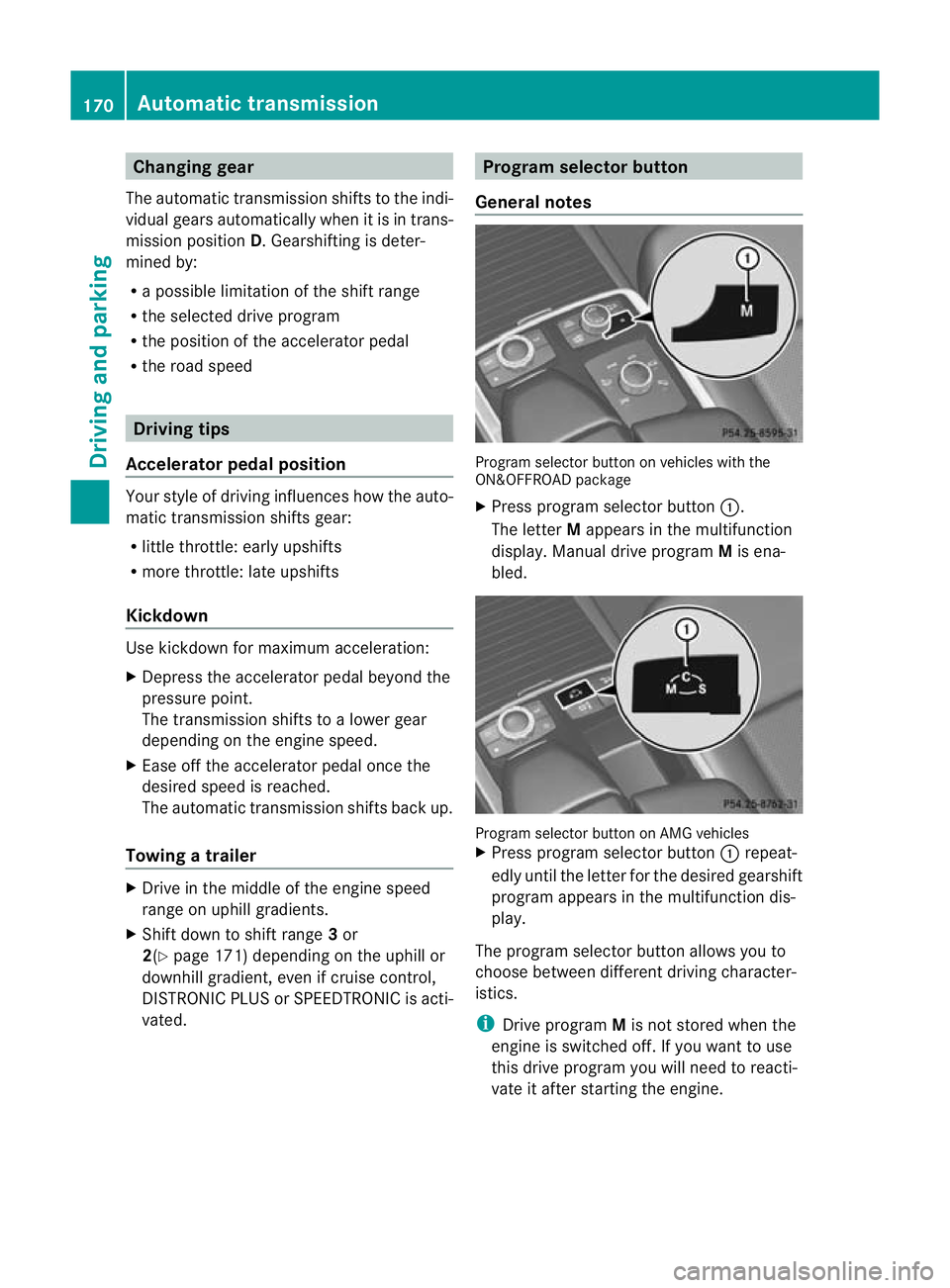
General notes Progra
mselector button on vehicles with the
ON&OFFROAD package
X Press program selecto rbutton :.
The letter Mappears in the multifunction
display. Manual driv eprogram Mis ena-
bled. Program selector button on AMG vehicles
X
Press program selector button :repeat-
edly until the letter for the desired gearshift
program appears in the multifunction dis-
play.
The program selector button allow syou to
choose between differen tdriving character-
istics.
i Drive program Mis not store dwhen the
engin eisswitched off. If you want to use
this drive program you will need to reacti-
vate it after startin gthe engine. 170
Automa
tict ran smissionDriving and pa rking
Page 183 of 441
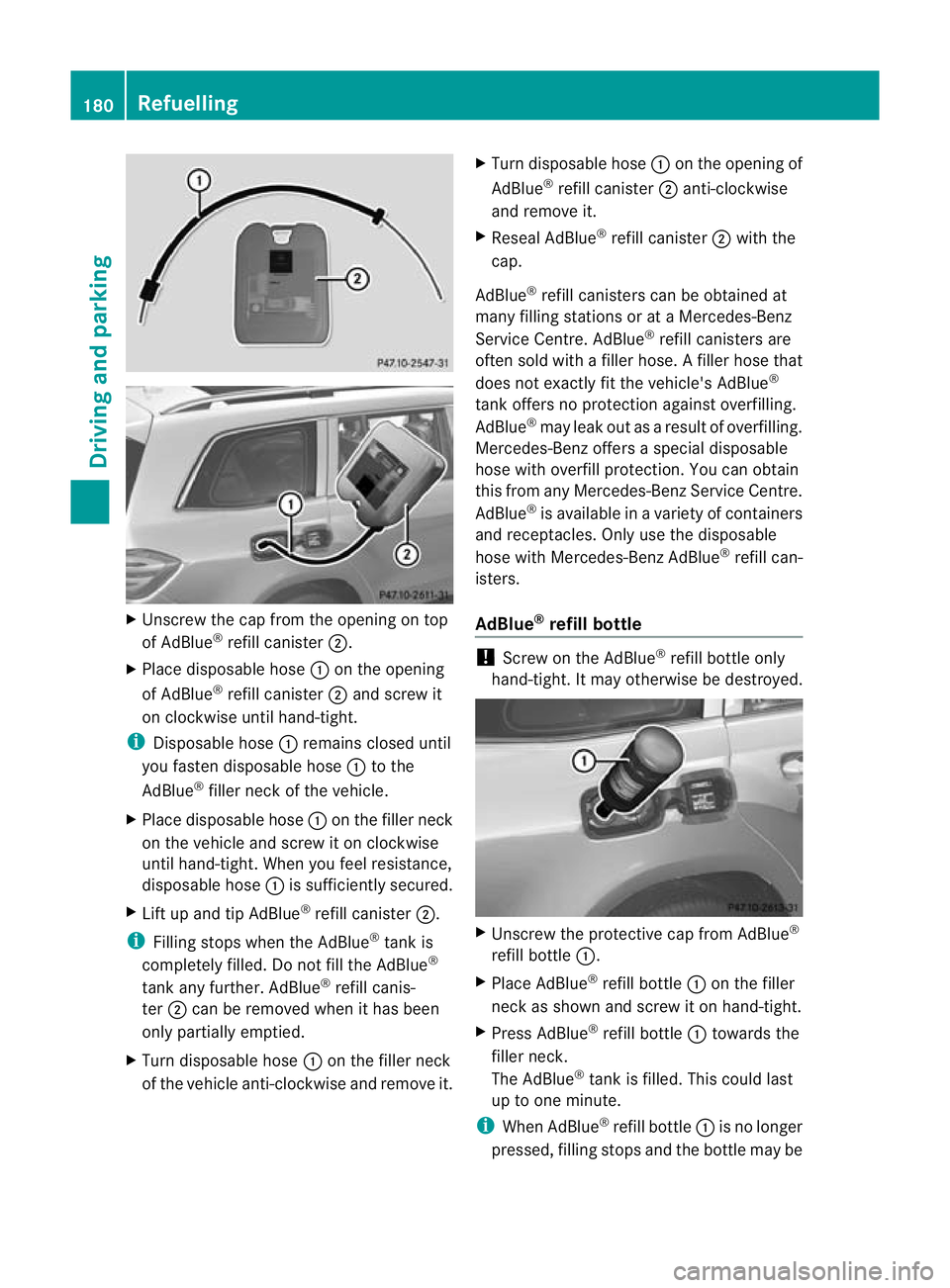
X
Unscre wthe cap from the opening on top
of AdBlue ®
refill canister ;.
X Plac edisposable hose :on the opening
of AdBlue ®
refill canister ;and screw it
on clockwise until hand-tight.
i Disposable hose :remains closed until
you fasten disposable hose :to the
AdBlue ®
filler neck of the vehicle.
X Place disposable hose :on the filler neck
on the vehicle and screw it on clockwise
until hand-tight. When you feel resistance,
disposable hose :is sufficiently secured.
X Lif tu pa nd tip AdBlue ®
refill canister ;.
i Filling stops whe nthe AdBlue ®
tan kis
completely fille d.Do no tfill the AdBlue ®
tank any further. AdBlue ®
refill canis-
ter ;can be removed when it has been
only partially emptied.
X Turn disposable hose :on the filler neck
of the vehicle anti-clockwise and remov eit. X
Turn disposable hose :on the opening of
AdBlue ®
refill canister ;anti-clockwise
and remove it.
X Reseal AdBlue ®
refill canister ;with the
cap.
AdBlue ®
refill canisters can be obtained at
many filling statio nsor at aMercedes-Benz
Servic eCentre. AdBlue ®
refill canisters are
often sold with afiller hose. Afiller hose that
does not exactly fit the vehicle's AdBlue ®
tan koffers no pro tection agains toverfilling.
AdBlue ®
may leak ou tasar esult of overfilling.
Mercedes-Ben zoffers aspecial disposable
hose with overfill protection. You can obtain
this from any Mercedes-Benz Servic eCentre.
AdBlue ®
is available in avariety of containers
and receptacles. Only use the disposable
hos ewith Mercedes-Benz AdBlue ®
refill can-
isters.
AdBlue ®
refill bottle !
Screw on the AdBlue ®
refill bottle only
hand-tight. It may otherwis ebedestroyed. X
Unscrew the protectiv ecap from AdBlue ®
refill bottle :.
X Place AdBlue ®
refill bottle :on the filler
neck as sho wn andscre witonh and-tight.
X Press AdBlue ®
refill bottle :towards the
fille rneck.
The AdBlue ®
tank is filled. Thi scould last
up to one min ute.
i Whe nAdBlue ®
refill bottle :is no longer
pressed, filling stops and the bottle may be 180
RefuellingDriving and parking
Page 185 of 441
To ensur
ethat the vehicle is secured against
rolling away unintentionally:
R the electric parkin gbrake mus tbea pplied
R the tra nsmission must be in position Pand
the key must be remove dfrom th eignition
lock
R on steep uphill or downhil lgradients ,turn
the fron twheels towards the kerb
R on steep uphill or downhill gradients, the
front axl eofane mpty vehicl emust be
secured, for example with awheel chock
R on steep uphill or downhill gradients, the
rea raxle of aladen vehicle must be addi-
tionally secured, for example with awheel
choc k. Switching of
fthe engine
Important safety notes G
WARNING
Th ea utomatic transmission switches to neu-
tral position Nwhen you switch off the engine.
The vehicle may roll away .There is arisk of
an accident.
After switching off the engine, always switch
to parking position P.Prevent th eparked vehi-
cle from rolling awa ybyapplying the parking
brake.
Usin gthe key X
Engag ethe electric parkin gbrake.
X Shift th etransmission to position P.
X Turn th ekey to position 0in the igniti on
lock and remov eit.
The immobilise risactivated.
i If you switch the engine off with the trans-
mission in position Ror D,t he automatic
transmission shift stoNautomatically.
If you then open one of the front doors or
remove the key from the ignition, the auto-
matic transmission shifts to P.
If you shift the automatic transmission to
N before switching off the engine, the auto- matic transmission remains in
Neven if a
door is opened.
Usin gKEYLESS-GO X
Engage the electric parking brake.
X Shift the transmission to position P.
X Press the Start/Stop button (Y page 159).
The engine stops and all the indicator
lamps in the instrument cluster go out.
i If you use the Start/Stop button to switch
off the engine, the automatic transmission
shifts to Nautomatically. If you then open
one of the front doors, the automatic trans-
mission shifts to P.
i The engine can be switched off while the
vehicle is in motion by pressing and holding
the Start/Stop button for abou tthree sec-
onds. This func tion operates independently
of the ECO start/stop automatic engine
switch-of ffunction. Electric parking brake
General notes G
WARNING
If you leave children unsupervised in the vehi-
cle, they could set it in motion by, for example:
R releasing the parking brake
R shifting the automatic transmission out of
the parking position P
R startin gthe engine.
They coul dalso operate the vehicle's equip-
ment. There is arisk of an accident and injury.
When leaving the vehicle, always take the key
with you and lock the vehicle. Never leave
children unsupervised in the vehicle.
i The electric parking brake carries out a
func tion chec katregular interval swhen
the engin eisswitched off. Noises that
occur are normal. 182
ParkingDriving and parking
Page 192 of 441
Read this section before drivin
gyour vehicle
off-road. Pra ctisebyt ravelling over more gen-
tle off-road terrain first.
The following driving systems are specially
adapted to off-road driving:
R Off-road program (vehicles without the
ON&OFFROAD package) (Y page 252)
R Off-road program 1and 2(vehicles wit hthe
ON&OFFROAD package) (Y page 253)
R LOW RANGE off-road gear (vehicles with
the ON&OFFROAD package)
(Y page 254)
R Differential lock (vehicles with the
ON&OFFROAD package) (Y page 254)
R Off-road AB S(Ypage 61)
R Off-road 4ETS (Y page 66)
R Off-road ESP ®
(Y page 67)
R AIRMATI Cpackag e(veh icle level)
(Y pag e212)
R DSR (Downh illS peed Regulation)
(Y page 251)
Observe the following notes:
R Stop your vehicle and, if necessary, select
the off-road program (Y page 252)orthe
LOW RANGE off -road gear (Y page 254)
befor edriving off-road.
R Select avehicle level suitable for the off-
road ter rain. To avoid damaging the vehicle,
make sure ther eisalways sufficien tground
cle arance.
R Check that items of luggage and loads are
stowed safel yand are wel lsecur ed
( Y page 343).
R Always keep the engine running and in gear
when driv ingonad ownhill gradient. Acti-
vate DSR (Y page 251).
R Drive slowly and evenly, if necessary at
walking pace.
R Ensure that the wheels ar einc ontact with
the ground at all times.
R Drive with extreme car eonu nknown off-
road routes where visibility is poor. For
safety reasons, get out of the vehicl efirst
and survey the off-road route. R
Check the depth of water before fording
rivers and streams.
R Look out for obstacles such as rocks, holes,
tree stumps and furrows.
R Take care when turning on an uphill or
downhill slop eorwhen driving across a
slope. The vehicle could otherwise tip over.
R Always keep the side windows and the pan-
orama sliding sunroof closed dur ingt he
journey.
R Do not stray from marked routes or paths.
i Information about retrofitting special all-
terrain tyres is available from any qualified
specialist workshop.
i Do not use the HOL Dfunction when driv-
ing off-road, on steep uphill or downhill gra-
dients or on slippery or loos esurfaces. The
HOLD function cannot hold the vehicl eon
suc hsurfaces.
Checklis tbefor edriving off-road X
Engine oil level: check theengine oil and
top it up if necessary.
Whe ndriving on stee pgradients, the
engin eoil level must be sufficiently high to
ensure acorrec toil supply in the vehicle.
X AdBlue ®
tank (BlueTEC vehicles): check
the fluid level and, if necessary, refill to the
maximum (13 l) (Y page 178).
X Tyre-ch ange tool kit: checkthat the jack
is wor king and mak esure you have the
wheelbrace, arobust tow cabl eand afold-
ing spade in the vehicle.
X Wheels and ty res: chec kthe tyr etread
depth and tyre pressure.
X Check for damage and remove any foreign
objects, e.g. small stones, fro mthe
wheels/tyres.
X Replace any missing valv ecaps.
X Replace dented or damaged wheels.
X Wheels: dented or bent wheel scan lead to
al oss of tyr epressure and damag etot he
tyr eb ead. Before driving off-road, check
the wheels and replace them if necessary. Driving tips
189Driving and parking Z
Page 196 of 441
in effect achieved in the process reduces
the stoppin gdistanc ewhen drivin goff-
road. Th esteerabilit yofthe vehi cleisc on-
siderably redu cedift he wheels lock. Driving systems
Cruise cont
rol
Important safety notes G
WARNING
Do not change down for additional engine
braking on aslipper yroad surface. This could
cause the driv ewheels to lose their grip and
the vehi clec ould skid. G
WAR
NING
Cruise control cannot tak eaccount of road
and traffic conditions.
Alway spay attention to traffic conditions
even when cruis econtrol is activa ted.
Cruise control is only an aid designed to assist
driving. You are responsible for the vehicle's
speed and for braking in good time. G
WAR
NING
Do not use cruise control
R in traffic conditions that do not allow you to
drive at aconstan tspeed (e.g. heavy tra ffic
or winding roads). You may otherwise
cause an accident.
R on slippery roads. The drive wheels may
lose their grip when brakin goraccelerating
and the vehicle may skid.
R whe nther eisl ow visibility ,e.g. due to fog,
heavy rain or snow.
General notes Cruis
econtr ol maintains aconstan troad
speed for you. It brakes automatically in order
to avoid exceeding the set speed. On long and
steep downhil lgradients, especiall yifthe
vehicle is laden or towing atrailer, yo umust
select shift range 1,2or 3in good time. By doing so, you will make use of the braking
effec
tofthe engine. This relieves the load on
the brake system and prevents the brakes
from overheating and wearing too quickly.
Use cruise con trolonly if road and traffic con-
ditions make it appropriate to maintain a
steady speed for aprolonged period. Yo ucan
store any road spee dabove 30 km/h.
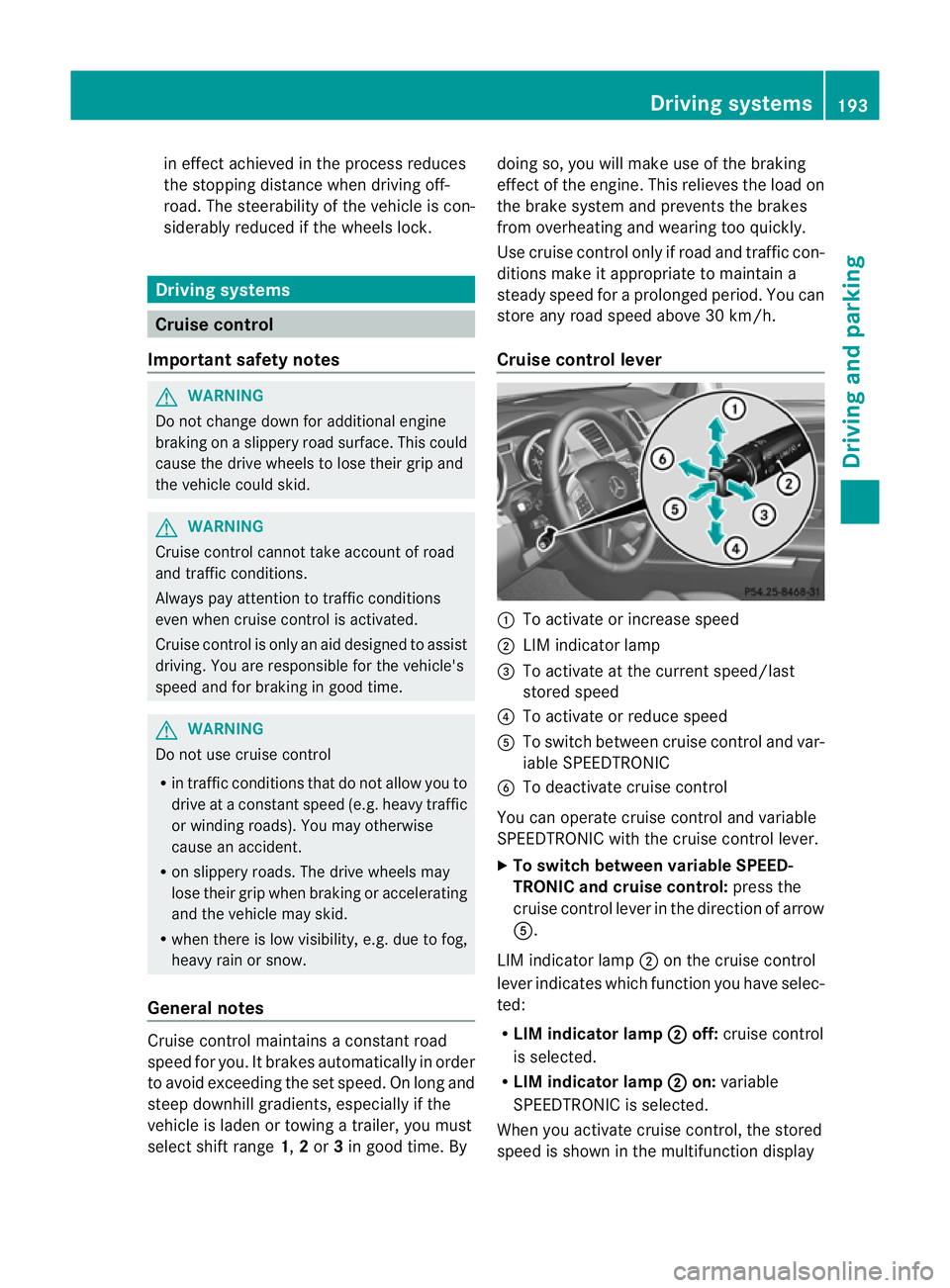
Cruise contro llever :
To activate or increase speed
; LIMi ndicato rlamp
= To activate at the current speed/last
stored speed
? To activate or reduce speed
A To switch between cruise control and var-
iable SPEEDTRONIC
B To deactivate cruise control
You can operate cruise control and variable
SPEEDTRONIC with the cruise control lever.
X To switch between variable SPEED-
TRONIC and cruise control: press the
cruise control lever in the direction of arrow
A.
LIM indicator lamp ;on the cruise control
lever indicates which function you have selec-
ted:
R LIM indicator lamp ; off:
cruise control
is selected.
R LIM indicator lamp ; on:
variable
SPEEDTRONIC is selected.
When you activate cruise control, the stored
spee diss hown in the multifunction display Driving systems
193Driving and parking Z
Page 197 of 441
for five seconds
.Inthe multifunction display,
the segments between the stored speed and
the maxim um speedlight up.
Activation conditions To activate cruise control, all of the following
activation condition
smust be fulfilled:
R the electric parkin gbrake mus tbe
released.
R yo ua re driving faster than 30 km/h.
R ESP ®
mus tbes witched on, but not inter-
vening.
R the transmission must be in position D.
R DS Rm ust be deactivated.
R off-road program 2must be deactivated
(vehicles with the ON&OFFROA Dpackage).
R the cruise con trol fu nction must be selec-
te d( Ypage 193).
Storing, maintaining and callin gupa
speed Storing and maintaining th
espeed X
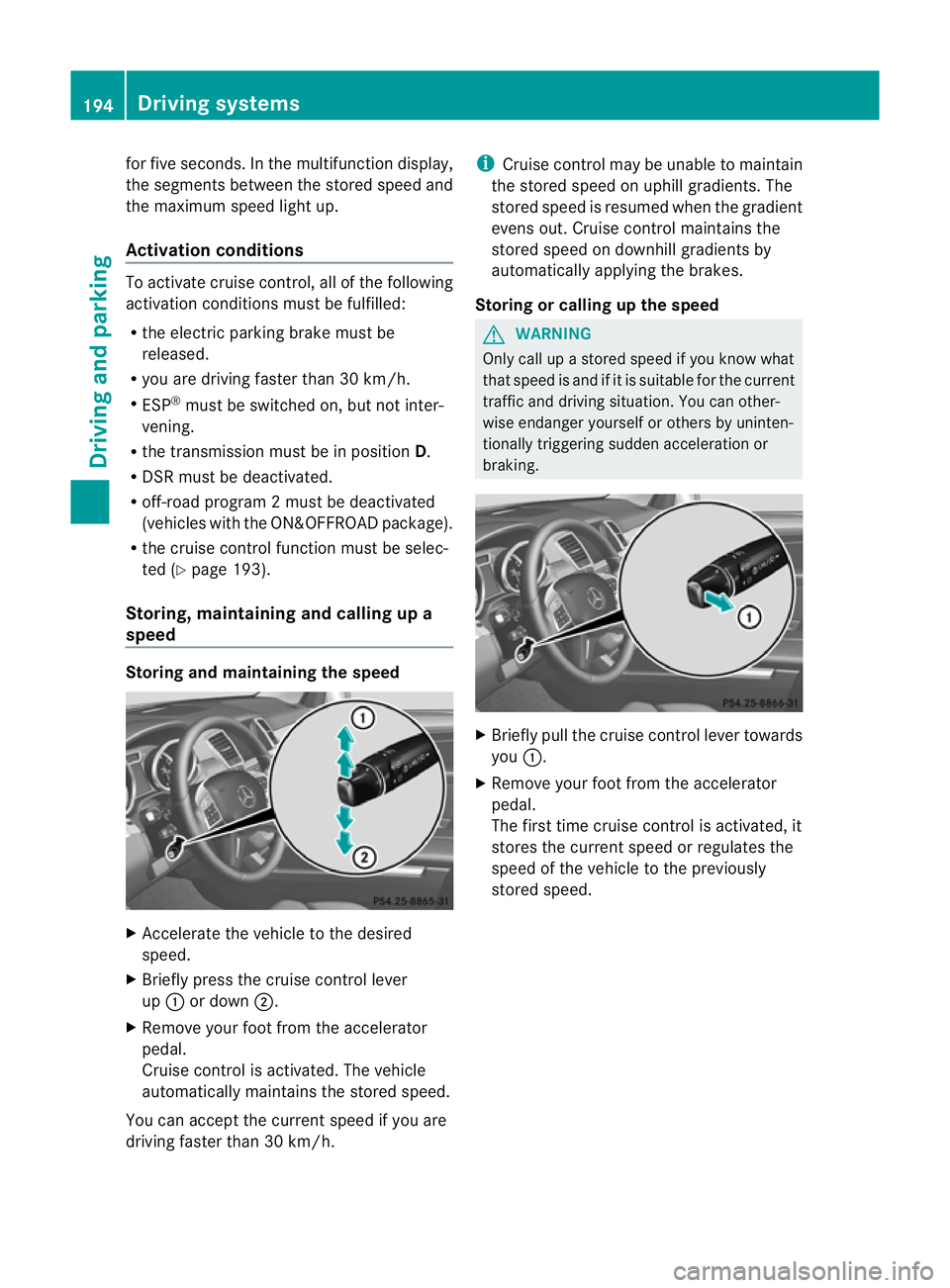
Accelerate the vehicl etothe desir ed
speed.
X Briefly press the cruise control lever
up : or down ;.
X Remov eyourfoot from the acc elerator
pedal.
Cruise control is activated. The vehicle
automaticall ymaintains the store dspeed.
Yo uc an accep tthe current speed if you are
drivin gfaster than 30 km/h. i
Cruise control may be unabl etomaintain
the store dspeed on uphil lgradients. The
store dspeed is resumed when the gradient
evens out. Cruise control maintains the
stored speed on downhil lgradient sby
automaticall yapplyin gthe brakes.
Stor ingorc alling up the speed G
WARNING
Onl ycallupas toredspeed if you know what
that speed is and if it is suitable for the current
traffic and driving situation. You can other-
wis eendanger yoursel forothers by uninten-
tionally triggering sudden acce leratio nor
braking. X
Briefly pull the cruise contro llever towards
you :.
X Remov eyour foot from the accelerator
pedal.
The first tim ecruis econtr ol is activated, it
stores the curren tspeed or regulates the
speed of the vehicle to the previously
stored speed. 194
Driving systemsDriving and parking
Page 199 of 441
SPEEDTRONIC
Important safety notes G
WARNING
Never depress the brake peda lcontinuously
while the vehicle is in motion, e.g. never cause
the brakes to rub by applying constant slight
pedal pressure. This causes the brake system
to overheat, increases the brakin gdistance
and can lead to the brakes failing completely. G
WARNING
Do not change down for additional engine
braking on aslippery road surface. This could
cause the drive wheels to lose their grip and
the vehicle could skid. G
WARNING
SPEEDTRONI Cisonly an aid designe dto
assis tdriving. Yo uare responsibl efor the
vehicle' sspeed and for braking in good time. G
WARNING
If there is achange of drivers, advise the new
driver of the limit speed stored.
Only use variable SPE EDTRONI Cifyou will not
have to accelerate suddenl ytoaspeed above
that stored as the limit speed. You could oth-
erwise cause an accident.
You can only exceed the limit speed stored if
you deactivate variable SPE EDTRONIC:
R using the cruise control lever
R by depressin gthe accelerator pedal
beyon dthe pressure point (kickdown)
It is not possible to deactivate variable
SPE EDTRONI Cbybraking.
General notes SPE
EDTRONIC brakes automatically so that
you do not exceed the set speed. On long and
steep downhil lgradients ,especially if the
vehicle is laden or towing atrailer, yo umust
select shift range 1,2or 3in good time. By
doing so, you will make use of the braking
effect of the engine. This relieves the load on the brake system and prevent
sthe brakes
from overheating and wearing too quickly .If
you need additional braking, depres sthe
brake pedal repeatedly rather than con tinu-
ously.
You can set avariable or permanent limit
speed:
R variable for speedlimits, e.g. in built-up
areas
R permanent for long-term speed restric-
tions, e.g. when drivin gwith winter tyres
fitted (Y page 198)
i The speed indicated in the speedometer
may differ slightly from the limit speed
stored.
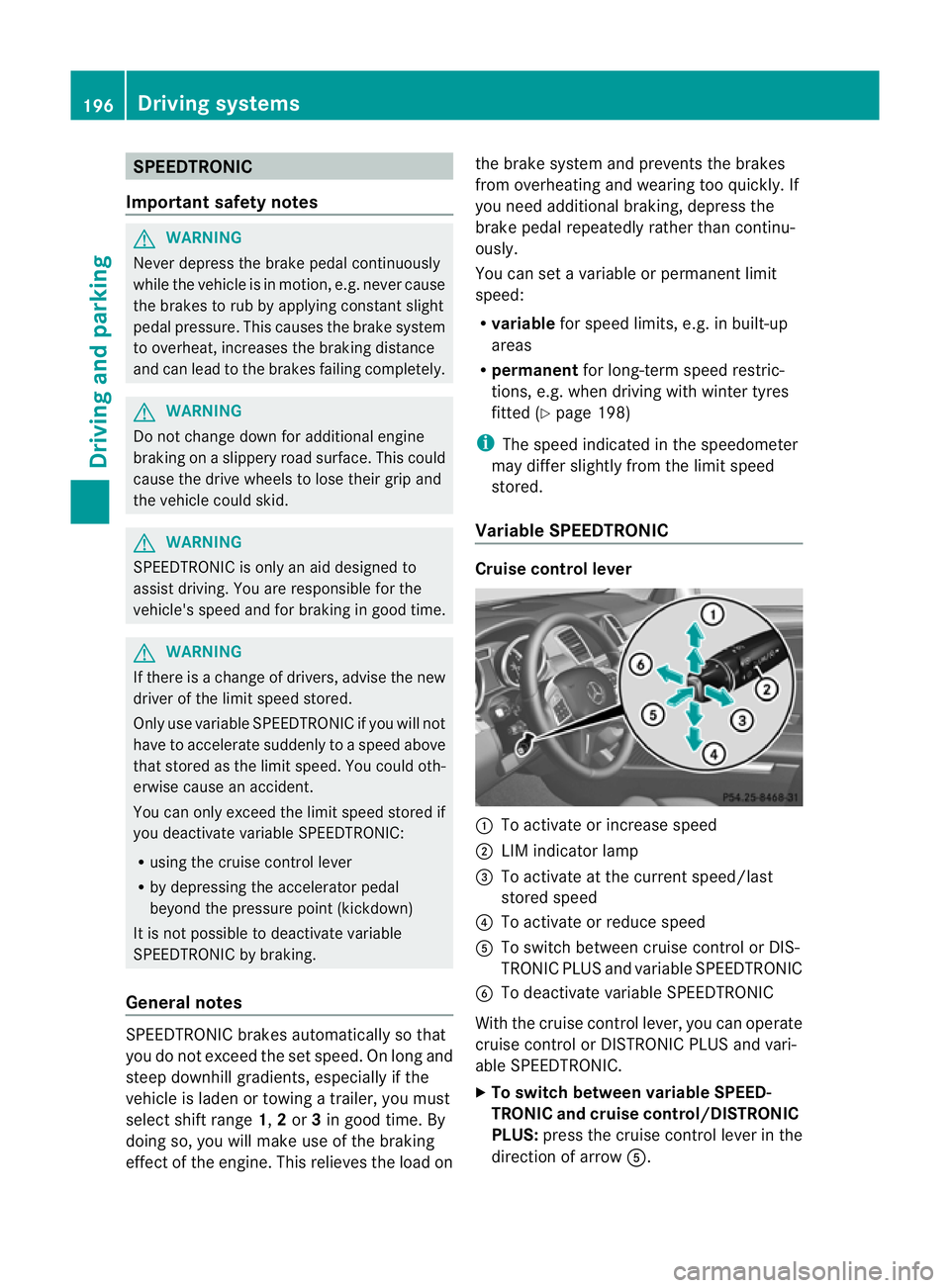
Variable SPEEDTRONIC Cruise control lever
:
To activate or increase speed
; LIMi ndicato rlamp
= To activate at the current speed/last
stored speed
? To activate or reduce speed
A To switch between cruise control or DIS-
TRONIC PLUS and variable SPEEDTRONIC
B To deactivate variable SPEEDTRONIC
With the cruise control lever, you can operate
cruise control or DISTRONIC PLUS and vari-
able SPEEDTRONIC.
X To switch between variable SPEED-
TRONIC and cruise control/DISTRONIC
PLUS: press the cruise control lever in the
direction of arrow A.196
Driving systemsDriving and parking
Page 200 of 441
LIM indicato
rlamp ;on the cruise control
lever indicates which function you have selec-
ted:
R LIM indicator lamp ; off:
cruise control
or DISTRONI CPLUS is selected.
R LIM indicator lamp ; on:
variable
SPEEDTRONIC is selected.
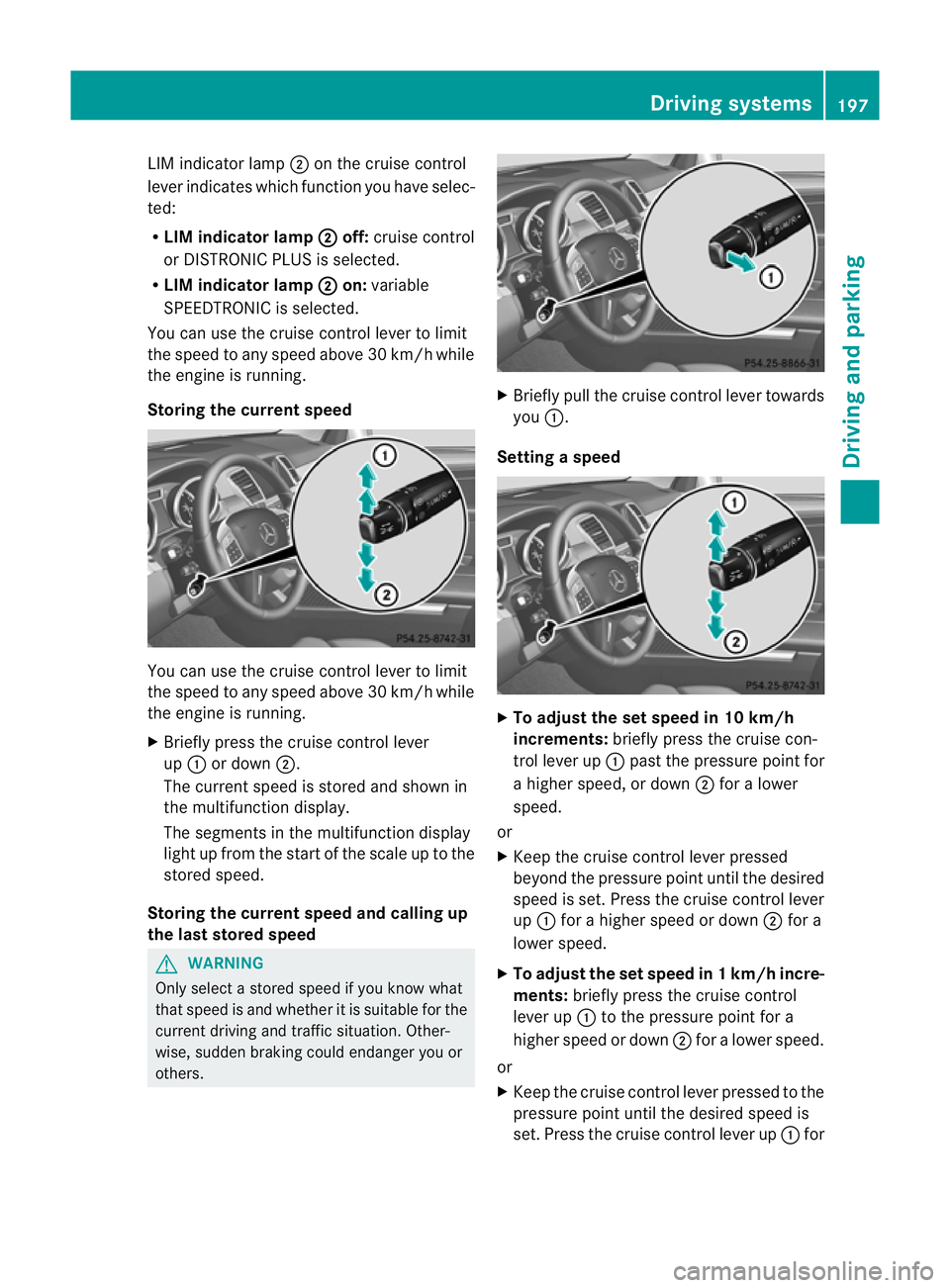
You can use the cruise control lever to limit
the speed to any speed above 30 km/ hwhile
the engin eisrunning.
Storing the current speed You can use the cruise control lever to limit
the spee dtoa ny speed above 30 km/h while
the engine is running.
X Briefly pres sthe cruise control lever
up : or down ;.
The curren tspeed is stored and shown in
the multifunction display.
The segment sinthe multifunction display
light up from the start of the scale up to the
stored speed.
Storing the current speed and calling up
the last stored speed G
WARNING
Only select astored speed if you know what
that speed is and whether it is suitable for the
curren tdriving and traffic situatio n.Other-
wise, sudden brakin gcould endan ger youor
others. X
Briefly pull the cruise control lever towards
you :.
Setting aspeed X
To adjust the se tspeed in 10 km/h
increments: brieflypress th ecruise con-
tro llev er up :pas tthe pressure point for
ah igher speed, or down ;for alower
speed.
or
X Keep the cruise control lever pressed
beyond the pressure point until the desired
speed is set. Press the cruise control lever
up : for ahigher speed or down ;for a
lowe rspeed.
X To ad just th eset speed in 1km/h incre-
ments: briefly press the cruise control
lever up :to the pressure point for a
higher speed or down ;for alower speed.
or
X Keep the cruise contr ol leverpresse dtothe
pressur epoint until the desire dspeed is
set. Press the cruise contro llever up :for Driving systems
197Driving and parking Z