warning light MERCEDES-BENZ GL SUV 2012 Manual PDF
[x] Cancel search | Manufacturer: MERCEDES-BENZ, Model Year: 2012, Model line: GL SUV, Model: MERCEDES-BENZ GL SUV 2012Pages: 441, PDF Size: 10.66 MB
Page 254 of 441
on such
adynamometer, pleas econsult a
qualified workshop. You coul dotherwise
damage the drive train or the brake system.
4MATIC ensures that all four wheels are per-
manently driven. Togethe rwith ESP ®
and
4ETS, it improves the trac tion of your vehicle
whenever adrive whee lspins due to insuffi-
cient grip.
i In wintr ydriving conditions ,the maximum
effect of 4MATIC can only be achieved if
you use winter tyres (M+ Styres), with snow
chain sifn eces sary.
Fo rfurther information on "Driving off-road",
see (Y page 188).
DSR (Downhill Speed Regulation) Important safet
ynotes G
WARNING
DS Riso nlyana id designed to assist you when
drivin gdownhill .You are responsible for keep-
ing control of the vehicle and for assessing
whether the downhil lgradient can be man-
aged.
When activating DSR th evehicle may brake
suddenly due to DSR inter vening. Thi sis
dependent on the downhill gradien tand the
difference between the current speed and the
speed set. DSR may not alway sbeable to
keep to the set speed, depending on road sur-
fac eand tyre conditions .You coul dlose con-
trol of the vehicle and cause an accident.
Selec taset speed suitable for the prevailing
conditions and when necessary, apply the
brakes manually. G
WARNING
If you depress the accelerator pedal wit hDSR
activated, the nthe set speed can be excee-
ded. Drive downhill with specia lcare and
alway skeep in min dthat DSR brakes the vehi-
cle as soon as you remove your foot from the
accelerator pedal. The vehicle ma ybrake sud-
denly due to DSR intervening, depending on
th ed ownhill gradient and the differen ce between the current speed and the set speed.
You could lose control of the vehicl
eand
cause an accident.
DSR assists you whe ndriving downhill. It
keeps th espeed of travel at the speed set on
the on-boar dcomputer .The steeper the
downhill gradient ,the greater the DS Rbrak-
ing effect on th evehicle. When driving on flat
stretches of road or on an uphill gradient, the
DSR braking effect is minima lornon-existent.
DSR con trols the set speed when it is active
and the automatic transmission is in the D,
R or Nposition .Bya ccelerating or braking,
you can always drive at ahigher or alower
speed than that set on the on-boar dcom-
puter.
Further information about "Driving off-road"
(Y page 188).
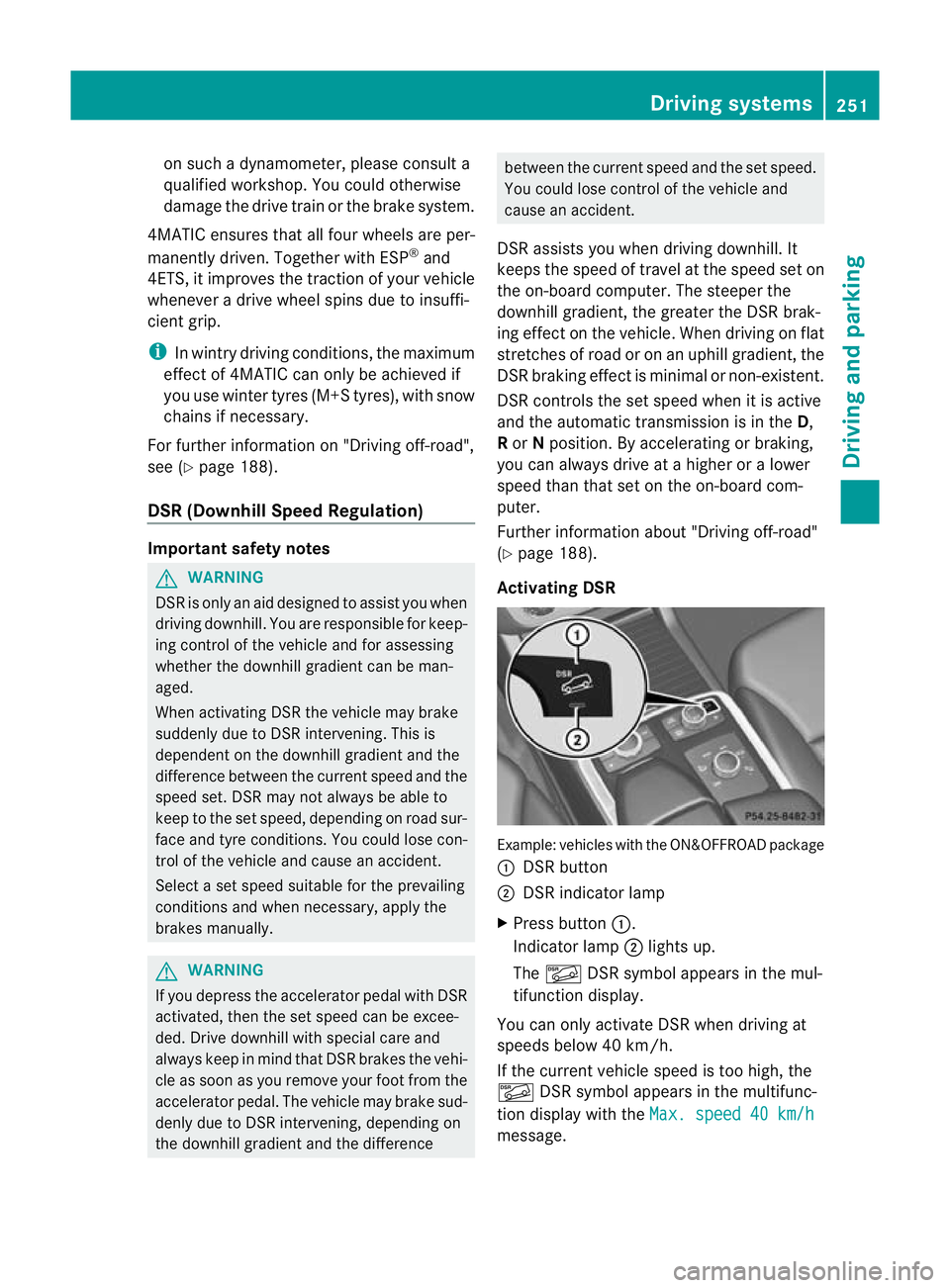
Activating DSR Example: vehicles wit
hthe ON&OFFROAD package
: DSR button
; DSR indicator lamp
X Press button :.
Indicator lamp ;lights up.
The à DSR symbol appear sint he mul-
tifunction display.
You can only activate DS Rwhen drivin gat
speeds below 40 km /h.
If the current vehicle speed is too high, the
à DSR symbol appears in the multifunc-
tion display with the Max.speed 40 km/h message. Drivin
gsystems
251Drivingand pa rking Z
Page 263 of 441
X
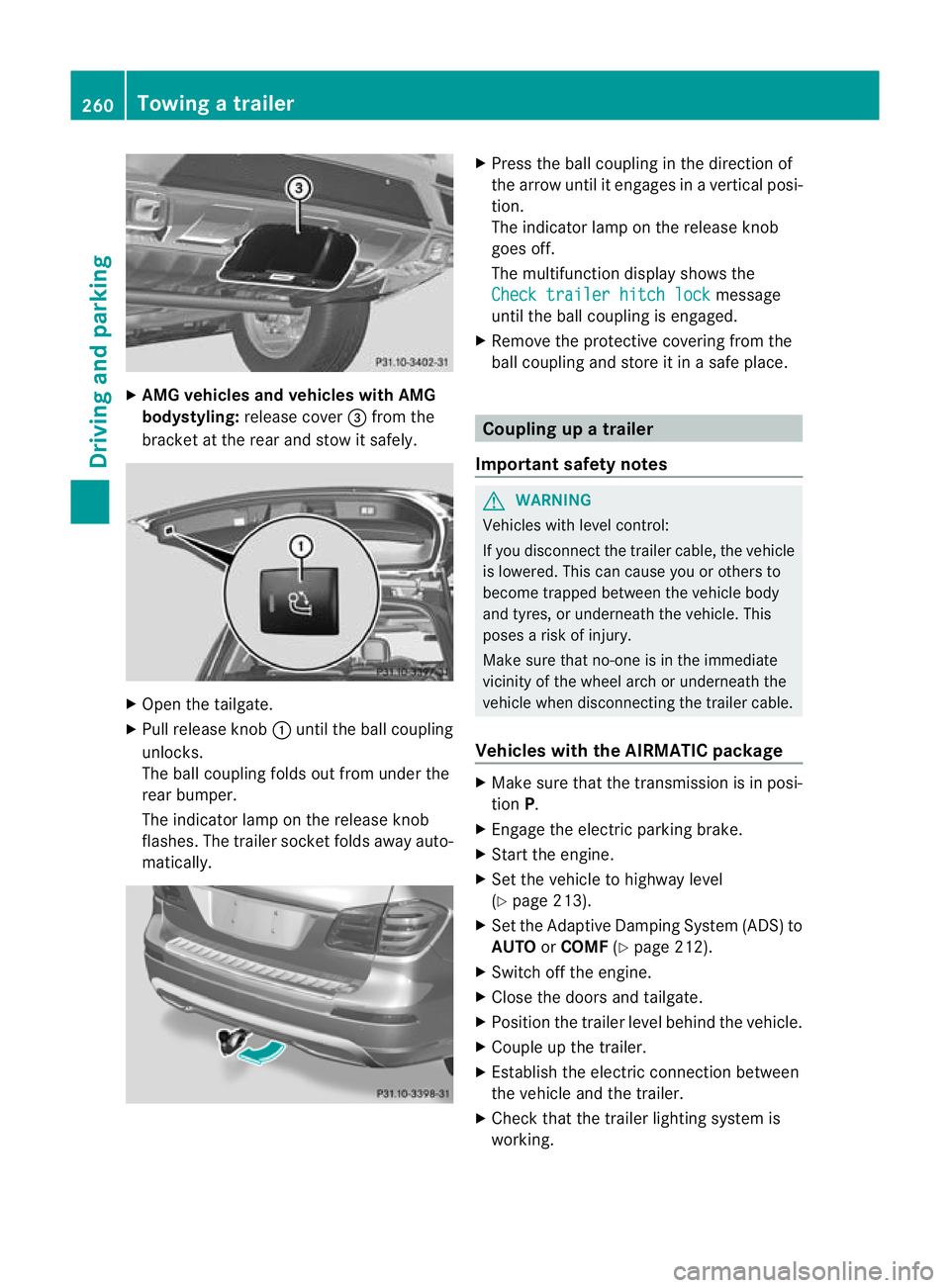
AMG vehicles and vehicles with AMG
bodystyling: release cover =from the
bracket at the rea rand sto witsafely. X
Open the tailgate.
X Pull release knob :until the ball coupling
unlocks.
The ball coupling folds out from under the
rear bumper.
The indicator lamp on the release knob
flashes .The trailer socket folds away auto-
matically. X
Press the ball couplin ginthe direction of
the arrow until it engages in avertical posi-
tion.
The indicator lam ponthe release knob
goes off.
The multifunction display shows the
Chec ktrailer hitch lock message
until th eball coupling is engaged.
X Remove the protective covering from the
ball coupling and store it in asafe place. Coupling up
atrailer
Important safety notes G
WARNING
Vehicles with level control:
If you disconnec tthe trailer cable, the vehicle
is lowered. This can cause you or other sto
become trapped between the vehicl ebody
and tyres, or underneat hthe vehicle. This
poses arisk of injury.
Make sure that no-on eisinthe immediate
vicinit yofthe wheel arch or underneath the
vehicle when disconnectin gthe trailer cable.
Vehicles with th eAIRMATIC package X
Make sure that the transmission is in posi-
tion P.
X Engage the electric parking brake.
X Start the engine.
X Set the vehicle to highway level
(Y page 213).
X Set the Adaptive Damping System (ADS )to
AUTO orCOMF (Ypage 212).
X Switch off the engine.
X Close the doors and tailgate.
X Position the trailer level behind the vehicle.
X Coupl eupthe trailer.
X Establish the electric con nectio nbetween
the vehicle and the trailer.
X Check that the trailer lighting system is
working. 260
Towing
atrailerDriving an dparking
Page 271 of 441
=
Rev coun ter( Ypage 268)
? Coolan ttemperatur e(Ypage 26 8)
A Multifunction displa y(Ypage 27 0)
B Instrumen tcluster lighting (Y page 268) Instrument cluster lighting
The lighting in the instrument cluster ,inthe
displays and the controls in the vehicle inte-
rior can be adjusted usin gthe brightness con-
trol knob.
The brightness control knob is on the bottom
lef toft he instrumen tcluster (Y page 30).
X Turn the brightness control knob clockwise
or anti-clockwise.
If the light switch is set to Ã,Tor
L,t he brightness is dependant upon
the brightness of the ambient light.
i The light sensor in the instrumen tcluster
automatically controls the brightness of
the multifunction display.
In daylight, the displays in the instrument
cluster are not illuminated. Coolant temperature gauge
The coolant temperature gauge is in the
instrument cluster on the right-hand side
(Y page 30).
Under normal operatin gcondition sand with
the specified coolant level ,the coolant tem-
perature ma yrise to 120 †.
At high outside temperatures and when driv-
ing uphill, the coolant temperature may rise
to the end of the scale. Rev counter
! Do not drive in the overrevving range.
Doin gsow ill damage the engine.
The red band in the rev counter indicates the
engine's overrevving range. The fuel supply is interrupted to protec
tthe
engin ewhen the red band is reached. Outside tem
perature display G
WARNING
At temperatures just above freezing point, the
street may be icy, especially in wooded areas
or on bridges. If you do not adapt your driving
style to the conditio ns,the vehicle coul dskid.
For this reason, adapt your driving style and
speed to the weather conditions.
The outside temperature displa yisinthe mul-
tifunc tion display (Y page 270).
Changes in the outside temperatur eare dis-
played afte rashort delay. Speedomete
rwith segments
The segments in the speedometer indicate
which speed range is avai lable.
R Cruise control activated (Y page 193):
The segment slight up from the stored
speed to the maximum speed.
R Variabl eSPEEDTRONIC activated
(Y page 196):
The segments light up from the star tofthe
scal etot he selected limit speed.
R DISTRONI CPLUS activate d(Ypage 198):
One or two segment sinthe set speed
range light up.
R DISTRONI CPLUS detects avehicle in front:
The segments between the speed of the
vehicle in fron tand the store dspeed light
up. 268
Display
sand operationOn-board computer and displays
Page 287 of 441
When you are close to radi
otelescope facili-
ties, the rada rsensor system will be deacti-
vated automatically.
The following system sare switche doff when
th er adar senso rsystem is deactivated:
R DISTRONIC PLUS (Y page 198)
R BAS PLUS (Y page 62)
R PRE-SAFE ®
Brak e(Ypage 68)
R Blin dSpot Assist (Y page 238)
R Active Blin dSpot Assist (Y page 242)
Heating submenu Auxiliary heating dep
arture time G
WARNING
Exhaus tfumes are produced when the auxili-
ary heating is in operation. Inhaling the se
exhaus tfumes can be poisonous. You should
therefor eswitch off th eauxiliar yheating in
confine dspaces without an extraction sys-
tem, e.g .agarage. G
WARNING
When operating the auxiliary heating parts of
the vehicle can get very hot. Make sure that
the exhaust system does not under any cir-
cumstances come into contact with easily
ignitable material such as dry grass or fuels.
The material could otherwise ignite and set
the vehicle alight. Choos eyour parkin gspot
accordingly.
Operating the auxiliary heating is thus pro-
hibited at fillin gstations or when your vehicle
is being refuelled .You must therefor eswitch
off the auxiliary heating at filling stations.
! Operating the auxiliary heating/ventila-
tion draws on the vehicle battery. After you
have heated or ventilated the vehicle a
maximum of two times, drive for alonger
distance.
This func tion is only available on vehicles with
auxiliary heatin g(Ypage 148). In the
Heating submenu, you can select a
stored departure tim eorchange adeparture
time.
The auxiliary heatin gtimer func tion calcu-
lates the switch-on tim eaccording to the out-
sid etemperatur esothat the vehicle is pre-
heate dbyt he departur etime. When the
departur etime is reached, the auxiliary heat-
ing continues to heat for afurther five
minutes and then switches off. The auxiliary
heating adopts the THERMATI Cor
THERMOTRONI Ctemperature setting.
You can switc hoff th eauxiliary heating by
using the remot econtrol or the auxiliar yheat-
ing button on the centre console.
i Swit chthe auxiliary heating on regularly
once amonthfor about ten minutes.
Selecting th edepartur etime or deactivat-
ing aselected depa rtur et ime
X Press the =or; button on the steer-
ing wheel to select the Settings menu.
X Press the :or9 button to select the
Heating submenu.
X Press ato confirm.
You will see the selected setting.
X Press ato confirm.
X Press the :or9 button to select
one of the three departur etimes or Timer off (no timer active).
X Press ato confirm.
If ad eparture tim eisselected, the yellow
indicator lam plights up on the auxiliary
heating button.
Changing the depa rtur et ime
X Press the =or; button on the steer-
ing wheel to select the Settings menu.
X Press the :or9 button to select the
Heating submenu.
X Press ato confirm.
You will see the selected setting.
X Press ato confirm. 284
Menus and submenusOn-board computer and displays
Page 288 of 441
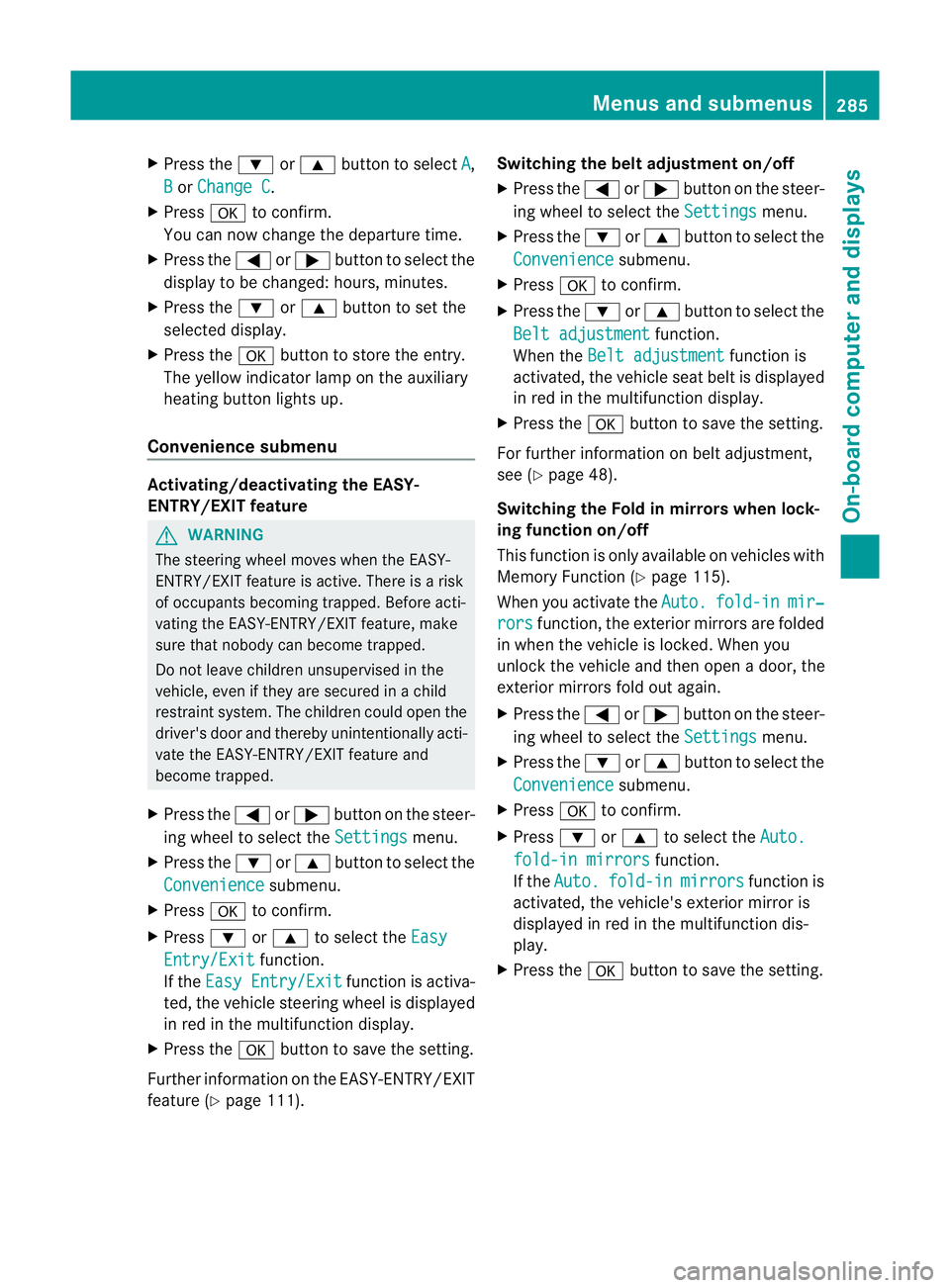
X
Press the :or9 button to select A ,
B or
Change C .
X Press ato confirm.
You can now change the departur etime.
X Press the =or; button to select the
display to be changed: hours, minutes.
X Press the :or9 button to set the
selected display.
X Press the abutton to store the entry.
The yellow indicator lamp on the auxiliary
heating button lights up.
Convenience submenu Activating/deactivating the EASY-
ENTRY/EXIT feature
G
WARNING
The steerin gwheel moves when the EASY-
ENTRY/ EXIT feature is active. There is arisk
of occupant sbecoming trapped. Before acti-
vating the EASY-ENTRY/EXI Tfeature, make
sure that nobody can becom etrapped.
Do not leave children unsupervised in the
vehicle, eve nifthey ar esecured in achild
rest raint system. The children could open the
driver's door and thereby unintentionally acti-
vate the EASY-ENTRY/EXIT featur eand
become trapped.
X Pres sthe = or; button on the steer-
ing wheel to selec tthe Settings menu.
X Press the :or9 button to selec tthe
Convenie nce submenu.
X Press ato con firm.
X Press :or9 to select the Easy Entry/Ex
it function.
If the Easy Entry/Exit function is activa-
ted ,the vehicle steerin gwheel is displayed
in red in the multifunction display.
X Press the abutton to sav ethe setting.
Further information on the EASY- ENTRY/EXIT
feature (Y page 111). Switching the belt adjustment on/off
X
Press the =or; button on the steer-
ing whee ltoselect the Settings menu.
X Press the :or9 button to select the
Convenie nce submenu.
X Press ato con firm.
X Press the :or9 buttontos elect the
Belt adjustme nt function.
When the Belt adjustment function is
activated, th evehicle seat belt is displayed
in red in the multifunction display.
X Press the abutton to save the setting.
For further information on belt adjustment,
see (Y page 48).
Switching th eFold in mirrors when lock-
ing function on/off
This func tion is only available on vehicles with
Memor yFunction (Y page 115).
When you activat ethe Auto. fold-in mir‐
rors func
tion, the exterior mirror sare folded
in when th evehicle is locked. When you
unloc kthe vehicle and then open adoor, the
exterior mirror sfold out again.
X Press the =or; button on the steer-
ing wheel to select the Settings menu.
X Press the :or9 button to select the
Convenie nce submenu.
X Press ato con firm.
X Press :or9 to select the Auto. fold-in mirrors function.
If the Auto. fold-in mirrors function is
activated, th evehicle' sexterior mirror is
displaye dinred in the multifunction dis-
play.
X Press the abutton to save the setting. Menus and submenus
285On-board computera nd displays Z
Page 294 of 441
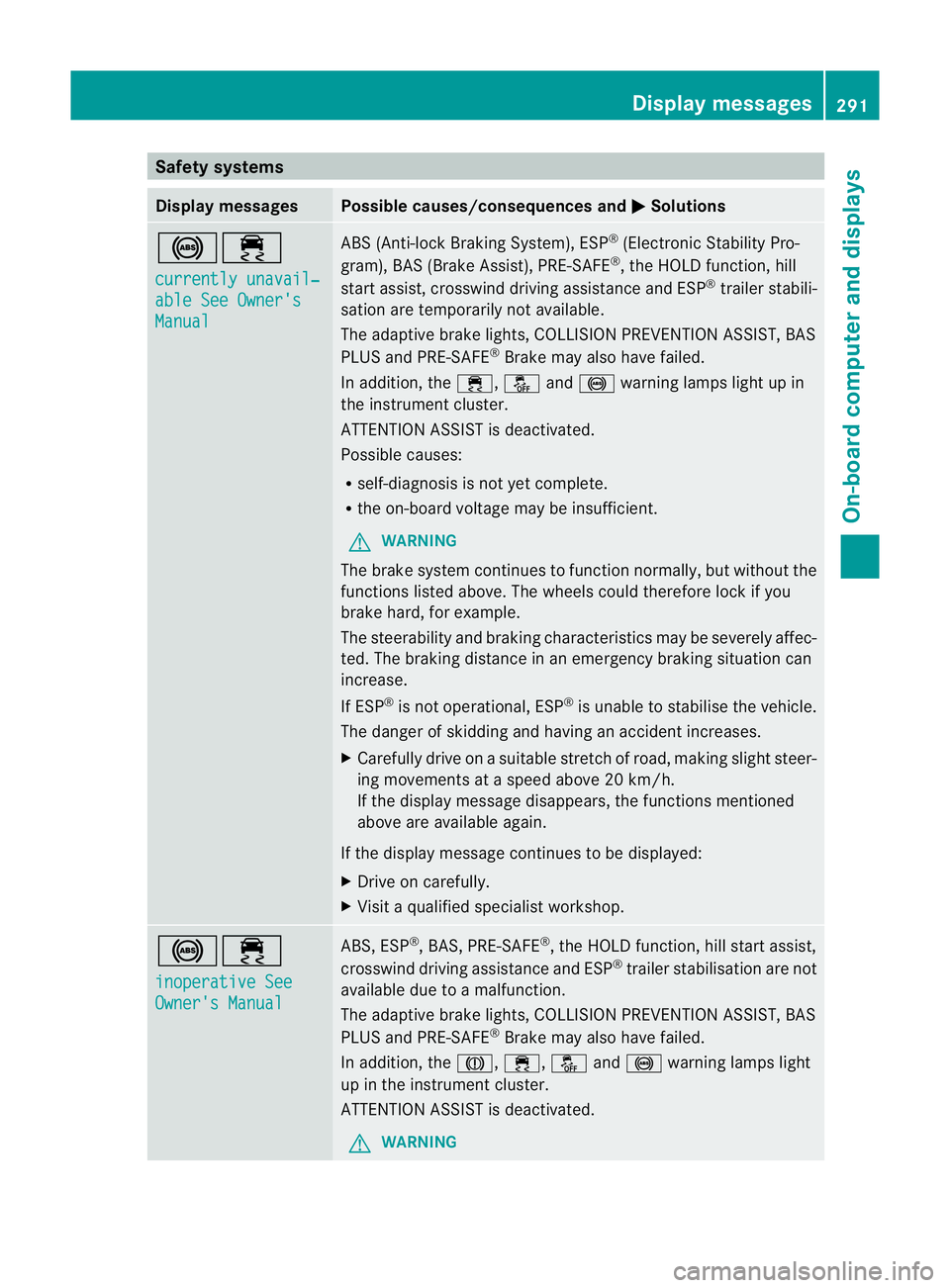
Safety systems
Display messages Possible causes/consequences and
M Solutions
!÷
currentl
yunavail‐ able See Owner's
Manual ABS (Anti-loc
kBraking System) ,ESP ®
(Electronic Stability Pro-
gram), BAS (Brake Assist), PRE-SAFE ®
,t he HOL Dfunction, hill
start assist, crosswind driving assistance and ESP ®
trailer stabili-
sation are temporarily not available.
The adaptive brake lights ,COLLISION PREVENTION AS SIST, BAS
PLUS and PRE-SAFE ®
Brake may als ohave failed.
In addition, the ÷,åand! warning lamps light up in
the instrumen tcluster.
ATTENTION ASSIST is deactivated.
Possible causes:
R self-diagnosis is not yet complete.
R the on-board voltage may be insufficient.
G WARNING
The brake system continues to func tion normally, but withou tthe
func tions listed above. The wheels coul dtherefore lock if you
brake hard, for example.
The steerability and brakin gcharacteristics ma ybeseverely affec-
ted. The braking distance in an emergency braking situation can
increase.
If ESP ®
is not operational, ESP ®
is unabl etos tabilise the vehicle.
The dange rofskidding and having an accident increases.
X Carefull ydrive on asuitable stretch of road, making slight steer-
ing movement sataspeed above 20 km/h.
If the display message disappears, the functions mentioned
above are available again.
If the display message continues to be displayed:
X Drive on carefully.
X Visit aqualified specialist workshop. !÷
inoperativ
eSee Owner's Manual ABS, ESP
®
,B AS ,PRE-SAFE ®
,t he HOL Dfunction, hill start assist,
crosswind driving assistance and ESP ®
trailer stabilisation are not
available due to amalfunction.
The adaptive brake lights ,COLLISION PREVENTION AS SIST, BAS
PLUS and PRE-SAFE ®
Brake may als ohave failed.
In addition, the J,÷,åand! warning lamps light
up in the instrumen tcluster.
ATTENTION ASSIST is deactivated.
G WARNING Display messages
291On-board computer and displays Z
Page 295 of 441
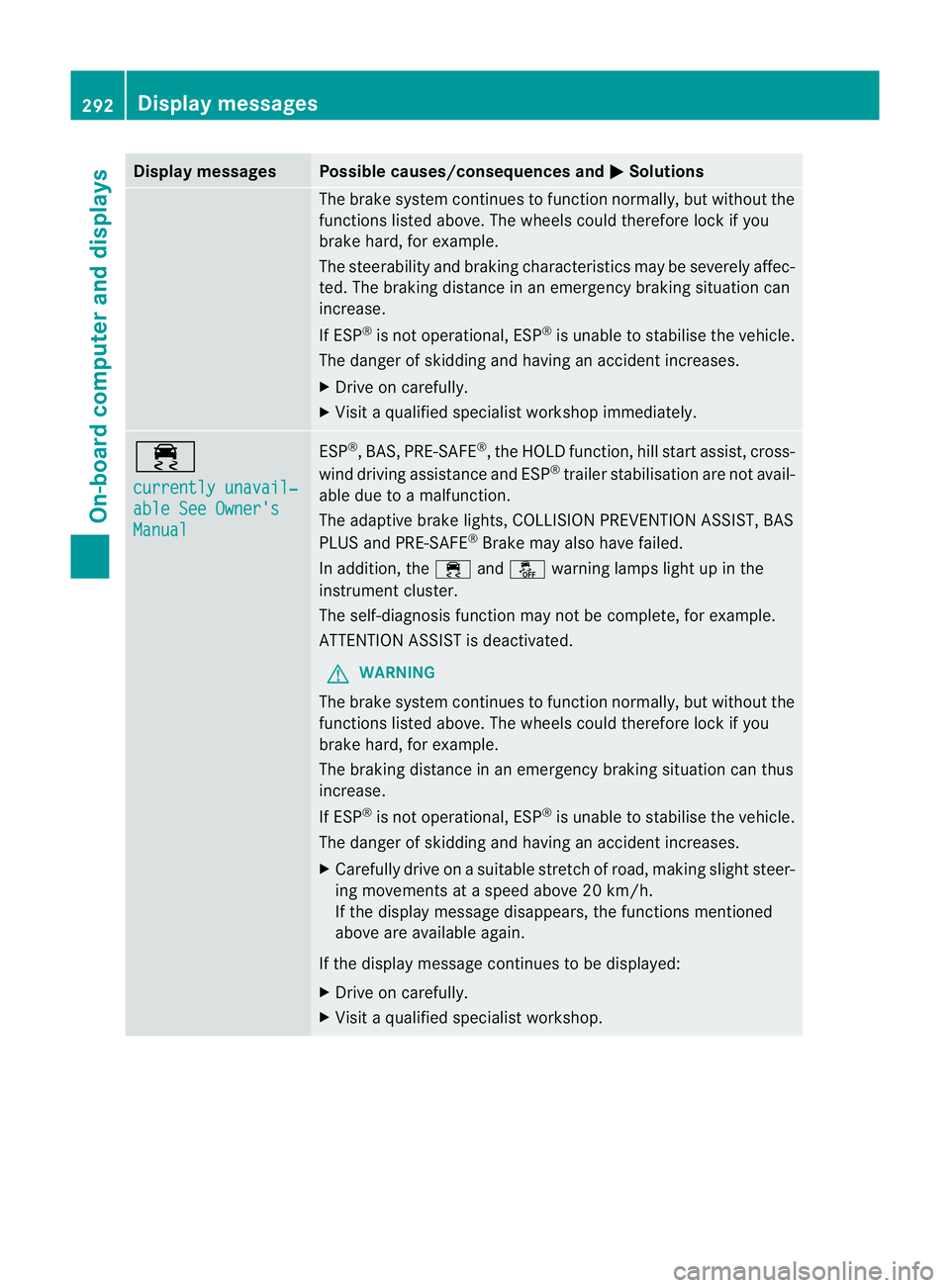
Displa
ymessages Possible causes/consequences and
M Solutions
The brak
esystem con tinues to function normally, but without the
function slisted above. The wheels could therefore loc kifyou
brake hard ,for example.
The steerabilit yand braking characteristics may be severely affec-
ted. The braking distance in an emergenc ybraking situatio ncan
increase.
If ESP ®
is not operational, ESP ®
is unable to stabilis ethe vehicle.
The danger of skidding and having an accident increases.
X Drive on carefully.
X Visit aqualified specialist worksho pimmediately. ÷
currentl
yunavail‐ able See Owner's
Manual ESP
®
,B AS, PRE-SAFE ®
,t he HOL Dfunction, hill start assist, cross-
wind driving assistance and ESP ®
trailer stabilisatio nare not avail-
ab ledue to amalfunction.
The adaptive brake lights, COLLISION PREVENTION ASSIST, BAS
PLUS and PRE-SAFE ®
Brake may als ohave failed.
In addition, the ÷andå warning lamp slight up in the
instrument cluster.
The self-diagnosi sfunction may not be complete, for example.
ATTENTION ASSIS Tisd eactivated.
G WARNING
The brak esystem continues to function normally, but witho utthe
functions listed above. Th ewheels could therefor elock if you
brake hard ,for example.
The brakin gdistance in an emergenc ybraking situatio ncan thus
increase.
If ESP ®
is not operational, ESP ®
is unable to stabilis ethe vehicle.
The danger of skidding and having an accident increases.
X Carefully drive on asuitable stretc hofroad, makin gslight steer-
ing movement sataspeed above 20 km/h.
If the display message disappears, the functions mentioned
above are available again.
If the display message continues to be displayed:
X Drive on carefully.
X Visit aqualified specialist workshop. 292
Display messagesOn-board computer and displays
Page 296 of 441
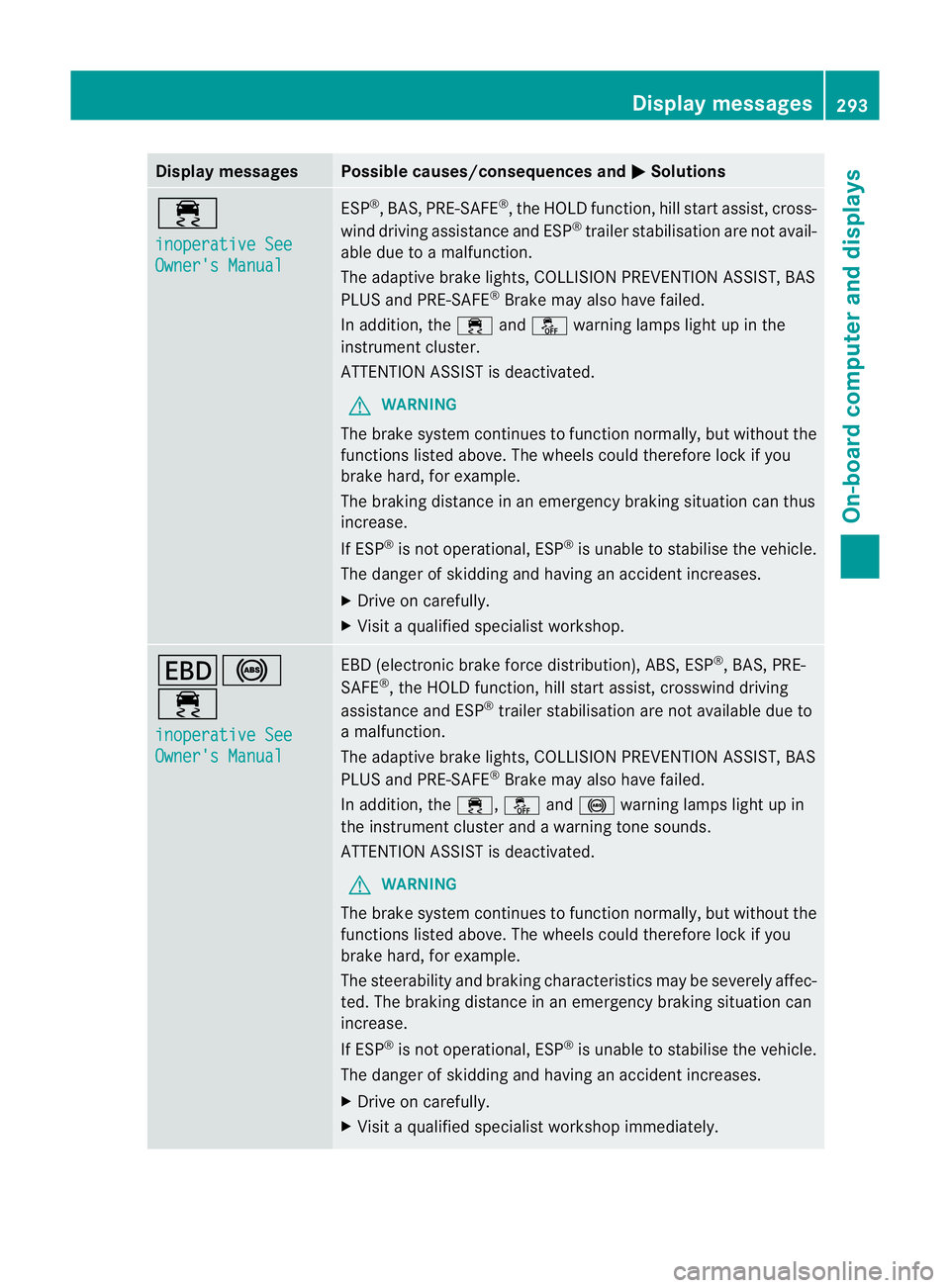
Displa
ymessages Possible causes/consequences and
M Solutions
÷
in
operative See Owner'
sManual ESP
®
,B AS, PRE-SAFE ®
,t he HOL Dfunction, hill start assist, cross-
wind driving assistance and ESP ®
trailer stabilisatio nare not avail-
ab ledue to amalfunction.
The adaptive brake lights, COLLISION PREVENTION ASSIST, BAS
PLUS and PRE-SAFE ®
Brake may als ohave failed.
In addition, the ÷andå warning lamp slight up in the
instrument cluster.
ATTENTION ASSIST is deactivated.
G WARNING
The brake system continues to function normally, but withou tthe
func tions listed above. The wheels coul dtherefore lock if you
brake hard, for example.
The brakin gdistance in an emergenc ybraking situatio ncan thus
increase.
If ESP ®
is not operational, ESP ®
is unable to stabilis ethe vehicle.
The danger of skidding and having an accident increases.
X Drive on carefully.
X Visit aqualified specialist workshop. T!
÷
inoperativ
eSee Owner's Manual EBD (electroni
cbrake force distribution) ,ABS ,ESP ®
,B AS ,PRE-
SAFE ®
,t he HOL Dfunction, hill start assist, crosswind driving
assistance and ESP ®
trailer stabilisation are not available due to
am alfunction.
The adaptive brake lights ,COLLISION PREVENTION AS SIST, BAS
PLU Sand PRE-SAFE ®
Brake may also have failed.
In addition, the ÷,åand! warning lamps light up in
the instrument cluster and awarnin gtones ounds.
ATTENTION ASSI STis deactivated.
G WAR
NING
The brake sys temc ontinues to fu nction normally, but without the
function slisted above. The wheels could therefore lock if you
brak ehard, for example.
The steerabilit yand braking characteristics may be seve rely affec-
ted. The braking distanc einanemergency braking situation can
increase.
If ESP ®
is not opera tional, ESP ®
is unable to stabilise the vehicle.
The danger of skidding and havi ngan accident increases.
X Drive on carefully.
X Visit aqualified specialist worksho pimmediately. Display mess
ages
293On-board computer and displays Z
Page 297 of 441
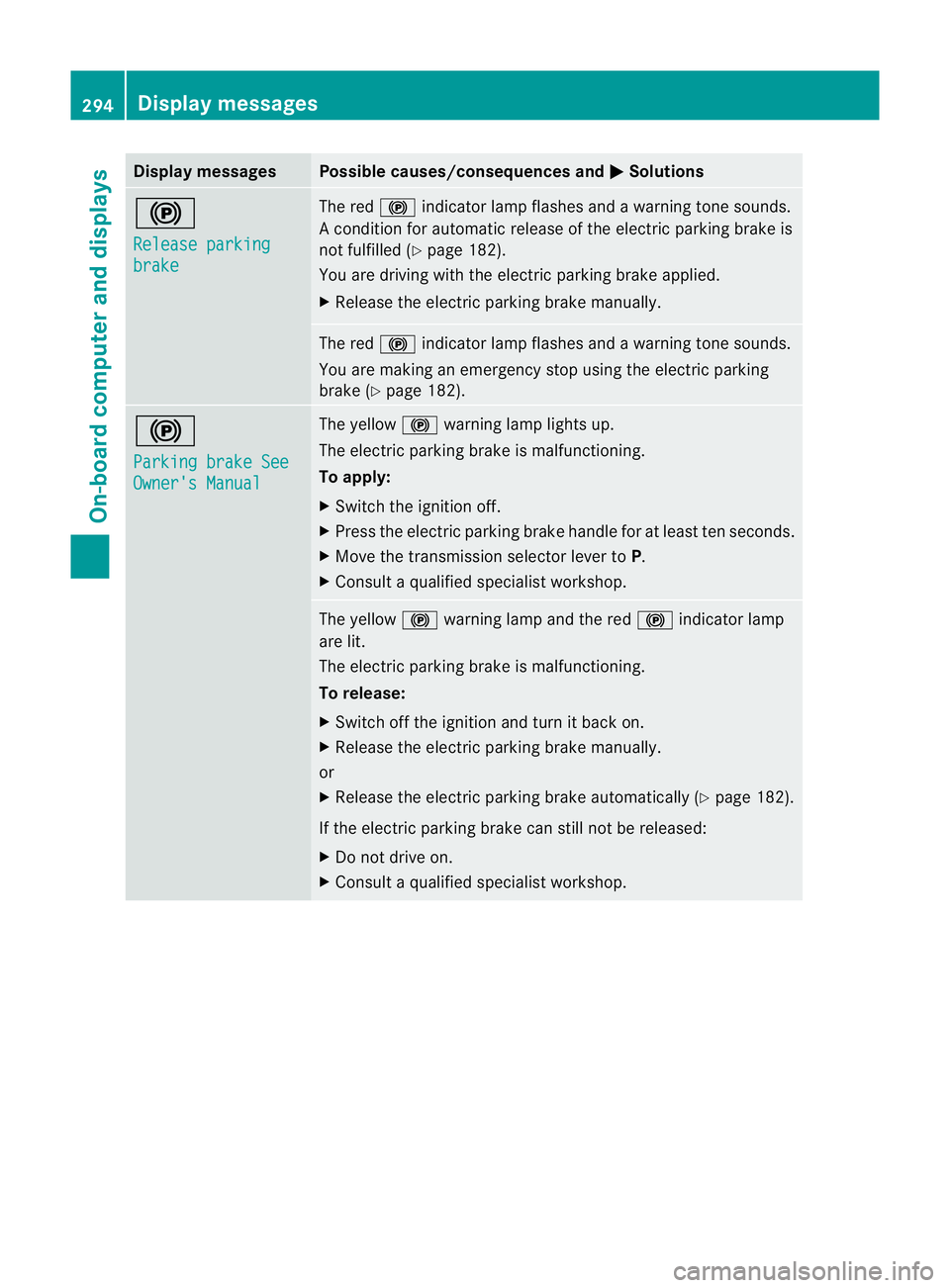
Displa
ymessages Possible causes/consequences and
M Solutions
!
Re
leasep arking brake Th
er ed ! indicato rlamp flashes and awarning ton esounds.
Ac onditio nfor aut omatic relea se of theelectric parking brak eis
not fulfilled (Y page182).
You are driving wit hthe electric parking brak eapplied.
X Releas ethe electric parking brak emanually. The red
!indicator lamp flashes and awarning ton esounds.
You ar emaking an emergenc ystopu singthe electric parking
brak e(Ypage 182). !
Pa
rkingb rake See Owner'
sManual Th
ey ellow !warning lamp light sup.
The electric parking brak eismalfunctioning.
To apply:
X Switch th eignition off.
X Press th eelectric parking brak ehandle for at least ten seconds.
X Move the transmission selector lever to P.
X Consul taqualified specialist workshop. The yellow
!warning lamp and the red !indicator lamp
are lit.
The electric parkin gbrake is malfunctioning.
To release:
X Switch off th eignition and tur nitback on.
X Release the electric parkin gbrake manually.
or
X Releas ethe electric parkin gbrake automaticall y(Ypage 18 2).
If the electric parking brake can still not be released:
X Do not drive on.
X Consul taqualified specialist workshop. 294
Display messagesOn-boar
dcomputer and displays
Page 298 of 441
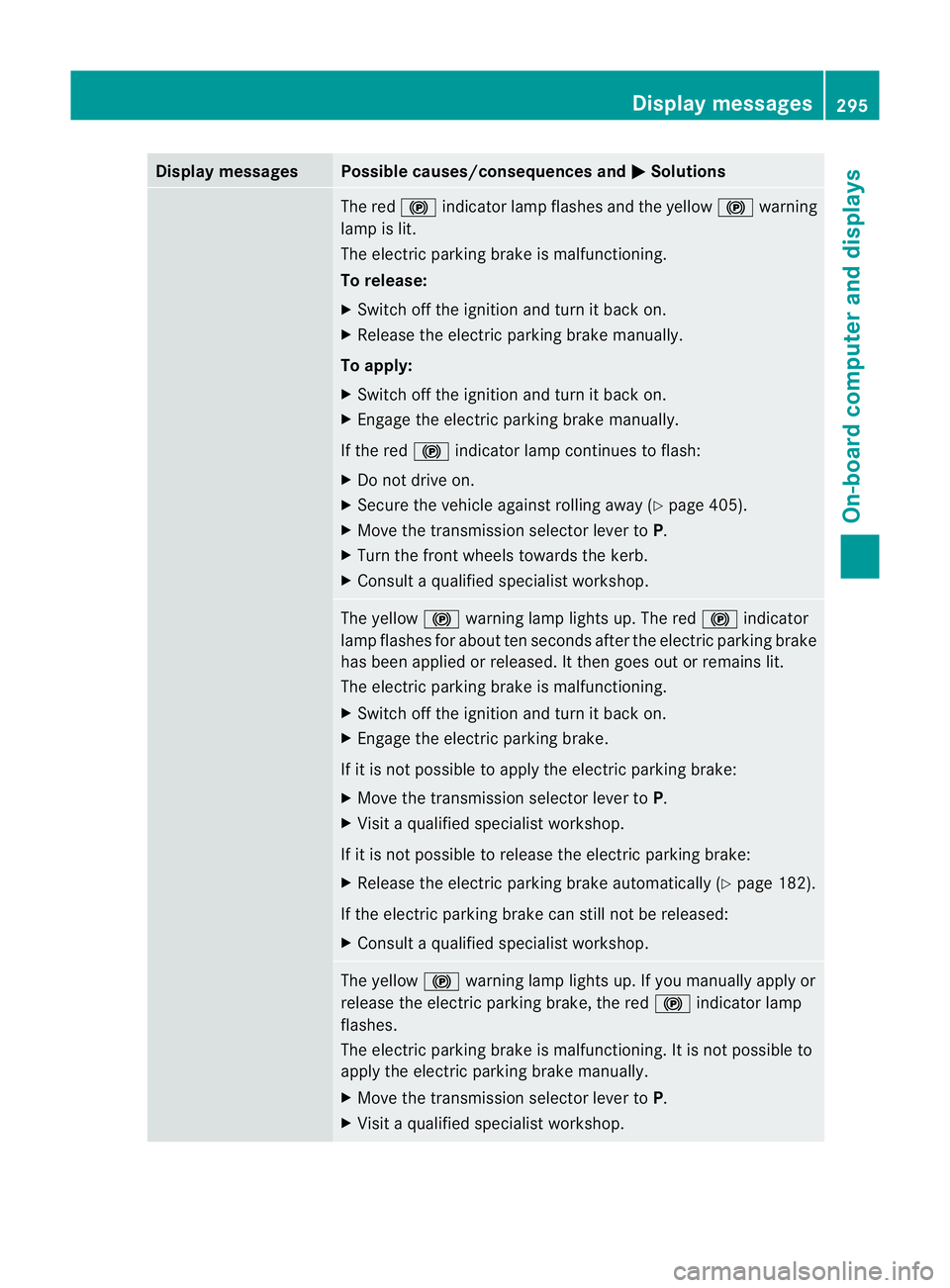
Displa
ymessages Possible causes/consequences and
M Solutions
The red
!indicato rlamp flashes and the yellow !warning
lamp is lit.
The elect ricp arking brak eismalfunctioning.
To release:
X Switch off the ignition and tur nitback on.
X Release the elect ricp arking brak emanually.
To apply:
X Switch off the ignition and tur nitback on.
X Engage the elect ricp arking brak emanually.
If the red !indicator lamp con tinues to flash:
X Do not driv eon.
X Secure the vehicle agai nstrolling away ( Ypage 405).
X Mov ethe transmissio nselecto rlever to P.
X Turn the fron twheels towards the kerb.
X Consult aqualified specialist workshop. The yellow
!warning lamp lights up. The red !indicator
lamp flashes for about ten seconds after the electric parking brake
has been applied or released .Itthen goes out or remain slit.
The electric parkin gbrake is malfunctioning.
X Switch off th eignition and tur nitback on.
X Engage the electric parking brake.
If it is not possible to apply the electric parking brake:
X Move the transmission selector lever to P.
X Visit aqualified specialist workshop.
If it is not possible to release the electric parking brake:
X Release the electric parking brake automatically (Y page 182).
If the electric parking brake can still not be released:
X Consult aqualified specialist workshop. The yellow
!warning lamp lights up. If you manually apply or
release the electric parking brake, the red !indicator lamp
flashes.
The electric parking brake is malfunctioning. It is not possible to
apply the electric parking brake manually.
X Move the transmission selector lever to P.
X Visit aqualified specialist workshop. Display messages
295On-board computer and displays Z