phone MERCEDES-BENZ GLA 2019 Owner's Guide
[x] Cancel search | Manufacturer: MERCEDES-BENZ, Model Year: 2019, Model line: GLA, Model: MERCEDES-BENZ GLA 2019Pages: 346, PDF Size: 16.66 MB
Page 268 of 346
USA only: alternatively, the vehicle can beopened via:
Rthe Internet, under the "Owners Online" sec-tion
Rtelephone applications (e.g. for iPhone®,
Android®)
To do this, you will need your identificationnumber and password.
iVehicle remote opening is only possible ifthe corresponding mobile phone network isaccessible.
Vehicle remote closing
The vehicle valet locking feature can be usedwhen you have forgotten to lock the vehicleand you are no longer nearby.
The vehicle can then be locked by theMercedes-Benz Customer Assistance Center.
The vehicle can be immediately lockedremotely up to four days after the ignition waslast switched off. After this time, valet lockingmay be delayed by 15 to 60 minutes. After30 days the vehicle can no longer be lockedremotely.
XContact the following service hotlines:
RUSA:Mercedes-Benz Customer Assis-tance Center at 1-800-FOR-MERCedes(1-800-367-6372) or 1-866-990-9007
RCanada:Customer Service at1-888-923-8367You will be asked for your password.
The next time you are inside the vehicle andyou switch on the ignition, theDoors LockedDoors LockedRemotelyRemotelymessage will appear on the multi-function display.
USA only: alternatively, the vehicle can belocked via:
Rthe Internet, under the "Owners Online" sec-tion
Rtelephone applications (e.g. for iPhone®,
Android®)
To do this, you will need your identificationnumber and password.
iThe vehicle valet locking feature is availa-ble when the relevant mobile phone networkis available and data connection is possible.
Stolen vehicle recovery service
If your vehicle has been stolen:
XNotify the police.The police will issue a numbered incidentreport.
XThis number will be forwarded to theMercedes-Benz Customer Assistance Centertogether with your PIN.The Mercedes-Benz Customer AssistanceCenter then tries to locate the system. TheMercedes-Benz Customer Assistance Centercontacts you and the local law enforcementagency if the vehicle is located.
However, only the law enforcement agencyis informed of the location of the vehicle.
iIf the anti-theft alarm system is activatedfor longer than 30 seconds, Mercedes meconnect automatically notifies theMercedes-Benz Customer Assistance Cen-ter.
Vehicle Health Check
With the Vehicle Health Check, the CustomerAssistance Center can provide improved sup-port for problems with your vehicle. During anexisting call, vehicle data is transferred to theCustomer Assistance Center. The customerservice representative can use the receiveddata to decide what kind of assistance isrequired. You are then, for example, guided tothe nearest Mercedes-Benz Service Center ora recovery vehicle is called.
If vehicle data needs to be transferred duringan MB Info call or a Roadside Assistance call,this is initiated by the Customer AssistanceCenter. You will see theRoadside Assis‐Roadside Assis‐tance Connectedtance Connectedmessage on the multimediasystem display. If the vehicle remote malfunc-tion diagnosis can be started, theRequestRequestfor vehicle diagnosis received.for vehicle diagnosis received.Start vehicle diagnosis?Start vehicle diagnosis?messageappears in the display.
XConfirm the message withYesYes.
XWhen theVehicle diagnosis: PleaseVehicle diagnosis: Pleasestart ignitionstart ignitionmessage appears, turnthe SmartKey to position2in the ignitionlock (Ypage 125).
XWhen thePlease follow the instruc‐Please follow the instruc‐tions received by phone and movetions received by phone and moveyour vehicle to a safe positionyour vehicle to a safe positionmes-
266Features
Stowage and features
Page 269 of 346
sage appears, follow the customer servicerepresentative's instructions.The message in the display disappears.
If you selectCancelCancelthe remote malfunctiondiagnosis is canceled completely.
The vehicle operating state check begins.You will see theVehicle diagnosisVehicle diagnosisactivated.activated.message.
When the diagnosis is completed, theSendSendvehicle diagnostics data (Voice con‐vehicle diagnostics data (Voice con‐nection may be interrupted duringnection may be interrupted duringdata transfer)data transfer)message appears. The vehi-cle data can now be sent to the CustomerAssistance center.
XPressOKOKto confirm the message.The voice connection with the CustomerAssistance Center is terminated.
You will see theVehicle Diagnosis:Vehicle Diagnosis:Transferring data...Transferring data...message.
The vehicle data is sent to the CustomerAssistance Center.
Depending on what the customer service rep-resentative agreed with you, the voice connec-tion is re-established after the transfer is com-plete. If necessary, you will be contacted at alater time by another means, e.g. by e-mail orphone.
Another function of the Vehicle Health Checkis the transfer of service data to the CustomerAssistance Center. If a service is due, the mul-timedia system display shows a message tothis effect together with information about anyspecial offers at your workshop.
USA only: this information can also be calledup under "Owners Online" at http://www.mbusa.com.
Information on Roadside Assistance(Ypage 26).
Downloading routes
Downloading routes allows you to transfer andsave predefined routes in the navigation sys-tem. To do this, an SD memory card must beinserted into the multimedia system. If no SDmemory card is inserted, you must insert thecard into the card slot on the multimedia sys-tem before saving the route.
A route can be prepared and sent either by acustomer service representative or via theMercedes me connect portal on the Internet.
Each route can include up to 20 way points.Once a route has been received by the naviga-tion system, you will see the
XTo start route guidance:selectYesYes.An overview of the route is shown in the dis-play.
iIf you selectNoNo, the saved route can becalled up later via the navigation menu.
XSelectStartStart.Route guidance starts.
iDownloaded and saved routes can becalled up again in the multimedia system.
You can find information about this in theseparate operating instructions.
Speed alert
You can define the upper speed limit, whichmust not be exceeded by the vehicle.
If this selected speed is exceeded by the vehi-cle, a message will be sent to the CustomerAssistance Center. The Customer AssistanceCenter then forwards this information to you.
You can select the way in which you receivethis information beforehand. Possible optionsinclude text message, e-mail or an automatedcall.
The data you receive contains the followinginformation:
Rthe location where the speed limit wasexceeded
Rthe time at which the speed limit was excee-ded
Rthe selected speed limit which was excee-ded
Geo fencing
Geo fencing allows you to select areas whichthe vehicle should not enter or leave. You willbe informed if the vehicle crosses the bounda-ries of the selected areas. You can select theway in which you receive this informationbeforehand. Possible options include text mes-sage, e-mail or an automated call.
The area can be determined as either a circleor a polygon with a maximum of ten corners.
Features267
Stowage and features
Z
Page 270 of 346
You can specify up to ten areas simultane-ously. Different settings are possible for eacharea.
USA only: these settings can be called upunder "Owners Online" at http://www.mbusa.com.
Alternatively, you can trigger an MB Info calland inform the customer service representa-tive that you wish to activate geo fencing.
Currently inactive areas can be activated bytext message.
Triggering the vehicle alarm
With this function, you can trigger the vehicle'spanic alarm via text message. An alarmsounds and the exterior lighting flashes.Depending on the setting, the panic alarmlasts five or ten seconds. Afterwards, thealarm switches off.
Garage door opener
General notes
The HomeLink®garage door opener integratedin the rear-view mirror allows you to operateup to three different door and gate systems.
Use the integrated garage door opener only ongarage doors that:
Rhave safety stop and reverse features and
Rmeet current U.S. federal safety standards
Once programed, the integrated garage dooropener in the rear-view mirror will assume thefunction of the garage door system's remotecontrol. Please also read the operating instruc-tions for the garage door system.
When programming a garage door opener,park the vehicle outside the garage. Do notleave the engine running while programming.
Certain garage door drives are incompatiblewith the integrated garage door opener. If youhave difficulty programing the integratedgarage door opener, contact a Mercedes-BenzService Center.
Alternatively, you can call the following tele-phone assistance services:
RUSA:Mercedes-Benz Customer AssistanceCenter at 1-800-FOR-MERCedes
RCanada:Customer Service at1-800-387-0100
RHomeLink®hotline 1-800-355-3515 (free ofcharge)
More information on HomeLink®and/or com-patible products is also available online athttp://www.homelink.com.
Notes on the declaration of conformity(Ypage 27).
USA: FCC ID: CB2HMIHL4
Canada: IC: 279B-HMIHL4
Important safety notes
GWARNING
When you operate or program the door with
the integrated garage door opener, persons
in the range of movement of the door may
become trapped or be struck by the door.
There is a risk of injury.
When using the integrated garage door
opener, always make sure that nobody is
within the range of movement of the door.
GDANGER
Combustion engines emit poisonous
exhaust gases such as carbon monoxide.
Inhaling these exhaust gases is hazardous to
health and can result in poisoning. There is a
risk of fatal injury. Therefore, never leave the
engine running an enclosed space without
adequate ventilation.
Programming
Programming the buttons
Pay attention to the "Important safety notes"(Ypage 268).
268Features
Stowage and features
Page 290 of 346
XSwitch off the engine.
XVehicles without KEYLESS-GO:removethe SmartKey from the ignition lock.
XVehicles with KEYLESS-GO start-func-tion or KEYLESS-GO:open the driver'sdoor.The vehicle electronics are now in positionZ. This is the same as the SmartKey havingbeen removed.
XVehicles with KEYLESS-GO start-func-tion or KEYLESS-GO:remove the Start/Stop button from the ignition lock(Ypage 125).
XMake sure that the engine cannot be startedvia your smartphone (Ypage 126).
XMake sure that the passengers are notendangered as they do so. Make sure thatno one is near the danger area while awheel is being changed. Anyone who is notdirectly assisting in the wheel changeshould, for example, stand behind the bar-rier.
XGet out of the vehicle. Pay attention to traf-fic conditions when doing so.
XClose the driver's door.
MOExtended tires (tires with run-flat
properties)
General notes
With MOExtended tires (tires with run flatcharacteristics), you can continue to drive yourvehicle even if there is a total loss of pressurein one or more tires. The affected tire must notshow any clearly visible damage.
You can recognize an MOExtended tire by theMOExtended marking which appears on thesidewall of the tire. You will find this markingnext to the tire size designation, the load-bear-ing capacity and the speed index(Ypage 320).
MOExtended tires may be used only in con-junction with an activated tire pressure losswarning system (Canada only) or tire pressuremonitor (USA only).
If a pressure loss warning messageappears in the multifunction display:
Robserve the instructions in the display mes-sages (Ypage 223).
Rcheck the tire for damage
Rif driving on, observe the following notes
The driving distance possible in run-flat modeis approximately 50 miles (80 km) when thevehicle is partially laden. When the vehicle isfully laden it is approximately 19 miles(30 km).
In addition to the vehicle load, the driving dis-tance possible depends upon:
RVehicle speed
RRoad condition
ROutside temperature
The driving distance possible in run-flat modemay be reduced by extreme driving conditionsor maneuvers, or it can be increased through amoderate style of driving.
The driving distance possible in run-flat modeis counted from the moment the tire pressureloss warning appears in the multifunction dis-play.
You must not exceed the maximum permissi-ble speed for limp-home mode of 50 mph(80 km/h).
When replacing one or all tires, please observethe following specifications for your vehicle'stires:
RSize
RType and
RThe "MOExtended" marking
If a tire has gone flat and cannot be replacedwith an MOExtended tire, a standard tire maybe used as a temporary measure. Make surethat you use the proper size and type (summeror winter tire).
Vehicles equipped with MOExtended tires arenot equipped with a TIREFIT kit at the factory.It is therefore recommended that you addition-ally equip your vehicle with a TIREFIT kit if youmount tires that do not feature run-flat charac-teristics, e.g. winter tires. A TIREFIT kit may beobtained from a qualified specialist workshop.
288Flat tire
Roadside Assistance
Page 315 of 346
The tire pressure monitor does not warn you ofan incorrectly set tire pressure. Observe thenotes on the recommended tire pressure(Ypage 307).
The tire pressure monitor is not able to warnyou of a sudden loss of pressure, e.g. if thetire is penetrated by a foreign object. In theevent of a sudden loss of pressure, bring thevehicle to a halt by braking carefully. Avoidabrupt steering movements.
The tire pressure monitor has a yellow warninglamp in the instrument cluster for indicatingpressure loss or a malfunction. Whether thewarning lamp flashes or lights up indicateswhether a tire pressure is too low or the tirepressure monitor is malfunctioning:
Rif the warning lamp is lit continuously, thetire pressure on one or more tires is signifi-cantly too low. The tire pressure monitor isnot malfunctioning.
Rif the warning lamp flashes for around aminute and then remains lit constantly, thetire pressure monitor is malfunctioning.
In addition to the warning lamp, a messageappears in the multifunction display. Observethe information on display messages(Ypage 223).
It may take up to ten minutes for a malfunc-tion of the tire pressure monitor to be indica-ted. A malfunction will be indicated by the tirepressure warning lamp flashing for approx-imately one minute and then remaining lit.When the malfunction has been rectified, thetire pressure warning lamp goes out after afew minutes of driving.
The tire pressure values indicated by the on-board computer may differ from those meas-ured at a gas station with a pressure gauge.The tire pressures shown by the on-boardcomputer refer to those measured at sea level.At high altitudes, the tire pressure values indi-cated by a pressure gauge are higher thanthose shown by the on-board computer. In thiscase, do not reduce the tire pressures.
The operation of the tire pressure monitor canbe affected by interference from radio trans-mitting equipment (e.g. radio headphones,two-way radios) that may be being operated inor near the vehicle.
Checking the tire pressure electroni-
cally
XMake sure that the SmartKey is in positionHin the ignition lock (Ypage 125).
XPressYoreon the steering wheelto select theServ.Serv.menu.
XPress thecordbutton to selectTire PressureTire Pressure.
XPress thevbutton.The current tire pressure of each tire isshown in the multifunction display.
If the vehicle was parked for longer than20 minutes, theTire pressure will beTire pressure will bedisplayed after driving a few minutesdisplayed after driving a few minutesmessage is shown.
After a teach-in process, the tire pressuremonitor automatically detects new wheels ornew sensors. As long as a clear allocation ofthe tire pressure value to the individual wheelsis not possible, theTire Pressure MonitorTire Pressure MonitorActiveActivemessage is shown instead of the tirepressure display. The tire pressures arealready being monitored.
If an emergency spare wheel is mounted, thesystem may continue to show the tire pressureof the wheel that has been removed for a fewminutes. If this occurs, note that the value dis-played for the position where the spare wheelis fitted is not the same as the current tirepressure of the emergency spare wheel.
Tire pressure monitor warning mes-
sages
If the tire pressure monitor detects a pressureloss in one or more tires, a warning message isshown in the multifunction display. The yellowtire pressure warning lamp then lights up.
RIf thePlease Correct Tire PressurePlease Correct Tire Pressuremessage appears in the multifunction dis-play, the tire pressure in at least one tire istoo low. The tire pressure must be correctedwhen the opportunity arises.
RIf theCheck Tire PressureCheck Tire Pressuremessageappears in the multifunction display, the tirepressure in one or more tires has droppedsignificantly. The tires must be checked.
RIf theTire Pressure Warning TireTire Pressure Warning TireFailureFailuremessage appears, the tire pressurein one or more tires has dropped suddenly.The tires must be checked.
Tire pressure313
Wheels and tires
Z
Page 334 of 346
Information regarding technical data
iThe data stated here specifically refers toa vehicle with standard equipment. Consultan authorized Mercedes-Benz Center for thedata for all vehicle variants and trim levels.
Vehicle electronics
Installing two-way radios and mobile
phones (RF transmitters)
GWARNING
The electromagnetic radiation from two-way
radios can interfere with the vehicle elec-
tronics if two-way radios are manipulated or
retrofitted incorrectly. This could jeopardize
the operating safety of the vehicle. There is
a risk of an accident.
You should have all work on electrical and
electronic components carried out at a
qualified specialist workshop.
GWARNING
If you incorrectly operate two-way radios in
the vehicle, the electromagnetic radiation
may interfere with the vehicle electronics,
for example if:
Rthe two-way radio is not connected to an
exterior antenna
Rthe exterior antenna is not correctly
mounted or is not low-reflection
This could jeopardize the operating safety of
the vehicle. There is a risk of an accident.
Have the low-reflection exterior antenna
installed at a qualified specialist workshop.
Always connect two-way radios to the low-
reflection exterior antenna when operating
in the vehicle.
!The operating permit may be invalidated ifthe instructions for installation and use oftwo-way radios are not observed.
In particular, the following requirementsmust be complied with:
Ronly approved wavebands may be used
Robserve the maximum permissible outputin these wavebands
Ronly approved antenna positions may beused
Excessive levels of electromagnetic radiationmay cause damage to your health and thehealth of others. Using an exterior antennatakes into account current scientific discus-sions relating to the possible health hazardsthat may result from electromagnetic fields.
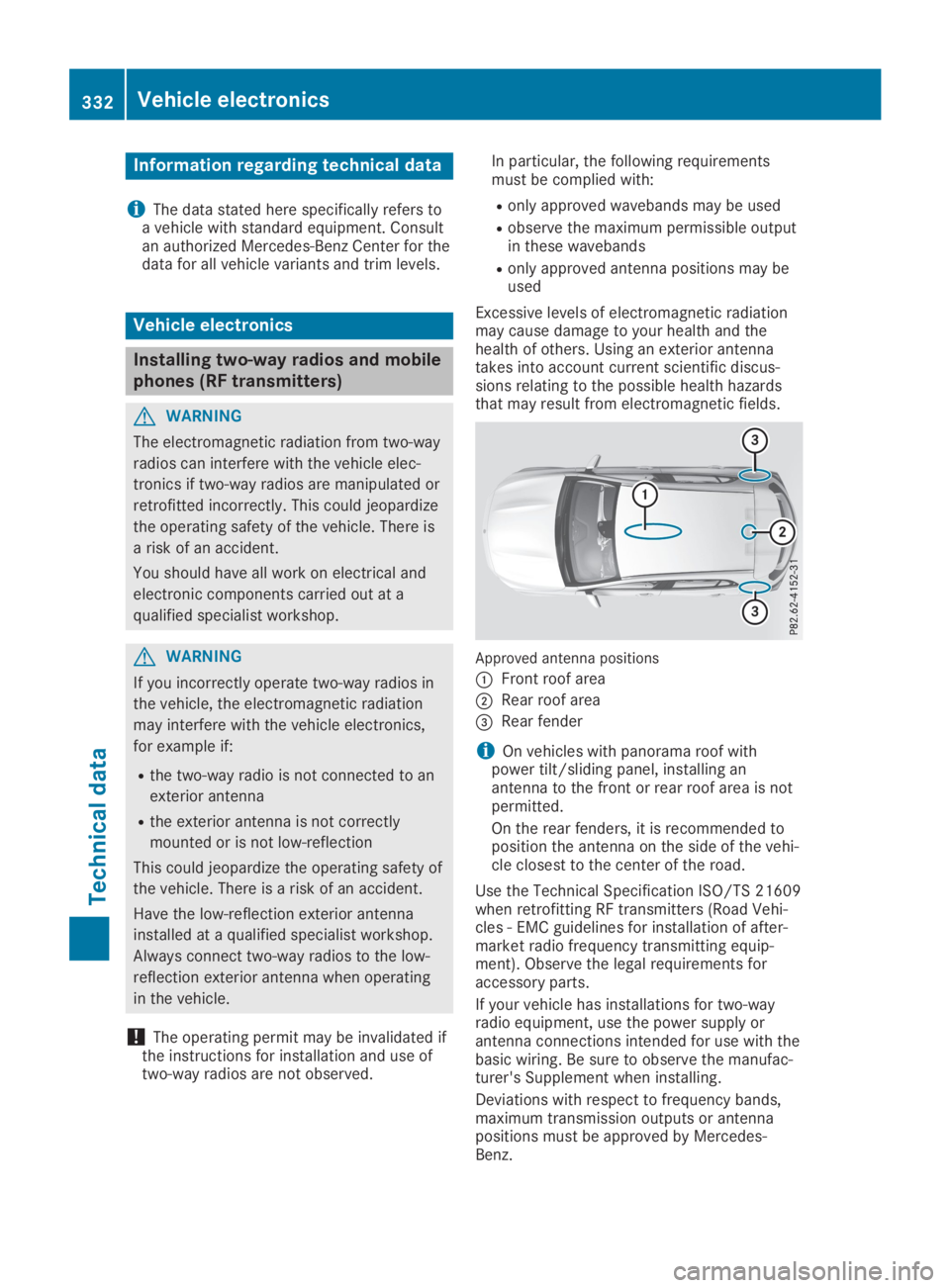
Approved antenna positions
CFront roof area
DRear roof area
Page 335 of 346
The maximum transmission output (PEAK) atthe base of the antenna must not exceed thefollowing values:
Frequency bandMaximumtransmissionoutput
Short wave
3 - 54 MHz
100 W
4 m waveband
74 - 88 MHz
30 W
2 m waveband
144 - 174 MHz
50 W
Trunked radio system/Tetra
380 - 460 MHz
10 W
70 cm waveband
400 - 460 MHz
35 W
Mobile communications(2G/3G/4G)10 W
The following can be used in the vehicle with-out restrictions:
RRF transmitters with a maximum transmis-sion output of up to 100 mW
RRF transmitters with transmitter frequenciesin the 380 - 410 MHz frequency band and amaximum transmission output of up to 2 W(trunked radio system/Tetra)
RMobile phones (2G/3G/4G)
There is no restriction for antenna positions onthe outside of the vehicle for the following fre-quency bands:
RTrunked radio system/Tetra
R70 cm waveband
R2G/3G/4G
Identification plates
Vehicle identification plate with
vehicle identification number (VIN)
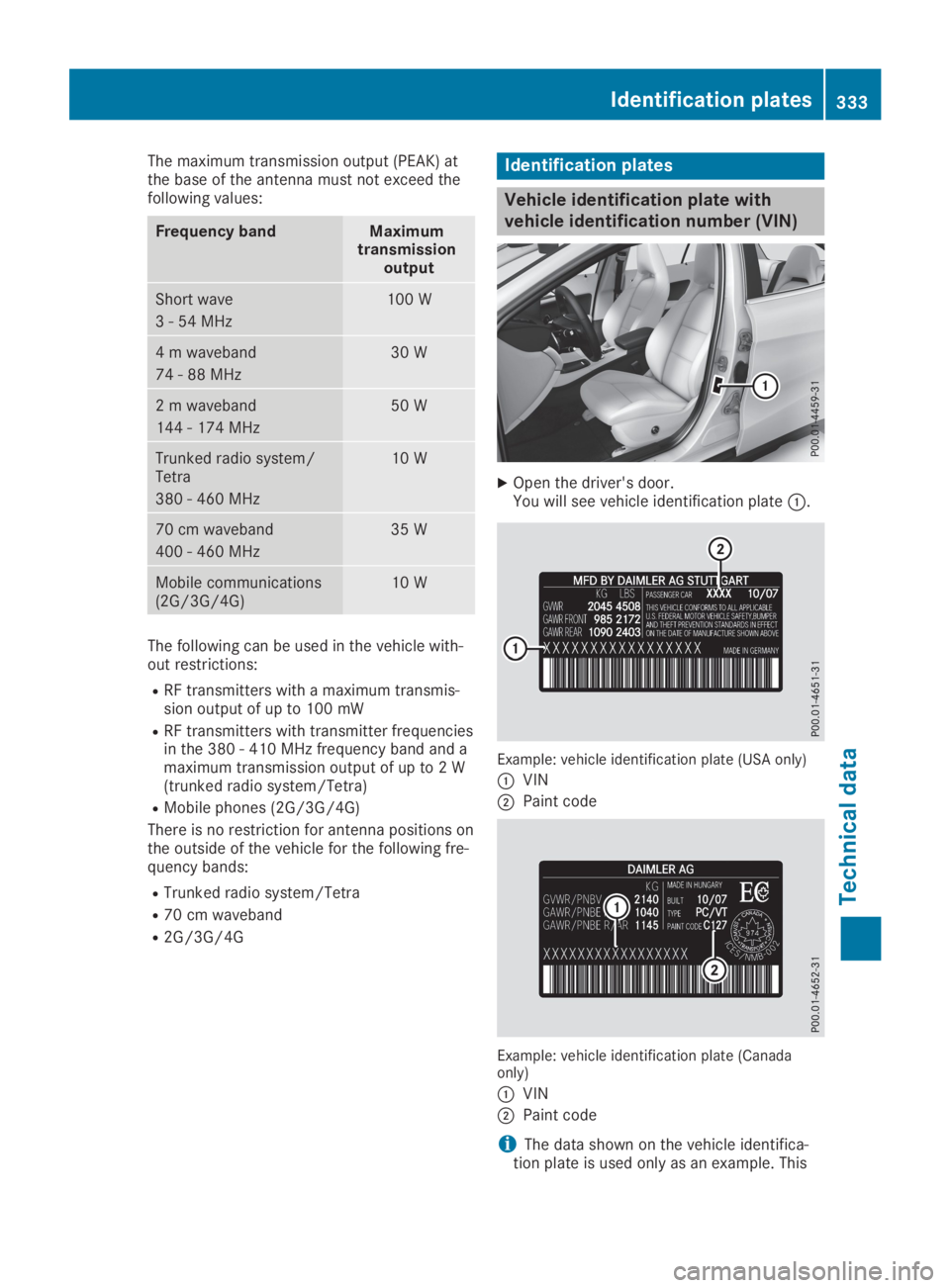
XOpen the driver's door.You will see vehicle identification plateC.
Example: vehicle identification plate (USA only)
CVIN
DPaint code
Example: vehicle identification plate (Canadaonly)
CVIN
DPaint code
iThe data shown on the vehicle identifica-tion plate is used only as an example. This
Identification plates333
Technical data
Z