phone MERCEDES-BENZ GLA 2019 User Guide
[x] Cancel search | Manufacturer: MERCEDES-BENZ, Model Year: 2019, Model line: GLA, Model: MERCEDES-BENZ GLA 2019Pages: 346, PDF Size: 16.66 MB
Page 115 of 346
Overview of climate control systems
General notes
Observe the settings recommended on the fol-lowing pages. The windows could otherwisefog up.
To prevent the windows from fogging up:
Rswitch off climate control only briefly
Rswitch on air-recirculation mode only briefly
Rswitch on the cooling with air dehumidifica-tion function
Rswitch on the defrost windshield functionbriefly, if required
The air-conditioning system or dual-zone auto-matic climate control regulates the tempera-ture and the humidity of the vehicle interiorand filters undesirable substances from theair.
The air-conditioning system or dual-zone auto-matic climate control can only be operatedwhen the engine is running. Optimum opera-tion is only achieved with the side windowsand panorama roof with power tilt/slidingpanel closed.
If you start the engine using your smartphone,the last selected climate control setting isreactivated (Ypage 84).
The residual heat function can only be activa-ted or deactivated with the ignition switchedoff (Ypage 122).
Always keep the ventilation flaps behind theside trim panel in the cargo compartmentclear (Ypage 108). Otherwise the vehicle willnot be ventilated correctly.
iVentilate the vehicle for a brief period dur-ing warm weather, e.g. using the conveni-ence opening feature (Ypage 84). This willspeed up the cooling process and thedesired interior temperature will be reachedmore quickly.
iThe integrated filter filters out most parti-cles of dust and soot and completely filtersout pollen. It also reduces gaseous pollu-tants and odors. A clogged filter reduces theamount of air supplied to the vehicle inte-rior. For this reason, you should alwaysobserve the interval for replacing the filter,which is specified in the Maintenance Book-let. As it depends on environmental condi-tions, e.g. heavy air pollution, the intervalmay be shorter than stated in the Mainte-nance Booklet.
iIt is possible that under certain circum-stances the residual heat function may beactivated automatically an hour after theSmartKey has been removed in order to drythe automatic climate control. The vehicle isthen ventilated for 30 minutes.
Overview of climate control systems113
Climate control
Page 127 of 346
There is a risk of fire and an accident.
Release the parking brake fully before driv-
ing off.
!Do not warm up the engine while station-ary. Pull away immediately. Avoid highengine speeds and full throttle until theengine has reached its operating tempera-ture.
In vehicles with automatic transmission,engage positions P and R only when thevehicle is stationary.
Where possible, avoid spinning the drivewheels when pulling away on slippery roads.You could otherwise damage the drive train.
!Mercedes-AMG vehicles:avoid full-loadoperation and engine speeds greater than5000 rpm when the engine is cold. Thishelps to protect the engine and avoidsuncomfortable driving.
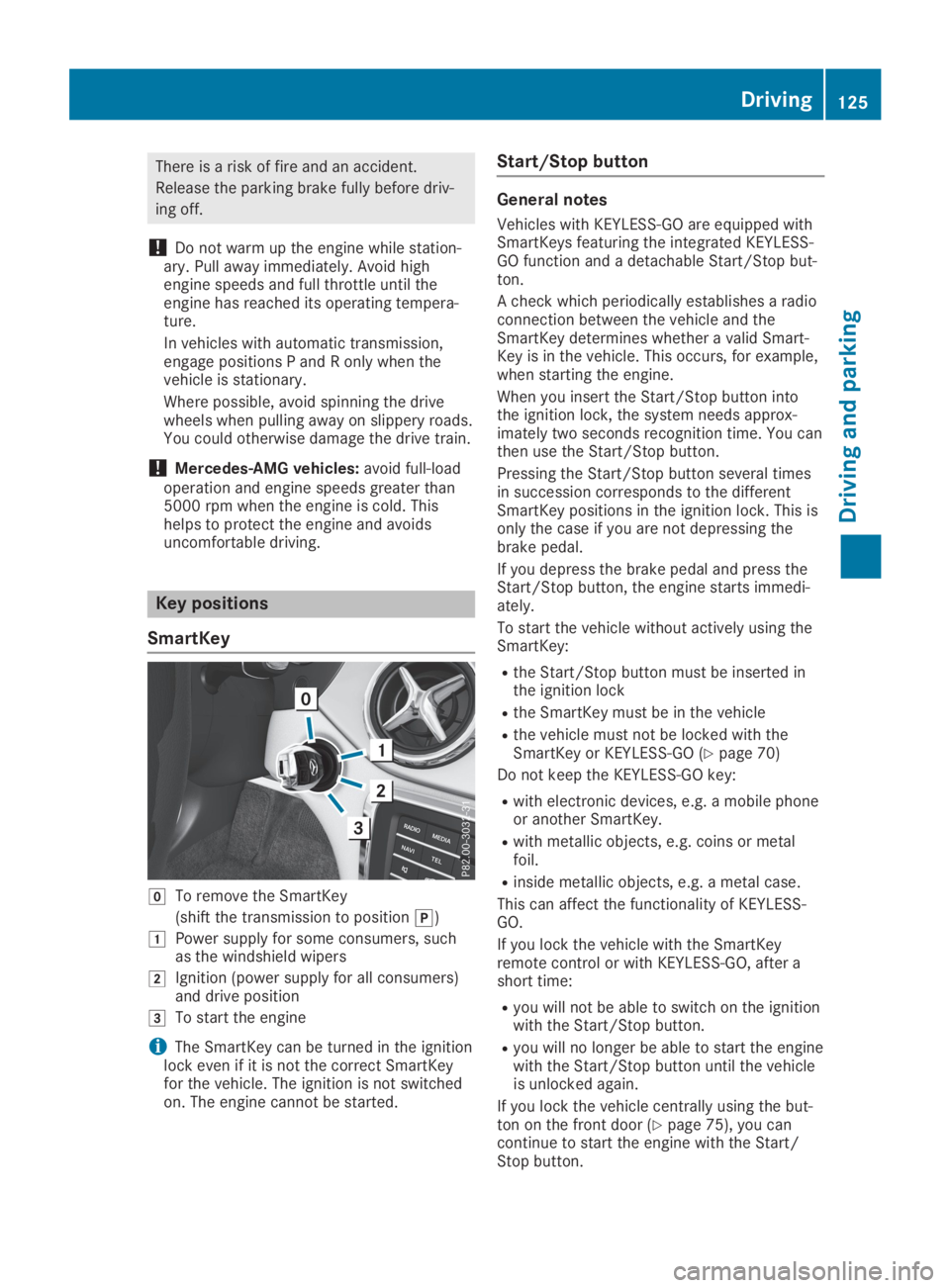
Key positions
SmartKey
ZTo remove the SmartKey
(shift the transmission to position])
GPower supply for some consumers, suchas the windshield wipers
HIgnition (power supply for all consumers)and drive position
ITo start the engine
iThe SmartKey can be turned in the ignitionlock even if it is not the correct SmartKeyfor the vehicle. The ignition is not switchedon. The engine cannot be started.
Start/Stop button
General notes
Vehicles with KEYLESS-GO are equipped withSmartKeys featuring the integrated KEYLESS-GO function and a detachable Start/Stop but-ton.
A check which periodically establishes a radioconnection between the vehicle and theSmartKey determines whether a valid Smart-Key is in the vehicle. This occurs, for example,when starting the engine.
When you insert the Start/Stop button intothe ignition lock, the system needs approx-imately two seconds recognition time. You canthen use the Start/Stop button.
Pressing the Start/Stop button several timesin succession corresponds to the differentSmartKey positions in the ignition lock. This isonly the case if you are not depressing thebrake pedal.
If you depress the brake pedal and press theStart/Stop button, the engine starts immedi-ately.
To start the vehicle without actively using theSmartKey:
Rthe Start/Stop button must be inserted inthe ignition lock
Rthe SmartKey must be in the vehicle
Rthe vehicle must not be locked with theSmartKey or KEYLESS-GO (Ypage 70)
Do not keep the KEYLESS-GO key:
Rwith electronic devices, e.g. a mobile phoneor another SmartKey.
Rwith metallic objects, e.g. coins or metalfoil.
Rinside metallic objects, e.g. a metal case.
This can affect the functionality of KEYLESS-GO.
If you lock the vehicle with the SmartKeyremote control or with KEYLESS-GO, after ashort time:
Ryou will not be able to switch on the ignitionwith the Start/Stop button.
Ryou will no longer be able to start the enginewith the Start/Stop button until the vehicleis unlocked again.
If you lock the vehicle centrally using the but-ton on the front door (Ypage 75), you cancontinue to start the engine with the Start/Stop button.
Driving125
Driving and parking
Z
Page 129 of 346
Inhaling these exhaust gases is hazardous to
health and can result in poisoning. There is a
risk of fatal injury. Therefore, never leave the
engine running an enclosed space without
adequate ventilation.
GWARNING
Flammable materials introduced through
environmental influence or by animals can
ignite if in contact with the exhaust system
or parts of the engine that heat up. There is
a risk of fire.
Carry out regular checks to make sure that
there are no flammable foreign materials in
the engine compartment or in the exhaust
system.
General notes
During a cold start, the engine runs at higherspeeds to enable the catalytic converter toreach its operating temperature. The sound ofthe engine may change during this time.
Automatic transmission
XShift the transmission to position](Ypage 134).The transmission position indicator on themultifunction display shows](Ypage 134).
iYou can start the engine in transmissionpositions]and\\.
Starting procedure with the SmartKey
To start the engine using the SmartKey insteadof the Start/Stop button, pull the Start/Stopbutton out of the ignition lock.
XTurn the SmartKey to positionIin the igni-tion lock (Ypage 125) and release it assoon as the engine is running.
Starting procedure with the Start/
Stop button
The Start/Stop button can be used to start thevehicle manually without inserting the Smart-Key into the ignition lock. The Start/Stop but-ton must be inserted in the ignition lock and
the SmartKey must be in the vehicle. Thismode for starting the engine operates inde-pendently of the ECO start/stop automaticengine start function.
You can start the engine if a valid SmartKey isin the vehicle. Switch off the engine andalways take the SmartKey with you when leav-ing the vehicle, even if you only leave it for ashort time. Pay attention to the importantsafety notes.
XDepress the brake pedal and keep itdepressed.
XPress the Start/Stop button once(Ypage 125).The engine starts.
Starting procedure via smartphone
Observe the important safety notes on startingthe engine (Ypage 126).
You can also start your engine via your smart-phone from outside the vehicle. In this case,the previously selected climate control settingis activated. In this way you can cool or heatthe interior of the vehicle before starting thejourney.
Only start the engine via your smartphone if itis safe to start and run the engine where yourvehicle is parked.
Observe the legal stipulations in the areawhere your vehicle is parked. Engine start viasmartphone may be limited to certain coun-tries or regions.
You can execute a maximum of two consecu-tive starting attempts via your smartphone. Ifyou insert the SmartKey into the ignition lock,you can carry out two more starting attempts.
Once you have started the engine, you canswitch the engine off via your smartphone atany time.
You can only start the engine via your smart-phone if:
Rthe SmartKey is in the ignition lock
Rpark position]is selected
Rthe accelerator pedal is not depressed
Rthe alarm for the anti-theft alarm system isnot set
Rthe panic alarm is not activated
Rthe hazard warning lamps are switched off
Rthe hood is closed
Driving127
Driving and parking
Z
Page 130 of 346
Rthe doors are closed and locked
Rthe windows and sliding sunroof are closed
Also make sure that:
Rthe fuel tank is sufficiently filled
Rthe starter battery has been sufficientlycharged
GWARNING
Limbs could be crushed or trapped if the
engine is started unintentionally during ser-
vice or maintenance work. There is a risk of
injury.
Always secure the engine against uninten-
tional starting before carrying out mainte-
nance or repair work.
Make sure that the engine cannot be startedvia your smartphone before carrying out main-tenance or repairs. You can prevent an enginestart via your smartphone, for example, if you:
Rswitch on the hazard warning lamps
Rdo not lock the doors
Ropen the hood
Pulling away
General notes
GWARNING
If the engine speed is above the idling speed
and you engage transmission position:
orF, the vehicle could pull away sud-
denly. There is a risk of an accident.
When engaging transmission position:
orF, always firmly depress the brake
pedal and do not simultaneously accelerate.
Depress the accelerator carefully when pullingaway.
The vehicle locks centrally once you havepulled away. The locking knobs in the doorsdrop down.
You can open the doors from the inside at anytime.
You can also deactivate the automatic lockingfeature (Ypage 199).
Vehicles with automatic transmission:it ispossible to shift the transmission from posi-
tion]to the desired position only if youdepress the brake pedal. Only then can theparking lock be deactivated.
All vehicles (except Mercedes-AMG vehi-cles):if you do not depress the brake pedal,the DIRECT SELECT lever can still be movedbut the parking lock remains engaged.
Mercedes-AMG vehicles:if you do notdepress the brake pedal, the selector lever canstill be moved but the parking lock remainsengaged.
At transmission fluid temperatures below
Page 150 of 346
The electric parking brake is not automaticallyapplied if the engine is switched off by theECO start/stop function.
Releasing automatically
Your vehicle's electric parking brake is auto-matically released if all of the following condi-tions are met:
RThe engine is running
RThe transmission is in position[or^andyou depress the accelerator pedal or shiftfrom position]to[or^
RThe seat belt is fastened
If the transmission is in position^, the tail-gate must be closed.
If your seat belt is not fastened, the followingconditions must be fulfilled to automaticallyrelease the electric parking brake:
RThe driver's door is closed.
RYou are shifting from transmission position]or have previously driven at speedsgreater than 2 mph (3 km/h)
Ensure that you do not depress the accelera-tor pedal unintentionally. Otherwise, the park-ing brake will be released and the vehicle willstart to move.
Emergency braking
The vehicle can also be braked during anemergency by using the electric parking brake.
XWhile driving, push handleCof the electricparking brake (Ypage 147).The vehicle is braked as long as you keephandleCof the electric parking brakepressed. The longer the electric parkingbrake handleCis depressed, the greaterthe braking force.
During braking:
Ra warning tone sounds
RtheRelease Parking BrakeRelease Parking Brakemessageappears
Rthe redI(USA only) or$(Canadaonly) indicator lamp in the instrument clus-ter flashes
When the vehicle has been braked to a stand-still, the electric parking brake is applied.
Parking the vehicle for a long period
If you leave the vehicle parked for longer thanfour weeks, the battery may be damaged byexhaustive discharging.
If you leave the vehicle parked for longer thansix weeks, the vehicle may suffer damage as aresult of lack of use.
XVisit a qualified specialist workshop andseek advice.
iYou can obtain information about tricklechargers from a qualified specialist work-shop.
Driving tips
General notes
Important safety notes
GWARNING
If you switch off the ignition while driving,
safety-relevant functions are only available
with limitations, or not at all. This could
affect, for example, the power steering and
the brake boosting effect. You will require
considerably more effort to steer and brake.
There is a risk of an accident.
Do not switch off the ignition while driving.
GWARNING
If you operate mobile communication equip-
ment when driving, you may be distracted
from the traffic situation. You could also
lose control of the vehicle. There is a risk of
an accident.
Only operate this equipment when the vehi-
cle is stationary.
Observe the legal requirements for the countryin which you are driving. Some jurisdictionsprohibit the driver from using a mobile phonewhile driving a vehicle.
If you make a call while driving, always usehands-free mode. Only operate the telephonewhen the traffic situation permits. If you areunsure, pull over to a safe location and stopbefore operating the telephone.
148Driving tips
Driving and parking
Page 192 of 346
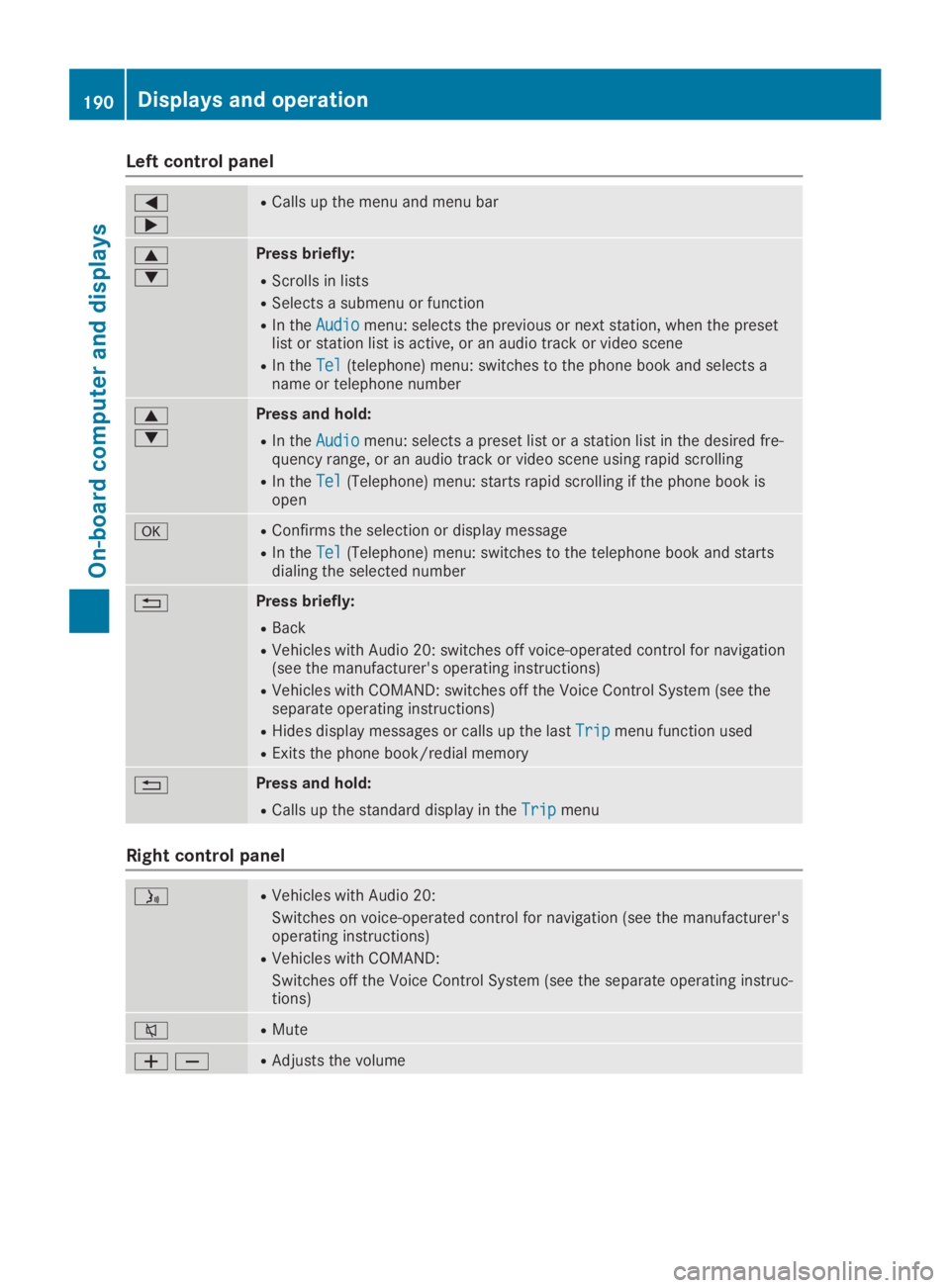
Left control panel
Y
e
RCalls up the menu and menu bar
c
d
Press briefly:
RScrolls in lists
RSelects a submenu or function
RIn theAudioAudiomenu: selects the previous or next station, when the presetlist or station list is active, or an audio track or video scene
RIn theTelTel(telephone) menu: switches to the phone book and selects aname or telephone number
c
d
Press and hold:
RIn theAudioAudiomenu: selects a preset list or a station list in the desired fre-quency range, or an audio track or video scene using rapid scrolling
RIn theTelTel(Telephone) menu: starts rapid scrolling if the phone book isopen
vRConfirms the selection or display message
RIn theTelTel(Telephone) menu: switches to the telephone book and startsdialing the selected number
8Press briefly:
RBack
RVehicles with Audio 20: switches off voice-operated control for navigation(see the manufacturer's operating instructions)
RVehicles with COMAND: switches off the Voice Control System (see theseparate operating instructions)
RHides display messages or calls up the lastTripTripmenu function used
RExits the phone book/redial memory
8Press and hold:
RCalls up the standard display in theTripTripmenu
Right control panel
Page 193 of 346
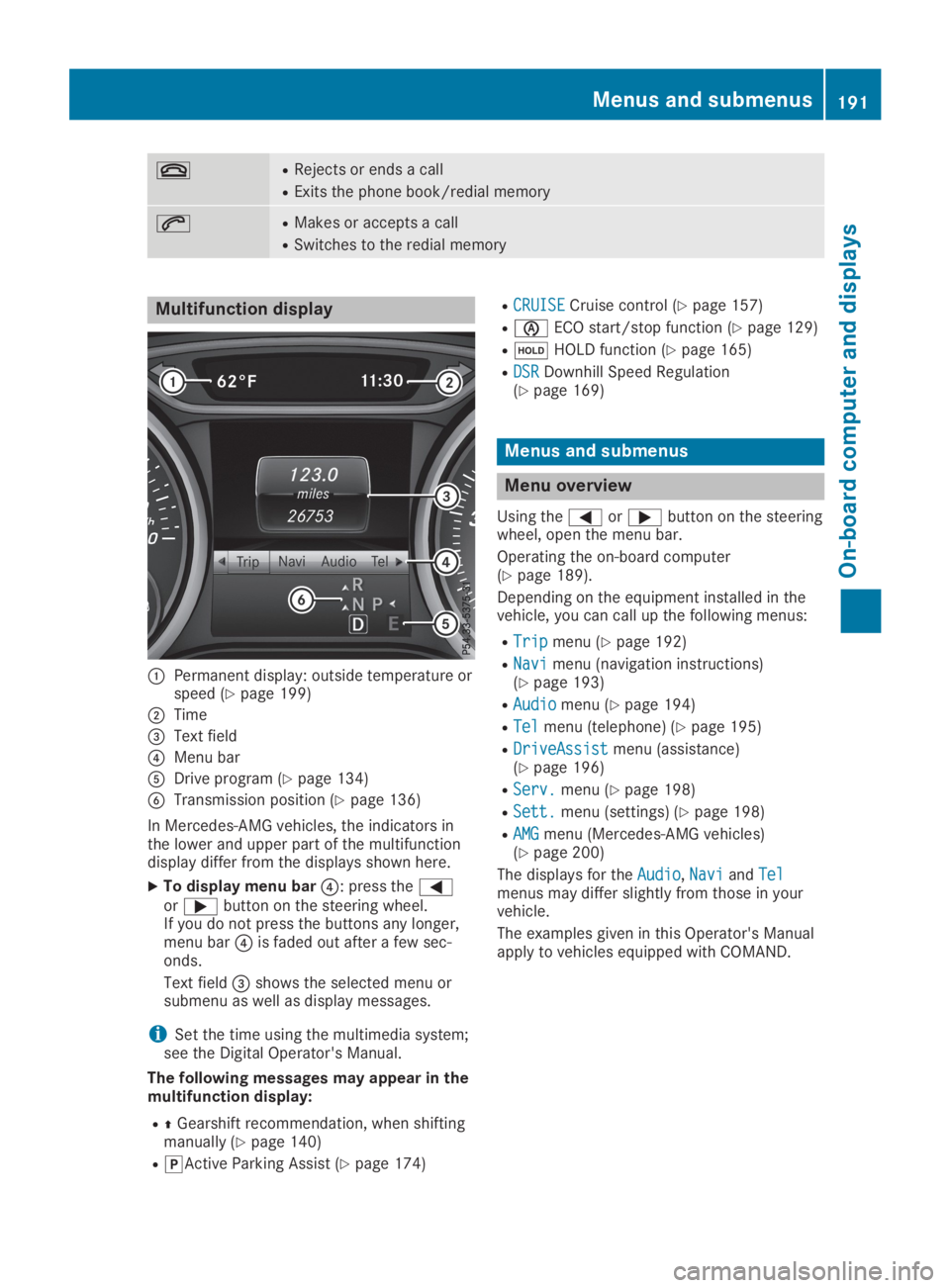
vRRejects or ends a call
RExits the phone book/redial memory
aRMakes or accepts a call
RSwitches to the redial memory
Multifunction display
CPermanent display: outside temperature orspeed (Ypage 199)
DTime
Page 197 of 346
XSwitch on the multimedia system and selectradio (see the Digital Operator's Manual).
XPress theYorebutton on the steer-ing wheel to select theAudioAudiomenu.
XTo select a preset list or station list:press and briefly hold thecordbut-ton until the preset list or station list in thedesired frequency range is shown.
XTo select a station:briefly presscord.
iSIRIUS XM satellite radio functions like anormal radio.
You can find further information on opera-tion in the "Satellite radio" section of theDigital Operator's Manual for the multimediasystem.
Operating an audio player or audio
media
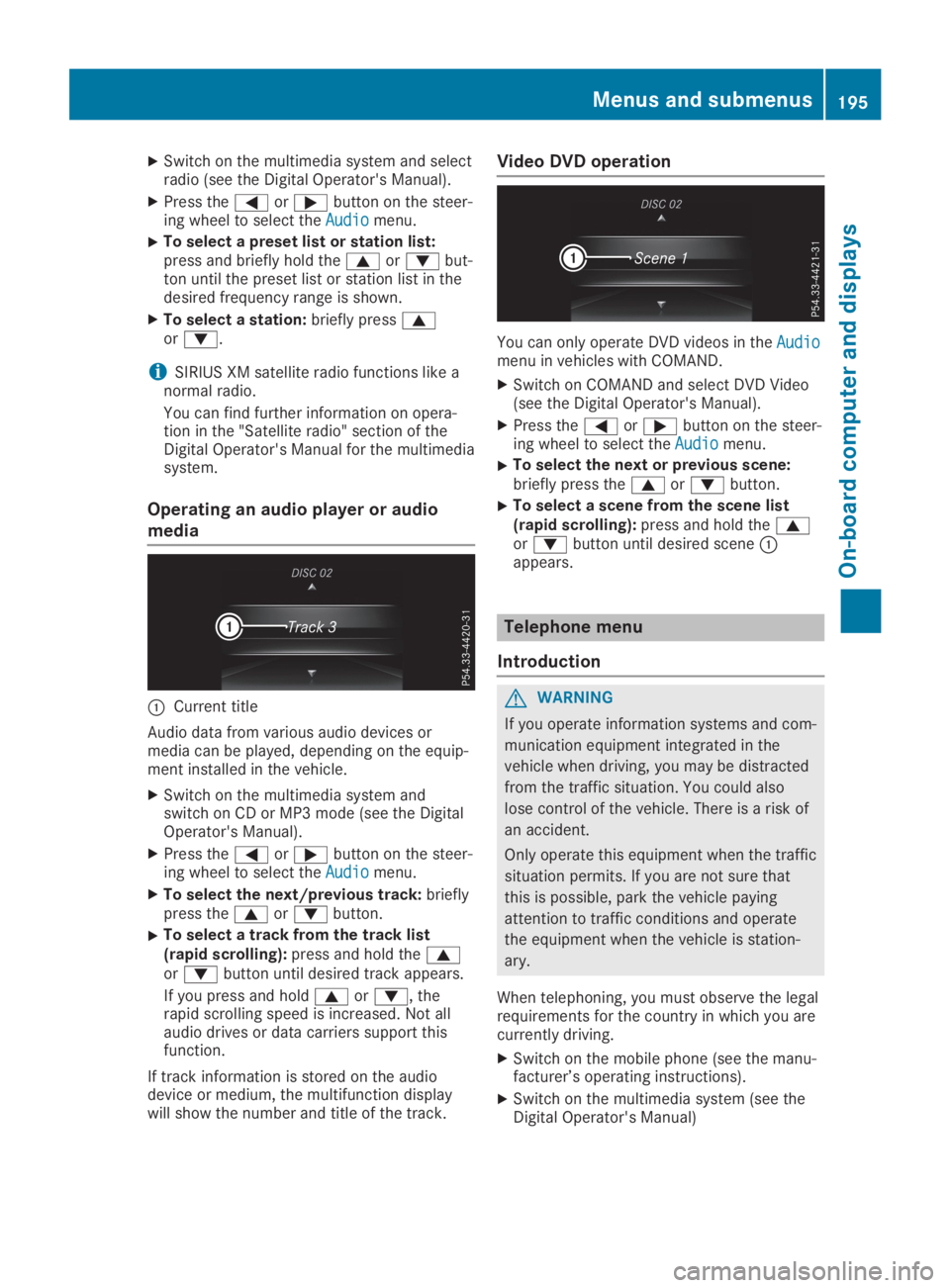
CCurrent title
Audio data from various audio devices ormedia can be played, depending on the equip-ment installed in the vehicle.
XSwitch on the multimedia system andswitch on CD or MP3 mode (see the DigitalOperator's Manual).
XPress theYorebutton on the steer-ing wheel to select theAudioAudiomenu.
XTo select the next/previous track:brieflypress thecordbutton.
XTo select a track from the track list(rapid scrolling):press and hold thecordbutton until desired track appears.
If you press and holdcord, therapid scrolling speed is increased. Not allaudio drives or data carriers support thisfunction.
If track information is stored on the audiodevice or medium, the multifunction displaywill show the number and title of the track.
Video DVD operation
You can only operate DVD videos in theAudioAudiomenu in vehicles with COMAND.
XSwitch on COMAND and select DVD Video(see the Digital Operator's Manual).
XPress theYorebutton on the steer-ing wheel to select theAudioAudiomenu.
XTo select the next or previous scene:briefly press thecordbutton.
XTo select a scene from the scene list(rapid scrolling):press and hold thecordbutton until desired sceneCappears.
Telephone menu
Introduction
GWARNING
If you operate information systems and com-
munication equipment integrated in the
vehicle when driving, you may be distracted
from the traffic situation. You could also
lose control of the vehicle. There is a risk of
an accident.
Only operate this equipment when the traffic
situation permits. If you are not sure that
this is possible, park the vehicle paying
attention to traffic conditions and operate
the equipment when the vehicle is station-
ary.
When telephoning, you must observe the legalrequirements for the country in which you arecurrently driving.
XSwitch on the mobile phone (see the manu-facturer’s operating instructions).
XSwitch on the multimedia system (see theDigital Operator's Manual)
Menus and submenus195
On-board computer and displays
Z
Page 198 of 346
XEstablish a Bluetooth®connection to themultimedia system (see the Digital Opera-tor's Manual).
XPress theYorebutton on the steer-ing wheel to select theTelTelmenu.
You will see one of the following display mes-sages in the multifunction display:
RPhone READYPhone READYor the name of the networkprovider: the mobile phone has found a net-work and is ready to receive.
RPhone No ServicePhone No Service: there is no networkavailable or the mobile phone is searchingfor a network.
Accepting a call
If someone calls you when you are in theTelTelmenu, a display message appears in the multi-function display.
You can accept a call at any time, even if youare not in theTelTelmenu.
XPress theabutton on the steering wheelto accept an incoming call.
Rejecting or ending a call
You can end or reject a call anytime, even ifyou are not in theTelTelmenu.
XPress thevbutton on the steering wheelto reject or end a call.
Selecting an entry in the phone book
XPress theYorebutton on the steer-ing wheel to select theTelTelmenu.
XPress thec,dorvbutton toswitch to the phone book.
XAuthorize access to the phone book on thephone.
XPress thecordbutton to select thedesired name.
or
XTo begin rapid scrolling:press and holdthecordbutton for longer than onesecond.Rapid scrolling stops when you release thebutton or reach the end of the list.
XIf only one telephone number is storedfor a name:press theaorvbuttonto start dialing.
or
XIf there is more than one number for aparticular name:press theaorvbutton to display the numbers.
XPress thecordbutton to select thenumber you want to dial.
XPress theaorvbutton to start dial-ing.
or
XIf you do not want to make a call:pressthevor8button.
Redialing
The on-board computer saves the last namesor numbers dialed in the redial memory.
XPress theYorebutton on the steer-ing wheel to select theTelTelmenu.
XPress theabutton to switch to theredial memory.
XPress thecordbutton to select thedesired name or number.
XPress theaorvbutton to start dial-ing.
or
XIf you do not want to make the call:pressthevor8button.
Assistance menu
Introduction
Depending on the equipment installed in thevehicle, you have the following options in theDriveAssistDriveAssistmenu:
RDisplaying the assistance graphic(Ypage 197)
RDeactivating/activating ESP®(exceptMercedes‑AMG vehicles) (Ypage 197)
RActivating/deactivating Active Brake Assist(Ypage 197)
RActivating/deactivating ATTENTION ASSIST(Ypage 198)
RActivating/deactivating Blind Spot Assist(Ypage 198)
RActivating/deactivating Lane Keeping Assist(Ypage 198)
196Menus and submenus
On-board computer and displays
Page 247 of 346
Notes for route types:
REco RouteEco Route
RDynamic Traffic RouteDynamic Traffic Route
Traffic reports on the route for the routeguidance are taken into account (not availa-ble in all countries).
RDynamic TRF. Route After RequestDynamic TRF. Route After Request
You can decide whether or not current traf-fic reports should be included in the routecalculation (not available in all countries).
RCalculate Alternative RoutesCalculate Alternative Routes
Different routes are being calculated. Inorder to do so, instead ofStartStart, select themenu itemContinueContinue.
XTo avoid/use route options:select
Avoid OptionsAvoid Options.
XSelect a route option.
Notes for route options:
RUse Toll RoadsUse Toll Roads
The route calculation includes roads whichrequire you to pay a usage fee (toll).
RNumber of Occupants in the Vehicle:Number of Occupants in the Vehicle:(only available in the USA)
Prerequisite: your vehicle meets the accessconditions for carpool lanes.
Carpool lanes will be included if the carpoollanes option is activated.
Entering an address
Multimedia system:
XSelectNaviNavi{NavigationNavigation.The map shows the vehicle's current posi-tion.
XSlide6the controller.
XSelectDestinationDestination{Address EntryAddress Entry.
Enter an address, e.g. as follows:
Rcity or ZIP code, street, house number
Rstate/province, city or ZIP code
Rcity or ZIP code, center
Rstreet, city or ZIP code, intersection
XSelectCityCity.The city in which the vehicle is currentlylocated (current vehicle position) is at thetop. Below this, you will see locations forwhich route guidance has already been car-ried out.
XEnter the city.TheCsymbol: the location is contained onthe digital map multiple times.
XTo switch to the list:slide the5control-ler.
XSelect the location.If available, the ZIP code is shown. If thereare different ZIP codes available for thelocation, the corresponding digits are dis-played with anXX.
XEnter the street and house number.The address is in the menu.
Further options for destination entry:
Rsearch for a keyword
The keyword search finds destinations usingfragments of words.
Rselect the last destination
Rselect a contact
Rselect a POI
You can search for a POI by location, nameor telephone number.
Rselect destination on the map
Renter intermediate destination
You can map the route to the destinationyourself with up to four intermediate desti-nations.
Rselect destinations from Mercedes-BenzApps
Rselect geo-coordinates
Calculating the route
Prerequisite: the address has been enteredand is in the menu.
XSelectStartStartorContinueContinue.The route is calculated with the selectedroute type and the selected route options.
If route guidance has already been activa-ted, a prompt will appear asking whetheryou wish to end the current route guidance.
XSelectCancel Active Route GuidanceCancel Active Route GuidanceorSet as Intermediate DestinationSet as Intermediate Destination.Cancel Active Route GuidanceCancel Active Route Guidancecancelsthe current route guidance and starts routecalculation to the new destination.
Set as Intermediate DestinationSet as Intermediate Destinationaddsthe new destination in addition to the exist-ing destination and opens the intermediatedestinations list.
Operating system245
Multimedia system
Z