Sts MERCEDES-BENZ GLA-Class 2016 X156 Comand Manual
[x] Cancel search | Manufacturer: MERCEDES-BENZ, Model Year: 2016, Model line: GLA-Class, Model: MERCEDES-BENZ GLA-Class 2016 X156Pages: 246, PDF Size: 6.73 MB
Page 7 of 246
Searching for a mobile phone ........ 115
Selecting a playback option ........... 196
Starting playback if the Blue-
tooth
®audio device has been
stopped ......................................... 195
Telephony ...................................... 114
Telephony notes ............................ 112
Buttons and controller ........................ 24
C
Call lists
Displaying details ........................... 135
Opening and selecting an entry ..... 135
Saving an entry in the address
book .............................................. 136
Camera
360° camera (COMAND) ................. 58
Rear view camera ............................ 59
Car pool lanes ...................................... 68
Category list (music search) ............ 189
CD
Fast forward/fast rewind ............... 187
Inserting ........................................ 184
Inserting/loading (DVD changer) ... 184
Inserting/loading (Rear Seat
Entertainment System) .................. 234
Notes on discs ............................... 183
Removing/ejecting (Rear Seat
Entertainment System) .................. 234
Selecting a track ............................ 187
Sound settings (balance, bass,
fader, treble) .................................. 208
CD mode
Playback options ........................... 186
Character entry
Phone book ...................................... 33
Characters
Entering (navigation) ........................ 34
Clear button ......................................... 25
Climate control
Ionization (COMAND) ....................... 56
COMAND
Active multicontour seat .................. 56
Basic functions ................................ 31
Components .................................... 20
Control panel ................................... 23
Controller ......................................... 24 Display ............................................. 21
Functions ......................................... 20
Multicontour seat ............................ 56
Seat functions .................................. 56
Switching on/off .............................. 31
COMAND display
Cleaning instructions ....................... 22
Setting ............................................. 40
Contacts
Deleting ......................................... 133
Importing ....................................... 133
Controller ............................................. 24
Cordless headphones
Changing batteries ........................ 231
Indicator lamp ................................ 229
Rear Seat Entertainment System ... 229
Selecting the screen ...................... 230
D
Date format, setting ............................ 43
Day design, setting ............................. 40
Delayed switch-off
Interior lighting ................................ 55
Delayed switch-off time
Setting (COMAND) ........................... 55
Destination
Saving to SD memory card .............. 99
Storing in the address book ............. 98
Destination (navigation)
Entering a destination using the
map ................................................. 78
Entering a point of interest .............. 75
Entering using geo-coordinates ....... 82
Entering using Mercedes-Benz
Apps ................................................ 82
Keyword search ............................... 72
Saving .............................................. 98
Selecting an address book con-
tact as a destination ........................ 74
Selecting from the list of last des-
tinations ........................................... 74
Destination/route download
Deleting a destination from the
server ............................................ 159
Displaying destinations in the
vehicle ........................................... 158
Index5
Page 13 of 246
Weather map ................................. 219
SIRIUS weather map
Storm Guide ..................................2 24
Storm Watch Box ........................... 223
Sound
Switching on/off .............................. 31
Sound settings
Balance/fader ............................... 208
Calling up the sound menu ............ 208
Equalizer ........................................ 208
Speed dial
Deleting ......................................... 137
Setting up ...................................... 137
State/province
Selecting .......................................... 70
Station presets (radio)
Deleting marked stations ...............1 70
Stop function
Video DVD ..................................... 203
Storing stations
Radio ............................................. 170
Switching between summer time
and standard time ............................... 42
Switching on media mode
Using the Media button ................. 180
Via the device list .......................... 181
Via the main function bar ............... 180
Via the number keypad .................. 181
System settings
Bluetooth
®....................................... 48
Date ................................................. 41
Importing/exporting data ................ 49
Language ......................................... 48
Text reader speed ............................ 44
Time ................................................. 41
Time zone ........................................ 41
Voice Control System ...................... 44
T
Telephone
Accepting a call (COMAND) ........... 119
Adding a call .................................. 121
Adjusting the volume for calls .......... 31
Apple CarPlay
®.............................. 146
Authorizing a mobile phone (con-
necting) ......................................... 116
Call lists ......................................... 135 Call waiting .................................... 122
Calls with several participants ....... 121
Conference calls ............................ 122
Connecting a mobile phone (gen-
eral information) ............................ 114
De-authorizing (disconnecting) a
mobile phone ................................. 118
Deleting a speed dial preset .......... 137
Deleting messages ........................ 144
Displaying Bluetooth
®connection
details ............................................ 118
Downloading messages manually .. 139
E-mail ............................................. 137
E-mail requirements ....................... 138
E-mail settings ............................... 138
Ending an active call ...................... 123
Entering a number ......................... 119
Entering phone numbers ................ 119
Establishing the connection from
the mobile phone ........................... 117
Function restrictions ...................... 113
Functions available during a call .... 120
General notes ................................ 112
Incoming call during an existing
call ................................................. 122
Making a call ................................. 119
Message conditions ....................... 138
Message settings ........................... 138
Operating options .......................... 113
Phone book .................................... 123
Reading messages ......................... 140
Reception and transmission vol-
ume ............................................... 118
Reconnecting a mobile phone
automatically ................................. 117
Rejecting a call (COMAND) ............ 119
Safety notes .................................. 112
Sending DTMF tones ...................... 121
Setting up a speed dial .................. 137
Switching between calls (call wait-
ing) ................................................ 121
Switching between mobile
phones ........................................... 117
Switching the microphone on/of f..1 21
Telephone menu overview ............. 113
Text message condi
tions ...............1 38
Text message settings ................... 138
Text messages (SMS) .................... 137
Index11
Page 16 of 246
Operating safety
Important safety notes
GWARNING
Modifications to electronic components, their software as well as wiring can impair their
function and/or the function of other net-
worked components. In particular, systems
relevant to safety could also be affected. As a
result, these may no longer function as inten-
ded and/or jeopardize the operating safety of
the vehicle. There is an increased risk of an
accident and injury.
Never tamper with the wiring as well as elec-
tronic components or their software. You
should have all work to electrical and elec-
tronic equipment carried out at a qualified
specialist workshop.
If you make any changes to the vehicle elec-
tronics, the general operating permit is ren-
dered invalid.
GWARNING
If you operate information systems and com-
munication equipment integrated in the vehi-
cle while driving, you will be distracted from
traffic conditions. You could also lose control
of the vehicle. There is a risk of an accident.
Only operate the equipment when the traffic
situation permits. If you are not sure that this
is possible, park the vehicle paying attention
to traffic conditions and operate the equip-
ment when the vehicle is stationary.
You must observe the legal requirements for
the country in which you are currently driving
when operating COMAND.
COMAND calculates the route to the destina-
tion without taking account of the following,
for example:
Rtraffic lights
Rstop and yield signs
Rmerging lanes
Rparking or stopping in a no parking/no
stopping zone
Rother road and traffic rules and regulations
Rnarrow bridges
COMAND can give incorrect navigation com-
mands if the actual street/traffic situation
does not correspond with the digital map's
data. Digital maps do not cover all areas nor
all routes in an area. For example, a route may
have been diverted or the direction of a one-
way street may have changed.
For this reason, you must always observe
road and traffic rules and regulations during
your journey. Road and traffic rules and reg-
ulations always have priority over the sys-
tem's driving recommendations.
Navigation announcements are intended to
direct you while driving without diverting your
attention from the road and driving.
Please always use this feature instead of con-
sulting the map display for directions. Look-
ing at the icons or map display can distract
you from traffic conditions and driving, and
increase the risk of an accident.
Bear in mind that at a speed of only 30 mph
(approximately 50 km/h) your vehicle covers
a distance of 44 feet (approximately 14 m)
per second.
This equipment complies with FCC radiation
exposure limits set forth for uncontrolled
equipment and meets the FCC radio fre-
quency (RF) Exposure Guidelines in Supple-
men
t C to OET65.
This equipment has very low levels of RF
energy that is deemed to comply without
maximum permissive exposure evaluation
(MPE). But it is desirable that it should be
installed and operated with at least 8inches
(20 cm) and more between the radiator and a
person's body (excluding extremities: hands,
wrists, feet and legs.)
14Introduction
Page 22 of 246
Overview
Components
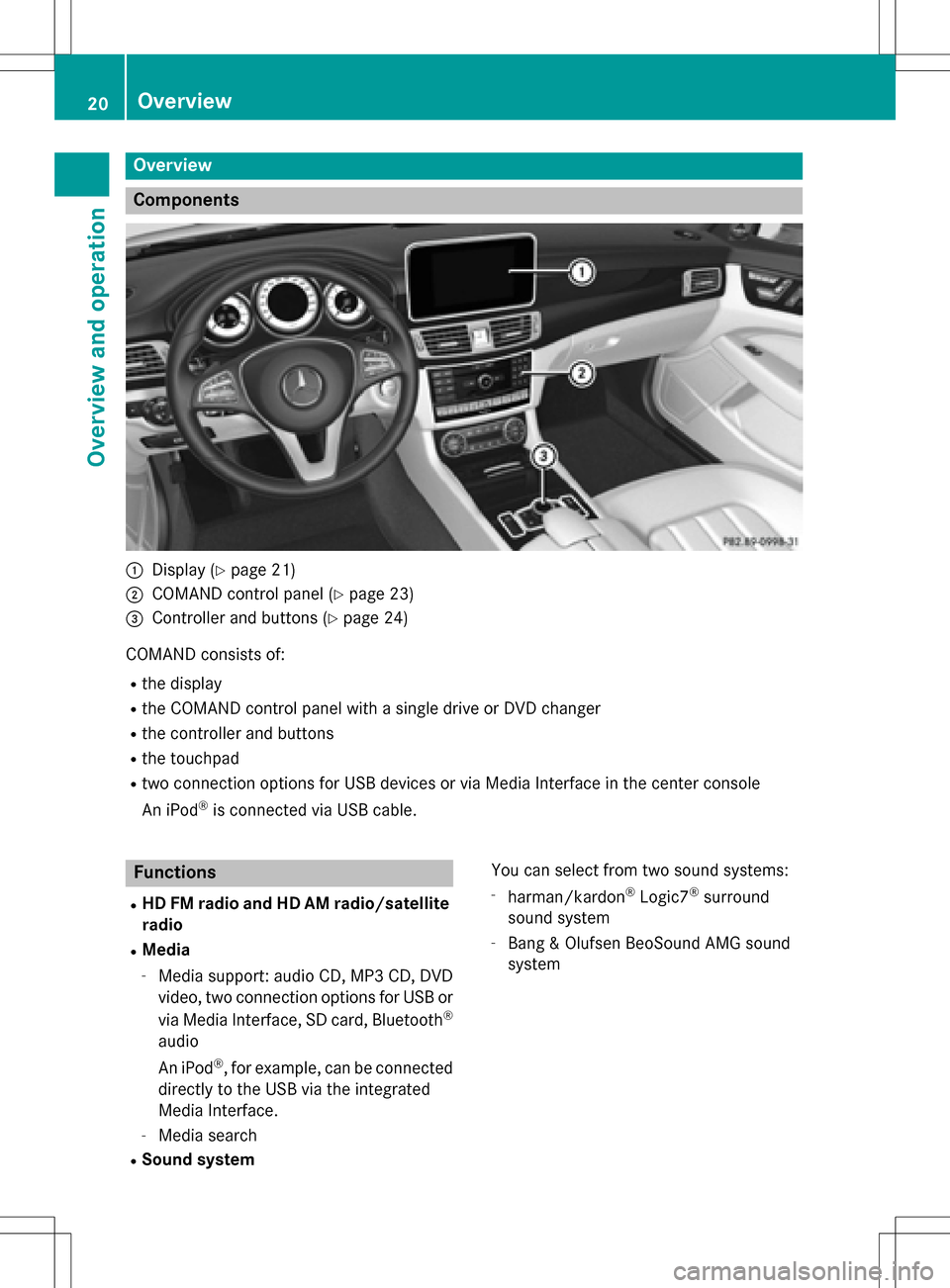
:Display (Ypage 21)
;COMAND control panel (Ypage 23)
=Controller and buttons (Ypage 24)
COMAND consists of:
Rthe display
Rthe COMAND control panel with a single drive or DVD changer
Rthe controller and buttons
Rthe touchpad
Rtwo connection options for USB devices or via Media Interface in the center console
An iPod
®is connected via USB cable.
Functions
RHD FM radio and HD AM radio/satellite
radio
RMedia
-Media support: audio CD, MP3 CD, DVD
video, two connection options for USB or
via Media Interface, SD card, Bluetooth
®
audio
An iPod
®, for example, can be connected
directly to the USB via the integrated
Media Interface.
-Media search
RSound system You can select from two sound systems:
-harman/kardon®Logic7®surround
sound system
-Bang & Olufsen BeoSound AMG sound
system
20Overview
Overview and operation
Page 25 of 246
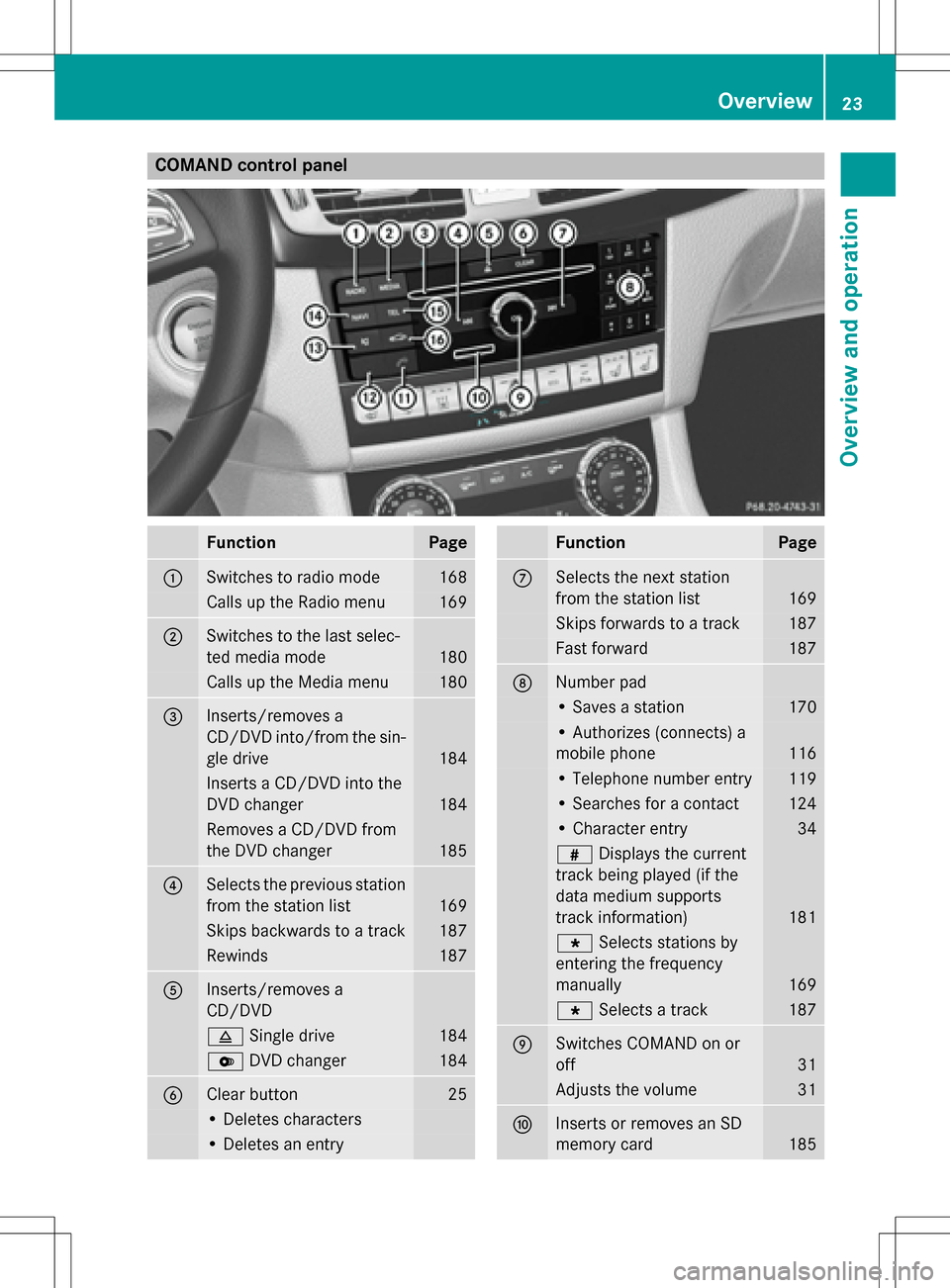
COMAND control panel
FunctionPage
:Switches to radio mode168
Calls up the Radio menu169
;Switches to the last selec-
ted media mode
180
Calls up the Media menu180
=Inserts/removes a
CD/DVD into/from the sin-
gle drive
184
Inserts a CD/DVD into the
DVD changer
184
Removes a CD/DVD from
the DVD changer
185
?Selects the previous station
from the station list
169
Skips backwards to a track187
Rewinds187
AInserts/removes a
CD/DVD
8Single drive184
VDVD changer184
BClear button25
• Deletes characters
• Deletes an entry
FunctionPage
CSelects the next station
from the station list
169
Skips forwards to a track187
Fast forward187
DNumber pad
• Saves a station170
• Authorizes (connects) a
mobile phone
116
• Telephone number entry119
• Searches for a contact124
• Character entry34
zDisplays the current
track being played (if the
data medium supports
track information)
181
g Selects stations by
entering the frequency
manually
169
g Selects a track187
ESwitches COMAND on or
off
31
Adjusts the volume31
FInserts or removes an SD
memory card
185
Overview23
Overview and operation
Page 28 of 246
XSelectTouchpadif the touchpad is equip-
ped with handwriting recognition.
XSelect Activate Touchpad.
The touchpad is switched on Oor off ª.
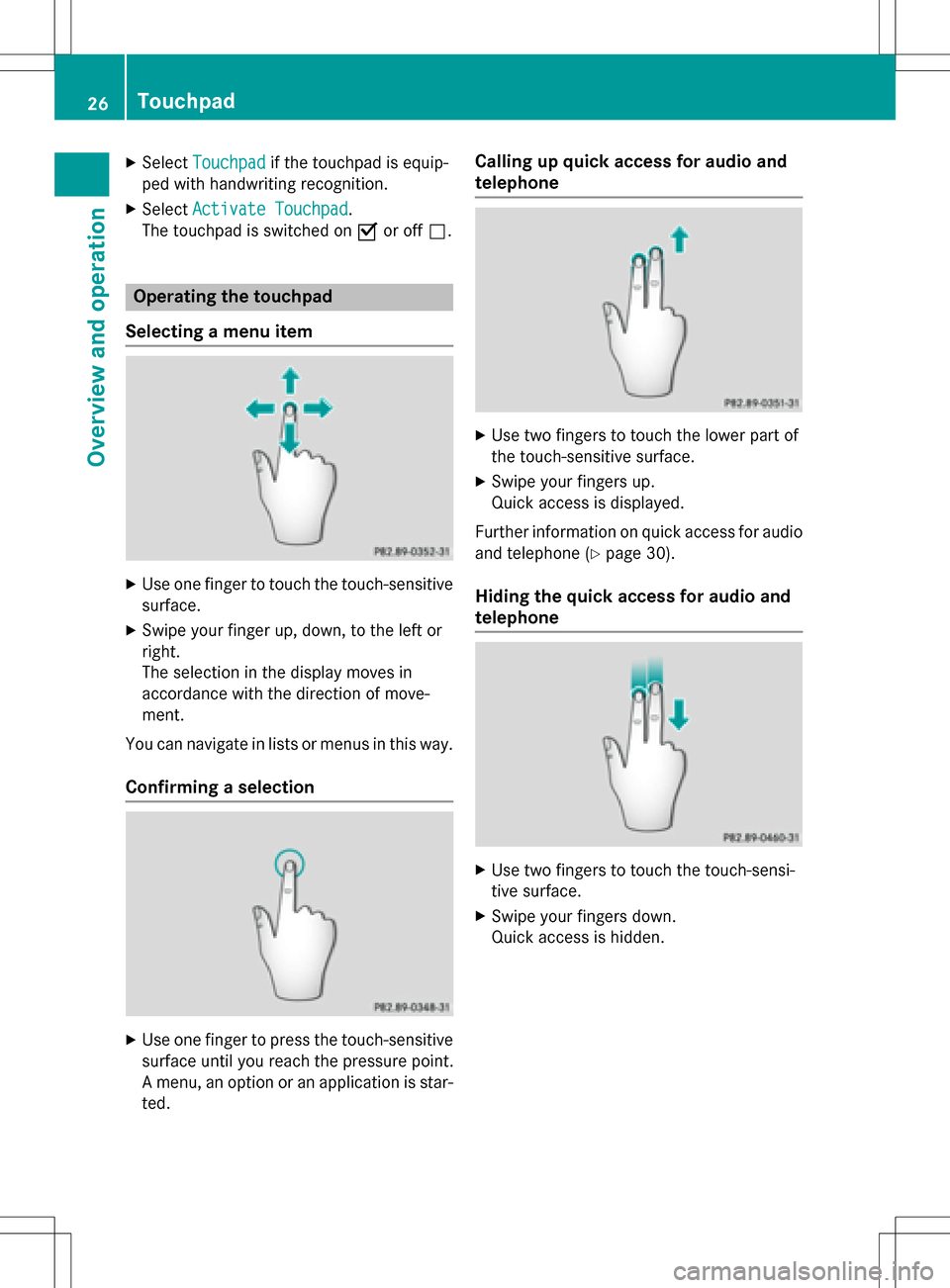
Operating the touchpad
Selecting a menu item
XUse one finger to touch the touch-sensitive
surface.
XSwipe your finger up, down, to the left or
right.
The selection in the display moves in
accordance with the direction of move-
ment.
You can navigate in lists or menus in this way.
Confirming a selection
XUse one finger to press the touch-sensitive surface until you reach the pressure point.
A menu, an option or an application is star-
ted.
Calling up quick access for audio and
telephone
XUse two fingers to touch the lower part of
the touch-sensitive surface.
XSwipe your fingers up.
Quick access is displayed.
Further information on quick access for audio
and telephone (
Ypage 30).
Hiding the quick access for audio and
telephone
XUse two fingers to touch the touch-sensi-
tive surface.
XSwipe your fingers down.
Quick access is hidden.
26Touchpad
Overview and operation
Page 31 of 246
XTo select a character suggestion: turn the
controller.
The selected character is entered instead
of the automatically recognized character.
Character entry can be continued.
Inserting a space
Prerequisite: an input line for text, numbers or
characters has been selected.
XUse your finger to touch the touch-sensi-
tive surface and swipe to the right.
A space is entered into the input line.
Deleting characters
Prerequisite: an input line for text, numbers or
characters has been selected.
XUse your finger to touch the touch-sensi-
tive surface and swipe to the left.
The character last entered is deleted.
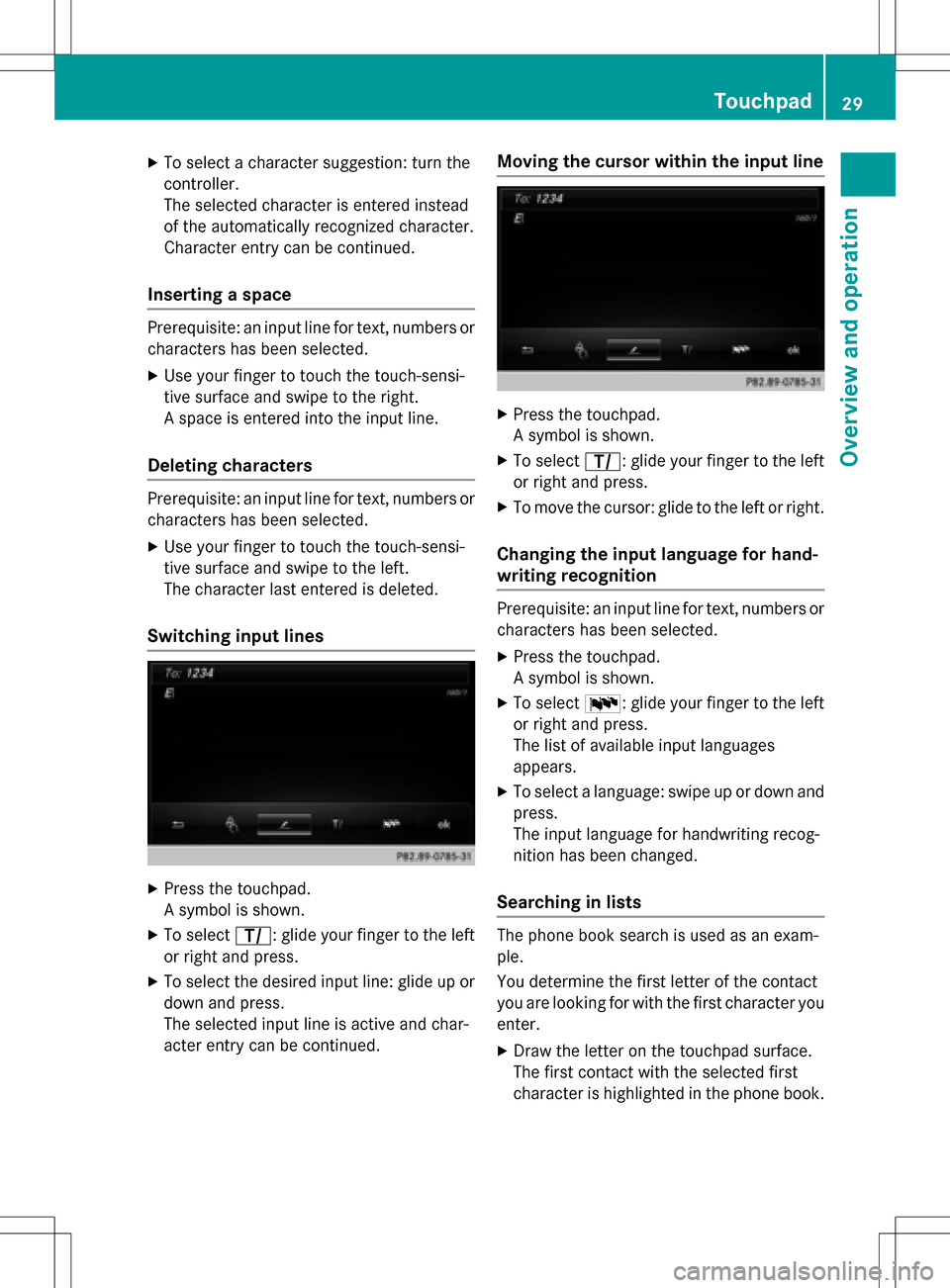
Switching input lines
XPress the touchpad.
A symbol is shown.
XTo selectp: glide your finger to the left
or right and press.
XTo select the desired input line: glide up or
down and press.
The selected input line is active and char-
acter entry can be continued.
Moving the cursor within the input line
XPress the touchpad.
A symbol is shown.
XTo select p: glide your finger to the left
or right and press.
XTo move the cursor: glide to the left or right.
Changing the input language for hand-
writing recognition
Prerequisite: an input line for text, numbers or
characters has been selected.
XPress the touchpad.
A symbol is shown.
XTo select B: glide your finger to the left
or right and press.
The list of available input languages
appears.
XTo select a language: swipe up or down and
press.
The input language for handwriting recog-
nition has been changed.
Searching in lists
The phone book search is used as an exam-
ple.
You determine the first letter of the contact
you are looking for with the first character you
enter.
XDraw the letter on the touchpad surface.
The first contact with the selected first
character is highlighted in the phone book.
Touchpad29
Overview and operation
Page 36 of 246
SymbolFunction
%Cancels input
SInserts a paragraph
Entering characters using the number
keypad
If an input line for text or numbers is selected,
the number keypad is used for the character
entry.
XFor example, to enter the letterc: press the
l number key briefly three times in suc-
cession.
An additional display area is shown with all
the available characters. Press the key
repeatedly to go through the characters
until c
is highlighted.
XWait until the character display goes out.
The letter c
is entered in the input line.
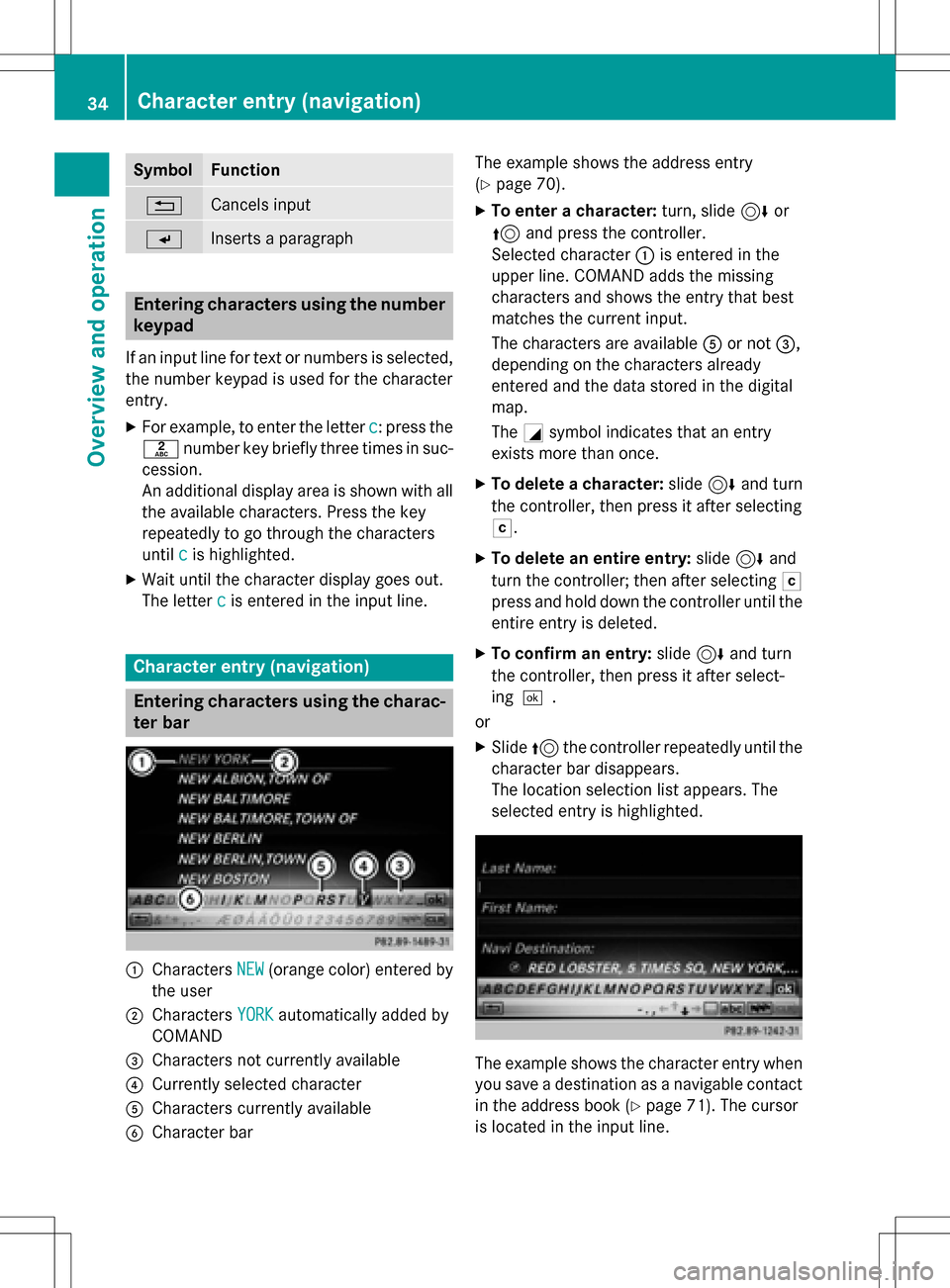
Character entry (navigation)
Entering characters using the charac-
ter bar
:Characters NEW(orange color) entered by
the user
;Characters YORKautomatically added by
COMAND
=Characters not currently available
?Currently selected character
ACharacters currently available
BCharacter bar The example shows the address entry
(
Ypage 70).
XTo enter a character:
turn, slide6or
5 and press the controller.
Selected character :is entered in the
upper line. COMAND adds the missing
characters and shows the entry that best
matches the current input.
The characters are available Aor not =,
depending on the characters already
entered and the data stored in the digital
map.
The Gsymbol indicates that an entry
exists more than once.
XTo delete a character: slide6and turn
the controller, then press it after selecting
F.
XTo delete an entire entry: slide6and
turn the controller; then after selecting F
press and hold down the controller until the
entire entry is deleted.
XTo confirm an entry: slide6and turn
the controller, then press it after select-
ing¬.
or
XSlide 5the controller repeatedly until the
character bar disappears.
The location selection list appears. The
selected entry is highlighted.
The example shows the character entry when
you save a destination as a navigable contact
in the address book (
Ypage 71). The cursor
is located in the input line.
34Character entry (navigation)
Overview and operation
Page 53 of 246
XPress theØbutton on the COMAND
control panel.
or
XPress Vehiclein the main function bar.
The vehicle menu is displayed.
XTo select SystemSettings: slide6and
press the controller.
A menu appears.
XTo select Data Import/Export: turn and
press the controller.
XSelect Import DataorExport Data.
iIf you import data, such as address data,
the existing data on COMAND is overwrit-
ten. You will see a message to this effect.
COMAND is restarted after the data import.
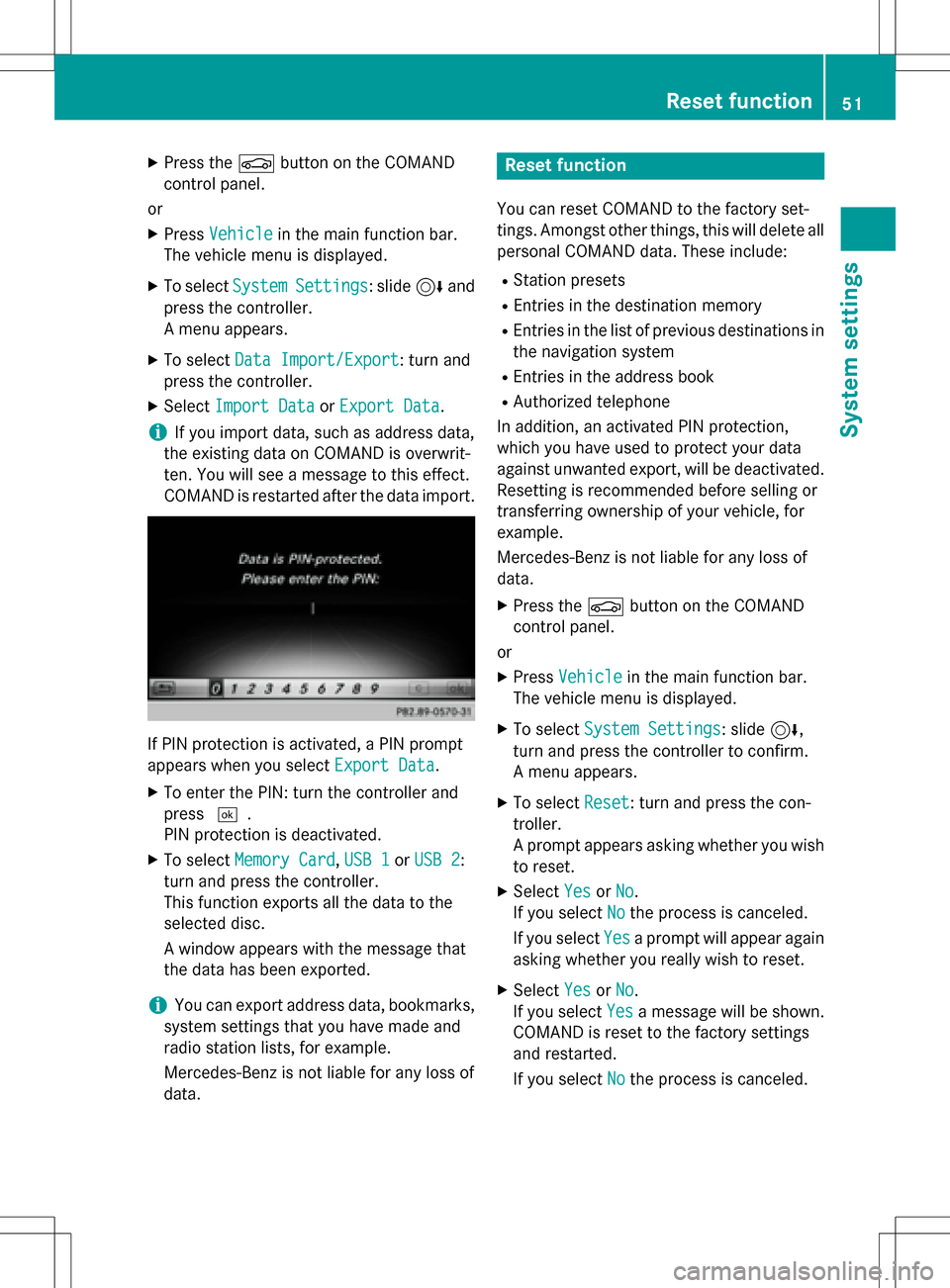
If PIN protection is activated, a PIN prompt
appears when you select Export Data
.
XTo enter the PIN: turn the controller and
press¬.
PIN protection is deactivated.
XTo select Memory Card,USB 1or USB 2:
turn and press the controller.
This function exports all the data to the
selected disc.
A window appears with the message that
the data has been exported.
iYou can export address data, bookmarks,
system settings that you have made and
radio station lists, for example.
Mercedes-Benz is not liable for any loss of
data.
Reset function
You can reset COMAND to the factory set-
tings. Amongst other things, this will delete all
personal COMAND data. These include:
RStation presets
REntries in the destination memory
REntries in the list of previous destinations in
the navigation system
REntries in the address book
RAuthorized telephone
In addition, an activated PIN protection,
which you have used to protect your data
against unwanted export, will be deactivated.
Resetting is recommended before selling or
transferring ownership of your vehicle, for
example.
Mercedes-Benz is not liable for any loss of
data.
XPress the Øbutton on the COMAND
control panel.
or
XPress Vehiclein the main function bar.
The vehicle menu is displayed.
XTo select System Settings: slide6,
turn and press the controller to confirm.
A menu appears.
XTo select Reset: turn and press the con-
troller.
A prompt appears asking whether you wish
to reset.
XSelect YesorNo.
If you select No
the process is canceled.
If you select Yes
a prompt will appear again
asking whether you really wish to reset.
XSelect YesorNo.
If you select Yes
a message will be shown.
COMAND is reset to the factory settings
and restarted.
If you select No
the process is canceled.
Reset function51
System settings
Z
Page 60 of 246
XTo selectReset: turn and press the con-
troller.
XTo select a seat: slide 1the controller.
XTo reset: press the controller.
A prompt appears.
XTo select YesorNo: turn and press the con-
troller.
If you select No
the process is canceled.
After selecting Yes
all seat adjustments are
reset to the default values (factory setting).
360° camera
General notes
The 360° camera surveys the vehicle sur-
roundings and assists you, for example when
parking or at exits with reduced visibility.
The 360° camera is only an aid. It is not a
replacement for your attention to your imme-
diate surroundings. You are always responsi-
ble for safe maneuvering and parking. Make
sure that no persons or animals are in the
maneuvering range.
Further information on the 360°camera can
be found in the vehicle Operator's Manual.
Displaying the 360° camera image
The 360° camera image can be displayed if:
Ryour vehicle is equipped with a 360° cam-
era
Rthe 360° Camerafunction is activated;
(see the vehicle Operator's Manual)
XSelect Vehiclein the main function bar.
The vehicle menu is displayed.
XSelect 360° Camera.
The 360° camera image appears in split-
screen mode. You will see the previous view on the display
if, when the function is switched on:
Ryou turn the SmartKey to position
1in the
ignition lock
Ryou select transmission position P
Rwhen you are driving at moderate speeds
Switching the display off manually
XTo select &: slide 6and press the con-
troller.
Switching the display on automatically
XYou can automatically switch the 360 cam-
era display using reverse gear
(
Ypage 58).
Switching the 360° camera auto-
matic mode on/off
This function activates the 360° camera
when reverse gear is engaged.
XSelect Vehiclein the main function bar.
The vehicle menu is displayed.
XTo switch to the menu bar: slide6the
controller.
XTo select System Settings: turn and
press the controller.
XTo select 360°Camera: turn and press the
controller.
The 360° Camera
menu appears.
XSelect Activation by R gear.
Activate Oor deactivate the function ª.
Opening the camera cover for clean-
ing
XTo selectOpenCameraCoverin the 360°
camera menu: turn the controller and press
to confirm.
The Please
Wait...message appears for
approximately three seconds.
The camera cover opens.
58360° camera
Vehicle functions