display MERCEDES-BENZ GLA SUV 2017 Owner's Manual
[x] Cancel search | Manufacturer: MERCEDES-BENZ, Model Year: 2017, Model line: GLA SUV, Model: MERCEDES-BENZ GLA SUV 2017Pages: 369, PDF Size: 7.56 MB
Page 26 of 369
Summer tyres ................................ 336
Tyre size (data
).............................. 347
Tyre tread ...................................... 335
see Flat tyre U
Unlocking Emergency unlocking ....................... 88
From inside the vehicle (central
unlocking button) ............................. 87
Upshift indicator (on-board com-
puter, Mercedes-AMG vehicles) ....... 231
USB devices
Connecting to the Media Inter-
face ............................................... 287 V
Vanity mirror (in sun visor) .............. 298
Vehicle
Correct use ...................................... 30
Data acquisition ............................... 30
Display message ............................ 258
Electronics ..................................... 350
Equipment ....................................... 27
Implied warranty .............................. 30
Individual settings .......................... 228
Leaving parked up ......................... 169
Locking (in an emergency) ............... 88
Locking (key) ................................... 79
Lowering ........................................ 346
Pulling away ................................... 146
Raising ........................................... 344
Registration ..................................... 30
Securing from rolling away ............ 344
Transporting .................................. 330
Unlocking (in an emergency) ........... 88
Unlocking (key) ................................ 79
Vehicle data ................................... 358
Vehicle battery
see Battery (vehicle)
Vehicle data
Boot load (maximum) ..................... 358
Roof load (maximum) ..................... 358
Vehicle data (off-road driving)
Approach/departure angle ............ 359
Maximum gradient climbing abil-
ity .................................................. 359 Vehicle dimensions
........................... 358
Vehicle emergency locking ................ 88
Vehicle identification number
see VIN
Vehicle identification plate .............. 351
Vehicle tool kit .................................. 317
Ventilation
Setting the vents ........................... 141
Video
Operating the DVD ......................... 224
See also Digital Owner's Manua l... 277
VIN
Seat ............................................... 352
Type plate ...................................... 351 W
Warning and indicator lamps ABS ................................................ 267
Active Brake Assist ........................ 275
Brakes ........................................... 266
Distance warning signal ................. 275
ESP ®
.............................................. 269
ESP ®
OFF ....................................... 270
Fuel tank ........................................ 272
LIM (cruise control )........................ 176
LIM (Distance Pilot DISTRONIC ).... 181
LIM (variable limiter) ...................... 178
Overview .......................................... 34
Reserve fuel ................................... 272
Seat belt ........................................ 265
Tyre pressure monitor ................... 276
Warning triangle ................................ 316
Washer fluid
Display message ............................ 263
Weather display (COMAND Online)
See also Digital Owner's Manua l... 277
Wheel and tyre combinations
Tyres .............................................. 347
Wheel bolt tightening torque ........... 346
Wheel chock ...................................... 344
Wheels
Changing a whee l.......................... 342
Changing/replacing ....................... 342
Checking ........................................ 334
Cleaning ......................................... 310
Emergency spare wheel ................. 348
Fitting a new wheel ........................ 345 Index
23
Page 27 of 369
Important safety notes .................. 334
Information on driving .................... 334
Removing a wheel
.......................... 345
Storing ........................................... 343
Tightening torque ........................... 346
Wheel size/tyre size ...................... 347
Wheels and tyres
Changing a whee l.......................... 343
Windowbag
Display message ............................ 243
Operation ......................................... 49
Windows
Cleaning ......................................... 310
see Side windows
Windscreen
Demisting ...................................... 134
Windscreen washer fluid
see Windscreen washer system
Windscreen washer system
Important safety notes .................. 357
Topping up ..................................... 306
Windscreen wipers
Display message ............................ 263
Problem (malfunction) ................... 127
Rear window wipe r........................ 124
Replacing the wiper blades ............ 125
Switching on/of f........................... 124
Winter driving
General notes ................................ 336
Winter operation
Slippery road surfaces ................... 172
Snow chains .................................. 337
Winter tyres
Limiting the speed (on-board com-
puter) ............................................. 229
M+S tyres ...................................... 336
Wiper blades
Cleaning ......................................... 310
Important safety notes .................. 125
Replacing (on the rear window )..... 126
Wooden trim (cleaning instruc-
tions) .................................................. 313
Workshop
see Qualified specialist workshop Z
ZONE function Switching on/of f........................... 134 24
Index
Page 28 of 369
Introduction
The printed Owner's Manual provides informa-
tion about the safe operation of your vehicle.
The Digital Owner's Manual provides compre-
hensive and specifically adapted information on
your vehicle's equipment and multimedia sys-
tem. You can call up the Digital Owner's Manual
via the multimedia system.
i You will not incur any costs when calling up
the Digital Owner's Manual. The Digital Own-
er's Manual works without connecting to the
internet.
There are three ways to access the topics of the Digital Owner's Manual:
R Visual search
The visual search allows you to explore your
vehicle "virtually". Starting from either the
vehicle exterior view or interior view, you can
access many of the different topics covered
by the Digital Owner's Manual. To access the vehicle interior section, select the "Vehicle
interior" view.
R Keyword search
The keyword search allows you to search for a
keyword by entering characters.
R Contents
You can select individual sections in the con-
tents.
i The Digital Owner's Manual is deactivated
for safety reasons while driving. Operation
Calling up the Digital Owner's Manual
X Press the Øbutton on the centre console.
The vehicle overview appears.
X Select the "Owner's Manual" menu item by
turning 3or pressing 7the controller.
X Acknowledge 7the message about the
warning and safety notes.
The basic menu for the Digital Owner's Man-
ual appears. Operating the Digital Owner's Manual
General notes Please observe the information about the oper-
ation of the controller (Y page 278).
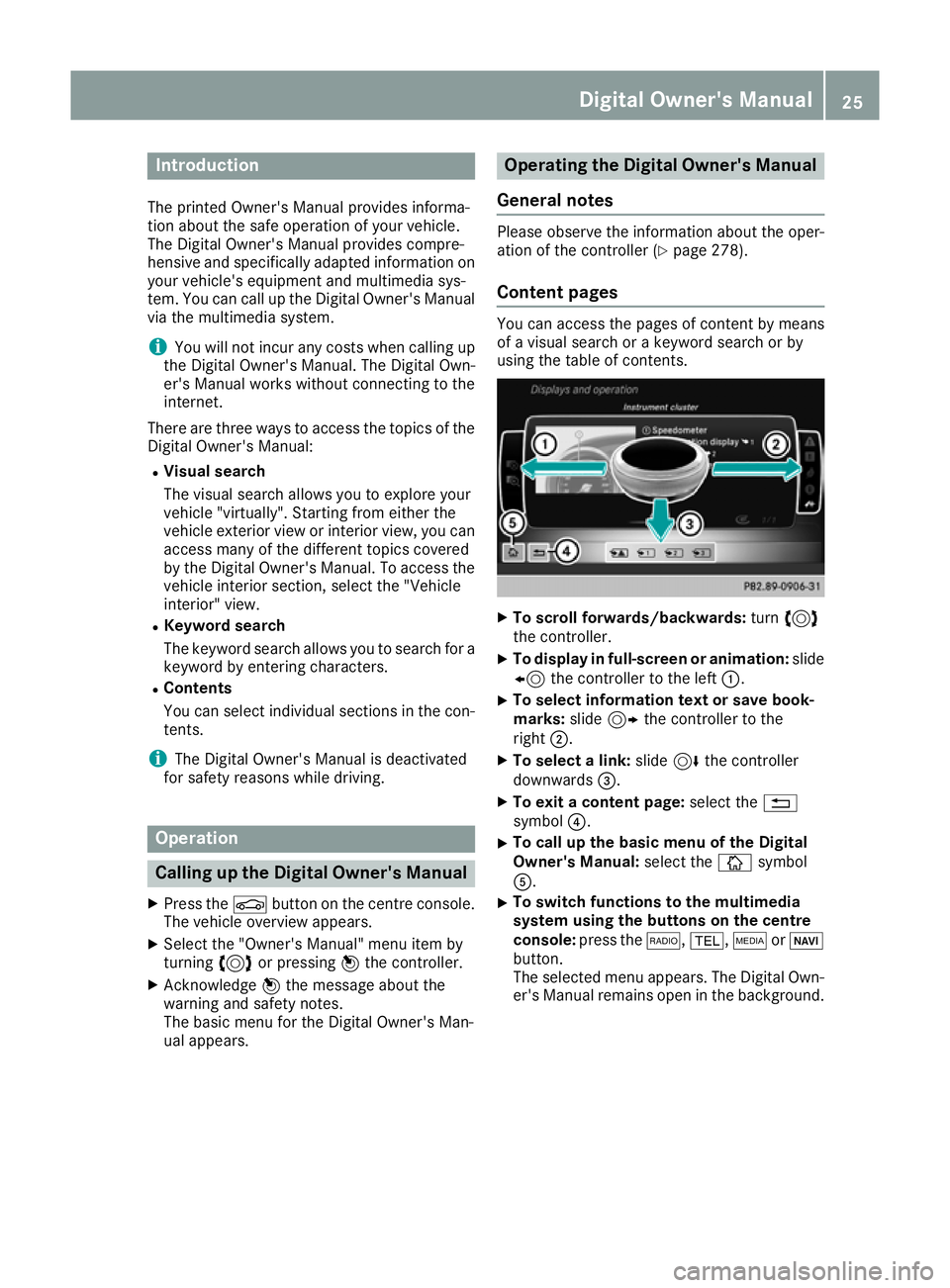
Content pages You can access the pages of content by means
of a visual search or a keyword search or by
using the table of contents.
X
To scroll forwards/backwards: turn3
the controller.
X To display in full-screen or animation: slide
8 the controller to the left :.
X To select information text or save book-
marks:
slide9 the controller to the
right ;.
X To select a link: slide6the controller
downwards =.
X To exit a content page: select the%
symbol ?.
X To call up the basic menu of the Digital
Owner's Manual:
select theÞsymbol
A.
X To switch functions to the multimedia
system using the buttons on the centre
console: press the $,%,ÕorØ
button.
The selected menu appears. The Digital Own- er's Manual remains open in the background. Digital Owner's Manual
25
Page 32 of 369
Designation Title Edition
DIN EN 894-1 Safety of machinery – Ergonomic requirements for the design
of displays and control actuators – Part 1: General principles 2008
DIN EN 894-2 Safety of machinery – Ergonomic requirements for the design
of displays and control actuators – Part 2: Displays 2008
DIN EN 55014-1 Electromagnetic compatibility – Requirements for household
appliances, electric tools and similar apparatus – Part 1:
Emission 2011
DIN EN 55014-2 Electromagnetic compatibility – Requirements for household
appliances, electric tools and similar apparatus – Part 2:
Immunity 2008
The applicable safety and health protection requirements for the design and construction of machi-
nery based on Annex I of the Directive on Machinery are complied with.
Complete technical documentation is available
1 in the original version
The operating instructions for the machinery/machine part are available
1 in the language of the user's country: German
In the event of modifications made to the machinery/equipment after delivery that have not been cleared with active Tools Europe GmbH, this declaration loses its validity.
Authorised representative(s) for compilation of the technical documentation, CE commissioner(s) 22.6.2015 [Name of signatory] [Stamp]
Date Signatory and details of signatory Signature
Diagnostics connection
The diagnostics connection is used for connect- ing diagnostic equipment at a qualified special-
ist workshop. G
WARNING
If you connect equipment to a diagnostics
connection in the vehicle, it may affect the
operation of vehicle systems. As a result, the operating safety of the vehicle could be affec-
ted. There is a risk of an accident.
Only connect equipment to a diagnostics con-
nection in the vehicle, which is approved for
your vehicle by Mercedes-Benz. G
WARNING
Objects in the driver's footwell may restrict
the clearance around the pedals or block a
depressed pedal. This jeopardises the oper- ating and road safety of the vehicle. There is a
risk of an accident.
Stow all objects securely in the vehicle so that
they do not get into the driver's footwell.
Always fit the floormats securely and as pre-
scribed in order to ensure that there is always sufficient room for the pedals. Do not use
loose floormats and do not place several floor-mats on top of one another.
! If the engine is switched off and equipment
on the diagnostics connection is used, the
starter battery may discharge.
Connecting equipment to the diagnostics con-
nection can lead to emissions monitoring infor-
mation being reset, for example. This may lead
to the vehicle failing to meet the requirements of
the next emissions test during the main inspec- tion. Operating safety
29Introduction Z
Page 35 of 369
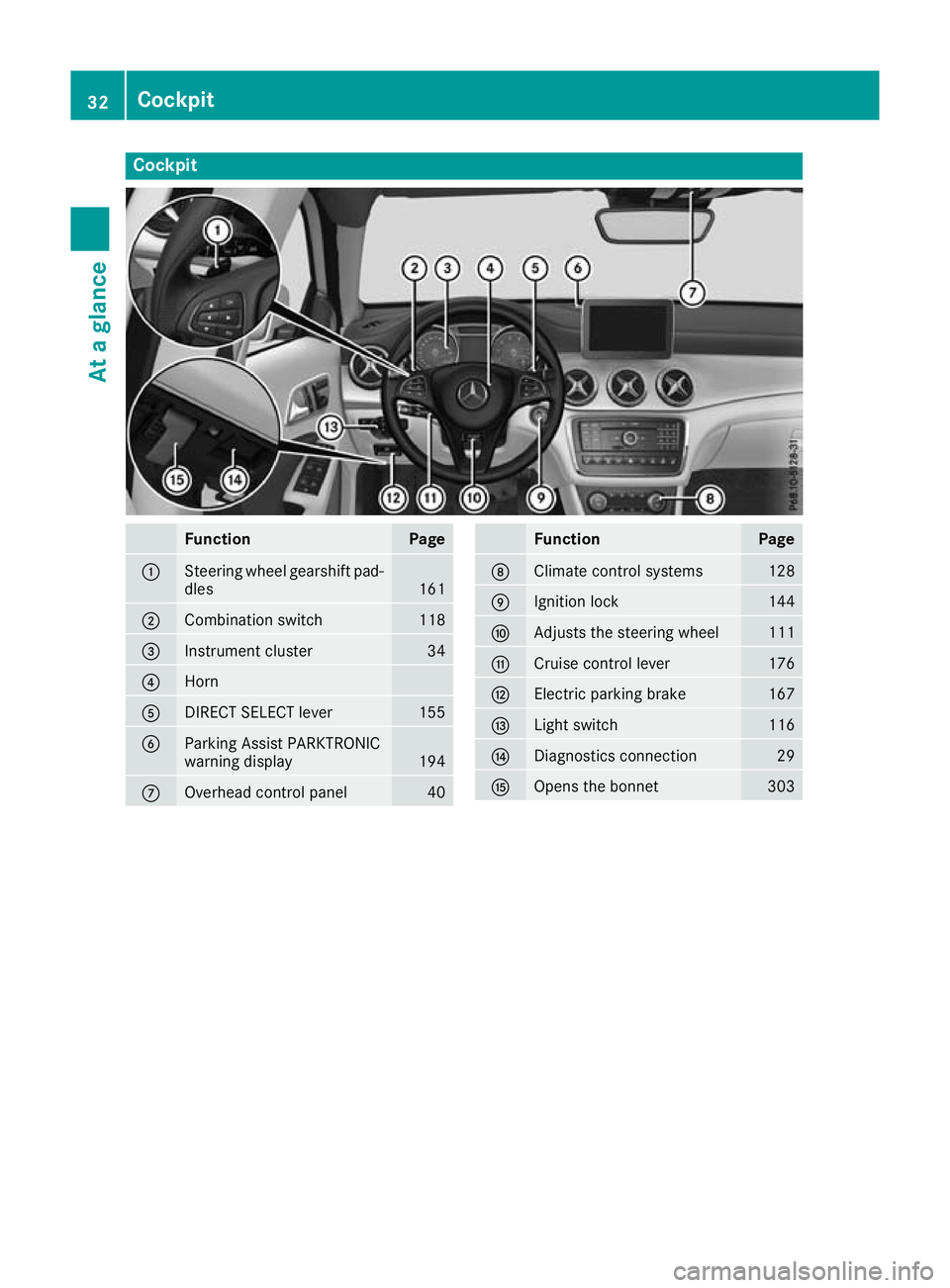
Cockpit
Function Page
:
Steering wheel gearshift pad-
dles 161
;
Combination switch 118
=
Instrument cluster 34
?
Horn
A
DIRECT SELECT lever 155
B
Parking Assist PARKTRONIC
warning display
194
C
Overhead control panel 40 Function Page
D
Climate control systems 128
E
Ignition lock 144
F
Adjusts the steering wheel 111
G
Cruise control lever 176
H
Electric parking brake 167
I
Light switch 116
J
Diagnostics connection 29
K
Opens the bonnet 30332
CockpitAt a glance
Page 36 of 369
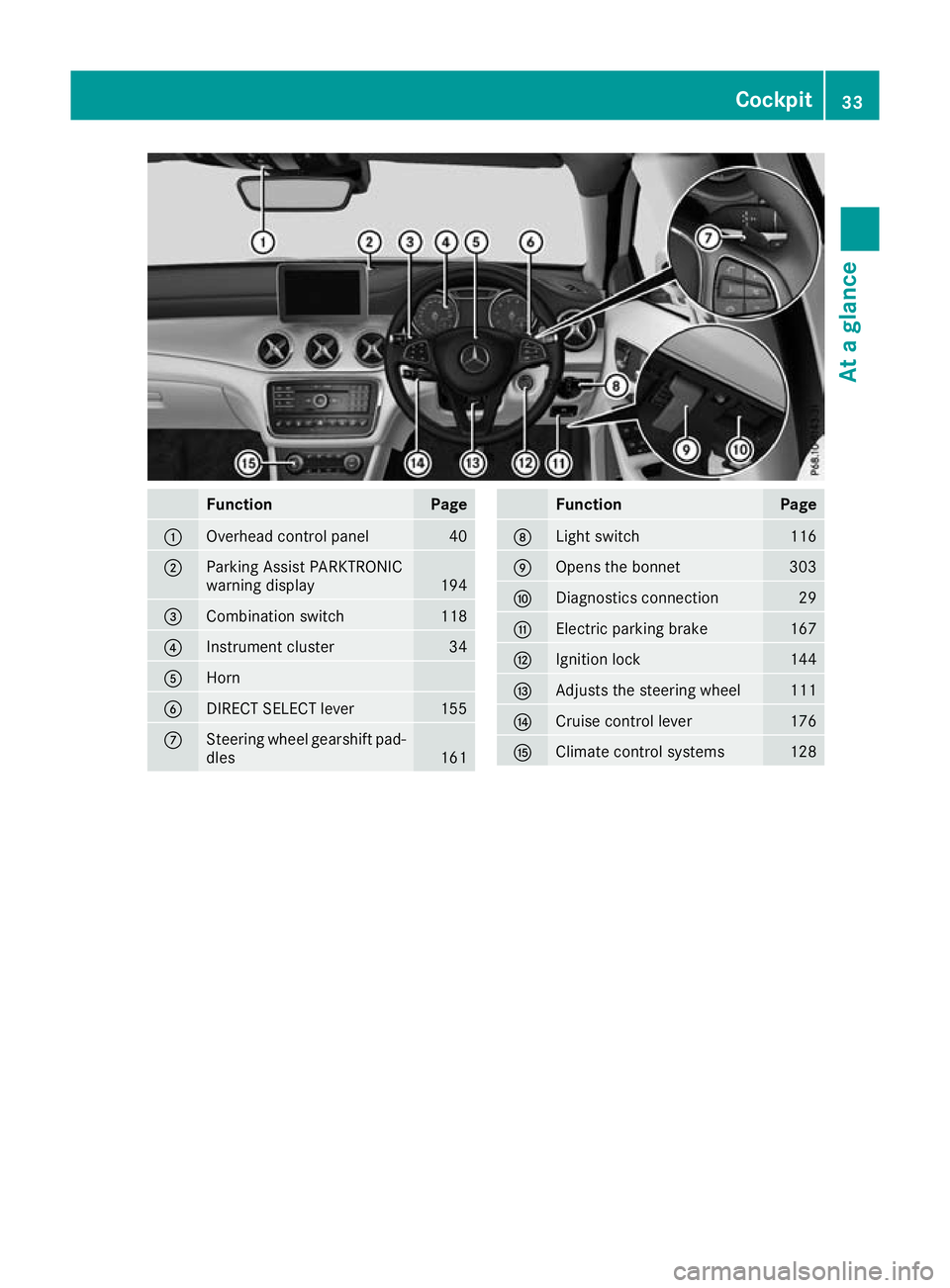
Function Page
:
Overhead control panel 40
;
Parking Assist PARKTRONIC
warning display
194
=
Combination switch 118
?
Instrument cluster 34
A
Horn
B
DIRECT SELECT lever 155
C
Steering wheel gearshift pad-
dles 161 Function Page
D
Light switch 116
E
Opens the bonnet 303
F
Diagnostics connection 29
G
Electric parking brake 167
H
Ignition lock 144
I
Adjusts the steering wheel 111
J
Cruise control lever 176
K
Climate control systems 128Cockpit
33At a glance
Page 37 of 369
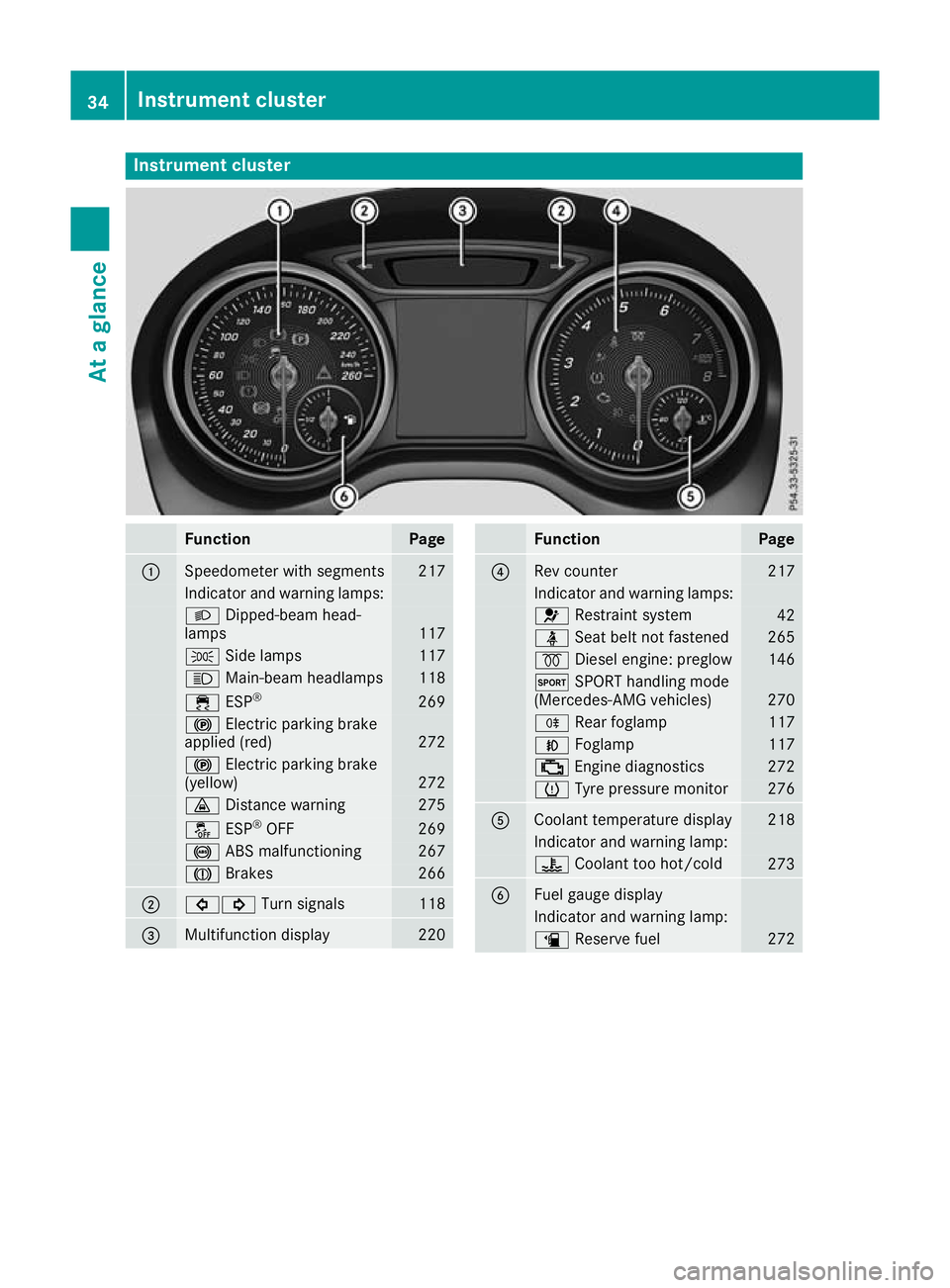
Instrument cluster
Function Page
:
Speedometer with segments 217
Indicator and warning lamps:
L
Dipped-beam head-
lamps 117
T
Side lamps 117
K
Main-beam headlamps 118
÷
ESP® 269
!
Electric parking brake
applied (red) 272
!
Electric parking brake
(yellow) 272
·
Distance warning 275
å
ESP®
OFF 269
!
ABS malfunctioning 267
J
Brakes 266
;
#!
Turn signals 118
=
Multifunction display 220 Function Page
?
Rev counter 217
Indicator and warning lamps:
6
Restraint system 42
ü
Seat belt not fastened 265
%
Diesel engine: preglow 146
M
SPORT handling mode
(Mercedes-AMG vehicles) 270
R
Rear foglamp 117
N
Foglamp 117
;
Engine diagnostics 272
h
Tyre pressure monitor 276
A
Coolant temperature display 218
Indicator and warning lamp:
?
Coolant too hot/cold 273
B
Fuel gauge display
Indicator and warning lamp:
æ
Reserve fuel 27234
Instrument clusterAt a glance
Page 38 of 369
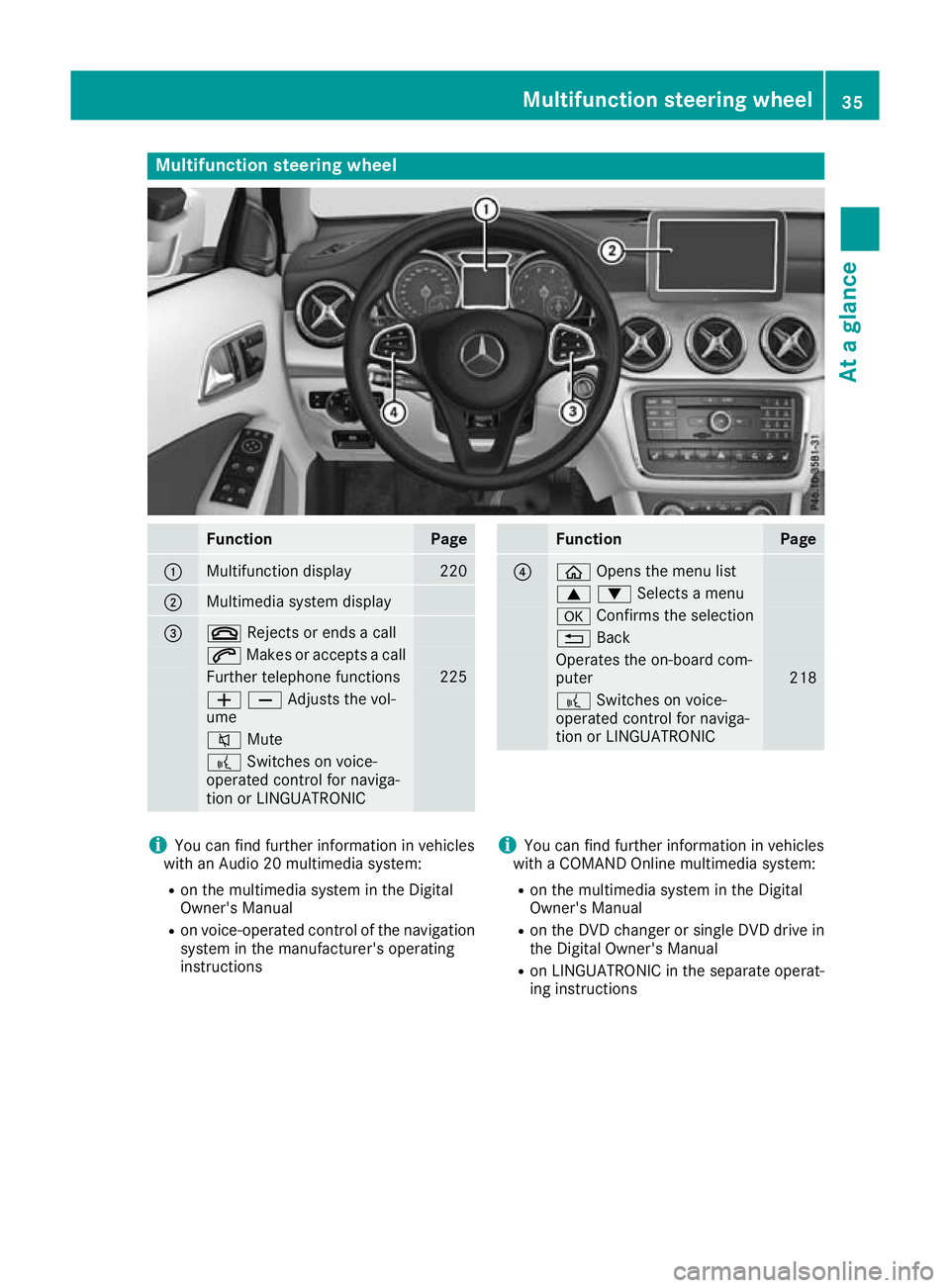
Multifunction steering wheel
Function Page
:
Multifunction display 220
;
Multimedia system display
=
~
Rejects or ends a call 6
Makes or accepts a call Further telephone functions 225
WXAdjusts the vol-
ume 8
Mute ?
Switches on voice-
operated control for naviga-
tion or LINGUATRONIC Function Page
?
ò
Opens the menu list 9:Selects a menu
a
Confirms the selection %
Back Operates the on-board com-
puter
218
?
Switches on voice-
operated control for naviga-
tion or LINGUATRONIC i
You can find further information in vehicles
with an Audio 20 multimedia system:
R on the multimedia system in the Digital
Owner's Manual
R on voice-operated control of the navigation
system in the manufacturer's operating
instructions i
You can find further information in vehicles
with a COMAND Online multimedia system:
R on the multimedia system in the Digital
Owner's Manual
R on the DVD changer or single DVD drive in
the Digital Owner's Manual
R on LINGUATRONIC in the separate operat-
ing instructions Multifunction steering wheel
35At a glance
Page 39 of 369
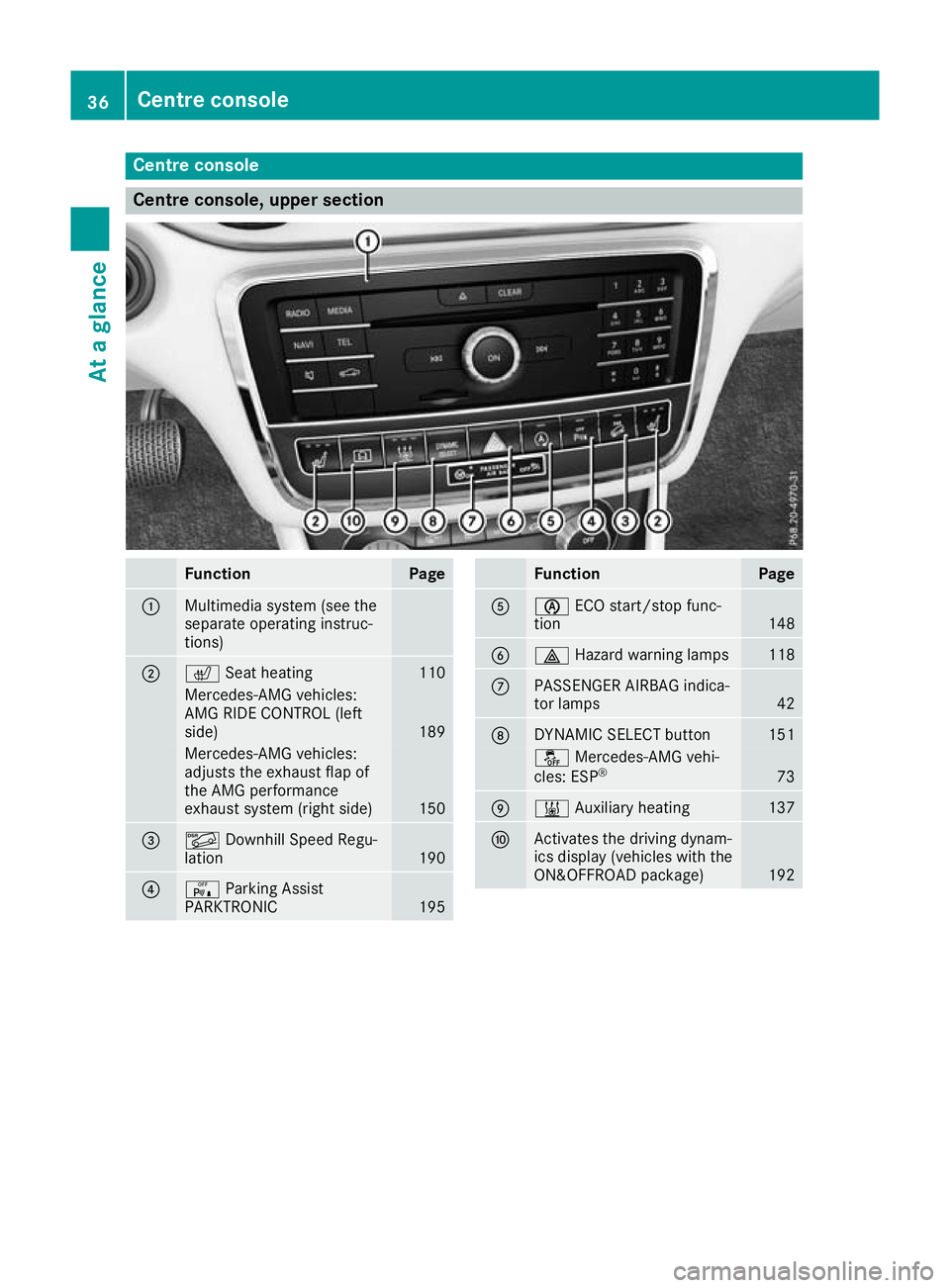
Centre console
Centre console, upper section
Function Page
:
Multimedia system (see the
separate operating instruc-
tions)
;
c
Seat heating 110
Mercedes-AMG vehicles:
AMG RIDE CONTROL (left
side) 189
Mercedes-AMG vehicles:
adjusts the exhaust flap of
the AMG performance
exhaust system (right side) 150
=
Ã
Downhill Speed Regu-
lation 190
?
c
Parking Assist
PARKTRONIC 195 Function Page
A
è
ECO start/stop func-
tion 148
B
£
Hazard warning lamps 118
C
PASSENGER AIRBAG indica-
tor lamps 42
D
DYNAMIC SELECT button 151
å
Mercedes-AMG vehi-
cles: ESP ® 73
E
&
Auxiliary heating 137
F
Activates the driving dynam-
ics display (vehicles with the
ON&OFFROAD package) 19236
Centre consoleAt a glance
Page 45 of 369
Mercedes-Benz recommends that you only use
driving aids which have been approved specifi-
cally for your vehicle by Mercedes-Benz. Restraint system warning lamp
The functions of the restraint system are
checked after the ignition is switched on and at regular intervals while the engine is running.
Therefore, malfunctions can be detected in
good time.
The 6 restraint system warning lamp on the
instrument cluster lights up when the ignition is
switched on. It goes out no later than a few sec- onds after the vehicle is started. The compo-
nents of the restraint system are in operational
readiness.
A malfunction has occurred if the 6restraint
system warning lamp:
R does not light up after the ignition is switched
on
R does not go out after a few seconds with the
engine running
R lights up again while the engine is running G
WARNING
If the restraint system is malfunctioning,
restraint system components may be trig-
gered unintentionally or may not deploy as
intended during an accident. This may affect
the seat belt tensioner or airbag, for example. This poses an increased risk of injury or even
fatal injury.
Have the restraint system checked and
repaired immediately at a qualified specialist
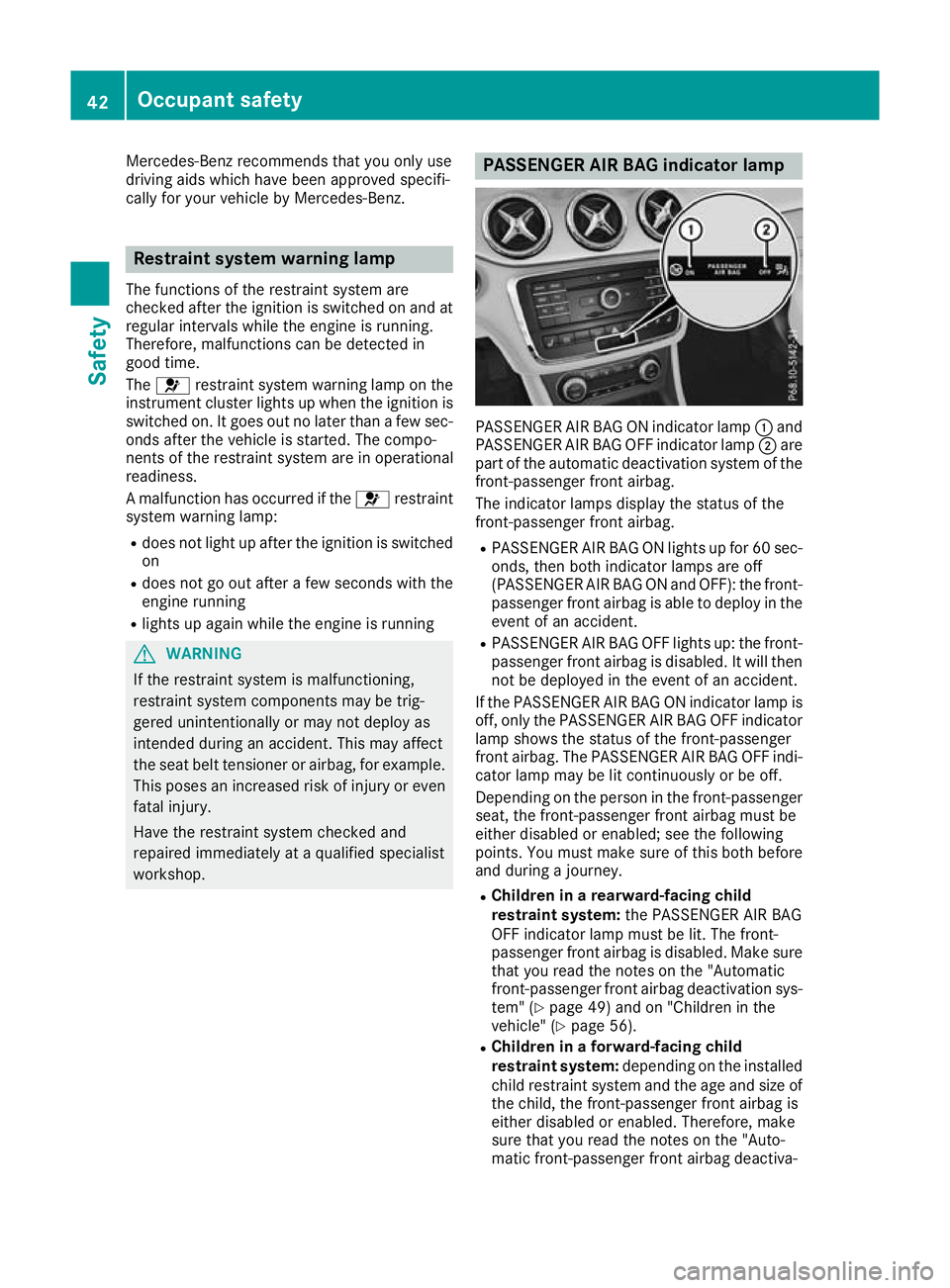
workshop. PASSENGER AIR BAG indicator lamp
PASSENGER AIR BAG ON indicator lamp
:and
PASSENGER AIR BAG OFF indicator lamp ;are
part of the automatic deactivation system of the front-passenger front airbag.
The indicator lamps display the status of the
front-passenger front airbag.
R PASSENGER AIR BAG ON lights up for 60 sec-
onds, then both indicator lamps are off
(PASSENGER AIR BAG ON and OFF): the front-
passenger front airbag is able to deploy in the event of an accident.
R PASSENGER AIR BAG OFF lights up: the front-
passenger front airbag is disabled. It will then
not be deployed in the event of an accident.
If the PASSENGER AIR BAG ON indicator lamp is off, only the PASSENGER AIR BAG OFF indicator
lamp shows the status of the front-passenger
front airbag. The PASSENGER AIR BAG OFF indi-
cator lamp may be lit continuously or be off.
Depending on the person in the front-passenger seat, the front-passenger front airbag must be
either disabled or enabled; see the following
points. You must make sure of this both before
and during a journey.
R Children in a rearward-facing child
restraint system: the PASSENGER AIR BAG
OFF indicator lamp must be lit. The front-
passenger front airbag is disabled. Make sure
that you read the notes on the "Automatic
front-passenger front airbag deactivation sys-
tem" (Y page 49) and on "Children in the
vehicle" (Y page 56).
R Children in a forward-facing child
restraint system: depending on the installed
child restraint system and the age and size of
the child, the front-passenger front airbag is
either disabled or enabled. Therefore, make
sure that you read the notes on the "Auto-
matic front-passenger front airbag deactiva- 42
Occupant safetySafety