light MERCEDES-BENZ GLC 2019 User Guide
[x] Cancel search | Manufacturer: MERCEDES-BENZ, Model Year: 2019, Model line: GLC, Model: MERCEDES-BENZ GLC 2019Pages: 370, PDF Size: 19.55 MB
Page 25 of 370
Quick access for Audio .................. 271
Switching ....................................... 270
Switching input line ....................... 270
Tow-starting
Emergency engine starting ............ 327
Important safety notes .................. 324
Towing a trailer
Axle load, permissible.................... 365
Cleaning the trailer tow hitch ......... 310
Coupling up a trailer...................... 204
Decoupling a trailer ....................... 206
Driving tips .................................... 203
ESP®(Electronic Stability Pro-
gram) ............................................... 71
Important safety notes .................. 202
Installing the ball coupling ............. 204
Lights display message .................. 239
Power supply ................................. 206
Pulling away with a trailer.............. 135
Removing the ball coupling ............ 206
Trailer loads................................... 364
Towing away
Important safety guidelines ........... 324
Installing the towing eye ................ 325
Notes for 4MATIC vehicles ............ 327
Removing the towing eye ............... 326
Transporting the vehicle ................ 326
With both axles on the ground ....... 326
Towing eye......................................... 314
Traction system
see ETS/4ETS (Electronic Trac-
tion System)
Traffic reports
see also Digital Operator's Man-
ual .................................................. 268
Traffic Sign Assist
Activating/deactivating the warn-
ing function .................................... 220
Display message ............................ 247
Function/notes............................. 193
Important safety notes .................. 193
Instrument cluster display ............. 193
Trailer coupling
see Towing a trailer
Trailer loads and drawbar nose-
weights............................................... 206
Trailer towing
Active Blind Spot Assist ................. 199
Active Lane Keeping Assist ............ 202
Blind Spot Assist ............................ 195
Permissible trailer loads and
drawbar noseweights ..................... 206
Transfer case..................................... 150
Transmission
Display message ............................ 253
see Automatic transmission
Transmission oil
Temperature (on-board computer,
Mercedes-AMG vehicles) ............... 223
Transmission position display......... 142
Transporting the vehicle.................. 326
Trim pieces (cleaning instruc-
tions).................................................. 311
Trip computer (on-board com-
puter).................................................. 213
Trip odometer
Calling up ....................................... 212
Resetting (on-board computer) ...... 214
Trunk
see Cargo compartment
Turn signals
Display message ............................ 239
Replacing bulbs (front) ................... 115
Switching on/off........................... 110
Two-way radio
Frequencies ................................... 356
Installation ..................................... 356
Transmission output (maximum) .... 356
Type identification plate
see Vehicle identification plate
U
Unlocking
Emergency unlocking ....................... 84
From inside the vehicle (central
unlocking button) ............................. 83
USB devices
Connecting to the Media Inter-
face ............................................... 277
V
Vanity mirror (in the sun visor)........ 290
Vehicle
Correct use ...................................... 31
Index23
Page 34 of 370
The following text is reproduced as required ofall manufacturers under Title 49, Code of U.S.Federal Regulations, Part 575 pursuant to theNational Traffic and Motor Vehicle Safety Act of1966.
If you believe that your vehicle has a defectwhich could cause a crash or could cause injuryor death, you should immediately inform theNational Highway Traffic Safety Administration(NHTSA) in addition to notifying Mercedes-BenzUSA, LLC.
If NHTSA receives similar complaints, it mayopen an investigation, and if it finds that a safetydefect exists in a group of vehicles, it may ordera recall and remedy campaign. However, NHTSAcannot become involved in individual problemsbetween you, your dealer, or Mercedes-BenzUSA, LLC.
To contact NHTSA, you may call the VehicleSafety Hotline toll-free at 1-888-327-4236(TTY: 1-800-424-9153);go tohttp://www.safercar.gov; or write to: Administrator,NHTSA, 400 Seventh Street, SW., Washington,DC 20590.
You can also obtain other information aboutmotor vehicle safety from
http://www.safercar.gov
Limited Warranty
!Observe the notes in this Operator's Manualregarding the correct operation of your vehi-cle and possible damage to the vehicle. Dam-age to the vehicle which is caused by violationof these notes is not covered by theMercedes-Benz implied warranty or the newor used-vehicle warranty.
QR code for rescue card
The QR codes are secured in the fuel filler flapand on the opposite side on the B-pillar. In theevent of an accident, rescue services can usethe QR code to quickly find the appropriate res-cue card for your vehicle. The current rescuecard contains the most important informationabout your vehicle in a compact form, e.g. therouting of the electric cables.
You can find more information underwww.mercedes-benz.de/qr-code.
Data stored in the vehicle
Data storage
A wide range of electronic components in yourvehicle contain data memories.
These data memories temporarily or perma-nently store technical information about:
Rthe vehicle's operating state
Rincidents
Rmalfunctions
In general, this technical information docu-ments the state of a component, a module, asystem or the surroundings.
This includes, for example:
Roperating conditions of system components.For example, fluid levels
Rthe vehicle's status messages and those of itsindividual components, e.g. number of wheelrevolutions/speed, deceleration in move-ment, lateral acceleration, accelerator pedalposition
Rmalfunctions and defects in important systemcomponents, e.g. lights, brakes
Rvehicle reactions and operating conditions inspecial driving situations, e.g. air bag deploy-ment, intervention of stability control sys-tems
Rambient conditions, e.g. outside temperature
This data is of an exclusively technical natureand can be used to:
Rassist in recognizing and rectifying malfunc-tions and defects
Ranalyze vehicle functions, e.g. after an acci-dent
Roptimize vehicle functions
The data cannot be used to trace the vehicle'smovements.
When your vehicle is serviced, technical infor-mation can be read from the event data memoryand malfunction data memory.
Services include, for example:
Rrepair services
Rservice processes
Rwarranties
Rquality assurance
The vehicle is read out by employees of the ser-vice network (including the manufacturer) usingspecial diagnostic testers. More detailed infor-mation is obtained from it, if required.
32Data stored in the vehicle
Introduction
Page 41 of 370
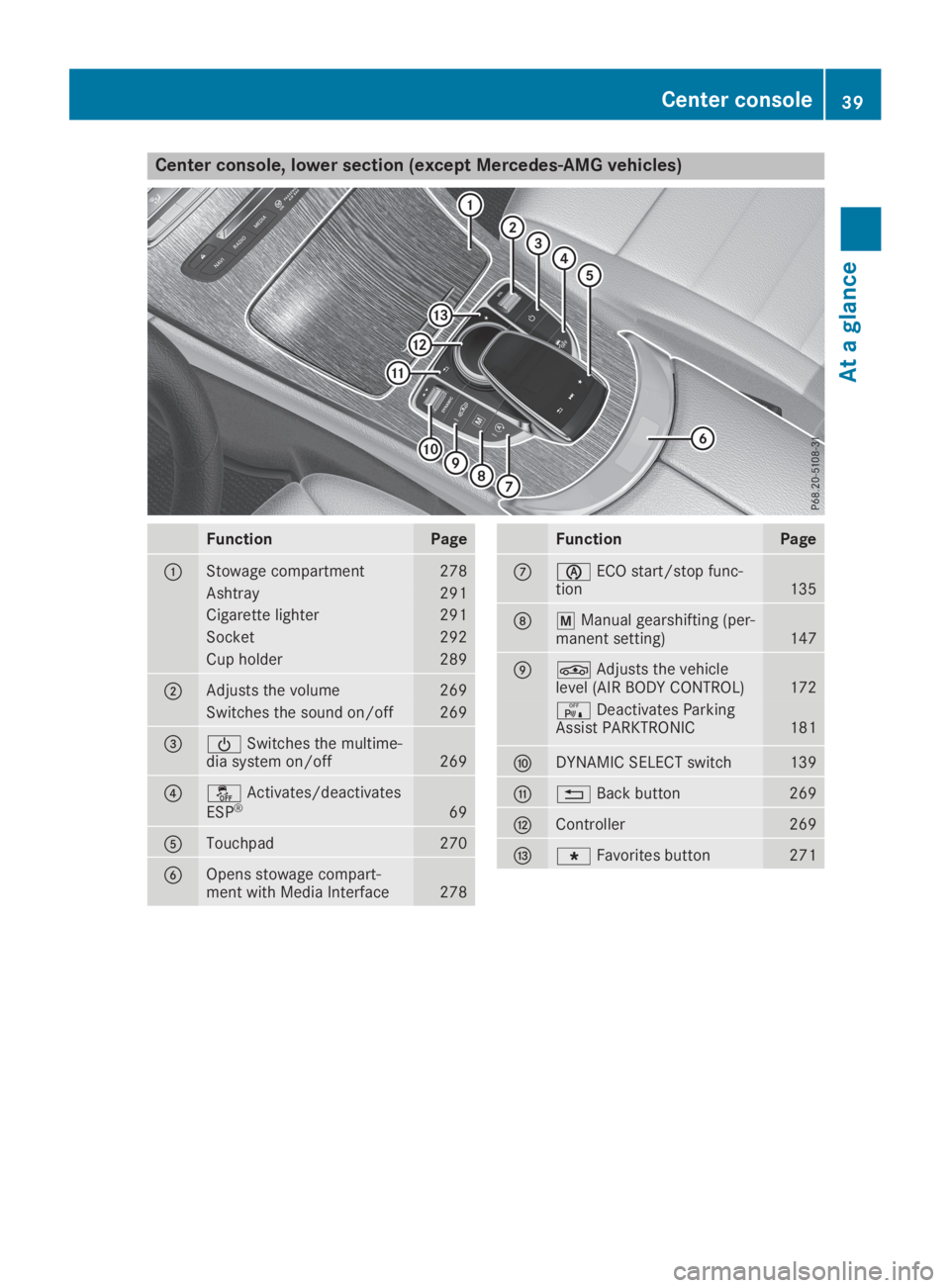
Center console, lower section (except Mercedes-AMG vehicles)
FunctionPage
CStowage compartment278
Ashtray291
Cigarette lighter291
Socket292
Cup holder289
DAdjusts the volume269
Switches the sound on/off269
Page 42 of 370
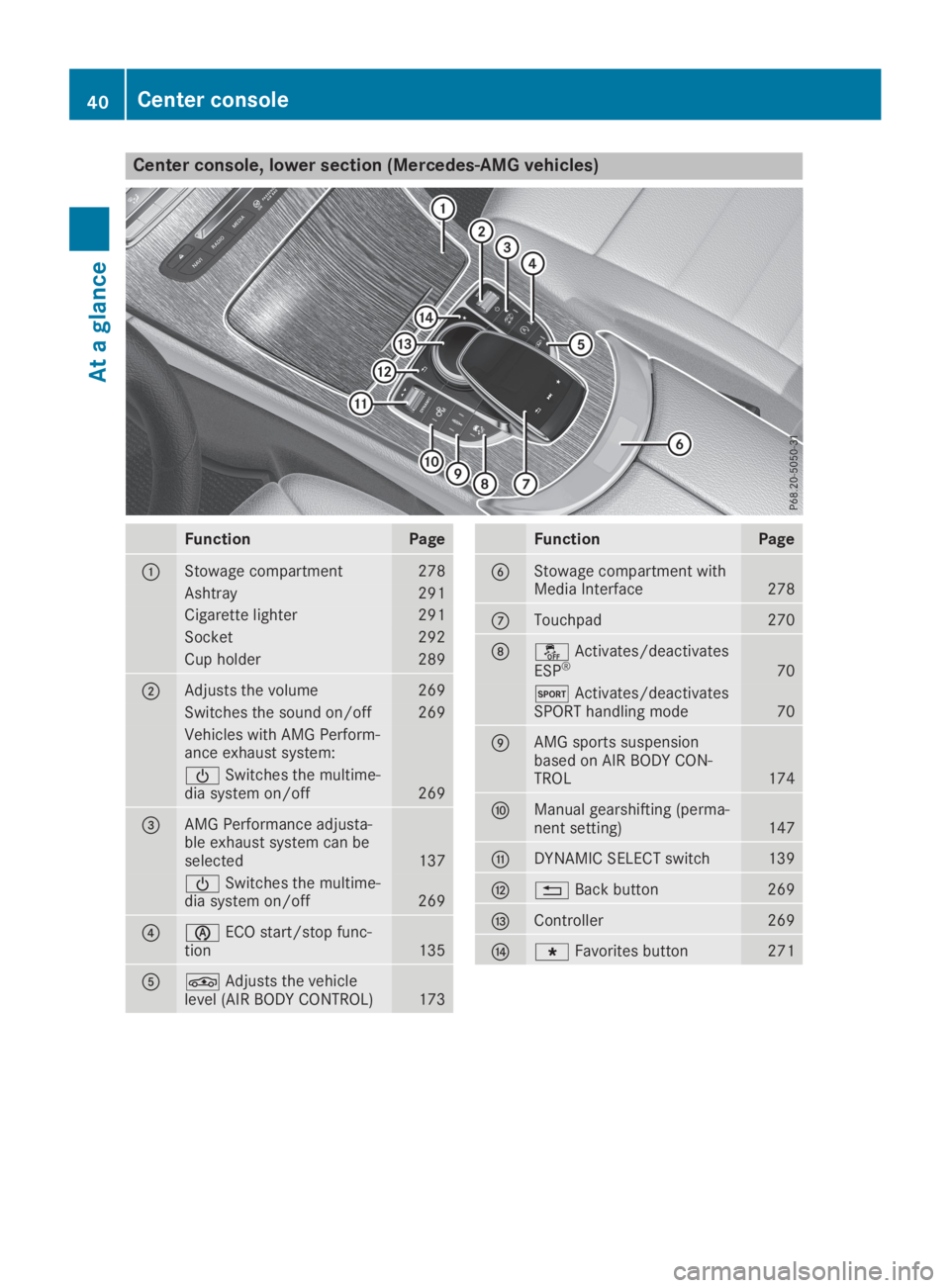
Center console, lower section (Mercedes-AMG vehicles)
FunctionPage
CStowage compartment278
Ashtray291
Cigarette lighter291
Socket292
Cup holder289
DAdjusts the volume269
Switches the sound on/off269
Vehicles with AMG Perform-ance exhaust system:
Page 43 of 370
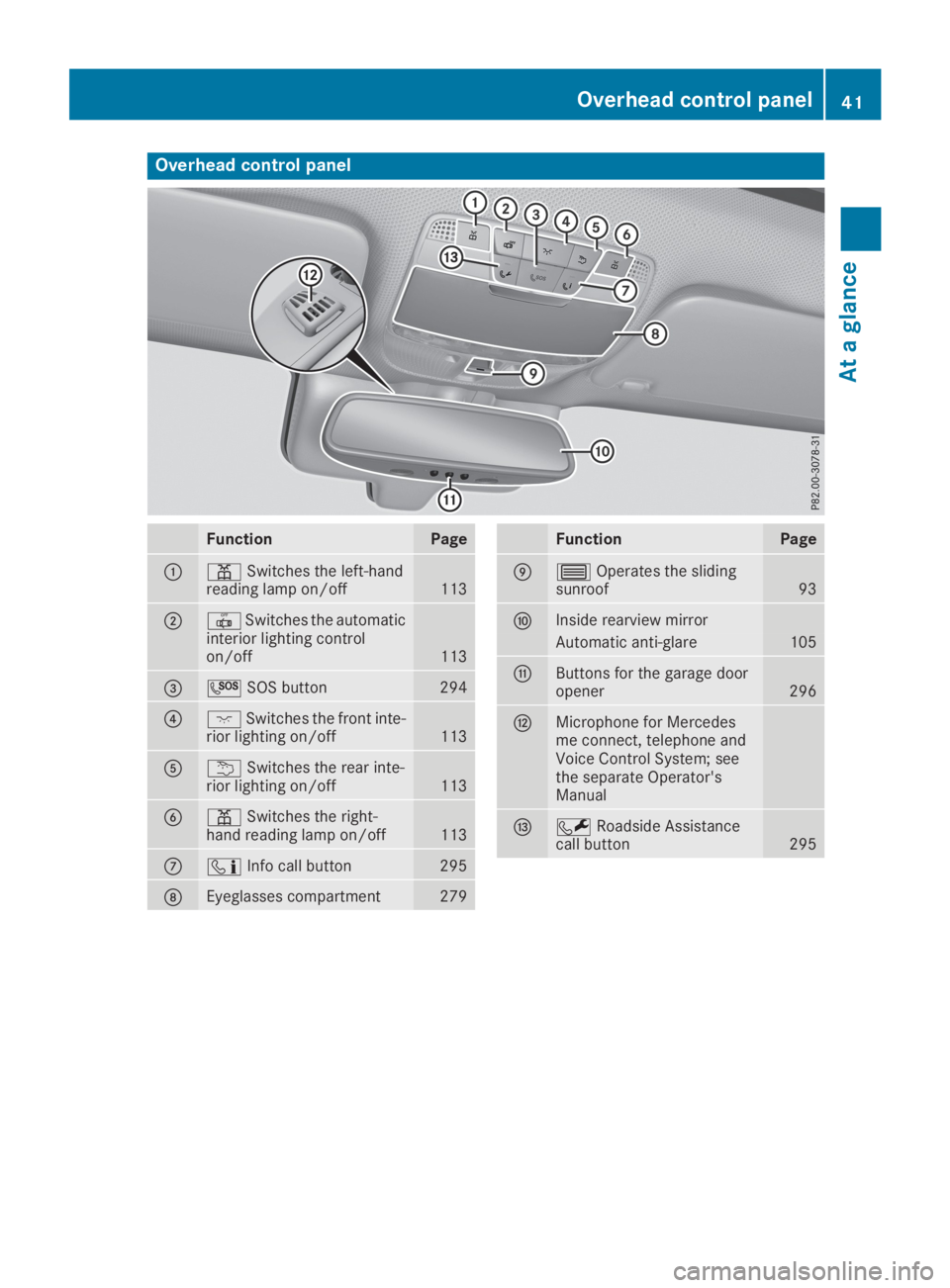
Overhead control panel
FunctionPage
C=Switches the left-handreading lamp on/off113
D3Switches the automaticinterior lighting controlon/off113
Page 46 of 370
Restraint system warning lamp
The functions of the restraint system arechecked after the ignition is switched on and atregular intervals while the engine is running.Therefore, malfunctions can be detected ingood time.
Theurestraint system warning lamp on theinstrument cluster lights up when the ignition isswitched on. It goes out no later than a few sec-onds after the vehicle is started. The compo-nents of the restraint system are in operationalreadiness.
A malfunction has occurred if theurestraintsystem warning lamp:
Rdoes not light up after the ignition is switchedon
Rdoes not go out after a few seconds with theengine running
Rlights up again while the engine is running
GWARNING
If the restraint system is malfunctioning,
restraint system components may be trig-
gered unintentionally or may not deploy as
intended during an accident. This can affect
for example the Emergency Tensioning
Device or the air bag. This poses an increased
risk of injury or even fatal injury.
Have the restraint system checked and
repaired in a qualified specialist workshop as
soon as possible.
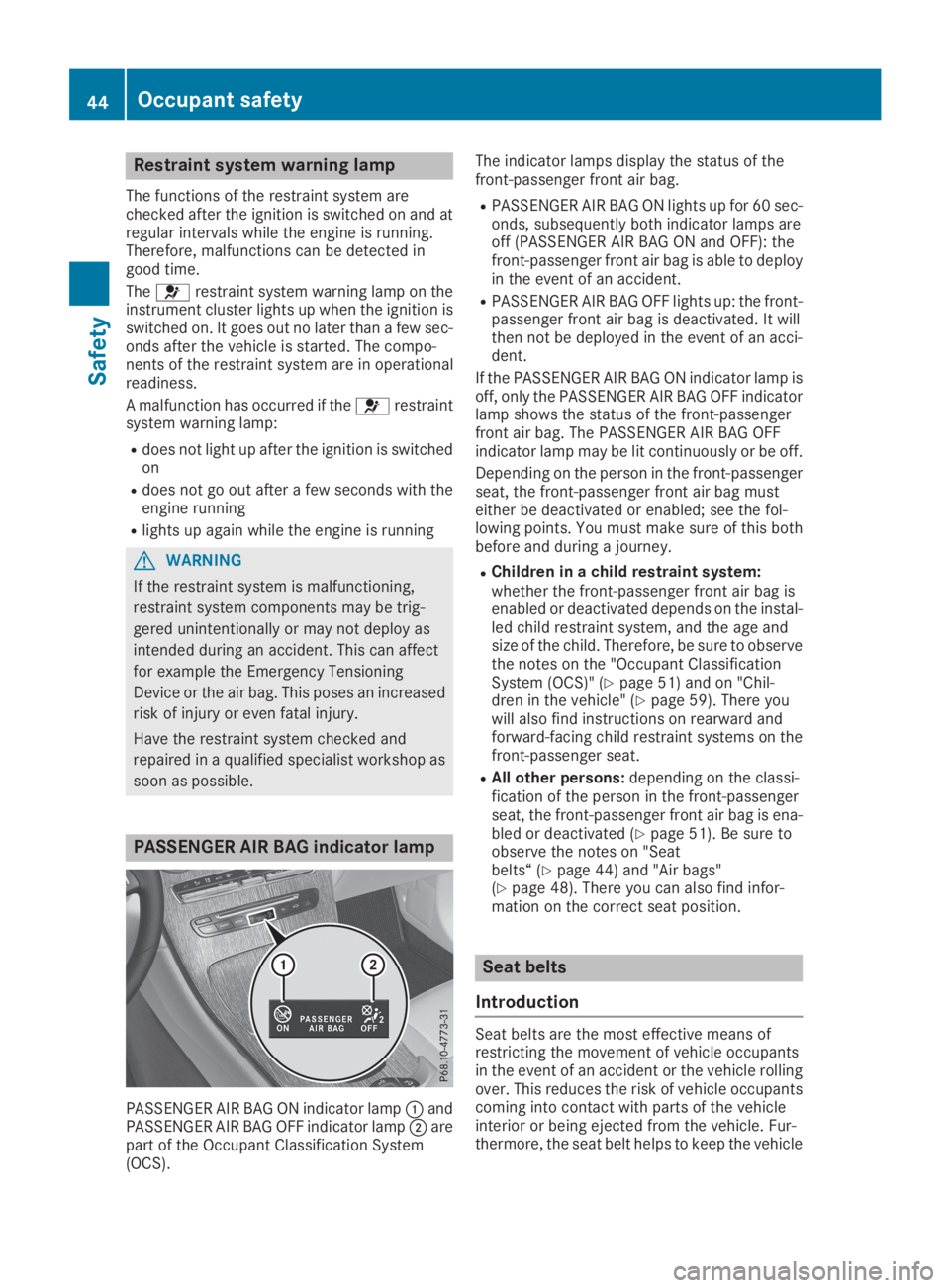
PASSENGER AIR BAG indicator lamp
PASSENGER AIR BAG ON indicator lampCandPASSENGER AIR BAG OFF indicator lampDarepart of the Occupant Classification System(OCS).
The indicator lamps display the status of thefront-passenger front air bag.
RPASSENGER AIR BAG ON lights up for 60 sec-onds, subsequently both indicator lamps areoff (PASSENGER AIR BAG ON and OFF): thefront-passenger front air bag is able to deployin the event of an accident.
RPASSENGER AIR BAG OFF lights up: the front-passenger front air bag is deactivated. It willthen not be deployed in the event of an acci-dent.
If the PASSENGER AIR BAG ON indicator lamp isoff, only the PASSENGER AIR BAG OFF indicatorlamp shows the status of the front-passengerfront air bag. The PASSENGER AIR BAG OFFindicator lamp may be lit continuously or be off.
Depending on the person in the front-passengerseat, the front-passenger front air bag musteither be deactivated or enabled; see the fol-lowing points. You must make sure of this bothbefore and during a journey.
RChildren in a child restraint system:whether the front-passenger front air bag isenabled or deactivated depends on the instal-led child restraint system, and the age andsize of the child. Therefore, be sure to observethe notes on the "Occupant ClassificationSystem (OCS)" (Ypage 51) and on "Chil-dren in the vehicle" (Ypage 59). There youwill also find instructions on rearward andforward-facing child restraint systems on thefront-passenger seat.
RAll other persons:depending on the classi-fication of the person in the front-passengerseat, the front-passenger front air bag is ena-bled or deactivated (Ypage 51). Be sure toobserve the notes on "Seatbelts“ (Ypage 44) and "Air bags"(Ypage 48). There you can also find infor-mation on the correct seat position.
Seat belts
Introduction
Seat belts are the most effective means ofrestricting the movement of vehicle occupantsin the event of an accident or the vehicle rollingover. This reduces the risk of vehicle occupantscoming into contact with parts of the vehicleinterior or being ejected from the vehicle. Fur-thermore, the seat belt helps to keep the vehicle
44Occupant safety
Safety
Page 50 of 370
The seat belt adjustment will apply a certaintightening force if any slack is detected betweenthe vehicle occupant and the seat belt. Do notgrab hold of the seat belt.
You can switch the seat belt adjustment on andoff using the multimedia system. Information onswitching the seat belt adjustment on and offcan be found in the Digital Operating Instruc-tions.
Belt warning for the driver and front
passenger
Thevseat belt warning lamp in the instru-ment cluster is a reminder that all vehicle occu-pants must wear their seat belts. It may light upcontinuously or flash. In addition, there may bea warning tone.
Regardless of whether the driver's seat belt hasalready been fastened, thevseat belt warn-ing lamp lights up for six seconds each time theengine is started. If the front doors are closedand the driver's or front-passenger seat belt hasnot been fastened, thevseat belt warninglamp lights up again after the six seconds. Assoon as the driver's and front-passenger seatbelts are fastened or a front door is openedagain, thevseat belt warning lamp goes out.
If the driver's seat belt is not fastened after theengine is started, an additional warning tone willsound. The warning tone switches off after sixseconds or once the driver's seat belt is fas-tened.
If the vehicle's speed exceeds 15 mph(25 km/h)once and the driver's and front-passenger seat belts are not fastened, a warningtone sounds. A warning tone also sounds withincreasing intensity for 60 seconds or until thedriver or front passenger have fastened theirseat belts.
If the driver or front passenger unfasten theirseat belts during the journey, the seat belt warn-ing is activated again.
Air bags
Introduction
The installation point of an air bag can be rec-ognized by the AIRBAG marking.
An air bag complements the correctly fastenedseat belt. It is no substitute for the seat belt. The
air bag provides additional protection in appli-cable accident situations.
Not all air bags are deployed in an accident. Thedifferent air bag systems function independ-ently from one another (Ypage 55).
However, no system available today can com-pletely eliminate injuries and fatalities.
It is also not possible to rule out a risk of injurycaused by an air bag due to the high speed atwhich the air bag must be deployed.
Important safety notes
GWARNING
If you do not sit in the correct seat position,
the air bag cannot protect as intended and
could even cause additional injury when
deployed. This poses an increased risk of
injury or even fatal injury.
To avoid hazardous situations, always make
sure that all of the vehicle's occupants:
Rhave fastened their seat belts correctly,
including pregnant women
Rare sitting correctly and maintain the great-
est possible distance to the air bags
Rfollow the following instructions
Always make sure that there are no objects
between the air bag and the vehicle's occu-
pants.
RAdjust the seats properly before beginningyour journey. Always make sure that the seatis in an almost upright position. The center ofthe head restraint must support the head atabout eye level.
RMove the driver's and front-passenger seatsas far back as possible. The driver's seat posi-tion must allow the vehicle to be driven safely.
ROnly hold the steering wheel on the outside.This allows the air bag to be fully deployed.
RAlways lean against the backrest while driv-ing. Do not lean forward or lean against thedoor or side window. You may otherwise be inthe deployment area of the air bags.
RAlways keep your feet in the footwell in frontof the seat. Do not put your feet on the dash-
48Occupant safety
Safety
Page 53 of 370
Window curtain air bagsCare integrated intothe side of the roof frame and deployed in thearea from the A-pillar to the C-pillar.
When deployed, the window curtain air bagenhances the level of protection for the head.However, it does not protect the chest or arms.
If the restraint system control unit detects a sideimpact, the window curtain air bag is deployedon the side on which the impact occurs.
If the system determines that they can offeradditional protection to that provided by theseat belt, a window curtain air bag may bedeployed in other accident situations(Ypage 55).
Occupant Classification System
(OCS)
Introduction
The Occupant Classification System (OCS) cat-egorizes the person in the front-passenger seat.Depending on that result, the front-passengerfront air bag is either enabled or deactivated.
The system does not deactivate:
Rthe side impact air bag
Rthe window curtain air bag
Rthe Emergency Tensioning Devices
Requirements
To be classified correctly, the front passengermust sit:
Rwith the seat belt fastened correctly
Rin an almost upright position with their backagainst the seat backrest
Rwith their feet resting on the floor, if possible
If the front passenger does not observe theseconditions, OCS may produce a false classifica-tion, e.g. because the front passenger:
Rtransfers their weight by supporting them-selves on a vehicle armrest
Rsits in such a way that their weight is raisedfrom the seat cushion
If it is absolutely necessary to install a childrestraint system on the front-passenger seat, besure to observe the correct positioning of thechild restraint system. Never place objectsunder or behind the child restraint system, e.g. acushion. Fully retract the seat cushion length.The entire base of the child restraint system
must always rest on the seat cushion of thefront-passenger seat. The backrest of theforward-facing child restraint system must lie asflat as possible against the backrest of the front-passenger seat.
The child restraint system must not touch theroof or be subjected to a load by the headrestraint. Adjust the angle of the seat backrestand the head restraint position accordingly.
Only then can OCS be guaranteed to functioncorrectly. Always observe the child restraint sys-tem manufacturer's installation and operatinginstructions.
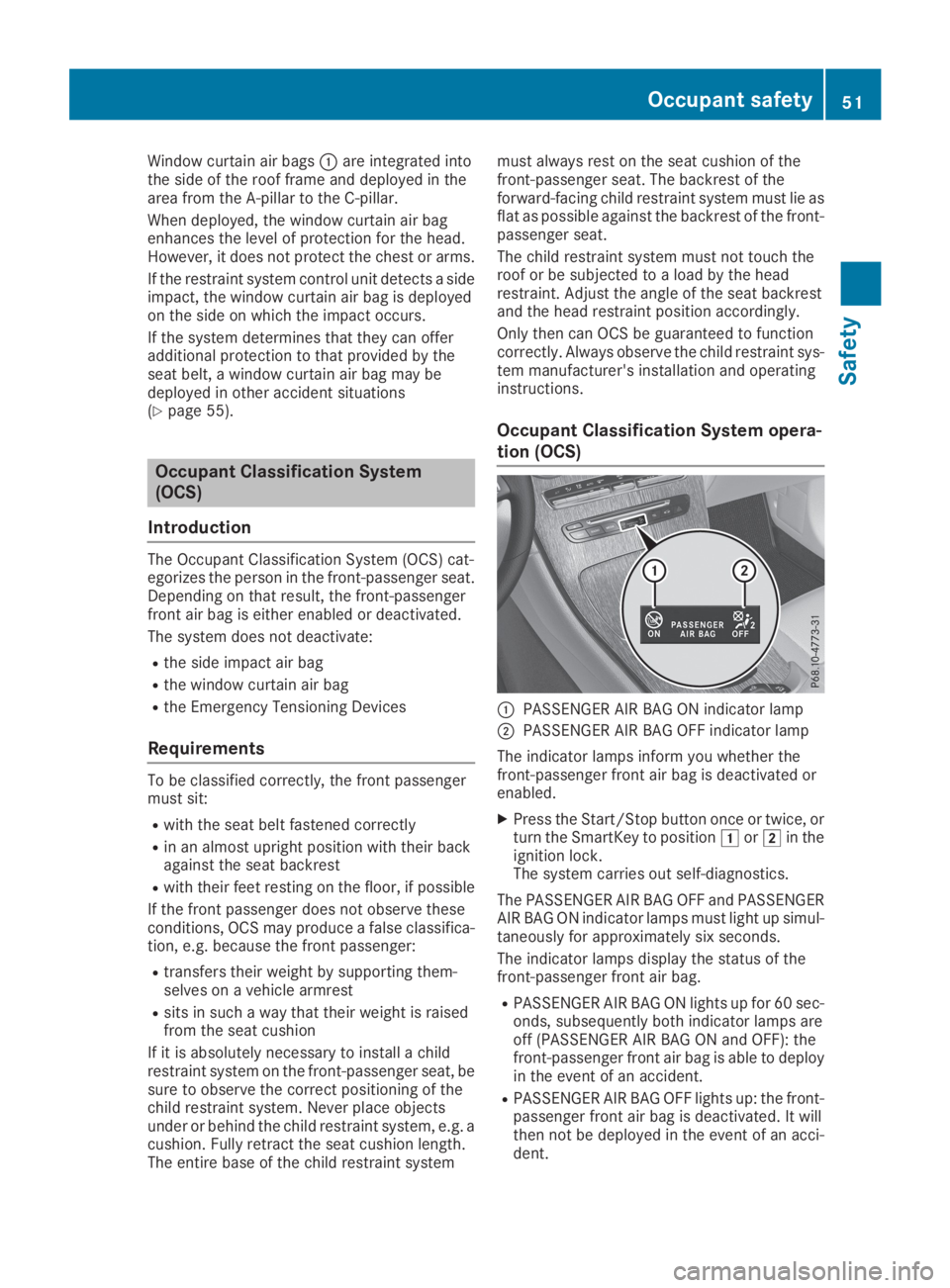
Occupant Classification System opera-
tion (OCS)
CPASSENGER AIR BAG ON indicator lamp
DPASSENGER AIR BAG OFF indicator lamp
The indicator lamps inform you whether thefront-passenger front air bag is deactivated orenabled.
XPress the Start/Stop button once or twice, orturn the SmartKey to positionGorHin theignition lock.The system carries out self-diagnostics.
The PASSENGER AIR BAG OFF and PASSENGERAIR BAG ON indicator lamps must light up simul-taneously for approximately six seconds.
The indicator lamps display the status of thefront-passenger front air bag.
RPASSENGER AIR BAG ON lights up for 60 sec-onds, subsequently both indicator lamps areoff (PASSENGER AIR BAG ON and OFF): thefront-passenger front air bag is able to deployin the event of an accident.
RPASSENGER AIR BAG OFF lights up: the front-passenger front air bag is deactivated. It willthen not be deployed in the event of an acci-dent.
Occupant safety51
Safety
Z
Page 54 of 370
If the PASSENGER AIR BAG ON indicator lamp isoff, only the PASSENGER AIR BAG OFF indicatorlamp shows the status of the front-passengerfront air bag. The PASSENGER AIR BAG OFFindicator lamp may be lit continuously or be off.
If the status of the front-passenger front air bagchanges while the vehicle is in motion, an air bagdisplay message appears in the instrument clus-ter (Ypage 237). When the front-passengerseat is occupied, always pay attention to thePASSENGER AIR BAG OFF indicator lamp. Beaware of the status of the front-passenger frontair bag both before and during the journey.
GWARNING
If the PASSENGER AIR BAG OFF indicator
lamp is lit, the front-passenger front air bag is
disabled. It will not be deployed in the event of
an accident and cannot perform its intended
protective function. A person in the front-
passenger seat could then, for example, come
into contact with the vehicle's interior, espe-
cially if the person is sitting too close to the
dashboard. This poses an increased risk of
injury or even fatal injury.
When the front-passenger seat is occupied,
always ensure that:
Rthe classification of the person in the front-
passenger seat is correct and the front-
passenger front air bag is enabled or disa-
bled in accordance with the person in the
front-passenger seat
Rthe front-passenger seat has been moved
back as far back as possible.
Rthe person is seated correctly.
Make sure, both before and during the jour-
ney, that the status of the front-passenger
front air bag is correct.
GWARNING
If you secure a child in a rearward-facing child
restraint system on the front-passenger seat
and the PASSENGER AIR BAG OFF indicator
lamp is off, the front-passenger front air bag
can deploy in the event of an accident. The
child could be struck by the air bag. This poses
an increased risk of injury or even fatal injury.
Make sure that the front-passenger front air
bag has been deactivated. The PASSENGER
AIR BAG OFF indicator lamp must be lit.
NEVER use a rearward-facing child restraint
on a seat protected by an ACTIVE FRONT AIR-
BAG in front of it; DEATH or SERIOUS INJURY
to the child can occur.
If the PASSENGER AIR BAG OFF indicator lampstays off, do not install a rearward-facing childrestraint system on the front-passenger seat.You can find more information on OCS under"Problems with the Occupant Classification Sys-tem" (Ypage 54).
GWARNING
If you secure a child in a forward-facing child
restraint system on the front-passenger seat
and you position the front-passenger seat too
close to the dashboard, in the event of an
accident, the child could:
Rcome into contact with the vehicle's inte-
rior if the PASSENGER AIR BAG OFF indi-
cator lamp is lit, for example
Rbe struck by the air bag if the PASSENGER
AIR BAG OFF indicator lamp is off
This poses an increased risk of injury or even
fatal injury.
Always move the front-passenger seat as far
back as possible and fully retract the seat
cushion length. Always make sure that the
shoulder belt strap is correctly routed from
the vehicle belt sash guide to the shoulder
belt guide on the child restraint system. The
shoulder belt strap must be routed forwards
and downwards from the vehicle belt sash
guide. If necessary, adjust the vehicle belt
sash guide and the front-passenger seat
accordingly. Always observe the child
restraint system manufacturer's installation
instructions.
If OCS determines that:
RThe front-passenger seat is unoccupied, thePASSENGER AIR BAG OFF indicator lamplights up after the system self-test and
52Occupant safety
Safety
Page 55 of 370
remains lit. This indicates that the front-passenger front air bag is deactivated.
RThe front-passenger seat is occupied by achild of up to twelve months old, in a standardchild restraint system, the PASSENGER AIRBAG OFF indicator lamp lights up after thesystem self-test and remains lit. This indi-cates that the front-passenger front air bag isdeactivated.
But even in the case of a twelve-month-oldchild, in a standard child restraint system, thePASSENGER AIR BAG OFF indicator lamp cango out after the system self-test. This indi-cates that the front-passenger front air bag isactivated. The result of the classification isdependent on, among other factors, the childrestraint system and the child's stature. It isrecommended that you install the childrestraint system on a suitable rear seat.
RThe front-passenger seat is occupied by aperson of smaller stature (e.g. a teenager orsmall adult), the PASSENGER AIR BAG OFFindicator lamp lights up and remains lit afterthe system self-test depending on the resultof the classification or, alternatively, goes out.
-If the PASSENGER AIR BAG OFF indicatorlamp is off, move the front-passenger seatas far back as possible. Alternatively, a per-son of smaller stature can sit on a rear seat.
-If the PASSENGER AIR BAG OFF indicatorlamp is lit, a person of smaller statureshould not use the front-passenger seat.
RThe front-passenger seat is occupied by anadult or a person of adult stature, thePASSENGER AIR BAG OFF indicator lampgoes out after the system self-test. This indi-cates that the front-passenger front air bag isactivated.
If children are traveling in the vehicle, be sure toobserve the notes on "Children in the vehicle"(Ypage 59).
When the Occupant Classification System(OCS) is malfunctioning, the redurestraintsystem warning lamp on the instrument clusterand the PASSENGER AIR BAG OFF indicatorlamp light up simultaneously. The front-passenger front air bag is deactivated in thiscase and does not deploy during an accident.Have the Occupant Classification System (OCS)checked and repaired immediately at a qualifiedspecialist workshop. Mercedes-Benz recom-mends that you use an authorized Mercedes-Benz Center for this purpose.
If the front-passenger seat, the seat cover or theseat cushion are damaged, have the necessaryrepair work carried out at a qualified specialistworkshop. Mercedes-Benz recommends thatyou use an authorized Mercedes-Benz Centerfor this purpose.
For safety reasons, Mercedes-Benz recom-mends that you only use seat accessories thathave been approved by Mercedes-Benz.
If the driver's air bag deploys, this does notmean that the front-passenger front air bag willalso deploy. The Occupant Classification Sys-tem (OCS) categorizes the occupant on thefront-passenger seat. Depending on that result,the front-passenger front air bag is either ena-bled or deactivated.
Self-check
GDANGER
If the PASSENGER AIR BAG OFF and
PASSENGER AIR BAG ON indicator lamps do
not both light up during the self-test, the sys-
tem is malfunctioning. The front-passenger
front air bag might be triggered unintention-
ally or might not be triggered at all in the event
of an accident with high deceleration. This
poses an increased risk of injury or even fatal
injury.
In this case the front-passenger seat may not
be used. Do not install a child restraint system
on the front-passenger seat. Have the Occu-
pant Classification System (OCS) checked
and repaired immediately at a qualified spe-
cialist workshop.
GWARNING
If the PASSENGER AIR BAG OFF indicator
lamp remains lit after the self-test, the front-
passenger front air bag is deactivated. It will
not be deployed in the event of an accident. In
this case, the front-passenger front air bag
cannot perform its intended protective func-
tion, e.g. when a person is seated in the front-
passenger seat.
That person could, for example, come into
contact with the vehicle's interior, especially
if the person is sitting too close to the dash-
Occupant safety53
Safety
Z