phone MERCEDES-BENZ GLC-Class 2016 X253 Comand Manual
[x] Cancel search | Manufacturer: MERCEDES-BENZ, Model Year: 2016, Model line: GLC-Class, Model: MERCEDES-BENZ GLC-Class 2016 X253Pages: 222, PDF Size: 6.39 MB
Page 15 of 222
Downloading manually ................... 137
Editing text templates .................... 141
Inbox .............................................. 138
Reading .......................................... 138
Reading aloud ................................ 139
Settings ......................................... 136
Storing sender in address book ..... 142
Storing the sender as a new
address book entry ........................ 142
Using a phone number in the text .. 142
Using text templates ...................... 141
Writing ........................................... 139
Time
Setting ............................................. 40
Setting summer/standard time ....... 40
Setting the format ............................ 41
Setting the time ............................... 40
Setting the time zone ....................... 39
Setting the time/date format .......... 41
Switching automatic time on/off ..... 39
Touchpad
Calling up quick access for audio
and telephone .................................. 25
Changing the input language for
handwriting recognition ................... 28
Changing the station/music
track ................................................ 29
Character suggestions ..................... 27
Deleting characters ......................... 28
Entering a space .............................. 27
Entering characters ......................... 27
Gesture control ................................ 25
Handwriting recognition ................... 27
Operating the touchpad ................... 25
Overview .......................................... 24
Quick access for audio and tele-
phone .............................................. 29
Switching ......................................... 25
Switching input line ......................... 28
Track
Selecting (CD, DVD, MP3) .............. 184
Traffic reports
Calling up a list ................................ 91
Real-time traffic report .................... 92
U
Updating the digital map .................. 102USB audio mode
Selecting a track ............................ 184
USB devices
Connecting to the Media Inter-
face ............................................... 182
see Audio CD/DVD and MP3 mode
V
Vehicle settingsCalling up ......................................... 50
Video
see Video DVD
Video DVD
Control option ................................ 201
DVD menu ..................................... 204
DVD's control menu ...................... 203
Full-screen mode ........................... 202
Function restrictions ...................... 202
Menu options ................................. 202
Notes on discs ............................... 201
Overview ........................................ 202
Overview of DVD functions ............ 204
Pause function ............................... 205
Picture settings .............................. 202
Playing conditions .......................... 201
Safety notes .................................. 200
Selecting a scene/chapter ............ 205
Stop function ................................. 205
Switching to ................................... 202
Video menu ................................... 203
Voice Control System
Settings ........................................... 41
see Voice Control System
Volume, adjusting
Navigation messages ....................... 29
W
Weather map (SIRIUS)Activating/deactivating display
levels ............................................. 216
Calling up ....................................... 215
Legend ........................................... 219
Moving ........................................... 215
Showing/hiding the menu ............. 216
Storm overview .............................. 220
Storm watch areas ......................... 219
Time stamp .................................... 219
Index13
Page 23 of 222
RNavigation system
-Navigation via the hard drive
-Destination entry using keyword search
-Realistic 3D map with textured city mod-
els
-Personal POIs and routes using SD mem-
ory card
-Navigation functions, e.g. Drive Informa-
tion
-Dynamic route guidance with traffic
reports via SIRIUS satellite radio
RCommunication
-Messaging functions (text messages,
email)
-Address book
-Internet browser
-Mercedes-Benz Apps with Google Local
Search™, destination/route download,
Facebook, Google Street View™, stock
prices, news and much more
-Mercedes-Benz Mobile Website
-WiFi interface for the connection of a
smartphone to COMAND
-WiFi hotspot functionality to connect a
tablet PC or laptop in order to enable
access to the Internet using the custom-er's mobile phone
RSIRIUS Weather
-Weather data as an information chart
(current forecast, 5-day preview,
detailed information)
-Weather data on the weather map, e.g.
rain radar data, storm characteristics
and the track of tropical cyclones (hurri-
canes, typhoons)
RVehicle functions
-Vehicle settings, such as ambient light-
ing, belt adjustment and tow-away alarm
-360° camera
-Rear view camera
-Climate control functions, such as cli-
mate mode, perfume atomizer and aux-
iliary heating
-DYNAMIC SELECT (individual drive pro-
gram)
RFavorites button
Fast access to favorites functions using the
favorites button on the controller or on the
touchpad
Display
General notes
!Avoid any direct contact with the display
surface. Pressure on the display surface
may result in impairments to the display,
which could be irreversible.
Wearing polarized sunglasses may impair
your ability to read the display.
The display has an automatic temperature-
controlled switch-off feature. The brightness
is automatically reduced if the temperature is
too high. The display may then temporarily
switch off completely.
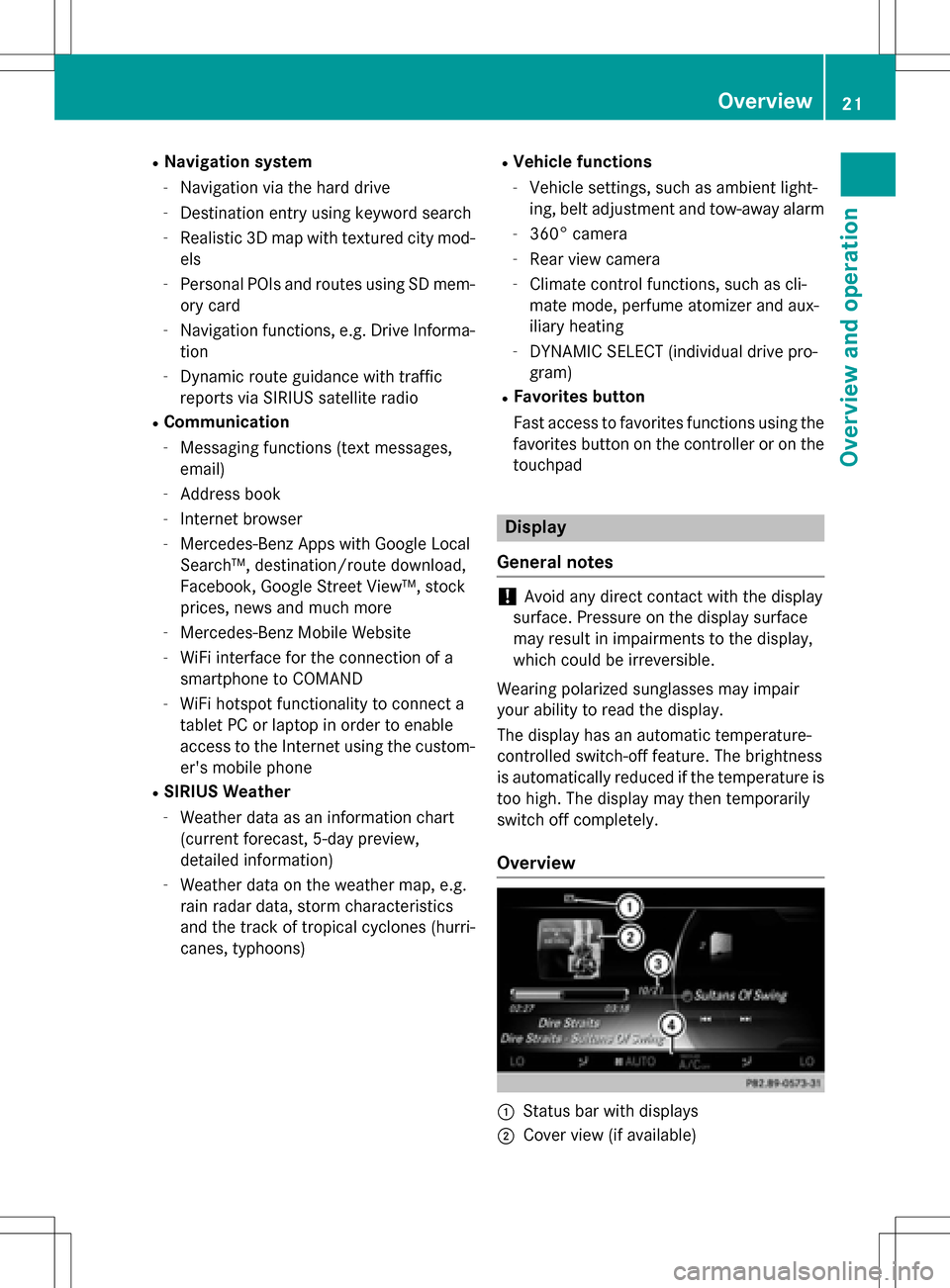
Overview
:Status bar with displays
;Cover view (if available)
Overview21
Overview and operation
Page 25 of 222
Buttons and controller
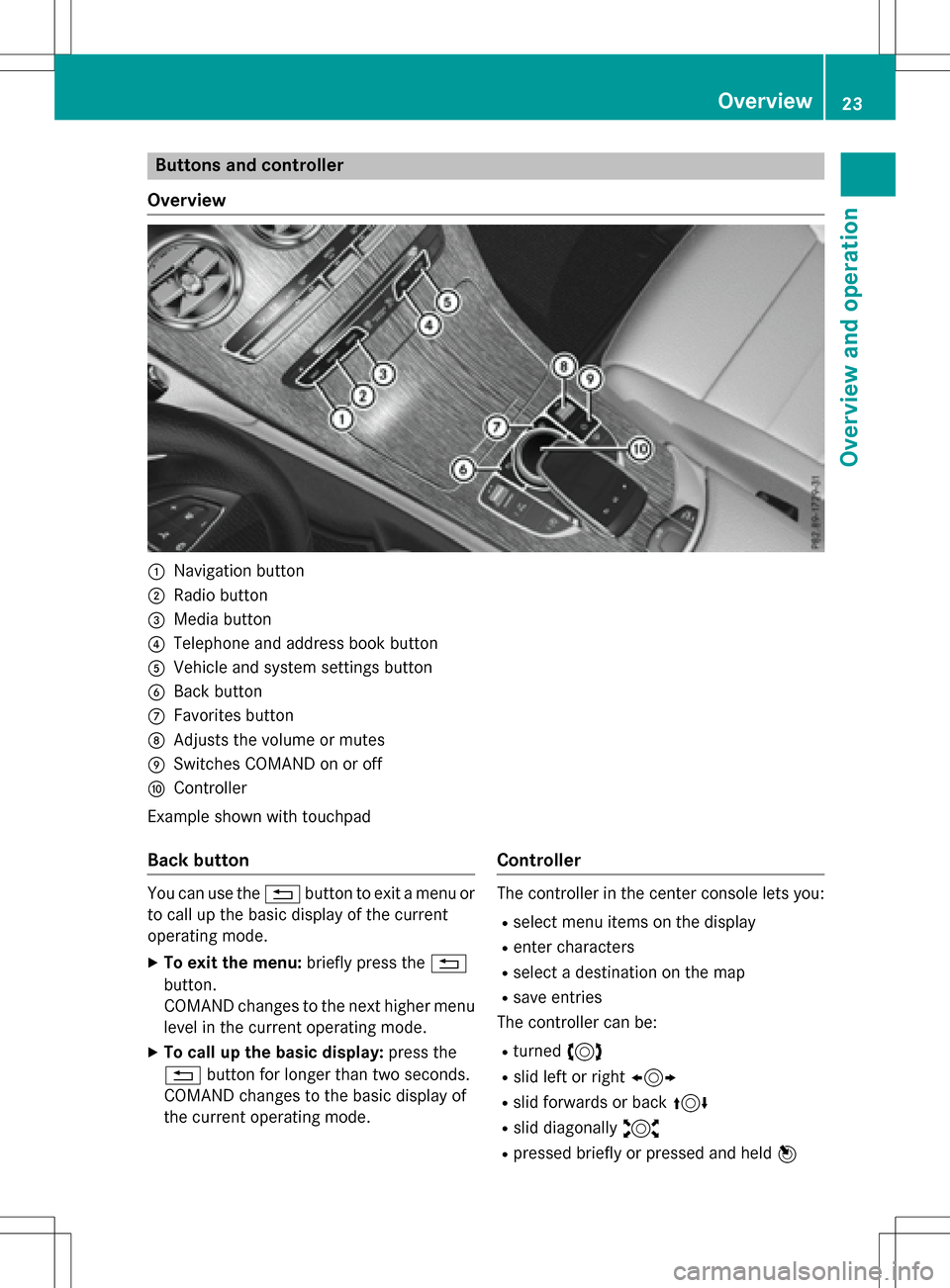
Overview
:Navigation button
;Radio button
=Media button
?Telephone and address book button
AVehicle and system settings button
BBack button
CFavorites button
DAdjusts the volume or mutes
ESwitches COMAND on or off
FController
Example shown with touchpad
Back button
You can use the %button to exit a menu or
to call up the basic display of the current
operating mode.
XTo exit the menu: briefly press the%
button.
COMAND changes to the next higher menu
level in the current operating mode.
XTo call up the basic display: press the
% button for longer than two seconds.
COMAND changes to the basic display of
the current operating mode.
Controller
The controller in the center console lets you:
Rselect menu items on the display
Renter characters
Rselect a destination on the map
Rsave entries
The controller can be:
Rturned 3
Rslid left or right 1
Rslid forwards or back 4
Rslid diagonally2
Rpressed briefly or pressed and held 7
Overview23
Overviewand operation
Page 26 of 222
Favorites button
With the favorites button, you can select, add
oredit favorites.
XPress the favorites button on the controller.
The favorites are displayed.
XTo select a favorite: turn and press the
controller.
Other functions (
Ypage 34).
Touchpad
For COMAND with touchpad: alternatively,
you can use the touchpad to select and enter information (
Ypage 24).
Multifunction steering wheel
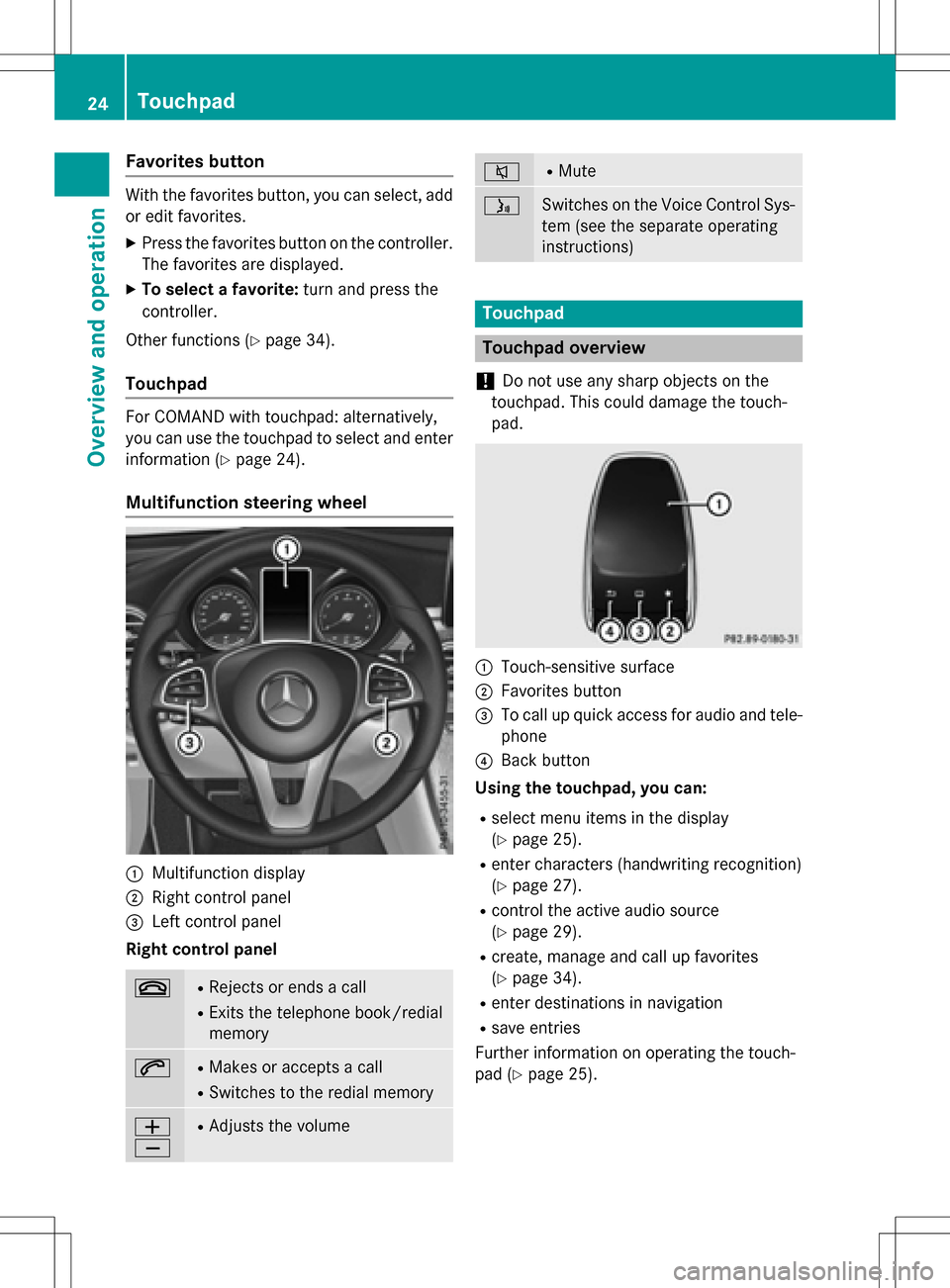
:Multifunction display
;Right control panel
=Left control panel
Right control panel
~RRejects or ends a call
RExits the telephone book/redial
memory
6RMakes or accepts a call
RSwit ches to the redial memory
W
XRAdjusts the volume
8RMute
óSwitches on the Voice Control Sys-
tem (see the separate operating
instructions)
Touchpad
Touchpad overview
!
Do not use any sharp objects on the
touch pad.This could damage the touch-
pad.
:Touch-sensitive surface
;Favorites button
=To call upquick access for audio and tele-
phone
?Back button
Using the touchpad, you can:
Rselect menu items inthe disp lay
(
Ypage 25).
Renter characters (handwriting recognit ion)
(
Ypage 27).
Rcontrol the act iveaudio source
(
Ypage 29).
Rcreate, manage and call up favorites
(
Ypage 34).
Renter destinations innavigation
Rsave entries
Further information on operating the touch-
pad (
Ypage 25).
24Touchpad
Overview and operation
Page 27 of 222
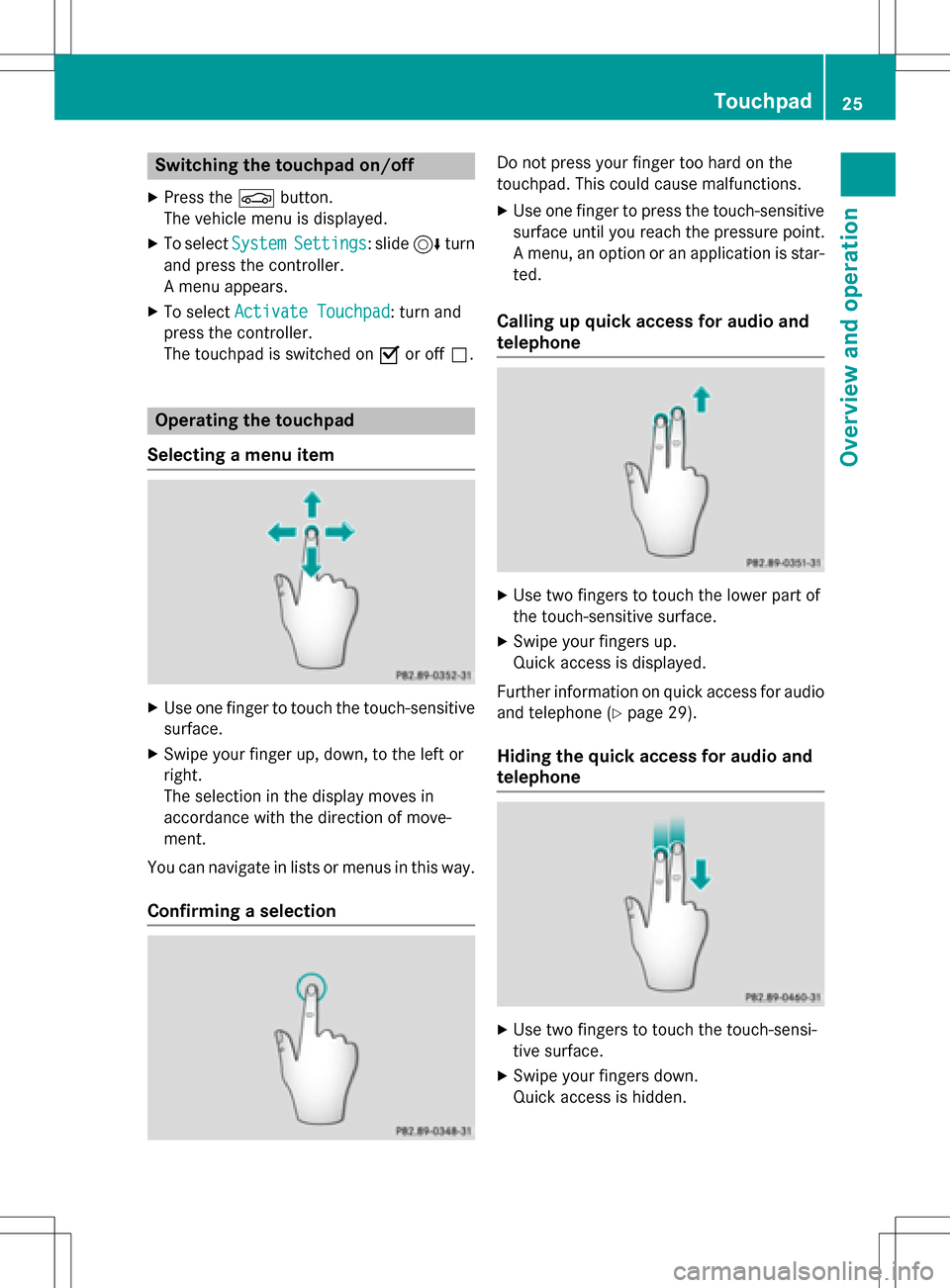
Switching the touchpad on/off
XPress theØbutton.
The vehicle menu is displayed.
XTo select SystemSettings: slide6turn
and press the controller.
A menu appears.
XTo select Activate Touchpad: turn and
press the controller.
The touchpad is switched on Oor off ª.
Operating the touchpad
Selecting a menu item
XUse one finger to touch the touch-sensitive
surface.
XSwipe your finger up, down, to the left or
right.
The selection in the display moves in
accordance with the direction of move-
ment.
You can navigate in lists or menus in this way.
Confirming a selection
Do not press your finger too hard on the
touchpad. This could cause malfunctions.
XUse one finger to press the touch-sensitive
surface until you reach the pressure point.
A menu, an option or an application is star-
ted.
Calling up quick access for audio and
telephone
XUse two fingers to touch the lower part of
the touch-sensitive surface.
XSwipe your fingers up.
Quick access is displayed.
Further information on quick access for audio
and telephone (
Ypage 29).
Hiding the quick access for audio and
telephone
XUse two fingers to touch the touch-sensi-
tive surface.
XSwipe your fingers down.
Quick access is hidden.
Touchpad25
Overview and operation
Page 29 of 222
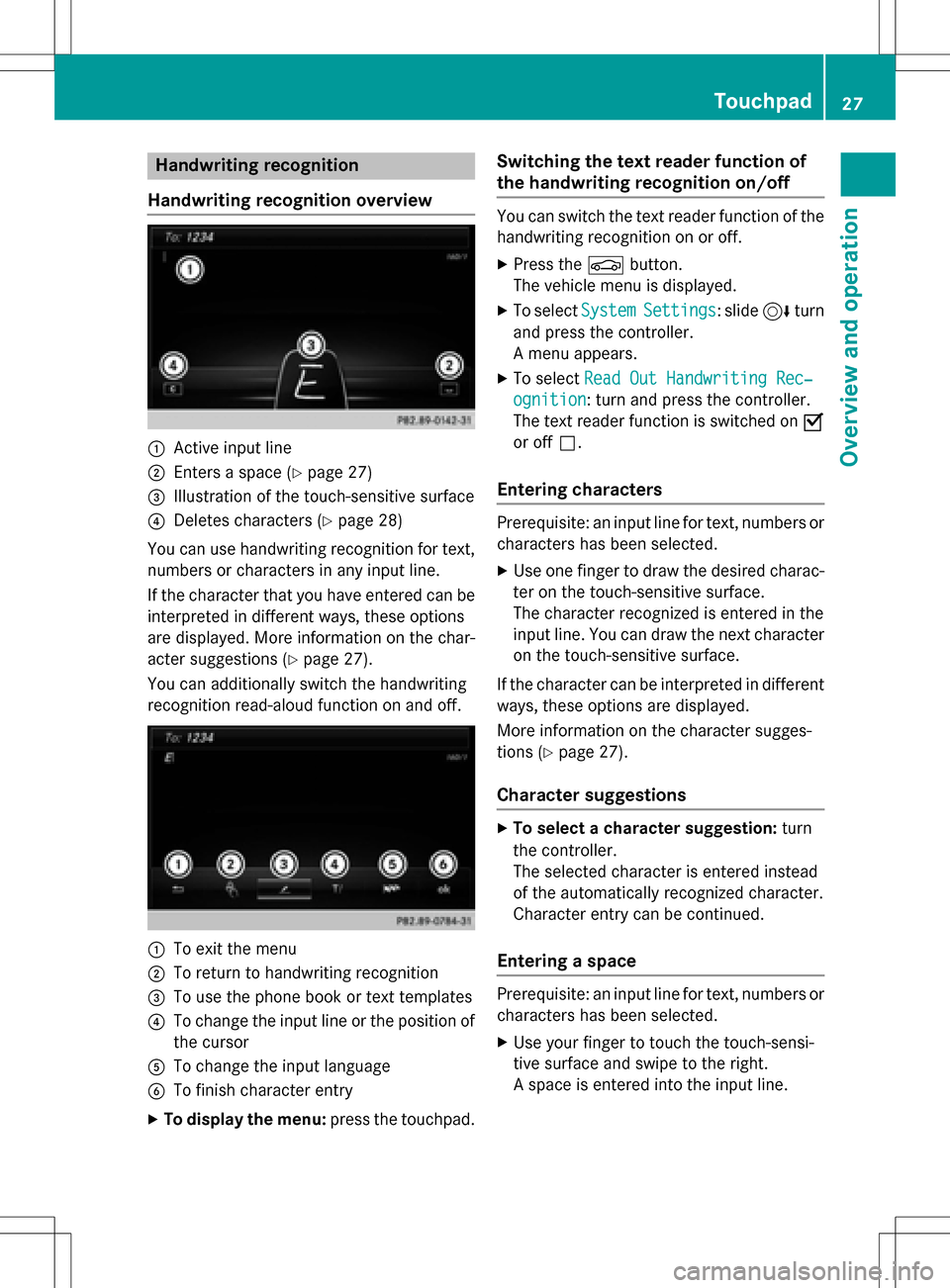
Handwriting recognition
Handwriting recognition overview
:Active input line
;Enters a space (Ypage 27)
=Illustration of the touch-sensitive surface
?Deletes characters (Ypage 28)
You can use handwriting recognition for text,
numbers or characters in any input line.
If the character that you have entered can be
interpreted in different ways, these options
are displayed. More information on the char-
acter suggestions (
Ypage 27).
You can additionally switch the handwriting
recognition read-aloud function on and off.
:To exit the menu
;To return to handwriting recognition
=To use the phone book or text templates
?To change the input line or the position of
the cursor
ATo change the input language
BTo finish character entry
XTo display the menu: press the touchpad.
Switching the text reader function of
the handwriting recognition on/off
You can switch the text reader function of the
handwriting recognition on or off.
XPress theØbutton.
The vehicle menu is displayed.
XTo select SystemSettings: slide6turn
and press the controller.
A menu appears.
XTo select Read Out Handwriting Rec‐
ognition: turn and press the controller.
The text reader function is switched on O
or off ª.
Entering characters
Prerequisite: an input line for text, numbers or
characters has been selected.
XUse one finger to draw the desired charac-
ter on the touch-sensitive surface.
The character recognized is entered in the
input line. You can draw the next character
on the touch-sensitive surface.
If the character can be interpreted in different
ways, these options are displayed.
More information on the character sugges-
tions (
Ypage 27).
Character suggestions
XTo select a character suggestion: turn
the controller.
The selected character is entered instead
of the automatically recognized character.
Character entry can be continued.
Entering a space
Prerequisite: an input line for text, numbers or
characters has been selected.
XUse your finger to touch the touch-sensi-
tive surface and swipe to the right.
A space is entered into the input line.
Touchpad27
Overview and operation
Page 30 of 222
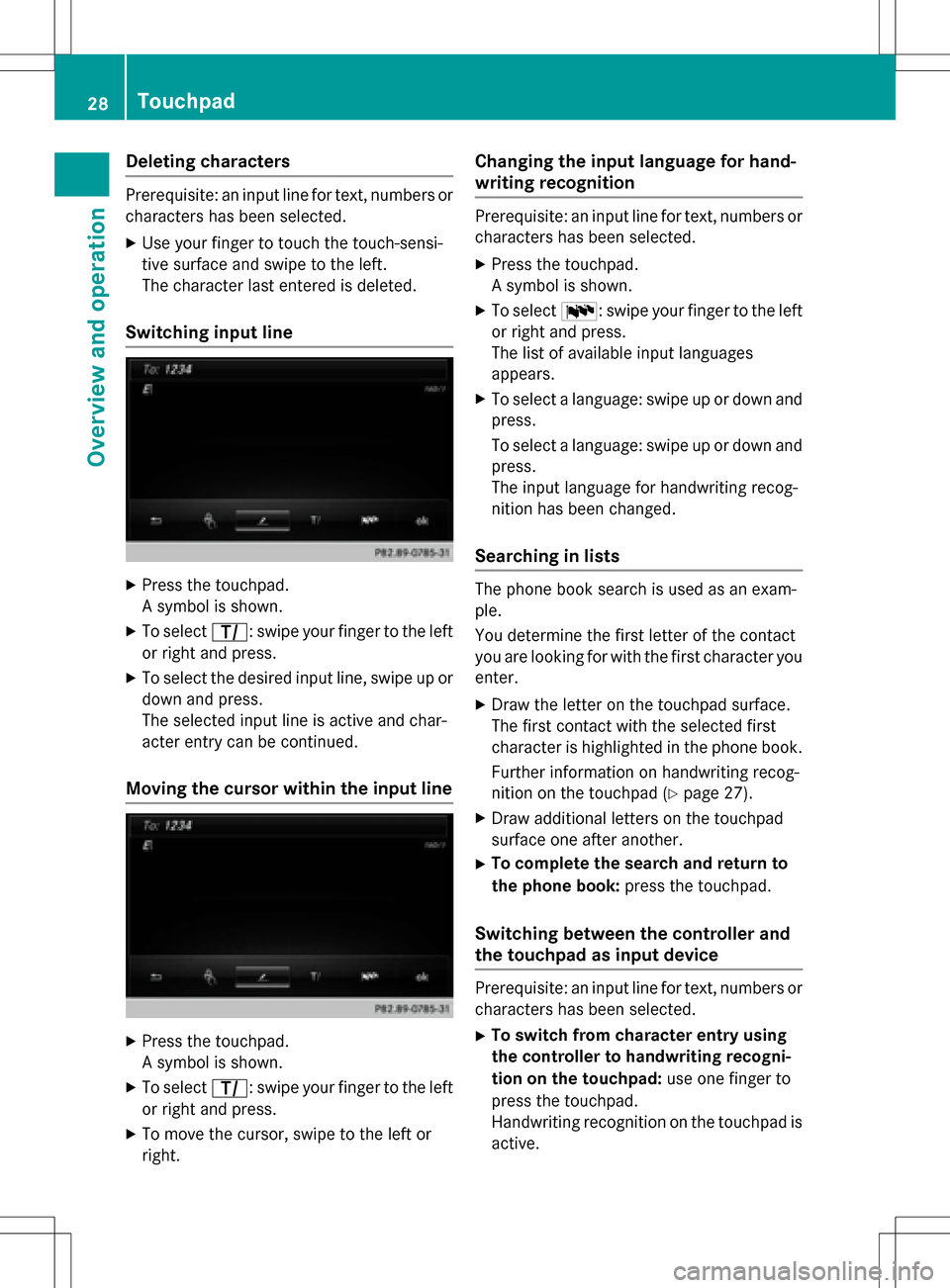
Deleting characters
Prerequisite: an input linefo rtext ,number sor
characters has been selected.
XUse your finger to touch th etouch-sensi-
tive surfac eand swip eto th eleft.
The characte rlast entered is deleted.
Switchin ginput line
XPress th etouchpad.
A symbol is shown .
XTo selectp: swipeyour finger to th elef t
or right and press.
XTo selec tth edesire dinput line, swip eup or
down and press.
The selecte dinput lin eis active and char-
acter entr ycan be continued.
Moving th ecursor within th einput line
XPress th etouchpad.
A symbol is shown .
XTo selectp: swipeyour finger to th elef t
or right and press.
XTo move th ecursor ,swip eto th elef tor
right .
Changin gth einput language for hand -
writing recognition
Prerequisite: an input lin efo rtext ,number sor
characters has been selected.
XPress th etouchpad.
A symbol is shown .
XTo selectB: swipeyour finger to th elef t
or right and press.
The list of available input language s
appears .
XTo selec t alanguage :swip eup or down and
press.
To selec t alanguage :swip eup or down and
press.
The input language fo rhandwritin grecog-
nition has been changed.
Searchin gin list s
The phone boo ksearch is used as an exam-
ple.
You determin eth efirst lette rof th econtact
you are looking fo rwit hth efirst characte ryou
enter.
XDraw th elette ron th etouchpad surface.
The first contact wit hth eselecte dfirst
characte ris highlighted in th ephone book.
Further information on handwritin grecog-
nition on th etouchpad (
Ypage 27).
XDraw additional letters on th etouchpad
surfac eon eafter another.
XTo complet eth esearc han dreturn to
th ephone book :press th etouchpad.
Switchin gbetween th econtroller an d
th etouchpa das input device
Prerequisite: an input lin efo rtext ,number sor
characters has been selected.
XTo switch from characte rentry using
th econtroller to handwriting recogni -
tion on th etouchpad: use onefinger to
press th etouchpad.
Handwritin grecognition on th etouchpad is
active .
28Touchpad
Overview and operation
Page 31 of 222
XTo switch from handwriting recognition
on the touchpad to character entry
using the controller:press the controller.
Character entry using the controller is
active.
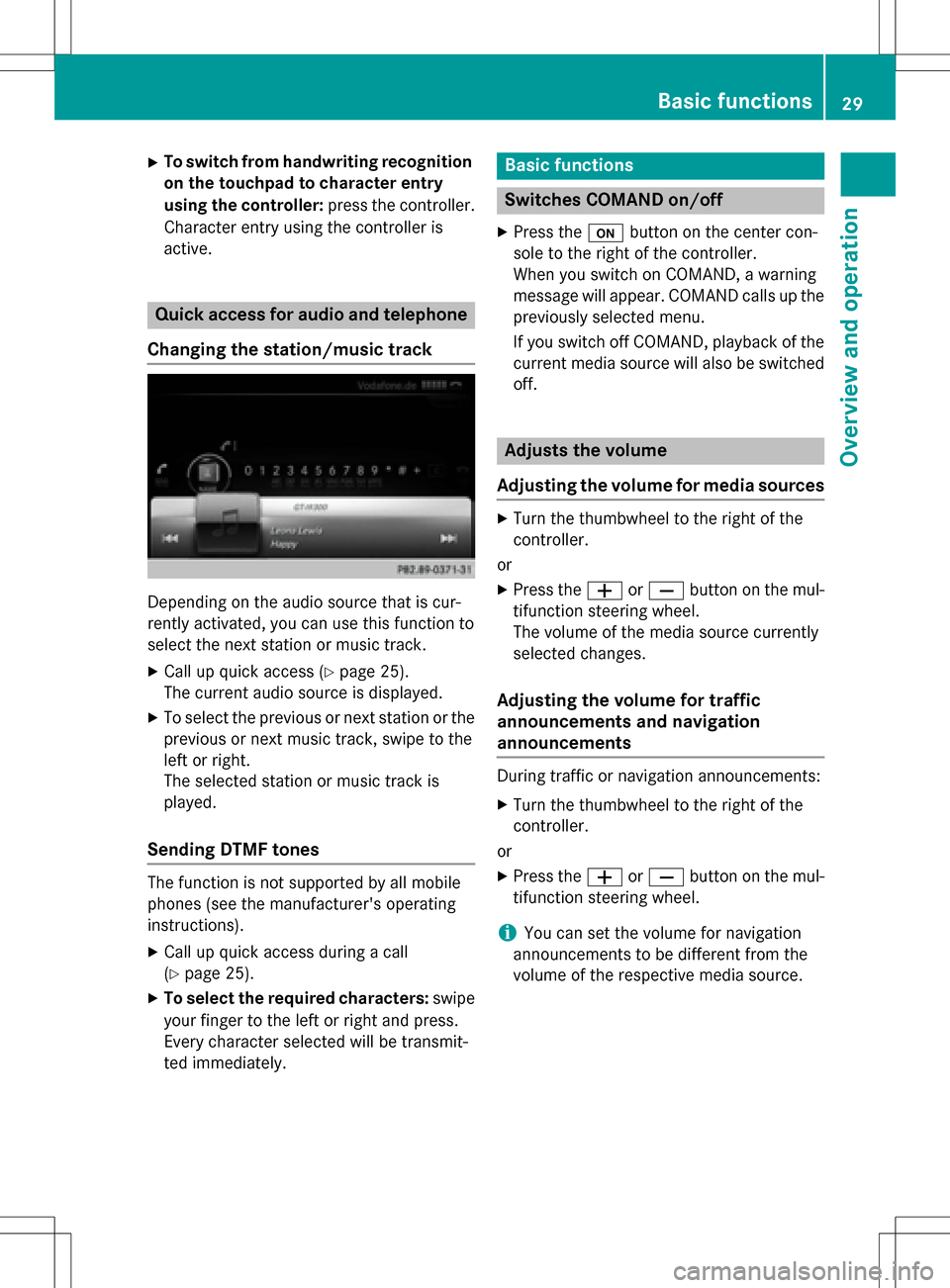
Quick access for audio and telephone
Changing the station/music track
Depending on the audio source that is cur-
rently activated, you can use this function to
select the next station or music track.
XCall up quick access (Ypage 25).
The current audio source is displayed.
XTo select the previous or next station or the
previous or next music track, swipe to the
left or right.
The selected station or music track is
played.
Sending DTMF tones
The function is not supported by all mobile
phones (see the manufacturer's operating
instructions).
XCall up quick access during a call
(
Ypage 25).
XTo select the required characters: swipe
your finger to the left or right and press.
Every character selected will be transmit-
ted immediately.
Basic functions
Switches COMAND on/off
XPress the ubutton on the center con-
sole to the right of the controller.
When you switch on COMAND, a warning
message will appear. COMAND calls up the
previously selected menu.
If you switch off COMAND, playback of the
current media source will also be switched off.
Adjusts the volume
Adjusting the volume for media sources
XTurn the thumbwheel to the right of the
controller.
or
XPress the WorX button on the mul-
tifunction steering wheel.
The volume of the media source currently
selected changes.
Adjusting the volume for traffic
announcements and navigation
announcements
During traffic or navigation announcements:
XTurn the thumbwheel to the right of the
controller.
or
XPress the WorX button on the mul-
tifunction steering wheel.
iYou can set the volume for navigation
announcements to be different from the
volume of the respective media source.
Basic functions29
Overview and operation
Page 32 of 222
Adjusting the volumefor phone calls
You can adjust thevolume for hands-free
mod eduring atelephon ecall .
XTurn th ethumbwheel to th eright of th e
controller .
or
XPress th eW orX buttonon th emul-
tifunction steering wheel.
iSetting th evolume for th eVoic eControl
Syste mvoice output ,see th eseparat e
operating instructions.
Switching the sound on oroff
Media source sound
XPress th ethumbwheel to th eright of th e
controller .
or
XPress th e8 buttonon th emultifunction
steering wheel.
iIf th eaudio output is switched off ,th e
status lin ewill sho wthe8 symbol. If
you switch th emedia source or chang eth e
volume, th esoun dis automatically
switched on .
Switching navigati onannouncements
off and onagain
XTo switch offnavigation announce-
ments :press th ethumbwheel to th eright
of th econtroller during th eannouncement.
The Spoken
drivin grecommendations
havebee ndeactivated.message
appears.
XTo switch navigation announcement s
back on: switch COMAND off and then on
again (
Ypage 29).
or
XStart ane wrout ecalculation (Ypage 69).or
XSelec
t+: while rout eguidance is active ,
sho wthemen uand pre ssthecontroller
(
Ypage 87) .
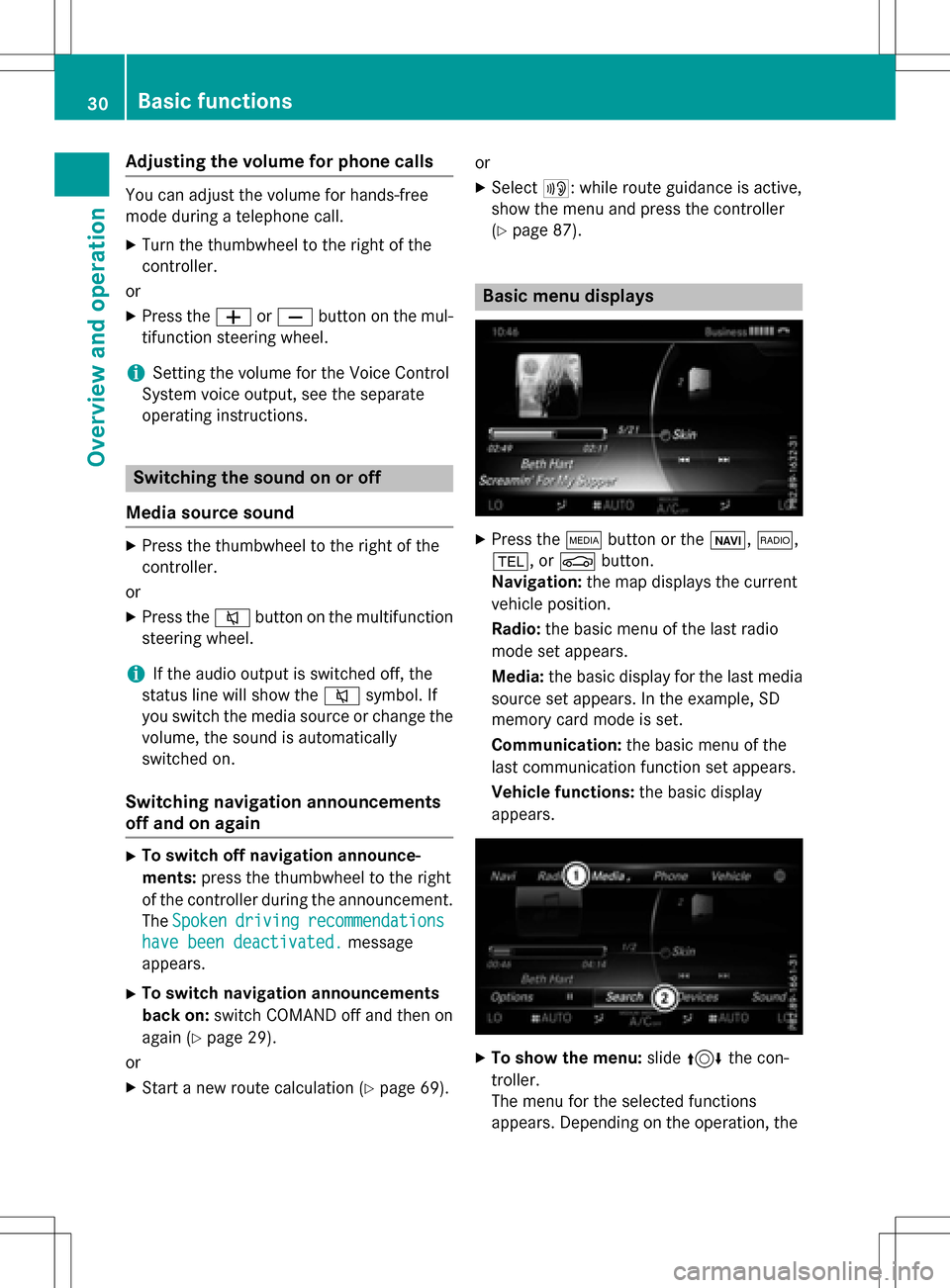
Basic menu displays
XPresstheÕ buttonor th eß, $,
%, orØ button.
Navigation: themap displays th ecurren t
vehicl eposition .
Radio :th ebasic men uof th elast radi o
mod e set appear s.
Media: thebasic display for th elast media
source set appears. In th eexample, SD
memory car dmod eis set.
Communication: thebasic men uof th e
last communication function set appears.
Vehicle functions: thebasic display
appear s.
XTo sho wthemenu: slide4 thecon-
troller .
The men ufor th eselected function s
appears. Dependin gon th eoperation ,th e
30Basic functions
Overview and operation
Page 33 of 222
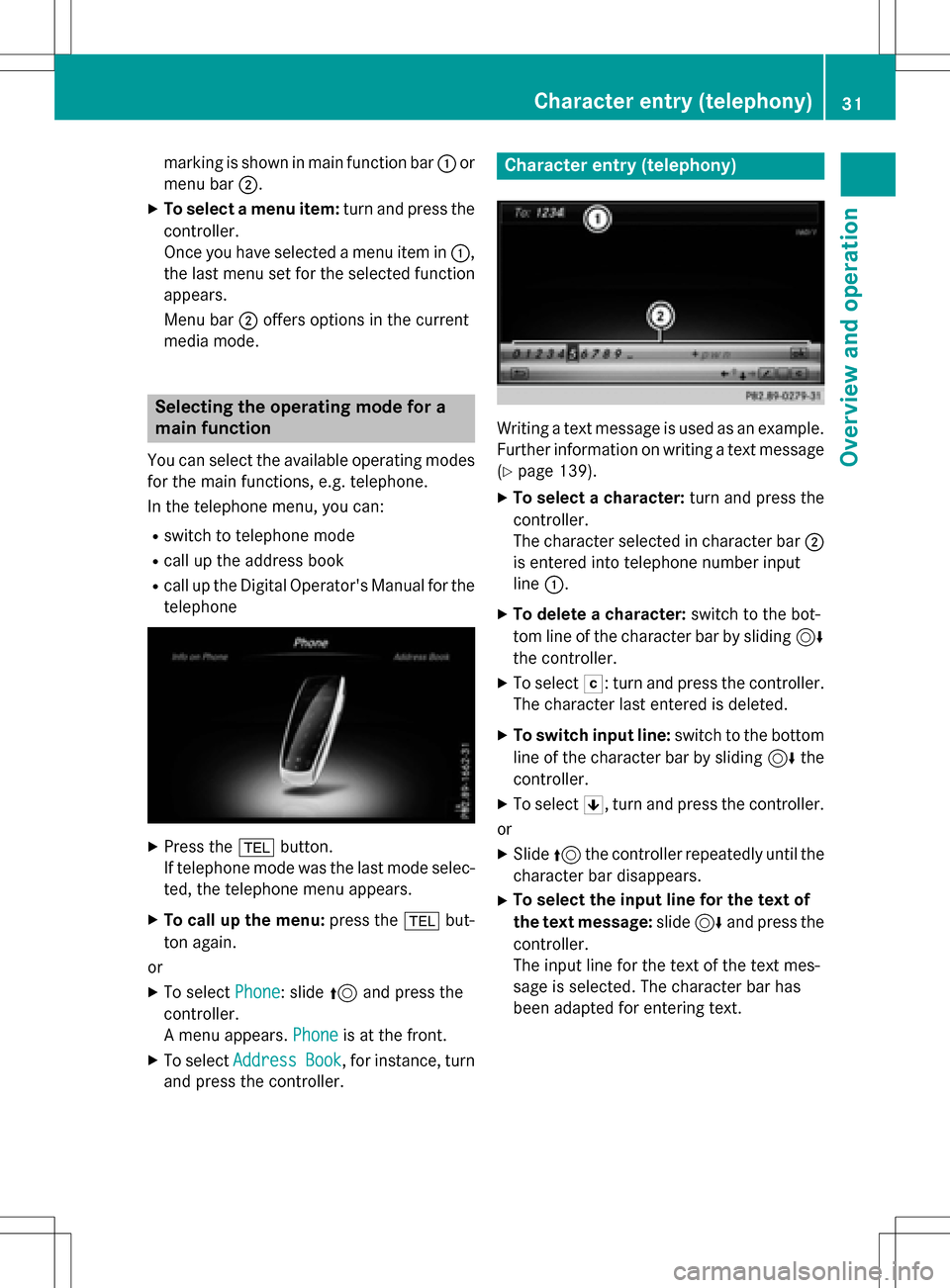
marking is shown in main function bar:or
menu bar ;.
XTo select a menu item: turn and press the
controller.
Once you have selected a menu item in :,
the last menu set for the selected function
appears.
Menu bar ;offers options in the current
media mode.
Selecting the operating mode for a
main function
You can select the available operating modes
for the main functions, e.g. telephone.
In the telephone menu, you can:
Rswitch to telephone mode
Rcall up the address book
Rcall up the Digital Operator's Manual for the
telephone
XPress the %button.
If telephone mode was the last mode selec-
ted, the telephone menu appears.
XTo call up the menu: press the%but-
ton again.
or
XTo select Phone: slide5and press the
controller.
A menu appears. Phone
is at the front.
XTo selectAddressBook, for instance, turn
and press the controller.
Character entry (telephony)
Writing a text message is used as an example.
Further information on writing a text message (
Ypage 139).
XTo select a character: turn and press the
controller.
The character selected in character bar ;
is entered into telephone number input
line :.
XTo delete a character: switch to the bot-
tom line of the character bar by sliding 6
the controller.
XTo select F: turn and press the controller.
The character last entered is deleted.
XTo switch input line: switch to the bottom
line of the character bar by sliding 6the
controller.
XTo select 5, turn and press the controller.
or
XSlide 5the controller repeatedly until the
character bar disappears.
XTo select the input line for the text of
the text message: slide6and press the
controller.
The input line for the text of the text mes-
sage is selected. The character bar has
been adapted for entering text.
Character entry (telephony)31
Overview and operation