lock MERCEDES-BENZ GLC-Class 2016 X253 Owner's Manual
[x] Cancel search | Manufacturer: MERCEDES-BENZ, Model Year: 2016, Model line: GLC-Class, Model: MERCEDES-BENZ GLC-Class 2016 X253Pages: 418, PDF Size: 9.23 MB
Page 209 of 418
Activating/deactivating the rear view
camera
XTo activate:makesur ethat th eSmartKey
is in position 2in th eignition lock.
XMak esur ethat th eActivatio nby R
gearfunction is selected in Audio 20 or
COMAND (see th eDigital Operator' sMan -
ual).
XEngage revers egear .
The rear vie wcamera flap opens. The area
behind th evehicl eis shown wit hguide lines
in th eAudio 20 or COMAND display.
The imag efrom th erear vie wcamera is
available throughout th emaneuverin g
process.
To deacti vate:therear vie wcamera deacti -
vates if you shif tth etransmission to Por after
driving forwards ashort distance.
Messages in the Audio 20 orCOMAND
display
The rear vie wcamera may sho w adistorted
vie wof obstacles, sho wthem incorrectl yor
no tat all. The rear vie wcamera does no tsho w
objects in th efollowin gpositions:
Rver yclose to th erear bumper
Runder th erear bumper
Rin close range abov eth ehandle on th e
trunk lid
!Objects no tat ground level may appear to
be further away than they actually are, e.g. :
Rthebumper of aparked vehicl e
Rthedrawbar of atrailer
Rth eball couplin gof atrailer to whitch
Rtherear section of an HGV
Raslante dpos t
Use th eguidelines only for orientation .
Approach objects no further than th ebot -
tom-mos tguideline.
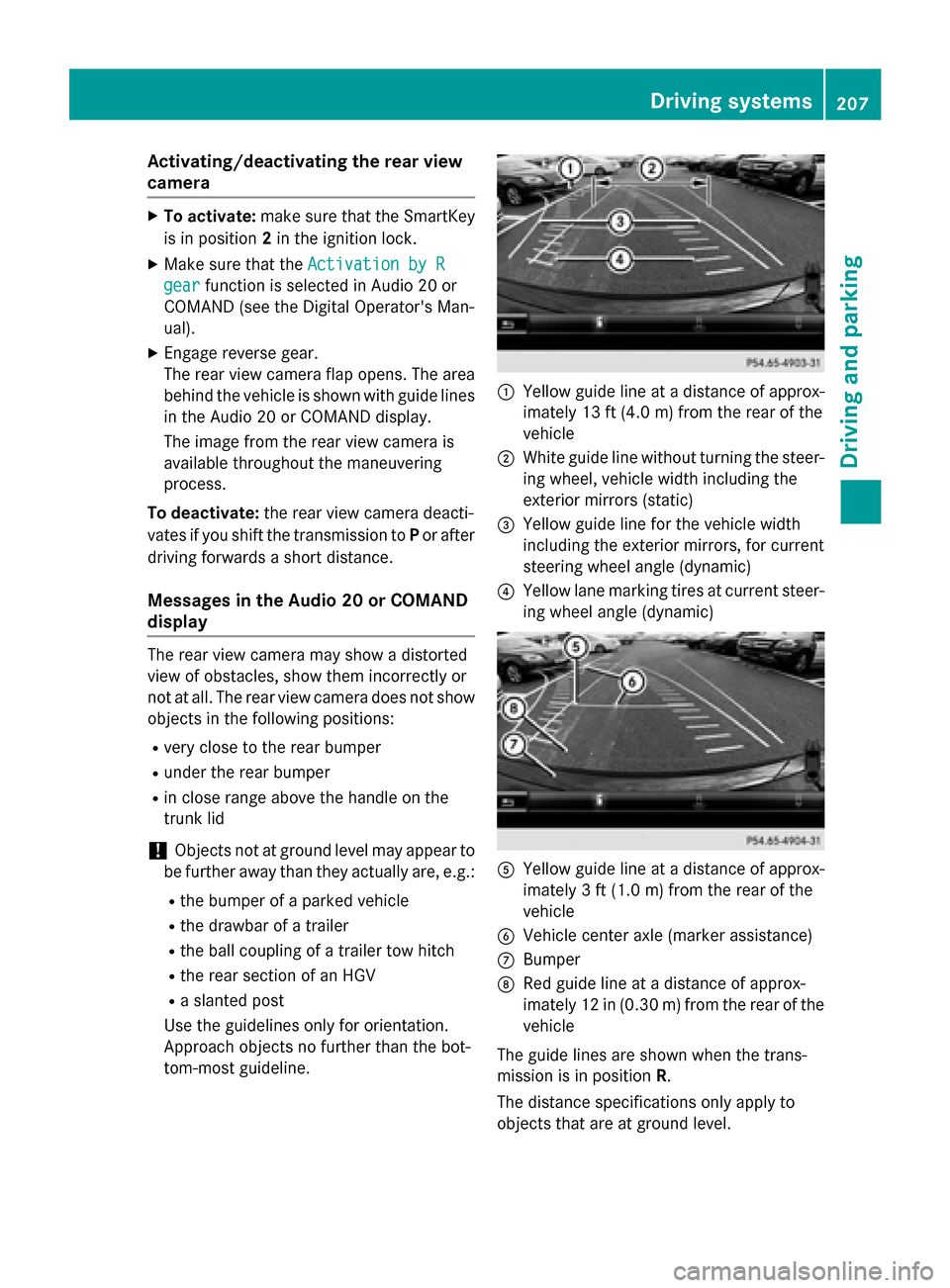
:Yello wguide lin eat adistanc eof approx -
imately 13 ft (4. 0m) from th erear of th e
vehicl e
;Whiteguide lin ewithout turnin gth e steer -
ing wheel, vehicl ewidt hincludin gth e
exterio rmirror s(static)
=Yello wguide lin efor th evehicl ewidt h
includin gth eexterio rmirrors, for curren t
steering whee langle (dynamic )
?Yellowlan emarking tires at curren t steer-
ing whee langle (dynamic )
AYellowguide lin eat adistanc eof approx -
imately 3ft (1.0 m) from the rear of the
vehicle
BVehicle center axle (marker assistance)
CBumper
DRed guide line at a distance of approx-
imately 12 in (0.30 m) fromthe rear of the
vehicle
The guide lines are shown when the trans-
mission is in position R.
The distance specifications only apply to
objects that are at ground level.
Driving system s207
Driving an d parking
Z
Page 214 of 418
Activating the360°camera using
reverse gear
The 360° camera images can be automati-
call ydisplayed by engagin grevers egear .
XMakesur ethat th eSmartKey is in posi-
tion 2in th eignition lock.
XMak esur ethat th eActivatio nby R
gearfunction is selected in Audio 20 or
COMAND (see th eDigital Operator' sMan -
ual).
XTo sho wth e360° camera image: engage
revers egear .
The area behind th evehicl eis shown in th e
Audio 20 or COMAND display in split -
scree nmode. You see th eto pvie wof th e
vehicl eand th eimag efrom th erear vie w
camera.
Selecting the split-screen view orfull
screen mode
Switchin gbetween split scree nviews:
XTo switch to th elin ewit hth evehicl eicons :
slide 5thecontroller .
XTo selectavehicl eicon: tur nth econtroller .
Switchin gto full scree nmode:
X180 °Vie wTurn and press th econtroller .
iThe full scree noption is only available in
th efollowin gviews:
RTop vie wwit hpictur efrom th erear vie w
camera
RTop vie wwit hpictur efrom th efron tcam -
era
Displays in the Audio 20 orCOMAND
display
Important safety notes
The camera system may sho w adistorted
vie wof obstacles, showthem incorrectl yor
no tat all. Obstacles are no t shown by the
system in th efollowin glocations:
Runder th efron tand rear bumpers
Rver yclose to th efron tand rear bumpers
R
R
in clo serange abov eth ehandle on th e
trunk lid
Rver yclose to th eexterio rmirror s
Rin thetransitional areas between th evari-
ous cameras in th evirtual to pvie w
!Objects no tat ground level may appear to
be further away than they actually are, e.g. :
Rthebumper of aparked vehicl e
Rthedrawbar of atrailer
Rth eball couplin gof atrailer to whitch
Rtherear section of an HGV
Raslante dpos t
Use th eguidelines only for orientation .
Approach objects no further than th ebot -
tom-mos tguideline.
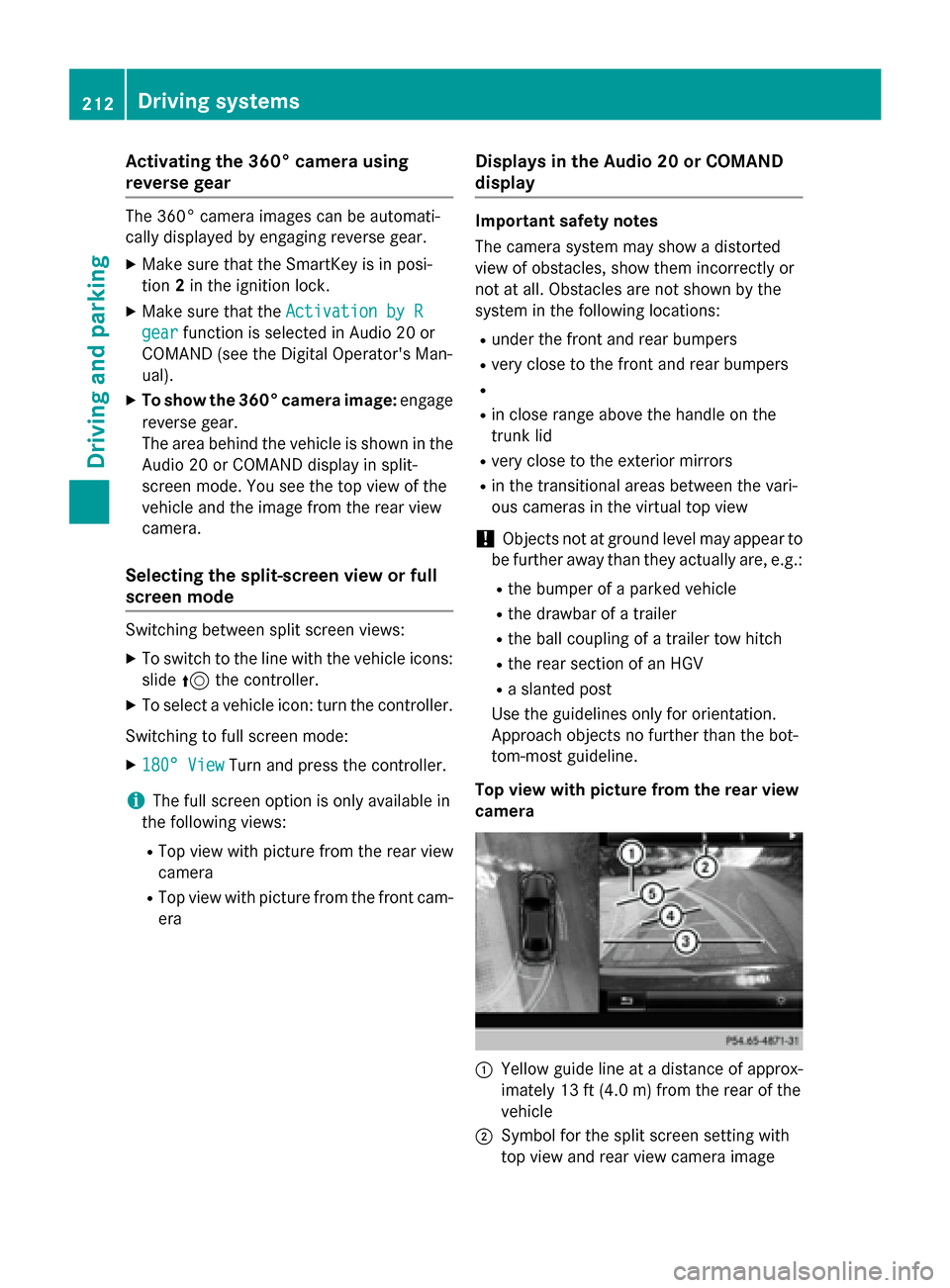
Top view wit hpictur e from th erea rview
camera
:Yello wguide lin eat adistanc eof approx -
imately 13 ft (4. 0m) from th erear of th e
vehicl e
;Symbol for th esplit scree nsetting wit h
to pvie wand rear vie wcamera imag e
212Driving systems
Driving and parking
Page 221 of 418
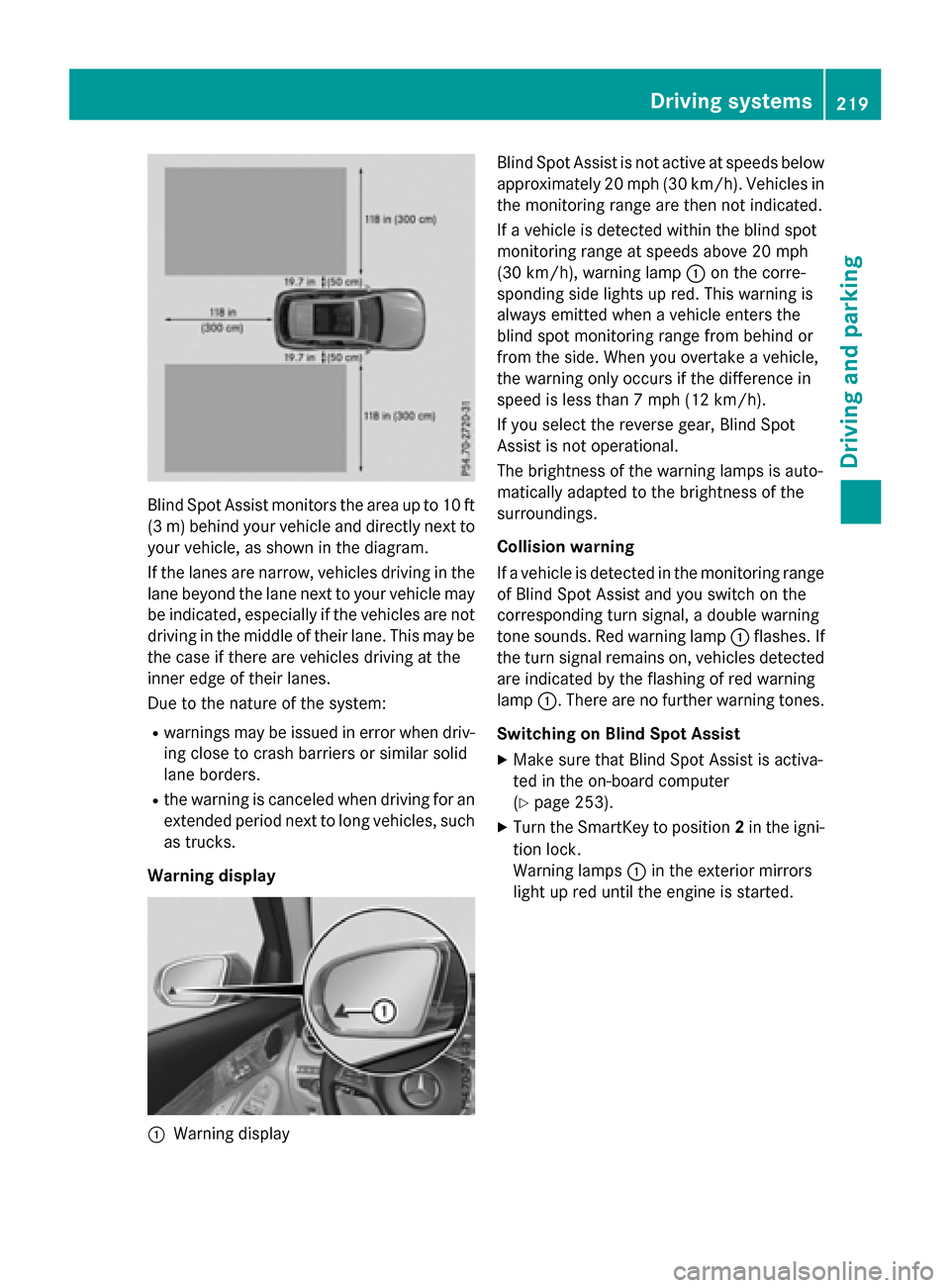
Blind Spot Assist monitors the area up to 10 ft
(3 m) behind your vehicle and directly next to
your vehicle, as shown in the diagram.
If the lanes are narrow, vehicles driving in the
lane beyond the lane next to your vehicle may
be indicated, especially if the vehicles are not
driving in the middle of their lane. This may be
the case if there are vehicles driving at the
inner edge of their lanes.
Due to the nature of the system:
Rwarnings may be issued in error when driv-
ing close to crash barriers or similar solid
lane borders.
Rthe warning is canceled when driving for an
extended period next to long vehicles, such
as trucks.
Warning display
:Warning display Blind Spot Assist is not active at speeds below
approximately 20 mph (30 km/h). Vehicles in
the monitoring range are then not indicated.
If a vehicle is detected within the blind spot
monitoring range at speeds above 20 mph
(30 km/h), warning lamp
:on the corre-
sponding side lights up red. This warning is
always emitted when a vehicle enters the
blind spot monitoring range from behind or
from the side. When you overtake a vehicle,
the warning only occurs if the difference in
speed is less than 7 mph (12 km/h).
If you select the reverse gear, Blind Spot
Assist is not operational.
The brightness of the warning lamps is auto-
matically adapted to the brightness of the
surroundings.
Collision warning
If a vehicle is detected in the monitoring range
of Blind Spot Assist and you switch on the
corresponding turn signal, a double warning
tone sounds. Red warning lamp :flashes. If
the turn signal remains on, vehicles detected
are indicated by the flashing of red warning
lamp :. There are no further warning tones.
Switching on Blind Spot Assist
XMake sure that Blind Spot Assist is activa-
ted in the on-board computer
(
Ypage 253).
XTurn the SmartKey to position 2in the igni-
tion lock.
Warning lamps :in the exterior mirrors
light up red until the engine is started.
Driving systems219
Driving and parking
Z
Page 227 of 418
RESP®is switched off.
Ra loss of tire pressure or a defective tire is
detected.
Switching on Active Blind Spot Assist
XMake sure that Active Blind Spot Assist is
activated in the on-board computer
(
Ypage 253).
XTurn the SmartKey to position 2in the igni-
tion lock.
Warning lamps :in the exterior mirrors
light up red for approximately 1.5 second s.
Gray radar waves propagating backwards
appear next to the vehicle in the assistance
display in the multifunction display.
Active Lane Keeping Assist
General notes
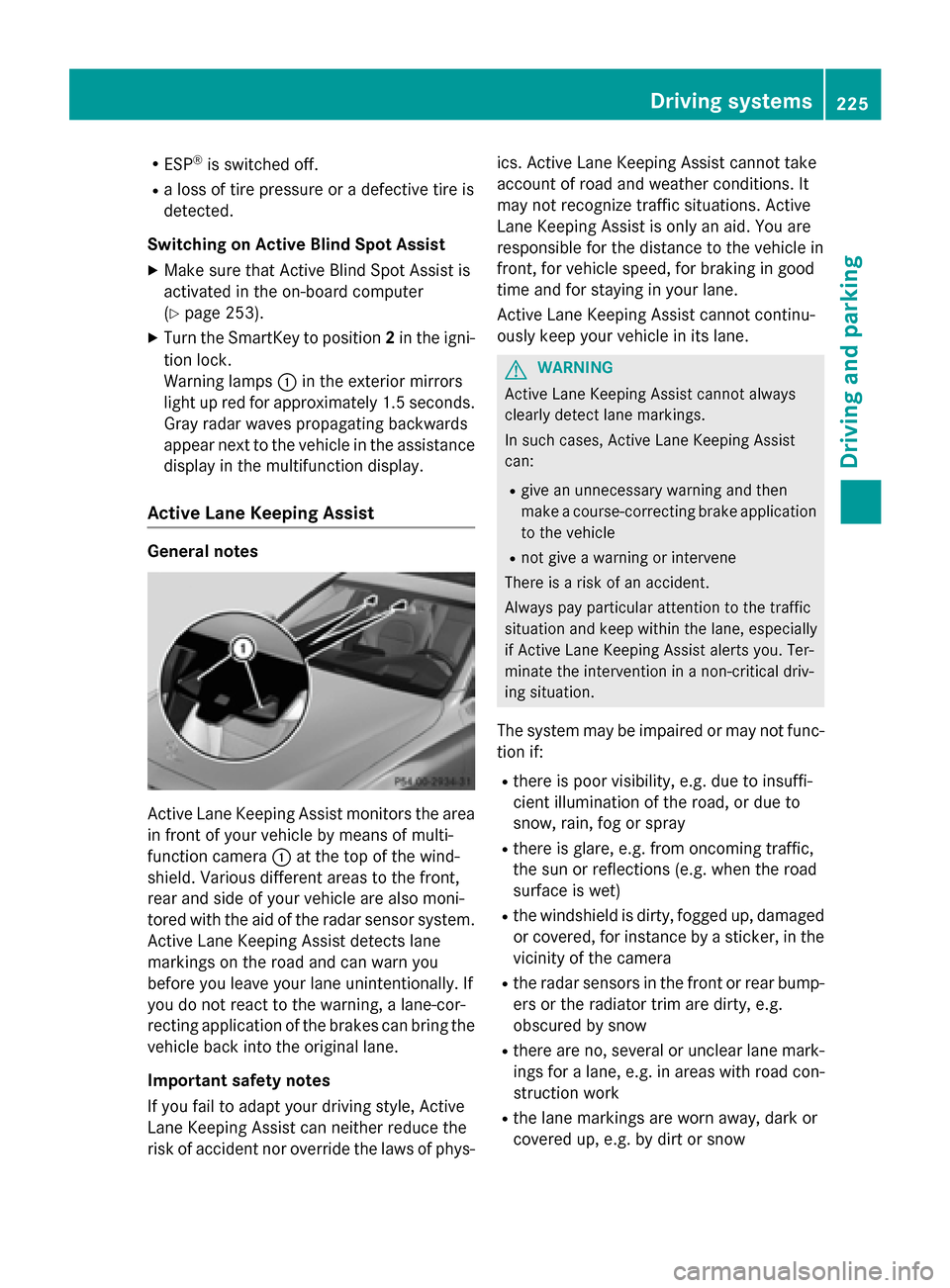
Active Lane Keeping Assist monitors the area
in front of your vehicle by means of multi-
function camera :at the top of the wind-
shield. Various different areas to the front,
rear and side of your vehicle are also moni-
tored with the aid of the radar sensor system.
Active Lane Keeping Assist detects lane
markings on the road and can warn you
before you leave your lane unintentionally. If
you do not react to the warning, a lane-cor-
recting application of the brakes can bring the
vehicle back into the original lane.
Important safety notes
If you fail to adapt your driving style, Active
Lane Keeping Assist can neither reduce the
risk of accident nor override the laws of phys- ics. Active Lane Keeping Assist cannot take
account of road and weather conditions. It
may not recognize traffic situations. Active
Lane Keeping Assist is only an aid. You are
responsible for the distance to the vehicle in
front, for vehicle speed, for braking in good
time and for staying in your lane.
Active Lane Keeping Assist cannot continu-
ously keep your vehicle in its lane.
GWARNING
Active Lane Keeping Assist cannot always
clearly detect lane markings.
In such cases, Active Lane Keeping Assist
can:
Rgive an unnecessary warning and then
make a course-correcting brake application
to the vehicle
Rnot give a warning or intervene
There isa risk of an accident.
Always pay particular attention to the traffic
situation and keep within the lane, especially
if Active Lane Keeping Assist alerts you. Ter-
minate the intervention ina non-critical driv-
ing situation.
The system may be impaired or may not func-
tion if:
Rthere is poor visibility, e.g. due to insuffi-
cient illumination of the road, or due to
snow, rain, fog or spray
Rthere is glare, e.g. from oncoming traffic,
the sun or reflections (e.g. when the road
surface is wet)
Rthe windshield is dirty, fogged up, damaged or covered, for instance by a sticker, in the
vicinity of the camera
Rthe radar sensors in the front or rear bump-
ers or the radiator trim are dirty, e.g.
obscured by snow
Rthere are no, several or unclear lane mark- ings for a lane, e.g. in areas with road con-
struction work
Rthe lane markings are worn away, dark or
covered up, e.g. by dirt or snow
Driving systems225
Driving and parking
Z
Page 233 of 418
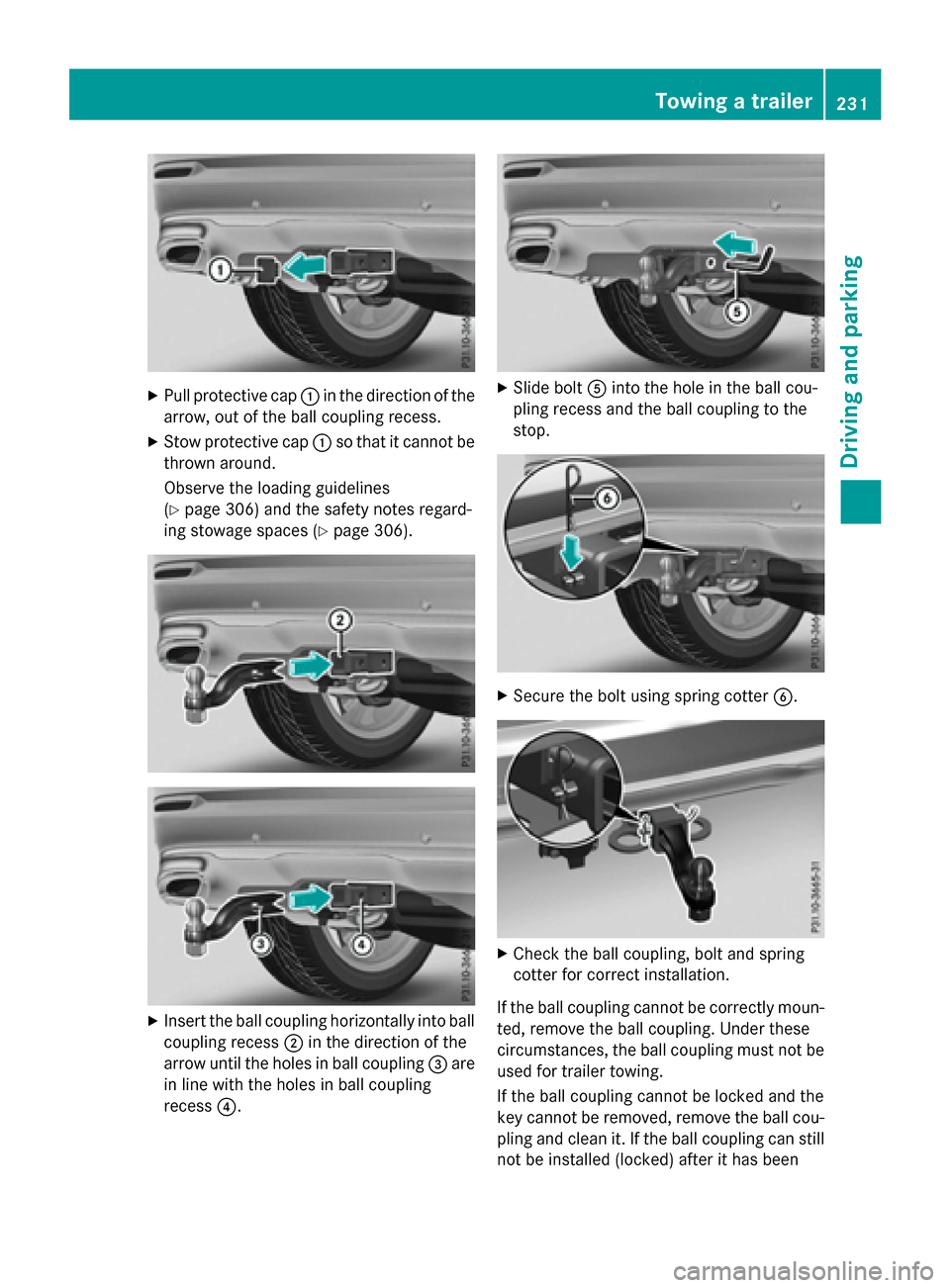
XPull protective cap:in the direction of the
arrow, out of the ball coupling recess.
XStow protective cap :so that it cannot be
thrown around.
Observe the loading guidelines
(
Ypage 306) and the safety notes regard-
ing stowage spaces (
Ypage 306).
XInsert the ball coupling horizontally into ball coupling recess ;in the direction of the
arrow until the holes in ball coupling =are
in line with the holes in ball coupling
recess ?.
XSlide bolt Ainto the hole in the ball cou-
pling recess and the ball coupling to the
stop.
XSecure the bolt using spring cotter B.
XCheck the ball coupling, bolt and spring
cotter for correct installation.
If the ball coupling cannot be correctly moun- ted, remove the ball coupling. Under these
circumstances, the ball coupling must not be
used for trailer towing.
If the ball coupling cannot be locked and the
key cannot be removed, remove the ball cou- pling and clean it. If the ball coupling can still
not be installed (locked) after it has been
Towing a trailer231
Driving and parking
Z
Page 234 of 418
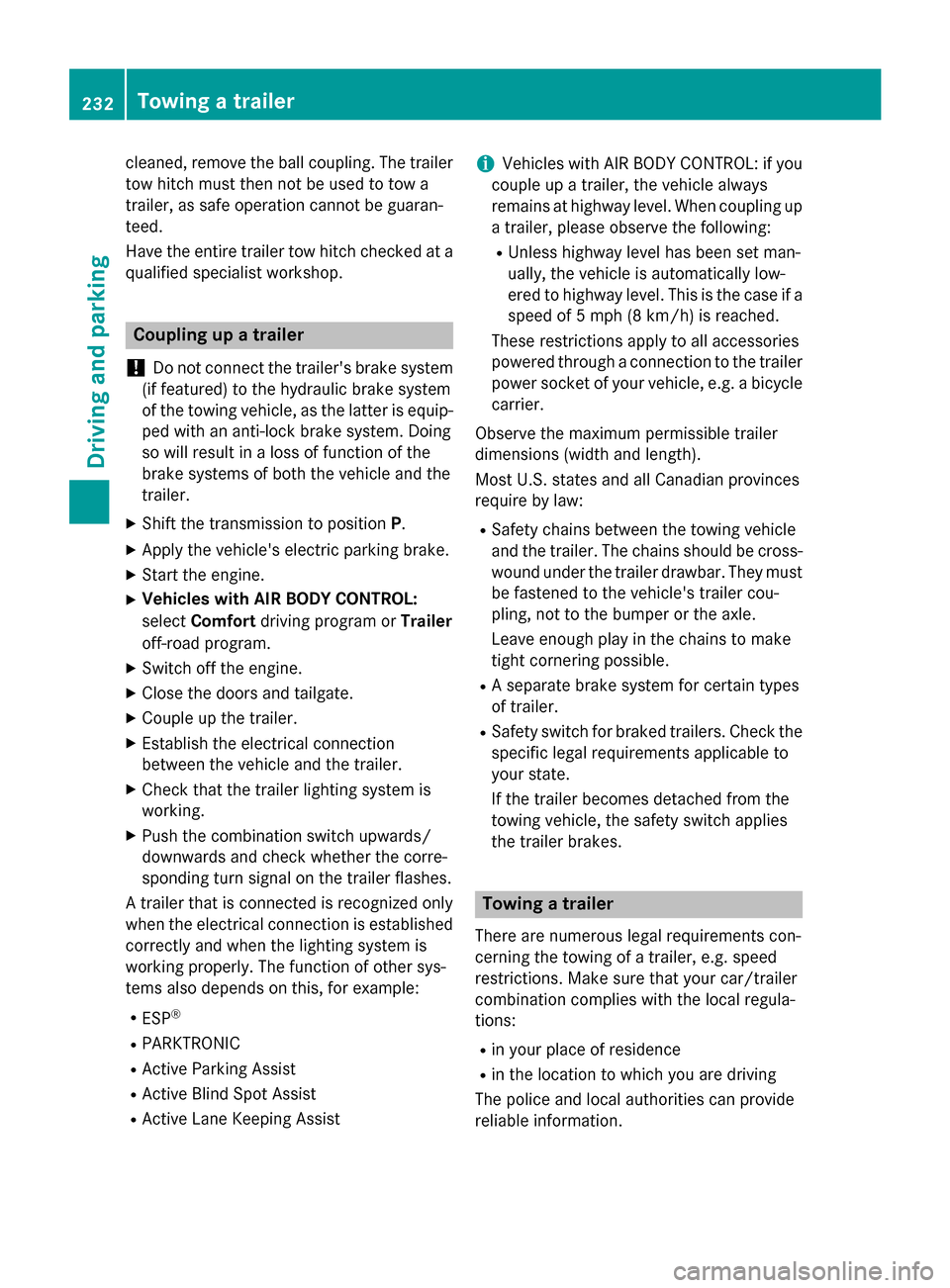
cleaned, remove the ball coupling. The trailer
tow hitch must then not be used to tow a
trailer, as safe operation cannot be guaran-
teed.
Have the entire trailer tow hitch checked at a
qualified specialist workshop.
Coupling up a trailer
!
Do not connect the trailer's brake system
(if featured) to the hydraulic brake system
of the towing vehicle, as the latter is equip-
ped with an anti-lock brake system. Doing
so will result in a loss of function of the
brake systems of both the vehicle and the
trailer.
XShift the transmission to position P.
XApply the vehicle's electric parking brake.
XStart the engine.
XVehicles with AIR BODY CONTROL:
selectComfort driving program or Trailer
off-road program.
XSwitch off the engine.
XClose the doors and tailgate.
XCouple up the trailer.
XEstablish the electrical connection
between the vehicle and the trailer.
XCheck that the trailer lighting system is
working.
XPush the combination switch upwards/
downwards and check whether the corre-
sponding turn signal on the trailer flashes.
A trailer that is connected is recognized only
when the electrical connection is established
correctly and when the lighting system is
working properly. The function of other sys-
tems also depends on this, for example:
RESP®
RPARKTRONIC
RActive Parking Assist
RActive Blind Spot Assist
RActive Lane Keeping Assist
iVehicles with AIR BODY CONTROL: if you
couple up a trailer, the vehicle always
remains at highway level. When coupling up
a trailer, please observe the following:
RUnless highway level has been set man-
ually, the vehicle is automatically low-
ered to highway level. This is the case if a
speed of 5 mph (8 km/h) is reached.
These restrictions apply to all accessories
powered through a connection to the trailer
power socket of your vehicle, e.g. a bicycle
carrier.
Observe the maximum permissible trailer
dimensions (width and length).
Most U.S. states and all Canadian provinces
require by law:
RSafety chains between the towing vehicle
and the trailer. The chains should be cross-
wound under the trailer drawbar. They must
be fastened to the vehicle's trailer cou-
pling, not to the bumper or the axle.
Leave enough play in the chains to make
tight cornering possible.
RA separate brake system for certain types
of trailer.
RSafety switch for braked trailers. Check the specific legal requirements applicable to
your state.
If the trailer becomes detached from the
towing vehicle, the safety switch applies
the trailer brakes.
Towing a trailer
There are numerous legal requirements con-
cerning the towing of a trailer, e.g. speed
restrictions. Make sure that your car/trailer
combination complies with the local regula-
tions:
Rin your place of residence
Rin the location to which you are driving
The police and local authorities can provide
reliable information.
232Towing a trailer
Driving and parking
Page 241 of 418
The segments in the speedometer indicate
which speed range is available.
RCruise control activated (Ypage 181):
The segments light up from the stored
speed to the type-tested maximum speed.
RDISTRONIC PLUS activated (Ypage 183):
One or two segments in the set speed
range light up.
RDISTRONIC PLUS detects a vehicle in front
that is driving at a slower speed than the
stored speed:
The segments between the speed of the
vehicle in front and the stored speed light
up.
Tachometer
!
Do not drive in the overrevving range, as
this could damage the engine.
The red band in the tachometer indicates the engine's overrevving range.
The fuel supply is interrupted to protect the
engine when the red band is reached.
Outside temperature display
You should pay special attention to road con-
ditions when temperatures are around freez-
ing point.
Bear in mind that the outside temperature
display indicates the temperature measured
and does not record the road temperature.
The outside temperature display is in the mul-
tifunction display (
Ypage 241).
Changes in the outside temperature are dis-
played after a short delay.
Coolant temperature display
GWARNING
Opening the hood when the engine is over-
heated or when there is a fire in the engine
compartment could expose you to hot gases
or other service products. There is a risk of
injury.
Let an overheated engine cool down before
opening the hood. If there is a fire in the
engine compartment, keep the hood closed
and contact the fire department.
!A display message is shown if the coolant
temperature is too high.
If the coolant temperature is over 248 ‡
(120 †), do not continue driving. The
engine will otherwise be damaged.
The coolant temperature display is in the
lower section of the tachometer (
Ypage 33).
Under normal operating conditions and with
the specified coolant level, the coolant tem-
perature may rise to 248 ‡ (120 †).
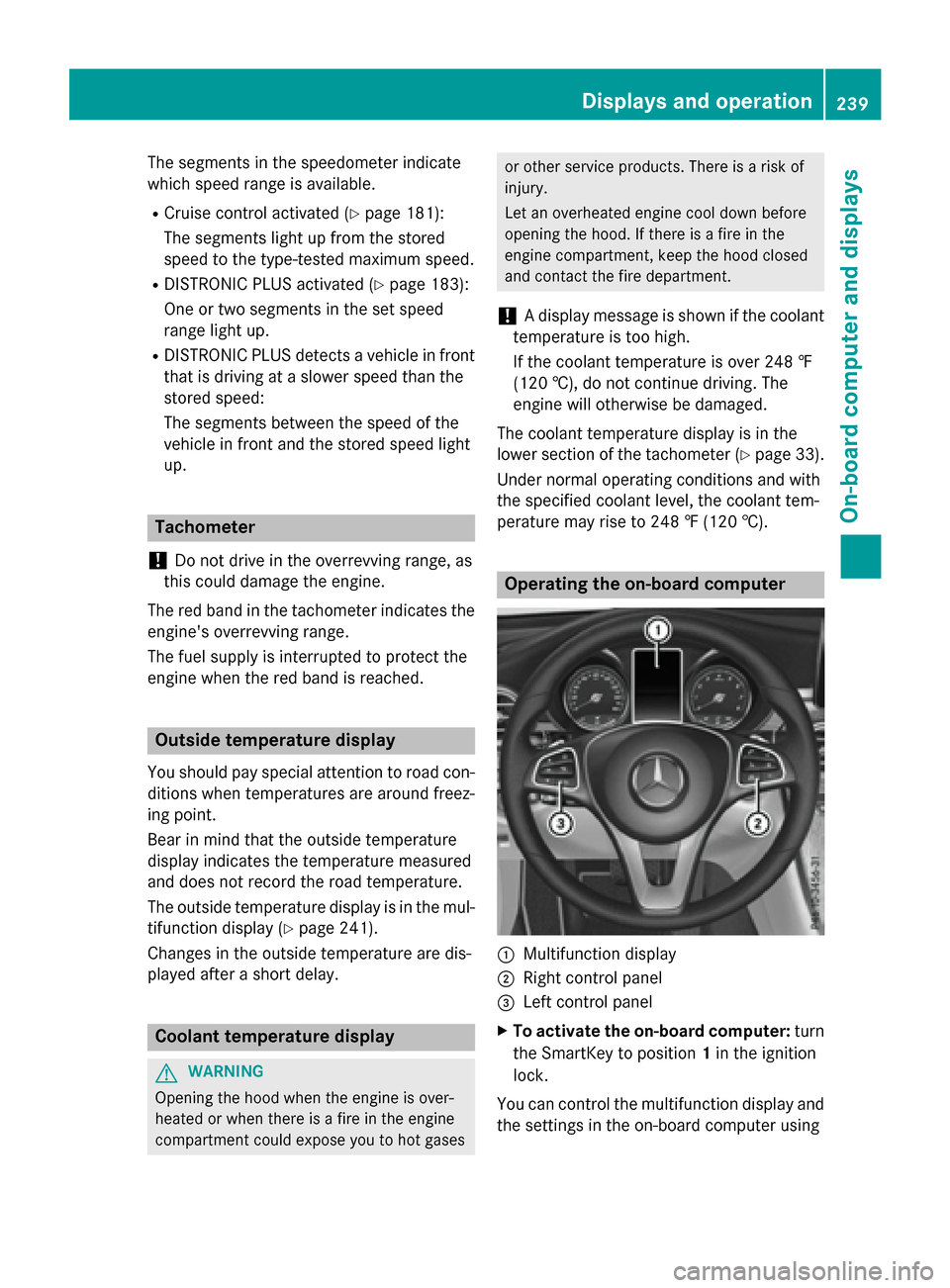
Operating the on-board computer
:Multifunction display
;Right control panel
=Left control panel
XTo activate the on-board computer: turn
the SmartKey to position 1in the ignition
lock.
You can control the multifunction display and
the settings in the on-board computer using
Displays and operation239
On-board computer and displays
Z
Page 243 of 418
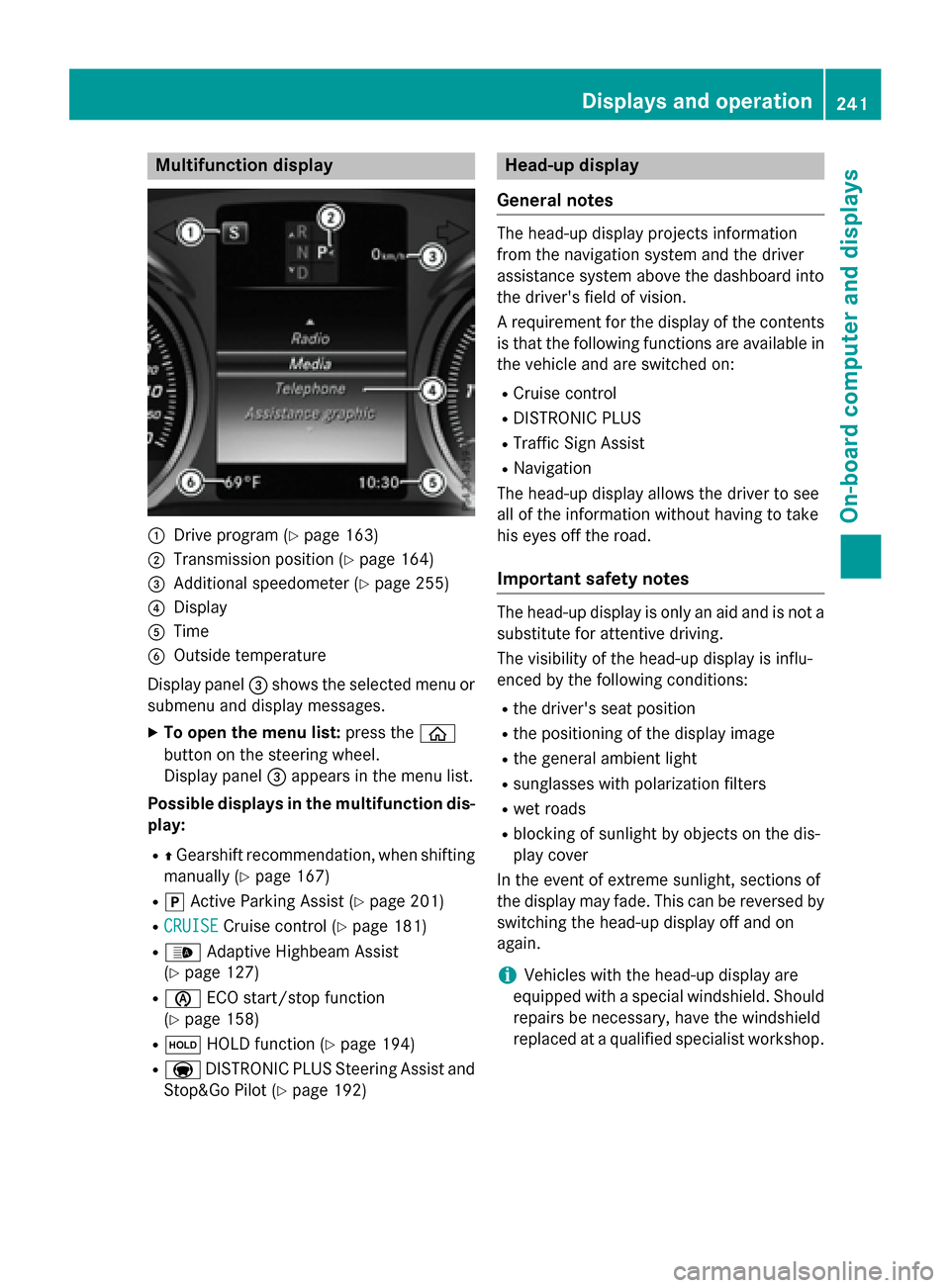
Multifunction display
:Drive program (Ypage 163)
;Transmission position (Ypage 164)
=Additional speedometer (Ypage 255)
?Display
ATime
BOutside temperature
Display panel =shows the selected menu or
submenu and display messages.
XTo open the menu list: press theò
button on the steering wheel.
Display panel =appears in the menu list.
Possible displays in the multifunction dis-
play:
RZ Gearshift recommendation, when shifting
manually (
Ypage 167)
Rj Active Parking Assist (Ypage 201)
RCRUISECruise control (Ypage 181)
R_ Adaptive Highbeam Assist
(
Ypage 127)
Rè ECO start/stop function
(
Ypage 158)
Rë HOLD function (Ypage 194)
RaDISTRONIC PLUS Steering Assist and
Stop&Go Pilot (
Ypage 192)
Head-up display
General notes
The head-up display projects information
from the navigation system and the driver
assistance system above the dashboard into
the driver's field of vision.
A requirement for the display of the contents
is that the following functions are available in
the vehicle and are switched on:
RCruise control
RDISTRONIC PLUS
RTraffic Sign Assist
RNavigation
The head-up display allows the driver to see
all of the information without having to take
his eyes off the road.
Important safety notes
The head-up display is only an aid and is not a
substitute for attentive driving.
The visibility of the head-up display is influ-
enced by the following conditions:
Rthe driver's seat position
Rthe positioning of the display image
Rthe general ambient light
Rsunglasses with polarization filters
Rwet roads
Rblocking of sunlight by objects on the dis-
play cover
In the event of extreme sunlight, sections of
the display may fade. This can be reversed by
switching the head-up display off and on
again.
iVehicles with the head-up display are
equipped with a special windshield. Should
repairs be necessary, have the windshield
replaced at a qualified specialist workshop.
Displays and operation241
On-board computer and displays
Z
Page 260 of 418
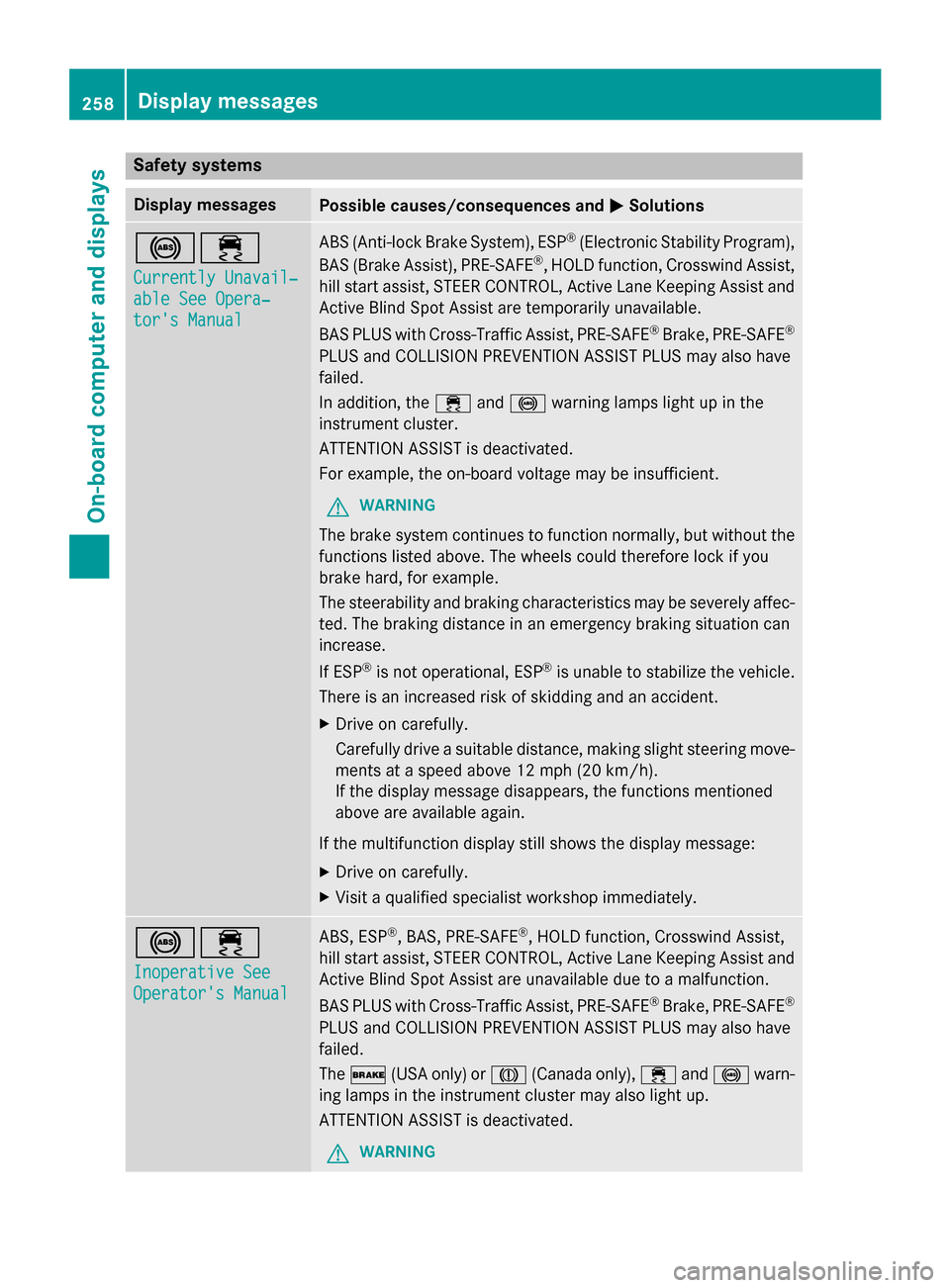
Safety systems
Display messagesPossible causes/consequences andMSolutions
!÷
Currently Unavail‐
able See Opera‐
tor's Manual
ABS (Anti-lock Brake System), ESP®(Electronic Stability Program),
BAS (Brake Assist), PRE‑ SAFE®, HOLD function, Crosswind Assist,
hill start assist, STEER CONTROL, Active Lane Keeping Assist and
Active Blind Spot Assist are temporarily unavailable.
BAS PLUS with Cross-Traffic Assist, PRE‑SAFE
®Brake, PRE‑ SAFE®
PLUS and COLLISION PREVENTION ASSIST PLUS may also have
failed.
In addition, the ÷and! warning lamps light up in the
instrument cluster.
ATTENTION ASSIST is deactivated.
For example, the on-board voltage may be insufficient.
GWARNING
The brake system continues to function normally, but without the
functions listed above. The wheels could therefore lock if you
brake hard, for example.
The steerability and braking characteristics may be severely affec-
ted. The braking distance in an emergency braking situation can
increase.
If ESP
®is not operational, ESP®is unable to stabilize the vehicle.
There is an increased risk of skidding and an accident.
XDrive on carefully.
Carefully drive a suitable distance, making slight steering move-
ments at a speed above 12 mph (20 km/h).
If the display message disappears, the functions mentioned
above are available again.
If the multifunction display still shows the display message:
XDrive on carefully.
XVisit a qualified specialist workshop immediately.
!÷
Inoperative See
Operator's Manual
ABS, ESP®, BAS, PRE‑SAFE®, HOLD function, Crosswind Assist,
hill start assist, STEER CONTROL, Active Lane Keeping Assist and Active Blind Spot Assist are unavailable due to a malfunction.
BAS PLUS with Cross-Traffic Assist, PRE‑ SAFE
®Brake, PRE‑SAFE®
PLUS and COLLISION PREVENTION ASSIST PLUS may also have
failed.
The$ (USA only) or J(Canada only), ÷and! warn-
ing lamps in the instrument cluster may also light up.
ATTENTION ASSIST is deactivated.
GWARNING
258Display messages
On-board computer and displays
Page 278 of 418
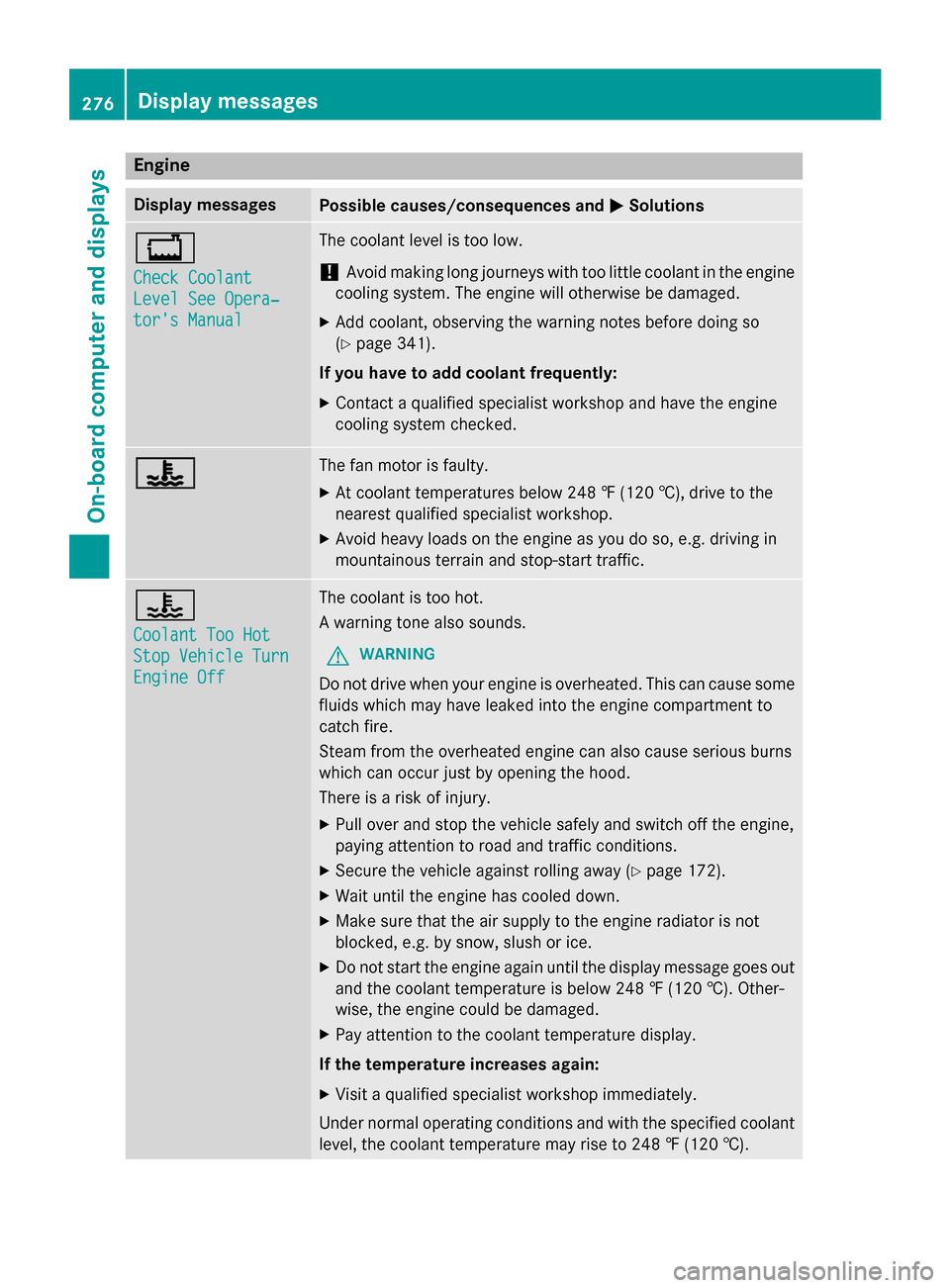
Engine
Display messagesPossible causes/consequences andMSolutions
+
Check Coolant
Level See Opera‐
tor's Manual
The coolant level is too low.
!Avoid making long journeys with too little coolant in the engine
cooling system. The engine will otherwise be damaged.
XAdd coolant, observing the warning notes before doing so
(
Ypage 341).
If you have to add coolant frequently:
XContact a qualified specialist workshop and have the engine
cooling system checked.
?The fan motor is faulty.
XAt coolant temperatures below 248 ‡ (120 †), drive to the
nearest qualified specialist workshop.
XAvoid heavy loads on the engine as you do so, e.g. driving in
mountainous terrain and stop-start traffic.
?
Coolant Too Hot
Stop Vehicle Turn
Engine Off
The coolant is too hot.
A warning tone also sounds.
GWARNING
Do not drive when your engine is overheated. This can cause some
fluids which may have leaked into the engine compartment to
catch fire.
Steam from the overheated engine can also cause serious burns
which can occur just by opening the hood.
There is a risk of injury.
XPull over and stop the vehicle safely and switch off the engine,
paying attention to road and traffic conditions.
XSecure the vehicle against rolling away (Ypage 172).
XWait until the engine has cooled down.
XMake sure that the air supply to the engine radiator is not
blocked, e.g. by snow, slush or ice.
XDo not start the engine again until the display message goes out
and the coolant temperature is below 248 ‡ (120 †). Other-
wise, the engine could be damaged.
XPay attention to the coolant temperature display.
If the temperature increases again:
XVisit a qualified specialist workshop immediately.
Under normal operating conditions and with the specified coolant
level, the coolant temperature may rise to 248 ‡ (120†) .
276Displa y messages
On-board computer and displays