lock MERCEDES-BENZ GLC-Class 2016 X253 Manual PDF
[x] Cancel search | Manufacturer: MERCEDES-BENZ, Model Year: 2016, Model line: GLC-Class, Model: MERCEDES-BENZ GLC-Class 2016 X253Pages: 418, PDF Size: 9.23 MB
Page 134 of 418
XInsert the new bulb into bulb holder;.
XInsert bulb holder;into the groove with
the lug at the top.
XPush bulb holder ;down until it engages
audibly.
XPress on housing cover :and turn it clock-
wise.
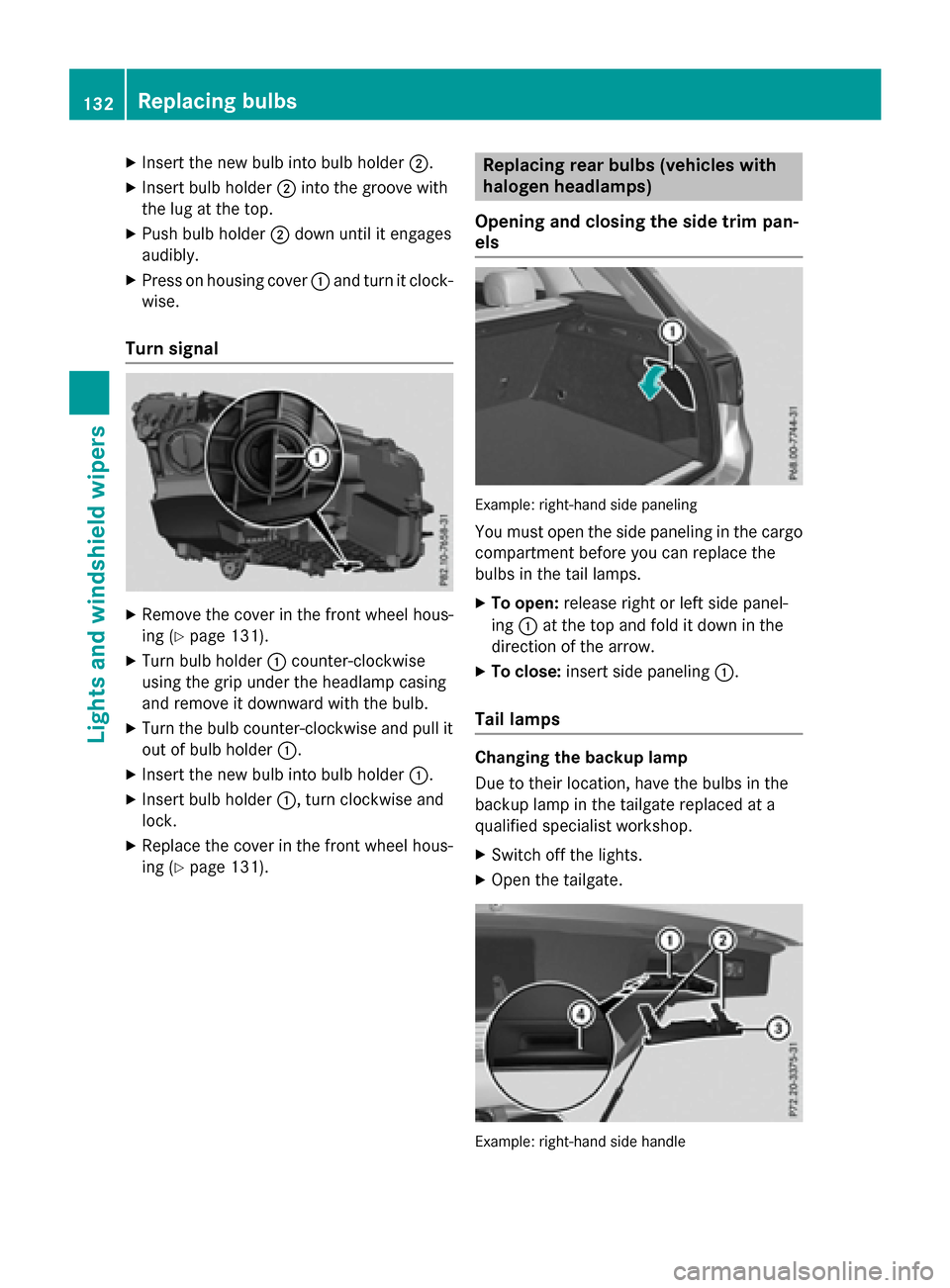
Turn signal
XRemove the cover in the front wheel hous-
ing (
Ypage 131).
XTurn bulb holder :counter-clockwise
using the grip under the headlamp casing
and remove it downward with the bulb.
XTurn the bulb counter-clockwise and pull it
out of bulb holder :.
XInsert the new bulb into bulb holder :.
XInsert bulb holder:, turn clockwise and
lock.
XReplace the cover in the front wheel hous-
ing (
Ypage 131).
Replacing rear bulbs (vehicles with
halogen headlamps)
Opening and closing the side trim pan-
els
Example: right-hand side paneling
You must open the side paneling in the cargo
compartment before you can replace the
bulbs in the tail lamps.
XTo open: release right or left side panel-
ing :at the top and fold it down in the
direction of the arrow.
XTo close: insert side paneling :.
Tail lamps
Changing the backup lamp
Due to their location, have the bulbs in the
backup lamp in the tailgate replaced at a
qualified specialist workshop.
XSwitch off the lights.
XOpen the tailgate.
Example: right-hand side handle
132Replacing bulbs
Lights and windshield wipers
Page 135 of 418
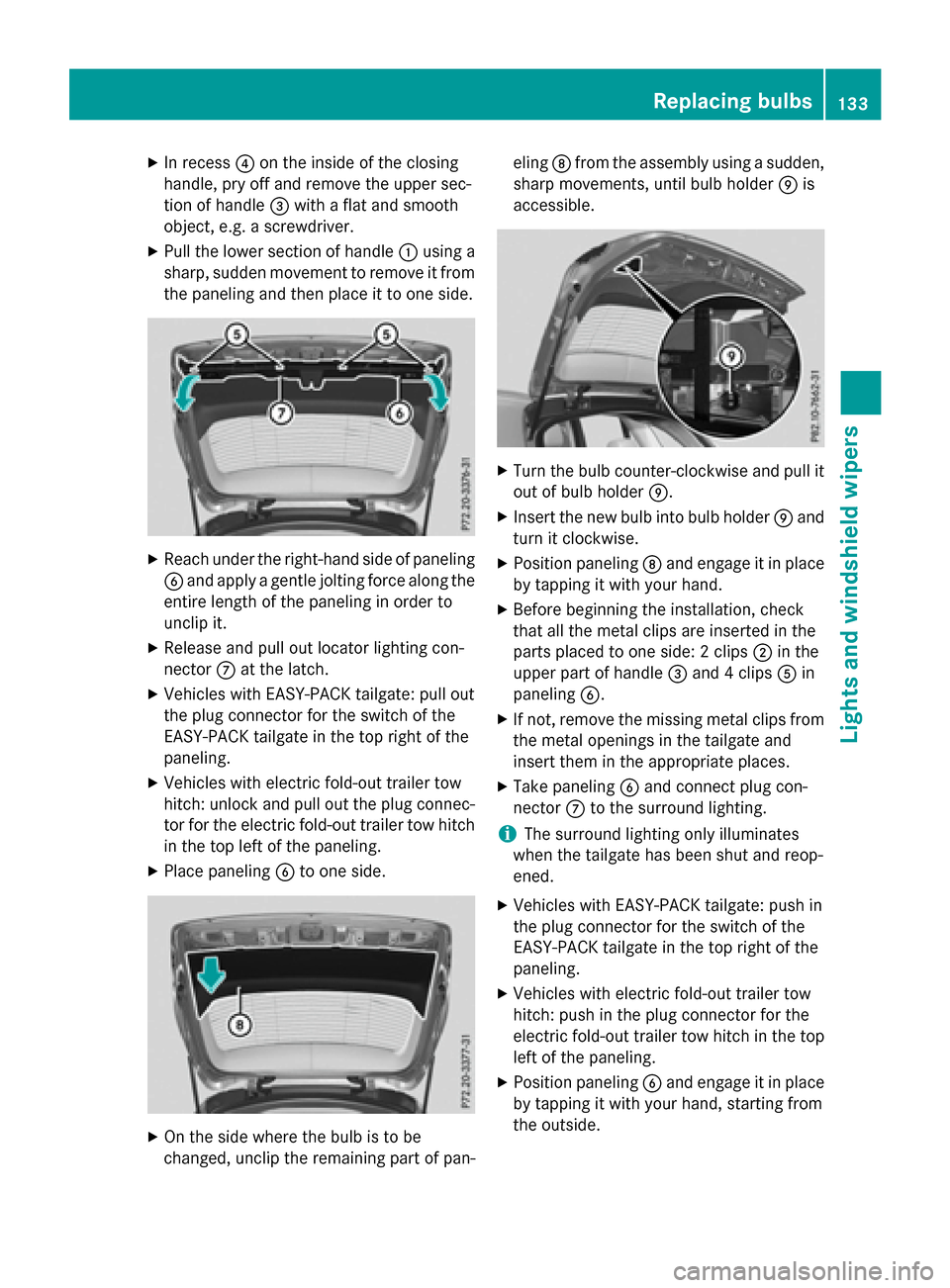
XIn recess?on the inside of the closing
handle, pry off and remove the upper sec-
tion of handle =with a flat and smooth
object, e.g. a screwdriver.
XPull the lower section of handle :using a
sharp, sudden movement to remove it from
the paneling and then place it to one side.
XReach under the right-hand side of paneling
B and apply a gentle jolting force along the
entire length of the paneling in order to
unclip it.
XRelease and pull out locator lighting con-
nector Cat the latch.
XVehicles with EASY-PACK tailgate: pull out
the plug connector for the switch of the
EASY-PACK tailgate in the top right of the
paneling.
XVehicles with electric fold-out trailer tow
hitch: unlock and pull out the plug connec-
tor for the electric fold-out trailer tow hitch
in the top left of the paneling.
XPlace paneling Bto one side.
XOn the side where the bulb is to be
changed, unclip the remaining part of pan- eling
Dfrom the assembly using a sudden,
sharp movements, until bulb holder Eis
accessible.
XTurn the bulb counter-clockwise and pull it out of bulb holder E.
XInsert the new bulb into bulb holder Eand
turn it clockwise.
XPosition paneling Dand engage it in place
by tapping it with your hand.
XBefore beginning the installation, check
that all the metal clips are inserted in the
parts placed to one side: 2 clips ;in the
upper part of handle =and 4 clips Ain
paneling B.
XIf not, remove the missing metal clips from
the metal openings in the tailgate and
insert them in the appropriate places.
XTake paneling Band connect plug con-
nector Cto the surround lighting.
iThe surround lighting only illuminates
when the tailgate has been shut and reop-
ened.
XVehicles with EASY-PACK tailgate: push in
the plug connector for the switch of the
EASY-PACK tailgate in the top right of the
paneling.
XVehicles with electric fold-out trailer tow
hitch: push in the plug connector for the
electric fold-out trailer tow hitch in the top
left of the paneling.
XPosition paneling Band engage it in place
by tapping it with your hand, starting from
the outside.
Replacing bulbs133
Lights and windshield wipers
Z
Page 137 of 418
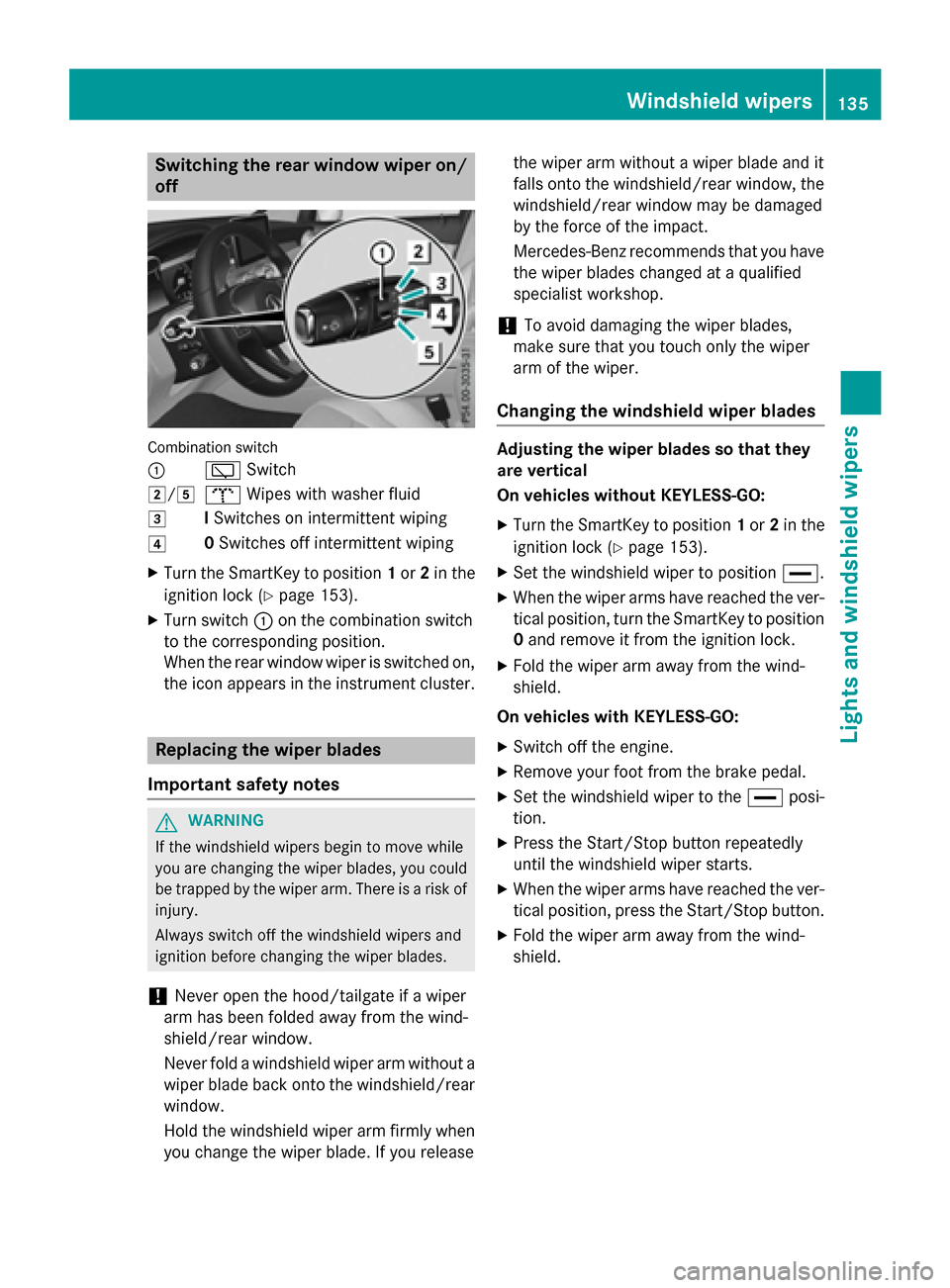
Switching the rear window wiper on/
off
Combination switch
:
èSwitch
2/5bWipes with washer fluid
3ISwitches on intermittent wiping
40 Switches off intermittent wiping
XTurn the SmartKey to position 1or 2in the
ignition lock (
Ypage 153).
XTurn switch :on the combination switch
to the corresponding position.
When the rear window wiper is switched on,
the icon appears in the instrument cluster.
Replacing the wiper blades
Important safety notes
GWARNING
If the windshield wipers begin to move while
you are changing the wiper blades, you could be trapped by the wiper arm. There is a risk of
injury.
Always switch off the windshield wipers and
ignition before changing the wiper blades.
!Never open the hood/tailgate if a wiper
arm has been folded away from the wind-
shield/rear window.
Never fold a windshield wiper arm without a
wiper blade back onto the windshield/rear
window.
Hold the windshield wiper arm firmly when
you change the wiper blade. If you release the wiper arm without a wiper blade and it
falls onto the windshield/rear window, the
windshield/rear window may be damaged
by the force of the impact.
Mercedes-Benz recommends that you have
the wiper blades changed at a qualified
specialist workshop.
!To avoid damaging the wiper blades,
make sure that you touch only the wiper
arm of the wiper.
Changing the windshield wiper blades
Adjusting the wiper blades so that they
are vertical
On vehicles without KEYLESS-GO:
XTurn the SmartKey to position 1or 2in the
ignition lock (
Ypage 153).
XSet the windshield wiper to position °.
XWhen the wiper arms have reached the ver-
tical position, turn the SmartKey to position
0 and remove it from the ignition lock.
XFold the wiper arm away from the wind-
shield.
On vehicles with KEYLESS-GO:
XSwitch off the engine.
XRemove your foot from the brake pedal.
XSet the windshield wiper to the °posi-
tion.
XPress the Start/Stop button repeatedly
until the windshield wiper starts.
XWhen the wiper arms have reached the ver- tical position, press the Start/Stop button.
XFold the wiper arm away from the wind-
shield.
Windshield wipers135
Lights and windshield wipers
Z
Page 138 of 418
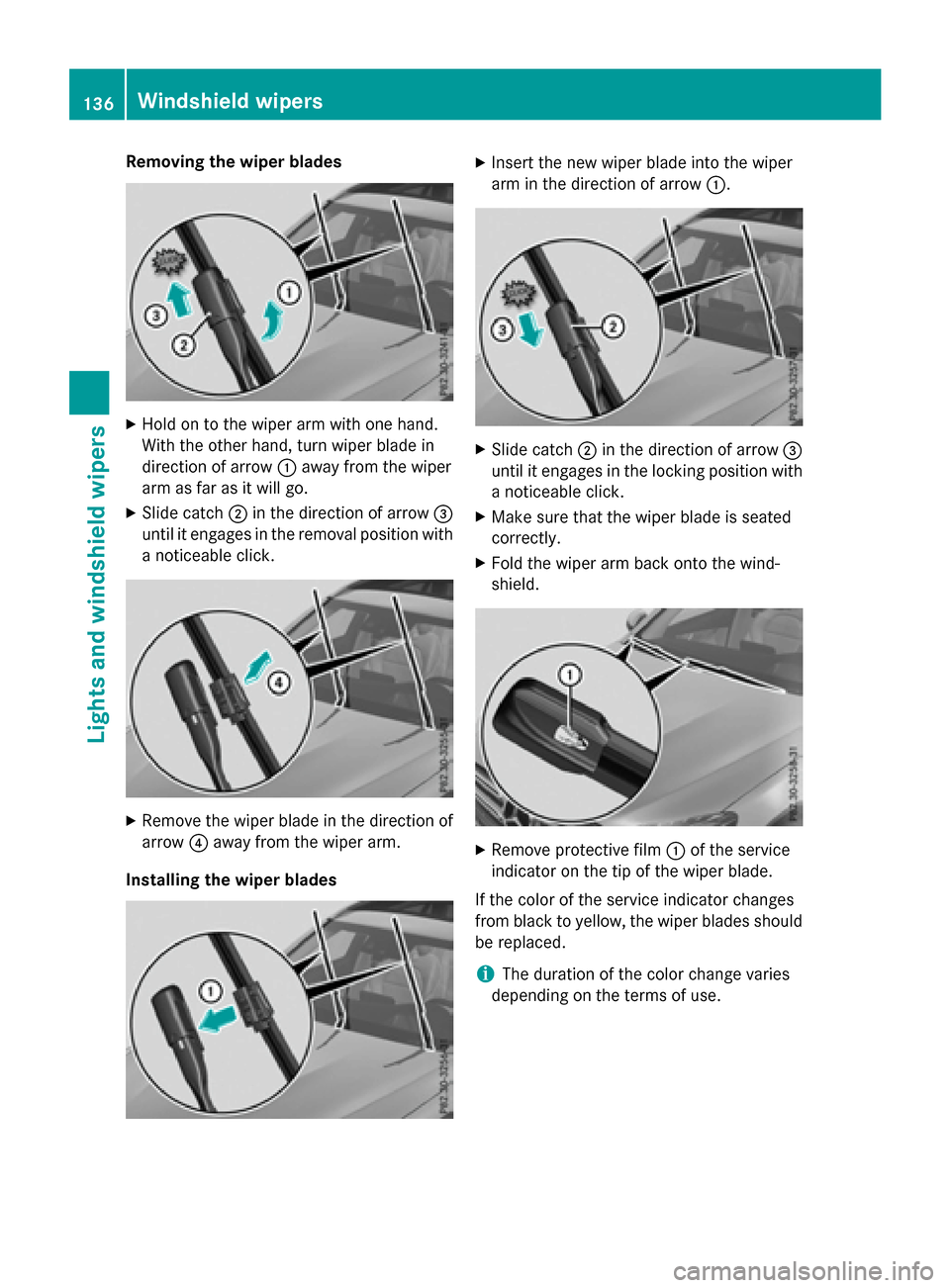
Removing the wiper blades
XHold on to the wiper arm with one hand.
With the other hand, turn wiper blade in
direction of arrow:away from the wiper
arm as far as it will go.
XSlide catch ;in the direction of arrow =
until it engages in the removal position with
a noticeable click.
XRemove the wiper blade in the direction of
arrow ?away from the wiper arm.
Installing the wiper blades
XInsert the new wiper blade into the wiper
arm in the direction of arrow :.
XSlide catch;in the direction of arrow =
until it engages in the locking position with a noticeable click.
XMake sure that the wiper blade is seated
correctly.
XFold the wiper arm back onto the wind-
shield.
XRemove protective film :of the service
indicator on the tip of the wiper blade.
If the color of the service indicator changes
from black to yellow, the wiper blades should
be replaced.
iThe duration of the color change varies
depending on the terms of use.
136Windshield wipers
Lights and windshield wipers
Page 139 of 418
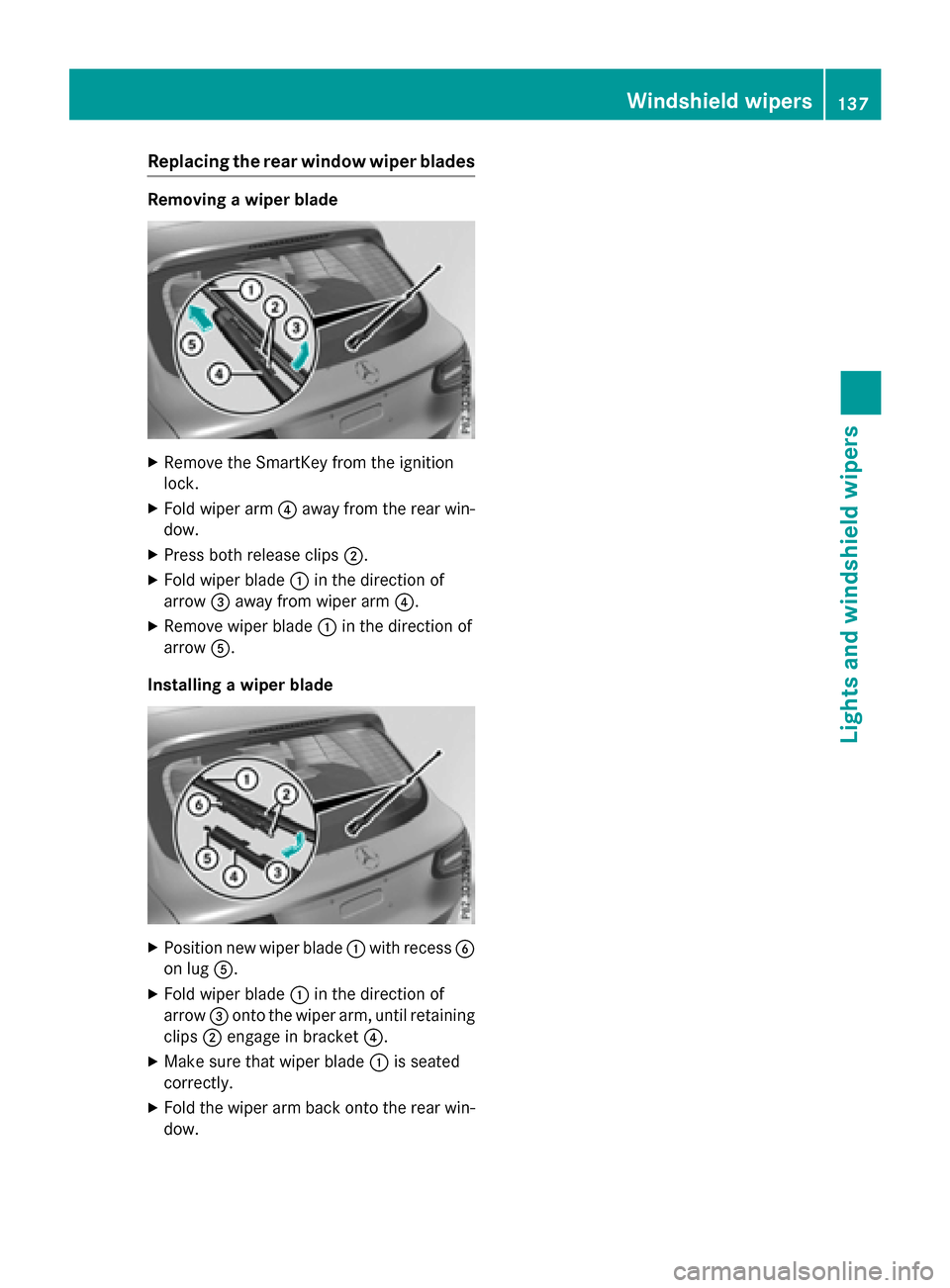
Replacing the rear window wiper blades
Removing a wiper blade
XRemove the SmartKey from the ignition
lock.
XFold wiper arm?away from the rear win-
dow.
XPress both release clips ;.
XFold wiper blade:in the direction of
arrow =away from wiper arm ?.
XRemove wiper blade:in the direction of
arrow A.
Installing a wiper blade
XPosition new wiper blade :with recess B
on lug A.
XFold wiper blade :in the direction of
arrow =onto the wiper arm, until retaining
clips ;engage in bracket ?.
XMake sure that wiper blade :is seated
correctly.
XFold the wiper arm back onto the rear win-
dow.
Windshield wipers137
Lights and windshield wipers
Z
Page 140 of 418
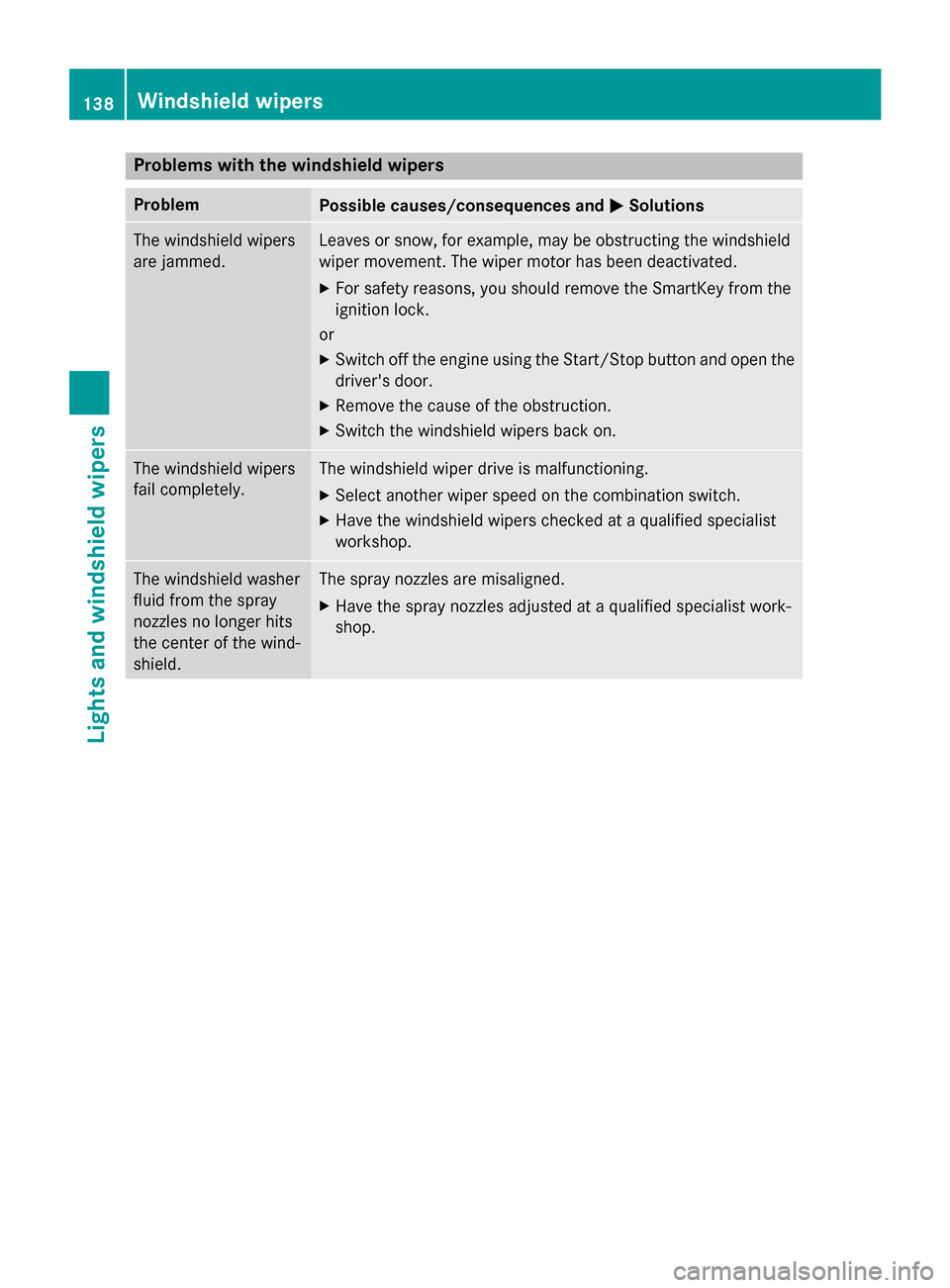
Problems with the windshield wipers
ProblemPossible causes/consequences andMSolutions
The windshield wipers
are jammed.Leaves or snow, for example, may be obstructing the windshield
wiper movement. The wiper motor has been deactivated.
XFor safety reasons, you should remove the SmartKey from the
ignition lock.
or
XSwitch off the engine using the Start/Stop button and open the driver's door.
XRemove the cause of the obstruction.
XSwitch the windshield wipers back on.
The windshield wipers
fail completely.The windshield wiper drive is malfunctioning.
XSelect another wiper speed on the combination switch.
XHave the windshield wipers checked at a qualified specialist
workshop.
The windshield washer
fluid from the spray
nozzles no longer hits
the center of the wind-
shield.The spray nozzles are misaligned.
XHave the spray nozzles adjusted at a qualified specialist work-
shop.
138Windshield wipers
Lights and windshield wipers
Page 146 of 418
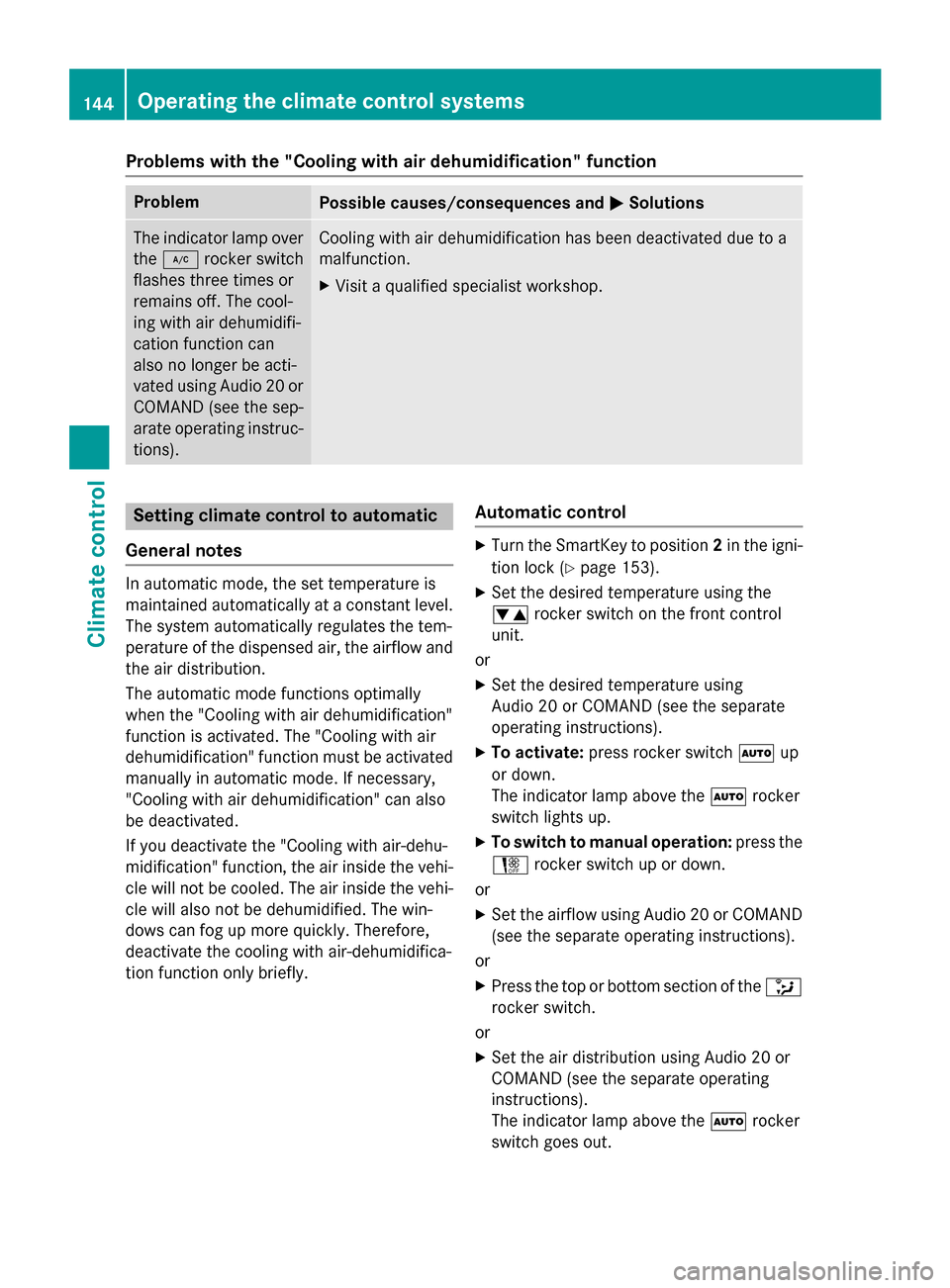
Problems with the "Cooling with air dehumidification" function
ProblemPossible causes/consequences andMSolutions
The indicator lamp over
the¿ rocker switch
flashes three times or
remains off. The cool-
ing with air dehumidifi-
cation function can
also no longer be acti-
vated using Audio 20 or
COMAND (see the sep-
arate operating instruc-
tions).Cooling with air dehumidification has been deactivated due to a
malfunction.
XVisit a qualified specialist workshop.
Setting climate control to automatic
General notes
In automatic mode, the set temperature is
maintained automatically at a constant level.
The system automatically regulates the tem-
perature of the dispensed air, the airflow and
the air distribution.
The automatic mode functions optimally
when the "Cooling with air dehumidification"
function is activated. The "Cooling with air
dehumidification" function must be activated
manually in automatic mode. If necessary,
"Cooling with air dehumidification" can also
be deactivated.
If you deactivate the "Cooling with air-dehu-
midification" function, the air inside the vehi- cle will not be cooled. The air inside the vehi-
cle will also not be dehumidified. The win-
dows can fog up more quickly. Therefore,
deactivate the cooling with air-dehumidifica-
tion function only briefly.
Automatic control
XTurn the SmartKey to position 2in the igni-
tion lock (
Ypage 153).
XSet the desired temperature using the
w rocker switch on the front control
unit.
or
XSet the desired temperature using
Audio 20 or COMAND (see the separate
operating instructions).
XTo activate: press rocker switch Ãup
or down.
The indicator lamp above the Ãrocker
switch lights up.
XTo switch to manual operation: press the
H rocker switch up or down.
or
XSet the airflow using Audio 20 or COMAND
(see the separate operating instructions).
or
XPress the top or bottom section of the _
rocker switch.
or
XSet the air distribution using Audio 20 or
COMAND (see the separate operating
instructions).
The indicator lamp above the Ãrocker
switch goes out.
144Operating the climate control systems
Climate control
Page 147 of 418
In automatic mode, if you adjust the airflow or
air distribution manually, the indicator lamp
above theÃrocker switch goes out. The
function which has not been changed man-
ually, however, continues to be controlled
automatically. When the manually set func-
tion switches back to automatic mode, the
indicator lamp above the Ãrocker switch
lights up again.
Setting the temperature
Different temperatures can be set for the
driver's and front-passenger sides.
XTurn the SmartKey to position 2in the igni-
tion lock (
Ypage 153).
XTo increase or reduce: press thew
rocker switch up or down.
or
XSet the temperature using Audio 20 or
COMAND (see the separate operating
instructions).
Only change the temperature setting in
small increments. Start at 72 ‡ (22 †).
Setting the air distribution
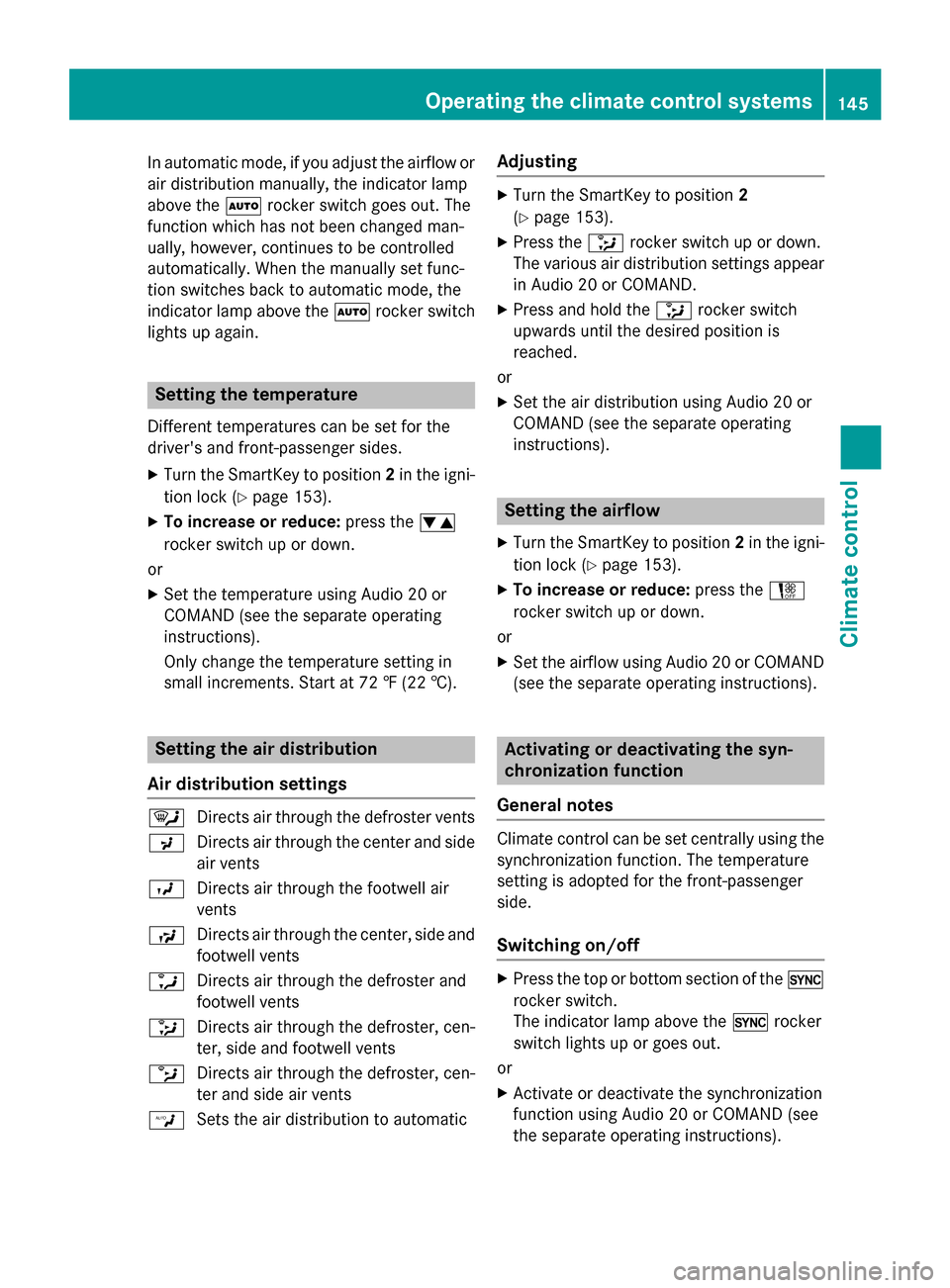
Air distribution settings
¯ Directs air through the defroster vents
P Directs air through the center and side
air vents
O Directs air through the footwell air
vents
S Directs air through the center, side and
footwell vents
a Directs air through the defroster and
footwell vents
_ Directs air through the defroster, cen-
ter, side and footwell vents
b Directs air through the defroster, cen-
ter and side air vents
W Sets the air distribution to automatic
Adjusting
XTurn the SmartKey to position 2
(
Ypage 153).
XPress the _rocker switch up or down.
The various air distribution settings appear
in Audio 20 or COMAND.
XPress and hold the _rocker switch
upwards until the desired position is
reached.
or
XSet the air distribution using Audio 20 or
COMAND (see the separate operating
instructions).
Setting the airflow
XTurn the SmartKey to position 2in the igni-
tion lock (
Ypage 153).
XTo increase or reduce: press theH
rocker switch up or down.
or
XSet the airflow using Audio 20 or COMAND
(see the separate operating instructions).
Activating or deactivating the syn-
chronization function
General notes
Climate control can be set centrally using the
synchronization function. The temperature
setting is adopted for the front-passenger
side.
Switching on/off
XPress the top or bottom section of the 0
rocker switch.
The indicator lamp above the 0rocker
switch lights up or goes out.
or
XActivate or deactivate the synchronization
function using Audio 20 or COMAND (see
the separate operating instructions).
Operating the climate control systems145
Climate control
Page 148 of 418
The synchronization function deactivates if
the settings for the front-passenger side are
changed.
Defrosting the windshield
General notes
You can use this function to defrost the wind-
shield or to clear a fogged up windshield or
front side windows on the inside.
Switch off the "Windshield defrosting" func-
tion as soon as the windshield is clear again.
Switching the "Windshield defrosting"
function on or off
XTurn the SmartKey to position 2in the igni-
tion lock (
Ypage 153).
XTo activate: press the¬rocker switch
on the front control unit up or down.
The indicator lamp above the ¬rocker
switch lights up. The current climate con-
trol settings are deactivated.
The climate control system switches to the
following functions:
Rhigh airflow
Rhigh temperature
Rair distribution to the windshield and
front side windows
Rair-recirculation mode off
iIf necessary, the "Cooling with air dehu-
midification" function is activated. In this
case, the indicator lamp above the
¿ rocker switch remains switched off.
XTo deactivate: press the¬rocker
switch up or down.
The indicator lamp above the ¬rocker
switch goes out. The previously selected
settings are restored. Air-recirculation
mode remains deactivated.
or
XPress the top or bottom section of the Ã
rocker switch.
Defrosting the windows
Windows fogged up on the inside
XActivate the cooling with air dehumidifica-
tion function with the ¿rocker switch.
or
XActivate the cooling with air dehumidifica-
tion function via Audio 20 or COMAND (see
the separate operating instructions).
XSwitch on automatic mode using the Ã
rocker switch.
XIf the windows continue to fog up, activate
the "Windshield defrosting" function using
the ¬ rocker switch.
iYou should only select this setting until
the windshield is clear again.
Windows fogged up on the outside
XActivate the windshield wipers.
XSwitch on automatic mode using the Ã
rocker switch.
iIf you clean the windows regularly, they
do not fog up so quickly.
Rear window defroster
General notes
The rear window defroster has a high current draw. You should therefore switch it off as
soon as the rear window is clear. Otherwise,
the rear window defroster switches off auto-
matically after several minutes.
If the battery voltage is too low, the rear win-
dow defroster may switch off.
Switching on/off
XTurn the SmartKey to position 2in the igni-
tion lock (
Ypage 153).
XPress the ¤rocker switch up or down.
The indicator lamp above the ¤rocker
switch lights up or goes out.
146Operating the climate control systems
Climate control
Page 149 of 418
Problems with the rear window defroster
ProblemPossible causes/consequences andMSolutions
The rear window
defroster has deactiva-
ted prematurely or can-
not be activated.The battery has not been sufficiently charged.
XSwitch off any consumers that are not required, e.g. reading
lamps, interior lighting or the seat heating.
When the battery is sufficiently charged, the rear window
defroster can be activated again.
Switching air-recirculation mode
on/off
General notes
You can also temporarily deactivate the flow
of fresh air manually if unpleasant odors are
entering the vehicle from outside. The air
already inside the vehicle will then be recir-
culated.
If you switch on air-recirculation mode, the
windows can fog up more quickly, in particu-
lar at low temperatures. Only use air-recircu-
lation mode briefly to prevent the windows
from fogging up.
Switching on/off
XTurn the SmartKey to position 2in the igni-
tion lock (
Ypage 153).
XTo activate: press thegrocker switch
up or down.
The indicator lamp above the grocker
switch lights up.
Air-recirculation mode switches on automat-
ically:
Rat high outside temperatures
Rin a tunnel (vehicles with a navigation sys-
tem only)
The indicator lamp above the grocker
switch is not lit when automatic air-recircula-
tion mode is activated. Outside air is added
after about 30 minutes.
XTo deactivate: press thegrocker
switch up or down.
The indicator lamp above the grocker
switch goes out.
Air-recirculation mode deactivates automati-
cally:
Rafter approximately five minutes at outside temperatures below approximately 41 ‡
(5 †)
Rafter approximately five minutes if cooling
with air dehumidification is deactivated
Rafter approximately 30 minutes at outside
temperatures above approximately 41 ‡
(5 †) if the "Cooling with air dehumidifica-
tion" function is activated
Perfume atomizer
Operating the perfume atomizer
GWARNING
If children open the perfume vial, they could
drink the perfume or it could come into con-
tact with their eyes. There is a risk of injury. Do not leave children unsupervised in the vehicle.
If the perfume liquid has been drunk, consult
a doctor. If perfume comes into contact with
your eyes or skin, rinse the eyes with clean
water. If you continue to experience difficul-
ties, consult a doctor.
Operating the climate control systems147
Climate control
Z