lock MERCEDES-BENZ GLC-Class 2016 X253 Owner's Manual
[x] Cancel search | Manufacturer: MERCEDES-BENZ, Model Year: 2016, Model line: GLC-Class, Model: MERCEDES-BENZ GLC-Class 2016 X253Pages: 418, PDF Size: 9.23 MB
Page 292 of 418
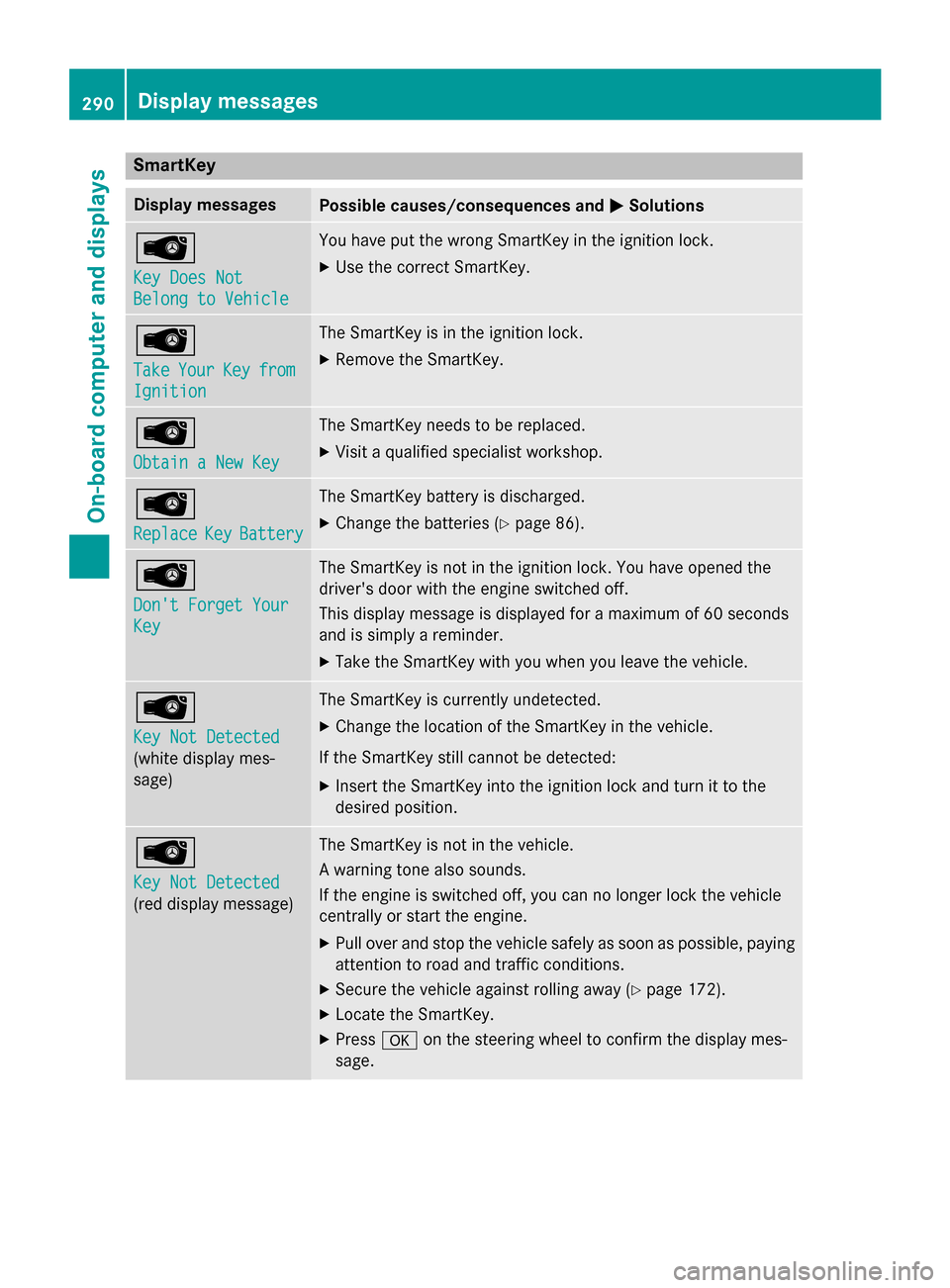
SmartKey
Display messagesPossible causes/consequences andMSolutions
Â
Key Does Not
Belong to Vehicle
You have put the wrong SmartKey in the ignition lock.
XUse the correct SmartKey.
Â
TakeYourKeyfrom
Ignition
The SmartKey is in the ignition lock.
XRemove the SmartKey.
Â
Obtain a New Key
The SmartKey needs to be replaced.
XVisit a qualified specialist workshop.
Â
ReplaceKeyBattery
The SmartKey battery is discharged.
XChange the batteries (Ypage 86).
Â
Don't Forget Your
Key
The SmartKey is not in the ignition lock. You have opened the
driver's door with the engine switched off.
This display message is displayed for a maximum of 60 seconds
and is simply a reminder.
XTake the SmartKey with you when you leave the vehicle.
Â
Key Not Detected
(white display mes-
sage)
The SmartKey is currently undetected.
XChange the location of the SmartKey in the vehicle.
If the SmartKey still cannot be detected:
XInsert the SmartKey into the ignition lock and turn it to the
desired position.
Â
Key Not Detected
(red display message)
The SmartKey is not in the vehicle.
A warning tone also sounds.
If the engine is switched off, you can no longer lock the vehicle
centrally or start the engine.
XPull over and stop the vehicle safely as soon as possible, paying
attention to road and traffic conditions.
XSecure the vehicle against rolling away (Ypage 172).
XLocate the SmartKey.
XPress aon the steering wheel to confirm the display mes-
sage.
290Display messages
On-board computer and displays
Page 296 of 418
Warning/
indicator
lampNSignal type
Possible causes/consequences and M
Solutions
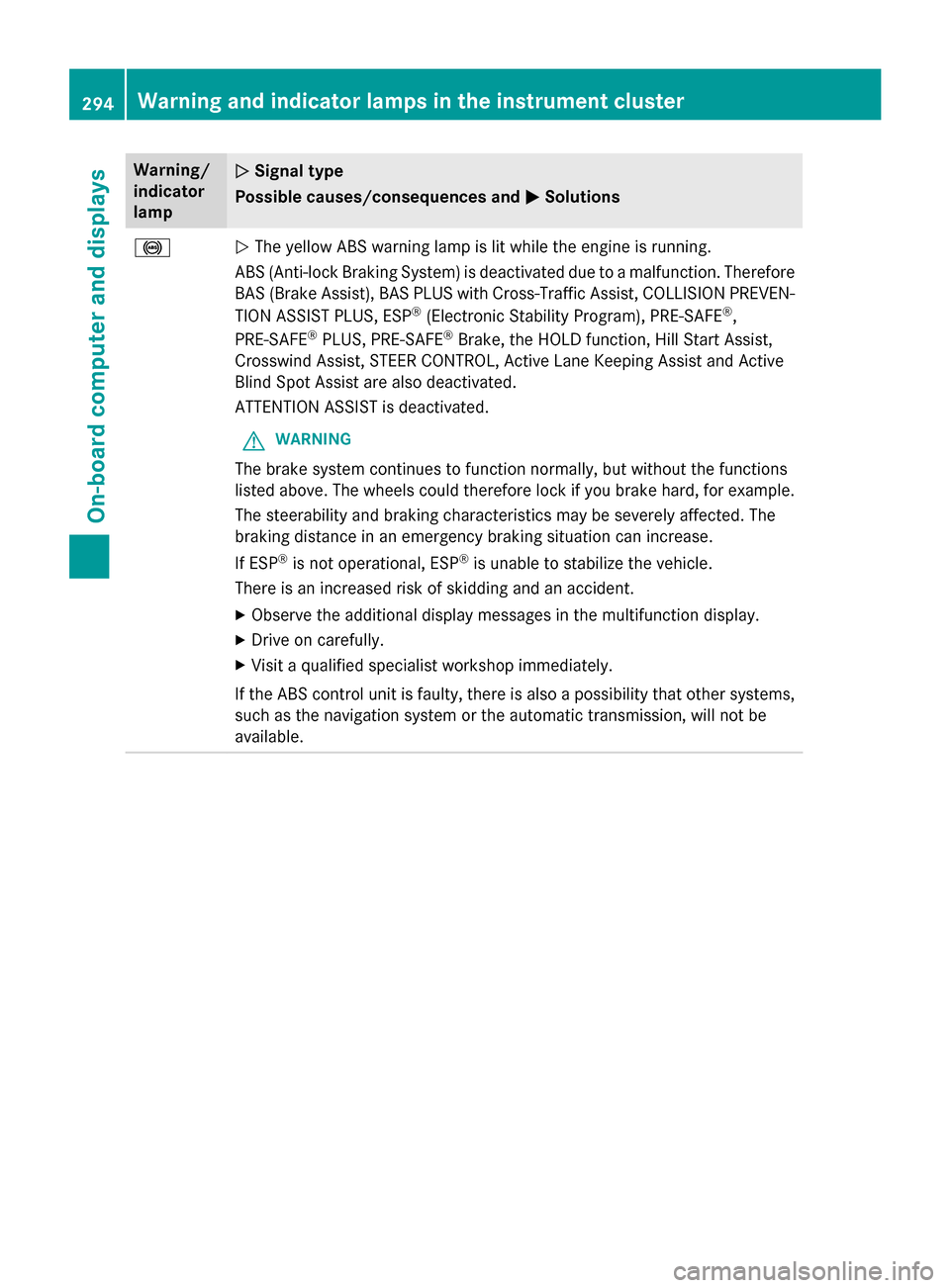
!NThe yellow ABS warning lamp is lit while the engine is running.
ABS (Anti-lock Braking System) is deactivated due to a malfunction. Therefore
BAS (Brake Assist), BAS PLUS with Cross-Traffic Assist, COLLISION PREVEN-
TION ASSIST PLUS, ESP
®(Electronic Stability Program), PRE‑SAFE®,
PRE‑SAFE®PLUS, PRE‑SAFE®Brake, the HOLD function, Hill Start Assist,
Crosswind Assist, STEER CONTROL, Active Lane Keeping Assist and Active
Blind Spot Assist are also deactivated.
ATTENTION ASSIST is deactivated.
GWARNING
The brake system continues to function normally, but without the functions
listed above. The wheels could therefore lock if you brake hard, for example.
The steerability and braking characteristics may be severely affected. The
braking distance in an emergency braking situation can increase.
If ESP
®is not operational, ESP®is unable to stabilize the vehicle.
There is an increased risk of skidding and an accident.
XObserve the additional display messages in the multifunction display.
XDrive on carefully.
XVisit a qualified specialist workshop immediately.
If the ABS control unit is faulty, there is also a possibility that other systems,
such as the navigation system or the automatic transmission, will not be
available.
294Warning and indicator lamps in the instrument cluster
On-board computer and displays
Page 297 of 418
Warning/
indicator
lampNSignal type
Possible causes/consequences and M
Solutions
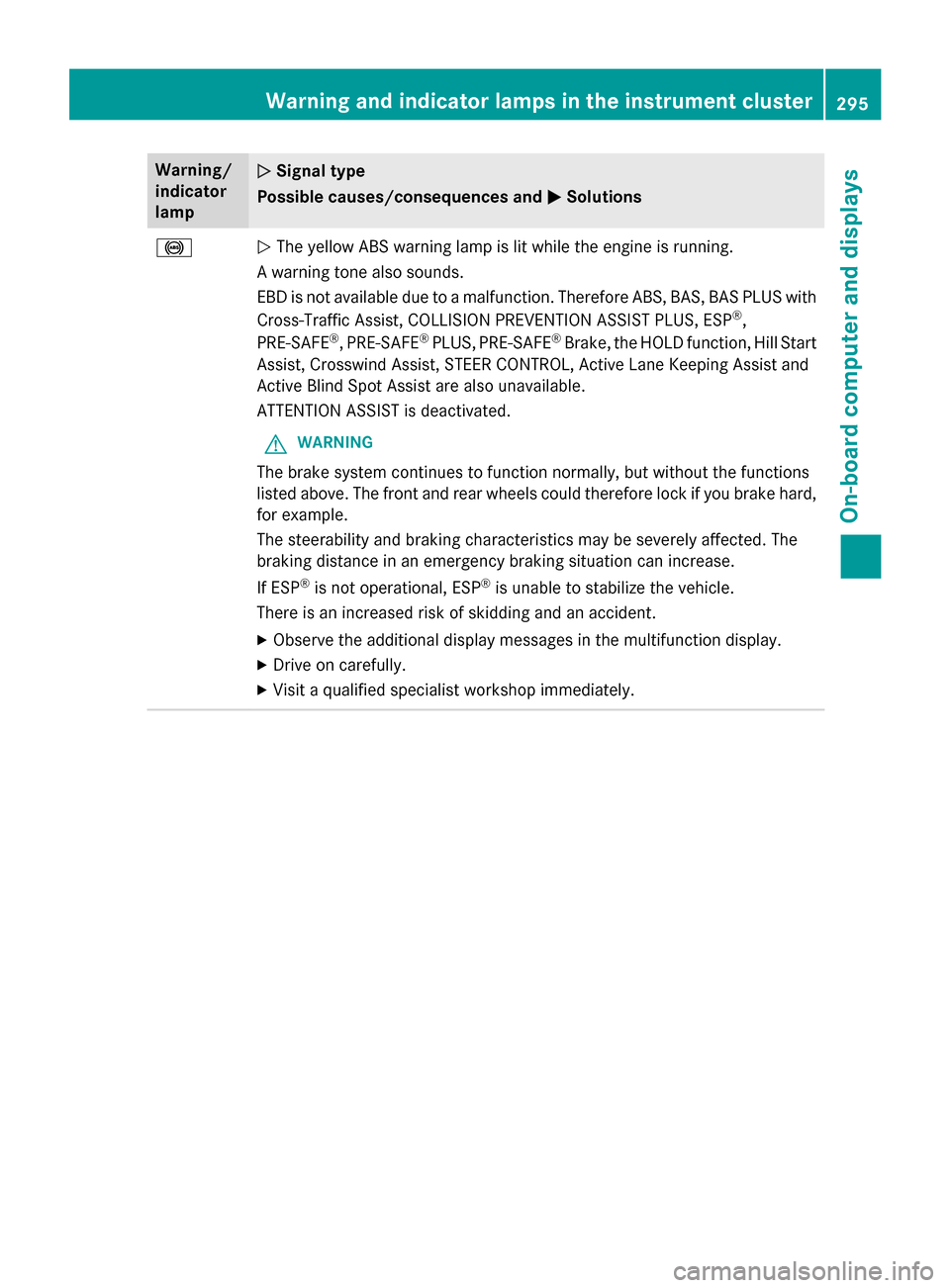
!NThe yellow ABS warning lamp is lit while the engine is running.
A warning tone also sounds.
EBD is not available due to a malfunction. Therefore ABS, BAS, BAS PLUS with
Cross-Traffic Assist, COLLISION PREVENTION ASSIST PLUS, ESP
®,
PRE‑SAFE®, PRE‑SAFE®PLUS, PRE‑SAFE®Brake, the HOLD function, Hill Start
Assist, Crosswind Assist, STEER CONTROL, Active Lane Keeping Assist and
Active Blind Spot Assist are also unavailable.
ATTENTION ASSIST is deactivated.
GWARNING
The brake system continues to function normally, but without the functions
listed above. The front and rear wheels could therefore lock if you brake hard,
for example.
The steerability and braking characteristics may be severely affected. The
braking distance in an emergency braking situation can increase.
If ESP
®is not operational, ESP®is unable to stabilize the vehicle.
There is an increased risk of skidding and an accident.
XObserve the additional display messages in the multifunction display.
XDrive on carefully.
XVisit a qualified specialist workshop immediately.
Warning and indicator lamps in the instrument cluster295
On-board computer and displays
Z
Page 298 of 418
Warning/
indicator
lampNSignal type
Possible causes/consequences and M
Solutions
$J
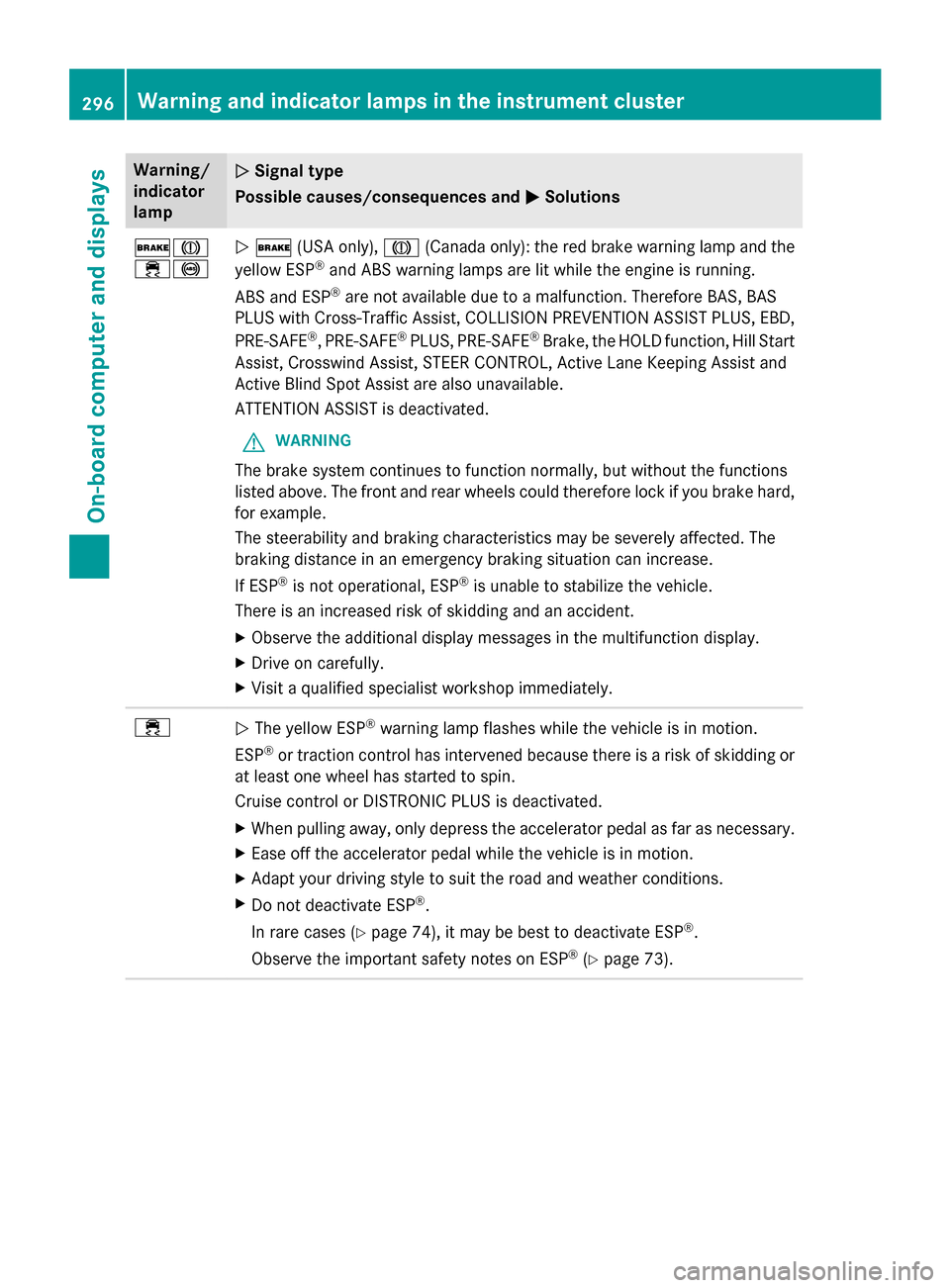
÷!N$ (USA only), J(Canada only): the red brake warning lamp and the
yellow ESP®and ABS warning lamps are lit while the engine is running.
ABS and ESP
®are not available due to a malfunction. Therefore BAS, BAS
PLUS with Cross-Traffic Assist, COLLISION PREVENTION ASSIST PLUS, EBD,
PRE‑SAFE
®, PRE‑SAFE®PLUS, PRE‑SAFE®Brake, the HOLD function, Hill Start
Assist, Crosswind Assist, STEER CONTROL, Active Lane Keeping Assist and
Active Blind Spot Assist are also unavailable.
ATTENTION ASSIST is deactivated.
GWARNING
The brake system continues to function normally, but without the functions
listed above. The front and rear wheels could therefore lock if you brake hard,
for example.
The steerability and braking characteristics may be severely affected. The
braking distance in an emergency braking situation can increase.
If ESP
®is not operational, ESP®is unable to stabilize the vehicle.
There is an increased risk of skidding and an accident.
XObserve the additional display messages in the multifunction display.
XDrive on carefully.
XVisit a qualified specialist workshop immediately.
÷N The yellow ESP®warning lamp flashes while the vehicle is in motion.
ESP
®or traction control has intervened because there is a risk of skidding or
at least one wheel has started to spin.
Cruise control or DISTRONIC PLUS is deactivated.
XWhen pulling away, only depress the accelerator pedal as far as necessary.
XEase off the accelerator pedal while the vehicle is in motion.
XAdapt your driving style to suit the road and weather conditions.
XDo not deactivate ESP®.
In rare cases (
Ypage 74), it may be best to deactivate ESP®.
Observe the important safety notes on ESP
®(Ypage 73).
296Warning and indicator lamps in the instrument cluster
On-board computer and displays
Page 302 of 418
Warning/
indicator
lampNSignal type
Possible causes/consequences and M
Solutions
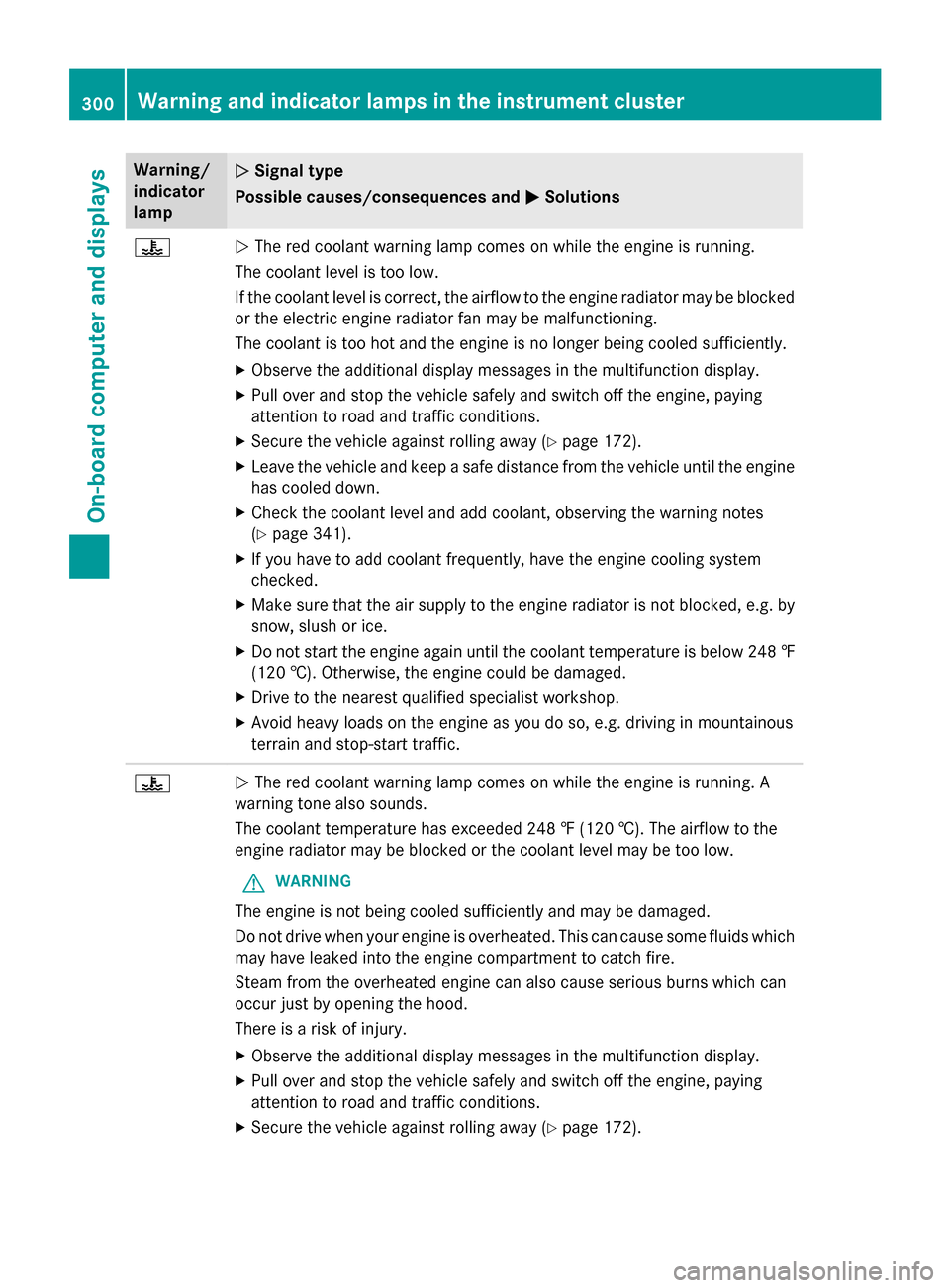
?NThe red coolant warning lamp comes on while the engine is running.
The coolant level is too low.
If the coolant level is correct, the airflow to the engine radiator may be blocked
or the electric engine radiator fan may be malfunctioning.
The coolant is too hot and the engine is no longer being cooled sufficiently.
XObserve the additional display messages in the multifunction display.
XPull over and stop the vehicle safely and switch off the engine, paying
attention to road and traffic conditions.
XSecure the vehicle against rolling away (Ypage 172).
XLeave the vehicle and keep a safe distance from the vehicle until the engine has cooled down.
XCheck the coolant level and add coolant, observing the warning notes
(
Ypage 341).
XIf you have to add coolant frequently, have the engine cooling system
checked.
XMake sure that the air supply to the engine radiator is not blocked, e.g. by
snow, slush or ice.
XDo not start the engine again until the coolant temperature is below 248 ‡
(120 †). Otherwise, the engine could be damaged.
XDrive to the nearest qualified specialist workshop.
XAvoid heavy loads on the engine as you do so, e.g. driving in mountainous
terrain and stop-start traffic.
?N The red coolant warning lamp comes on while the engine is running. A
warning tone also sounds.
The coolant temperature has exceeded 248 ‡ (120 †). The airflow to the
engine radiator may be blocked or the coolant level may be too low.
GWARNING
The engine is not being cooled sufficiently and may be damaged.
Do not drive when your engine is overheated. This can cause some fluids which
may have leaked into the engine compartment to catch fire.
Steam from the overheated engine can also cause serious burns which can
occur just by opening the hood.
There is a risk of injury.
XObserve the additional display messages in the multifunction display.
XPull over and stop the vehicle safely and switch off the engine, paying
attention to road and traffic conditions.
XSecure the vehicle against rolling away (Ypage 172).
300Warning and indicator lamps in the instrument cluster
On-board computer and displays
Page 303 of 418
Warning/
indicator
lampNSignal type
Possible causes/consequences and M
Solutions
XLeave the vehicle and keep a safe distance from the vehicle until the engine
has cooled down.
XCheck the coolant level and add coolant, observing the warning notes
(
Ypage 341).
XIf you have to add coolant frequently, have the engine cooling system
checked.
XMake sure that the air supply to the engine radiator is not blocked, e.g. by
snow, slush or ice.
XAt coolant temperatures below 248 ‡(120 †), drive to the nearest qualified
specialist workshop.
XAvoid heavy loads on the engine as you do so, e.g. driving in mountainous
terrain and stop-start traffic.
Driving systems
Warning/
indicator
lampNSignal type
Possible causes/consequences and M
Solutions
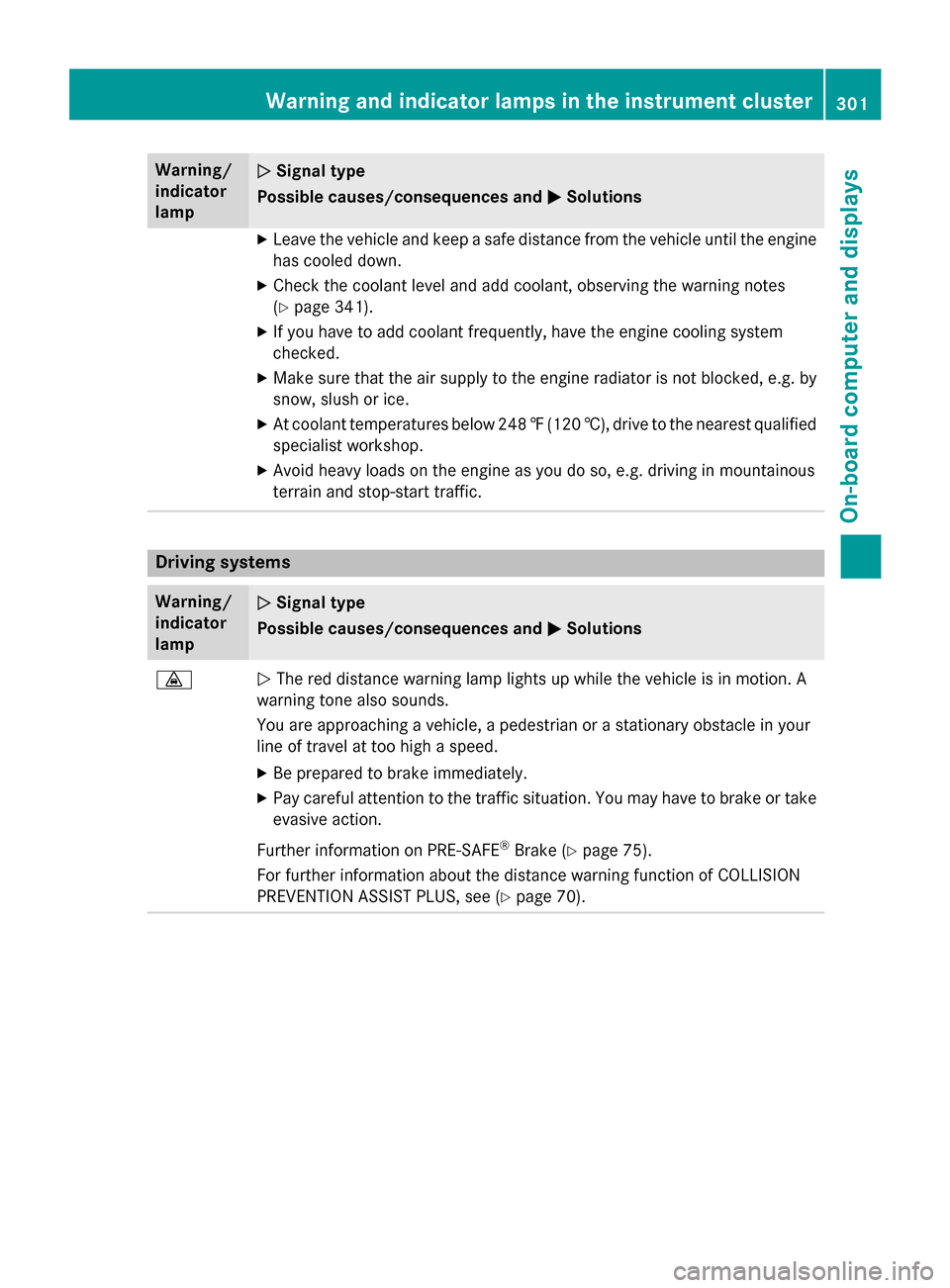
·NThe red distance warning lamp lights up while the vehicle is in motion. A
warning tone also sounds.
You are approaching a vehicle, a pedestrian or a stationary obstacle in your
line of travel at too high a speed.
XBe prepared to brake immediately.
XPay careful attention to the traffic situation. You may have to brake or take
evasive action.
Further information on PRE ‑SAFE
®Brake (Ypage 75).
For further information about the distance warning function of COLLISION
PREVENTION ASSIST PLUS, see (
Ypage 70).
Warning and indicator lamps in the instrument cluster301
On-board computer and displays
Z
Page 309 of 418
RAlways stow objects so that they cannot be
thrown around in such situations.
RAlways make sure that objects do not pro-
trude from stowage spaces, parcel nets or
stowage nets.
RClose the lockable stowage spaces before
starting a journey.
RStow and secure objects that are heavy,
hard, pointed, sharp-edged, fragile or too
large in the cargo compartment.
Observe the loading guidelines (Ypage 306).
Stowage compartments in the front
Glove box
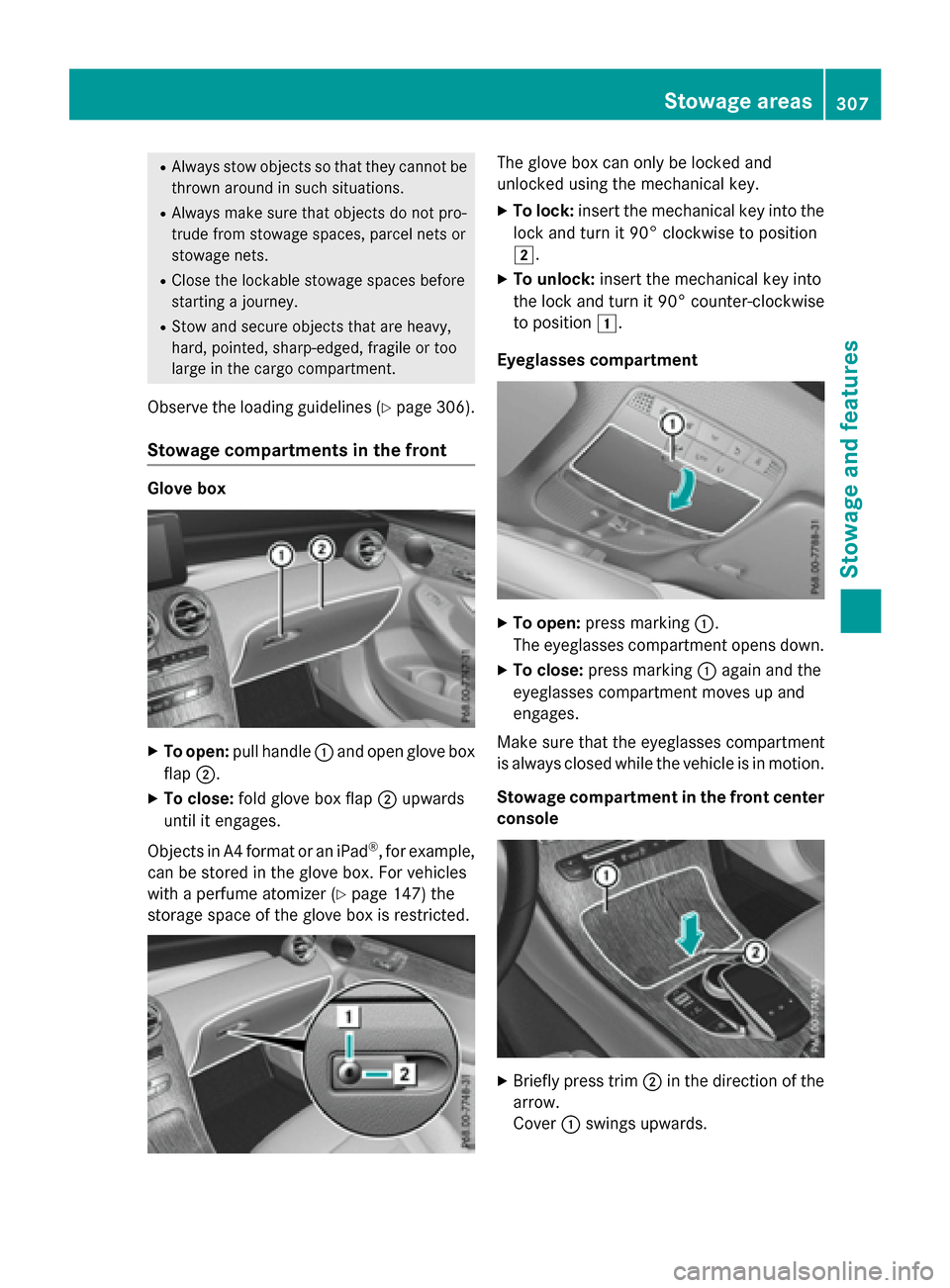
XTo open: pull handle :and open glove box
flap ;.
XTo close: fold glove box flap ;upwards
until it engages.
Objects in A4 format or an iPad
®, for example,
can be stored in the glove box. For vehicles
with a perfume atomizer (
Ypage 147) the
storage space of the glove box is restricted.
The glove box can only be locked and
unlocked using the mechanical key.
XTo lock: insert the mechanical key into the
lock and turn it 90° clockwise to position
2.
XTo unlock: insert the mechanical key into
the lock and turn it 90° counter-clockwise
to position 1.
Eyeglasses compartment
XTo open: press marking :.
The eyeglasses compartment opens down.
XTo close: press marking :again and the
eyeglasses compartment moves up and
engages.
Make sure that the eyeglasses compartment
is always closed while the vehicle is in motion.
Stowage compartment in the front center
console
XBriefly press trim ;in the direction of the
arrow.
Cover :swings upwards.
Stowage areas307
Stowag ean d features
Z
Page 312 of 418
otherwise be damaged or could themselves
damage the rear seats.
Observe the loading guidelines (
Ypage 306).
The outside and the middle rear seat backr-
ests can be folded down separately to
increase the cargo compartment capacity.
The division ratio is 40% to 20% to 40%.
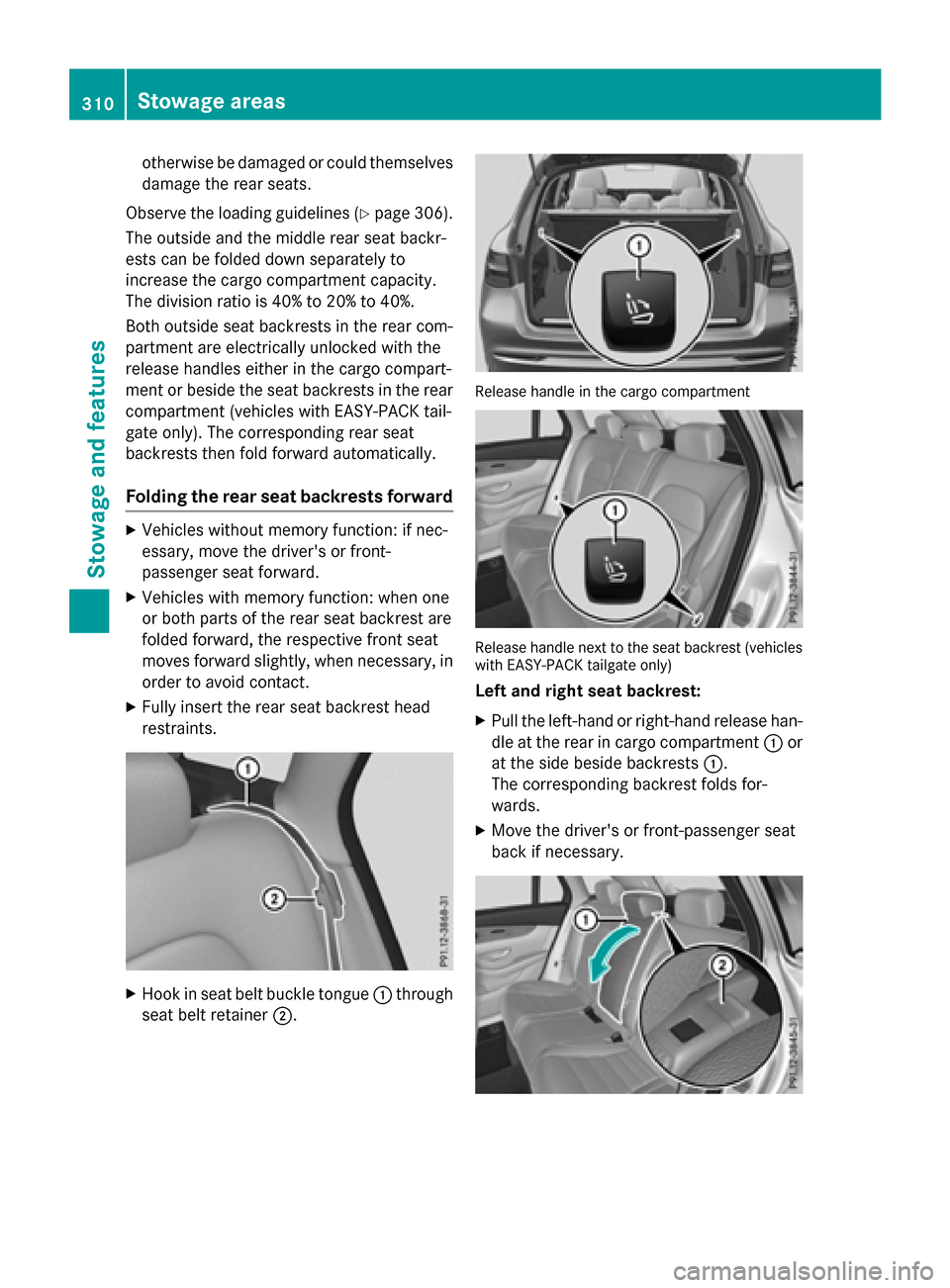
Both outside seat backrests in the rear com-
partment are electrically unlocked with the
release handles either in the cargo compart-
ment or beside the seat backrests in the rear
compartment (vehicles with EASY-PACK tail-
gate only). The corresponding rear seat
backrests then fold forward automatically.
Folding the rear seat backrests forward
XVehicles without memory function: if nec-
essary, move the driver's or front-
passenger seat forward.
XVehicles with memory function: when one
or both parts of the rear seat backrest are
folded forward, the respective front seat
moves forward slightly, when necessary, in
order to avoid contact.
XFully insert the rear seat backrest head
restraints.
XHook in seat belt buckle tongue :through
seat belt retainer ;.
Release handle in the cargo compartment
Release handle next to the seat backrest (vehicles
with EASY-PACK tailgate only)
Left and right seat backrest:
XPull the left-hand or right-hand release han-
dle at the rear in cargo compartment :or
at the side beside backrests :.
The corresponding backrest folds for-
wards.
XMove the driver's or front-passenger seat
back if necessary.
310Stowage areas
Stowage and features
Page 313 of 418
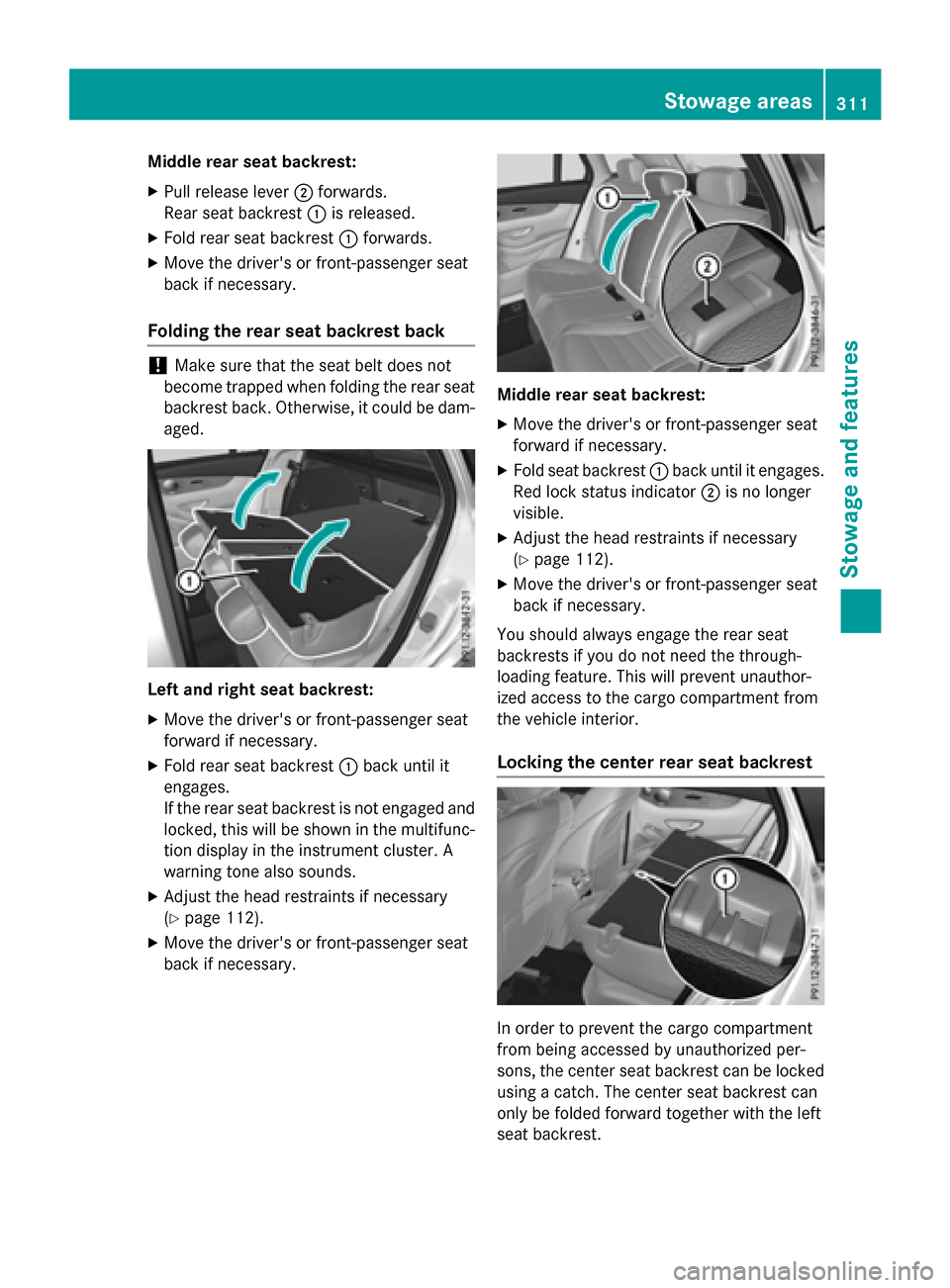
Middle rear seat backrest:
XPull release lever;forwards.
Rear seat backrest :is released.
XFold rear seat backrest :forwards.
XMove the driver's or front-passenger seat
back if necessary.
Folding the rear seat backrest back
!Make sure that the seat belt does not
become trapped when folding the rear seat
backrest back. Otherwise, it could be dam-
aged.
Left and right seat backrest:
XMove the driver's or front-passenger seat
forward if necessary.
XFold rear seat backrest :back until it
engages.
If the rear seat backrest is not engaged and
locked, this will be shown in the multifunc-
tion display in the instrument cluster. A
warning tone also sounds.
XAdjust the head restraints if necessary
(
Ypage 112).
XMove the driver's or front-passenger seat
back if necessary.
Middle rear seat backrest:
XMove the driver's or front-passenger seat
forward if necessary.
XFold seat backrest :back until it engages.
Red lock status indicator ;is no longer
visible.
XAdjust the head restraints if necessary
(
Ypage 112).
XMove the driver's or front-passenger seat
back if necessary.
You should always engage the rear seat
backrests if you do not need the through-
loading feature. This will prevent unauthor-
ized access to the cargo compartment from
the vehicle interior.
Locking the center rear seat backrest
In order to prevent the cargo compartment
from being accessed by unauthorized per-
sons, the center seat backrest can be locked
using a catch. The center seat backrest can
only be folded forward together with the left
seat backrest.
Stowage areas311
Stowage and features
Z
Page 314 of 418
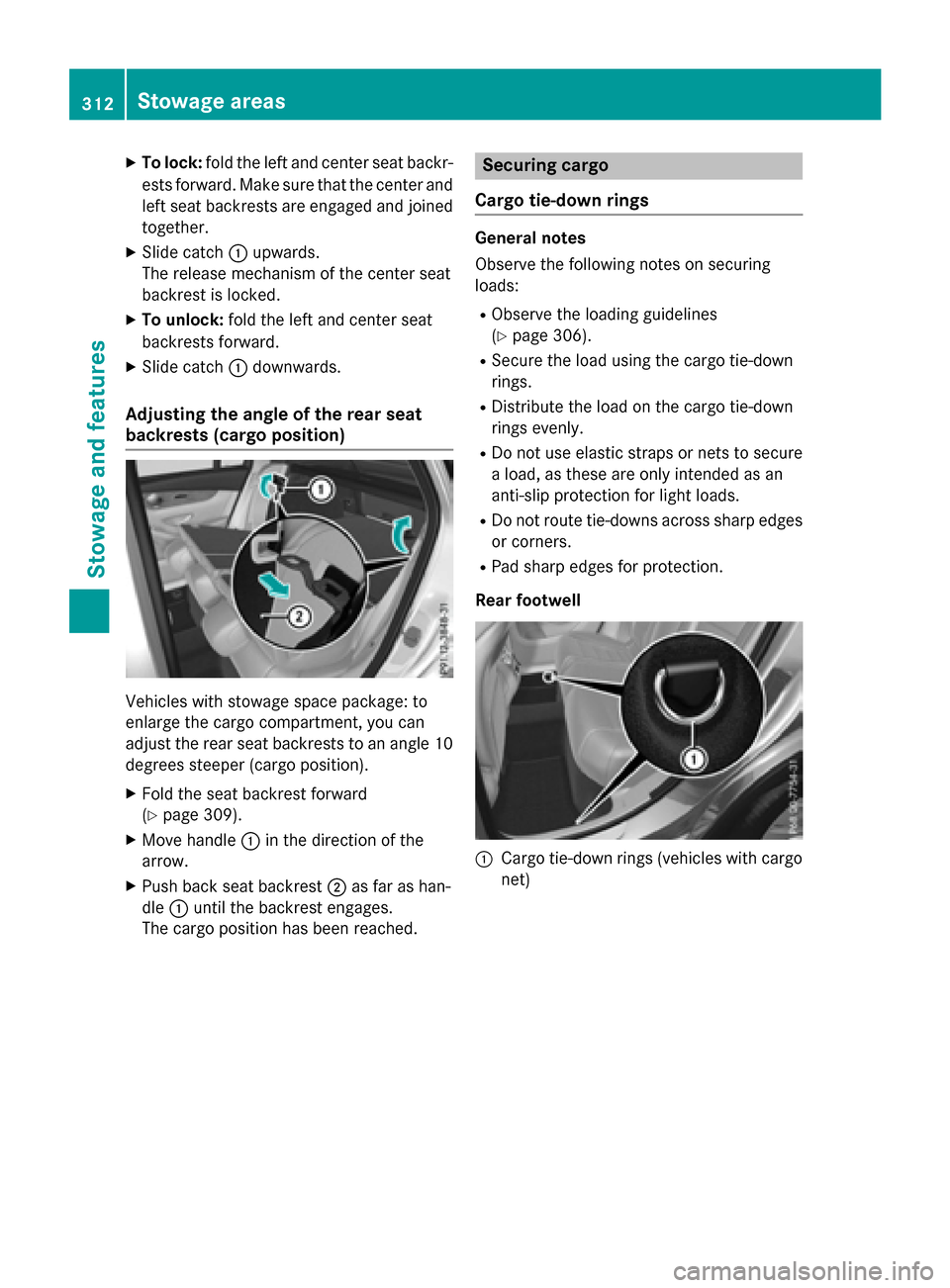
XTo lock:fold the left and center seat backr-
ests forward. Make sure that the center and
left seat backrests are engaged and joined
together.
XSlide catch :upwards.
The release mechanism of the center seat
backrest is locked.
XTo unlock: fold the left and center seat
backrests forward.
XSlide catch :downwards.
Adjusting the angle of the rear seat
backrests (cargo position)
Vehicles with stowage space package: to
enlarge the cargo compartment, you can
adjust the rear seat backrests to an angle 10
degrees steeper (cargo position).
XFold the seat backrest forward
(
Ypage 309).
XMove handle :in the direction of the
arrow.
XPush back seat backrest ;as far as han-
dle :until the backrest engages.
The cargo position has been reached.
Securing cargo
Cargo tie-down rings
General notes
Observe the following notes on securing
loads:
RObserve the loading guidelines
(
Ypage 306).
RSecure the load using the cargo tie-down
rings.
RDistribute the load on the cargo tie-down
rings evenly.
RDo not use elastic straps or nets to secure
a load, as these are only intended as an
anti-slip protection for light loads.
RDo not route tie-downs across sharp edges or corners.
RPad sharp edges for protection.
Rear footwell
:Cargo tie-down rings (vehicles with cargo
net)
312Stowage areas
Stowag ean d features