manual transmission MERCEDES-BENZ GLC-Class 2016 X253 User Guide
[x] Cancel search | Manufacturer: MERCEDES-BENZ, Model Year: 2016, Model line: GLC-Class, Model: MERCEDES-BENZ GLC-Class 2016 X253Pages: 418, PDF Size: 9.23 MB
Page 197 of 418
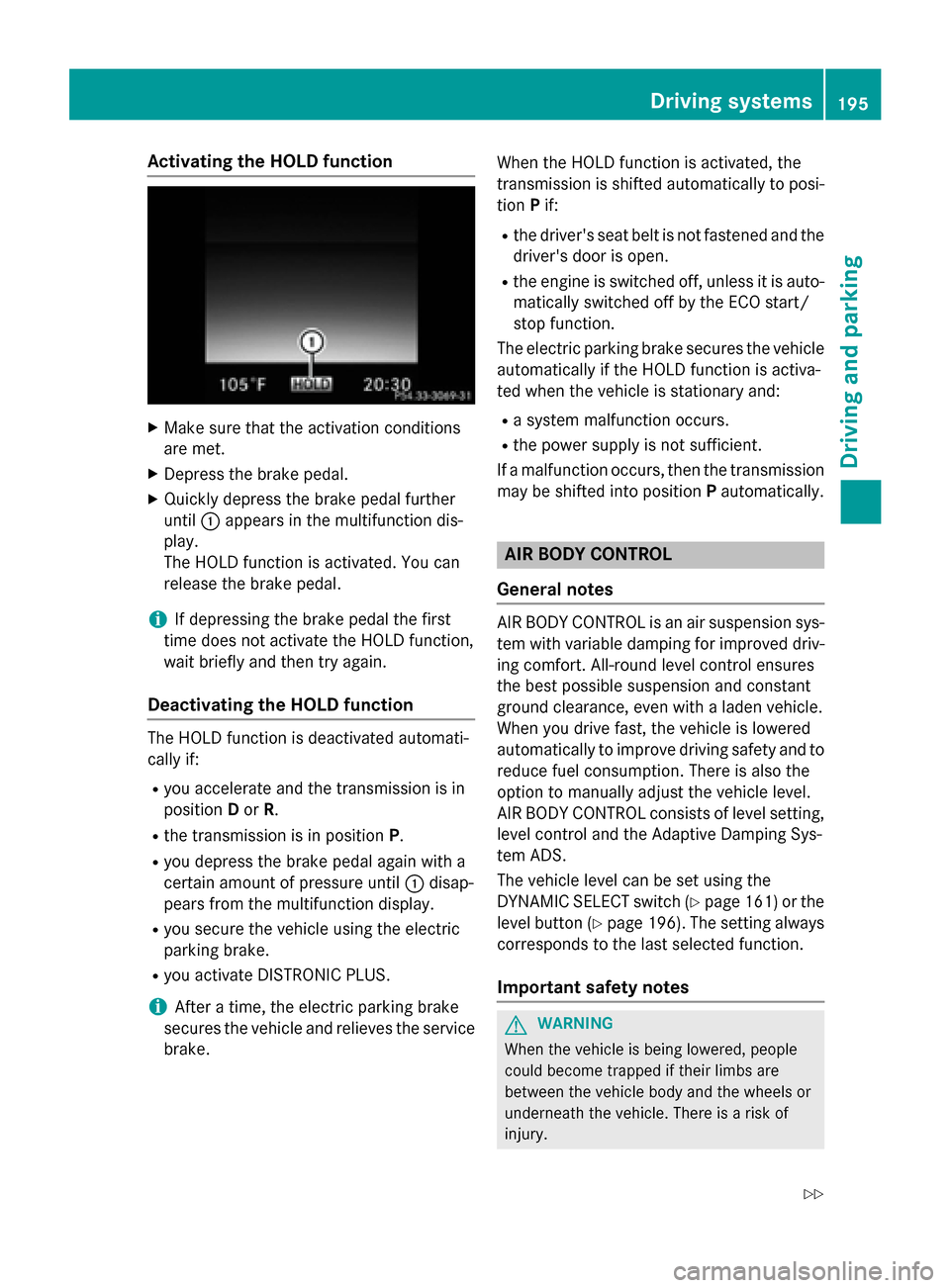
Activating the HOLD function
XMakesur ethat th eactivation condition s
are met .
XDepress th ebrak epedal .
XQuickl ydepress th ebrak epedal further
until :appear sin th emultifunction dis-
play.
The HOLD function is activated. You can
release th ebrak epedal .
iIf depressing th ebrak epedal th efirst
time does no tactivat eth eHOLD function ,
wait briefly and then tr yagain .
Deactivating the HOLD function
The HOLD function is deactivated automati-
callyif:
Ryou accelerate and th etransmission is in
position Dor R.
Rth etransmission is in position P.
Ryou depress thebrak epedal again wit h a
certain amoun tof pressur euntil :disap -
pear sfrom th emultifunction display.
Ryou secure th evehicl eusin gth eelectric
parking brake.
Ryou activat eDISTRONI CPLUS.
iAfte r atime, th eelectric parking brak e
secures th evehicl eand relieves th eservic e
brake. When th
eHO LD function is activated, th e
transmission is shifte dautomatically to posi-
tion Pif:
Rthedriver' sseat belt is no tfastene dand th e
driver' sdoor is open .
Rtheengin eis switched off ,unless it is auto -
matically switched off by th eECO start/
stop function .
The electric parking brak esecures th evehicl e
automatically if th e HOLD function is activa-
te dwhen th evehicl eis stationary and :
Rasystem malfunction occur s.
Rthepower suppl yis no tsufficient.
If amalfunction occur s,then th etransmission
may be shifte dint oposition Pautomatically.
AIR BODY CONTROL
Gene ral notes
AIRBODY CONTROL is an air suspension sys-
te m wit hvariable damping for improve ddriv -
ing comfort .All-roun dlevel control en sures
th ebest possible suspension and constan t
ground clearance ,eve nwit h a laden vehicle.
When you driv efast, th evehicl eis lowered
automatically to improve driving safet yand to
reduce fuel consumption .There is also th e
option to manually adjust th evehicl elevel.
AI RBODY CONTROL cons istsof level setting ,
level control and th eAdaptive Dampin gSys -
te m ADS.
The vehicl elevel can be setusin gth e
DYNAMIC SELECT switch (
Ypage 161) or the
level butto n (
Ypage 196). The setting always
correspond sto th elast selected function .
Important safety notes
GWARNIN G
When th evehicl eis bein glowered, people
could become trapped if their limb sare
between th evehicl ebody and th ewheels or
underneat hth evehicle. There is aris kof
injury.
Driving systems195
Driving and parking
Z
Page 212 of 418
object is marked with a bar. Objects located
some distance from the vehicle away are
marked with a yellow bar. If the distance to
the object is very small, the bar is displayed in
red.
Object detection only works in wide-angle
mode.
In order to use the function, it must be
switched on in Audio 20 or COMAND (see the
Digital Operator's Manual).
360° camera
General notes
The 360° camera is a system consisting of
four cameras.
The system analyzes images from the follow-
ing cameras:
RRear view camera
RFront camera
RTwo side cameras in the exterior mirrors
The cameras capture the immediate sur-
roundings of the vehicle. The system sup-
ports you, for example when parking or if
vision is restricted at an exit.
You can show pictures from the 360° camera
in full-screen mode or in six different split-
screen views on the Audio 20 or COMAND
display. A split-screen view also includes a
top view of the vehicle. This view is calculated
from the data supplied by the installed cam-
eras (virtual camera).
The six split-screen views are:
Rtop view and picture from the rear view
camera (130° viewing angle)
Rtop view and image from the front camera
(130° viewing angle without displaying the
maximum steering wheel angle)
Rtop view and enlarged rear view
Rtop view and enlarged front view
Rtop view and images from the rear-facing
side cameras (rear wheel view)
Rtop view and images from the forward-
facing side cameras (front wheel view) When the function is active and you shift the
transmission from
Dor Rto N, the guide lines
in the Audio 20 or COMAND display are hid-
den.
When you change between transmission
positions Dand R, you see the previously
selected front or rear view.
Distances measured by PARKTRONIC will
also be optically displayed:
Rin split screen view as red or yellow brack- ets around the vehicle icon in the top view,
or
Rat the bottom right as red or yellow brack-
ets around the vehicle symbol in full-screen
mode
The line thickness and color of the brackets
show how far the vehicle is from an object.
Ryellow brackets with thin lines:
PARKTRONIC is active
Ryellow brackets with normal lines: an
object is present in close range of the vehi- cle
Rred line: an object is present in the imme-
diate close range of the vehicle
Important safety notes
The 360°camera is only an aid and may show
a distorted view of obstacles, show them
incorrectly or not at all. The 360°camera is
not a substitute for attentive driving.
You are always responsible for safe maneu-
vering and parking. When maneuvering or
parking, make sure that there are no persons,
animals or objects in the area in which you are
maneuvering.
You are always responsible for safety, and
must always pay attention to your surround-
ings when parking and maneuvering. This
applies to the areas behind, in front of and
beside the vehicle. You could otherwise
endanger yourself and others.
210Driving systems
Driving and parking
Page 235 of 418
Observe the following when towing a trailer:
RTo gain driving experience and to become
accustomed to the new handling charac-
teristics, you should practice the following
in a traffic-free location:
-cornering
-stopping
-backing up
RBefore driving, check:
-trailer tow hitch
-safety switch for braked trailers
-safety chains
-electrical connections
-lights
-wheels
RAdjust the exterior mirrors to provide an
unobstructed view of the rear section of the
trailer.
RIf the trailer has electronically controlled
brakes, pull away carefully. Brake manually
using the brake controller and check
whether the brakes function correctly.
RSecure any objects on the trailer to prevent
the cargo from slipping when the vehicle is
in motion.
RWhen you couple up a trailer, check at reg-
ular intervals that the load is firmly secured.
If the trailer is equipped with trailer lights
and brakes, check the trailer to ensure that
these are working.
RBear in mind that the handling will be less
stable when towing a trailer than when driv-
ing without one. Avoid sudden steering
movements.
RThe vehicle/trailer combination is heavier,
accelerates more slowly, has a decreased
gradient climbing capability and a longer
braking distance.
It is more susceptible to side winds and
requires more careful steering.
RIf possible, do not brake suddenly, but
instead depress the brake pedal moder-
ately at first so that the trailer can activate its brakes. Then increase the pressure on
the brake pedal.
RIf the automatic transmission repeatedly
shifts between gears on uphill or downhill
gradients, shift to a lower gear using the
left-hand steering wheel paddle shifter.
A lower gear and lower speed reduce the
risk of engine failure.
RWhen driving downhill, shift to a lower gear
to utilize the engine's braking effect.
Avoid continuous brake application as this
may overheat the vehicle brakes and, if
installed, the trailer brakes.
RIf the coolant temperature increases dra-
matically while the air-conditioning system is switched on, switch off the air-condition-
ing system.
Coolant heat can also be dissipated by
opening the windows and switching the
ventilation blower and the interior temper-
ature to the highest level.
RWhen overtaking, pay particular attention
to the extended length of your vehicle/
trailer combination.
Due to the length of the vehicle/trailer
combination, you require addi
tional road
space in relation to the vehicle you are
overtaking before you can change back to
the original lane.
Decoupling a trailer
GWARNING
If you uncouple a trailer with the overrun
brake engaged, you could trap your hand
between the vehicle and the trailer drawbar.
There is a risk of injury.
Do not uncouple a trailer if the overrun brake
is engaged.
!Do not disconnect a trailer with an
engaged overrun brake. Otherwise, your
vehicle could be damaged by the rebound-
ing of the overrun brake.
Towing a trailer233
Driving and parking
Z
Page 243 of 418
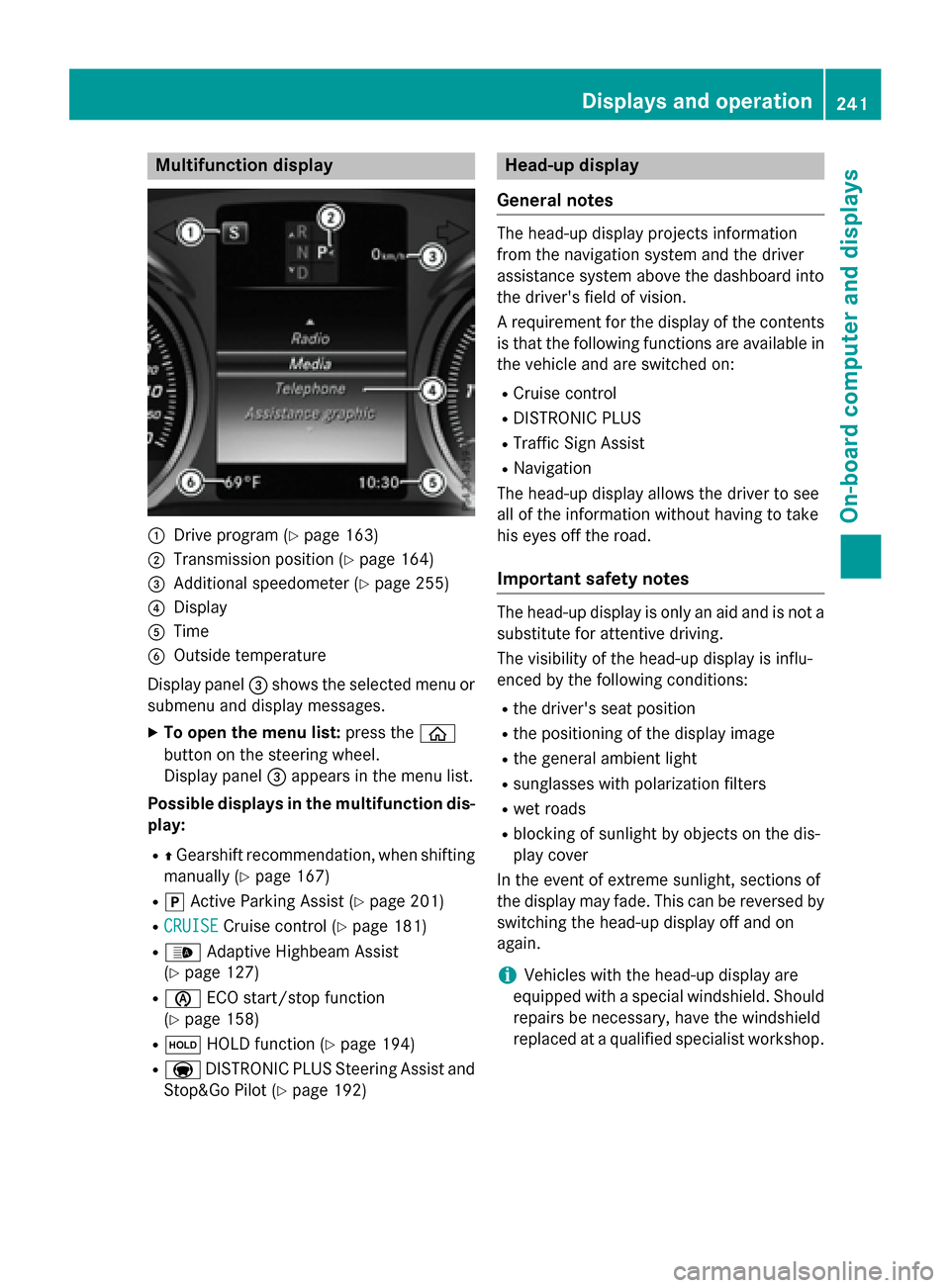
Multifunction display
:Drive program (Ypage 163)
;Transmission position (Ypage 164)
=Additional speedometer (Ypage 255)
?Display
ATime
BOutside temperature
Display panel =shows the selected menu or
submenu and display messages.
XTo open the menu list: press theò
button on the steering wheel.
Display panel =appears in the menu list.
Possible displays in the multifunction dis-
play:
RZ Gearshift recommendation, when shifting
manually (
Ypage 167)
Rj Active Parking Assist (Ypage 201)
RCRUISECruise control (Ypage 181)
R_ Adaptive Highbeam Assist
(
Ypage 127)
Rè ECO start/stop function
(
Ypage 158)
Rë HOLD function (Ypage 194)
RaDISTRONIC PLUS Steering Assist and
Stop&Go Pilot (
Ypage 192)
Head-up display
General notes
The head-up display projects information
from the navigation system and the driver
assistance system above the dashboard into
the driver's field of vision.
A requirement for the display of the contents
is that the following functions are available in
the vehicle and are switched on:
RCruise control
RDISTRONIC PLUS
RTraffic Sign Assist
RNavigation
The head-up display allows the driver to see
all of the information without having to take
his eyes off the road.
Important safety notes
The head-up display is only an aid and is not a
substitute for attentive driving.
The visibility of the head-up display is influ-
enced by the following conditions:
Rthe driver's seat position
Rthe positioning of the display image
Rthe general ambient light
Rsunglasses with polarization filters
Rwet roads
Rblocking of sunlight by objects on the dis-
play cover
In the event of extreme sunlight, sections of
the display may fade. This can be reversed by
switching the head-up display off and on
again.
iVehicles with the head-up display are
equipped with a special windshield. Should
repairs be necessary, have the windshield
replaced at a qualified specialist workshop.
Displays and operation241
On-board computer and displays
Z
Page 364 of 418
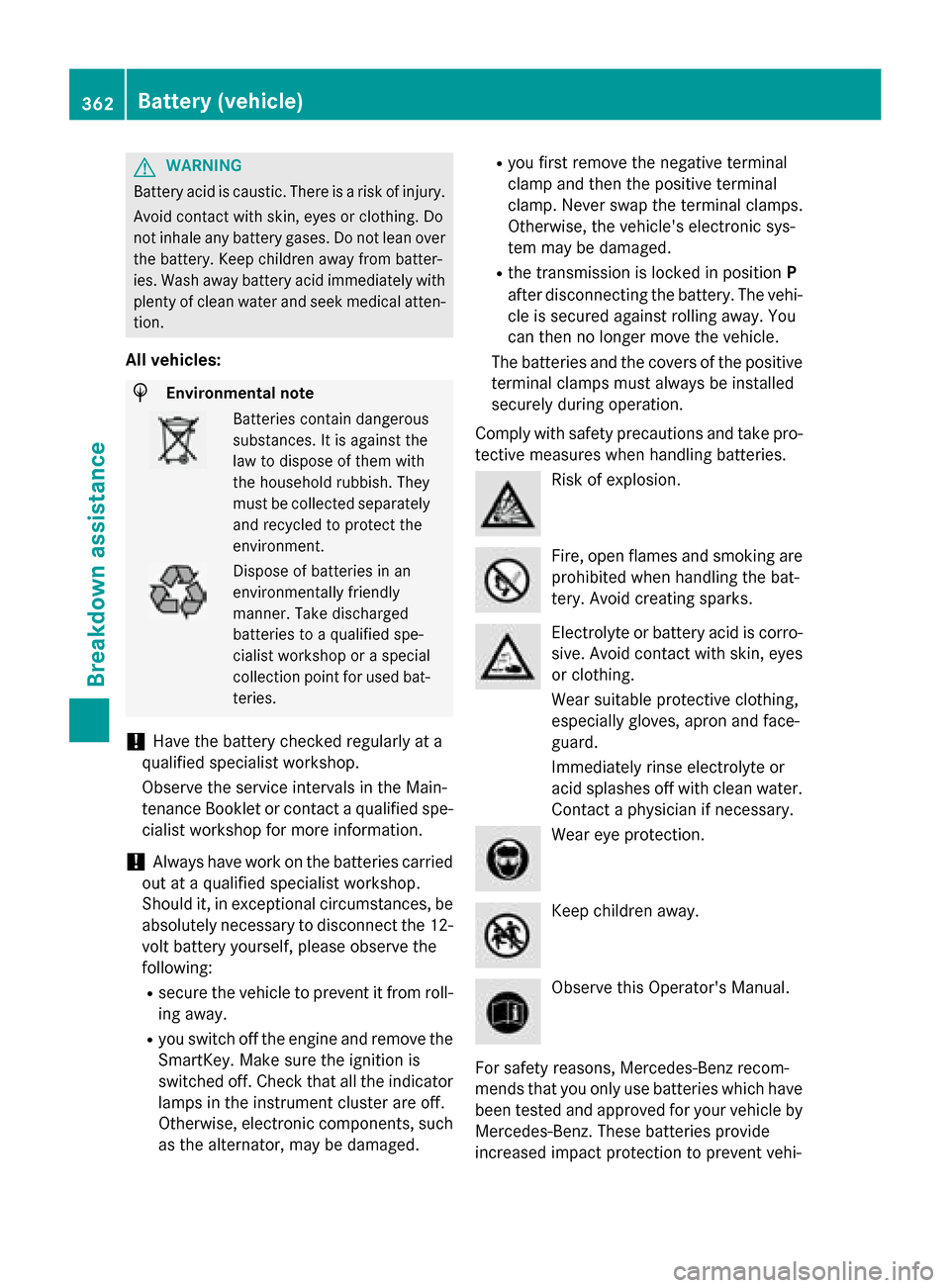
GWARNING
Battery acid is caustic. There is a risk of injury.
Avoid contact with skin, eyes or clothing. Do
not inhale any battery gases. Do not lean over
the battery. Keep children away from batter-
ies. Wash away battery acid immediately with
plenty of clean water and seek medical atten-
tion.
All vehicles:
HEnvironmental note
Batteries contain dangerous
substances. It is against the
law to dispose of them with
the household rubbish. They
must be collected separately and recycled to protect the
environment.
Dispose of batteries in an
environmentally friendly
manner. Take discharged
batteries to a qualified spe-
cialist workshop or a special
collection point for used bat-
teries.
!Have the battery checked regularly at a
qualified specialist workshop.
Observe the service intervals in the Main-
tenance Booklet or contact a qualified spe-
cialist workshop for more information.
!Always have work on the batteries carried
out at a qualified specialist workshop.
Should it, in exceptional circumstances, be
absolutely necessary to disconnect the 12-
volt battery yourself, please observe the
following:
Rsecure the vehicle to prevent it from roll- ing away.
Ryou switch off the engine and remove the
SmartKey. Make sure the ignition is
switched off. Check that all the indicator
lamps in the instrument cluster are off.
Otherwise, electronic components, such
as the alternator, may be damaged.
Ryou first remove the negative terminal
clamp and then the positive terminal
clamp. Never swap the terminal clamps.
Otherwise, the vehicle's electronic sys-
tem may be damaged.
Rthe transmission is locked in position P
after disconnecting the battery. The vehi-
cle is secured against rolling away. You
can then no longer move the vehicle.
The batteries and the covers of the positive
terminal clamps must always be installed
securely during operation.
Comply with safety precautions and take pro-
tective measures when handling batteries.
Risk of explosion.
Fire, open flames and smoking are
prohibited when handling the bat-
tery. Avoid creating sparks.
Electrolyte or battery acid is corro-
sive. Avoid contact with skin, eyes
or clothing.
Wear suitable protective clothing,
especially gloves, apron and face-
guard.
Immediately rinse electrolyte or
acid splashes off with clean water. Contact a physician if necessary.
Wear eye protection.
Keep children away.
Observe this Operator's Manual.
For safety reasons, Mercedes-Benz recom-
mends that you only use batteries which have
been tested and approved for your vehicle by
Mercedes-Benz. These batteries provide
increased impact protection to prevent vehi-
362Battery (vehicle)
Breakdown assistance
Page 411 of 418
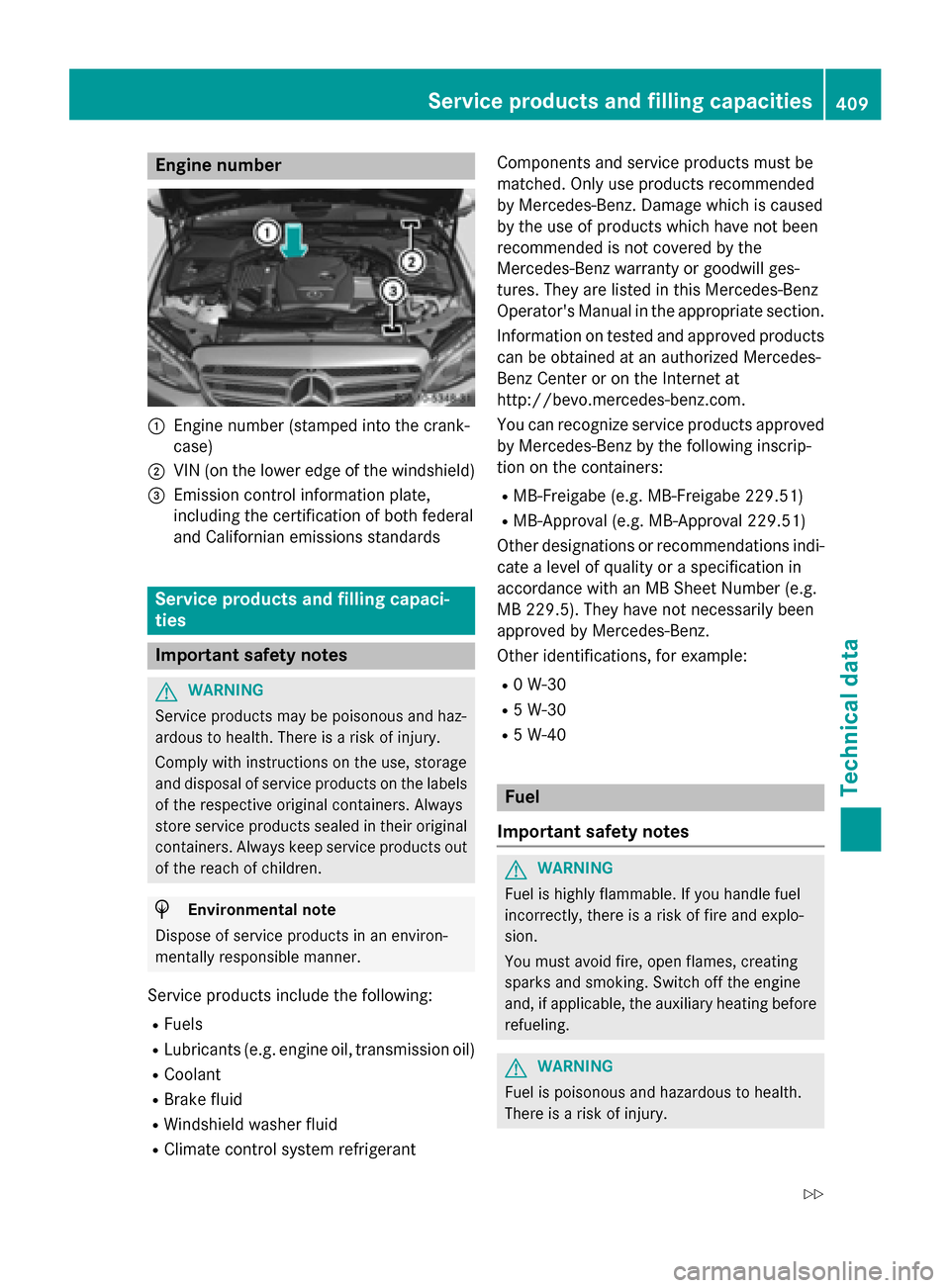
Engine number
:Engine number (stamped into the crank-
case)
;VIN (on the lower edge of the windshield)
=Emission control information plate,
including the certification of both federal
and Californian emissions standards
Service products and filling capaci-
ties
Important safety notes
GWARNING
Service products may be poisonous and haz-
ardous to health. There is a risk of injury.
Comply with instructions on the use, storage
and disposal of service products on the labels
of the respective original containers. Always
store service products sealed in their original
containers. Always keep service products out
of the reach of children.
HEnvironmental note
Dispose of service products in an environ-
mentally responsible manner.
Service products include the following:
RFuels
RLubricants (e.g. engine oil, transmission oil)
RCoolant
RBrake fluid
RWindshield washer fluid
RClimate control system refrigerant Components and service products must be
matched. Only use products recommended
by Mercedes-Benz. Damage which is caused
by the use of products which have not been
recommended is not covered by the
Mercedes-Benz warranty or goodwill ges-
tures. They are listed in this Mercedes-Benz
Operator's Manual in the appropriate section.
Information on tested and approved products
can be obtained at an authorized Mercedes-
Benz Center or on the Internet at
http://bevo.mercedes-benz.com.
You can recognize service products approved
by Mercedes-Benz by the following inscrip-
tion on the containers:
RMB-Freigabe (e.g. MB-Freigabe 229.51)
RMB-Approval (e.g. MB-Approval 229.51)
Other designations or recommendations indi-
cate a level of quality or a specification in
accordance with an MB Sheet Number (e.g.
MB 229.5). They have not necessarily been
approved by Mercedes-Benz.
Other identifications, for example:
R0 W-30
R5 W-30
R5 W-40
Fuel
Important safety notes
GWARNING
Fuel is highly flammable. If you handle fuel
incorrectly, there is a risk of fire and explo-
sion.
You must avoid fire, open flames, creating
sparks and smoking. Switch off the engine
and, if applicable, the auxiliary heating before refueling.
GWARNING
Fuel is poisonous and hazardous to health.
There is a risk of injury.
Service products and filling capacities409
Technical data
Z