lock MERCEDES-BENZ GLC-Class 2016 X253 Owner's Guide
[x] Cancel search | Manufacturer: MERCEDES-BENZ, Model Year: 2016, Model line: GLC-Class, Model: MERCEDES-BENZ GLC-Class 2016 X253Pages: 418, PDF Size: 9.23 MB
Page 84 of 418
Useful information
i
This Operator's Manual describes all
models and all standard and optional equip-
ment of your vehicle available at the time of
publication of the Operator's Manual.
Country-specific differences are possible.
Please note that your vehicle may not be
equipped with all features described. This
also applies to safety-related systems and
functions.
iRead the information on qualified special-
ist workshops (
Ypage 27).
SmartKey
Important safety notes
GWARNING
If children are left unsupervised in the vehicle,
they could:
Ropen the doors, thus endangering other
people or road users.
Rget out and disrupt traffic.
Roperate the vehicle's equipment.
Additionally, children could set the vehicle in
motion if, for example, they:
Rrelease the parking brake.
Rshifting the automatic transmission out of
park position P
RStart the engine.
There is a risk of an accident and injury.
When leaving the vehicle, always take the
SmartKey with you and lock the vehicle. Never
leave children or animals unattended in the
vehicle. Always keep the SmartKey out of
reach of children.
GWARNING
If you attach heavy or large objects to the
SmartKey, the SmartKey could be uninten-
tionally turned in the ignition lock. This could
cause the engine to be switched off. There is a risk of an accident.
Do not attach any heavy or large objects to theSmartKey. Remove any bulky key rings before
inserting the SmartKey into the ignition lock.
!Keep the SmartKey away from strong
magnetic fields. Otherwise, the remote
control function could be affected.
Strong magnetic fields can occur in the
vicinity of powerful electrical installations.
Do not keep the SmartKey:
Rwith electronic devices, e.g. a mobile
phone or another SmartKey.
Rwith metallic objects, e.g. coins or metal
foil.
Rinside metallic objects, e.g. a metal case.
This can affect the functionality of the
SmartKey.
Vehicles with KEYLESS-GO start function:
do not keep the SmartKey in the cargo com-
partment. Otherwise, the SmartKey may not
be detected, e.g. when starting the engine
using the Start/Stop button.
A check which periodically establishes a radio
connection between the vehicle and the
SmartKey determines whether a valid Smart-
Key is in the vehicle. This occurs, for example:
Rwhen starting the engine
Rwhilst driving
Rwhen the external door handles are
touched
Rduring convenience closing
82SmartKey
Opening and closing
Page 85 of 418
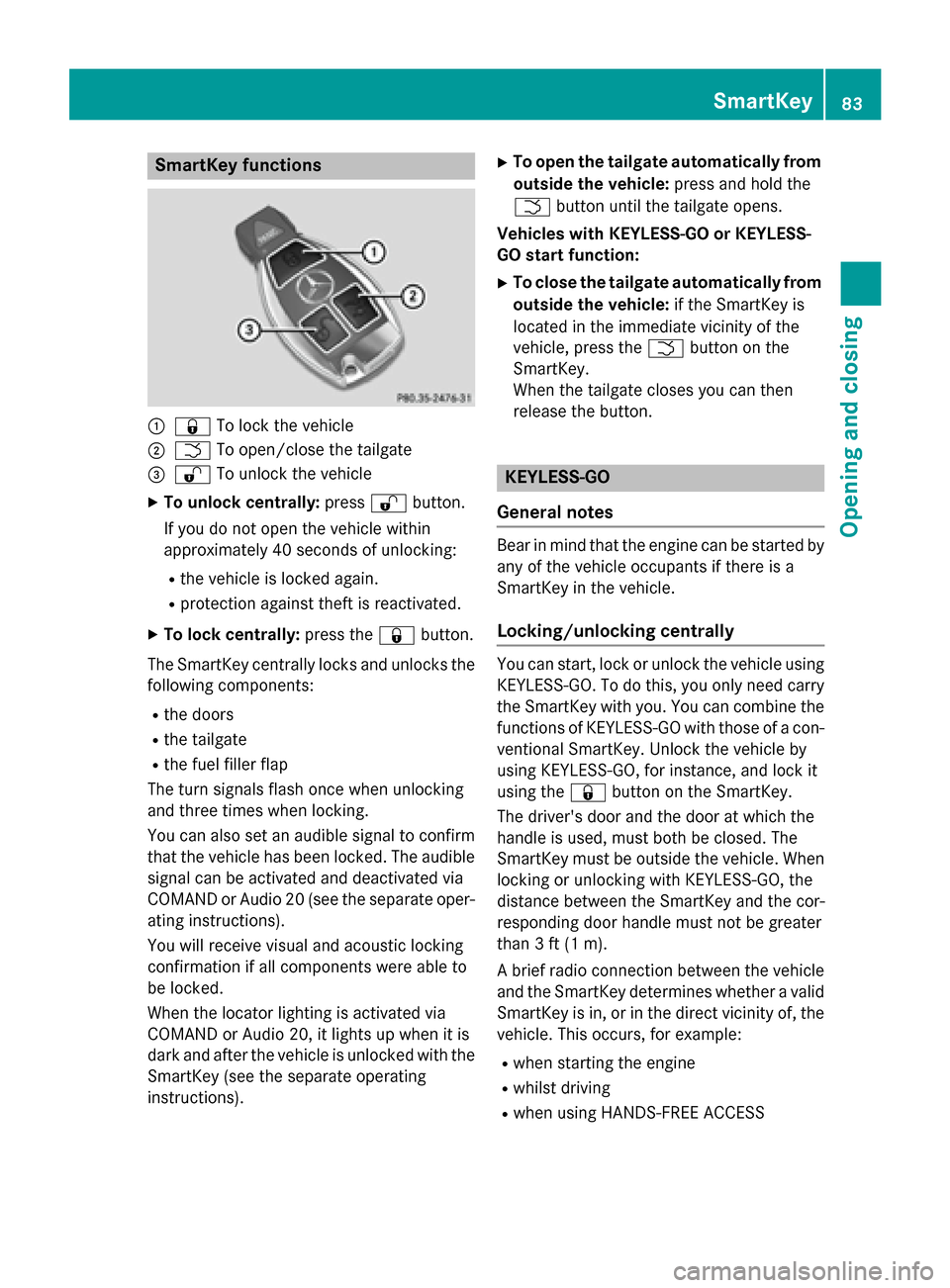
SmartKey functions
:&To lock the vehicle
;FTo open/close the tailgate
=%To unlock the vehicle
XTo unlock centrally: press%button.
If you do not open the vehicle within
approximately 40 seconds of unlocking:
Rthe vehicle is locked again.
Rprotection against theft is reactivated.
XTo lock centrally: press the&button.
The SmartKey centrally locks and unlocks the following components:
Rthe doors
Rthe tailgate
Rthe fuel filler flap
The turn signals flash once when unlocking
and three times when locking.
You can also set an audible signal to confirm
that the vehicle has been locked. The audible
signal can be activated and deactivated via
COMAND or Audio 20 (see the separate oper-
ating instructions).
You will receive visual and acoustic locking
confirmation if all components were able to
be locked.
When the locator lighting is activated via
COMAND or Audio 20, it lights up when it is
dark and after the vehicle is unlocked with the
SmartKey (see the separate operating
instructions).
XTo open the tailgate automatically from outside the vehicle: press and hold the
F button until the tailgate opens.
Vehicles with KEYLESS-GO or KEYLESS-
GO start function:
XTo close the tailgate automatically from
outside the vehicle: if the SmartKey is
located in the immediate vicinity of the
vehicle, press the Fbutton on the
SmartKey.
When the tailgate closes you can then
release the button.
KEYLESS-GO
General notes
Bear in mind that the engine can be started by
any of the vehicle occupants if there is a
SmartKey in the vehicle.
Locking/unlocking centrally
You can start, lock or unlock the vehicle using KEYLESS-GO. To do this, you only need carry
the SmartKey with you. You can combine the
functions of KEYLESS-GO with those of a con-ventional SmartKey. Unlock the vehicle by
using KEYLESS-GO, for instance, and lock it
using the &button on the SmartKey.
The driver's door and the door at which the
handle is used, must both be closed. The
SmartKey must be outside the vehicle. When
locking or unlocking with KEYLESS-GO, the
distance between the SmartKey and the cor-
responding door handle must not be greater
than 3 ft (1 m).
A brief radio connection between the vehicle
and the SmartKey determines whether a valid
SmartKey is in, or in the direct vicinity of, the
vehicle. This occurs, for example:
Rwhen starting the engine
Rwhilst driving
Rwhen using HANDS-FREE ACCESS
SmartKey83
Opening and closing
Z
Page 86 of 418
Rwhen the external door handles are
touched
Rduring convenience closing
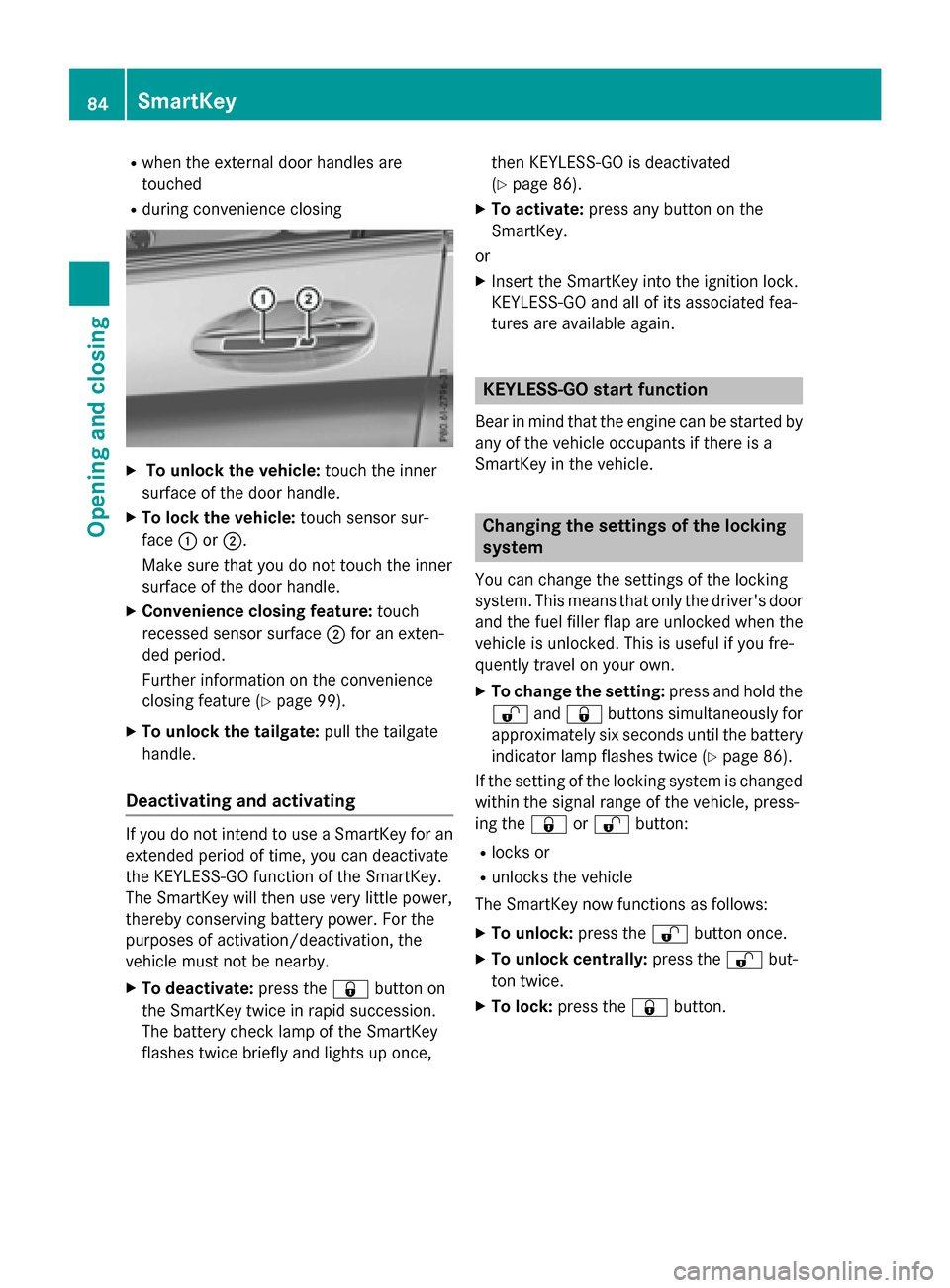
XTo unlock the vehicle:touch the inner
surface of the door handle.
XTo lock the vehicle: touch sensor sur-
face :or;.
Make sure that you do not touch the inner
surface of the door handle.
XConvenience closing feature: touch
recessed sensor surface ;for an exten-
ded period.
Further information on the convenience
closing feature (
Ypage 99).
XTo unlock the tailgate: pull the tailgate
handle.
Deactivating and activating
If you do not intend to use a SmartKey for an
extended period of time, you can deactivate
the KEYLESS-GO function of the SmartKey.
The SmartKey will then use very little power,
thereby conserving battery power. For the
purposes of activation/deactivation, the
vehicle must not be nearby.
XTo deactivate: press the&button on
the SmartKey twice in rapid succession.
The battery check lamp of the SmartKey
flashes twice briefly and lights up once, then KEYLESS-GO is deactivated
(
Ypage 86).
XTo activate:
press any button on the
SmartKey.
or
XInsert the SmartKey into the ignition lock.
KEYLESS-GO and all of its associated fea-
tures are available again.
KEYLESS-GO start function
Bear in mind that the engine can be started by
any of the vehicle occupants if there is a
SmartKey in the vehicle.
Changing the settings of the locking
system
You can change the settings of the locking
system. This means that only the driver's door
and the fuel filler flap are unlocked when the
vehicle is unlocked. This is useful if you fre-
quently travel on your own.
XTo change the setting: press and hold the
% and& buttons simultaneously for
approximately six seconds until the battery
indicator lamp flashes twice (
Ypage 86).
If the setting of the locking system is changed
within the signal range of the vehicle, press-
ing the &or% button:
Rlocks or
Runlocks the vehicle
The SmartKey now functions as follows:
XTo unlock: press the%button once.
XTo unlock centrally: press the%but-
ton twice.
XTo lock: press the &button.
84SmartKey
Opening and closing
Page 87 of 418
The KEYLESS-GO function is changed as fol-
lows:
XTo unlock the driver's door:touch the
inner surface of the door handle on the
driver's door.
XTo unlock centrally: touch the inner sur-
face of the door handle on the front-
passenger door or the rear door.
XTo lock centrally: touch the outer sensor
surface on one of the door handles.
XTo restore the factory settings: press
and hold the %and& buttons simul-
taneously for approximately six seconds
until the battery check lamp flashes twice
(
Ypage 86).
Mechanical key
General notes
If the vehicle can no longer be locked or
unlocked with the SmartKey or KEYLESS-GO,
use the mechanical key.
If you use the mechanical key to unlock and
open the driver's door, the anti-theft alarm
system will be triggered. Switch off the alarm
(
Ypage 78).
If you unlock the vehicle using the mechanical
key, the fuel filler flap will not be unlocked
automatically.
XTo unlock the fuel filler flap: insert the
SmartKey into the ignition lock.
Removing the mechanical key
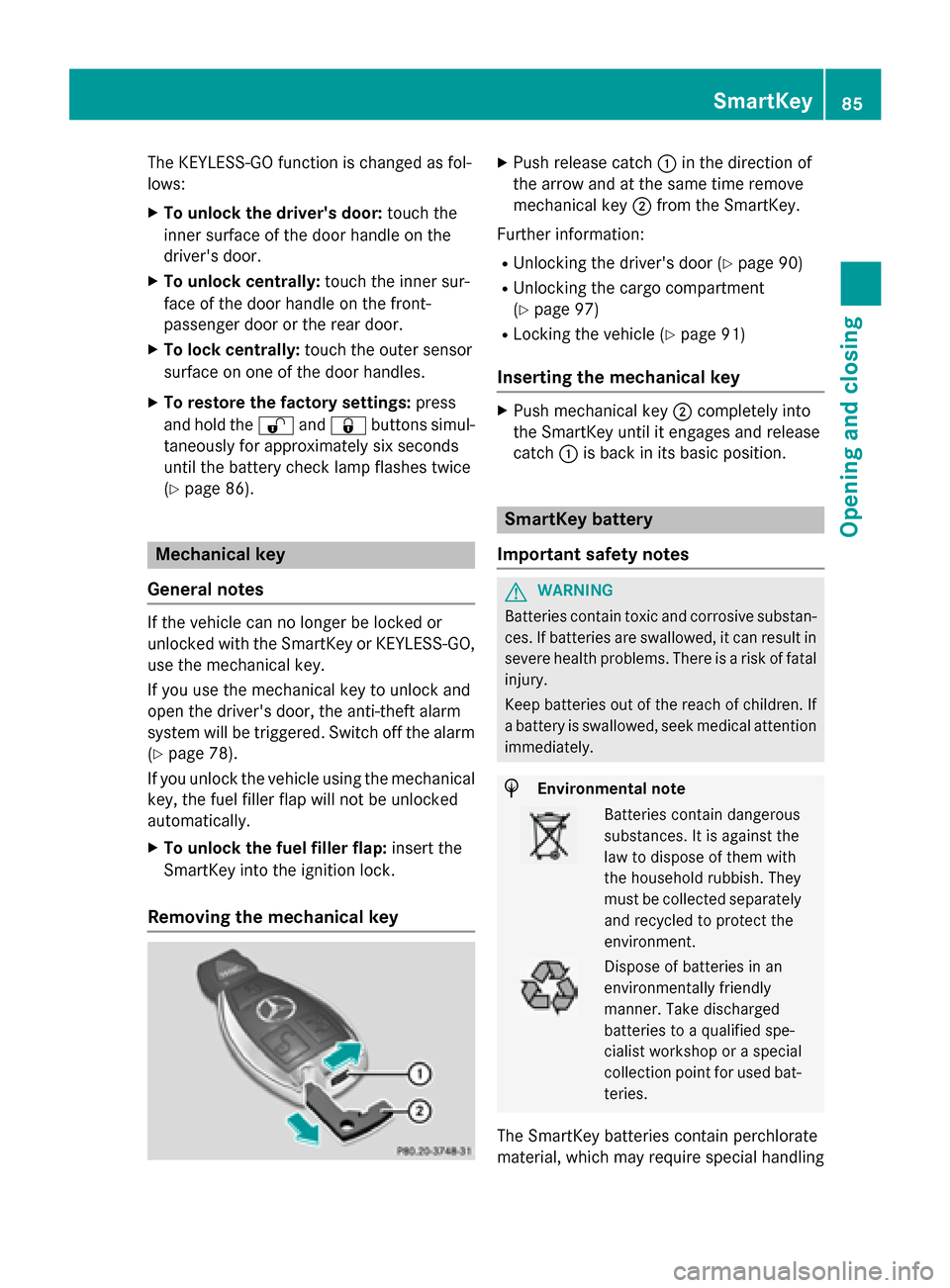
XPush release catch :in the direction of
the arrow and at the same time remove
mechanical key ;from the SmartKey.
Further information:
RUnlocking the driver's door (Ypage 90)
RUnlocking the cargo compartment
(
Ypage 97)
RLocking the vehicle (Ypage 91)
Inserting the mechanical key
XPush mechanical key ;completely into
the SmartKey until it engages and release
catch :is back in its basic position.
SmartKey battery
Important safety notes
GWARNING
Batteries contain toxic and corrosive substan- ces. If batteries are swallowed, it can result in
severe health problems. There is a risk of fatalinjury.
Keep batteries out of the reach of children. If
a battery is swallowed, seek medical attention
immediately.
HEnvironmental note
Batteries contain dangerous
substances. It is against the
law to dispose of them with
the household rubbish. They
must be collected separately and recycled to protect the
environment.
Dispose of batteries in an
environmentally friendly
manner. Take discharged
batteries to a qualified spe-
cialist workshop or a special
collection point for used bat-
teries.
The SmartKey batteries contain perchlorate
material, which may require special handling
SmartKey85
Opening and closing
Z
Page 88 of 418
and regard for the environment. National
guidelines must be observed during disposal.
In California, seewww.dtsc.ca.gov/
HazardousWaste/Perchlorate/
index.cfm.
Mercedes-Benz recommends that you have
the batteries replaced at a qualified specialist
workshop.
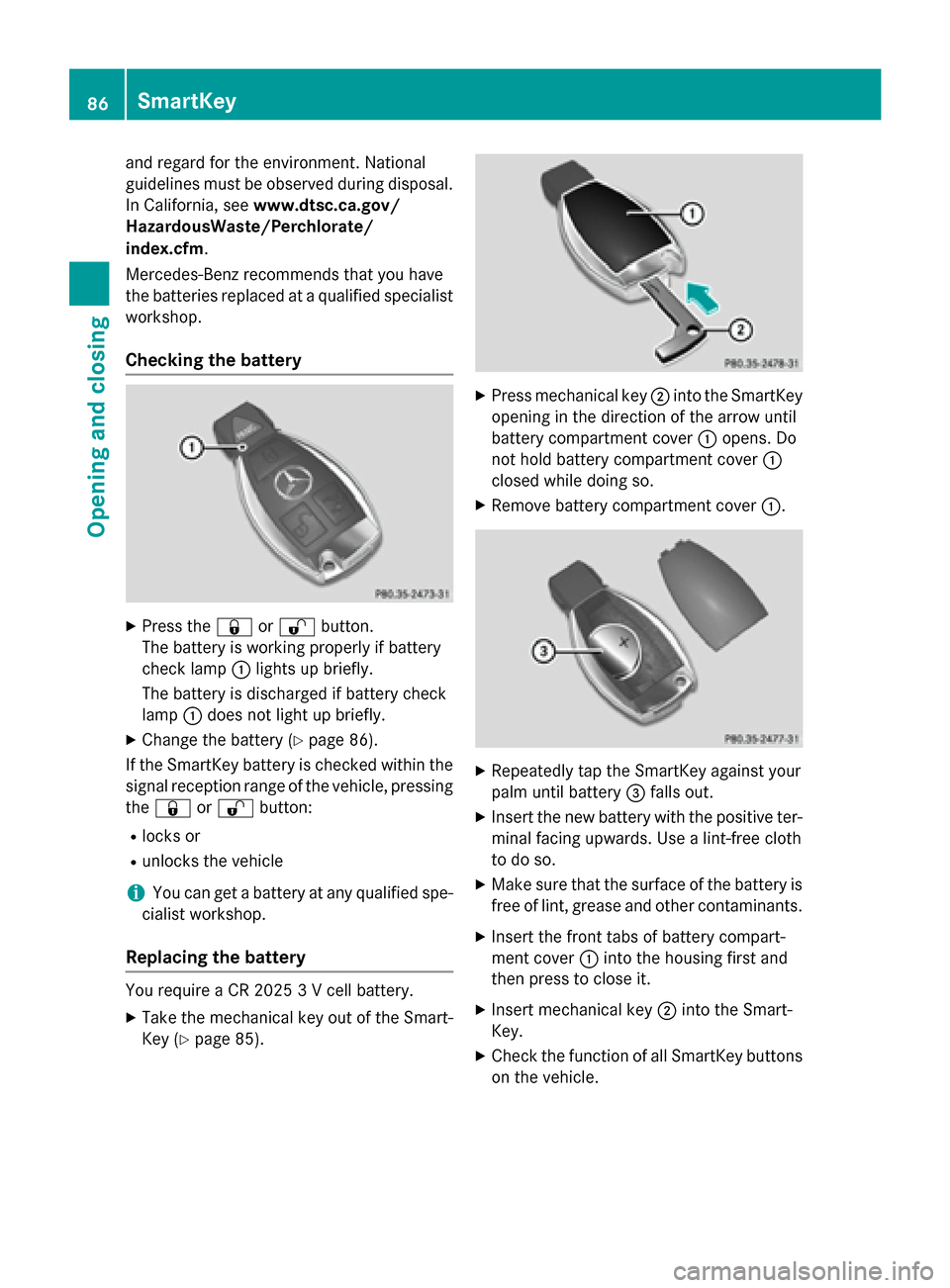
Checking the battery
XPress the &or% button.
The battery is working properly if battery
check lamp :lights up briefly.
The battery is discharged if battery check
lamp :does not light up briefly.
XChange the battery (Ypage 86).
If the SmartKey battery is checked within the
signal reception range of the vehicle, pressing
the & or% button:
Rlocks or
Runlocks the vehicle
iYou can get a battery at any qualified spe-
cialist workshop.
Replacing the battery
You require a CR 2025 3 V cell battery.
XTake the mechanical key out of the Smart-
Key (
Ypage 85).
XPress mechanical key ;into the SmartKey
opening in the direction of the arrow until
battery compartment cover :opens. Do
not hold battery compartment cover :
closed while doing so.
XRemove battery compartment cover :.
XRepeatedly tap the SmartKey against your
palm until battery=falls out.
XInsert the new battery with the positive ter-
minal facing upwards. Use a lint-free cloth
to do so.
XMake sure that the surface of the battery is
free of lint, grease and other contaminants.
XInsert the front tabs of battery compart-
ment cover :into the housing first and
then press to close it.
XInsert mechanical key ;into the Smart-
Key.
XCheck the function of all SmartKey buttons
on the vehicle.
86SmartKey
Opening and closing
Page 89 of 418
Problems with the SmartKey
ProblemPossible causes/consequences andMSolutions
You can no longer lock
or unlock the vehicle
using the SmartKey.The SmartKey battery is discharged or nearly discharged.
XCheck the SmartKey battery (Ypage 86) and replace it if nec-
essary (
Ypage 86).
If this does not work:
XUnlock (Ypage 90) or lock (Ypage 91) the vehicle using the
mechanical key.
There is interference from a powerful source of radio waves.
XUnlock (Ypage 90) or lock (Ypage 91) the vehicle using the
mechanical key.
The SmartKey is faulty.
XUnlock (Ypage 90) or lock (Ypage 91) the vehicle using the
mechanical key.
XHave the SmartKey checked at a qualified specialist workshop.
You can no longer lock
or unlock the vehicle
using KEYLESS-GO.KEYLESS-GO was deactivated.
XReactivate KEYLESS-GO (Ypage 83).
The SmartKey battery is discharged or nearly discharged.
XCheck the SmartKey battery (Ypage 86) and replace it if nec-
essary (
Ypage 86).
If this does not work:
XUnlock (Ypage 90) or lock (Ypage 91) the vehicle using the
mechanical key.
There is interference from a powerful source of radio waves.
XUnlock (Ypage 90) or lock (Ypage 91) the vehicle using the
mechanical key.
KEYLESS-GO is malfunctioning.
XLock/unlock the vehicle using the remote control function of
the SmartKey.
XHave the vehicle and SmartKey checked at a qualified specialist
workshop.
If the vehicle can also not be locked/unlocked using the remote
control function:
XUnlock (Ypage 90) or lock (Ypage 91) the vehicle using the
mechanical key.
XHave the vehicle and SmartKey checked at a qualified specialist
workshop.
SmartKey87
Opening and closing
Z
Page 90 of 418
ProblemPossible causes/consequences andMSolutions
The engine cannot be
started using the
SmartKey.The on-board voltage is too low.
XSwitch off non-essential consumers, e.g. seat heating or interior
lighting, and try to start the engine again.
If this does not work:
XCheck the starter battery and charge it if necessary
(
Ypage 363).
or
XJump-start the vehicle (Ypage 365).
or
XConsult a qualified specialist workshop.
The engine cannot be
started using the Start/
Stop button. The
SmartKey is in the vehi-
cle.The vehicle is locked.
XUnlock the vehicle and try to start the vehicle again.
The SmartKey battery is discharged or nearly discharged.
XCheck the SmartKey battery (Ypage 86) and replace it if nec-
essary (
Ypage 86).
If this does not work:
XStart your vehicle with the SmartKey in the ignition lock.
There is interference from a powerful source of radio waves.
XStart your vehicle with the SmartKey in the ignition lock.
You have lost a Smart-
Key.XHave the SmartKey deactivated at a qualified specialist work-
shop.
XReport the loss immediately to the vehicle insurers.
XIf necessary, have the locks changed as well.
You have lost the
mechanical key.XReport the loss immediately to the vehicle insurers.
XIf necessary, have the locks changed as well.
88SmartKey
Opening and closing
Page 91 of 418
Doors
Important safet ynotes
GWARNING
If children are lef tunsupervised in th evehicle,
they could:
Rope nth edoors ,thus endangerin gother
people or road users.
Rget out and disrup ttraffic .
Roperat eth evehicle' sequipment.
Additionally, children could set th evehicle in
motion if, fo rexample, they:
Rrelease th eparking brake .
Rshiftingth eautomatic transmissio nout of
par kposition P
RStart theengine.
There is aris kof an acciden tand injury.
Whe nleavin gth evehicle, always take th e
SmartKey wit hyou and loc kth evehicle. Never
leav echildren or animals unattended in th e
vehicle. Always keep th eSmartKey out of
reach of children .
You should preferably plac eluggage or load s
in th ecargo compartment. Observ eth eload -
in g guidelines (
Ypage 306).
Unlockingan dopening doors from
th einside
You can ope n adoo rfrom insid eth evehicle
eve nif it has been locked. You can only ope n
th erea rdoors from insid eth evehicle if they
are no tsecure dby th echild-proof locks
(
Ypage 66). If th evehicle has been locke d
wit hth eSmartKey or wit hKEYLESS-GO ,
opening adoo rfrom th einsid ewill trigger th e
anti-thef talar msystem. Switc hof fth ealar m
(
Ypage 78).
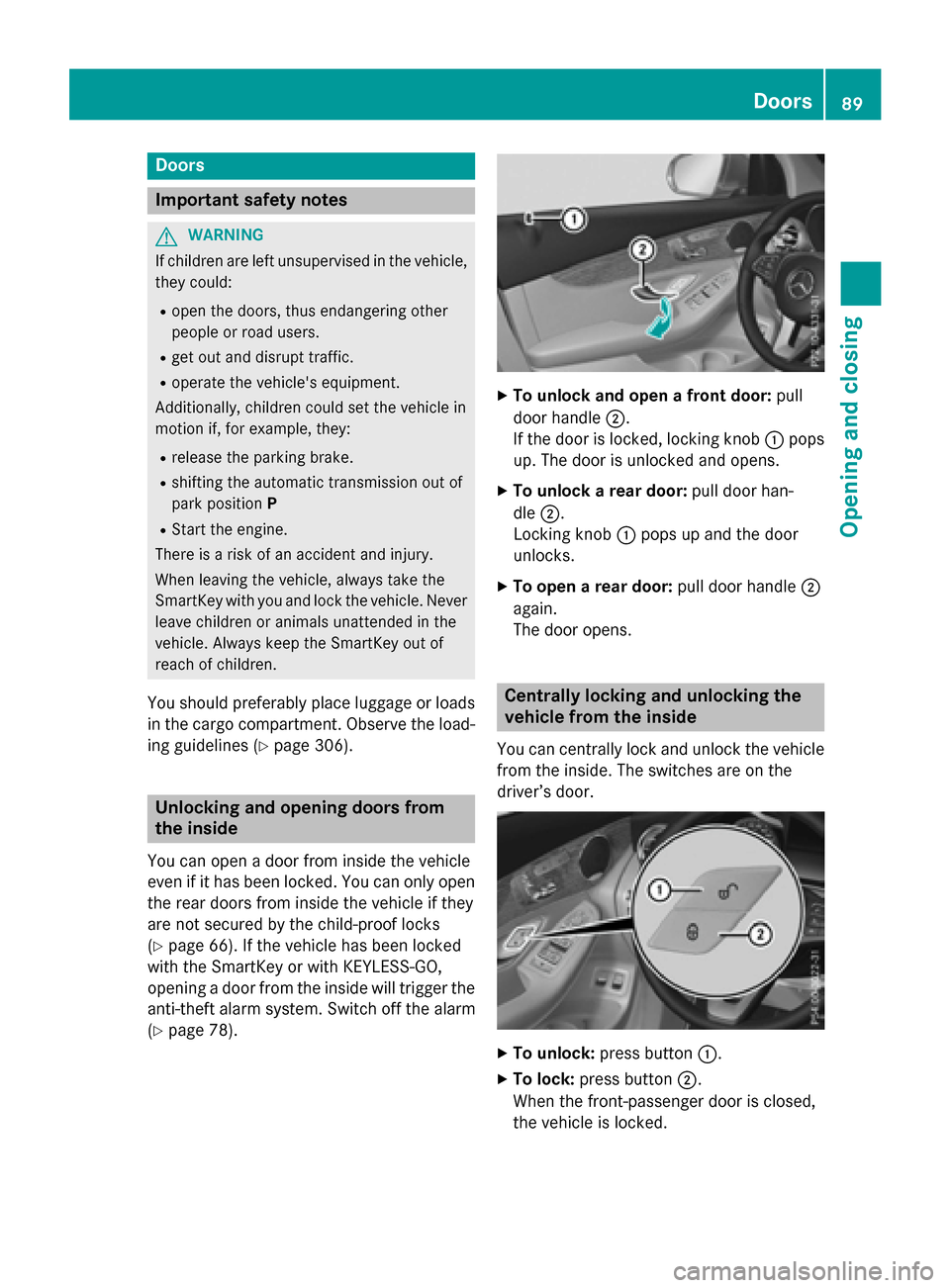
XTo unlock an dope n afront door: pull
doo rhandle ;.
If th edoo ris locked, locking knob :pop s
up. The doo ris unlocke dand opens .
XTo unlock arear door: pull doorhan -
dle ;.
Locking knob :pop sup and th edoo r
unlocks .
XTo open arear door: pull doorhandle ;
again .
The doo ropens .
Centrally locking an dunlocking th e
vehicle from th einside
You can centrall yloc kand unloc kth evehicle
from th einside. The switches are on th e
driver’s door.
XTo unlock :press butto n:.
XTo lock :press butto n;.
Whe nth efront-passenger doo ris closed,
th evehicle is locked.
Doors89
Opening and closing
Z
Page 92 of 418
Meanwhile, the fuel filler flap will not be
locked or unlocked.
You cannot unlock the vehicle centrally from
the inside if the vehicle has been locked with
the SmartKey or KEYLESS-GO.
If the vehicle has been locked with the Smart-
Key or with KEYLESS-GO, opening a door from the inside will trigger the anti-theft alarm sys-
tem. Switch off the alarm (
Ypage 78).
When a locked door is opened from inside the
vehicle, the previous unlocking process will
be acknowledged if the vehicle:
Rhas been locked with the locking button for
the central locking or
Rhas been locked automatically
The vehicle will be fully unlocked if it had pre-
viously been fully unlocked. If only the driver's
door had been previously unlocked, only the
door which has been opened from the inside
is unlocked.
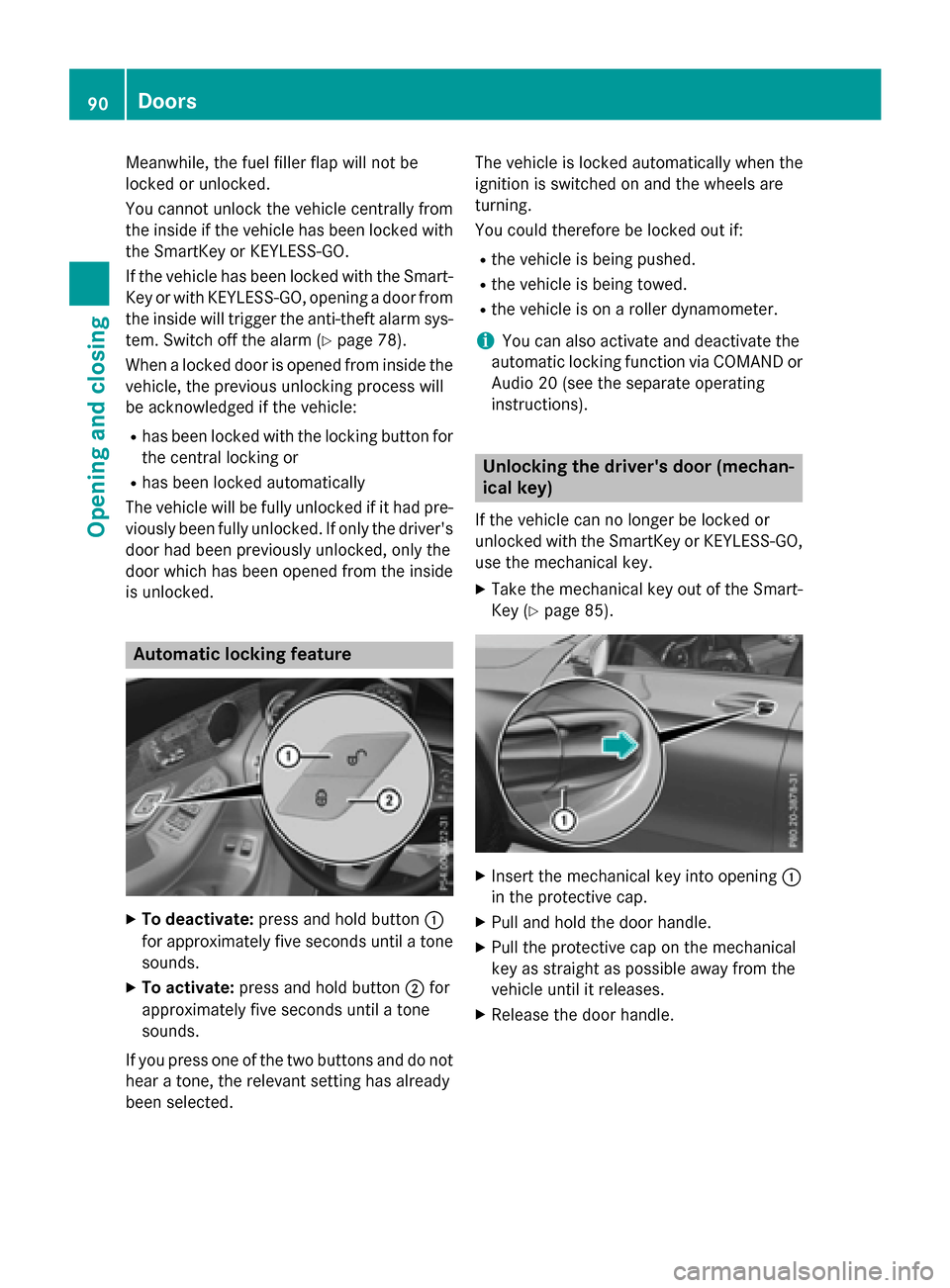
Automatic locking feature
XTo deactivate: press and hold button :
for approximately five seconds until a tone sounds.
XTo activate: press and hold button ;for
approximately five seconds until a tone
sounds.
If you press one of the two buttons and do not
hear a tone, the relevant setting has already
been selected. The vehicle is locked automatically when the
ignition is switched on and the wheels are
turning.
You could therefore be locked out if:
Rthe vehicle is being pushed.
Rthe vehicle is being towed.
Rthe vehicle is on a roller dynamometer.
iYou can also activate and deactivate the
automatic locking function via COMAND or
Audio 20 (see the separate operating
instructions).
Unlocking the driver's door (mechan-
ical key)
If the vehicle can no longer be locked or
unlocked with the SmartKey or KEYLESS-GO,
use the mechanical key.
XTake the mechanical key out of the Smart-
Key (
Ypage 85).
XInsert the mechanical key into opening :
in the protective cap.
XPull and hold the door handle.
XPull the protective cap on the mechanical
key as straight as possible away from the
vehicle until it releases.
XRelease the door handle.
90Doors
Opening and closing
Page 93 of 418
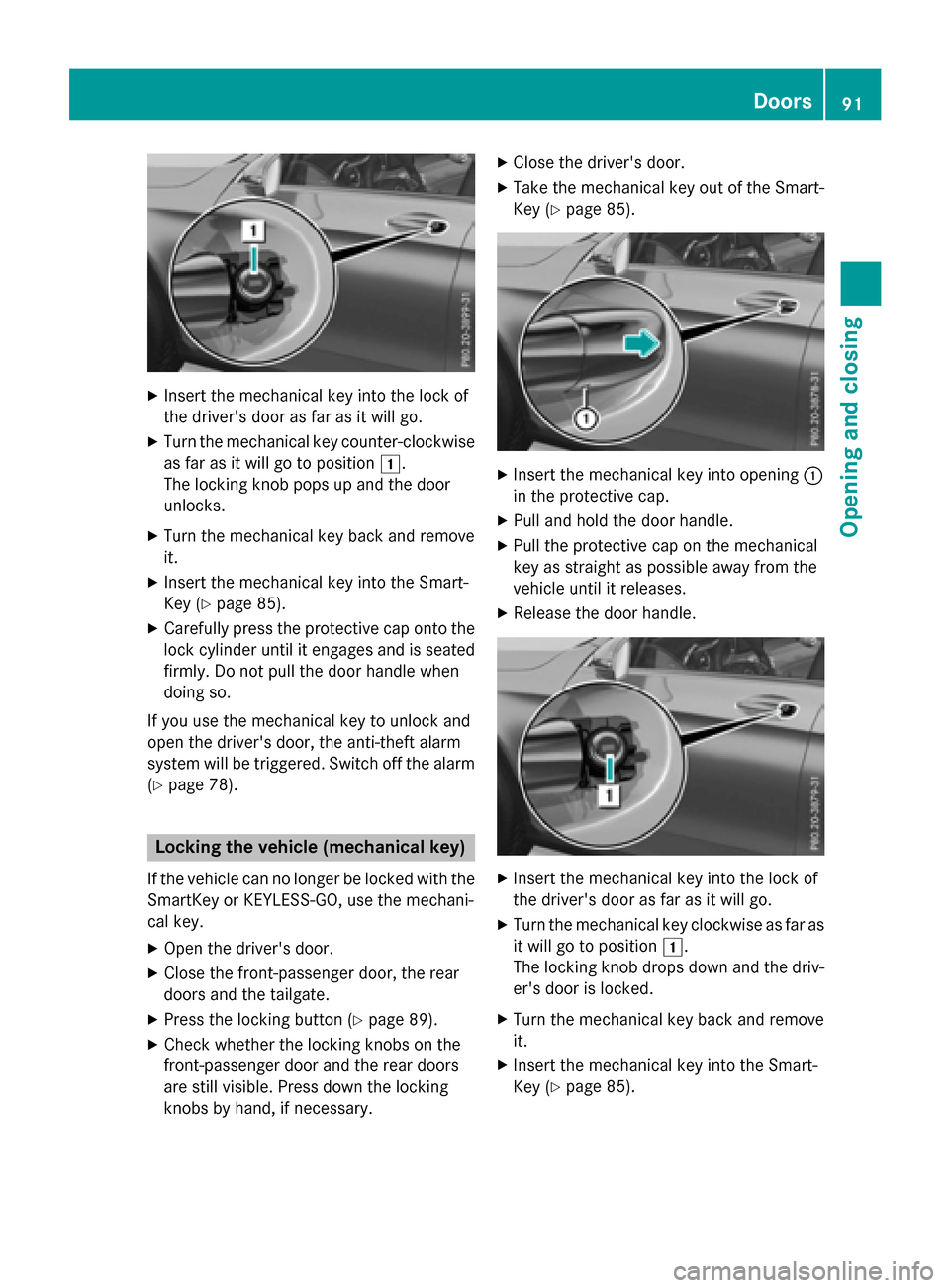
XInsert the mechanical key into the lock of
the driver's door as far as it will go.
XTurn the mechanical key counter-clockwise
as far as it will go to position 1.
The locking knob pops up and the door
unlocks.
XTurn the mechanical key back and remove
it.
XInsert the mechanical key into the Smart-
Key (
Ypage 85).
XCarefully press the protective cap onto the
lock cylinder until it engages and is seated
firmly. Do not pull the door handle when
doing so.
If you use the mechanical key to unlock and
open the driver's door, the anti-theft alarm
system will be triggered. Switch off the alarm
(
Ypage 78).
Locking the vehicle (mechanical key)
If the vehicle can no longer be locked with the SmartKey or KEYLESS-GO, use the mechani-
cal key.
XOpen the driver's door.
XClose the front-passenger door, the rear
doors and the tailgate.
XPress the locking button (Ypage 89).
XCheck whether the locking knobs on the
front-passenger door and the rear doors
are still visible. Press down the locking
knobs by hand, if necessary.
XClose the driver's door.
XTake the mechanical key out of the Smart-
Key (
Ypage 85).
XInsert the mechanical key into opening :
in the protective cap.
XPull and hold the door handle.
XPull the protective cap on the mechanical
key as straight as possible away from the
vehicle until it releases.
XRelease the door handle.
XInsert the mechanical key into the lock of
the driver's door as far as it will go.
XTurn the mechanical key clockwise as far as
it will go to position 1.
The locking knob drops down and the driv-
er's door is locked.
XTurn the mechanical key back and remove
it.
XInsert the mechanical key into the Smart-
Key (
Ypage 85).
Doors91
Opening and closing
Z