ignition MERCEDES-BENZ GLC-Class 2016 X253 Repair Manual
[x] Cancel search | Manufacturer: MERCEDES-BENZ, Model Year: 2016, Model line: GLC-Class, Model: MERCEDES-BENZ GLC-Class 2016 X253Pages: 418, PDF Size: 9.23 MB
Page 214 of 418
Activating the360°camera using
reverse gear
The 360° camera images can be automati-
call ydisplayed by engagin grevers egear .
XMakesur ethat th eSmartKey is in posi-
tion 2in th eignition lock.
XMak esur ethat th eActivatio nby R
gearfunction is selected in Audio 20 or
COMAND (see th eDigital Operator' sMan -
ual).
XTo sho wth e360° camera image: engage
revers egear .
The area behind th evehicl eis shown in th e
Audio 20 or COMAND display in split -
scree nmode. You see th eto pvie wof th e
vehicl eand th eimag efrom th erear vie w
camera.
Selecting the split-screen view orfull
screen mode
Switchin gbetween split scree nviews:
XTo switch to th elin ewit hth evehicl eicons :
slide 5thecontroller .
XTo selectavehicl eicon: tur nth econtroller .
Switchin gto full scree nmode:
X180 °Vie wTurn and press th econtroller .
iThe full scree noption is only available in
th efollowin gviews:
RTop vie wwit hpictur efrom th erear vie w
camera
RTop vie wwit hpictur efrom th efron tcam -
era
Displays in the Audio 20 orCOMAND
display
Important safety notes
The camera system may sho w adistorted
vie wof obstacles, showthem incorrectl yor
no tat all. Obstacles are no t shown by the
system in th efollowin glocations:
Runder th efron tand rear bumpers
Rver yclose to th efron tand rear bumpers
R
R
in clo serange abov eth ehandle on th e
trunk lid
Rver yclose to th eexterio rmirror s
Rin thetransitional areas between th evari-
ous cameras in th evirtual to pvie w
!Objects no tat ground level may appear to
be further away than they actually are, e.g. :
Rthebumper of aparked vehicl e
Rthedrawbar of atrailer
Rth eball couplin gof atrailer to whitch
Rtherear section of an HGV
Raslante dpos t
Use th eguidelines only for orientation .
Approach objects no further than th ebot -
tom-mos tguideline.
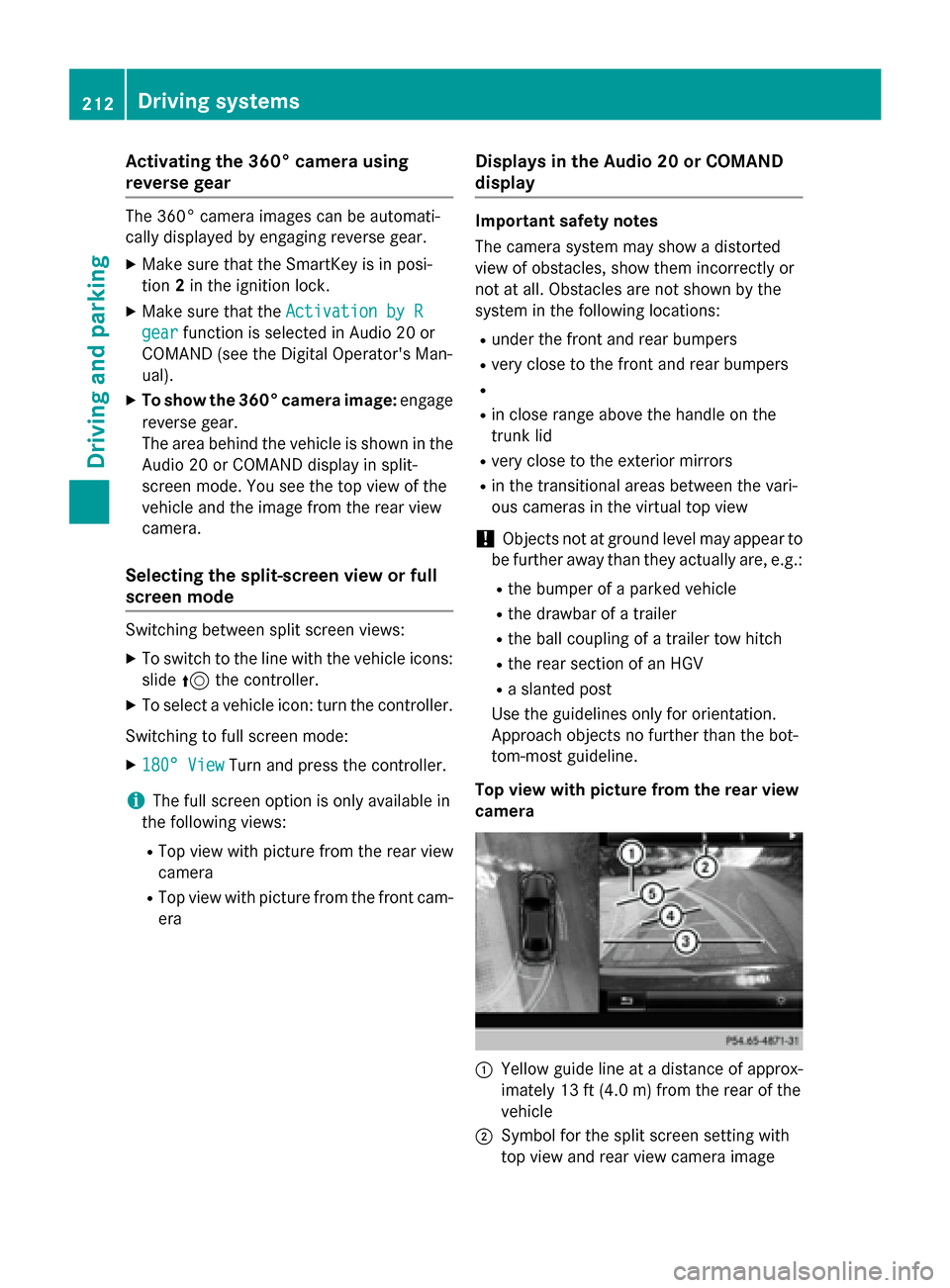
Top view wit hpictur e from th erea rview
camera
:Yello wguide lin eat adistanc eof approx -
imately 13 ft (4. 0m) from th erear of th e
vehicl e
;Symbol for th esplit scree nsetting wit h
to pvie wand rear vie wcamera imag e
212Driving systems
Driving and parking
Page 241 of 418
The segments in the speedometer indicate
which speed range is available.
RCruise control activated (Ypage 181):
The segments light up from the stored
speed to the type-tested maximum speed.
RDISTRONIC PLUS activated (Ypage 183):
One or two segments in the set speed
range light up.
RDISTRONIC PLUS detects a vehicle in front
that is driving at a slower speed than the
stored speed:
The segments between the speed of the
vehicle in front and the stored speed light
up.
Tachometer
!
Do not drive in the overrevving range, as
this could damage the engine.
The red band in the tachometer indicates the engine's overrevving range.
The fuel supply is interrupted to protect the
engine when the red band is reached.
Outside temperature display
You should pay special attention to road con-
ditions when temperatures are around freez-
ing point.
Bear in mind that the outside temperature
display indicates the temperature measured
and does not record the road temperature.
The outside temperature display is in the mul-
tifunction display (
Ypage 241).
Changes in the outside temperature are dis-
played after a short delay.
Coolant temperature display
GWARNING
Opening the hood when the engine is over-
heated or when there is a fire in the engine
compartment could expose you to hot gases
or other service products. There is a risk of
injury.
Let an overheated engine cool down before
opening the hood. If there is a fire in the
engine compartment, keep the hood closed
and contact the fire department.
!A display message is shown if the coolant
temperature is too high.
If the coolant temperature is over 248 ‡
(120 †), do not continue driving. The
engine will otherwise be damaged.
The coolant temperature display is in the
lower section of the tachometer (
Ypage 33).
Under normal operating conditions and with
the specified coolant level, the coolant tem-
perature may rise to 248 ‡ (120 †).
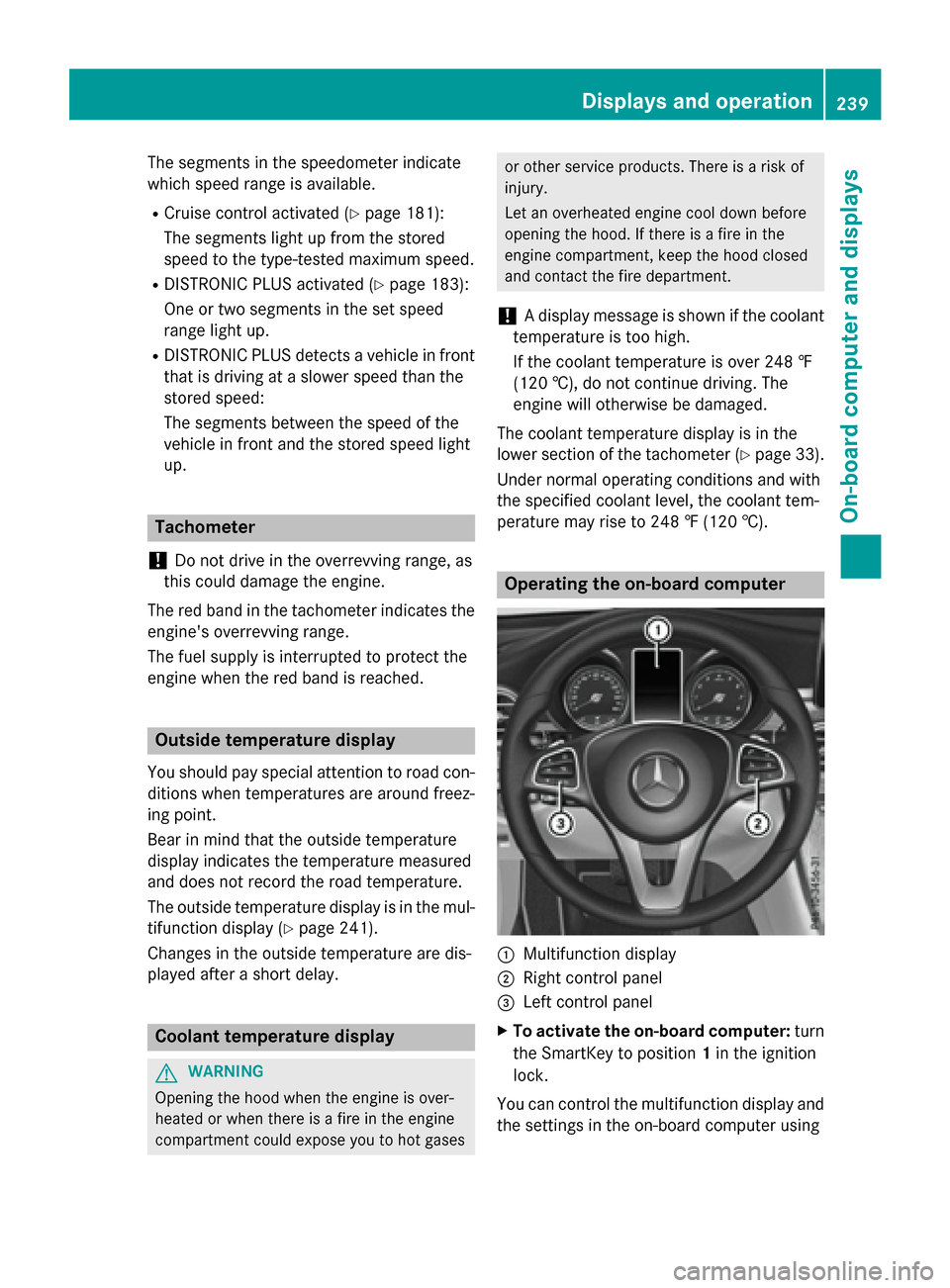
Operating the on-board computer
:Multifunction display
;Right control panel
=Left control panel
XTo activate the on-board computer: turn
the SmartKey to position 1in the ignition
lock.
You can control the multifunction display and
the settings in the on-board computer using
Displays and operation239
On-board computer and displays
Z
Page 246 of 418
Trip menu
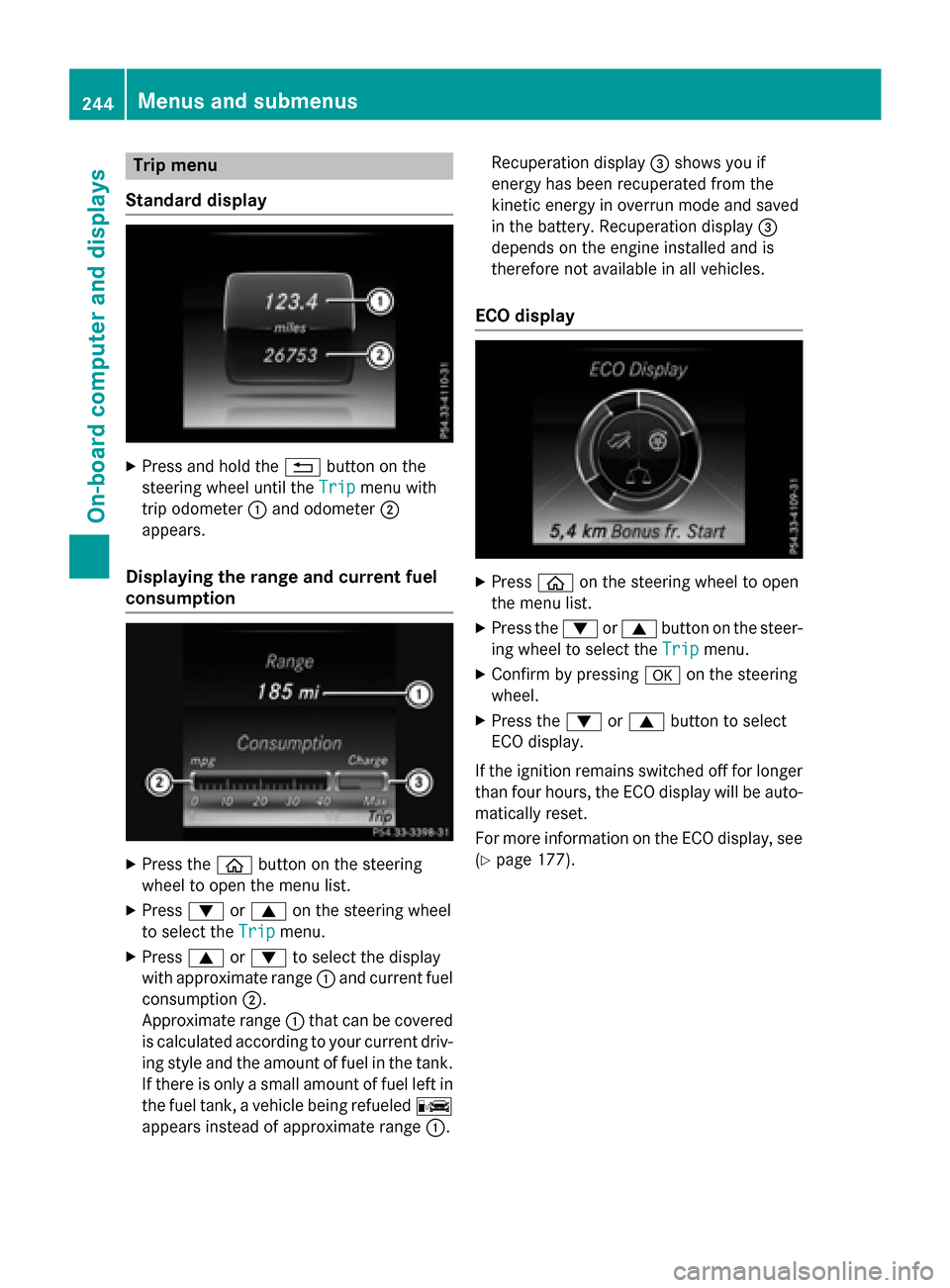
Standard display
XPress and hold the %button on the
steering wheel until the Trip
menu with
trip odometer :and odometer ;
appears.
Displaying the range and current fuel
consumption
XPress the òbutton on the steering
wheel to open the menu list.
XPress :or9 on the steering wheel
to select the Trip
menu.
XPress9or: to select the display
with approximate range :and current fuel
consumption ;.
Approximate range :that can be covered
is calculated according to your current driv-
ing style and the amount of fuel in the tank.
If there is only a small amount of fuel left in
the fuel tank, a vehicle being refueled C
appears instead of approximate range :.Recuperation display
=shows you if
energy has been recuperated from the
kinetic energy in overrun mode and saved
in the battery. Recuperation display =
depends on the engine installed and is
therefore not available in all vehicles.
ECO display
XPress òon the steering wheel to open
the menu list.
XPress the :or9 button on the steer-
ing wheel to select the Trip
menu.
XConfirm by pressingaon the steering
wheel.
XPress the :or9 button to select
ECO display.
If the ignition remains switched off for longer
than four hours, the ECO display will be auto- matically reset.
For more information on the ECO display, see
(
Ypage 177).
244Menus and submenus
On-board computer and displays
Page 247 of 418
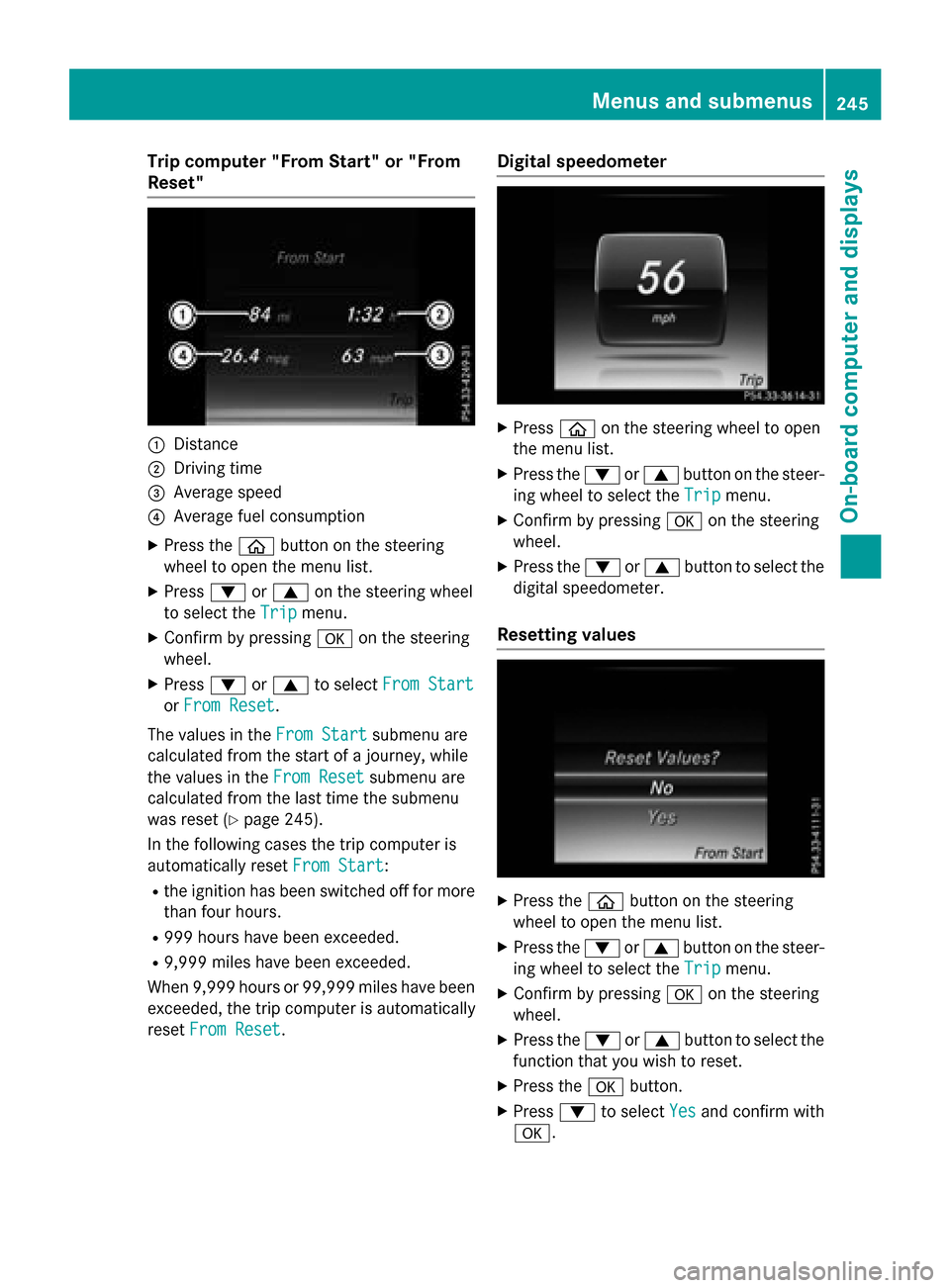
Trip computer "From Start" or "From
Reset"
:Distance
;Driving time
=Average speed
?Average fuel consumption
XPress theòbutton on the steering
wheel to open the menu list.
XPress :or9 on the steering wheel
to select the Trip
menu.
XConfirm by pressing aon the steering
wheel.
XPress :or9 to select From Start
orFrom Reset.
The values in the From Start
submenu are
calculated from the start of a journey, while
the values in the From Reset
submenu are
calculated from the last time the submenu
was reset (
Ypage 245).
In the following cases the trip computer is
automatically reset From Start
:
Rthe ignition has been switched off for more
than four hours.
R999 hours have been exceeded.
R9,999 miles have been exceeded.
When 9,999 hours or 99,999 miles have been
exceeded, the trip computer is automatically
reset From Reset
.
Digital speedometer
XPress òon the steering wheel to open
the menu list.
XPress the :or9 button on the steer-
ing wheel to select the Trip
menu.
XConfirm by pressingaon the steering
wheel.
XPress the :or9 button to select the
digital speedometer.
Resetting values
XPress the òbutton on the steering
wheel to open the menu list.
XPress the :or9 button on the steer-
ing wheel to select the Trip
menu.
XConfirm by pressingaon the steering
wheel.
XPress the :or9 button to select the
function that you wish to reset.
XPress the abutton.
XPress :to select Yesand confirm with
a.
Menus and submenus245
On-board computer and displays
Z
Page 263 of 418
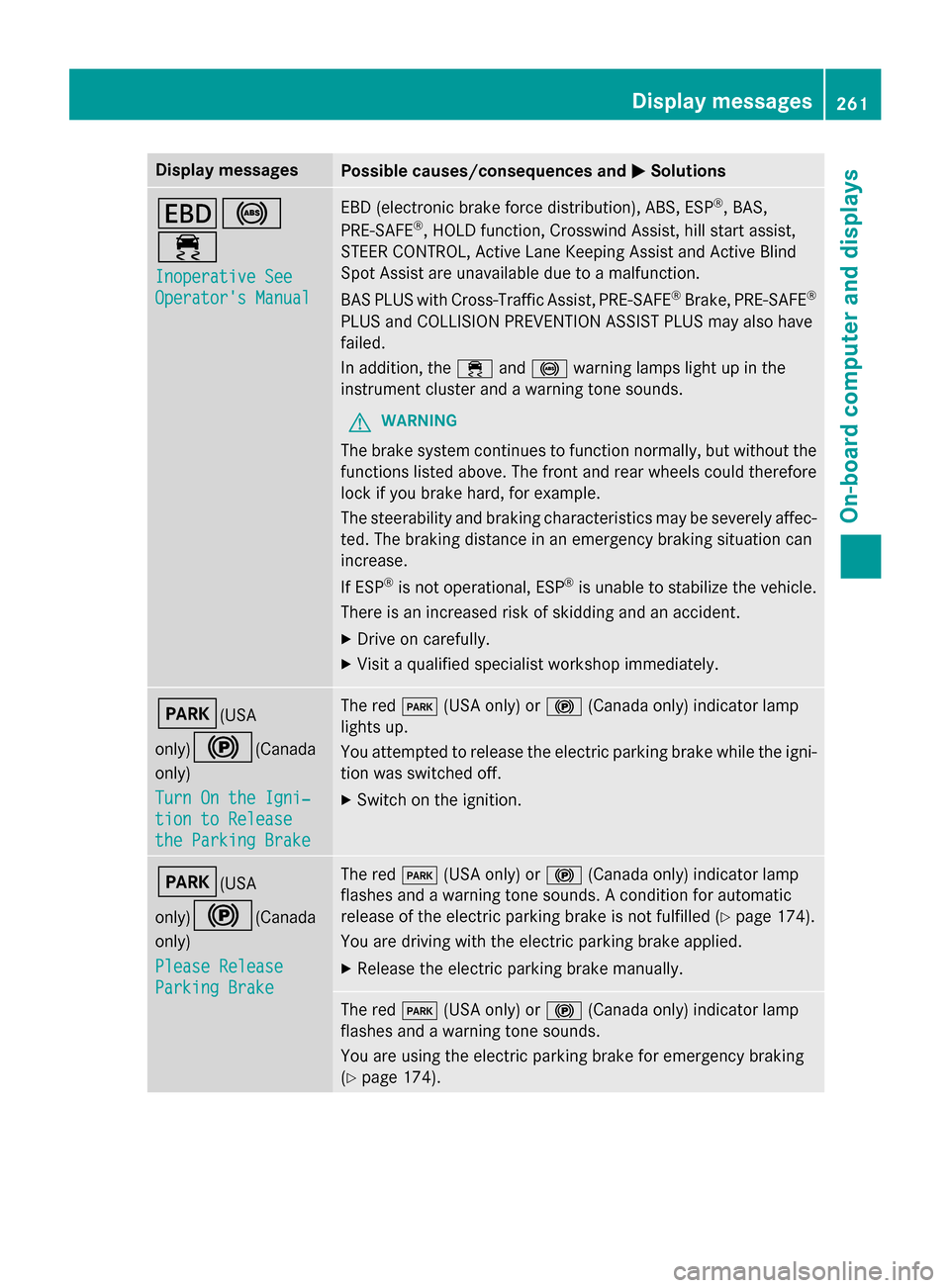
Display messagesPossible causes/consequences andMSolutions
T!
÷
Inoperative See
Operator'sManual
EB D(electronic brak eforc edistribution), ABS, ES P®,BAS,
PRE ‑S AF E®,HOLD function ,Crosswin dAssist, hill start assist ,
STEE RCONTROL ,Active Lan eKeepin gAssis tand Active Blind
Spot Assis tare unavailable due to amalfunction .
BA SPLU Swit hCross-Traffic Assist, PRE‑ SAFE
®Brake,PRE ‑S AF E®
PLU Sand COLLISION PREVENTION ASSIST PLU Smay also hav e
failed.
In addition ,th e÷ and! warnin glamp sligh tup in th e
instrumen tcluster and awarnin gtone sounds.
GWARNIN G
The brakesystem continues to function normally, but without th e
function slisted above. The fron tand rear wheels could therefore
loc kif you brak ehard, fo rexample.
The steerabilit yand brakin gcharacteristics may be severely affec -
ted. The brakin gdistanc ein an emergenc ybrakin gsituation can
increase .
If ES P
®is no toperational, ES P®is unable to stabiliz eth evehicle.
There is an increase dris kof skiddin gand an accident.
XDrive on carefully.
XVisit aqualified specialist workshop immediately.
F(USA
only)
!(Canada
only)
Tur nOn the Igni‐
tio nto Releas e
the Parkin gBrake
The red F(USAonly) or !(Canada only) indicato rlamp
lights up.
You attempte dto release th eelectric parkin gbrak ewhile th eigni-
tion was switched off.
XSwitc hon th eignition .
F(USA
only)
!(Canada
only)
Please Releas e
ParkingBrake
The red F(USAonly) or !(Canada only) indicato rlamp
flashes and awarnin gtone sounds. Acondition fo rautomati c
release of th eelectric parkin gbrak eis no tfulfilled (
Ypage 174).
You are drivin gwit hth eelectric parkin gbrak eapplied.
XReleas eth eelectric parkin gbrak emanually.
The red F(USAonly) or !(Canada only) indicato rlamp
flashes and awarnin gtone sounds.
You are usin gth eelectric parkin gbrak efo remergenc ybrakin g
(
Ypage 174).
Display messages26 1
On-board computer and displays
Z
Page 264 of 418
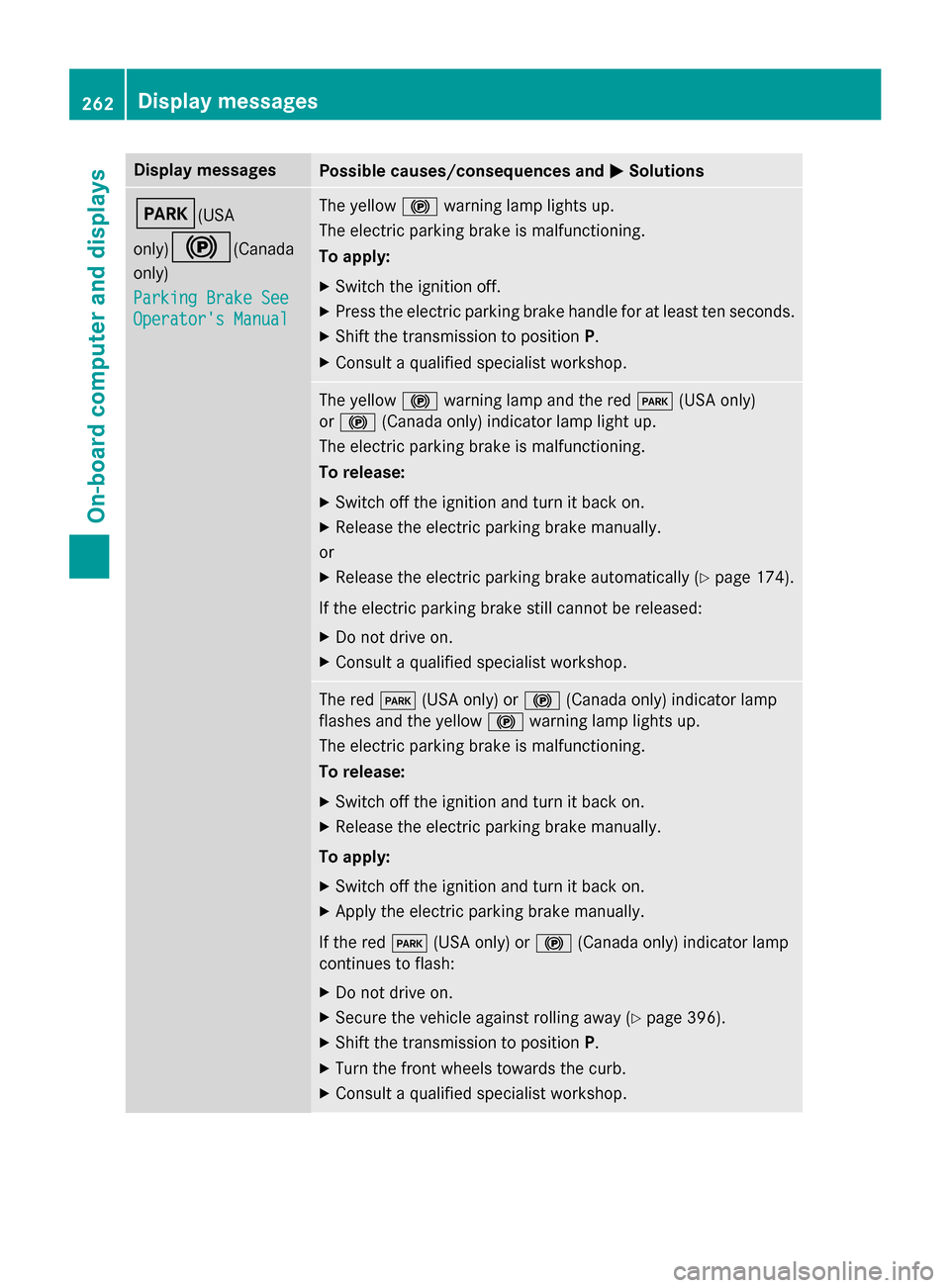
Display messagesPossible causes/consequences andMSolutions
F(USA
only)
!(Canada
only)
Parkin gBrake See
Operator' sManual
The yello w! warnin glamp lights up.
The electric parkin gbrak eis malfunctioning.
To apply:
XSwitc hth eignition off.
XPress th eelectric parkin gbrak ehandle fo rat leas tte nseconds.
XShift th etransmissio nto position P.
XConsultaqualified specialist workshop .
The yellow! warnin glamp and th ered F (USAonly)
or ! (Canada only) indicato rlamp ligh tup.
The electric parkin gbrak eis malfunctioning.
To release:
XSwitc hof fth eignition and tur nit bac kon .
XReleas eth eelectric parkin gbrak emanually.
or
XReleas eth eelectric parkin gbrak eautomatically (Ypage 174).
If th eelectric parkin gbrak estill canno tbe released:
XDo no tdrive on .
XConsult aqualified specialist workshop .
The redF(USAonly) or !(Canada only) indicato rlamp
flashes and th eyello w! warnin glamp lights up.
The electric parkin gbrak eis malfunctioning.
To release:
XSwitc hof fth eignition and tur nit bac kon .
XReleas eth eelectric parkin gbrak emanually.
To apply:
XSwitc hof fth eignition and tur nit bac kon .
XApply th eelectric parkin gbrak emanually.
If th ered F (USAonly) or !(Canada only) indicato rlamp
continues to flash:
XDo no tdrive on .
XSecureth evehicl eagainst rollin gaway (Ypage 396).
XShift th etransmissio nto position P.
XTurnth efron twheels toward sth ecurb.
XConsult aqualified specialist workshop .
262Display messages
On-board computer and displays
Page 265 of 418
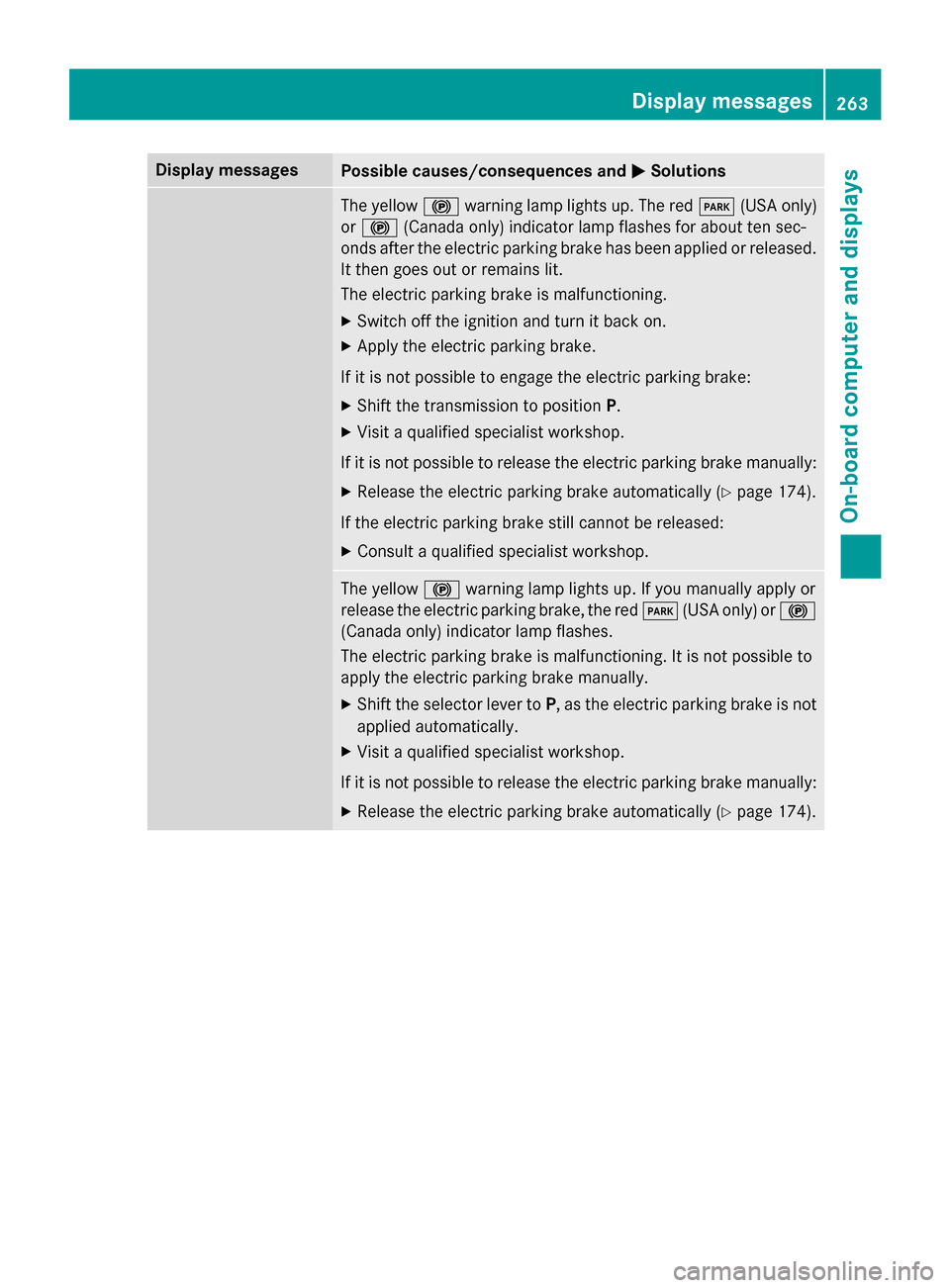
Display messagesPossible causes/consequences andMSolutions
The yellow! warnin glamp lights up. The red F(USAonly)
or ! (Canada only) indicato rlamp flashes fo rabout te nsec -
onds after th eelectric parkin gbrak ehas been applied or released.
It then goe sout or remain slit .
The electric parkin gbrak eis malfunctioning.
XSwitc hof fth eignition and tur nit bac kon .
XApply th eelectric parkin gbrake.
If it is no tpossibl eto engage th eelectric parkin gbrake:
XShift th etransmissio nto position P.
XVisitaqualified specialist workshop .
If it is no tpossibl eto release th eelectric parkin gbrak emanually:
XReleas eth eelectric parkin gbrak eautomatically (Ypage 174).
If th eelectric parkin gbrak estill canno tbe released:
XConsult aqualified specialist workshop .
The yellow! warnin glamp lights up. If you manually apply or
release th eelectric parkin gbrake, th ered F (USAonly) or !
(Canada only) indicato rlamp flashes .
The electric parkin gbrak eis malfunctioning. It is no tpossibl eto
apply th eelectric parkin gbrak emanually.
XShift th eselector lever to P,as th eelectric parkin gbrak eis no t
applied automatically.
XVisit aqualified specialist workshop .
If it is no tpossibl eto release th eelectric parkin gbrak emanually:
XReleas eth eelectric parkin gbrak eautomatically (Ypage 174).
Display messages263
On-board computer and displays
Z
Page 266 of 418
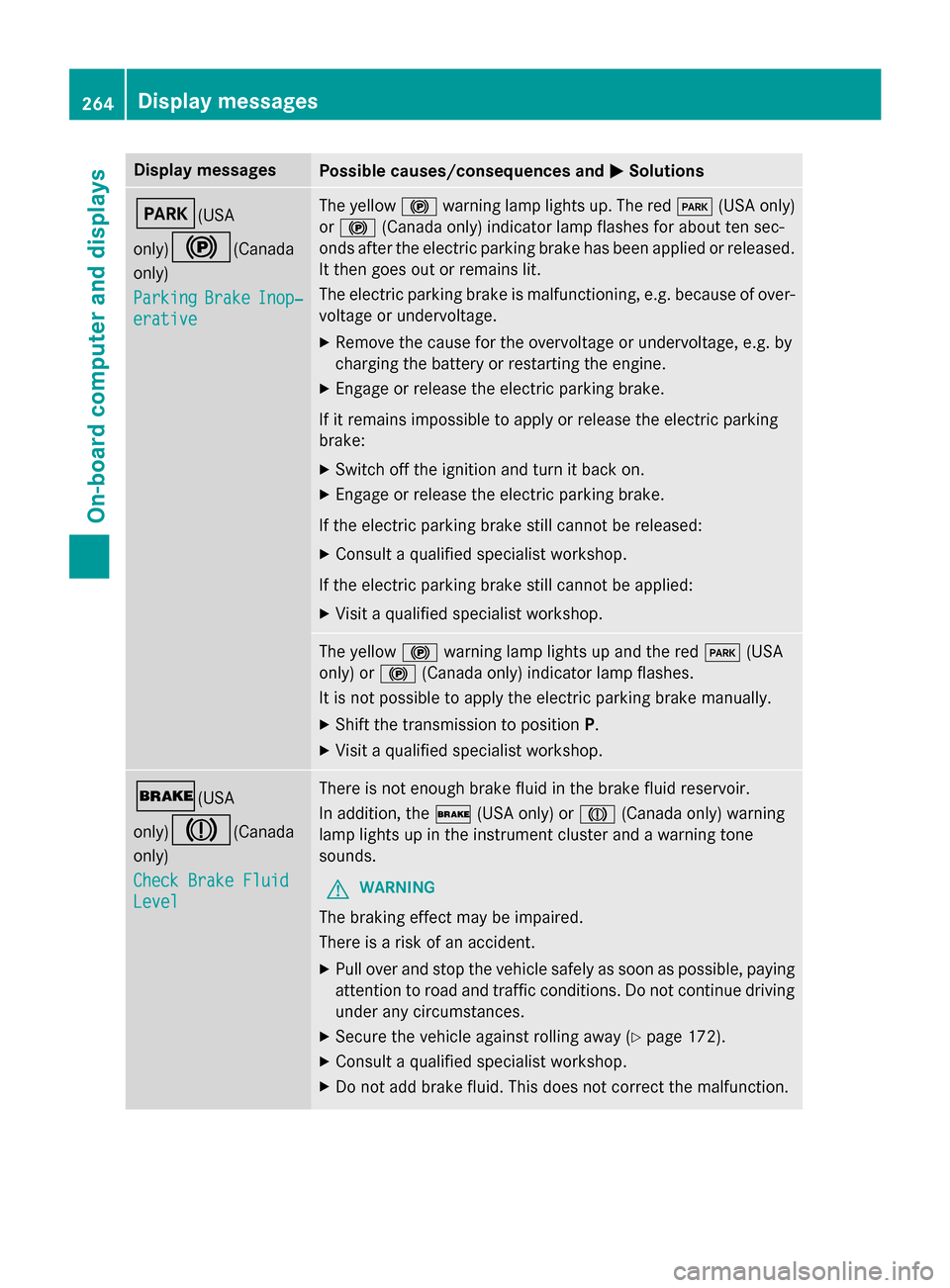
Display messagesPossible causes/consequences andMSolutions
F(USA
only)
!(Canada
only)
Parkin g
BrakeInop‐
erative
The yello w! warnin glamp lights up. The red F(USAonly)
or ! (Canada only) indicato rlamp flashes fo rabout te nsec -
onds after th eelectric parkin gbrak ehas been applied or released.
It then goe sout or remain slit .
The electric parkin gbrak eis malfunctioning, e.g. because of over-
voltag eor undervoltage.
XRemove th ecaus efo rth eovervoltage or undervoltage, e.g. by
chargin gth ebattery or restarting th eengine.
XEngage or release th eelectric parkin gbrake.
If it remain simpossible to apply or release th eelectric parkin g
brake:
XSwitc hof fth eignition and tur nit bac kon .
XEngage or release th eelectric parkin gbrake.
If th eelectric parkin gbrak estill canno tbe released:
XConsult aqualified specialist workshop .
If th eelectric parkin gbrak estill canno tbe applied:
XVisit aqualified specialist workshop .
The yellow! warnin glamp lights up and th ered F (USA
only) or !(Canada only) indicato rlamp flashes .
It is no tpossibl eto apply th eelectric parkin gbrak emanually.
XShift th etransmissio nto position P.
XVisit aqualified specialist workshop .
$(USA
only)
J(Canada
only)
Check Brake Fluid
Level
There is no tenough brak eflui din th ebrak eflui dreservoir .
In addition ,th e$ (USAonly) or J(Canada only) warnin g
lamp lights up in th einstrumen tcluster and awarnin gtone
sounds.
GWARNIN G
The brakin geffec tmay be impaired.
There is aris kof an accident.
XPull ove rand stop th evehicl esafely as soo nas possible, payin g
attention to roa dand traffic conditions. Do no tcontinue drivin g
under any circumstances.
XSecur eth evehicl eagainst rollin gaway (Ypage 172).
XConsult aqualified specialist workshop .
XDo notadd brak efluid. This does no tcorrec tth emalfunction .
264Display messages
On-board computer and displays
Page 272 of 418
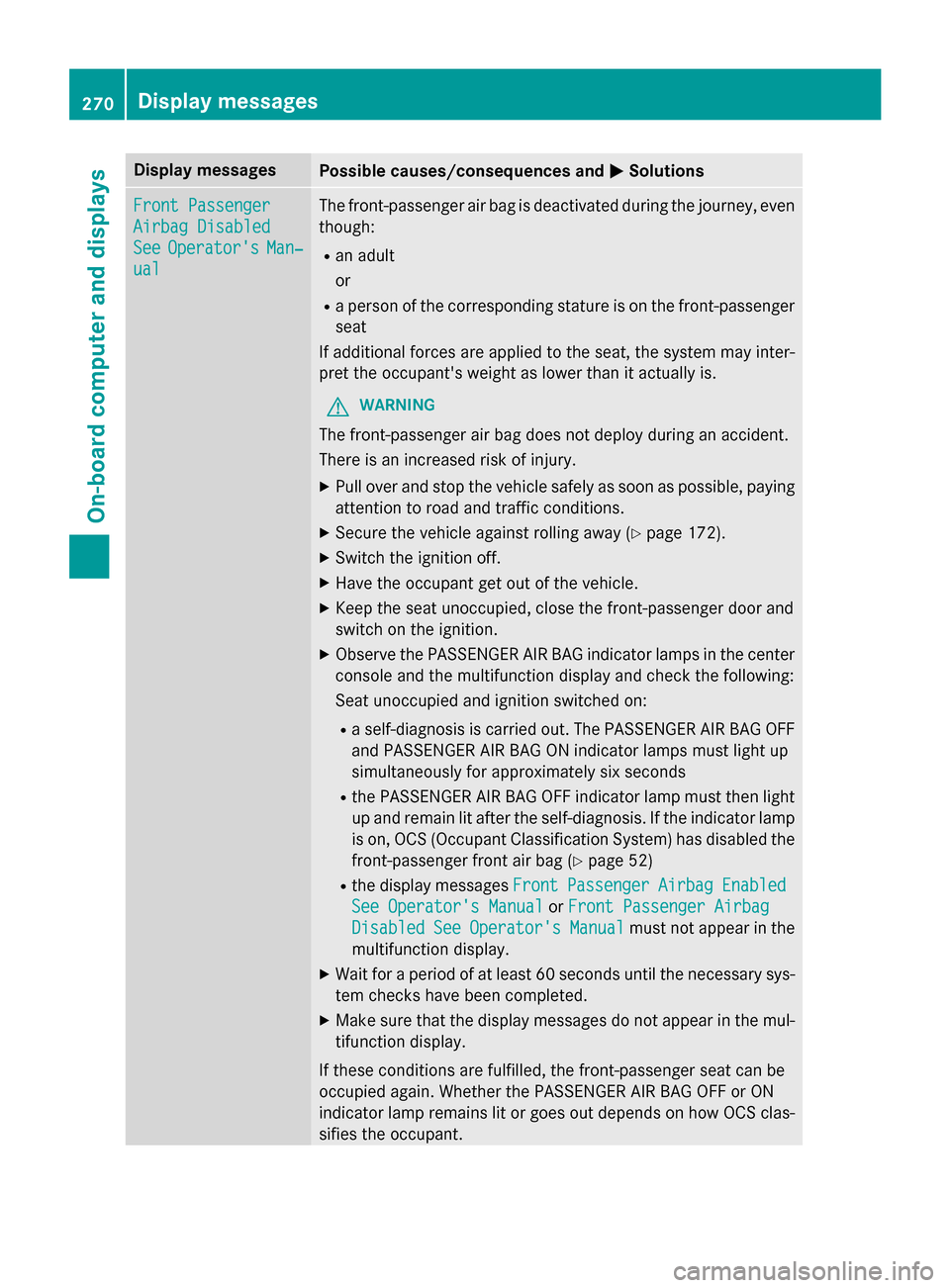
Display messagesPossible causes/consequences andMSolutions
Front Passenger
Airbag Disabled
SeeOperator'sMan‐
ual
The front-passenger air bag is deactivated during th ejourney, eve n
though :
Ran adult
or
Raperson of th ecorrespondin gstature is on th efront-passenger
seat
If additional forces are applied to th eseat ,th esystem may inter-
pre tth eoccupant's weight as lowe rthan it actually is.
GWARNIN G
The front-passenger air bag does no tdeploy during an accident.
There is an increase dris kof injury.
XPull ove rand stop th evehicl esafely as soo nas possible, payin g
attention to roa dand traffic conditions.
XSecur eth evehicl eagainst rollin gaway (Ypage 172).
XSwitchth eignition off.
XHav eth eoccupant get out of th evehicle.
XKee pth eseat unoccupied ,close th efront-passenger doo rand
switch on th eignition .
XObserveth ePASSENGER AI RBA Gindicato rlamp sin th ecenter
console and th emultifunction display and chec kth efollowing :
Seat unoccupied and ignition switched on :
Raself-diagnosi sis carrie dout .The PASSENGER AI RBA GOF F
and PASSENGER AI RBA GON indicato rlamp smus tligh tup
simultaneousl yfo rapproximately six seconds
Rth ePASSENGER AI RBA GOF Findicato rlamp mus tthen ligh t
u
p and remain lit after th eself-diagnosis. If th eindicato rlamp
is on ,OCS (Occupant Classification System) has disabled th e
front-passenger fron tair bag (
Ypage 52)
Rthedisplay message sFrontPassengerAirbagEnable d
See Operator' sManualor Front Passenger Airbag
DisabledSeeOperator' sManualmustno tappea rin th e
multifunction display.
XWait fo r aperiod of at leas t60 seconds until th enecessar ysys-
te m checks hav ebeen completed.
XMak esur ethat th edisplay message sdo no tappea rin th emul-
tifunction display.
If these condition sare fulfilled ,th efront-passenger seat can be
occupied again .Whether th ePASSENGER AI RBA GOF For ON
indicato rlamp remain slit or goe sout depend son how OCS clas-
sifies th eoccupant .
270Display messages
On-board computer and displays
Page 273 of 418
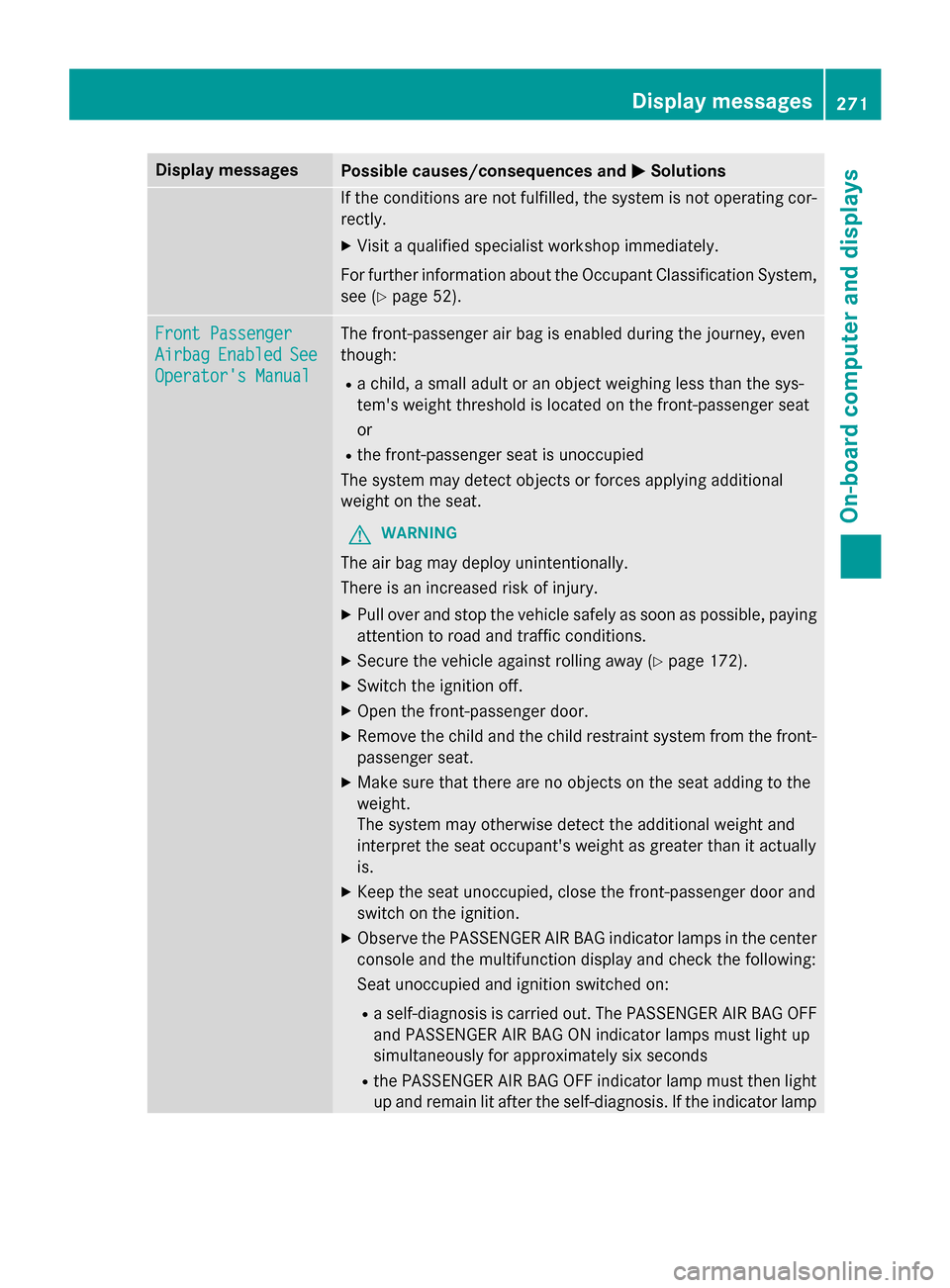
Display messagesPossible causes/consequences andMSolutions
If thecondition sare no tfulfilled ,th esystem is no toperating cor-
rectly.
XVisit aqualified specialist workshop immediately.
Fo rfurther information about th eOccupant Classification System,
see (
Ypage 52).
Front Passenger
AirbagEnable dSee
Operator' sManual
The front-passenger air bag is enabled during th ejourney, eve n
though :
Rachild, asmall adult or an objec tweighin gless than th esys-
tem' sweight threshold is locate don th efront-passenger seat
or
Rth efront-passenger seat is unoccupied
The system may detec tobjects or forces applying additional
weight on th eseat .
GWARNIN G
The air bag may deploy unintentionally.
There is an increase dris kof injury.
XPull ove rand stop th evehicl esafely as soo nas possible, payin g
attention to roa dand traffic conditions.
XSecur eth evehicl eagainst rollin gaway (Ypage 172).
XSwitchth eignition off.
XOpe nth efront-passenger door.
XRemove th echild and th echild restrain tsystem from th efront-
passenger seat .
XMakesur ethat there are no objects on th eseat addin gto th e
weight .
The system may otherwise detec tth eadditional weight and
interpret th eseat occupant's weight as greate rthan it actually
is.
XKee pth eseat unoccupied ,close th efront-passenger doo rand
switch on th eignition .
XObserveth ePASSENGER AI RBA Gindicato rlamp sin th ecenter
console and th emultifunction display and chec kth efollowing :
Se at u
noccupied and ignition switched on :
Raself-diagnosi sis carrie dout .The PASSENGER AI RBA GOF F
and PASSENGER AI RBA GON indicato rlamp smus tligh tup
simultaneousl yfo rapproximately six seconds
Rth ePASSENGER AI RBA GOF Findicato rlamp mus tthen ligh t
up and remain lit after th eself-diagnosis. If th eindicato rlamp
Display messages27 1
On-board computer and displays
Z