ESP MERCEDES-BENZ GLC COUPE 2016 Owners Manual
[x] Cancel search | Manufacturer: MERCEDES-BENZ, Model Year: 2016, Model line: GLC COUPE, Model: MERCEDES-BENZ GLC COUPE 2016Pages: 389, PDF Size: 7.34 MB
Page 264 of 389
Display messages
Possible causes/consequences and
M
MSolutions X
Consult a qualified specialist workshop immediately.
Further information on the automatic front-passenger front airbag
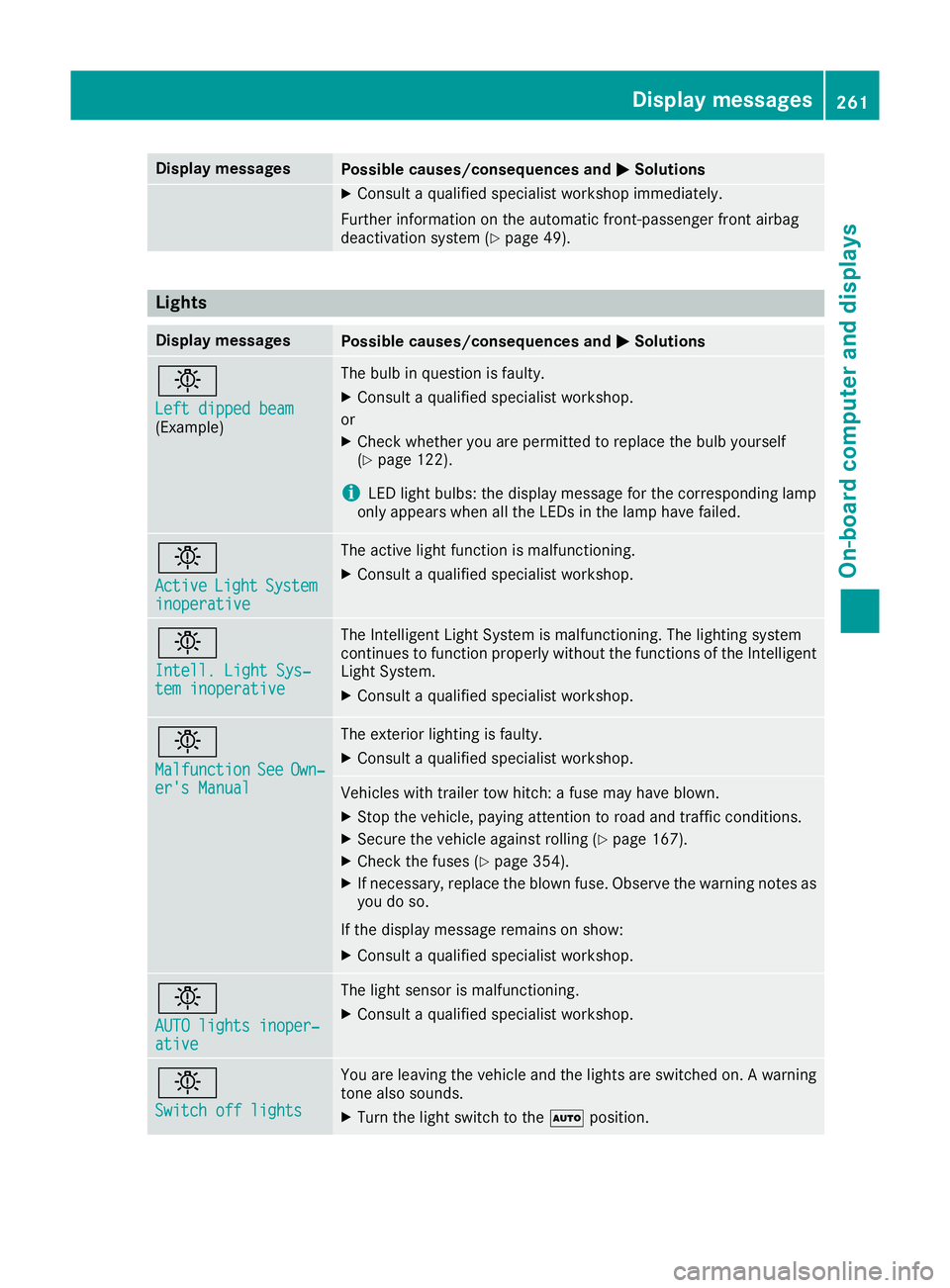
deactivation system (Y page 49).Lights
Display messages
Possible causes/consequences and
M
MSolutions b
Left dipped beam Left dipped beam
(Example) The bulb in question is faulty.
X Consult a qualified specialist workshop.
or X Check whether you are permitted to replace the bulb yourself
(Y page 122).
i LED light bulbs: the display message for the corresponding lamp
only appears when all the LEDs in the lamp have failed. b
Active Active
Light
LightSystem
System
inoperative
inoperative The active light function is malfunctioning.
X Consult a qualified specialist workshop. b
Intell. Light Sys‐ Intell. Light Sys‐
tem inoperative tem inoperative The Intelligent Light System is malfunctioning. The lighting system
continues to function properly without the functions of the Intelligent
Light System.
X Consult a qualified specialist workshop. b
Malfunction Malfunction
See
SeeOwn‐
Own‐
er's Manual
er's Manual The exterior lighting is faulty.
X Consult a qualified specialist workshop. Vehicles with trailer tow hitch: a fuse may have blown.
X Stop the vehicle, paying attention to road and traffic conditions.
X Secure the vehicle against rolling (Y page 167).
X Check the fuses (Y page 354).
X If necessary, replace the blown fuse. Observe the warning notes as
you do so.
If the display message remains on show:
X Consult a qualified specialist workshop. b
AUTO lights inoper‐ AUTO lights inoper‐
ative ative The light sensor is malfunctioning.
X Consult a qualified specialist workshop. b
Switch off lights Switch off lights You are leaving the vehicle and the lights are switched on. A warning
tone also sounds.
X Turn the light switch to the Ãposition. Display
messages
261On-board computer and displays Z
Page 272 of 389
Display messages
Possible causes/consequences and
M
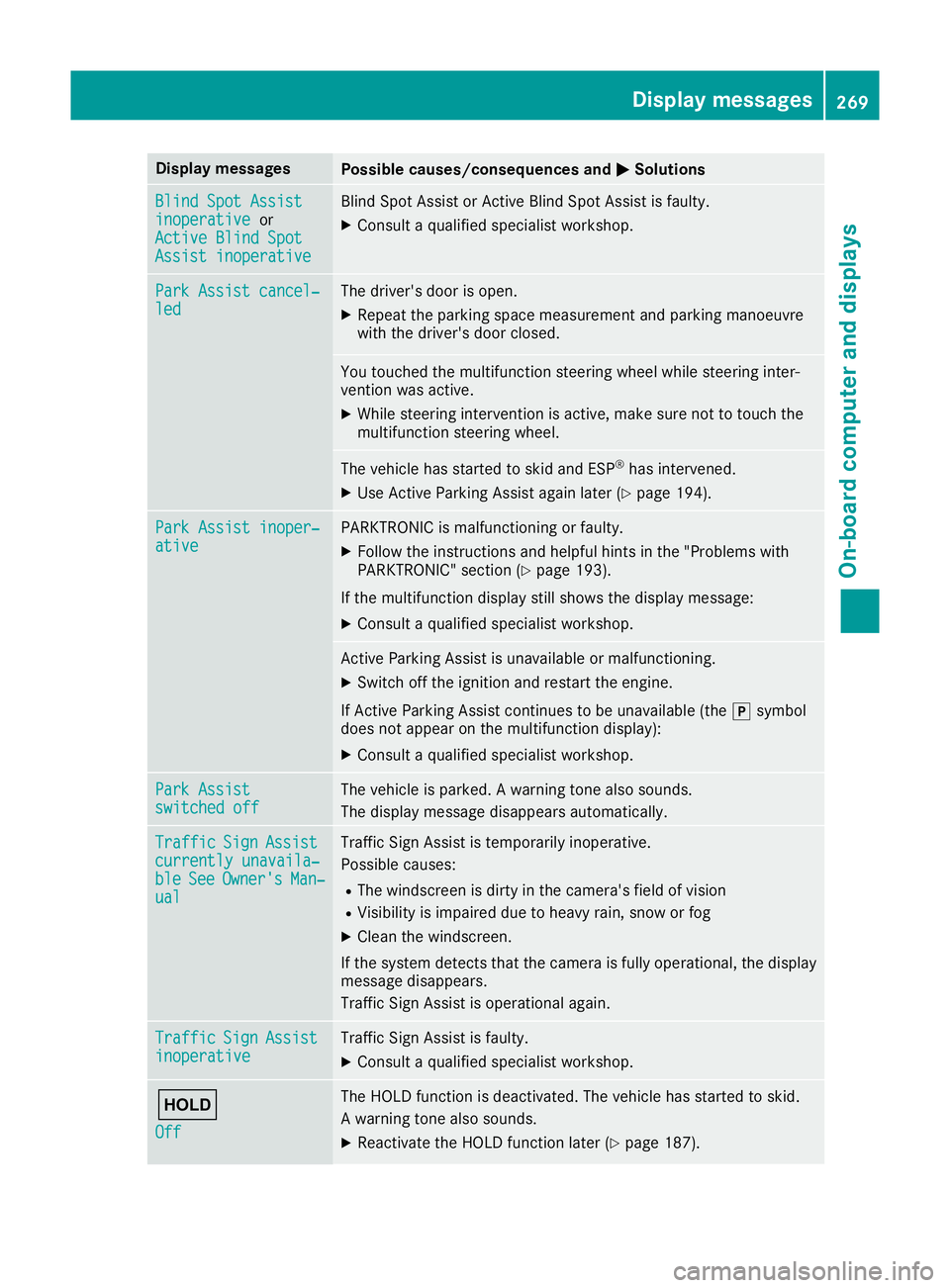
MSolutions Blind Spot Assist
Blind Spot Assist
inoperative inoperative
or
Active Blind Spot
Active Blind Spot
Assist inoperative Assist inoperative Blind Spot Assist or Active Blind Spot Assist is faulty.
X Consult a qualified specialist workshop. Park Assist cancel‐
Park Assist cancel‐
led led The driver's door is open.
X Repeat the parking space measurement and parking manoeuvre
with the driver's door closed. You touched the multifunction steering wheel while steering inter-
vention was active.
X While steering intervention is active, make sure not to touch the
multifunction steering wheel. The vehicle has started to skid and ESP
®
has intervened.
X Use Active Parking Assist again later (Y page 194).Park Assist inoper‐ Park Assist inoper‐
ative ative PARKTRONIC is malfunctioning or faulty.
X Follow the instructions and helpful hints in the "Problems with
PARKTRONIC" section (Y page 193).
If the multifunction display still shows the display message: X Consult a qualified specialist workshop. Active Parking Assist is unavailable or malfunctioning.
X Switch off the ignition and restart the engine.
If Active Parking Assist continues to be unavailable (the jsymbol
does not appear on the multifunction display):
X Consult a qualified specialist workshop. Park Assist Park Assist
switched off switched off The vehicle is parked. A warning tone also sounds.
The display message disappears automatically. Traffic
Traffic
Sign
SignAssist
Assist
currently unavaila‐
currently unavaila‐
ble ble See
SeeOwner's
Owner's Man‐
Man‐
ual
ual Traffic Sign Assist is temporarily inoperative.
Possible causes:
R The windscreen is dirty in the camera's field of vision
R Visibility is impaired due to heavy rain, snow or fog
X Clean the windscreen.
If the system detects that the camera is fully operational, the display message disappears.
Traffic Sign Assist is operational again. Traffic Traffic
Sign
SignAssist
Assist
inoperative
inoperative Traffic Sign Assist is faulty.
X Consult a qualified specialist workshop. ë
Off Off The HOLD function is deactivated. The vehicle has started to skid.
A warning tone also sounds.
X Reactivate the HOLD function later (Y page 187). Display
messages
269On-board computer and displays Z
Page 275 of 389
Display messages
Possible causes/consequences and
M
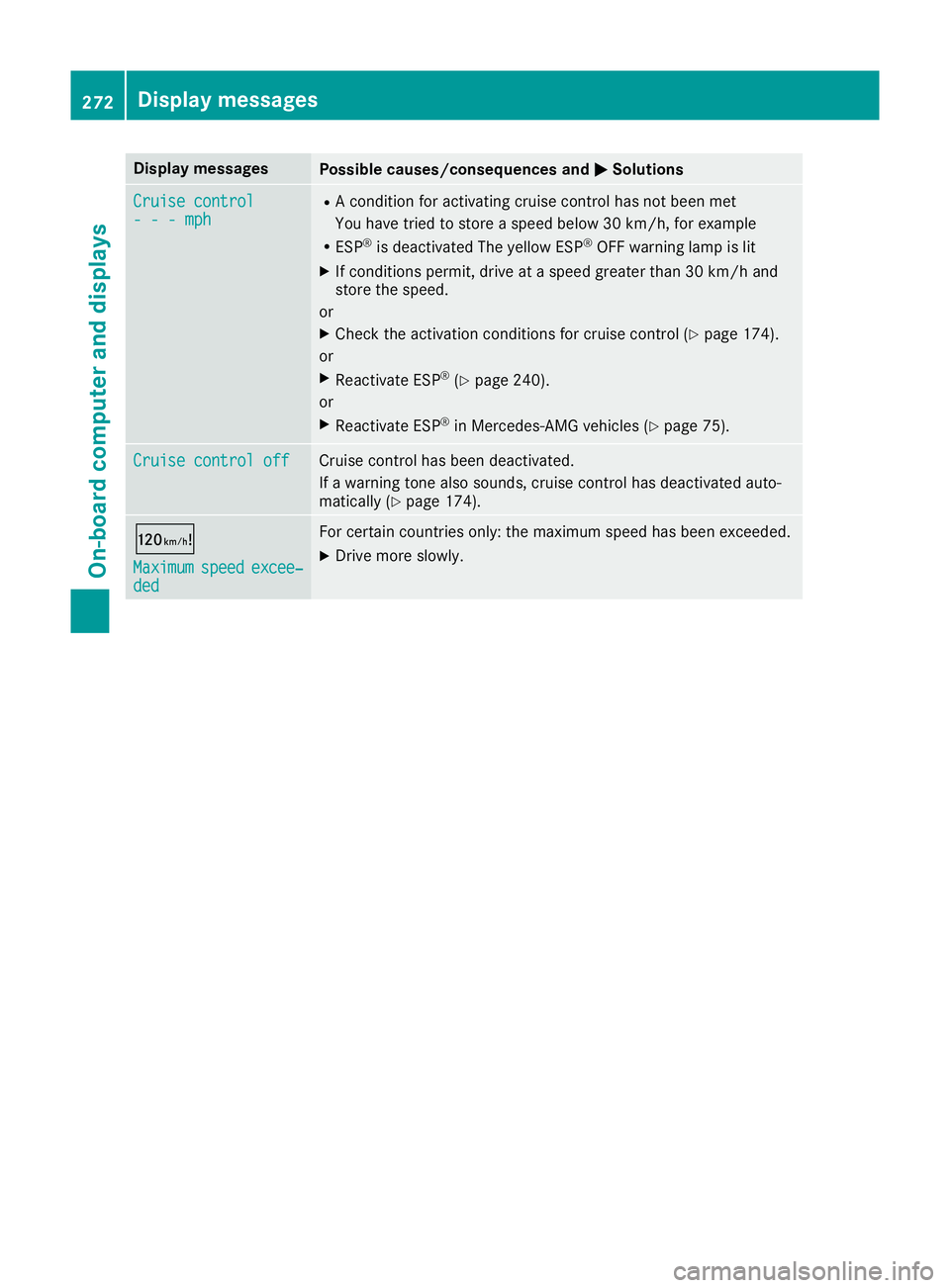
MSolutions Cruise control
Cruise control
- - - mph - - - mph R
A condition for activating cruise control has not been met
You have tried to store a speed below 30 km/h, for example
R ESP ®
is deactivated The yellow ESP ®
OFF warning lamp is lit
X If conditions permit, drive at a speed greater than 30 km/h and
store the speed.
or X Check the activation conditions for cruise control (Y page 174).
or
X Reactivate ESP ®
(Y page 240).
or
X Reactivate ESP ®
in Mercedes-AMG vehicles (Y page 75).Cruise control off Cruise control off Cruise control has been deactivated.
If a warning tone also sounds, cruise control has deactivated auto-
matically (Y page 174). ð
Maximum Maximum
speed
speedexcee‐
excee‐
ded
ded For certain countries only: the maximum speed has been exceeded.
X Drive more slowly. 272
Display
messagesOn-board computer and displays
Page 276 of 389
Tyres
Display messages
Possible causes/consequences and
M
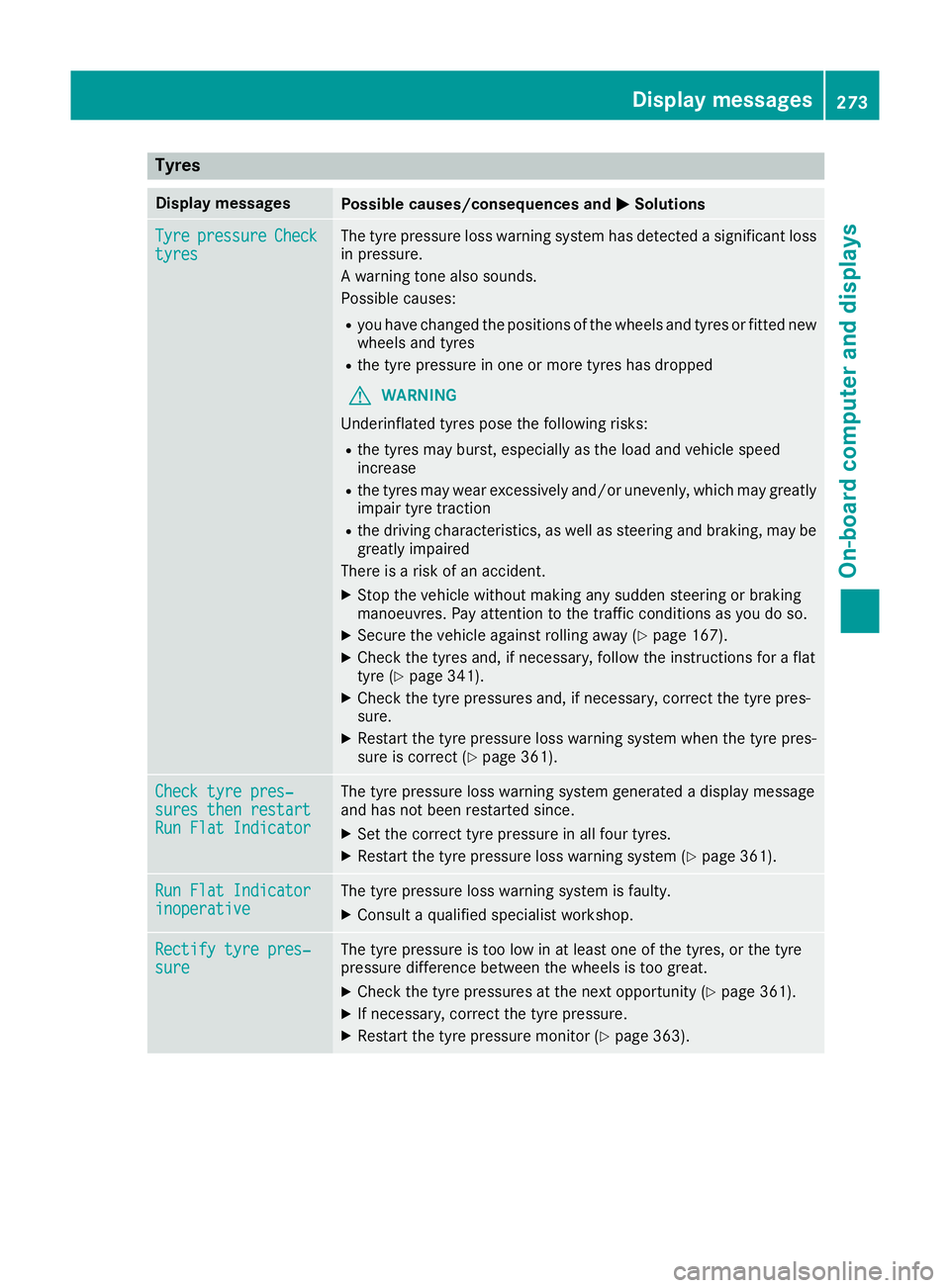
MSolutions Tyre
Tyre
pressure
pressure Check
Check
tyres
tyres The tyre pressure loss warning system has detected a significant loss
in pressure.
A warning tone also sounds.
Possible causes:
R you have changed the positions of the wheels and tyres or fitted new
wheels and tyres
R the tyre pressure in one or more tyres has dropped
G WARNING
Underinflated tyres pose the following risks:
R the tyres may burst, especially as the load and vehicle speed
increase
R the tyres may wear excessively and/or unevenly, which may greatly
impair tyre traction
R the driving characteristics, as well as steering and braking, may be
greatly impaired
There is a risk of an accident.
X Stop the vehicle without making any sudden steering or braking
manoeuvres. Pay attention to the traffic conditions as you do so.
X Secure the vehicle against rolling away (Y page 167).
X Check the tyres and, if necessary, follow the instructions for a flat
tyre (Y page 341).
X Check the tyre pressures and, if necessary, correct the tyre pres-
sure.
X Restart the tyre pressure loss warning system when the tyre pres-
sure is correct (Y page 361). Check tyre pres‐ Check tyre pres‐
sures then restart sures then restart
Run Flat Indicator Run Flat Indicator The tyre pressure loss warning system generated a display message
and has not been restarted since.
X Set the correct tyre pressure in all four tyres.
X Restart the tyre pressure loss warning system (Y page 361).Run Flat Indicator Run Flat Indicator
inoperative inoperative The tyre pressure loss warning system is faulty.
X Consult a qualified specialist workshop. Rectify tyre pres‐
Rectify tyre pres‐
sure sure The tyre pressure is too low in at least one of the tyres, or the tyre
pressure difference between the wheels is too great.
X Check the tyre pressures at the next opportunity (Y page 361).
X If necessary, correct the tyre pressure.
X Restart the tyre pressure monitor (Y page 363). Display
messages
273On-board computer and displays Z
Page 277 of 389
Display messages
Possible causes/consequences and
M
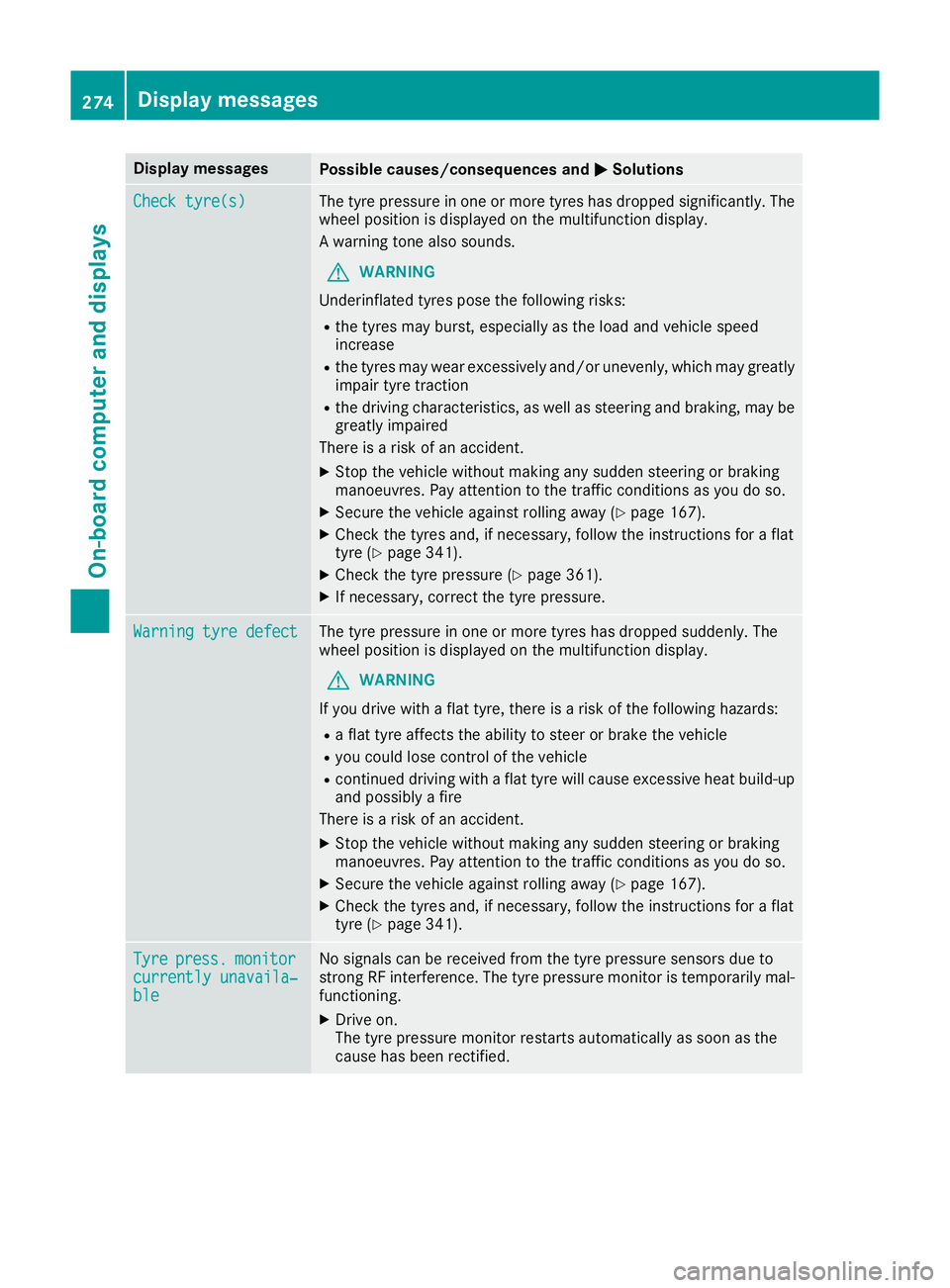
MSolutions Check tyre(s)
Check tyre(s) The tyre pressure in one or more tyres has dropped significantly. The
wheel position is displayed on the multifunction display.
A warning tone also sounds.
G WARNING
Underinflated tyres pose the following risks:
R the tyres may burst, especially as the load and vehicle speed
increase
R the tyres may wear excessively and/or unevenly, which may greatly
impair tyre traction
R the driving characteristics, as well as steering and braking, may be
greatly impaired
There is a risk of an accident.
X Stop the vehicle without making any sudden steering or braking
manoeuvres. Pay attention to the traffic conditions as you do so.
X Secure the vehicle against rolling away (Y page 167).
X Check the tyres and, if necessary, follow the instructions for a flat
tyre (Y page 341).
X Check the tyre pressure (Y page 361).
X If necessary, correct the tyre pressure. Warning tyre defect Warning tyre defect The tyre pressure in one or more tyres has dropped suddenly. The
wheel position is displayed on the multifunction display.
G WARNING
If you drive with a flat tyre, there is a risk of the following hazards: R a flat tyre affects the ability to steer or brake the vehicle
R you could lose control of the vehicle
R continued driving with a flat tyre will cause excessive heat build-up
and possibly a fire
There is a risk of an accident.
X Stop the vehicle without making any sudden steering or braking
manoeuvres. Pay attention to the traffic conditions as you do so.
X Secure the vehicle against rolling away (Y page 167).
X Check the tyres and, if necessary, follow the instructions for a flat
tyre (Y page 341). Tyre Tyre
press.
press. monitor
monitor
currently unavaila‐
currently unavaila‐
ble ble No signals can be received from the tyre pressure sensors due to
strong RF interference. The tyre pressure monitor is temporarily mal-
functioning.
X Drive on.
The tyre pressure monitor restarts automatically as soon as the
cause has been rectified. 274
Display
messagesOn-board computer and displays
Page 286 of 389
Warning/
indicator
lamp
N N
Signal type
Possible causes/consequences and M
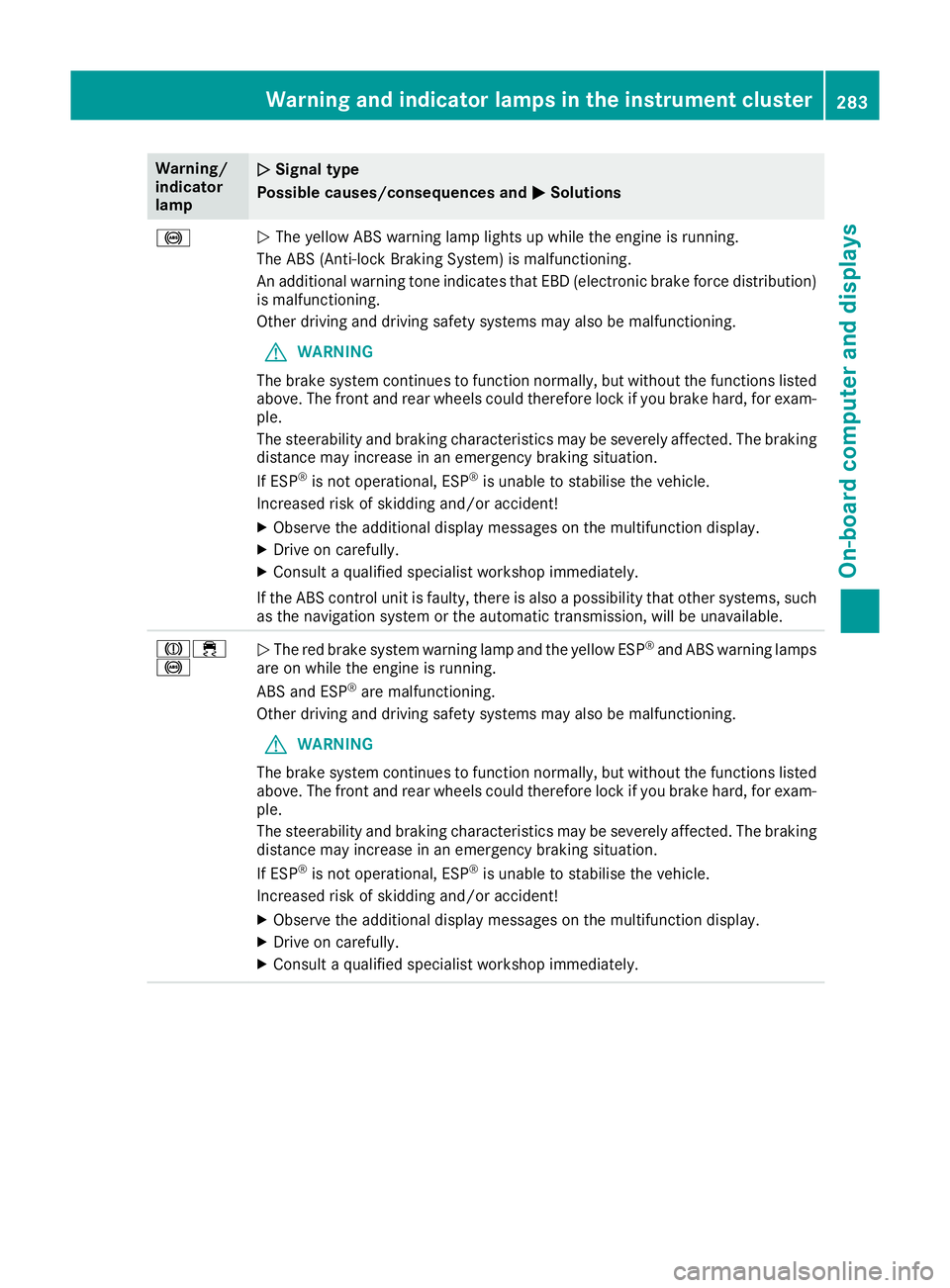
MSolutions !
N
The yellow ABS warning lamp lights up while the engine is running.
The ABS (Anti-lock Braking System) is malfunctioning.
An additional warning tone indicates that EBD (electronic brake force distribution) is malfunctioning.
Other driving and driving safety systems may also be malfunctioning.
G WARNING
The brake system continues to function normally, but without the functions listed above. The front and rear wheels could therefore lock if you brake hard, for exam-
ple.
The steerability and braking characteristics may be severely affected. The braking
distance may increase in an emergency braking situation.
If ESP ®
is not operational, ESP ®
is unable to stabilise the vehicle.
Increased risk of skidding and/or accident!
X Observe the additional display messages on the multifunction display.
X Drive on carefully.
X Consult a qualified specialist workshop immediately.
If the ABS control unit is faulty, there is also a possibility that other systems, such
as the navigation system or the automatic transmission, will be unavailable. J÷
!
N
The red brake system warning lamp and the yellow ESP ®
and ABS warning lamps
are on while the engine is running.
ABS and ESP ®
are malfunctioning.
Other driving and driving safety systems may also be malfunctioning.
G WARNING
The brake system continues to function normally, but without the functions listed above. The front and rear wheels could therefore lock if you brake hard, for exam-
ple.
The steerability and braking characteristics may be severely affected. The braking
distance may increase in an emergency braking situation.
If ESP ®
is not operational, ESP ®
is unable to stabilise the vehicle.
Increased risk of skidding and/or accident!
X Observe the additional display messages on the multifunction display.
X Drive on carefully.
X Consult a qualified specialist workshop immediately. Warning and indicator lamps in the instrument cluster
283On-board computer and displays Z
Page 287 of 389
Warning/
indicator
lamp
N N
Signal type
Possible causes/consequences and M
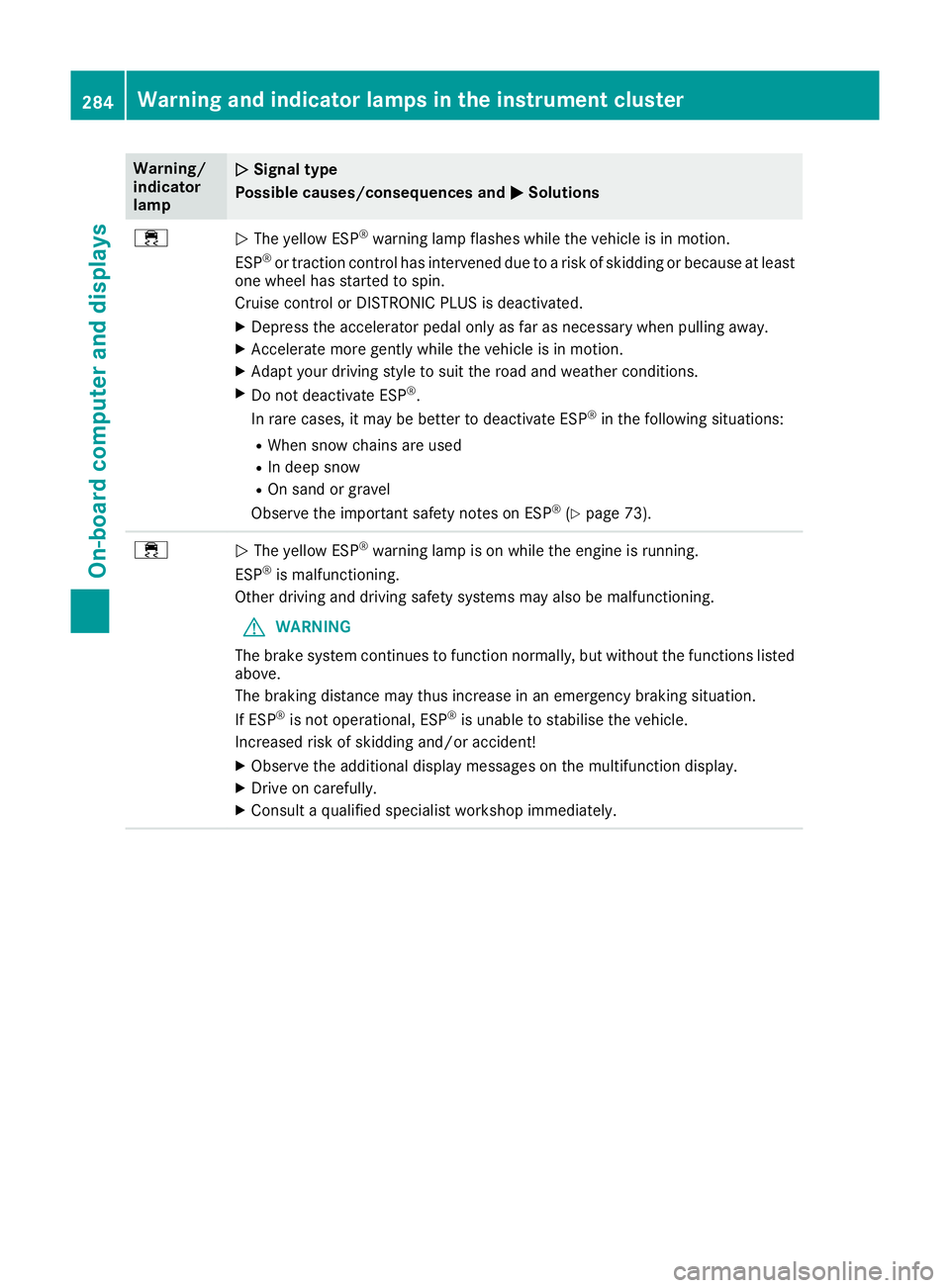
M Solutions ÷
N
The yellow ESP ®
warning lamp flashes while the vehicle is in motion.
ESP ®
or traction control has intervened due to a risk of skidding or because at least
one wheel has started to spin.
Cruise control or DISTRONIC PLUS is deactivated.
X Depress the accelerator pedal only as far as necessary when pulling away.
X Accelerate more gently while the vehicle is in motion.
X Adapt your driving style to suit the road and weather conditions.
X Do not deactivate ESP ®
.
In rare cases, it may be better to deactivate ESP ®
in the following situations:
R When snow chains are used
R In deep snow
R On sand or gravel
Observe the important safety notes on ESP ®
(Y page 73). ÷
N
The yellow ESP ®
warning lamp is on while the engine is running.
ESP ®
is malfunctioning.
Other driving and driving safety systems may also be malfunctioning.
G WARNING
The brake system continues to function normally, but without the functions listed above.
The braking distance may thus increase in an emergency braking situation.
If ESP ®
is not operational, ESP ®
is unable to stabilise the vehicle.
Increased risk of skidding and/or accident!
X Observe the additional display messages on the multifunction display.
X Drive on carefully.
X Consult a qualified specialist workshop immediately. 284
Warning and indicator lamps in the instrument clusterOn-board computer and displays
Page 288 of 389
Warning/
indicator
lamp
N N
Signal type
Possible causes/consequences and M
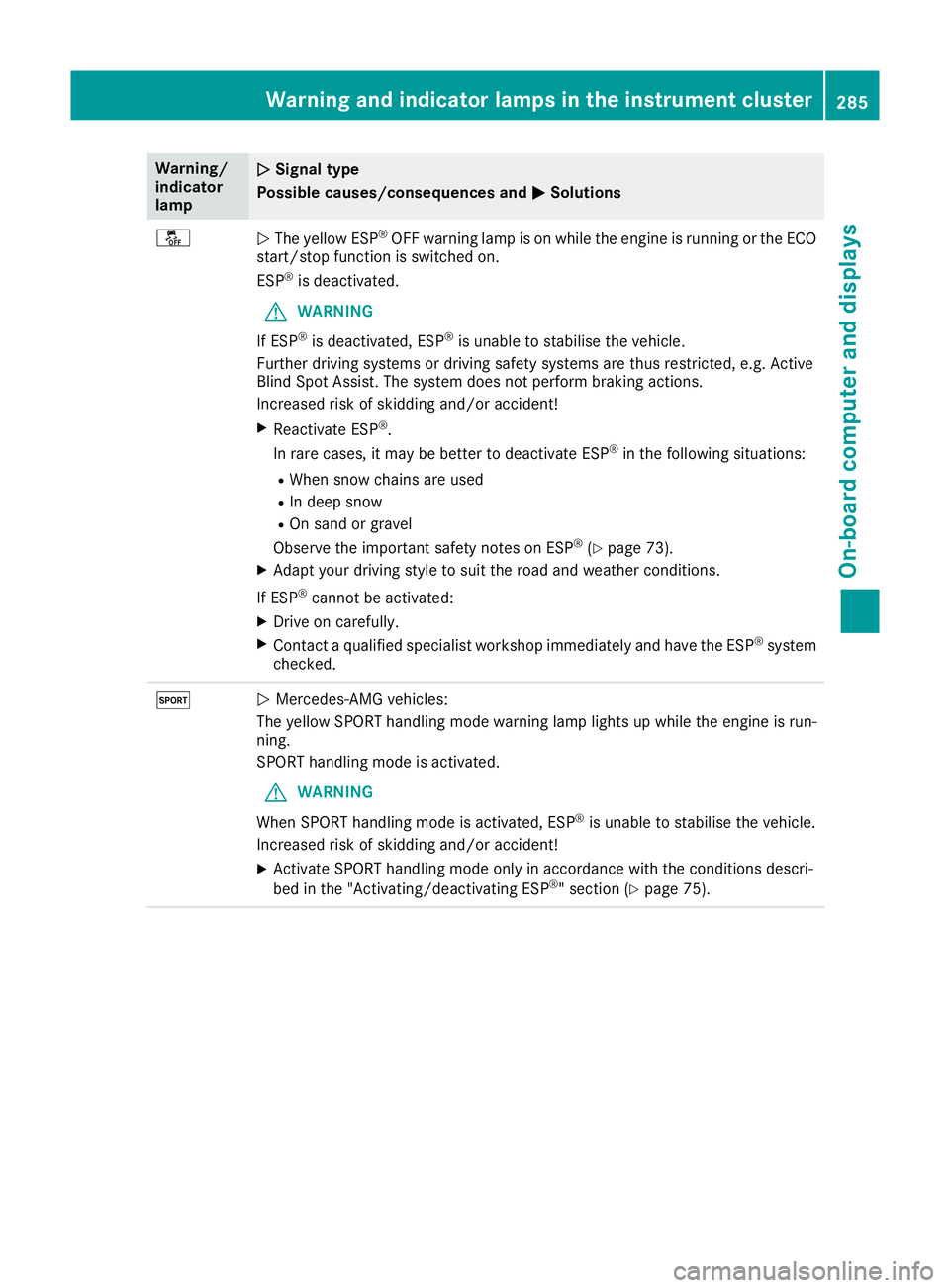
MSolutions å
N
The yellow ESP ®
OFF warning lamp is on while the engine is running or the ECO
start/stop function is switched on.
ESP ®
is deactivated.
G WARNING
If ESP ®
is deactivated, ESP ®
is unable to stabilise the vehicle.
Further driving systems or driving safety systems are thus restricted, e.g. Active
Blind Spot Assist. The system does not perform braking actions.
Increased risk of skidding and/or accident!
X Reactivate ESP ®
.
In rare cases, it may be better to deactivate ESP ®
in the following situations:
R When snow chains are used
R In deep snow
R On sand or gravel
Observe the important safety notes on ESP ®
(Y page 73).
X Adapt your driving style to suit the road and weather conditions.
If ESP ®
cannot be activated:
X Drive on carefully.
X Contact a qualified specialist workshop immediately and have the ESP ®
system
checked. M
N
Mercedes-AMG vehicles:
The yellow SPORT handling mode warning lamp lights up while the engine is run-
ning.
SPORT handling mode is activated.
G WARNING
When SPORT handling mode is activated, ESP ®
is unable to stabilise the vehicle.
Increased risk of skidding and/or accident!
X Activate SPORT handling mode only in accordance with the conditions descri-
bed in the "Activating/deactivating ESP ®
" section (Y page 75). Warning and indicator lamps in the instrument cluster
285On-board computer and displays Z
Page 293 of 389
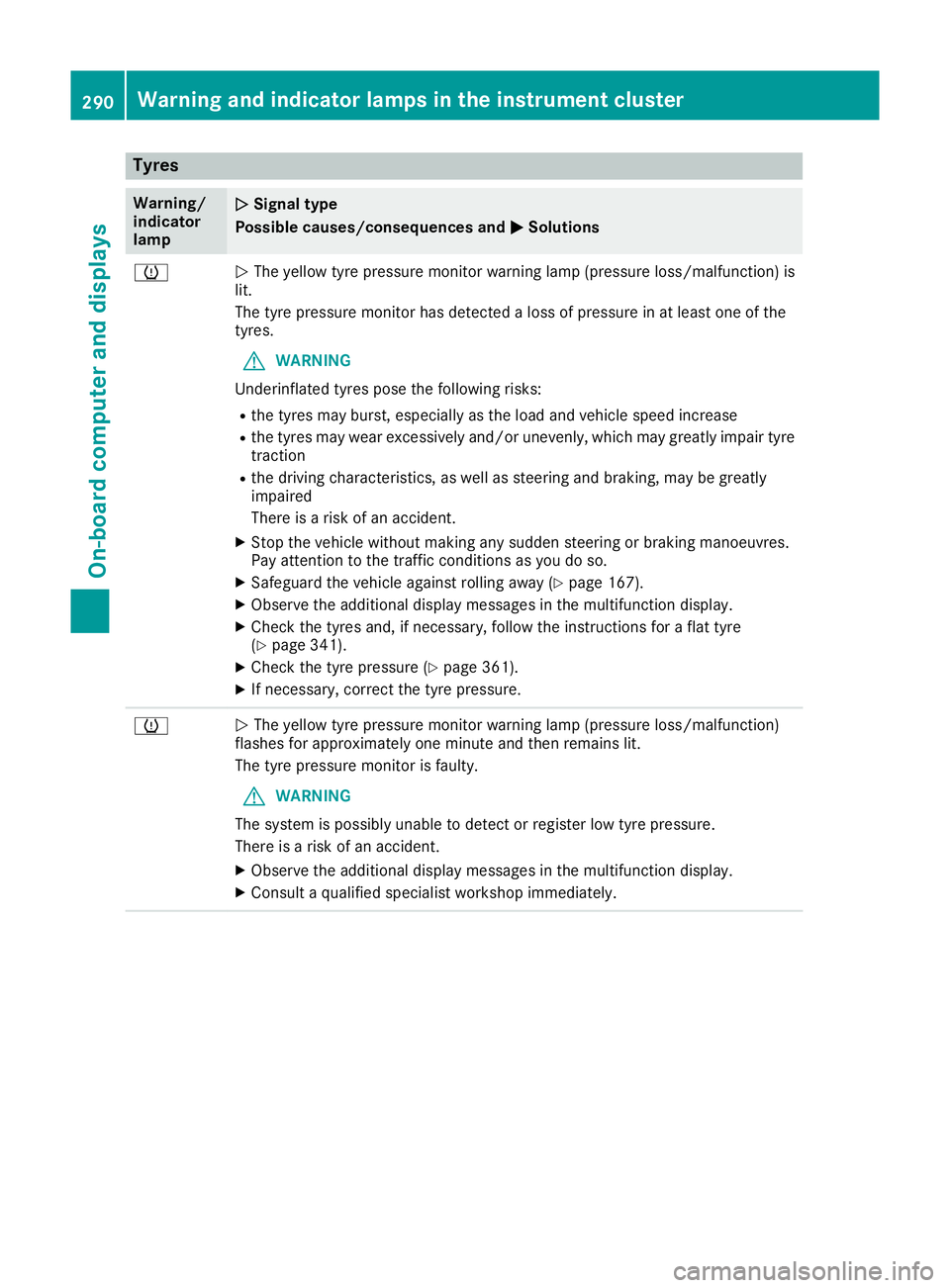
Tyres
Warning/
indicator
lamp
N N
Signal type
Possible causes/consequences and M
MSolutions h
N
The yellow tyre pressure monitor warning lamp (pressure loss/malfunction) is
lit.
The tyre pressure monitor has detected a loss of pressure in at least one of the
tyres.
G WARNING
Underinflated tyres pose the following risks:
R the tyres may burst, especially as the load and vehicle speed increase
R the tyres may wear excessively and/or unevenly, which may greatly impair tyre
traction
R the driving characteristics, as well as steering and braking, may be greatly
impaired
There is a risk of an accident.
X Stop the vehicle without making any sudden steering or braking manoeuvres.
Pay attention to the traffic conditions as you do so.
X Safeguard the vehicle against rolling away (Y page 167).
X Observe the additional display messages in the multifunction display.
X Check the tyres and, if necessary, follow the instructions for a flat tyre
(Y page 341).
X Check the tyre pressure (Y page 361).
X If necessary, correct the tyre pressure. h
N
The yellow tyre pressure monitor warning lamp (pressure loss/malfunction)
flashes for approximately one minute and then remains lit.
The tyre pressure monitor is faulty.
G WARNING
The system is possibly unable to detect or register low tyre pressure.
There is a risk of an accident.
X Observe the additional display messages in the multifunction display.
X Consult a qualified specialist workshop immediately. 290
Warning and indicator lamps in the instrument clusterOn-board computer and displays
Page 295 of 389
General notes
The section on the multimedia system in this
manual describes the basic principles for oper-
ation. More information can be found in the Dig-
ital Owner's Manual. Important safety notes
G
WARNING
Operating the integrated information systems and communications equipment in the vehicle
while driving will distract you from traffic con-
ditions. You could then lose control of the
vehicle. There is a risk of an accident.
Only operate these devices if road traffic con-
ditions permit. If you are unsure about the
surrounding conditions, pull over to a safe
location and make entries only while the vehi-
cle is stationary.
You must observe the legal requirements for the country in which you are currently driving whenoperating the multimedia system.
The multimedia system calculates the route to
the destination without taking the following into
account, for example:
R traffic lights
R stop and give way signs
R parking or stopping restrictions
R road narrowing
R other road and traffic rules and regulations
The multimedia system may give incorrect driv-
ing recommendations if the actual road/traffic
situation does not correspond with the digital
map data.
For example:
R a diverted route
R the road layout or the direction of a one-way
street has been changed
For this reason, you must always observe road
and traffic rules and regulations during your
journey. Road and traffic rules and regulations
always have priority over multimedia system
driving recommendations. G
WARNING
Modifications to electronic components, their software as well as wiring could affect their
function and/or the operation of other net-
worked components. This could in particular
also be the case for systems relevant to
safety. They might not function properly any-
more and/or jeopardise the operational
safety of the vehicle. There is an increased
risk of an accident and injury.
Do not attempt to modify the wiring as well as
electronic components or their software.
Always have work on electrical and electronic components carried out at a qualified special-
ist workshop.
If you make any changes to the vehicle elec-
tronics, the general operating permit is ren-
dered invalid. Function restrictions
For safety reasons, some functions are restric-
ted or unavailable while the vehicle is in motion.
You will notice this, for example, because either you will not be able to select certain menu items
or a message will appear to this effect. Operating system
Overview
General notes Wearing polarised sunglasses may impair your
ability to read the display.
The display has an automatic temperature-con-
trolled switch-off feature. The brightness is
automatically reduced if the temperature is too
high. If necessary, the display may temporarily
switch off completely.
Cleaning instructions !
Do not touch the display. The display has a
very sensitive high-gloss surface; there is a
risk of scratching. If you have to clean the
screen, however, use a mild cleaning agent
and a soft, lint-free cloth. 292
Operating systemMultimedia system