ESP MERCEDES-BENZ GLC COUPE 2016 Owner's Guide
[x] Cancel search | Manufacturer: MERCEDES-BENZ, Model Year: 2016, Model line: GLC COUPE, Model: MERCEDES-BENZ GLC COUPE 2016Pages: 389, PDF Size: 7.34 MB
Page 100 of 389
Convenience opening feature
X
Press and hold the %button on the key
until the sliding sunroof is in the desired posi- tion.
X To interrupt convenience opening: release
the % button. Convenience closing feature
Important safety notes G
WARNING
When the convenience closing feature is oper- ating, parts of the body could become trapped
in the closing area of the side window and the
sliding sunroof. There is a risk of injury.
Observe the complete closing procedure
when the convenience closing feature is oper-
ating. When closing make sure that no parts of the body are in the closing area.
Vehicles with KEYLESS-GO or KEYLESS-GO
start function: if the key is in the immediate
vicinity of the vehicle, the "convenience closing" feature is available.
When you lock the vehicle, you can simultane-
ously:
R close the side windows
R close the sliding sunroof
Notes on the automatic reversing function for:
R the side windows (Y page 95)
R the sliding sunroof (Y page 99)
Using the key X
Press and hold the &button until the side
windows and the sliding sunroof are fully
closed.
X Make sure that all the side windows and the
sliding sunroof are closed.
X To interrupt convenience closing: release
the & button.
Using KEYLESS-GO The driver's door and the door at which the han-
dle is used must both be closed. The key must be outside the vehicle. The distance between the
key and the corresponding door handle must not
be greater than 1 m. X
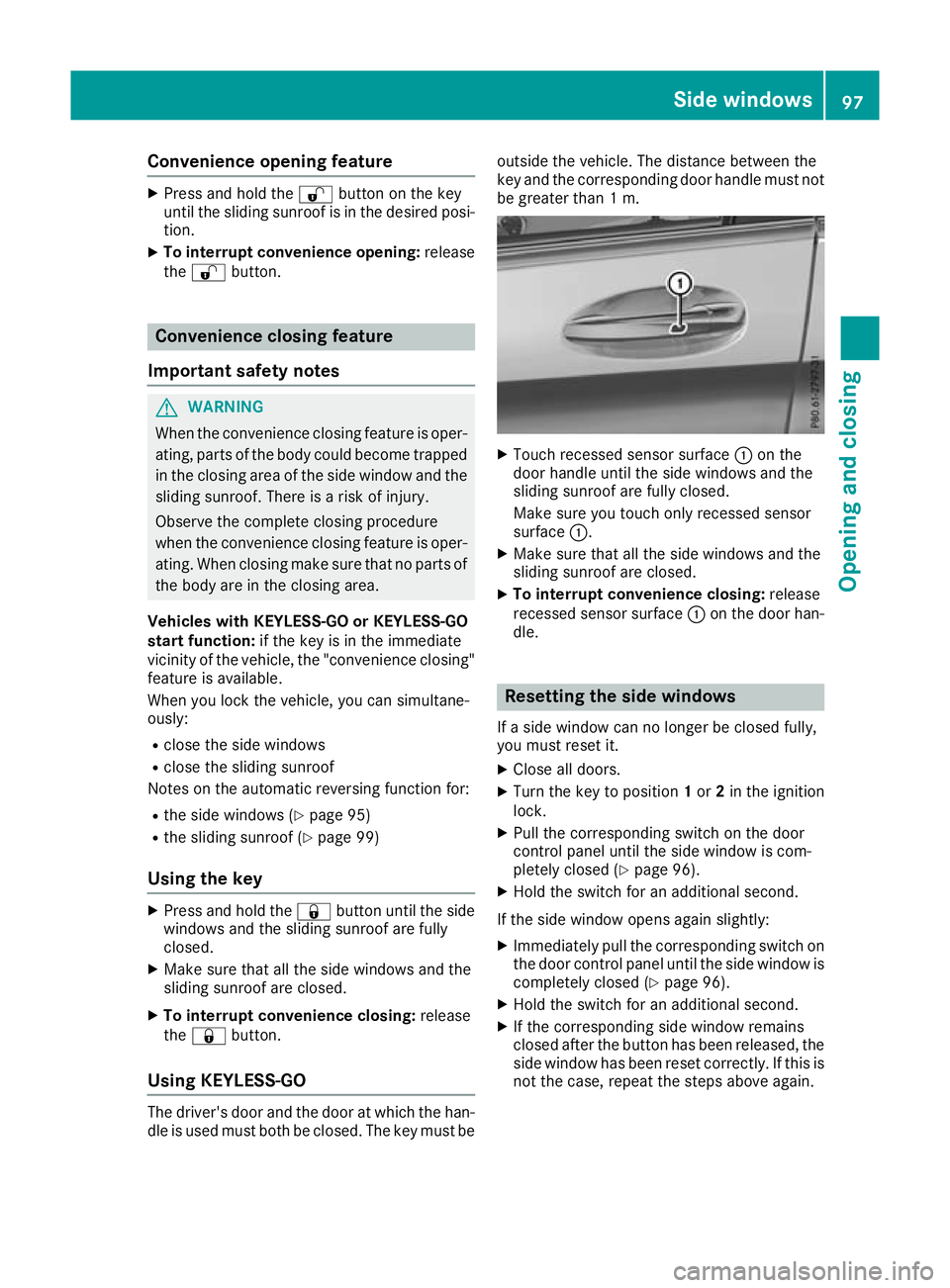
Touch recessed sensor surface :on the
door handle until the side windows and the
sliding sunroof are fully closed.
Make sure you touch only recessed sensor
surface :.
X Make sure that all the side windows and the
sliding sunroof are closed.
X To interrupt convenience closing: release
recessed sensor surface :on the door han-
dle. Resetting the side windows
If a side window can no longer be closed fully,
you must reset it.
X Close all doors.
X Turn the key to position 1or 2in the ignition
lock.
X Pull the corresponding switch on the door
control panel until the side window is com-
pletely closed (Y page 96).
X Hold the switch for an additional second.
If the side window opens again slightly: X Immediately pull the corresponding switch on
the door control panel until the side window is completely closed (Y page 96).
X Hold the switch for an additional second.
X If the corresponding side window remains
closed after the button has been released, the
side window has been reset correctly. If this is
not the case, repeat the steps above again. Side windows
97Opening and closing Z
Page 101 of 389
Problems with the side windows
G
WARNING
If you close a side window again immediately after it has been blocked or reset, the side window
closes with increased or maximum force. The reversing function is then not active. Parts of the
body could be trapped in the closing area in the process. This poses an increased risk of injury or even fatal injury.
Make sure that no parts of the body are in the closing area. To stop the closing process, releasethe switch or push the switch again to reopen the side window. Problem
Possible causes/consequences and
M MSolutions A side window cannot be
closed because it is
blocked by objects, e.g.
leaves in the window
guide. X
Remove the objects.
X Close the side window. A side window cannot be
closed and you cannot
see the cause. If a side window is obstructed during closing and reopens again
slightly:
X Immediately after the window blocks, pull the corresponding switch
again until the side window has closed.
The side window is closed with increased force.
If a side window is obstructed again during closing and reopens again slightly:
X Immediately after the window blocks, pull the corresponding switch
again until the side window has closed.
The side window is closed without the automatic reversing feature. Sliding sunroof
Important safety notes
G
WARNING
While opening and closing the sliding sunroof, body parts in close proximity could become
trapped. There is a risk of injury.
Make sure that no body parts are in close
proximity during the opening and closing pro- cedures.
If somebody becomes trapped:
R release the switch immediately, or
R during automatic operation, press the
switch briefly in any direction
The opening or closing procedure will be stop- ped. G
WARNING
If children operate the sliding sunroof they
could become trapped, particularly if they are left unsupervised. There is a risk of injury.
When leaving the vehicle, always take the key
with you and lock the vehicle. Never leave
children unattended in the vehicle.
! Only open the panorama sliding sunroof if it
is free of snow and ice. Otherwise, malfunc-
tions may occur.
Do not allow anything to protrude from the
sliding sunroof. Otherwise, the seals could be
damaged.
Resonance noises can occur in addition to the
usual airflow noises when the sliding sunroof is
open. They are caused by minor pressure fluc-
tuations in the vehicle interior. Change the posi- tion of the sliding sunroof or open a side window
slightly to reduce or eliminate these noises. 98
Sliding sunroofOpening and closing
Page 102 of 389
Sliding sunroof reversing feature
The sliding sunroof is equipped with an auto-
matic reversing function. If an solid object
blocks or restricts the sliding sunroof during the
closing process, the sliding sunroof opens again automatically. The automatic reversing function
is only an aid and is not a substitute for your
attention when closing the sliding roof. G
WARNING
The reversing feature does not react:
R to soft, light and thin objects, e.g. small fin-
gers
R over the last 4 mm of the closing movement
R during resetting
R when closing the sliding sunroof again man-
ually immediately after automatic reversing
This means that the reversing feature cannot
prevent someone being trapped in these sit-
uations. There is a risk of injury.
When closing make sure that no body parts
are in the closing area.
If someone is trapped:
R release the switch immediately or
R press the switch in any direction during the
automatic closing process
The closing process is stopped. Operating the sliding sunroof
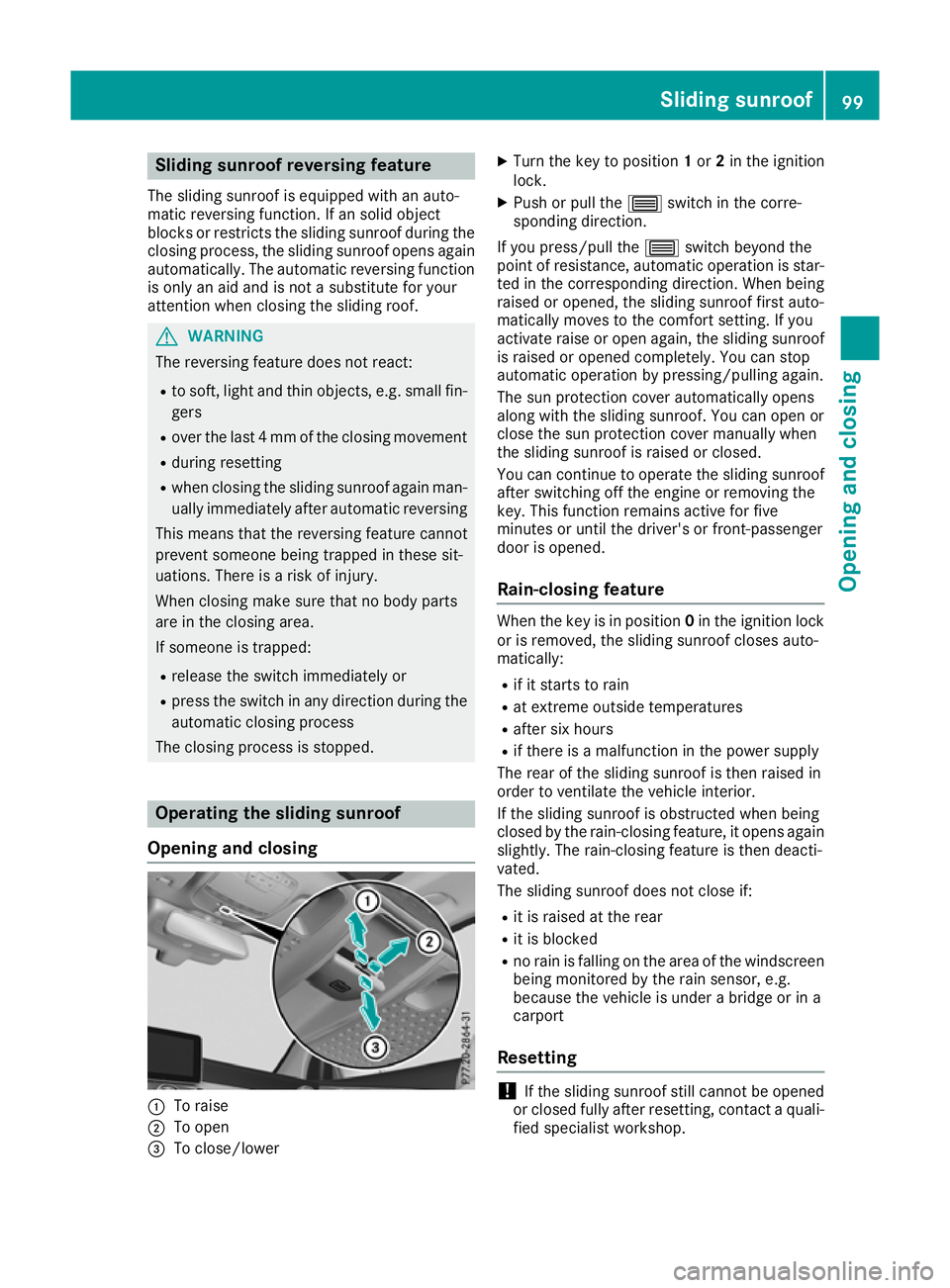
Opening and closing :
To raise
; To open
= To close/lower X
Turn the key to position 1or 2in the ignition
lock.
X Push or pull the 3switch in the corre-
sponding direction.
If you press/pull the 3switch beyond the
point of resistance, automatic operation is star- ted in the corresponding direction. When being
raised or opened, the sliding sunroof first auto-
matically moves to the comfort setting. If you
activate raise or open again, the sliding sunroof
is raised or opened completely. You can stop
automatic operation by pressing/pulling again.
The sun protection cover automatically opens
along with the sliding sunroof. You can open or
close the sun protection cover manually when
the sliding sunroof is raised or closed.
You can continue to operate the sliding sunroof
after switching off the engine or removing the
key. This function remains active for five
minutes or until the driver's or front-passenger
door is opened.
Rain-closing feature When the key is in position
0in the ignition lock
or is removed, the sliding sunroof closes auto-
matically:
R if it starts to rain
R at extreme outside temperatures
R after six hours
R if there is a malfunction in the power supply
The rear of the sliding sunroof is then raised in
order to ventilate the vehicle interior.
If the sliding sunroof is obstructed when being
closed by the rain-closing feature, it opens again
slightly. The rain-closing feature is then deacti-
vated.
The sliding sunroof does not close if:
R it is raised at the rear
R it is blocked
R no rain is falling on the area of the windscreen
being monitored by the rain sensor, e.g.
because the vehicle is under a bridge or in a
carport
Resetting !
If the sliding sunroof still cannot be opened
or closed fully after resetting, contact a quali- fied specialist workshop. Sliding sunroof
99Opening and closing Z
Page 104 of 389
Correct driver's seat position
G
WARNING
You could lose control of the vehicle while
driving if you:
R adjust the driver's seat, steering wheel or
mirrors
R fasten the seat belt
There is a risk of an accident.
Adjust the driver's seat, head restraint, steer-
ing wheel and mirrors and fasten your seat
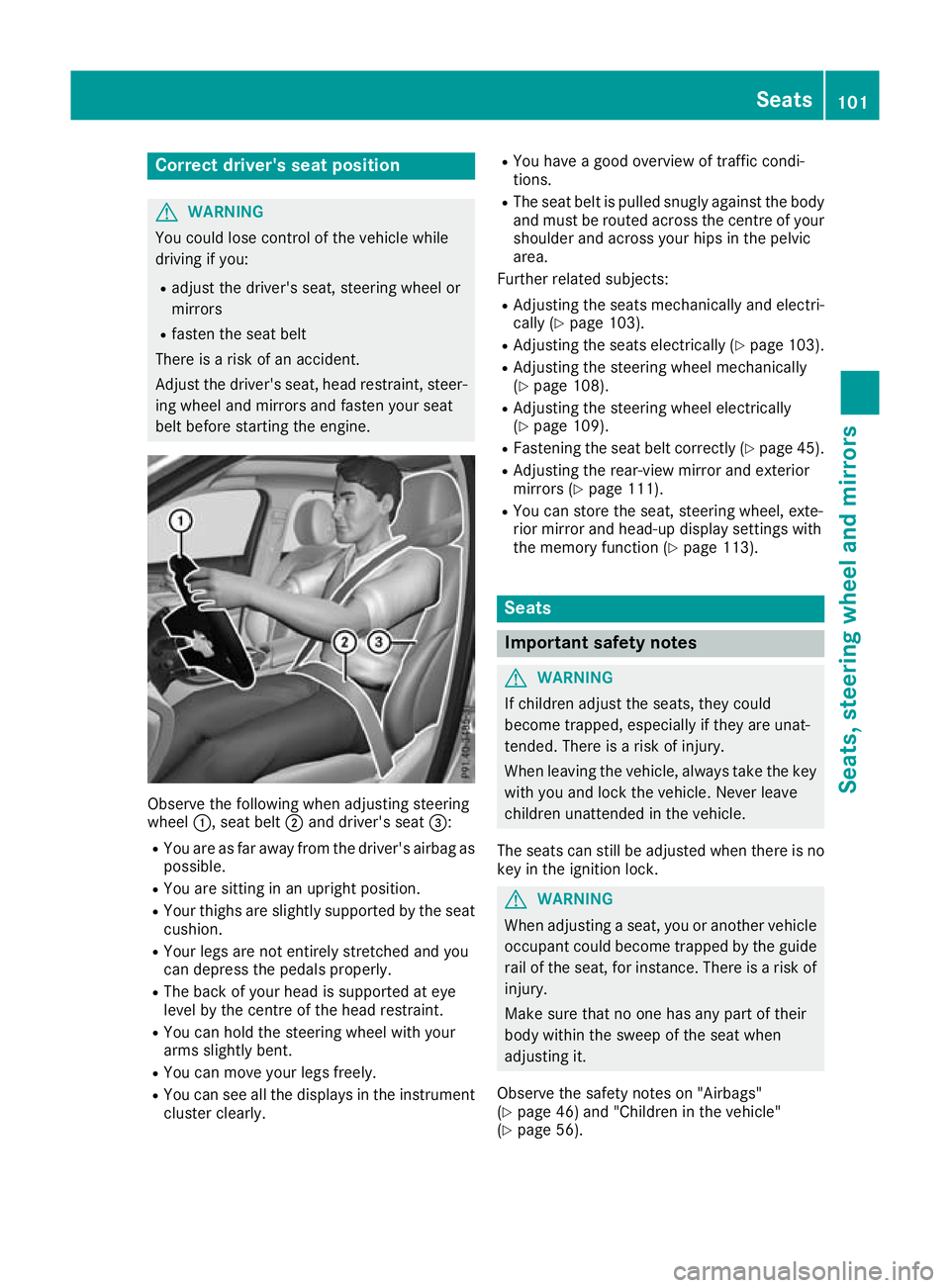
belt before starting the engine. Observe the following when adjusting steering
wheel
:, seat belt ;and driver's seat =:
R You are as far away from the driver's airbag as
possible.
R You are sitting in an upright position.
R Your thighs are slightly supported by the seat
cushion.
R Your legs are not entirely stretched and you
can depress the pedals properly.
R The back of your head is supported at eye
level by the centre of the head restraint.
R You can hold the steering wheel with your
arms slightly bent.
R You can move your legs freely.
R You can see all the displays in the instrument
cluster clearly. R
You have a good overview of traffic condi-
tions.
R The seat belt is pulled snugly against the body
and must be routed across the centre of your
shoulder and across your hips in the pelvic
area.
Further related subjects:
R Adjusting the seats mechanically and electri-
cally (Y page 103).
R Adjusting the seats electrically (Y page 103).
R Adjusting the steering wheel mechanically
(Y page 108).
R Adjusting the steering wheel electrically
(Y page 109).
R Fastening the seat belt correctly (Y page 45).
R Adjusting the rear-view mirror and exterior
mirrors (Y page 111).
R You can store the seat, steering wheel, exte-
rior mirror and head-up display settings with
the memory function (Y page 113). Seats
Important safety notes
G
WARNING
If children adjust the seats, they could
become trapped, especially if they are unat-
tended. There is a risk of injury.
When leaving the vehicle, always take the key with you and lock the vehicle. Never leave
children unattended in the vehicle.
The seats can still be adjusted when there is no
key in the ignition lock. G
WARNING
When adjusting a seat, you or another vehicle occupant could become trapped by the guiderail of the seat, for instance. There is a risk of
injury.
Make sure that no one has any part of their
body within the sweep of the seat when
adjusting it.
Observe the safety notes on "Airbags"
(Y page 46) and "Children in the vehicle"
(Y page 56). Seats
101Seats, steering wheel and mirrors Z
Page 113 of 389
control of the vehicle. There is a risk of an
accident.
Always wait until the adjustment process is
complete before driving off.
The EASY-ENTRY/EXIT feature makes getting in
and out of your vehicle easier.
You can activate and deactivate the EASY-
ENTRY/EXIT feature using the multimedia sys-
tem (see the Digital Operating Instructions).
Position of the steering wheel when the
EASY-ENTRY/EXIT feature is active The steering wheel tilts upwards if you:
R remove the key from the ignition lock
R with KEYLESS-GO or KEYLESS-GO start
function: open the driver's door; the voltage
supply must be switched on
R with the key: open the driver's door; the key
must be in position 0or 1in the ignition lock
(Y page 144)
R open the driver's door when the ignition is
switched off
i The steering wheel tilts upwards only if the
driving position is stored after the steering
column adjustment has been adjusted
(Y page 113).
The most recent driving position of the steering
wheel is stored if:
R the ignition is switched off
R the setting is stored using the memory func-
tion (Y page 113)
i The steering wheel moves upwards only if it
has not already reached the upper steering
limiter.
Position of the steering wheel for driv-
ing The steering wheel is moved to the previously
set position if:
R the driver's door is closed and you insert the
key into the ignition lock
R you close the driver's door when the ignition
is switched on
R you press the Start/Stop button once in vehi-
cles with KEYLESS-GO or the KEYLESS-GO
start function i
The steering wheel returns to the last set
position only if the driving position is stored
after the seat or steering column has been
adjusted (Y page 113).
The most recent driving position of the steering
wheel is stored if:
R the ignition is switched off
R the setting is stored using the memory func-
tion (Y page 113)
Crash-responsive EASY-EXIT feature If the crash-responsive EASY-EXIT feature is trig-
gered in an accident, the steering column will
move upwards when the driver's door is opened
or the key is removed from the ignition lock. This
makes it easier to exit the vehicle and rescue the
occupants.
The crash-responsive EASY-EXIT feature is
operational only if the EASY-EXIT/ENTRY fea-
ture is activated in the multimedia system (see
Digital Operating Instructions). Mirrors
Rear-view mirror
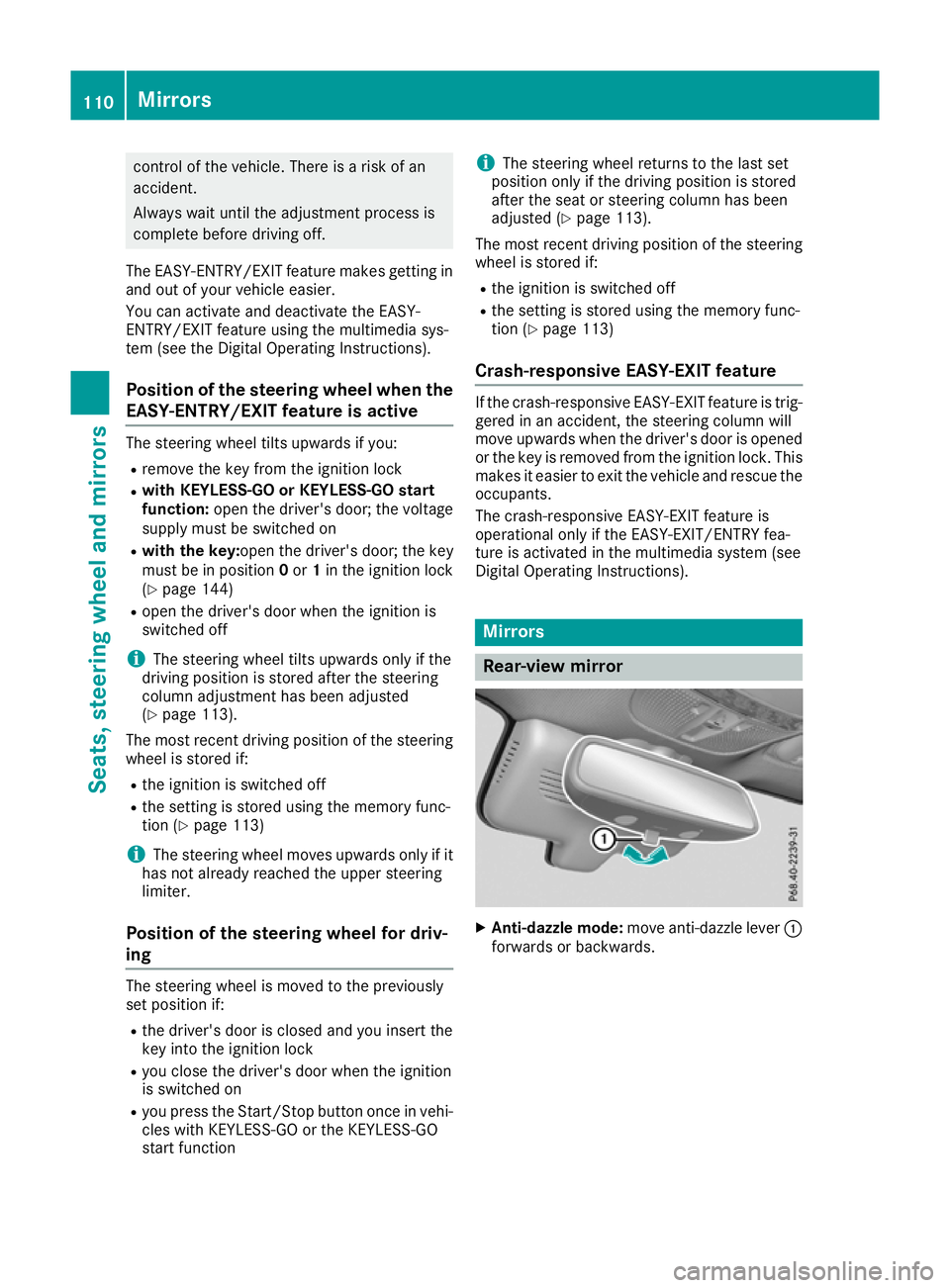
X
Anti-dazzle mode: move anti-dazzle lever :
forwards or backwards. 110
MirrorsSeats, steering wheel and mirrors
Page 116 of 389
X
Engage reverse gear.
The exterior mirror on the front-passenger
side moves to the preset parking position.
X Use button ;to adjust the exterior mirror to
a position that allows you to see the rear
wheel and the kerb.
The parking position is stored.
i If you shift the transmission to another posi-
tion, the exterior mirror on the front-
passenger side returns to the driving position.
Storing using the memory button You can store the parking position of the front-
passenger-side exterior mirror using memory
button M:. Reverse gear must not be
engaged.
X Turn the key to position 2in the ignition lock
(Y page 144).
X Press button =.
X Use button ;to adjust the exterior mirror to
a position that allows you to see the rear
wheel and the kerb.
X Press memory button M: and one of the
arrows on button ;within three seconds.
The parking position is stored if the exterior
mirror does not move.
X If the mirror moves out of position, repeat the
steps.
X After successfully storing, reset the driving
position of the exterior mirror.
Calling up a stored parking position X
Turn the key to position 2in the ignition lock
(Y page 144).
X Adjust the front-passenger-side exterior mir-
ror using button =.
X Engage reverse gear.
The exterior mirror on the front-passenger
side moves to the stored parking position.
The exterior mirror on the front-passenger side
moves back to its original position:
R as soon as you exceed a speed of 15 km/h
R about ten seconds after you have disengaged
reverse gear
R when you use button ?to select the exterior
mirror on the driver's side Memory function
Important safety notes
G
WARNING
If you use the memory function on the driver's side while driving, the adjustments could
cause you to lose control of the vehicle. There
is a risk of an accident.
Only use the memory function on the driver's
side while the vehicle is stationary. G
WARNING
When the memory function adjusts the seat or steering wheel, you and other vehicle occu-
pants – particularly children – could become
trapped. There is a risk of injury.
While the memory function is making adjust-
ments, make sure that no one has any body
parts in the sweep of the seat or steering
wheel. If somebody becomes trapped, imme-
diately release the memory function position
button. The adjustment process is stopped. G
WARNING
If children activate the memory function, they
could become trapped, especially if they are
unattended. There is a risk of injury.
When leaving the vehicle, always take the key with you and lock the vehicle. Never leave
children unattended in the vehicle.
The memory function can be used at any time,
e.g. even when the key is not in the ignition lock. Storing settings
Using the memory function, you can store up to three different settings, e.g. for three different
people.
The following settings are stored as a single
memory preset:
R Position of the seat, backrest and head
restraint
R Driver's side: position of the exterior mirrors
on the driver's and front-passenger sides
R Position of the head-up display Memory function
113Seats, steeringwheel and mirrors Z
Page 118 of 389
Exterior lighting
General notes
For reasons of safety, Mercedes-Benz recom-
mends that you drive with lights switched on
even during the daytime. In some countries,
operation of the headlamps varies due to legal
requirements and voluntary recommendations. Driving abroad
Vehicles with halogen headlamps It is not necessary to switch your headlamps to
symmetrical dipped beam when driving in coun- tries where vehicles are driven on the opposite
side of the road to the country in which the vehi-
cle is registered. Legal requirements are fulfilled
without switching the headlamps to symmetri-
cal dipped beam.
Vehicles with Intelligent Light System It is necessary to switch your headlamps to sym-
metrical dipped beam before crossing the bor-
der into countries where vehicles are driven on
the opposite side of the road. This prevents
oncoming traffic from being dazzled.
You can switch the headlamps to symmetrical or
asymmetrical dipped beam using the "dipped-
beam headlamps for driving on the right/left"
function via the on-board computer
(Y page 244). This must be switched back to
asymmetrical dipped beam upon your return.
Symmetrical lights do not illuminate as large an
area of the edge of the carriageway. In this case,
"highway mode" and "extended-range fog
lamps" are not available. Setting the exterior lighting
Setting options Exterior lighting can be set using the:
R light switch (Y page 115)
R combination switch (Y page 117)
R headlamp range control for vehicles with hal-
ogen headlamps (Y page 117)
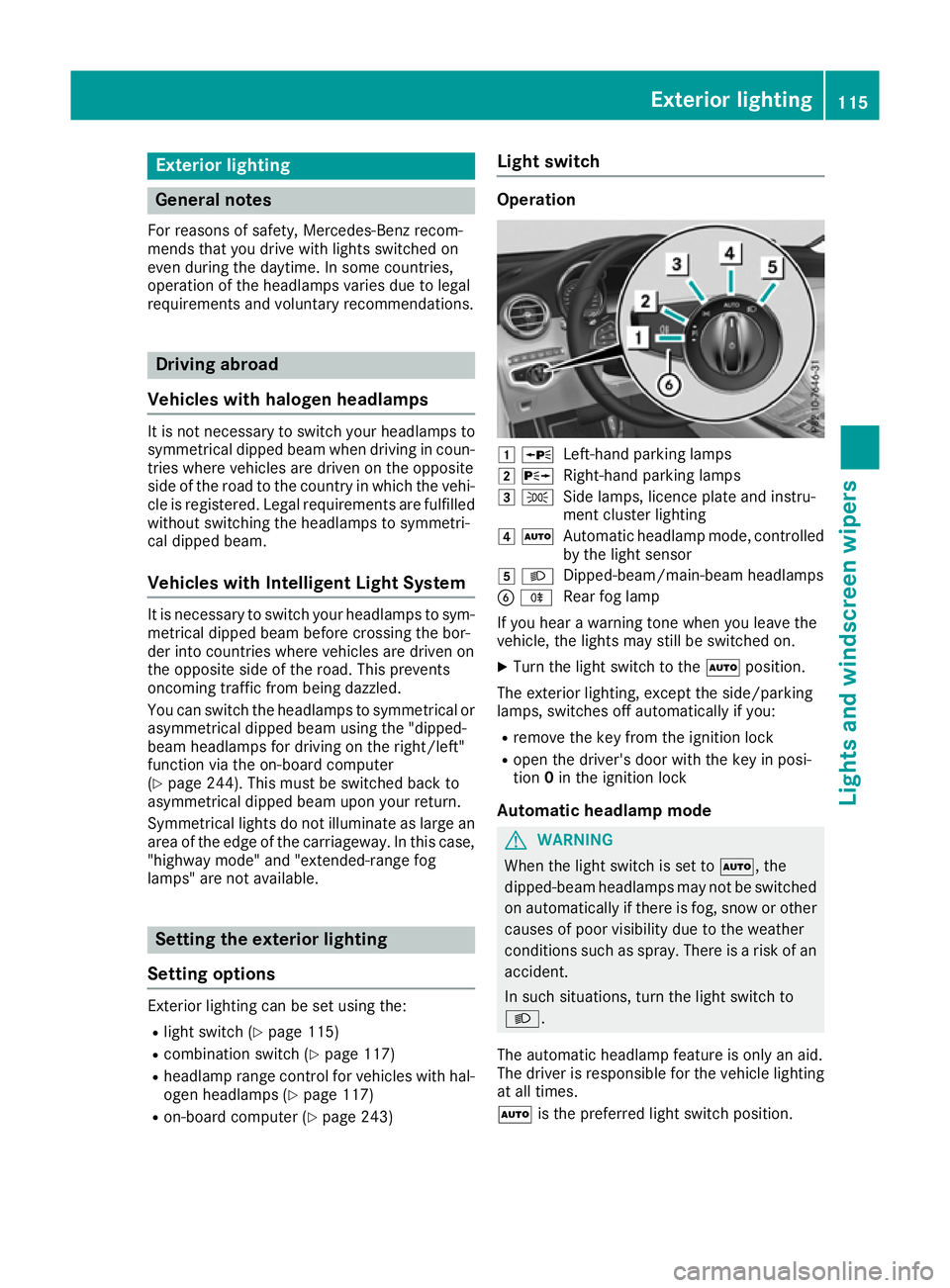
R on-board computer (Y page 243) Light switch Operation
1
W
Left-hand parking lamps
2 X
Right-hand parking lamps
3 T
Side lamps, licence plate and instru-
ment cluster lighting
4 Ã
Automatic headlamp mode, controlled
by the light sensor
5 L
Dipped-beam/main-beam headlamps
B R
Rear fog lamp
If you hear a warning tone when you leave the
vehicle, the lights may still be switched on.
X Turn the light switch to the Ãposition.
The exterior lighting, except the side/parking
lamps, switches off automatically if you: R remove the key from the ignition lock
R open the driver's door with the key in posi-
tion 0in the ignition lock
Automatic headlamp mode G
WARNING
When the light switch is set to Ã, the
dipped-beam headlamps may not be switched on automatically if there is fog, snow or othercauses of poor visibility due to the weather
conditions such as spray. There is a risk of an
accident.
In such situations, turn the light switch to
L.
The automatic headlamp feature is only an aid.
The driver is responsible for the vehicle lighting at all times.
à is the preferred light switch position. Exterior lighting
115Lights and windscreen wipers Z
Page 119 of 389
The light setting is automatically selected
according to the brightness of the ambient light,
but not in the event of poor visibility due to
weather conditions such as fog, snow or spray.
R With the key in position 1in the ignition lock,
the side lamps are switched on or off auto-
matically depending on the brightness of the
ambient light.
R The daytime driving lights or the side lamps
and dipped-beam headlamps are switched on
or off automatically while the engine is run-
ning depending on the ambient light condi-
tions.
X To switch on the automatic headlamps:
turn the light switch to the Ãposition.
The daytime driving lights improve the visibility
of your vehicle during the day.
When the side lamps and dipped-beam head-
lamps are switched on, the green Tside
lamps and Ldipped-beam headlamps indi-
cator lamps on the instrument cluster light up.
Dipped-beam headlamps G
WARNING
When the light switch is set to Ã, the
dipped-beam headlamps may not be switched on automatically if there is fog, snow or othercauses of poor visibility due to the weather
conditions such as spray. There is a risk of an
accident.
In such situations, turn the light switch to
L.
When the ignition is switched on and the light
switch is in the Lposition, the side lamps
and dipped-beam headlamps are switched on
even if the light sensor does not sense dark
ambient light conditions. This is advantageous
when there is fog or rain.
X To switch on the dipped-beam headlamps:
turn the key in the ignition lock to position 2
or start the engine.
X Turn the light switch to the Lposition.
The green Lindicator lamp on the instru-
ment cluster lights up.
Rear fog lamp The rear fog lamp improves the visibility of your
vehicle for the traffic behind in the event of
heavy fog. You must observe the legal require- ments for the country in which you are currently
driving when operating the rear fog lamp.
X To switch on the rear fog lamp: turn the key
in the ignition lock to position 2or start the
engine.
X Turn the light switch to the LorÃ
position.
X Press the Rbutton.
The yellow Rindicator lamp on the instru-
ment cluster lights up.
Side lamps ! When the battery is discharged heavily, the
side lamps or parking lamps are automatically
switched off to facilitate an engine start.
Always park your vehicle safely and in a well lit area, in accordance with the relevant legal
stipulations. Avoid using the Tside lamps
for periods lasting several hours. Where pos-
sible, switch on the right Xor left W
parking lamp.
X To switch on the side lamp: turn the light
switch to the Tposition.
The green Tindicator lamp on the instru-
ment cluster lights up.
Parking lamps Switching on the parking lamps ensures that the
corresponding side of the vehicle is illuminated.
X To switch on the parking lamp: turn the key
to position 0in the ignition lock or remove the
key.
X Turn the light switch to the W(left-hand
side of the vehicle) or X(right-hand side of
the vehicle) position. 116
Exterior lightingLights and windscreen wipers
Page 120 of 389
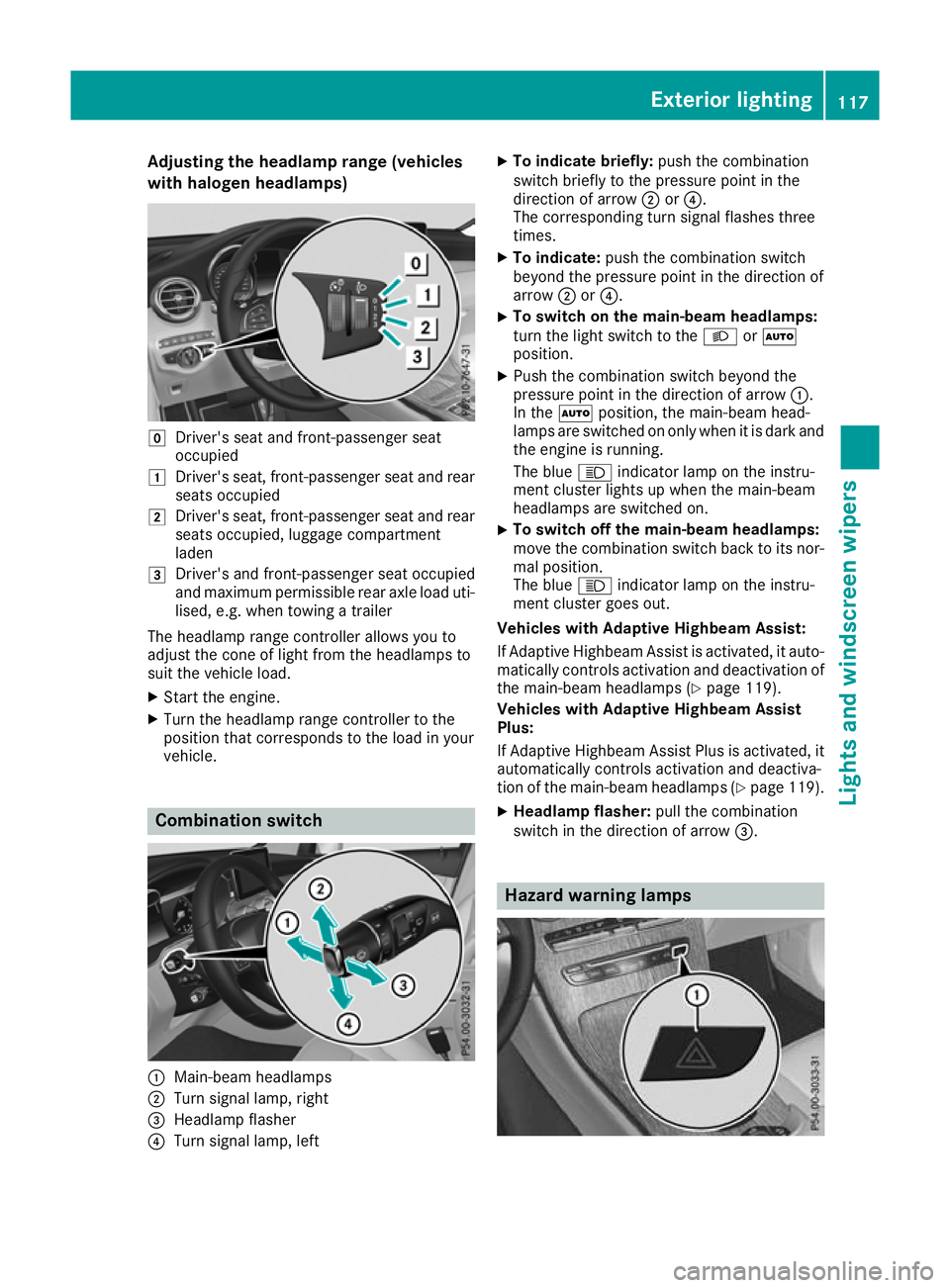
Adjusting the headlamp range (vehicles
with halogen headlamps) g
Driver's seat and front-passenger seat
occupied
1 Driver's seat, front-passenger seat and rear
seats occupied
2 Driver's seat, front-passenger seat and rear
seats occupied, luggage compartment
laden
3 Driver's and front-passenger seat occupied
and maximum permissible rear axle load uti-
lised, e.g. when towing a trailer
The headlamp range controller allows you to
adjust the cone of light from the headlamps to
suit the vehicle load.
X Start the engine.
X Turn the headlamp range controller to the
position that corresponds to the load in your
vehicle. Combination switch
:
Main-beam headlamps
; Turn signal lamp, right
= Headlamp flasher
? Turn signal lamp, left X
To indicate briefly: push the combination
switch briefly to the pressure point in the
direction of arrow ;or?.
The corresponding turn signal flashes three
times.
X To indicate: push the combination switch
beyond the pressure point in the direction of
arrow ;or?.
X To switch on the main-beam headlamps:
turn the light switch to the LorÃ
position.
X Push the combination switch beyond the
pressure point in the direction of arrow :.
In the Ãposition, the main-beam head-
lamps are switched on only when it is dark and
the engine is running.
The blue Kindicator lamp on the instru-
ment cluster lights up when the main-beam
headlamps are switched on.
X To switch off the main-beam headlamps:
move the combination switch back to its nor- mal position.
The blue Kindicator lamp on the instru-
ment cluster goes out.
Vehicles with Adaptive Highbeam Assist:
If Adaptive Highbeam Assist is activated, it auto- matically controls activation and deactivation of
the main-beam headlamps (Y page 119).
Vehicles with Adaptive Highbeam Assist
Plus:
If Adaptive Highbeam Assist Plus is activated, it
automatically controls activation and deactiva-
tion of the main-beam headlamps (Y page 119).
X Headlamp flasher: pull the combination
switch in the direction of arrow =. Hazard warning lamps Exterior lighting
117Lights and windscreen wipers Z
Page 121 of 389
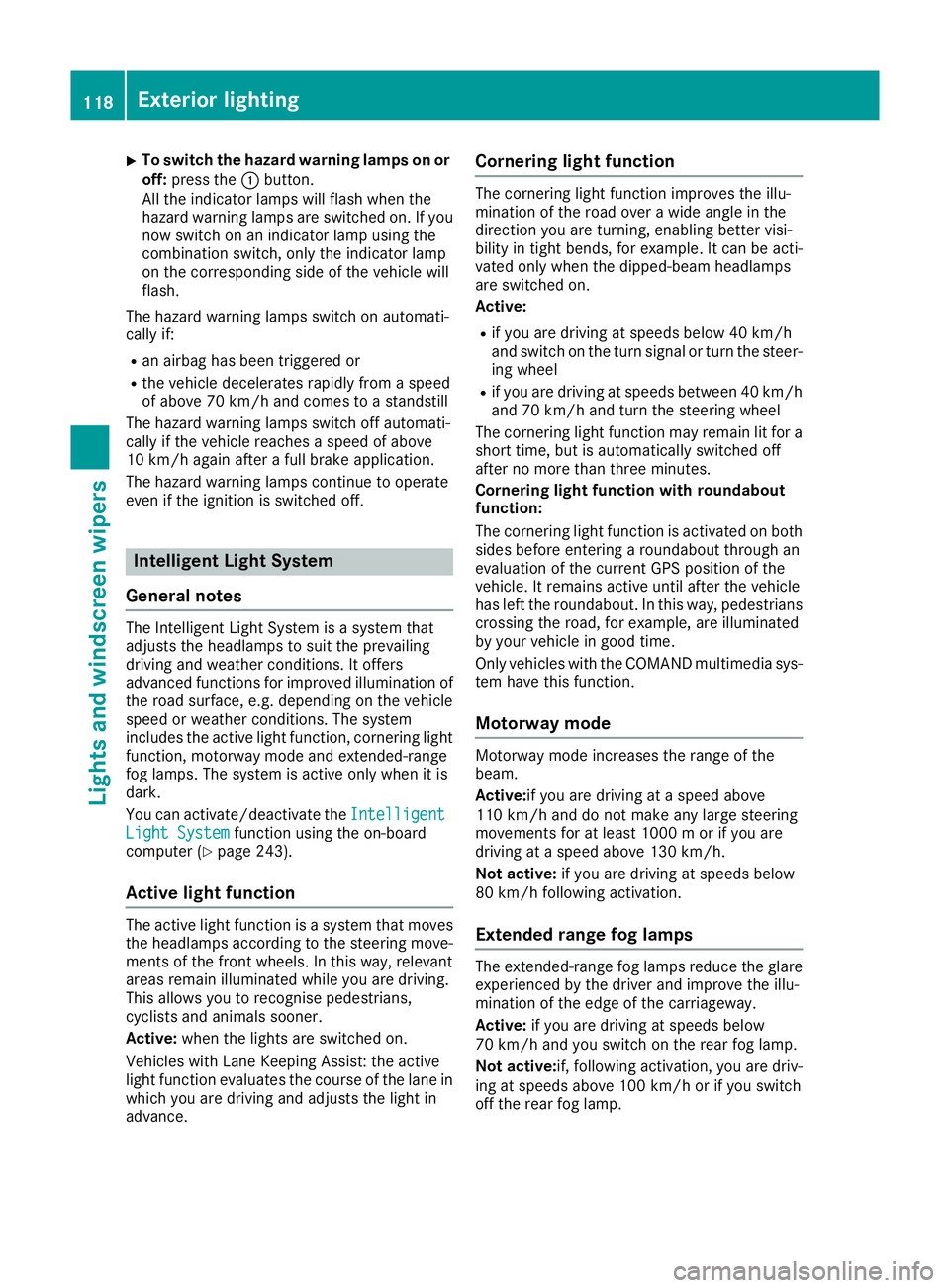
X
To switch the hazard warning lamps on or
off: press the :button.
All the indicator lamps will flash when the
hazard warning lamps are switched on. If you
now switch on an indicator lamp using the
combination switch, only the indicator lamp
on the corresponding side of the vehicle will
flash.
The hazard warning lamps switch on automati-
cally if:
R an airbag has been triggered or
R the vehicle decelerates rapidly from a speed
of above 70 km/h and comes to a standstill
The hazard warning lamps switch off automati-
cally if the vehicle reaches a speed of above
10 km/h again after a full brake application.
The hazard warning lamps continue to operate
even if the ignition is switched off. Intelligent Light System
General notes The Intelligent Light System is a system that
adjusts the headlamps to suit the prevailing
driving and weather conditions. It offers
advanced functions for improved illumination of the road surface, e.g. depending on the vehicle
speed or weather conditions. The system
includes the active light function, cornering light
function, motorway mode and extended-range
fog lamps. The system is active only when it is
dark.
You can activate/deactivate the Intelligent
Intelligent
Light System Light System function using the on-board
computer (Y page 243).
Active light function The active light function is a system that moves
the headlamps according to the steering move-
ments of the front wheels. In this way, relevant
areas remain illuminated while you are driving.
This allows you to recognise pedestrians,
cyclists and animals sooner.
Active: when the lights are switched on.
Vehicles with Lane Keeping Assist: the active
light function evaluates the course of the lane in which you are driving and adjusts the light in
advance. Cornering light function The cornering light function improves the illu-
mination of the road over a wide angle in the
direction you are turning, enabling better visi-
bility in tight bends, for example. It can be acti-
vated only when the dipped-beam headlamps
are switched on.
Active:
R if you are driving at speeds below 40 km/h
and switch on the turn signal or turn the steer-
ing wheel
R if you are driving at speeds between 40 km/h
and 70 km/h and turn the steering wheel
The cornering light function may remain lit for a short time, but is automatically switched off
after no more than three minutes.
Cornering light function with roundabout
function:
The cornering light function is activated on both
sides before entering a roundabout through an
evaluation of the current GPS position of the
vehicle. It remains active until after the vehicle
has left the roundabout. In this way, pedestrians crossing the road, for example, are illuminated
by your vehicle in good time.
Only vehicles with the COMAND multimedia sys-
tem have this function.
Motorway mode Motorway mode increases the range of the
beam.
Active:if you are driving at a speed above
110 km/h and do not make any large steering
movements for at least 1000 m or if you are
driving at a speed above 130 km/h.
Not active: if you are driving at speeds below
80 km/h following activation.
Extended range fog lamps The extended-range fog lamps reduce the glare
experienced by the driver and improve the illu-
mination of the edge of the carriageway.
Active: if you are driving at speeds below
70 km/h and you switch on the rear fog lamp.
Not active: if, following activation, you are driv-
ing at speeds above 100 km/h or if you switch
off the rear fog lamp. 118
Exterior lightingLights and
windscreen wipers