camera MERCEDES-BENZ GLC COUPE 2019 Owner's Guide
[x] Cancel search | Manufacturer: MERCEDES-BENZ, Model Year: 2019, Model line: GLC COUPE, Model: MERCEDES-BENZ GLC COUPE 2019Pages: 657, PDF Size: 11.28 MB
Page 472 of 657
Cleaning and care
Information on
washing theve hicle in a car
wa sh &
WARNING Risk of an accident due to
re duced braking po wer af terwa shing the
ve hicle
Braking ef ficiency is reduced af terwa shing
th eve hicle. #
Afterth eve hicle has been washed,
brake carefully while paying attention to
th e traf fic conditions until braking
po we r has been fully restored. *
NO
TEDama gedue tounsuitable car
wa sh #
Before driving into a car wash make
sure that the car wash is suitable for
th eve hicle dimensions. #
Ensure there is suf ficient ground clear‐
ance between the underbody and the
guide rails of the car wash. #
Ensure that the clearance width of the
car wash, in particular the width of the
guide rails, is suf ficient. To
avo id damage to yourvehicle when using a
car wash, ensure thefo llowing beforehand:
R Active Dis tance Assi stDISTRONIC and the
HOLD function are deactivated.
R the 360° Camera or there ve rsing camera is
switched off.
R the side windo wsand sliding sun roof are
comple tely closed.
R the blo werfo rth eve ntilation/heating is
switched off.
R the windscreen wiper switch is in position
g.
R theke y is at a minimum dis tance of 3 m
aw ay from theve hicle, otherwise theta ilgate
could open unin tentionally.
R in car washes with a con veyo r sy stem: neu‐
tral iis engaged.
% In car washes with a con veyo r sy stem: if you
wo uld like tolea vetheve hicle while it is being
washed, make sure theke y is located
in theve hicle. The park position jisother‐
wise automatically engaged.
% If, af terth e car wash, youre mo vethewax
from the windscreen and wiper rubbers, this
will pr event smearing and reduce wiper
noise.
Au tomatic car wash mode
In car wash mode, theve hicle is prepared for
driving into the automatic car wash. Car wash
mode can be activated up toa speed of
20 km/h.
The following settings are made when car wash
mode is activated:
R the outside mir rors are folded down.
R thera in sensor is deactivated topreve ntthe
windscreen washer sy stem from starting up
automaticall y.
R there ar wind owwiper is deactivated.
R the windo wsand the sliding sunroof are
closed.
R the air conditioning sy stem is set toair-recir‐
culation mode. Main
tenance and care 469
Page 473 of 657
R
Parking Assist PARKTRONIC is deacti vated.
R Vehicles with 360° Camera: the front
image is activated af ter appro x. eight sec‐
onds.
R Vehicles with AIRMATIC or E- ACTIVE
BO DY CONT ROL:theve hicle is raised tothe
maximum possible chassis le vel
( / page 232) .
If one of the settings cann otbe selected, this is
displa yedby a% behind there spective set‐
ting.
Car wash mode is automatically deactivated at
speeds abo ve20 km/h.
The following settings are reset when car wash
mode is deactivated:
R the outside mir rors are folded out.
R thera in sensor is activated.
R there ar wind owwiper is activated.
R the air conditioning sy stem is set tofresh air
mode.
R Parking Assist PARKTRONIC is reset tothe
pr ev iously selec ted setting. R
the windo wsand the sliding sunroof remain
closed.
R Vehicles with 360° Camera: the front
image is deactivated at speeds abo ve
18 km/h.
R Vehicles with AIRMATIC or E- ACTIVE
BO DY CONT ROL:theve hicle is lo weredto
th e pr eviously set chassis le vel. Information on using a high-pressure cleaner
&
WARNING Risk of an accident when
using high-pressure cleane rswith circu‐
lar jet nozzles
The water jet of a circular jet nozzle (dirt
grinder) can cause extern ally invisible dam‐
age tothe tyres or chassis parts.
Components damaged in this wa y may unex‐
pec tedly fail. #
Do not use high-pressure cleaners with
circular jet nozzles toclean theve hicle. #
Have damaged tyres or chassis parts
re placed immediatel y. To
avo id damage to yourvehicle, obser vethefo l‐
lowing when using a high-pressure cleaner:
R keep theke y at least 3 m away from theve hi‐
cle. Otherwise theta ilgate could open unin‐
te ntional ly.
R maintain a dis tance of at least 30 cm tothe
ve hicle.
R vehicles with deco rative foil: parts of your
ve hicle are co vered with a decorative foil.
Maintain a dis tance of at least 70 cm
between thefo il-c ove red parts of theve hicle
and the nozzle of the high-pressure cleaner.
Mo vethe high-pressure cleaner nozzle
around whilst cleaning. The waterte mp era‐
ture of the high-pressure cleaner must not
exc eed 60 °C.
R obser vethe information on the cor rect dis‐
ta nce in the equipment manufacturer's oper‐
ating instructions.
R do not point the nozzle of the high-pressure
cleaner directly at sensitive parts such as
tyres, slits, electrical components, bat teries,
light bulbs and ventilation sl ots. 47 0
Maintenance and care
Page 479 of 657
Note
s on cleaning and car eA voiding vehicle damage
Exterior lighting Cleanthe lenses with a wet sponge and mild cleaning agent,
e.g. car sha mpoo. Only use cleaning agents or cleaning clo
thsth at are suitable
fo r plast ic lenses.
Sensors Cleanthe sensors in the front and rear bumper and in the
ra diator grille with a soft clo thand car shampoo. When using a high-pressure cleaner, main
tain a minimum dis‐
ta nce of 30 cm.
Side running boards
Usewate r and acid-free cleaning agents. Do not cleanthe aluminium trim insert of theru nning board
wi th alkaline or acidic cleaning agents such as wheel clean‐
ers. Do not use acidic wheel cleaners toremo vebrake dust.
The aluminium trim inserts could otherwise be damaged.
Re versing camera
and 360° Camera R
Open the camera co ver with the multimedia sy stem
(/ page 247) .
R Use clean water and a soft clo thtoclean the camera lens. Do not use a high-pressure cleaner.
Ta ilpipes
Clean with cleaning agents recommended byMercedes-Benz,
particularly in the winter and af terwa shing theve hicle. Do not use acidic cleaning agents.
Tr ailer hitch R
Remo vetraces of rust on the ball, e.g. with a wire brush.
R Remo vedirt with a lint-free clo th.
R After cleaning, oil or grease the ball head lightl y.
R Obser vethe no tes on care in the trailer hitch manufactur‐
er's operating instructions. Do not clean
the ball neck with a high-pressure cleaner or sol‐
ve nt. 476
Maintenance and care
Page 558 of 657
Display messages
Possible causes/consequences and M
MSolutions
ä Fault Drive at max. 80
km/h *T
he AIR BODY CONTROL is functioning only toa limited extent. The vehicle's handling characteristics may be af fec‐
te d. #
Drive in a manner appropriate forth e cur rent le vel, but do not exceed 80 km/h. #
Consult a qualified specialist workshop.
*D YNAMIC BODY CONT ROL is malfunctioning. The vehicle's handling characteristics may be af fected. #
Do not drive at speeds grea terth an 80 km/h. #
Consult a qualified specialist workshop.
Please reduce speed *Y
ou are driving toofast forth e selected vehicle le vel. #
Toadjust theve hicle le vel,yo u must not drive at speeds greaterth an 60 km/h. #
Toadjust theve hicle le vel during trailer operation, you must not drive at speeds greaterth an 30 km/h.
Active Steering Assist cur-
rently unavailable See Own-
er's Manual *A
ctive Steering Assist is temp orarily una vailable.
The ambient conditions are outside the sy stem limits (/ page 222). #
Drive on.
As soon as the ambient conditions are within the sy stem limits, the sy stem will become available again. #
If necessar y,clean the windscreen in the camera's field of vision. #
Check the tyre pressure if necessar y.
Active Steering Assist inop-
erative *A
ctive Steering Assist is malfunctioning. Active Dis tance Assi stDISTRONIC remains available. #
Consult a qualified specialist workshop. Display messages and
warning/indicator lamps 555
Page 559 of 657
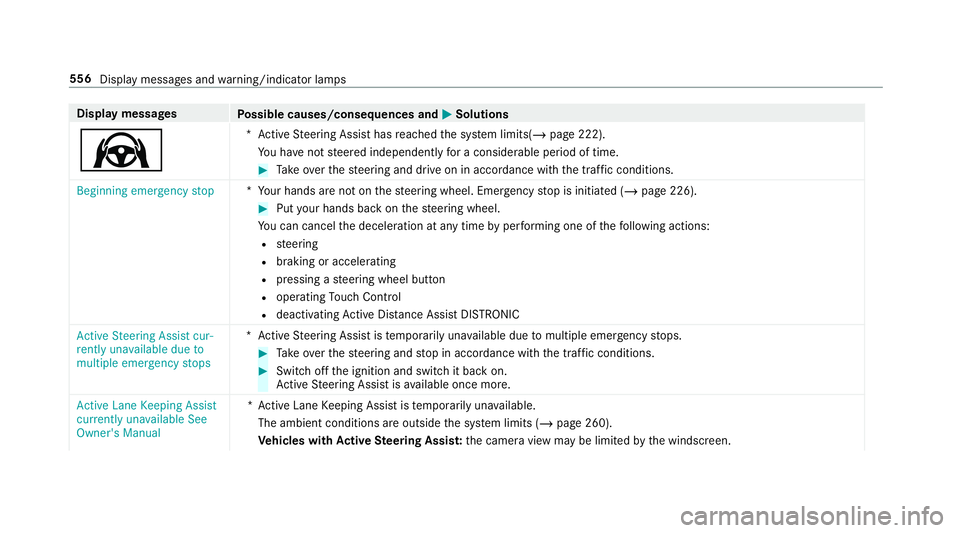
Display messages
Possible causes/consequences and M
MSolutions
Ø *A
ctive Steering Assist has reached the sy stem limits(/ page 222).
Yo u ha venot steered independently for a considerable period of time. #
Take ove rth esteering and drive on in accordance with the traf fic conditions.
Beginning emergency stop *Y
our hands are not on thesteering wheel. Emer gency stop is initiated (/ page 226). #
Put your hands back on thesteering wheel.
Yo u can cancel the deceleration at any time byper form ing one of thefo llowing actions:
R steering
R braking or accelerating
R pressing a steering wheel button
R operating Touch Control
R deactivating Active Dis tance Assi stDISTRONIC
Active Steering Assist cur-
rently unavailable due to
multiple emergency stops *A
ctive Steering Assist is temp orarily una vailable due tomultiple emergency stops. #
Take ove rth esteering and stop in accordance with the tra ffic conditions. #
Swit choff the ignition and switch it back on.
Ac tive Steering Assist is available once more.
Active Lane Keeping Assist
currently unavailable See
Owner's Manual *A
ctive Lane Keeping Assist is temp orarily una vailable.
The ambient conditions are outside the sy stem limits (/ page 260).
Ve hicles with Active Steering Assis t:the camera view may be limited bythe windscreen. 556
Display messages and warning/indicator lamps
Page 562 of 657
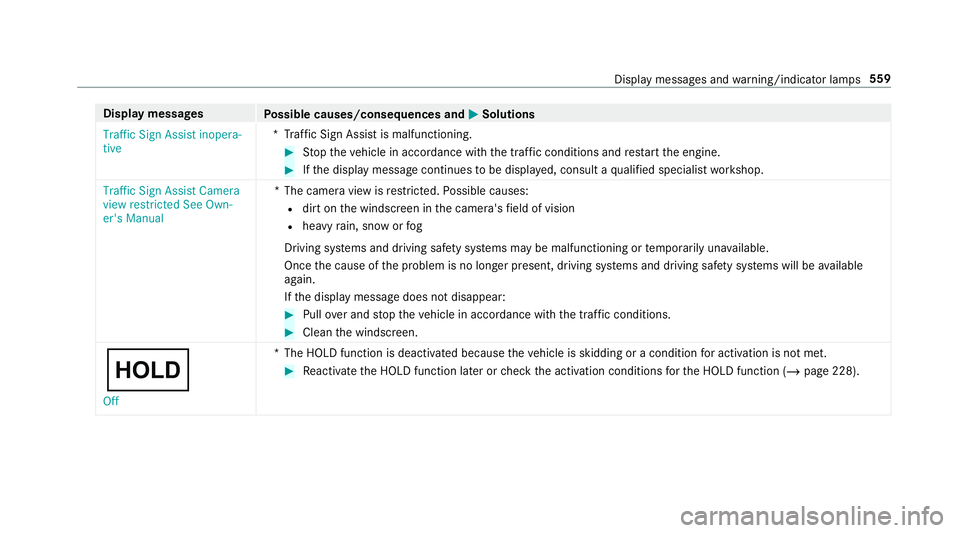
Display messages
Possible causes/consequences and M
MSolutions
Traffic Sign Assist inopera-
tive *T
raffic Sign Assist is malfunctioning. #
Stop theve hicle in accordance with the tra ffic conditions and restart the engine. #
Ifth e display message continues tobe displa yed, consult a qualified specialist workshop.
Traffic Sign Assist Camera
view restricted See Own-
er's Manual *T
he camera view is restricted. Possible causes:
R dirt on the windscreen in the camera's field of vision
R heavy rain, snow or fog
Driving sy stems and driving saf ety sy stems may be malfunctioning or temp orarily una vailable.
Once the cause of the problem is no longer present, driving sy stems and driving saf ety sy stems will be available
again.
If th e display message does not disappear: #
Pull over and stop theve hicle in accordance with the tra ffic conditions. #
Clean the windscreen.
ë Off *T
he HOLD function is deactivated because theve hicle is skidding or a condition for activation is not met. #
Reactivate the HOLD function later or check the activation conditions forth e HOLD function (/ page 228). Display messages and
warning/indicator lamps 559
Page 593 of 657
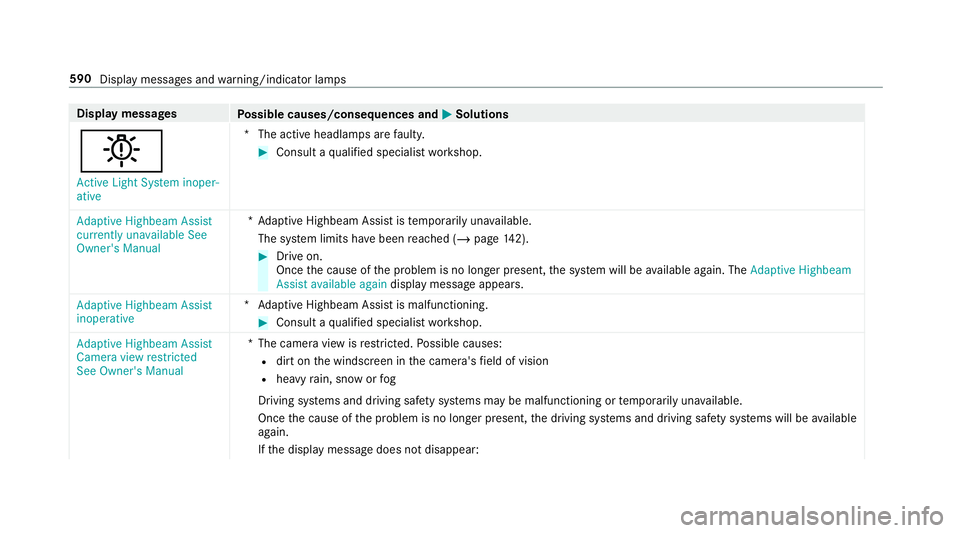
Display messages
Possible causes/consequences and M
MSolutions
b Active Light System inoper-
ative *T
he active headlamp s arefaulty. #
Consult a qualified specialist workshop.
Adaptive Highbeam Assist
currently unavailable See
Owner's Manual *A
daptive Highbeam Assist is temp orarily una vailable.
The sy stem limits ha vebeen reached (/ page142). #
Drive on.
Once the cause of the problem is no longer present, the sy stem will be available again. The Adaptive Highbeam
Assist available again display message appears.
Adaptive Highbeam Assist
inoperative *A
daptive Highbeam Assist is malfunctioning. #
Consult a qualified specialist workshop.
Adaptive Highbeam Assist
Camera view restricted
See Owner's Manual *T
he camera view is restricted. Possible causes:
R dirt on the windscreen in the camera's field of vision
R heavy rain, snow or fog
Driving sy stems and driving saf ety sy stems may be malfunctioning or temp orarily una vailable.
Once the cause of the problem is no longer present, the driving sy stems and driving saf ety sy stems will be available
again.
If th e display message does not disappear: 590
Display messages and warning/indicator lamps
Page 594 of 657
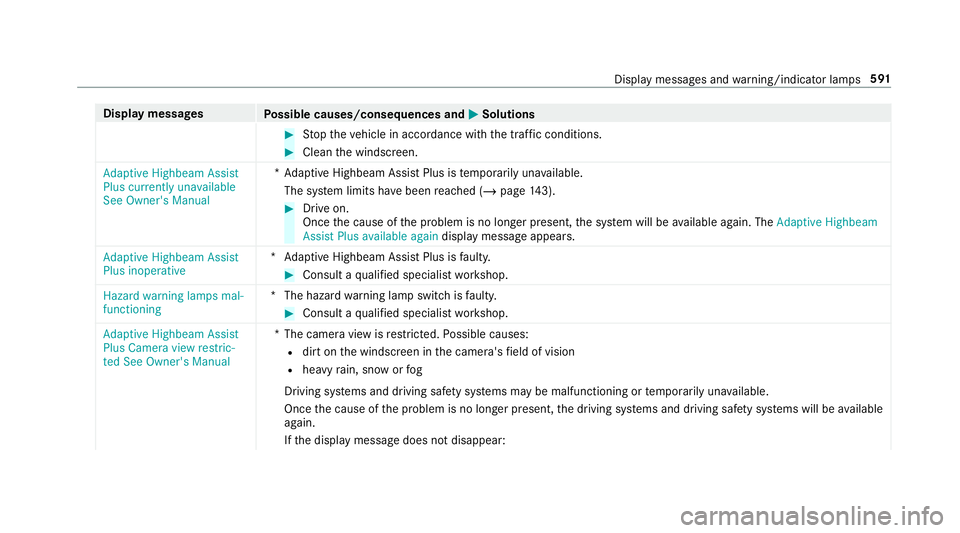
Display messages
Possible causes/consequences and M
MSolutions #
Stop theve hicle in accordance with the tra ffic conditions. #
Clean the windscreen.
Adaptive Highbeam Assist
Plus currently unavailable
See Owner's Manual *A
daptive Highbeam Assist Plus is temp orarily una vailable.
The sy stem limits ha vebeen reached (/ page143). #
Drive on.
Once the cause of the problem is no longer present, the sy stem will be available again. The Adaptive Highbeam
Assist Plus available again display message appears.
Adaptive Highbeam Assist
Plus inoperative *A
daptive Highbeam Assist Plus is faulty. #
Consult a qualified specialist workshop.
Hazard warning lamps mal-
functioning *T
he hazard warning lamp switch is faulty. #
Consult a qualified specialist workshop.
Adaptive Highbeam Assist
Plus Camera view restric-
ted See Owner's Manual *T
he camera view is restricted. Possible causes:
R dirt on the windscreen in the camera's field of vision
R heavy rain, snow or fog
Driving sy stems and driving saf ety sy stems may be malfunctioning or temp orarily una vailable.
Once the cause of the problem is no longer present, the driving sy stems and driving saf ety sy stems will be available
again.
If th e display message does not disappear: Display messages and
warning/indicator lamps 591
Page 610 of 657
1,
2, 3 ...
4MATIC ..................................................... 184
Fu nction .............................................. 184
12 V battery
see Battery (vehicle)
12 V so cket
see Soc ket (12 V)
48 V on-board electrical sy stem
Operating saf ety .................................... 21
230 V soc ket
see Soc ket (230 V)
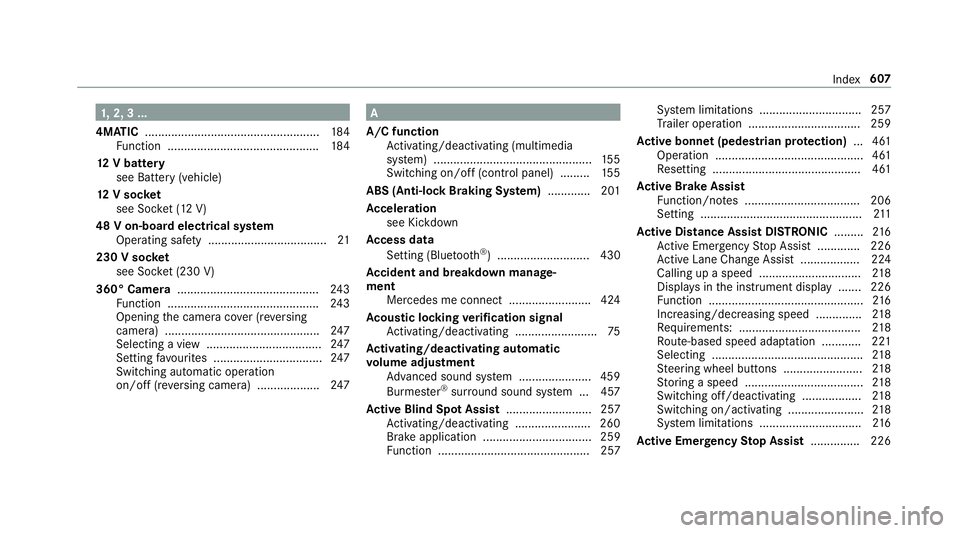
360° Camera ........................................... 24 3
Fu nction .............................................. 24 3
Opening the camera co ver (r eve rsing
camera) .............................................. .247
Selecting a view ................................... 247
Setting favo urites ................................ .247
Switching au tomatic operation
on/off (r eversing camera) .................. .247 A
A/C function Activating/deactivating (multimedia
sy stem) ................................................ 15 5
Switching on/off (control panel) ......... 15 5
ABS (Anti-lock Braking Sy stem) ............ .201
Ac celeration
see Kickdown
Ac cess data
Setting (Blue tooth®
) ............................ 430
Ac cident and breakdown manage‐
ment
Mercedes me connect ........................ .424
Ac oustic locking verification signal
Ac tivating/deactivating ......................... 75
Ac tivating/deactivating automatic
vo lume adjustment
Ad vanced sound sy stem ......................4 59
Burmes ter®
sur round sound sy stem ... 457
Ac tive Blind Spot Assi st.......................... 257
Ac tivating/deactivating ...................... .260
Brake application ................................. 259
Fu nction .............................................. 257 Sy
stem limitations ...............................2 57
Tr ailer operation .................................. 259
Ac tive bonn et(pedestrian pr otection) ...4 61
Operation ............................................. 461
Re setting ............................................. 461
Ac tive Brake Assi st
Fu nction/no tes ................................... 206
Setting .................................................2 11
Ac tive Di stance Assist DISTRO NIC......... 216
Ac tive Emergency Stop Assist .............2 26
Ac tive Lane Change Assi st.................. 224
Calling up a speed ............................... 218
Displ ays in the instrument display .......2 26
Fu nction ............................................... 216
Increasing/decreasing speed .............. 218
Re quirements: .................................... .218
Ro ute-based speed adap tation ........... .221
Selecting .............................................. 218
St eering wheel buttons ........................ 218
St oring a speed .................................... 218
Switching off/deacti vating .................. 218
Switching on/activating ....................... 218
Sy stem limitations ...............................2 16
Ac tive Eme rgency Stop Assist ...............226 Index
607
Page 615 of 657
Boot lid
see Tailgate
Brake Assist Sy stem
see BAS (Brake Assi stSystem)
Brake fluid
No tes .................................................. 533
Brake forc e distribution
EBD (Elect ronic Brake forc e Distribu‐
tion) ..................................................... 206
Brakes ABS (Anti-lock Braking Sy stem) ........... 201
Ac tive Brake Assi st.............................. 206
Ad aptive brake lights .......................... .212
BA S (Brake Assi stSystem) .................. 201
Driving tips .......................................... 17 0
EBD (Electronic Brake forc e Distribu‐
tion) ..................................................... 206
HOLD function .....................................2 28
Limi ted braking ef fect (salt-trea ted
ro ads) .................................................. 17 0
New/replaced brakepads/brake
discs .................................................... 17 0
Ru nning-in no tes ..................................1 70Braking assi
stance
see BAS (Brake Assi stSystem)
Breakdown Overview of the help functions .............. 16
To w- starting ........................................ 498
To wing away ........................................ 494
Tr ansporting theve hicle ......................4 96
Wheel change ...................................... 51 5
Breakdown see Flat tyre
Burmes ter®
sur round sound sy stem .....4 57
Ad justing the balance/fader ............... 458
Ad justing the sound focus ................... 458
Ad justing treble, mid-range and bass
settings ............................................... 457
Au tomatic volume adjustment ............ .457
Calling up the sound menu .................. 457
Information .......................................... 457
Selecting the sound profile .................. 458
Butto ns
St eering wheel .....................................2 71 C
Call list Deleting .............................................. .409
Making a call ....................................... 408
Overview ............................................. 408
Selecting options ................................ 408
Selecting options for suggestions ........ 409
Calling up the sound menu
Adva nced sound sy stem ......................4 58
Burmes ter®
sur round sound sy stem ... 457
Calls ..........................................................4 03
Ac cepting ............................................ 403
Ac tivating functions du ring a call ........ 404
Calls wi thseveral participants ............ .404
Declining ............................................. 403
Ending a call ........................................ 403
Incoming call during an existing call .... 404
Making ................................................ 403
Mercedes me ...................................... 420
Camera see 360° Camera
see Reversing camera
Car key
see Key 612
Index