display MERCEDES-BENZ GLC SUV 2015 Owners Manual
[x] Cancel search | Manufacturer: MERCEDES-BENZ, Model Year: 2015, Model line: GLC SUV, Model: MERCEDES-BENZ GLC SUV 2015Pages: 497, PDF Size: 15.27 MB
Page 297 of 497
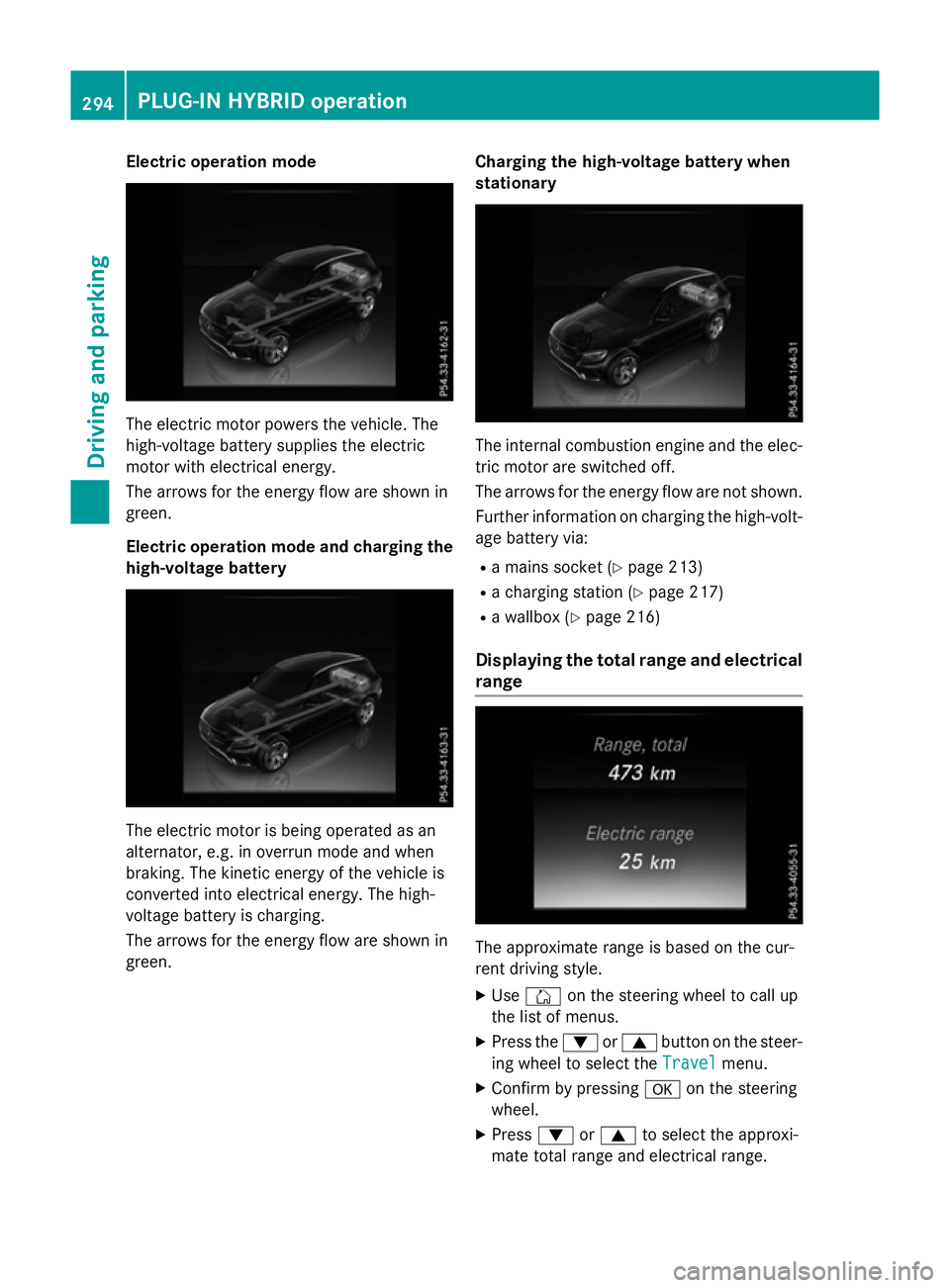
Electric operation mode
The electric motor powers the vehicle. The
high-voltage battery supplies the electric
motor with electrical energy.
The arrows for the energy flow are shown in
green.
Electric operation mode and charging the
high-voltage battery The electric motor is being operated as an
alternator, e.g. in overrun mode and when
braking. The kinetic energy of the vehicle is
converted into electrical energy. The high-
voltage battery is charging.
The arrows for the energy flow are shown in
green. Charging the high-voltage battery when
stationary The internal combustion engine and the elec-
tric motor are switched off.
The arrows for the energy flow are not shown.
Further information on charging the high-volt-
age battery via:
R a mains socket (Y page 213)
R a charging station (Y page 217)
R a wallbox (Y page 216)
Displaying the total range and electrical range The approximate range is based on the cur-
rent driving style.
X Use Ñ on the steering wheel to call up
the list of menus.
X Press the :or9 button on the steer-
ing wheel to select the Travel Travelmenu.
X Confirm by pressing aon the steering
wheel.
X Press :or9 to select the approxi-
mate total range and electrical range. 294
PLUG‑
IN HYBRID operationDriving and parking
Page 298 of 497
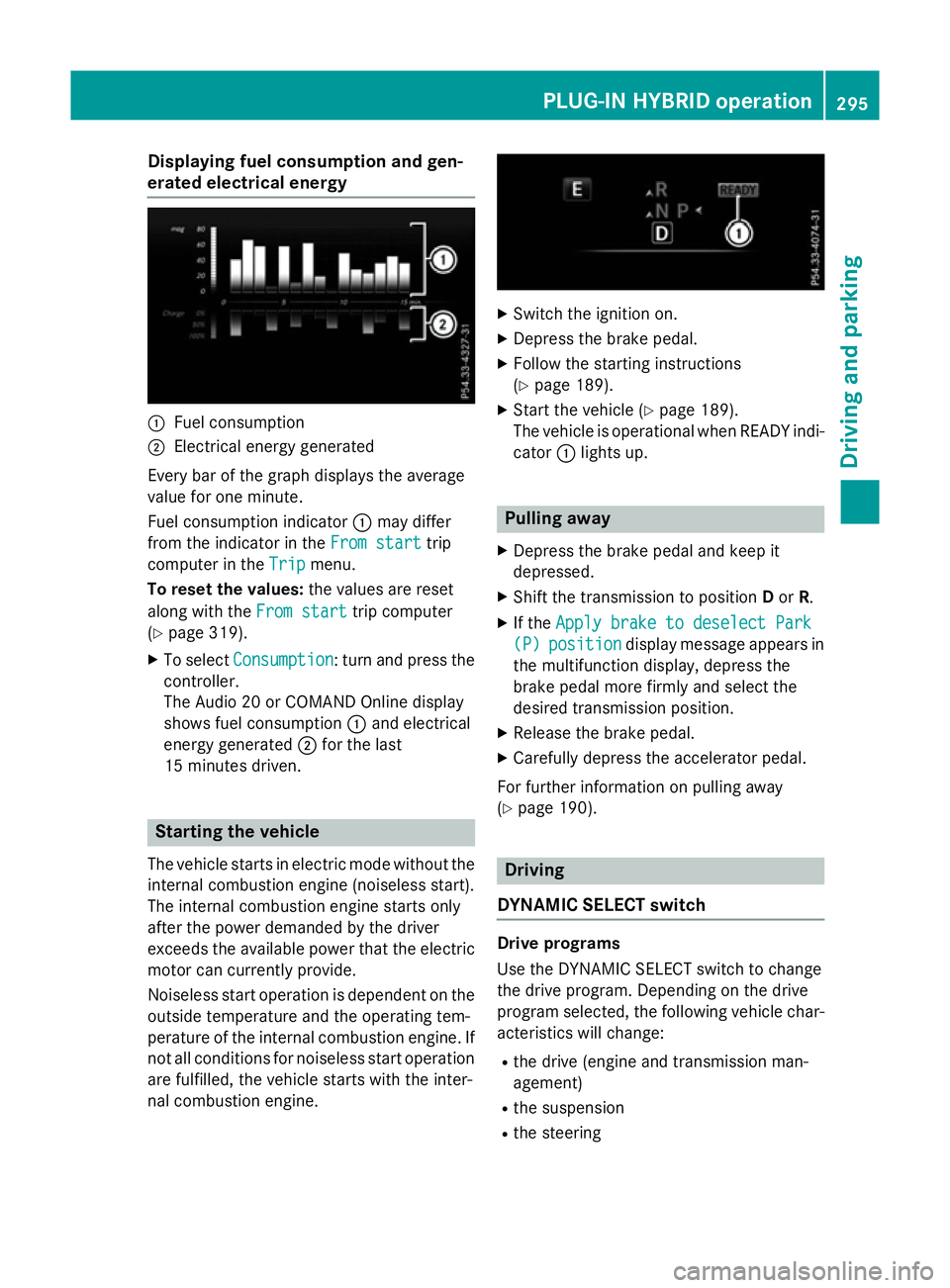
Displaying fuel consumption and gen-
erated electrical energy :
Fuel consumption
; Electrical energy generated
Every bar of the graph displays the average
value for one minute.
Fuel consumption indicator :may differ
from the indicator in the From start From starttrip
computer in the Trip
Trip menu.
To reset the values: the values are reset
along with the From start
From starttrip computer
(Y page 319).
X To select Consumption
Consumption: turn and press the
controller.
The Audio 20 or COMAND Online display
shows fuel consumption :and electrical
energy generated ;for the last
15 minutes driven. Starting the vehicle
The vehicle starts in electric mode without the
internal combustion engine (noiseless start).
The internal combustion engine starts only
after the power demanded by the driver
exceeds the available power that the electric
motor can currently provide.
Noiseless start operation is dependent on the
outside temperature and the operating tem-
perature of the internal combustion engine. If
not all conditions for noiseless start operation are fulfilled, the vehicle starts with the inter-
nal combustion engine. X
Switch the ignition on.
X Depress the brake pedal.
X Follow the starting instructions
(Y page 189).
X Start the vehicle (Y page 189).
The vehicle is operational when READY indi-
cator :lights up. Pulling away
X Depress the brake pedal and keep it
depressed.
X Shift the transmission to position Dor R.
X If the Apply brake to deselect Park
Apply brake to deselect Park
(P) (P) position
position display message appears in
the multifunction display, depress the
brake pedal more firmly and select the
desired transmission position.
X Release the brake pedal.
X Carefully depress the accelerator pedal.
For further information on pulling away
(Y page 190). Driving
DYNAMIC SELECT switch Drive programs
Use the DYNAMIC SELECT switch to change
the drive program. Depending on the drive
program selected, the following vehicle char-
acteristics will change:
R the drive (engine and transmission man-
agement)
R the suspension
R the steering PLUG
‑IN HYBRID ope ration
295Driving an d parking Z
Page 299 of 497
R
the climate control
- the climate control settings
- the rear window heating operation period
- the performance of the seat heating
R the availability of the Eco Assistant
If the ignition is switched off for less than four hours, the previously selected drive program
is activated when the engine is next started. If
the ignition is switched off for more than four hours, drive program Cis activated when the
engine is next started. X
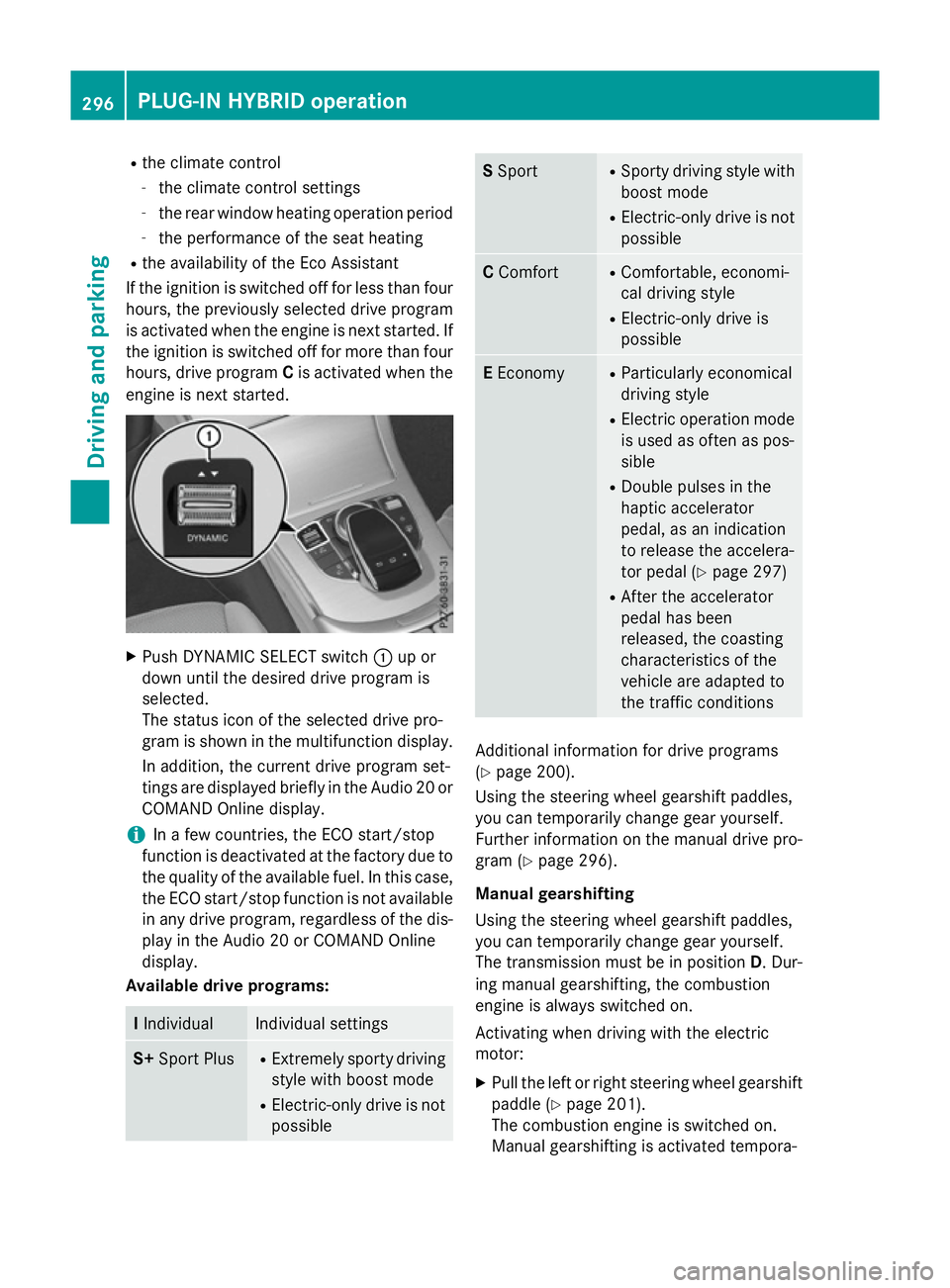
Push DYNAMIC SELECT switch :up or
down until the desired drive program is
selected.
The status icon of the selected drive pro-
gram is shown in the multifunction display.
In addition, the current drive program set-
tings are displayed briefly in the Audio 20 or COMAND Online display.
i In a few countries, the ECO start/stop
function is deactivated at the factory due to the quality of the available fuel. In this case,
the ECO start/stop function is not available in any drive program, regardless of the dis-
play in the Audio 20 or COMAND Online
display.
Available drive programs: I
Individual Individual settings
S+
Sport Plus R
Extremely sporty driving
style with boost mode
R Electric-only drive is not
possible S
Sport R
Sporty driving style with
boost mode
R Electric-only drive is not
possible C
Comfort R
Comfortable, economi-
cal driving style
R Electric-only drive is
possible E
Economy R
Particularly economical
driving style
R Electric operation mode
is used as often as pos-
sible
R Double pulses in the
haptic accelerator
pedal, as an indication
to release the accelera-
tor pedal (Y page 297)
R After the accelerator
pedal has been
released, the coasting
characteristics of the
vehicle are adapted to
the traffic conditions Additional information for drive programs
(Y page 200).
Using the steering wheel gearshift paddles,
you can temporarily change gear yourself.
Further information on the manual drive pro-
gram (Y page 296).
Manual gearshifting
Using the steering wheel gearshift paddles,
you can temporarily change gear yourself.
The transmission must be in position D. Dur-
ing manual gearshifting, the combustion
engine is always switched on.
Activating when driving with the electric
motor:
X Pull the left or right steering wheel gearshift
paddle (Y page 201).
The combustion engine is switched on.
Manual gearshifting is activated tempora- 296
PLUG
‑IN HYBRI D operationDriving an d parking
Page 300 of 497
rily. The selected gear and
Mappear in the
multifunction display.
Activating when driving with the combustion
engine:
X Pull the left or right steering wheel gearshift
paddle (Y page 201).
Manual gearshifting is activated tempora-
rily. The selected gear and Mappear in the
multifunction display.
The ECO start/stop function is not available
when manually changing gear.
Further information on the manual drive pro-
gram (Y page 201).
Haptic accelerator pedal General notes
The haptic accelerator pedal helps you to
reduce the fuel consumption and emissions
of your vehicle.
There are two different functions available for
this purpose:
R an additional point of resistance in E-MODE
operating mode (Y page 290)
R a double pulse in drive program E
(Y page 295)
Additional point of resistance in the hap-
tic accelerator pedal
The maximum available electric performance
is indicated by a tangible point of resistance
in the haptic accelerator pedal.
The additional point of resistance is available in E-MODE operating mode (Y page 290).
If you depress the haptic accelerator pedal
beyond the pressure point, the combustion
engine is switched on.
Double pulses in the haptic accelerator
pedal
A noticeable double pulse in the haptic accel-
erator pedal is a recommendation that you
should release the accelerator pedal. By this
means, in HYBRID,E-MODE orE-SAVE oper-
ating mode the combustion engine can be switched off and disconnected from the
power train (overrun mode).
The double pulse is available in drive program
E (Y page 295).
After the accelerator pedal has been
released, the coasting characteristics of the
vehicle are adapted to the traffic conditions
To avoid getting too close to the vehicle in
front, you must apply the brakes manually
when necessary.
Driving tips General driving tips
Drive carefully and maintain a suitable dis-
tance from the vehicle in front. Avoid frequent
and sudden acceleration as well as abrupt
braking.
During partial electric drive, pulling away and acceleration, the electric motor supports the internal combustion engine.
During overrun in transmission position Dand
braking, the electric motor operates as an
alternator.
Further information on the ECO start/stop
function (Y page 298).
Additional driving tips (Y page 222).
Stationary vehicle
If the vehicle is stopped, the combustion
engine is, for the most part, switched off.
Automatic climate control continues to func-
tion. The electro-mechanically assisted steer-
ing gear allows use of the power steering
without loss of comfort.
Acceleration
Depending on the operating mode, pulling
away and driving under low load conditions
are performed:
R entirely by electric propulsion
R in combination with the internal combus-
tion engine
When accelerating at an increased or full
load, boost mode is utilised. The electric
motor supports the internal combustion PLUG‑IN HYBRID operation
297Driving and parking Z
Page 302 of 497
The internal combustion engine will not be
switched off automatically, if:
R the self-diagnosis function of the engine
control unit is still active
R there is a malfunction in the hybrid drive
system
R the climate control of the vehicle requires it
R the high-voltage battery is being charged
(Y page 292)
R automatic emissions tests are running
Automatic engine start
The internal combustion engine, which has
been automatically switched-off, starts auto-
matically in certain situations, when:
R the power demand from the driver via the
accelerator pedal is greater than the elec-
tric motor alone can provide
R the driver switches to drive program Sor M
R the charge level of the high-voltage battery
has reached the lower limit
R the settings of the automatic climate con-
trol require it, e.g. at external temperatures
above 30 †
Overrun mode
In overrun mode, the combustion engine is
switched off and is disconnected from the
drive train. The electric motor:
R generates low thrust, which corresponds to
the overrun mode of an active combustion
engine
R functions as an alternator and produces the
necessary energy for the auxiliary consum- ers and charges the high-voltage battery
Overrun mode is available in drive program E
below 160 km/h.
In drive program E, after the accelerator pedal
has been released the coasting characteris-
tics of the vehicle are adapted to the traffic
conditions. Further information about the
haptic accelerator pedal (Y page 297).Route-based energy management For route-based energy management, the
system factors in information about the
expected route when route guidance is
active.
The information on the route is provided by
COMAND Online and includes the following:
R road categories
R speed limitations
R data on downhill gradients
The use of electric energy is automatically
optimally distributed from the beginning to
the end of the journey, using information
about the route. The distribution is pre-emp-
tive and takes into consideration:
R the sections of the journey ahead
R the energy consumption on the whole route
The charge status of the high-voltage battery
is thus systematically controlled. In addition,
the control function takes into account that:
R the fuel savings through the use of electri-
cal energy can vary, depending on the route
(e.g. urban, interurban or motorway)
R the use of electrical energy is held available
in particular for electric operation (e.g.
urban routes)
The vehicle thus automatically selects the
optimum driving mode for the respective sec- tion of the route.
Route-based energy management is available
under the following conditions:
R drive program Eis selected
R HYBRID driving mode is selected
R active route guidance is activated
R suitable map data is available
When route-based energy management is in
operation, the area in front of the vehicle is
shown as green in the multifunction display. PLUG‑IN HYBRID operation
299Driving and parking Z
Page 304 of 497
Problems with PLUG-IN HYBRID operation
Internal combustion engine Problem
Possible causes/consequences and
M
MSolutions You cannot start the
internal combustion
engine. The multifunc-
tion display shows no
display messages. The
READY indicator in the
multifunction display is
off. For example, self-diagnosis is not yet complete or the hybrid drive
system is malfunctioning.
X Switch off the ignition and turn it back on.
X Try to start the internal combustion engine again.
If the internal combustion engine still does not start: X Consult a qualified specialist workshop. You wish to pull away,
but the ECO start/stop
function does not start
the internal combus-
tion engine. The READY
indicator in the multi-
function display is off. The ECO start/stop function has failed. The warning and indicator
lamps in the instrument cluster light up.
X Shift the transmission to P.
X Switch off the ignition and turn it back on.
X Start the engine. The hybrid drive system is malfunctioning.
X Consult a qualified specialist workshop. Recuperative Brake System
Problem
Possible causes/consequences and
M MSolutions Braking resistance is
reduced and brake
pedal travel is longer
than usual.
G
Risk of accident
The Recuperative Brake System is malfunctioning.
X Observe the additional display messages in the multifunction
display (Y page 335).
X Observe the information regarding indicator and warning lamps
in the instrument cluster (Y page 377) . PLUG‑IN HYBRID operation
301Driving and parking Z
Page 305 of 497
Hybrid drive system
Problem
Possible causes/consequences and
M
MSolutions The hybrid drive system
has been switched off
automatically. You have been in an accident.
The hybrid drive system remains switched off if:
R the internal combustion engine cannot be restarted after a few
seconds.
R the red 6restraint system warning lamp in the instrument
cluster is lit.
X Consult a qualified specialist workshop. The hybrid drive system
has been switched off
automatically. The mul-
tifunction display also
shows a display mes-
sage. An electrical short circuit has occurred in the hybrid drive system
or an electrical connection has been disconnected.
X Observe the additional display messages in the multifunction
display (Y page 335).
X Consult a qualified specialist workshop. Towing a trailer
Important safety notes
G
WARNING
You could lose control of the vehicle/trailer
combination if it begins to swerve. The vehi-
cle/trailer combination could even overturn.
There is a risk of an accident.
On no account should you attempt to
straighten out the vehicle/trailer combina-
tion by increasing speed. Decrease your
speed and do not countersteer. Brake if nec-
essary. G
WARNING
If the maximum the permissible load for a car- rier system is exceeded, the carrier could
come loose from the vehicle and endanger
other road users. There is a risk of an accident and injury.
Never exceed the permissible noseweight
when using a carrier. Exceeding the maximum permissible nose-
weight of the trailer drawbar on the ball cou-
pling may cause damage to the following:
R your vehicle
R the trailer
R the ball coupling
R trailer tow hitch
The vehicle/trailer combination could
become unstable.
If the noseweight used is lower than the min- imum permissible noseweight, the vehicle/
trailer combination could also become unsta- ble.
To avoid hazardous situations:
R make sure to check the noseweight before
each journey
R use a drawbar noseweight as close as pos-
sible to the maximum noseweight
R do not exceed the maximum permissible
noseweight
R do not use a noseweight lower than the
minimum noseweight 302
Towing a trailerDriving and parking
Page 308 of 497
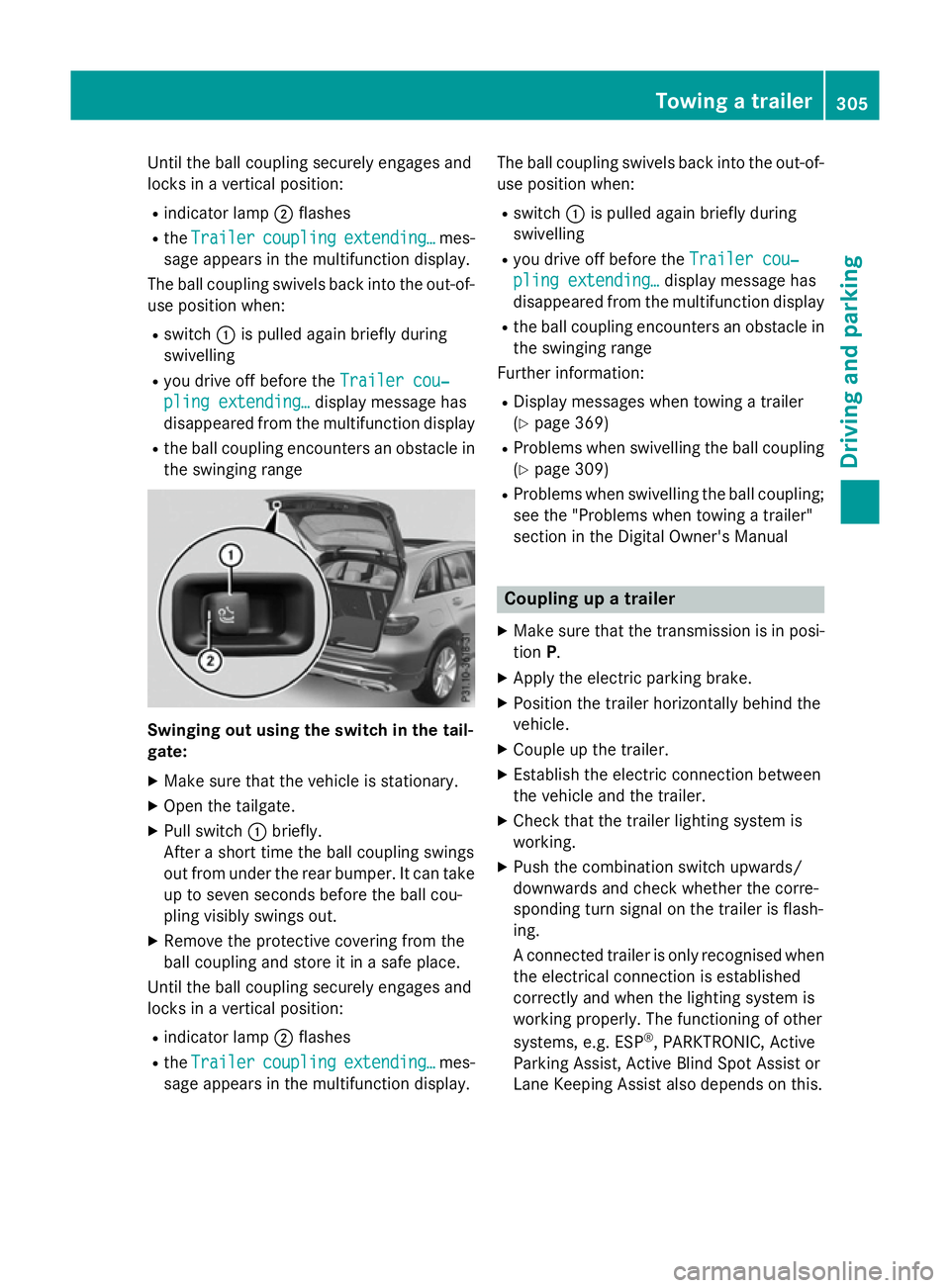
Until the ball coupling securely engages and
locks in a vertical position:
R indicator lamp ;flashes
R the Trailer
Trailer coupling
coupling extending…
extending… mes-
sage appears in the multifunction display.
The ball coupling swivels back into the out-of- use position when:
R switch :is pulled again briefly during
swivelling
R you drive off before the Trailer cou‐
Trailer cou‐
pling extending…
pling extending… display message has
disappeared from the multifunction display
R the ball coupling encounters an obstacle in
the swinging range Swinging out using the switch in the tail-
gate:
X Make sure that the vehicle is stationary.
X Open the tailgate.
X Pull switch :briefly.
After a short time the ball coupling swings
out from under the rear bumper. It can take
up to seven seconds before the ball cou-
pling visibly swings out.
X Remove the protective covering from the
ball coupling and store it in a safe place.
Until the ball coupling securely engages and
locks in a vertical position:
R indicator lamp ;flashes
R the Trailer
Trailer coupling coupling extending…
extending… mes-
sage appears in the multifunction display. The ball coupling swivels back into the out-of-
use position when:
R switch :is pulled again briefly during
swivelling
R you drive off before the Trailer cou‐
Trailer cou‐
pling extending…
pling extending… display message has
disappeared from the multifunction display
R the ball coupling encounters an obstacle in
the swinging range
Further information:
R Display messages when towing a trailer
(Y page 369)
R Problems when swivelling the ball coupling
(Y page 309)
R Problems when swivelling the ball coupling;
see the "Problems when towing a trailer"
section in the Digital Owner's Manual Coupling up a trailer
X Make sure that the transmission is in posi-
tion P.
X Apply the electric parking brake.
X Position the trailer horizontally behind the
vehicle.
X Couple up the trailer.
X Establish the electric connection between
the vehicle and the trailer.
X Check that the trailer lighting system is
working.
X Push the combination switch upwards/
downwards and check whether the corre-
sponding turn signal on the trailer is flash-
ing.
A connected trailer is only recognised when
the electrical connection is established
correctly and when the lighting system is
working properly. The functioning of other
systems, e.g. ESP ®
, PARKTRONIC, Active
Parking Assist, Active Blind Spot Assist or
Lane Keeping Assist also depends on this. Towing a trailer
305Driving and parking Z
Page 309 of 497
Uncoupling a trailer
G
WARNING
If you uncouple a trailer with an engaged over- run brake, you could trap your hand between
the vehicle and the trailer drawbar. This poses a risk of injury.
Do not uncouple a trailer with an engaged
overrun brake. G
WARNING
Vehicles with level control:
If you disconnect the trailer cable, the vehicle is lowered. This can cause you or others to
become trapped between the vehicle body
and tyres, or underneath the vehicle. This
poses a risk of injury.
Make sure that no-one is in the immediate
vicinity of the wheel arch or underneath the
vehicle when disconnecting the trailer cable.
! Do not disconnect a trailer with an
engaged overrun brake. Otherwise, your
vehicle could be damaged by the rebound- ing of the overrun brake.
! Remove the installed adapter cable
before folding in the ball coupling. Other-
wise, damage may occur to the rear
bumper and the adapter cable.
X Make sure that the transmission is in posi-
tion P.
X Apply the electric parking brake.
X Secure the trailer against rolling away.
X Remove the trailer cable and decouple the
trailer. Swinging the ball coupling in
! Do not attempt to speed the up the swing-
out procedure by applying additional pres-
sure with your foot. The system could oth-
erwise be mechanically damaged.
Swing the ball coupling back in using the
switch on the driver's door or tailgate, if you
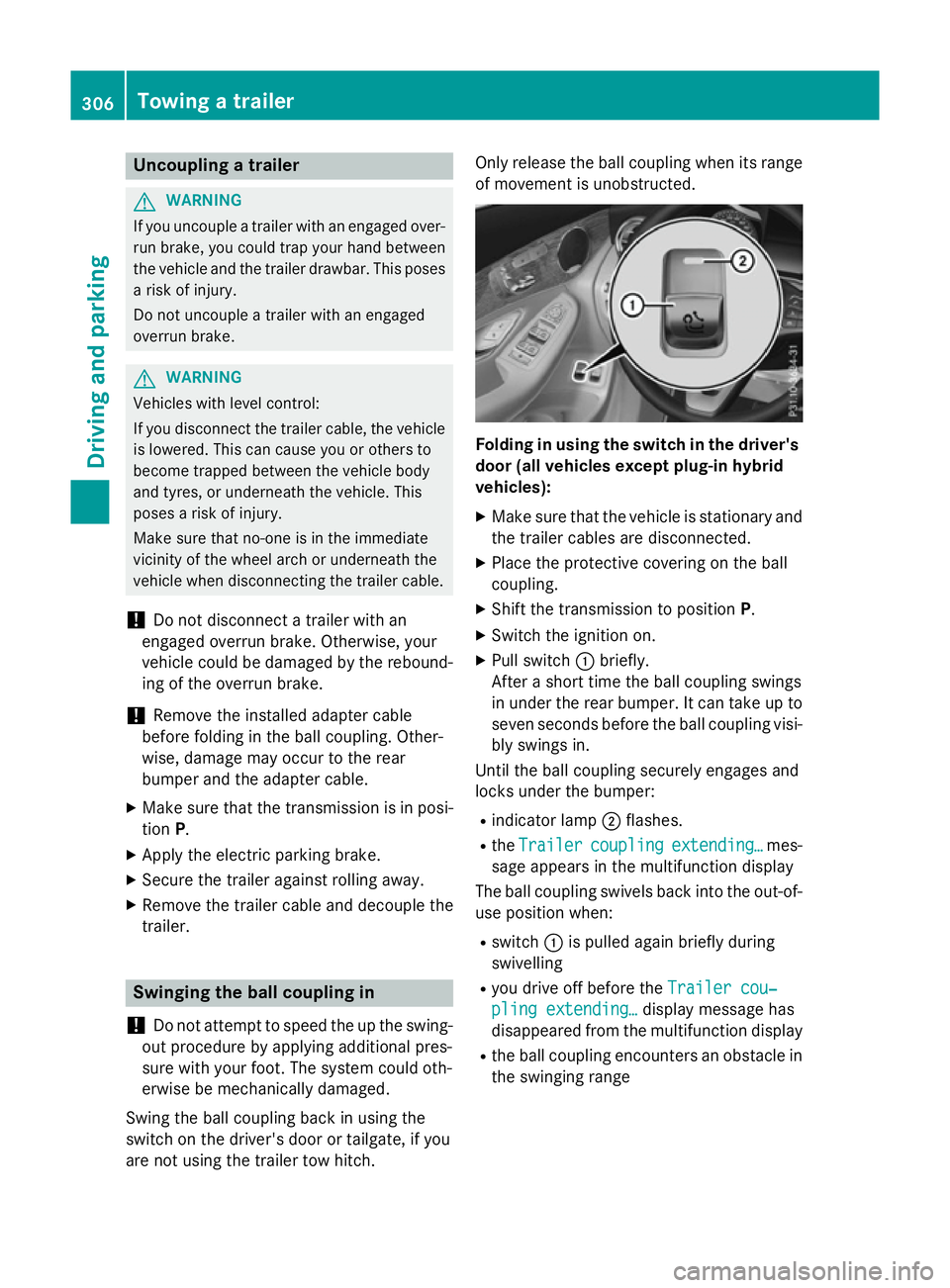
are not using the trailer tow hitch. Only release the ball coupling when its range
of movement is unobstructed. Folding in using the switch in the driver's
door (all vehicles except plug-in hybrid
vehicles):
X Make sure that the vehicle is stationary and
the trailer cables are disconnected.
X Place the protective covering on the ball
coupling.
X Shift the transmission to position P.
X Switch the ignition on.
X Pull switch :briefly.
After a short time the ball coupling swings
in under the rear bumper. It can take up to seven seconds before the ball coupling visi-bly swings in.
Until the ball coupling securely engages and
locks under the bumper:
R indicator lamp ;flashes.
R the Trailer
Trailer coupling coupling extending…
extending… mes-
sage appears in the multifunction display
The ball coupling swivels back into the out-of-
use position when:
R switch :is pulled again briefly during
swivelling
R you drive off before the Trailer cou‐
Trailer cou‐
pling extending…
pling extending… display message has
disappeared from the multifunction display
R the ball coupling encounters an obstacle in
the swinging range 306
Towing a trailerDriving and parking
Page 310 of 497
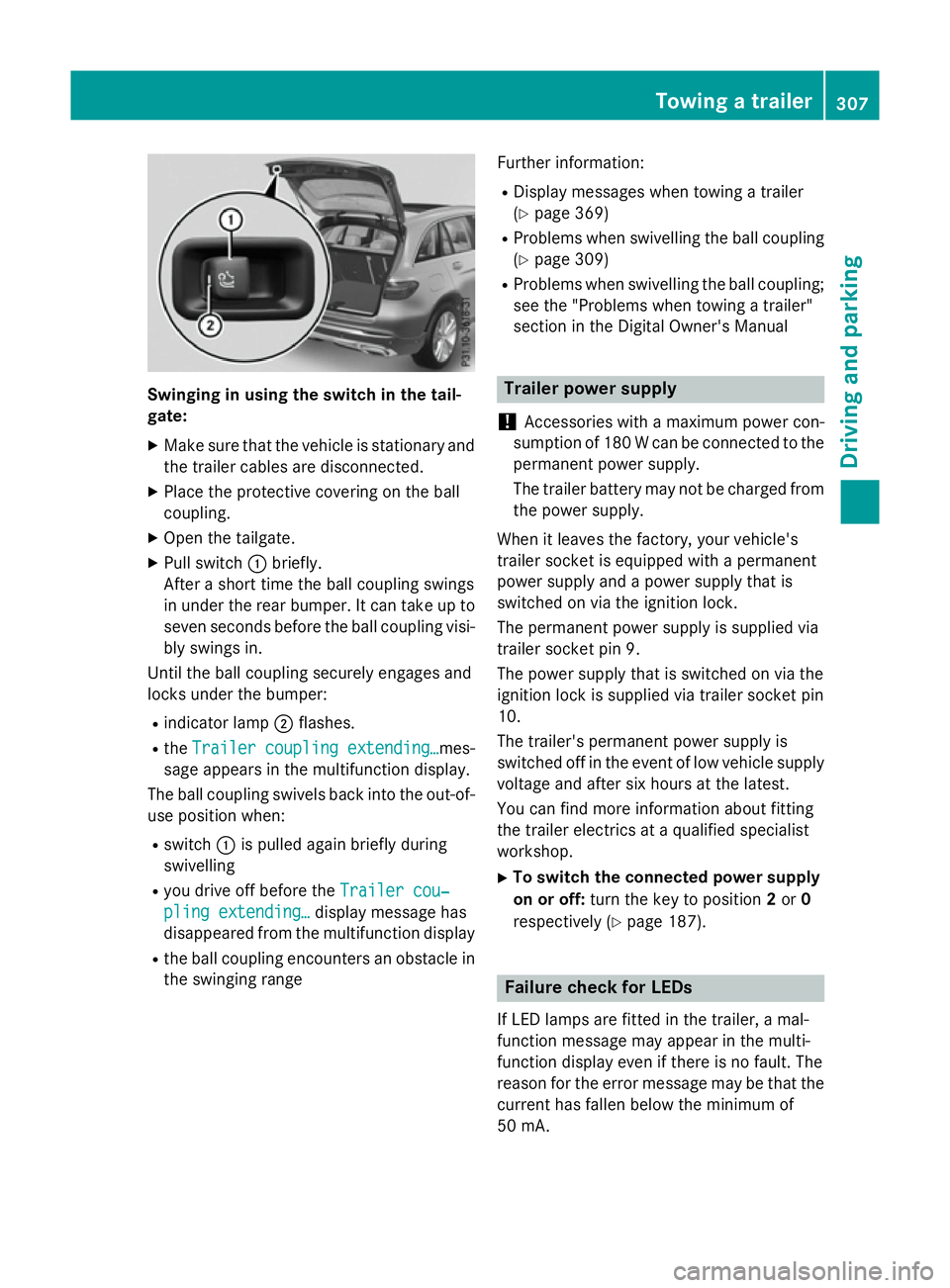
Swinging in using the switch in the tail-
gate:
X Make sure that the vehicle is stationary and
the trailer cables are disconnected.
X Place the protective covering on the ball
coupling.
X Open the tailgate.
X Pull switch :briefly.
After a short time the ball coupling swings
in under the rear bumper. It can take up to
seven seconds before the ball coupling visi- bly swings in.
Until the ball coupling securely engages and
locks under the bumper:
R indicator lamp ;flashes.
R the Trailer coupling extending…
Trailer coupling extending… mes-
sage appears in the multifunction display.
The ball coupling swivels back into the out-of- use position when:
R switch :is pulled again briefly during
swivelling
R you drive off before the Trailer cou‐ Trailer cou‐
pling extending…
pling extending… display message has
disappeared from the multifunction display
R the ball coupling encounters an obstacle in
the swinging range Further information:
R Display messages when towing a trailer
(Y page 369)
R Problems when swivelling the ball coupling
(Y page 309)
R Problems when swivelling the ball coupling;
see the "Problems when towing a trailer"
section in the Digital Owner's Manual Trailer power supply
! Accessories with a maximum power con-
sumption of 180 W can be connected to the
permanent power supply.
The trailer battery may not be charged from the power supply.
When it leaves the factory, your vehicle's
trailer socket is equipped with a permanent
power supply and a power supply that is
switched on via the ignition lock.
The permanent power supply is supplied via
trailer socket pin 9.
The power supply that is switched on via the
ignition lock is supplied via trailer socket pin
10.
The trailer's permanent power supply is
switched off in the event of low vehicle supply
voltage and after six hours at the latest.
You can find more information about fitting
the trailer electrics at a qualified specialist
workshop.
X To switch the connected power supply
on or off: turn the key to position 2or 0
respectively (Y page 187). Failure check for LEDs
If LED lamps are fitted in the trailer, a mal-
function message may appear in the multi-
function display even if there is no fault. The
reason for the error message may be that the
current has fallen below the minimum of
50 mA. Towing a trailer
307Driving and parking Z