display MERCEDES-BENZ GLC SUV 2015 Owners Manual
[x] Cancel search | Manufacturer: MERCEDES-BENZ, Model Year: 2015, Model line: GLC SUV, Model: MERCEDES-BENZ GLC SUV 2015Pages: 497, PDF Size: 15.27 MB
Page 281 of 497
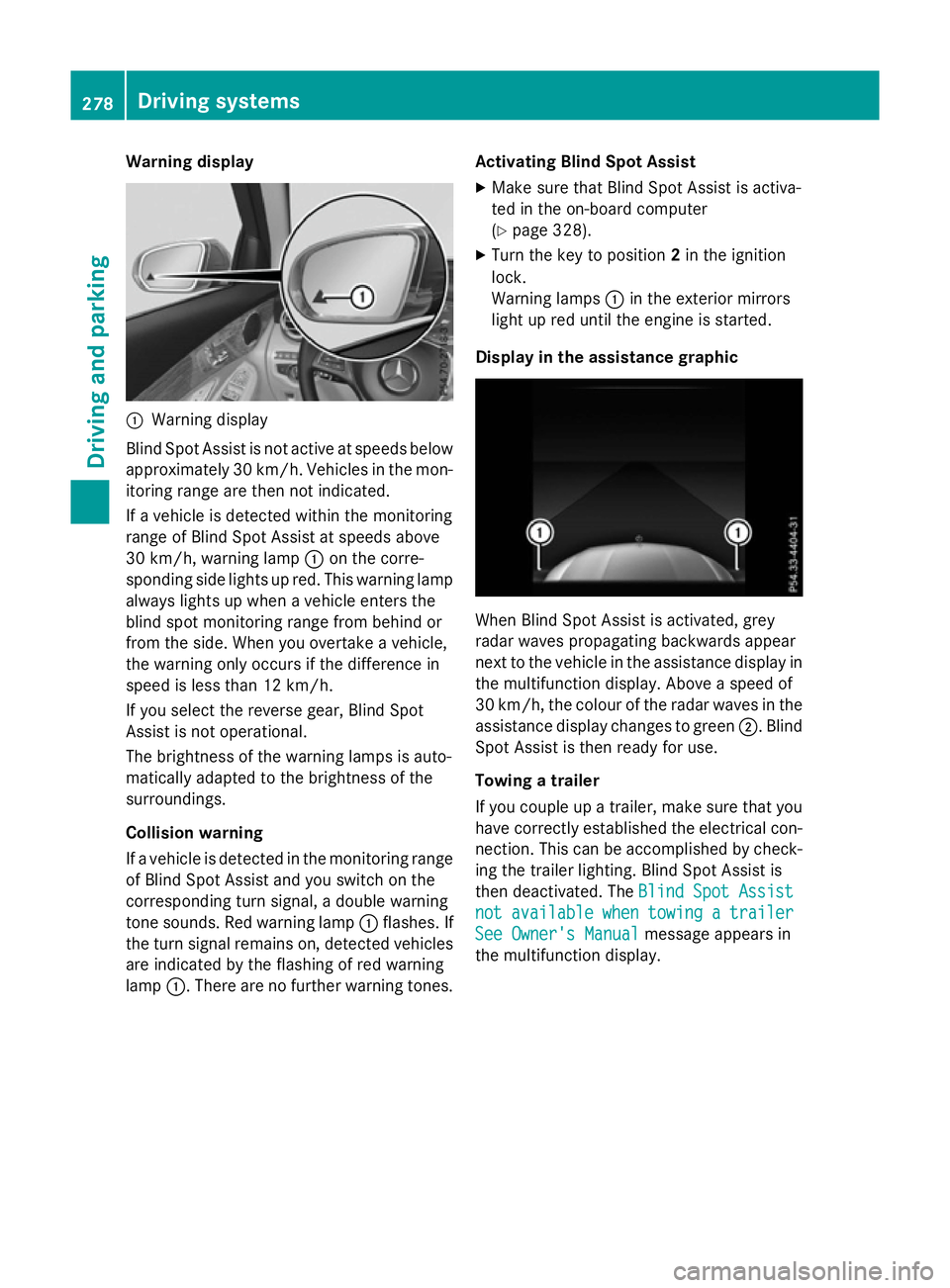
Warning display
:
Warning display
Blind Spot Assist is not active at speeds below approximately 30 km/h. Vehicles in the mon-itoring range are then not indicated.
If a vehicle is detected within the monitoring
range of Blind Spot Assist at speeds above
30 km/h, warning lamp :on the corre-
sponding side lights up red. This warning lamp
always lights up when a vehicle enters the
blind spot monitoring range from behind or
from the side. When you overtake a vehicle,
the warning only occurs if the difference in
speed is less than 12 km/h.
If you select the reverse gear, Blind Spot
Assist is not operational.
The brightness of the warning lamps is auto-
matically adapted to the brightness of the
surroundings.
Collision warning
If a vehicle is detected in the monitoring range
of Blind Spot Assist and you switch on the
corresponding turn signal, a double warning
tone sounds. Red warning lamp :flashes. If
the turn signal remains on, detected vehicles
are indicated by the flashing of red warning
lamp :. There are no further warning tones. Activating Blind Spot Assist
X Make sure that Blind Spot Assist is activa-
ted in the on-board computer
(Y page 328).
X Turn the key to position 2in the ignition
lock.
Warning lamps :in the exterior mirrors
light up red until the engine is started.
Display in the assistance graphic When Blind Spot Assist is activated, grey
radar waves propagating backwards appear
next to the vehicle in the assistance display in the multifunction display. Above a speed of
30 km/h, the colour of the radar waves in the
assistance display changes to green ;. Blind
Spot Assist is then ready for use.
Towing a trailer
If you couple up a trailer, make sure that you
have correctly established the electrical con- nection. This can be accomplished by check-ing the trailer lighting. Blind Spot Assist is
then deactivated. The Blind Spot Assist Blind Spot Assist
not
not available
available when
whentowing
towing a
atrailer
trailer
See Owner's Manual
See Owner's Manual message appears in
the multifunction display. 278
Driving systemsDriving and parking
Page 283 of 497
Activating/deactivating Lane Keeping
Assist X
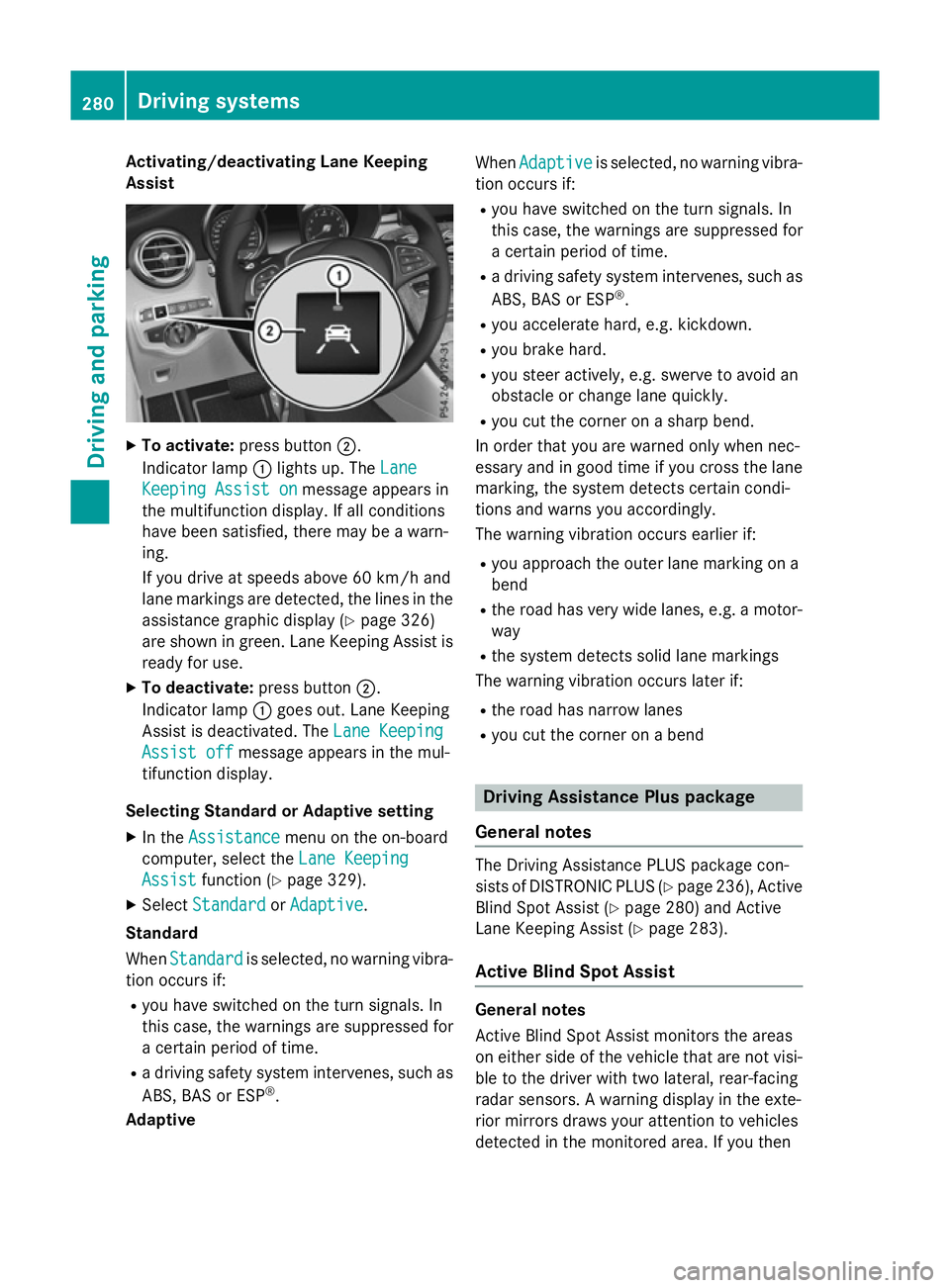
To activate: press button ;.
Indicator lamp :lights up. The Lane
Lane
Keeping Assist on
Keeping Assist on message appears in
the multifunction display. If all conditions
have been satisfied, there may be a warn-
ing.
If you drive at speeds above 60 km/h and
lane markings are detected, the lines in the assistance graphic display (Y page 326)
are shown in green. Lane Keeping Assist is
ready for use.
X To deactivate: press button;.
Indicator lamp :goes out. Lane Keeping
Assist is deactivated. The Lane Keeping
Lane Keeping
Assist off Assist off message appears in the mul-
tifunction display.
Selecting Standard or Adaptive setting
X In the Assistance
Assistance menu on the on-board
computer, select the Lane Keeping
Lane Keeping
Assist
Assist function (Y page 329).
X Select Standard
Standard orAdaptive
Adaptive.
Standard
When Standard Standard is selected, no warning vibra-
tion occurs if:
R you have switched on the turn signals. In
this case, the warnings are suppressed for
a certain period of time.
R a driving safety system intervenes, such as
ABS, BAS or ESP ®
.
Adaptive When
Adaptive
Adaptive is selected, no warning vibra-
tion occurs if:
R you have switched on the turn signals. In
this case, the warnings are suppressed for
a certain period of time.
R a driving safety system intervenes, such as
ABS, BAS or ESP ®
.
R you accelerate hard, e.g. kickdown.
R you brake hard.
R you steer actively, e.g. swerve to avoid an
obstacle or change lane quickly.
R you cut the corner on a sharp bend.
In order that you are warned only when nec-
essary and in good time if you cross the lane marking, the system detects certain condi-
tions and warns you accordingly.
The warning vibration occurs earlier if:
R you approach the outer lane marking on a
bend
R the road has very wide lanes, e.g. a motor-
way
R the system detects solid lane markings
The warning vibration occurs later if:
R the road has narrow lanes
R you cut the corner on a bend Driving Assistance Plus package
General notes The Driving Assistance PLUS package con-
sists of DISTRONIC PLUS (Y
page 236), Active
Blind Spot Assist (Y page 280) and Active
Lane Keeping Assist (Y page 283).
Active Blind Spot Assist General notes
Active Blind Spot Assist monitors the areas
on either side of the vehicle that are not visi-
ble to the driver with two lateral, rear-facing
radar sensors. A warning display in the exte-
rior mirrors draws your attention to vehicles
detected in the monitored area. If you then 280
Driving systemsDriving and pa
rking
Page 285 of 497
Due to the nature of the system:
R warnings may be issued in error when driv-
ing close to crash barriers or similar solid
lane borders
R warnings may be interrupted when driving
alongside particularly long vehicles, for
example lorries, for a prolonged time
Warning display :
Warning display
Active Blind Spot Assist is not operational at
speeds below approximately 30 km/h. Vehi-
cles in the monitoring range are then not indi-
cated.
If a vehicle is detected within the monitoring
range of Blind Spot Assist at speeds above
30 km/h, warning lamp :on the corre-
sponding side lights up red. This warning lamp
always lights up when a vehicle enters the
blind spot monitoring range from behind or
from the side. When you overtake a vehicle,
the warning only occurs if the difference in
speed is less than 12 km/h.
If you select the reverse gear, Active Blind
Spot Assist is not operational.
The brightness of the warning lamps is auto-
matically adapted to the brightness of the
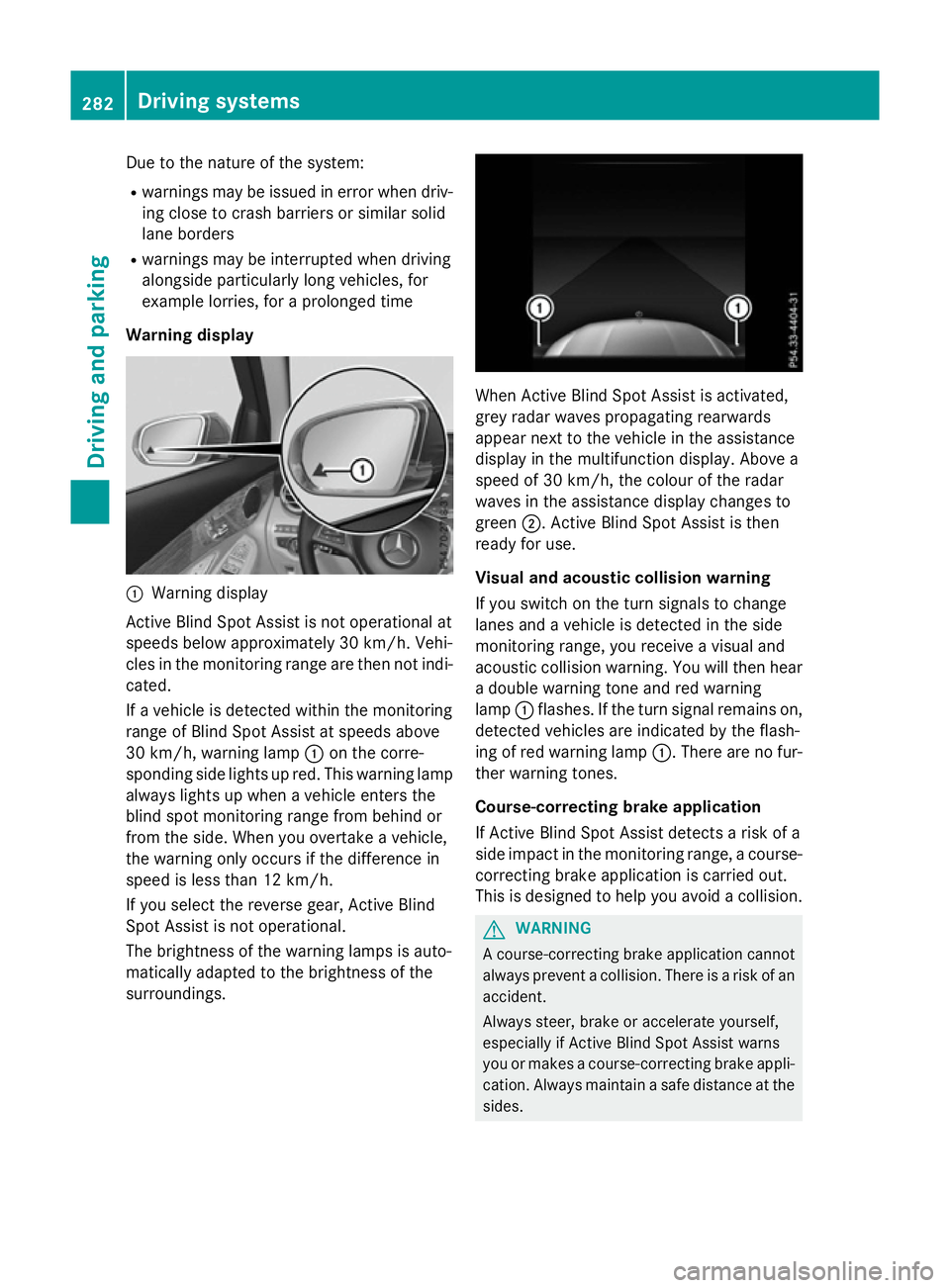
surroundings. When Active Blind Spot Assist is activated,
grey radar waves propagating rearwards
appear next to the vehicle in the assistance
display in the multifunction display. Above a
speed of 30 km/h, the colour of the radar
waves in the assistance display changes to
green ;. Active Blind Spot Assist is then
ready for use.
Visual and acoustic collision warning
If you switch on the turn signals to change
lanes and a vehicle is detected in the side
monitoring range, you receive a visual and
acoustic collision warning. You will then hear a double warning tone and red warning
lamp :flashes. If the turn signal remains on,
detected vehicles are indicated by the flash-
ing of red warning lamp :. There are no fur-
ther warning tones.
Course-correcting brake application
If Active Blind Spot Assist detects a risk of a
side impact in the monitoring range, a course- correcting brake application is carried out.
This is designed to help you avoid a collision. G
WARNING
A course-correcting brake application cannot always prevent a collision. There is a risk of an
accident.
Always steer, brake or accelerate yourself,
especially if Active Blind Spot Assist warns
you or makes a course-correcting brake appli-
cation. Always maintain a safe distance at the sides. 282
Driving systemsDriving an
d parking
Page 286 of 497
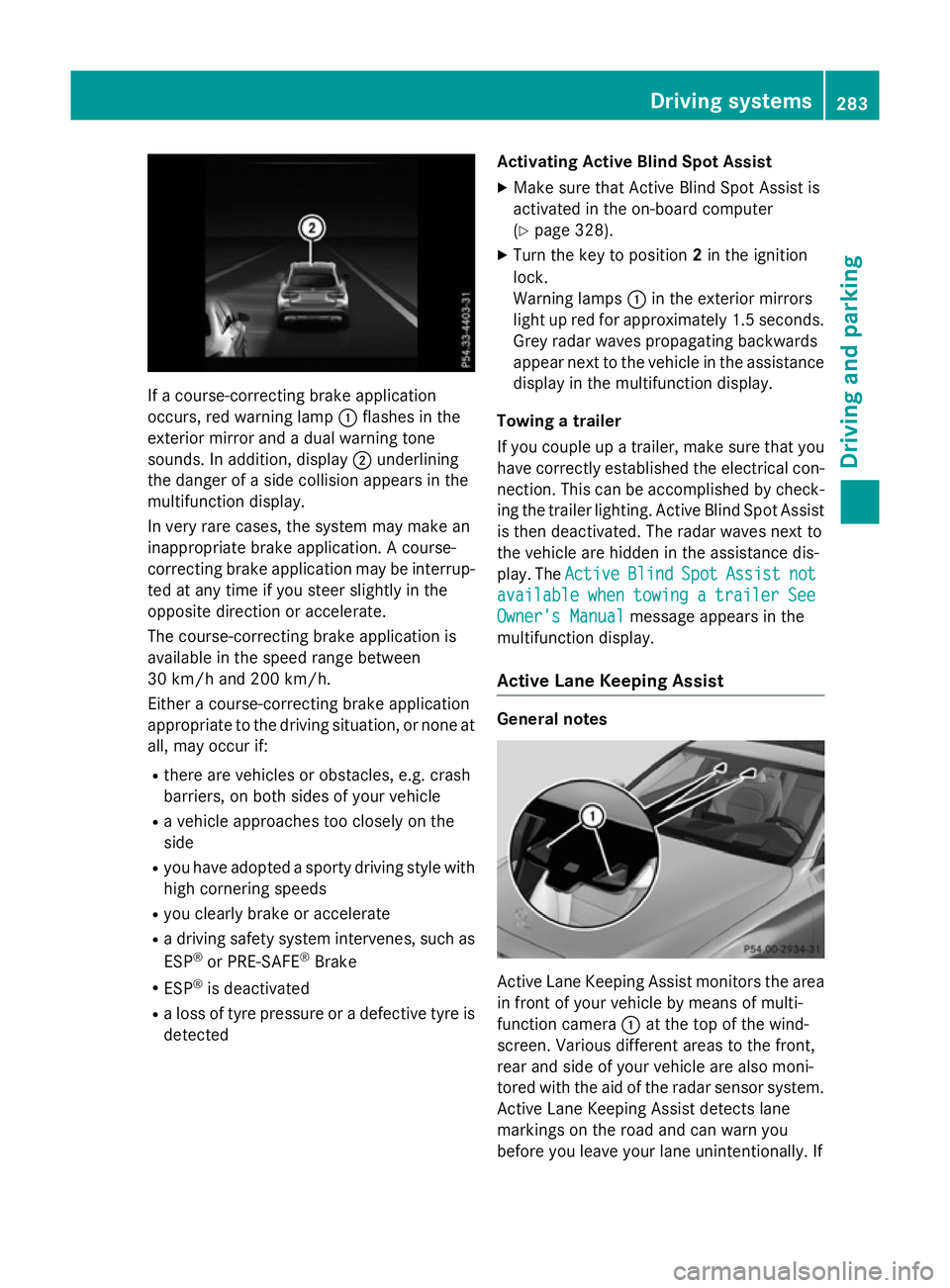
If a course-correcting brake application
occurs, red warning lamp :flashes in the
exterior mirror and a dual warning tone
sounds. In addition, display ;underlining
the danger of a side collision appears in the
multifunction display.
In very rare cases, the system may make an
inappropriate brake application. A course-
correcting brake application may be interrup-
ted at any time if you steer slightly in the
opposite direction or accelerate.
The course-correcting brake application is
available in the speed range between
30 km/h and 200 km/h.
Either a course-correcting brake application
appropriate to the driving situation, or none at all, may occur if:
R there are vehicles or obstacles, e.g. crash
barriers, on both sides of your vehicle
R a vehicle approaches too closely on the
side
R you have adopted a sporty driving style with
high cornering speeds
R you clearly brake or accelerate
R a driving safety system intervenes, such as
ESP ®
or PRE-SAFE ®
Brake
R ESP ®
is deactivated
R a loss of tyre pressure or a defective tyre is
detected Activating Active Blind Spot Assist
X Make sure that Active Blind Spot Assist is
activated in the on-board computer
(Y page 328).
X Turn the key to position 2in the ignition
lock.
Warning lamps :in the exterior mirrors
light up red for approximately 1.5 seconds. Grey radar waves propagating backwards
appear next to the vehicle in the assistance
display in the multifunction display.
Towing a trailer
If you couple up a trailer, make sure that you have correctly established the electrical con-
nection. This can be accomplished by check- ing the trailer lighting. Active Blind Spot Assist
is then deactivated. The radar waves next to
the vehicle are hidden in the assistance dis-
play. The Active
Active Blind BlindSpot
SpotAssist
Assist not
not
available
available when
whentowing
towing a
atrailer
trailer See
See
Owner's Manual
Owner's Manual message appears in the
multifunction display.
Active Lane Keeping Assist General notes
Active Lane Keeping Assist monitors the area
in front of your vehicle by means of multi-
function camera :at the top of the wind-
screen. Various different areas to the front,
rear and side of your vehicle are also moni-
tored with the aid of the radar sensor system. Active Lane Keeping Assist detects lane
markings on the road and can warn you
before you leave your lane unintentionally. If Driving systems
283Driving and parking Z
Page 288 of 497
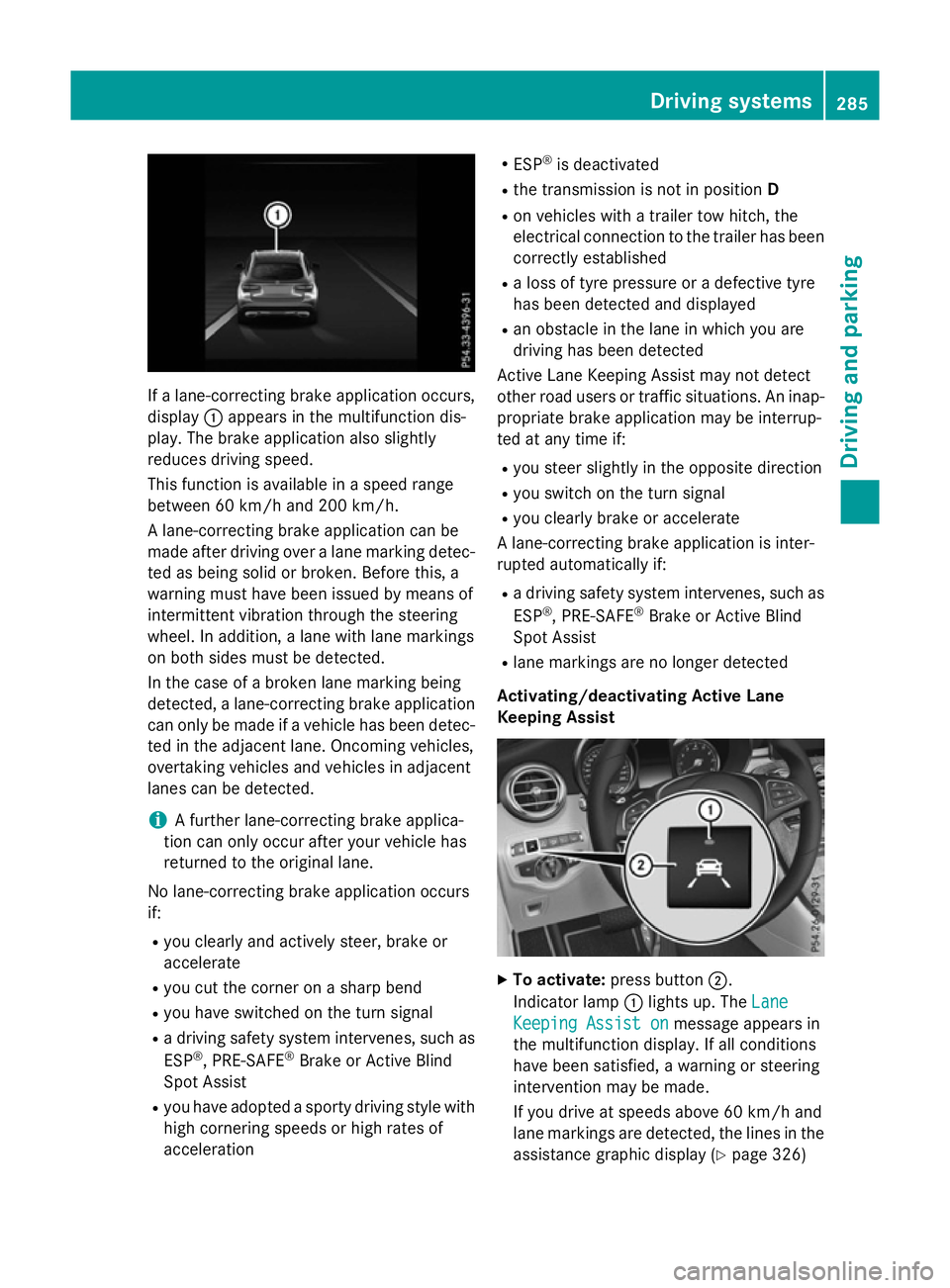
If a lane-correcting brake application occurs,
display :appears in the multifunction dis-
play. The brake application also slightly
reduces driving speed.
This function is available in a speed range
between 60 km/h and 200 km/h.
A lane-correcting brake application can be
made after driving over a lane marking detec- ted as being solid or broken. Before this, a
warning must have been issued by means of
intermittent vibration through the steering
wheel. In addition, a lane with lane markings
on both sides must be detected.
In the case of a broken lane marking being
detected, a lane-correcting brake application
can only be made if a vehicle has been detec-
ted in the adjacent lane. Oncoming vehicles,
overtaking vehicles and vehicles in adjacent
lanes can be detected.
i A further lane-correcting brake applica-
tion can only occur after your vehicle has
returned to the original lane.
No lane-correcting brake application occurs
if: R you clearly and actively steer, brake or
accelerate
R you cut the corner on a sharp bend
R you have switched on the turn signal
R a driving safety system intervenes, such as
ESP ®
, PRE-SAFE ®
Brake or Active Blind
Spot Assist
R you have adopted a sporty driving style with
high cornering speeds or high rates of
acceleration R
ESP ®
is deactivated
R the transmission is not in position D
R on vehicles with a trailer tow hitch, the
electrical connection to the trailer has been
correctly established
R a loss of tyre pressure or a defective tyre
has been detected and displayed
R an obstacle in the lane in which you are
driving has been detected
Active Lane Keeping Assist may not detect
other road users or traffic situations. An inap- propriate brake application may be interrup-
ted at any time if:
R you steer slightly in the opposite direction
R you switch on the turn signal
R you clearly brake or accelerate
A lane-correcting brake application is inter-
rupted automatically if:
R a driving safety system intervenes, such as
ESP ®
, PRE-SAFE ®
Brake or Active Blind
Spot Assist
R lane markings are no longer detected
Activating/deactivating Active Lane
Keeping Assist X
To activate: press button ;.
Indicator lamp :lights up. The Lane Lane
Keeping Assist on
Keeping Assist on message appears in
the multifunction display. If all conditions
have been satisfied, a warning or steering
intervention may be made.
If you drive at speeds above 60 km/h and
lane markings are detected, the lines in the assistance graphic display (Y page 326) Driving systems
285Driving and parking Z
Page 289 of 497
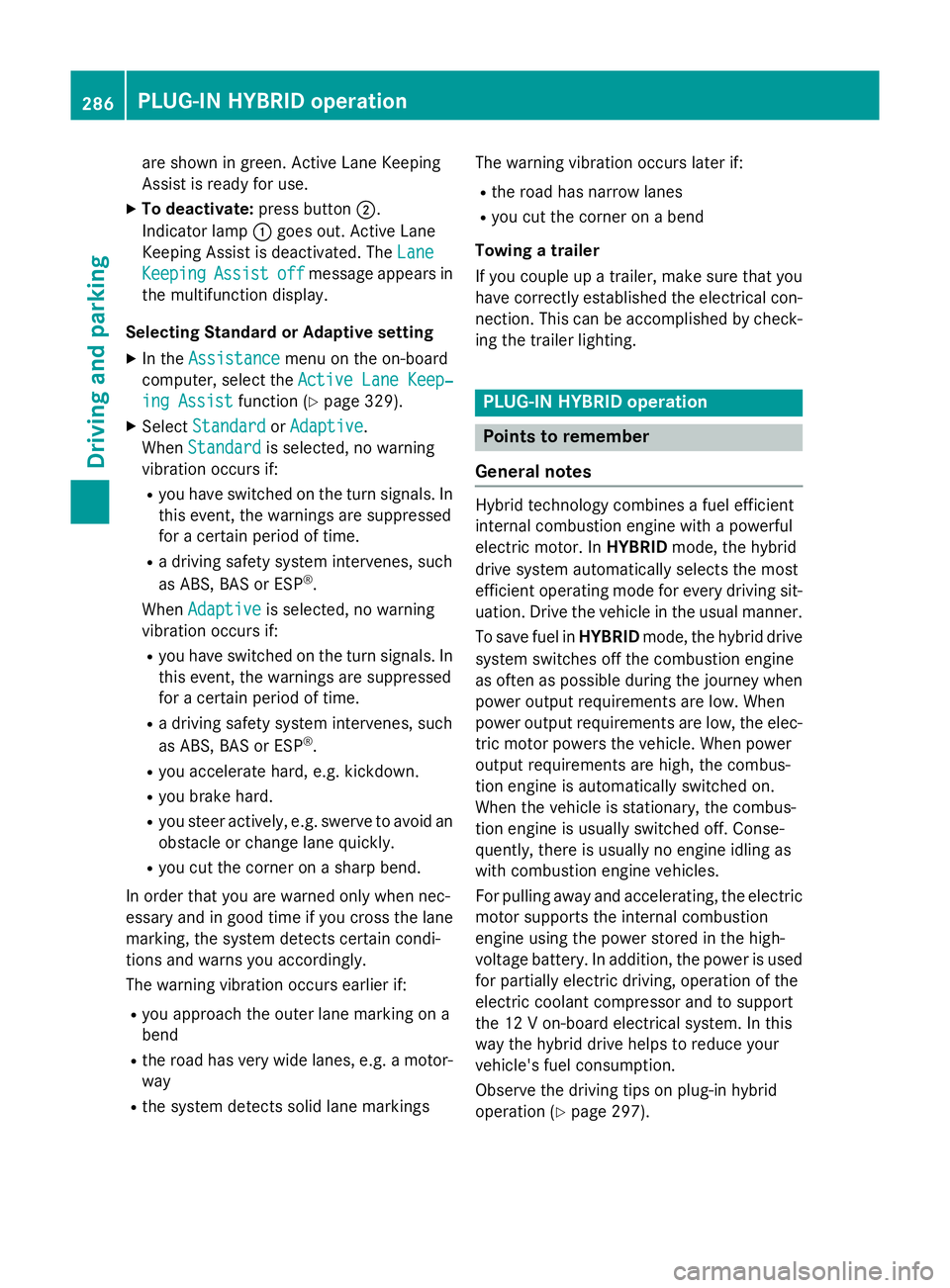
are shown in green. Active Lane Keeping
Assist is ready for use.
X To deactivate: press button;.
Indicator lamp :goes out. Active Lane
Keeping Assist is deactivated. The Lane
Lane
Keeping
Keeping Assist
Assistoff
offmessage appears in
the multifunction display.
Selecting Standard or Adaptive setting
X In the Assistance
Assistance menu on the on-board
computer, select the Active Lane Keep‐
Active Lane Keep‐
ing Assist
ing Assist function (Ypage 329).
X Select Standard
Standard orAdaptive
Adaptive.
When Standard
Standard is selected, no warning
vibration occurs if:
R you have switched on the turn signals. In
this event, the warnings are suppressed
for a certain period of time.
R a driving safety system intervenes, such
as ABS, BAS or ESP ®
.
When Adaptive
Adaptive is selected, no warning
vibration occurs if:
R you have switched on the turn signals. In
this event, the warnings are suppressed
for a certain period of time.
R a driving safety system intervenes, such
as ABS, BAS or ESP ®
.
R you accelerate hard, e.g. kickdown.
R you brake hard.
R you steer actively, e.g. swerve to avoid an
obstacle or change lane quickly.
R you cut the corner on a sharp bend.
In order that you are warned only when nec-
essary and in good time if you cross the lane marking, the system detects certain condi-
tions and warns you accordingly.
The warning vibration occurs earlier if:
R you approach the outer lane marking on a
bend
R the road has very wide lanes, e.g. a motor-
way
R the system detects solid lane markings The warning vibration occurs later if:
R the road has narrow lanes
R you cut the corner on a bend
Towing a trailer
If you couple up a trailer, make sure that you have correctly established the electrical con- nection. This can be accomplished by check-
ing the trailer lighting. PLUG
‑IN HYBRID operation Points to remember
General notes Hybrid technology combines a fuel efficient
internal combustion engine with a powerful
electric motor. In HYBRIDmode, the hybrid
drive system automatically selects the most
efficient operating mode for every driving sit-
uation. Drive the vehicle in the usual manner.
To save fuel in HYBRIDmode, the hybrid drive
system switches off the combustion engine
as often as possible during the journey when power output requirements are low. When
power output requirements are low, the elec-
tric motor powers the vehicle. When power
output requirements are high, the combus-
tion engine is automatically switched on.
When the vehicle is stationary, the combus-
tion engine is usually switched off. Conse-
quently, there is usually no engine idling as
with combustion engine vehicles.
For pulling away and accelerating, the electric
motor supports the internal combustion
engine using the power stored in the high-
voltage battery. In addition, the power is used
for partially electric driving, operation of the
electric coolant compressor and to support
the 12 V on-board electrical system. In this
way the hybrid drive helps to reduce your
vehicle's fuel consumption.
Observe the driving tips on plug-in hybrid
operation (Y page 297).286
PLUG‑
IN HYBRID operationDriving and parking
Page 290 of 497
Recuperative Brake System
If you release the accelerator pedal when the
vehicle is in motion, overrun recuperation is
initiated. The electric motor is operated as a
alternator when in overrun mode and when
you brake. Hybrid technology converts the
kinetic energy of the vehicle into electricity
and stores it in the high-voltage battery.
Observe the important safety notes for the
Recuperative Brake System (Y page 46).Important safety notes
If the engine is switched off by the ECO start/
stop function and you open the driver's door:
R a message appears in the multifunction dis-
play and
R a warning tone sounds
For further information, see (Y page 357).
All of the vehicle's systems remain active, if:
R the vehicle is stationary
R the combustion engine is switched off
R the READY-indicator in the instrument clus-
ter is lit
If you remove your foot from the brake pedal
while in transmission position D or R, the
vehicle could pull away automatically.
Observe the notes on the READY display of
the ECO start/stop function (Y page 298).
Vehicles with an electric motor generate sig-
nificantly less noise than vehicles with inter-
nal combustion engines. As a result, your
vehicle may not be heard by other road users
in certain situations. This is the case, for
example, when you are parking and your vehi-
cle is not seen by other road users.
This requires you to adopt a particularly antic-
ipatory driving style, as it is necessary to allow for the possibility that other road users may
behave unpredictably. PLUG‑IN HYBRID operation
287Driving and parking Z
Page 292 of 497
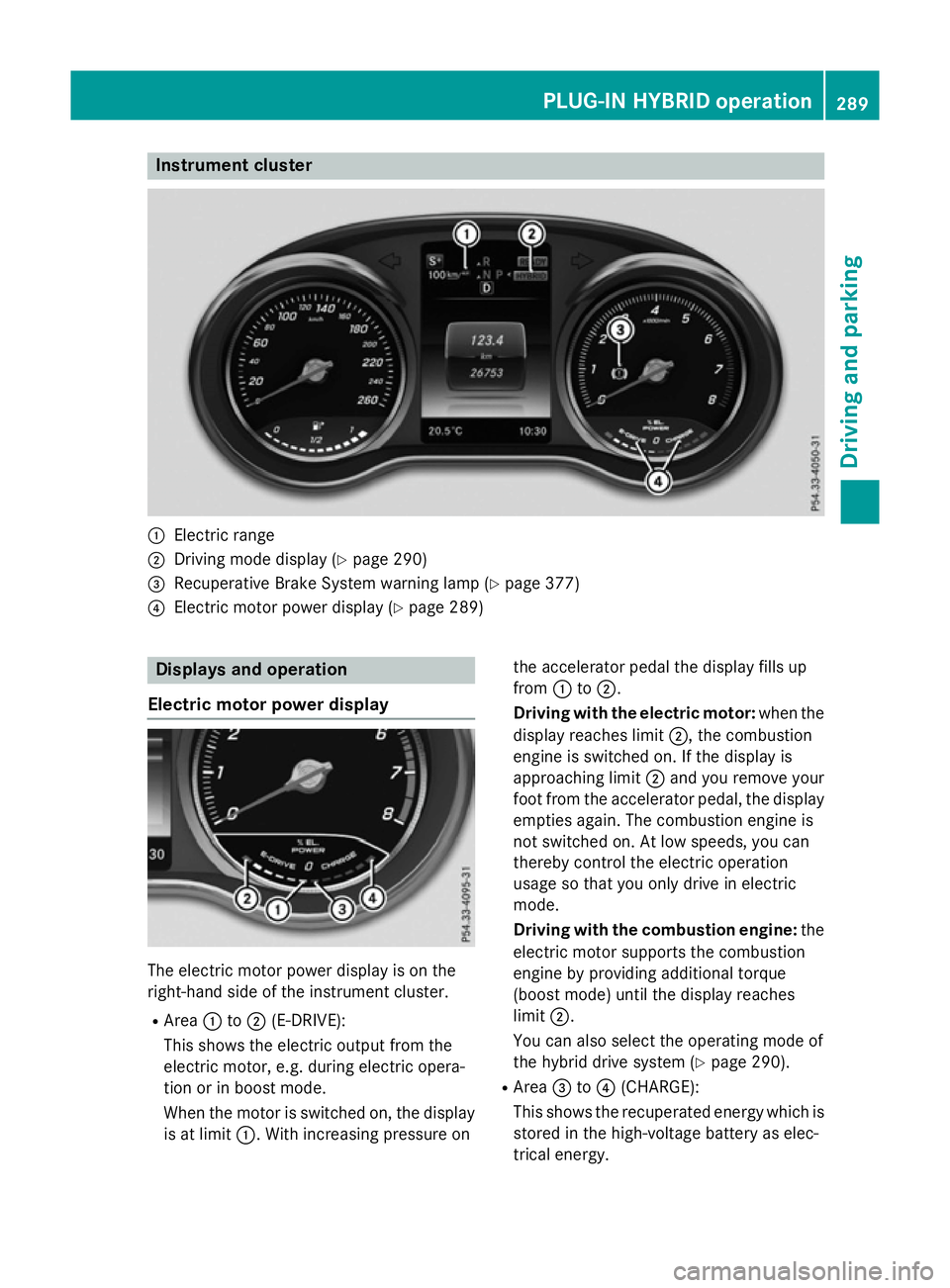
Instrument cluster
:
Electric range
; Driving mode display (Y page 290)
= Recuperative Brake System warning lamp (Y page 377)
? Electric motor power display (Y page 289)Displays and operation
Electric motor power display The electric motor power display is on the
right-hand side of the instrument cluster.
R Area :to; (E-DRIVE):
This shows the electric output from the
electric motor, e.g. during electric opera-
tion or in boost mode.
When the motor is switched on, the display
is at limit :. With increasing pressure on the accelerator pedal the display fills up
from
:to;.
Driving with the electric motor: when the
display reaches limit ;, the combustion
engine is switched on. If the display is
approaching limit ;and you remove your
foot from the accelerator pedal, the display
empties again. The combustion engine is
not switched on. At low speeds, you can
thereby control the electric operation
usage so that you only drive in electric
mode.
Driving with the combustion engine: the
electric motor supports the combustion
engine by providing additional torque
(boost mode) until the display reaches
limit ;.
You can also select the operating mode of
the hybrid drive system (Y page 290).
R Area =to? (CHARGE):
This shows the recuperated energy which is stored in the high-voltage battery as elec-
trical energy. PLUG
‑IN HYBRID operation
289Driving and parking Z
Page 293 of 497
When the display reaches limit
?, the max-
imum recuperative braking power has been exhausted. The mechanical brakes are acti-
vated.
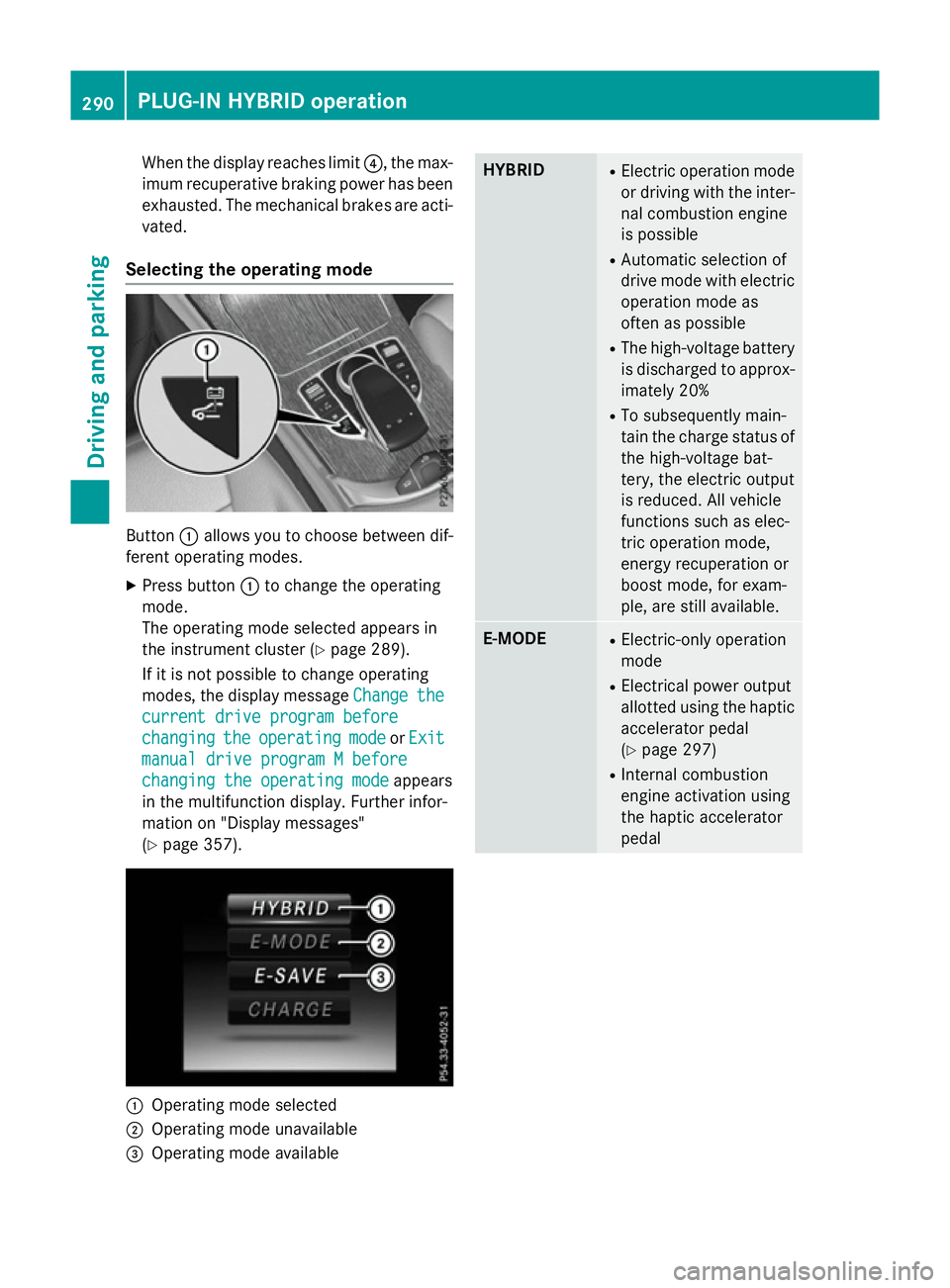
Selecting the operating mode Button
:allows you to choose between dif-
ferent operating modes.
X Press button :to change the operating
mode.
The operating mode selected appears in
the instrument cluster (Y page 289).
If it is not possible to change operating
modes, the display message Change
Change the the
current drive program before
current drive program before
changing changing the
theoperating
operating mode
modeorExit
Exit
manual drive program M before
manual drive program M before
changing the operating mode changing the operating mode appears
in the multifunction display. Further infor-
mation on "Display messages"
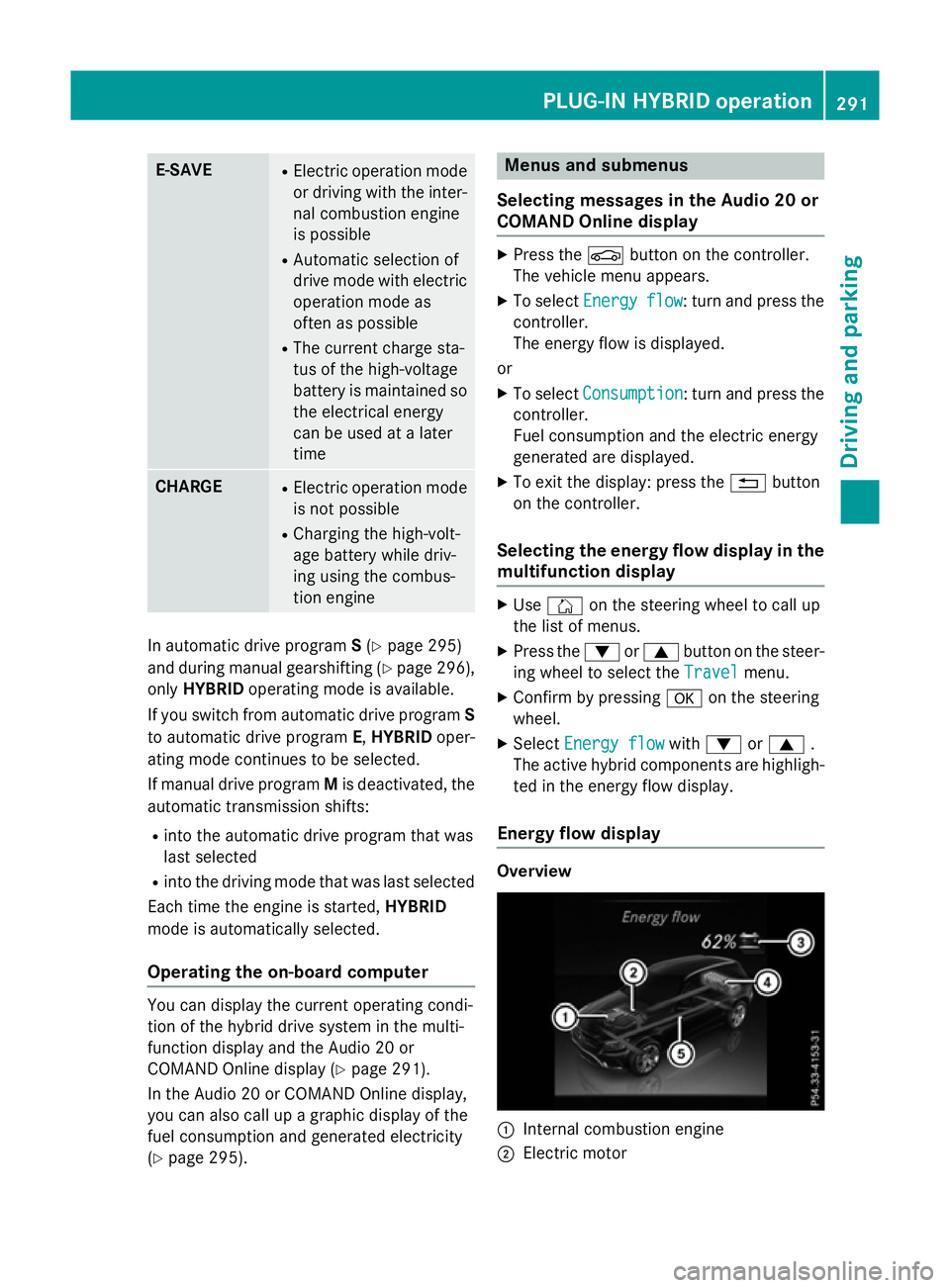
(Y page 357). :
Operating mode selected
; Operating mode unavailable
= Operating mode available HYBRID R
Electric operation mode
or driving with the inter- nal combustion engine
is possible
R Automatic selection of
drive mode with electric
operation mode as
often as possible
R The high-voltage battery
is discharged to approx-imately 20%
R To subsequently main-
tain the charge status of
the high-voltage bat-
tery, the electric output
is reduced. All vehicle
functions such as elec-
tric operation mode,
energy recuperation or
boost mode, for exam-
ple, are still available. E-MODE R
Electric-only operation
mode
R Electrical power output
allotted using the haptic
accelerator pedal
(Y page 297)
R Internal combustion
engine activation using
the haptic accelerator
pedal 290
PLUG‑IN HYBRID operationDriving and parking
Page 294 of 497
E-SAVE R
Electric operation mode
or driving with the inter- nal combustion engine
is possible
R Automatic selection of
drive mode with electric
operation mode as
often as possible
R The current charge sta-
tus of the high-voltage
battery is maintained so the electrical energy
can be used at a later
time CHARGE R
Electric operation mode
is not possible
R Charging the high-volt-
age battery while driv-
ing using the combus-
tion engine In automatic drive program
S(Y page 295)
and during manual gearshifting (Y page 296),
only HYBRID operating mode is available.
If you switch from automatic drive program S
to automatic drive program E,HYBRID oper-
ating mode continues to be selected.
If manual drive program Mis deactivated, the
automatic transmission shifts:
R into the automatic drive program that was
last selected
R into the driving mode that was last selected
Each time the engine is started, HYBRID
mode is automatically selected.
Operating the on-board computer You can display the current operating condi-
tion of the hybrid drive system in the multi-
function display and the Audio 20 or
COMAND Online display (Y page 291).
In the Audio 20 or COMAND Online display,
you can also call up a graphic display of the
fuel consumption and generated electricity
(Y page 295). Menus and submenus
Selecting messages in the Audio 20 or
COMAND Online display X
Press the Øbutton on the controller.
The vehicle menu appears.
X To select Energy Energyflow
flow: turn and press the
controller.
The energy flow is displayed.
or
X To select Consumption Consumption: turn and press the
controller.
Fuel consumption and the electric energy
generated are displayed.
X To exit the display: press the %button
on the controller.
Selecting the energy flow display in the multifunction display X
Use Ñ on the steering wheel to call up
the list of menus.
X Press the :or9 button on the steer-
ing wheel to select the Travel Travelmenu.
X Confirm by pressing aon the steering
wheel.
X Select Energy flow
Energy flow with: or9 .
The active hybrid components are highligh- ted in the energy flow display.
Energy flow display Overview
:
Internal combustion engine
; Electric motor PLUG‑
IN HYBRID operation
291Driving and parking Z