tailgate MERCEDES-BENZ GLC SUV 2015 Owners Manual
[x] Cancel search | Manufacturer: MERCEDES-BENZ, Model Year: 2015, Model line: GLC SUV, Model: MERCEDES-BENZ GLC SUV 2015Pages: 497, PDF Size: 15.27 MB
Page 13 of 497
Cruise control ................................ 230
Display message ............................ 359
Distronic Plus ................................ 236
HOLD function ..............................
.247
Lane Keeping Assist ..................... .279
Lane package ................................ 276
PARKTRONIC ................................. 254
Reversing camera .......................... 262
SPEEDTRONIC ............................... 233
Traffic Sign Assist .......................... 274
Driving tips
Aquaplaning ................................... 225
Automatic transmission ................. 199
Brakes .......................................... .224
DISTRONIC PLUS ........................... 244
Downhill gradient ........................... 224
Driving abroad ............................... 138
Driving in winter ............................ .226
Driving on flooded roads ................ 226
Driving on sand .............................. 229
Driving on wet roads ..................... .225
Fuel ................................................ 222
General .......................................... 222
Icy road surfaces ........................... 226
Limited braking efficiency on sal-
ted roads ....................................... 225
New brake disks ............................ 225
New brake pads/linings ................ 225
Off-road driving .............................. 226
Running-in tips ............................... 186
Snow chains .................................. 457
Subjecting brakes to a load ........... 224
Symmetrical dipped bea m............. 138
The first 1500 km .......................... 186
Towing a trailer .............................. 303
Travelling uphill .............................. 229
Tyre ruts ........................................ 229
Wet road surface ........................... 225
DSR (Downhill Speed Regulation)
Display message ............................ 363
Function/note s............................. 248
DVD video
Operating (on-board computer) ..... 323
DYNAMIC SELECT switch
Automatic transmission ................. 195
Climate control (THERMATIC 2-
zone) .............................................. 159 Climate control
(THERMOTRONIC) .......................... 162
PLUG-IN HYBRID operation ............ 295 E
EASY-ENTRY feature Function/note s............................. 130
EASY-EXIT feature
Function/note s............................. 130
EASY-PACK luggage compartment
management system ........................ 399
EBD (electronic brake force distri-
bution)
Display message ............................ 339
Function/note s................................ 87
ECO display
Function/note s............................. 223
On-board computer ....................... 318
ECO start/stop function
Automatic engine start .................. 192
Automatic engine switch-off .......... 192
Climate control
(THERMOTRONIC ).......................... 162
Deactivating/activating ................. 193
General information ....................... 192
Important safety notes .................. 191
Introduction ................................... 191
Electromagnetic compatibility
Declaration of conformity ................ 27
Emergency
Automatic measures after an acci-
dent ................................................. 65
Emergency key
Unlocking the driver's door ............ 102
Emergency key element
Function/note s................................ 97
Inserting .......................................... 97
Locking vehicle .............................. 103
Removing ......................................... 97
Emergency release
Driver's door .................................. 102
Emergency spare wheel
General notes ................................ 475
Important safety notes .................. 474
Technical data ............................... 476
Emergency unlocking
Tailgate .......................................... 109 10
Index
Page 22 of 497
Introduction .....................................46
Warning lamp ................................. 383
Warning lamp (function) ...................47
Rev counter ........................................ 313
Reversing camera
Cleaning instructions ..................... 425
Displays in the Audio display ......... 263
Displays in the COMAND display ... 263
Function/notes ............................ .262
Switching on/off ........................... 263
Reversing feature
Panorama sliding sunroof .............. 114
Roller sunblinds ............................ .116
Side windows ................................. 110
Tailgate .......................................... 104
Reversing lamp
Changing bulbs .............................. 148
Reversing lamp (display message) .. 352
Roller sunblind
Panorama sliding sunroof .............. 115
Roller sunblinds (panorama sliding
sunroof)
Operating ....................................... 116
Roof carrier ........................................ 402
Roof lining and carpets (cleaning
instructions) ...................................... 428
Roof load (maximum) ........................ 488S
Safety Children in the vehicle ..................... 65
Hybrid drive system ......................... 44
see Operating safety
Safety net
Attaching ....................................... 398
Important safety information ......... 398
Safety notes
Hybrid vehicles ................................ 44
SD memory card
Selecting ........................................ 323
Seat
Folding the backrest (rear com-
partment) forwards/back ...... 393, 394
Seat belt
Centre rear-compartment sea t........ 51
Correct usage .................................. 50 Seat belts
Adjusting the driver's and front-
passenger seat belt ......................... 52
Adjusting the height ......................... 50
Cleaning ......................................... 428
Fastening ......................................... 50
Important safety guidelines ............. 49
Introduction ..................................... 48
Rear seat belt status indicator ......... 52
Releasing ......................................... 51
Warning lamp ................................. 376
Warning lamp (function) ................... 52
Seats
Adjusting (electrically) ................... 123
Adjusting (manually and electri-
cally) .............................................. 122
Adjusting the 4-way lumbar sup-
port ................................................ 125
Adjusting the head restraint .......... 123
Calling up a stored setting (mem-
ory function) .................................. 135
Cleaning the cover ......................... 427
Correct driver's seat position ........ 120
Important safety notes .................. 121
Seat heating .................................. 125
Seat heating problem .................... 127
Seat ventilation .............................. 127
Seat ventilation problem ................ 128
Storing settings (memory func-
tion) ............................................... 135
Switching seat heating on/of f....... 125
Switching the seat ventilation on/
off .................................................. 127
Section
PLUG-IN HYBRID operation ............ 286
Securing a load
see Stowage space
Securing luggage ............................... 396
Selector lever
Cleaning ......................................... 427
see Automatic transmission
Sensors (cleaning instructions) ....... 425
Service menu (on-board com-
puter) .................................................. 326
Service message
see ASSYST PLUS Index
19
Page 24 of 497
Stowage compartment
Map pockets ..................................3 92
Stowage compartments
Armrest (under) ............................ .392
Centre console .............................. 391
Cup holder ..................................... 402
Door ............................................... 392
Glove compartment ....................... 391
Important safety information ......... 390
Rear ............................................... 392
Spectacles compartment .............. .391
see Stowage areas
Stowage net ....................................... 392
Stowage space
Stowage net ................................... 392
Summer tyres
In winter ........................................ 456
Sun blind
Rear side windows ......................... 404
Sun visor ............................................ 404
Suspension settings
AIR BODY CONTROL ..................... .253
Switching the auxiliary heating/
ventilation
On/off .......................................... .179 T
Tail lamps see Lights
Tailgate
Display message ............................ 371
Emergency unlocking ..................... 109
Limiting the opening angle ............. 108
Obstruction detectio n.................... 104
Opening dimensions ...................... 488
Opening/closing ............................ 104
Opening/closing (automatically
from inside) ................................... 108
Opening/closing (automatically
from outside) ................................. 105
Opening/closing (manually from
outside) ......................................... 105
Technical data
Capacities ...................................... 480
Emergency spare wheel ................. 476
Information .................................... 478
Trailer load s................................... 491 Tyres/wheels ................................. 468
Vehicle data ................................... 488
Telephone
Accepting a call (multifunction
steering wheel) .............................. 325
Display message ............................ 374
Introduction ................................... 324
Menu (on-board computer) ............ 324
Number from the phone book ........ 325
Redialling ....................................... 326
Rejecting/ending a call ................. 325
Telephone compartment ................ 392
Temperature
Coolant (display in the instrumentcluster) .......................................... 313
Coolant (on-board computer) ......... 327
Outside temperature ...................... 313
Setting (climate control )................ 165
TEMPOMAT
Function/note s............................. 230
TIREFIT kit .......................................... 435
Tyre pressure not reached ............. 436
Tyre pressure reached ................... 437
Top Tether ............................................ 68
Total distance recorder .................... 318
Tow-away protection
Activating ......................................... 91
Deactivating ..................................... 91
Function ........................................... 91
Tow-starting
Emergency engine starting ............ 448
Important safety notes .................. 445
Towing
Important safety notes .................. 445
Notes for 4MATIC vehicles ............ 448
Transporting the vehicle ................ 448
Towing a trailer
Active Blind Spot Assist ................. 283
Active Lane Keeping Assist ............ 286
Active Parking Assist ..................... 257
Axle load, permissibl e.................... 492
ESP ®
(Electronic Stability Pro-
gram) ............................................... 86
Failure check for LEDs ................... 307
General notes ................................ 303
Pulling away with a traile r.............. 191
Swinging out the ball coupling ....... 304 Index
21
Page 45 of 497
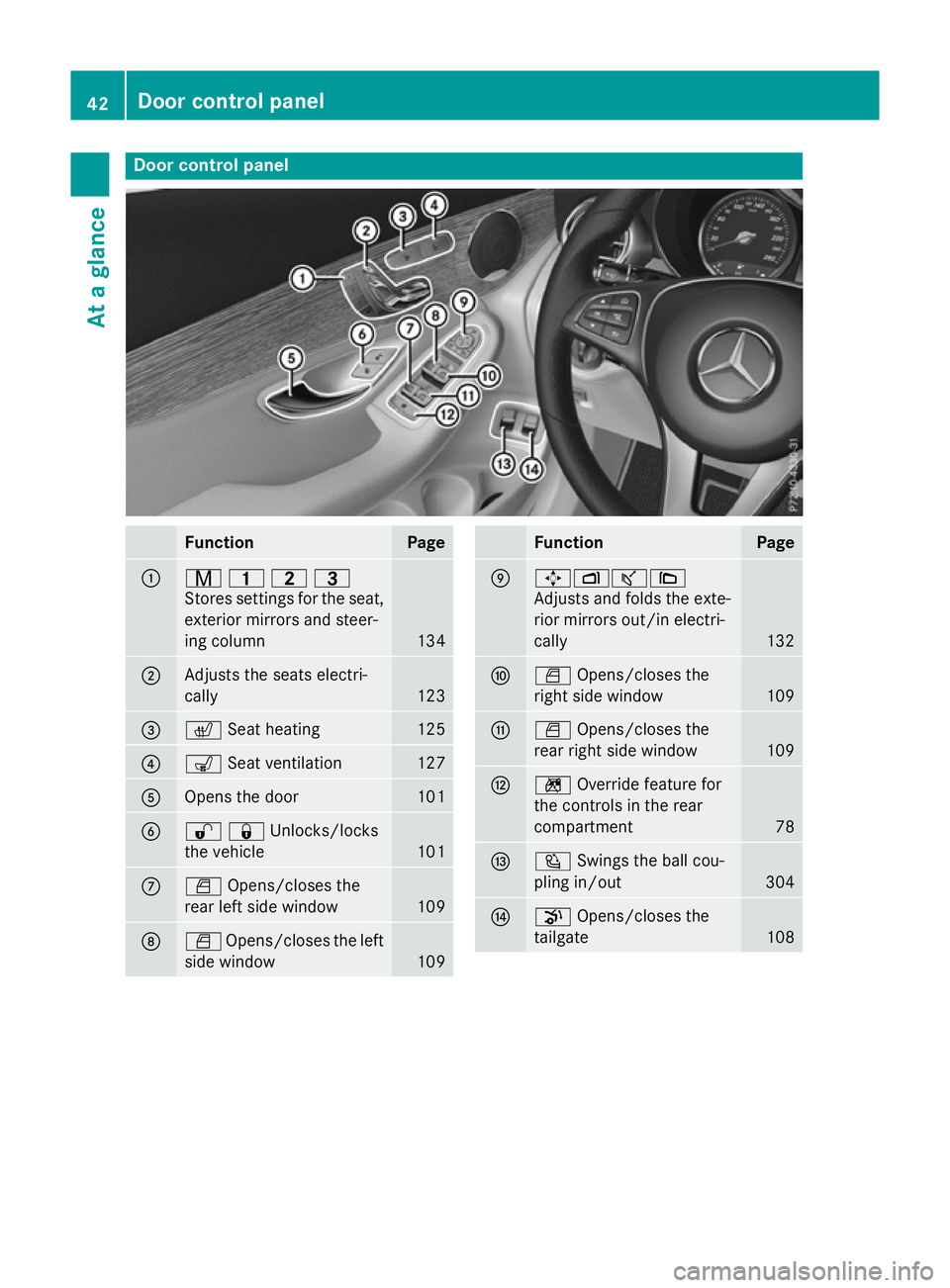
Door control panel
Function Page
:
r
45=
Stores settings for the seat, exterior mirrors and steer-
ing column 134
;
Adjusts the seats electri-
cally
123
=
c
Seat heating 125
?
s
Seat ventilation 127
A
Opens the door 101
B
%&Unlocks/locks
the vehicle 101
C
W
Opens/closes the
rear left side window 109
D
W
Opens/closes the left
side window 109 Function Page
E
7Zª\
Adjusts and folds the exte-
rior mirrors out/in electri-
cally
132
F
W
Opens/closes the
right side window 109
G
W
Opens/closes the
rear right side window 109
H
n
Override feature for
the controls in the rear
compartment 78
I
Ü
Swings the ball cou-
pling in/out 304
J
p
Opens/closes the
tailgate 10842
Door control panelAt a glance
Page 93 of 497
STEER CONTROL
General notes STEER CONTROL helps you by transmitting a
noticeable steering force to the steering
wheel in the direction required for vehicle
stabilisation.
This steering support is provided in particular
if:
R both right wheels or both left wheels are on
a wet or slippery road surface when you
brake
R the vehicle starts to skid
Important safety notes i
Observe the "Important safety notes" sec-
tion (Y page 78).
No steering support is provided from STEER
CONTROL, if:
R ESP ®
is malfunctioning
R the steering is faulty
If ESP ®
is malfunctioning, you will be assisted
further by the electrical power steering. Protection against theft
Immobiliser
The immobiliser prevents your vehicle from
being started without the correct key.
X To activate with the key: remove the key
from the ignition lock.
X To activate with KEYLESS-GO start-
function or KEYLESS-GO: switch the igni-
tion off and open the driver's door.
X To deactivate: switch on the ignition.
When leaving the vehicle, always take the key
with you and lock the vehicle. Anyone can
start the engine if a valid key has been left
inside the vehicle.
i The immobiliser is always deactivated
when you start the engine. ATA (Anti-Theft Alarm system)
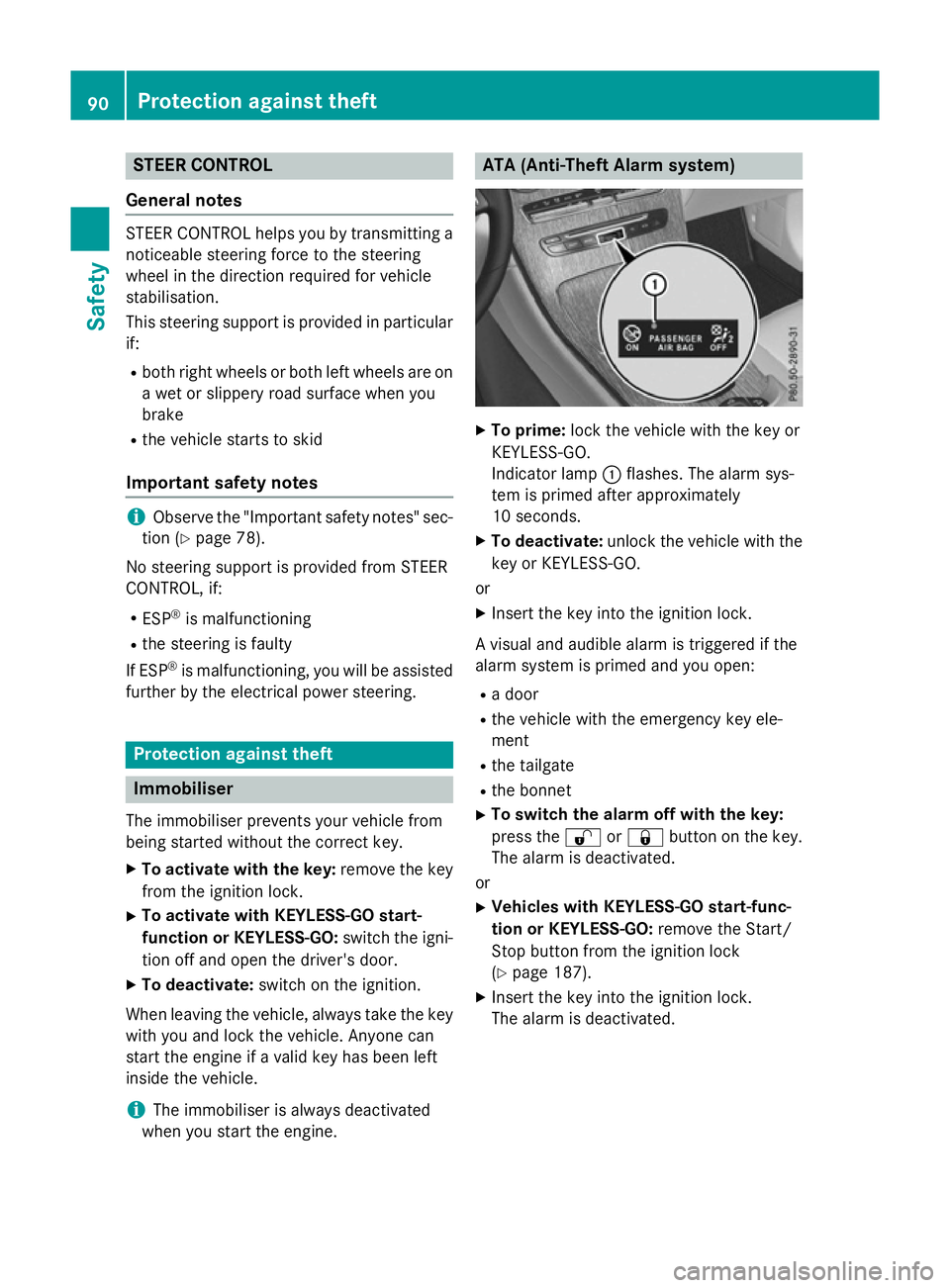
X
To prime: lock the vehicle with the key or
KEYLESS-GO.
Indicator lamp :flashes. The alarm sys-
tem is primed after approximately
10 seconds.
X To deactivate: unlock the vehicle with the
key or KEYLESS-GO.
or X Insert the key into the ignition lock.
A visual and audible alarm is triggered if the
alarm system is primed and you open: R a door
R the vehicle with the emergency key ele-
ment
R the tailgate
R the bonnet
X To switch the alarm off with the key:
press the %or& button on the key.
The alarm is deactivated.
or X Vehicles with KEYLESS-GO start-func-
tion or KEYLESS-GO: remove the Start/
Stop button from the ignition lock
(Y page 187).
X Insert the key into the ignition lock.
The alarm is deactivated. 90
Protection against theftSafety
Page 94 of 497
X
To deactivate the alarm using KEYLESS-
GO: grasp the outside door handle. The key
must be outside the vehicle.
The alarm is deactivated.
or
X Press the Start/Stop button on the dash-
board. The key must be inside the vehicle.
The alarm is deactivated.
The alarm is not switched off, even if you
close the open door that has triggered it, for
example.
i If the alarm stays on for more than
30 second s,the Mercedes‑Benz emer-
gency call system automatically sends a
message to the Customer Assistance
Centre. This is done by means of a text
message or a data connection.
The emergency call system sends a mes-
sage or establishes a data connection pro-
vided that:
R you have subscribed to the
Mercedes‑ Benz emergency call system
R the Mercedes‑ Benz emergency call sys-
tem has been activated properly
R the necessary mobile phone network is
available Tow-away protection
Function An audible and visual alarm is triggered if your
vehicle's angle of inclination is altered while
tow-away protection is primed. This can occur if the vehicle is jacked up on one side, for
example.
Priming X
Make sure that: R
the doors are closed
R the tailgate is closed
Only then is the tow-away protection
primed.
X Lock the vehicle with the key or KEYLESS-
GO.
Tow-away protection is primed after
approximately 60 second s.
De activating X
Unlock the vehicle with the key or KEY-
LESS-GO.
or X Insert the key into the ignition lock.
Tow-away protection is deactivated auto-
matically.
Deactivating You can deactivate the tow-away protection
using COMAND Online or Audio 20. Informa-
tion about deactivating the interior motion
sensor (see the separate COMAND Online or Audio 20 operating instructions). Interior motion sensor
Function When the interior motion sensor is primed, a
visual and audible alarm is triggered if move-
ment is detected in the vehicle interior. This
can occur if someone reaches into the vehicle
interior, for example.
Priming X
Make sure that:
R the side windows are closed
R the panorama sliding sunroof is closed
R there are no objects, e.g. mascots, hang-
ing on the rear-view mirror or on the grab handles on the roof trim
This will prevent false alarms.
X Make sure that: Protection against theft
91Safety Z
Page 95 of 497
R
the doors are closed
R the panorama sliding sunroof is closed
R the tailgate is closed
Only then is the interior motion sensor
primed.
X Lock the vehicle with the key or KEYLESS-
GO.
The interior motion sensor is primed after
approximately 10 second s.
Switching off X
Unlo ck the vehicle with the key or KEY-
LESS-GO.
or X Insert the key into the ignition lock.
or X Press the Start/Stop button.
The key must be in the vehicle.
The interior motion sensor is automatically
switched off.
Deactivating You can deactivate the interior motion sensor
using COMAND Online or Audio 20. Informa-
tion about deactivating the interior motion
sensor (see the separate COMAND Online or Audio 20 operating instructions). 92
Protection against theftSafety
Page 98 of 497
ment. Otherwise, the key may not be detec-
ted, e.g. when starting the engine using the
Start/Stop button.
A check which periodically establishes a radio
connection between the vehicle and the key
determines whether a valid key is in the vehi- cle. This occurs, for example:
R when starting the engine
R whilst driving
R when the external door handles are
touched
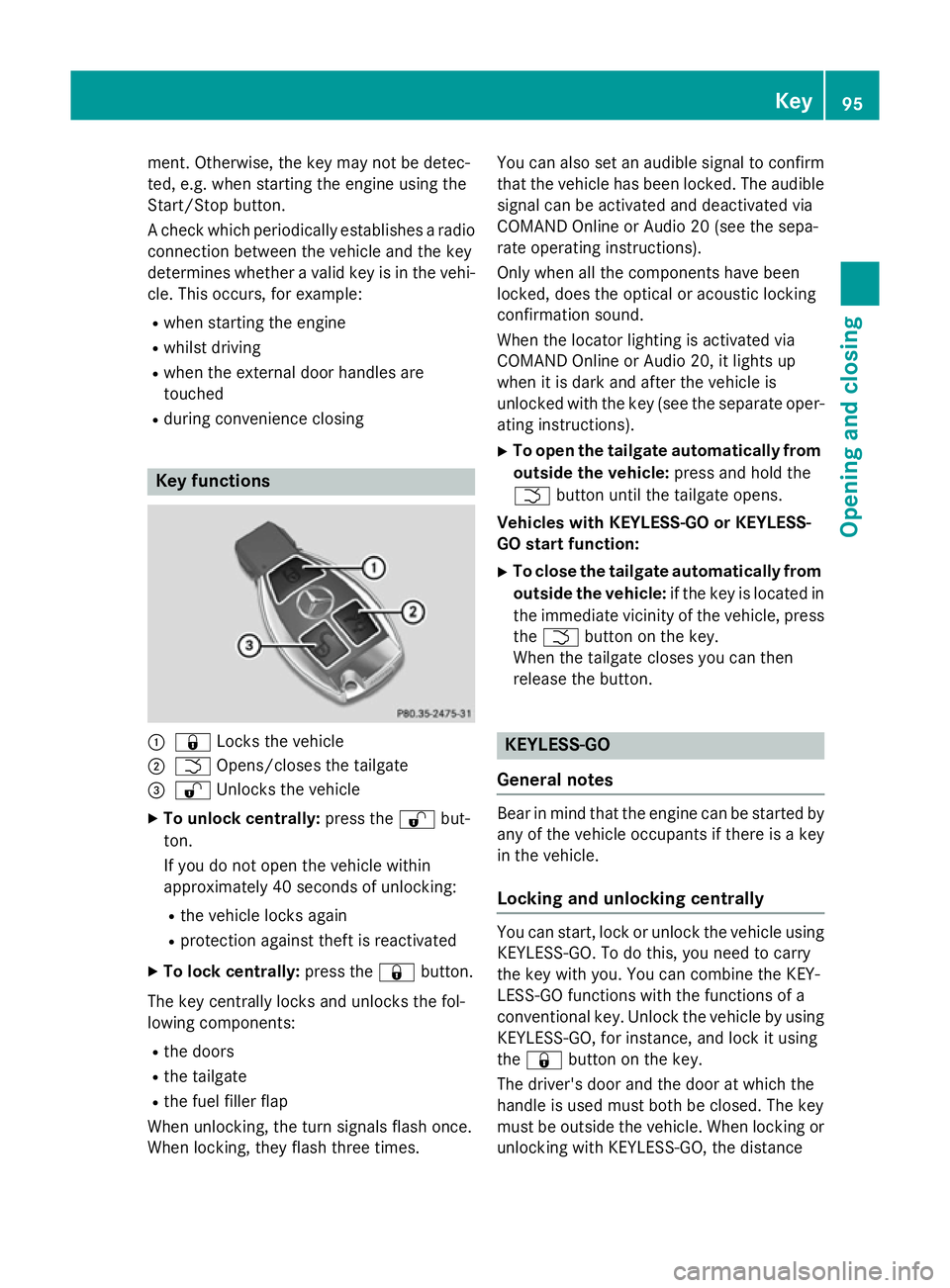
R during convenience closing Key functions
:
& Locks the vehicle
; F Opens/closes the tailgate
= % Unlocks the vehicle
X To unlock centrally: press the%but-
ton.
If you do not open the vehicle within
approximately 40 seconds of unlocking:
R the vehicle locks again
R protection against theft is reactivated
X To lock centrally: press the&button.
The key centrally locks and unlocks the fol-
lowing components:
R the doors
R the tailgate
R the fuel filler flap
When unlocking, the turn signals flash once.
When locking, they flash three times. You can also set an audible signal to confirm
that the vehicle has been locked. The audiblesignal can be activated and deactivated via
COMAND Online or Audio 20 (see the sepa-
rate operating instructions).
Only when all the components have been
locked, does the optical or acoustic locking
confirmation sound.
When the locator lighting is activated via
COMAND Online or Audio 20, it lights up
when it is dark and after the vehicle is
unlocked with the key (see the separate oper-ating instructions).
X To open the tailgate automatically from
outside the vehicle: press and hold the
F button until the tailgate opens.
Vehicles with KEYLESS-GO or KEYLESS-
GO start function:
X To close the tailgate automatically from
outside the vehicle: if the key is located in
the immediate vicinity of the vehicle, press
the F button on the key.
When the tailgate closes you can then
release the button. KEYLESS-GO
General notes Bear in mind that the engine can be started by
any of the vehicle occupants if there is a key
in the vehicle.
Locking and unlocking centrally You can start, lock or unlock the vehicle using
KEYLESS-GO. To do this, you need to carry
the key with you. You can combine the KEY-
LESS-GO functions with the functions of a
conventional key. Unlock the vehicle by using
KEYLESS-GO, for instance, and lock it using
the & button on the key.
The driver's door and the door at which the
handle is used must both be closed. The key
must be outside the vehicle. When locking or unlocking with KEYLESS-GO, the distance Key
95Opening and closing Z
Page 99 of 497
between the key and the corresponding door
handle must not be greater than 1 m.
A brief radio connection between the vehicle and the key determines whether a valid key isin, or in the direct vicinity of, the vehicle. This
occurs, for example:
R when starting the engine
R whilst driving
R when using HANDS-FREE ACCESS
R when the external door handles are
touched
R during convenience closing X
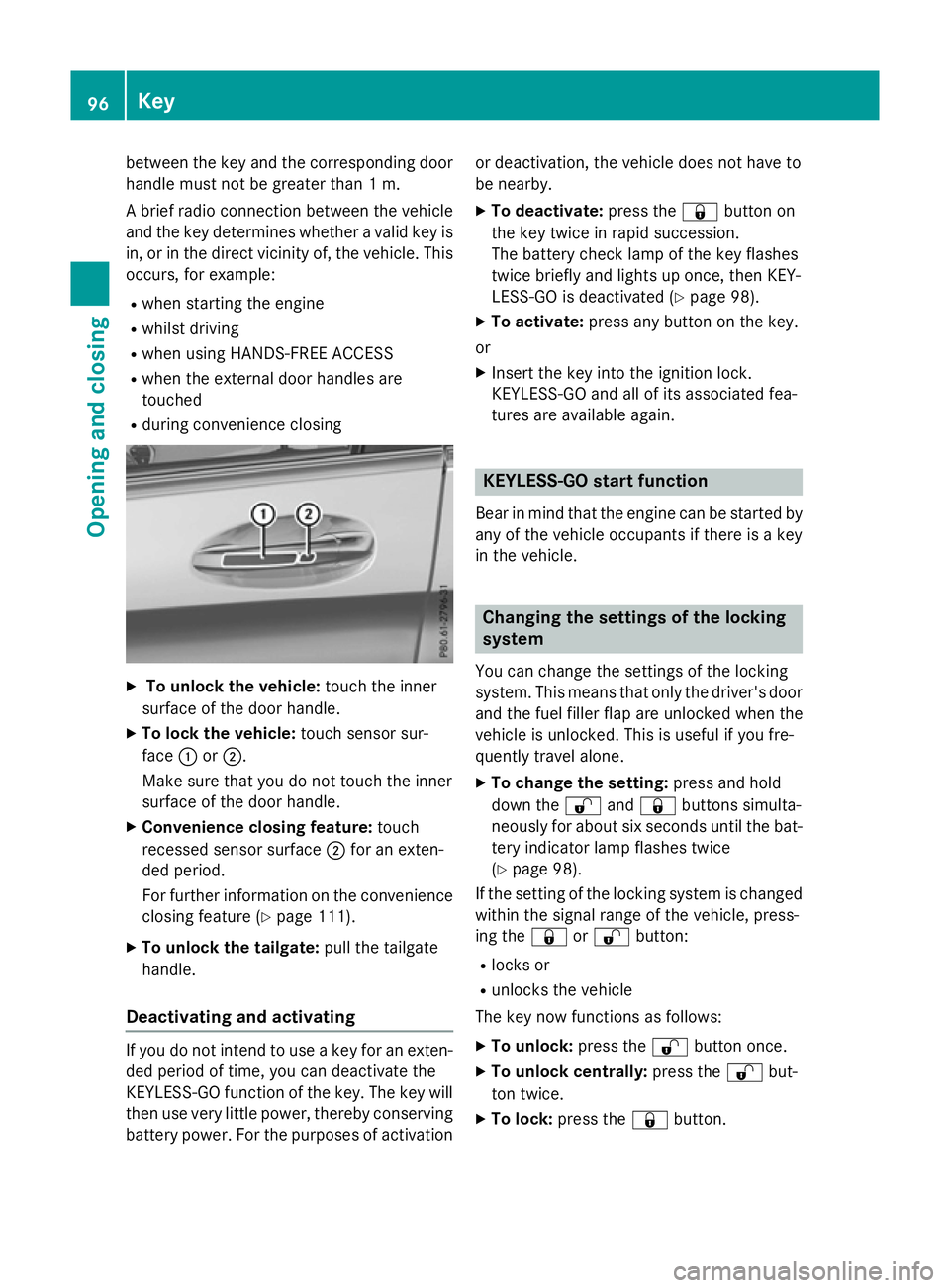
To unlock the vehicle: touch the inner
surface of the door handle.
X To lock the vehicle: touch sensor sur-
face :or;.
Make sure that you do not touch the inner
surface of the door handle.
X Convenience closing feature: touch
recessed sensor surface ;for an exten-
ded period.
For further information on the convenience closing feature (Y page 111).
X To unlock the tailgate: pull the tailgate
handle.
Deactivating and activating If you do not intend to use a key for an exten-
ded period of time, you can deactivate the
KEYLESS-GO function of the key. The key will
then use very little power, thereby conserving battery power. For the purposes of activation or deactivation, the vehicle does not have to
be nearby.
X To deactivate: press the&button on
the key twice in rapid succession.
The battery check lamp of the key flashes
twice briefly and lights up once, then KEY-
LESS-GO is deactivated (Y page 98).
X To activate: press any button on the key.
or
X Insert the key into the ignition lock.
KEYLESS-GO and all of its associated fea-
tures are available again. KEYLESS-GO start function
Bear in mind that the engine can be started by any of the vehicle occupants if there is a key
in the vehicle. Changing the settings of the locking
system
You can change the settings of the locking
system. This means that only the driver's door and the fuel filler flap are unlocked when the
vehicle is unlocked. This is useful if you fre-
quently travel alone.
X To change the setting: press and hold
down the %and& buttons simulta-
neously for about six seconds until the bat- tery indicator lamp flashes twice
(Y page 98).
If the setting of the locking system is changed
within the signal range of the vehicle, press-
ing the &or% button:
R locks or
R unlocks the vehicle
The key now functions as follows:
X To unlock: press the%button once.
X To unlock centrally: press the%but-
ton twice.
X To lock: press the &button. 96
KeyOpening and closing
Page 106 of 497
X
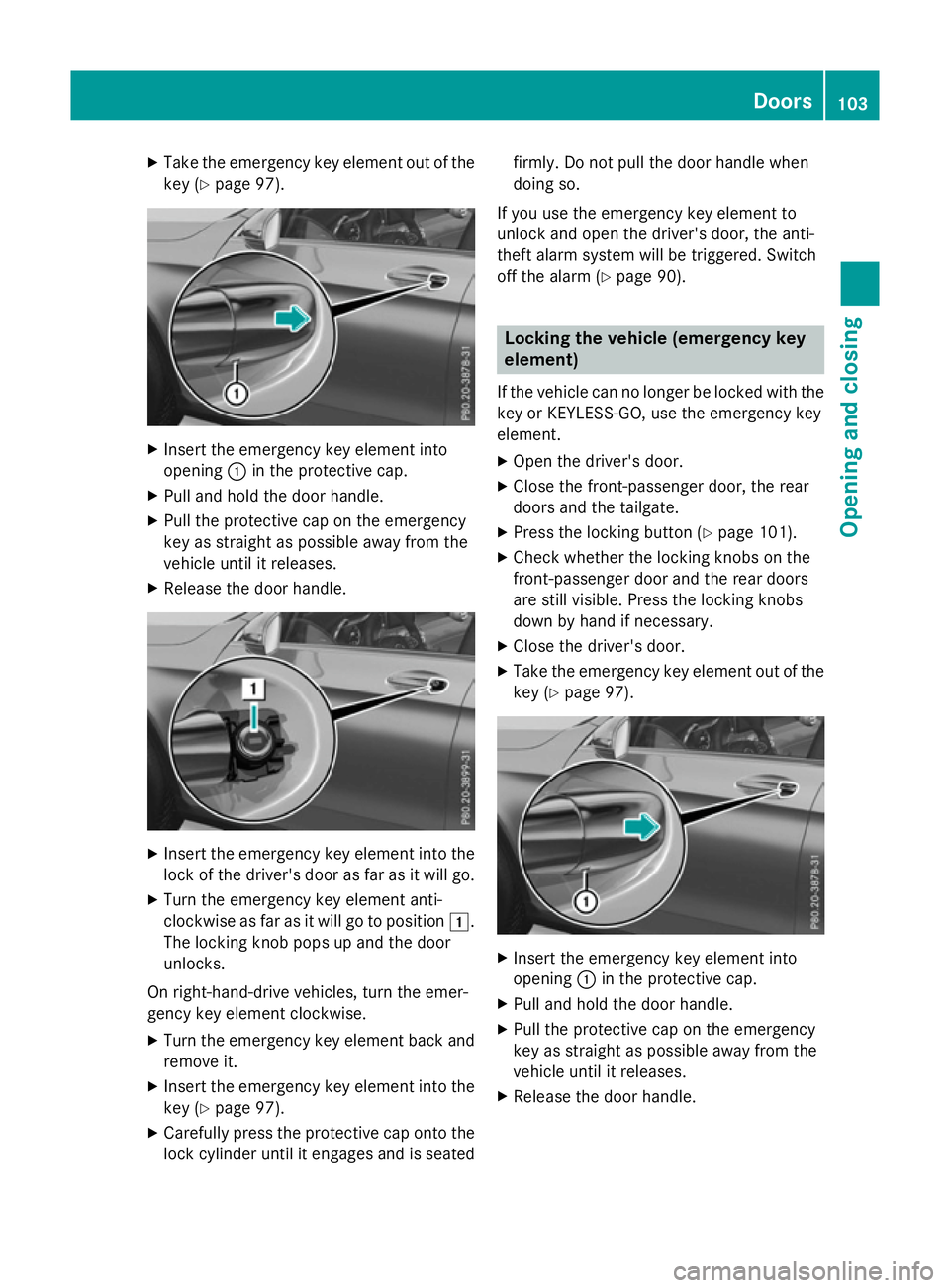
Take the emergency key element out of the
key (Y page 97). X
Insert the emergency key element into
opening :in the protective cap.
X Pull and hold the door handle.
X Pull the protective cap on the emergency
key as straight as possible away from the
vehicle until it releases.
X Release the door handle. X
Insert the emergency key element into the
lock of the driver's door as far as it will go.
X Turn the emergency key element anti-
clockwise as far as it will go to position 1.
The locking knob pops up and the door
unlocks.
On right-hand-drive vehicles, turn the emer-
gency key element clockwise.
X Turn the emergency key element back and
remove it.
X Insert the emergency key element into the
key (Y page 97).
X Carefully press the protective cap onto the
lock cylinder until it engages and is seated firmly. Do not pull the door handle when
doing so.
If you use the emergency key element to
unlock and open the driver's door, the anti-
theft alarm system will be triggered. Switch
off the alarm (Y page 90). Locking the vehicle (emergency key
element)
If the vehicle can no longer be locked with the key or KEYLESS-GO, use the emergency key
element.
X Open the driver's door.
X Close the front-passenger door, the rear
doors and the tailgate.
X Press the locking button (Y page 101).
X Check whether the locking knobs on the
front-passenger door and the rear doors
are still visible. Press the locking knobs
down by hand if necessary.
X Close the driver's door.
X Take the emergency key element out of the
key (Y page 97). X
Insert the emergency key element into
opening :in the protective cap.
X Pull and hold the door handle.
X Pull the protective cap on the emergency
key as straight as possible away from the
vehicle until it releases.
X Release the door handle. Doors
103Opening and closing Z