phone MERCEDES-BENZ GLK-Class 2012 X204 Comand Manual
[x] Cancel search | Manufacturer: MERCEDES-BENZ, Model Year: 2012, Model line: GLK-Class, Model: MERCEDES-BENZ GLK-Class 2012 X204Pages: 182, PDF Size: 4.89 MB
Page 65 of 182
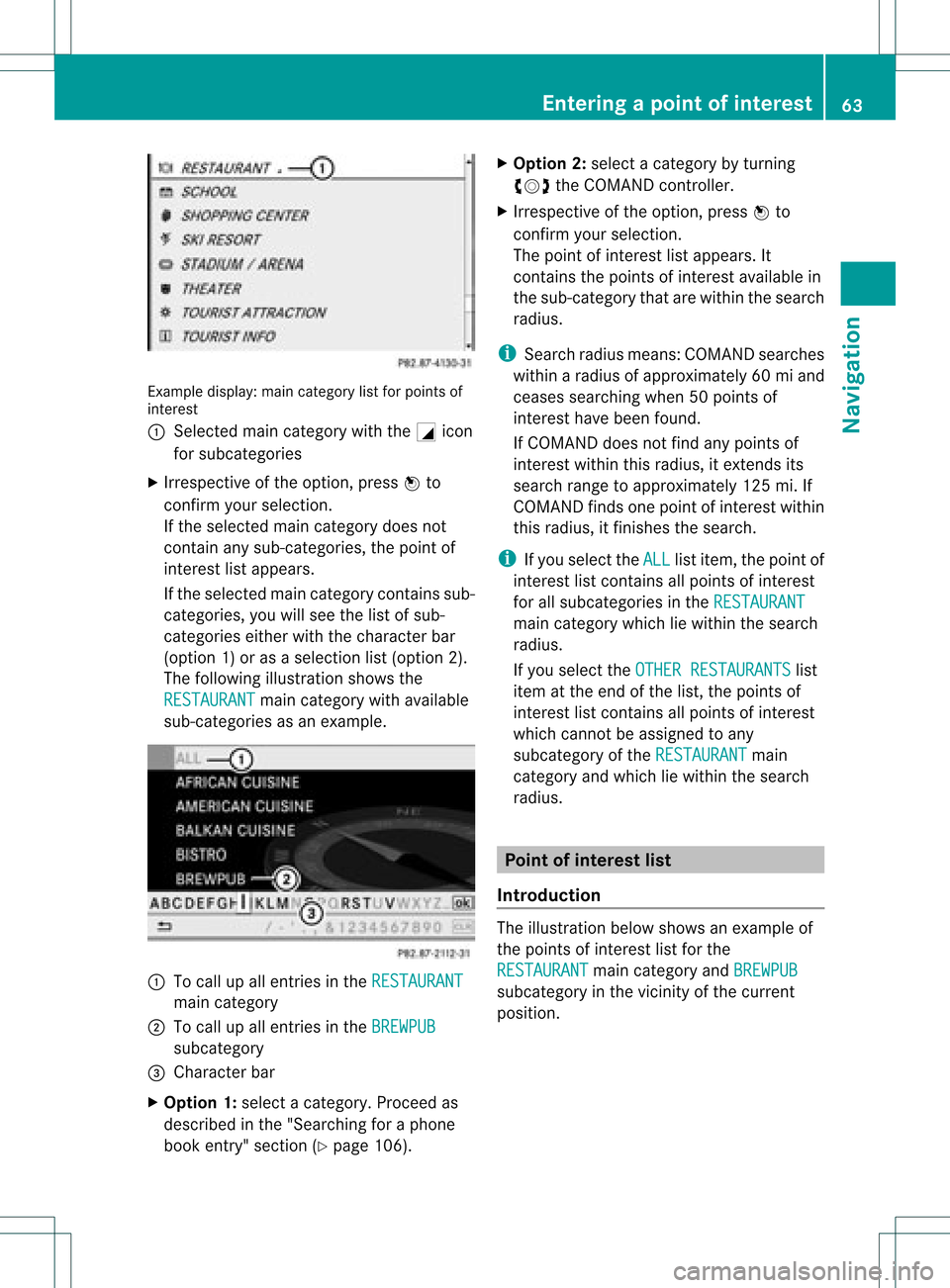
Exam
ple displ ay:m ain categor ylist forpoin tsof
int eres t
: Sele cted main categor ywith theG icon
for subc ategories
X Irr espec tiveof theopt ion,pres sW to
con firmy our selection .
If the selected maincategory doesnot
cont ainany sub-categories, thepoint of
inter estlistappears.
If the selected maincategory contains sub-
categories, youwillsee thelistofsub-
categories eitherwiththecharact erbar
(option 1)or as aselection list(option 2).
The following illustration showsthe
RESTAURANT main
category withavaila ble
sub-categories asan example. :
Tocall upallentr iesinthe RESTAURANT main
category
; Tocall upallentr iesinthe BREWPUB subcategory
= Character bar
X Option 1:select acategory. Proceedas
described inthe "Searching foraphone
book entry"section (Ypage 106). X
Option 2:select acategory byturnin g
cVd theCOMAND controller.
X Irrespect iveofthe option, pressWto
conf irmyour selection.
The point ofinteres tlist appears. It
con tain sthe point sof interest available in
the sub-c atego rythat arewithin thesearc h
radius.
i Sear chradius means:COMA NDsearc hes
within aradius ofapprox imately60miand
cease ssearc hingwhen 50point sof
int erest havebeen found.
If COMA NDdoes notfindany point sof
int erest within thisradius, itext ends its
searc hrang eto approx imately125 mi.If
COMA NDfinds one point ofint erest within
this radius, itfin ishes thesearc h.
i Ifyou selec tthe ALL list
item, thepoint of
interest listcont ains allpoints ofinterest
for allsubcategories inthe RESTAURANT main
category whichliewithin thesearch
radius.
If you select theOTHER RESTAURANTS list
item atthe end ofthe list, thepoints of
interest listcont ains allpoints ofinterest
which cannot beassigned toany
subcategory ofthe RESTAURANT main
category andwhich liewithin thesearch
radius. Point
ofinterest list
Introduction The
illustration belowshows anexample of
the points ofinterest listforthe
RESTAURANT main
category andBREWPUB subcategory
inthe vicinity ofthe current
position. Entering
apoint ofint eres t
63Navi gatio n Z
Page 66 of 182
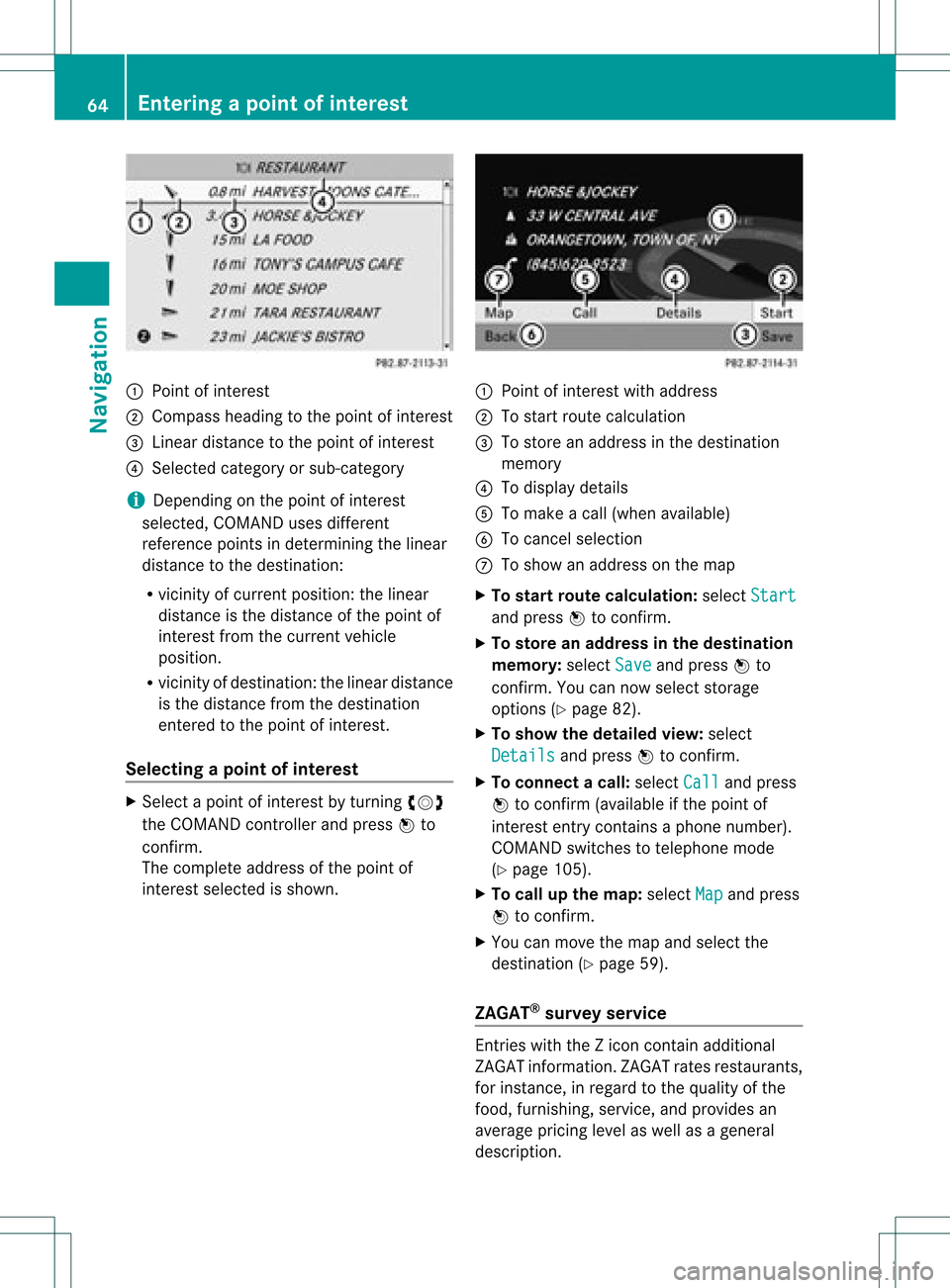
:
Point ofinter est
; Compass headingtothe point ofinter est
= Linear distanc eto the point ofinter est
? Select edcategory orsub-categor y
i Dependin gon the point ofinter est
selected, COMAND usesdifferen t
referen cepoints indetermin ingthe linear
distanc eto the destinat ion:
R vicinit yof curren tposition: thelinear
distanc eis the distanc eof the point of
inter estfrom thecurren tvehicle
position.
R vicinit yof destinat ion:thelinear distanc e
is the distanc efrom thedestinat ion
ent ered tothe point ofinter est.
Selecting apoint ofint eres t X
Sele ctapoin tof interes tby turnin gcVd
th eCOMA NDcontroller andpres sW to
con firm.
The com pleteaddre ssofthepoin tof
int erest selectedisshown . :
Poin tofintere stwith addre ss
; Tosta rtrou tecal cul ation
= Tostor ean addre ssinthe destinati on
mem ory
? Todispl aydetai ls
A Toma keacal l(w hen availabl e)
B Tocance lsel ecti on
C Tosho wan addre sson the map
X To start route calculati on:sel ect Start and
pressW toconfi rm.
X To sto rean addre ssinthe destinatio n
memo ry:select Save and
pressW to
confi rm.Youcan now select stor age
op tio ns (Ypage 82) .
X To sho wthe deta iled view :sel ect
Det ails and
pressW toconfi rm.
X To conn ectac all:select Call and
press
W toconfirm (avai lable ifthe pointof
interest entrycontains aphone numbe r).
COM AND switches totelep hone mode
(Y pag e105).
X To callup the map: select Map and
press
W toconfirm.
X You canmove themap andselect the
desti nation (Ypag e59).
ZAGA T®
survey service Entries
with the Zicon contain additiona l
ZAGAT informa tion.ZAGAT ratesrestau rants,
for instance, inrega rdtothe qualityofthe
food, furnishing,service,and provi desan
aver ageprici ngleve las wel las agenera l
descri ption. 64
En
tering apoint ofint eres tNavi gatio n
Page 73 of 182

Please
alwaysuse this feature instead of
cons ulting themap display fordirection s.
Consulting thesymbols ormap display for
direction smay cause youtodivert your
atten tionfrom driving andincrease yourrisk
of an accident .
i Audible navigation announcementsare
muted duringatelephone call.
If you have missed anannounc ement,you can
call upthe curren tannounc ementatany
time.
X To show themenu: pressWthe COMAND
cont roller.
X Select +inthe navigation systemmenu
bar byturn ingcVd theCOMAND
cont roller andpress Wtoconf irm.
Switching navigation announcements
on/off X
To switch off:press theBbutton during
an announc ement.
You willbriefly seethemessage: The driving
instructio nshave been muted .
X To switch on:press Wthe COMAND
cont roller.
X Select +inthe navigation systemmenu
bar byturn ingcVd theCOMAND
cont roller andpress Wtoconf irm.
i COMAND automatically switchesthe
navigation announcementsback onwhen:
R you have anew route calculated.
R you switch COMAND backonagain or
start theengine.
Reducing volumeduring anavig ation
anno uncemen t The
volu meofan active audio orvide osou rce
can beautomatica llyredu cedduring a
navig ationannou ncement. X
Sele ctNavi in
the mainfunction barby
sli ding ZVandturning cVdtheCOM AND
controll erand pres sW toconfirm.
X Sele ctAudio Fadeout and
pres sW to
confirm.
Depend ingonthe previ ousstatus ,the
function isswi tched onO oroff ª.
Settin gthe volume manuall y X
Adjust thevolu meusing the qcontrol
knob during anavig ationannou ncement.
or
X Sele ct+ inthe map view with the menu
show nand adjus tthe volume usingthe
q cont rolknob. Avoiding
asection oftherou te
blocked byatraf fic jam
This function bloc ksasec tiono fthe route
ahead ofyou. Youcansetthe length ofthe
blocked routesection. Ifpossible, COMAND
calculates adetour around theblocked
section ofthe route.
X To switch onnavigation mode:pressthe
g funct ionbutton.
X To show themenu: pressWthe COMAND
cont roller.
X Select Route in
the navigation system
menu barbyturning cVdtheCOMAND
cont roller andpress Wtoconfirm .
X Select Detour and
press Wtoconfirm .
X To block asection ofthe route: select
Longer or
Shorter repeatedly
andconfirm
using Wuntil thedesired sectionhasbeen
selected.
i The total length ofthe section thatcanbe
blocked isdefined bythe digital map.The
menu itemsareavaila bleaccordingly.
X To star troute calculation: selectStart and
press Wtoconfirm . Route
guidance
71Navigation Z
Page 95 of 182
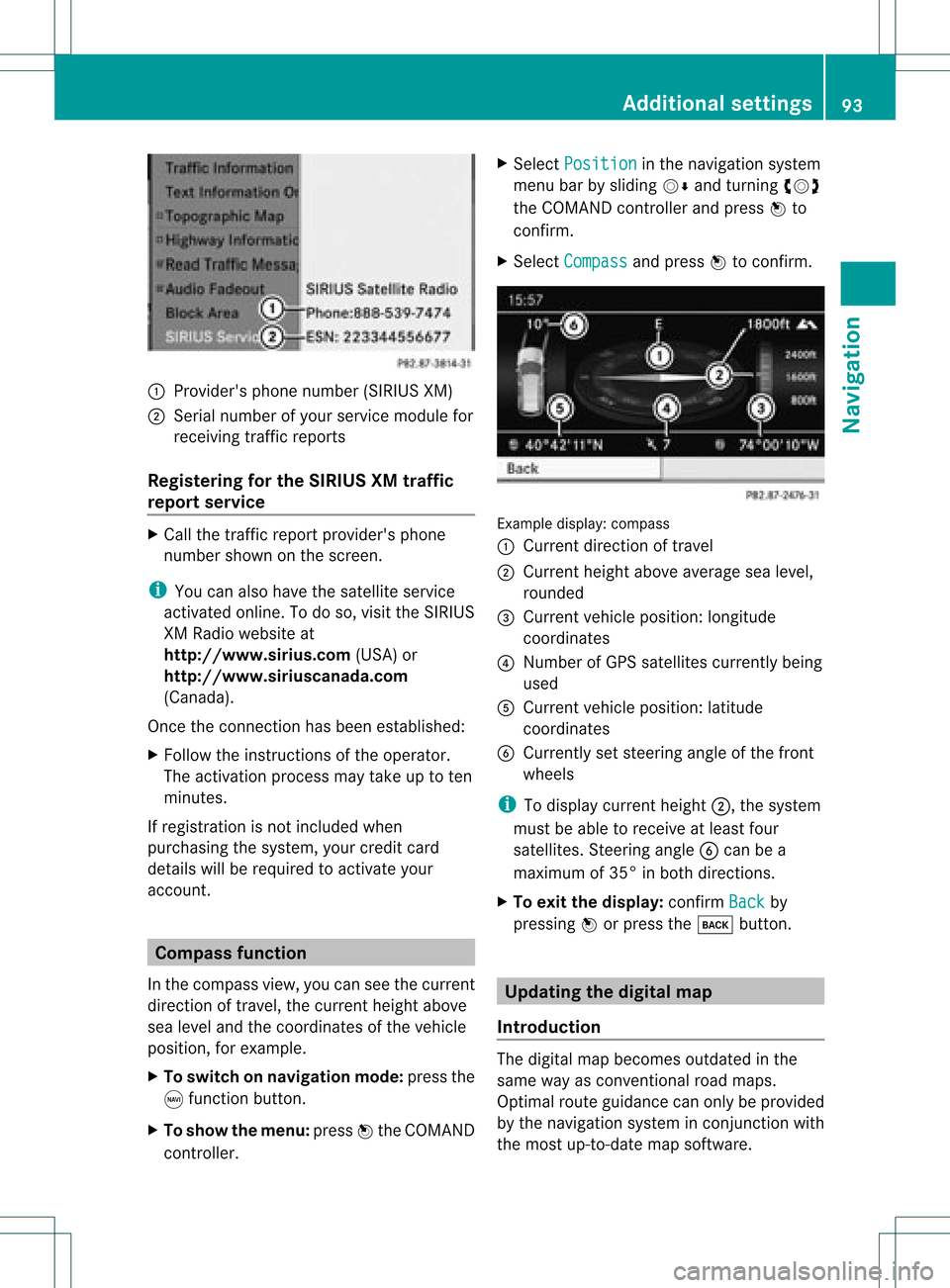
1
Provider's phonenumber (SIRIUSXM)
2 Serial number ofyour service module for
receivin gtraff icreport s
Registering forthe SIRIUS XMtraffic
repor tserv ice X
Call thetraff icrepo rtprov ider' sphon e
num bershown onthesc reen .
i You canalso have thesat ellit eser vice
act ivat edonline .Todo so, visit theSIRIUS
XM Radio website at
htt <0010002C00210021001700170017002000130009001200090015001300200003
000F000DB (USA)or
htt <0010002C00210021001700170017002000130009001200090015001300030001
000E000100040001B .com
(Canada) .
Once theconn ection hasbeen established:
X Follow theinstr uctions ofthe operator.
The activation processmaytake uptoten
minutes.
If registrat ionisnot included when
purchasing thesystem, yourcredit card
details willberequired toactivate your
account . Compass
function
In the compass view,youcan seethecurrent
direction oftravel, thecurrent heightabove
sea level andthecoordinat esofthe vehicle
position, forexample.
X To switch onnavigation mode:pressthe
g funct ionbutton .
X To show themenu: pressWthe COMAND
cont roller. X
Select Position in
the navigation system
menu barbysliding VÆandturnin gcVd
the COMAND controller andpress Wto
conf irm.
X Select Compass and
press Wtoconf irm. Example
display:compass
: Current direction oftravel
; Current heightaboveaverage sealevel,
rounded
= Current vehicleposition: longitude
coordinat es
? Number ofGPS satellites currentlybeing
used
A Current vehicleposition: latitude
coordinat es
B Currently setsteerin gangle ofthe front
wheels
i Todisplay current height;,thesystem
must beable toreceive atleast four
satellites. Steeringangle Bcan bea
maximum of35° inboth direction s.
X To exit thedisplay: confirmBack by
pressing Worpress thek button . Upda
tingthedigital map
Introdu ction The
digital mapbecomes outdatedinthe
same wayasconv ention alroad maps.
Optimal routeguidance canonly beprovided
by the navigation systeminconj unct ionwith
the most up-to- datemapsoftware. Additional
settings
93Navigation Z
Page 99 of 182
COMAN
Dfea tures <0021002100210021002100210021002100210021002100210021002100210021
002100210021002100210021002100210021002100210021002100210021V 98
General information<0021002100210021002100210021002100210021002100210021002100210021
002100210021002100210021002100210021002100210021V 98
Telephony viathe Bluet ooth®
inter-
face ........ .......... .................................... . 99
Reception andtransm ission volume 103
Telephone operation........ .......... ....... 104
Using thephone book<0021002100210021002100210021002100210021002100210021002100210021
002100210021002100210021V 106
Using calllists .................. ................. 109
Using theaddress book <0021002100210021002100210021002100210021002100210021002100210021
002100210021V 112 97Telephone
Page 100 of 182
COMAN
Dfea tures
Thes eOper atingIn st ruc tions desc ribeall
st andar dand optionalequipm enta vail able
for you rCOMAND systematthe time of
purcha se.Cou ntry-specifi cdeviation sare
possible. Pleasenotethat your COMAND
system maynotbeequipped withallthe
features described. General
information Introd
uction
Telephony viaBluetoot h®
int erface, in
con junc tion with aBluetoot h®
-c apable
mobile phone, enables youtophone viathe
Bluetoot h®
int erface.
With asuitable mobilephone, youcan usethe
hands- freesystem viathe Bluetoot h®
int erface, importcontact sfrom themobile
phone viaPBA P(Phone BookAccess Profile)
and receive vCards.
You canobtain moredetailed information
about suitable mobilephones andabout
con nectingBluetoot h®
-c apable mobile
phones toCOMAND onthe Internet 2
at
htt p://ww w.mbu sa-mobile.com. Orcall
the Mercedes- BenzCustomer Assistance
Center on
1-8 00-FOR-ME RCedes(1-80 0-367-637 2)for
the USA oron 1-8 00- 387 -0100for Canada. Safet
ynotes G
WARN
ING
A driver's attentiontothe road must alway s
be his/her primary focuswhendriving. For
your safety andthesafety ofother s,we
recom mendthatyoupull over toasafe
location andstop before placing ortakin ga
telephon ecall. Ifyou choose touse themobile
phone whiledriving, pleaseusethehandsfr ee device
andonly usethemobile phonewhen
weather, road,andtrafficcon ditions permit.
Some jurisdict ionsprohibit thedriver from
using acellular mobilephonewhiledriving a
vehicle.
Bear inmind thatataspeed ofjust 30mph
(approximat ely50km/ h),your vehicle is
cover ingadistanc eof 44 feet (approximat ely
14 m)every second. G
WARN
ING
Ex cessive electromagnet icradiation may
con stitute ahealth hazard toyourself and
other s.
There isscien tificdiscussion surroundingthe
possible healthrisksposed by
electr omagnet icfields. Youcanreduce this
risk byusing anext erior aerial.
Therefor e,only usemobile communication
equipment ifit is con nect edtothe exterior
aerial ofthe vehicle. Call
disconnection whilethevehicle is
in motion
Ac allmay bedisc onnected if:
R there isins ufficie ntnetwo rkcover age in
cer tain areas .
R you mov efrom onetrans mitter/ rec eive r
area (cell)int oano ther and nochann elsare
fr ee.
R you useaSI M car dwhic his no tcompatible
with thenetwork available.
R you areusing amobile phonewith
"Twincard" andthemobile phonewiththe
second SIMcard isalready loggedintothe
network . Operat
ingoptions
You canoperate thetelephone by:
R using theCOMAND controller:
turn cVd.
2 Only valid forUSA. 98
General
informationTelephone
Page 101 of 182
slide
XVY orZVÆ.
press W.
R pressing theKorI button andusing the
telephone keypadonCOMAND
R pressing the6 or~ button onthe
multifunction steeringwheel
R using Voice Control (seetheseparate Voice
Control System instructions)
Unless statedotherwise, thedescriptions and
illu strations inthis section refertoCOMAND. Function
restrictions
The telephone isnot ready foruse inthe
followi ngsituations:
R the telephone automaticall ytries tolog on
to anetwork. Ifno network isavail able, you
will notbeable tomake a"911" emergency
call. Ifyou attempt tomake anoutgoing
call, theNoService message
willappea r
for ashort while. 911
emergency call G
WARNING
The 911 emergency callsystem isapubli c
service. Usingitwithout duecause isa
criminal offense.
The followi ngrequirements mustbefulfill ed
for a911 emergency call:
R the mobile phonemustbeswitched on.
R anetwork mustbeavail able.
R avalid andoperational SIMcard must be
inserted inthe mobile phone.
R the mobile phoneisconn ected toCOMAND
via Bluetooth ®
.
If you cannot makeanemergency call,you
must arrange rescuemeasures yourself. X
Ent ernumbers onCOMAND (Ypage 104).
X Press theKbutton.
The telephone makestheconn ection.
X Wait forthe emergency callcent erto
respond andthen describe theemergency. Telephony
viathe Bluetooth ®
interface Condition
s
On the mobile phone For
telephony viaCOMAND's Bluetooth®
interface, aBluetooth ®
-capable mobile
phone isrequired.
i Not allmobile phones available onthe
market areequa llysuitabl e.More detailed
information onsuitabl emobile phones and
on conn ecting Bluetooth ®
-capable mobile
phones withCOMAND canbefound onthe
Intern etat
htt p://www .mbusa-mobile.com.O rcall
th eMer cedes-Ben zCust ome rAssistance
Center at
1-80 0-FOR-ME RCedes(1-800- 367-6372)
(for theUSA) orCustomer Relations at
1-80 0-387-0100(for Canada ).
The battery ofthe mobile phoneshould
alwa ysbe kept sufficiently chargedinorder
to prevent malfunctions.
In preparation fortelephoning viathe
Bluetooth ®
interface, youshould checkthe
followi ngitems onyour mobile phone(seethe
mobile phoneoperating instructions):
X Hands-Fr eeProfile
The mobile phonemustsupport Hands-
Free Profile 1.0orabove.
i Some displays(e.g. thesignal strengt h)
depend onthe supported versionofthe
Hands-Fr eeProfile.
X Bluetooth ®
visibil ity
On certain mobilephones, thedevice itself
must bemade "visible"for other devices,
as well asactivating theBluetooth ® Telephony
viathe Bluetooth ®
interface 99Telephone Z
Page 102 of 182

function
(seethemobi lephone operating
instructio ns).
X Blue tooth ®
devi cename
Every Bluetooth ®
devi cehas itsown
Blue tooth ®
devi cename. Thisdevicename
is freel ydefi nabl e,but can beidentical for
al ldevi cesfrom thesame manufa cturer.It
is therefore recommende dthat youchange
this name sothat youcan easilyrecognize
you rmobile phone (seethemobile phone
operating instructions).
X Switch onthe mobile phoneandenter the
PIN when prompted todo so(see the
mobile phoneoperating instructions).
X Act ivate Bluetooth ®
funct ionsand, where
necessary, Bluetooth®
visibility onthe
mobile phone(seethemobile phone
operating instructions).
On COMAND X
Act ivate theBluetooth ®
funct ionin
COMAND (Ypage 42). Connec
tingamobile phone
Gener alinfor mation Bef
ore usin gyour mobilephon ewith
COMA NDforthefir st tim e,you willneedto
con nectit.
When youauth orizeanew mobi lephon e,itis
con nectedautom atically.
Conn ecting com prises:
R sear ching for aBluet ooth®
-c apable mobile
phon e
R subse quentlyauth orizing it
You canconnectupto ten mobile phones.
Search ingforam obile phone X
Pres sth e÷ function butt oninCOMA ND.
X Sele ctPho ne in
thete lepho nebasic menu
by slidin gVÆ andturnin gcVd the COMA
NDcontroller andpres sW to
con firm.
X Sele ctBlu etooth Pho
nes and
pres sW to
con firm.
X Sele ctUpd ate and
pres sW tocon firm.
COMA NDsearc hesforBluet ooth®
te lepho neswith inran geand adds them to
th eBluet ooth®
telepho nelist.
The durat ionofthesearc hdepends onthe
number ofBluetoot h®
telephon eswithin
range andtheir charact eristics. Ex
ample ofdisplay: Bluetoot h®
telephon eslist
: Current lycon nected #and authoriz ed
mobile phoneY
; Mobile phonenotwithin rangebut
previously authorized(L appears ingray)
= Newly detectedmobile phonewithin
range butnot yetauthoriz ed(no icon yet
Y)
The Bluetoot h®
telephon eslist shows all
mobile phones withinrangeandallpreviously
authoriz edmobile phones, whether ornot
they areinrange.
i Ifthe Bluetoot h®
telephon eslist isfull,
you willberequested tode-author izea
mobile phone(Y page 102).IfCOMAND
does notfind your mobile phone, external
authoriz ation(Ypage 101)may be
nec essary.
i When called upagain, thetelephon elist
may nolonger showallmobile phones
because, forexample, amobile phonehas
been removed fromthevehicle inthe 100
Telephony viatheBluet ooth®
interf aceTelephone
Page 103 of 182
meantime.
Inthis case, startanew search
to upd ate the Blue tooth ®
teleph onelist.
Authorizin g(regi stering )am obile
ph one X
In theBluet ooth®
te lepho neslist,selec tthe
not yetauthorized mobilephonebyturning
cVd theCOMAND controller.
X Select Options by
sliding VYthe
COMAND controller andpress Wto
confirm .
X Select Authorize and
press Wtoconfirm .
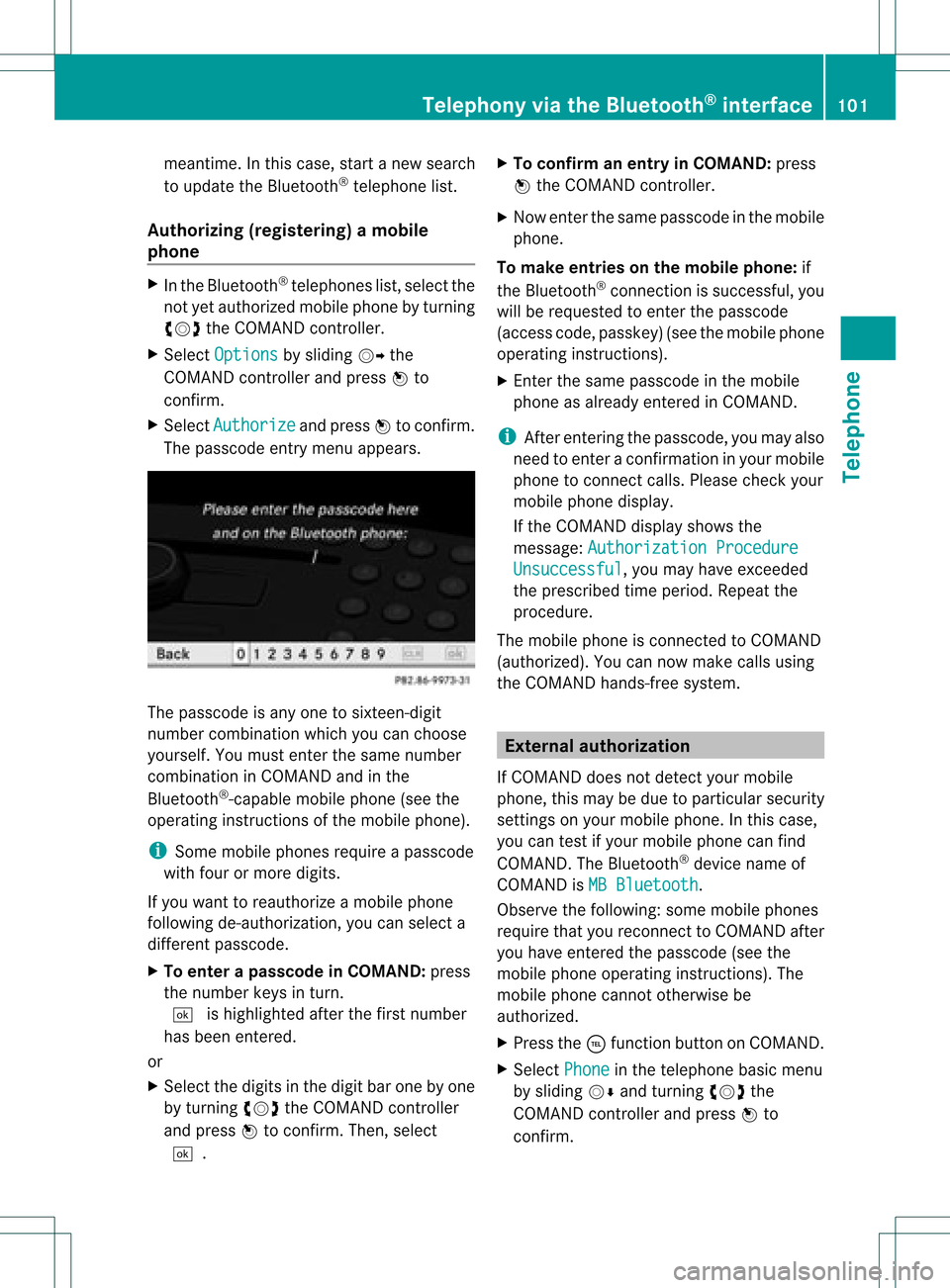
The passcode entrymenu appears. The
passcode isany one tosixteen- digit
number combination whichyoucan choose
yourself. Youmust enter thesame number
combination inCOMAND andinthe
Bluetooth ®
-capable mobilephone(seethe
operating instructionsofthe mobile phone).
i Some mobile phones requireapasscode
with fourormore digits.
If you want toreauthorize amobile phone
following <0004000500250001001500140008000F00120009001C000100140009000F000E
0032V youcan select a
different passcode.
X To enter apassc odeinCOMA ND:press
the numbe rkeys inturn.
¬ ishigh lighted after thefirst numbe r
has beenentere d.
or
X Sel ect the digits inthe digitb aroneby one
by turnin gcVd theCOMA NDcontroll er
and pres sW toconfirm .Then ,selec t
¬. X
To confir man ent ryinCOMAN D:pres s
W theCOMA NDcontroll er.
X Now enterthe same passcode inthe mobile
phone.
To make entries onthe mobile phone:if
the Bluetooth ®
conn ection issuccessful, you
will berequested toenter thepasscode
(access code,passkey) (seethemobile phone
operating instructions).
X Ent erthe same passcode inthe mobile
phone asalready entered inCOMAND.
i Afterenterin gthe passcode, youmay also
need toenter aconfirm ationinyour mobile
phone toconn ectcalls. Please checkyour
mobile phonedisplay.
If the COMAND displayshows the
message: Authorization Procedure Unsuccessful ,
you may have exceeded
the prescribed timeperiod. Repeatthe
procedure.
The mobile phoneisconn ected toCOMAND
(authorized). Youcannow make callsusing
the COMAND hands-free system. External
authorizat ion
If COMAND doesnotdetect yourmobile
phone, thismay bedue toparticular security
settin gson your mobile phone. Inthis case,
you can test ifyour mobile phonecanfind
COMAND. TheBluetooth ®
device nameof
COMAND isMB Bluetooth .
Observe thefollowing: somemobile phones
require thatyoureconn ecttoCOMAND after
you have entered thepasscode (seethe
mobile phoneoperating instructions).The
mobile phonecannot otherwise be
authorized.
X Press the÷funct ionbutton onCOMAND.
X Select Phone in
the telephone basicmenu
by sliding VÆandturning cVdthe
COMAND controller andpress Wto
confirm . Telephony
viathe Bluetooth ®
interface 101Telephone Z
Page 104 of 182

X
Sel ect Blu etooth Pho
nes and
pressW to
confi rm.
X Sel ect Update .
X Sel ect Options by
sliding VY the
CO MAND controllera nd pre ssing W to
confi rm.
X Sel ect ExternalAuthorization and
pre ssW toconfi rm.
X Star tthe Bluetoo th®
sea rch onthe mob ile
ph one (see the mob ile ph one opera ting
ins tructio ns).
X Sel ect COMAND (MB Bluetooth )
on the
mob ile ph one .
X Enter thepassco deon the mob ile ph one
wh en req uested toand then enteritin
COMA ND. Connect
inganot hermob ilephone
If you have authorizedmor eth an onemob ile
phon e,you can swit chbet ween theind ivid ual
phon es.
i You canonlyswit chtoano ther auth orized
phon eif you arenotcurr ently mak ingacall .
X Se lec tthe mobile phoneinthe Bluetooth ®
telephones listbyturning cVdthe
COMAND controller andpress Wto
confirm .
The selected mobilephoneissearched for
and conn ected ifit is within Bluetooth ®
range andifBluetooth ®
is activated.
Only onemobile phonecanbeconn ected
at any one time. Thecurrent lyconn ected
mobile phoneisindicated bythe #dot in
the Bluetooth ®
telephones list
(Y page 100). Displaying
details
X Press the÷funct ionbutton onCOMAND.
X Select Phone in
the telephone basicmenu
by sliding VÆandturning cVdthe COMAND
controller andpress Wto
confirm .
X Select Bluetooth Phones and
press Wto
confirm .
X Select thedesired mobilephoneinthe
Bluetooth ®
telephones list.
X Select Options by
sliding VYandpress
W toconfirm .
X Select Details and
press Wtoconfirm .
The following information concerning the
selected mobilephoneisshown:
R Bluetooth ®
name
R Bluetooth ®
address
R availa bilitystatus (isshown afteranew
search)
R authorization status
X To close thedetailed view:turncVd or
slide XVY theCOMAND controller. De-registering
(de-authorizing) a
mobile phone
Mercedes-Ben zUSA, LLCrecommen dsde-
authorization onboth COMAND andonthe
mobile phone. Subsequent authorization may
otherwise fail.
X Press the÷funct ionbutton onCOMAND.
X Select Phone in
the telephone basicmenu
by sliding VÆandturning cVdthe
COMAND controller andpress Wto
confirm .
X Select Bluetooth Phones and
press Wto
confirm .
X Select thedesired mobilephoneinthe
Bluetooth ®
telephones list.102
Telephony viathe Bluetooth ®
interfaceTelephone