phone MERCEDES-BENZ GLK-Class 2012 X204 Comand Manual
[x] Cancel search | Manufacturer: MERCEDES-BENZ, Model Year: 2012, Model line: GLK-Class, Model: MERCEDES-BENZ GLK-Class 2012 X204Pages: 182, PDF Size: 4.89 MB
Page 115 of 182
X
Proceed asdescribed under"Searching for
a phone bookentry" (Ypage 106). Creating
anew entry inthe address
book
You canenteraddress datadirectly intothe
address book.Ifyou store telephone
numbers inthe COMAND phonebook,these
are also saved inthe address book.Ifyou
store anavigation destination,COMAND
creates anaddress bookentrywhich includes
the complet enavigable addressdata.
X Call upthe address book(Ypage 112).
X Select New in
the address bookbysliding
VÆ andturningcVd theCOMAND
cont roller andpress Wtoconf irm.
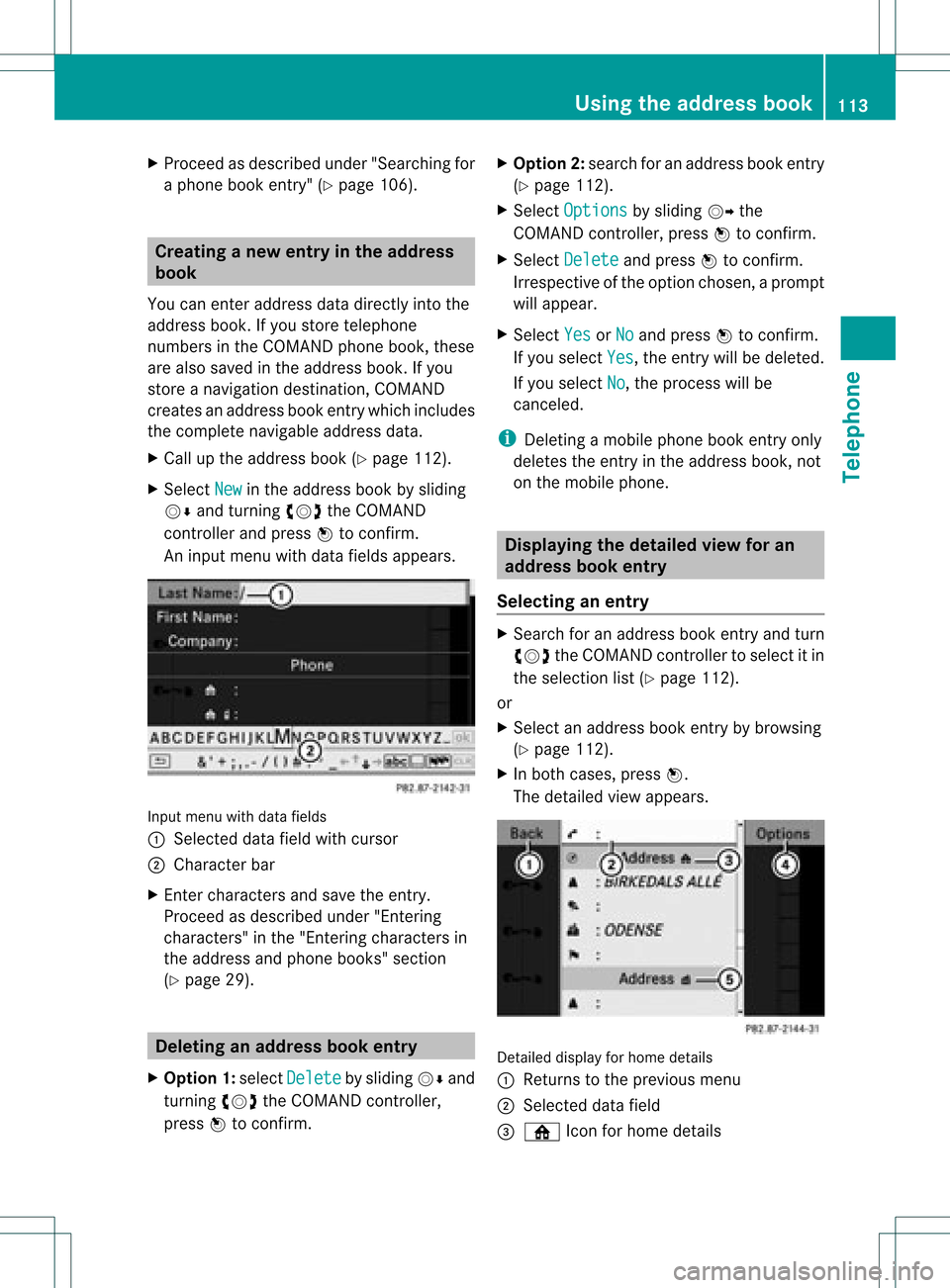
An input menu withdata fields appears. Input
menu withdata fields
: Select eddata fieldwithcursor
; Character bar
X En ter charact ersand save theentry.
Proceed asdescribed under"Entering
charact ers"inthe "Ent ering charact ersin
the address andphone books" section
(Y page 29). Deleting
anadd ress book entry
X Option 1:select Delete by
sliding VÆand
turn ingcVd theCOMAND controller,
press Wtoconf irm. X
Option 2:search foranaddress bookentry
(Y page 112).
X Select Options by
sliding VYthe
COMAND controller, pressWtoconf irm.
X Select Delete and
press Wtoconf irm.
Irrespec tiveofthe option chosen ,a prompt
will appear.
X Select Yes or
No and
press Wtoconf irm.
If you select Yes ,
the entrywill bedeleted.
If you select No ,
the process willbe
canc eled.
i Deletin gamobile phonebookentryonly
deletes theentryinthe address book,not
on the mobile phone. Displaying
thedeta iledview foran
add ress book entry
Selecting anentry X
Search foranaddress bookentryand turn
cVd theCOMAND controller toselect itin
the selection list(Ypage 112).
or
X Select anaddress bookentryby browsing
(Y page 112).
X In both cases, pressW.
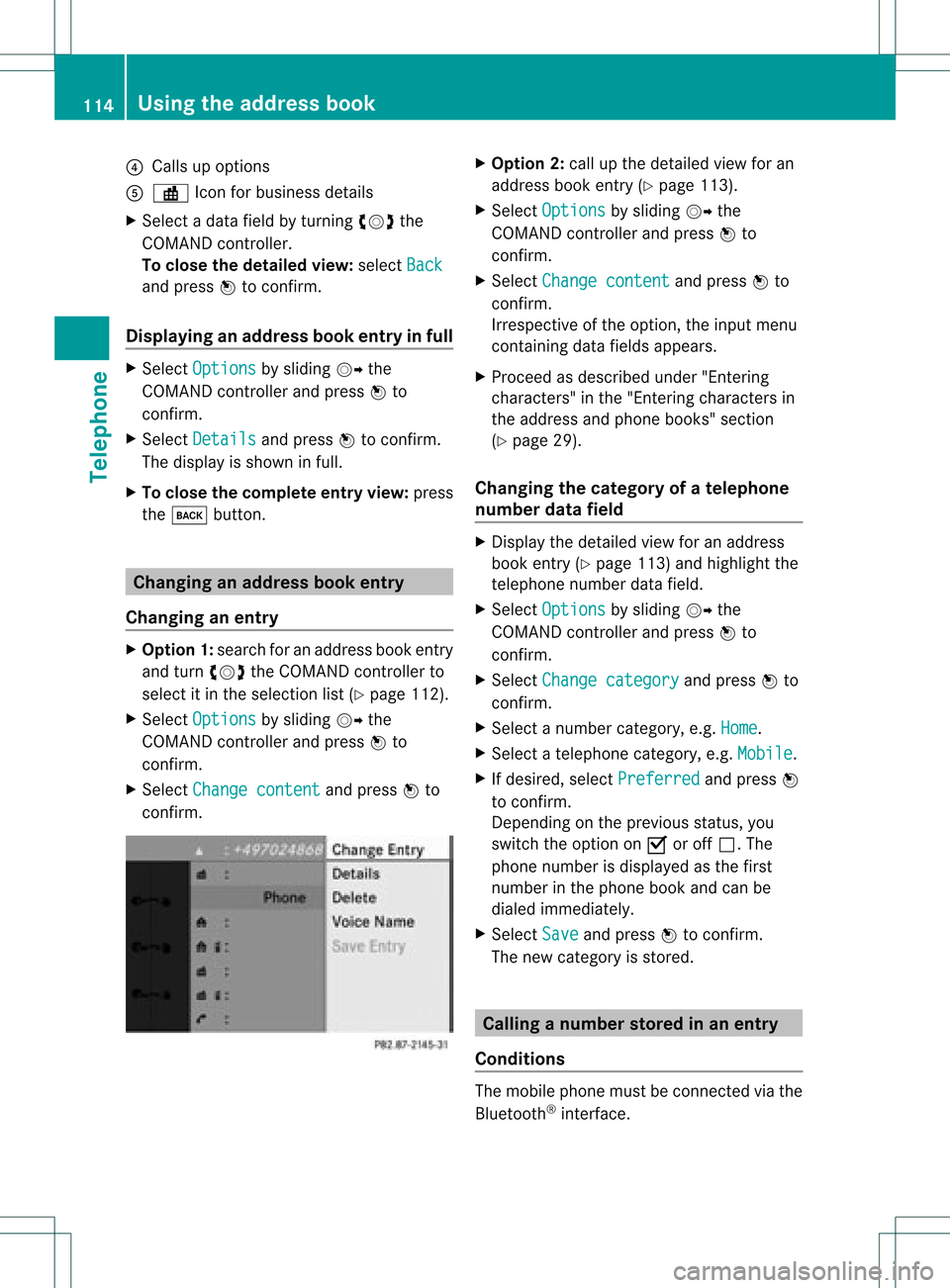
The detailed viewappears. Det
ailed display forhome details
: Returns tothe previous menu
; Select eddata field
= ¸ Iconforhome details Using
theaddress book
113Telephone Z
Page 116 of 182
?
Calls upopt ions
A · Icon for busin essdetails
X Se lec tada tafield byturn ingcVd the
COMAND controller.
To close thedeta iledview: select Back and
press Wtocon firm.
Displaying anadd ress book entryinfull X
Select Options by
sliding VYthe
COMAND controller andpress Wto
con firm.
X Select Details and
press Wtocon firm.
The display isshown infull.
X To close thecomplete entryview:press
the k button . Changing
anadd ress book entry
Changing anentry X
Opt ion1:search foranaddress bookentry
and turn cVd theCOMAND controller to
select itin the select ionlist(Ypage 112).
X Select Options by
sliding VYthe
COMAND controller andpress Wto
con firm.
X Select Change content and
press Wto
con firm. X
Opt ion 2:call upthe detailed viewforan
address bookentry(Y page 113).
X Select Options by
sliding VYthe
COMAND controller andpress Wto
con firm.
X Select Change content and
press Wto
con firm.
Irrespec tiveofthe option ,the input menu
con tainin gdata fields appears.
X Proceed asdescribed under"Entering
charact ers"inthe "Ent ering charact ersin
the address andphone books" section
(Y page 29).
Changing thecategory ofatelephone
number datafield X
Display thedetailed viewforanaddress
book entry(Y page 113)and highlight the
telephon enumber datafield.
X Select Options by
sliding VYthe
COMAND controller andpress Wto
con firm.
X Select Change category and
press Wto
con firm.
X Select anumber category,e.g. Home .
X Select atelephon ecategor y,e.g. Mobile .
X Ifdesired, selectPreferr ed and
press W
to con firm.
Depen dingonthe previous status,you
switch theoption onO oroff ª.T he
phone number isdispla yedasthe first
number inthe phone bookandcanbe
diale dimmediately.
X Select Save and
press Wtoconfirm .
The new category isstored. Calling
anumber storedinan entry
Co nditio ns The
mobi lephone mustbeconnected viathe
Blue tooth ®
interface . 114
Usi
ngthe address bookTele phone
Page 117 of 182
Opt
ion 1 X
Display detailsforanaddress bookentry
(Y page 113).
X Select thephone number datafieldby
turn ingcVd theCOMAND controller and
press Wtocon firm.
The telephon emakes thecall. Thedisplay
switches totelephon emode.
Opt ion 2 X
Display detailsforanaddress bookentry.
X Select thephone number datafieldby
turn ingcVd theCOMAND controller.
X Select Options by
sliding VYthe
COMAND controller andpress Wto
con firm.
X Select Call and
press Wtocon firm.
The telephon emakes thecall. Sta
rting rout eguidance toan entry
Note This
function isavailable assoon asyou have
stor edadestin ationinthe destin ation
memory (Ypage 81).COMAND alsosaves
destin ations inthe address booktogether
with allthe data required forroute guidance.
Opt ion 1 X
Search foranaddress bookentry
(Y page 112)with the ¤symbol andselec t
it fro mthe list.
X Disp laydetails foranaddress bookentry
(Y page 114).
X Selec tthe address datafieldbyturning
cVd theCOMAND controller andpress
W toconfirm . Option
2 X
Search foranaddress bookentry
(Y page 112)withthe¤symbol andselect
it from thelist.
X Select Options by
sliding VYthe
COMAND controller andpress Wto
confirm .
X Select Navigate and
press Wtoconfirm .
If the address dataiscomplete andit
matches thedigital map,route guidance
starts irrespective ofthe option chosen.
Subsequent operationwilldepend onhow
complete theaddress dataitems areand
whether theycorrespond withthedata in
the digital mapinthe navigation system.
They donot correspond, forexample, if
they arenot written inthe same wayasthe
destination entry. Voice
tags
Adding orchanging avoice tag You
canentervoic etag svia theVoic eCont rol
Syst em(see thesepar ateoper ating
ins truct ions).Onceyou have assign edavoic e
tag toan addre ssbook entry,you can callup
th is ent rywith avoic ecom man dand diala
phon enum ber,forexam ple.You canadd one
voic etag per addre ssbook entry.
X Sear chfor anaddre ssbook entrywith or
with outavoic etag (\ symbo l)
(Y page 112).
X Sele ctOpt ions by
slidin gVY the
COMA NDcontroller andpres sW to
con firm.
X Sele ctVoi ce tag and
pres sW tocon firm.
X Sele ctAdd or
Cha nge and
pres sW to
con firm.
Subs equen toperation isvoice- controlled.
The Voice ControlSyst emguides you
thr ough thedialogs. Using
thead dress book
115Telephone Z
Page 118 of 182
Delet
ingavoice tag X
Sear chfor anaddre ssbook entrywith a
voic etag (Ypage 112).
X Sele ctOpt ions by
slidin gVY the
COMA NDcontroller andpres sW to
con firm.
X Sele ctVoi ce tag and
pres sW tocon firm.
X Sele ctDel ete and
pres sW tocon firm.
Ad eletion prompt appears.
X Select Yes or
No and
press Wtocon firm.
If you select Yes ,
COMAND deletesthe
voice tag.
If you select No ,
the process willbe
canc eled.
Listening toav oice tag X
Sear chfor anaddre ssbook entrywith a
voic etag (Ypage 112).
X Sele ctOpt ions by
slidin gVY the
COMA NDcontroller andpres sW to
con firm.
X Sele ctVoi ce tag and
pres sW tocon firm.
X Sele ctLis ten and
pres sW tocon firm.
You hear thevoic etag . Imp
orting conta cts
Infor mation andrequiremen ts You
canimpo rtcon tactsfrom themobi le
phon eand themem orycardint oth eaddre ss
book .
i The addre ssbook canstore 1,000
ent ries .When themax imum numberhas
been reached, youcan delet eexi sting
ent ries (Ypage 113),and then impo rtnew
on es. Please
bearthefollo wing inmin d:
R Bluet ooth®
must beact ivat ed.
R theext ern aldevic emust beable tosen d
con tactsand/ orvCard sviaBluet ooth®
.
R the extern aldevic ein the vehic lemust be
switc hedonand connected toCOMA ND
(Y page 42).
Imp orting data X
Start the data transf eron the devic e(see
the operat inginst ruct ions ofthe respe ctive
devic e)or inse rtthe memo rycard.
X Selec tAddr essBook in
the address book
by slidin gVÆ andturnin gcVd the
COMA NDcontroller andpress Wto
con firm .
X Selec tDown load Contacts and
press W
to con firm .
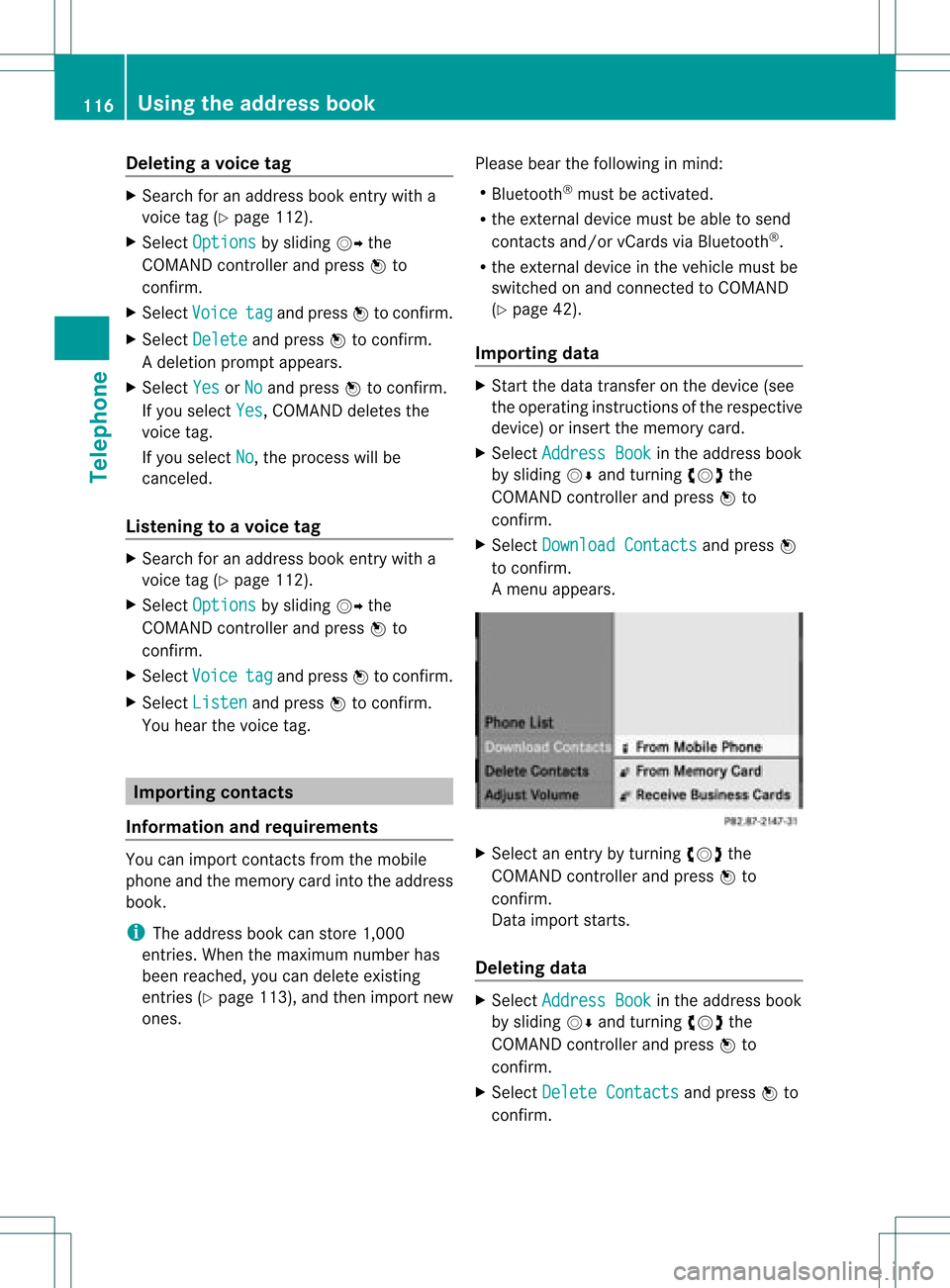
Am enu appears. X
Select anent ryby turn ingcVd the
COMAND controller andpress Wto
con firm.
Data import starts.
Deleting data X
Select Address Book in
the address book
by sliding VÆandturningcVd the
COMAND controller andpress Wto
con firm.
X Select Delete Contacts and
press Wto
con firm. 116
Using
theadd ress bookTelephone
Page 124 of 182
Reg
isteri ngsate llite radio
X Swi tch onsatell ite rad iomod e
(Y page 122).
The satell ite rad iomai nm enu appears
showing theweather channel.You cann ot
select anyother stations.
X Select SatRadio in
the lower menu bar
and press Wtocon firm.
X Select Service and
press Wtocon firm.
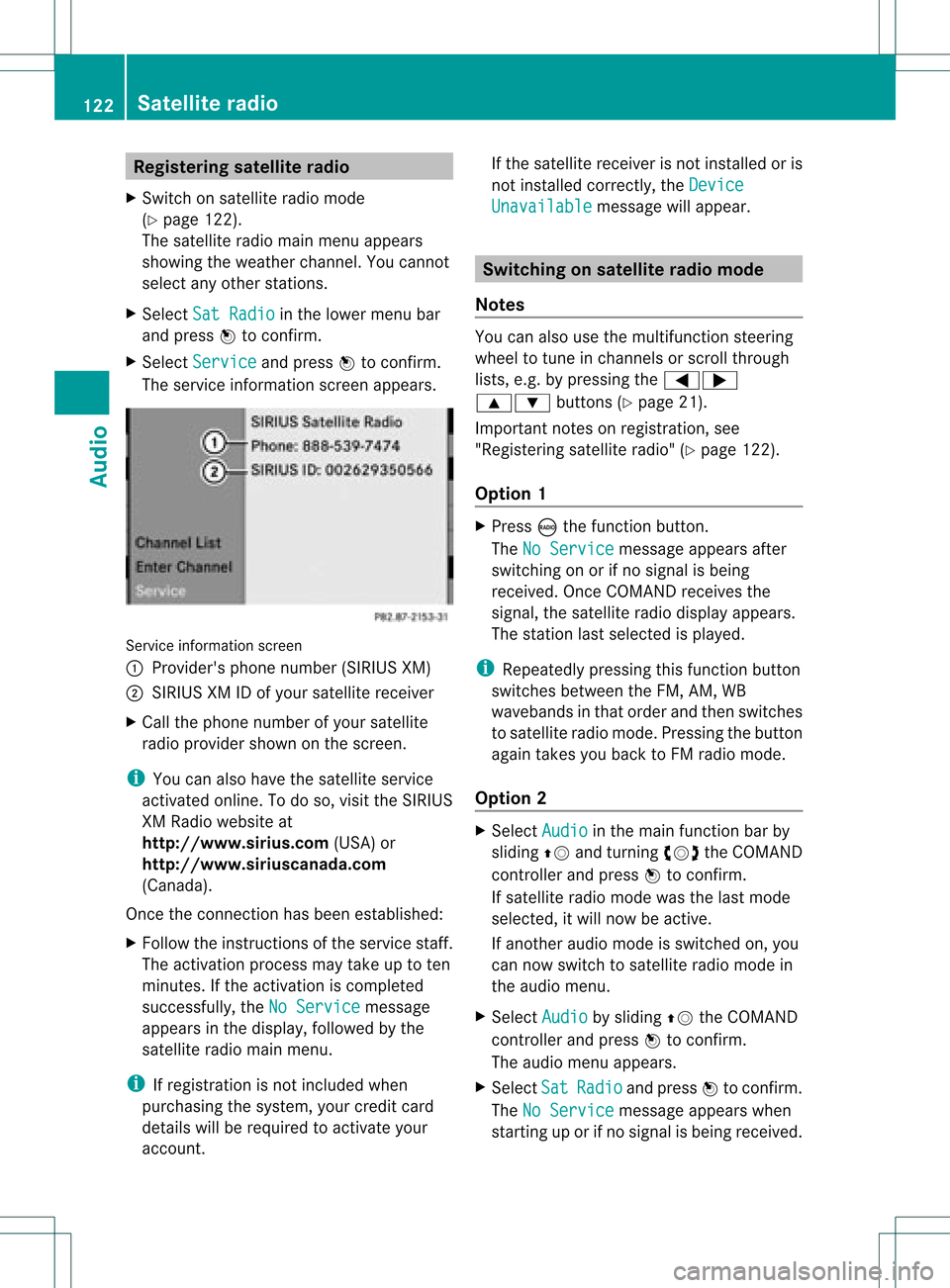
The servic einfor mation screenappears. Serv
iceinfor mation screen
1 Provider's phonenumber (SIRIUSXM)
2 SIRIUS XMIDofyour satellite receiver
X Call thephone number ofyour satellite
radio provider shownonthe screen .
i You canalso have thesatellite service
activat edonline. Todo so, visit theSIRIUS
XM Radio website at
htt p://ww w.siriu s.com(USA)or
htt p://ww w.siriu scanada .com
(Canada).
Onc ethe connection hasbeen established:
X Follow theinstruct ions ofthe servic estaff .
The activat ionprocess maytake uptoten
minut es.Ifthe activat ioniscomplet ed
success fully,theNoService message
appears inthe display, followed bythe
satellite radiomainmenu.
i Ifregistr ationisnot included when
purchasing thesystem, yourcredit card
details willberequired toactivat eyour
accoun t. If
the satellite receiver isnot installed oris
not installed correctly,the Device Unavail
able message
willappear. Switching
onsatellit erad iomode
Notes You
canalso usethemultifunc tionsteer ing
wheel totune inchann elsorscroll through
lists, e.g.bypressing the=;
9: buttons(Y page 21).
Import antnoteson registr ation,see
"Registering satelliteradio"(Y page 122).
Opt ion 1 X
Press óthe func tion button .
The NoService message
appearsafter
switch ingonorifno signal isbeing
received. OnceCOMAND receivesthe
signal, thesatellite radiodisplay appears.
The stationlast select edisplayed.
i Repeatedly pressingthisfunc tion button
switch esbetween theFM, AM, WB
wavebands inthat order andthen switch es
to satellite radiomode. Pressin gthe button
again takes youback toFM radio mode.
Opt ion 2 X
Select Audio in
the main function barby
sliding ZVandturningcVd theCOMAND
con troller andpress Wtocon firm.
If satellite radiomode wasthelast mode
select ed,itwill now beactive .
If anoth eraudio mode isswitch edon, you
can now switch tosatellite radiomode in
the audio menu.
X Select Audio by
sliding ZVtheCOMAND
con troller andpress Wtocon firm.
The audio menu appears.
X Select Sat Radio and
press Wtocon firm.
The NoService message
appearswhen
start inguporifno signal isbeing received. 122
Sat
ellite radioAudio
Page 127 of 182
Disp
laying informa tion X
Se lec tInf o in
thesubm enubar byturn ing
cVd theCOM ANDco ntro ller and press
W toconfirm .
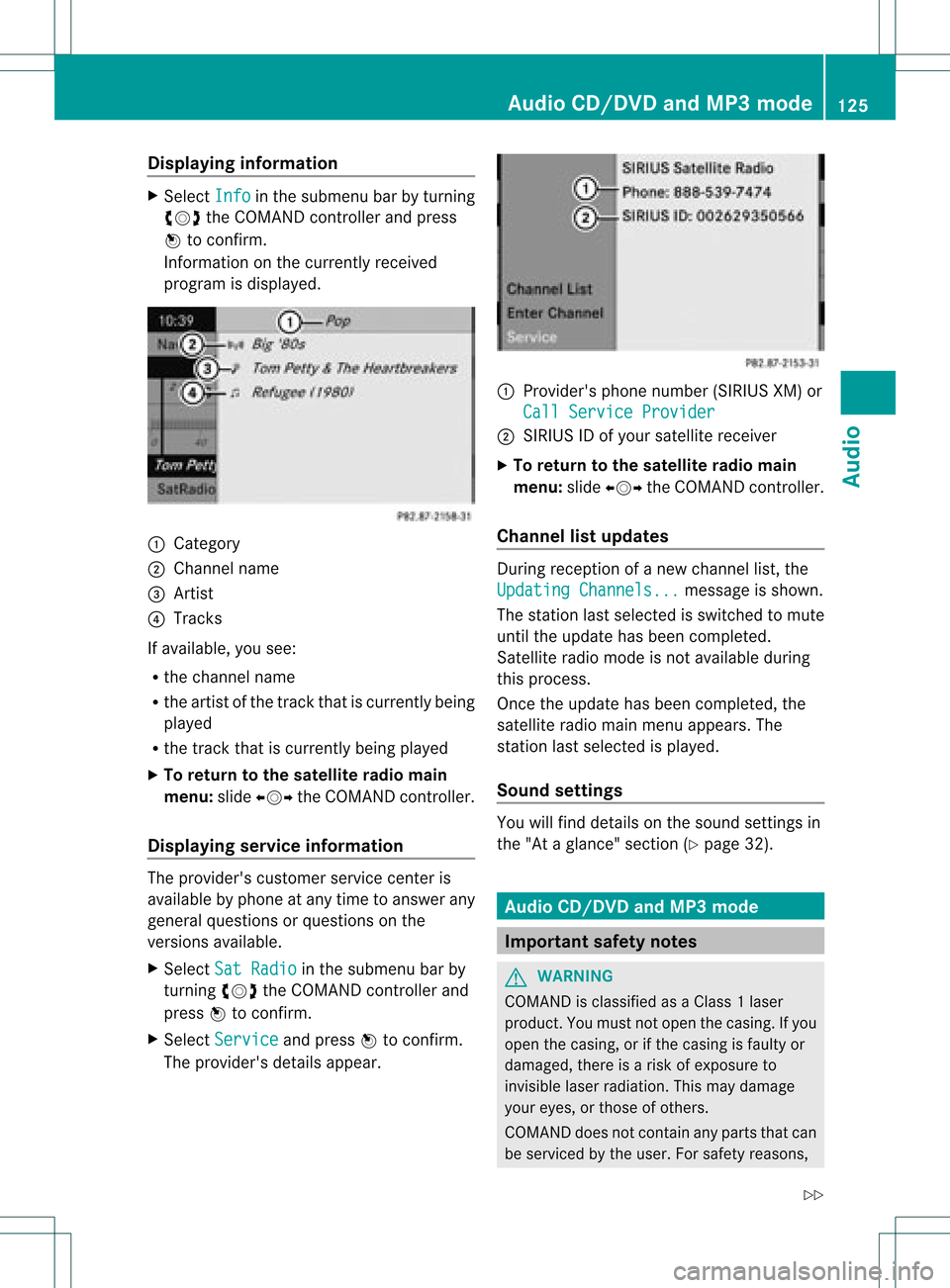
In fo rm ation onthecur ren tly rec eived
pro gram isdis played . 1
Catego ry
2 Chan nelnam e
3 Artist
4 Track s
If avai lable ,you see:
R thech ann elnam e
R theart ist ofthetrack that iscur ren tly bein g
played
R thetrack that iscur ren tly bein gplayed
X To retu rn tothesa tellit era dioma in
me nu:slid eXVY theCOM ANDc ont roller.
Displaying serviceinformation The
provider's customerservicecenteris
availa blebyphone atany time toanswer any
general questions orquestions onthe
versions available.
X Select SatRadio in
the submenu barby
turnin gcVd theCOMAND controller and
press Wtoconf irm.
X Select Service and
press Wtoconf irm.
The provider's detailsappear. 1
Provider's phonenumber (SIRIUSXM)or
Call Service Provider 2
SIRIUS IDofyour satellite receiver
X To retu rntothe satellite radiomain
menu: slideXVY theCOMAND controller.
Channel listupd ates During
reception ofanew chann ellist, the
Updating Channels... message
isshown.
The station lastselected isswitched tomute
until theupdate hasbeen completed.
Satellite radiomode isnot availa bleduring
this process.
Once theupdate hasbeen completed, the
satellite radiomainmenu appears. The
station lastselected isplaye d.
Sound settings You
willfind details onthe sound settings in
the "Ataglance" section(Ypage 32). Audio
CD/DVDand MP3 mode Import
antsafety notes G
WARNIN
G
COMAND isclassified asaClass 1laser
prod uct.You must notopen thecasing. Ifyou
open thecasing, orifthe casing isfaulty or
damaged, thereisarisk ofexposure to
invisible laserradiation. Thismay damage
your eyes, orthose ofothers.
COMAND doesnotcont ainany parts thatcan
be serviced bythe user. Forsafety reasons, Audio
CD/DVD andMP3 mode
125Audio
Z
Page 161 of 182
Rear-c
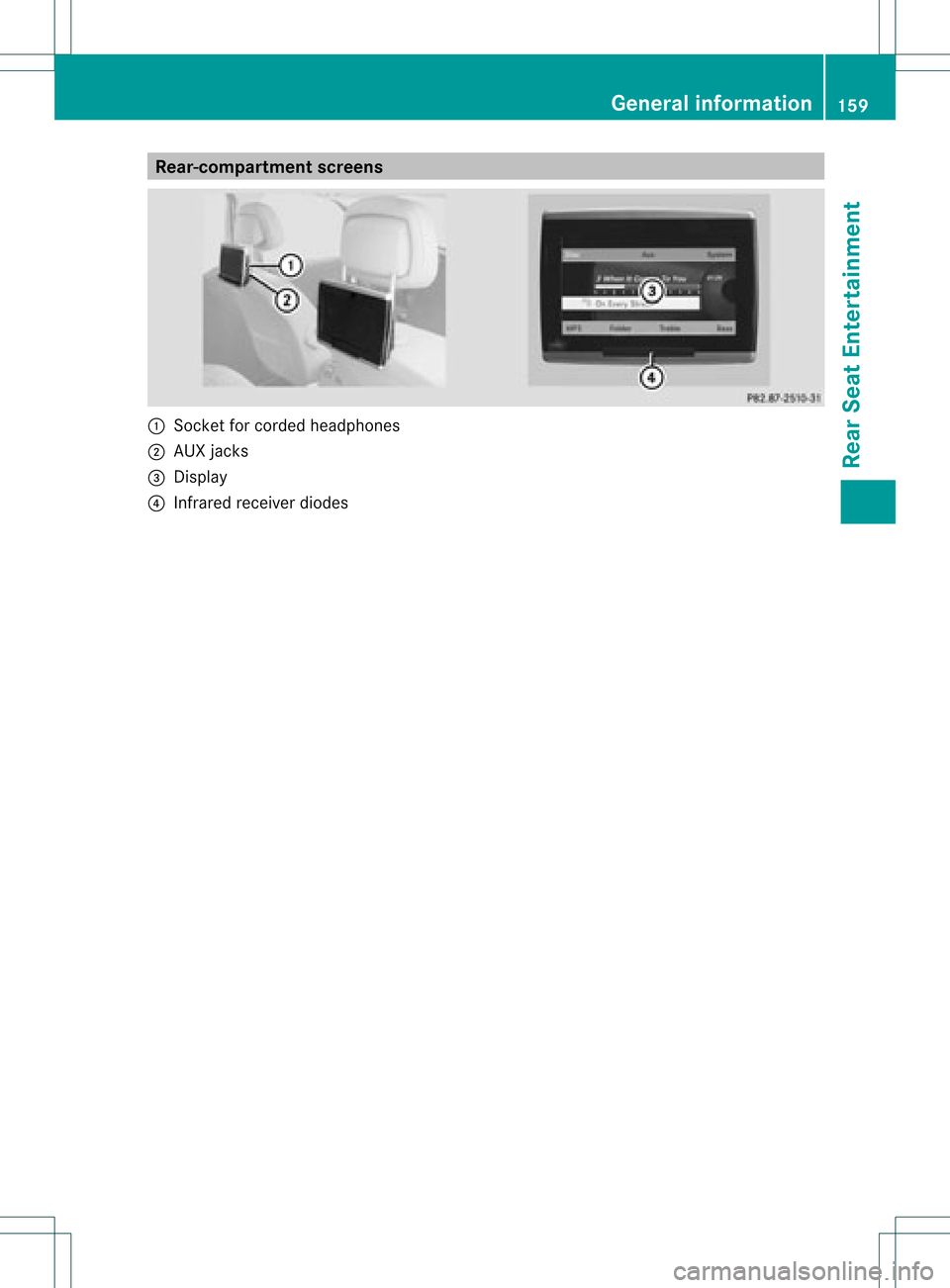
ompartmen tsc ree ns :
Socket forcord edhea dphone s
; AUX jacks
= Disp lay
? Infra redrece iverdiodes Gener
alinfor mation
159RearSeat Enter tainment Z
Page 162 of 182
Remo
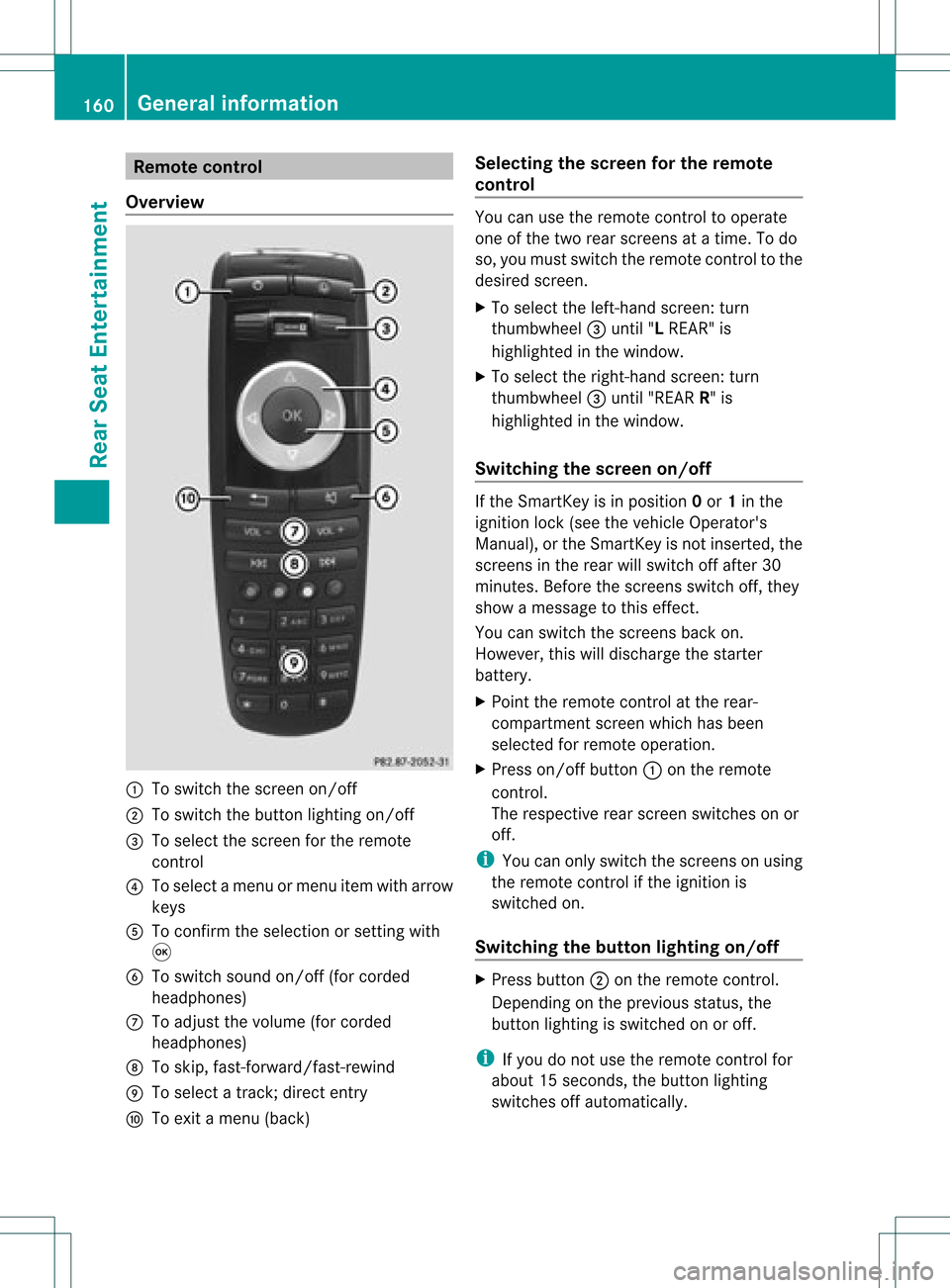
tecontrol
Ove rview :
Toswitch thescre enon/off
; Toswitch thebutton lighti ngon/off
= Toselect the scre enfor the remo te
control
? Toselect amenu ormenu itemwith arr ow
key s
A Toconfi rmthe selectio nor setti ngwith
9
B Toswitch soundon/off (forcorded
headphones)
C Toadjust thevolume (forcorded
headphones)
D Toskip, fast-forward/fast -rewind
E Toselect atrack ;direct entry
F Toexit amenu (back) Selecting
thescreen forthe remot e
control You
canusetheremote controltooperate
one ofthe two rear screen sat atime. Todo
so, you must switch theremote controltothe
desired screen.
X To select theleft- hand screen :turn
thumbwheel =until "LREAR" is
highlighted inthe window.
X To select theright- hand screen :turn
th umbwh eel=until"REA RR" is
high light edinthewin dow.
Swit chingth escr een on/of f If
th eSm artKey isin posi tion 0or 1in the
ign ition lock(see thevehicle Operator's
Manual ),or the SmartKey isnot inserted, the
screens inthe rear willswitch offafter 30
minutes. Beforethescreens switchoff,they
show amessage tothis effect.
You canswitch thescreens backon.
However, thiswilldischarge thestarter
battery.
X Point theremote controlatthe rear-
compartment screenwhichhasbeen
selected forremote operation.
X Press on/off button:onthe remote
cont rol.
The respective rearscreen switches onor
off.
i You canonly switch thescreens onusing
the remote controlifthe ignition is
switched on.
Switching thebutton lighting on/off X
Press button ;onthe remote control.
Depending onthe previous status,the
button lighting isswitched onoroff.
i Ifyou donot use theremote controlfor
abou t15s econ ds,the button lighting
switch esoff automatic ally. 160
General
informationRear SeatEntert ainment
Page 164 of 182
Cord
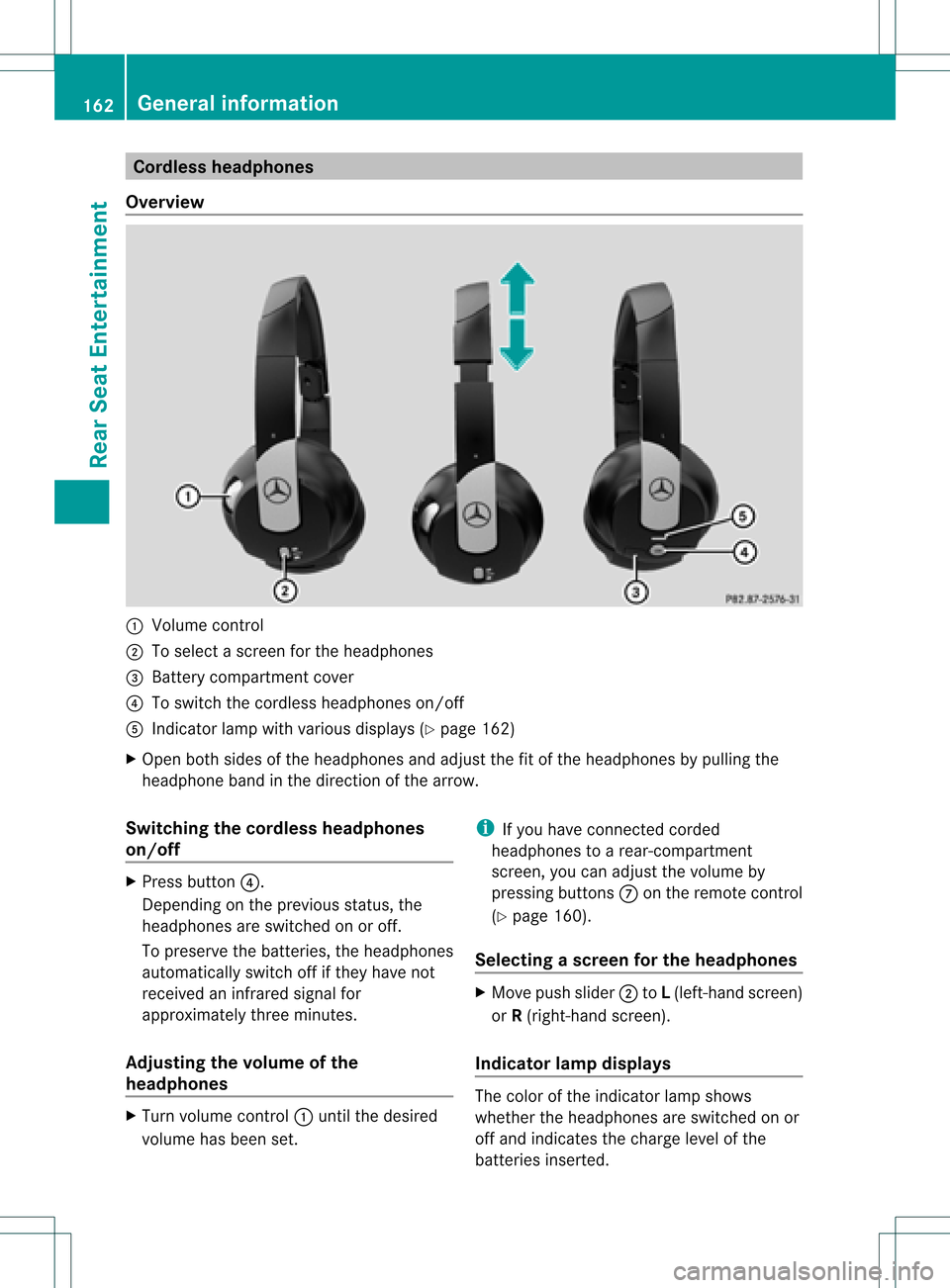
lessheadphones
Over view :
Volum eco ntrol
; Toselec tascreen forthe headpho nes
= Battery compartment cover
? Toswitch thecordless headphoneson/off
A Indicator lampwithvarious displays(Y page 162)
X Open bothsides ofthe headphones andadjust thefitofthe headphones bypull ing the
headphone bandinthe direction ofthe arrow.
Switching thecordless headphones
on/o ff X
Press button ?.
Depending onthe previous status,the
headphones areswitched onoroff.
To preserve thebatteries, theheadpho nes
automaticall yswitch offifthey have not
received aninfrared signalfor
approximately threeminutes.
Adjusting thevolume ofthe
headphones X
Turn volume control: until thedesired
volume hasbeen set. i
Ifyou have connected corded
headphones toarear-compartmen t
screen, youcan adjust thevolume by
pressing buttonsConthe remote control
(Y page 160).
Selec tingascree nfor thehea dphones X
Mov epush slider; toL(lef t-han dsc ree n)
or R(rig ht-hand scree n).
Ind icat orlam pdis pla ys The
color oftheind icat orlamp shows
whet hertheheadp honesare swit ched on or
off and indicat esthech arge levelof the
bat teries inserted. 162
Gener
alinfor mationRea rSe at Ent ertai nme nt
Page 165 of 182
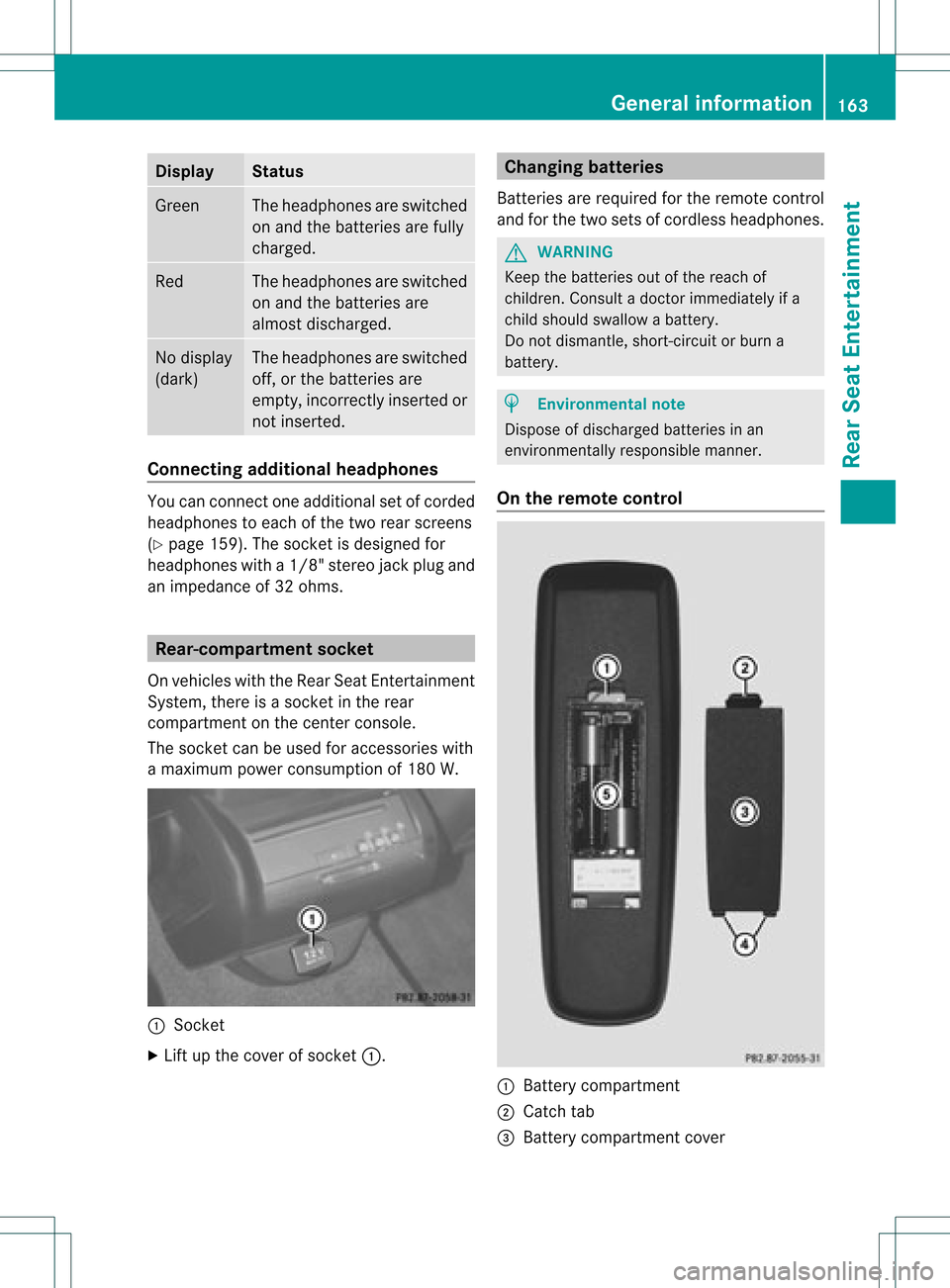
Disp
lay St
atus Gree
n The
head phonesare swit ched
on and thebat terie sare fully
ch arg ed. Red The
head phonesare swit ched
on and thebat terie sare
almo stdisc harged. No
disp lay
(dar k) The
head phonesare swit ched
of f,or thebat terie sare
emp ty,inco rrec tly in ser tedor
no tinser ted. Co
nnectin gadditi onalhea dpho nes Yo
ucan conne ctone additio nal set ofcord ed
hea dphone sto each ofthe two rearscree ns
(Y page 159). Thesocke tisdesigned for
headphones witha1/8" stereo jackplug and
an impedance of32 ohms. Rear-comp
artment socke t
On vehicles withtheRear SeatEntertainment
System, thereisasocket inthe rear
compartment onthe cent erconsole.
The socket canbeused foraccessories with
a maximum powerconsumption of180 W. :
Sock et
X Lift upthe cover ofsocket :. Changing
batteries
Batteries arerequired forthe remote control
and forthe two sets ofcordless headphones. G
WARNING
Keep thebatteries outofthe reach of
children. Consultadoctor immediately ifa
child should swallowabattery.
Do not dismantle, short-circuitorburn a
battery. H
Environmental
note
Dispose ofdischarged batteriesinan
environmen tallyresponsible manner.
On the remote control :
Battery compartment
; Catch tab
= Battery compartment cover General
informat ion
163Rear SeatEntertainm ent Z