button MERCEDES-BENZ GLK-Class 2013 X204 Owners Manual
[x] Cancel search | Manufacturer: MERCEDES-BENZ, Model Year: 2013, Model line: GLK-Class, Model: MERCEDES-BENZ GLK-Class 2013 X204Pages: 378, PDF Size: 5.03 MB
Page 278 of 378

X
Open both Velcro fasteners and remove the
cargo net.
X Unroll and unfold the cargo net.
The upper and lower guide rods must
engage audibly.
Attaching the cargo net Cargo net installed behind the C-pillar
X
Insert guide rod 0003into retainer 0002in the
direction of the arrow.
X Slide guide rod 0003forwards into
retainer 0002in the direction of the arrow.
Tightening the cargo net Seat belt reel holder behind the front seats
X
Insert belt hook 0002into cargo tie-down
ring 0003in the direction of the arrow.
X Pull tensioning strap 0021by the loose end in
the direction of the arrow until the cargo
net is tight.
X After driving a short distance, check the
tension of the cargo net and retighten it if
necessary. Releasing the cargo net
Seat belt reel holder behind the front seats
X
Pull belt adjuster 0002upwards in the
direction of the arrow to reduce the tension
on the tensioning strap.
X Unhook belt hook 0003from cargo tie-down
ring 0021.
Detaching and storing the cargo net X
Detach guide rod 0003from bracket 0002
(Y page 276).
X Press the red button on the upper and lower
guide rods.
X Fold the cargo net and roll it up.
X Close the two Velcro fasteners on the cargo
net holder. Coat hooks on the tailgate
0002
Coat hook 276
Stowage areasStowage and features
Page 282 of 378

X
To open: pull cover 0003outb y its top edge.
X To remove the insert: press release
button 0021and lift the insert up and out.
X To install the insert: install insert0002from
above into the holder and press down into
the holder until it engages. Cigarette lighter
G
WARNING
You can burn yoursel fifyou touch the hot
heating element or the socket of the cigarette
lighter.
In addition, flammable materials can ignite if:
R the hot cigarette lighter falls
R a child holds the hot cigarette lighter to
objects, for example
There is a risk of fire and injury.
Always hold the cigarette lighter by the knob.
Always make sure that the cigarette lighter is
out of reach of children. Never leave children
unsupervised in the vehicle.
Your attention must always be focused on the
traffic conditions. Only use the cigarette
lighter when road and traffic conditions
permit. X
Turn the SmartKey to position 2in the
ignition lock (Y page 141).
X To open: slide cover 0002forwards. X
Press in cigarette lighter 0003.
Cigarette lighter 0003will pop out
automatically when the heating element is
red-hot.
X To close: pull cover 0002back. 12
Vsockets
General notes The sockets can be used for accessories with
a maximum draw of 180 W (15 A).
Accessories include such items as lamps or
chargers for mobile phones.
If you use the sockets for long periods when
the engine is switched off
,the battery may
discharge.
X Turn the SmartKey to position 1in the
ignition lock (Y page 141).
i An emergency cut-out ensures that the
on-board voltage does not drop too low. If
the on-board voltage is too low, the power
to the sockets is automatically cut. This
ensures that there is sufficient power to
start the engine.
Socket in the front-compartment center
console X
To open: slide cover 0002forwards.
X Lift up the cover of socket 0003.
X To close: pull cover 0002back. 280
FeaturesStowage and features
Page 285 of 378
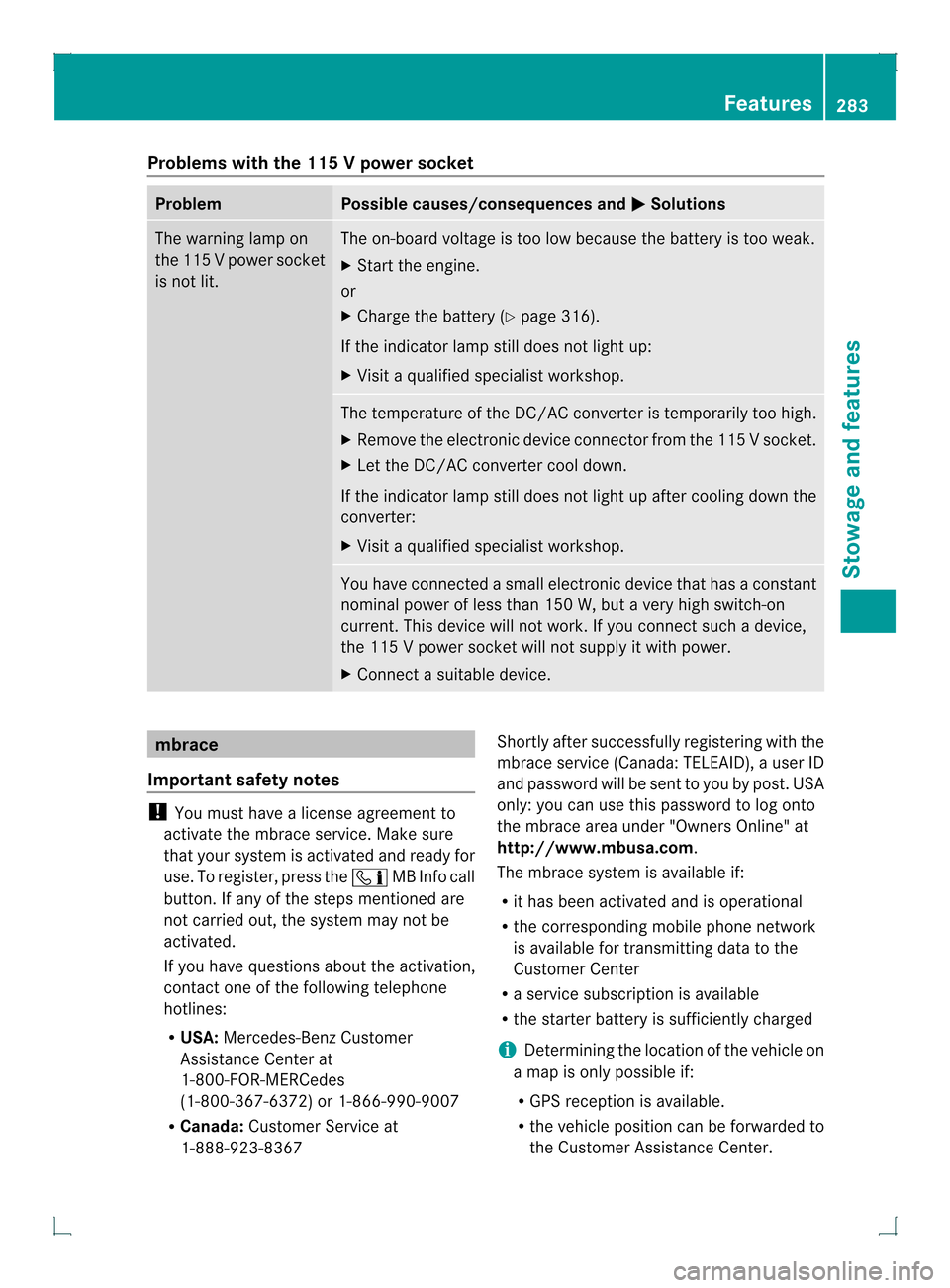
Problems with the 115
Vpower socket Problem Possible causes/consequences and
0001 Solutions
The warning lamp on
the 11
5Vpower socket
is not lit. The on-board voltage is too low because the battery is too weak.
X
Start the engine.
or
X Charge the battery (Y page 316).
If the indicator lamp still does not light up:
X Visit a qualified specialist workshop. The temperature of the DC/AC converter is temporarily too high.
X Remove the electronic device connector from the 115 V socket.
X Let the DC/AC converter cool down.
If the indicator lamp still does not light up after cooling down the
converter:
X Visit a qualified specialist workshop. You have connected a small electronic device that has a constant
nominal power of less than 150 W, but a very high switch-on
current. This device will not work. If you connect such a device,
the 115
Vpower socket will not supply it with power.
X Connect a suitable device. mbrace
Important safety notes !
You must have a license agreement to
activate the mbrace service. Make sure
that your system is activated and ready for
use. To register, press the 000AMB Info call
button. If any of the steps mentioned are
not carried out, the system may not be
activated.
If you have questions about the activation,
contact one of the following telephone
hotlines:
R USA: Mercedes-Benz Customer
Assistance Center at
1-800-FOR-MERCedes
(1-800-367-6372) or 1-866-990-9007
R Canada: Customer Service at
1-888-923-8367 Shortly after successfully registering with the
mbrace service (Canada: TELEAID), a user ID
and password will be sent to you by post. USA
only: you can use this password to log onto
the mbrace area under "Owners Online" at
http://www.mbusa.com.
The mbrace system is available if:
R
it has been activated and is operational
R the corresponding mobile phone network
is available for transmitting data to the
Customer Center
R a service subscription is available
R the starter battery is sufficiently charged
i Determining the location of the vehicle on
a map is only possible if:
R GPS reception is available.
R the vehicle position can be forwarded to
the Customer Assistance Center. Features
283Stowage and features Z
Page 286 of 378
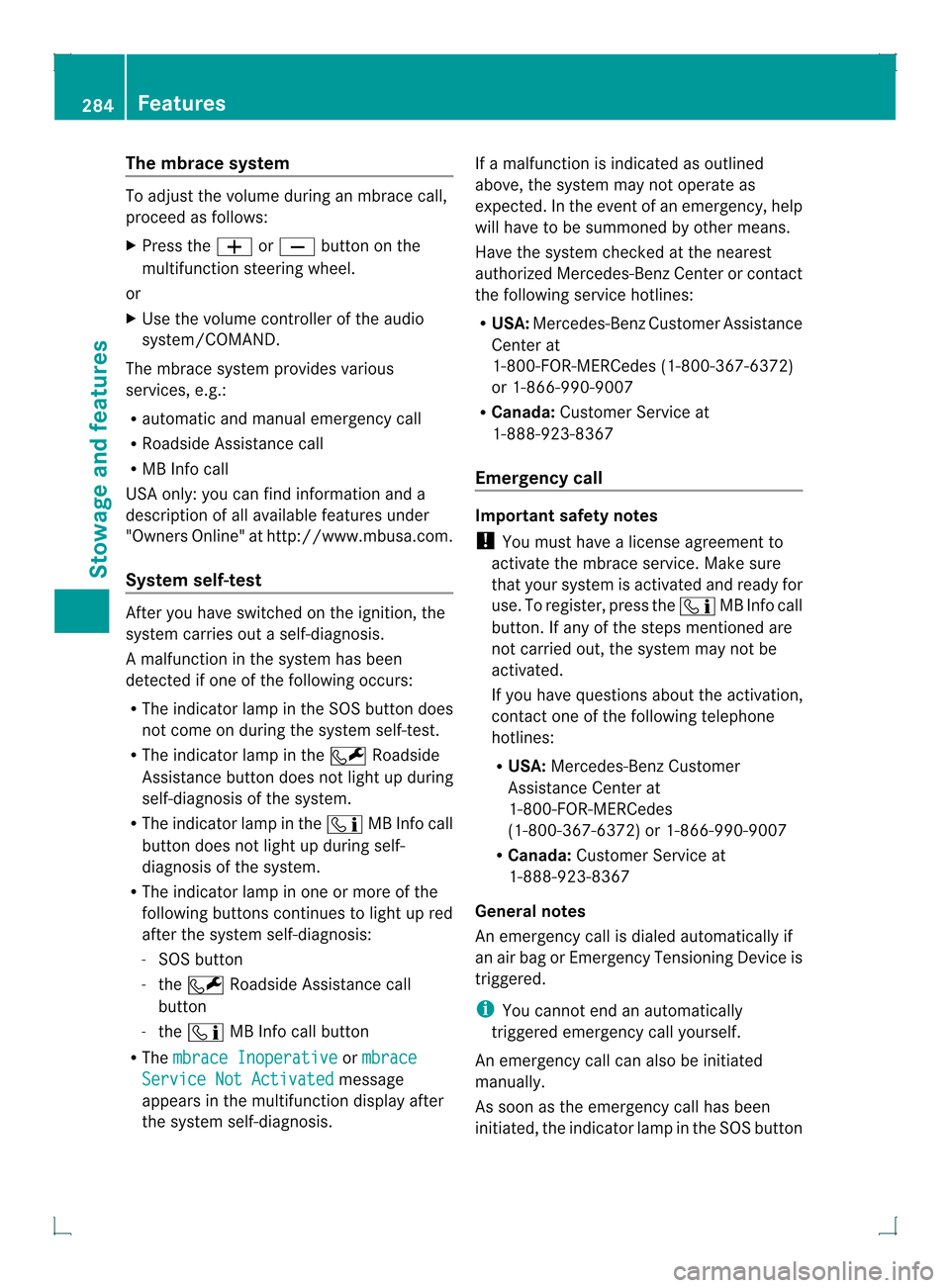
The mbrace system
To adjus
tthe volume during an mbrace call,
proceed as follows:
X Press the 0009or000A button on the
multifunction steering wheel.
or
X Use the volume controller of the audio
system/COMAND.
The mbrace system provides various
services, e.g.:
R automatic and manual emergency call
R Roadside Assistance call
R MB Info call
USA only: you can find information and a
description of all available features under
"Owners Online" at http://www.mbusa.com.
System self-test After you have switched on the ignition, the
system carries out a self-diagnosis.
Am
alfunction in the system has been
detected if one of the following occurs:
R The indicator lamp in the SO Sbutton does
not come on during the system self-test.
R The indicator lamp in the 0008Roadside
Assistance butto ndoes not light up during
self-diagnosis of the system.
R The indicator lamp in the 000AMB Info call
button does not light up during self-
diagnosis of the system.
R The indicator lamp in one or more of the
following buttons continues to light up red
after the system self-diagnosis:
- SOS button
- the 0008 Roadside Assistance call
button
- the 000A MB Info call button
R The mbrace Inoperative or
mbrace Service Not Activated message
appears in the multifunction display after
the system self-diagnosis. If a malfunction is indicated as outlined
above, the system may not operate as
expected. In the event of an emergency, help
will have to be summoned by other means.
Have the system checked at the nearest
authorized Mercedes-Benz Center or contact
the following service hotlines:
R
USA: Mercedes-Benz Customer Assistance
Center at
1-800-FOR-MERCedes (1-800-367-6372)
or 1-866-990-9007
R Canada: Customer Service at
1-888-923-8367
Emergency call Important safety notes
!
You must have a license agreement to
activate the mbrace service. Make sure
that your system is activated and ready for
use. To register, press the 000AMB Info call
button. If any of the steps mentioned are
not carried out, the system may not be
activated.
If you have questions about the activation,
contact one of the following telephone
hotlines:
R USA: Mercedes-Benz Customer
Assistance Center at
1-800-FOR-MERCedes
(1-800-367-6372) or 1-866-990-9007
R Canada: Customer Service at
1-888-923-8367
General notes
An emergency call is dialed automatically if
an air bag or Emergency Tensioning Device is
triggered.
i You cannot end an automatically
triggered emergency call yourself.
An emergency call can also be initiated
manually.
As soon as the emergenc ycall has been
initiated, the indicator lamp in the SO Sbutton 284
FeaturesStowage and featu
res
Page 287 of 378
flashes. The
Connecting Call message
appears in the multifunction display.
The audio outpu tis muted.
Once the connection has been made, the
Call Connected message appears in the
multifunction display.
All important information on the emergency
is transmitted, for example:
R Current location of the vehicle (as
determined by the GPS system)
R Vehicle identification number
R Information on the severity of the accident
Shortly after the emergency call has been
initiated, a voice connection is automatically
established between the Mercedes-Benz
Customer Assistance Center and the vehicle
occupants.
R If the vehicle occupants respond, the
Mercedes-Benz Customer Assistance
Center attempts to get more information
on the emergency.
R If there is no response from the vehicle
occupants, an ambulance is immediately
sent to the vehicle.
The mbrace system has not been able to
initiate an emergency call if no voice
connection to the Response Center has been
established.T his can occur, for example, if
the relevant mobile phone network is not
available. The indicator lamp in the SOS
button flashes continuously.
The Call Failed message appears in the
multifunction display and must be confirmed.
In this case, seek assistance by other means. Making an emergency call G
WARNING
It can be dangerous to remain in the vehicle,
even if you have pressed the SOS button in an
emergency if:
R you see smoke inside or outside of the
vehicle, e.g. if there is a fire after an
accident
R the vehicle is on a dangerous section of
road
R the vehicle is not visible or cannot easily be
seen by other road users, particularly when
dark or in poor visibility conditions
There is a risk of an accident and injury.
Leave the vehicle immediately in this or
similar situations as soon as it is safe to do
so. Move to a safe location along with other
vehicle occupants. In such situations, secure
the vehicle in accordance with national
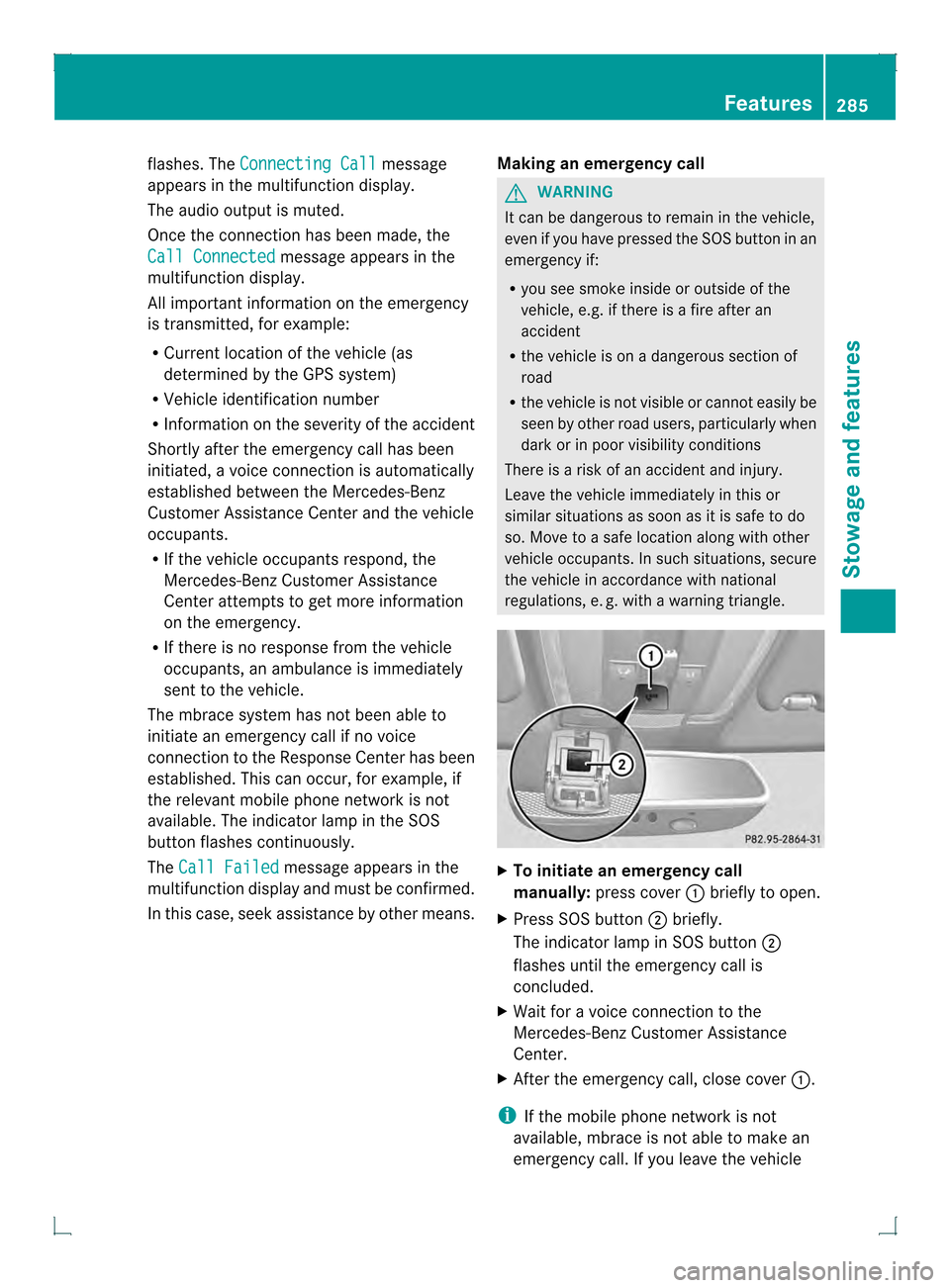
regulations, e. g. with a warning triangle. X
To initiate an emergency call
manually: press cover 0002briefly to open.
X Press SOS button 0003briefly.
The indicator lamp in SOS button 0003
flashes until the emergency call is
concluded.
X Wait for a voice connection to the
Mercedes-Ben zCustome rAssistance
Center.
X After the emergency call, close cover 0002.
i If the mobile phone network is not
available, mbrace is not able to make an
emergency call. If you leave the vehicle Features
285Stowage and features Z
Page 288 of 378
immediately after pressing the SOS button,
you do not know if mbrace has successfully
made the emergency call. In this situation,
seek additional assistance by other means.
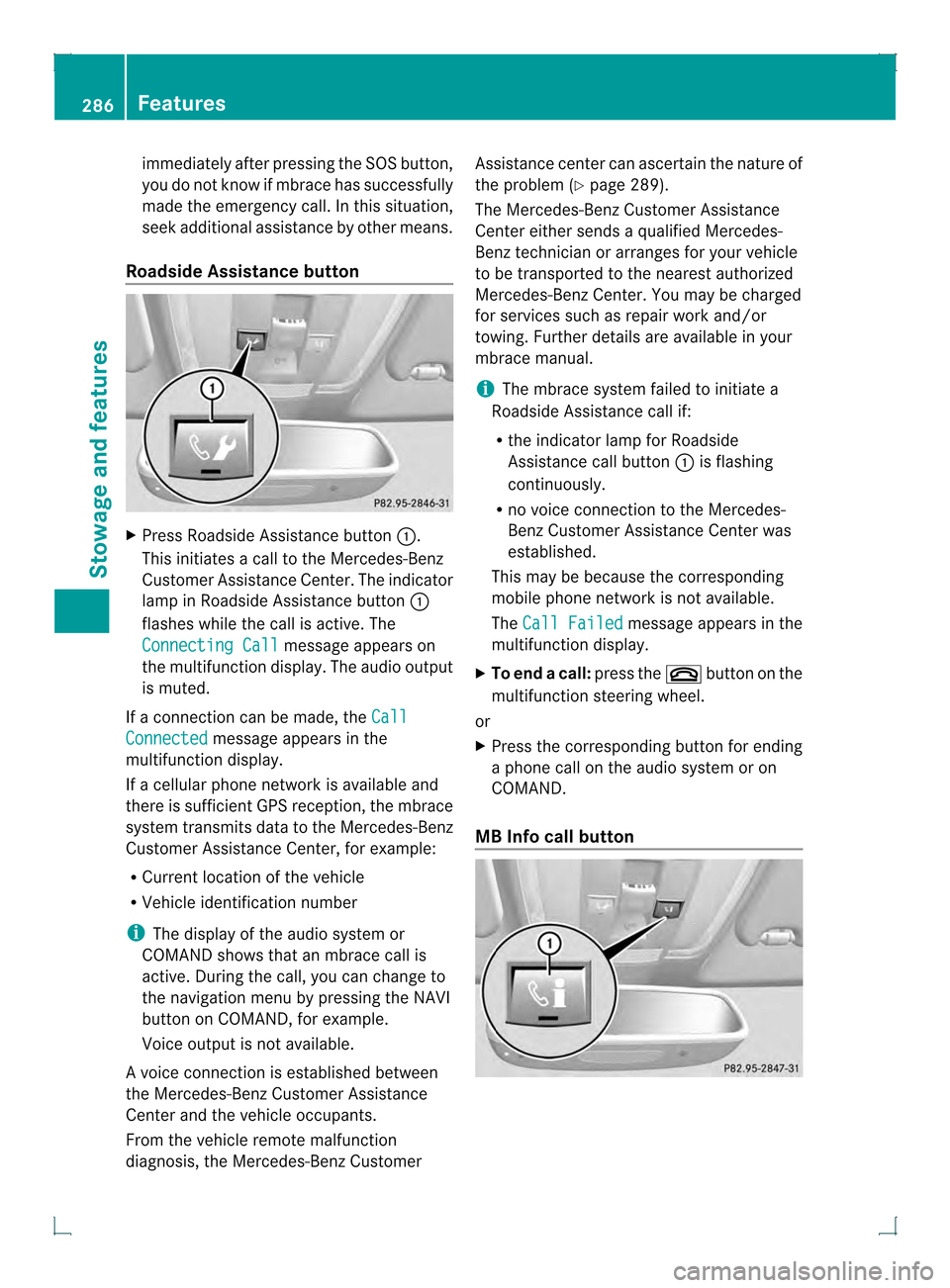
Roadside Assistance button X
Press Roadside Assistance button 0002.
This initiates a call to the Mercedes-Benz
Customer Assistance Center. The indicator
lamp in Roadside Assistance button 0002
flashes while the call is active. The
Connecting Call message appears on
the multifunction display. The audio output
is muted.
If a connection can be made, the CallConnected message appears in the
multifunction display.
If a cellular phone network is available and
there is sufficien tGPS reception, the mbrace
system transmits data to the Mercedes-Benz
Customer Assistance Center, for example:
R Current location of the vehicle
R Vehicle identification number
i The display of the audio system or
COMAND shows that an mbrace call is
active. During the call, you can change to
the navigation menu by pressing the NAVI
button on COMAND, for example.
Voice output is not available.
Av oice connection is established between
the Mercedes-Benz Customer Assistance
Center and the vehicle occupants.
From the vehicle remote malfunction
diagnosis, the Mercedes-Benz Customer Assistance center can ascertain the nature of
the problem (Y
page 289).
The Mercedes-Benz Customer Assistance
Center either sends a qualified Mercedes-
Benz technician or arranges for your vehicle
to be transported to the nearest authorized
Mercedes-Benz Center. You may be charged
for services such as repair work and/or
towing. Further details are available in your
mbrace manual.
i The mbrace system failed to initiate a
Roadside Assistance call if:
R the indicator lamp for Roadside
Assistance call button 0002is flashing
continuously.
R no voice connection to the Mercedes-
Benz Customer Assistance Center was
established.
This may be because the corresponding
mobile phone network is not available.
The Call Failed message appears in the
multifunction display.
X To end acall: press the 000Bbutton on the
multifunctio nsteering wheel.
or
X Press the corresponding button for ending
a phone call on the audio syste moron
COMAND.
MB Info call button 286
FeaturesStowage and featu
res
Page 289 of 378
X
Press MB Info call button 0002.
This initiates a call to the Mercedes-Benz
Customer Assistance Center. The indicator
lamp in MB Info call button 0002flashes while
the connection is being made. The
Connecting Call message appears on
the multifunction display. The audio system
is muted.
If a connection can be made, the CallConnected message appears in the
multifunction display.
If a cellular phone network is available and
there is sufficient GPS reception, the mbrace
system transmits data to the Mercedes-Benz
Customer Assistance Center, for example:
R Current location of the vehicle
R Vehicle identification number
i The display of the audio system or
COMAND shows that an mbrace call is
active. During the call, you can change to
the navigation menu by pressing the NAVI
button on COMAND, for example.
Voice output is not available.
Av oice connection is established between
the Mercedes-Benz Customer Assistance
Center and the vehicle occupants. You can
obtain information on how to operate your
vehicle's systems, on the location of the
nearest authorized Mercedes-Benz Center,
and on further products and services offered
by Mercedes-Benz USA.
USA only: you can find further information on
the mbrace system under "Owners Online" at
http://www.mbusa.com.
i The mbrace system failed to initiate an
MB Info call if:
R the indicator lamp in MB Info call
button 0002is flashing continuously.
R no voice connection to the Mercedes-
Benz Customer Assistance Center was
established.
This may be because the corresponding
mobile phone network is not available. The
Call Failed message appears in the
multifunction display.
X To end acall: press the 000Bbutton on the
multifunctio nsteering wheel.
or
X Press the corresponding button for ending
a phone call on the audio syste moron
COMAND.
Call priority When service calls are active, e.g. Roadside
Assistance or MB Info calls, an emergency
call can still be initiated. In this case, an
emergency call will take priority and override
all other active calls.
The indicator lamp of the respective button
flashes until the call is ended. An emergency
call can only be terminated by the Mercedes-
Benz Customer Assistance Center.
All other calls can be ended by pressing:
R the 000B button on the multifunction
steering wheel
R the corresponding butto nonthe audio
system or on COMAND for ending a
telephone call
i If an mbrace call is initiated, audio output
is muted. The mobile phone is no longer
connected to COMAND. However, if you
would like to use your mobile phone, do so
only when the vehicle is stationary and in a
safe location.
Downloading destinations in COMAND Downloading destinations
Destination Download gives you access to a
data bank with over 15 million Points of
Interest (POIs). These can be downloaded on
the navigation system in your vehicle. If you
know the destination, the address can be
downloaded.A
lternatively, you can obtain the
location of Points of Interest (POIs)/
importan tdestinations in the vicinity. Features
287Stowage and features Z
Page 293 of 378
select the way in which you receive this
information beforehand. Possible options
include SMS, E-Mail or an automated call.
The area can be determined as either a circle
or a polygon with a maximum of ten corners.
You can specify up to ten areas
simultaneously. Different settings are
possible for each area.
USA only: these settings can be called up
under "Owners Online" at http://
www.mbusa.com.
Alternatively, you can trigger an MB Info call
and inform the customer service
representative that you wish to activate geo
fencing.
Currently inactive areas can be activated by
SMS.
Triggering the vehicle alarm With this function, you can trigger the
vehicle's panic alarm via SMS. An alarm
sounds and the exterior lighting flashes.
Depending on the setting, the panic alarm
lasts five or ten seconds. Afterwards, the
alarm switches off. Garage door opener
Important safety notes G
WARNING
When you operate or program the garage door
with the integrated garage door opener,
persons in the range of movement of the
garage door can become trapped or struck by
the garage door. There is arisk of injury.
When using the integrated garage door
opener, always make sure that nobody is
within the range of movement of the garage
door. G
WARNING
Combustion engines emit poisonous exhaust
gases such as carbo nmonoxide. Inhaling
these exhaust gases leads to poisoning. There is a risk of fatal injury. Therefore never leave
the engine running in enclosed spaces
without sufficient ventilation.
The HomeLink ®
garage door opener
integrated in the rear-view mirror allows you
to operate up to three different door and gate
systems.
Only operate garage doors using the
integrated garage door opener if:
R they are equipped with a safety stop and
reverse feature, and
R they conform to the current U.S. safety
standards.
When programming a garage door opener,
park vehicle outside the garage.
i Certain garage door drives are
incompatible with the integrated garage
door opener. If you have difficulty
programming the integrated garage door
opener, contact an authorized Mercedes-
Benz Center.
Alternatively, you can call the following
telephone assistance services:
R USA: Mercedes-Benz Customer
Assistance Center at
1-800-FOR-MERCedes
R Canada: Customer Service at
1-800-387-0100
R HomeLink ®
hotline 1-800-355-3515
(free of charge)
More information on HomeLink ®
and/or
compatible products is also available
online at http://www.homelink.com.
i Notes on the declaration of conformity
(Y page 26).
Programming Programming buttons
Observe the "Important safety notes"
(Y
page 291). Features
291Stowage and features Z
Page 294 of 378
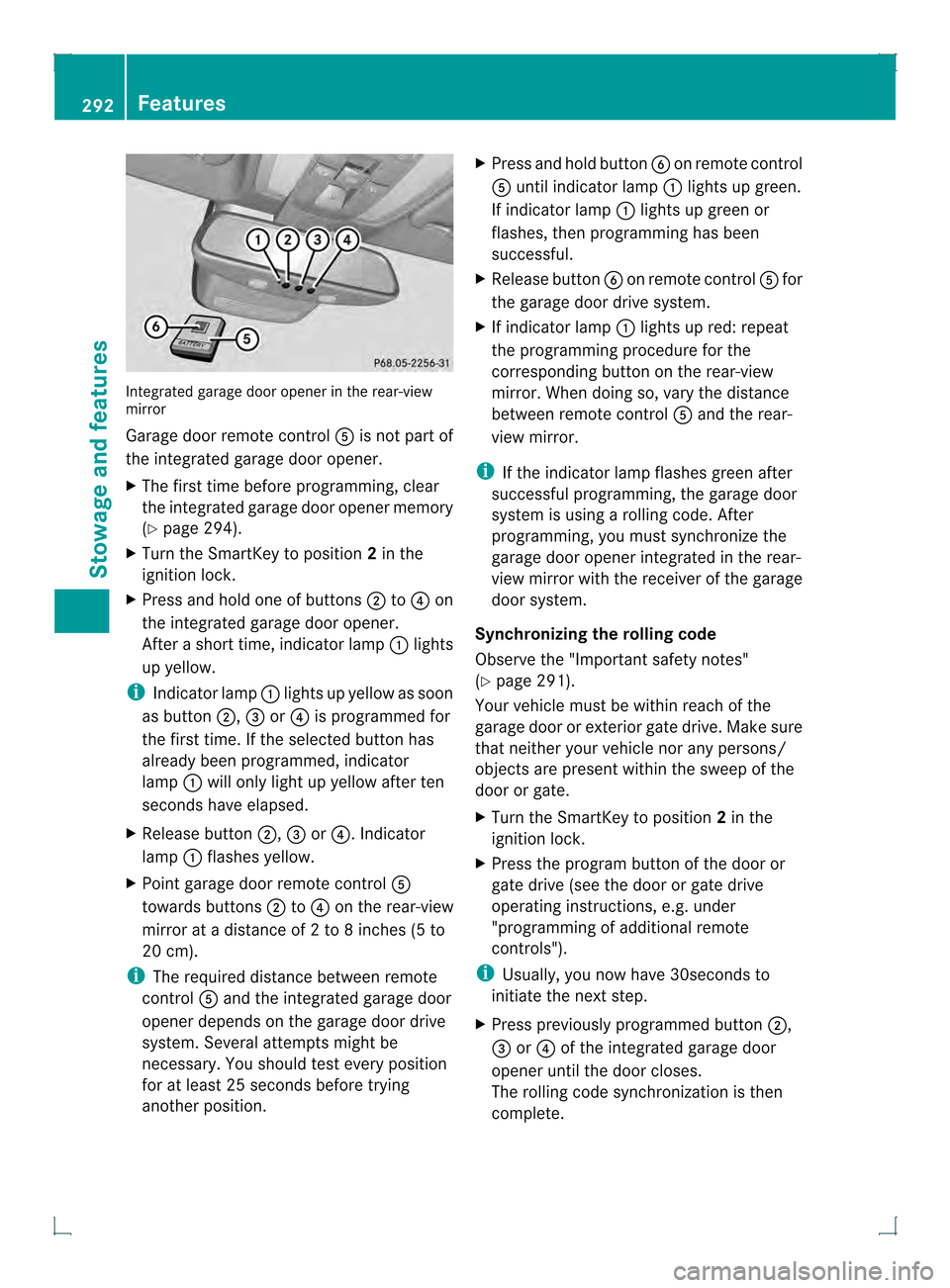
Integrated garage door opener in the rear-view
mirror
Garage door remote control 001Eis not part of
the integrated garage door opener.
X The first time before programming, clear
the integrated garage door opener memory
(Y page 294).
X Turn the SmartKey to position 2in the
ignition lock.
X Press and hold one of buttons 0003to0020 on
the integrated garage door opener.
After a short time, indicator lamp 0002lights
up yellow.
i Indicator lamp 0002lights up yellow as soon
as button 0003,0021or0020 is programmed for
the first time. If the selected button has
already been programmed, indicator
lamp 0002will only lightu p yellow after ten
seconds have elapsed.
X Release button 0003,0021or0020. Indicator
lamp 0002flashes yellow.
X Point garage door remote control 001E
towards buttons 0003to0020 on the rear-view
mirror at a distance of 2 to 8 inches (5 to
20 cm).
i The required distance between remote
control 001Eand the integrated garage door
opener depends on the garage door drive
system. Several attempts might be
necessary. You should test every position
for at least 25 seconds before trying
another position. X
Press and hold button 001Fon remot econtrol
001E until indicator lamp 0002lights up green.
If indicator lamp 0002lights up green or
flashes, then programming has been
successful.
X Release button 001Fon remote control 001Efor
the garage door drive system.
X If indicator lamp 0002lights up red: repeat
the programming procedure for the
corresponding button on the rear-view
mirror. When doing so, vary the distance
between remote control 001Eand the rear-
view mirror.
i If the indicator lamp flashes green after
successful programming, the garage door
system is using a rolling code. After
programming, you must synchronize the
garage door opener integrated in the rear-
view mirror with the receiver of the garage
door system.
Synchronizing the rolling code
Observe the "Important safety notes"
(Y page 291).
Your vehicle must be within reach of the
garage door or exterior gate drive. Make sure
that neither your vehicle nor any persons/
objects are present within the sweep of the
door or gate.
X Turn the SmartKey to position 2in the
ignition lock.
X Press the program button of the door or
gate drive (see the door or gate drive
operating instructions, e.g. under
"programming of additional remote
controls").
i Usually, you now have 30seconds to
initiate the next step.
X Press previously programmed button 0003,
0021 or0020 of the integrated garage door
opener until the door closes.
The rolling code synchronization is then
complete. 292
FeaturesStowage and features
Page 295 of 378
Notes on programming the remote
control
Canadia nradio frequency laws require a
"break" (or interruption) of the transmission
signals after broadcasting for a few seconds.
Therefore, these signals may no tlast long
enough for the integrated garage door
opener. The signal is no trecognized during
programming. Comparable with Canadian
law, some U.S.g arage door openers also
feature a "break".
Proceed as follows:
R if you live in Canada
R if you have difficulties programming the
garage door opener (regardless of where
you live) when using the programming
steps
X Press and hold one of buttons 0003to0020 on
the integrated garage door opener.
Afte rashort time, indicator lamp 0002lights
up yellow.
X Release the button.
Indicator lamp 0002flashes yellow.
X Press button 001Fof garage door remote
control 001Efor two seconds, then release it
for two seconds.
X Press button 001Fagainf or two seconds.
X Repeat this sequence on button 001Fof
remote control 001Euntil indicator lamp 0002
lights up green.
If indicator lamp 0002turns red, repeat the
process.
X Continue with the other programming
steps (see above).
Problems when programming
If you are experiencing problems
programming the integrated garage door
opener on the rear-view mirror, take note of
the following instructions:
R Check the transmitter frequency of garage
door drive remote control 001E.This can
usually be found on the back of the remote
control. The integrated garage door opener is
compatible with devices that have units
which operate in the frequency range of
280to 433MHz.
R Replace the batteries in garage door
remote control 001E.This increases the
likelihood that garage door remote control
001E will transmit a stronga nd precise signal
to the integrated garage door opene rinthe
rear-view mirror.
R When programming, hold remote control
001E at varying distances and angles from the
button that you are programming. Try
various angles at a distance between 2and
12 inches (5to 30 cm) or at the same angle
but at varying distances.
R If another remote control for the same
garage door drive is available, repeat the
same programming steps with this remote
control. Before performing these steps,
make sure that new batteries have been
installed in garage door drive remote
control 001E.
R Note that some remote controls only
transmit for a limited amount of time (the
indicator lamp on the remote control goes
out). Press button 001Fon remote control
001E again before transmission ends.
R Align the antenna cable of the garage door
opener unit. This can improve signal
reception/transmission.
Opening/closing the garage door After it has been programmed, the integrated
garage door opener performs the function of
the garage door system remote control.
Please also read the operating instructions
for the garage door system.
X
Turn the SmartKey to position 2in the
ignition lock.
X Press button 0003,0021or0020 which you have
programmed to operate the garage door.
Garage door system with a fixed code:
indicator lamp 0002lights up green. Features
293Stowage and features Z