button MERCEDES-BENZ GLK-Class 2013 X204 Repair Manual
[x] Cancel search | Manufacturer: MERCEDES-BENZ, Model Year: 2013, Model line: GLK-Class, Model: MERCEDES-BENZ GLK-Class 2013 X204Pages: 378, PDF Size: 5.03 MB
Page 151 of 378
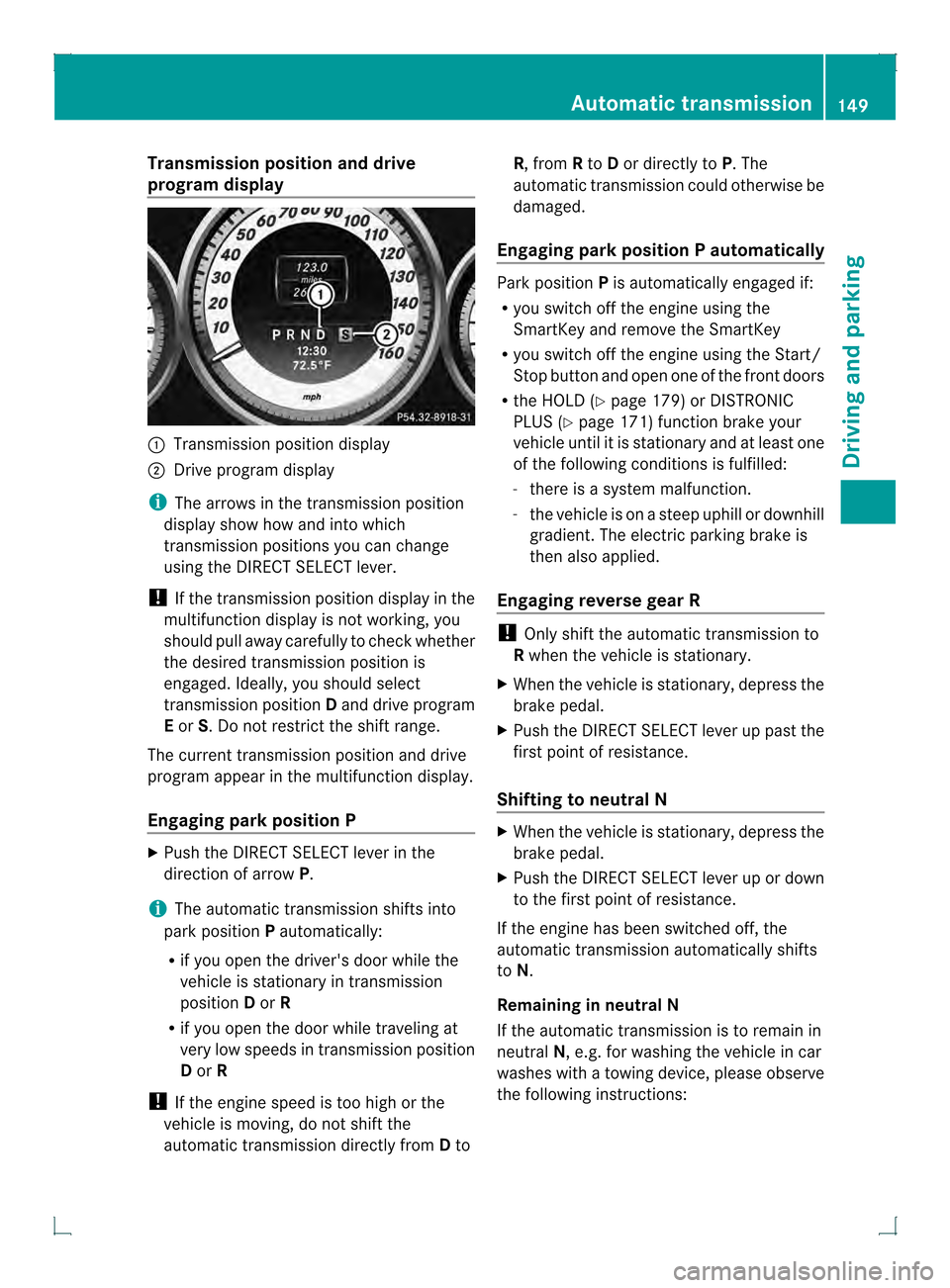
Transmission position and drive
program display 0002
Transmission positio ndisplay
0003 Drive program display
i The arrows in the transmission position
display show how and into which
transmission positions you can change
using the DIRECT SELECT lever.
! If the transmission position display in the
multifunction display is not working, you
should pull away carefully to chec kwhether
the desired transmission position is
engaged. Ideally, you should select
transmission position Dand drive program
E or S. Do not restrict the shift range.
The current transmission position and drive
program appearint he multifunction display.
Engaging parkp osition P X
Push the DIRECT SELECT lever in the
directio nofarrowP.
i The automatic transmission shifts into
park position Pautomatically:
R if you open the driver's door while the
vehicle is stationary in transmission
position Dor R
R if you open the door while traveling at
very low speeds in transmission position
D or R
! If the engine speed is too high or the
vehicle is moving, do not shift the
automatic transmission directly from Dto R, from
Rto Dor directly to P.The
automatic transmission could otherwise be
damaged.
Engaging parkp osition P automatically Park position
Pis automatically engaged if:
R you switch off the engine using the
SmartKey and remove the SmartKey
R you switch off the engine using the Start/
Stop button and open one of the fron tdoors
R the HOLD (Y page 179) or DISTRONIC
PLUS (Y page 171) function brake your
vehicle until it is stationary and at least one
of the following conditions is fulfilled:
- there is a system malfunction.
- the vehicle is on a steep uphill or downhill
gradient. The electric parking brake is
then also applied.
Engaging reverse gear R !
Only shift the automatic transmission to
R when the vehicle is stationary.
X When the vehicle is stationary, depress the
brake pedal.
X Push the DIRECT SELECT lever up past the
first point of resistance.
Shifting to neutral N X
When the vehicle is stationary, depress the
brake pedal.
X Push the DIRECT SELECT lever up or down
to the first point of resistance.
If the engine has been switched off, the
automatic transmission automatically shifts
to N.
Remaining in neutral N
If the automatic transmission is to remain in
neutral N, e.g. for washing the vehicle in car
washes with a towing device, please observe
the following instructions: Automatic transmission
149Driving and parking Z
Page 152 of 378
G
WARNING
If children are left unsupervised in the vehicle,
they could:
R open the doors, thus endangering other
people or road users.
R get out and disrupt traffic.
R operate the vehicle's equipment.
Additionally, children could set the vehicle in
motion if, for example, they:
R release the parking brake.
R shift the automatic transmission out of
parking position P.
R starting the engine.
There is a risk of an accident and injury.
When leaving the vehicle, always take the
SmartKey with you and lock the vehicle. Never
leave children or animals unattended in the
vehicle. Always keep the SmartKey out of
reach of children.
Using the SmartKey:
R Make sure that the ignitio nis switched on.
R When the vehicle is stationary, depress the
brake pedal and keep it depressed.
R Shift to neutral N.
R Release the brake pedal.
R if the electric parking brake is applied,
release it.
R Switch off the ignition and leave the
SmartKey in the ignition lock.
Using KEYLESS-GO:
R Make sure that the ignition is switched on.
R When the vehicle is stationary, depress the
brake pedal and keep it depressed.
R Engage park position P.
R Release the brake pedal.
R Remove the Start/Stop button from the
ignition lock.
R Insert the SmartKey into the ignition lock.
R Switch on the ignition.
R Depress the brake pedal and keep it
depressed. R
Shift to neutral N.
R Release the brake pedal.
R if the electric parking brake is applied,
release it.
R Switch off the ignition and leave the
SmartKey in the ignition lock.
Engaging drive position D X
When the vehicle is stationary, depress the
brake pedal.
X Push the DIRECT SELECT lever down past
the first point of resistance. Transmission positions
0003
Park position
Do not shift the transmission into
position
P(Ypage 160) unless the
vehicle is stationary. The parking
lock should not be used as a brake
when parking. Always apply the
parking brake in addition to the
parking lock in order to secure the
vehicle.
If the vehicle electronics are
malfunctioning, the transmission
may be locked in position P. Have
the vehicle electronics checked
immediately at a qualified
specialist workshop.
The automatic transmission shifts
to Pautomatically if you:
R remove the SmartKey
R switch off the engine when in R
or Dand open one of the front
doors 0004
Reverse gear
Only shift the transmission to
R
when the vehicle is stationary. 150
Automatic transmissionDriving and parking
Page 153 of 378
0002
Neutral
Do not shift the transmission to
N
while driving. The transmission
could otherwise be damaged.
No power is transmitted from the
engine to the drive wheels.
Releasing the brakes will allow you
to move the vehicle freely, e.g .to
push it or tow it.
If ESP ®
is deactivated or faulty:
only shift the transmission to
position Nif the vehicle is in danger
of skidding, e.g. on icy roads.
! Rolling in neutral Ncan damage
the drive train. 0009
Drive
The automatic transmission
changes gear automatically. All
forward gears are available.
Changing gear
The automatic transmission shifts to the
individual gears automatically when it is in
transmission position D.This automatic
gearshifting behavior is determined by:
R a shift range restriction, if selected
R the selected drive program:
E/S(Y page 151)
R the position of the accelerator pedal
R the road speed Driving tips
Kickdown Use kickdown for maximum acceleration.
X
Depress the accelerator pedal beyond the
pressure point.
The automatic transmission shifts to a
lower gear depending on the engine speed.
X Ease off the accelerator pedal once the
desired speed is reached.
The automatic transmission shifts back up.
Towing atrailer X
When traveling downhill, switch to a lower
gear if the automatic transmission
constantly switches between two gears.
X Engaging a lowe rgear and reducing the
speed reduces the risk of the engine
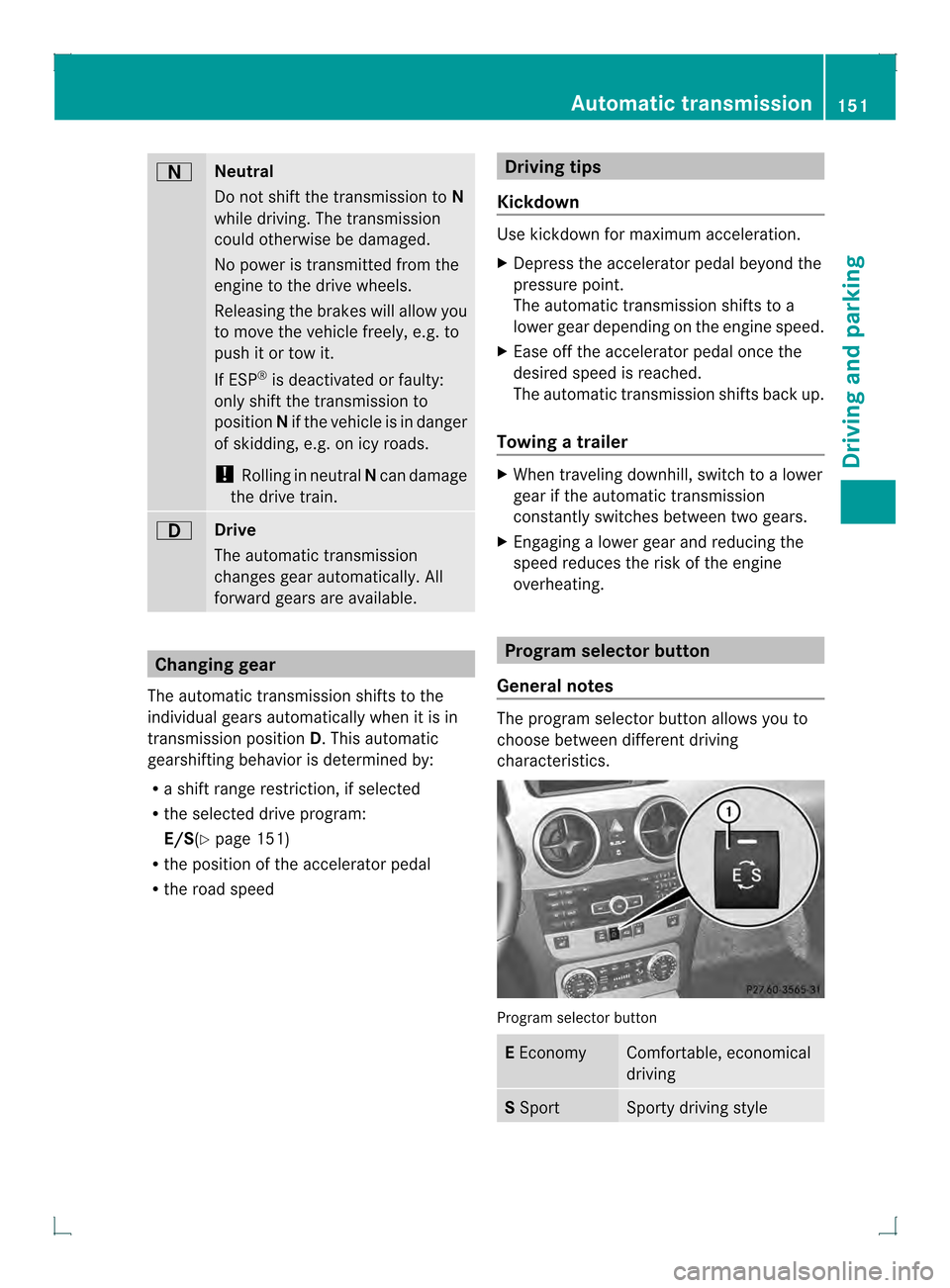
overheating. Program selector button
General notes The program selector button allows you to
choose between differen
tdriving
characteristics. Progra
mselector button E
Economy Comfortable, economical
driving
S
Sport Sporty driving styleAutomatic transmission
151Driving and parking Z
Page 154 of 378
i
For further information on the automatic
drive program, see (Y page 152).
X Press program selector button 0002
repeatedly until the letter for the desired
gearshift program appears in the
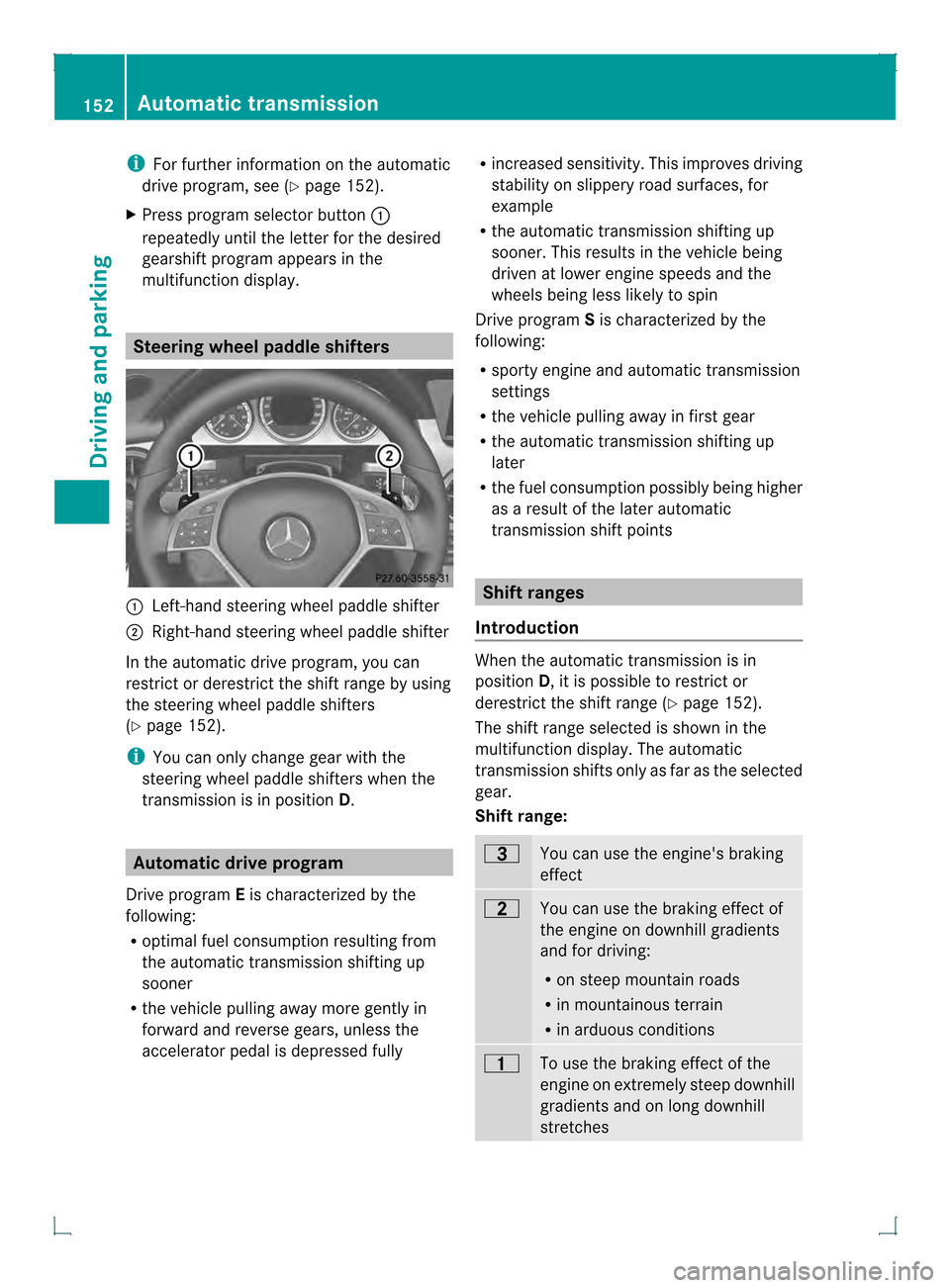
multifunction display. Steering wheel paddle shifters
0002
Left-hand steering wheel paddle shifter
0003 Right-hand steering wheel paddle shifter
In the automatic drive program, you can
restrict or derestrict the shift range by using
the steering wheel paddle shifters
(Y page 152).
i You can only change gea rwith the
steering wheel paddle shifters when the
transmission is in position D.Automatic drive program
Drive program Eis characterized by the
following:
R optimal fuel consumption resulting from
the automatic transmission shifting up
sooner
R the vehicle pulling away mor egently in
forward and reverse gears, unless the
accelerator pedal is depressed fully R
increased sensitivity. This improves driving
stability on slippery road surfaces, for
example
R the automatic transmission shifting up
sooner .This results in the vehicle being
driven at lower engine speeds and the
wheels being less likely to spin
Drive program Sis characterized by the
following:
R sporty engine and automatic transmission
settings
R the vehicle pulling away in first gear
R the automatic transmission shifting up
later
R the fuel consumption possibly being higher
as a result of the later automatic
transmission shift points Shift ranges
Introduction When the automatic transmission is in
position
D, it is possible to restrict or
derestrict the shift range (Y page 152).
The shift range selected is shown in the
multifunction display. The automatic
transmission shifts only as far as the selected
gear.
Shift range: 0008
You can use the engine's braking
effect
000A
You can use the braking effect of
the engine on downhill gradients
and for driving:
R
on steep mountain roads
R in mountainous terrain
R in arduous conditions 000F
To use the braking effect of the
engine on extremely steep downhill
gradients and on long downhill
stretches152
Automatic transmissionDriving and parking
Page 163 of 378

Vehicles with automatic transmission
X
Apply the parking brake firmly.
X Shift the transmission to position P.
Using the SmartKey
X Turn the SmartKey to position 0in the
ignition lock and remove it.
The immobilize ris activated.
i The SmartKey can only be removed if the
transmission is in position P.
Using KEYLESS-GO
X Press the Start/Stop button (Y page 141).
The engine stops and all the indicator
lamps in the instrument cluster go out.
i When the driver's door is closed, this
corresponds to key position 1. When the
driver's door is open, this corresponds to
key position 0:"key removed".
i In the event of an emergency, the engine
can be turned off while the vehicle is in
motion by pressing and holding the Start/
Stop button for three seconds. Parking brake
G
WARNING
If you must brake the vehicle with the parking
brake, the braking distance is considerably
longe rand the wheels could lock. There is an
increased danger of skidding and accidents.
Only use the parking brake to brake the
vehicle when the service brake is faulty .Do
not apply the parking brake too firmly. If the
wheels lock, release the parking brake until
the wheels begi nturning again. G
WARNING
If you leave children unsupervised in the
vehicle, they could set it in motion by, for
example:
R releasing the parking brake
R shifting the automatic transmission out of
the parking position P
R starting the engine.
They could also operate the vehicle's
equipment. There is a ris kofanaccident and
injury.
Whe nleaving the vehicle, always take the
SmartKey with you and lock the vehicle. Never
leave children unsupervised in the vehicle.
If you brake the vehicle with the parking
brake, the brake lamps will not light up. X
To apply: depress parking brake 0003firmly.
When the engine is running, the 000D(USA
only) or 0006(Canada only) indicator lamp
lights up in the instrument cluster.
X To release: depress the brake pedal and
keep it depressed.
X Pull release handle 0002.
When the ignition is switched on or the
engine is running, the 000D(USA only) or
0006 (Canada only) indicator lamp goes out
in the instrument cluster. Parking the vehicle for
along period
If you leave the vehicle parked for longer than
four weeks, the battery may be damaged by
exhaustive discharging. Parking
161Driving and parking Z
Page 186 of 378
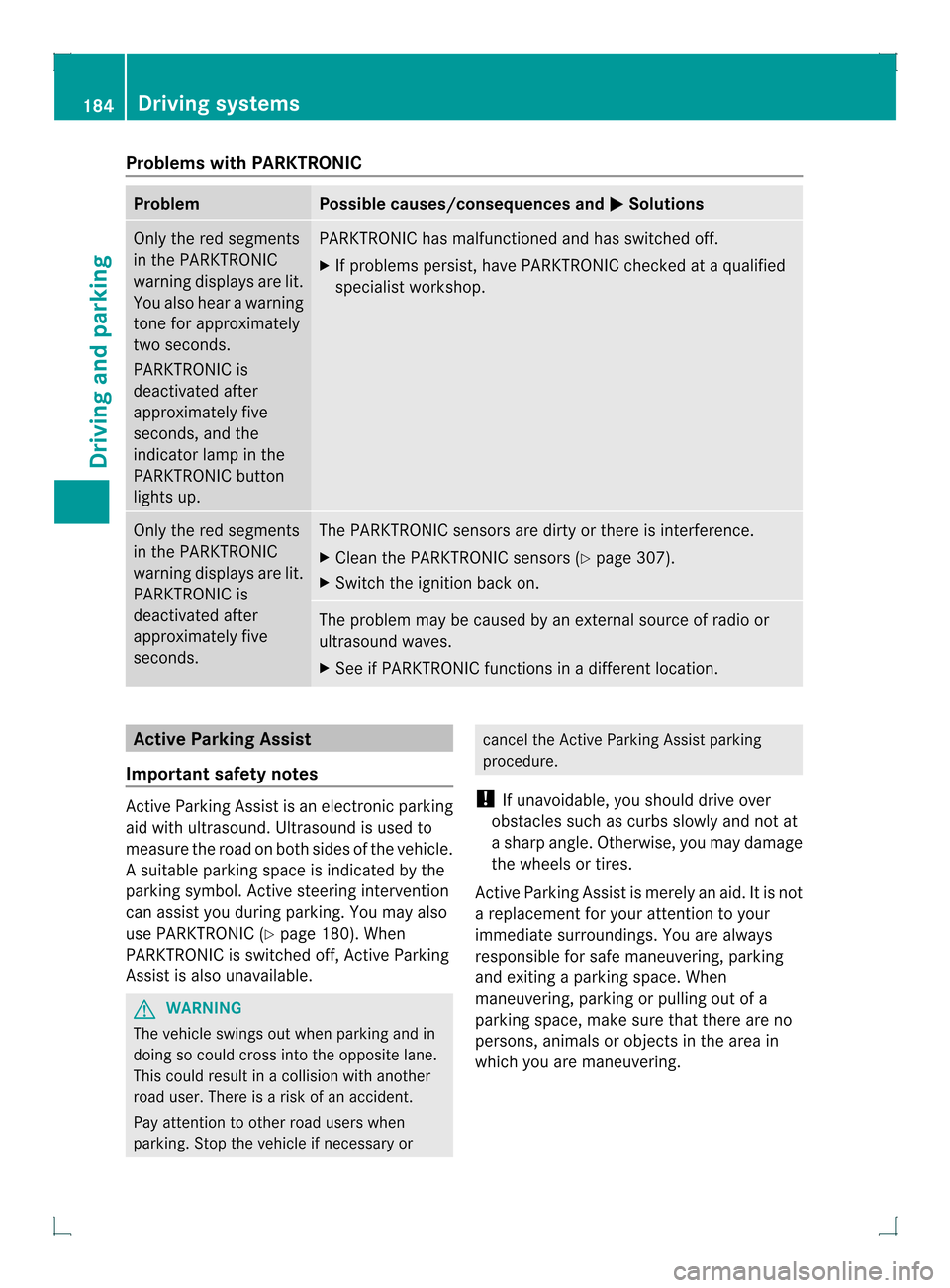
Problems with PARKTRONIC
Problem Possible causes/consequences and
0001 Solutions
Only the red segments
in the PARKTRONIC
warning displays are lit.
You also hear a warning
tone for approximately
two seconds.
PARKTRONIC is
deactivated after
approximately five
seconds, and the
indicator lamp in the
PARKTRONIC button
lights up. PARKTRONIC has malfunctioned and has switched off.
X
If problems persist, have PARKTRONIC checked at a qualified
specialist workshop. Only the red segments
in the PARKTRONIC
warning displays are lit.
PARKTRONIC is
deactivated after
approximately five
seconds. The PARKTRONIC sensors are dirty or there is interference.
X
Cleant he PARKTRONIC sensors (Y page 307).
X Switch the ignition back on. The problem may be caused by an external source of radio or
ultrasound waves.
X
See if PARKTRONIC functions in a different location. Active Parking Assist
Important safety notes Active Parking Assist is an electronic parking
aid with ultrasound. Ultrasound is used to
measure the road on both sides of the vehicle.
As uitable parking space is indicated by the
parking symbol. Active steering intervention
can assis tyou during parking. You may also
use PARKTRONIC (Y page 180). When
PARKTRONIC is switched off, Active Parking
Assist is also unavailable. G
WARNING
The vehicle swings out when parking and in
doing so could cross into the opposite lane.
This could result in a collision with another
road user. There is a risk of an accident.
Pay attention to other road users when
parking. Stop the vehicle if necessary or cancel the Active Parking Assist parking
procedure.
! If unavoidable, you should drive over
obstacles such as curbs slowly and not at
a sharp angle. Otherwise, you may damage
the wheels or tires.
Active Parking Assist is merely an aid. It is not
a replacement for your attention to your
immediate surroundings. You are always
responsible for safe maneuvering, parking
and exiting a parking space. When
maneuvering, parking or pulling out of a
parking space, make sure that there are no
persons, animals or object sinthe area in
which you are maneuvering. 184
Driving systemsDriving and parking
Page 187 of 378
Use Active Parking Assist for parking spaces:
R that are parallel to the direction of travel
R that are on straight roads, not bends
R that are on the same level as the road, e.g.
not on the pavement
Parking tips:
R On narrow roads, drive as close to the
parking space as possible.
R Parking spaces that are littered, overgrown
or partially occupied by trailer drawbars
might be identified incorrectly or not at all.
R Snowfall or heavy rain may lead to a parking
space being measured inaccurately.
R Pay attention to the PARKTRONIC
(Y page 182) warning messages during the
parking procedure.
R You can intervene in the steering procedure
to correct it at any time. Active Parking
Assist will then be canceled.
R When transporting a load which protrudes
from your vehicle, you should not use
Active Parking Assist.
R when snow chains or an emergency spare
wheel are mounted, you should not use
Active Parking Assist here either.
R Make sure that the tire pressures are
always correct.T his hasadirec tinfluence
on the parking characteristics of the
vehicle.
Detecting parking spaces Objects located above the height range of
Active Parking Assist will not be detected
when the parking space is measured .These
are not taken into account when the parking
procedure is calculated, e.g. overhanging
loads, tail sections or loading ramps of goods
vehicles. In some circumstances, Active
Parking Assist may therefore guide you into
the parking space too early. G
WARNING
If there are objects above the detection range,
Active Parking Assist may turn prematurely. You may cause a collision as a result. There is
a risk of an accident.
If there are objects above the detection range,
stop and deactivate Active Parking Assist.
Active Parking Assist is switched on
automatically when driving forwards. The
system is operational at speeds of up to
approximately 22 mph (35 km/h). While in
operation, the system independently locates
and measures parking spaces on both sides
of the vehicle. When driving at speeds below
19 mph (30 km/h), you will see the parking
symbol as a status indicator in the instrument
cluster. By default, Active Parking Assist only
displays parking spaces on the front-
passenger side. Parking spaces on the
driver's side are displayed as soon as the turn
signal on the driver's side is activated. To park
on the driver's side, you must leave the
driver's side turn signal switched on. This
must remain switched on until you
acknowledge the use of Active Parking Assist
by pressing the 000Bbutton on the
multifunction steering wheel.
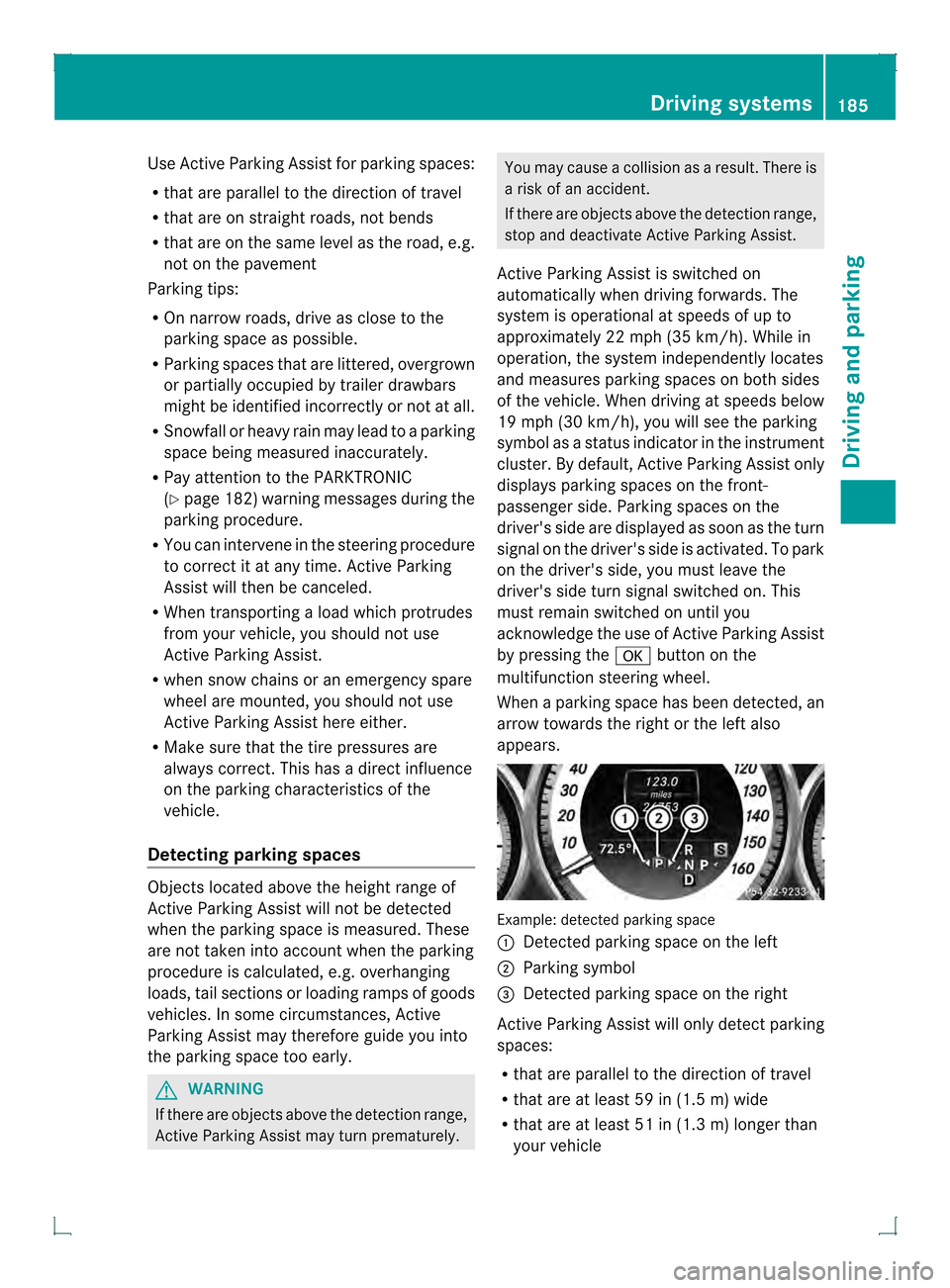
When a parking space has been detected, an
arrow towards the right or the left also
appears. Example: detected parking space
0002
Detected parking space on the left
0003 Parking symbol
0021 Detected parking space on the right
Active Parking Assist will only detect parking
spaces:
R that are parallel to the direction of travel
R that are at least 59 in (1.5 m) wide
R that are at least 51 in (1.3 m) longer than
your vehicle Driving systems
185Driving and parking Z
Page 188 of 378
Ap
arking space is displayed while you are
driving past it, and until you are
approximately 50 ft (15 m) away from it.
Parking G
WARNING
Active Parking Assist merely aids you by
intervening actively in the steering. If you do
not brake there is a risk of an accident.
Always apply the brakes yourself when
maneuvering and parking.
i When PARKTRONIC detects obstacles,
Active Parking Assist brakes automatically
during the parking process. You are
responsible for braking in good time.
Active Parking Assist does no tsuppor tyou
with parking spaces parallel to the direction
of travel if:
R the parking space is on acurb
R the parking space is apparently blocked,
for example by foliage or grass paving
blocks
R the range of movement is too small
R the parking space is bordered by an
obstacle which is no tclearly defined such
as a tree or a trailer
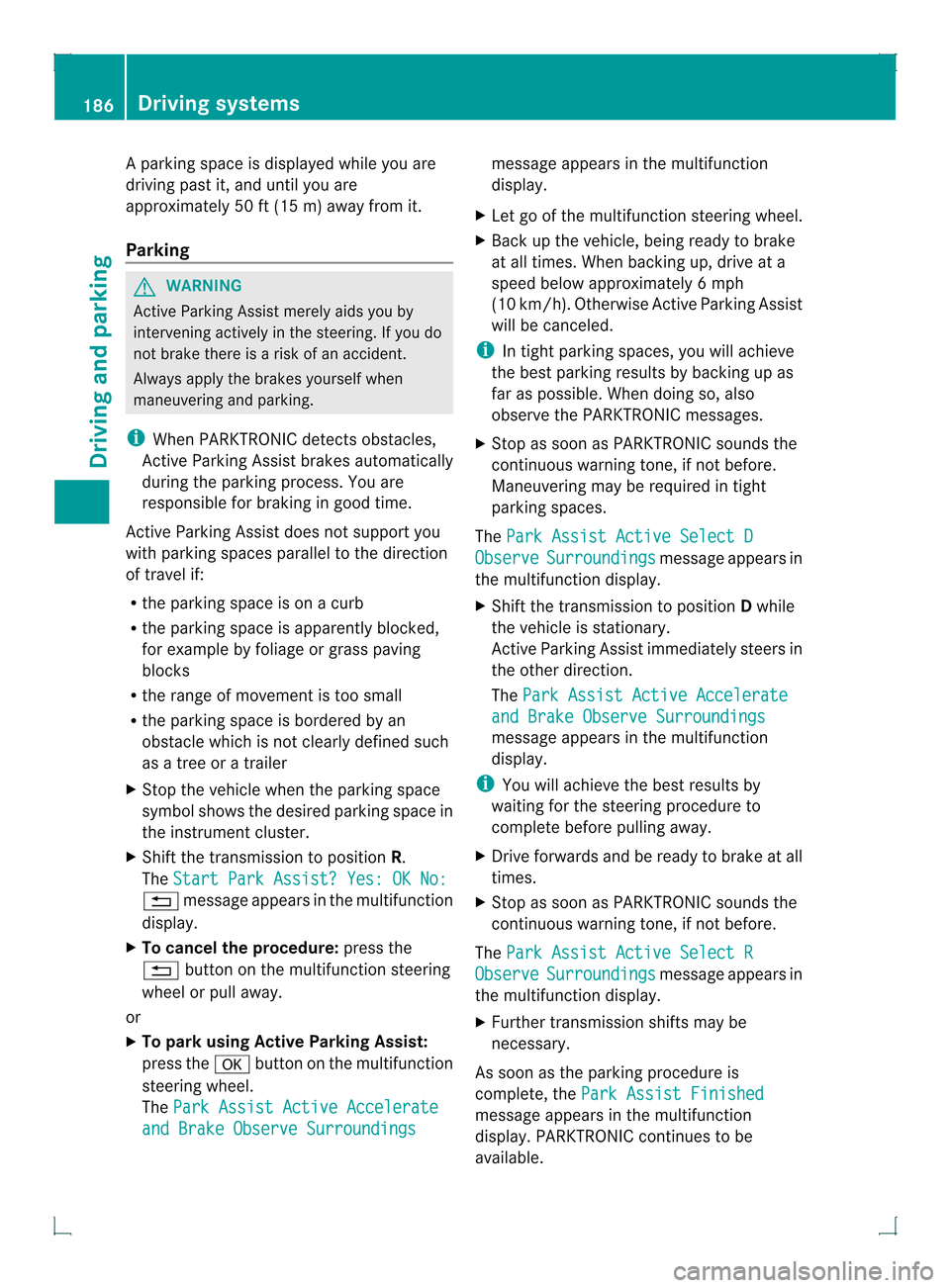
X Stop the vehicle when the parking space
symbol shows the desired parking space in
the instrument cluster.
X Shif tthe transmission to position R.
The Start Park Assist? Yes: OK No: 0007
message appears in the multifunction
display.
X To cancel the procedure: press the
0007 button on the multifunction steering
wheel or pull away.
or
X To parku sing Active Parking Assist:
press the 000Bbutton on the multifunction
steering wheel.
The Park Assist Active Accelerate and Brake Observe Surroundings message appears in the multifunction
display.
X Let go of the multifunction steering wheel.
X Back up the vehicle, being ready to brake
at all times. When backing up, drive at a
speed below approximately 6mph
(10 km/h). Otherwise Active Parking Assist
will be canceled.
i In tight parking spaces, you will achieve
the best parking results by backing up as
far as possible. When doing so, also
observe the PARKTRONIC messages.
X Stop as soon as PARKTRONIC sounds the
continuous warning tone, if not before.
Maneuvering may be required in tight
parking spaces.
The Park Assist Active Select D Observe Surroundings message appears in
the multifunction display.
X Shift the transmission to position Dwhile
the vehicle is stationary.
Active Parking Assist immediately steers in
the other direction.
The Park Assist Active Accelerate and Brake Observe Surroundings
message appears in the multifunction
display.
i You will achieve the best results by
waiting for the steering procedure to
complete before pulling away.
X Drive forwards and be ready to brake at all
times.
X Stop as soon as PARKTRONIC sounds the
continuous warning tone, if not before.
The Park Assist Active Select R Observe Surroundings message appears in
the multifunction display.
X Further transmission shift smay be
necessary.
As soon as the parking procedure is
complete, the Park Assist Finished message appears in the multifunction
display. PARKTRONIC continue
sto be
available. 186
Driving systemsDriving and parking
Page 189 of 378
X
Maneuver if necessary.
X Always observe the warning messages
displayed by PARKTRONIC (Y page 182).
Parking tips:
R The way your vehicle is positioned in the
parking space after parking is dependent
on various factors. These include the
position and shape of the vehicles parked
in front and behind it and the conditions of
the location. It may be the case that Active
Parking Assist guides you too far into a
parking space, or not far enough into it. In
some cases, it may also lead you across or
onto the curb. If necessary, you should
cancel the parking procedure with Active
Parking Assist.
R You can also engage forward gear
prematurely. The vehicle redirects and
does not drive as far into the parking space.
Should a gear be changed too early, the
parking procedure will be canceled. A
sensible parking position can no longer be
achieved from this position.
Exiting aparking space In order that Active Parking Assist can
support you whe nyou exit the parking space:
R the border of the parking space must not
be too low.
R the border of the parking space must not
be too wide. The system maneuvers the
vehicle into a position at a maximum of 45°
to the starting position in the parking
space.
R a maneuvering distance of at least 24 in
(0.60 m) must be available.
Active Parking Assist can only assist you with
exiting a parking space if you have parked the
vehicle using Active Parking Assist.
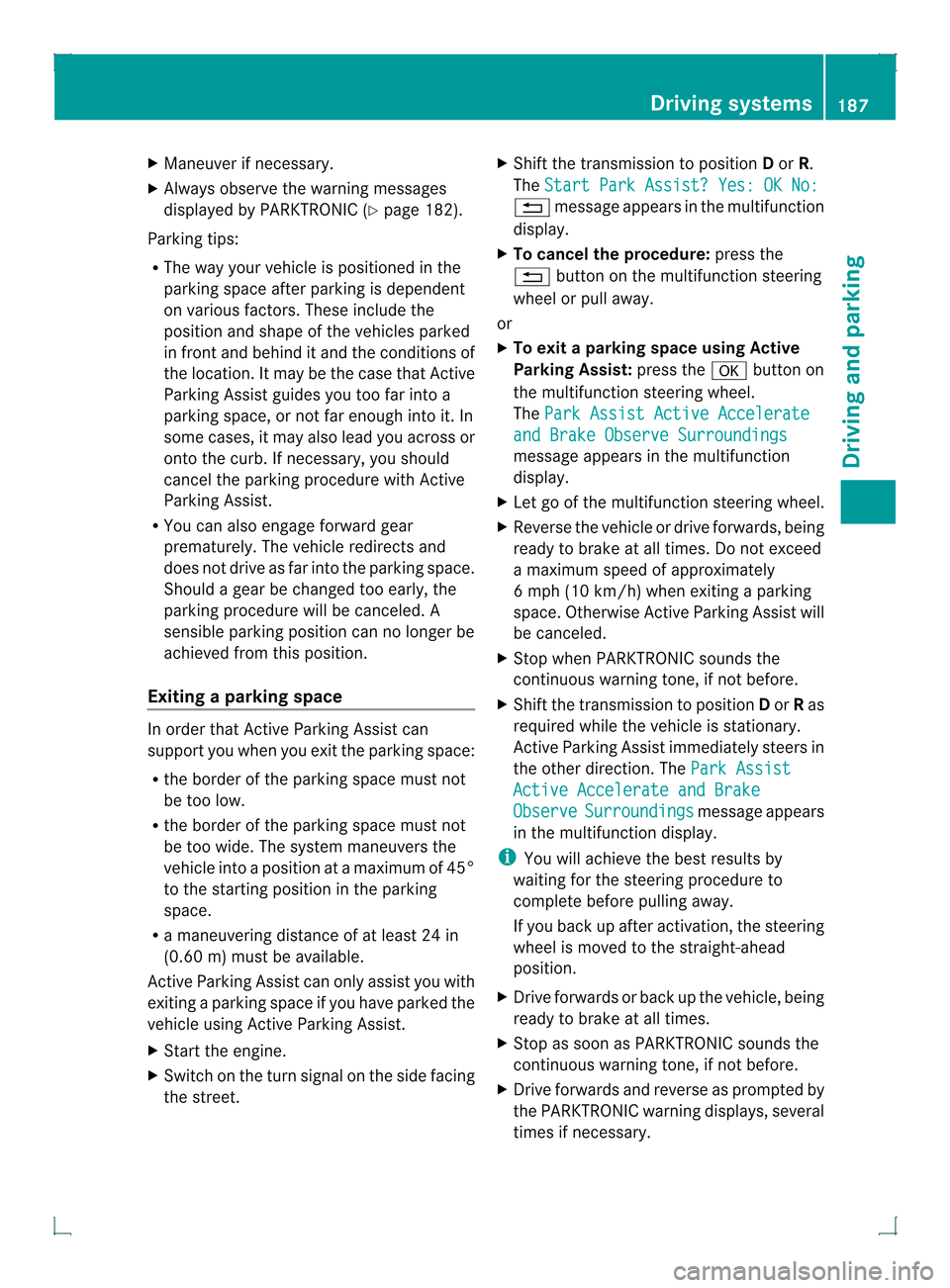
X Start the engine.
X Switch on the turn signal on the side facing
the street. X
Shift the transmission to position Dor R.
The Start Park Assist? Yes: OK No: 0007
message appears in the multifunction
display.
X To cancel the procedure: press the
0007 button on the multifunction steering
wheel or pull away.
or
X To exit aparking space using Active
Parking Assist: press the000Bbutton on
the multifunctio nsteering wheel.
The Park Assist Active Accelerate and Brake Observe Surroundings
message appears in the multifunction
display.
X Let go of the multifunctio nsteering wheel.
X Reverse the vehicle or drive forwards, being
ready to brake at all times. Do not exceed
a maximum speed of approximately
6 mph (10 km/h) when exiting a parking
space .Otherwise Active Parking Assist will
be canceled.
X Stop when PARKTRONIC sounds the
continuous warning tone, if not before.
X Shift the transmission to position Dor Ras
required while the vehicle is stationary.
Active Parking Assist immediately steers in
the other direction. The Park Assist Active Accelerate and Brake
Observe Surroundings message appears
in the multifunctio ndisplay.
i You will achieve the best results by
waiting for the steering procedure to
complete before pulling away.
If you back up after activation, the steering
wheel is moved to the straight-ahead
position.
X Drive forwards or back up the vehicle, being
ready to brake at all times.
X Stop as soon as PARKTRONIC sounds the
continuous warning tone, if not before.
X Drive forwards and reverse as prompted by
the PARKTRONIC warning displays, several
times if necessary. Driving systems
187Driving and parking Z
Page 190 of 378
Once you have exited the parking space
completely, the steering wheel is moved to
the straight-ahead position. You hear a tone
and the
Park Assist Finished message
appears in the multifunction display. You will
then have to steer and merge into traffic on
your own. PARKTRONIC is still available.
Canceling Active Parking Assist You can cancel Active Parking Assist at any
time.
X
Stop the movement of the multifunction
steering wheel or steer yourself.
Active Parking Assist will be canceled at
once. The Park Assist Canceled message appears in the multifunction
display.
or
X Press the PARKTRONIC button on the
center console (Y page 182).
PARKTRONIC is switched off and Active
Parking Assist is immediately canceled.
The Park Assist Canceled message
appears in the multifunction display.
Active Parking Assist is canceled
automatically if:
R you engage the electric parking brake
R parking using Active Parking Assist is no
longer possible
R you are driving faster than 6 mph
(10 km/h)
R a wheel spins, ESP ®
intervenes or fails. The
000F warning lamp lights up in the
instrument cluster.
Aw arning tone sounds. The parking space
symbol disappears and the multifunction
display shows the Park Assist Canceledmessage.
If Active Parking Assist is canceled, you must
steer again yourself.
If a system malfunctio noccurs, the vehicle is
braked to a standstill. To drive on, depress the
accelerato ragain. Towing
atrailer For vehicles with a trailer tow hitch, the
minimum length for parking spaces is slightly
increased.
If you have attached a trailer to your vehicle,
you should not use Active Parking Assist.
Once the electrical connectio
nis established
between your vehicle and the trailer, Active
Parking Assist is no longer available.
PARKTRONIC is deactivated for the rear area. Rear view camera
Important safety notes The rear view camera is only an aid. It is not
a replacement for your attention to your
immediate surroundings. You are always
responsible for safe maneuvering and
parking. When maneuvering or parking, make
sure that there are no persons, animals or
objects in the area in which you are
maneuvering.
Under the following circumstances, the rear
view camera will not function, or will function
in a limited manner:
R
the tailgate is open
R in heavy rain, snow or fog
R at night or in very dark places
R if the camera is exposed to very bright light
R if the area is lit by fluorescent light or LED
lighting (the display may flicker)
R if there is a sudden change in temperature,
e.g. when driving into a heated garage in
winter
R if the camera lens is dirty or obstructed
R if the rear of your vehicle is damaged.In
this event, have the camera positio nand
setting checked at a qualified specialist
workshop. 188
Driving systemsDriving an
d parking