display MERCEDES-BENZ GLK SUV 2008 User Guide
[x] Cancel search | Manufacturer: MERCEDES-BENZ, Model Year: 2008, Model line: GLK SUV, Model: MERCEDES-BENZ GLK SUV 2008Pages: 261, PDF Size: 8.67 MB
Page 17 of 261
Standard display
On-board computer (luxury multi-
function steering wheel). ..................95
On-board computer (multi-func-
tion steering wheel). .........................92
Station
see Radio
Steering wheel
Adjusting .......................................... 66
Buttons (on-board computer,
luxury multi-function steering
wheel). .............................................. 93
Buttons (on-board computer,
multi-function steering wheel) ..........91
Storing settings ................................ 69
Steering wheel boss
Cleaning. ........................................ 170
Steering wheel gearshift paddles....... 88
Stowage compartment ......................129
Armrest (under) .............................. 130
Glove compartment. .......................130
Rear seat armrest. ..........................131
Stowage compartments
Under driver's seat/front-
passenger seat. .............................. 130
Submenu (luxury multi-function
steering wheel)
Convenience ................................... 104
Factory settings .............................. 104
Instrument cluster .......................... 101
Lights ............................................ .102
Standard display. .............................. 95
Time/date. ..................................... 102
Vehicle............................................ 104
Summer opening
see Convenience opening
Sun visor............................................. 137
Supplemental Restraint System see SRS
Surround lighting
On-board computer (luxury multi-
function steering wheel) .................103
Switching off the alarm
ATA. .................................................. 55 T
Tailgate Display message ............................. 183
Emergency unlocking...................... 214
Limiting the opening angle................ 61
Tail lamp
Display message ............................. 191
Tail lamps
changing. ........................................ 220
Display message ............................. 191
Tail pipes
Cleaning. ........................................ 171
Tank
see Fuel tank
Tank capacity ..................................... 245
Technical data GLK 280 4MATIC ............................ 249
GLK 320 CDI 4MATIC .....................250
GLK 350 4MATIC ............................ 249
Trailer loads .................................... 254
Tyres. .............................................. 252
Wheels. ........................................... 252
Telephone
see Mobile phone
Telephone compartment ...................130
Temperature Coolant. ............................................ 90
Outside temperature......................... 90
Thermatic
Malfunction indicator lamp. ............199
Thermotronic
Malfunction indicator lamp. ............199
Tightening torque............................... 231
Time Setting (on-board computer,
luxury multi-function steering
wheel). ............................................ 102
Setting (on-board computer,
multi-function steering wheel)
......................................................... 93
TIREFIT kit
Using. ............................................. 222
TopTether .............................................. 49
Total distance recorder................. 92, 95
Tow-away protection........................... 55
Towing................................................. 23814 Index
X204_AKB; 1; 5, en-GB
wobuchh,
Version: 2.11.4 2008-10-15T13:20:56+02:00 - Seite 14Dateiname: 6515_0671_02_buchblock.pdf; preflight
Page 18 of 261
Towing eye
Fitting ............................................. 237
Removing....................................... .238
Trailer
7-pin connector .............................. 166
Display message (luxury multi-
function steering wheel) .................188
Display messages (multi-function
steering wheel). .............................. 188
Power supply. ................................. 166
Trailer coupling
see Trailer tow hitch
Trailer loads
Technical data. ............................... 254
Trailer tow hitch
Cleaning. ........................................ 172
Trailer towing
Driving tips ..................................... 164
ESP ®
................................................. 53
Mounting dimensions. ....................253
Parktronic. ...................................... 115
Transmission output (maximum)
Telephone/two-way radio ...............243
Transport (vehicle)............................. 238
Travelling uphill.................................. 159
Trim strips Cleaning. ........................................ 171
Trip computer
On-board computer (luxury multi-
function steering wheel) ...................95
On-board computer (multi-func-
tion steering wheel). .........................92
Trip meter ....................................... 92, 95
Resetting (on-board computer,
luxury multi-function steering
wheel). .............................................. 96
Resetting (on-board computer,
multi-function steering wheel) ..........92
Turn signal
Display message..................... 188, 190
Two-way radio
Installation. ..................................... 243
Tyre grip .............................................. 157
Tyre pressure ..................................... 152
Display message ............................. 181
Tyre pressure loss warning system
............................................................. 153Tyres
Direction of rotatio n....................... 152
General notes. ................................ 150
Technical data. ............................... 252
Tyre tread ............................................ 152 U
Unladen weight.................................. 249
Unlocking Emergency unlocking...................... 213
From the inside (central unlocking
button) .............................................. 59 V
Variable Speedtronic .........................111
Vehicle Emergency unlocking .............213, 214
Individual settings. ..........................101
Leaving parked up. .........................213
Towing. ........................................... 238
Transporting ................................... 238
Vehicle battery................................... 232
Vehicle dimensions .................... 242, 249
Vehicle electronics ............................243
Vehicle identification number
(VIN) ................................................... 244
Vehicle identification plates............. 244
Vehicle tool kit................................... 175
Vehicle weights.................................. 249
Video DVD Operating (on-board computer,
luxury multi-function steering
wheel). .............................................. 99 W
Warning and indicator lamp ABS (yellow).................................... 201
LIM (cruise control)......................... 108
LIM (variable Speedtronic). .............111
Warning and indicator lamps
ESP ®
......................................... 52, 201
Malfunction indicator lamp. ............199
Warning tone...................................... 205
Warning triangle................................. 174
Washer fluid Display message ............................. 198 Index
15 X204_AKB; 1; 5, en-GB
wobuchh,
Version: 2.11.4
2008-10-15T13:20:56+02:00 - Seite 15 Dateiname: 6515_0671_02_buchblock.pdf; preflight
Page 19 of 261
Washer fluid reservoir...............
149, 249
Filling capacity. ............................... 249
Wearing seat belts............................... 70
Wheel bolts Tightening torque............................ 231
Wheel chock
Use. ................................................ 176
Wheels
General notes. ................................ 150
Interchanging.................................. 154
Technical data. ............................... 252
Windowbag........................................... 39
Windowbags Display message (luxury multi-
function steering wheel) .................198
Display message (multi-function
steering wheel). .............................. 182
Windows
Cleaning. ........................................ 169
Cleaning the windscreen ...............169
see Side windows
Windscreen washer fluid................... 249
Topping up. ..................................... 149
Windscreen washer system...... 149, 249
Windscreen wipers.............................. 79
Cleaning. ........................................ 169
Malfunction..................................... 210
Replacing the wiper blades .............220
Winter diesel...................................... 146
Winter driving............................. 155, 156
Winter tyres ........................................ 155
Limit speed (on-board computer,
luxury multi-function steering
wheel). ............................................ 113
Wooden trim
Cleaning. ........................................ 17116 Index
X204_AKB; 1; 5, en-GB
wobuchh,
Version: 2.11.4 2008-10-15T13:20:56+02:00 - Seite 16Dateiname: 6515_0671_02_buchblock.pdf; preflight
Page 27 of 261
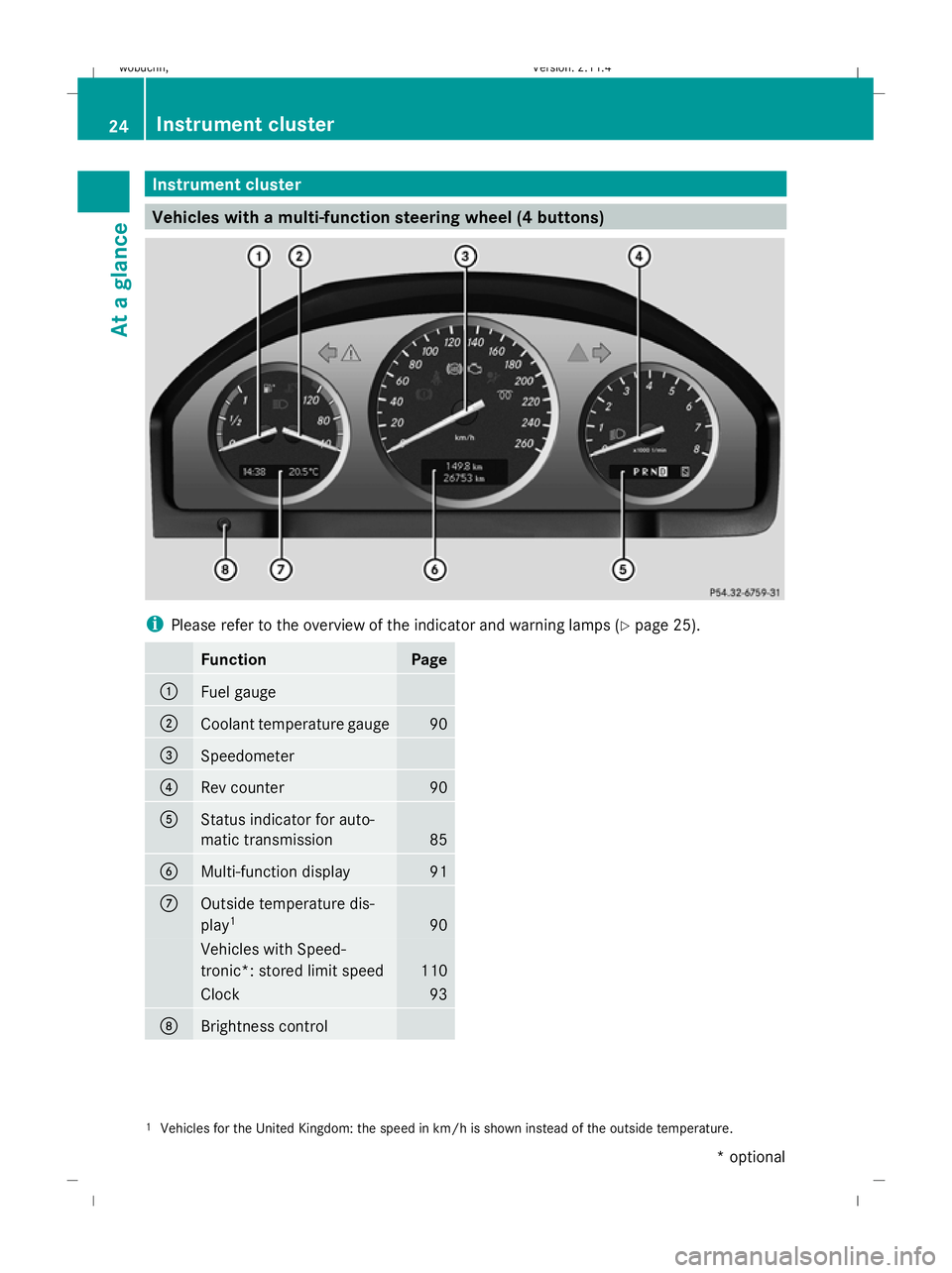
Instrument cluster
Vehicles with a multi-function steering wheel (4 buttons)i
Please refer to the overview of the indicator and warning lamps ( Ypage 25).
FunctionPage
:Fuel gauge
;Coolant temperature gauge90
=Speedometer
?Rev counter90
AStatus indicator for auto-
matic transmission
85
BMulti-function display91
COutside temperature dis-
play 1
90
Vehicles with Speed-
tronic*: stored limit speed
110
Clock93
DBrightness control
1
Vehicles for the United Kingdom: the speed in km/h is shown instead of the outside temperature.
24Instrument cluster
At a glance
* optional
X204_AKB; 1; 5, en-GB
wobuchh,
Version: 2.11.4 2008-10-15T13:20:56+02:00 - Seite 24Dateiname: 6515_0671_02_buchblock.pdf; preflight
Page 29 of 261
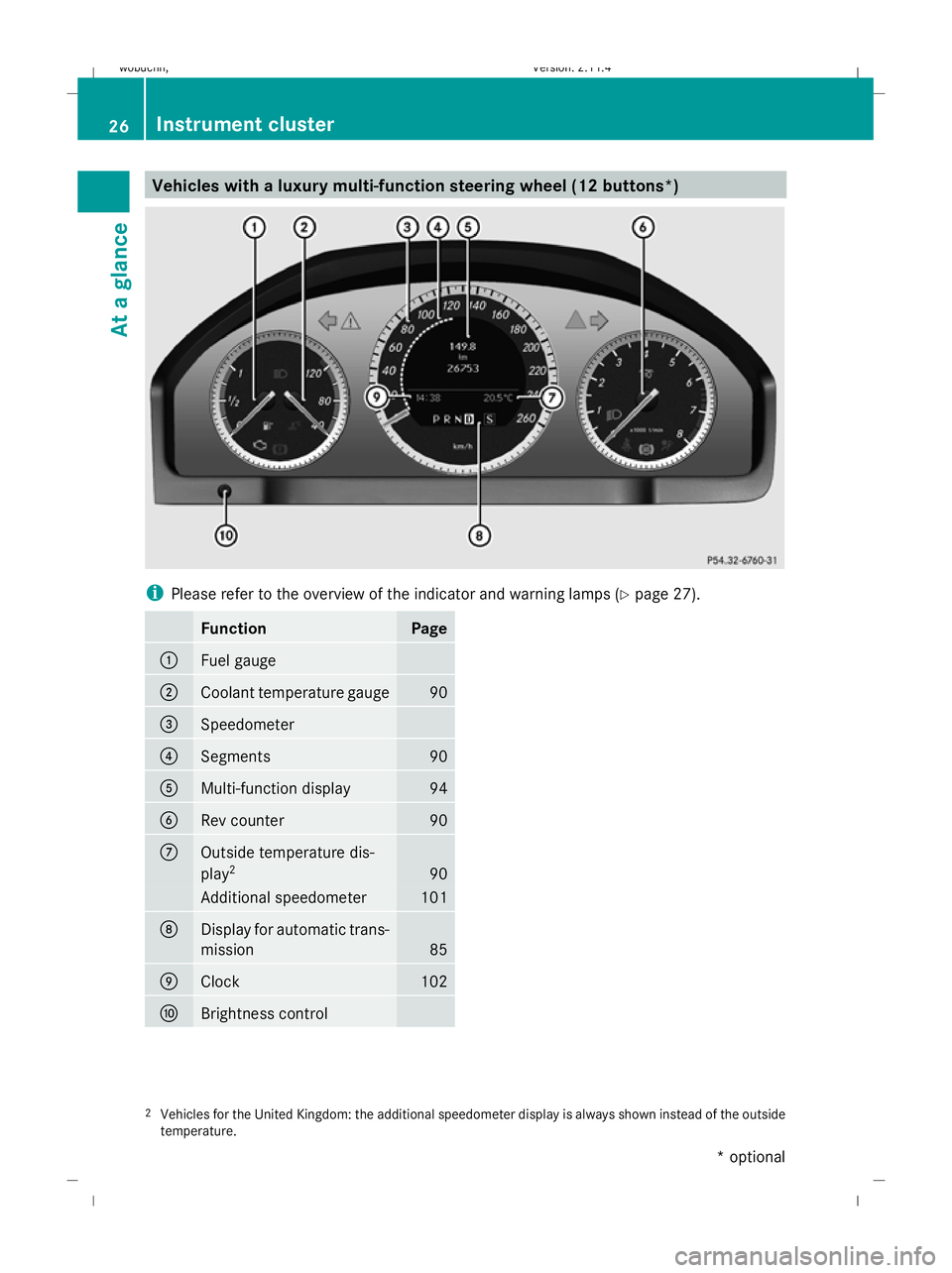
Vehicles with a luxury multi-function steering wheel (12 buttons
*)i
Please refer to the overview of the indicator and warning lamps (Y page 27).
FunctionPage
:Fuel gauge
;Coolant temperature gauge90
=Speedometer
?Segments90
AMulti-function display94
BRev counter90
COutside temperature dis-
play2
90
Additional speedometer101
DDisplay for automatic trans-
mission
85
EClock102
FBrightness control
2
Vehicles for the United Kingdom: the additional speedometer display is always shown instead of the outside
temperature.
26Instrument cluster
At a glance
* optional
X204_AKB; 1; 5, en-GB
wobuchh,
Version: 2.11.4 2008-10-15T13:20:56+02:00 - Seite 26Dateiname: 6515_0671_02_buchblock.pdf; preflight
Page 31 of 261
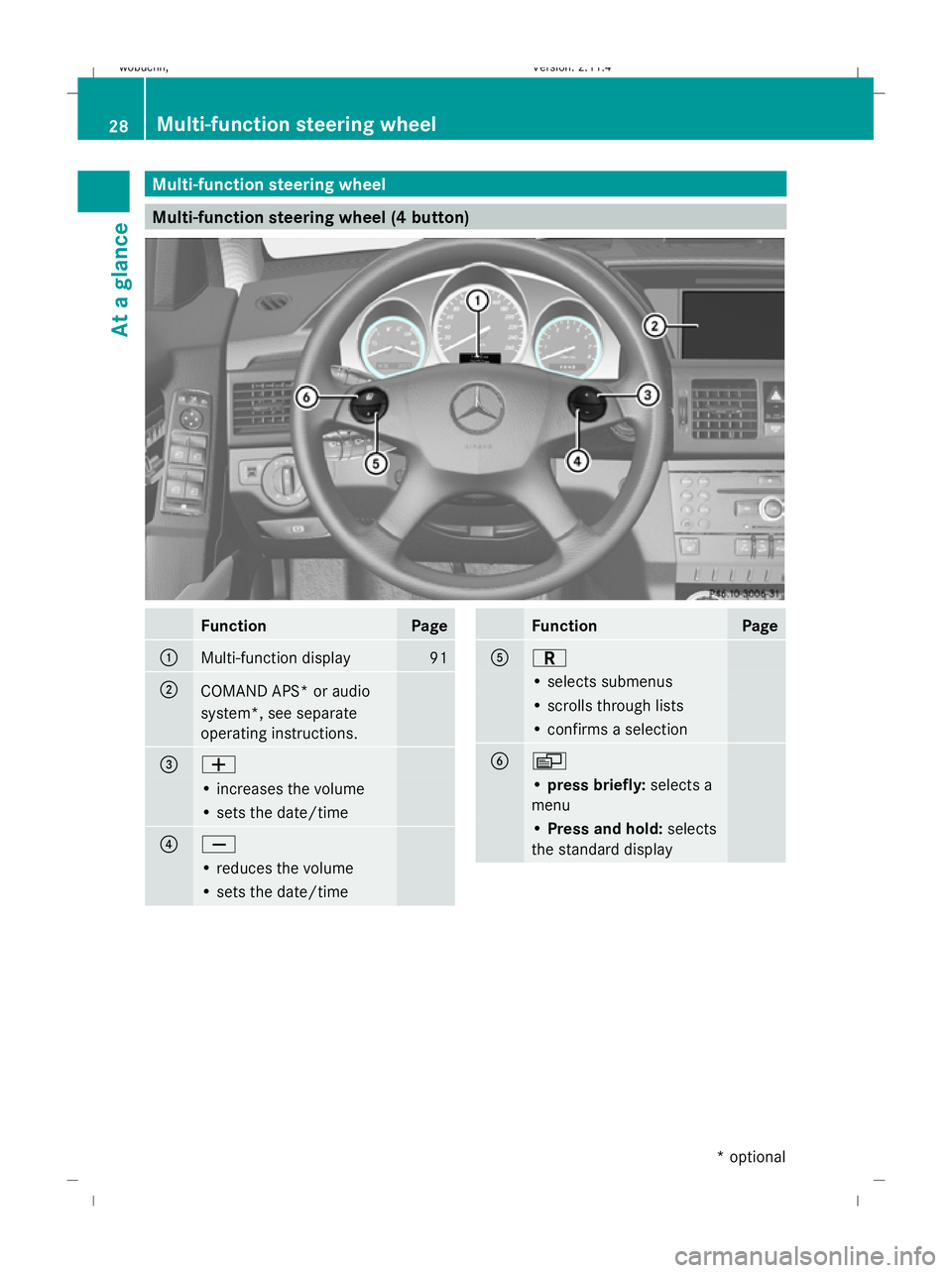
Multi-function steering wheel
Multi-function steering wheel (4 button)FunctionPage
:Multi-function display91
;COMAND APS* or audio
system*, see separate
operating instructions.
=W
• increases the volume
• sets the date/time
?X
• reduces the volume
• sets the date/time
FunctionPage
AC
• selects submenus
• scrolls through lists
• confirms a selection
BV
•
press briefly: selects a
menu
• Press and hold: selects
the standard display
28Multi-function steering wheel
At a glance
* optional
X204_AKB; 1; 5, en-GB
wobuchh,
Version: 2.11.4
2008-10-15T13:20:56+02:00 - Seite 28 Dateiname: 6515_0671_02_buchblock.pdf; preflight
Page 32 of 261
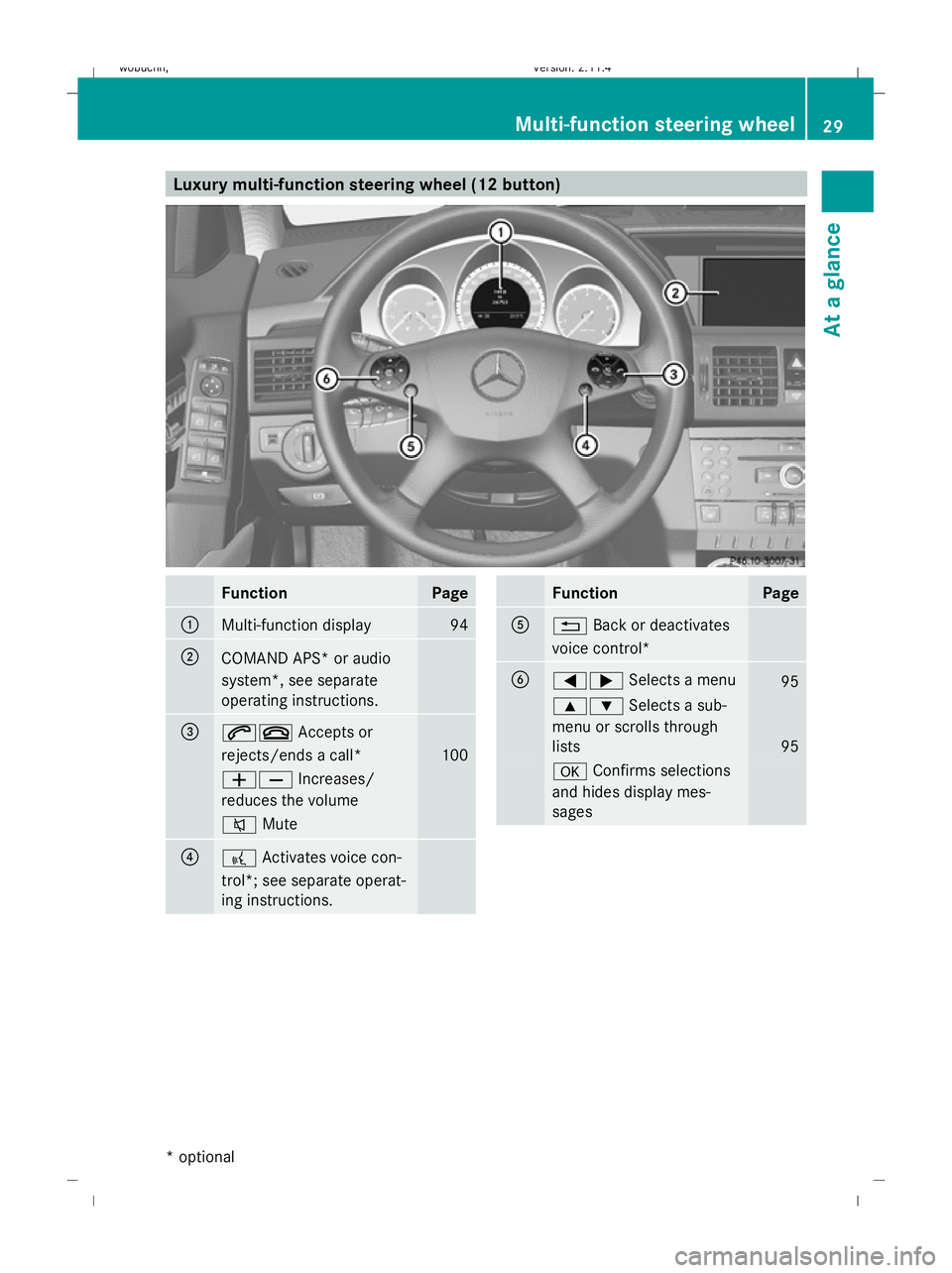
Luxury multi-function steering wheel (12 button)FunctionPage
:Multi-function display94
;COMAND APS* or audio
system*, see separate
operating instructions.
=6~
Accepts or
rejects/ends a call*
100
WX Increases/
reduces the volume
8 Mute
??Activates voice con-
trol*; see separate operat-
ing instructions.
FunctionPage
A% Back or deactivates
voice control*
B=; Selects a menu95
9:Selects a sub-
menu or scrolls through
lists
95
a Confirms selections
and hides display mes-
sages
Multi-function steering wheel 29
At a glance
* optional
X204_AKB; 1; 5, en-GB
wobuchh,
Version: 2.11.4 2008-10-15T13:20:56+02:00 - Seite 29ZDateiname: 6515_0671_02_buchblock.pdf; preflight
Page 56 of 261
i
Only use wheels with the recommended
tyre sizes. Only then will ESP ®
function
properly.
ESP ®
trailer stabilisation If your trailer begins to lurch, you can only
stabilise the vehicle/trailer combination by
depressing the brake firmly.
In this situation, ESP
®
assists you and detects
if the trailer begins to lurch. ESP ®
slows the
vehicle down by braking and limiting the
engine output until the vehicle/trailer com-
bination has stabilised.
Trailer stabilisation is active above speeds of
about 65 km/h. G
Risk of accident
If road and weather conditions are bad, trailer
stabilisation will not be able to prevent the
trailer from swerving and thereby reduce the
risk of accident. Trailers with a high centre of
gravity can tip over before ESP ®
can detect
this.
Trailer stabilisation does not work if ESP ®
is
deactivated or disabled because of a mal-
function.
ETS (Electronic Traction Support) Traction control is part of ESP
®
.
Traction control brakes the drive wheels indi-
vidually if they spin. This enables you to pull
away and accelerate on slippery surfaces, for
example, if the road surface is slippery on one
side.
Traction control remains active when you
deactivate ESP ®
. G
Risk of accident
Traction control cannot reduce the risk of an
accident if you drive too fast. Traction control
cannot override the laws of physics.
i If heavy demands are made on the brakes,
traction control switches off automatically
for a brief period so that the brakes do not heat up even further. If traction control
does not intervene for this reason, the
d
warning lamp in the instrument clus-
ter lights up. In addition the multi-function
display shows one of the following mes-
sages: ESP inoperative (vehicles with 4-
button multi-function steering wheel) or
ESP currently unavail. See Owner's
Manual (vehicles with 12-button luxury
multi-function steering wheel)*.
Activating/deactivating ESP ® ESP
®
is activated automatically when the
engine is running.
It may be best to deactivate ESP ®
in the fol-
lowing situations:
R when using snow chains
R in deep snow
R on sand or gravel G
Risk of accident
Activate ESP ®
as soon as the situations
described above no longer apply. ESP ®
will
otherwise not be able to stabilise the vehicle
if the vehicle starts to skid or a wheel starts
to spin.
If you deactivate ESP ®
:
R ESP ®
no longer improves driving stability.
R the engine's torque is no longer limited and
the drive wheels can spin. Spinning of the
wheels results in a cutting action, which
provides better grip.
R traction control is still activated.
R ESP ®
still provides support when you
brake.
i If ESP ®
is deactivated and one or more
wheels start to spin, the dwarning lamp
in the instrument cluster flashes. In such
situations, ESP ®
will not stabilise the vehi-
cle. Driving safety systems
53Safety
* optional
X204_AKB; 1; 5, en-GB
wobuchh,
Version: 2.11.4 2008-10-15T13:20:56+02:00 - Seite 53 ZDateiname: 6515_0671_02_buchblock.pdf; preflight
Page 69 of 261
Steering wheel
Points to remember
Depending on the vehicle equipment, you can
adjust the steering wheel either manually or
electrically*. G
Risk of injury
The electrically adjustable steering wheel*
can be adjusted when the key is removed
from the ignition lock. Therefore, do not leave
children unsupervised in the vehicle as they
could become trapped as the steering wheel
is adjusted. G
Risk of accident
Only adjust the steering wheel when the vehi-
cle is stationary and do not pull away until the
steering wheel adjustment mechanism is
locked in position. Otherwise, you might drive
without the steering wheel adjustment mech-
anism being locked in position and be distrac-
ted from road and traffic conditions by an
unexpected movement of the steering wheel
and cause an accident.
However, the steerability of the vehicle is not
affected.
When you adjust the steering wheel, make
sure that:
R the steering wheel can be reached with
your arms slightly bent
R you can move your legs freely
R you can see all the displays in the instru-
ment cluster clearly Adjusting the steering wheel man-
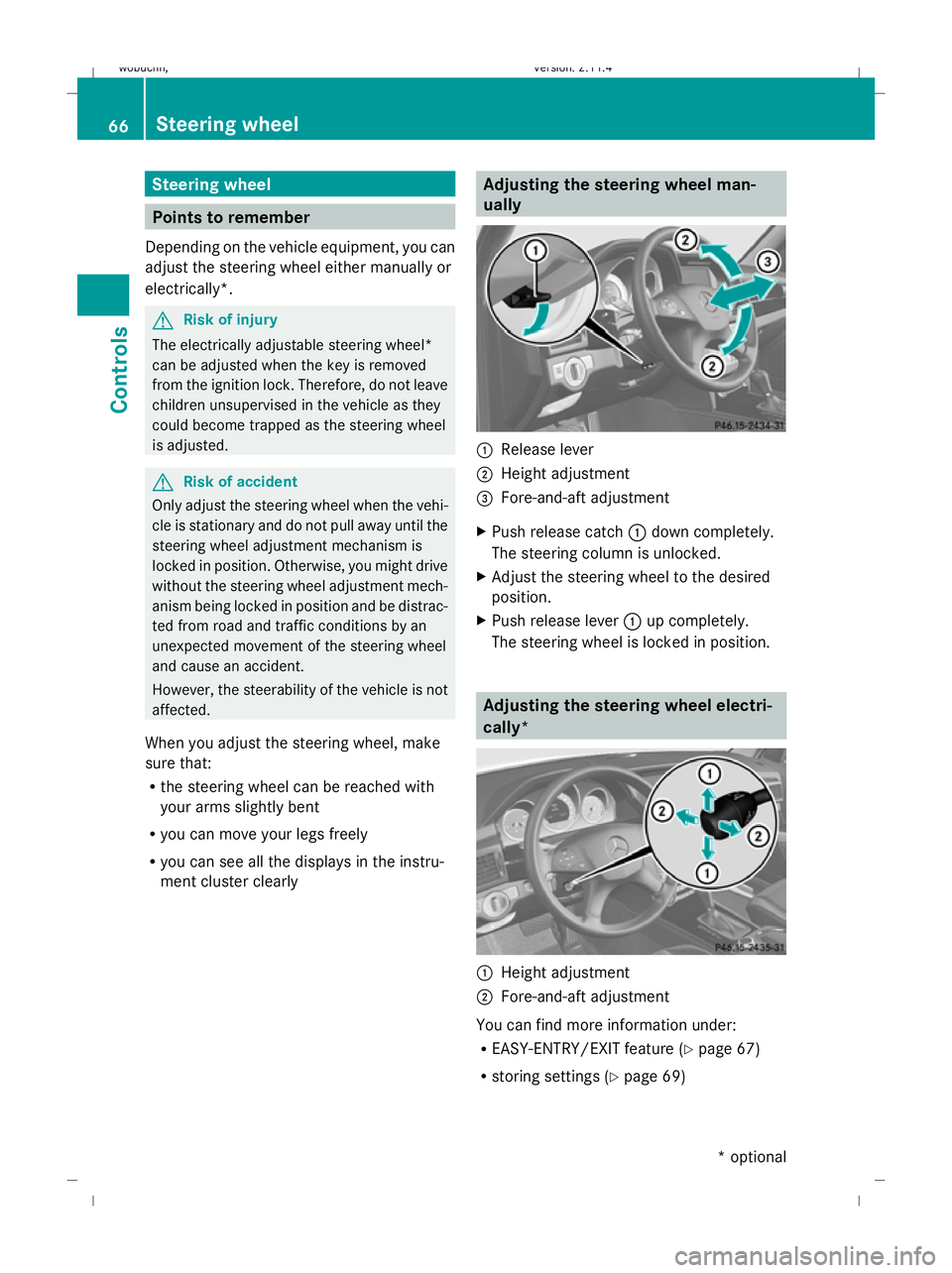
ually :
Release lever
; Height adjustment
= Fore-and-aft adjustment
X Push release catch :down completely.
The steering column is unlocked.
X Adjust the steering wheel to the desired
position.
X Push release lever :up completely.
The steering wheel is locked in position. Adjusting the steering wheel electri-
cally*
:
Height adjustment
; Fore-and-aft adjustment
You can find more information under:
R EASY-ENTRY/EXIT feature (Y page 67)
R storing settings (Y page 69)66 Steering wheelControls
* optional
X204_AKB; 1; 5, en-GB
wobuchh,
Version: 2.11.4 2008-10-15T13:20:56+02:00 - Seite 66Dateiname: 6515_0671_02_buchblock.pdf; preflight
Page 76 of 261
The rear-compartment seat belt status indi-
cator appears in the multi-function display for
around 30 seconds if:
R
you set off and have reached a speed of
approximately 10 km/h.
R the rear passengers fasten or unfasten
their seat belts while driving.
R someone gets in or out of the vehicle.
You can also cancel the messages immedi-
ately (Y page 176).
The following messages appear in the multi-
function display:
Vehicles with multi-function steering wheel (4
buttons)
R 7 No rr.st.belt engaged
R 7 1 rr.st.belt engaged
R 7 2 rr.st.belts engaged
R 7 3 rr.st.belts engaged
Vehicles with a luxury multi-function steering
wheel* (12 buttons)
R 7 No rear seat belt engaged
R 7 1 rear seat belt engaged
R 7 2 rear seat belts engaged
R 7 3 rear seat belts engaged
i The status indicator for the rear-compart-
ment seat belts is only available for certain
countries. Correct driver's seat position
G
Risk of accident
Only adjust the driver's seat when the vehicle
is stationary. You will otherwise be distracted
from the road and traffic conditions and you
could lose control of the vehicle as a result of
the seat moving. This could cause an acci-
dent. G
Risk of accident
Only adjust the steering wheel when the vehi-
cle is stationary and do not pull away until the
steering wheel adjustment mechanism is
locked in position. Otherwise, you might drive
without the steering wheel adjustment mech-
anism being locked in position and be distrac-
ted from road and traffic conditions by an
unexpected movement of the steering wheel
and cause an accident.
However, the steerability of the vehicle is not
affected.
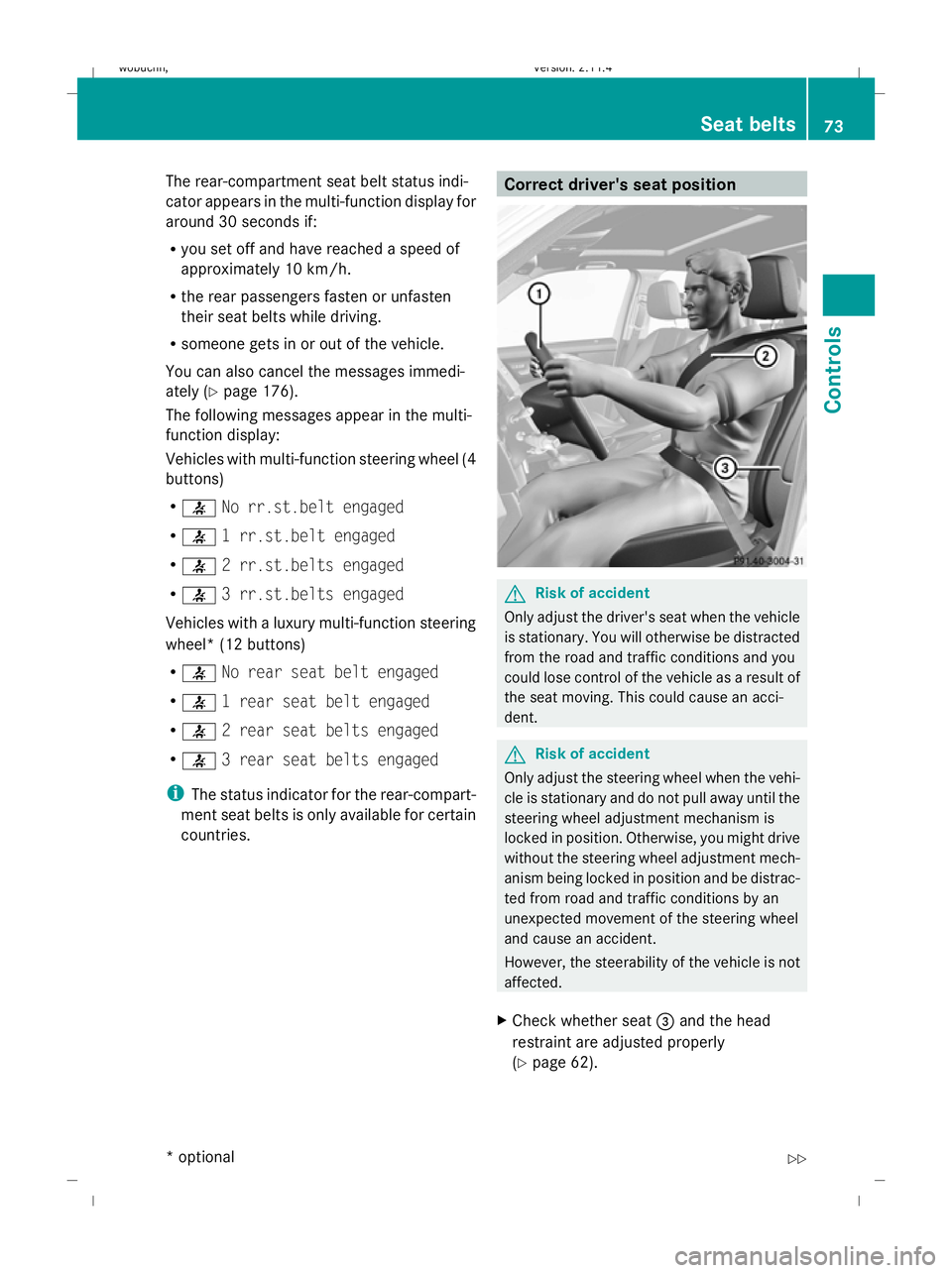
X Check whether seat =and the head
restraint are adjusted properly
(Y page 62). Seat belts
73Controls
* optional
X204_AKB; 1; 5, en-GB
wobuchh,
Version: 2.11.4 2008-10-15T13:20:56+02:00 - Seite 73 ZDateiname: 6515_0671_02_buchblock.pdf; preflight