display MERCEDES-BENZ GLS SUV 2019 Owners Manual
[x] Cancel search | Manufacturer: MERCEDES-BENZ, Model Year: 2019, Model line: GLS SUV, Model: MERCEDES-BENZ GLS SUV 2019Pages: 729, PDF Size: 12.03 MB
Page 529 of 729
#
Set the zones.
Setting the colour ef fects #
Select Effects. #
Swit chWelcome orClimate on or off.
% Further information on theto pic of setting
ambiance light (/ page164). Setting
the language in there ar passenger
comp artment Re
ar Seat En tertainment Sy stem:
4 © 5
Settings 5
System
5 Language #
Set the language. Selecting sy
stem settings in there ar com‐
partment Re
ar Seat En tertainment Sy stem:
4 © 5
Settings 5
System
Ad justing the brightness #
Select Display. #
Adjust the brightness.
Connecting a device in the device manager #
Select Device Manager. #
Select a device that is tobe connec ted.
Headphones and headsets are connec ted
with there ar displa y.
Mobile phones and other devices are con‐
nected with the multimedia sy stem.
Setting the sensitivity for the rear display #
Select Touch Sensitivity. #
Select Fast,Medium orSlow.
Showing sy stem information #
Select System info. Na
vigation Switching on navigation in
there ar comp art‐
ment
Re ar Seat En tertainment Sy stem:
4 © 5
Navigation (Navigation)
The map appears and sho ws the current vehicle
position. #
Select an option in the navigation menu.
The following options are available, forex ample
on there ar display:
R Entering the destination and transfer ring the
destination tothe multimedia sy stem using
Send to Car Navigation
R Setting the map scale (/ page 438)
R Moving the map and rotating the map
R Showing route information
R Online map update forre gions
This option is not available in all countries. 526
MBUX multimedia sy stem
Page 530 of 729
Services, apps and
web br owser Overview of services, apps and
web br ows er
(Rear Seat Entertainment Sy stem)
The following functions are available on there ar
display depending on the count ryand vehicle
equipment:
R Use of stre aming, casting and sharing serv‐
ices
The transmission of con tent acco rding tothe
DLNA certifica teis suppor ted.
A device can be connec ted with there ar dis‐
play using the HDMI mini port.
St reaming media devices, such as Google
Chromecast forex ample, are available forthe
re ar display af terre gistration in the device
manager. Connect a device in the device
manager (/ page 526).
R Calling up thewe b br ows er
The rear display uses a br owser from the
manufacturer.
% Devices and apps forth e use of stre aming,
casting and sharing services are not part of th
e scope of delivery forth eRe ar Seat En ter‐
ta inment Sy stem.
Fo r legal reasons, some con tent can only be
pl ay ed back with specific apps.
The AirPlay inter face for transmitting content
is not cur rently suppor ted.
% You cannot download content via theweb
br ows er.
Calling up services, apps and web br owser
(Rear Seat Entertainment Sy stem)
Re quirements:
R An Internet connection is set up in the multi‐
media sy stem at the front via the communi‐
cation module, depending on theve hicle
equipment (/ page 489)
Re ar Seat En tertainment Sy stem:
4 © 5
Apps #
Select an application. Media
Information about media mode in
there ar
comp artment
There is one USB port and one HDMI connection
in theRe ar Seat En tertainment Sy stem
(/ page 522).
Data storage media suppor tedby theRe ar Seat
En tertainment Sy stem:
R USB storage device
The data storage medium is connected with
th ere ar display via the USB port (type C)
(/ page 522).
The data storage medium is connected with
th e multimedia sy stem using the multimedia
connection unit in thestow age compartment
under the armrest (/ page 500).
R iPod ®
R iPhone ®
R MTP devices
R Blue tooth ®
audio equipment MBUX multimedia sy
stem 527
Page 531 of 729
Blu
etoo th®
audio equipment can on ly be
authorised using the multimedia sy stem
(/ page 500).
The Rear Seat En tertainment Sy stem supports a
tot al of up to50,000 files. The Rear Seat En ter‐
ta inment Sy stem can also access files on the
multimedia sy stem.
Fu rther information about media mode
(/ page 496). The
term s HDMI and HDMI High-Definition Multi‐
media Inter face, and the HDMI Logo are trade‐
mar ksorregis tere d trademar ksof HDMI Licens‐
ing LLC in theUn ited States and other countries. Switching on media mode in
there ar
passenger comp artment
Re quirements:
R A data storage medium is connected with the
re ar display or the multimedia sy stem.
R A Blue tooth®
audio device is connec ted with
th e multimedia sy stem.
Re ar Seat En tertainment Sy stem:
4 © 5
Media #
Select USBorBluetooth.
The following functions are available:
R Controlling media playback (/ page 528)
R ª Using theke yword
sear ch(/ page 504)
R 5 Searching for media files using catego‐
ri es (/ page 503) Controlling media playback in
theRe ar Seat
Entertainment Sy stem
Re ar Seat En tertainment Sy stem:
4 © 5
Media #
Topause or continue playback: select
Ë or;. #
Toselect the next or pr evious track:
select üorû. #
Toscroll through trac ksquickl y:press and
hold û orü. #
Towind a track forw ards or backwards:
ta p on the desired point on the timeline. #
Toplay back trac ksinrandom order:
select 9. #
Torepeat a track: select:.
Fo rth ere peat function there are thefo llow‐
ing options:
R Tap once: the active pla ylist is repeated.
R Tap twice: the cur rent track is repeated.
R Tapth re e times: there peat function is
deactivated. 528
MBUX multimedia sy stem
Page 532 of 729
#
Toshow the cur rent track lis t:select the
co ver. Ra
dio Switching
to radio in the rear passenger
comp artment
Re ar Seat En tertainment Sy stem:
4 © 5
Radio #
Select a station with qorr.
The station is selec ted on the multimedia
sy stem. #
Toset a frequency band: select a frequency
band.
The following functions are available:
R ª Searching forra dio sta‐
tions(/ page 506)
R Selecting from thest ation list (/ page 506)
R Z Switching options on or off.
Traffic announcements
When the option is switched on, the.
symbol is shown in the menu bar.
Frequency fix Display radio text information TV
mode Switching
toTV mode in the rear passenger
comp artment
Re ar Seat En tertainment Sy stem:
4 © 5
Media 5
TV #
Select a channel with qorr.
The channel is selec ted on the multimedia sys‐
te m. #
Toshow full screen: tap on the pr eview pic‐
ture. #
Toshow theTV menu: selectG.
The following functions are available:
R ª Searching for a TV chan‐
nel(/ page510)
R Õ Showing cur rent programme information
fo rth e selected TVchannel (EPG)
(/ page 511)
R Storing and managing TVchannels
(/ page 512) R
Showing telete xt (/ page 514)
R Z Setting options:
Setting Audio/subtitles
Switching Station fix on or off.
Displaying Teletext
Selecting Video settings Sound
Overview of sound settings in the
rear com‐
partment
The sound settings depend on whi chsound sys‐
te m is available.
Depending on the equipment ins talled, one of
th efo llowing sy stems is suppor ted:
R Sound sy stem (/ page515)
R Burmes ter®
sur round sound sy stem
(/ page 516)
R Burmes ter®
high-end 3D sur round sound sys‐
te m (/ page518) MBUX multimedia sy
stem 529
Page 534 of 729
ASS
YST PLUS se rvice inter val display Fu
nction of the ASS YST PLUS se rvice inter val
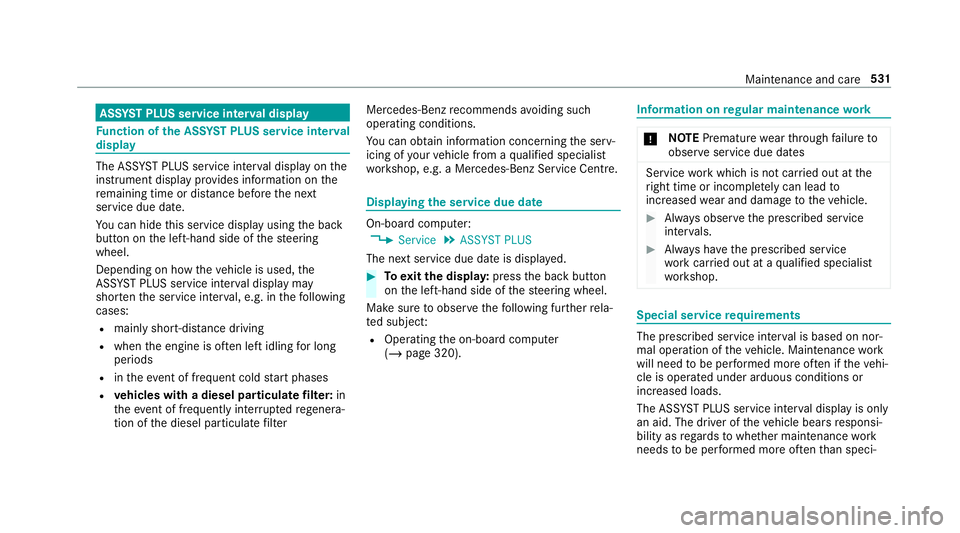
displ ay The ASS
YST PLUS service inter val display on the
instrument display pr ovides information on the
re maining time or dis tance be fore the next
service due date.
Yo u can hide this service display using the back
button on the left-hand side of thesteering
wheel.
Depending on how theve hicle is used, the
ASS YST PLUS service inter val display may
shor tenth e service inter val, e.g. in thefo llowing
cases:
R mainly short-dis tance driving
R when the engine is of ten le ftidling for long
periods
R intheeve nt of frequent cold start phases
R vehicles with a diesel particulate filter: in
th eev ent of frequently inter rupted rege nera‐
tion of the diesel particulate filter Mercedes-Benz
recommends avoiding such
operating conditions.
Yo u can obtain information concerning the serv‐
icing of your vehicle from a qualified specialist
wo rkshop, e.g. a Mercedes-Benz Service Centre. Displaying
the service due da te On-board computer:
4 Service 5
ASSYST PLUS
The next service due date is displa yed. #
Toexitth e displa y:press the back button
on the left-hand side of thesteering wheel.
Make sure toobser vethefo llowing fur ther rela‐
te d subjec t:
R Operating the on-board computer
(/ page 320). Information on
regular maintenance work *
NO
TEPremature wearthro ugh failure to
obser veservice due dates Service
workwhich is not car ried out at the
ri ght time or incomple tely can lead to
inc reased wear and damage totheve hicle. #
Alw ays obser vethe prescribed service
inter vals. #
Alw ays ha vethe prescribed service
wo rkcar ried out at a qualified specialist
wo rkshop. Special service
requ irements The prescribed service inter
val is based on nor‐
mal operation of theve hicle. Maintenance work
will need tobe per form ed more of ten if theve hi‐
cle is operated under arduous conditions or
increased loads.
The ASS YST PLUS service inter val display is only
an aid. The driver of theve hicle bears responsi‐
bility as rega rdsto whe ther maintenance work
needs tobe per form ed more of tenth an speci‐ Main
tenance and care 531
Page 535 of 729
fi
ed based on the actual operating conditions
and/or loads.
Examples of arduous operating conditions:
R regular city driving with frequent intermedi‐
ate stops
R mainly short-dis tance driving
R frequent operation in mountainous terrain or
on poor road sur faces
R when the engine is of ten le ftidling for long
periods
R operation in particula rly dusty conditions
and/or if air-recirculation mode is frequently
used
In these or similar operating conditions, ha vethe
interior air filter, engine air cleaner, engine oil
and oil filter etc. changed more frequent ly. The
ty re s must be checked more frequently if the
ve hicle is operated under increased loads. Fur‐
th er information can be obtained at a qualified
specialist workshop. Battery disconnection periods
The ASS
YST PLUS se rvice inter val display
can only calculate the service due da tewhen
th e bat tery is connected. #
Notedown the service due date displa yed on
th e instrument display before disconnecting
th e battery (/ page 531). Engine compartment
Opening/closing
the bonnet &
WARNING Risk of accident due todriv‐
ing with the engine bonn etunlo cked
An unloc ked engine bonn etmay open up
when theve hicle is in motion and block your
vie w. #
Never unlock the engine bonn etwhen
driving. #
Before every trip, ensure that the
engine bonn etis loc ked. &
WARNING Risk of accident and inju ry
when opening and closing the engine
bonn et
When opening or closing the engine bonn et,
it may suddenly drop into the end position.
There is a risk of injury for an yone in the
engine bonn et's range of mo vement. #
Only open or close the engine bonn et
when there are no persons in the
engine bonn et's range of mo vement. &
WARNING Danger of bu rns when open‐
ing the bonn et
If yo u open the engine bonn etwhen the
engine has overheated or during a fire inthe
engine compartment, you could come into
contact with hot gases or other escaping
operating fluids. #
Before opening the bonn et, allow the
engine tocool down. 532
Maintenance and care
Page 538 of 729
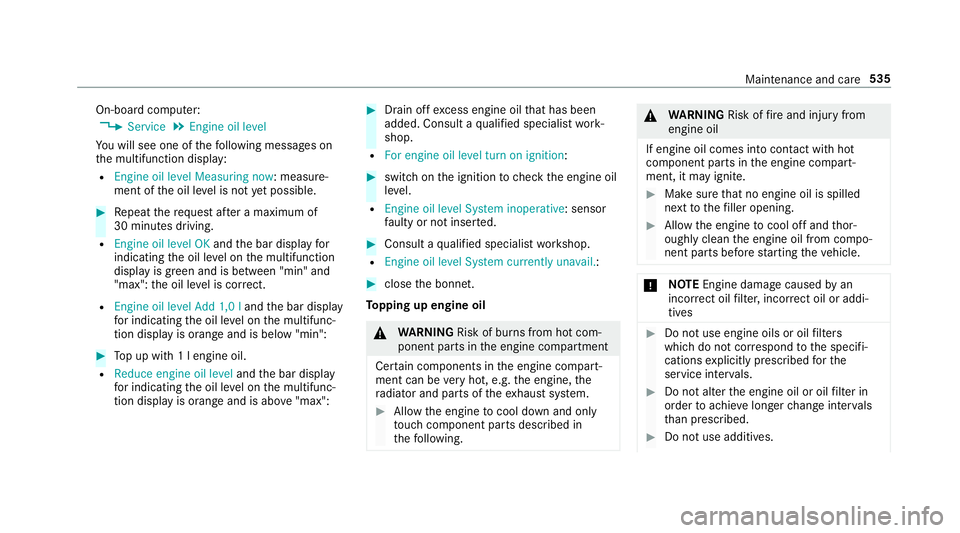
On-board computer:
4 Service 5
Engine oil level
Yo u will see one of thefo llowing messages on
th e multifunction display:
R Engine oil level Measuring now : measure‐
ment of the oil le vel is not yet possible. #
Repeat there qu est af ter a maximum of
30 minutes driving.
R Engine oil level OK andthe bar display for
indicating the oil le vel on the multifunction
display is green and is between "min" and
"max": the oil le vel is cor rect.
R Engine oil level Add 1,0 l andthe bar display
fo r indicating the oil le vel on the multifunc‐
tion display is orange and is below "min": #
Top up with 1 l engine oil.
R Reduce engine oil level andthe bar display
fo r indicating the oil le vel on the multifunc‐
tion display is orange and is abo ve"max": #
Drain off excess engine oil that has been
added. Consult a qualified specialist work‐
shop.
R For engine oil level turn on ignition: #
switch on the ignition tocheck the engine oil
le ve l.
R Engine oil level System inoperative : sensor
fa ulty or not inser ted. #
Consult a qualified specialist workshop.
R Engine oil level System currently unavail. : #
close the bonn et.
To pping up engine oil &
WARNING Risk of bu rns from hot com‐
ponent parts in the engine compartment
Cer tain components in the engine compart‐
ment can be very hot, e.g. the engine, the
ra diator and parts of theex haust sy stem. #
Allow the engine tocool down and only
to uch co mponent parts described in
th efo llowing. &
WARNING Risk offire and injury from
engine oil
If engine oil comes into con tact wi thhot
component parts in the engine compart‐
ment, it may ignite. #
Make sure that no engine oil is spilled
next tothefiller opening. #
Allow the engine tocool off and thor‐
oughly clean the engine oil from compo‐
nent parts before starting theve hicle. *
NO
TEEngine dama gecaused byan
incor rect oil filter, incor rect oil or addi‐
tives #
Do not use engine oils or oil filters
which do not cor respond tothe specifi‐
cations explicitly prescribed forthe
service inter vals. #
Do not alter the engine oil or oil filter in
order toachie velonger change inter vals
th an presc ribed. #
Do not use additives. Maintenance and care
535
Page 539 of 729
#
Follow the instructions in the service
inter val display rega rding the oil
ch ange. *
NO
TEDama gecaused bytopping up too
much engine oil To
o much engine oil can damage the engine
or the catalytic con verter. #
Have excess engine oil remo ved at a
qu alified specialist workshop. #
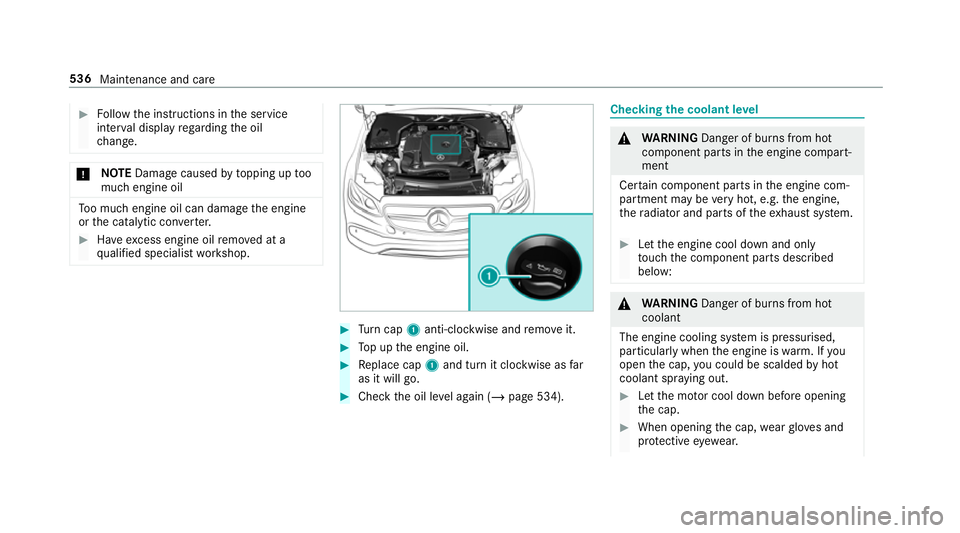
Turn cap 1anti-clockwise and remo veit. #
Top up the engine oil. #
Replace cap 1and turn it clockwise as far
as it will go. #
Check the oil le vel again (/ page 534). Checking
the coolant le vel &
WARNING Danger of bu rns from hot
component parts in the engine compart‐
ment
Cer tain component parts in the engine com‐
partment may be very hot, e.g. the engine,
th era diator and parts of theex haust sy stem. #
Let the engine cool down and only
to uch the component parts described
below: &
WARNING Danger of bu rns from hot
coolant
The engine cooling sy stem is pressurised,
particularly when the engine is warm. If you
open the cap, you could be scalded byhot
coolant spr aying out. #
Let the mo tor cool down before opening
th e cap. #
When opening the cap, wearglove s and
pr otective eyew ear. 536
Maintenance and care
Page 540 of 729
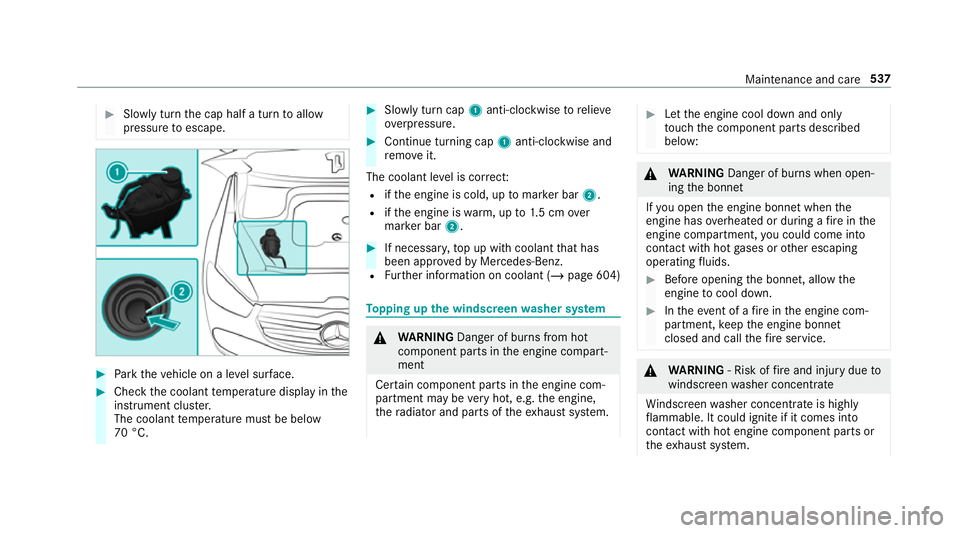
#
Slowly turn the cap half a turn toallow
pressure toescape. #
Park theve hicle on a le vel sur face. #
Check the coolant temp erature display in the
instrument clus ter.
The coolant temp erature must be below
70 °C. #
Slowly turn cap 1anti-clockwise torelie ve
ov erpressure. #
Continue turning cap 1anti-clockwise and
re mo veit.
The coolant le vel is cor rect:
R ifth e engine is cold, up tomar ker bar 2.
R ifth e engine is warm, up to1.5 cm over
mar ker bar 2. #
If necessar y,top up with coolant that has
been appr ovedby Mercedes-Benz.
R Further information on coolant (/ page 604) To
pping up the windsc reen washer sy stem &
WARNING Danger of bu rns from hot
component parts in the engine compart‐
ment
Cer tain component parts in the engine com‐
partment may be very hot, e.g. the engine,
th era diator and parts of theex haust sy stem. #
Let the engine cool down and only
to uch the component parts described
below: &
WARNING Danger of bu rns when open‐
ing the bonn et
If yo u open the engine bonn etwhen the
engine has overheated or during a fire inthe
engine compartment, you could come into
contact with hot gases or other escaping
operating fluids. #
Before opening the bonn et, allow the
engine tocool down. #
Intheeve nt of a fire inthe engine com‐
partment, keep the engine bonn et
closed and call thefire service. &
WARNING ‑ Risk of fire and injury due to
windscreen washer concentrate
Wi ndsc reen washer concentrate is highly
fl ammable. It could ignite if it comes into
con tact wi thhot engine component parts or
th eex haust sy stem. Maintenance and care
537
Page 550 of 729
Note
s on care of the interior &
WARNING Risk of inju ryfrom pla stic
parts breaking off af terth e use of sol‐
ve nt-based care products
Ca reand cleaning products con taining sol‐
ve nts can cause su rfaces in the cockpit to
become porous. When
the airbags are deplo yed, plastic parts
may break away. #
Do not use any care or cleaning prod‐
ucts containing sol vents toclean the
cockpit. &
WARNING Risk of inju ryor death from
bleached seat belts
Bleaching or dyeing seat belts can se verely
we aken them.
This can, forex ample, cause seat belts to
te ar or fail in an accident. #
Never blea chor dye seat belts. Obser
vethefo llowing information: Cleaning and car
eA voiding vehicle damage
Seat belts Clean with lukewarmand soapy water. R
Do not use chemical cleaning agents.
R Do not dry seat belts byheating them toove r 80 °C or
ex posing them todirect sunlight.
Display Cleanthe sur face carefully wi tha mic rofibre clo thand a suit‐
able display care product (TFT/LCD). R
Swit choff the display and let it cool down.
R Do not use any other cleaning products.
Plastic trim R
Clean with a damp microfibre clo th.
R For heavy soiling: use care product recommended for
Mercedes-Benz. R
Do not attach sticke rs,fi lms or similar materials.
R Do not allow cosmetics, insect repellent or sun cream to
come in contact wi th the plastic trim. Maintenance and care
547