rear MERCEDES-BENZ M-Class 2011 W164 Comand Manual
[x] Cancel search | Manufacturer: MERCEDES-BENZ, Model Year: 2011, Model line: M-Class, Model: MERCEDES-BENZ M-Class 2011 W164Pages: 214, PDF Size: 4.69 MB
Page 35 of 214
Wirel
essheadphone s
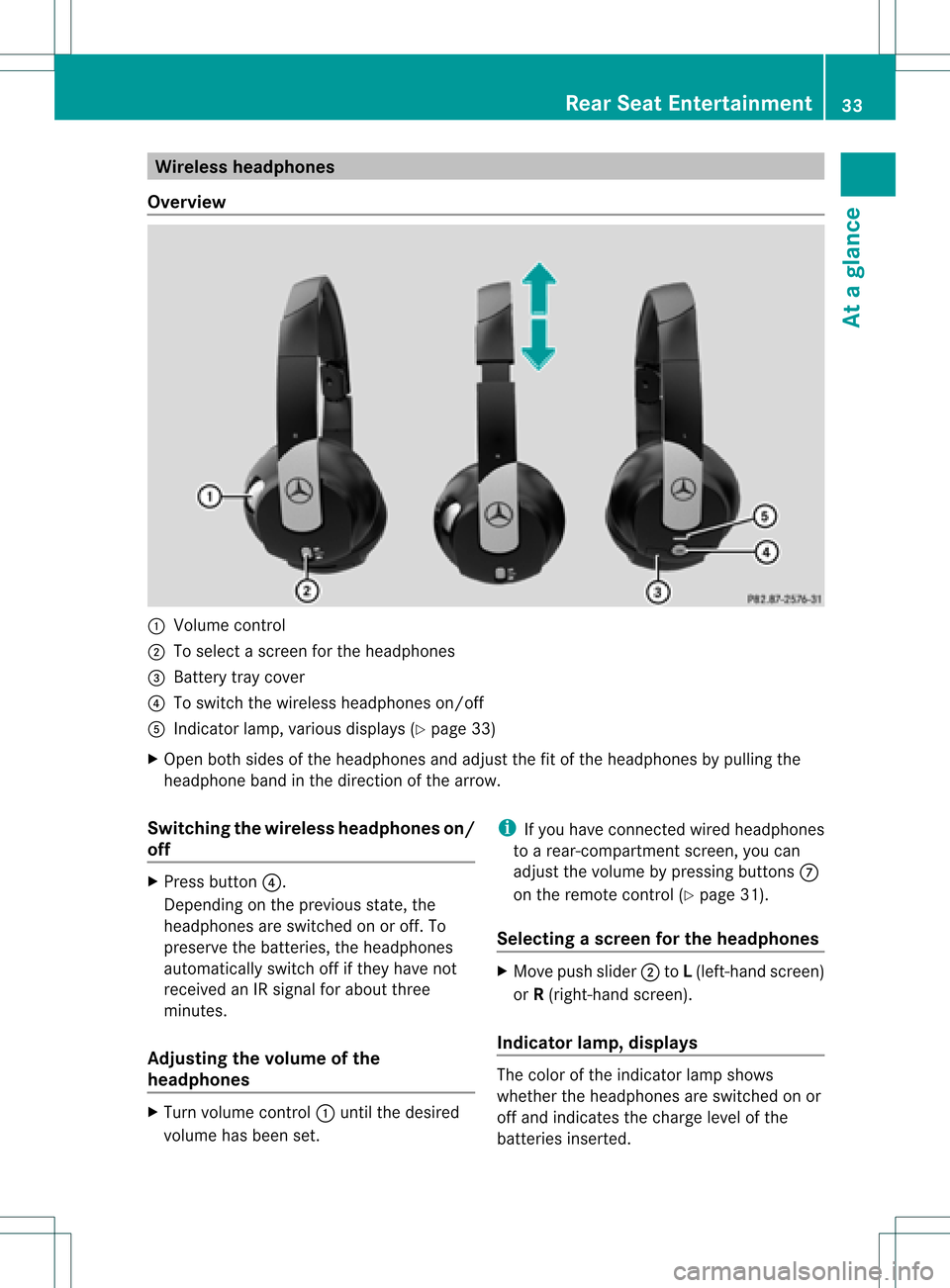
Ove rview :
Volu mecontrol
; Tosele ctascreen forthe headpho nes
= Battery traycover
? Toswi tch the wire less headpho neson/off
A Indica torlamp, various displays (Y pag e33)
X Open bothsidesof the headpho nesand adjustthe fitofthe headpho nesbypul ling the
hea dpho neband inthe direction ofthe arrow .
Swi tchin gthe wirele ssheadphone son/
off X
Press button ?.
Dependi ngon the previ ousstate, the
hea dpho nesareswitched onoroff. To
prese rvethe batteri es,the headpho nes
au tomatica llyswi tch offifthey have not
receive dan IRsigna lfor abo utthree
minutes .
Adjusting thevolume ofthe
headphone s X
Turn volumecontrol :until thedesi red
volu mehas been set. i
Ifyou have connected wiredhea dpho nes
to arear-comp artmentscreen,youcan
adju stthe volu mebypress ingbuttons C
on the remote control(Ypag e31).
Sel ecting ascree nfor thehea dphones X
Mov epush slider; toL(lef t-han dsc ree n)
or R(rig ht-hand scree n).
Ind icat orlam p,dis pla ys The
color oftheind icat orlamp shows
whet hertheheadp honesare swit ched on or
off and indicat esthech arge levelof the
bat teries inserted. Rea
rSea tEnt ertain men t
33Ataglan ce Z
Page 36 of 214
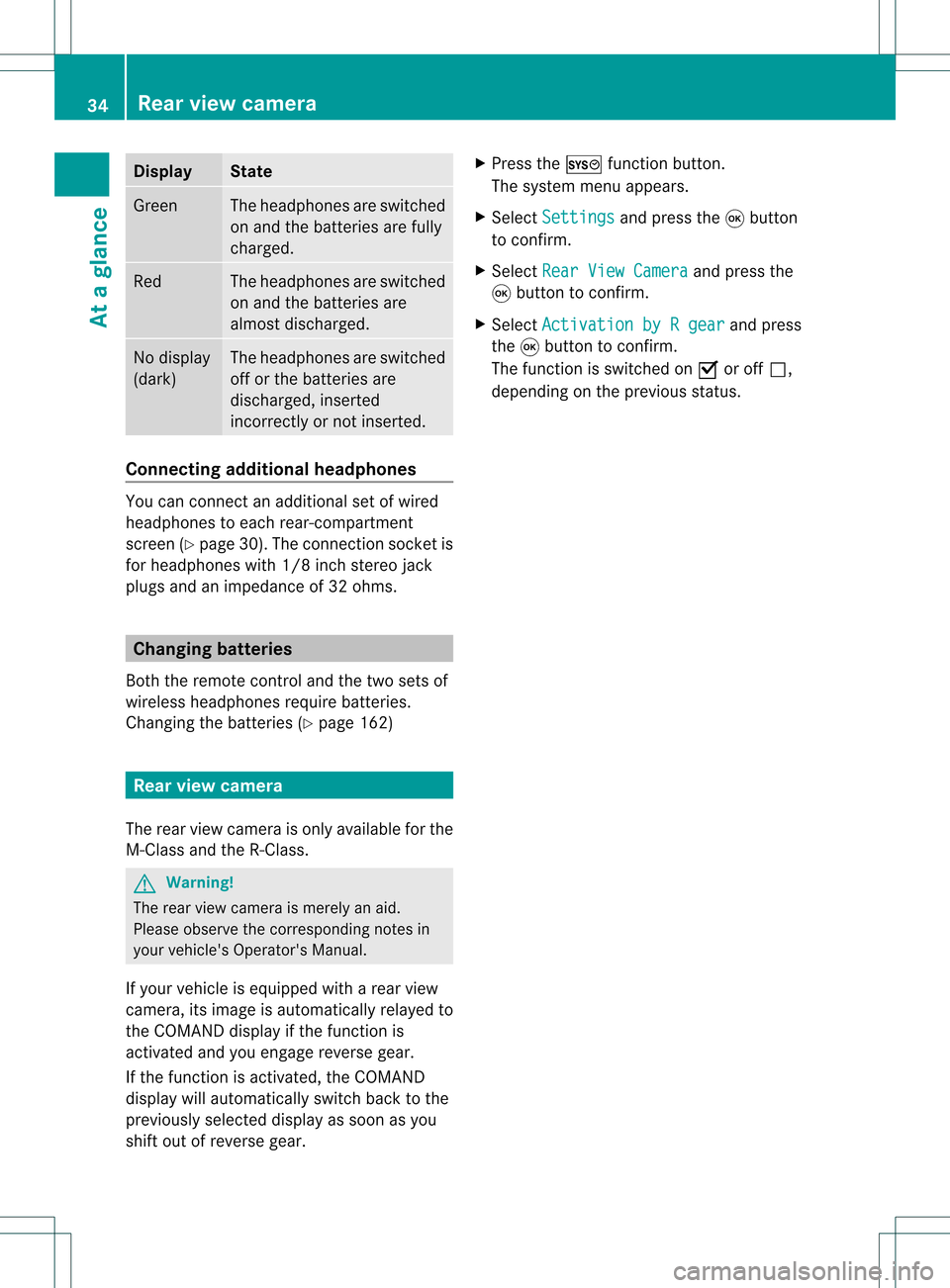
Disp
lay St
ate Gree
n The
head phonesare swit ched
on and thebat terie sare fully
ch arg ed. Red The
head phonesare swit ched
on and thebat terie sare
almo stdisc harged. No
disp lay
(dar k) The
head phonesare swit ched
of for thebat terie sare
disc harged, inser ted
in co rrec tly or notin ser ted. Connect
ingadditiona lhea dphon es You
canconn ecta na ddition alset ofwired
headphones toeach rear-compart ment
scre en(Ypage 30).Theconnection sock etis
for headphones with1/8inch stereojack
plugs andanimpedanc eof 32 ohms. Changing
batteries
Bot hthe remot econ troland thetwo sets of
wireless headphones requirebatteries.
Changing thebatt eries (Ypage 162) Rear
view camer a
The rear view camera isonly available forthe
M-Class andtheR-Class. G
War
ning!
The rear view camera ismerely anaid.
Please observe thecorr espondin gnotes in
your vehicle's Operator's Manual.
If your vehicle isequipped witharear view
camera, itsimage isautomatically relayedto
the COMAND displayifthe funct ionis
activated andyouengage reverse gear.
If the funct ionisactivated, theCOMAND
display willautomatically switchbacktothe
previously selecteddisplayassoon asyou
shift outofreverse gear. X
Press theW functionbutton .
The system menuappears.
X Select Settings and
press the9button
to conf irm.
X Select RearViewCamera and
press the
9 button toconf irm.
X Select Activation byRgear and
press
the 9button toconf irm.
The funct ionisswitched onO oroff ª,
depending onthe previous status. 34
Rear
view cameraAtaglance
Page 78 of 214
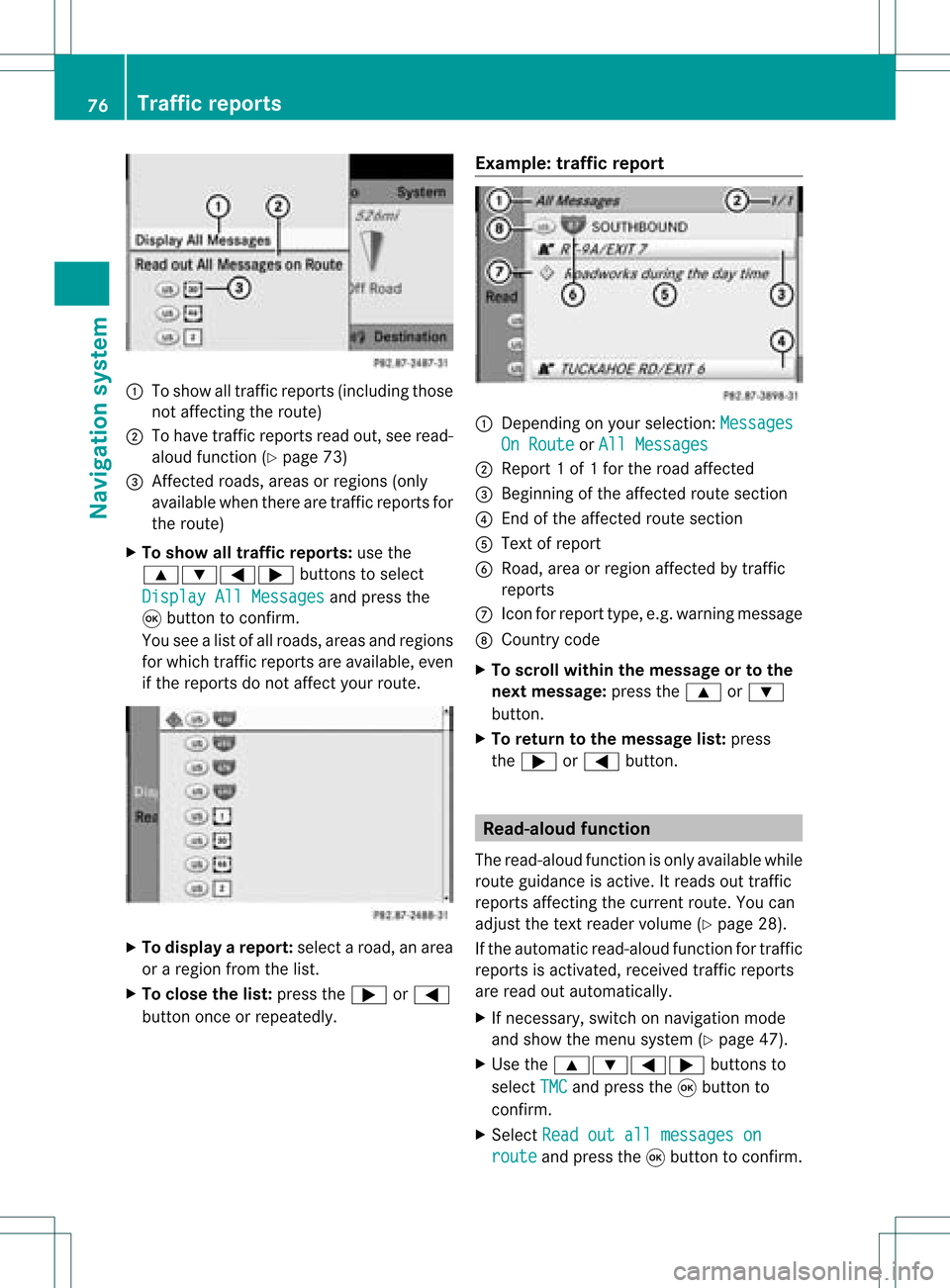
1
Toshow alltraff icreports (including those
not affect ingthe route)
2 Tohave trafficreports readout,seeread-
aloud function(Ypage 73)
3 Affected roads, areasorregions (only
availab lewhen therearetraff icreports for
the route)
X To show alltraffic repor ts:use the
9:=; buttonsto select
Display AllMessages and
press the
9 button toconf irm.
You seealist ofall roads, areasandregions
for which trafficreports areavailab le,even
if the reports donot affect yourroute. X
To display arepor t:select aroad, anarea
or aregion fromthelist.
X To close thelist: press the; or=
button onceorrepeatedly. Examp
le:traffic repor t 1
Dependin gon your selection :Messages On
Route or
All Messages 2
Report 1of 1for the road affect ed
3 Beginn ingofthe affect edroute section
4 Endof the affect edroute section
5 Text ofreport
6 Road, areaorregion affectedbytraff ic
reports
C Icon forreport type,e.g.warning message
D Country code
X To scroll within themessage ortothe
next message: pressthe9 or:
button .
X To retu rntothe message list:press
the ; or= button . Read-
aloud function
The read-aloud functionisonly availab lewhile
route guidance isactive. Itreads outtraff ic
reports affectingthe curren troute. Youcan
adjust thetext reader volume (Ypage 28).
If the automatic read-aloud functionfortraff ic
reports isactivat ed,received trafficreports
are read outautomatically.
X Ifnecess ary,switch onnavigation mode
and show themenu system (Ypage 47).
X Use the9:=; buttonsto
select TMC and
press the9button to
conf irm.
X Select Readoutallmessages on route and
press the9button toconf irm. 76
Tr
affic repor tsNavigation system
Page 117 of 214
Opera
tingthetelephone usingthe
mult ifunction steeringwheel Telephone
menu
Introd uction You
canoperate thetelephon eusing the
function sin the "Tele phone" menu,provided
you have connected itto the Mercedes-Benz
hands-free system.
The displa yin the "Tele phone" menudepends
on the status ofthe telephone.
X Switch onthe telephone andCOMAND.
X Press theV orU button toselect the
TEL displa
y.
Telephone isready toreceive calls Bluetooth
®
interface telephony: whetherthe
network provider's nameisdispla yed
depends onthe telephone connected. Acc
epting acall
You may accep tacallat any time provided
the telepho neisrea dytorece ivecalls.Whe n
a cal lis incom ing,yousee thename or
tele pho nenumb erinthe multifunction
di spl ay.
X Pre ssthe 6 button onthe multifunction
stee ring wheel . Reje
cting orendin gac all
X Press the~ button onthe multifunctio n
steeri ngwhe el. Cal
linganumbe rfrom theCOM AND
phone book
You may select and diala numbe rfrom the
COMAND phonebookatany time, provid ed
you rmobile phone isready toreceive calls. i
Ifyou have imported contacts
(Y page 114), youcan select thephone
book entriesofthe mobile phonebyusing
the multifunct ionsteerin gwheel.
X Press theV orU button toselect the
TEL display
.
X Press the& or* button toopen the
phone bookinthe multifunct iondisplay .
X Press the& or* button untilthe
desired entryhas been highlighted.
The stored names aredisplay ed
alphabe tically.
i Ifyou press andhold the& or*
button forlonger thanonesecond, the
multifunct iondisplay willskip from thefifth
entr yto the first entryfound forthe next
letter. Skipping stopsassoon asyou
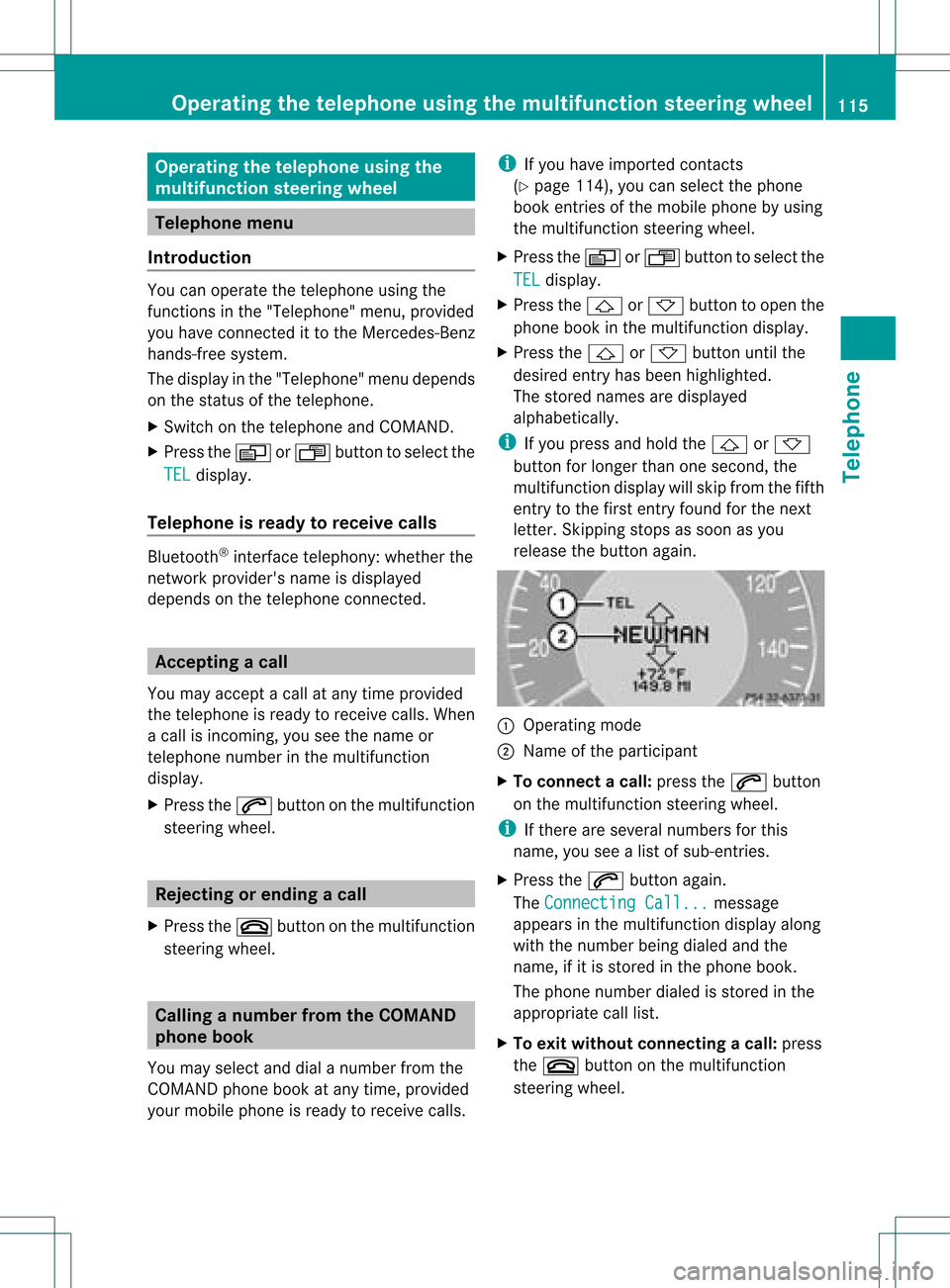
release thebutton again. :
Operating mode
; Name ofthe participant
X To connec tacall:press the6 button
on the multifunctio nstee ring wheel.
i Ifthe rearese ver alnum bers for this
nam e,youse ealist of sub-e ntri es.
X Pre ssthe 6 button again.
Th eCon nectingCal l... mes
sage
ap pe arsin the multifu nctio ndisplay along
with thenumb erbeing dialed andthe
name ,if it is stored inthe phon ebook .
The phon enumb erdialed isstored inthe
appropr iatecalllist.
X To exit withou tconnect ingacall: press
the ~ button onthe multifunctio n
steeri ngwhe el. Operating
thetelephone usingthe multifunc tionsteering wheel
115Tele phone Z
Page 122 of 214
X
Sel ect EnterFrequency and
pressthe
9 button toconfi rm.
Irre spe ctive ofthe optionused ,an inp ut
menu willap pe ar.
X Enter afreq uency using the numb erkey s.
CO MAND tunesin to the freq uency
enter ed. Wave
band Fre
quen cy AM 530
-1710 kHz FM 87.8
-107.9 MHz WB
(Weather Band ) Wea
ther report
cha nnel s i
Youcan onlyenter currently permi tted
numb ers.
i Ifyo uenter afreq uency inthe FMorAM
wa veb and swh ich isou tsid ethe freq uency
rang e,CO MAND tunesin to the next lowe r
freq uency. Sto
ring astatio n
Sto ringstati onsmanua lly The
reareten presets availabl e for each
wa veb and (FM,AM, andSatR adio).
Qui cksav e
X Pre ssand holdanum berk ey, e.g. l,
until youhear aton e.
The stationisstor ed.
Directly inthe stat ionpresets
X Press the9button whenthedisplay/
select ionwindow isactive.
or
X Select Presets in
the radio display using
the :=; buttonsand press the
9 button tocon firm.
In both cases, thestationpreset sappear.
The #dot indicat esunder which preset
the curren tlyselect edstat ionisstor ed. St
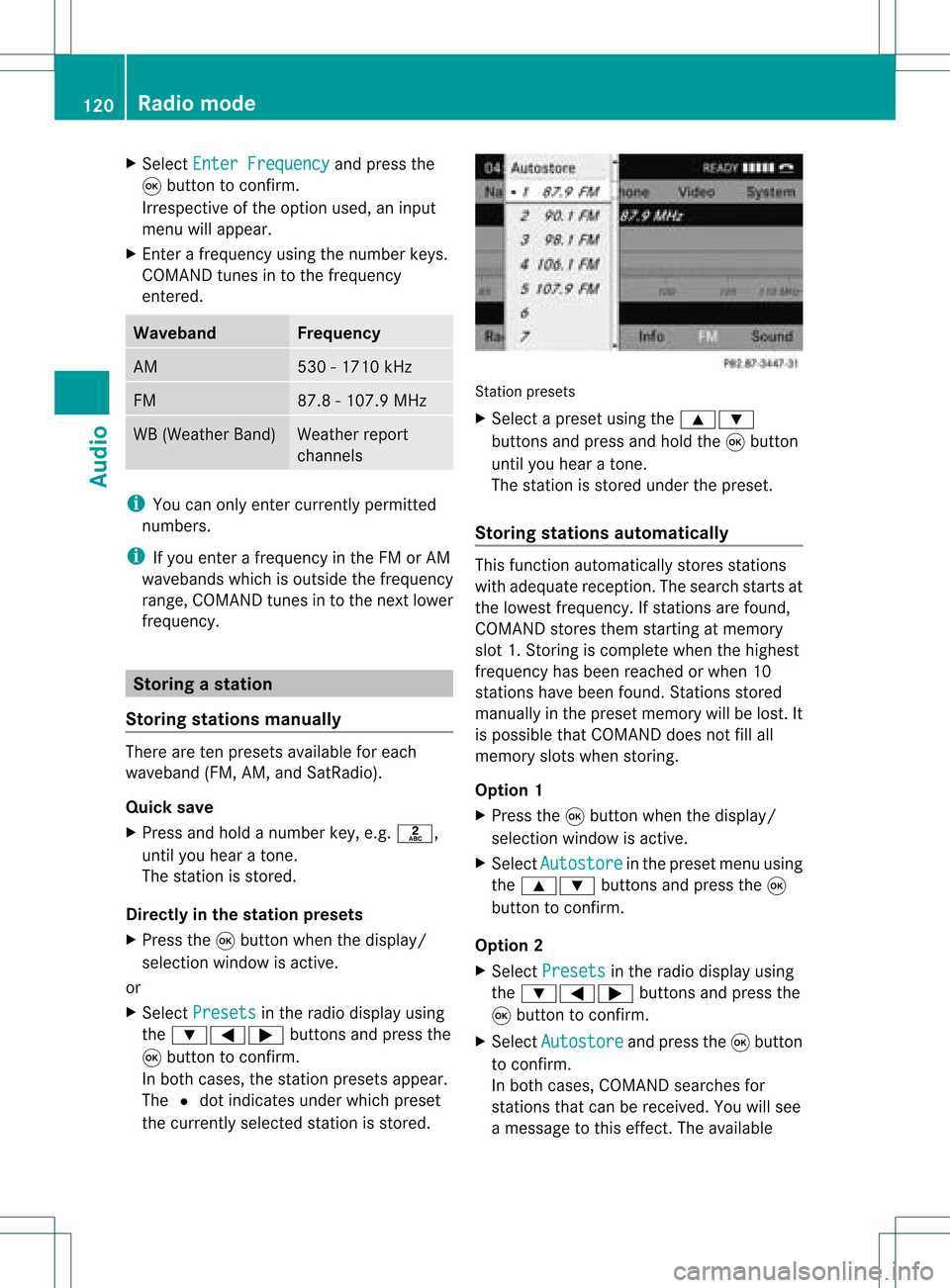
ation preset s
X Select apreset usingthe9:
button sand press andhold the9button
until youhear aton e.
The stationisstor edunder thepreset .
Stor ingstat ions automat ically This
function automatic allystoresstat ions
with adequate reception.Thesearch startsat
the lowest frequenc y.Ifstat ions arefound,
COMAND storesthem startingatmemory
slot 1.Storing iscomplet ewhen thehighest
frequenc yhas been reached orwhen 10
stat ions have been found. Stations stored
manually inthe preset memory willbelost. It
is possible thatCOMAND doesnotfillall
memory slotswhen storing.
Opt ion 1
X Press the9button whenthedisplay/
select ionwindow isactive.
X Select Autosto re in
the preset menuusing
the 9: buttonsand press the9
button tocon firm.
Opt ion 2
X Select Presets in
the radio display using
the :=; buttonsand press the
9 button tocon firm.
X Select Autosto re and
press the9button
to con firm.
In both cases, COMAND searchesfor
stat ions thatcanbereceived. Youwillsee
a message tothis effec t.The available 120
Rad
iomod eAudio
Page 141 of 214
i
Only usetracks withabit rate ofat least
128 kbit/s andasampling rateofat least
44.1 kHz.Lower ratescancause a
noticeable deterioration inqual ity.This is
especial lythe case ifyou have activated the
surround soundfunction.
Notes oncopyright MP3
orWMA tracks thatyoucreate orplay
back aregenerally subjecttocopyright
protection inaccordance withtheappl icable
internat ionalandnational regulations.
In many countries, reproductions, evenfor
private use,arenot permitted withoutthe
prior consent ofthe copyright holder.
Make surethatyouknow aboutthe appli cable
copyright regulations andthat youcomply
with these.
If you own these rights yourself, e.g.foryour
own compositions andrecordings, orifthe
copyright holderhasgranted youpermission,
these restrict ionsdonot apply .
Notes onCDs/ DVDs Discs
withcopy protect ionare not
compatible withtheaudi oCD standard and
therefore maynotbeable tobe play edby
COMAND.
There maybeplay back problems when
play ingcopied discs.Therearealarge variety
of discs, disc-writing softwareandwriters
availa ble.This variety meansthatthere isno
guarantee thatthesystem willbeable toplay
discs thatyouhave copied yourself.
There maybeplay back problems ifyou play
CDs thatyouhave copied yourself witha
storage capacity ofmore than700MB.These
CDs arenot compatible withcurrent ly
appli cable standards.
i Inmany DVDaudioalbu ms,thelast track
does notcont ainany music andtheRear
Seat Entertainment Systemswitches tothe
next disc. Thisbehavior issystem-related
and isnot amalfunction. !
Donot affix stick ersorlabel sto the discs.
They could peeloffand damage thedrive.
The drive isdesigned tohold discs which
comply withtheEN60908 standard.
Therefore, youcan only usediscs witha
maximum thickness of1.3 mm.
If you insert thickerdiscs, e.g.those that
cont aindata onboth sides (DVD onone
side andaudiodata onthe other), they
cannot beeject edand candamage the
drive.
Do not use discs withadiameter of8cm,
even withanadapter. Onlyuseround discs
with adiameter of12 cm.
i COMAND canplay back audioCDswith
the high -res oluti on surro und forma t. MUS
ICREG ISTER Ge
neral notes
Th isfunctio nisavail able ifCOMAND is
equip pedwith anintegrated harddisk.
To protect thehard drive fromdamage ,
COMAND switchesitoff atvery high
temperatures. TheMUSIC REGISTER willthen
be temporarily unavailable.
You canstore music filesinMP3 orWMA
format inthe MUSIC REGISTER. Thememory
has acapacity of4G B.
! Retaint he original musicfilesinasecure
location. Anerror inCOMAND mightresult
in the loss ofthe music filesstored inthe
MUSIC REGISTER. Mercedes-Ben zis not
liabl efor any loss ofdata. Switching
onthe MUSIC REGISTER
Option 1 X
Press theh functionbutton repeatedly
until theMUSIC REGISTER isswitched on.
If there areany music files,youwillhear the
first track inthe first folder foundor MUSIC
REGISTER
139Audio Z
Page 155 of 214
There
isarisk ofbeing distract edfrom the
road andtraff iccondit ionsifthis isdone while
the vehicle isin motion . Notes
ondiscs
There maybeplayb ackproblems when
playi ngcopied discs.Therearealarge variety
of discs, DVDauthoring software,writing
software andwriters available.This variety
means thatthere isno guarantee thatthe
system willbeable toplay discs thatyouhave
copied yourself.
! Donot affix stick ersorlabels tothe discs,
as they could peeloffand damage
COMAND .Stic kers cancause thedisc to
bend, which canresult inread errors and
disc recogn itionproblems.
! COMAND isdesigned toaccommo date
discs which comply withtheEN6090 8
standard. Youcantheref oreonly usediscs
with amaximum thickness of1.3 mm.
If you insert thickerdiscs, e.g.those that
cont aindata onboth sides (DVD onone
side andaudio dataonthe other), they
cann otbe eject edand candamage
COMAND .
Use round discswithadiameter of12 cm.
Do not use discs withadiameter of8cm,
even withanadapter. DVD
playback conditions
Video DVDsnot conf orming tothe standards
are commer ciallyavaila ble.
These DVDscan create picture, soundor
other problems duringplayback.
COMAND canplay back video DVDs
produced accordingto the following
standards:
R region code1orregion code0(no reg ion
cod e) i
Ifyo uins ert avid eo DVD with adi ffer ent
reg ionc ode, youwillsee amessage tothis
effect .
R PAL orNTSC TVstandard
You willgenerally findtherelevant details
either onthe DVD itself oron the DVD case.
i COMAND isset toregion code1at the
factor y.This settingcan bechanged atan
authorized Mercedes-B enzCenter. Thiswill
allow youtoplay video DVDswith a
different regioncode,provided thatthey
are produced inaccordanc ewith thePAL
or NTSC standard. Theregion codecanbe
changed amaximum offive times. Function
restrictions
Dependin gon the DVD ,it is possible that
cert ainfunct ionsoractions willbe
temporarily blockedormay notfunct ionatall.
As soon asyou trytoactivate thesefunctions
or actions ,you willsee theKicon inthe
display . Inserting
andejecting aDVD
X Pro cee das descri bedin the "Inser ting and
ejec ting CDs andDVDs" section
(Y page 129) . Sw
itchin gon video DVD mode
Opti on1 X
Inse rtavid eo DVD (Y pa ge 129) .
CO MAND load sthe med iumi nser tedand
sta rts toplay it.
Opti on2 X
Pre ssthe h functio nbu tton.
CO MAND switch estothe previouslyset
di sc mod e(a ud ioCD, audio DVD, MP3CD
or vid eo DVD) ortoMed iaInter face mod e. Vide
oDVD mode
153Vide o Z
Page 163 of 214

Vehi
cle equi pmen t<0023002300230023002300230023002300230023002300230023002300230023
002300230023002300230023002300230023002300230023> 162
General information<0023002300230023002300230023002300230023002300230023002300230023
002300230023002300230023002300230023> 162
Basic functions <0023002300230023002300230023002300230023002300230023002300230023
0023002300230023002300230023002300230023002300230023002300230023
0023> 163
System settings <0023002300230023002300230023002300230023002300230023002300230023
0023002300230023002300230023002300230023002300230023002300230023> 165
CD/DVD audioand MP3 mode ........ 166
Video DVDmode <0023002300230023002300230023002300230023002300230023002300230023
002300230023002300230023002300230023002300230023002300230023> 171
AUX mode <0023002300230023002300230023002300230023002300230023002300230023
0023002300230023002300230023002300230023002300230023002300230023
0023002300230023002300230023002300230023> 175 161Rear
SeatEntert ainment
Page 164 of 214
Vehi
cle equi pmen t
i TheseOpe rating Instru ctionsdescri beall
sta nda rdand optio nal equipme ntava ilab le
for your veh icleat the time ofpurcha se.
Pl ea se note thatyour vehicle maynotbe
equipped withallfeatures described. General
information Changing
thebatt eries
Notes Both
theremote controland thetwo sets of
wireless headphones requirebatteries. G
War
ning!
Keep thebatteries outofthe reach of
children. Consultadoctor immediately ifa
child should swallow abattery.
Do not dismantle, short-circuit orburn a
battery. H
Environmental
note
Dispose ofdischarged batteriesinan
environ mentallyresponsible manner. In
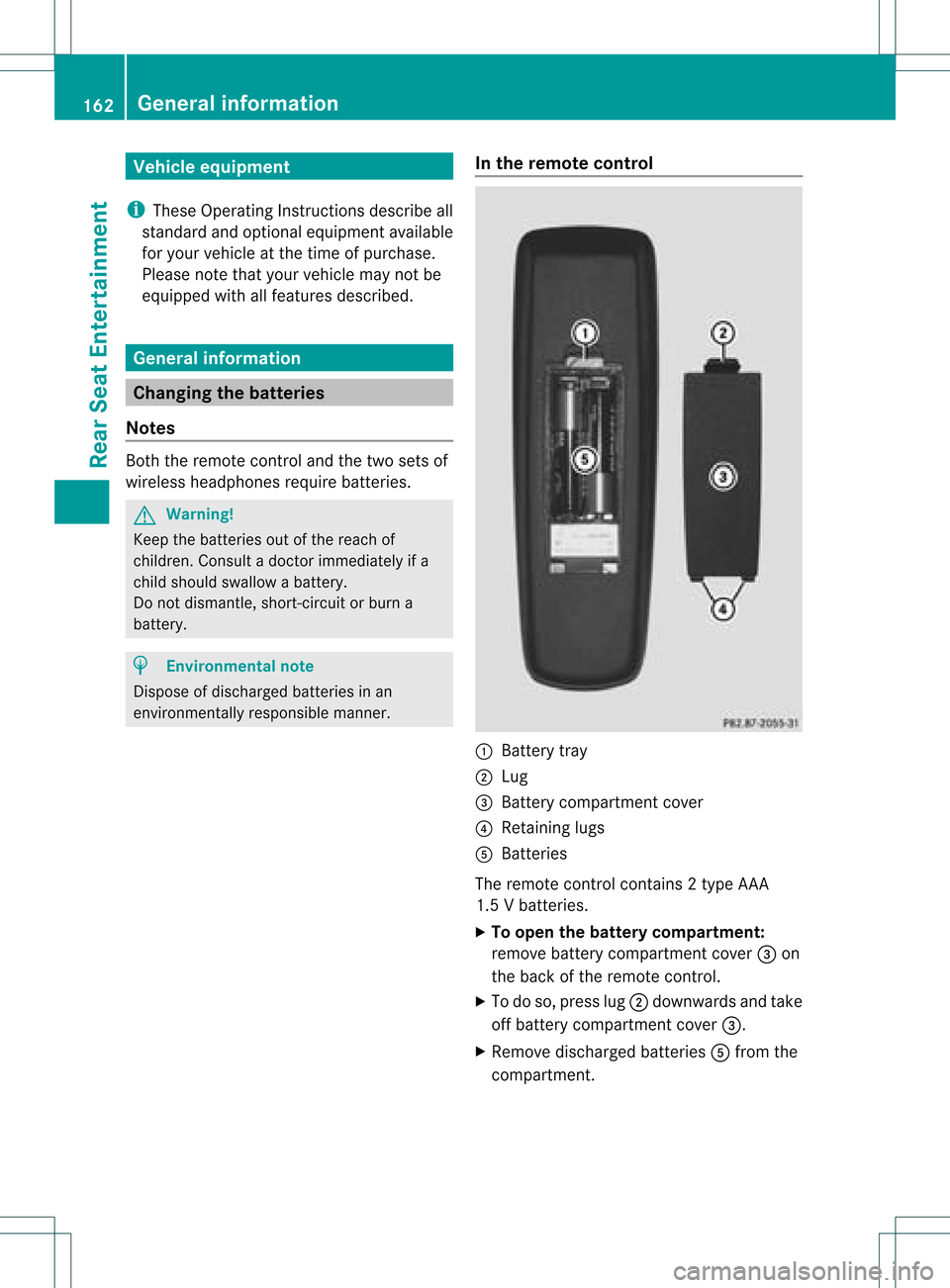
the remot econtrol :
Batt erytray
; Lug
= Batt erycompartm entcover
? Retaining lugs
A Batt eries
The remote controlcont ains 2type AAA
1.5 Vbatteries.
X To open thebatt erycompar tment:
remove batterycompartm entcover =on
the back ofthe remote control.
X To do so, press lug;downwards andtake
off battery compartm entcover =.
X Remove discharged batteriesAfrom the
compartm ent. 162
General
informationRearSeatEntert ainment
Page 165 of 214

X
Insert newbatteries. Observethepola rity
marking onthe batteries andinthe battery
compartment whendoing so.
Left-hand battery:thepositive pole(+)
must faceupwards.
Rig ht-hand battery: thepositive pole(+)
must facedownwa rds.
X To clo sethe battery compartment: first
pla cebattery compartment cover=into
the battery compartment withretaining
lug s? and allow lug ;toclip into place.
In the wirel essheadphones The
battery compartment coverislocated on
the left head phone. :
Battery compartment cover
The wirel esshead phones contain 2type AAA
1. 5V bat terie s.
X To ope nth ebat tery com partme nt:fo ld
th ebat tery compar tmentco ver :
upwar ds.Whe ndoing so,hold theleft
headphone asshown toprevent the
insert edbatteries fromfalling out.
X Remove thedischarged batteriesfromthe
compart ment.
X Insert newbatteries. Observethepolarity
marking onthe batteries andinthe battery
compart mentwhen doing so.
Left- hand battery: thepositive pole(+)
must faceupwards. Right-hand
battery:thepositive pole(+)
must facedownwards.
X To close thebatt erycompar tment:
press thebattery compartm entlid
downwards untilitclips intoplace.
If the batteries havebeen insert ed
correc tly,the indicator lampwilllight up
green whentheheadphones areswitched
on. Basic
functions Using
headphones
You canusethewireless headphones
supplied and/oruptotwo sets ofwired
headphones connected tothe correspon ding
jack ofthe rear-com partmentscreen s
(Y page 30).
Infor mation on:
R switching thewireless headphones on/off
R adjusting thevolume ofthe headphones
R selecting ascreen forthe headphones
can befound inthe "Wireless headphones"
section (Ypage 33). Using
themain loudspeaker s
You canusethevehicle loudspeakers to
listen toadisc insert edinthe rear-
compart mentdrive. Todo so, atleast oneof
the rear-com partmentscree nsmus tbeset to
disc mode.
X Sett ingusing COMAND: press,for
example, the$ function button to
switch onanaudio mode.
X Select Audio using
the9 button and
press the9button tocon firm.
The audio menu (Ypage 21)appears.
X Select Rear using
the9: buttons
and press the9button tocon firm.
i The headphones' volumesettingdoes not
affect themain loudspeakers. Ba
sic functions
163RearSeatEntert ainment Z