rear MERCEDES-BENZ M-Class 2011 W164 Comand Manual
[x] Cancel search | Manufacturer: MERCEDES-BENZ, Model Year: 2011, Model line: M-Class, Model: MERCEDES-BENZ M-Class 2011 W164Pages: 214, PDF Size: 4.69 MB
Page 166 of 214
Adj
usting thesoun dsettings
You canselec tthe sound settingsinthe audi o
CD/DV D/MP3, TV,video DVDandAUX
modes.
X Switch onanoperating mode(e.g.CD
mode).
X Select Treble or
Bass using
the :=; buttonsonthe remote
cont roland press the9button toconfirm .
As etting scale appears.
X Select asett ingusing the9:
button sand press the9button tocon firm. Several
users
Simult aneous useofthe rear -
compa rtment drive i
The two rear-c ompartm entscreen scan
be operated almostentirely independen tly
from oneanoth er.However, therecan bea
con flict insome menus ifthe two screen s
are used atthe same time.
If the rear-c ompartm entdrive isbeing used
for both screen ssimultaneously, selecting
cert ainmenus orsett ings onone ofthe
screen salso affect sthe other screen .
The following functionsaffect bothscreen s:
R changin gplayback options
R select ingatrac k(from thetrac klist ora
folder)
R using play,pause andstop
R fast forward/r ewindorscrollin g
R calling upthe DVD menu andnavigatin g
within it
R sett ingthe language, subtitlesandcamera
angle
R calling upinteract iveDVD content The
following functionsaffect onlyone
screen :
R audio andvideo functionsas well aspicture
sett ings
R switch ingbetween fullscreen andthe
screen showing themenu
Switching betweenoperatingmodes The
curren tsett ings aresaved whenyouexit
an operatin gmode (e.g.audio CDmode). If
you callupthis operatin gmode againlater,
ther eare two possibilities:
R the operatin gmode hasbeen adjusted on
the other screen .
R the operatin gmode hasnotbeen adjusted.
In the first case, theoperatin gmode appears
as shown onthe other screen .
In the secon dcase, thesett ingappears onthe
screen asitwas when youlast exitedthe
operatin gmode. Pictur
esettings
Overview You
canselect thesesettings invideo DVD
and AUX mode. Instruct ions forAUX mode
(Y page 32).
Adju sting thebright ness,contra stand
color X
Switc hon video DVDmode.
X To show themenu: pressthe9button
on the remot econ trol.
or
X Select Menu while
thenavigation menu
(Y page 154)is shown andpress the9
button tocon firm.
X Select DVD-Vid eo using
the :=; buttonsand press the
9 button tocon firm. 164
Ba
sic functionsRear SeatEntert ainment
Page 167 of 214
X
Sel ect Bright ness ,
Con trast or
Col or and
pressthe 9button toconfi rm.
As etting scale appears.
X Select thesett ingand press the9button
to con firm.
Changing thepictu reform at X
To show themenu: pressthe9button
on the remot econ trol.
or
X Select Menu while
thenavigation menu
(Y page 154)is shown andpress the9
button tocon firm.
X Select DVD-Vid eo using
the :=; buttonsand press the
9 button tocon firm.
The äicon infron tof the 16:9 Optimiz
ed ,
4:3 or
Widescr een menu
item
indicat esthe curren tlyselect edformat .
X Select theformat andpress the9button
to con firm. System
settings Notes
You cansetallsystem settings individually for
each screen without affectingthe other
screen .You make these settings using the
remote control(Ypage 31). Selecting
thedisplay language
X Select System using
the9=;
button son the remote controland press
the 9button toconf irm.
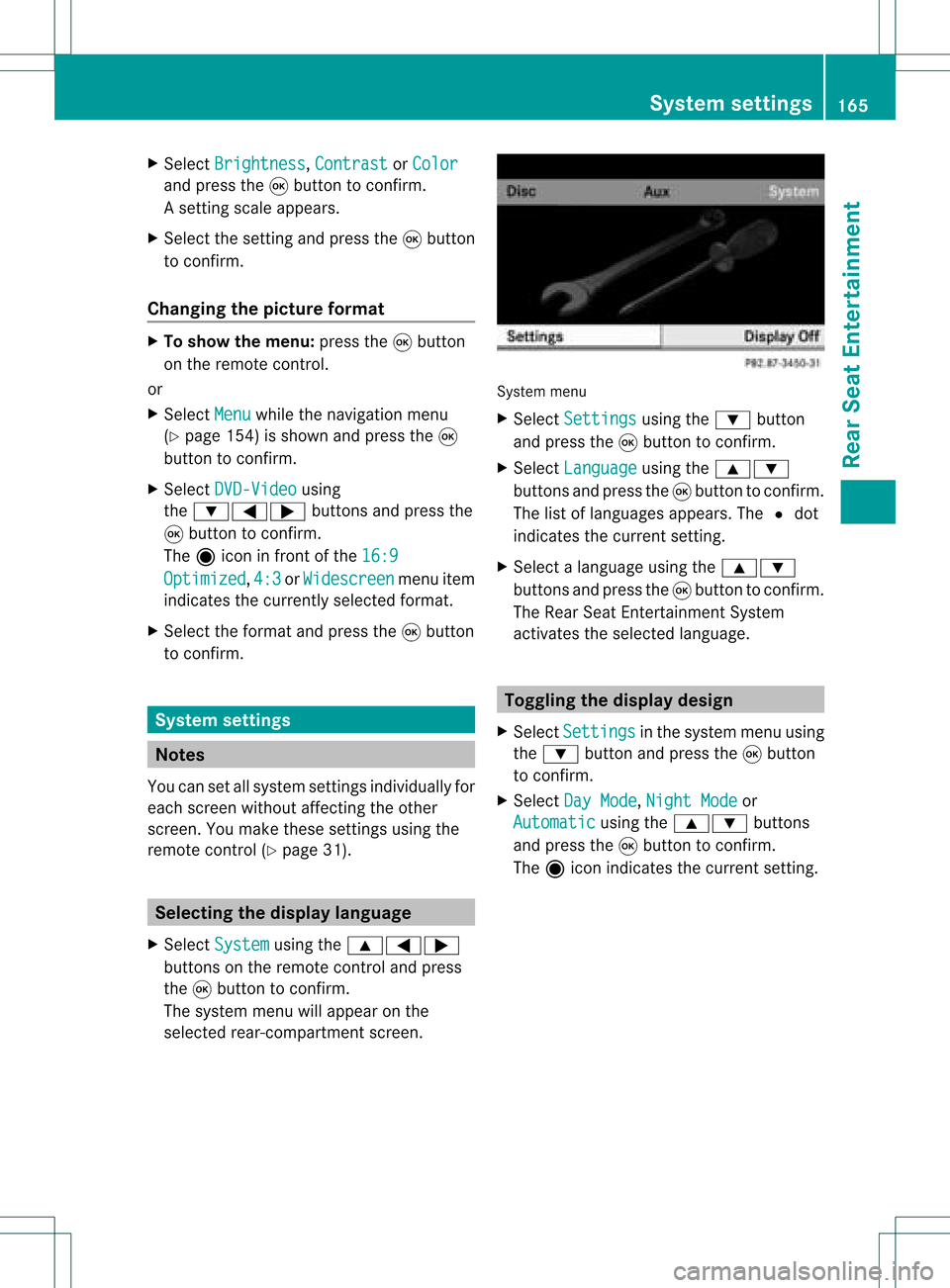
The system menuwillappear onthe
selected rear-compartmentscreen . System
menu
X Select Settings using
the: button
and press the9button toconf irm.
X Select Language using
the9:
button sand press the9button toconf irm.
The listoflanguages appears.The#dot
indicates thecurrent setting.
X Select alanguage usingthe9:
button sand press the9button toconf irm.
The Rear SeatEntert ainment System
activates theselected language. Toggling
thedisplay design
X Select Settings in
the system menuusing
the : button andpress the9button
to conf irm.
X Select DayMode ,
Night Mode or
Automatic using
the9: buttons
and press the9button toconf irm.
The äicon indicates thecurrent setting. System
settings
165RearSeatEntert ainment Z
Page 168 of 214
Design Exp
lanation Day
Mode The
displayisset
per man ently to day
des ign. Nig
htMode The
displayisset
per man ently to
ni ght design. Aut
omatic The
displaydes ign
ch ang esdepe nding
on theveh icle
in st rum entclu ster
illum inati on. Set
ting thebr igh tness
X Se lec tSet tings in
thesyst emmen uusin g
th e: buttona nd pre ssthe 9button
to confi rm.
X Sel ect Brightness us
ing the 9:
bu ttons andpressthe 9button toconfi rm.
As caleap pea rs.
X Adju stthe brightne ssusing the 9:
bu ttons andpressthe 9button toconfi rm.
The brightne ssbarm oves upordown. The
image dimsorbrightens according tothe
bar position onthe scale. Hiding/showing
thepictur e
X To hide thepictur e:select Display Off in
the system menuusingthe:;
button sand press the9button toconf irm.
The picture ishidden.
X To display thepictur e:press the9
button . CD/D
VDaudio andMP3 mode Import
antsafety notes G
War
ning!
The CD/D VDdrive isaclass 1laser product.
You must noto pen thecasing. Thereisarisk
of exposure toinvisible laserradiation ifyou
open thecasing orifthe casing isfaulty or
damaged.
The Rear SeatEntert ainmen tSystem contains
no parts which youcan repair yourself. For
safety reasons ,all maint enanc ework must be
carried outbyqualified aftersales
tec hnic ians. G
War
ning
The driver should notwear aRear Seat
En tert ainmen theadset whileoperatin gthe
vehicle underanycircumstan ces.Theuseof
a headset whiledriving thevehicle could
drastic allyimpair theability toreact toaudible
traff iccon ditions (e.g.emergen cysirens from
police/fir e/ambulance, anothercar’s horn,
etc .). G
War
ning
When notinuse, headsets orext ernal video
sources shouldbestor edinas afe locatio n
(e. g.on eof theveh icle’sstorag e
com partmen ts)so that they are notloose
within thepassenger compartmentduring
braking, vehiclemaneuvers oratraffic
accident .Object smoving withinthe
passenger compartmentcould cause serious
personal injurytovehicle occupant s. G
War
ning
Due toapotent ialchokin ghazar d,wired
heads etusage bychildre nshould onlyoccur
with adultsuper vision . 166
CD/DVD
audio and MP3 modeRearSe at Ent ertai nme nt
Page 169 of 214
Gene
ralnotes
You willfind information onthe follo wing
topics inthe "Aud io"chapter:
R Notes onCDs/DVDs (Ypage 139)
R Notes onMP3 mode (Ypage 137)
R Notes oncopyri ght(Ypage 139) Ins
erting aCD/DVD
M- Class :th eCD /DVD drive isin thece nter
beh ind th efron tseats.
R-Class: theCD/D VDdrive isin the center
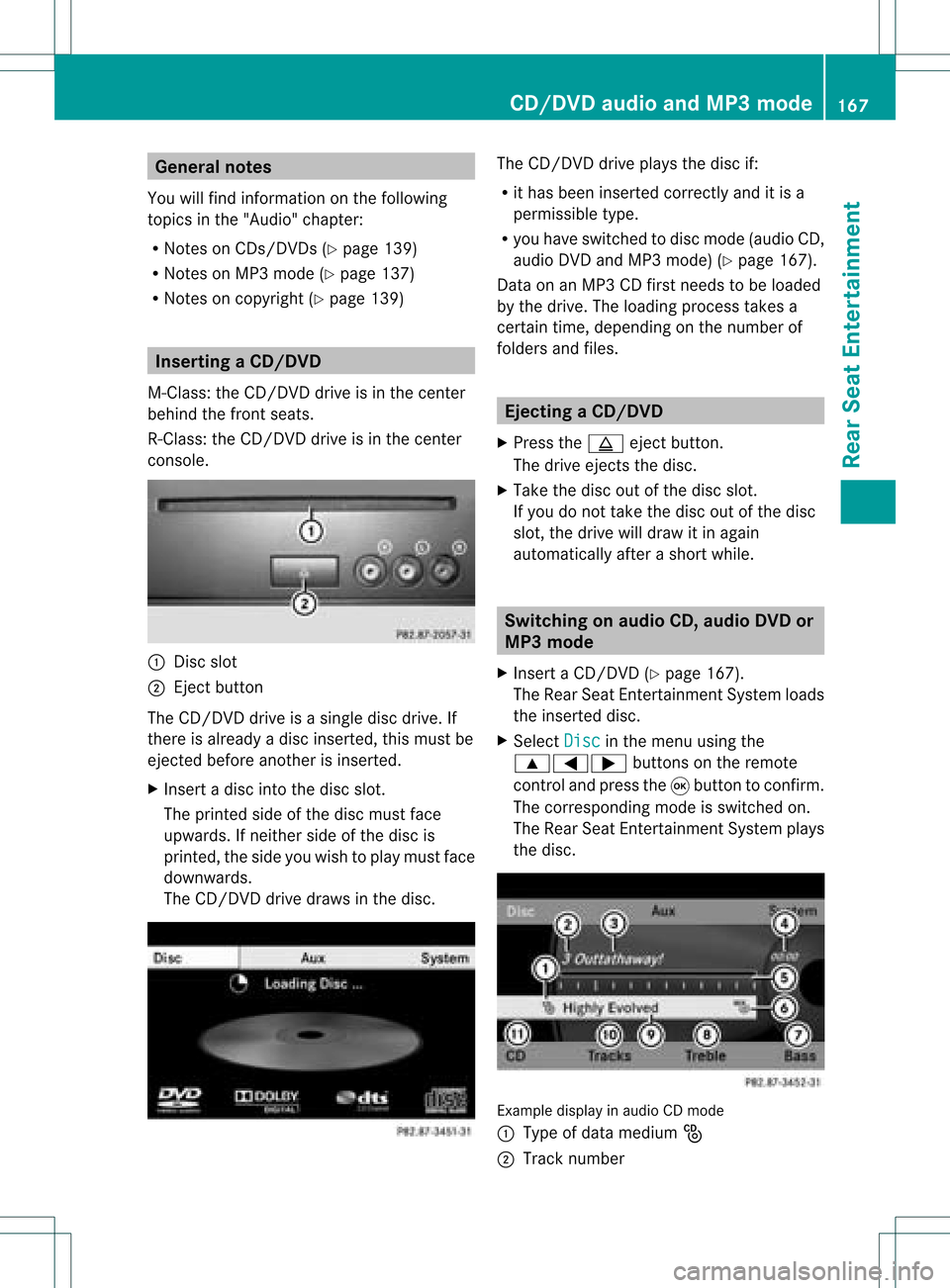
con sole. :
Disc slot
; Eject button
The CD/D VDdrive isasingle discdrive. If
ther eis already adisc insert ed,this must be
ejec tedbefore anotherisinsert ed.
X Inser tadisc intothe disc slot.
The print edside ofthe disc must face
upwards. Ifneit her side ofthe disc is
print ed,the side youwish toplay must face
downwards.
The CD/D VDdrive draws inthe disc. The
CD/D VDdrive plays thedisc if:
R ithas been insert edcorr ectlyand itis a
permissible type.
R you have switchedtodisc mode (audio CD,
audio DVDandMP3 mode) (Ypage 167).
Dat aon anMP3 CDfirst needs tobe loaded
by the drive. Theloading processtak esa
cert aintime, dependin gon the number of
folders andfiles. Ejecting
aCD/DVD
X Press theþ ejec tbut ton.
The drive ejec ts thedis c.
X Tak eth edis co utofthed isc slot .
If you donot takethe disc outofthe disc
slot ,the drive willdraw itin again
autom atically afterashor twhile. Switching
onaudio CD,audio DVDor
MP3 mode
X Insert aCD/DV D(Y page 167).
The Rear SeatEntertainment Systemloads
the inserted disc.
X Select Disc in
the menu usingthe
9=; buttonsonthe remote
cont roland press the9button toconfirm .
The corresponding modeisswitched on.
The Rear SeatEntertainment Systemplays
the disc. Example
displayinaudio CDmode
: Type ofdata medium _
; Track number CD/
DVD audioand MP3 mode
167RearSeatEnterta inment Z
Page 170 of 214

=
Track name (onlyifstored onthe disc as
CD text )
? Track time
A Visual timeandtrack display
B Current playbacksett ings (noicon for
"Normal tracksequence")
C Toadjust thebass
D Toadjust thetreble
E Disc name (onlyifstored onthe disc as
CD text )
F Tocall upthe track list
G Playba ckoptions Example
displayinaudio DVDmode
: Type ofdata medium ü
; Track number
= Track time
? Visual timeandtrack display
A Current playbacksett ings (noicon for
"Normal tracksequence")
B Toadjust thebass
C Toadjust thetreble
D Tocall upthe track list
E Stop funct ion
F Pause function
G Playba ckoptions Example
displayinMP3 mode
: Type ofdata medium þ
; Track number
= Track name
? Track time
A Visual timeandtrack display
B Current playbacksett ings (noicon for
"Normal tracksequence")
C Toadjust thebass
D Toadjust thetreble
E Disc name orcurren tfolder
F Tocall upthe folder list
G Playba ckoptions, toswitch track
inform ationon/of f Selecting
atrac k
Se lecti ng byskippin gto atrac k X
To skipfo rwa rds orbac kwards toa
trac k:pre ssthe = or; button on
the rem otecontr ol.
or
X Pre ssthe E orF button.
Skip ping forwa rdski ps tothe next track.
Skip ping backw ards res tartsthe curre nt
tra ck (ifi th as been playin gfor mor eth an
eigh tsecon ds)orstart sthe previous track
(if the curren ttrack hasonly been playing
for ashorter time).
If the Random Tracks or
Random Folder
pla
yba ckoption hasbeen selected, the
track order israndom. 168
CD
/DVD audio andMP3 modeRear SeatEntertainmen t
Page 171 of 214
Selec
tingbytrack list In
audi oCD mode, thetrack listcont ains all
the track son the disc current lyplay ing.
In audi oDVD mode, thetrack listcont ains all
track sin the current lyactive group; see
"Settin gthe audi oformat" (Ypage 170).
In MP3 mode, thetrack listshows alltrack s
on the current lyactive folder, aswell asthe
folder structureforselection ofall the track s
on the MP3 CD.
X Select Tracks (audi
oCD/D VDmode) or
Folder (MP3
mode) using
the :=; buttonsonthe remote
cont roland press the9button toconf irm.
or
X Press the9button whenthedisplay /
selection windowisactive.
The track listappears. The#dot indicates
the current track.
X Select atrack using the9: buttons
and press the9button toconf irm.
Selec tingatrac kbydirect lyenter ingits
num ber X
Press honthe remo tecon trol.
The track entrydisplay appears.
Ex ample: track 2
X Press thel numbe rkey.
Ex ample: track 12
X Press thecorrespo ndingnumbe rkeys in
rapid success ion.
i Itis not possible toent ernumbers that
exc eed thenumber oftrac kson the CDor
in the curren tlyactiv efolder.
X Wait forapproximat elythree secon dsafter
makin gan ent ry.
You willhear theentered track.The
corr espondin gbasic menu thenreappears. Fast
forwar d/rewind
X With the<0004000900130010000C0001001C002400130005000C0005000300140009000F
000E> windowactive,
press the= or; button onthe
remot econ trol repeatedly untilyoureach
the desired position.
or
X Press andhold theE orF button
until thedesired position hasbeen
reached. Selecting
afolder
This function ison lyavailable inMP3 mode .
X Sele ctFol der usin
gth e:=;
butt onson therem otecon trol and pres s
th e9 butt ontocon firm.
or
X Pres sth e9 butt onwhen thedisplay/
selec tionw indow isact ive.
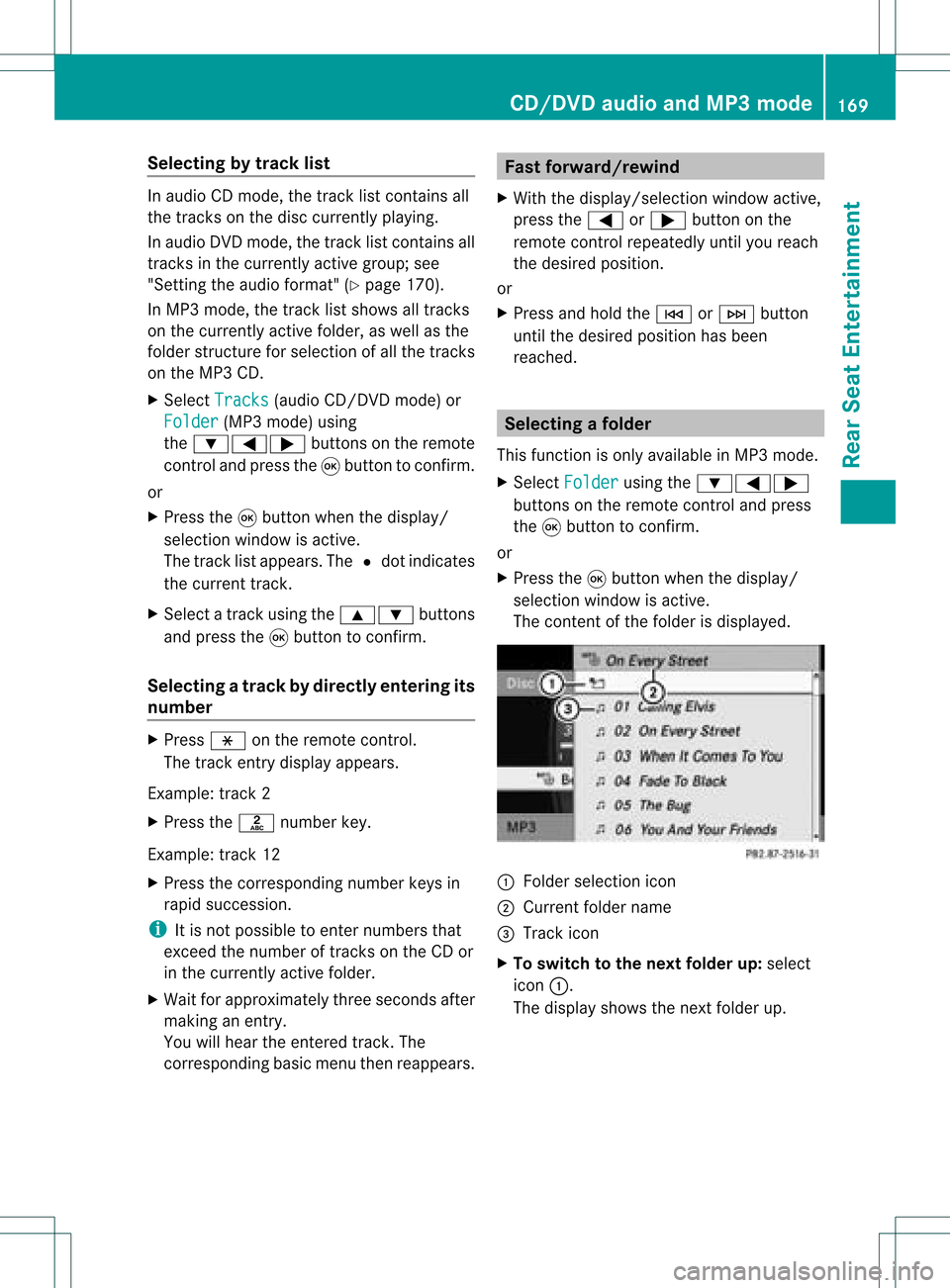
The contentofthe folder isdispla yed. :
Folder selection icon
; Current foldername
= Track icon
X To switch tothe next folder up:select
icon :.
The displa yshows thenext folder up. CD/
DVD audioand MP3 mode
169RearSeatEnterta inment Z
Page 172 of 214
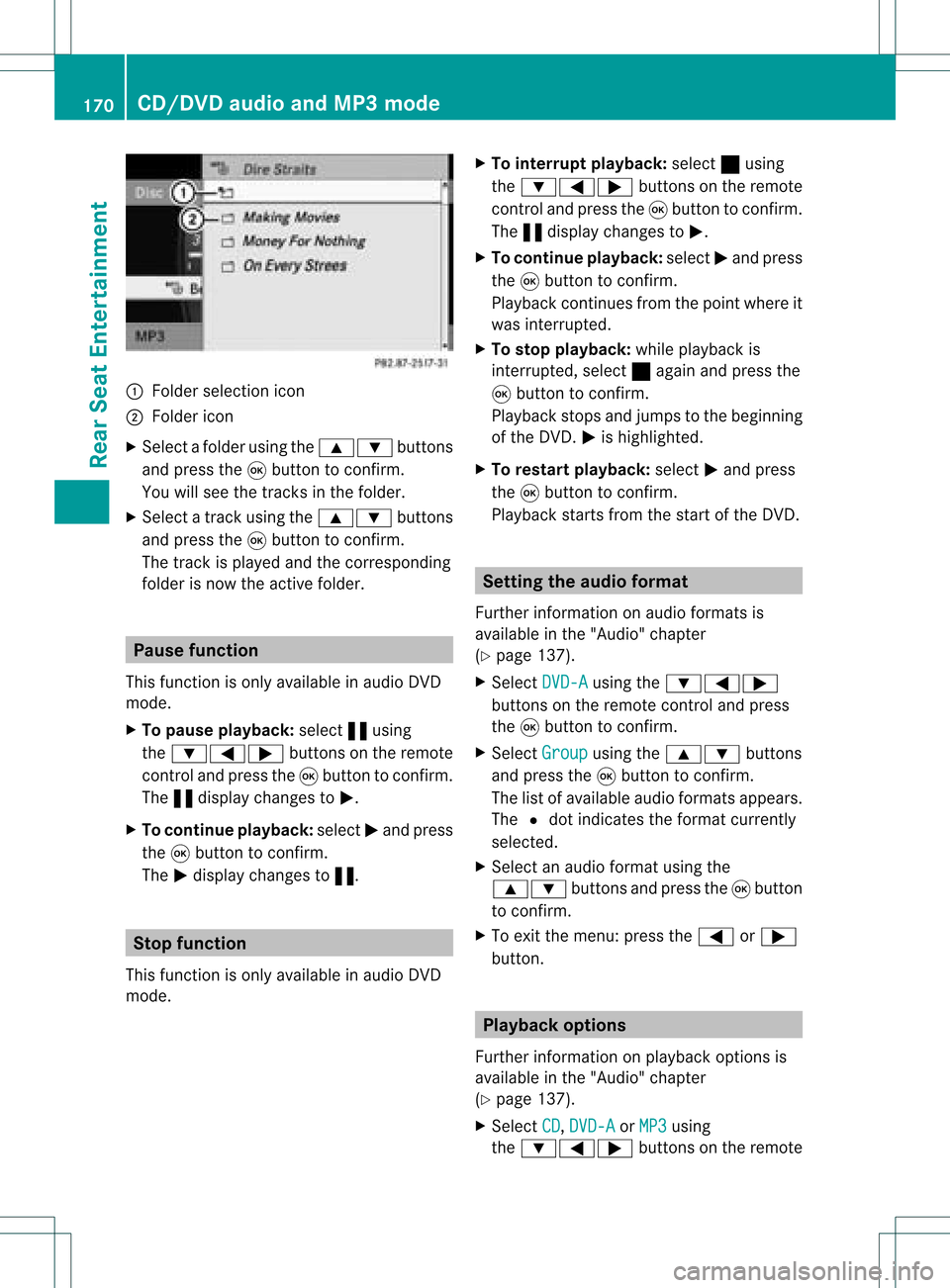
:
Fold ersel ectio nicon
; Folder icon
X Sel ect afol der using the 9: buttons
and pressthe 9button toconfi rm.
You willsee thetracks inthe folder .
X Sel ect atrack using the 9: buttons
and pressthe 9button toconfi rm.
The track isplay ed and thecorre sponding
fol der isnow theactivefolder . Paus
efunc tion
Thi sfuncti onisonly availab lein audio DVD
mod e.
X To pause playback:sel ect «using
the :=; buttons onthe remo te
control andpressthe 9button toconfi rm.
The «displ aycha nges toM.
X To contin ueplayb ack:sel ect Mand press
the 9button toconfi rm.
The Mdispl aycha nges to«. Stop
function
Thi sfuncti onisonly availab lein audio DVD
mod e. X
To interrupt playback:sel ect ±using
the :=; buttons onthe remo te
control andpressthe 9button toconfi rm.
The «displ aycha nges toM.
X To contin ueplayb ack:sel ect Mand press
the 9button toconfi rm.
Pl ay ba ck continu esfrom thepointwh ere it
wa sinter rupted.
X To sto pplayb ack:wh ile play ba ck is
inter rupted, select ±againa nd pre ssthe
9 button toconfi rm.
Pl ay ba ck stop sand jumpstothe beginning
of the DVD. Mishighl ighted .
X To res tart playback:sel ect Mand press
the 9button toconfi rm.
Pl ay ba ck sta rts from thestartof the DVD. Se
ttin gthe audi ofo rmat
Fur ther informa tionon audio form atsis
av aila bl e in the "Audio" cha pter
(Y page 137) .
X Sel ect DVD-A us
ing the :=;
bu ttons onthe rem otecontro land press
the 9button toconfi rm.
X Sel ect Group us
ing the 9: buttons
and pressthe 9button toconfi rm.
The list of availabl eau dioform atsappe ars.
The #dotind icates the form atcur rentl y
sel ecte d.
X Sel ect anaudio form atusing the
9: buttons andpressthe 9button
to confi rm.
X To exitthe menu: pressthe= or;
button. Playback
options
Further information onplay back options is
availa bleinthe "Audio" chapter
(Y page 137).
X Select CD ,
DVD-A or
MP3 using
the :=; buttonsonthe remote 170
CD/
DVD audioand MP3 modeRear SeatEnterta inment
Page 173 of 214
control
andpressthe 9buttons to
confi rm.
The options list ap pea rs.A# dot indicates
the optioncurr ently selected .
X Sel ect Norm al Trac
k Sequ
ence ,
Rand om Trac
ks or
Rand omFold er us
ing the
9: buttons andpressthe 9button
to confi rm.
The optionisswi tched on.Allopti ons
excep tNorm alTrac kSequ ence wi
llbe
ind icated inthe displ ay/sel ectio nwindow.
i Ifyou chan gethe disc, theNorm al Trac
kSequ ence opt
ion isact ivat ed
autom atically. Ifan opt ion isselec ted,it
remain sselec tedafterthe Rear Seat
En ter tain men tSyst emisswitc hedonor
off . Switch
ingtrack infor mation on/off
(MP3 modeonly)
If the func tionisswitc hedon,folder andtrack
name sare displayed.
If the func tion isswitc hedoff,disc andfile
name sare displayed.
X Selec tDisp layTrackInfo rmation using
the9: buttonsonthe remo te
con trol and press the9butt ontocon firm .
The func tion isswitc hedonO oroff ª,
depen dingonthe prev ious status. Vid
eoDVD mode Gener
alnotes
Her eyou willfindfurt her inform ation onthe
followin gtop ics:
R Safe tynot es(Ypage 128)
R Not eson CDs/ DVDs (Ypage 139) DVD
playback conditions
There maybeplayback problemswhen
playing copieddiscs .There arealarge variety of
discs, DVDauthoring software,discwriting
software andwriters available.This variety
means thatthere isno guarantee thatthe
Rear SeatEntertainment Systemwillbeable
to play video DVDsthat youhave copied
yourself.
You willfind further information inthe "Video"
chapter (Ypage 153). Inform ationregarding
COMAND alsoappli estothe Rear Seat
Ent ertainment System. Function
restrictions
Depending onthe DVD ,it is possible that
certain functionsoractions described inthis
section willbetemporarily blockedormay not
funct ionatall. Assoon asyou trytoactivate
these functionsoractions, youwillsee the
K icon inthe displa y. Inserting
andejecting aCD/DVD
X Proc eed asdes cribed inthe"Au dio CD/
DV Da ndMP3 mode"sec tion
(Y page 129) . Sw
itchin gon video DVD mode
X Inse rtavid eo DVD.
The RearSea tEnterta inmentSys tem load s
the disc.
If disc mod ewa sthe last mod esel ecte d,it
wi llnow beacti ve.
If it wa snot, switch onvideo DVD modeas
de scri bedin the followi ng instructio n.
X Sel ect Disc us
ing the 9=;
bu ttons onthe rem otecontro land press
the 9button toconfi rm.
If the video DVD fulfills the play ba ck
cri teri a,the filme ithe rstar tsautoma tically
or the menu saved onthe DVD appe ars. If
the DVD menu appe ars, yo uwi llnee dto
sta rtthe film ma nua lly.
X Sel ect the corr espo ndi ngmenu itemi nthe
DVD menu (Ypage 174). Video
DVDmode
171RearSeatEnterta inment Z
Page 174 of 214

Showing/
hidingthenavigation menu
X To show: pressthe9 or: button.
X To hide: press the9 or: button.
or
X Wait forapproximately eightseconds. Navigation
menu
: Type ofdata medium
; Current track
= Current scene
? Track time
A Toshow themenu Showing/
hidingthemenu
X To show: pressthe9button onthe
remote control.
or
X Select Menu while
thenavigation menuis
shown andpress the9button toconf irm.
X To hide: press the9 button, select
Full Screen and
press the9button to
conf irm. Menu
shown
: Video DVDoptions
; Pause function
= Stop function
? Toadjust thetreble
A Toadjust thebass Fast
forward /rewind
X Press andhold theE orF button on
the remote controluntil thedesired
position hasbeen reached.
You seethenavigation menu. Pause
function
X Show themenu (Ypage 172).
X To pause playback: select«and press
the 9button onthe remote controlto
conf irm.
The «display changes toM.
X To continue playback: selectMand press
the 9button toconf irm.
The menu ishidden. Stop
function
X Show themenu (Ypage 172).
X To interru ptplayback: select±and
press the9button onthe remote control
to conf irm.
The «display changes toM.T hevideo
image ishidden. 172
Video
DVDmodeRear SeatEnterta inment
Page 175 of 214
X
To conti nue play back:sel ect Mand press
the 9button toconfi rm.
Pl ay ba ck conti nuesfrom thepoint where it
wa sinte rrupte d.The menu ishidd en.
X To sto pplay back:wh ile play ba ck is
inte rrupte d,sel ect ±againa nd pre ssthe
9 button toconfi rm.
Pl ay ba ck stop sand jumpstothe beginning
of the DVD. Mishighl ighted .
X To res tart playback:sel ect Mand press
the 9button toconfi rm.
Pl ay ba ck sta rts from thestartof the DVD. Se
lecti ng ascene/ch apter
Not es Fur
ther inform ation onthis fun ction is
availab lein the"Vide o"chapt er
(Y page 155).
Ski pping forwar ds/back wards X
Pre ssthe= or; buttonon the
rem oteco ntrol .
or
X Pre sstheE orF button.
The navigat ionmen u(Y page 172)appear s
for appr oximat elyeigh tsecon ds.
Selecting ascene/ch apter directl y The
example sillust ratehow tosele ctscen e/
ch apt er5.
X Op tion1: while thefilm isplayin g,pre ss
th eh button.
X Pre sstheco rrespo nding num berkey,in
th is cas eo.
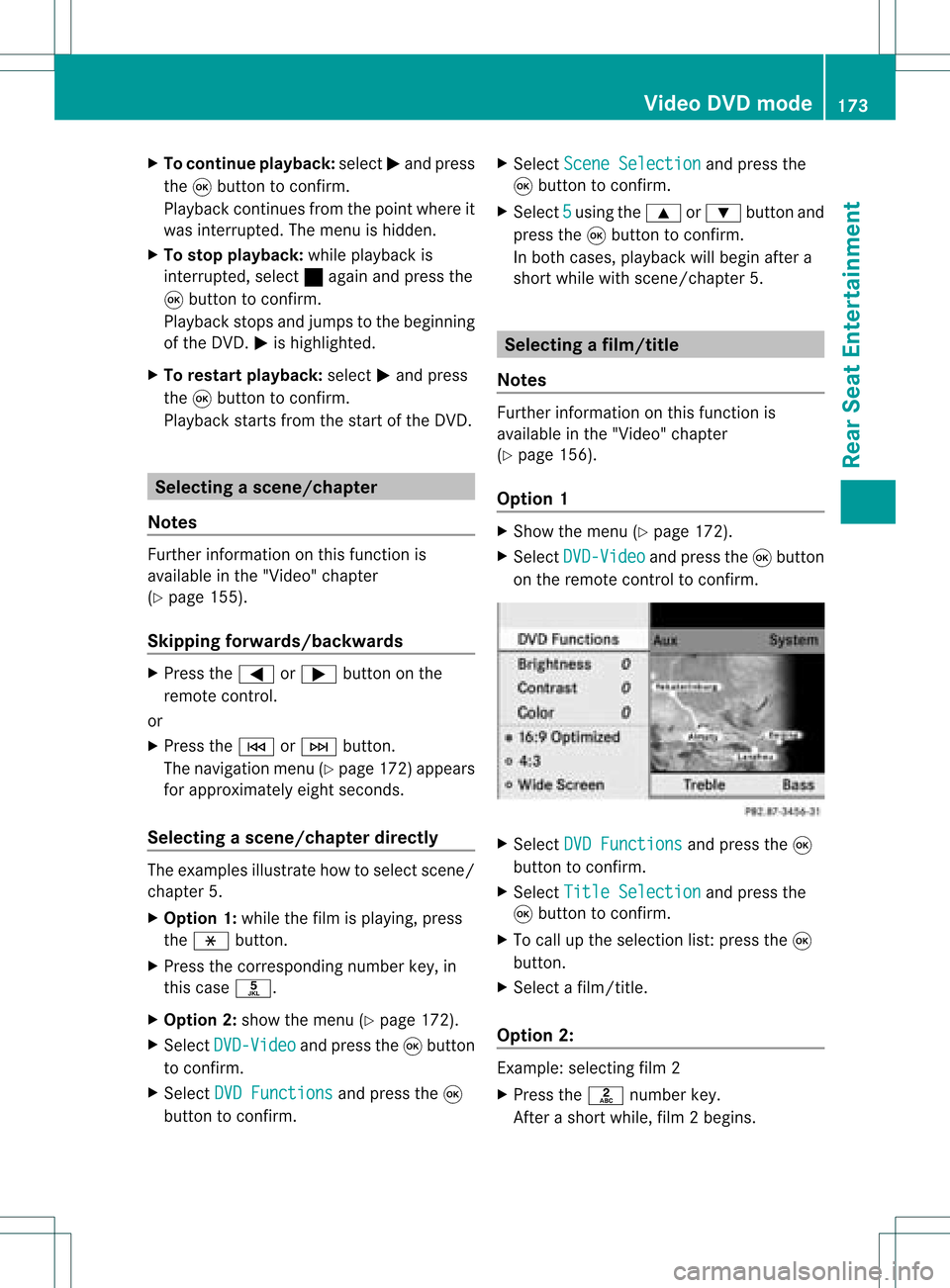
X Op tion2: sho wthemen u(Y page 172).
X Se lec tDVD -Video and
pressthe9 but ton
to confirm .
X Se lec tDVD Functions and
pressthe9
but tonto confirm . X
Se lec tSce neSelection and
pressthe
9 buttonto confirm .
X Se lec t5 usin
gth e9 or: buttona nd
pre ssthe 9button toconfi rm.
In bo th cas es, play ba ck willbe gina fter a
short whilewith scene/chap ter5. Sel
ecting afilm/t itle
Not es Furt
herinformat iononthis func tion is
available inthe "Video" chapter
(Y page 156).
Opt ion 1 X
Show themen u(Y page 172).
X Selec tDVD- Video and
press the9butt on
on the remo tecon trol to con firm . X
Selec tDVD Functions and
press the9
butt ontocon firm .
X Selec tTitl eSele ction and
press the
9 butt ontocon firm .
X To call upthe selec tionlist:press the9
butt on.
X Selec ta film/ title.
Opt ion 2: Ex
ample: selectingfilm 2
X Press thel numbe rkey.
Af ter ashor twhile, film2begins. Vid
eoDVD mode
173Rear SeatEntert ainment Z